
MDRU229FZE01 - Freezer MIDEA - Free user manual and instructions
Find the device manual for free MDRU229FZE01 MIDEA in PDF.
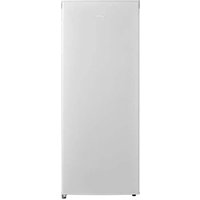


| Product type | Freezer |
| Brand | Midea |
| Model | MDRU229FZE01 |
| Net volume | 160 L |
| Defrost type | Manual |
| Freezing capacity | 7.2 kg/24h |
| Temperature rise time | 9 h |
| Dimensions (H × W × D) | 1420 × 550 × 550 mm |
| Rated voltage | 220-240 V ~ |
| Frequency | 50 Hz |
| Rated current | 0.5 A |
| Climate class | SN, N, ST, T (according to rating plate) |
| Required clearances | > 100 mm on each side |
| Leveling | Adjustable feet |
| Door reversal | Possible, tools required |
| Temperature adjustment | Thermostat (MIN-MAX) |
| Shelf material | Metal or plastic grid depending on configuration |
| Interior lighting | Yes, replacement by professional |
| Spare parts available (7 years) | Thermostat, sensors, circuit board, light source, handles, hinges, drawers, baskets, door gaskets (10 years) |
| Energy consumption | Energy class not specified, consult the label |
| Approximate weight | Approx. 40-45 kg (estimate) |
Frequently Asked Questions - MDRU229FZE01 MIDEA
User questions about MDRU229FZE01 MIDEA
0 question about this device. Answer the ones you know or ask your own.
Ask a new question about this device
Download the instructions for your Freezer in PDF format for free! Find your manual MDRU229FZE01 - MIDEA and take your electronic device back in hand. On this page are published all the documents necessary for the use of your device. MDRU229FZE01 by MIDEA.
USER MANUAL MDRU229FZE01 MIDEA
Upright Freezer
SINGLE DOOR SERIES
USER MANUAL
MDRU229FZE01
LANGUAGES
EN English
FR Français
DE Deutsch
IT Italiano
ES Español
PT Português
GR Ελληνικά
PL Polski
CZ Čeština
HU Magyar
LV Latvian
LT Lithuanian
SK Slovak
SR Serbian
HR Croatian
SL Slovenian
RO Romanian
BG Bulgarian
AL Albanian
THANK YOU LETTER
Thank you for choosing Midea! Before using your new Midea product, please read this manual thoroughly to ensure that you know how to operate the features and functions that your new appliance offers in a safe way.
EN
CONTENTS
THANK YOU LETTER 01
SPECIFICATIONS 02
PRODUCT OVERVIEW 03
PRODUCT INSTALLATION 04
OPERATION INSTRUCTIONS 11
CLEANING AND MAINTENANCE 13
TROUBLESHOOTING 15
APPENDIX 17
SPECIFICATIONS
| Product model | MDRU229FZE01 |
| Frozen Food Storage Volume 160 L | |
| Defrosting Type Manual-defrost | |
| Temperature Rise Time 9 h | |
| Freezing Capacity | 7.2 kg/24h |
| Rated Voltage 220-240V~ | |
| Frequency 50Hz | |
| Rated Current 0.5A | |
| Overall Dimension (H x W x D) | 1420x550x550 mm |
EN
PRODUCT OVERVIEW
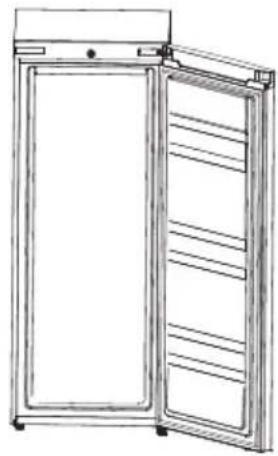
Names of components
EN
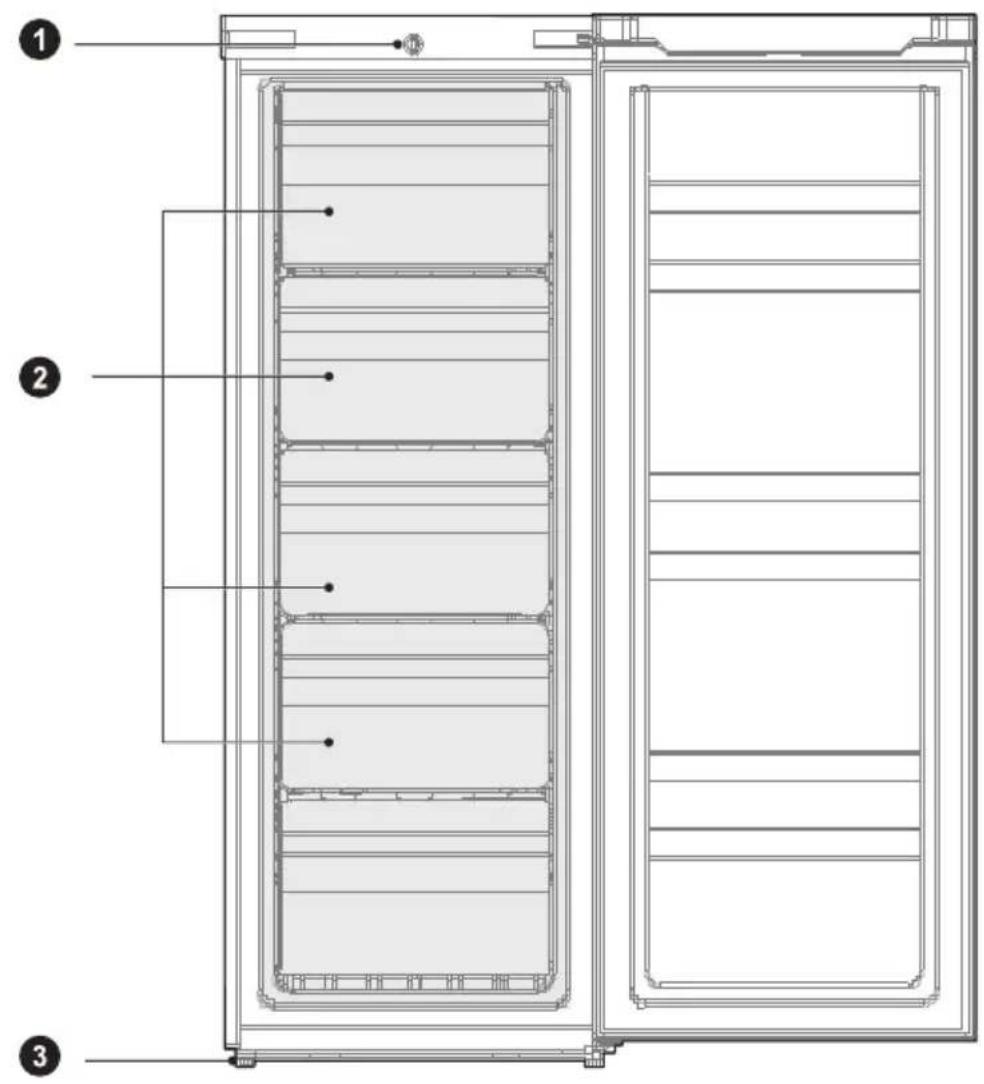
1 Thermostat
2 Drawer
3 Leveling foot

ATTENTION
The picture above is only for reference. The actual configuration will depend on the physical product or statement by the distributor.
PRODUCT INSTALLATION
Installation Instructions
For refrigerating appliances with climate class
- Depending on the climate class, this refrigerating appliance is intended to be used at ambient temperatures within the ranges specified in the following table.
- The climate class can be found on the rating plate. The product may not operate properly at temperatures outside of the specific range. • You can find the climate class on the product label.
Effective temperature range
- The product is designed to operate normally in the temperature range specified by its class rating.
| Class Symbol | Ambient temperature range °C | ||
| IEC 62552 (ISO 15502) ISO 8561 | |||
| Extended temperate SN | + 10 to + 32 | + 10 to + 32 | |
| Temperate N + 16 to + 32 | + 16 to + 32 | ||
| Subtropical ST + 16 to + 38 | + 18 to + 38 | ||
| Tropical T + 16 to + 43 | + 18 to + 43 | ||
Dimensions and Clearances
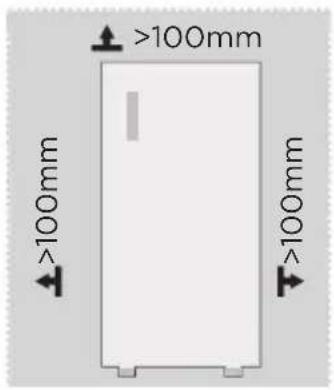
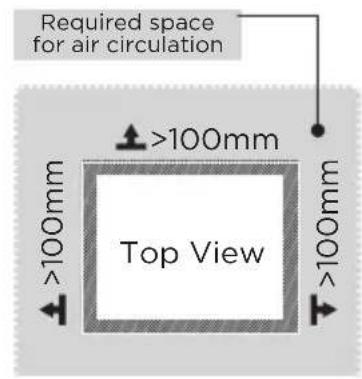
- Too small a distance from adjacent items may result in the degradation of freezing capability and increased electricity costs. Allow over 100 mm of clearance from each adjacent wall when installing the appliance.

ATTENTION
The picture above is only for reference. The actual configuration will depend on the physical product or statement by the distributor.
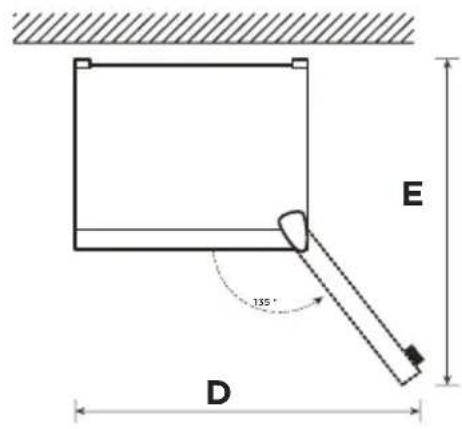
Space requirement diagram (when the door is open and when the door is closed)
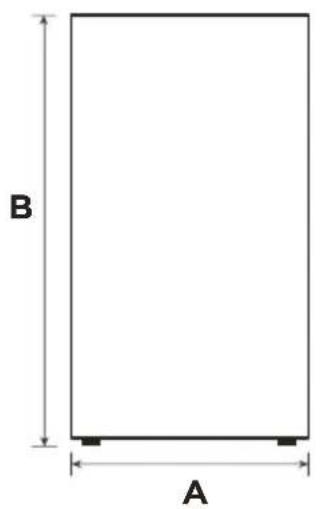
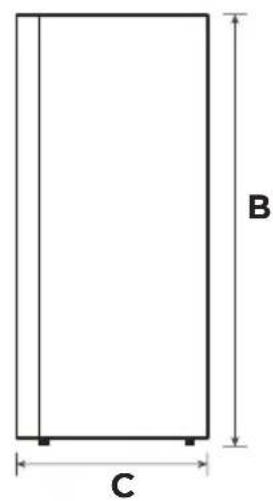
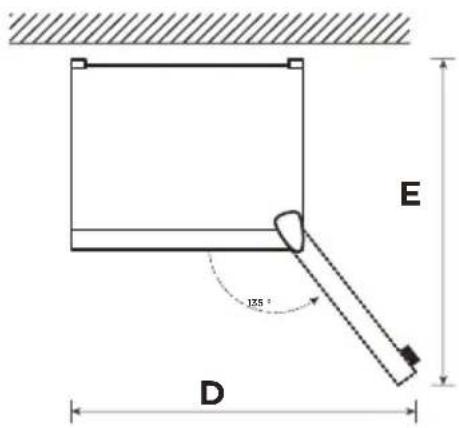
| Width | Overall Height | Depth | Width doors open 135° | Depth doors open 135° |
| A B C D E | ||||
| 550 | 1420 | 550 | 930 910 |
Note: All dimensions in mm
Door right-left change (optional)
Based on the location where you plan to use your refrigerator, you may find it more convenient to reverse the position of the door.

CAUTION
CAUTION: To avoid injury to yourself or your property, we recommend that someone assist you during the door reversal process.
List of tools to be provided by the user
 | Cross screwdriver |
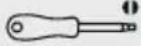 | Thin-blade screwdriver |
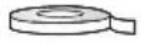 | Masking tape |
STEP
- Remove all food from door shelves. Fix the door with tape.
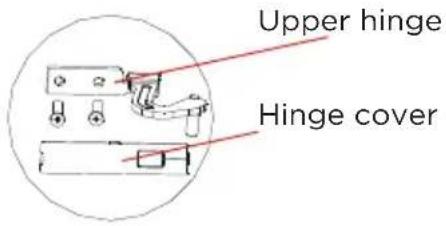
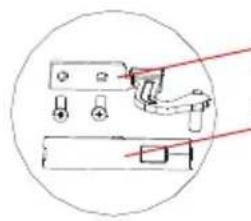
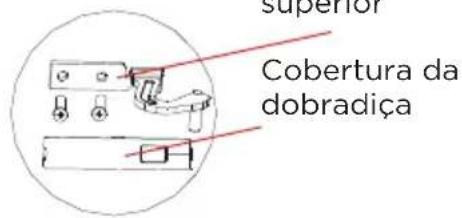
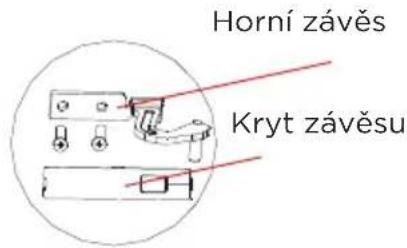
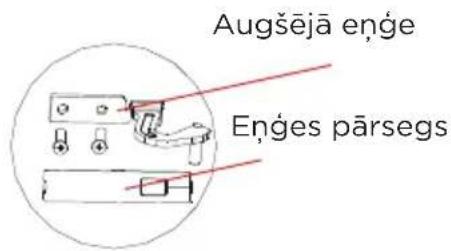
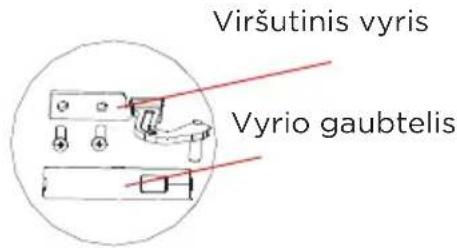
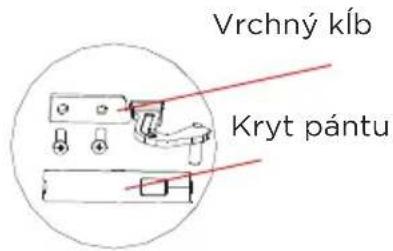
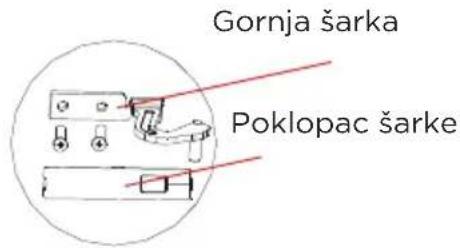
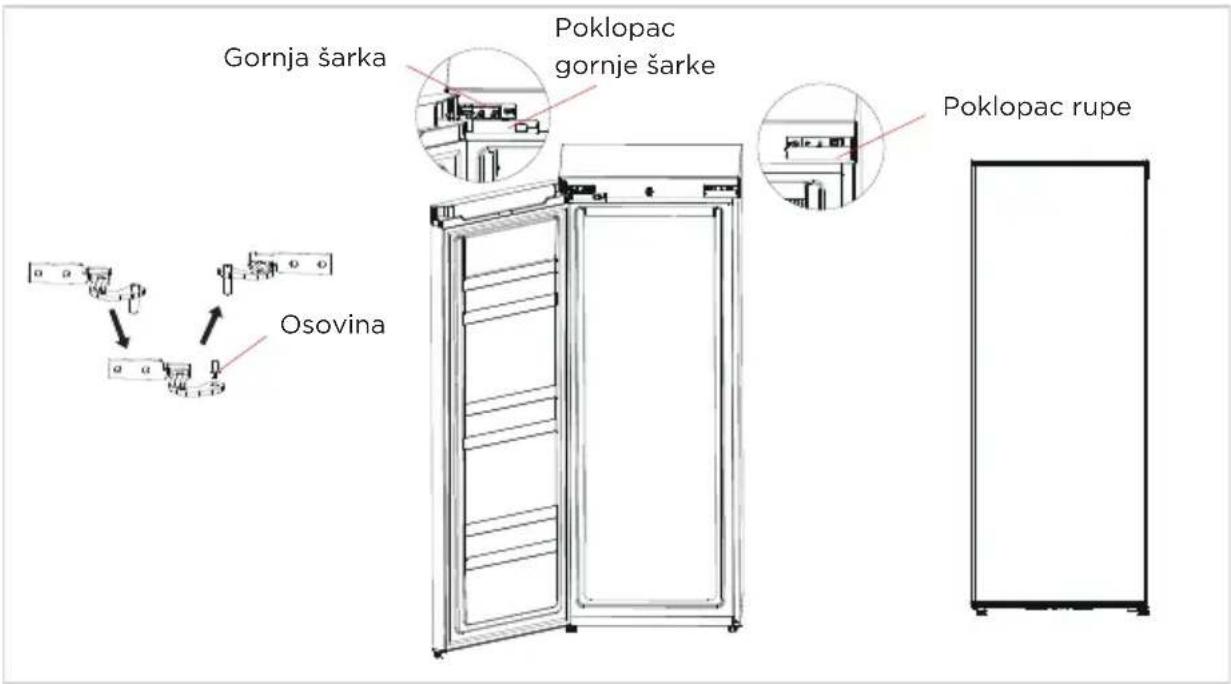
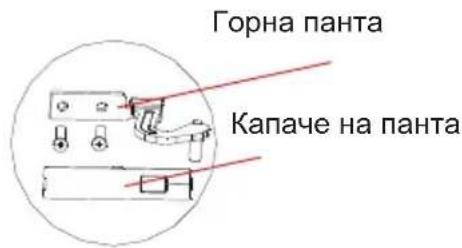
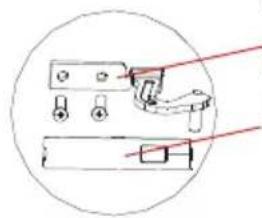
- Dismantle the upper hinge cover, screws, and upper hinge, and remove the plastic screw hole cap from the other side.
Hole cap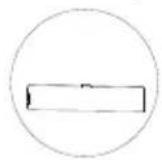
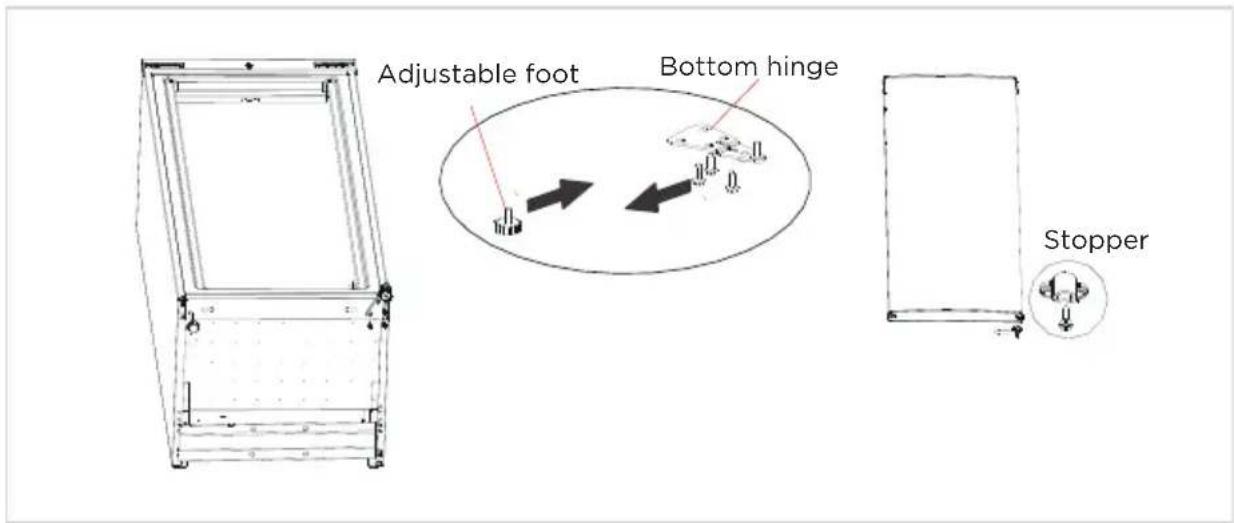
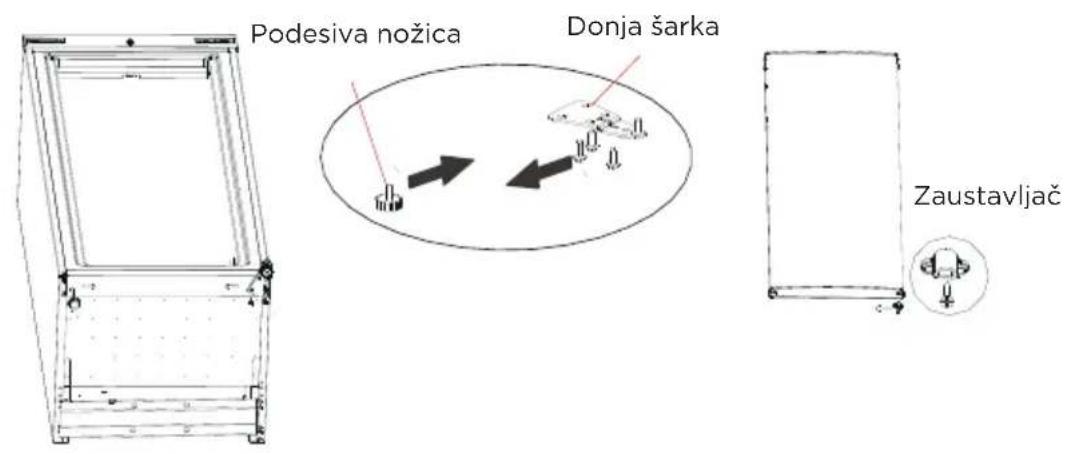
- Dismantle the door and the bottom hinge assembly and adjustable foot, then assemble the bottom hinge assembly and adjustable foot on the other side. Dismantle the stopper from the right bottom side of the door, and assemble it on the other side of the door.
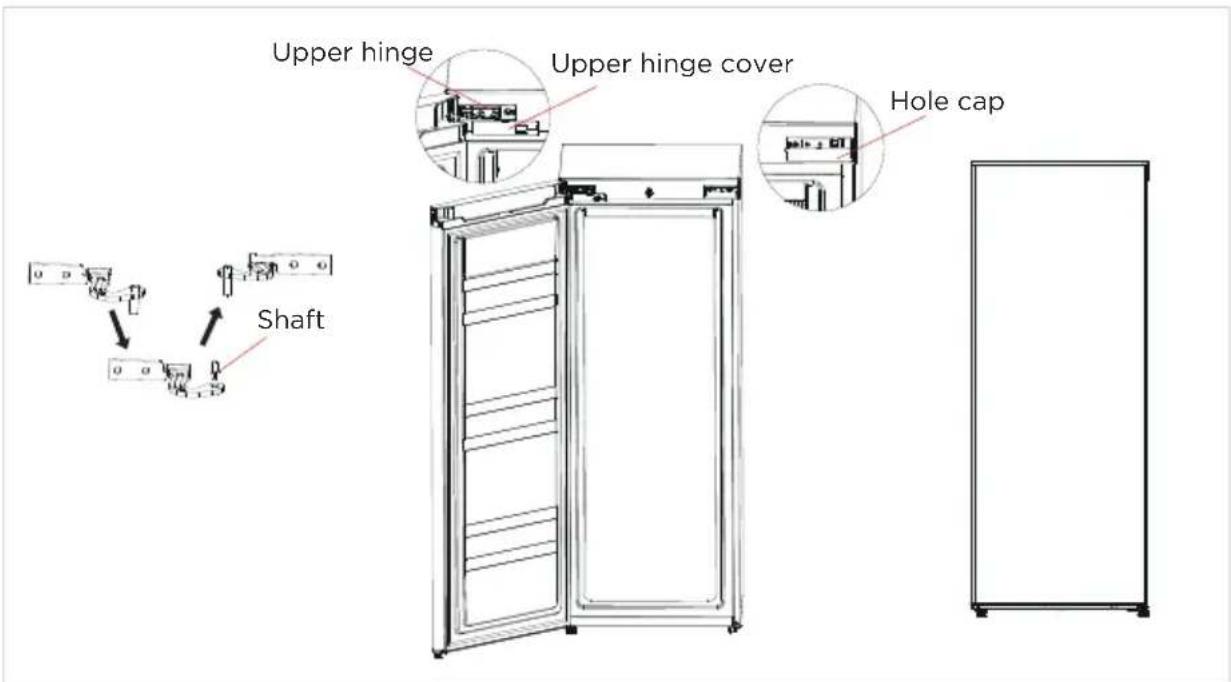
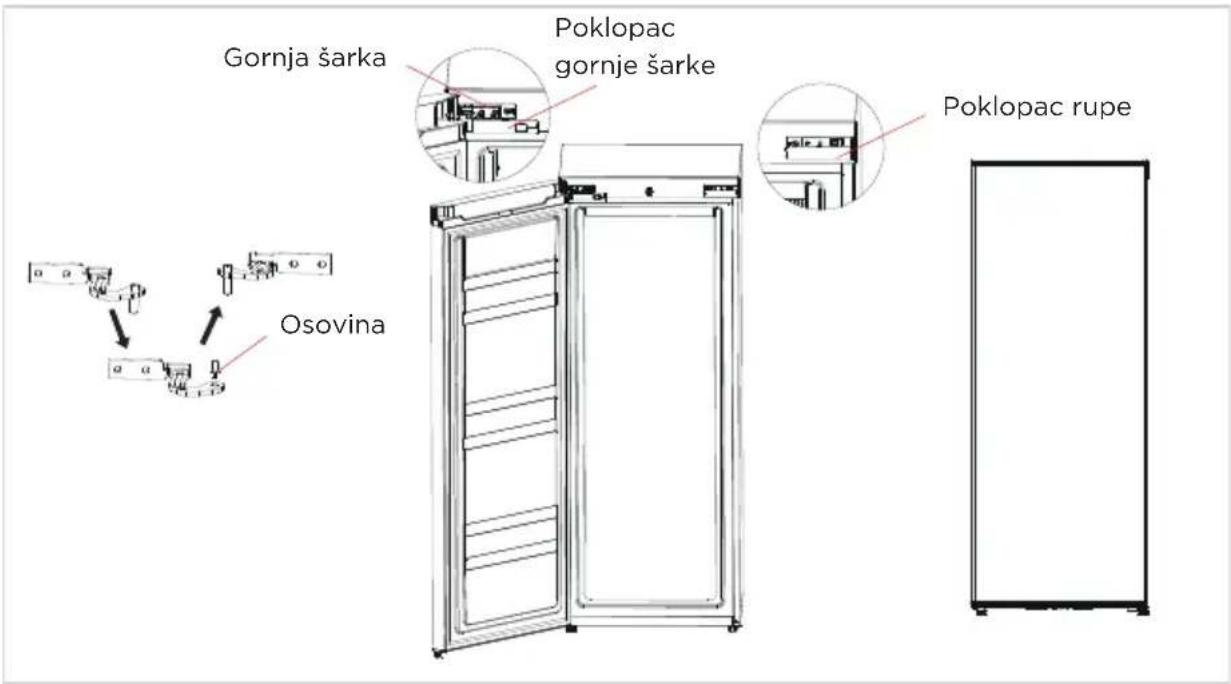
- Put the door on the bottom hinge, assemble the shaft of the top hinge as shown in the following picture, and assemble the upper hinge, upper hinge cover, and plastic screw hole caps successively.
Installing the door handle (Optional)

CAUTION
CAUTION: Figures in the user manual are only for reference. The actual product may differ slightly.
The refrigerator must be disconnected from the source of electrical supply before attempting the installation of the accessory.
STEP
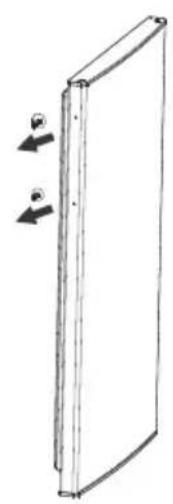
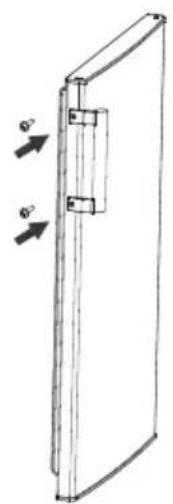
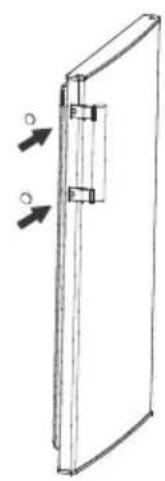
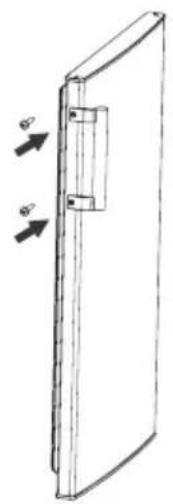
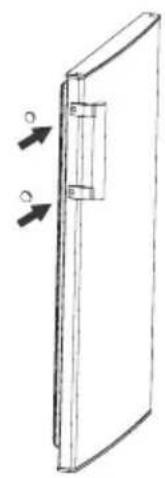
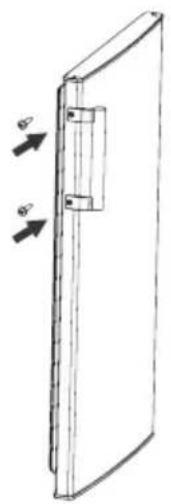
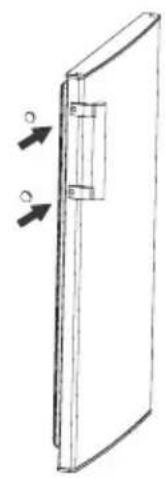
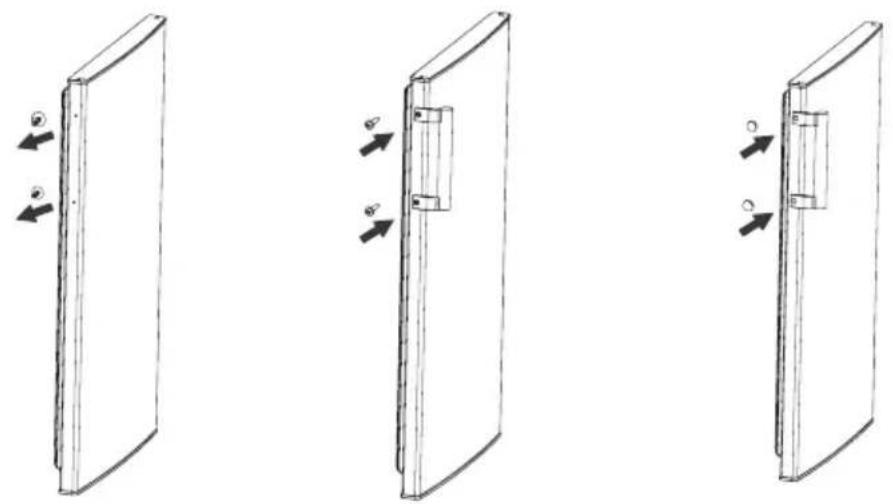
- Take out two plug pins from the door (side of door open).
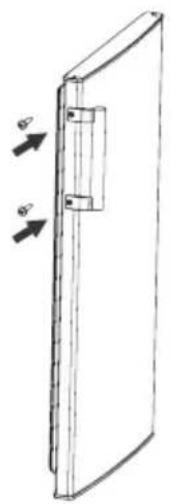
- Install the door handle to the door and fasten it with screws.
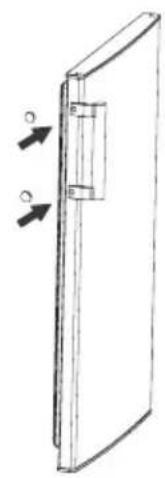
- Cover screw caps of the handle into screw holes.
Leveling feet
To avoid vibration, the unit must be leveled.
If required, adjust the leveling screws to compensate for the uneven floor.
The front should be slightly higher than the rear to aid in door closing.
Leveling screws can be turned easily by tipping the cabinet slightly.
Turn the leveling screws counterclockwise to raise the unit, clockwise to lower it.
Moving the appliance
- Remove all food from inside the appliance.
- Pull the power plug out, insert and fix it into the power plug hook at the rear or on top of the appliance.
- Tape parts such as shelves and the door handle to prevent them from falling off while moving the appliance.
- Move the appliance with more than two people carefully. When transporting the appliance over a long distance, keep the appliance upright.
- After installing the appliance, connect the power plug into a socket to switch on the appliance.

WARNING
Precautions before operation:
Before making changes, the refrigerator must be disconnected from the power supply.
Precautions should be taken to prevent any personal injury.
Connecting the appliance
After installing the appliance, connect the power plug into a socket outlet.

WARNING
After connecting the power supply cord (or plug) to the outlet, wait 2 or 3 hours before you put food into the appliance. If you add food before the appliance has cooled completely, your food may spoil.
Placement
- Before use, remove all packing materials, including bottom cushions, foam pads, and tapes inside of the refrigerator; tear off the protective film on the doors and the refrigerator body.
- Keep away from heat and avoid direct sunlight. Do not place the freezer in moist or watery places to prevent rust or reduction of insulating effect.
- Do not spray or wash the refrigerator; do not put the refrigerator in moist places easy to be splashed with water so as not to affect the electrical insulation properties of the refrigerator.
- The refrigerator is placed in a well-ventilated indoor place; the ground shall be flat and sturdy (rotate left or right to adjust the wheel for leveling if unstable).
Tips for energy saving
- Do not place the appliance near cookers, radiators, or other heat sources. If the ambient temperature is high, the compressor will run more frequently and for longer, resulting in increased energy consumption.
- Ensure that there is sufficient ventilation at the base of the appliance, on the sides of the appliance, and at the back of the appliance. Never cover ventilation openings.
- Please also observe the spacing dimensions in the chapter "Installation".
- The arrangement of drawers, shelves, and racks as shown in the illustration offers the most efficient use of energy and should therefore be retained as far as possible. All drawers and shelves should remain in the appliance to keep the temperature stable and save energy.
- To obtain a larger storage space (e.g., for large refrigerated/frozen goods), the middle drawers can be removed. The top and bottom drawers and shelves should be removed last if necessary.
- An evenly filled refrigerator/freezer compartment contributes to optimal energy use. Therefore, avoid empty or half-empty compartments.
- Allow warm food to cool before placing it in the refrigerator/freezer. Food that has already cooled down increases energy efficiency.
- Allow frozen food to defrost in the refrigerator. The coldness of the frozen food reduces the energy consumption in the refrigerator compartment and thus increases the energy efficiency.
- Operating the doors briefly as necessary to minimize cold loss and closing them properly reduces energy consumption.
- The door seals of your appliance must be perfectly intact so that the doors close properly and energy consumption is not increased unnecessarily.
OPERATION INSTRUCTIONS
Control panel
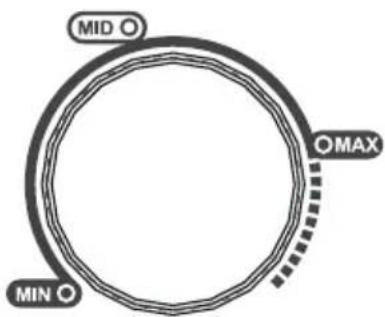
- If the ambient temperature is too high or in summer, according to actual needs, the thermostat adjusted to MAX.
- If the ambient temperature is too low or in winter, according to actual needs, the thermostat adjusted to MIN.

NOTE
Please use and adjust between MIN and MAX.

ATTENTION
The actual control panel may differ from model to model.
Tips on storing food
- The low temperature of the upright freezer may keep food fresh for a long time, and it is mainly used to store frozen foods and make ice.
- The upright freezer is suitable for storing meat, fish, shrimp, dumplings, rice balls, and other foods not to be consumed in the short term.
- Chunks of meat are preferably divided into small pieces for easy access. Please note that food shall be consumed within the shelf time.
| Order | Compartments TYPE | Target storage temp. [°C] | Appropriate food |
| 1 Fridge | +2 ~ +8 | Eggs, cooked food, packaged food, fruits and vegetables, dairy products, cakes, drinks and other foods are not suitable for freezing. | |
| 2 (***)-Freezer | ≤-18 | Seafood (fish, shrimp, shellfish), freshwater aquatic products and meat products (recommended for 3 months, the longer the storage time, the worse the taste and nutrition), suitable for frozen fresh food. | |
| 3 ***-Freezer | ≤-18 | Seafood (fish, shrimp, shellfish), freshwater aquatic products and meat products (recommended for 3 months, the longer the storage time, the worse the taste and nutrition), suitable for frozen fresh food. | |
| 4 **-Freezer | ≤-12 | Seafood (fish, shrimp, shellfish), freshwater aquatic products and meat products (recommended for 3 months, the longer the storage time, the worse the taste and nutrition), suitable for frozen fresh food. | |
| 5 *-Freezer | ≤-6 | Seafood (fish, shrimp, shellfish), freshwater aquatic products and meat products (recommended for 3 months, the longer the storage time, the worse the taste and nutrition), suitable for frozen fresh food. | |
| 6 O-star | -6 ~ 0 | Fresh pork, beef, fish, chicken, some packaged processed foods, etc. (Recommended to eat within the same day, preferably no more than 3 days).Partially encapsulated processed foods (non-freezable foods). | |
| 7 Chill | -2 ~ +3 | Fresh/ frozen pork, beef, chicken, freshwater aquatic products, etc. (7 days below 0°C and above 0°C is recommended for consumption within that day, preferably no more than 2 days). Seafood (less than 0 for 15 days, it is not recommended to store above 0°C. | |
| 8 Fresh food | 0 ~ +4 | Fresh pork, beef, fish, chicken, cooked food, etc.(Recommended to eat within the same day, preferably no more than 3 days) | |
| 9 Wine | +5 ~ +20 | Red wine, white wine, sparkling wine, etc. | |

ATTENTION
Please store different foods according to the compartments or target storage temperature of your purchased unit.
CLEANING AND MAINTENANCE
Overall cleaning
- Dusts behind the refrigerator and on the ground shall be timely cleaned to improve the cooling effect and energy saving.
- Check the door gasket regularly to make sure there are no debris. Clean the door gasket with a soft cloth dampened with soapy water or diluted detergent.
- The interior of the refrigerator should be cleaned regularly to avoid odor.
- Please turn off the power before cleaning the interior, remove all foods, drinks, shelves, drawers, etc.
- Use a soft cloth or sponge to clean the inside of the refrigerator with two tablespoons of baking soda and a quart of warm water. Then rinse with water and wipe clean. After cleaning, open the door and let it dry naturally before turning on the power.
- For areas that are difficult to clean in the refrigerator (such as narrow gaps or corners), it is recommended to wipe them regularly with a soft rag, soft brush, etc., and when necessary, combined with some auxiliary tools (such as thin sticks) to ensure no contaminants or bacterial accumulation in these areas.
- Do not use soap, detergent, scrub powder, spray cleaner, etc., as these may cause odors in the interior of the refrigerator or contaminate food.
- Clean the bottle frame, shelves, and drawers with a soft cloth dampened with soapy water or diluted detergent. Dry with a soft cloth or dry naturally.
- Wipe the outer surface of the refrigerator with a soft cloth dampened with soapy water, detergent, etc., and then wipe dry.
- Do not use hard brushes, steel wool, wire brushes, abrasives (such as toothpaste), organic solvents (such as alcohol, acetone, banana oil, etc.), boiling water, acid or alkaline items, which may damage the fridge surface and interior. Boiling water and organic solvents such as benzene may deform or damage plastic parts.
- Do not rinse directly with water or other liquids during cleaning to avoid short circuits or affect electrical insulation after immersion.

ATTENTION
Please unplug the refrigerator for defrost and cleaning.
Defrosting
• Power off the refrigerator. - Remove the food from the refrigerator and place it properly to prevent food from melting. - Clear the drain pipe (use soft materials to prevent damage to the liner). Prepare water containers for defrosting. (Pay attention to clean the compressor compartment water draining tray, avoiding overflow to the ground).
- You can also use an appropriate amount of hot water to speed up the defrost, and use a dry towel to dry the water after defrosting.
- You can also use an appropriate amount of hot water to speed up the defrost, and use a dry towel to dry the water after defrosting. • After defrosting, put back the foods in the cabinet, and power on the refrigerator.
Stop using
Power failure:
In case of power failure, even if it is in summer, foods inside the appliance can be kept for several hours; during the power failure, the times of door opening shall be reduced, and no more fresh food shall be put into the appliance.
Long-time nonuse:
The appliance shall be unplugged and then cleaned; then the doors are left open to prevent odor.
Moving:
Before the refrigerator is moved, take all objects inside out, fix the glass partitions, vegetable holder, freezing chamber drawers and etc. with tape, and tighten the leveling feet; close the doors and seal them with tape. During moving, the appliance shall not be laid upside down or horizontally, or be vibrated; the inclination during movement shall be no more than 45°.

ATTENTION
The appliance shall run continuously once it is started. Generally, the operation of the appliance shall not be interrupted; otherwise the service life may be impaired. Foods can be preserved for a couple of hours even in summer in case of power failure; it is recommended to reduce the frequency of opening door.
Cleaning the drawer
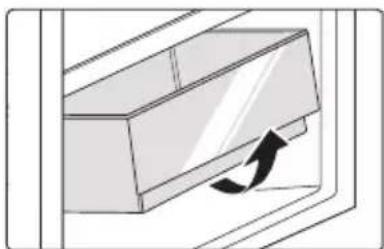
- Remove the contents of the drawer. Hold the handle of the drawer and pull it out completely until it stops.
- Lift the drawer up and remove it by pulling it out.

ATTENTION
The appliance shall run continuously once it is started. Generally, the operation of the appliance shall not be interrupted; otherwise the service life may be impaired.
TROUBLESHOOTING
The following simple issues can be handled by the user. Please call the after-sale service department if the issues are not solved.
| Problem Possible reason | |
| Failed operation | ·Check whether the appliance is connected to power or whether the plug is in well contact |
| ·Check whether the voltage is too low | |
| ·Check whether there is a power failure or partial circuits have tripped | |
| Odor | ·Odorous foods shall be tightly wrapped |
| ·Check whether there is any rotten food | |
| ·Clean the inside of the refrigerator | |
| Long-time operation of the compressor | ·Long operation of the refrigerator is normal in summer |
| ·When the ambient temperature is high It is not suggestible having too much food in the appliance at the same time | |
| ·Food shall get cool before being put into the appliance | |
| ·The doors are opened too frequently | |
| Light fails to get lit | ·Check whether the refrigerator is connected to power supply and whether the illuminating light is damaged |
| ·Have the light replaced by a specialist | |
| Door can not be properly closed | ·The door is stuck by food packages too much food is placed |
| ·The refrigerator is tilted. | |
| Loud noises | ·Check whether the floor is level and whether the refrigerator is placed stably |
| ·Check whether accessories are placed at proper locations | |
| Door seal fails to be tight | Remove foreign matters on the door seal |
| Heat the door seal and then cool it for restoration (or blow it with an electrical drier or use a hot towel for heating) | |
| Water pan overflows | There is too much food in the chamber or food stored contains too much water, resulting in heavy defrosting |
| The doors are not closed properly, resulting in frosting due to entry of air and increased water due to defrosting | |
| Hot housing | Heat dissipation of the built-in condenser via the housing, which is normal when housing becomes hot due to high ambient temperature, storage of too much food or shutdown of the compressor is shut down, provide sound ventilation to facilitate heat dissipation |
| Surface condensation | Condensation on the exterior surface and door seals of the refrigerator is normal when the ambient humidity is too high. Just wipe the condensate with a clean towel. |
| Abnormal noise | Buzz: The compressor may produce buzzes during operation, and the buzzes are loud particularly upon start or stop. This is normal.Creak: Refrigerant flowing inside of the appliance may produce creak, which is normal. |
EN
APPENDIX
Special for new European standard
The ordered parts in the following table can be acquired from Service provider channel
| Ordered part Provided by | Minimum time required for Provision | |
| Thermostats Professional maintenance personnel | At least 7 years after the last model is launched on the market | |
| Temperature sensors | Professional maintenance personnel | At least 7 years after the last model is launched on the market |
| Printed circuit boards | Professional maintenance personnel | At least 7 years after the last model is launched on the market |
| Light sources Professional maintenance personnel | At least 7 years after the last model is launched on the market | |
| Door handles Professional repairers and final users | At least 7 years after the last model is launched on the market | |
| Door hinges Professional repairers and final users | At least 7 years after the last model is launched on the market | |
| Trays Professional repairers and final users | At least 7 years after the last model is launched on the market | |
| Baskets Professional repairers and final users | At least 7 years after the last model is launched on the market | |
| Door gaskets Professional repairers and final users | At least 10 years after the last model is launched on the market | |
Dear customer
- If you want to return or replace the product, please contact the store where you buy.
(Remember to bring the purchase invoice)
- If your product breaks down which needs to repair, please contact after-sales service provider.

ATTENTION
The model information in the product database, as well as the model identifier, can be obtained through a weblink scanned by a QR code, if any, on the energy efficiency label of the product.
For more information about the energy efficiency of the appliance, visit https://ec.europa.eu and search using the model name.
The model name can be found on the rating label of the appliance.
THANK YOU LETTER
PRODUCT INSTALLATION 04
INSTRUCTIONS FOR USE 11
CLEANING AND MAINTENANCE 13
TROUBLESHOOTING 15
ANNEX 17
SPECIFICATIONS
1 Thermostat
2 Drawer
PRODUCT INSTALLATION

WARNING
1 Thermostat
2 Drawer
3 Leveling foot
WARNING
Upper hinge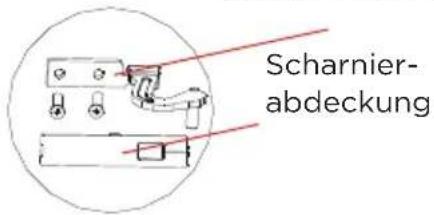
WARNING
1 Thermostat
2 Drawer

WARNING
1 Thermostat 2 Drawer 3 Leveling foot

WARNING
Upper hinge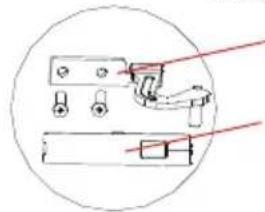

WARNING
1 Thermostat
2 Drawer
3 Leveling foot
WARNING
WARNING
1 Thermostat
2 Drawer
3 Leveling foot
WARNING
Upper hinge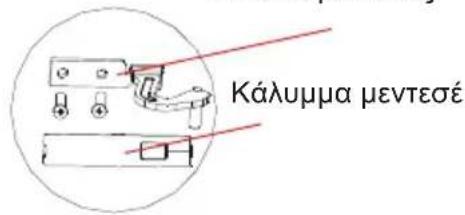

WARNING
1 Thermostat
2 Drawer
3 Leveling foot
WARNING
Upper hinge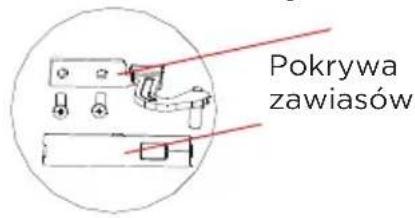

WARNING
1 Thermostat
2 Drawer
3 Leveling foot
WARNING
WARNING
1 Thermostat
2 Drawer
3 Leveling foot
WARNING
Top hinge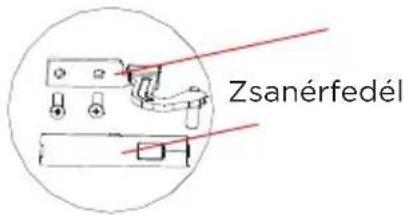
Leveling foot

WARNING
PRODUCT OVERVIEW 03
PRODUCT INSTALLATION 04
OPERATING INSTRUCTIONS 11
CLEANING AND MAINTENANCE 13
TROUBLESHOOTING 15
APPENDIX 17
SPECIFICATIONS
1 Thermostat
2 Drawer
3 Adjustable foot
CAUTION!

CAUTION!
1 Thermostat
2 Drawer
LT

ATTENTION
1 Thermostat
2 Drawer

WARNING
1 Thermostat
2 Drawer
3 Leveling foot
CAUTION
The image above is for reference only. The actual configuration will depend on the purchased product or the distributor's statement.
PRODUCT INSTALLATION
Installation instructions
- Remove the door, the lower hinge assembly, and the adjustable foot, then install the lower hinge assembly and the adjustable foot on the other side. Remove the bumper from the lower right side of the door and install it on the other side of the door.
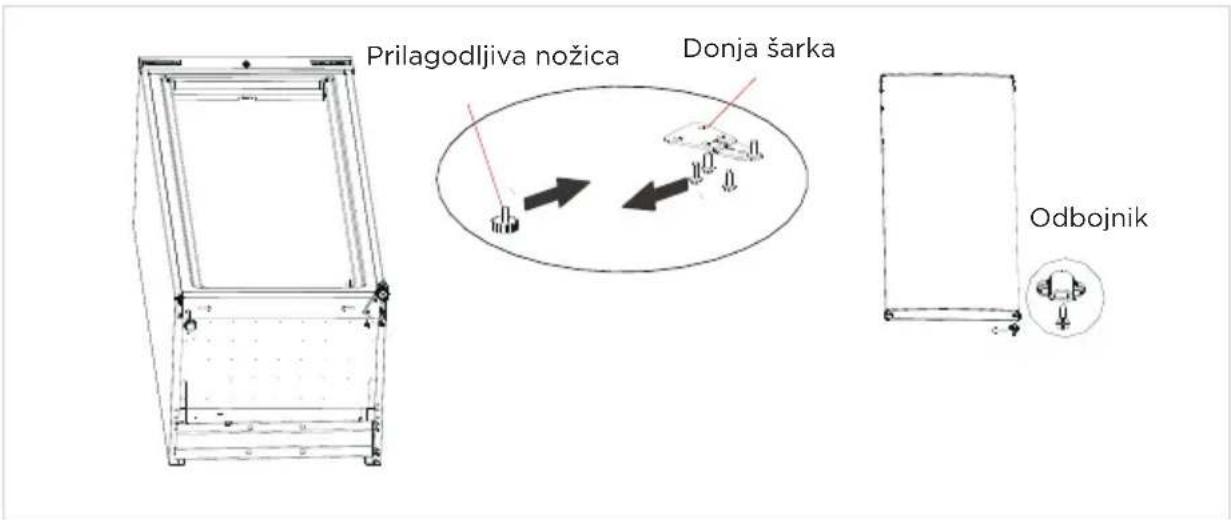
- Place the door on the lower hinge, position the upper hinge pin as shown in the following figure and install the upper hinge, then the upper hinge cover and the plastic covers for the screw holes.
- If the temperature is too high or during summer, according to actual needs, the thermostat should be set to MAX.
- If the temperature is too low or during winter, according to actual needs, the thermostat should be set to MIN.

NOTE
use and adjust between MIN and MAX.

CAUTION
The actual control panel may differ from model to model.

CAUTION
The appliance will operate continuously after it is started. Generally, the operation of the appliance should not be interrupted, otherwise the service life may be reduced.
TROUBLESHOOTING
1 Thermostat
2 Drawer
3 Leveling foot
CAUTION
The above image is for reference only. The actual configuration will depend on the physical product or the distributor's statement.
PRODUCT INSTALLATION
Installation instructions
For refrigerating appliances with climate class
- Depending on the climate class, this refrigerating appliance is intended for use in ambient temperature ranges as specified in the following table.
- The climate class can be found on the rating plate. The product may not operate correctly at temperatures outside the specified range.
- The climate class is indicated on the product label.
Effective temperature range
• The product is designed for normal operation in the temperature range determined by the class rating.
| Razred Simbol | Raspon temperature okoline °C | ||
| IEC 62552 (ISO 15502) | ISO 8561 | ||
| Prošireni umjereni SN + | 10 do + 32 + | 10 do + 32 | |
| Umjereni N + 16 do + 32 | + 16 do + 32 | ||
| Subtropski ST + 16 do + | 38 + 18 do + | 38 | |
| Tropski T + 16 do + 43 + | 18 do + 43 | ||
Dimensions and clearances
- Too small a distance from adjacent objects can lead to reduced freezing function and increased electricity costs. When installing the appliance, leave more than 100 mm of free space from each adjacent wall.
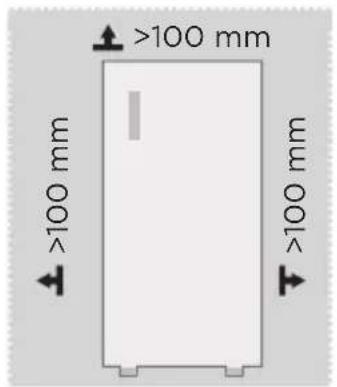
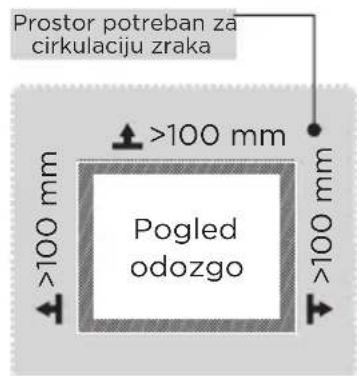

CAUTION
The above image is for reference only. The actual configuration will depend on the physical product or the distributor's statement.
C
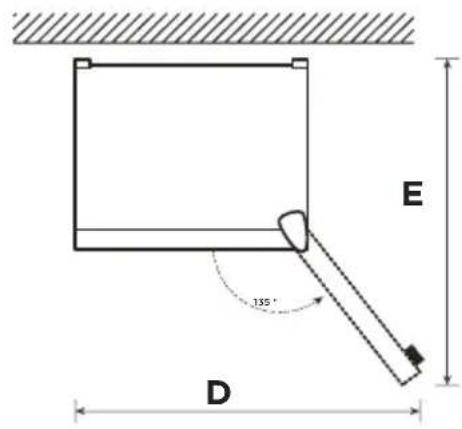
| Širina | Sveukupna visina | Dubina | Širina s vratima otvorenim pod kutom od 135° | Dubina s vratima otvorenim pod kutom od 135° |
| A B C D E | ||||
| 550 1420 | 550 930 910 |
Note: All dimensions in mm
HR
Changing the door swing direction (optional)
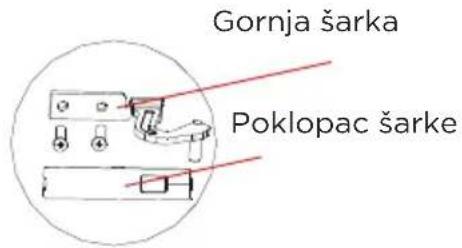
- Remove the door, the lower hinge assembly, and the adjustable foot, then install the lower hinge assembly and the adjustable foot on the other side. Remove the stopper from the lower right side of the door and install it on the other side of the door.
- Place the door on the lower hinge, install the upper hinge pin as described below, and then install in order the upper hinge, the upper hinge cover, and the plastic covers for the screw holes.
HR
Installing the door handle (optional)

CAUTION
CAUTION: The images in the user manual are for reference only. The actual product may differ slightly.
Before attempting to install optional accessories, the refrigerator must be disconnected from the power source.
STEP
- Remove the two plug caps from the door (on the door opening side).
- Install the handle on the door and secure it with screws.
- Insert the handle screw caps into the screw holes.
Leveling feet
- If the ambient temperature is too high or during summer, you can adjust the thermostat to MAX as needed.
- If the ambient temperature is too low or it is winter, the thermostat can be adjusted to MIN as needed.

NOTE
set it between MIN and MAX.

CAUTION
The actual control panel may differ depending on the model.

CAUTION
After starting, the device will operate continuously. In principle, the operation of the device should not be interrupted, as this may reduce its lifespan.
TROUBLESHOOTING
1 Thermostats
2 Drawer
3 Leveling foot
WARNING
SL
Leveling feet
To avoid vibrations, the unit must be leveled.
- If the ambient temperature is too high or it is summer time, adjust the thermostat to MAX according to actual needs.
- If the ambient temperature is too low or it is winter time, adjust the thermostat to MIN according to actual needs.

NOTE
use and adjust to MIN or MAX.

CAUTION

CAUTION
1 Thermostat
2 Drawer
3 Balancing piston
CAUTION
Upper blade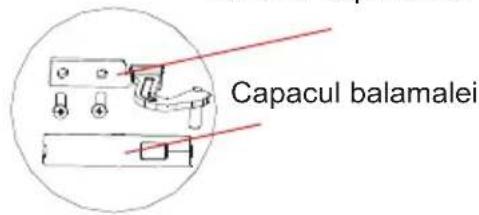

CAUTION
1 Thermostat
2 Drawer
C

NOTE
PRODUCT INSTALLATION
Upper hinge
Hinge cover

KEEP IN MIND
make yourself at home
- USER MANUAL
- LANGUAGES
- THANK YOU LETTER
- CONTENTS
- SPECIFICATIONS
- PRODUCT OVERVIEW
- NAMES OF COMPONENTS
- ATTENTION
- PRODUCT INSTALLATION
- INSTALLATION INSTRUCTIONS
- FOR REFRIGERATING APPLIANCES WITH CLIMATE CLASS
- EFFECTIVE TEMPERATURE RANGE
- DIMENSIONS AND CLEARANCES
- DOOR RIGHT-LEFT CHANGE (OPTIONAL)
- CAUTION
- STEP
- INSTALLING THE DOOR HANDLE (OPTIONAL)
- LEVELING FEET
- MOVING THE APPLIANCE
- WARNING
- CONNECTING THE APPLIANCE
- PLACEMENT
- TIPS FOR ENERGY SAVING
- OPERATION INSTRUCTIONS
- CONTROL PANEL
- NOTE
- TIPS ON STORING FOOD
- CLEANING AND MAINTENANCE
- OVERALL CLEANING
- DEFROSTING
- STOP USING
- POWER FAILURE
- LONG-TIME NONUSE
- MOVING
- CLEANING THE DRAWER
- TROUBLESHOOTING
- APPENDIX
- SPECIAL FOR NEW EUROPEAN STANDARD
- DEAR CUSTOMER
- LEVELING FOOT
- CHANGING THE DOOR SWING DIRECTION (OPTIONAL)
- KEEP IN MIND
Brand : MIDEA
Model : MDRU229FZE01
Category : Freezer