
HB6089-UL - Blender Vevor - Free user manual and instructions
Find the device manual for free HB6089-UL Vevor in PDF.



| Product Type | Commercial Immersion Blender |
| Brand | Vevor |
| Model | HB6089-UL (and variants B, D, AC, AB, A) |
| Power Supply | 120 V~60 Hz |
| Rated Power | 500 W or 750 W depending on model |
| Speed Range | 4000 to 20000 rpm (variable) |
| Shaft Length | 12, 16, or 20 inches depending on model |
| Noise Level | ≤85 dB |
| Continuous Run Function | Yes, with power button lock |
| Safety Button | Yes, must be pressed before each start |
| Thermal Protection | Yes, auto shut-off in case of overheating |
| Shaft Material | Stainless steel (spray) |
| Shaft Cleaning | Dishwasher safe or washable under running water |
| Motor Block Cleaning | Wipe with a damp cloth, do not immerse |
| Blade Disassembly | Possible using two provided wrenches |
| Recommended Use | Commercial (restaurant kitchens, canteens, etc.) |
| Warranty and Support | Technical support via www.vevor.com/support |
| Package Contents | Blender, mixing shaft, instruction manual |
Frequently Asked Questions - HB6089-UL Vevor
User questions about HB6089-UL Vevor
0 question about this device. Answer the ones you know or ask your own.
Ask a new question about this device
Download the instructions for your Blender in PDF format for free! Find your manual HB6089-UL - Vevor and take your electronic device back in hand. On this page are published all the documents necessary for the use of your device. HB6089-UL by Vevor.
USER MANUAL HB6089-UL Vevor
INSTRUCTION MANUAL
MODEL: HB6089B-UL / HB6089D-UL / HB6089AC-UL / HB6089AB-UL / HB6089A-UL
We continue to be committed to providing you with tools at competitive prices. "Save Half", "Half Price", or any other similar expressions used by us only report an estimate of savings you might benefit from buying certain tools with us compared to top brands, and do not necessarily mean to cover all categories of tools offered. We kindly remind you to verify carefully when placing an order with us whether you are actually saving half in comparison with the top major brands.
VEVOR®
TOUGH TOOLS, HALF PRICE
Commercial Blender
MODEL: HB6089B-UL / HB6089D-UL / HB6089AC-UL / HB6089AB-UL / HB6089A-UL
NEED HELP? CONTACT US!
Have product questions? Need technical support? Please feel free to contact us:

CustomerService@vevor.com
This is the original instruction. Please read all manual instructions carefully before operating. VEVOR reserves a clear interpretation of the user manual. The appearance of the product shall be subject to the product you received. Please forgive us that we won't inform you of any technology or software updates on our product.
IMPORTANT SAFEGUARDS
Before using the electrical appliance, the following basic precautions should always be followed, including the following:
- Read all instructions. Before using it, check that the voltage of the wall outlet corresponds to the voltage shown on the rating plate.
- Do not operate any appliance with a damaged cord or plug, or after the appliance malfunctions, or is dropped or damaged in any manner. Return the appliance to the nearest authorized service facility for examination, repair, or electrical or mechanical adjustment.
- If the supply cord is damaged, it must be replaced by the manufacturer, an authorized service agent, or a qualified technician to avoid a hazard.
- Always disconnect the blender from the supply if left unattended before assembling, disassembling, or cleaning.
- Do not let the cord hang over the edge of a table or hot surface. Be careful not to let the long power cord become a hazard when using the appliance.
Do not immerse the upper part of the blender in water, as this could cause an electric shock.
- Avoid contacting moving parts.
- Using accessories not recommended by the manufacturer may cause injuries to persons.
- Do not operate the appliance for other than its intended use.
- Avoid splashing food into the vent holes of the unit body during blending.
- The blender must be used in a working environment that is far away from corrosive materials or oil pollution, and must be kept away from explosive and flammable materials.
- The metal blades are extremely sharp. Please handle them carefully.
- Be careful of potential injury from misuse.
- While using the appliance, hold it with both hands: one hand on the host handle, and the other on the plastic connector.
- Switch off the appliance and disconnect it from the power supply before changing accessories or approaching parts that move during use.
- This appliance is not intended for use by children or by persons with reduced physical, sensory, or mental capabilities, or lack of experience and knowledge. Close supervision is necessary when any appliance is used near children. Children should be supervised to ensure that they do not play with the appliance.
SAVE THESE INSTRUCTIONS
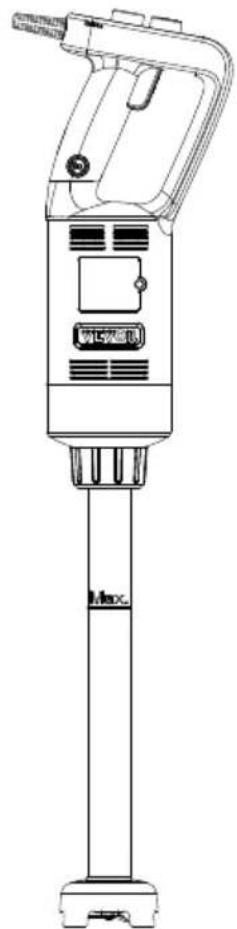
KNOW YOUR COMMERCIAL HAND BLENDER
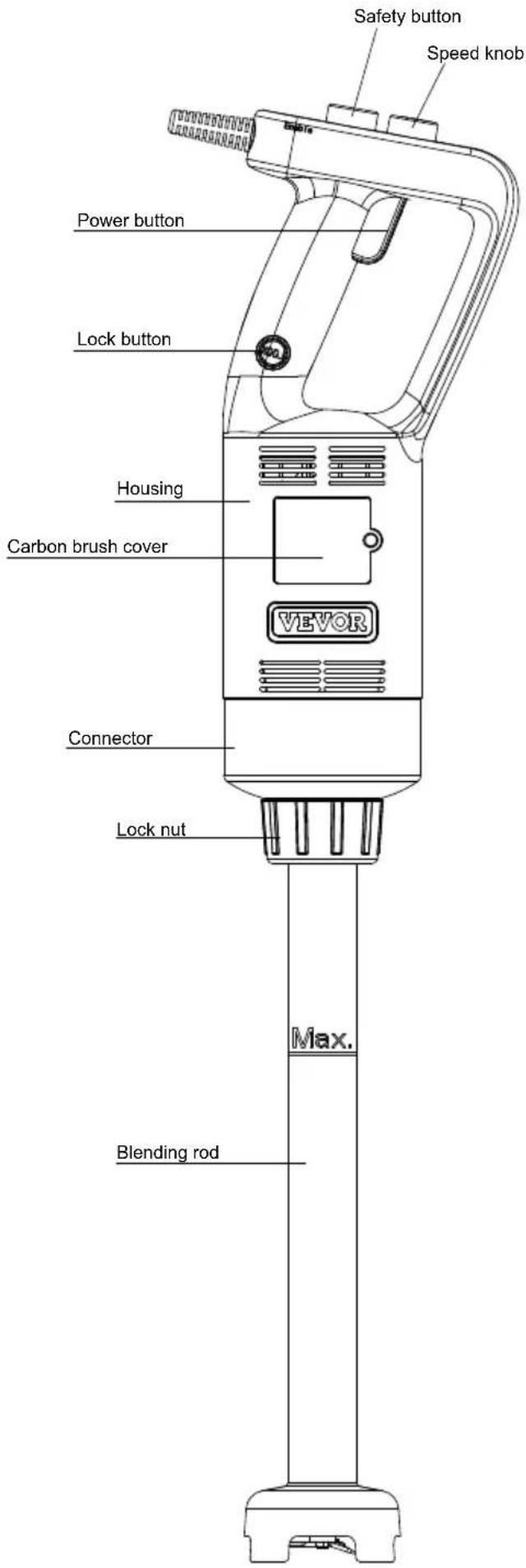
TECHNICAL PARAMETERS
| ModellInput | Rated Power | Tool length | Rotating speed(Min) | Rotating speed (Max) | Working noise | |
| HB6089 B-UL | 120V~ 60Hz | 500W12 | inch | 4000 RPM/Min | 18000 RPM/Min | ≤85dB (A) |
| HB6089 D-UL | 120V~ 60Hz | 500W20 | inch | 4000 RPM/Min | 18000 RPM/Min | ≤85dB (A) |
| HB6089 AC-UL | 120V~ 60Hz | 750W12 | inch | 8000 RPM/Min | 20000 RPM/Min | ≤85dB (A) |
| HB6089 AB-UL | 120V~ 60Hz | 750W16 | inch | 8000 RPM/Min | 20000 RPM/Min | ≤85dB (A) |
| HB6089 A-UL | 120V~ 60Hz | 750W20 | inch | 8000 RPM/Min | 20000 RPM/Min | ≤85dB (A) |
Before attaching or detaching, ensure that the appliance has stopped working and its mains plug is unplugged.
How to attach:
- Insert the blending rod into the threaded inner hole of the unit body. When inserting, align the slot of the connector with the ribs of the square aluminum to ensure that the connector is inserted in place.
- Tighten the lock nut to fix the blending rod firmly onto the body.
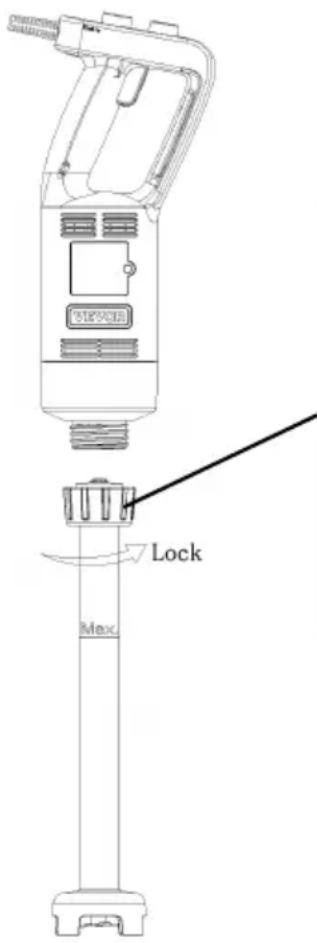
After the stirring rod is assembled into place with the main engine, rotate and tighten the plastic parts, and it is considered that the stirring rod has been fixed.
How to detach:
- Loosen the lock nut.
- Pull out the blending rod.
USING YOUR BLENDER
Before the first use, clean the blender according to the section of “QUICK CLEANING”.
The time running unit without load can't exceed 20s.
IMPORTANT: Blades are very sharp; handle them with care. Ensure that the hand-held blender is unplugged from the power outlet before installing or removing attachments.
OPERATION METHOD
GETTING STARTED AND STOPPED
- Check that the power button (3) is released.
- Install the blending rod.
- Connect the main unit to the power source.
- Press the safety button (1) and proceed to the next step within 5 seconds. If the unlocking fails after 5 seconds, press the safety button (1) again.
- Press the power button (3) to start the hand blender (working time per cycle: c minutes, interval time between two cycles ≥ 1 minute).
- Release the power button (3), and the machine will stop automatically.

Continuous operation instruction
After completing steps 1-5 above, proceed to the following steps:
- Press the lock button (4) when the power button (3) is pressed down, and the red indicator lights up.
- Release the power button (3) at this time, the hand blender will continue to operate.
- Press the power button (3) again, and the appliance stops, and the red indicator turns off.
Speed adjusting instruction
After completing steps 1-5 above, proceed to the following steps:
- Rotate the speed knob (2) to the desired speed setting.
NOTE:
In order to better control the hand blender, it is recommended to hold the hand and the bottom of the body. In addition, tilting the machine at a slight angle is recommended to prevent the bell-shaped housing from touching the bottom of a container. The ingredients in the container shall not exceed the MAX height of the blending rod. Avoid splashing food into the vent holes of the unit body or blending.
CLEANING AND MAINTENANCE METHODS
- Unplug the appliance and remove the detachable blending rod.
- Wash the detachable blending rod under running water without using an abrasive cleaner or detergents. After cleaning the detachable blending rod, place it upright so that any water that may have gotten in can be drained. The blend is a dishwasher-safe component.
- Wipe the motor unit with a damp cloth. Never immerse it in water or use a wet cloth as an electric shock may occur.
- Dry thoroughly.
QUICK CLEANING
Between processing tasks, hold the hand-held blender in a container half filled with water and turn it on for a few seconds.
CAUTION: Blades are very sharp; handle them with care.
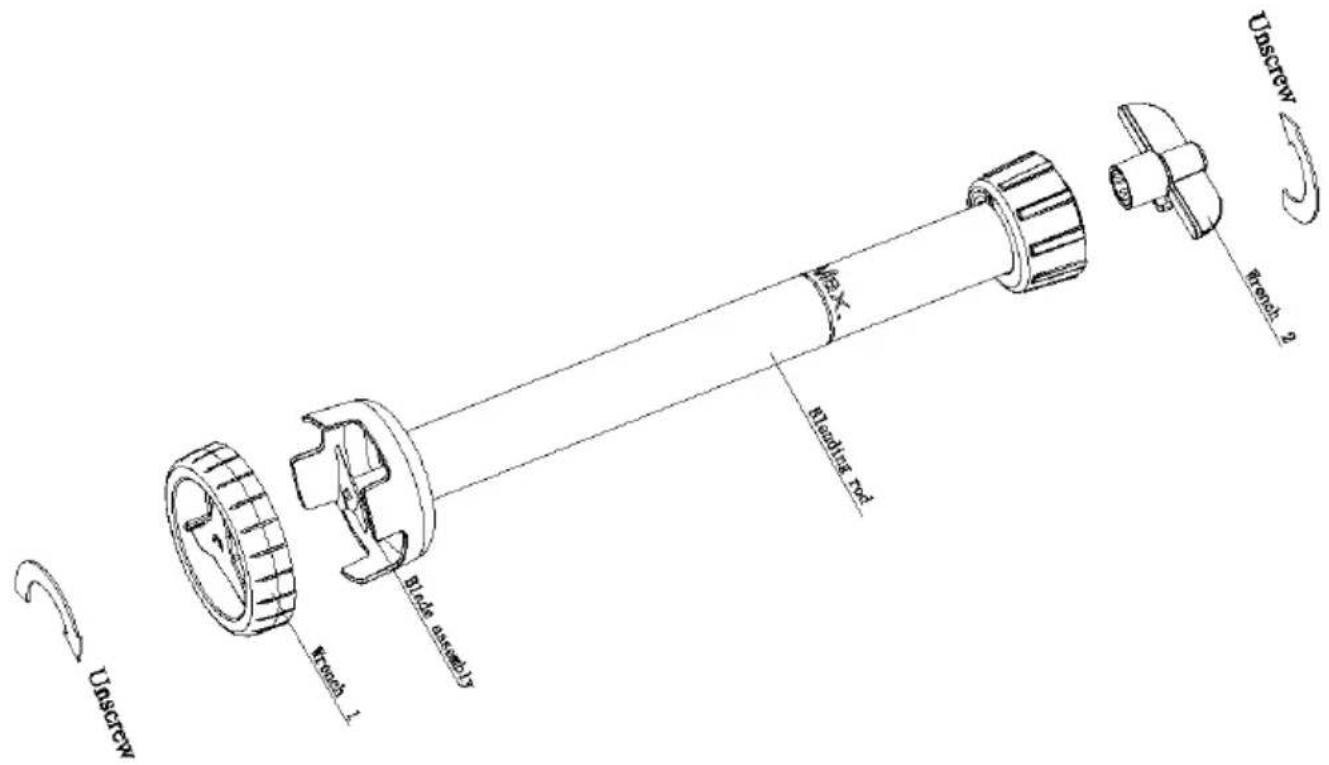
REMOVAL/INSTALLATION OF BLADE ASSEMBLY
- Align the blade assembly with wrench 1 and insert it into it.
- Align the blending head slot with wrench 2 and insert it into it.
- Unscrew clockwise to remove the blending rod.
FAULT ANALYSIS
| Fault Phenomenon | Cause Analysis | Exclusion Methods |
| Indicator light is not on | The power cord is not plugged in. | 1.Check the power cord to m sure it is plugged in. |
| Indicator Light on Product Inoperative | 1.Long working hours, motor overheat protection.2.The machine itself is of order. | 1.Wait an hour before reusing 2.Send to after-sales service department. |
Note:
The above are common troubleshooting methods. For other issues, please contact our customer service department or take the product to our designated repair center. Do not disassemble or repair it yourself.
Made In China
VEVOR®
TOUGH TOOLS, HALF PRICE
Technical Support and E-Warranty Certificate
www.vevor.com/support
VEVOR®
TOUGH TOOLS, HALF PRICE
Technical Support and E-Warranty Certificate www.vevor.com/support
INSTRUCTION MANUAL
MODEL: HB6089B-GS / HB6089D-GS / HB6089AC-GS / HB6089AB-GS / HB6089A-GS
We are committed to providing you with tools at competitive prices. "Save Half", "Half Price", or any other similar expressions used by us only represent an estimate of savings you might benefit from when buying certain tools from us compared to top brands, and do not necessarily mean that all categories of tools offered will save you half compared to the top major brands. Please verify carefully when placing an order.
VEVOR®
TOUGH TOOLS, HALF PRICE
Commercial Blender
MODEL: HB6089B-GS / HB6089D-GS / HB6089AC-GS / HB6089AB-GS / HB6089A-GS
NEED HELP? CONTACT US!
Have product questions? Need technical support? Please feel free to contact us:

CustomerService@vevor.com
This is the original instruction. Please read all manual instructions carefully before operating. VEVOR reserves a clear interpretation of the user manual. The appearance of the product shall be subject to the product you received. Please forgive us that we won't inform you if there are any technology or software updates on our product.
IMPORTANT SAFEGUARDS
Before using the electrical appliance, the following basic precautions should always be followed, including the following:
- Read all instructions. Before using it, check that the voltage of the wall outlet corresponds to the one shown on the rating plate.
- Do not operate any appliance with a damaged cord or plug, or after the appliance malfunctions, or is dropped or damaged in any manner. Return the appliance to the nearest authorized service facility for examination, repair, or electrical or mechanical adjustment.
- If the supply cord is damaged, it must be replaced by the manufacturer, an authorized service agent, or a qualified technician to avoid a hazard.
- Always disconnect the blender from the supply if left unattended before assembling, disassembling, or cleaning.
- Do not let the cord hang over the edge of a table or hot surface. Be careful not to trip over the long power cord when using the appliance.
Do not immerse the upper part of the blender in water, as this would give rise to electric shock.
- Avoid contacting moving parts.
- Using accessories not recommended by the manufacturer may cause injuries to persons.
- Do not operate the appliance for other than its intended use.
- Avoid splashing the food into the vent holes of unit body during blending.
- The blender must be used in a working environment that is far away from corrosive materials or oil pollution, and must be kept away from explosive and flammable materials.
- The metal blades are extremely sharp. Please handle it carefully.
- Be careful of potential injury from misuse.
- In the process of using the appliance, it is necessary to hold it with both hands, one hand holding the host handle, and the other hand holding the plastic connector.
- Switch off the appliance and disconnect from supply before changing accessories or approaching parts that move in use.
- Appliances can be used by persons with reduced physical, sensory or mental capabilities or lack of experience and knowledge if they have been given supervision or instruction concerning use of the appliance in a safe way and if they understand the hazards involved.
- Warning: Use a suitable bowl with attachable accessories and the accessory must not project from the upper part of the bowl.
- These appliances are intended to be used for commercial applications, for example in kitchens of restaurants, canteens, hospitals and in commercial enterprises such as bakeries, but not for continuous mass production of food.
SAVE THESE INSTRUCTIONS
KNOW YOUR COMMERCIAL HAND BLENDER
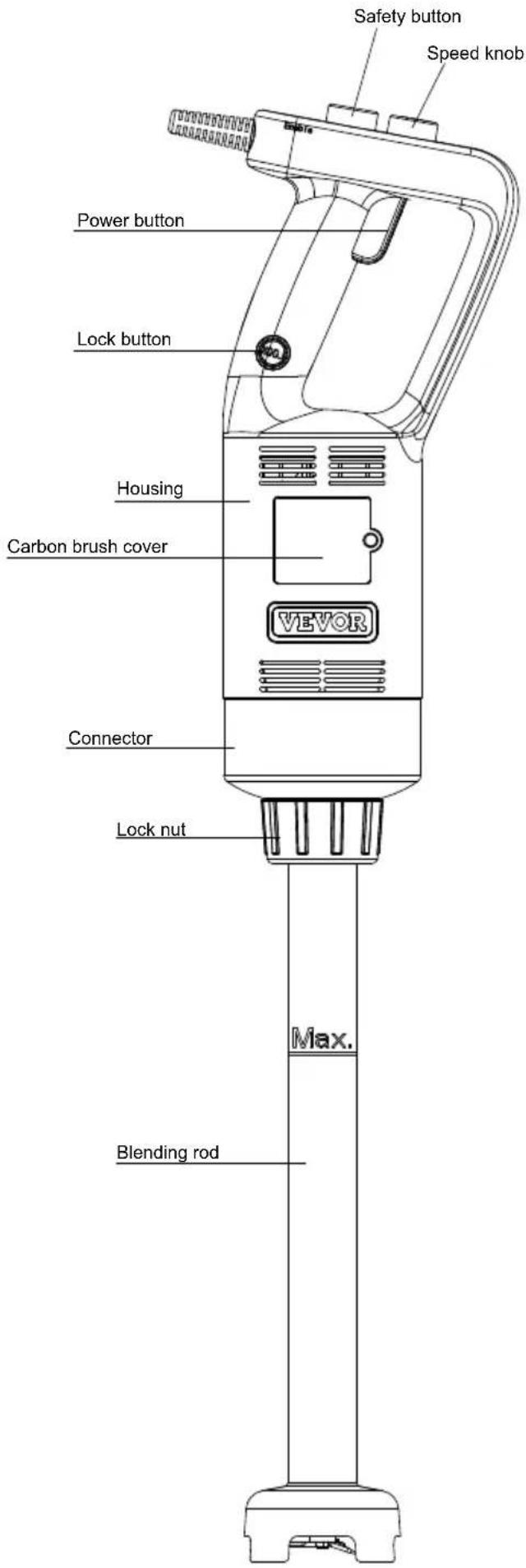
TECHNICAL PARAMETERS
| ModellInput | Rated Power | Tool length | Rotating speed(Min) | Rotating speed (Max) | Working noise | |
| HB6089 B-GS | AC220-240V; 50-60Hz | 500W12 | inch | 4000 RPM/Min | 18000 RPM/Min | ≤85dB (A) |
| HB6089 D-GS | AC220-240V; 50-60Hz | 500W20 | inch | 4000 RPM/Min | 18000 RPM/Min | ≤85dB (A) |
| HB6089 AC-GS | AC220-240V; 50-60Hz | 750W12 | inch | 8000 RPM/Min | 20000 RPM/Min | ≤85dB (A) |
| HB6089 AB-GS | AC220-240V; 50-60Hz | 750W16 | inch | 8000 RPM/Min | 20000 RPM/Min | ≤85dB (A) |
| HB6089 A-GS | AC220-240V; 50-60Hz | 750W20 | inch | 8000 RPM/Min | 20000 RPM/Min | ≤85dB (A) |
Before attaching or detaching, ensure the appliance has stopped and is unplugged from the mains.
How to attach:
- Insert the blending rod into the threaded inner hole of the unit body. When inserting, align the slot of the connector with the ribs of the square aluminum to ensure the connector is inserted in place.
- Tighten the lock nut to fix the blending rod firmly onto the body.
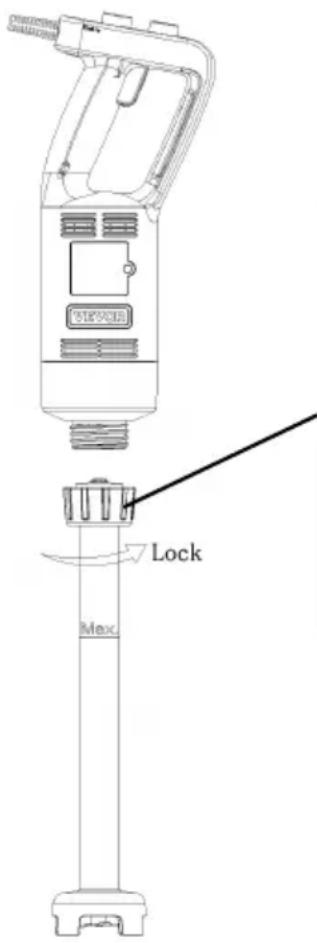
After the stirring rod is assembled into place with the main engine, rotate and tighten the plastic parts; this indicates the stirring rod is fixed.
How to detach:
- Loosen the lock nut.
- Pull out the blending rod.
USING YOUR BLENDER
Before first use, clean the blender according to the section “QUICK CLEANING”.
The unit must not run without load for more than 20 seconds.
IMPORTANT: Blades are very sharp; handle them with care. Ensure the hand-held blender is unplugged from the power outlet before installing or removing attachments.
OPERATION METHOD
Getting Started and Stopped
- Check that the power button (3) is released.
- Install the blending rod.
- Connect the main unit to the power source.
- Press the safety button (1) and proceed to the next step within 5 seconds. If the unlocking fails after 5 seconds, press the safety button (1) again.
- Press the power button (3) to start the hand blender (working time per cycle ≤ 3 minutes, interval time between two cycles ≥ 1 minute).
- Release the power button (3), and the machine will stop automatically.
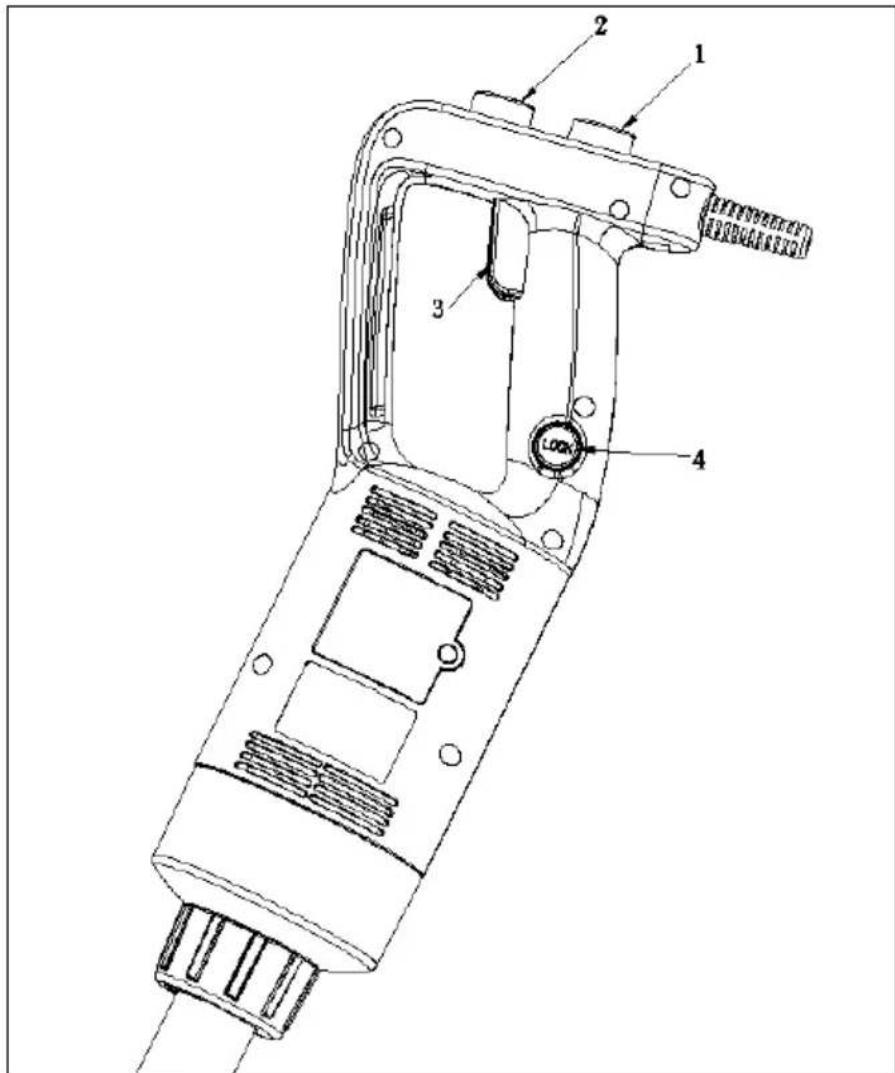
Continuous operation instruction
After completing steps 1-5 above, proceed to the following steps:
- Hold the lock button (4) while the power button (3) is pressed down, and the red indicator of the lock button lights up.
- At this time, release the power button (3) first and then release the lock button (4). The hand blender will work continuously, and the red indicator becomes solidly on.
- Press the power button (3) again. The appliance stops working. At this time, the lock button (4) springs up, and its red indicator goes off.
Note: During continuous working, do not touch the power button when gripping the blender to avoid triggering it to stop working.
How to grip the blender during working:
To blend food, operate the blender with one or both hands. When operating with one hand, just hold the handle position 1. When operating with both hands, hold the handle position 1 with one hand while holding the handle position 2 with the other hand.
CLEANING AND MAINTENANCE METHODS
Warning: Care is needed when handling cutting blades during cleaning.
- Unplug the appliance and remove the detachable blending rod.
- Wash the detachable blending rod under running water without using an abrasive cleaner or detergents. After cleaning the detachable blending rod, place it upright so that any water that may have gotten in can be drained. The blending rod is a dishwasher-safe component.
Note: the appliance is not to be cleaned with a water jet or a steam cleaner.
- Wipe the motor unit with a damp cloth. Never immerse it in water for cleaning, as an electric shock may occur.
- Dry thoroughly.
QUICK CLEANING
Between processing tasks, hold the hand-held blender in the container half filled with water and turn on for a few seconds.
CAUTION: Blades are very sharp; handle them with care.
REMOVAL/INSTALLATION OF BLADE ASSEMBLY
- Align the blade assembly with wrench 1 and insert into it.
- Align the blending head slot with wrench 2 and insert into it.
- Unscrew clockwise to remove the blending rod. Warning: When attaching the wrench 2 onto the blade assembly, do not touch the blade assembly with your fingers to avoid the risk of injury.

FAULT ANALYSIS
| Fault Phenomenon | Cause Analysis | Exclusion Methods |
| Indicator light is not on | The power cord is not plugged in. | 1.Check the power cord to m sure it is plugged in. |
| Indicator Light on Product Inoperative | 1.Long working hours, motor overheat protection.2.The machine itself is of order. | 1.Wait an hour before reusing 2.Send to after-sales service department. |
Note:
The above are common trouble analysis and troubleshooting methods. For other troubles, please contact our customer service department, or go directly to our designated repair point for repair. Do not dismantle and repair yourself.
Made In China
VEVOR®
TOUGH TOOLS, HALF PRICE
Technical Support and E-Warranty Certificate
www.vevor.com/support
VEVOR®
TOUGH TOOLS, HALF PRICE
INSTRUCTION MANUAL
MODEL: HB6089B-UL/HB6089D-UL/HB6089AC-UL/HB6089AB-UL/HB6089A-UL
NEED HELP? CONTACT US!
INSTRUCTION MANUAL
MODEL: HB6089B-GS/HB6089D-GS/HB6089AC-GS/HB6089AB-GS/HB6089A-GS
NEED HELP? CONTACT US!
Kundenservice@vevor.com
TROUBLESHOOTING
www.vevor.com/support
VEVOR®
TOUGH TOOLS, HALF PRICE
Kundenservice@vevor.com
www.vevor.com/support
VEVOR®
TOUGH TOOLS, HALF PRICE
electronics www.vevor.com/support
VEVOR®
TOUGH TOOLS, HALF PRICE
electronics www.vevor.com/support
VEVOR®
TOUGH TOOLS, HALF PRICE
TROUBLESHOOTING
NEED HELP? CONTACT US!
TROUBLESHOOTING
Machine Translated by Google
Note:
NEED HELP? CONTACT US!
Machine Translated by Google
Note:
NEED HELP? CONTACT US!
Klantenservice@vevor.com
TROUBLESHOOTING
warranty certificate www.vevor.com/support
VEVOR®
TOUGH TOOLS, HALF PRICE
Technical support and e-warranty certificate: www.vevor.com/support
USER MANUAL
MODEL: HB6089B-GS / HB6089D-GS / HB6089AC-GS / HB6089AB-GS / HB6089A-GS
NEED HELP? CONTACT US!
Customer service: Klantenservice@vevor.com
Warranty certificate: www.vevor.com/support
VEVOR®
TOUGH TOOLS, HALF PRICE
NEED HELP? CONTACT US!
Continuous operation instructions
TROUBLESHOOTING
www.vevor.com/support
VEVOR®
TOUGH TOOLS, HALF PRICE
NEED HELP? CONTACT US!
Continuous operation instruction
TROUBLESHOOTING
www.vevor.com/support



- INSTRUCTION MANUAL
- MODEL: HB6089B-UL / HB6089D-UL / HB6089AC-UL / HB6089AB-UL / HB6089A-UL
- VEVOR®
- COMMERCIAL BLENDER
- NEED HELP? CONTACT US
- IMPORTANT SAFEGUARDS
- SAVE THESE INSTRUCTIONS
- KNOW YOUR COMMERCIAL HAND BLENDER
- HOW TO ATTACH
- HOW TO DETACH
- USING YOUR BLENDER
- OPERATION METHOD
- GETTING STARTED AND STOPPED
- CONTINUOUS OPERATION INSTRUCTION
- SPEED ADJUSTING INSTRUCTION
- NOTE
- CLEANING AND MAINTENANCE METHODS
- QUICK CLEANING
- REMOVAL/INSTALLATION OF BLADE ASSEMBLY
- MADE IN CHINA
- TOUGH TOOLS, HALF PRICE
- MODEL: HB6089B-GS / HB6089D-GS / HB6089AC-GS / HB6089AB-GS / HB6089A-GS
- HOW TO GRIP THE BLENDER DURING WORKING
- MACHINE TRANSLATED BY GOOGLE
- KLANTENSERVICE@VEVOR.COM
- USER MANUAL
- CUSTOMER SERVICE: KLANTENSERVICE@VEVOR.COM
- CONTINUOUS OPERATION INSTRUCTIONS
Brand : Vevor
Model : HB6089-UL
Category : Blender