
IB350CV - Blender Vevor - Free user manual and instructions
Find the device manual for free IB350CV Vevor in PDF.



| Product Type | Professional Immersion Blender |
| Brand | Vevor |
| Model | IB350CV |
| Power Supply | 120 V ~ 60 Hz or 230 V ~ 50 Hz |
| Rated Power | 350 W |
| Tool Length | 10 to 20 inches (254 to 508 mm) |
| Rotation Speed | 4,000 to 16,000 RPM |
| Operating Noise | ≤ 85 dB(A) |
| Total Length | 373 mm |
| Bell Diameter | ∅ 96 mm |
| Shaft Diameter | ∅ 35 mm |
| Body Material | Stainless steel and PA66+GF30% |
| Usage | Commercial (restaurants, canteens) |
| Safety Devices | Safety switch, overcurrent circuit breaker |
| Variable Speed | Yes, with adjustment knob |
| Continuous Lock | Yes |
| Cleaning | Do not immerse the motor unit; do not wash in dishwasher |
| Spare Parts | Shaft, bell, whisk |
| Warranty | Technical support and electronic warranty certificate at www.vevor.com/support |
| Country of Origin | Not specified |
Frequently Asked Questions - IB350CV Vevor
User questions about IB350CV Vevor
0 question about this device. Answer the ones you know or ask your own.
Ask a new question about this device
Download the instructions for your Blender in PDF format for free! Find your manual IB350CV - Vevor and take your electronic device back in hand. On this page are published all the documents necessary for the use of your device. IB350CV by Vevor.
USER MANUAL IB350CV Vevor
Technical Support and E-Warranty Certificate www.vevor.com/support
Commercial Blender
Manual
MODEL: IB350CV
We continue to be committed to provide you tools with competitive price. "Save Half", "Half Price" or any other similar expressions used by us only represent estimate of savings you might benefit from buying certain tools with us compared to top brands and does not necessarily mean to cover all categories of tools offered. You are kindly reminded to verify carefully when you are placing an order with us that you are actually saving half in comparison with the top major brands.
MODEL: IB350CV
NEED HELP? CONTACT US!
Have product questions? Need technical support? Please feel free to contact us:
Technical Support and E-Warranty Certificate www.vevor.com/support
This is the original instruction. Please read all manual instructions carefully before operating. VEVOR reserves a clear interpretation of the user manual. The appearance of the product shall be subject to the product you received. Please forgive us that we won't inform you if there are any technology or software updates on our product.
 | Warning-To reduce the risk of injury, user must re instructions manual carefully. |
 | This product is subject to the provision of Europea Directive 2012/19/EC. The symbol showing a wheel crossed through indicates that the product requires separate refuse collection in the European Union. T applies to the product and all accessories marked this symbol. Products marked as such may not be discarded with normal domestic waste, but must be to a collection point for recycling electrical and ele devices |
PRODUCT DESCRIPTION
1.1 This machine is designed for food processing in restaurants, canteens, and similar catering establishments. 1.2 The machine is not intended to process meat with tough skin, shells, or fish scales. Neither use this machine to cut vegetables or fruit with nuts or tough skin. Otherwise, it might damage the machine, property, or cause personal injury. 1.3 The machine is intended for commercial and indoor use by trained and skilled personnel familiar with these instructions.
The machine body is made of PA66+GF30% stainless steel for easy cleaning and maintenance. It has safety features that comply with the applicable safety directives.
SAFETY REGULATIONS
Safety regulations
This appliance is intended for commercial use only and must not be used for household use.
The appliance must only be used for the purpose for which it is intended and designed. The manufacturer is not liable for any damage caused by incorrect operation and improper use.
Keep the appliance and electrical plug away from water and any other liquids. If the appliance falls into the water, immediately remove the plug from the socket and do not use it until it has been checked by a certified technician. Failure to follow these instructions could cause a risk to lives.
Never attempt to open the casing of the appliance yourself.
Do not insert any objects in the appliance casing.
Do not touch the plug with wet hands.
The danger of electric shock! Do not attempt to repair the appliance yourself. Repairs are to be conducted by qualified personnel only in case of malfunctions.
Never use a damaged appliance! Disconnect the appliance from the electrical outlet and contact the retailer if it is damaged.
Do not immerse the electrical parts of the appliance in water or liquids. Never hold the appliance under running water.
Regularly check the power plug and cord for damage. If the power plug or cord is damaged, it must be replaced by a service agent or similarly qualified persons to avoid danger or injury.
Make sure the cord does not contact sharp or hot objects and stays away from open fire. To pull the plug out of the socket, always pull the plug, not the cord.
Ensure that the cord (or extension cord) is positioned so that it does not cause a trip hazard.
Always keep an eye on the appliance when in use.
The appliance is connected to the power source as long as the
plug is in the socket,
Turn off the appliance before pulling the plug out of the socket. Never carry the appliance by the cord.
Do not use any extra devices that are not supplied with the appliance.
Only connect the appliance to an electrical outlet with the voltage and frequency mentioned on the appliance label.
Connect the power plug to an easily accessible electrical outlet so that the appliance can be unplugged immediately in an emergency. To completely switch off the appliance, pull the power plug out of the outlet.
Always turn the appliance off before disconnecting the plug.
Never use accessories other than those recommended by the manufacturer. Failure to do so could pose a safety risk to the user and damage the appliance. Only use original parts and accessories. This appliance is not intended for use by persons (including children) with reduced physical, sensory, or mental capabilities or lack of experience and knowledge.
Children must not use this appliance under any circumstances. Keep the appliance and its cord out of reach of children.
Always disconnect the appliance from the mains if it is left unattended or is not in use, and before assembly, disassembly, or cleaning.
Never leave the appliance unattended during use.
Special Safety Regulations
The appliance is intended for commercial and indoor use by trained and skilled personnel familiar with these instructions.
This machine is designed for food processing in restaurants, canteens and similar catering establishments.
Any other use might lead to damage to the appliance or personal injury.
Do not place the appliance on a heating object (gasoline, electric
charcoal cooker, etc.) Keep the appliance away from any hot surfaces and open flames. Always operate the appliance on a level, stable, clean, heat-resistant and dry surface.
Danger of injury! Care is needed when operating or cleaning. Wear protective gloves (not supplied) if necessary.
Caution! Securely route the power cord if necessary, in order to prevent unintentional tripping over and falling.
Do not use the appliance before it is properly assembled.
This appliance is not intended to be operated by means of an external timer or a separate remote-control system.
Never bypass any safety interlocks on the appliance.
WARNING: ALWAYS switch off the appliance and unplug from electrical power supply before cleaning, maintenance or storage.
WARNING: ALWAYS keep hands, long hair and clothing away from the moving parts.
WARNING: Take great care when handling the cutting blade. If necessary, wear protective gloves (not supplied).
Allow at least 15cm spacing around the appliance for ventilation during use.
Do not wash the appliance with water or water jet. Washing with water can cause leakage and increase the risk of electric shock. Some parts are dishwasher safe.
Parts description
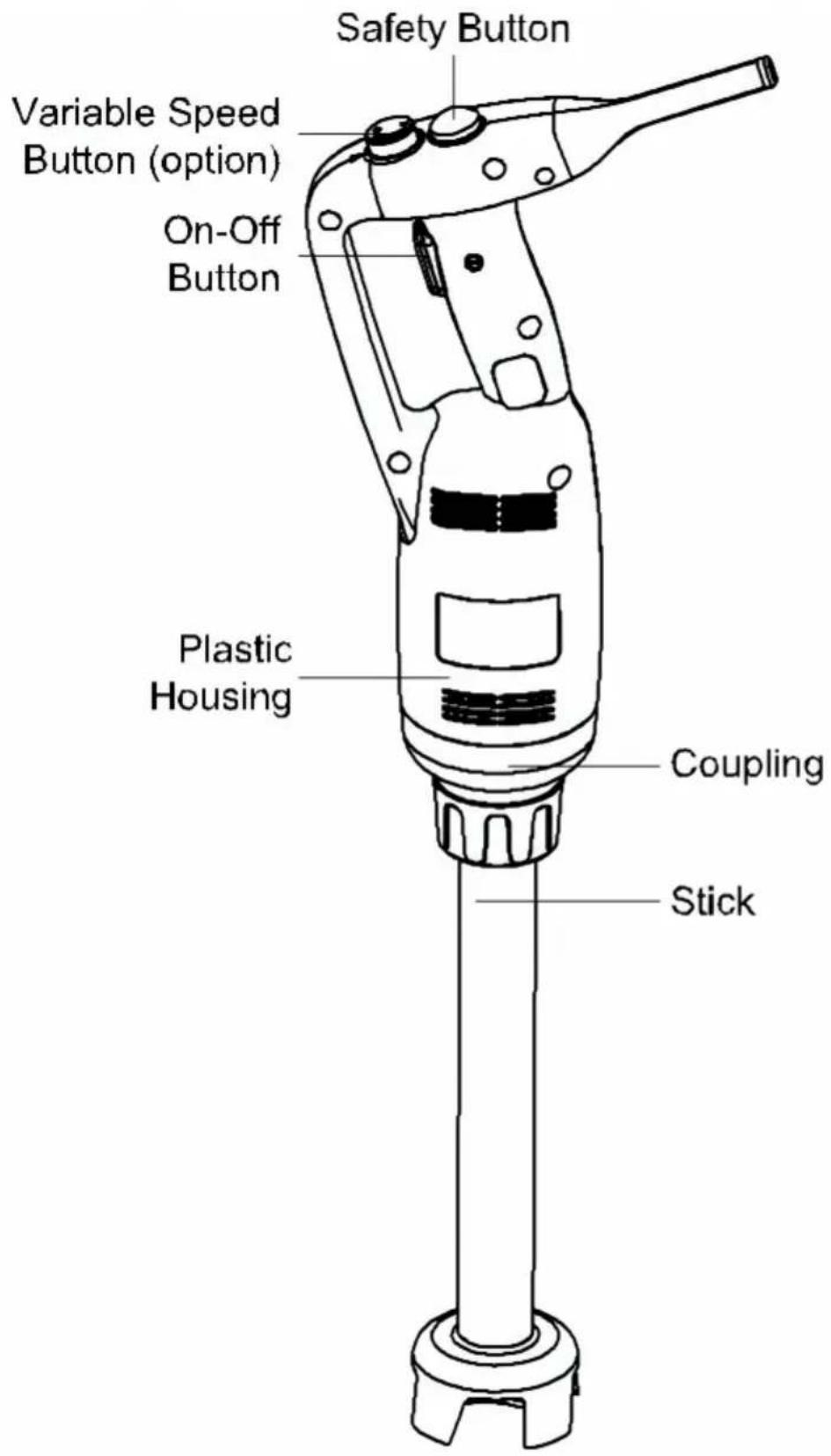
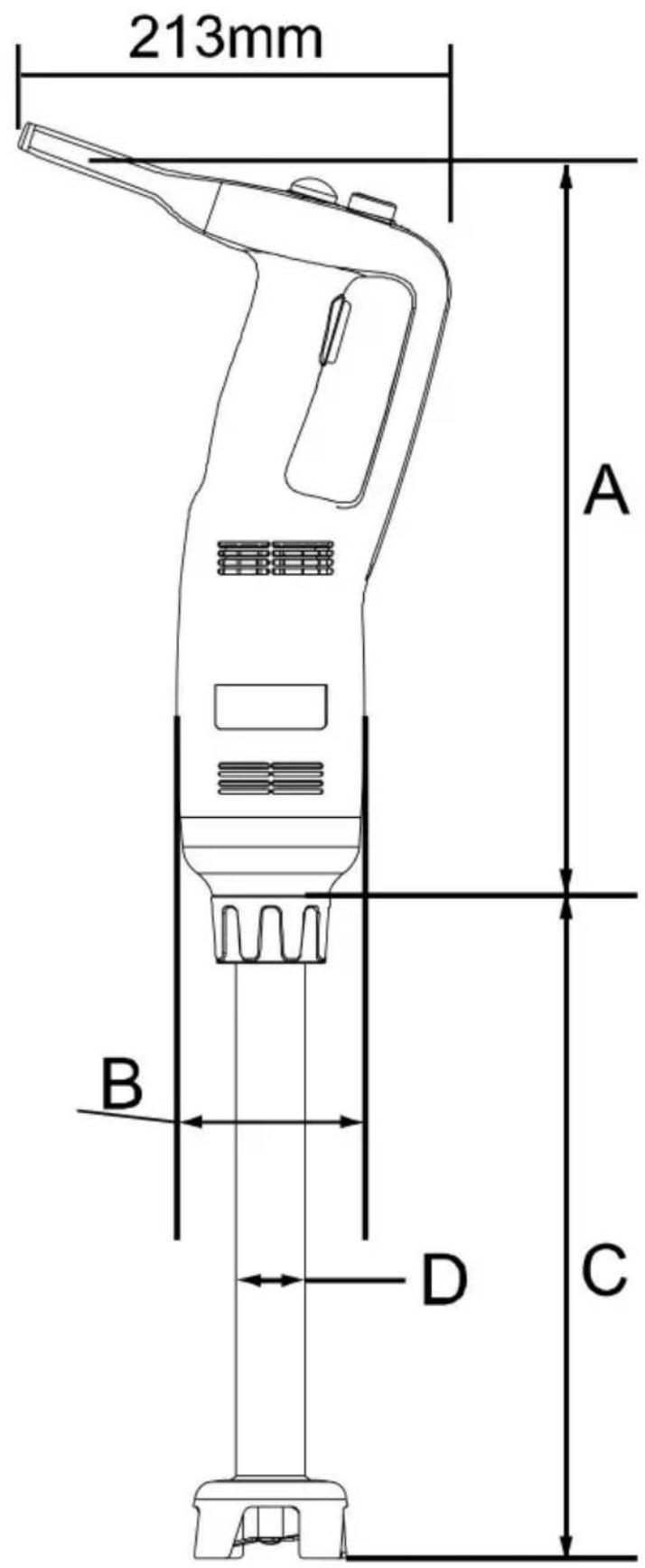
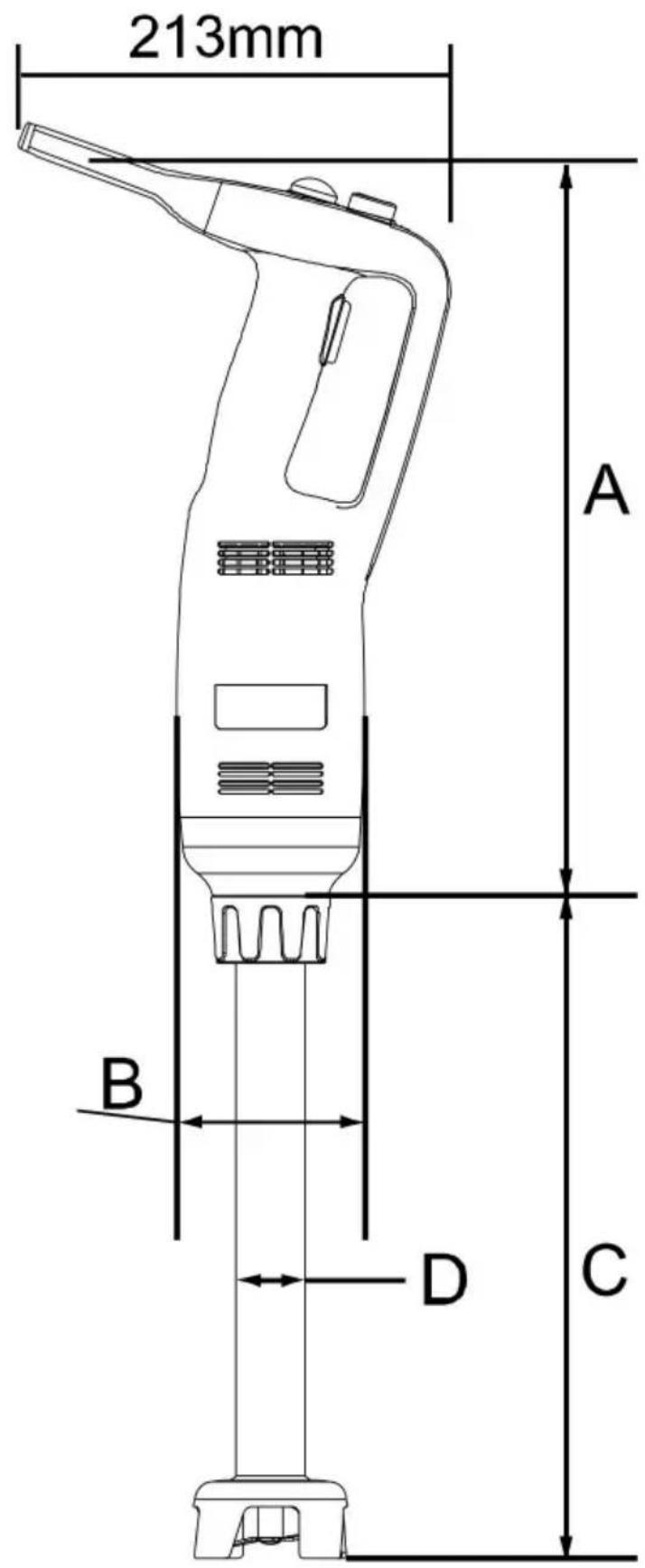
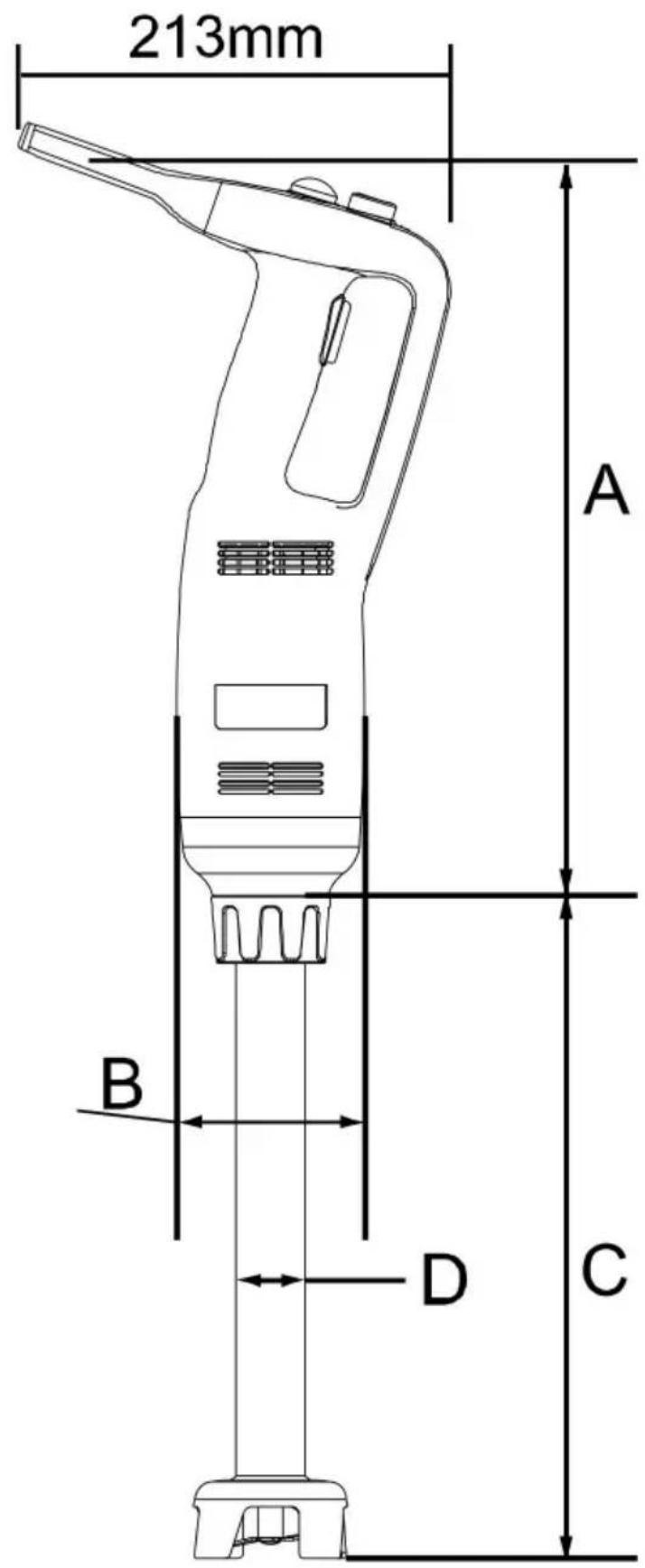
MAIN TECHNICAL PARAMETERS
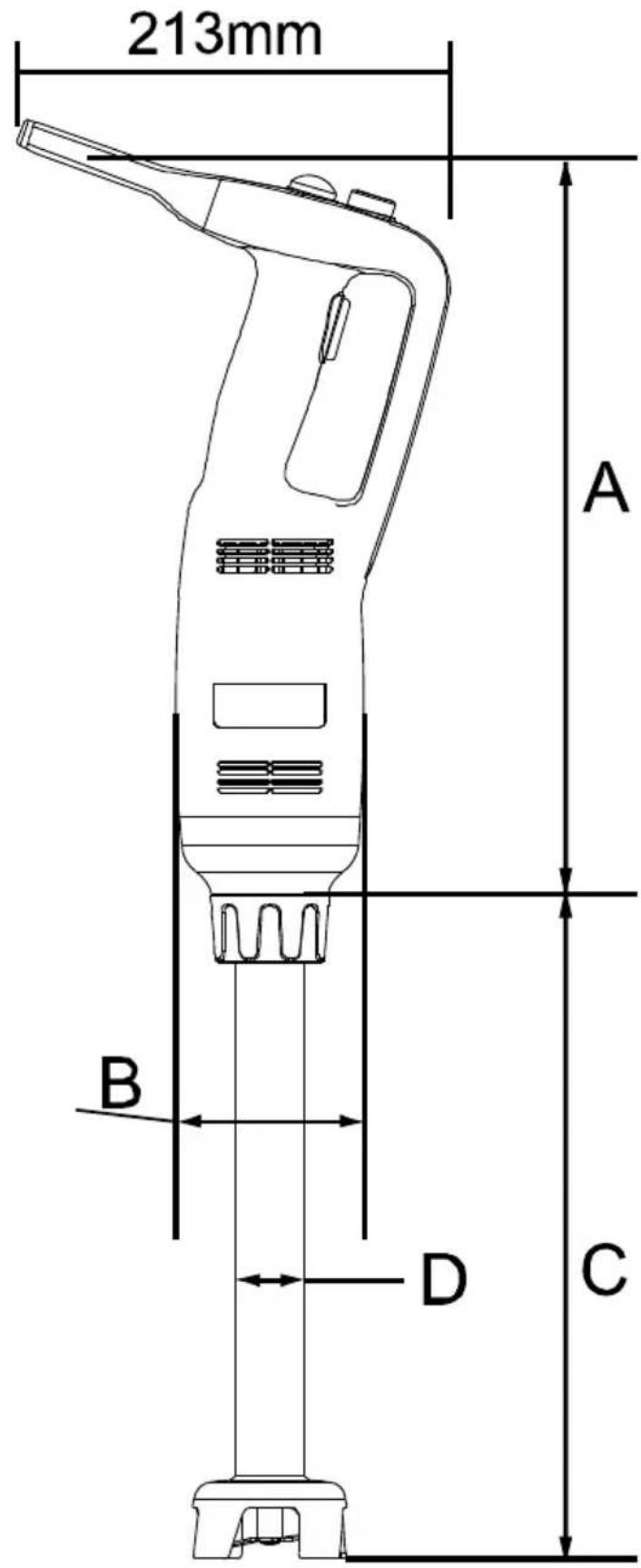
| Model | IB350CV | |
| Input | AC120V 60Hz | AC230V 50Hz |
| Rated Power | 350 W | 350 W |
| Tool length | 10~20 inch | 10~20 inch |
| Rotating speed | Min:4000RPMMax:16000 RPM | |
| Working noise | ≤85dB (A) | |
| A Length | 373 mm | |
| B Diameter | ∅ 96 mm | |
| C Length | 10inch: 254 mm12inch: 305 mm16inch: 406 mm20inch: 508 mm | |
| D Diameter | ∅ 35 mm | |
DIRECTIONS FOR USE
Preparation for first use
Check to make sure the appliance is undamaged. If it is damaged, contact your supplier immediately and do NOT use the appliance. Remove all the packing material and protection film (if applicable). Keep the packaging for future storage.
Clean the appliance, see: 4.6 Cleaning.
Place the food bowl or other container on a level and steady surface, unless mentioned otherwise. It is forbidden to put the machine on different objects from the working ground used in the food field. The working height should be between 900 – 1100mm from the floor level.
Position the appliance in such a way that the plug is accessible.
times.
Ensure the power outlet ratings correspond to the specifications on the rating plate.
Make sure that the machine is connected to a grounding system if needed.
Even if safety systems are installed on the machine, prevent approaching moving parts with hands, and do not touch the machine with wet hands.
Warning! When the whisk is used, start the appliance at a low speed. Warning! It is forbidden to use the whisk on machines with fixed speed.
Disconnect the machine's plug from the electricity before cleaning or maintenance operations.
Do not clean with a high-pressure water jet.
It is strongly recommended that the operator contact the after-sales center if any problem or malfunction occurs. Please do not disassemble or use the machine with unauthorized parts.
Warning: This machine must be properly immersed in water. To avoid overheating or damage, DO NOT allow it to run in the air for more than 10 seconds.
The manufacturer will not be responsible for the following cases:
If the components are replaced by unauthorized parts.
If unauthorized parts are replaced, the components.
If the instructions in this manual are to be carefully followed, the machine surfaces must not be treated with an unsuitable substance solvent.
Safety devices
Safety Switch: The safety switch is equipped for
IB350CF/IB350CV/IB500LF/IB500LV/ IB750LF/IB750LV, to make sure both hands are away from the blade while starting the machine
Overcurrent protection switch (Circuit breaker): This switch is designed to protect the electrical circuit from damage caused by excess current caused by an overload or short circuit. It interrupts current flow after a fault is detected.
Note: To reset the machine, wait a few minutes till the motor cools down, then restart the machine.
INSTALLATION
Packing and unpacking
Remove all packaging materials. Keep the packaging for future storage.
After unpacking all accessories, read the manual carefully before installation.
Make sure the delivery contents are complete and free of any damage. If you find that parts are missing or show damage, do not use the appliance but contact your dealer.
STARTING AND STOPPING THE BLENDER
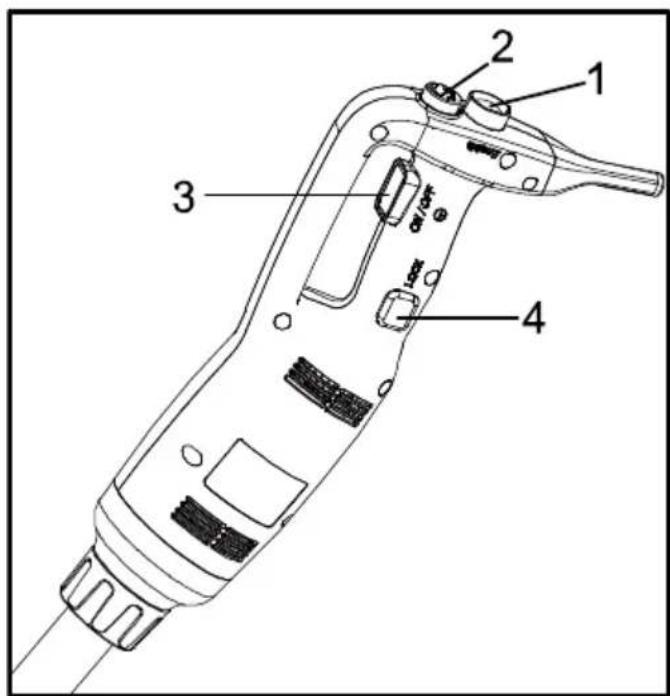
Check that the on-off button (No.3) is in the released position.
Connect the appliance to the power supply.
Insert the tube or whisk into the appliance.
Press and hold down the safety button (No.1) if the appliance is off. Press the on-off button (No.3), and the blender will start up. Release the safety button (No.1).
To stop the blender, release the on-off button (No.3), then the blender stops.
CONTINUOUS OPERATION:
Follow the above steps 4.4.2.1 to 4.4.2.6, then:
While the on-off button (No.3) is in the depressed position, press the locking button (No.4).
Release the on-off button (No.3), and the appliance will function continuously.
To stop the appliance, press the on-off button (No.3) and release it.
Change the speed of the motor by turning the variable speed knob (No.2) towards the maximum or minimum as required. With the self-regulating speed system, once you have selected a speed, it remains constant, even if the consistency of your mixture changes.
Warning: It is strongly advisable to start at a low speed when using the variable-speed blender!
Working position:
Blender function: For better control, we recommend holding the blender by the handle and the bottom of the motor unit. Further, we recommend tilting the blender slightly to prevent the bell front from touching the bottom of the container. Always ensure that the blender is sufficiently immersed to avoid splashing and that the air vents of the motor unit do not come into contact with any liquid. For optimum efficiency, two-thirds of the tube should be immersed in the preparation.
Whisk function: You can also hold the appliance by the handle with one hand, leaving the other free to keep the bowl, if necessary. While you process the preparation, we recommend moving the whisk around in the bowl to ensure the mixture is homogeneous. We strongly advise you to keep the whisk from touching the sides of the bowl. For maximum efficiency, at least one-fifth of the whisk length should be immersed. But never immerse the whisk holder into the preparation.
Warning: It is strongly advisable to start at a low speed when using the whisk!
CLEANING
As a precaution, always unplug your appliance before cleaning it.
After using the immersion blender and whisk in a hot preparation, cool the bottom of the tube in cold water before dismantling it from the tube. After completion of preparation, clean immediately to prevent food from sticking to surfaces.
Never put the motor unit and its handle in water; clean them with a damp cloth or sponge.
Blender tube and bell cleaning: Place the tube and bell into a suitable container with water and switch on for a few seconds to clean the bell and tube.
WARNING: Always dry the blades thoroughly after cleaning to prevent spotting.
Never immerse the whisk holder in water; clean it with a slightly damp cloth or sponge.
It is vital to clean it thoroughly between each job using a detergent disinfectant, but never use pure bleach. For plastic parts, do not use detergents that are too alkaline.
Warning 1: The blender tubes and whisks are unsuitable for dishwasher!
Warning 2: Blender tubes and whisk cannot be immersed thoroughly in water!
STORAGE
Before reassembling, make sure that all parts are dry. Before storing, remove all residues from the appliance and attachments, disconnect them from the supply, and thoroughly clean the appliance and accessories.
Store the appliance in a dry, protected environment at room temperature and out of the reach of children.
We recommend putting the appliance and attachments onto a “wall hanger” for dry and safe storage.
TROUBLESHOOTING
If it is due to a power cut or if the appliance had been unplugged, release the on-off button (No.3), check the power supply and then
restart the appliance.
If it is due to overheating of the machine, release the on-off button (No.3), and then unplug the appliance. Wait a few minutes for the motor to cool down and the thermal safety mechanism to reset, then restart the appliance.
If you cannot locate the cause of the problem: release the on-off button, unplug the appliance, and check the following:
the plug.
that the blades are free to rotate in the bell. Be careful: the blades are very sharp.
the state of the power cord.
the drive shaft is free to rotate. To do this, remove the bell and check the rotation of the end of the drive shaft manually.
If a malfunction occurs that is not on our list of possible faults, contact your retailer or return the appliance to the after-sales services.
VEVOR®
TOUGH TOOLS, HALF PRICE
Technical Support and E-Warranty Certificate
www.vevor.com/support
VEVOR®
TOUGH TOOLS, HALF PRICE
NEED HELP? CONTACT US!
MAIN TECHNICAL PARAMETERS
CONTINUOUS OPERATION:
IB350CF/IB350CV/IB500LF/IB500LV/ IB750LF/IB750LV, um
CONTINUOUS OPERATION:
www.vevor.com/support
VEVOR®
TOUGH TOOLS, HALF PRICE
MAIN TECHNICAL PARAMETERS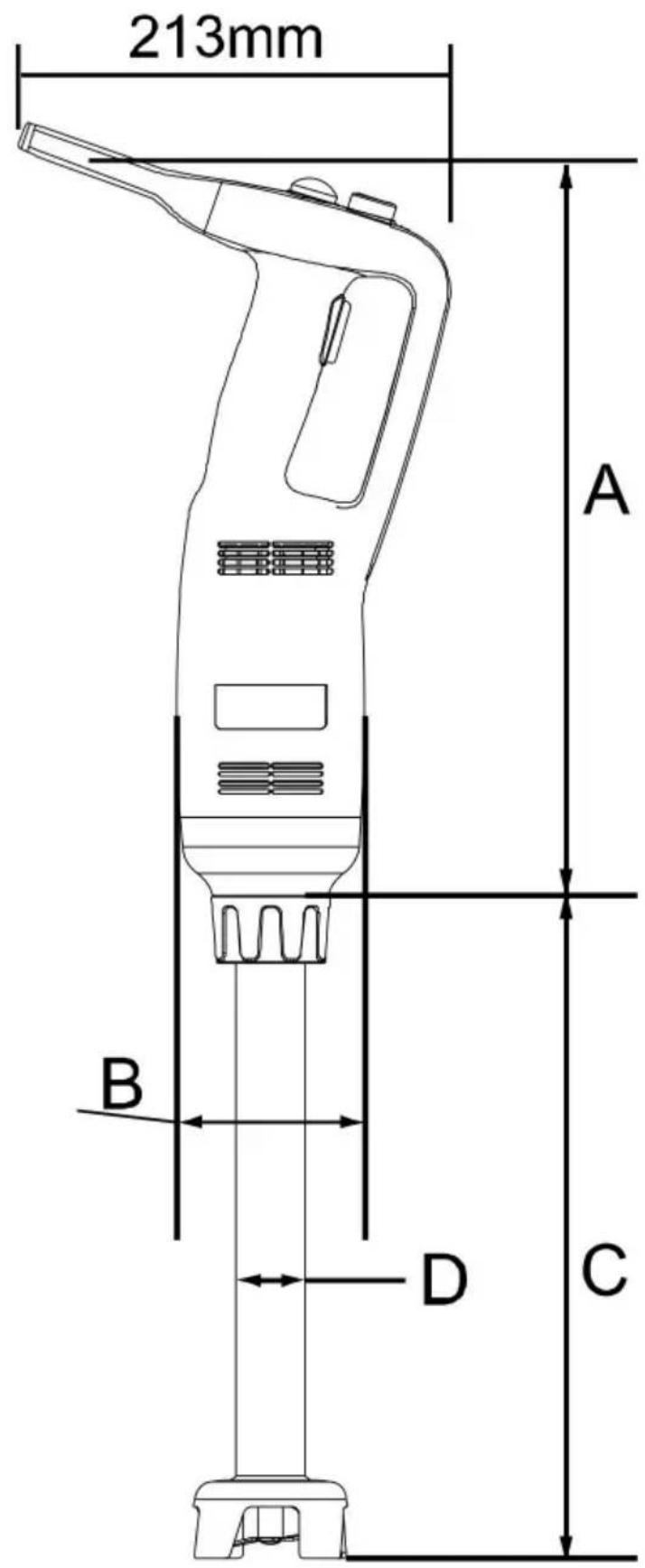
IB350CF/IB350CV/IB500LF/IB500LV/ IB750LF/IB750LV, to make
electronics www.vevor.com/support
VEVOR®
TOUGH TOOLS, HALF PRICE
MAIN TECHNICAL PARAMETERS
NEED HELP? CONTACT US!
MAIN TECHNICAL PARAMETERS
CONTINUOUS OPERATION:
NEED HELP? CONTACT US!
MAIN TECHNICAL PARAMETERS
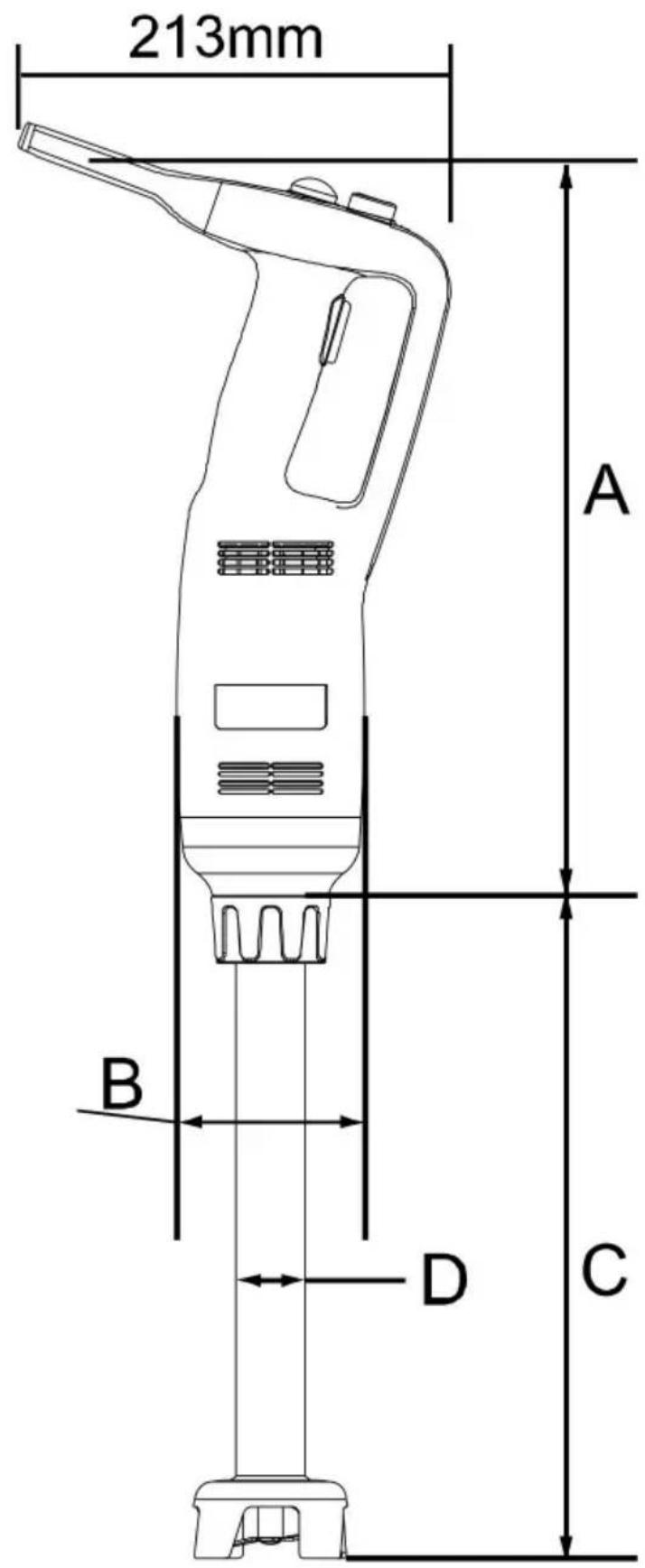
| Model | IB350CV | |
| Invoer | AC120V 60Hz | AC230V 50Hz |
| Nominaal vermogen | 350W | 350W |
| Gereedschapslengte | 10~20 inch | 10~20 inch |
| Rotatiesnelheid | Minimaal: 4000 tpmMaximaal: 16000 RPM | |
| Werkgeluid | y85dB (A) | |
| Een lengte | 373mm | |
| B-diameter | 96 mm | |
| C-lengte | 10 inch: 254 mm12 inch: 305 mm16 inch: 406 mm20 inch: 508 mm | |
| D-diameter | 35 mm | |
INSTRUCTIONS FOR USE
CONTINUOUS OPERATION:
VARIABLE SPEED OPERATION
NEED HELP? CONTACT US!
MAIN TECHNICAL PARAMETERS
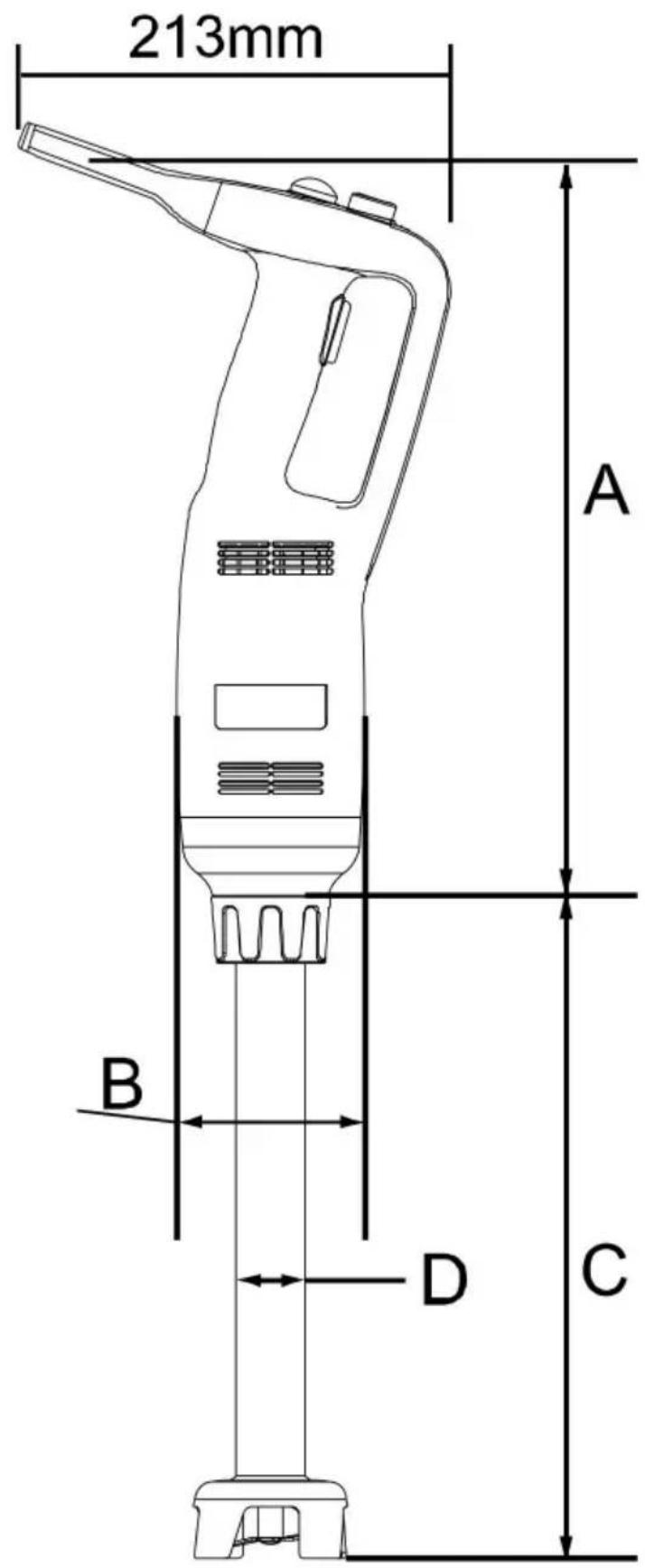
| Modell | IB350CV | |
| Input | AC120V 60Hz | AC230V 50Hz |
| Nominell effekt | 350W | 350W |
| Verktygets längd | 10~20 tum | 10~20 tum |
| Roterande hastighet | Min: 4000 rpmMax: 16000 RPM | |
| Arbetsljud | ÿ85dBÿAÿ | |
| A Längd | 373 mm | |
| B Diameter | ∅ 96 mm | |
| C Längd | 10 tum: 254 mm12 tum: 305 mm16 tum: 406 mm20 tum: 508 mm | |
| D Diameter | ∅ 35 mm | |
INSTRUCTIONS FOR USE
CONTINUOUS OPERATION:
www.vevor.com/support
- COMMERCIAL BLENDER
- MANUAL
- NEED HELP? CONTACT US
- PRODUCT DESCRIPTION
- SAFETY REGULATIONS
- SPECIAL SAFETY REGULATIONS
- PARTS DESCRIPTION
- MAIN TECHNICAL PARAMETERS
- DIRECTIONS FOR USE
- PREPARATION FOR FIRST USE
- THE MANUFACTURER WILL NOT BE RESPONSIBLE FOR THE FOLLOWING CASES
- SAFETY DEVICES
- INSTALLATION
- PACKING AND UNPACKING
- STARTING AND STOPPING THE BLENDER
- CONTINUOUS OPERATION
- CLEANING
- STORAGE
- TROUBLESHOOTING
- VEVOR®
- TOUGH TOOLS, HALF PRICE
- INSTRUCTIONS FOR USE
- VARIABLE SPEED OPERATION
Brand : Vevor
Model : IB350CV
Category : Blender