
VBPYCE-110 - Thermostat Vevor - Free user manual and instructions
Find the device manual for free VBPYCE-110 Vevor in PDF.
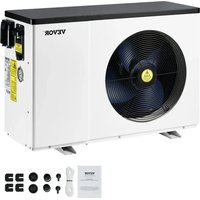


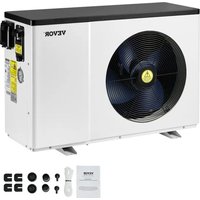
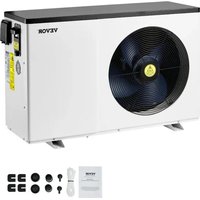
| Brand | Vevor |
| Model | VBPYCE-110 |
| Product Type | Heat pump for pool |
| Net Dimensions (L x W x H) | 1000 × 400 × 660 mm |
| Net Weight | 48.5 kg |
| Power Supply | 220-240 V ~ 50 Hz |
| Max Current | 12.23 A |
| Nominal Power Input (Heating) | 1.62 kW |
| Nominal Heating Power | 11.50 kW |
| Nominal Cooling Power | 11.58 kW |
| Refrigerant | R32 |
| Compressor | Mitsubishi |
| Water Temperature Range (Heating) | 9 – 40 °C |
| Water Temperature Range (Cooling) | 8 – 28 °C |
| Operating Ambient Temperature | -10 – 43 °C |
| Water Heat Exchanger Type | Titanium exchanger |
| Recommended Water Flow | 4.9 m³/h |
| Water Pipe Connection | 1-1/2" |
| Protection Level | IPX4 |
| Noise at 1 m | 43 – 53 dB(A) |
| Main Functions | Heating, cooling, automatic mode, timer, automatic defrost |
| Maintenance and Cleaning | Clean the casing with a damp cloth; clean the evaporator with a vacuum cleaner with a soft brush; drain the water in winter |
| Safety | High/low pressure protection, anti-freeze protection, water shortage protection, emergency stop |
| Spare Parts and Repairability | Disassembly possible with screwdriver and wrench; access to compressor, fan, electronic board |
Frequently Asked Questions - VBPYCE-110 Vevor
User questions about VBPYCE-110 Vevor
0 question about this device. Answer the ones you know or ask your own.
Ask a new question about this device
Download the instructions for your Thermostat in PDF format for free! Find your manual VBPYCE-110 - Vevor and take your electronic device back in hand. On this page are published all the documents necessary for the use of your device. VBPYCE-110 by Vevor.
USER MANUAL VBPYCE-110 Vevor
Technical Support and E-Warranty Certificate
www.vevor.com/support
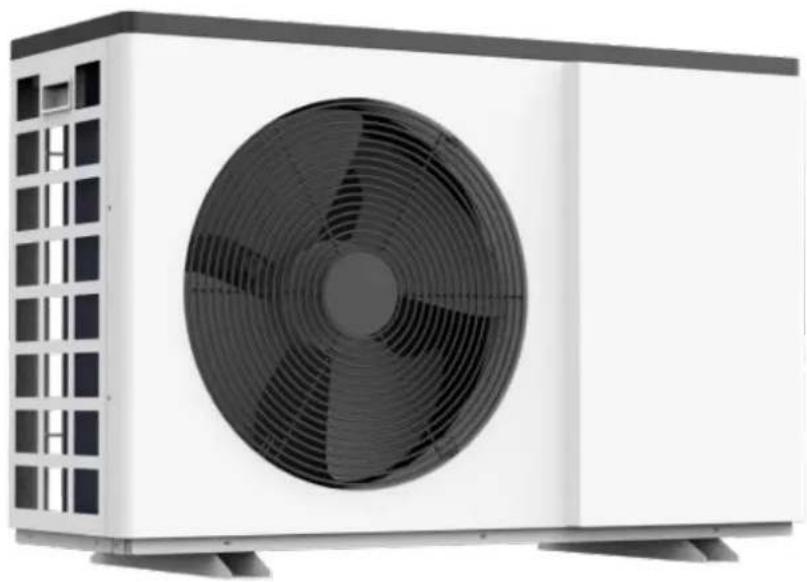
Pool Heat Pump
Model: VBPYCE-70/VBPYCE-110/VBPYCE-150/VBPYCE-210
We continue to be committed to provide you with tools at competitive prices. "Save Half", "Half Price", or any other similar expressions used by us represent an estimate of savings you might benefit from buying certain tools with us compared to the major top brands and does not necessarily mean all categories of tools offered by us. You are kindly reminded to verify carefully when you are placing an order with us if you are actually saving half in comparison with the top major brands.
Model: VBPYCE-70/VBPYCE-110/VBPYCE-150/VBPYCE-210

NEED HELP? CONTACT US!
Have product questions? Need technical support? Please feel free to contact Technical Support and E-Warranty Certificate at www.vevor.com/support
This is the original instruction. Please read all manual instructions carefully before operating. VEVOR reserves a clear interpretation of our user manual. The appearance of the product shall be subject to the product you received. Please forgive us; we won't inform you again if there are any technology or software updates on our products.
CONTENTS
1. FOREWORD 3
1.1. Read the Manual Before Operation 3 1.2. The Symbol Description of the Device 7 1.3. Statement 7 1.4. Safety Factors 8
2. OVERVIEW OF THE UNIT 10
2.1. Accessories Supplied With the Unit 10 2.2. Dimensions of the Unit 10 2.3. Main Parts of the Unit 11 2.4. Operation Range 15 2.5. Parameter of the Unit 15
3. INSTALLATION AND CONNECTION 16
3.1. Transportation....- 16 - 3.2. Notice Before Installation....- 17 - 3.3. Installation Instruction ...... - 17 - 3.4. Trial After Installation - 20 -
4. Remote controller operation guidance ...... error! Bookmark not defined.
1.1. Read the Manual Before Operation
WARNING
Do not use means to accelerate the defrosting process or to clean, other than those recommended by the manufacturer. The appliance shall be stored in a room without continuously operating ignition sources (for example: open flames, an operating gas appliance or an operating electric heater). Do not pierce or burn.
Be aware that refrigerants may not contain an odour.
Initial safety checks shall include:
①That capacitors are discharged: this shall be done in a safe manner to avoid possibility of sparking; ②That no live electrical components and wiring are exposed while charging, recovering or purging the system; ③That there is continuity of earth bonding.
Checks to the area
Prior to beginning work on systems containing flammable refrigerants, safety checks are necessary to ensure that the risk of ignition is minimized. For repair to the refrigerating system, the following precautions shall be completed prior to conducting work on the system
Work procedure
Work shall be undertaken under a controlled procedure so as to minimize the risk of a flame or vapour being present while the work is being performed.
General work area
All maintenance staff and others working in the local area shall be instructed on the nature of the work being carried out. Work in confined spaces shall be avoided.
Checking for presence of refrigerant
The area shall be checked with an appropriate refrigerant detector prior to and during work, and the technician shall be aware of potentially flammable atmospheres. Ensure that the leak detection equipment being used is suitable for use with flammable refrigerants, i.e., non-sparking, adequately sealed, or intrinsically safe.
Presence of fire extinguisher
If any hot work is to be conducted on the refrigerating equipment or any associated parts, fire extinguishing equipment shall be available to hand. Have a dry powder or CO2 fire extinguisher adjacent to the charging area.
No ignition sources
No person carrying out work in relation to a refrigeration system that involves exposing any work that contains or has contained flammable refrigerant shall use any sources of ignition in a manner that may lead to the risk of fire or explosion. All possible ignition sources, including smoking, should be kept sufficiently far away from the site of installation, repairing, removing, or disposal, during which flammable refrigerant can possibly be released to the surrounding space.
Before work takes place, the area around the equipment is to be surveyed to make sure there are no flammable hazards or ignition risks. "No Smoking" signs shall be displayed.
Ventilated area
Ensure that the area is in the open or that it is adequately ventilated before breaking into the system or conducting any hot work. A degree of ventilation shall continue during the period that the work is carried out. The ventilation should safely disperse any released refrigerant and preferably expel it externally into the atmosphere.
Checks to the refrigeration equipment
Where electrical components are being changed, they shall be fit for the purpose and to the specification. At all times the manufacturer's maintenance and service guidelines shall be followed. In doubt, consult the manufacturer's technical department for assistance.
The following checks shall be applied to installations using flammable refrigerants:
① The charge size is in accordance with the room size within which the refrigerant containing parts are installed; ② The ventilation machinery and outlets are operating adequately and are not obstructed; ③ If an indirect refrigerating circuit is being used, the secondary circuit shall be checked for the presence of refrigerant; ④ Marking to the equipment continues to be visible and legible. Markings and signs that are illegible shall be corrected; ⑤ Refrigeration pipe or components are installed in a position where they are unlikely to be exposed to any substance which may corrode refrigerant containing components, unless the components are constructed of materials which are inherently resistant to being corroded or are suitably protected against being so corroded.
Repairs to sealed components
- During repairs to sealed components, all electrical supplies shall be disconnected from the equipment being worked upon prior to any removal of sealed covers, etc. If it is absolutely necessary to have an electrical supply to equipment during servicing, then a permanently operating form of detection shall be located at the most critical point to warn of a potentially hazardous situation.
- Particular attention shall be paid to the following to ensure that by working on electrical components, the casing is not altered in such a way that the level of protection is affected. This shall include damage to cables, excessive number of connections, terminals not made to original specifications, damage to seals, incorrect fitting of glands, etc.
Ensure that the apparatus is mounted securely.
Ensure that seals or sealing materials have not degraded to the point that they no longer serve the purpose of preventing the ingress of flammable atmospheres. Replacement parts shall be in accordance with the manufacturer's specifications.
Repair to intrinsically safe components
Do not apply any permanent inductive or capacitive loads to the circuit without ensuring that this does not exceed the permissible voltage and current permitted for the equipment in use. Intrinsically safe components are the only types that can be worked on while live in the presence of a flammable atmosphere. The test apparatus shall be at the correct rating.
Replace components only with parts specified by the manufacturer. Other parts may result in ignition of refrigerant in the atmosphere from a leak.
NOTE The use of silicon sealant can inhibit the effectiveness of some types of leak detection equipment.
equipment.
Intrinsically safe components do not have to be isolated prior to working on them.
Cabling
Check that cabling will not be subject to wear, corrosion, excessive pressure, vibration, sharp edges, or any other adverse environmental effects. The check shall also take into account the effects of continual vibration from sources such as compressors or fans.
Detection of flammable refrigerants
Under no circumstances shall potential sources of ignition be used in the searching for or detection of refrigerant leaks. A halide torch (or any other detector using a naked flame) shall not be used.
Leak detection methods
The following leak detection methods are deemed acceptable for systems containing flammable refrigerants.
Electronic leak detectors shall be used to detect flammable refrigerants, but the sensitivity may be adequate, or may need re-calibration. (Detection equipment shall be calibrated in a refrigerant-free area.) Ensure that the detector is not a potential source of ignition and is suitable for the refrigerant used. Leak detection equipment shall be set at a percentage of the LFL of the refrigerant and calibrated to the refrigerant employed and the appropriate percentage of gas (25 % maximum confirmed).
Leak detection fluids are suitable for use with most refrigerants but the use of detergents containing chlorine shall be avoided as the chlorine may react with the refrigerant and corrode the copper pipe-work.
If a leak is suspected, all naked flames shall be removed/extinguished.
If a leakage of refrigerant is found which requires brazing, all of the refrigerant shall be recovered from the system, or isolated (by means of shut off valves) in a part of the system remote from the leak. Oxygen free nitrogen (OFN) shall then be purged through the system both before and during the brazing process.
Removal and evacuation
When breaking into the refrigerant circuit to make repairs – or for any other purpose – conventional procedures shall be used. However, it is important that best practice is followed since flammability is a consideration. The following procedure shall be adhered to:
① Remove refrigerant; ② Purge the circuit with inert gas; ③ Evacuate; ④ Purge again with inert gas; ⑤ Open the circuit by cutting or brazing.
The refrigerant charge shall be recovered into the correct recovery cylinders. The system shall be "flushed" with OFN to render the unit safe. This process may need to be repeated several times. Compressed air or oxygen shall not be used for this task.
Flushing shall be achieved by breaking the vacuum in the system with OFN and continuing to fill until the working pressure is achieved, then venting to atmosphere, and finally pulling down to a vacuum. This process shall be repeated until no refrigerant is within the system. When the final OFN charge is used, the system shall be vented down to atmospheric pressure to enable work to take place. This operation is absolutely vital if brazing operations on the pipework are to take place.
Ensure that the outlet for the vacuum pump is not close to any ignition sources and there is adequate ventilation.
available.
Charging procedures
In addition to conventional charging procedures, the following requirements shall be followed:
①Ensure that contamination of different refrigerants does not occur when using charging equipment. Hoses or lines shall be as short as possible to minimize the amount of refrigerant contained. Cylinders shall be kept upright. ②Ensure that the refrigeration system is earthed prior to charging the system with refrigerant. ③Label the system when charging is complete (if not already). ④Extreme care shall be taken not to overfill the refrigeration system. Prior to recharging the system, it shall be pressure tested with OFN. The system shall be leak tested on completion of charging and prior to commissioning. A follow-up leak test shall be carried out prior to leaving the site.
Decommissioning
Before carrying out this procedure, it is essential that the technician is completely familiar with the equipment and all its details. It is recommended good practice that all refrigerants are recovered. Prior to the task being carried out, an oil and refrigerant sample shall be taken in case analysis is required prior to re-use of reclaimed refrigerant. It is essential that electrical power is available for the task to be commenced.
①Become familiar with the equipment and its operation.
②Isolate the system electrically.
③Before attempting the procedure, ensure that:
Mechanical handling equipment is available, if required, for handling refrigerant cylinders; all personal protective equipment is available and being used correctly;
The recovery process is supervised at all times by a competent person;
Recovery equipment and cylinders conform to the appropriate standards.
④Pump down the refrigerant system, if possible. ⑤If a vacuum is not possible, make a manifold so that refrigerant can be removed from various parts of the system. ⑥Make sure that the cylinder is situated on the scales before recovery takes place. ⑦Start the recovery machine and operate in accordance with the manufacturer's instructions. ⑧Do not overfill cylinders (no more than 80% volume liquid charge). ⑨Do not exceed the maximum working pressure of the cylinder, even temporarily. ⑩When the cylinders have been filled correctly and the process completed, make sure that cylinders and the equipment are removed from the site promptly and all isolation valves on the equipment are closed off. ⑪Recovered refrigerant shall not be charged into another refrigeration system unless it has been cleaned and checked.
Labeling
Equipment shall be labeled stating that it has been decommissioned and emptied of refrigerant. The label shall be dated and signed. Ensure that there are labels on the equipment stating that it contains flammable refrigerant.
Recovery
When removing refrigerant from a system, either for servicing or decommissioning, it is recommended good practice that all refrigerants are removed safely. When transferring refrigerant into cylinders, ensure that only appropriate refrigerant recovery cylinders are employed. Ensure that the correct
Number of cylinders for holding the total system charge are available. All cylinders to be used must be designated for the recovered refrigerant and labeled for that refrigerant (i.e., special cylinders or recovery of refrigerant). Cylinders shall be complete with pressure relief valve and associated valves in good working order. Empty recovery cylinders are evacuated and, if possible, cooled before recovery occurs.
The recovery equipment shall be in good working order with a set of instructions concerning equipment that is at hand and shall be suitable for the recovery of flammable refrigerants.
In addition, a set of calibrated weighing scales shall be available and in good working order. Hoses shall be complete with leak-free disconnect couplings and in good condition. Before using the recovery machine, check that it is in satisfactory working order, has been properly maintained, and any associated electrical components are sealed to prevent ignition in the event of a refrigerant release. Consult the manufacturer if in doubt.
The recovered refrigerant shall be returned to the refrigerant supplier in the correct recovery container and the relevant Waste Transfer Note arranged. Do not mix refrigerants in recovery units and especially not in cylinders.
If compressors or compressor oils are to be removed, ensure that they have been evacuated to an acceptable level to make certain that flammable refrigerant does not remain within the lubrication. The evacuation process shall be carried out prior to returning the compressor to the suppliers. Heating the compressor body shall be employed to accelerate this process. When oil is drained from a system, it shall be carried out safely.
1.2. Symbol Description of the Device
The precautions listed here are divided into the following types. They are quite important, so follow them carefully. Meanings of DANGER, WARNING, CAUTION, and NOTE symbols.
| Symbols | Meaning | Description |
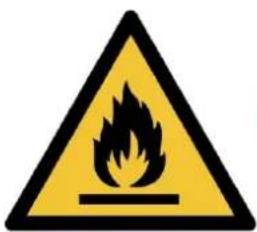
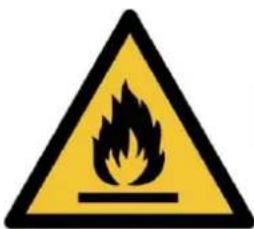
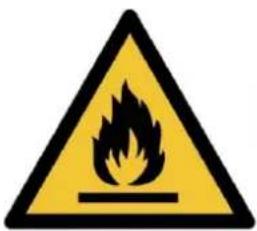
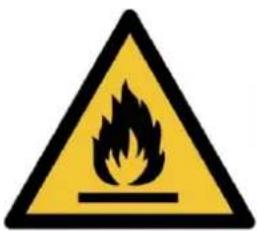
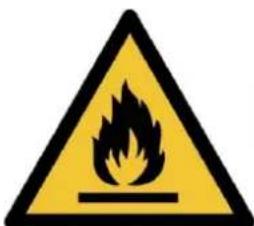
 | WARNING | The symbol shows that this appliance uses a flammable refIf the refrigerant is leaked and exposed to an external is source, there is a risk of fire. |
 | WARNING | All information marked with this symbol is important and sh viewed carefully. |
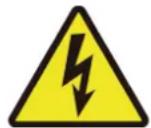 | WARNING | This symbol shows that there might be an electric shock appliance still connects the power cleaning, examination and |
 | CAUTION | This symbol shows Anti-freezing protection. It is necessary prevent the freezing of heat exchanger or water pipes, the unit can not be shut off in the ambient temperature lowerAll the water in the unit and plumbing system must be dra the unit will be turned off for a long time. |
 | CAUTION | This symbol shows that the operation manual should be carefully. |
 | CAUTION | This symbol shows that a service personnel should be hand equipment with reference to the installation manual. |
 | CAUTION | This symbol shows that information is available such as operating manual or installation manual. |
1.3. Statement
To keep users under safe working conditions and ensure property safety, please follow the instructions:
① Wrong operation may result in injury or damage; ② Please install the unit in compliance with local laws, regulations, and standards; ③ Confirm power voltage and frequency; ④ The unit is only used with grounding sockets; ⑤ Independent switch must be provided with the unit.
1.4. Safety Factors
The following safety factors need to be considered:
① Please read the following warnings before installation; ② Be sure to check the details that need attention, including safety factors; ③ After reading the installation instructions, be sure to save them for future reference.

WARNING
Make sure that the unit is installed safely and reliably.
- If the unit is not secure or not installed, it may cause damage. The minimum support weight required for installation is 21 g/mm².
- If the unit is installed in a closed area or limited space, please consider the size of the room and ventilation to prevent suffocation caused by refrigerant leakage.
① Use a specific wire and fasten it to the terminal block so that the connection will prevent pressure from being applied to parts.
② Wrong wiring will cause fire.
Please connect the power wire accurately according to the wiring diagram in the manual to avoid damage to the unit or fire.
③ Be sure to use correct materials during installation.
Wrong parts or wrong materials may result in fire, electric shock, or falling of the unit.
④ Install on the ground safely; please read the installation instructions.
Improper installation may result in fire, electric shock, falling of the unit, or water leakage.
⑤ Use professional tools for electrical work. If power supply capacity is insufficient or the circuit is not completed, it may cause fire or electric shock. ⑥ The unit must have a grounding device. If the power supply does not have a grounding device, be sure not to connect the unit. ⑦ The unit should only be removed and repaired by a professional technician. Improper movement or maintenance of the unit may cause water leakage, electric shock, or other issues. Please find a professional technician to do it. ⑧ Don't unplug or plug the power during operation. It may cause fire or electric shock. ⑨ Don't touch or operate the unit when your hands are wet. It may cause fire or electric shock. ⑩ Don't place heaters or other electrical appliances near the power wire. It may cause fire or electric shock. ⑪ Water must not be poured directly from the unit. Do not let water permeate into the electrical components.

WARNING
① Do not install the unit in a location where there may be flammable gas. ② If there is flammable gas around the unit, it will cause an explosion.
According to the instructions, carry out the drainage system and pipeline work. If the drainage system pipeline is defective, water leakage will occur. And it should be disposed of immediately to prevent household products from getting wet and damaged.
③ Do not clean the unit while the power is on. Turn off the power before cleaning the unit. If not, it may result in injury from a high-speed fan or electric shock. ④ Stop operating the unit once there is a problem or a fault code.
Please turn off the power and stop the unit. Otherwise, it may cause electric shock or injury. ⑤ Be careful when the unit is not packed or not installed. Pay attention to sharp edges and fins of the heat exchanger. ⑥ After installation or repair, please confirm that refrigerant is not leaking. If refrigerant is not enough, the unit will not work properly. ⑦ The installation of the external unit must be flat and firm. Avoid abnormal vibration and noise. ⑧ Do not put your fingers into the fan and evaporator. High-speed running fan will result in serious injury. ⑨ This device is not designed for people who are physically or mentally weak (including children) and who do not have experience and knowledge of heating and cooling systems. Unless it is under the direction and supervision of a professional technician, or has received training on the use of the unit. Children must use it under the supervision of an adult to ensure that they use the unit safely. If the unit is damaged, it must be replaced by a professional technician to avoid danger.
2. OVERVIEW OF THE UNIT
2.1. Accessories Supplied With the Unit
After unpacking, please check if you have all the following components.
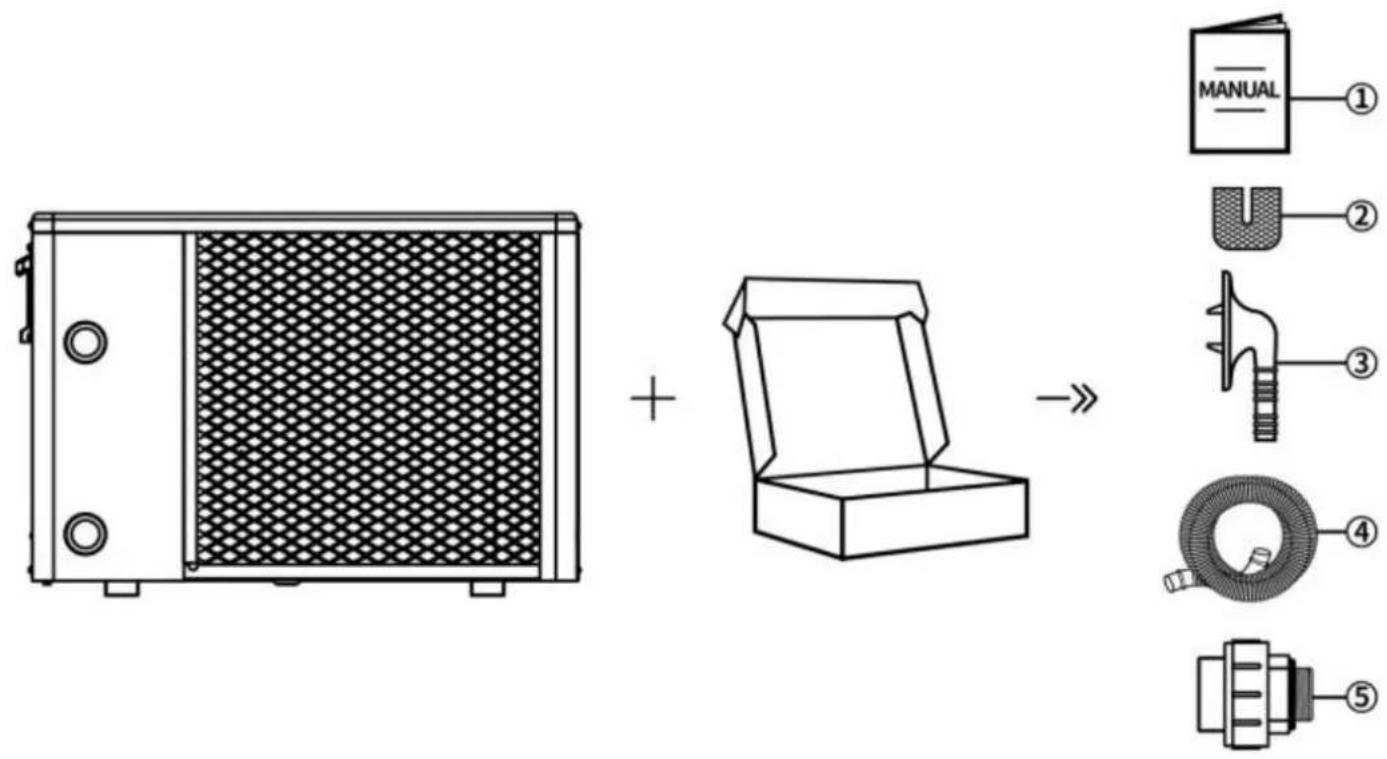
| NO. | Components | Quantity | NO. | Components | Quantity |
| 1 | User Manual | 1 | 4 | Drain Pipe | 2 |
| 2 | Rubber Blanket | 4 | 5 | Water Pipe Joint | 2 |
| 3 | Drain Connector | 2 |
2.2. Dimensions of the Unit
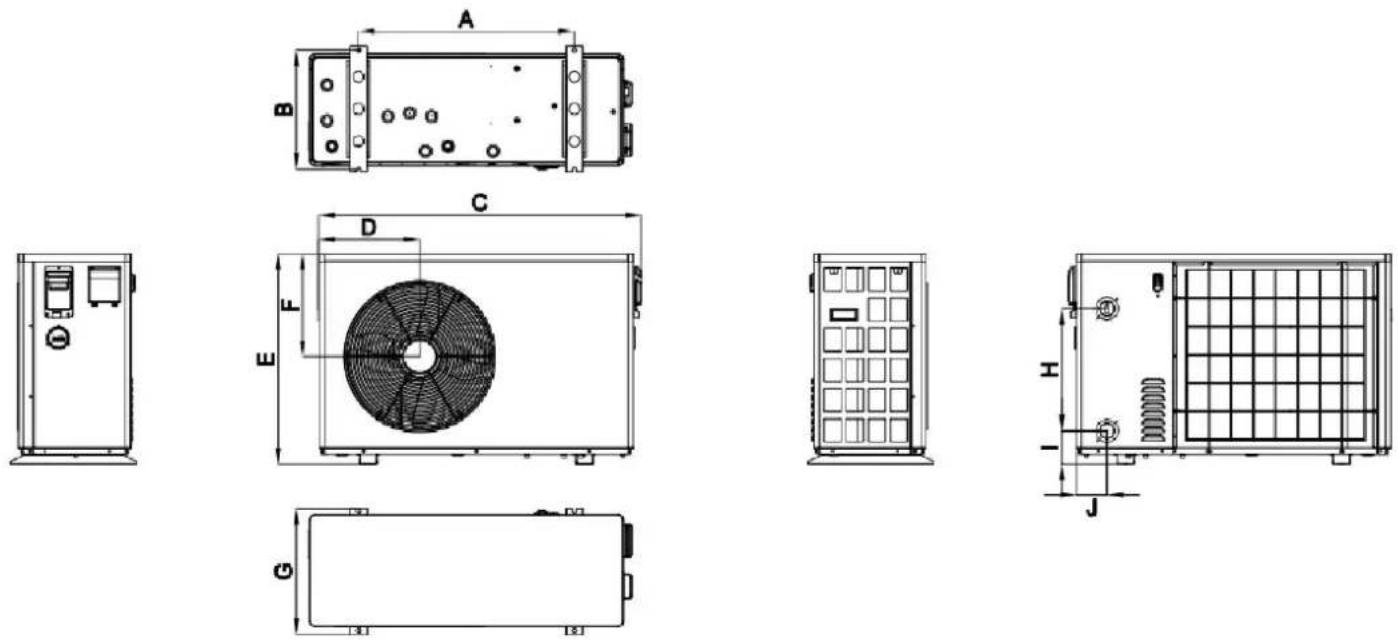
Dimension Unit: (mm)
| Model | A | B | C | D | E | F | G | H | I | J |
| VBPYCE-70 | 549 | 339 | 910 | 304 | 618 | 307 | 360 | 320 | 98 | 80 |
| VBPYCE-110 | ||||||||||
| VBPYCE-150 | 671 | 370 | 1002 | 314 | 654 | 320 | 391 | 380 | 103 | 95 |
| VBPYCE-210 | 720 | 423 | 1192 | 358 | 775 | 407 | 447 | 470 | 108 | 126 |
2.3. Main Parts of the Unit
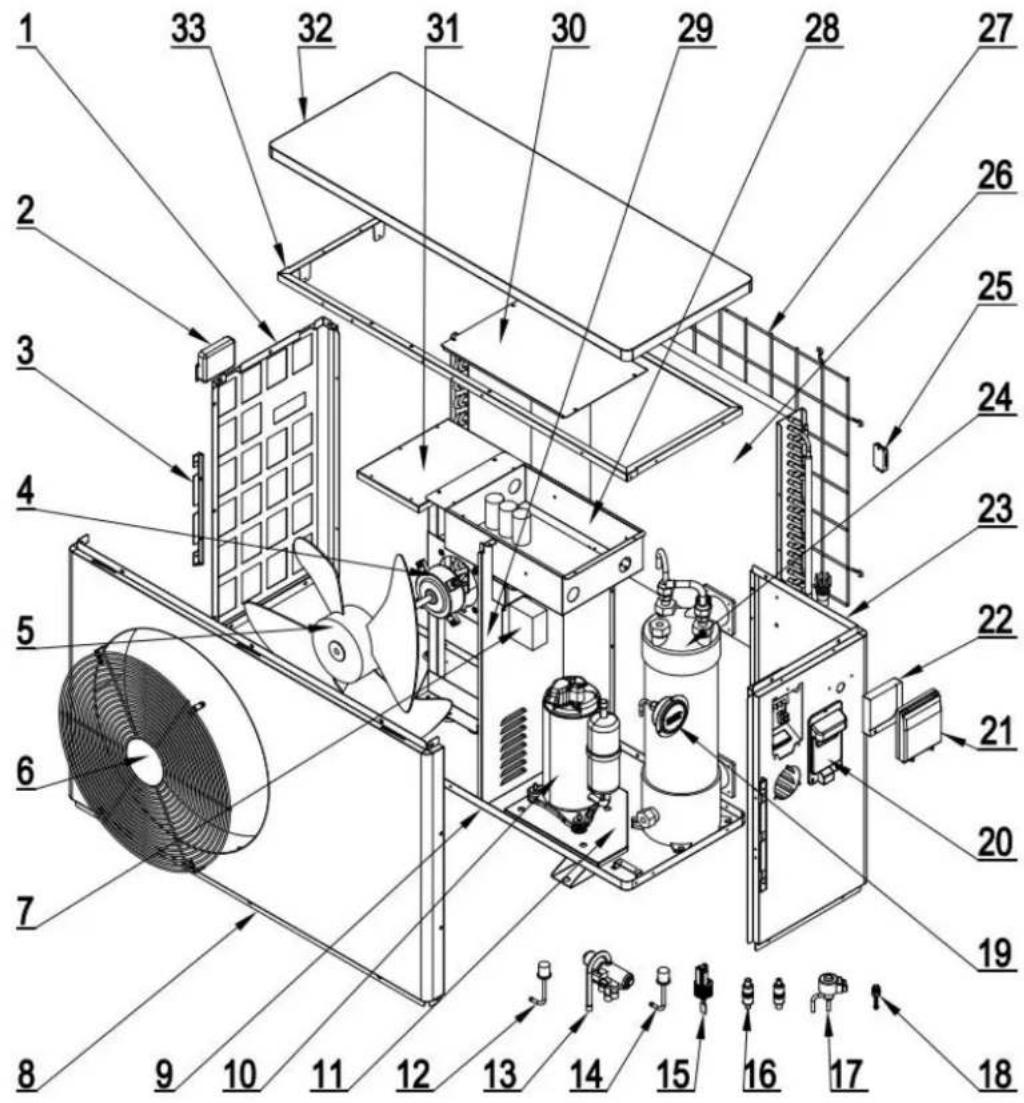
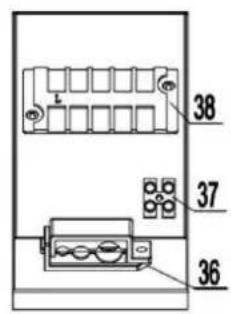
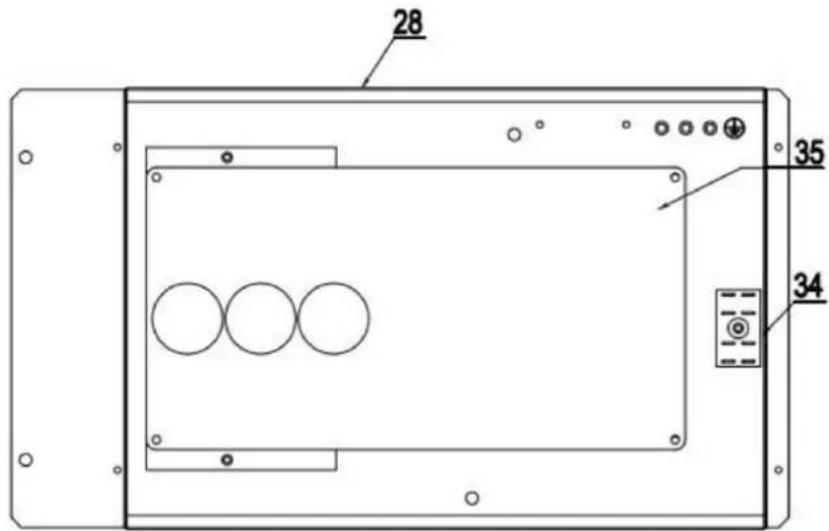
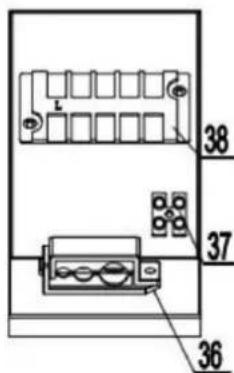
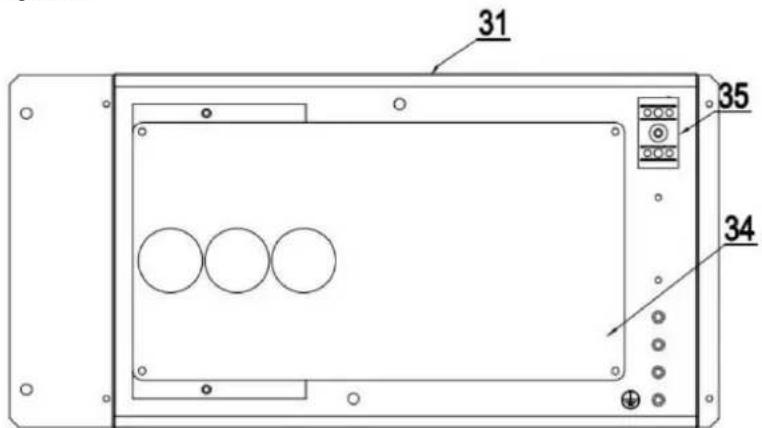
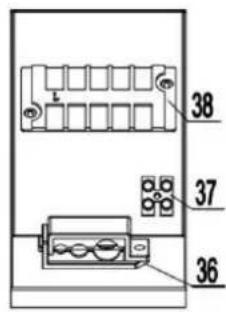
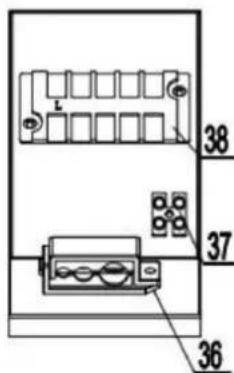
2.3.1. VBPYCE-70, VBPYCE-110
① Sheet metal and other structures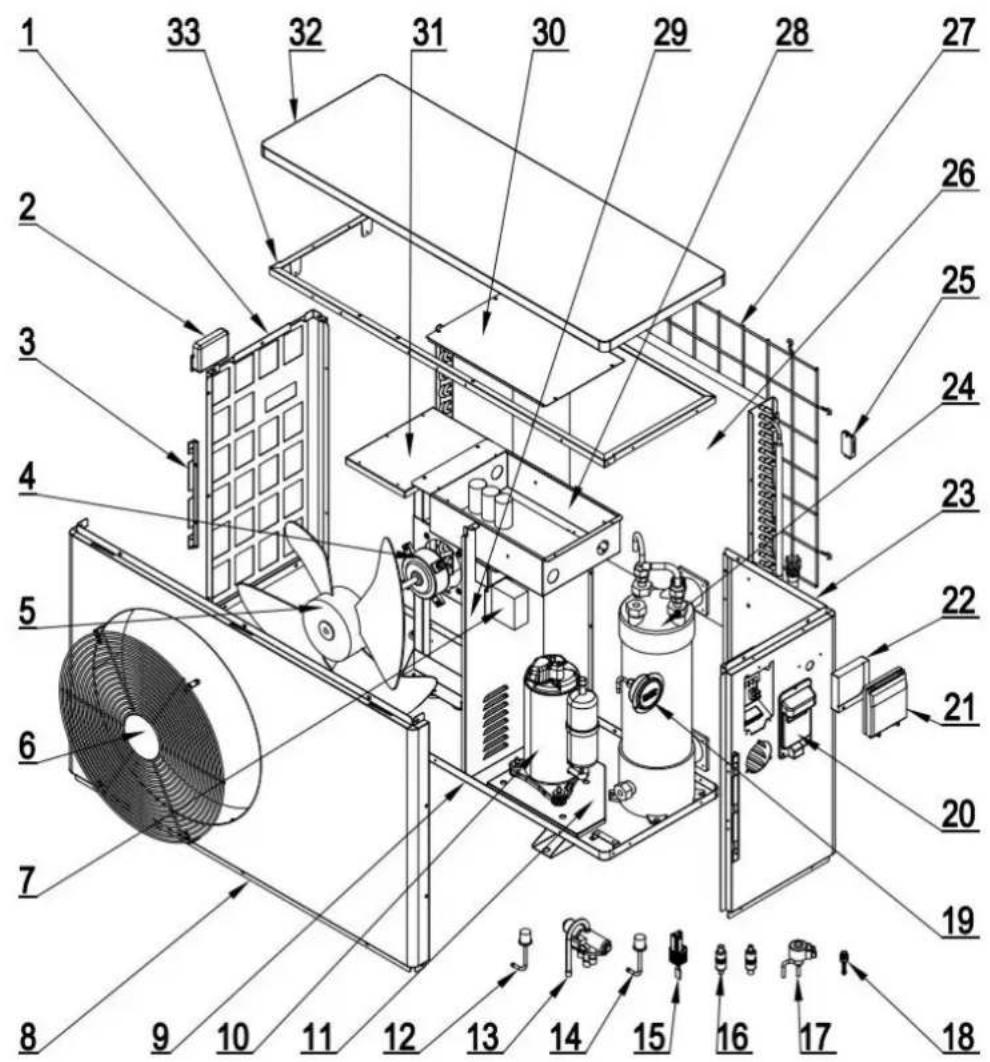
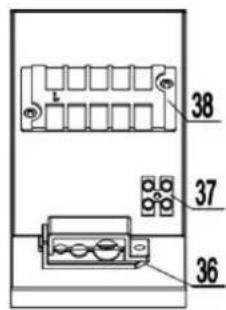
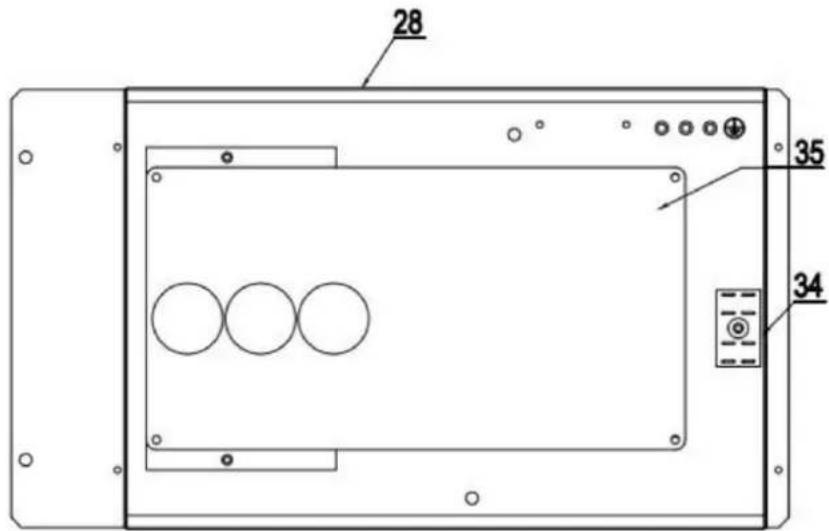
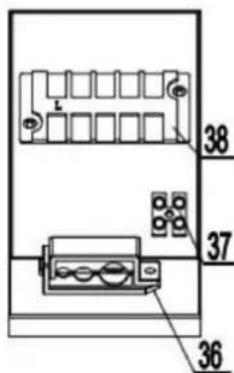
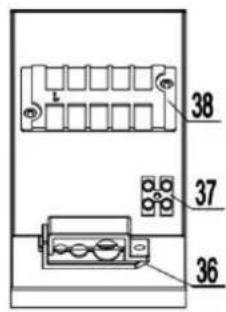
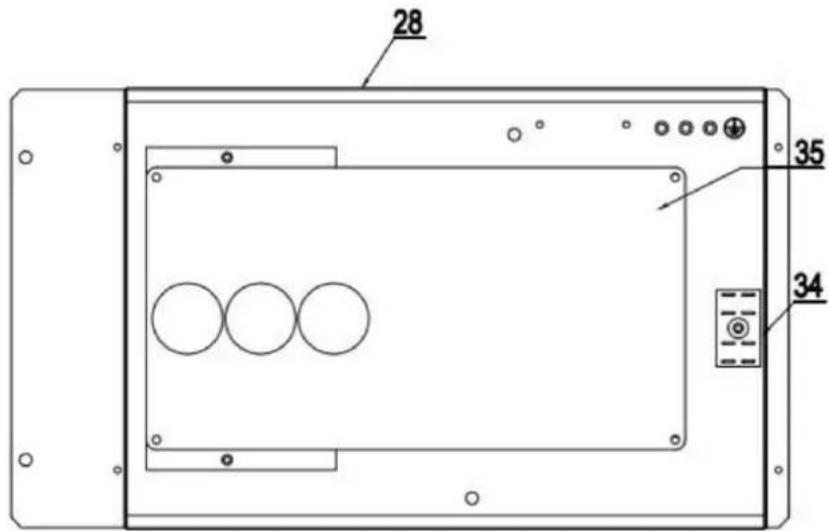
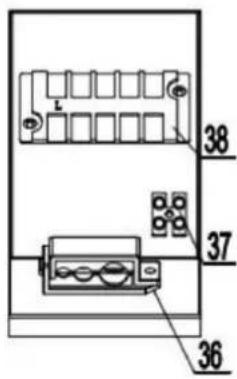
② Electrical System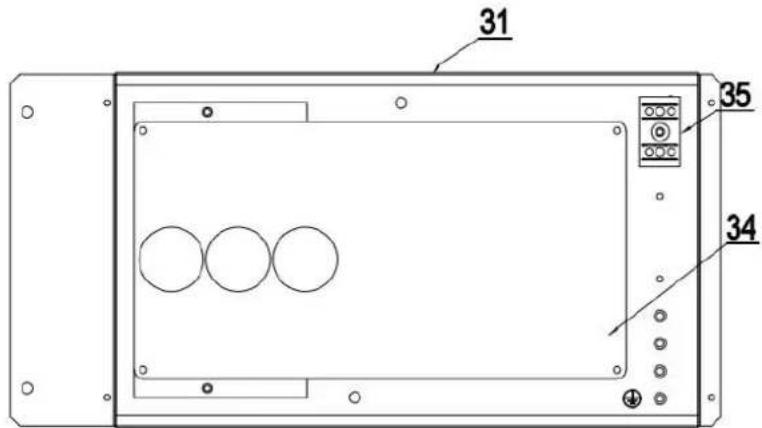
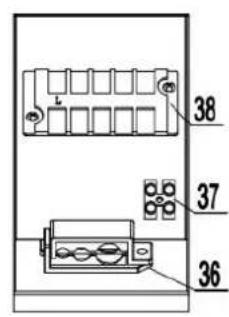
| 1 | Left Plate | 14 | EEV | 27 | Evaporator Component |
| 2 | Left Handle | 15 | Water Flow Switch | 28 | Reactor |
| 3 | Side Fixing Plate | 16 | Low Pressure Switch | 29 | Roof Assembly |
| 4 | Motor | 17 | Filter | 30 | Electrical Box Cover |
| 5 | Fan Blade | 18 | Needle Valve | 31 | Electrical Box Components |
| 6 | Fan Guard | 19 | Pressure Gauge | 32 | Motor Support |
| 7 | Median Septum | 20 | Right Plate | 33 | Inner Frame Components |
| 8 | Front Plate | 21 | Wired Controller Box | 34 | Main Board |
| 9 | Chassis | 22 | Wired Controller | 35 | 2U Terminal |
| 10 | Suspension Chassis | 23 | Right Handle | 36 | Cable Clip |
| 11 | Compressor | 24 | Titanium Heat Exchanger | 37 | 2-Position Terminal Board |
| 12 | High Pressure Switch | 25 | Ambient Temp Sensor Holder | 38 | 5-Position Terminal Board |
| 13 | 4-Way Valve | 26 | Back Net |
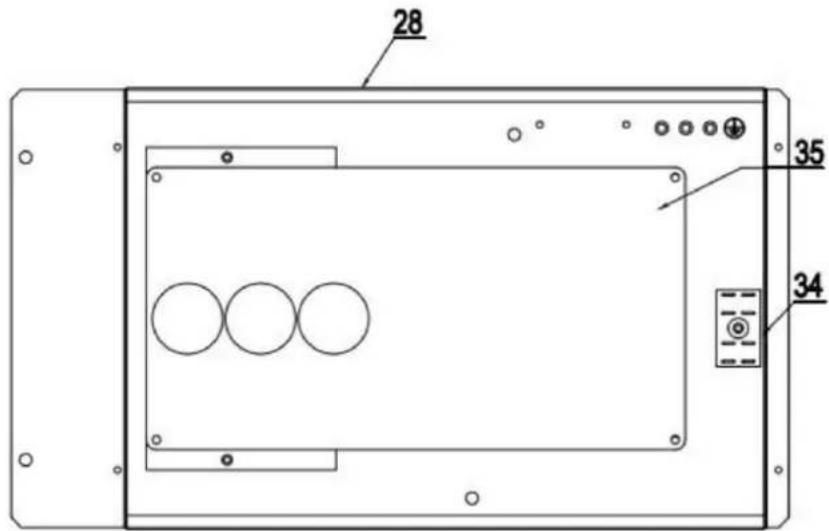
2.3.2. VBPYCE-150
① Sheet metal and other structures
② Electrical System
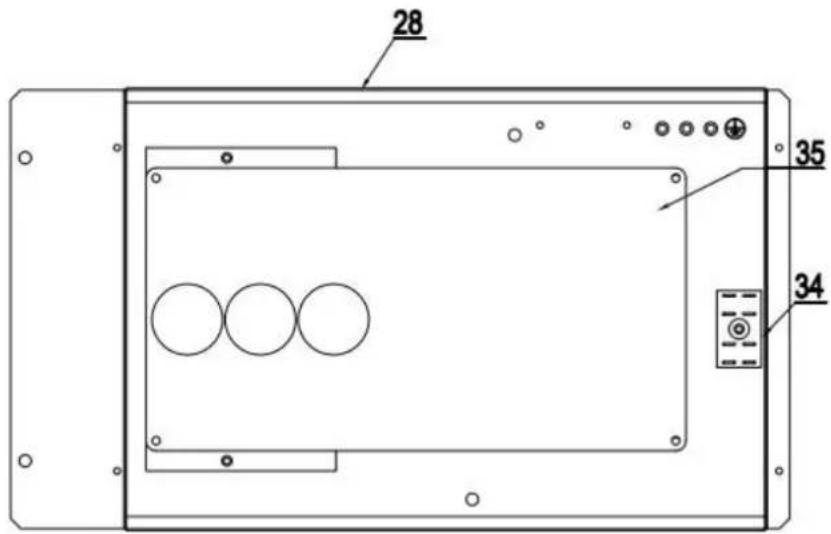
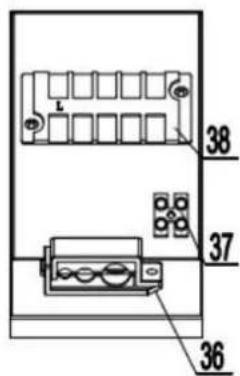
| 1 | Left Plate | 14 | Low Pressure Switch | 27 | Back Net |
| 2 | Left Handle | 15 | Water Flow Switch | 28 | Electrical Box Components |
| 3 | Side Fixing Plate | 16 | Filter | 29 | Median Septum |
| 4 | Motor | 17 | EEV | 30 | Electrical Box Cover |
| 5 | Fan Blade | 18 | Needle Valve | 31 | Motor Support |
| 6 | Fan Guard | 19 | Pressure Gauge | 32 | Roof Assembly |
| 7 | Reactor | 20 | Right Handle | 33 | Inner Frame Components |
| 8 | Front Plate | 21 | Wired Controller Box | 34 | 2U Terminal |
| 9 | Chassis | 22 | Wired Controller | 35 | Main Board |
| 10 | Compressor | 23 | Right Plate | 36 | Cable Clip |
| 11 | Suspension Chassis | 24 | Titanium Heat Exchanger | 37 | 2-Position Terminal Board |
| 12 | High Pressure Switch | 25 | Ambient Temp Sensor Holder | 38 | 5-Position Terminal Board |
| 13 | 4-Way Valve | 26 | Evaporator Component |
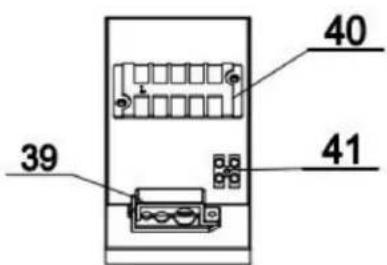
2.3.3. VBPYCE-210
① Sheet metal and other structures
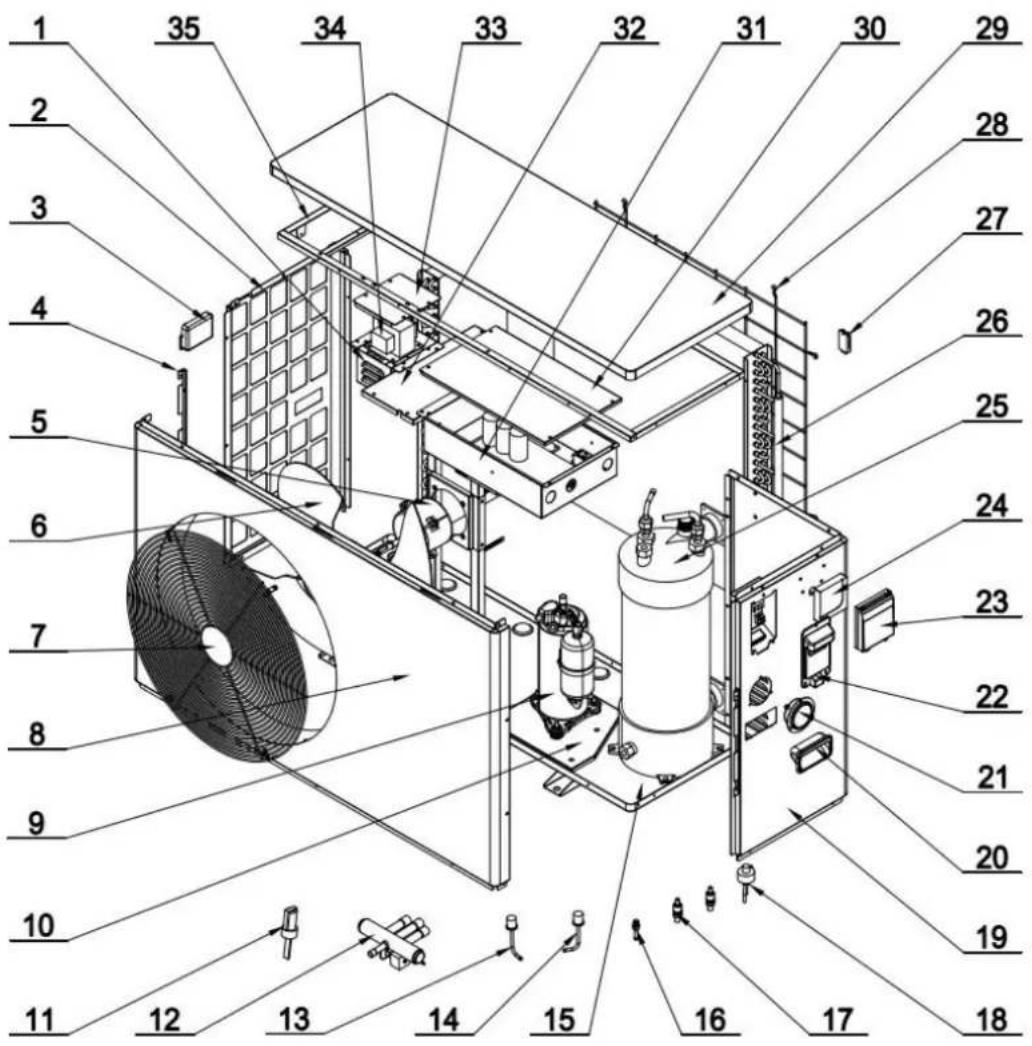
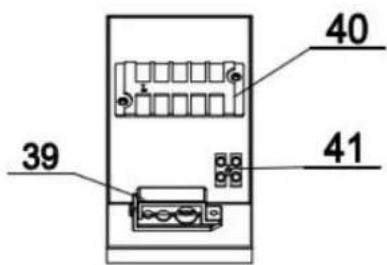
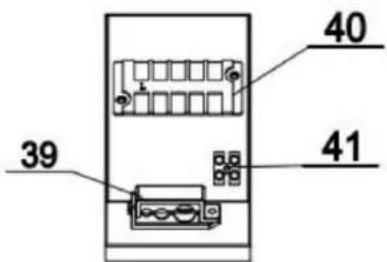
② Electrical System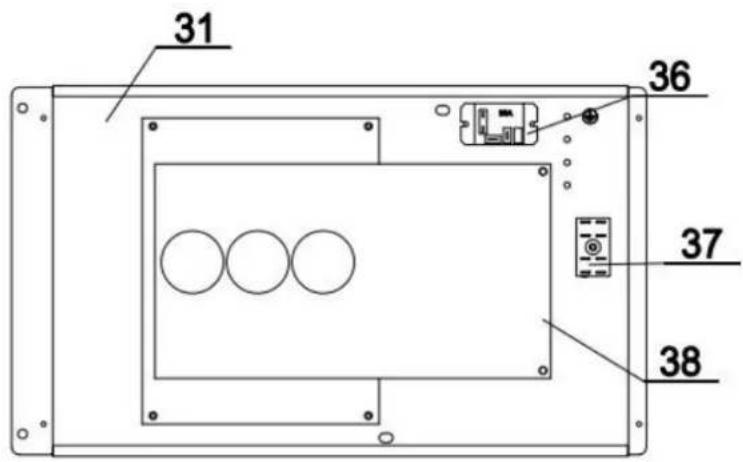
| 1 | Reactor Box | 15 | Chassis | 29 | Roof |
| 2 | Left Net | 16 | Needle Valve | 30 | Electrical Box Cover |
| 3 | Left Handle | 17 | Filter | 31 | Electrical Box Components |
| 4 | Side Fixing Plates | 18 | EEV | 32 | Motor Support |
| 5 | Motor | 19 | Right Plate | 33 | Reactor Box Cover |
| 6 | Fan Blades | 20 | Right Handle | 34 | Reactor |
| 7 | Fan Guard | 21 | Pressure Gauge | 35 | Inner Frame Components |
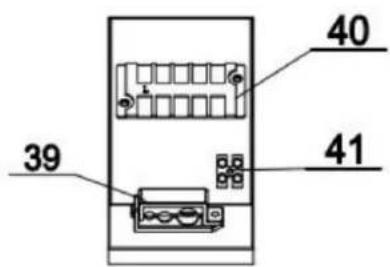
| 8 | Front Plate | 22 | Handle | 36 | Relay |
| 9 | Compressor | 23 | Wired Controller Box | 37 | 2U Terminal |
| 10 | Suspension Chassis | 24 | Wired Controller | 38 | Main Control Board |
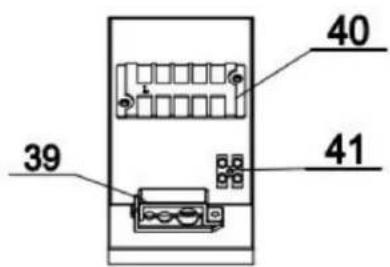
| 11 | Water Flow Switch | 25 | Titanium Heat Exchanger | 39 | 5-Position Terminal Board |
| 12 | 4-Way Valve | 26 | Evaporator | 40 | 2-Position Terminal Board |
| 13 | High Pressure Switch | 27 | Ambient Temp Sensor Holder | 41 | Cable Clip |
| 14 | Low Pressure Switch | 28 | Fin Net |
2.4. Operation Range
- Heating Mode
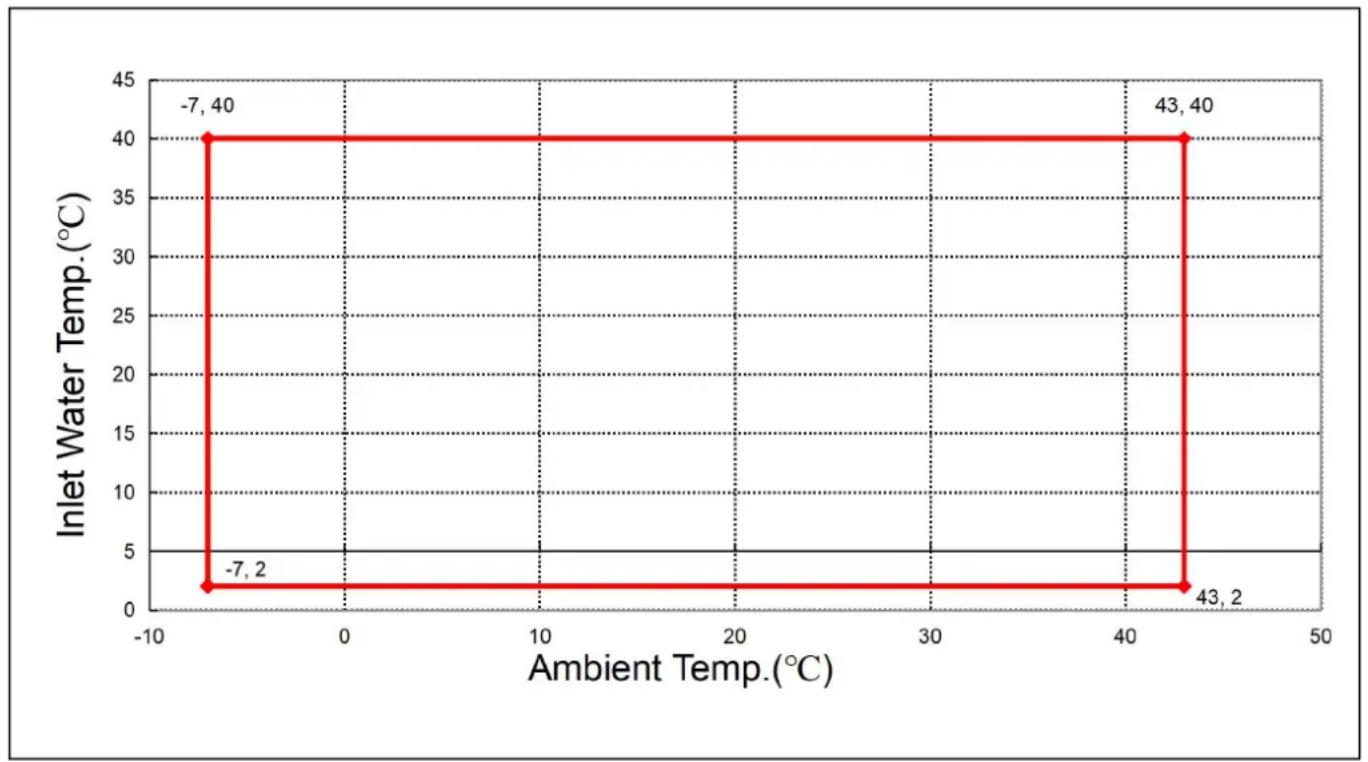
2.5. Parameter of the Unit
| Model:NF- | 70PR3-ID | 110PR3-ID | 150PR3-ID | 210PR3-ID |
| Advised Pool Size (m3) | 15~30 | 25~50 | 30~60 | 45~80 |
| [Heating] Ambient Temperature: (DB/WB) 27°C/24.3°C; Water Inlet/Outlet Temperature: 26°C/28°C. | ||||
| Heating capacity(kW) | 7.02 | 11.50 | 15.25 | 21.32 |
| Power input (kW) | 0.99 | 1.62 | 2.33 | 2.98 |
| COP | 7.09 | 7.11 | 6.55 | 7.15 |
| [Heating] Ambient Temperature: (DB/WB) 15°C/12°C; Water Inlet Temperature: 26°C. | ||||
| Heating capacity(kW) | 5.62 | 8.02 | 11.22 | 15.46 |
| Power input(kW) | 1.13 | 1.59 | 2.33 | 3.09 |
| COP | 4.98 | 5.03 | 4.83 | 5.00 |
| [Cooling ] Ambient Temperature: (DB/WB)°C/35 Water Inlet/Outlet Temperature: °C 28°C. | ||||
| Cooling Capacity (kW) | 3.91 | 6.25 | 8.54 | 11.58 |
| Power Input (kW) | 0.89 | 1.48 | 2.04 | 2.68 |
| EER | 4.39 | 4.22 | 4.19 | 4.32 |
| Max Power Input (kW) | 1.68 | 2.81 | 3.82 | 5.05 |
| Max Current (A) | 7.30 | 12.23 | 16.60 | 21.94 |
| Power Supply | 220V-240V~/50Hz | |||
| Heating Water Temp. Range(°C) | 9-40 | |||
| Cooling Water Temp. Range(°C) | 8-28 | |||
| Operating range(°C) | -10~43 | |||
| Refrigerant | R32 | |||
| Compressor Brand/Type | Mitsubishi | |||
| Manometer | Yes(Optional) | |||
| Gas Control | EEV | |||
| Water Heat Exchanger | Titanium Heat Exchanger | |||
| Water Pipe Connection | 1-1/2" | |||
| Water Pressure Drop (kPa) | 15 | 14 | 17 | 19 |
| Water Proof Level | IPX4 | IPX4 | IPX4 | IPX4 |
| Water Flow (m3/h) | 3.1 | 4.9 | 6.6 | 9.1 |
| Noise [dB(A)] at 1m | 40~52 | 43~53 | 44~54 | 45~56 |
| Net Weight(kg) | 44.5 | 48.5 | 55.5 | 76.0 |
| Net Dimensions(L*W*H)mm | 910×355×620 | 1000×400×660 | 1080×455×775 | |
3. INSTALLATION AND CONNECTION

WARNING: The heat pump must be installed by a professional team. The users are
not qualified to install it by themselves, otherwise the heat pump might be damaged and risky for safety.
This section is provided for information purposes only and must be checked and adapted according to the actual installation conditions.
3.1. Transportation
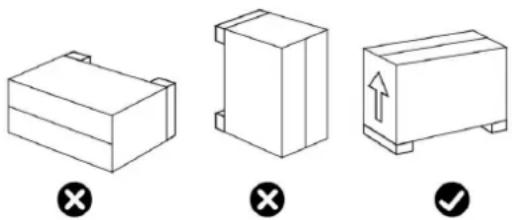
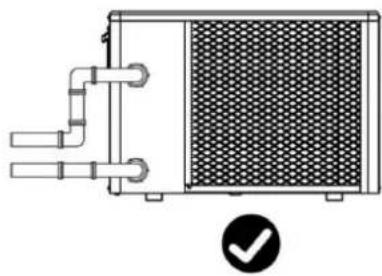
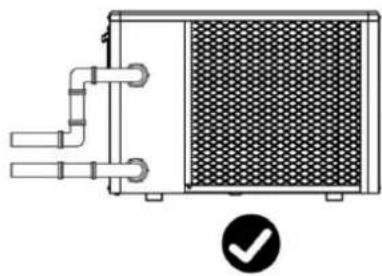
- When storing or moving the heat pump, the heat pump should be kept in the upright position.
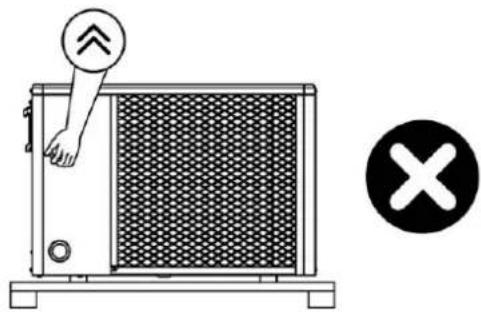
- When moving the heat pump, do not lift the water union since the titanium heat exchange heat pump will be damaged.
3.2. Notice Before Installation
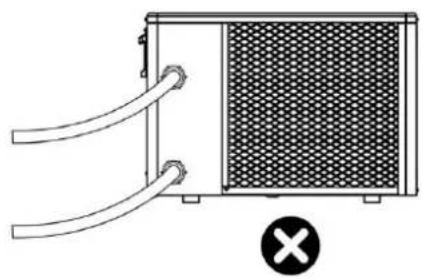
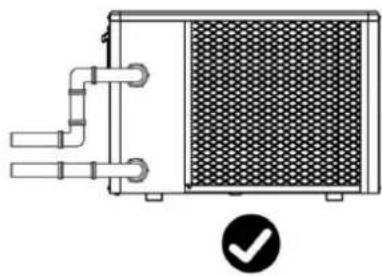
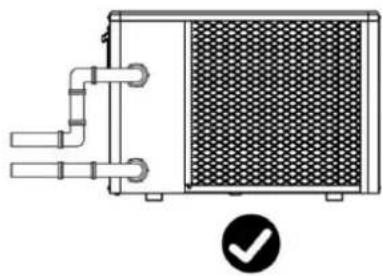
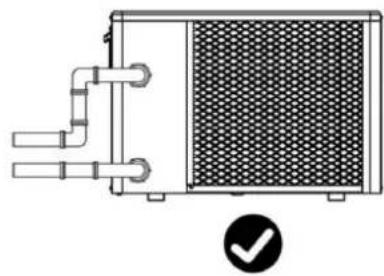
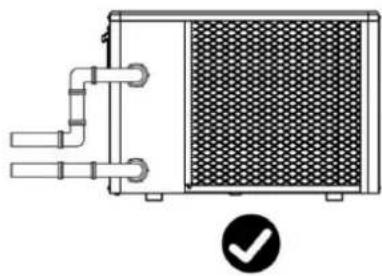
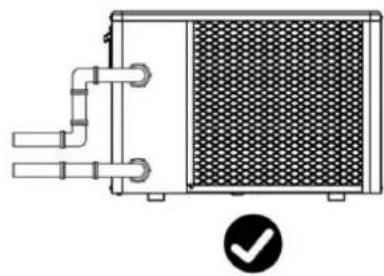
- The inlet and outlet water unions cannot bear the weight of soft pipes. The heat pump must be connected with hard pipes!
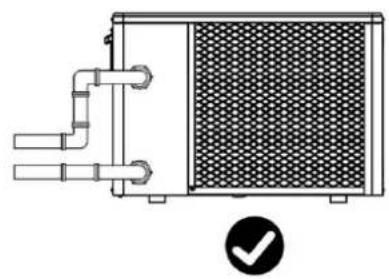
- In order to guarantee the heating efficiency, the water pipe length should be ≤10m between the pool and the heat pump.
3.
3.3. Installation Instructions
3.3.1 Pre-requirements
Equipment necessary for the installation of your heat pump:
①Power supply cable suitable for the unit's power requirements.
②A By-Pass kit and an assembly of PVC tubing suitable for your installation as well as stripper, PVC adhesive and sandpaper.
③A set of wall plugs and expansion screws suitable to attach the unit to your support.
④We recommend that you connect the unit to your installation by means of flexible PVC pipes in order to reduce the transmission of vibrations.
⑤Suitable fastening studs may be used to raise the unit.
3.3.2 Heat Pump Installation
①The frame must be fixed by bolts (M10) to concrete foundation or brackets. The concrete foundation must be solid; the bracket must be strong enough and anti-rust treated;
②The heat pump needs a water pump (Supplied by the user). The recommended pump specification-flux: refer to Technical Parameter, Max. lift ≥10m;
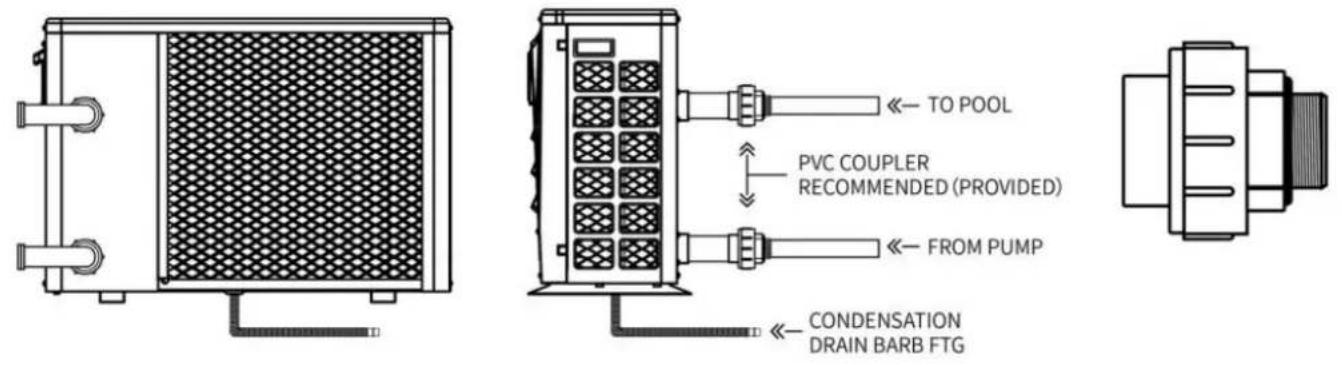
③When the heat pump is running, there will be condensation water discharged from the bottle please pay attention to it. Please insert the drainage tube(accessory) into the hole and clip connect a pipe to drain off the condensation water.Install the heat pump, raising it at least solid water-resistant pads, then connect the drainage pipe to the opening located under the
3.3.3 Location and Space
Please comply with the following rules concerning the choice of heat pump location.
①The unit's future location must be easily accessible for convenient operation and maintenance ②It must be installed on the ground, fixed ideally on a level concrete floor. Ensure that the floor is sufficiently stable and can support the weight of the unit. ③A water drainage device must be provided close to the unit in order to protect the area where it is installed. ④If necessary, the unit may be raised by using suitable mounting pads designed to support its weight. ⑤Check that the unit is properly ventilated, that the air outlet is not facing the windows of neighbouring buildings and that the exhaust air cannot return. In addition, provide sufficient space around the unit for servicing and maintenance operations. ⑥The unit must not be installed in an area exposed to oil, flammable gases, corrosive prod sulphur compounds or close to high frequency equipment. ⑦To prevent mud splashes, do not install the unit near a road or track. ⑧To avoid causing nuisance to neighbors, make sure the unit is installed so that it is positioned towards the area that is least sensitive to noise. ⑨Keep the unit as much as possible out of the reach of children. ⑩Installation space:
Unit: mm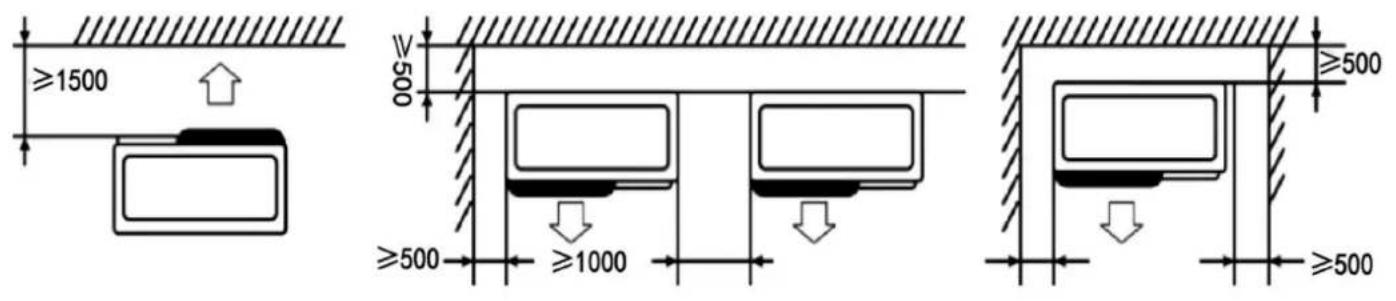
Do not place anything less than one meter in front of the heat pump.
Leave 500 mm of empty space on the sides and back of the heat pump and ensure free ventilation. Do not place any obstacles above or in front of the device!
3.3.4 Installation Layout
Note: The filter must be cleaned regularly to ensure that the water in the system is clean and to prevent filter blockage. It is necessary that the drainage valve is fixed on the lower water pipe. If the unit is operated during winter months, please disconnect the power supply and drain the water from
through the drainage valve. If the ambient temperature of the running unit is below 0°C, please keep the water pump running.
The installation diagram is shown in the following figure:
![graph LR A["Y-type Filter"] --> B["Swimming Pool Heat Pump"] C["One-way Valve"] --> D["PH Regulator"] E["Circulating Water Pump/Metering Pump"] --> F["Swimming Pool"] G["Hair Collector"] --> H["Sand Tank Filter"] I["Stop Valve"] --> J["Flocculator"] K["Disinfector"] --> L["Recoil Displacement"] M["W…](/content/2026/04/736634/images/53653d5033b1d9abf6ce0dd7817ef795fa1a9d1cb23183d90ec732431fc4e421.jpg)
| No. | Item | Quantity | No. | Item | Quantity |
| 1 | Swimming Pump Heat Pump | 1 | 7 | PH Regulator | 1 |
| 2 | Y-Type Filter | 1 | 8 | Sand Tank Filter | 1 |
| 3 | One-Way Valve | 1 | 9 | Flocculator | 1 |
| 4 | Circulating Water Pump | 1 | 10 | Disinfector | 1 |
| 5 | Hair Collector | 1 | 11 | Metering Pump | 3 |
| 6 | Stop Valve | 7 |
3.3.5 Electrical Installation
To function safely and maintain the integrity of your electrical system, the unit must be connected to the general electricity supply in accordance with the following regulations:
①Upstream, the general electricity supply must be protected by a 30mA differential switch. ②The heat pump must be connected to a suitable D-curve circuit breaker in accordance with current standards and regulations in the country where the system is installed. ③The electricity supply cable must be adapted to match the unit's rated power and the length of wiring required by the installation. The cable must be suitable for outdoor use. ④For a three-phase system, it is essential to connect the phases in the correct sequence. If phases are inverted, the heat pump's compressor will not work. ⑤In places open to the public, it is mandatory to install an emergency stop button close to the heat pump.
| Model | Power Supply Wires | ||
| Electricity Supply | Cable Diameter | Specification | |
| VBPYCE-70 | 220-240V~50Hz/60Hz | 3G 1.5mm 2 | 14AWG |
| VBPYCE-110 | 220-240V~50Hz/60Hz | 3G 1.5mm 2 | 14AWG |
| VBPYCE-150 | 220-240V~50Hz/60Hz | 3G 2.5mm 2 | 12AWG |
| VBPYCE-210 | 220-240V~50Hz/60Hz | 3G 2.5mm 2 | 12AWG |
3.3.6 Electrical Connection
WARNING: Power supply of ice bath chiller must be disconnected before any operation.
Please comply with the following instructions to connect the ice bath chiller.
Step 1: Prepare a socket
Step 2: Insert the plug into the socket as the following picture shows
Ensure that all electrical equipment is properly grounded.
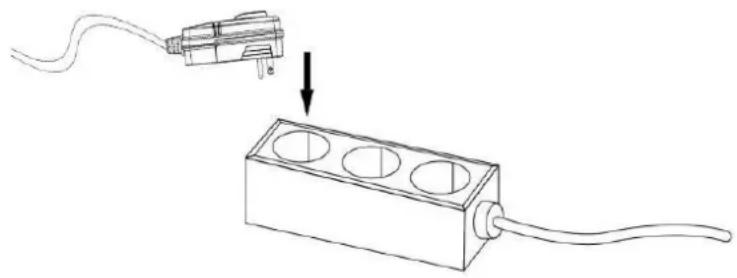
Plug Power Supply 220-240V~ / 50Hz
3.4. Trial After Installation

WARNING: Please check all the wiring carefully before turning on the heat pump.
3.4.1. Inspection Before Trial Running
Before running the test, confirm the following items and put a checkmark in the box:
| □ | Correct unit installation |
| □ | Power supply voltage is the same as unit rated voltage |
| □ | Correct piping and wiring |
| □ | Air inlet & outlet port of unit is unblocked |
| □ | Drainage and venting is unblocked and no water leaking |
| □ | Leakage protector is working |
| □ | Piping insulation is working |
| □ | Ground wire is connected correctly |
Step 1: The running test can begin after completing all installation.
Step 2: All wiring and piping should be connected well and carefully checked, then fill water before power is switched on.
Step 3: Empty all air within pipes and water tank, press the "on-off" button on the control panel to
set the unit at the setting temperature.
Step 4: Items to be checked during the running test:
① During the first running, check if the unit current is normal; ② Check if each function button on the control panel is normal; ③ Check if the display screen is normal; ④ Check for any leakage in the whole heating circulation system; ⑤ Check if the condensate drain is normal; ⑥ Check for any abnormal sound or vibration during running.
4. Controller Operation Guidance
4.1. Display
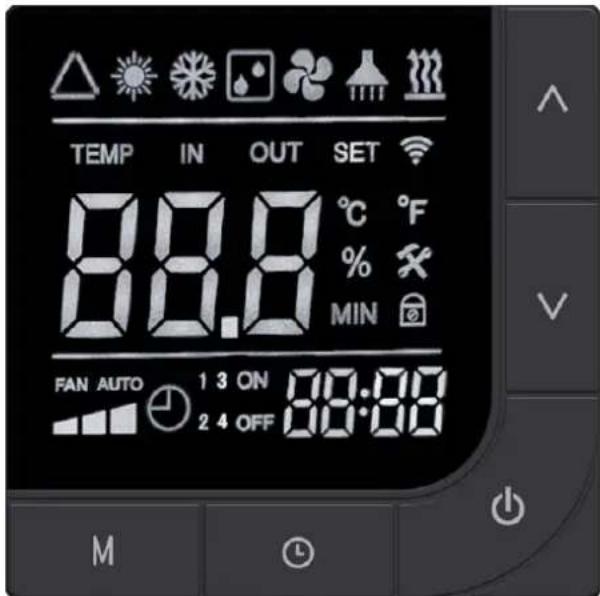
Basic Icons
| Icon | Meaning | Icon | Meaning |
 | Automatic Mode |  | Blower Icon |
 | Heating Mode |  | Fault Icon |
 | Refrigeration Mode |  | Lock Key Indicator |
 | Defrost Symbol |  | Electric Heating Symbol |
 | Silent Mode |  | powerful Mode |
 | Intelligent Mode |  | WiFi Icon |
4.2 Key Instructions
 | Power | Short press: toggle power on/off status, exit the current interface, return main interface |
| Press and hold for 3 seconds: lock/unlock the button | ||
 | Up | Short press: Enter the set temperature state in the power-on state and the current value |
| Press and hold for 3 seconds: manually turn on/off the electric heating | ||
 | Down | Short press: Enter the temperature setting state when the device is tu and decrease the current value |
| Press and hold for 3 seconds: Enter the crew parameter status q | ||
 | Mode | Short press: Press the mode key when the device is turned on to sw automatic/cooling/heating modes |
| Press and hold for 3 seconds: Switch frequency mode, mute/intelligent/ mode | ||
 | Alarm | Short press: Enter clock settings |
| Press and hold for 3 seconds: Enter the scheduled on/off setting in |
4.3 Combination Key Instructions
| Button operation | Operation duration | Function Description |
 | 3 seconds | Enter forced defrost under the main interface |
 | 3 seconds | Switch between Fahrenheit and Celsius under the r interface |
 | 5 seconds | Enter password input state |
 | 3 seconds | Restore factory settings |
 | 3 seconds | Enter default network configuration |
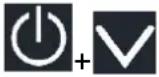 | 3 seconds | Enter compatible network configuration |
4.4 Operation Function Instructions
| NO. | Item | Operation Way |
| 1 | Key Lock | Long press the " key on the main interface for 3 second lock/unlock the button. |
| 2 | On/Off | In unlock state, tap on the main interface" " to switch between status; in shutdown state, display water temperature, unit, and o startup state, display water temperature, unit, clock, operating mo frequency mode |
| 3 | Temperature Setting | Press the " or " button while the device is powered enter the temperature setting interface. The displayed set tempe will blink. Modify the current set temperature by pressing the " " button. If no operation is made within 30 seconds for the button is briefly pressed, the current set temperature will be sa exited. |
| 4 | Mode Switch | While powered on, press the " " key to switch the operating automatic → cooling → heating. |
| 5 | Frequency Mode Switch | While powered on, press and hold the " " key for 3 seconds the operating frequency mode, mute → intelligent → strong n |
| 6 | Clock Setting | Press the " button to enter the clock setting state. The position blinks first, indicating that the current hour value can be using the " and " keys. Pressing the " key once increas the hour by 1, and pressing the " " key once decreases the you hold down the " " key or the " " key for a long time, th automatically increase or decrease. After setting the hour value, the " key again; at this point, the minute position blinks, inc that the current minute value can be adjusted using the " "" " After setting the minute value, press the " " key again to e |
| 7 | Timer On/Off Setting | Press and hold the " " key for 3 seconds to enter the timer Enter the timer selection, at this time, the "timer on 1" clock "I and you can set the hour by using the " " and " " keys; pr "key again to switch to the clock "minute", and you can minute by using the " " and " " keys; press the " " key aga switch to the "timer off 1" setting: the clock "hour" blinks, and the hour by using the " " and " " keys; press the " " key ag switch to the clock "minute", and you can set the minute by "and "keys; set other time periods in the same way, a time periods for timer settings;Press to exit or confirm.Return to the main interface, the current set timing period w displayed;Cancel the timing setting:Under the scheduled startup setting, pr the key can cancel/enable the scheduled startup function |
| 8 | Forced Defrost | Long press the " key and " " key for 3 seconds while in startup mode to enter the forced defrost mode. When entering the defrost icon will flash and display " ". |
| 9 | Switch Temperature Units | When the device is turned off, long press the " " and " " o main interface for 3 seconds to switch between Celsius and Fa |
| 10 | Status Query | Under the main interface, press and hold the " " key for 3 se enter the crew status parameter query. Use the " " and " " k browse parameters, and press the " " key to exit parameter qu the status query interface, if there is no key operation for cons seconds, the status query interface will automatically exit and re the main interface. |
| 11 | Restore Factory Parameters | While in shutdown state, press and hold the " " key + " " "key + key for 3 seconds to restore the factory settings line control. At this time, the buzzer will sound twice continuous parameter values will revert to the default settings. |
4.5 Troubleshooting
Fault codes and solutions
When a fault occurs, the main interface flashes the corresponding fault code. When null codes appear, they flash alternately.
| Error Code | Error Description | Remark |
| E03 | Water flow protection | |
| E04 | Winter anti-freezing | |
| E05 | High pressure fault | |
| E06 | Low pressure fault | |
| E09 | Communication fault between main board and display | |
| E10 | Communication failure of the variable frequency module (Alarm the communication between the outer board and the driver b disconnected) | |
| E12 | High exhaust temperature protection | |
| E15 | Water Inlet Temperature fault | |
| E16 | External pipe temperature fault | |
| E18 | Exhaust Temperature fault | |
| E19 | Direct current fan failure | |
| E20 | Variable frequency module abnormal protection | |
| E21 | Environmental temperature failure | |
| E22 | DC fan 2 failure | |
| E23 | Low refrigerant outlet temperature protection | |
| E27 | Leakage temperature fault | |
| E28 | CT Overcurrent Protection | |
| E29 | Return Air Temperature Fault | |
| E32 | Overheat protection of heating water outflow temperature/Protec against excessive difference in Inlet and outlet water tempera | |
| E33 | Outdoor coil high temperature protection | |
| E42 | Internal tube temperature failure |
E20 fault will simultaneously display the following fault numbers, switching fault codes every 3 seconds; fault numbers 1 to 128 are displayed first.
When fault numbers 1 to 128 do not occur, fault numbers 257 to 384 will be displayed. If faults of equal priority occur simultaneously, the fault numbers will be added together. For example, if fault numbers 16 and 32 occur simultaneously, 48 will be displayed.
| Code | Name | Description | Processing Opinion |
| 1 | IPM overcurrent | IPM module issue | Replace the variable frequenc module |
| 2 | Press machine synchronization anomaly | Press machine failure | Replace Press Machine |
| 4 | Reserved | -- | -- |
| 8 | Press machine phase failure | Press machine wiring broken, poor contact | Check the press input line |
| 16 | Low DC bus voltage | Low input voltage, PFC modu failure | Check input voltage, replace module |
| 32 | DC bus voltage hi | Input voltage too high, PFC module failure | Replace the variable frequenc module |
| 64 | Excessive heat sin temperature | Host fan failure, air duct block | Check the fan, air duct |
| 128 | Heat sink temperature fault | Blower fan sensor short circuit open circuit fault | Replace the variable frequenc module |
| 257 | Communication failure | The frequency conversion modu has not received the comman from the main controller | Check the communication connections of the main cont and variable frequency module |
| 258 | AC input phase missing | Input phase missing (valid fo three-phase module) | Check input line |
| 260 | AC input overcurrent | Input three-phase imbalance (valid for three-phase module) | Check the input three-phase phase voltage |
| 264 | Low AC input voltage | Input voltage too low | Check input voltage |
| 272 | High-pressure failure | High-pressure failure (reserved) | |
| 288 | Overheating IPM temperature | Host fan failure, air duct block | Check the fan, air duct |
| 320 | Excessive peak current of press machine | The current of the compressor too high, the driver and the p are not matched | Replace the inverter module |
| 384 | Overtemperature of PFC module | Overheating of PFC module | Check the PFC module |
5. MAINTENANCE AND WINTERIZING
5.1 Maintenance

WARNING: Before undertaking maintenance work on the unit, ensure that you have
disconnected the electrical power supply.
Cleaning
a. The heat pump's casing must be cleaned with a damp cloth. The use of detergents or
household products could damage the surface of the casing and affect its properties.
b. The evaporator at the rear of the heat pump must be carefully cleaned with a vacuum cleaner and a soft brush attachment.
Annual maintenance
The following operations must be undertaken by a qualified person at least once a year.
a. Carry out safety checks.
b. Check the integrity of the electrical wiring.
c. Check the earthing connections.
d. Monitor the state of the pressure gauge and the presence of refrigerant.
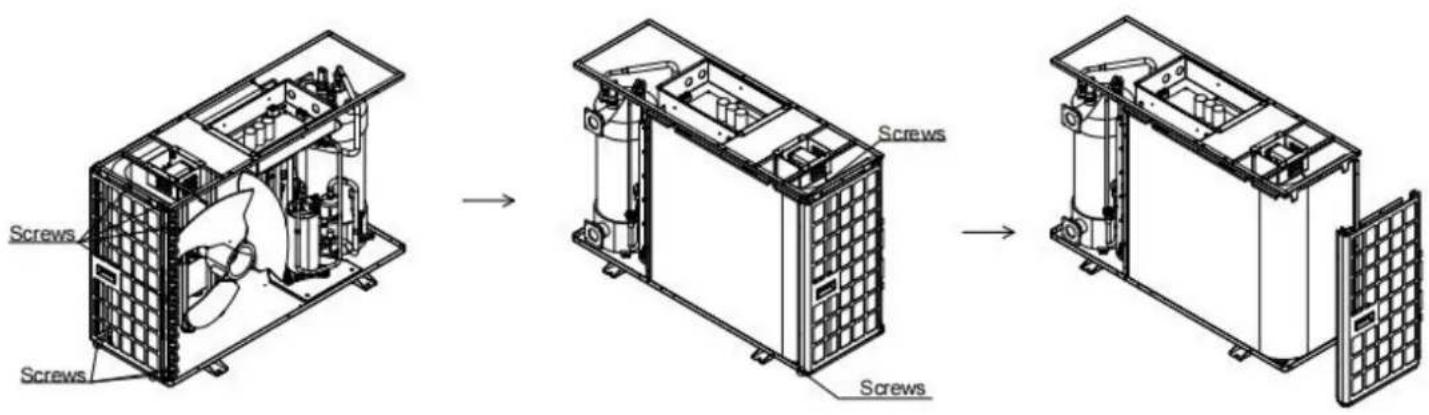
5.2. Disassembly Guidelines
Tools:
1. Phillips screwdriver
2. Wrench
3. Flat-blade screwdriver
5.2.1 VBPYCE-70, VBPYCE-110
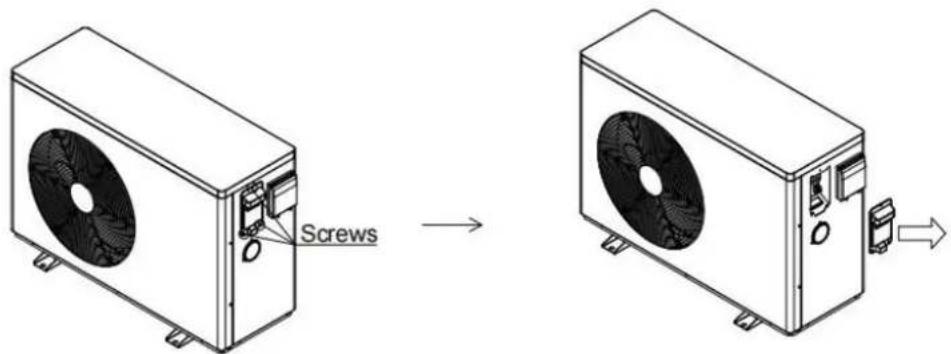
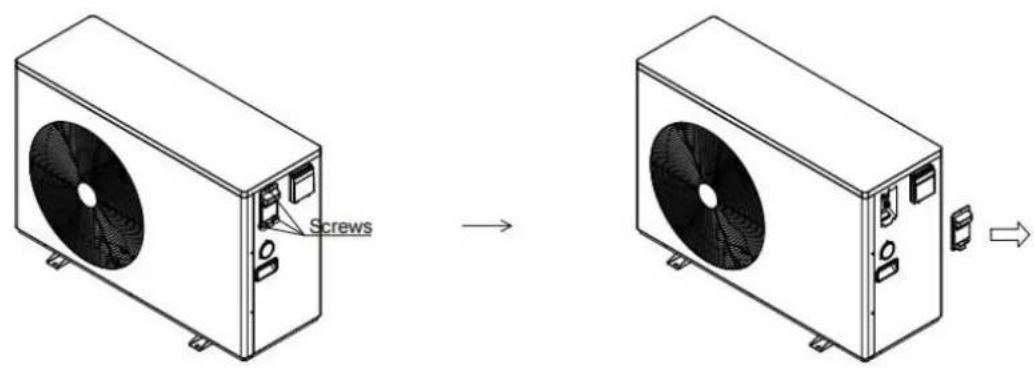
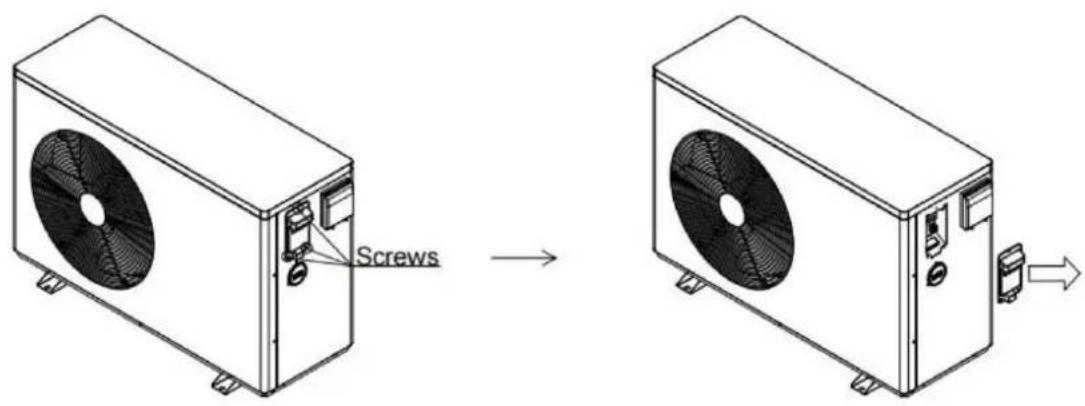
Step 1: Remove the terminal box cover
1. Remove the screws on the terminal box cover
②Take out the junction box cover towards the arrow
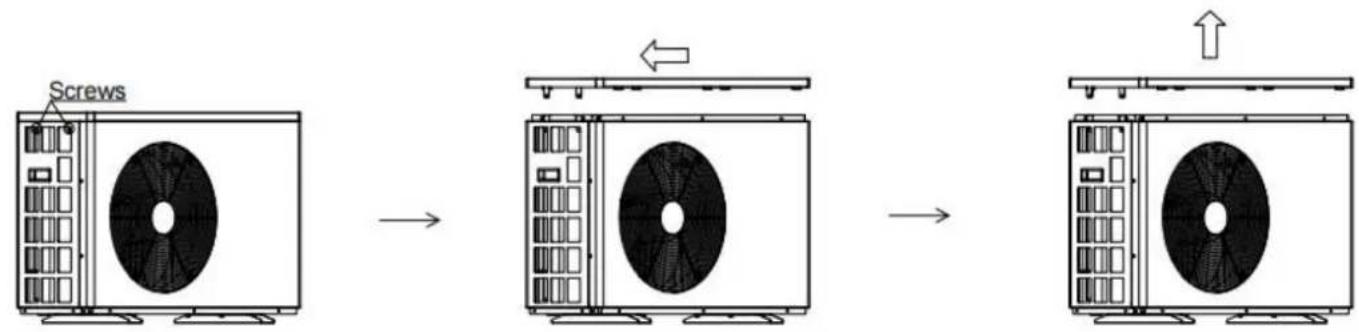
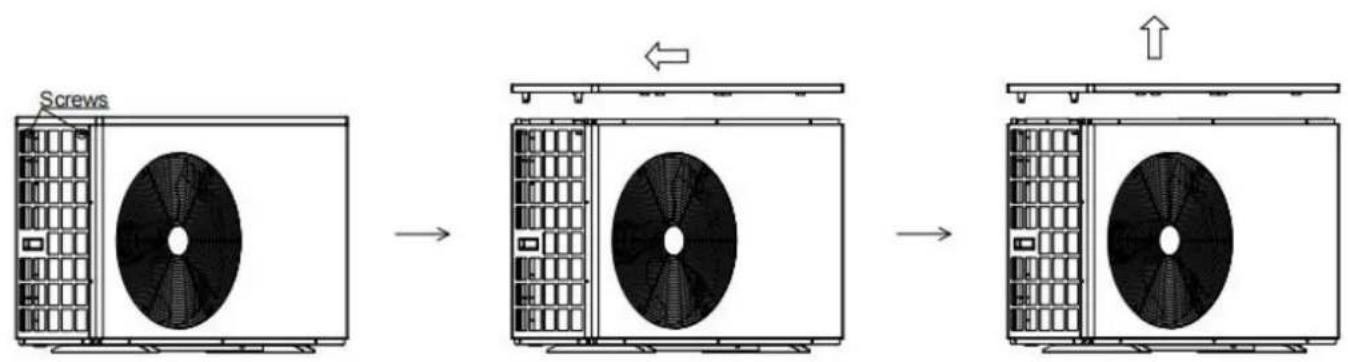
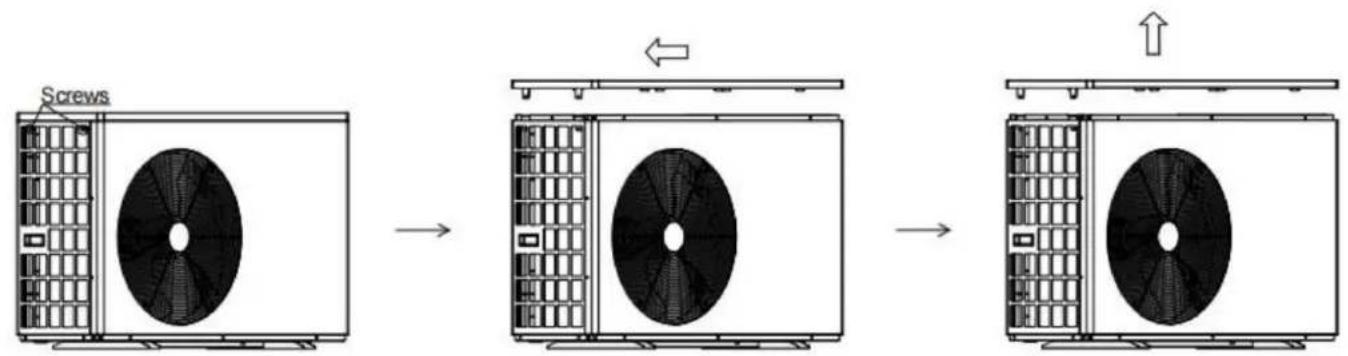
Step 2: Remove the top cover
①Remove the top cover screw ②Push the top cover in the direction of the arrow ③Take out the top cover towards the arrow
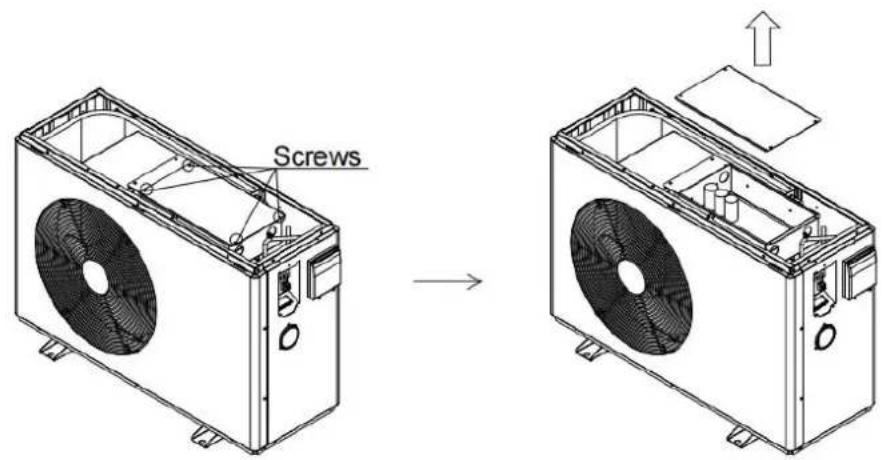
Step 3: Remove the electrical box cover
①Remove the screws on the electrical box cover ②Take out the electrical box cover in the direction of the arrow
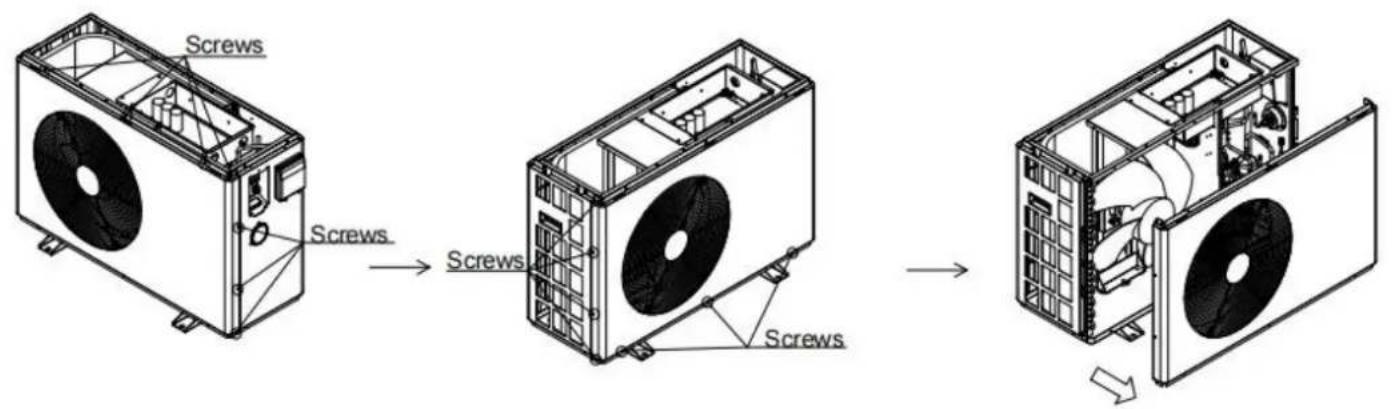
Step 4: Remove the front panel
①Remove the screws from the front panel ②Take out the front panel in the direction of the arrow
Step 5: Remove the rear cover
①Remove the screws holding the rear cover in place ②Pull the rear cover out of the way, following the arrow direction
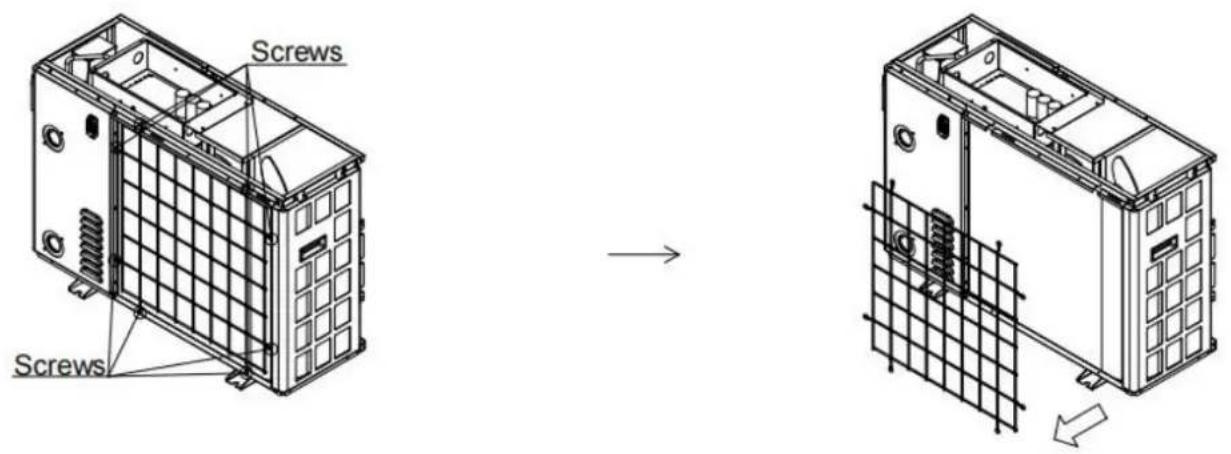
Step 6: Remove the right panel
①Remove the screw on the nozzle joint ②Remove the screws from the pressure gauge and right panel ③Take out the right board in the direction of the arrow
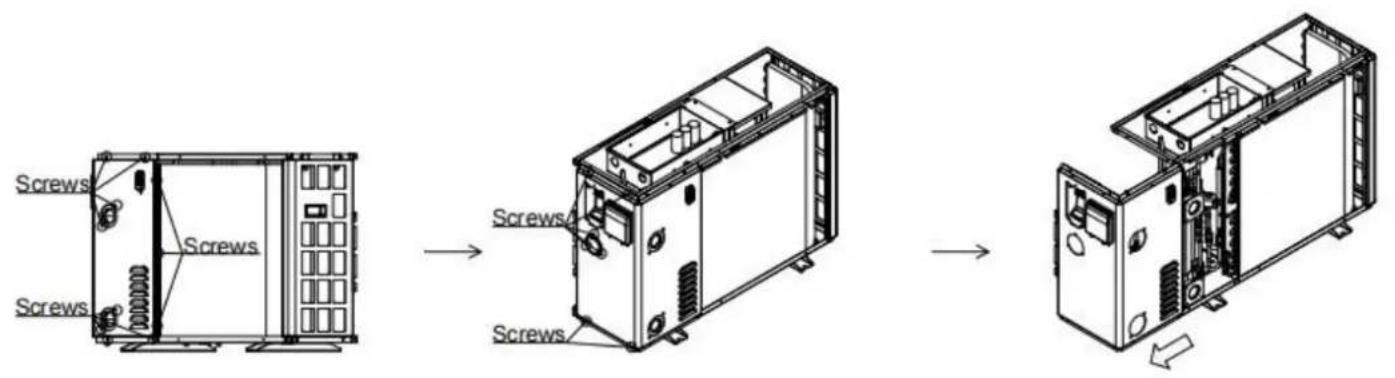
Step 7: Remove the left panel
①Remove the screws from the left panel ②Take out the left panel in the direction of the arrow
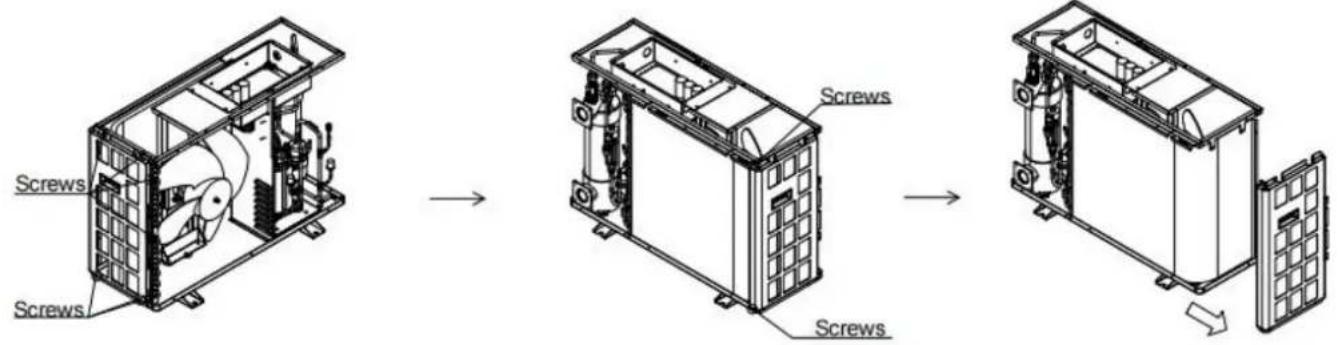
5.2.2 VBPYCE-150
Step 1: Remove the terminal box cover
① Remove the screws on the terminal box cover. ② Take out the junction box cover in the direction of the arrow.
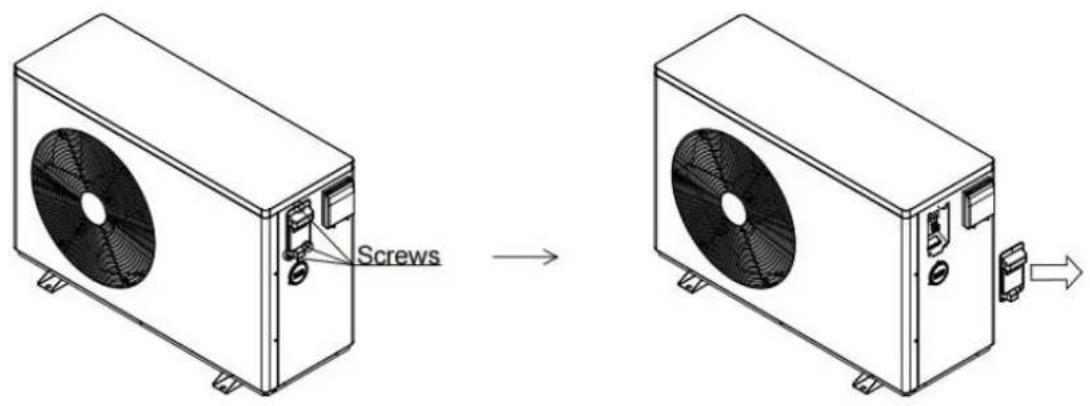
Step 2: Remove the top cover.
① Remove the top cover screw. ② Push the top cover in the direction of the arrow. ③ Take out the top cover in the direction of the arrow.
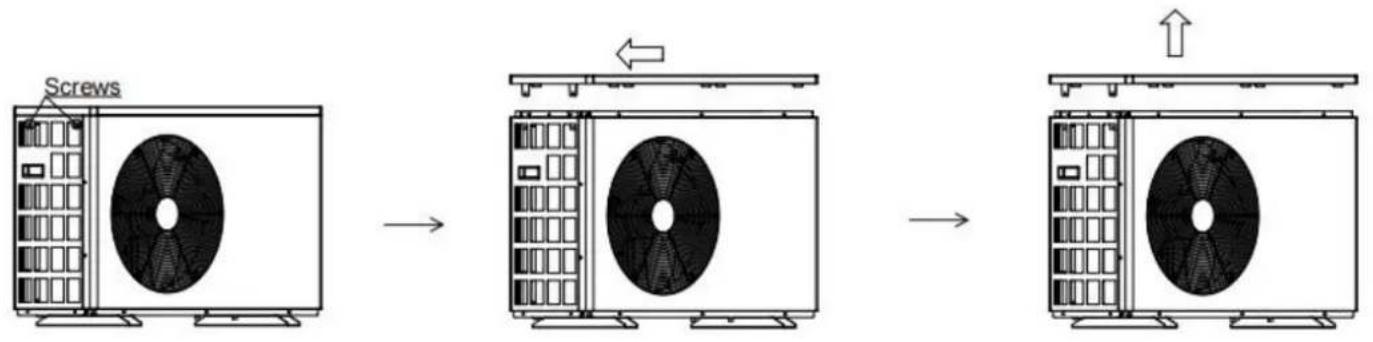
Step 3: Remove the electrical box cover.
① Remove the screws on the electrical box cover. ② Take out the electrical box cover in the direction of the arrow.
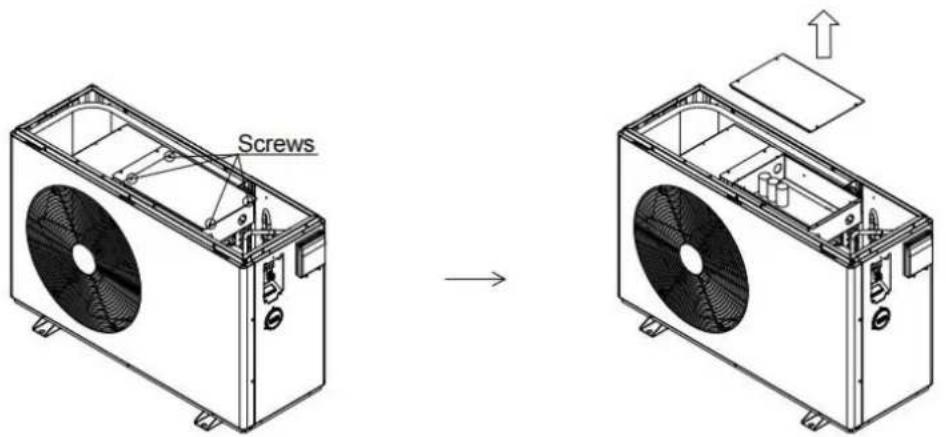
Step 4: Remove the front panel.
① Remove the screws from the front panel. ② Take out the front panel in the direction of the arrow.
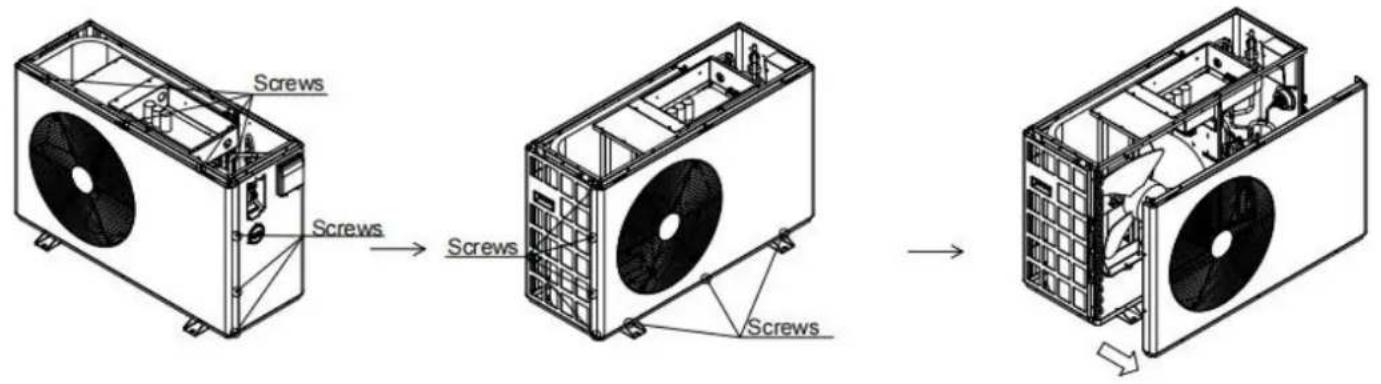
Step 5: Remove the rear cover.
① Remove the screws holding the rear cover in place. ② Pull the rear cover out of the way, following the arrow direction.
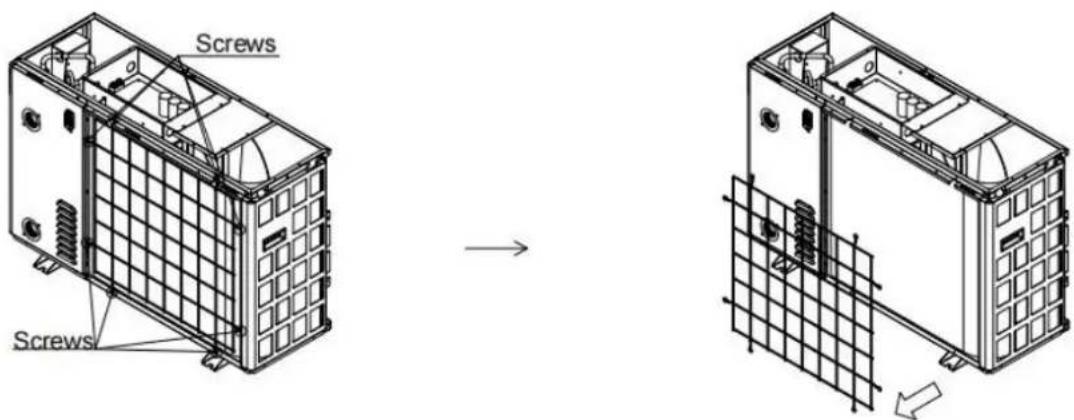
Step 6: Remove the right panel.
① Remove the screw on the nozzle joint. ② Remove the screws from the pressure gauge and right panel. ③ Take out the right board in the direction of the arrow.
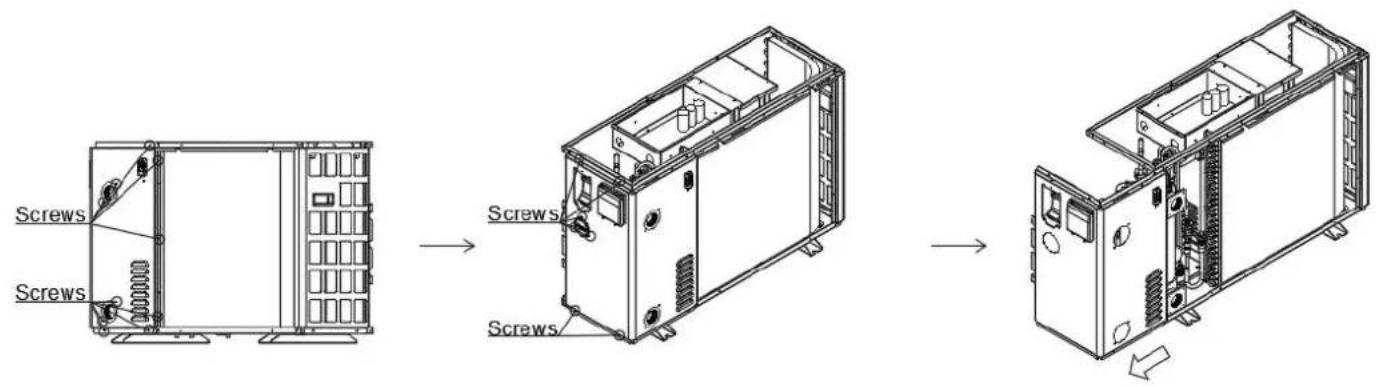
Step 7: Remove the left panel.
① Remove the screws from the left panel. ② Take out the left panel in the direction of the arrow.
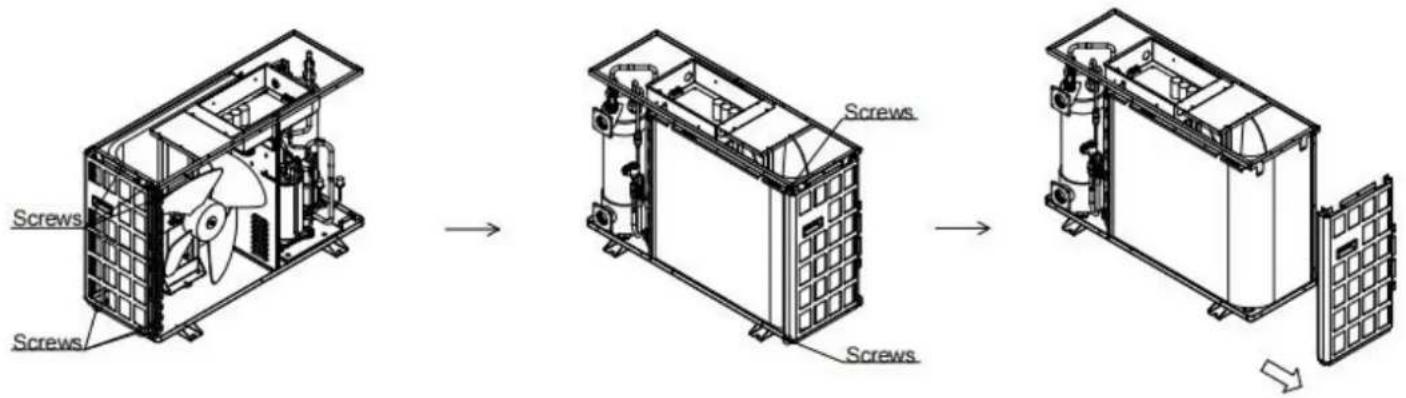
5.2.3 VBPYCE-210-PI
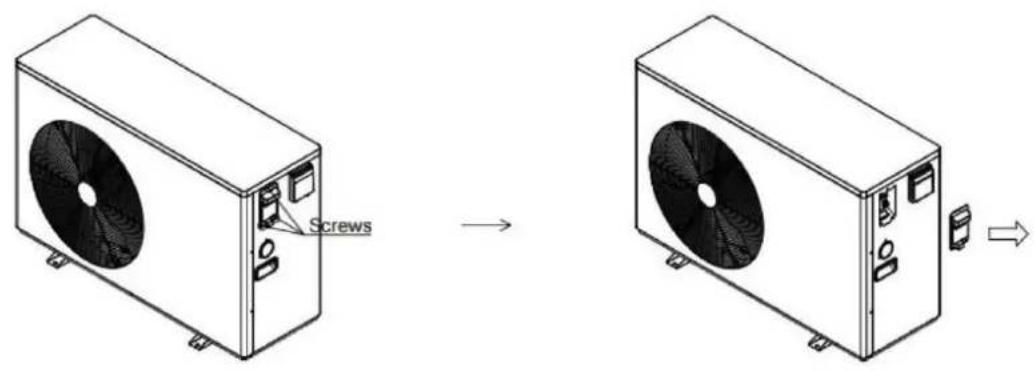
Step 1: Remove the terminal box cover.
①Remove the screws on the terminal box cover ②Take out the junction box cover towards the arrow
Step 2: Remove the top cover
①Remove the top cover screw ②Push the top cover in the direction of the arrow ③Take out the top cover towards the arrow
Step 3: Remove the electrical box cover
①Remove the screws on the electrical box cover ②Remove the screws on the cover of the reactor box ③Take out the electrical box cover in the direction of the arrow
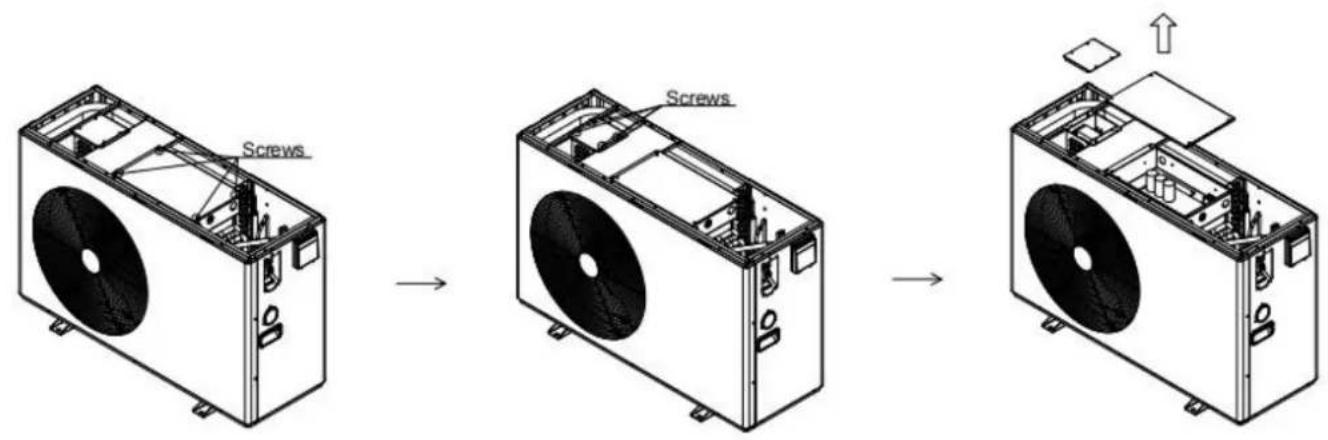
Step 4: Remove the front panel
①Remove the screws from the front panel ②Take out the front panel in the direction of the arrow
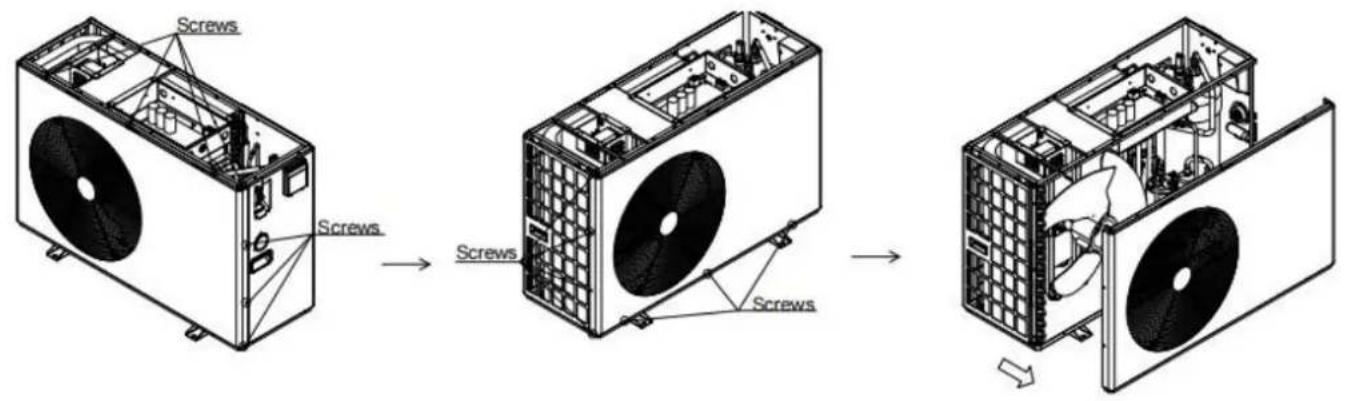
Step 5: Remove the rear cover
①Remove the screws holding the rear cover in place ②Pull the rear cover out of the way, following the arrow direction
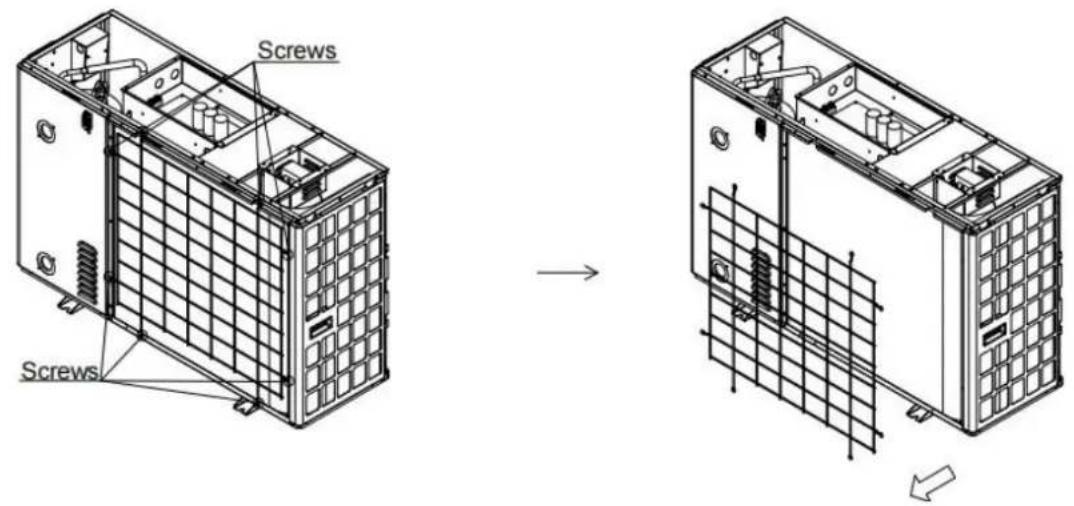
Step 6: Remove the right panel
①Remove the screw on the nozzle joint ②Remove the screws from the pressure gauge and right panel ③Take out the right board in the direction of the arrow
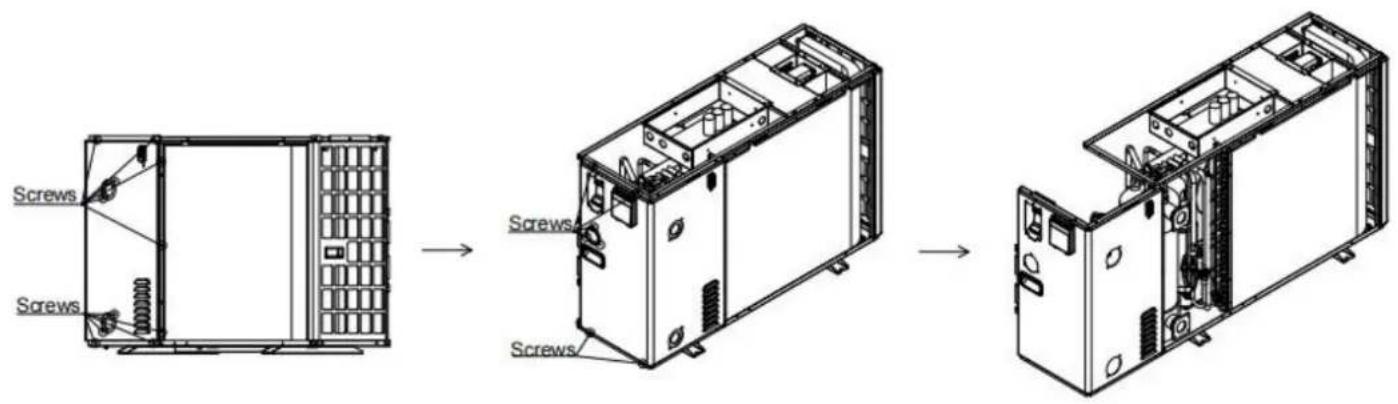
Step 7: Remove the left panel
①Remove the screws from the left panel ②Take out the left panel in the direction of the arrow
5.3 Winterizing

"CUT OFF" power supply of the heater before cleaning, examination and repairing
In winter season when you don't swim:
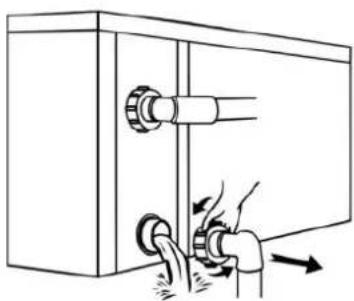
a. Cut off power supply to prevent any machine damage. b. Drain water clear of the machine.

!! Important:
Unscrew the water nozzle of inlet pipe to let the water flow out. When the water in the machine freezes in winter season, the titanium heat exchanger may be damaged.
c. Cover the machine body when not in use.
VEVOR®
TOUGH TOOLS, HALF PRICE
Technical Support and E-Warranty Certificate
www.vevor.com/support
VEVOR®
TOUGH TOOLS, HALF PRICE
www.vevor.com/support

NEED HELP? CONTACT US!
equipment.
| VBPYCE-150 95 | 671 370 1002 | 314 654 | 320 391 | 380 | 103 720 | 423 1192 | 358 | 775 407 | 447 |
| VBPYCE-210 | 470 108 126 |
Electrical system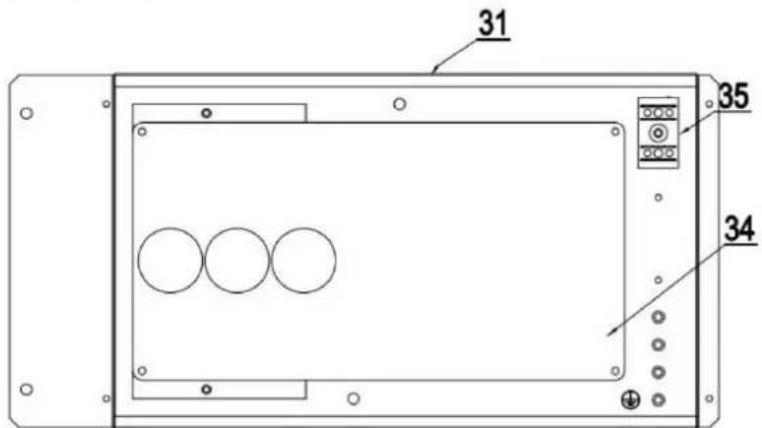
Electrical system
Electrical system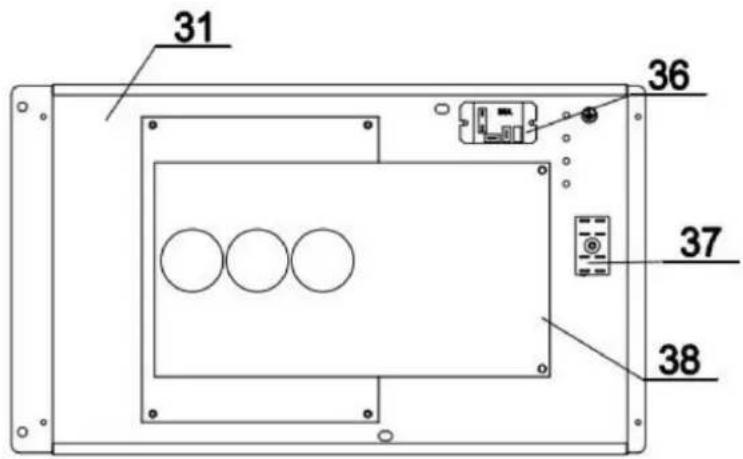
④ Circulating Water Pump/Metering Pump
∅ Hair Collector
Stop Valve
5.2.3 VBPYCE-210-PI
5.3 Winterization

!! Important:
www.vevor.com/support
Pool Heat Pump
Model: VBPYCE-70/VBPYCE-110/VBPYCE-150/VBPYCE-210

Equipment.
| VBPYCE-150 95 | 671 3 | 70 | 1002 | 314 | 65 | 4 | 320 | 3 | 91 | 380 | 103 | 720 | 423 | 11 | 92 | 358 | 775 | 407 | 447 |
| VBPYCE-210 | 470 | 1 | 08 | 126 |
④ Circulating Water Pump/Metering Pump
∅ Hair Collector
Stop Valve
Plug-in power supply
220-240V~ / 50Hz
5.2.2 VBPYCE-150
5.2.3 VBPYCE-210-PI
5.3 Overwintering


!! Important:
www.vevor.com/support

| VBPYCE-150 | 671 | 370 | 1002 | 314 | 654 | 320 | 391 | 380 | 103 | 720 | 423 | 1192 | 358 | 775 | 4957 |
| VBPYCE-210 | 447 | 470 | 108 | 126 |
④ Circulating Water Pump/Metering Pump
∅ Hair Collector
Stop Valve
Basic icons
5.2.2 VBPYCE-150
5.2.3 VBPYCE-210-PI
5.3 Winterization


!! Important:
www.vevor.com/support

equipment.
| VBPYCE-150 | 671 | 370 | 1002 | 314 | 654 | 320 | 391 | 380 | 103 | 720 | 423 | 1192 | 358 | 775 | 40795 |
| VBPYCE-210 | 447 | 470 | 108 | 126 |
Electrical system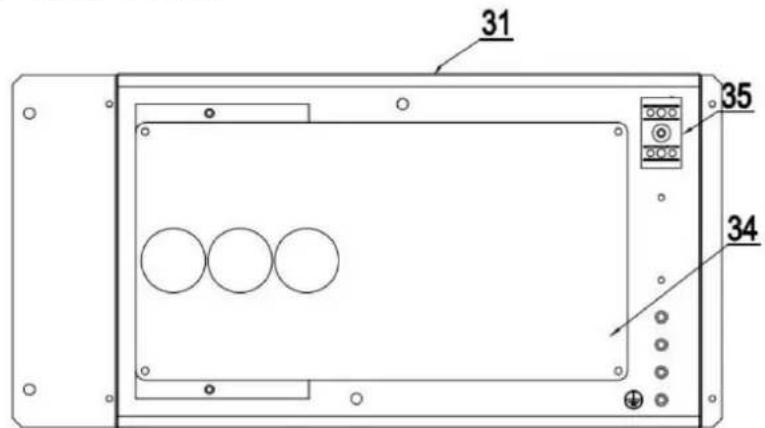
Electrical system
Electrical system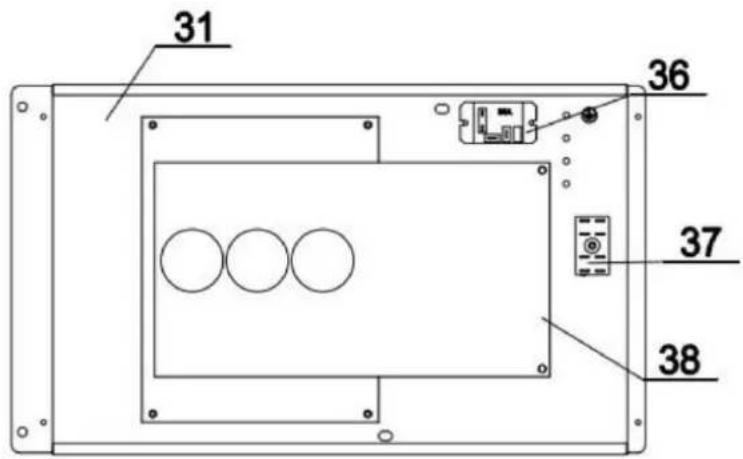
④ Circulating Water Pump/Metering Pump
∅ Hair Collector
Stop Valve
Basic icons
5.2.2 VBPYCE-150
5.2.3 VBPYCE-210-PI

!! Important:
www.vevor.com/support

NEED HELP? CONTACT US!
equipment.
available.
Loading procedures
| VBPYCE-150 95 | 671 | 370 | 1002 | 314 | 654 | 320 | 391 | 380 | 103 | 720 | 423 | 1192 | 358 | 775 | 407 |
| VBPYCE-210 | 447 | 470 | 108 | 126 |
④ Circulating Water Pump/Metering Pump
∅ Hair Collector
Stop Valve
Plug-in power supply
220-240 V~/50 Hz
Basic icons
5.2.2 VBPYCE-150
5.2.3 VBPYCE-210-PI
5.3 Winterizing


!! Important:
www.vevor.com/support
Swimming pool heat pump
Model: VBPYCE-70/VBPYCE-110/VBPYCE-150/VBPYCE-210

NEED HELP? CONTACT US!
| VBPYCE-150 95 | 671 | 370 | 1002 | 314 | 654 | 320 | 391 | 380 | 103 | 720 | 423 | 1192 | 358 | 775 | 407 |
| VBPYCE-210 | 447 | 470 | 108 | 126 |
ÿ Electrical system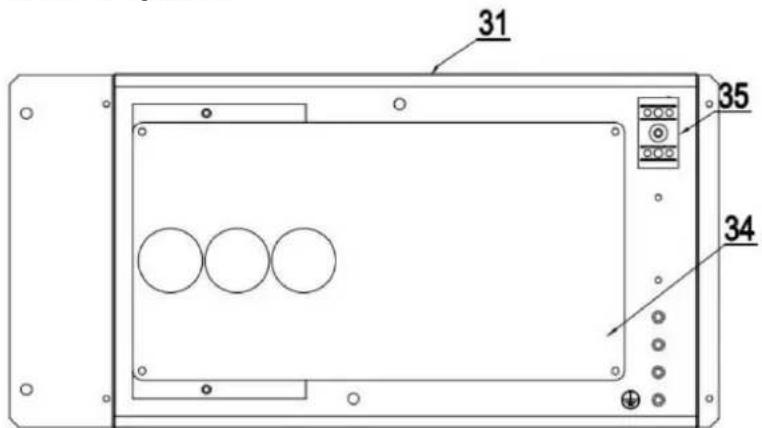
Electrical system
Electrical system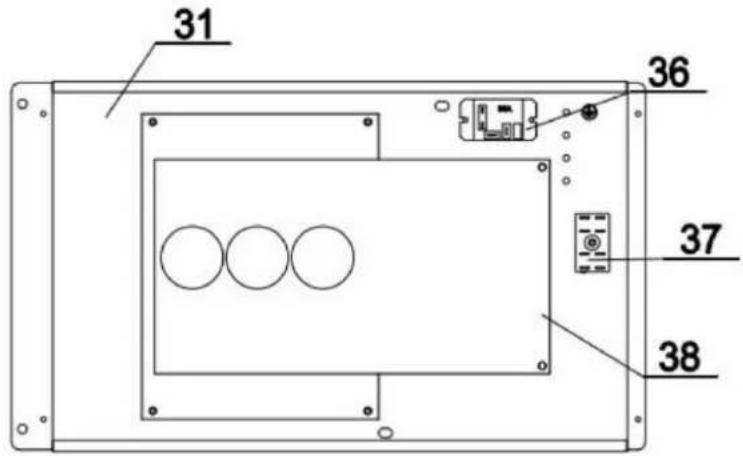
| 1 | Reactordoos | 15 | Chassis | 29 | Dak |
| 2 | Linkernet | 16 | Naaldventiel | 30 | Elektrische doosdeksel |
| 3 | Linker handvat | 17 | Filter | 31 | Elektrische doos Componenten |
| 4 | Zijbevestigingsplaten | 18 | EEV | 32 | Motorondersteuning |
| 5 | Motor | 19 | Rechter plaat | 33 | Reactorkastdeksel |
| 6 | Ventilatorbladen | 20 | Rechter handvat | 34 | Reactor |
| Verwarmingsvermogen (kW) | 5,62 | 8,02 | 11.22 | 15.46 |
| Opgenomen vermogen (kW) | 1,13 | 1,59 | 2.33 | 3.09 |
| COP | 4,98 | 5,03 | 4.83 | 5,00 |
| [Koeling] Omgevingstemperatuur: (DB/WB) 35 y /-; Waterinlaat-/uitlaattemperatuur: 30 y /28 y . | ||||
| Koelvermogen (kW) 8,54 Opgenomen | 3,91 vermogen (kW) | 2,04 | 6.25 | |
| 0,89 | 1.48 | 11.58 | ||
| 4.39 | 4.22 | 4.19 | 2.68 | |
| Maximaal opgenomen vermogen (kW) | 1.68 | 2.81 | 3,82 | 4.32 |
| Maximale stroom (A) | 7.30 | 12.23 | 16,60 | 5.05 |
| Voeding | 220V-240V~/50Hz | |||
| Verwarmingswatertemperatuurbereik ( y ) | 9-40 | |||
| Koelwatertemperatuurbereik ( y ) | 8-28 | |||
| Bedrijfsbereik ( y ) | -10~43 | |||
| Koelmiddel | R32 | |||
| Compressor Merk/Type | Mitsubishi | |||
| Manometer | Ja (optioneel) | |||
| Gascontrole | EEV | |||
| Waterwarmtewisselaar | Titanium warmtewisselaar | |||
| Waterleidingaansluiting | 1-1/2" | |||
| Waterdrukverlies (kPa) | 15 | 14 | 17 | 19 |
| Waterdichtheidsniveau | IPX4 | IPX4 | IPX4 | IPX4 |
| Waterstroom (m3/u) | 3.1 | 4,9 | 6.6 | 9.1 |
| Geluid [dB(A)] op 1m | 40~52 | 43~53 | 44~54 | 45~56 |
| Nettogewicht (kg) | 44.5 | 48,5 | 55.5 | 76.0 |
| Netto afmetingen (L*B*H) mm | 910×355×620 | 1000×400×660 | 1080×455×775 | |
3. INSTALLATION AND CONNECTION

Plug power supply
220-240V~/50Hz
5.2.2 VBPYCE-150
5.2.3 VBPYCE-210-PI

!! Important:
www.vevor.com/support
Pool heat pump
Model: VBPYCE-70/VBPYCE-110/VBPYCE-150/VBPYCE-210


NEED HELP? CONTACT US!
equipment.
ÿ Electrical system
ÿ Electrical system
ÿ Electrical system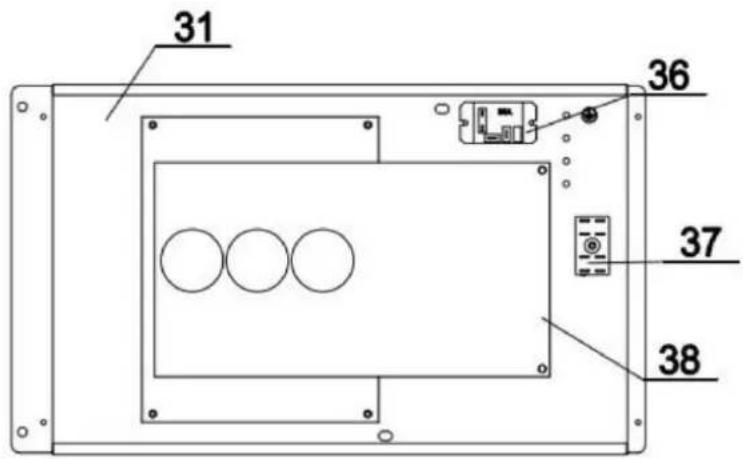
④ Circulating Water Pump/Metering Pump
∅ Hair Collector
Stop Valve
3.3.5 Electrical installation
3.4. Test after installation

WARNING: Check all wiring carefully before turning on the heat pump.
5.2.2 VBPYCE-150
Step 1: Remove the junction box cover. Remove the screws on the junction box cover. Pull out the junction box cover in the direction of the arrow.
Step 2: Remove the top cover
5.2.3 VBPYCE-210-PI
Step 1: Remove the junction box cover
Remove the screws on the junction box cover. Pull the junction box cover in the direction of the arrow.
Step 2: Remove the top cover. Remove the top cover screw. Slide the top cover in the direction of the arrow. Pull out the top cover in the direction of the arrow.
Step 5: Remove the rear door
5.3 Winter setting
!! Important:

!! Important:
- POOL HEAT PUMP
- NEED HELP? CONTACT US
- CONTENTS
- FOREWORD
- OVERVIEW OF THE UNIT
- INSTALLATION AND CONNECTION
- REMOTE CONTROLLER OPERATION GUIDANCE ...... ERROR! BOOKMARK NOT DEFINED
- READ THE MANUAL BEFORE OPERATION
- WARNING
- INITIAL SAFETY CHECKS SHALL INCLUDE
- CHECKS TO THE AREA
- WORK PROCEDURE
- GENERAL WORK AREA
- CHECKING FOR PRESENCE OF REFRIGERANT
- PRESENCE OF FIRE EXTINGUISHER
- NO IGNITION SOURCES
- VENTILATED AREA
- CHECKS TO THE REFRIGERATION EQUIPMENT
- REPAIRS TO SEALED COMPONENTS
- REPAIR TO INTRINSICALLY SAFE COMPONENTS
- CABLING
- DETECTION OF FLAMMABLE REFRIGERANTS
- LEAK DETECTION METHODS
- REMOVAL AND EVACUATION
- CHARGING PROCEDURES
- DECOMMISSIONING
- LABELING
- RECOVERY
- SYMBOL DESCRIPTION OF THE DEVICE
- STATEMENT
- SAFETY FACTORS
- ACCESSORIES SUPPLIED WITH THE UNIT
- DIMENSIONS OF THE UNIT
- MAIN PARTS OF THE UNIT
- VBPYCE-70, VBPYCE
- VBPYCE
- OPERATION RANGE
- PARAMETER OF THE UNIT
- TRANSPORTATION
- NOTICE BEFORE INSTALLATION
- INSTALLATION INSTRUCTIONS
- PRE-REQUIREMENTS
- HEAT PUMP INSTALLATION
- LOCATION AND SPACE
- INSTALLATION LAYOUT
- ELECTRICAL INSTALLATION
- ELECTRICAL CONNECTION
- TRIAL AFTER INSTALLATION
- INSPECTION BEFORE TRIAL RUNNING
- CONTROLLER OPERATION GUIDANCE
- DISPLAY
- KEY INSTRUCTIONS
- COMBINATION KEY INSTRUCTIONS
- OPERATION FUNCTION INSTRUCTIONS
- TROUBLESHOOTING
- FAULT CODES AND SOLUTIONS
- MAINTENANCE AND WINTERIZING
- MAINTENANCE
- ANNUAL MAINTENANCE
- DISASSEMBLY GUIDELINES
- TOOLS
- STEP 1: REMOVE THE TERMINAL BOX COVER
- STEP 2: REMOVE THE TOP COVER
- STEP 3: REMOVE THE ELECTRICAL BOX COVER
- STEP 4: REMOVE THE FRONT PANEL
- STEP 5: REMOVE THE REAR COVER
- STEP 6: REMOVE THE RIGHT PANEL
- STEP 7: REMOVE THE LEFT PANEL
- VBPYCE-210-PI
- WINTERIZING
- IMPORTANT
- VEVOR®
- TOUGH TOOLS, HALF PRICE
- WINTERIZATION
- OVERWINTERING
- SWIMMING POOL HEAT PUMP
- TEST AFTER INSTALLATION
- WINTER SETTING
Brand : Vevor
Model : VBPYCE-110
Category : Thermostat