
OCS-S1 - Scale Vevor - Free user manual and instructions
Find the device manual for free OCS-S1 Vevor in PDF.
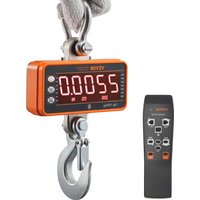


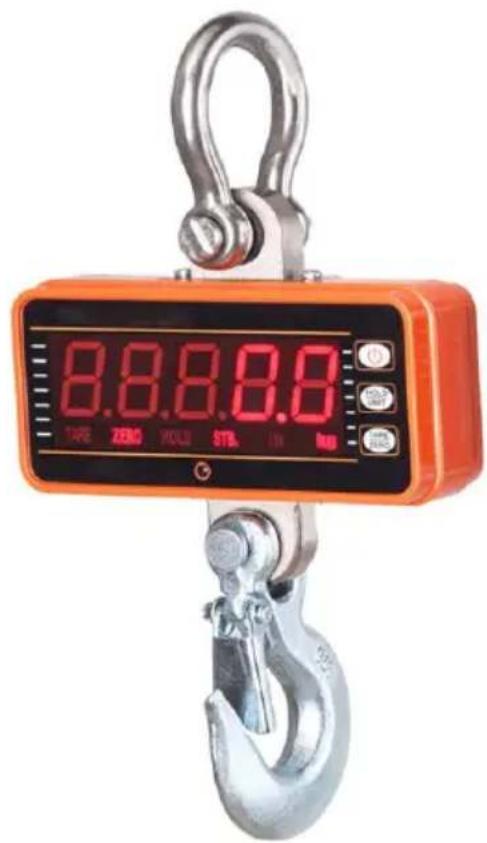
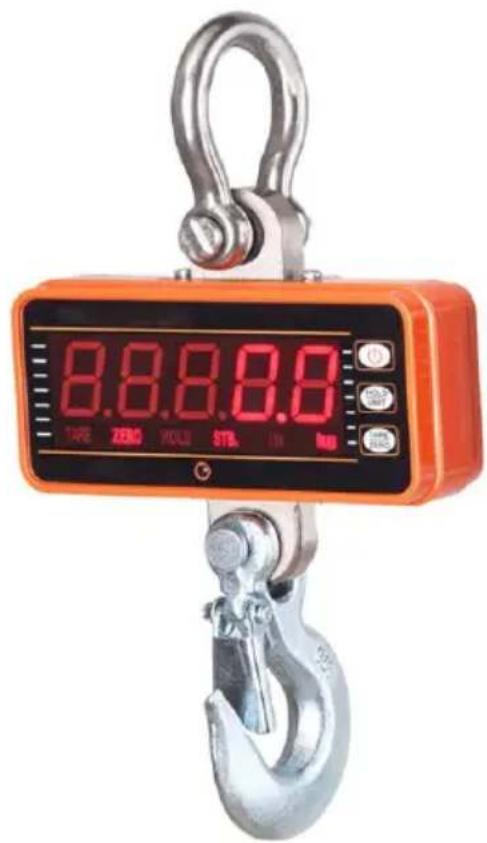
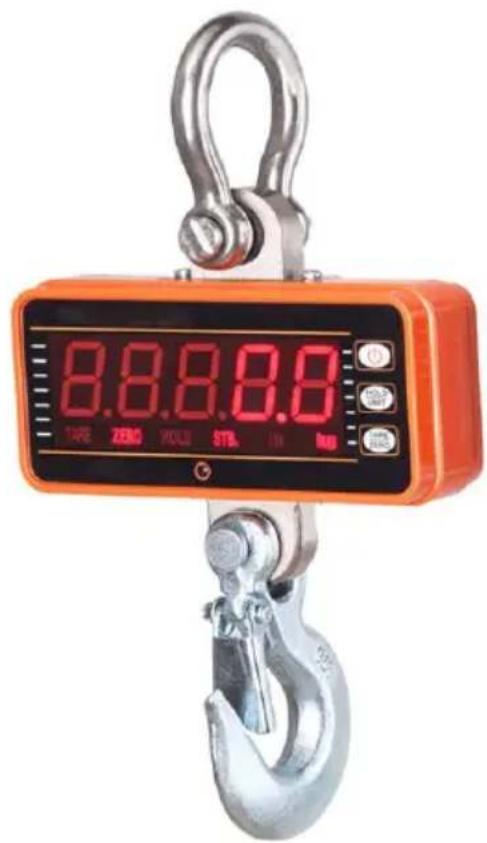
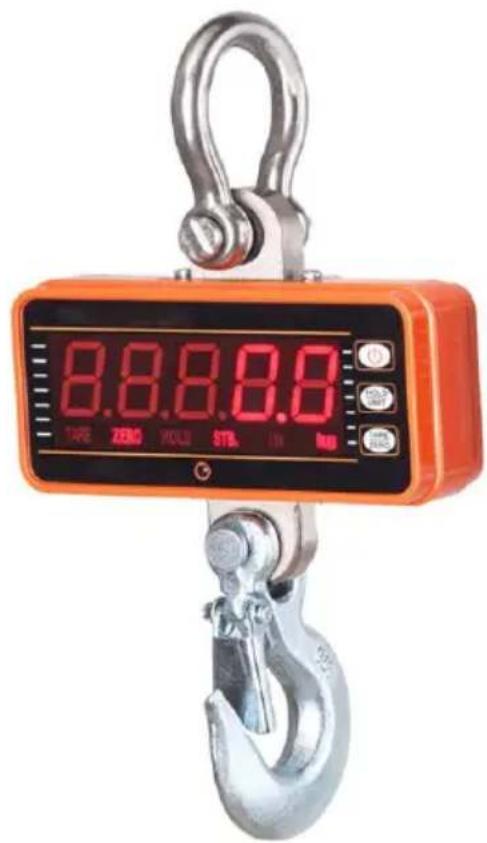
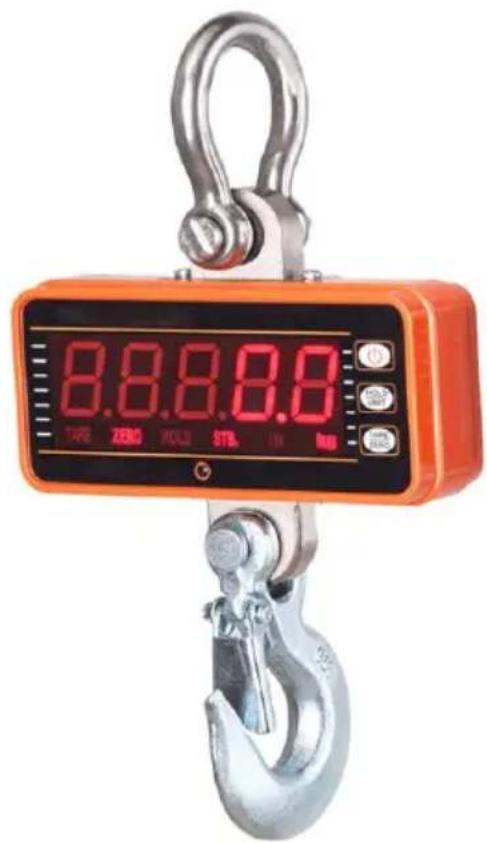
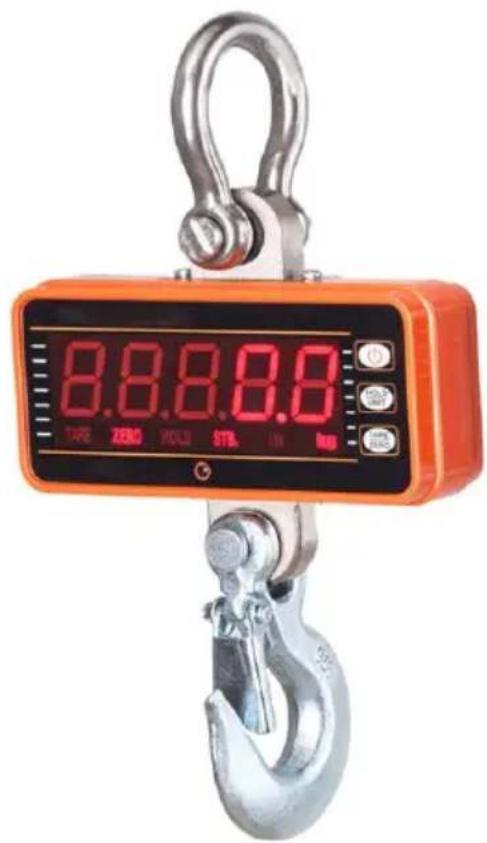
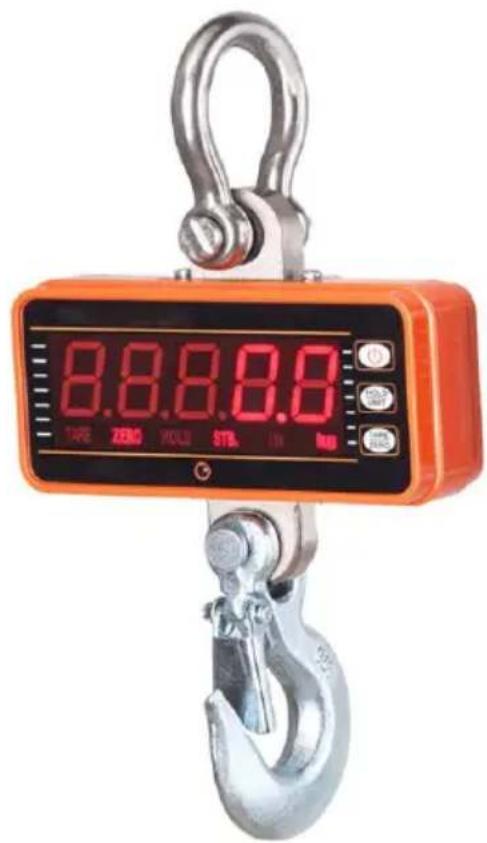
| Product type | Industrial Crane Scale |
| Brand | Vevor |
| Model | OCS-S1 |
| Maximum capacity | 1000 kg / 2200 lb |
| Division | 0.5 lb (0.2 kg) |
| Power supply | 4 AA 1.5 V batteries (6 V DC) |
| Display | 25.4 mm (1 inch) ultra-bright LED |
| Tare range | 100% FS |
| Auto zero | ±20% FS |
| Manual zero | ±4% FS |
| Stabilization time | ≤10 seconds |
| Allowable overload | 100% FS + 9e |
| Safe load | 120% of capacity |
| Ultimate load | 400% FS |
| Operating temperature | -10°C to +40°C |
| Operating humidity | ≤90% at 20°C |
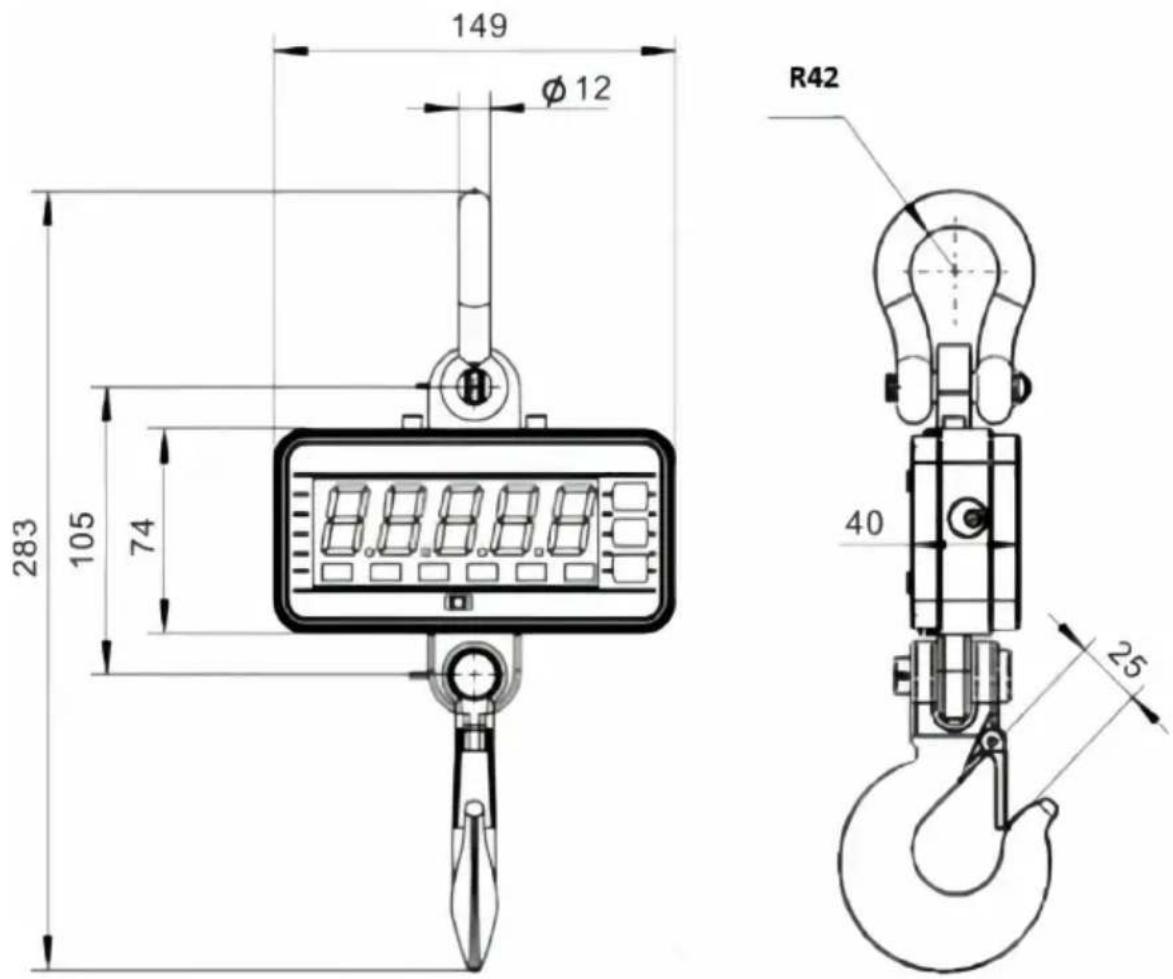
| Dimensions (approx.) | 283 x 105 x 74 mm (height x width x depth) |
| Main functions | Tare, zero, hold, accumulation, unit change (kg/lb/N), auto shut-off, sleep mode, adjustable brightness, pea hold function |
| Safety | Overload protection, auto shut-off, stability and zero indicators |
| Maintenance and cleaning | Replace used batteries, clean with a dry cloth, regularly check mechanical parts |
| Spare parts and repairability | AA batteries (not included), hook and shackle (not detailed); technical support at www.vevor.com/support |
| General information | Electronic warranty available online; compliant with standard GB/T 11883-2002 (equivalent to OIML R76) |
Frequently Asked Questions - OCS-S1 Vevor
User questions about OCS-S1 Vevor
0 question about this device. Answer the ones you know or ask your own.
Ask a new question about this device
Download the instructions for your Scale in PDF format for free! Find your manual OCS-S1 - Vevor and take your electronic device back in hand. On this page are published all the documents necessary for the use of your device. OCS-S1 by Vevor.
USER MANUAL OCS-S1 Vevor
Technical Support and E-Warranty Certificate
www.vevor.com/support
INDUSTRIAL CRANE SCALE
MODEL: OCS-S1
We continue to be committed to provide you tools with competitive price. "Save Half", "Half Price" or any other similar expressions used by us only represent of savings you might benefit from buying certain tools with us compared to top brands and does not necessarily mean to cover all categories of tools offered are kindly reminded to verify carefully when you are placing an order with us actually saving half in comparison with the top major brands.
VEVOR®
TOUGH TOOLS, HALF PRICE
INDUSTRIAL CRANE SCALE
MODEL: OCS-S1
NEED HELP? CONTACT US!
Have product questions? Need technical support? Please feel free to contact us:
Technical Support and E-Warranty Certificate www.vevor.com/support
This is the original instruction, please read all manual instruction carefully before operating. VEVOR reserves a clear interpretation user manual. The appearance of the product shall be subject to product you received. Please forgive us that we won't inform you there are any technology or software updates on our product.
GENERAL SAFETY RULES
| Symbol | Symbol Description |
 | Warning - To reduce the risk of injury, the user must rea instructions manual carefully. |
 | This symbol, placed before a safety comment, indicates a precaution, warning, or danger. Ignoring this warning may an accident. To reduce the risk of injury, fire, or electrocu please always follow the recommendations shown below. |
 | Warning- Be sure to wear gloves when using this product |
 | Warning- Be sure to wear eye protectors when using this |
 | Disposal information:This product is subject to the provision of European Direc 2012/19/EC. The symbol showing a wheelie bin crossed th indicates that the product requires separate refuse collectio the European Union. This applies to the product and all accessories marked with this symbol. Products marked as may not be discarded with normal domestic waste but mu taken to a collection point for recycling electrical and elec devices. |

General safety instructions
WARNING! Read all safety warnings and notes. Failure to follow the instructions listed below may result in electrical shock, fire, and/or injury. For good performance and precise measurement, be careful with daily operation and maintenance.
WORK AREA SAFETY
a) Keep the application area clean and well-lit. Unclean and dark areas lead to accidents. b) Do not use power tools in explosive environments, such as in the presence of flammable liquids, gases, or vapors. Power tools generate sparks that can ignite dust or vapors. c) Keep children and bystanders away when operating the appliance. Distractions can lead to loss of control over the device.
Usage Note:
Do not overload crane scale, this will damage loadcell;
Do not leave load hung on the digital balance for long. This will decrease accuracy and shorten loadcell life;
Inspect shackle and hook before using. Check clips, pins and screws regularly. Thank you for your support to our products!
1. Dimension & Weight
2. Display & Keys
- Scale Keys
| Key | Name | Function |
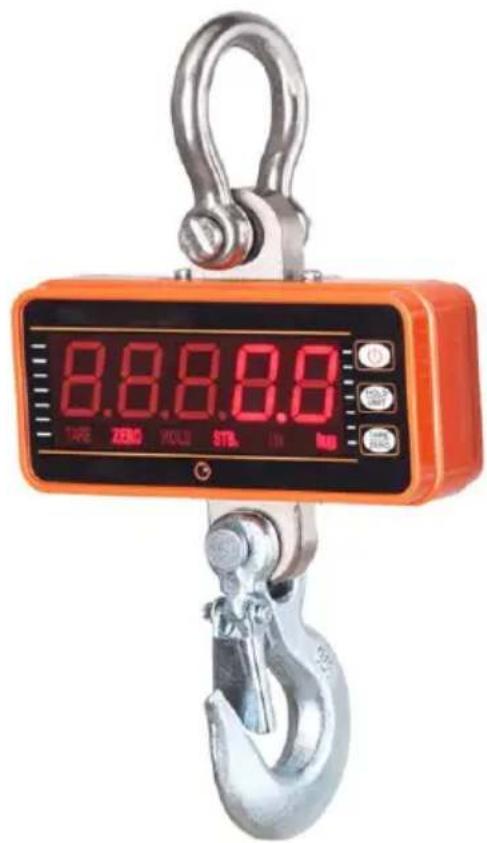
 | On/Off | Short pressing: Cancel & return to weighing modLong pressing: Power-on / Power-off |
 | TARE/ZERO | Short pressing: Tare in/out; Increase digitLong pressing: Zero; Move digit |
 | HOLD/UNIT | Short pressing: Lock/unlock; Confirm & nextLong pressing: Unit Switch; Input / cancel decimal |
- Remote Keys
| Key | Name | Function |
 | Zero | Same as long pressing |
 | Tare | Same as short pressing |
 | Hold | Same as short pressing |
 | Acc. | Accumulate weightDecrease flashing digit |
 | Del. | Delete last weightClear all weightLeft scroll flashing digit |
 | F1 | ViewInput / cancel decimal point |
 | F2 | Unit Switch |
 | Off | Long press to power offReturn to weighing mode |
 | 2nd | 2nd function |
- Indicators
| LED | Name | Note |
| STB. | Stable | lit when weight is stable |
| ZERO | Zero | lit when weight is at zero |
| TARE | Tared | lit when the scale is tared |
| HOLD | Hold | lit when the scale is locked |
| lb | lb | lit when the unit is lb |
| kg | kg | lit when the unit is kg |
| n | n | Kg and lb lights off |
- Message
| Message | Stand for | Note |
| detect weight | ||
| SETUP | SETUP | User Setup Menu |
| BAT99 | BATtery | battery life percentage |
| End | END | save and exit |
| OFF | OFF | power off |
| ouEr | OVERload | overloading |
| Err | ERRor | invalid operation |
| ACC | ACCumulate | accumulate weight |
| del | DELete | delete last weight |
| CLr | CLeaR | delete all weight |
3. Operations
● Power On/Off
√ Long press to power on the scale. The scale performs initialization and power-on tests, shows twice, then displays capacity, battery life percentage, weight detection, and then auto zero.
For information about Auto-Zero, refer to Scale Configuration in the Technical Manual.
√ Long press or to power off the scale. Battery life percentage shows, off message shows, and then power is cut off.
When the voltage of 3 batteries is lower than 3.2V, the scale will auto power off itself. Replace the dead batteries with new ones.
- Zero
√ Long press, or press, to zero. ZERO shows.
For information about Manual-Zero Range, refer to Scale Configuration in the Technical Manual.
- Tare In/Out
√ In gross mode, press or press to tare in. TARE shows.
Tare will reduce the apparent overload range of the scale. For example, if a 500*0.2 scale has a 100kg container as its tare, the scale will overload at a new weight of 401.8kg (500 - 100 + additional 9 divisions).
In net mode, press TARE or press to tare out. TARE disappears.
- Lock/Unlock
☑ Press or to lock screen. HOLD shows.
☑ Press again to unlock screen. HOLD disappears.
- Accumulate
Press to accumulate current weight.
ACC shows, indicating weight is accumulated. Scale uses displayed weight, so gross or net weight is added into the same accumulator.
- View
Press to enter View mode.
Display flashes accumulated weight.
Press on to view high 5-digit or low 5-digit.
Press or to exit View mode.
- Delete Last Weight
Press to delete the last accumulated weight.
del shows, indicating that the last accumulated weight is deleted. The delete function only deletes the last weight.
- Clear All Weight
Press first and then press to clear all accumulated weight.
shows, indicating all weight is cleared.
- Unit Switch
Long press for press, to switch the unit between kg, lb, and N.
When the unit is kg, it shows. When the unit is lb, it shows. When the unit is N, kg, and lb lights are off.
For more information about the User Unit, refer to Scale Configuration in the Technical Manual.
4. User Setup
Press first and then press to enter the User Setup menu.
- Auto-Off Timing
Press to enter Auto-Off Timing. Shows OFF - -
Press or press or to change the timing value.
Auto-Off Timing can be set to: (disabled), (5 min), (10 min), (15 min), 30 (30 min), (60 min). It is disabled by default.
The Auto-Off function maximizes the scale's battery life against people's carelessness to power off the scale when it's not working.
Auto-Off starts the countdown timer when there's no action, or the load is stable. Key pressing or motion in the load restarts the countdown timer.
- Display Brightness
Press to enter Display Brightness. Shows:
Press or press or to change the brightness value.
Display Brightness can be set off (disabled), (dim), (normal), (bright).
Dim display brightness saves battery power dramatically.
- Idle Mode Timing
Press to enter Idle Mode Timing. The display shows the current setting.
Press the up or down arrow keys to change the timing value.

Idle Mode Timing can be set to: (disabled), (5sec), (10sec), (15sec), (30sec), (60sec). It is 30sec by default.

To maximize battery life, the scale automatically enters Idle Mode when there is no action, or the load is stable. In Idle Mode, the scale works in low-power consumption status. Any key pressing or motion in load wakes up the scale from Idle Mode.

Press the up or down arrow keys to exit User Setup.
5. Battery Maintenance
To maximize battery life, please note the following battery maintenance guide:
① This scale is powered by 4 AA 1.5V batteries. Battery houses at the rear of the scale can be opened by screwing off screws. In order to conserve battery life, enable Auto-Off and Idle Mode to dim display brightness. When 4 batteries' voltage is lower than 3.5V, the scale will auto power off itself. Replace the dead batteries with new ones.
6. Troubleshooting
Simple problems can be resolved as per the below-listed solution. If problems persist, please contact your local representative.
| Symptom | Possible Cause | Suggested Solution |
| not power on after is pressed | discharged / defective battery | check the battery and replace |
| defective On/Off key | press harder and keep pressing 2s | |
| defective power cable | open the front panel, check the power cable | |
| defective mainboard | contact representative | |
| display flashes | discharged battery | replace battery |
| no action was taken after the key was pressed | scale is disturbed | re-plug power cable |
| defective key | contact representative | |
| weight reading is no stable | load in motion | keep load stable |
| weak Anti-Motion | change Anti-Motion level | |
| damped loadcell or mainboard | dry loadcell or mainboard | |
| defective mainboard | contact representative | |
| weight reading is no zero when there is load | discharged battery | replace battery |
| loadcell stressed too long | hang scale in storage | |
| loadcell drifts | contact representative | |
| large error in weight reading | scale not zeroed before applying the load | Manual Zero scale before loading |
| wrong unit | switch to the correct unit | |
| require calibration | calibrate scale | |
| defective loadcell or mainboard | contact representative |
7. Peak Holding function operating procedures:
A> Use remote controller to operate Peak Holding function procedures:
- Press remote controller the triangle key twice, enter the password interface, the scale screen displays P0000.
- Press remote
controller key and modify digits. Pressing and to shift the digits input. Enter peak holding set password P3721.
- Press remote controller, enter password to SFN; Press again
to enter PK OFF; Press remote controller or to choose PK ON; then press continuously until to END. When PKON function
set successfully, the peak holding function keeping after the scale turn on ag
- In actual use, press remote controller to
choose turn on or off the peak holding function, the indicator light HOLD is
on when the peak holding function turn on, or indicator light HOLD is off when the peak holding function turn off.
The maximum value of weighing will be automatic cover and maintain under condition of HOLD.
- The HOLD key's function is for holding current value when the peak holding function not enabled, different with the function in peak holding turn on.
8. Specifications
| Accuracy | Chinese GB/T 11883-2002 CIII eqv. OIML R76 |
| Tare Range | 100% F.S. |
| Auto Zero | ±20% F.S. |
| Manual Zero | ±4% F.S. |
| Stable Time | ≤10sec |
| Overload | 100% F.S. + 9e |
| Safety Load | 120% F.S. |
| Ultimate Load | 400% F.S. |
| Battery | 4*AA 1.5V batteries |
| Display | 25.4mm (1inch) ultra-bright LED |
| Op. Temp. | -10°C - +40°C |
| Op. Humidity | 20°C ≤90% |
| Items | Description | |
| 1 | Name | Industrial Crane Scale |
| 2 | Model | OCS-S1 |
| 3 | Parameter | Rating(s): 4x1.5AA (6VDC)Capacity: 1000kg/2200lbDivision: 0.5lb |
Manufacturer: Shanghaimuxinmuyeyouxiangongsi
Address: Shuangchenglu 803nong11hao1602A-1609shi, baoshanqu, shanghai 200000 CN.
Imported to AUS: SIHAO PTY LTD, 1 ROKEVA STREETEASTWOOD NS 2122 Australia
Imported to USA: Sanven Technology Ltd., Suite 250, 9166 Anaheim Pla, Rancho Cucamonga, CA 91730
| EC | REP |
E-CrossStu GmbH
Mainzer Landstr. 69, 60329 Frankfurt am Main
| UK | REP |
YH CONSULTING LIMITED.
C/O YH Consulting Limited, Office 147, Centurion House
London Road, Staines-upon-Thames, Surrey, TW18 4
VEVOR®
TOUGH TOOLS, HALF PRICE
Technical Support and E-Warranty Certificate
www.vevor.com/support
VEVOR®
TOUGH TOOLS, HALF PRICE
We continue to be committed to providing you with tools at competitive prices. "Save Half", "Half Price", or any other similar expressions used by us only represent the savings you might benefit from buying certain tools with us compared to top brands, and does not necessarily mean to cover all categories of tools offered. We kindly remind you to verify carefully when placing an order with us that you are actually saving half in comparison with the top major brands.
VEVOR®
TOUGH TOOLS, HALF PRICE
INDUSTRIAL CRANE SCALE
MODEL: OCS-S1
NEED HELP? CONTACT US!
Have product questions? Need technical support? Please feel free to contact us:
Technical Support and E-Warranty Certificate www.vevor.com/support
This is the original instruction. Please read all manual instructions carefully before operating. VEVOR reserves a clear interpretation of the user manual. The appearance of the product shall be subject to the product you received. Please forgive us that we won't inform you of any technology or software updates on our product.
GENERAL SAFETY RULES
Place, Rancho Cucamonga, CA 91730
| EC | REP |
E-CrossStu GmbH
Mainzer Landstr.69, 60329 Frankfurt am Main
| UK | REP |
YH CONSULTING LIMITED.
C/O YH Consulting Limited Office 147, Centurion H
London Road, Staines-upon-Thames, Surrey, TW18 4
VEVOR®
TOUGH TOOLS, HALF PRICE
www.vevor.com/support
VEVOR®
TOUGH TOOLS, HALF PRICE
www.vevor.com/support
INDUSTRIAL CRANE SCALE
MODEL: OCS-S1
We continue to be committed to providing you with tools at competitive prices. "Save Half", "Half Price", or any other similar expressions used by us only represent the savings you might benefit from buying certain tools with us compared to top brands, and do not necessarily mean that all categories of tools offered are covered. We kindly remind you to verify carefully when placing an order with us that you are actually saving half in comparison with the top major brands.
VEVOR®
TOUGH TOOLS, HALF PRICE
INDUSTRIAL CRANE SCALE
MODEL: OCS-S1
NEED HELP? CONTACT US!
Have product questions? Need technical support? Please feel free to contact us:
Technical Support and E-Warranty Certificate www.vevor.com/support
This is the original instruction. Please read all manual instructions carefully before operating. VEVOR reserves the right to interpret the user manual. The appearance of the product shall be subject to the product you received. Please forgive us that we won't inform you of any technology or software updates on our product.
Place, Rancho Cucamonga, CA 91730
| EC | REP |
E-CrossStu GmbH
Mainzer Landstr.69, 60329 Frankfurt am Main
| UK | REP |
YH CONSULTING LIMITED.
C/O YH Consulting Limited Office 147, Centurion House
London Road, Staines-upon-Thames, Surrey, TW18 4AX
VEVOR®
TOUGH TOOLS, HALF PRICE
www.vevor.com/support
VEVOR®
TOUGH TOOLS, HALF PRICE
We continue to be committed to provide you tools with competitive price. "Save Half", "Half Price" or any other similar expressions used by us only represent the savings you might benefit from buying certain tools with us compared to top brands and does not necessarily mean to cover all categories of tools offered. We kindly remind you to verify carefully when you are placing an order with us that you are actually saving half in comparison with the top major brands.
VEVOR®
TOUGH TOOLS, HALF PRICE
INDUSTRIAL CRANE SCALE
MODEL: OCS-S1
NEED HELP? CONTACT US!
Have product questions? Need technical support? Please feel free to contact us:
Technical Support and E-Warranty Certificate www.vevor.com/support
This is the original instruction. Please read all manual instructions carefully before operating. VEVOR reserves a clear interpretation of the user manual. The appearance of the product shall be subject to the product you received. Please forgive us that we won't inform you of any technology or software updates on our product.
GENERAL SAFETY STANDARDS
Imported in AUS: SIHAO PTY LTD, 1 ROKEVA STREET EASTWOOD NSW 2122 Australia
Imported in the USA: Sanven Technology Ltd., Suite 250, 9166 Anaheim Place, Rancho Cucamonga, CA 91730
| EC | REP |
E-CrossStu GmbH
Mainzer Landstr.69, 60329 Frankfurt am Main
| UK | REP |
YH CONSULTING LIMITED.
C/O YH Consulting Limited Office 147, Centurion House
London Road, Staines-upon-Thames, Surrey, TW18 4
VEVOR®
TOUGH TOOLS, HALF PRICE
We continue to be committed to providing you with tools at competitive prices. "Save Half", "Half Price", or any other similar expressions used by us only represent the savings you might benefit from buying certain tools with us compared to top brands, and do not necessarily mean to cover all categories of tools offered. We kindly remind you to verify carefully when placing an order with us that you are actually saving half in comparison with the top major brands.
VEVOR®
TOUGH TOOLS, HALF PRICE
INDUSTRIAL CRANE SCALE
MODEL: OCS-S1
NEED HELP? CONTACT US!
Have product questions? Need technical support? Please feel free to contact us:
Technical Support and E-Warranty Certificate www.vevor.com/support
This is the original instruction. Please read all manual instructions carefully before operating. VEVOR reserves a clear interpretation of the user manual. The appearance of the product shall be subject to the product you received. Please forgive us that we won't inform you of any technology or software updates on our product.
VEVOR®
TOUGH TOOLS, HALF PRICE
www.vevor.com/support
INDUSTRIAL CRANE SCALE
MODEL: OCS-S1
We continue to be committed to provide you tools with competitive price. "Save Half", "Half Price" or any other similar expressions used by us only represent savings you might benefit from buying certain tools with us compared to top brands and does not necessarily mean to cover all categories of tools offered. We kindly remind you to verify carefully when placing an order with us to ensure you are actually saving half in comparison with the top major brands.
VEVOR®
TOUGH TOOLS, HALF PRICE
INDUSTRIAL CRANE SCALE
MODEL: OCS-S1
NEED HELP? CONTACT US!
Have product questions? Need technical support? Please feel free to contact us:
Technical Support and E-Warranty Certificate www.vevor.com/support
This is the original instruction. Please read all manual instructions carefully before operating. VEVOR reserves a clear interpretation of the user manual. The appearance of the product shall be subject to the product you received. Please forgive us that we won't inform you of any technology or software updates on our product.
GENERAL SAFETY RULES
WORKPLACE SAFETY
Imported to AUS: SIHAO PTY LTD, 1 ROKEVA STREETEASTWOOD NSW 2122 Australia
Imported to USA: Sanven Technology Ltd., Suite 250, 9166 Anaheim Place, Rancho Cucamonga, CA 91730
| EC | REP |
E-CrossStu GmbH
Mainzer Landstr.69, 60329 Frankfurt am Main
| UK | REP |
YH CONSULTING LIMITED.
C/O YH Consulting Limited Office 147, Centurion House
London Road, Staines-upon-Thames, Surrey, TW18 4
VEVOR®
TOUGH TOOLS, HALF PRICE
www.vevor.com/support
VEVOR®
TOUGH TOOLS, HALF PRICE
Technical support and e-warranty certificate www.vevor.com/support
INDUSTRIAL CRANE SCALE
MODEL: OCS-S1
We continue to be committed to provide you tools with competitive price. "Save Half", "Half Price" or any other similar expressions used by us only represent savings you might benefit from buying certain tools with us compared to top brands and does not necessarily mean to cover all categories of tools offered. We kindly remind you to verify carefully when placing an order with us to ensure you are actually saving half in comparison with the top major brands.
VEVOR®
TOUGH TOOLS, HALF PRICE
INDUSTRIAL CRANE SCALE
MODEL: OCS-S1
NEED HELP? CONTACT US!
Have product questions? Need technical support? Please feel free to contact us:
Technical Support and E-Warranty Certificate www.vevor.com/support
This is the original instruction. Please read all manual instructions carefully before operating. VEVOR reserves the right to interpret the user manual. The appearance of the product shall be subject to the product you received. Please forgive us that we won't inform you of any technology or software updates on our product.
GENERAL SAFETY RULES
Anaheim Place, Rancho Cucamonga, CA 91730
| EC | REP |
E-CrossStu GmbH
Mainzer Landstr.69, 60329 Frankfurt am Main
| UK | REP |
YH CONSULTING LIMITED.
C/O YH Consulting Limited Office 147, Centurion House
London Road, Staines-upon-Thames, Surrey, TW18 4
VEVOR®
TOUGH TOOLS, HALF PRICE
VEVOR®
TOUGH TOOLS, HALF PRICE
INDUSTRIAL CRANE SCALE
MODEL: OCS-S1
We continue to be committed to providing you with tools at competitive prices. "Save Half", "Half Price", or any other similar expressions used by us only represent the savings you might benefit from buying certain tools with us compared to top brands, and do not necessarily mean to cover all categories of tools offered. We kindly remind you to verify carefully when placing an order with us that you are actually saving half in comparison with the top major brands.
VEVOR®
TOUGH TOOLS, HALF PRICE
INDUSTRIAL CRANE SCALE
MODEL: OCS-S1
NEED HELP? CONTACT US!
Have product questions? Need technical support? Please feel free to contact us:
Technical Support and E-Warranty Certificate www.vevor.com/support
This is the original instruction. Please read all manual instructions carefully before operating. VEVOR reserves a clear interpretation of the user manual. The appearance of the product shall be subject to the product you received. Please forgive us that we won't inform you if there are any technology or software updates on our product.
GENERAL SAFETY REGULATIONS
C/O YH Consulting Limited Office 147, Centurion H
London Road, Staines-upon-Thames, Surrey, TW18 4
VEVOR®
TOUGH TOOLS, HALF PRICE
www.vevor.com/support
- INDUSTRIAL CRANE SCALE
- VEVOR®
- NEED HELP? CONTACT US
- GENERAL SAFETY RULES
- GENERAL SAFETY INSTRUCTIONS
- WORK AREA SAFETY
- USAGE NOTE
- DIMENSION & WEIGHT
- DISPLAY & KEYS
- SCALE KEYS
- REMOTE KEYS
- INDICATORS
- MESSAGE
- OPERATIONS
- ● POWER ON/OFF
- ZERO
- TARE IN/OUT
- LOCK/UNLOCK
- ACCUMULATE
- VIEW
- DELETE LAST WEIGHT
- CLEAR ALL WEIGHT
- UNIT SWITCH
- USER SETUP
- AUTO-OFF TIMING
- DISPLAY BRIGHTNESS
- IDLE MODE TIMING
- BATTERY MAINTENANCE
- TROUBLESHOOTING
- PEAK HOLDING FUNCTION OPERATING PROCEDURES
- SPECIFICATIONS
- TOUGH TOOLS, HALF PRICE
- MODEL: OCS-S
- GENERAL SAFETY STANDARDS
- WORKPLACE SAFETY
- GENERAL SAFETY REGULATIONS
Brand : Vevor
Model : OCS-S1
Category : Scale