
HZX-988 - Hand tool Vevor - Free user manual and instructions
Find the device manual for free HZX-988 Vevor in PDF.
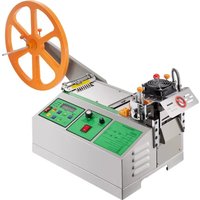


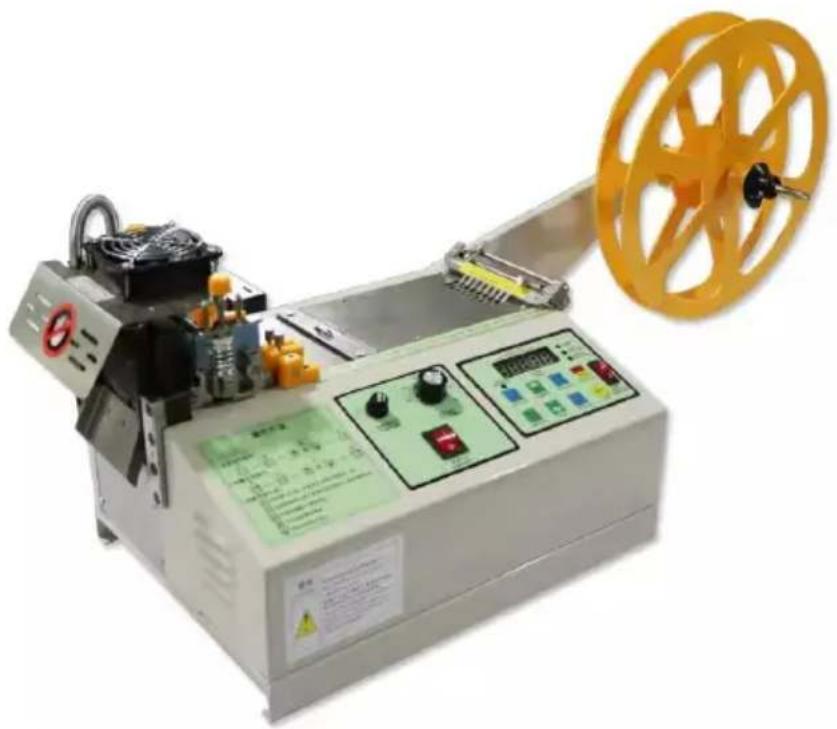
| Product type | Automatic microcomputer cutting machine |
| Brand | Vevor |
| Model | HZX-988 |
| Power supply | 120 V 60 Hz or 220-240 V 50 Hz |
| Power | 262 W (120 V) / 273 W (220-240 V) |
| Cutting width | 1 to 85 mm |
| Cutting length | 1 to 99,999 mm |
| Maximum cutting thickness | 3 mm |
| Cutting modes | Cold and hot (with temperature adjustment) |
| Temperature range (hot) | 130 °C to 250 °C |
| Feed speed adjustment | 1 to 99 (by steps) |
| Quantity setting | Up to 99,999 pieces |
| Feed type | Manual (material placement) |
| Safety | Emergency stop, protective cover, grounding |
| Maintenance | Blade change, regular lubrication |
| Spare parts available | Replacement blades (upper and lower) |
| Indicator lights | Run (green), fault (red), quantity (yellow) |
| Approximate dimensions | Approximately 50 × 40 × 30 cm |
| Approximate weight | Approximately 15 kg |
| Compliance | FCC Part 15, European Directive 2012/19/EU |
Frequently Asked Questions - HZX-988 Vevor
User questions about HZX-988 Vevor
0 question about this device. Answer the ones you know or ask your own.
Ask a new question about this device
Download the instructions for your Hand tool in PDF format for free! Find your manual HZX-988 - Vevor and take your electronic device back in hand. On this page are published all the documents necessary for the use of your device. HZX-988 by Vevor.
USER MANUAL HZX-988 Vevor
Technical Support and E-Warranty Certificate www.vevor.com/support
Automatic Microcomputer Cutting Machine MODEL: HZX-988
We continue to be committed to provide you tools with competitive price.
"Save Half", "Half Price" or any other similar expressions used by us only represents an estimate of savings you might benefit from buying certain tools with us compared to the major top brands, not necessarily mean to cover all categories of tools offered by us. You are kindly reminded to carefully consider when you are placing an order with us if you are actually saving half in comparison with major brands.
VEVOR®
TOUGH TOOLS, HALF PRICE
Automatic Microcomputer Cutting Machine
NEED HELP? CONTACT US!
Have product questions? Need technical support? Please feel free to contact us:
Technical Support and E-Warranty Certificate www.vevor.com/support
This is the original instruction. Please read all manual instructions carefully before operating. VEVOR reserves a clear interpretation of the user manual. The appearance of the product shall be subject to the product you received. Please forgive us that we won't inform you if there are any technology or software updates on our product.
Warning - To reduce the risk of injury, user must read the instruction manual carefully.
SAFETY WARNINGS AND PRECAUTIONS
Thank you for using this product. In order to make sure that you can operate the machine correctly, read this instruction carefully before operation and keep it properly for future reference. Please be sure to read the precautions and safe rules on this page to ensure your safe use. This manual will outline safety warnings and precautions, operating, and maintenance. The warnings and instructions reviewed in this manual cannot cover all possible conditions and situations that may occur. Caution and common sense are not built into this product, since we believe the users will comply with these codes.
Please read ALL the instructions before using your machine.
- Assemble needs to follow these instructions. Incorrect assembly can be a hazard.
- Do not assemble when tired or when under the influence of alcohol, drugs, or medication.
- Weight, elasticity, and other product properties are only applicable to correctly and completely assembled products.
- Keep the assembly area clean and well-lit.
- Keep bystanders out of the area during assembly.
- This is equipment, not a toy. It needs to be used under the guidance of a professional. Do not allow children and pets to play alone or approach this item.
- Use as intended only. Do not sit or stand on the product.
- Inspect before every use. Do not use it if parts are loose or damaged.
- Do not apply this unit to any other purposes than the indicated usage.
- Do not use it for commercial purposes.
- Do not clean it with any abrasive material.
- Never leave it unattended while in use.
- Pet urine and feces can damage the product. Please keep away.
- Do not place the product on or near hot air, electric burners, or heaters.
WARNING:
The warnings, cautions, and instructions discussed in this manual cannot cover all possible conditions or situations that could occur. It must be understood by the operator that common sense and caution are factors which cannot be built into this product, but must be supplied by the operator.
- Keep work area clean. Cluttered areas invite injuries.
- Observe work area conditions. Do not use machines or power tools in damp or wet locations. Do not expose to rain. Keep work area well lighted. Do not use electrically powered tools in the presence of flammable gases or liquids.
- Keep children away. Children must never be allowed in the work area. Do not let them handle machines, tools, or extension cords.
- Store idle equipment. When not in use, tools must be stored in a dry location to inhibit rust. Always lock up tools and keep them out of reach of children.
- Do not force tool. It will do the job better and more safely at the rate for which it was intended. Do not use inappropriate attachments in an attempt to exceed tool capacity.
- Use the right tool for the job. Do not attempt to force a small tool or attachment to do the work of a large industrial tool. Do not use a tool for a purpose for which it was not intended.
- Dress properly. Do not wear loose clothing or jewelry as they can be caught in moving parts. Protective, electrically non-conductive clothes and non-skid footwear are recommended when working. Wear restrictive hair covering to contain long hair.
- Use eye and ear protection. Always wear ISO approved impact safety goggles. Wear a full-face shield if you are producing metal filings or wood chips. Wear ISO approved dust mask or respirator when working around metal, and chemical dusts and mists.
- Do not overreach. Keep proper footing and balance at all times. Do not reach over or across a running machine.
- Maintain tools with care. Keep tools sharp and clean for better and safer performance. Follow instructions for lubricating and changing accessories. The handles must be kept clean, dry, and free from oil and grease at all times.
- Stay alert. Watch what you are doing; use common sense. Do not operate tool when you are tired.
SAVE THESE INSTRUCTIONS
| Model | HZX-988 | |
| Input | 120V 60Hz | 220 -240V 50Hz |
| Power | 262W | 273W |
| Cut-off width | 1~85mm | 1~85mm |
| Cut-off length | 1~99999mm | 1~99999mm |
| cut - off thickness | 3mm | 3mm |
FUNCTIONAL DESCRIPTION
The program cutter motor can be set as either AC motor or stepper. It can start cutting first or feeding first.
This machine operates under normal temperature conditions. If it operates at temperatures above 80 degrees Celsius, it will affect the machine's performance. It has no impact on the environment or energy consumption.
Run indicator light: The green light shines when the machine is running.
Trouble lamp: Fault indicating lamp. A machine failure will cause a red light and an alarm.
Quantity pilot lamp: Quantity indicator light. If the quantity is set, the light will be on.
Power on/off button: Machine main power supply on and off button.
Stop/Restoration: Pressing button during machine operation. Press for 3 seconds to reset the count to zero.
Start up: Start key. The device start key.
Quantity setting: Set the total number key. Total number of machines set.
Maximum value 99999.
Speed setting: Speed key. Set the feeding speed from 1-99. Long press for seconds to enter the interior to set the knife speed range of 0-3. "+" Go ahead: Feed point motion key. Manual click on the feed, and also set the length "+" key.
"-" Backward: Return point motion key. Also set the length setting "-". Length setting: Length set key. The device sets the length key, also synchronizes the length confirmation key setting. The internal setting long press 3 seconds can enter the error compensation setting (standard setting 50, the length is reduced, maximum 99 number, less length, minimum 00).
Cut set: Try cutting a knife button. The length parameter is set, you press the trial cut to measure the length, but also the length and the next digit key.
Length pilot lamp: Length indicator light. The length sets a green light.
PANEL FUNCTION INTRODUCTION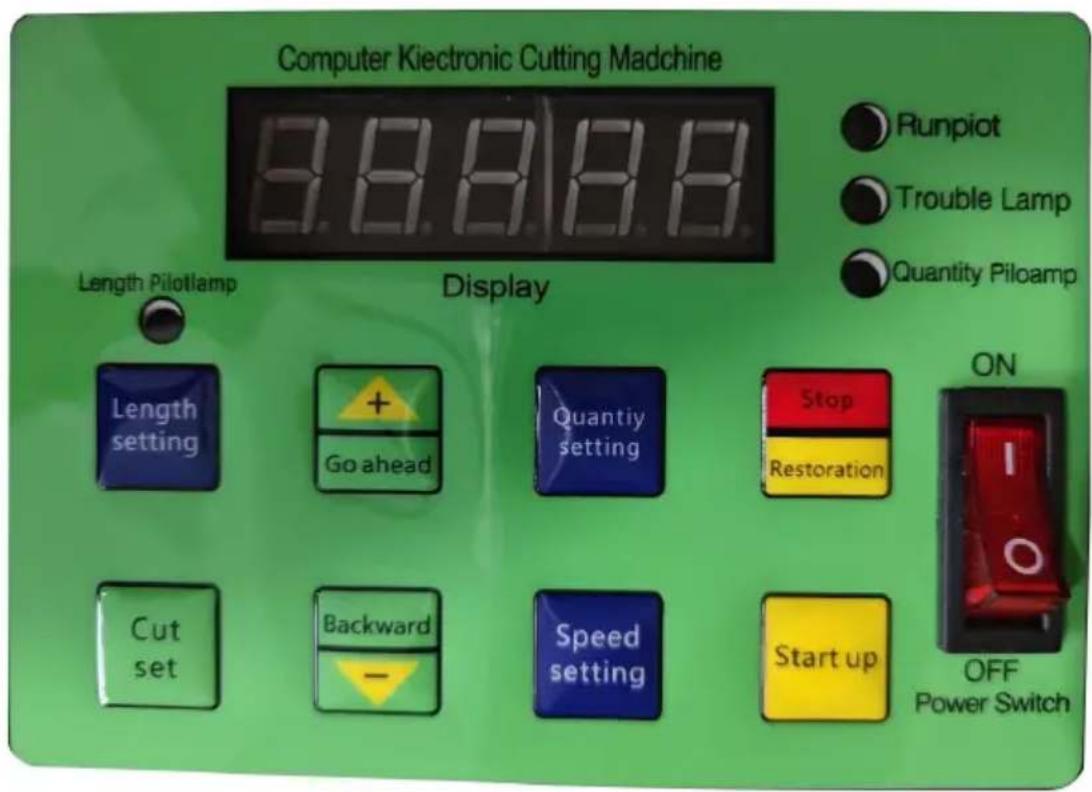
Power switch: This key controls the power switch. Quantity setting: Press this button to enter the current number setting state. Length setting: Press this button to enter the current length setting state.
Cut set: When the number is set, or the length is set, press the set key to enter the current number or length setting.
Goahead: Press the button to indicate an increase in the number.
Backward: Press the button to indicate a decrease in the number.
Stop/Restoration: Simply press this key to stop, long press this key to reset number.
CONSIDERATIONS
- Please confirm the power supply voltage and link ground wire before using.
- In order to ensure safety, please do not use hand or any object near the knife during cutting.
- When making any adjustment, please cut off the power to maintain safety.
- Do not remove any spare parts except for normal maintenance.
- Make sure to add oil once before starting.
- If the tool becomes blunt after a period of time, it can be used after grinding the knife in a professional grinder. The job must be done by a professional.
- If there is any difficulty in operation, please contact us, we will serve you wholeheartedly.
HOW TO CHANGE A KNIFE
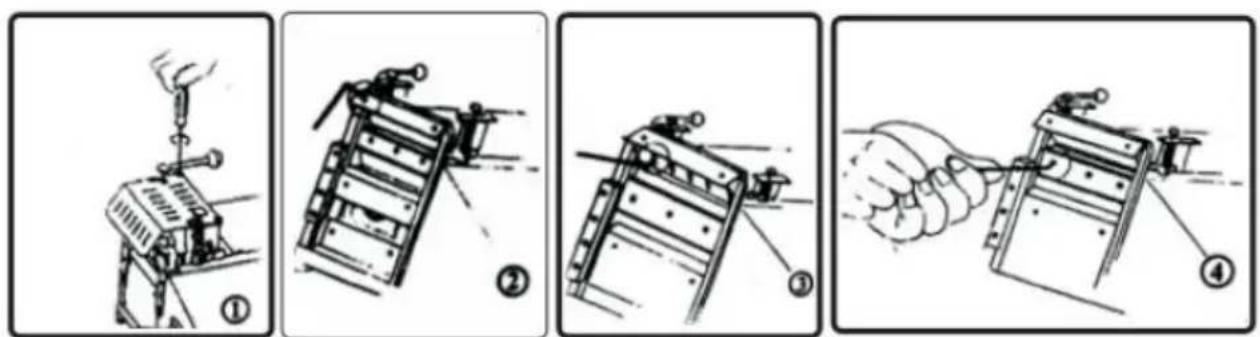
- First use the cross screwdriver to loosen the safety cover of 4 3-mm bolts and remove the safety cover. (see figure 1)
- Use the two-and-a-half mm inner hexagon wrench to loosen the two 5 mm hexagonal bolts at the top of the tool holder. (see figure 2)
- Unscrew the hexagon screw with the hexagonal head of the upper knife using a 4mm hexagonal spanner, and remove the knife. (see figure 3)
- Remove the hexagon screw with the hexagonal head of the lower knife using a 4mm hexagonal spanner and remove the lower knife. (see figure 4)
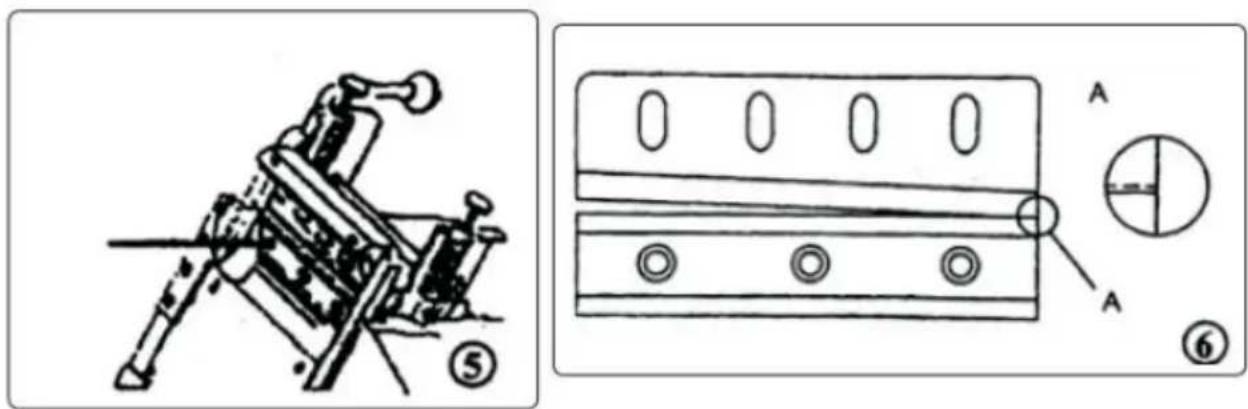
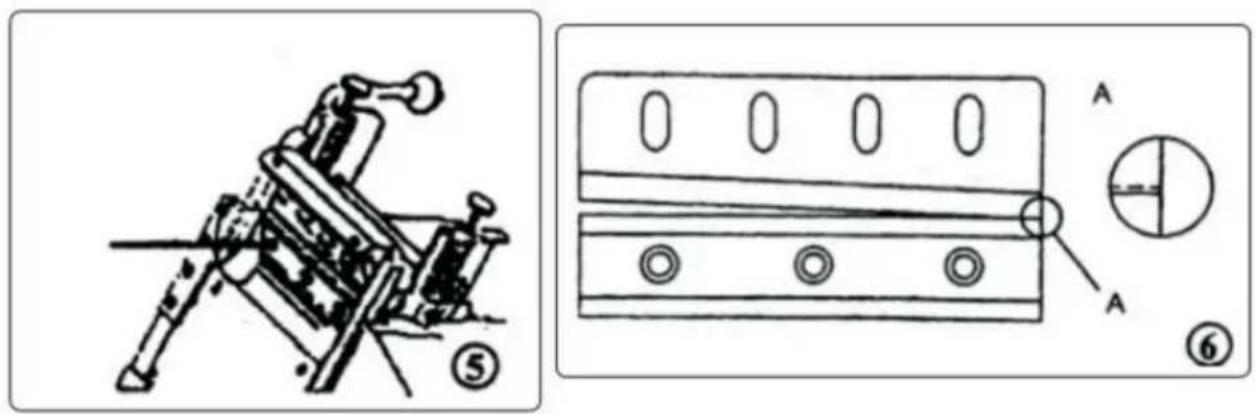
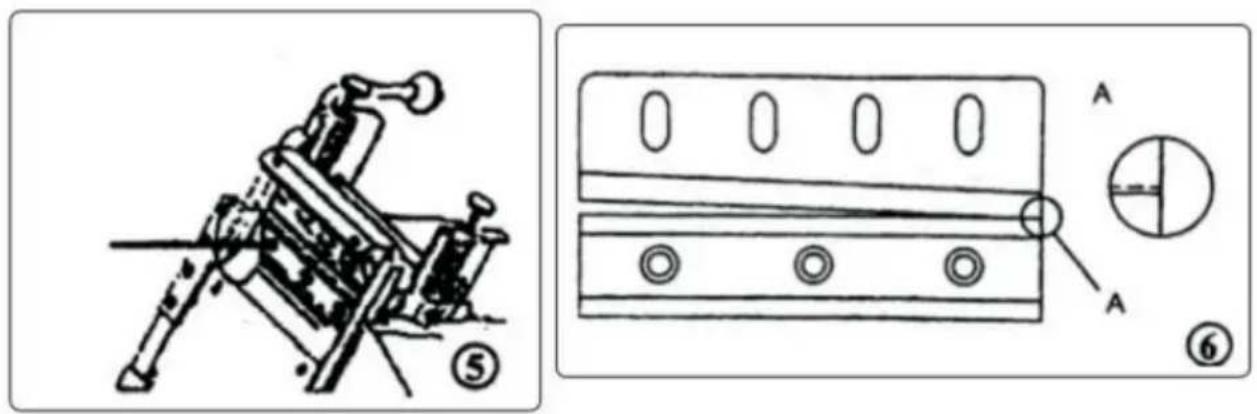
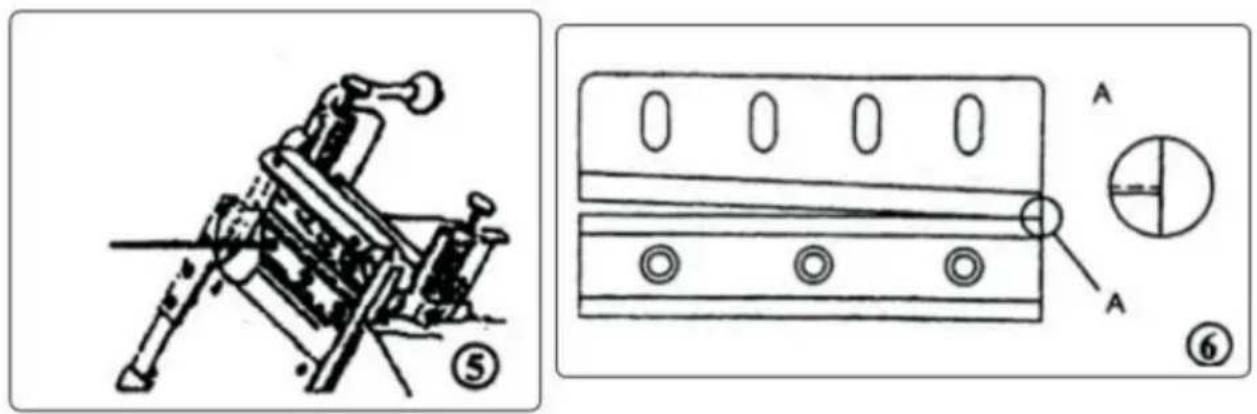
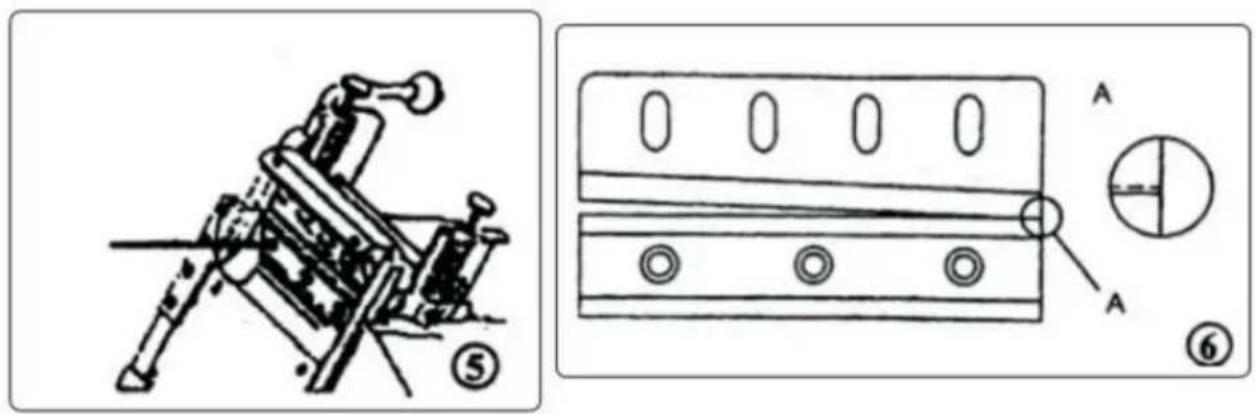
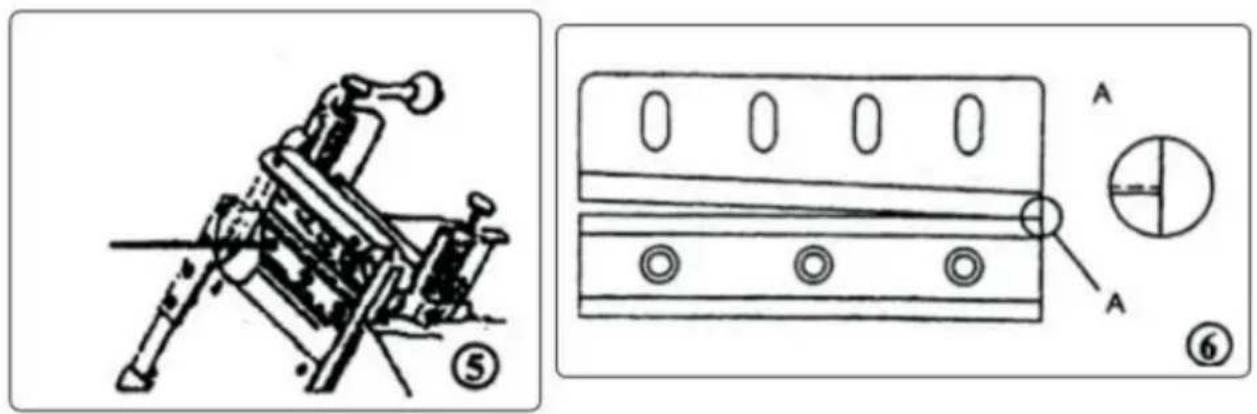
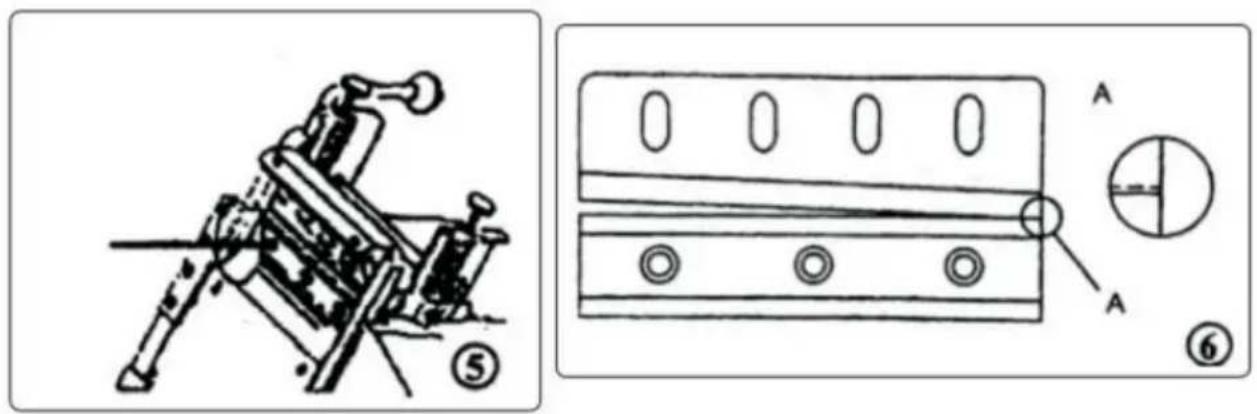
- Press the new lower knife to the original position with a 3.5mm cylinder hexagon screw with fixed pressure. (see figure 5)
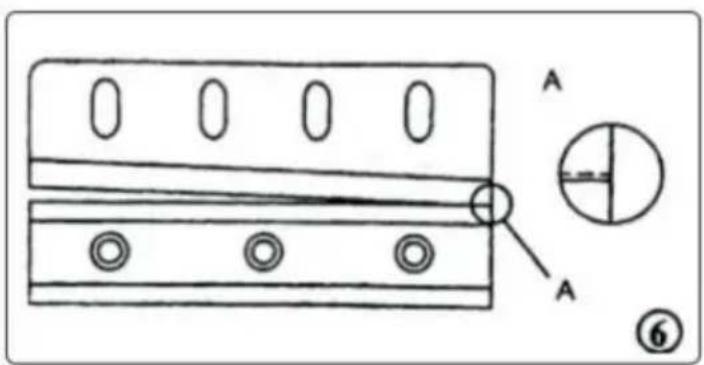
- Install the new knife on the tool post, but do not press the fixed clamp too hard. Then press the M/CUT key manually to let the knife be under the edge on the knife edge and the knife in contact, a little tight on the 5mm cylinder head hex socket screws. (see figure 6)
- Use the M/CUT key to test shearing using paper or thin fabric, and see if the knife and the knife are installed correctly.
- If the cut is normal, please press the pressure firmly on the top of the mm cylinder screws and the upper knife rack 2.
- Re-install the safety cover.
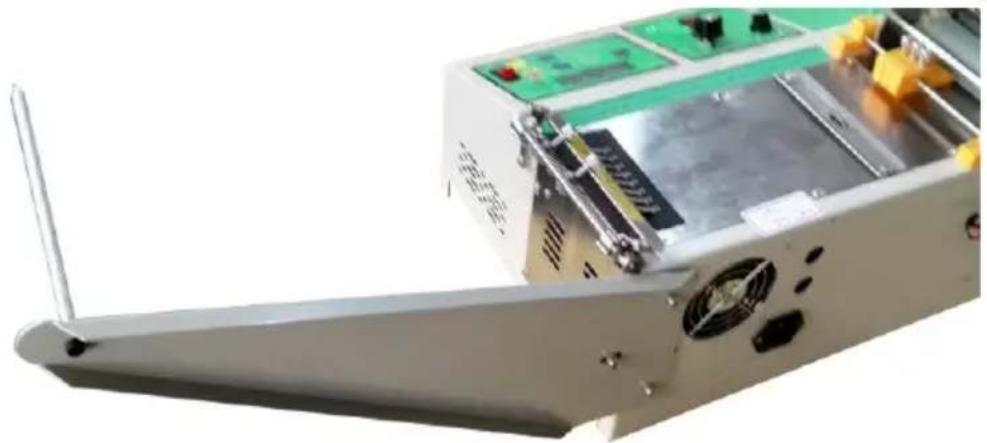
Installation Instructions
- Install the material rack as shown in the diagram.
- The correct way to place the material
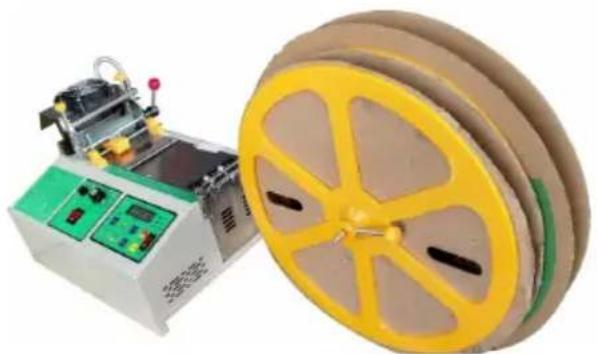
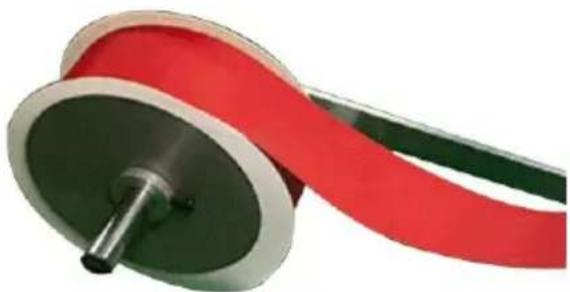
Material placement (see photo), the material can be placed manually into the blade when starting to be released.
Cut the magic and do not cut both.
When cutting the magic stick feeding, the rough surface must be facing up, smooth face down. (as shown below)
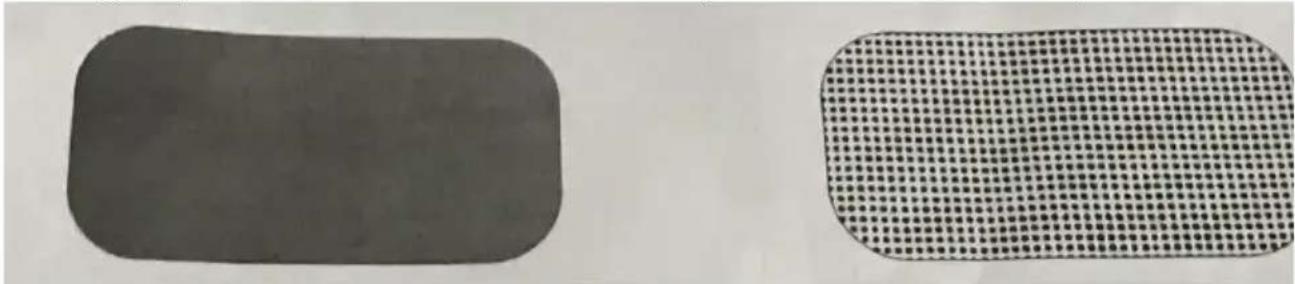
The rough side faces up (RIGHT) The rough side faces down (WRONG)
How to use the thermostat switch to start the fervent function.
The cutting knife is at room temperature when the tempering switch knob point 0.
It is recommended to use the temperature at 130 degrees Celsius - 250 deg Celsius. After 10 minutes of temperature adjustment, you can press the auton material button to complete the hot work according to the cold cutting proced
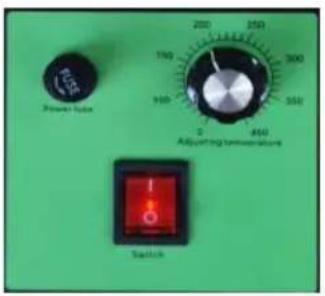
General troubleshooting measures (for reference only).
| NO. | condition | machine type | causes and measures | |
| 1. | non-transformer | All type | Check whether the power connection plug wire is in good contact. | |
| Check whether the fuse is disconned | ||||
| 2. | There is power but cannot start | rollout | All type | Check if there is any clutter on the |
| If the display displays a tool sensor Turn off the power and turn on the after 10 seconds, When the control green light is on, Press control pane Cut off the knife rack and move up down. | ||||
| If the display is normal or abnormal, need to turn off the power, Turn on power after ten seconds, Press start button green key, still cannot start, to consider change drive board | ||||
| non-starter | All type | Inspection pressure plate(cold knife; #20&29, hot knife#32&36 ) Is it too | ||
| All type | If this machine works for a long tim | |||
| Screen no display | temperature in the cabinet may be high, and it may appear abnormal, v is normal. Stop working, turn off the power switch, turn it on again later, the display should be normal. If the display is not normal during the cold please turn off the power and wait seconds before starting. The above method is repeated several times, sti not normal, open the box cover to the computer, connect the wiring. | |||
| 3. | Unable to cut off tape | HOT knife | Check whether the temperature reach the preset temperature | |
| check whether the hot knife is heated | ||||
| 4. | Just cut off the si of the tape | All type | Check to see if the heat is damage worn.The knife is adjusted by hand cutting, and the upper and lower kn are aligned and maintained. | |
| 5. | The cut length is different from the s value | All type | Loosen roller or use belt conveyor | |
| 6. | When the trademark was cut off, it did arriveThe cutting line is cut off | Color code | Move the sensor toward the edge of knife. | |
| 7. | When cutting off a trademark, the cut line is cut off | Color code | Move the sensor to the back of the | |
| 8. | The display screen displays errors | The length sensor is wrong | Color code | Sensor failure |
| Check whether the sensor is linked | ||||
| Check whether the cursor of the col standard sensor is tuned to the dete reference. | ||||
| Check the length and set the length the key to match the length of the trademark. | ||||
| Tool sensor error | All type | Failure of cutting motor or cutting induction device | ||
| 1. When the yellow indicator light or control panel is on when the power switched on, press 5. The tool hold move up and down. If it cannot mo may be that the tool holder is stuck 2. Open the bottom cover plate to whether the sensing line is loose an shifting. 3. Open the box cover to check wh the tool sensor is close to the swit the connection state of the connectio | ||||
| Check whether the cutter motor is n | ||||
| 9. | A hand touching th machine feels electric current | All type | In the installation of the equipment, user should be equipped with the el leakage switch, the triangle socket, t grounding pole must have a good grounding line to ensure the normal of the machine. | |
MATTERS NEEDING ATTENTION
- Press the feed and return button to adjust the feeding speed during opera
- When the output is displayed on the interface, press the stop button first, prompt state, and then reset to start.
- In the suspended state, press start, then the last walk that has not been completed, in the standby state, press start, and a new feeding cutter.
- During the operation, press pause and then press start to continue. Press | twice, then press start again for a new feed cutter.
FCC Information:
CAUTION: Changes or modifications not expressly approved by the party responsible for compliance could void the user's authority to operate the equipment!
This device complies with Part 15 of the FCC Rules. Operation is subject to following two conditions:
1) This product may cause harmful interference. 2) This product must accept any interference received, including interference that may cause undesired operation. WARNING: Changes or modifications to this product not expressly approved by the party responsible for compliance could void the user's authority to operate the product.
Note: This product has been tested and found to comply with the limits for a Class B digital device pursuant to Part 15 of the FCC Rules. These limits are designed to provide reasonable protection against harmful interference in a residential installation.
This product generates, uses, and can radiate radio frequency energy, and if not installed and used in accordance with the instructions, may cause harmful interference to radio communications. However, there is no guarantee that interference will not occur in a particular installation. If this product does cause harmful interference to radio or television reception, which can be determined by turning the product off and on, the user is encouraged to try to correct the interference by one or more of the following measures.
- Reorient or relocate the receiving antenna.
- Increase the separation between the product and receiver.
- Connect the product into an outlet on a circuit different from that to which the receiver is connected.
- Consult the dealer or an experienced radio/TV technician for help.
CORRECT DISPOSAL
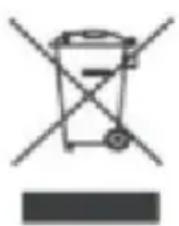
This product is subject to the provisions of European Directive 2012/19/EU. The symbol showing a wheelie bin crossed out indicates that the product requires separate refuse collection in the European Union. This applies to the product and all accessories marked with this symbol. Products marked as such may not be
discarded with normal domestic waste, but must be taken to a collection point for recycling electrical and electronic devices.
Address: Shuangchenglu 803nong11hao1602A-1609shi, Baoshanqu, Shanghai 200000 CN.
Imported to AUS: SIHAO PTY LTD, 1 ROKEVA STREET EASTWOOD NSW 2122 Australia
Imported to USA: Sanven Technology Ltd., Suite 250, 9166 Anaheim Place, Rancho Cucamonga, CA 91730
| UK | REP |
Pooledas Group Ltd
Unit 5 Albert Edward House, The Pavilion
Preston, United Kingdom
| EC | REP |
SHUNSHUN GmbH
Römeräcker 9 Z2021, 76351
Technical Support and E-Warranty Certificate
www.vevor.com/support
VEVOR®
TOUGH TOOLS, HALF PRICE
NEED HELP? CONTACT US!
www.vevor.com/support
www.vevor.com/support
VEVOR®
TOUGH TOOLS, HALF PRICE
Imported in AUS: SIHAO PTY LTD, 1 ROKEVA STREETEASTWOOD NSW 2122 Australia
Imported in the USA: Sanven Technology Ltd., Suite 250, 9166 Anaheim Place, Rancho Cucamonga, CA 91730
Pooledas Group Ltd
electronics www.vevor.com/support
VEVOR®
TOUGH TOOLS, HALF PRICE
Imported to AUS: SIHAO PTY LTD, 1 ROKEVA STREET, EASTWOOD, NSW 2122, Australia
Imported to USA: Sanven Technology Ltd., Suite 250, 9166 Anaheim Place, Rancho Cucamonga, CA 91730
Pooledas Group Ltd
NEED HELP? CONTACT US!
Imported to AUS: SIHAO PTY LTD, 1 ROKEVA STREET, EASTWOOD NSW 2122 Australia
Imported to USA: Sanven Technology Ltd., Suite 250, 9166 Anaheim Place, Rancho Cucamonga, CA 91730
Pooledas Group Ltd.
Unit 5 Albert Edward House, The Pavilions
NEED HELP? CONTACT US!
FUNCTIONAL DESCRIPTION
Unit 5 Albert Edward House, The Pavilions
warranty certificate www.vevor.com/support
VEVOR®
TOUGH TOOLS, HALF PRICE
NEED HELP? CONTACT US!
Installation Instructions
Unit 5 Albert Edward House, The Pavilions
www.vevor.com/support

- AUTOMATIC MICROCOMPUTER CUTTING MACHINE MODEL: HZX
- VEVOR®
- NEED HELP? CONTACT US
- SAFETY WARNINGS AND PRECAUTIONS
- PLEASE READ ALL THE INSTRUCTIONS BEFORE USING YOUR MACHINE
- WARNING
- FUNCTIONAL DESCRIPTION
- CONSIDERATIONS
- HOW TO CHANGE A KNIFE
- INSTALLATION INSTRUCTIONS
- HOW TO USE THE THERMOSTAT SWITCH TO START THE FERVENT FUNCTION
- MATTERS NEEDING ATTENTION
- FCC INFORMATION
- CORRECT DISPOSAL
- TOUGH TOOLS, HALF PRICE
Brand : Vevor
Model : HZX-988
Category : Hand tool