
DS900 - Sander SCHEPPACH - Free user manual and instructions
Find the device manual for free DS900 SCHEPPACH in PDF.


| Product type | Telescopic arm sander |
| Brand | Scheppach |
| Model | DS900 |
| Pad diameter | 215 mm |
| Rotational speed | 700 - 1700 rpm |
| Suction hose length | 4000 mm |
| Weight | 4.3 kg |
| Power supply voltage | 230 V / 50 Hz |
| Rated power input | 710 W |
| Sound pressure level | 88 dB(A) |
| Sound power level | 99 dB(A) |
| Vibration | 0.7 m/s² (uncertainty 1.5 m/s²) |
| LED lighting | Yes, with separate switch |
| Speed variator | Yes, continuous adjustment |
| Telescopic tube | Yes, adjustable in length |
| Vacuum cleaner connection | Yes, adapter included |
| Abrasive paper attachment | Self-adhesive (Velcro) |
| Main application | Sanding of dry walls, ceilings, floors, paint residue and plaster |
| Maintenance | Clean the ventilation slots, replace carbon brushes by a specialist |
| Protection class | Class II (double insulation) |
| Available spare parts | Pad, carbon brushes, abrasive paper, adapters |
| Warranty | Legal, defective parts replaced free of charge (excluding labor costs) |
Frequently Asked Questions - DS900 SCHEPPACH
User questions about DS900 SCHEPPACH
0 question about this device. Answer the ones you know or ask your own.
Ask a new question about this device
Download the instructions for your Sander in PDF format for free! Find your manual DS900 - SCHEPPACH and take your electronic device back in hand. On this page are published all the documents necessary for the use of your device. DS900 by SCHEPPACH.
USER MANUAL DS900 SCHEPPACH
DS900
DE
Long-neck sander
Original manual
GB
Long-neck sander
Translation of the original manual
FR
| DE | Langhalsschleifer 6 | |
| GB | Long-neck sander 12 | |
| FR | Ponceuse à bras télescopique 18 | |
| IT | Levigatrice a collo lungo 24 | |
| NL | Langhals-schuurmachine 30 | |
| CZ | Bruska s dlouhým dosahem 36 | |
| SK | Brúska s dlhým krkom 42 |
Technical data
Dimensions LxWxH (mm)....1920x270x260
Length of suction hose (mm)......4000
Weight kg....4.3
Power unit
Motor V/Hz 230/50
Rated power P1 (W) 710
Subject to technical modifications!
Noise characteristics
| Sound power level LWA dB(A) 99 | ||
| Sound pressure level LpA dB(A) 88 | ||
| Uncertainty in measurement K dB(A) 3 | ||
| Vibration m/s20,7 | ||
| Uncertainty in measurement K m/s21,5 |
Note:
The measured noise levels are determined according to EN 60745.
Use hearing protection!
The measured total vibration values (triax vector sum) are determined according to Standard EN 60745.
The vibration level specified in this data sheet has been measured according to the standard test stated in Standard EN 60745, and it is used to compare the different devices.
The level can be used for an initial exposure assessment. The specified vibration level applies to the most important applications of the device. However, if the device is used for other applications with other
accessories or if it is used in a badly maintained condition, the vibration level can deviate from the specifications. This means that the exposure level may increase significantly during the course of the operational hours.
An estimation of the vibration exposure also needs to include the times during which the device is switched off or it is switched on but not in use. This means that the exposure level may decrease significantly during the course of the operational hours.
Additional safety measures must be taken to protect the operator from the impact of the vibrations. This includes: Maintaining the device and accessories; keeping hands warm; organising work patterns.
GB
Explanation of symbols
The symbols used in this operating manual should direct your attention to potential risks. Please ensure that you fully understand the related safety symbols and explanations. The warnings relating to these symbols can neither prevent risk nor substitute correct actions to prevent accidents.
 | This symbol points out safety risks and shows a warning or danger. Non-compliance with this warning may lead to your own accidents or to those of others. To minimise risks based on injury, fire or electric shock, you must always follow the stipulated recommendations. |
 | Read the relevant chapters in this operating manual carefully before use. |
 | Symbol Category II: This device is equipped with dual insulation and does not need to be connected to an earthed power socket. |
 | Use hearing protection |
 | Wear goggles |
 | Use breathing equipment |
 | Wear gloves |
General information
- After unpacking, check all parts for possible transportation damage. In the event of complaints, inform the supplier immediately. Any complaints made after this time will not be accepted.
- The shipment is to be checked for completeness upon receipt.
- Read through the manual carefully in order to make yourself familiar with the device before using it for the first time.
- Only use original equipment regarding accessories, as well as consumable items and spare parts. Spare parts can be obtained from your specialized dealer. When ordering, please specify our part numbers, as well as the type and construction year of the device.
NOTE:
According to the applicable product liability laws, the manufacturer of the device does not assume liability for damages to the product or damages caused by the product that occur due to:
- Improper handling, • Non-compliance with the operating instructions,
- Repairs by third parties, not by authorized service technicians, • Installation and replacement of non-original spare parts, • Application other than specified,
- A breakdown of the electrical system that occurs due to non-compliance with the electric regulations and VDE regulations 0100, DIN 57113 / VDE0113.
We recommend:
Read through the complete text in the operating instructions before installing and commissioning the device. The operating instructions are intended to help the user to become familiar with the machine and take advantage of its application possibilities in accordance with the recommendations. The operating instructions contain important information on how to operate the machine safely, professionally and economically, how to avoid danger, costly repairs, reduce downtimes and how to increase reliability and service life of the machine.
In addition to the safety regulations in the operating instructions, you have to meet the applicable regulations that apply for the operation of the machine in your country. Keep the operating instructions package with the machine at all times and store it in a plastic cover to protect it from dirt and moisture. Read the instruction manual each time before operating the machine and carefully follow its information. The machine can only be operated by persons who were instructed concerning the operation of the machine and who are informed about the associated dangers. The minimum age requirement must be complied with.
We have marked the points in this manual that concern your safety with this sign: △
Safety notices ⚠️
WARNING: Read all safety notices and provisions carefully. Non-compliance with the safety notices and provisions may lead to electric shock, fire or serious injury.
Store the safety notices and provisions in a safe place so they can be accessed at any time.
In the safety notices, the term "devices" refers to electrically operated devices (with power cable) or to battery operated devices (without power cable).
1 – Safety in the work area
a) The work area has to be clean and well lit. Untidy and dark areas can lead to accidents.
b) Electronic devices must not be used in hazardous areas such as close to flammable liquids, gas or dust.
Electronic devices can generate sparks which ignite dust or vapours.
c) When the device is being used, no children or other people must be nearby.
Distractions can easily lead to loss of control over the device.
2 - Electric safety
a) The plugs for the electronic devices must be designed for the power socket. Plugs may not be modified under any circumstances.
Adapters may not be used for earthed devices. Original plugs and suitable power sockets reduce the risk of electric shocks.
b) Avoid any physical contact with earthed surfaces such as pipes, radiators, fridges. As soon as your body is earthed, there is an increased risk of electric shock.
c) Devices must neither be exposed to rain nor to damp weather. Ingress of water increases the risk of electric shock.
d) Cables must not be used outside their application in any circumstances. In no event shall cables be used to carry, pull or unplug the device. Keep the cable away from heat, lubricants, edges and moving parts. Damaged or entangled cables increase the risk of electric shock.
e) When the device is used outside, a suitable extension cable must be used. Using cables for the outside reduces the risk of electric shock.
f) If using the device in a damp environment cannot be avoided, the device has to be connected to a power supply which is protected by a residual current protection system. This decreases the risk of electric shock.
3 – Personal safety
a) Be careful when using the device, watch what you are doing and use your common sense. The device must not be used when the operator is tired or under the influence of drugs, alcohol or medication. Just a moment of carelessness can lead to serious injuries when using devices.
b) Using safety equipment Always wear goggles. By using safety equipment like dust masks, nonslip safety boots, safety helmets and hearing protection, the risk of injury can be reduced significantly.
c) Avoiding accidental switch-on Make sure the switch is set to OFF before plugging the device into the power socket or inserting the batteries, handling the device or carrying it. Carrying the device with a finger on the ON-switch or plugging the device into the power socket in the ON-position can lead to accidents.
d) Removing the setting screws before using the device. Setting screws on the rotating parts of the device can lead to injuries.
e) Do not use excessive movements. Always be in a stable and balanced position. This means that you can control the device better in unforeseen situations.
f) Wear suitable clothing. Do not wear loose clothing or jewellery. Protect hair, clothes and gloves from rotating parts. Loose clothing, jewellery or long hair can get caught in the rotating parts.
g) When using devices to connect dust extractions or absorbing equipment, make sure they are connected and used correctly. Using dust filters can reduce risks based on dust formation.
4 – Using and maintaining the device
a) Avoid over-use of the device. Use the appropriate device for your application. The correct device guarantees better and safer working conditions when it is used for the intended purpose.
b) Only use the device if it can be switched from the operating mode to the stop mode and vice versa. Devices where operation is not possible via the switch are a danger and must be sent for repair. c) Disconnect the power cable before you set up the device, change a component, or store it. These safety measures reduce the risk of accidentally switching on the device. d) Keep unused devices away from children and only allow people to operate them who are familiar with the device or the operating manual. Devices in the hands of untrained people are a danger. e) Maintaining the device: Check the device for incorrect alignment or blocking of rotating parts, for parts broken off, or other conditions which have an adverse impact on the device. Damaged devices must be repaired before use. Many accidents happen due to badly maintained devices. f) Make sure the cutting tools are sharp and clean. Carefully maintained tools with sharp cutting edges do not block as quickly and are easier to operate. g) The device, accessories, and abrasive sanding discs etc. must be used according to this operating manual and under consideration of the working conditions and the tasks to be done. The use of the device for tasks that do not correspond to its application can lead to dangerous situations.
5 - Maintenance and repair
a) The device may only be maintained and repaired by qualified maintenance staff using original spare parts. This guarantees the safety of the device.
GB SAFETY WARNINGS FOR SANDING, SANDBLASTING, METAL BRUSHING, POLISHING OR CUTTING WHEEL OPERATION:
a) This electronic device functions as a tool. Carefully read the safety notices, instructions, illustrations and specifications supplied with the electronic device. Non-compliance with the following safety notices may lead to electric shock, fire or serious injury. b) Jobs like sanding, sand blasting, metal brushing and polishing should not be carried out with this electronic device. Jobs outside the application of the device can cause danger and injury. c) Only use accessories which were produced specially for the device and which are recommended by the manufacturer. The fact that an accessory can be attached to your electronic device, does not guarantee device safety. d) The nominal rotation speed of the accessories must correspond to the maximum revolutions specified on the electronic device. Accessories which are operated at higher revolutions than the nominal rotation speed, can break and fly apart. e) The external diameter and the thickness of the accessories must lie within the capacity of your electronic device. Accessories of other sizes cannot be protected and controlled sufficiently. f) The holding mandrel of the discs, flanges and grinding discs as well as of other accessories must be big enough to conveniently accept the arbor of the electronic device. Accessories with an arbor hole unsuitable for the arbor size of the electronic device do not run smoothly, they vibrate increasingly which can lead to the device getting out of control. g) Only use undamaged accessories. Before using the device, the accessories must always be checked. Check the sanding discs for chippings and cracks, the grinding discs for cracks and excessive wear and tear as well as for loose or damaged cables. Should the
device or accessories fall on the floor, they must be checked for damage and, if required, undamaged accessories need to be attached. After checking and attaching the accessories, you as well as others present need to be positioned at sufficient distance from the surface of the rotating accessories, and the electronic device needs to run for one minute at maximum speed with no load. Damaged accessories usually break apart during this test phase.
h) Wear personal protective equipment. Depending on the application, you must wear face protection or goggles. When required, you must wear a dust mask, hearing protection, protective gloves and an apron as protection from particles which are produced during sanding. The goggles must be suitable as protection from small flying parts which are produced during different activities with the device. The dust mask or the breathing equipment must be able to filter particles which are produced during the different activities. If the human ear is exposed to very loud noises over a longer period, this can lead to hearing damage. i) People present have to be at a safe distance from the work area. The work area may only be entered with personal protective equipment. Debris from the machined part or from accessories can fly off and cause injuries within the immediate work area. j) Hold the device only by the insulated part of the handle when carrying out work during which there may be a danger that you cut into a cable which cannot be seen or into the cable of the device itself. If you cut into a live cable, the metal parts of the electronic device also become live and cause electric shock to the operator of the device. k) Keep the cable away from rotating accessories. If you lose control over the device, the cable could be cut or get hooked and your hand or your arm could get caught in the rotating accessories. l) Put down the electronic device only when the accessories have come to a complete standstill. Rotating accessories can get caught on the floor and the electronic device gets out of control. m) Leave the electronic device switched off during carrying. If the rotating accessories touch your clothes by accident, they will get caught up and the accessories can injure your body. n) Clean the ventilation slots of the electronic device regularly. The motor fan pulls dust into the casing so that excessive build-up of metal powder can lead to electrical hazards. o) The electronic device must not be used close to flammable materials. Generation of sparks can lead to ignition of these materials. p) Do not use accessories for which liquid coolants are required. Coolants can lead to electric shock.
Recoil and related safety notices
If rotating discs, metal brushes or other accessories get hooked or caught, this can lead to sudden recoil. The rotating accessory stops rapidly which leads to complete loss of control over the electronic device because the device abruptly rotates in the opposite direction. If a grinding wheel gets hooked or caught in the machined part, the edge of the grinding wheel eats into the surface of the material at that point, and the grinding wheel is ejected. The disc is either ejected towards the operator or away from the operator, depending on the direction in which the disc was moving when it got stuck. The grinding wheel may also break under these conditions. A recoil occurs only when the electronic device is used improperly or for inappropriate jobs. This can be prevented with appropriate safety measures which will be explained in the following.
a) Hold the electronic device securely and position yourself and your arm in such a way that you can withstand recoil. If required, use the additional handles to have maximum control over potential recoil or torque resistance when turning the device on. If
suitable safety measures are taken, the operator can control recoil and torque resistance at all times.
b) Keep your hand away from rotating accessories at all times. The recoil from the accessories can have an effect on your hand. c) Do not position yourself in the area where potential recoil of the device can have an impact. Recoil catapults the device in the direction opposite to the disc's direction of rotation at the time it gets stuck. d) When working on corners, sharp edges etc. you must be particularly careful. Avoid violent jolting and getting the accessory caught. Corners, sharp edges and violent jolting can lead to the rotating accessory getting caught, which can lead to loss of control and recoil. e) Do not attach motor saw blades for woodcuts or saw blades with serrated edges. These saw blades regularly lead to recoil and loss of control.
SAFETY WARNING PARTICULARLY FOR SANDING:
a) Do not use excessively large grinding wheels. Follow the manufacturer's recommendations when choosing abrasive paper. Larger abrasive paper reaching beyond the grinding edge presents a danger of tearing and can lead to tearing off or tearing of the grinding wheel or to recoil.
SAFETY WARNING FOR DRY WALL SANDING:
Warning! The following fundamental safety measures must be followed when using electric tools to prevent electric shock, injuries and danger of fire. Read and follow these instructions before using these tools. Store these instructions in a safe location.
- The devices must never be used in an explosive atmosphere.
- Prevent physical contact with the cable.
- Only use the extension lead recommended for use in the work area.
- Do not use the machine for unsuitable work such as coarse sanding, brushing etc. This leads to danger and injuries.
- Only use identical spare parts during maintenance, as otherwise risk-free use cannot be guaranteed.
- The permitted speed for accessories must correspond to the maximum speed of the machine. Otherwise, cracks or tears may occur if the operating speed for the approved machine is exceeded.
- Do not use damaged accessories. Always check before operation whether the accessories are damaged or torn. For example, check whether the support plate is torn on the grinding wheel. Make sure that there are no people in the rotation area of the machine, and let the machine run at maximum speed for one minute so that accessories can be comprehensively checked.
- Do not put the machine down until it has come to a complete standstill, because you will lose control of the device.
- Clean the outlet port of your machine regularly. Hold the machine with both hands during use to ensure safe operation.
- When sanding, do not use abrasive paper that is too big. When selecting a sanding plate, follow the manufacturer's recommendations. If the abrasive paper is bigger than the sanding plate, this presents a risk of tearing and injury, and it can also lead to the rotation stopping.
- The machine can be attached to a maximum of one extension pipe.
- We recommend that you always wear industrial safety gloves and goggles when working with the dry construction sander.
- Wearing tight-fitting clothing is mandatory.
- Always leave space for torque.
- Wear the protective mask P2 as protection from hazardous dust and select a suitable vacuum cleaner.
Intended use

The machine is intended for sanding dry walls, ceilings, and walls on internal and external surfaces, as well as for removing residue on the floor, paint coating, adhesive, and loose plaster, etc.
GB
Residual risks

The machine has been built according to the latest technology and recognized safety rules. However, there is still a chance of residual risks whilst working.
- Injury from recoiling branches when feeding. • Endangering health through noise. • Endangering health through electricity, when using improperly
connecting cables.
- Additionally, despite all the safety provisions, residual risks can occur which are not obvious.
Residual risks can be minimized by complying with the “Safety notices”, the “Intended use” as well as operating instructions overall.
Equipment fig. A
- Suction unit
- Motor
- Protective brushes
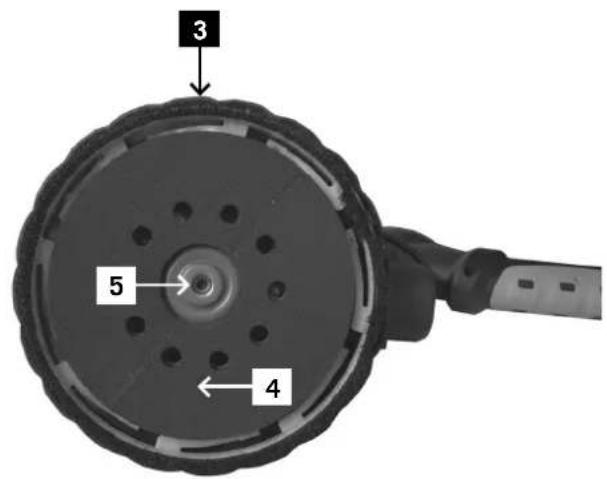
- Grinding wheel
- Screw
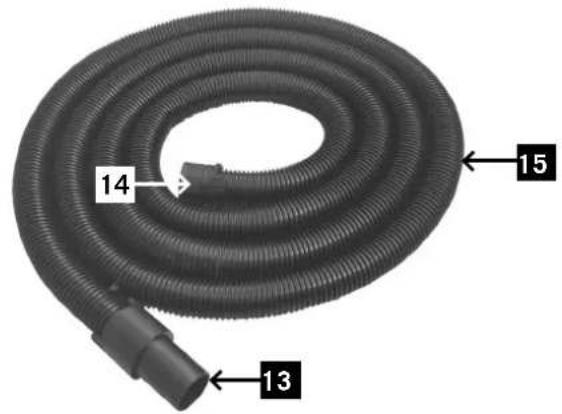
- Suction hose
- LED light
- Speed controller
- On/off switch
- Fixture for the guide pipe with telescope technology
- Guide pipe with telescope technology
- Carbon brush
- Adapter to connect the dust suction unit
- Adapter to connect the dust suction unit
- Suction hose
- Hexagon key
- Screwdriver
- Abrasive paper
- On/off switch LED light
Assembly
1. Setting up the hose connection
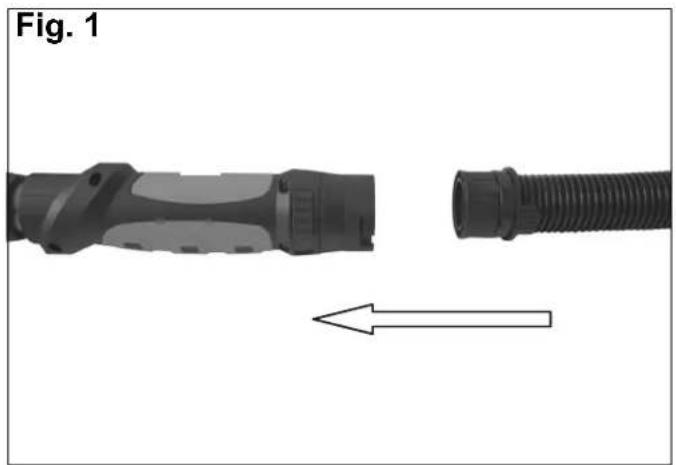
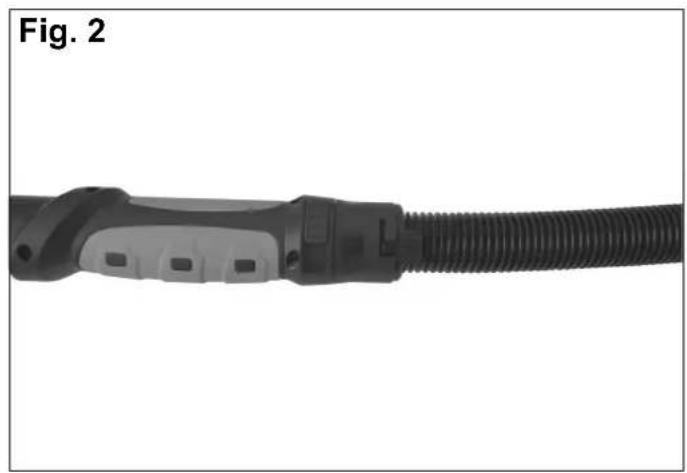
a) Align the attachment of the suction unit (fig. A) with the hose connection and insert the end until the button clicks into the slot (fig. 2). b) Disassembly of the machine takes place in reverse order of the steps. c) Inserting the grinding wheels
2. Use the extension.
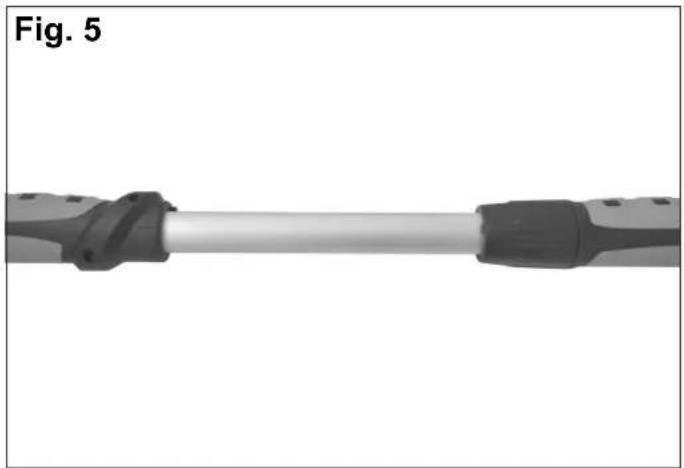
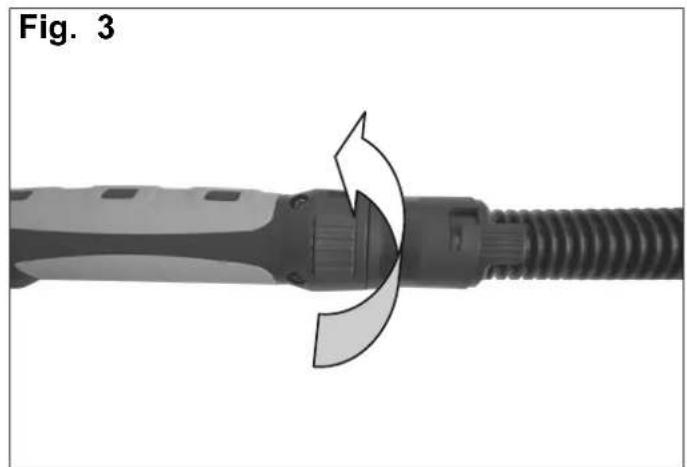
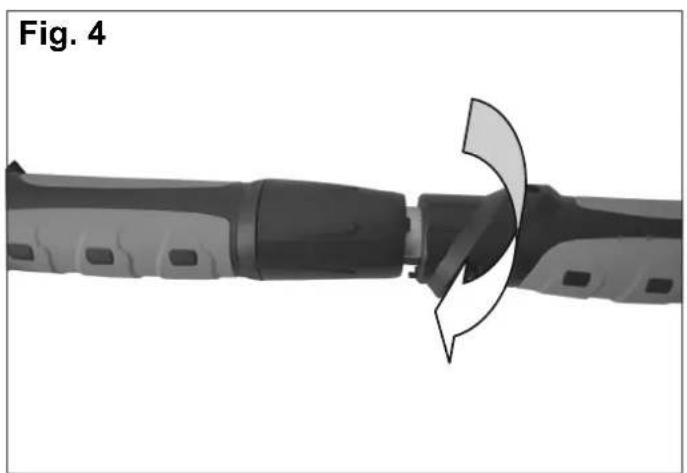
a) Dismantle the fixture of the guide pipe with telescope technology of the extension (fig. 3). b) Pull out the extension to see the length (fig. 5).
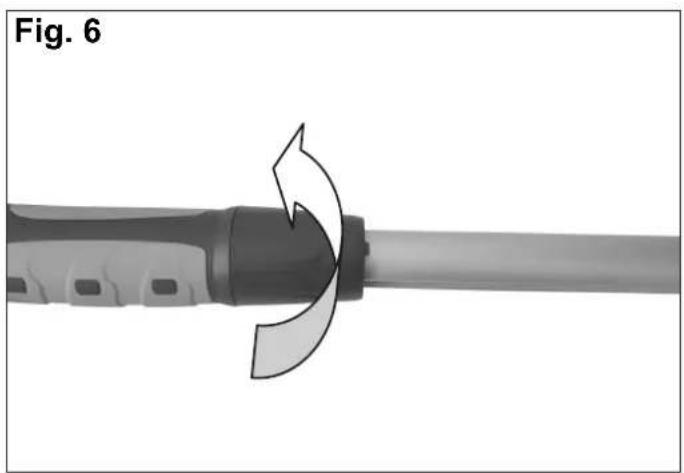
c) Tighten the suction unit by turning it to the right (fig. 6).
3. Inserting the abrasive paper
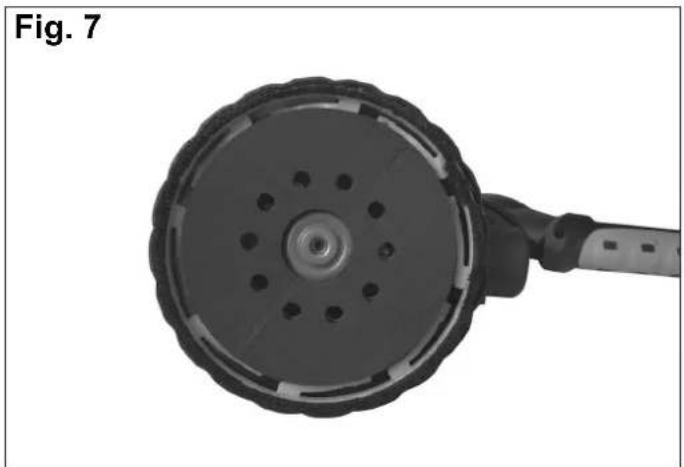
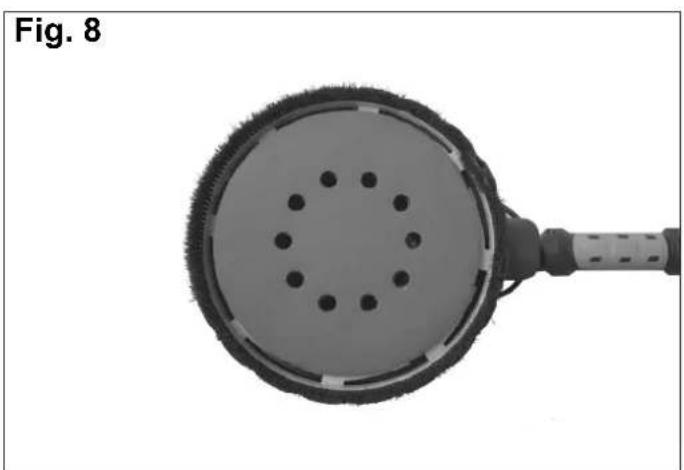
Put abrasive paper in the middle of the grinding wheel and press it down (fig. 7). The abrasive paper has a fibre layer on the underneath. The hook and eyelets fixture on the grinding wheel is intended for the attachment of the abrasive paper (fig. 8).
4. Connection to the vacuum cleaner
a) Connect the adapter with the vacuum cleaner to attach the dust suction unit of the hose.
Commissioning
Prior to use
In order to prevent accidentally starting the device, you must disconnect the device from the power supply before attaching, exchanging and adjusting accessories. Please check the power voltage before every use! It has to correspond with the specifications of the device. Remove all packaging as well as all loose parts which are on the device. Check the accessories before use. The accessories have to correspond to the device and the application.
Sanding process warning: Risk of injury!
This tool is intended for dry sanding only. Make sure you are standing in a stable and safe position. During work, stand on a flat surface and keep your balance. When working at height, make sure you are standing in a safe position and on safe scaffolding.
WARNING: Machine damage!
Check the surface for nails, screws and metal objects. This can damage tools.
NOTE: Excessive pressure does not lead to better sanding results but to increased wear and tear of the tool and to potential material damage.
- Always work with smooth movements.
- Move the grinding wheel with slight pressure over the area to be worked on.
- Sand rough areas several times rather than once with great pressure.
On/Off switch
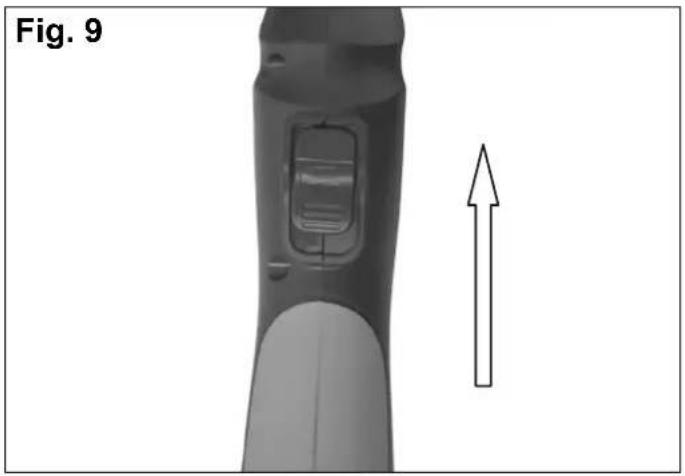
- Turning on the tool (fig.9) a) Hold the tool by the handles with both hands. b) Push the on/off switch forwards.
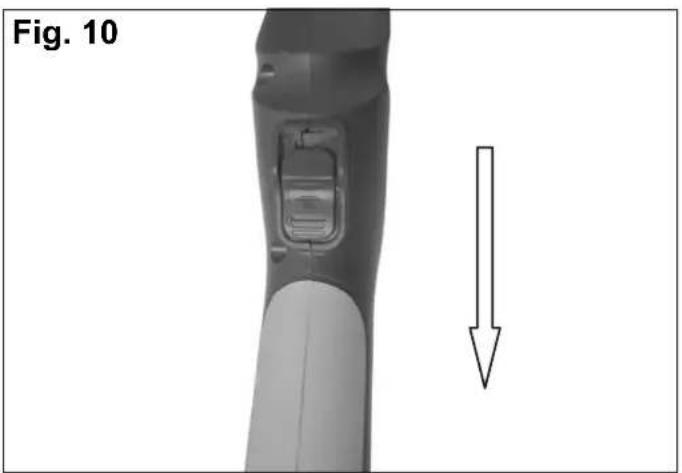
- Turning off the tool (fig.10)
a) On the rear end, push the on/off switch down.
Adjustable speed
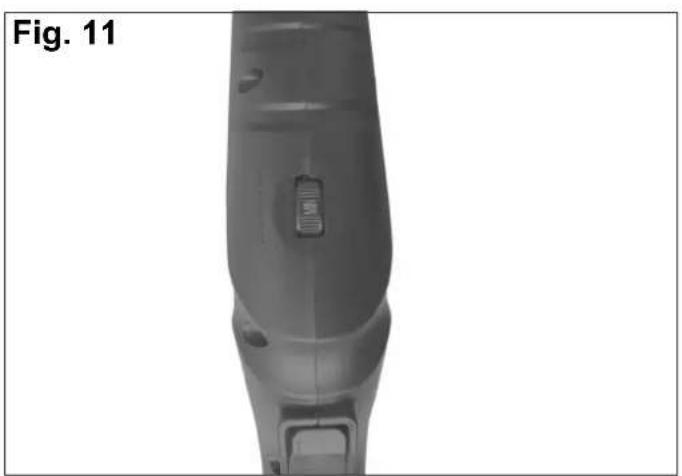
Adjust the speed by turning the speed controller. See figure. The user can set different speeds for different jobs (fig.11).
Electric connection ⚠️
The installed electronic motor is connected and operational. The connection complies with relevant VDE and DIN stipulations. The customer's mains connection as well as extension leads used must comply with these provisions.
Hazardous electric connections
Insulation damage often occurs on electric connections. Causes include:
- Pressure marks when connections are guided through windows and doors
- Kinks due to inappropriate attachment or guidance of the connection
- Cuts when the connection is run over • Insulation damage when being pulled out of the wall socket
- Tears from ageing insulation Such hazardous electric connections must not be used and are dangerous to life due to the insulation damage.
Regularly check electric connections for damage. Make sure the connection is not connected to the mains when checking. Electric
connections must comply with relevant VDE and DIN stipulations. Only use connections marked H 07 RN. Printing the type designation on the connection is the law.
AC motor
- The power voltage has to be 230 Volt – 50 Hz.
- Extension leads up to 25m in length must have a cross section of 1.5mm2 , at more than 25m length, it has to be at least 2.5mm2 .
- The mains connection is protected against short circuit with a 16A slow fuse.
Connections and repairs to the electrical equipment may only be carried out by a trained electrician.
If there are any questions, please provide the following data:
- Motor's type of power
• Data from the machine's type plate
When sending back the motor, always send the entire motor unit with switch.
Follow the safety notices!
Maintenance
The ventilation slots always have to be free and the product has to be cleaned regularly. If irregularities occur during use, the device has to be turned off and disconnected from the mains. Check and repair the device before using it again. Carried out by technicians.
The device may only be repaired by a qualified service technician. Staff can lead to injuries.
Only original spare parts may be used for the repair of the device. Follow the instructions in Chapter "Maintenance" in this operating manual. WARNING!
If the power cable of the electronic device is damaged, it has to be substituted with a cable specially manufactured which is available from customer services.
Maintenance and cleaning
Clean the casing simply with a damp cloth - do not use solvent! Dry the device carefully afterwards.
Removing / attaching the grinding wheel
- Removing the grinding wheel a) Stop the grinding wheel. b) Loosen the screw with an Allen key, anti-clockwise. c) Remove the grinding wheel.
- Attaching the grinding wheel
Warning: When attaching the grinding wheel, make sure that it sits on the motor shaft properly. On the back of the grinding wheel (fig. A/4), there is a groove for attaching the grinding wheel to the motor shaft.
a) Insert the grinding wheel. b) Stop the grinding wheel. c) Tighten the screw with an Allen key in a clockwise direction.
Replacing carbon brushes
The carbon brushes are consumables and are subject to much abrasion during use.
The carbon brushes have to be checked regularly. In order not to damage the electric circuit, both carbon brushes have to be replaced at the same time.
WARNING!
The carbon brushes may only be replaced by authorised customer service staff. The device may only be used with both carbon brushes.
Storage
The device, the operating manual as well as accessories, if applicable, must be stored in the original packaging. In this way, you will always have all information and parts at your disposal when required. Pack the device carefully or use the original packaging in order to prevent damage during transport. Always store the device in a dry location.
Dimensions L x I x H (mm) 1920x270x260
Dimensions L x P x H (mm)....1920x270x260
Disc diameter (mm) 215
Motor V/Hz....230/50
Nominal power P1 (W) 710
SAFETY WARNING FOR DRY SANDING OF WALLS:
WARNING: Risk of machine damage!
GB Only for EU countries. Do not dispose of electric tools together with household waste material! In observance of European directive 2012/19/EU on wasted electrical and electronic equipment and its implementation in accordance with national law, electric tools that have reached the end of their life must be collected separately and returned to an environmentally compatible recycling facility.
Apparent defects must be notified within 8 days from the receipt of the goods. Otherwise, the buyer's rights of claim due to such defects are invalidated. We guarantee for our machines in case of proper treatment for the time of the statutory warranty period from delivery in such a way that we replace any machine part free of charge which provably becomes unusable due to faulty material or defects of fabrication within such period of time. With respect to parts not
manufactured by us we only warrant insofar as we are entitled to warranty claims against the upstream suppliers. The costs for the installation of the new parts shall be borne by the buyer. The cancellation of sale or the reduction of purchase price as well as any other claims for damages shall be excluded.
Warranty FR



- DS
- TECHNICAL DATA
- NOTE
- USE HEARING PROTECTION
- EXPLANATION OF SYMBOLS
- GENERAL INFORMATION
- WE RECOMMEND
- SAFETY NOTICES ⚠️
- SAFETY IN THE WORK AREA
- ELECTRIC SAFETY
- PERSONAL SAFETY
- USING AND MAINTAINING THE DEVICE
- MAINTENANCE AND REPAIR
- GB SAFETY WARNINGS FOR SANDING, SANDBLASTING, METAL BRUSHING, POLISHING OR CUTTING WHEEL OPERATION
- RECOIL AND RELATED SAFETY NOTICES
- SAFETY WARNING PARTICULARLY FOR SANDING
- SAFETY WARNING FOR DRY WALL SANDING
- INTENDED USE
- RESIDUAL RISKS
- EQUIPMENT FIG. A
- ASSEMBLY
- SETTING UP THE HOSE CONNECTION
- USE THE EXTENSION
- INSERTING THE ABRASIVE PAPER
- CONNECTION TO THE VACUUM CLEANER
- COMMISSIONING
- PRIOR TO USE
- SANDING PROCESS WARNING: RISK OF INJURY
- WARNING: MACHINE DAMAGE
- ON/OFF SWITCH
- ADJUSTABLE SPEED
- ELECTRIC CONNECTION ⚠️
- HAZARDOUS ELECTRIC CONNECTIONS
- AC MOTOR
- MAINTENANCE
- MAINTENANCE AND CLEANING
- REMOVING / ATTACHING THE GRINDING WHEEL
- REPLACING CARBON BRUSHES
- WARNING
- STORAGE
- SAFETY WARNING FOR DRY SANDING OF WALLS
- WARNING: RISK OF MACHINE DAMAGE
- WARRANTY FR
Brand : SCHEPPACH
Model : DS900
Category : Sander