
EM2250 - Measuring equipment Vevor - Free user manual and instructions
Find the device manual for free EM2250 Vevor in PDF.
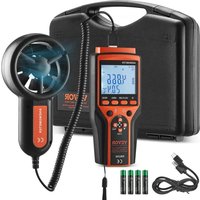


| Product Type | Digital Vane Anemometer |
| Brand | Vevor |
| Model | EM2250 |
| Dimensions (Main Unit) | 169 x 75 x 36 mm |
| Dimensions (Vane Unit) | 183 x 92 x 40 mm |
| Total Weight | 412 g |
| Power Supply | 4 AAA 1.5 V batteries |
| Wind Speed Measuring Range | 0 to 45 m/s |
| Wind Speed Accuracy | ±(5% + 0.5 m/s) |
| Air Flow Measuring Range | 0 to 999900 (cmm or cfm) |
| Temperature Measuring Range | -10°C to 60°C |
| Temperature Accuracy | ±2°C |
| Wind Chill Temperature | -27.7°C to 10°C (under specific conditions) |
| Data Storage | Up to 999 records in EPROM |
| Transmission Interface | USB Type-C (for PC software) |
| Main Functions | Instant measurement, max/min/average, hold, backlight, auto power off, Beaufort scale |
| Maintenance | Wipe with a damp cloth, remove batteries if not in use for a long time |
| Safety | Do not use in explosive atmosphere or in rain; inspect unit before use |
| Package Contents | Anemometer, vane unit, 4 AAA batteries, USB cable, user manual, carrying case |
| Warranty and Support | Technical support and electronic warranty certificate at www.vevor.com/support |
Frequently Asked Questions - EM2250 Vevor
User questions about EM2250 Vevor
0 question about this device. Answer the ones you know or ask your own.
Ask a new question about this device
Download the instructions for your Measuring equipment in PDF format for free! Find your manual EM2250 - Vevor and take your electronic device back in hand. On this page are published all the documents necessary for the use of your device. EM2250 by Vevor.
USER MANUAL EM2250 Vevor
Technical Support and E-Warranty Certificate www.vevor.com/support
ANEMOMETER
INSTRUCTION SHEET
MODEL: EM2250
We continue to be committed to provide you tools with competitive price. "Save Half", "Half Price" or any other similar expressions used by us only represents an estimate of savings you might benefit from buying certain tools with us compared to the top brands and does not necessarily mean to cover all categories of tools offered by us. We kindly remind you to verify carefully when placing an order with us if you are actually saving half in comparison with the top major brands.
VEVOR®
TOUGH TOOLS, HALF PRICE
ANEMOMETER
MODEL: EM2250
NEED HELP? CONTACT US!
Have product questions? Need technical support? Please feel free to contact us:
Technical Support and E-Warranty Certificate www.vevor.com/support
This is the original instruction. Please read all manual instructions carefully before operating. VEVOR reserves a clear interpretation of the user manual. The appearance of the product shall be subject to the product you received. Please forgive us that we won't inform you again if there are any technology or software updates on our product.
 | Warning-To reduce the risk of injury, user must read instructions manual carefully. |
 | This device complies with Part 15 of the FCC Rules. Operation is subject to the following two conditions:(1)This device may not cause harmful interference, and (2)this device must accept any interference received, including interference that may cause undesired operation. |
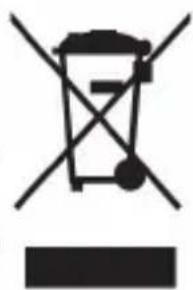
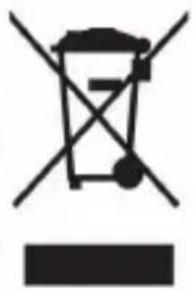
 | This product is subject to the provision of European Directive 2012/19/EC. The symbol showing a wheelie bin crossed through indicates that the product requires separate refuse collection in the European Union. This applies to the product and all accessories marked with this symbol. Products marked as such may not be discarded with normal domestic waste, but must be taken to a collection point for recycling electrical and electronic devices |
INTRODUCTION
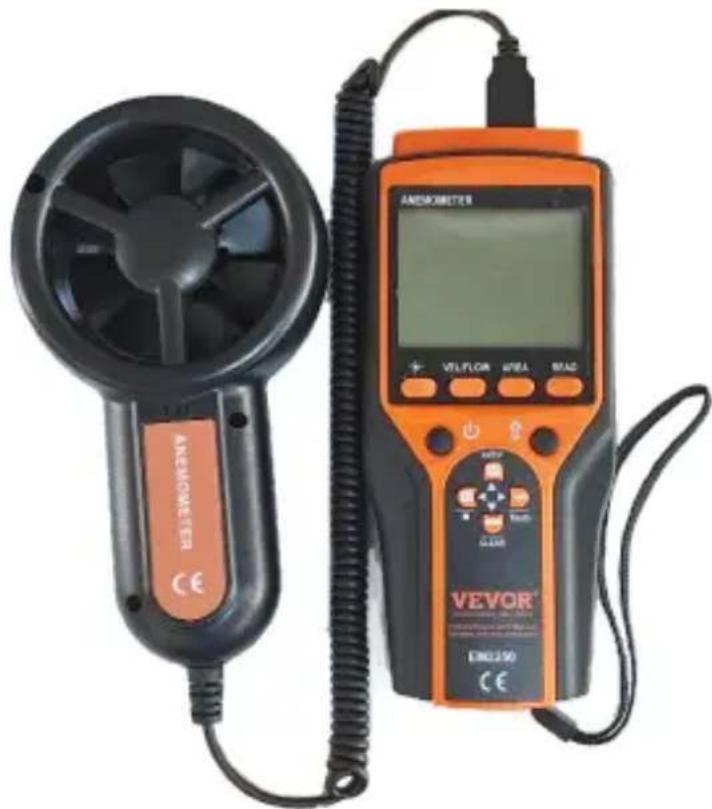
This anemometer can be used to measure wind velocity, air flow, and temperature (wind temperature and wind chill temperature). It is a very useful test tool.
FEATURES
- Instantaneous wind velocity, air flow and temperature measurements. ● Measurements of maximum wind velocity, minimum wind velocity and average wind velocity. ● Measurements of maximum air flow, minimum air flow, average air flow and 2/3Vmax air flow. ● Measurements of maximum temperature, minimum temperature and average temperature.
- Five kinds of wind velocity measurement units to select from.
- Two kinds of air flow measurement units to select from.
- Two kinds of temperature measurement units to select from. ● Area setting for air flow, with two unit options. ● Wind force indication. ● Wind chill temperature calculation. ● Manual/automatic storage of instantaneous wind velocity, air flow and
temperature measurement readings
- Presettable interval ( 0.5 - 600.0 secs ) of automatic saving of readings. ● Storage of up to 999 sets of readings in the built-in EPROM.
- Recall of stored wind velocity, air flow or temperature reading. ● Data retention during power loss.
- Erasure of all stored readings at one time. ● Data transmission. ● Battery charge level indication. ● Auto power off.
- Overrange indication. ● Data hold.
WARNING
- Before use, inspect the vane unit for crack and missing plastic. Do not use meter if it is damaged.
- When the battery charge level indicator shows " ", the batteries are not h enough and must be replaced immediately.
- Do not use the meter if it operates abnormally.
- Do not use the meter where explosive gas, vapor or dust is present.
- The meter is not waterproof, do not use the meter in rain.
- When servicing the meter, use only specified replacement parts.
- Do not use the meter with the battery cover or case open.
- When installing battery, make sure that the polarity connections are correct.
CHECK UP
Carefully unpack your package and ensure that you have the following items. In case that any item is missing or if you find any mismatch or damage, promptly contact the purchasing office.
- Anemometer unit----1 piece
- Vane unit----1 piece • 1.5V AAA battery----4 pieces
- USB Type-C data cable----1 piece
- Users manual----1 piece
METER INSTRUCTION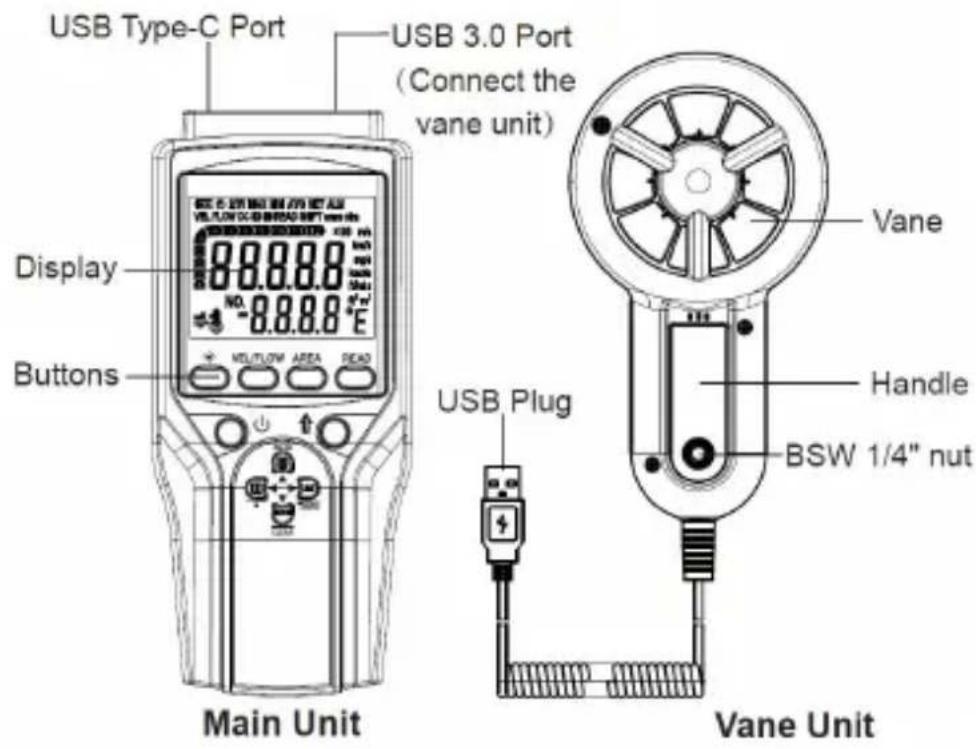
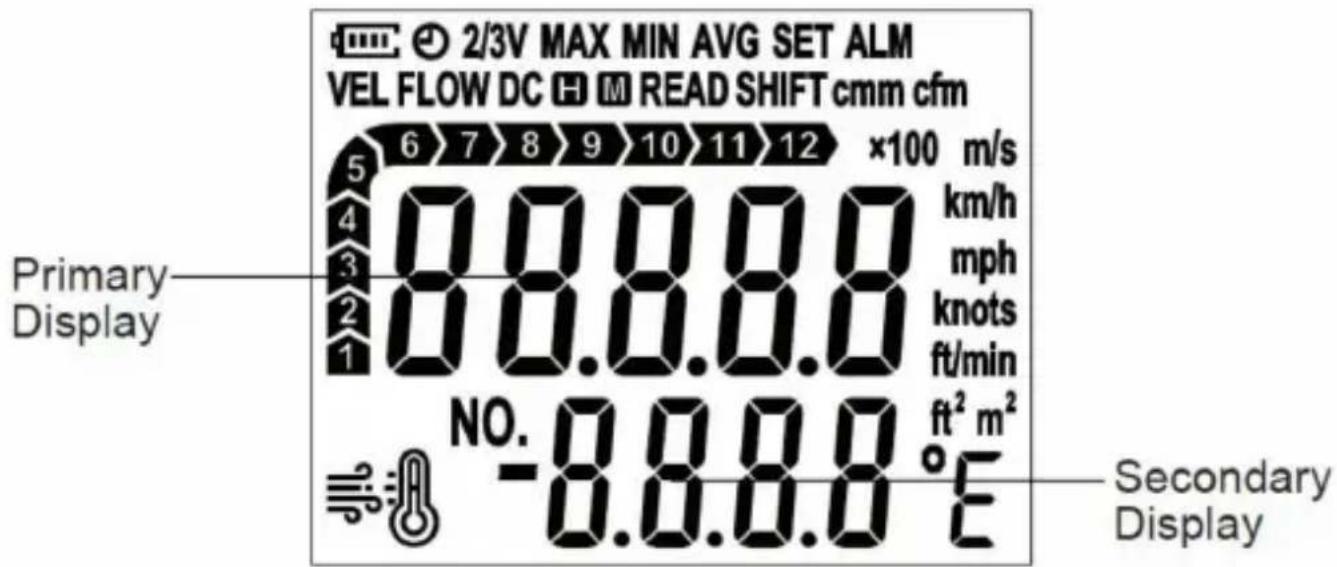
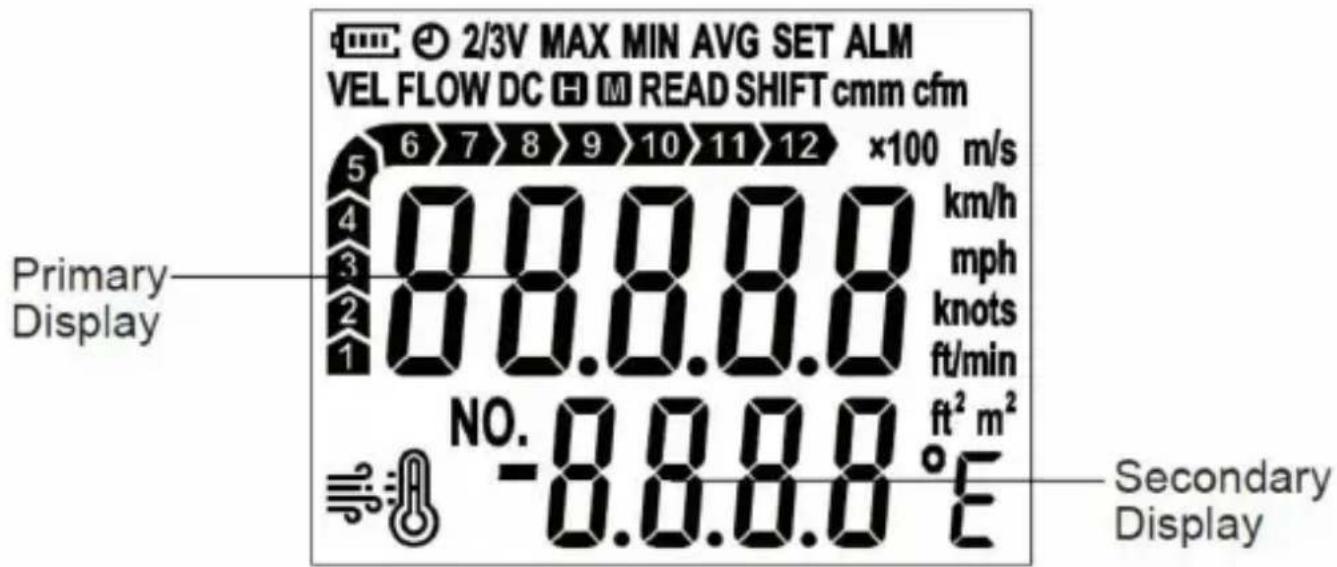
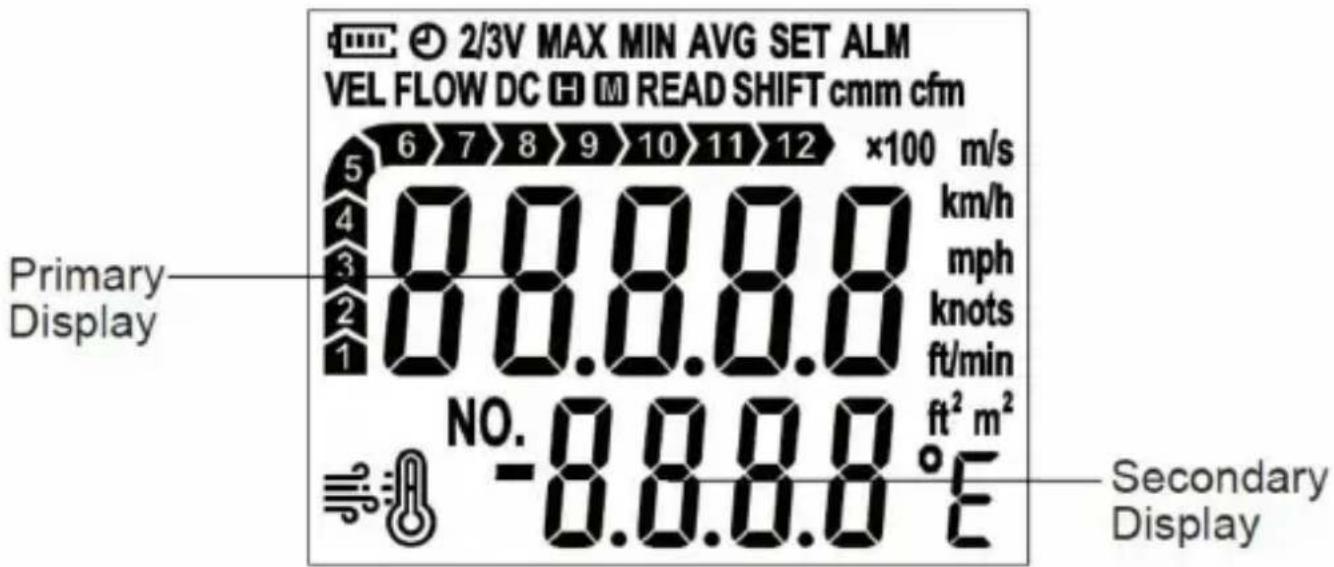
THE DISPLAY
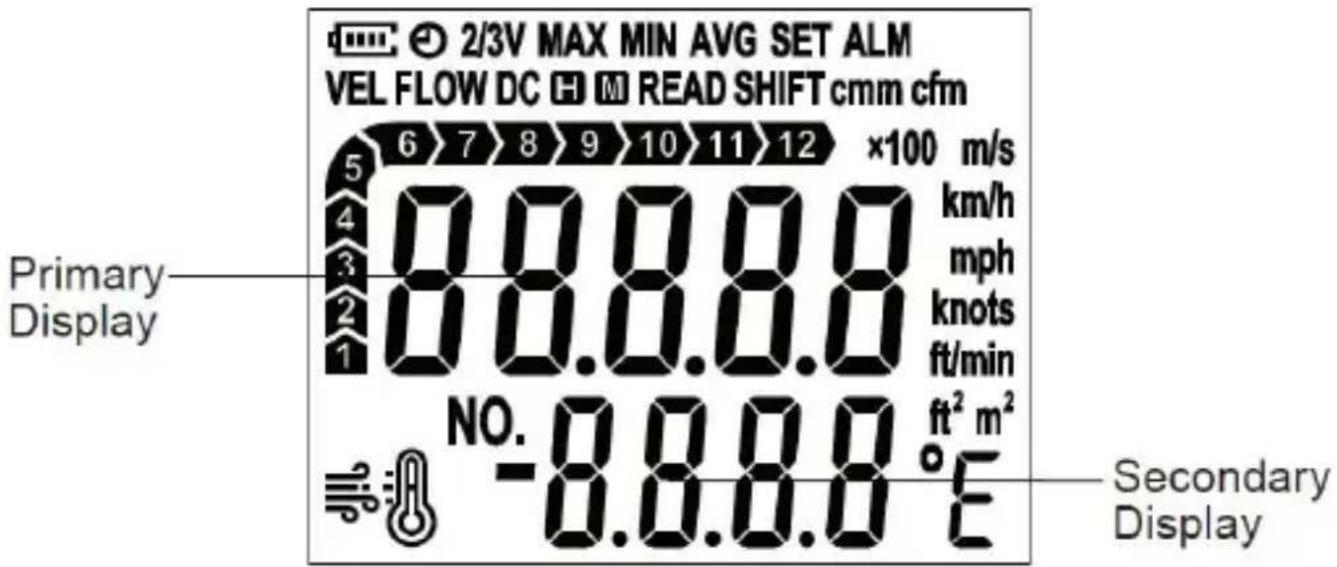
| Symbol | Description | |
| 1 |  | Battery charge level indicator. |
| 2 |  | Automatic power-off feature is enabled. |
| 3 |  | 2/3Vmax air flow reading is being shown on the primary display. |
| 4 |  | Maximum reading is being shown on the primary display. |
| 5 |  | Minimum reading is being shown on the primary display. |
| 6 | 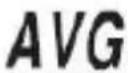 | Average reading is being shown on the primary display. |
| 7 | 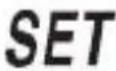 | The meter is in setting mode. |
| 8 |  | An alarm symbol which indicates that the vane unit is disconnected. |
| 9 |  | Wind velocity |
| 10 |  | Air flow |
| 11 |  | Data are being transmitted to the computer software. |
| 12 |  | The readings are locked. |
| 13 |  | Flashing symbol on the display indicates that the meter is saving data.Steady display of the symbol indicates that the EPROM is full. |
| 14 |  | Stored data are being displayed. |
| 15 | 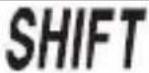 | The secondary function of buttons is enabled. |
| 16 | 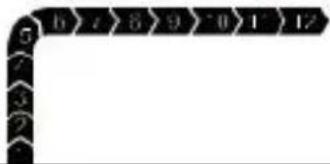 | Beaufort scale, which is used to indicate wind force. |
| 17 | 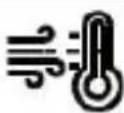 | Wind chill temperature |
| 18 |  | Record number |
| 19 | 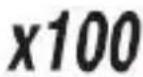 | The current air flow is 100000 . (When it is 10000 , "x10" will be displayed). |
| 20 | 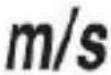 | Meters per second. The unit of velocity. |
| 21 | 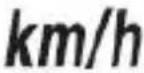 | Kilometers per hour. The unit of velocity. |
| 22 | 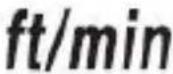 | Feet per minute. The unit of velocity. |
| 23 | 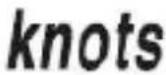 | Nautical miles per hour.The unit of velocity. |
| 24 | 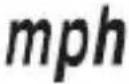 | Miles per hour. The unit of velocity. |
| 25 |  | Square feet. The unit of area. |
| 26 |  | Square meter. The unit of area. |
| 27 | 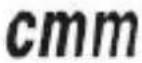 | Cubic meters per minute. The unit of flow. |
| 28 |  | Cubic feet per minute. The unit of flow. |
| 29 |  | Celsius degree. The unit of temperature. |
| 30 |  | Fahrenheit degree.The unit of temperature. |
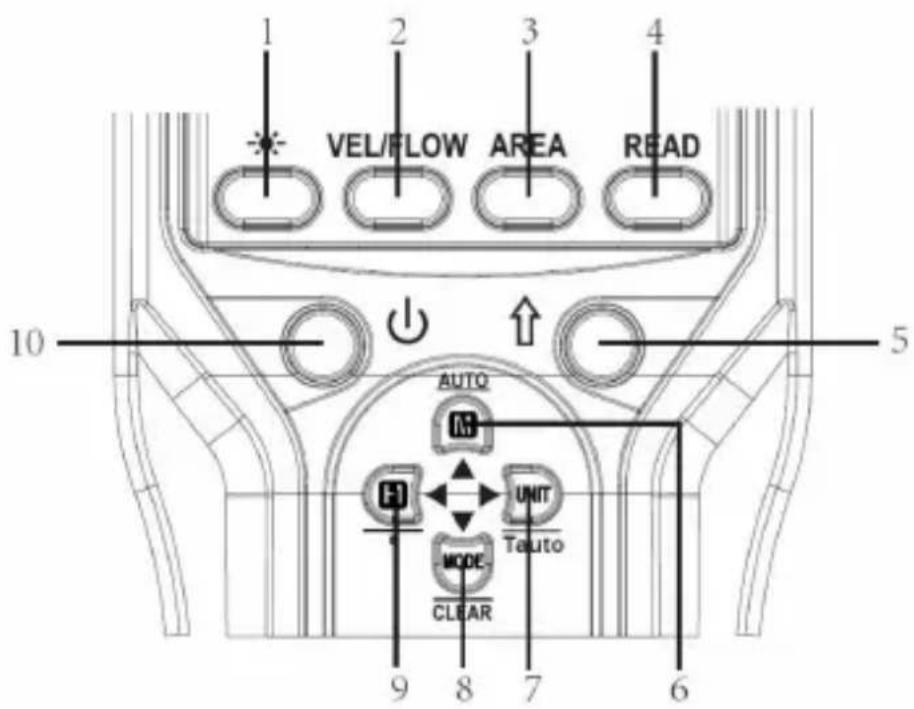
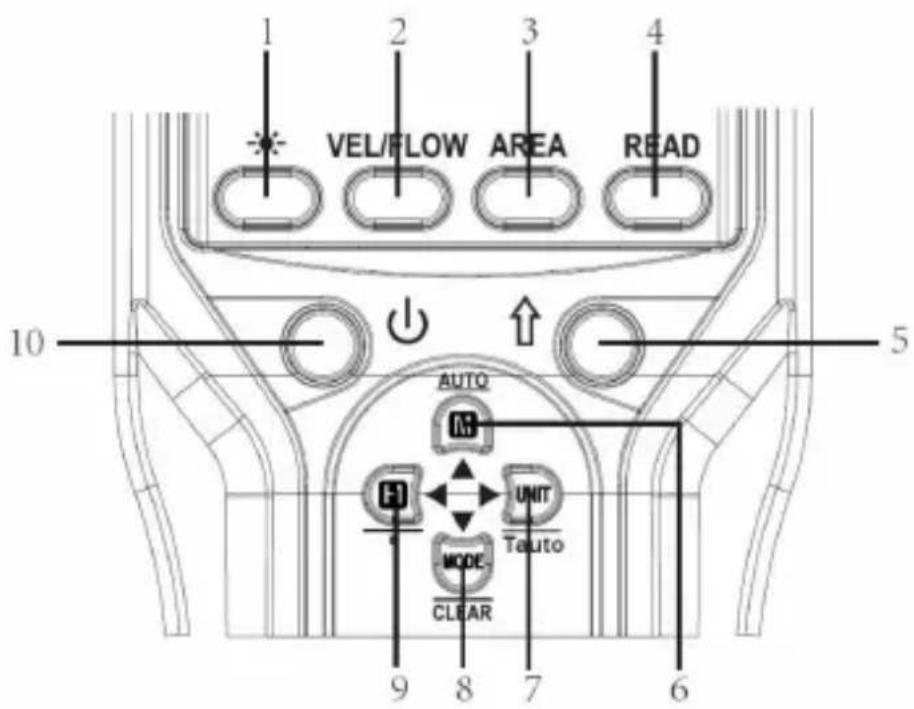
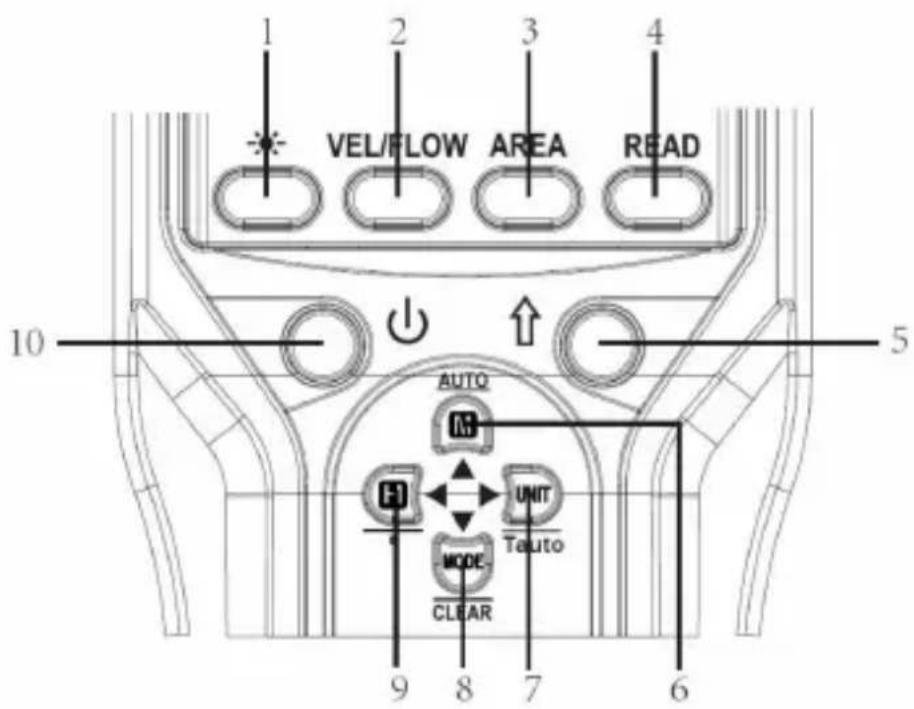
BUTTONS
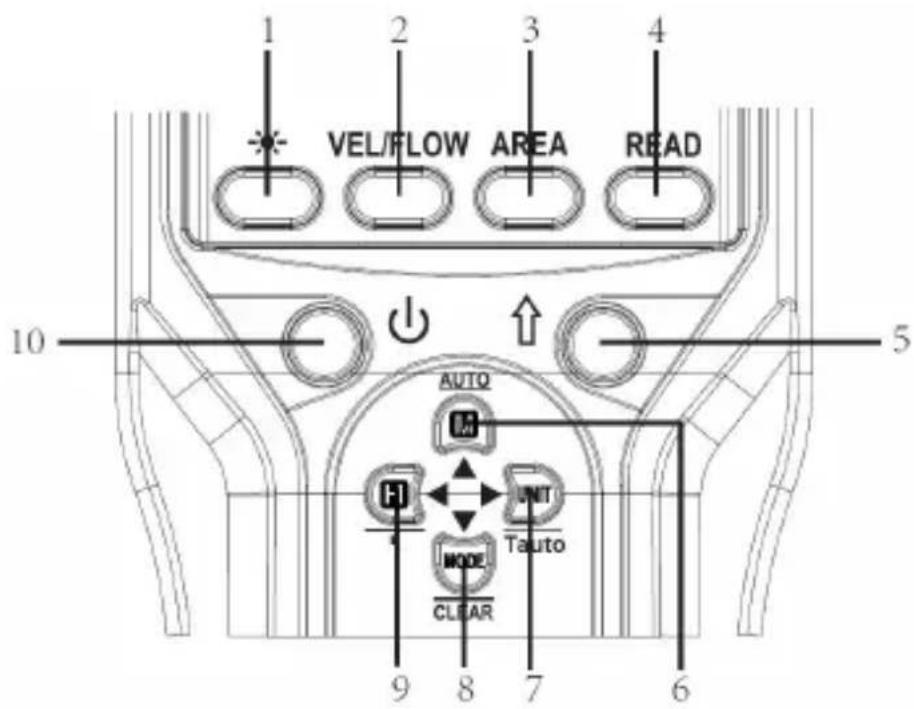
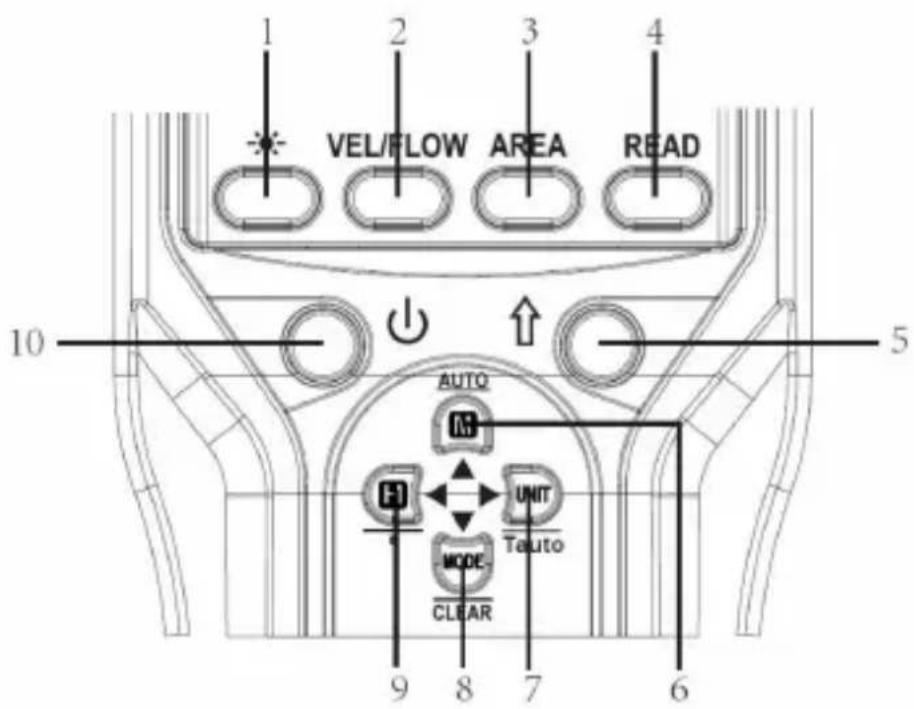
| Button | Description | |
| 1 |  | Used to turn on or off the backlight. |
| 2 | VEL/FLOW | Used to switch between wind velocity and air flow measurement mode. |
| 3 | AREA | Used to enter or exit area setting mode. |
| 4 | READ | Used to enter or exit the mode of recalling stored data. |
| 5 | [w2DE] | Used to enable other button's secondary function. If the other button do not have a secondary function, pressing it will have no effect. |
| 6 |  | Used to save the present readings or to stop automatic saving of readings.Secondary Function:Used to start automatic saving of the present readings at preset intervals. |
| 7 |  | Used to select a desired measurement unit or to exit the setting mode of saving interval of automatic storage.Secondary Function:Used to enter the setting mode of saving interval of automatic storage. |
| 8 |  | Used to enter MAX/MIN/AVG/2/3VMAX recording mode as well as to display maximum reading, minimum reading, average reading and 2/3Vmax reading.Secondary Function:When recalling the storage, press and hold this button to erase stored data. |
| 9 | 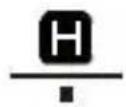 | Used to lock the present reading on the display.Secondary Function:Used to move the decimal point when you set the area for air flow measurements. |
| 10 |  | Used to turn on or off the meter;Used to enable or disable the automatic power-off feature. |
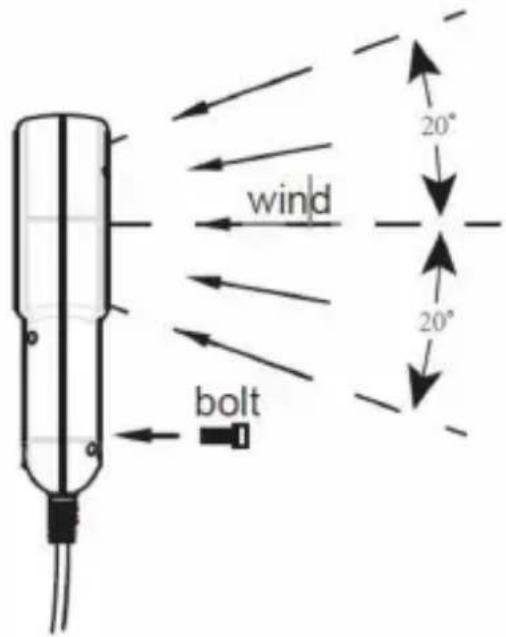
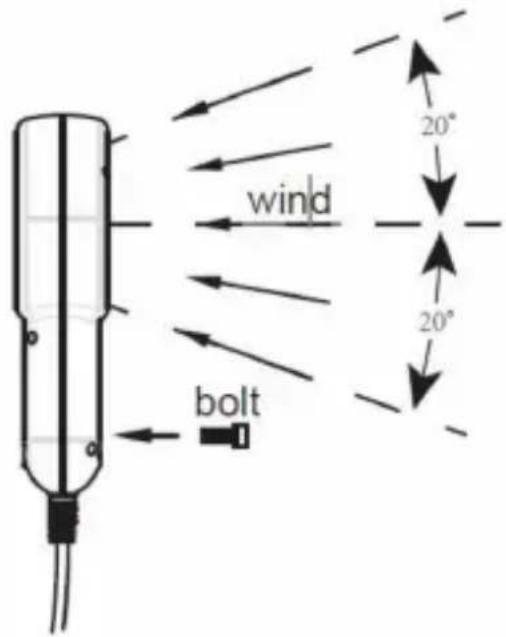
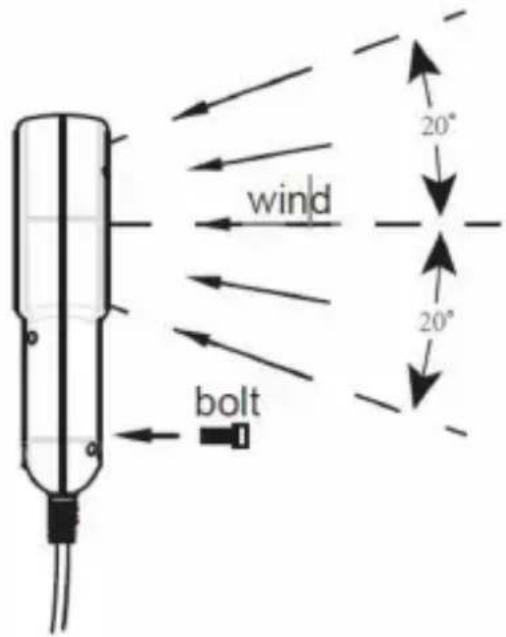
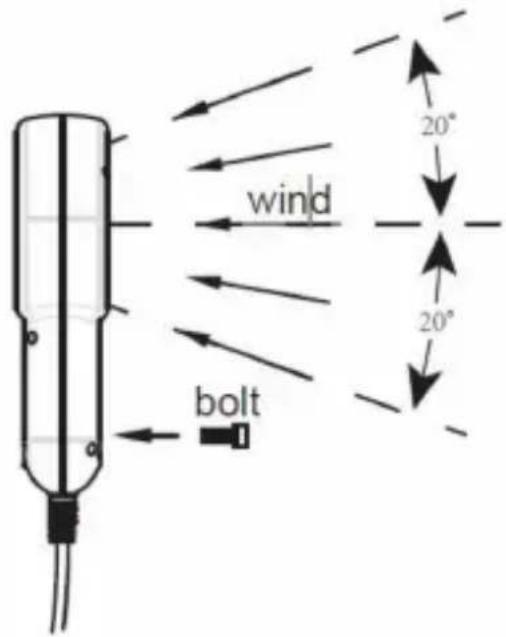
Vane Unit (sideview)
Tips:
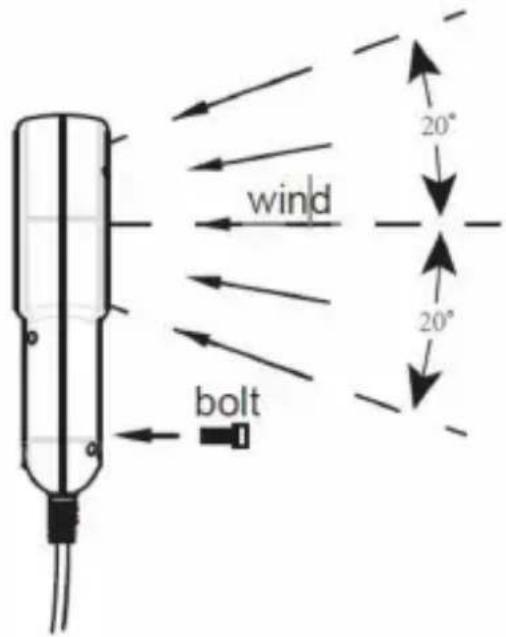
- To ensure measurement accuracy, hold the Vane Unit so that the flow passes through the vanes from the back to the front (the back is where the mounting thread is located) and keep the axis of the vanes within 20 degrees of the flow direction during measurement.
- If necessary, you can mount the Vane Unit on another object or a tripod using a BSW 1/4" bolt (not included). (Refer to the figure above.)
CONNECTING THE VANE UNIT
Insert the plug of the Vane Unit into the port (USB 3.0 Port) on the main unit. The plug and port are keyed so that the plug can only be inserted one way.
TURNING ON THE METER
- Install four new batteries (1.5V, AAA or equivalent) into the battery compartment. The display will show all segments briefly.
- Press the power button to turn on the meter. Note: If the Vane Unit is not connected or if the contact between the plug and the port is poor, the display will show "Err", "--", and the symbol " ". The meter will be unable to measure or store data.
Press the button to turn the backlight on or off, if necessary.
ENABLING AND DISABLING THE AUTOMATIC POWER-OFF
When the meter is not in automatic data saving or data transmission mode, you can press and hold the "1" button for about 2 seconds to enable or disable the automatic power-off feature. When the automatic power-off feature is enabled, " " is displayed as an indicator. Except during automatic data saving or data transmission, the meter will turn off automatically if no button is pressed for about 5 minutes.
ENABLING AND DISABLING THE SECONDARY FUNCTION
Press the "↑" button to enable the secondary function of other buttons. The display will show the symbol SHIFT. Then you can press any other button to display the secondary function interface. If there is no secondary function, pressing that button will have no effect.
Press the "↑" button again to disable the secondary function of other buttons; the symbol SHIFT will disappear.
SELECTING THE WIND VELOCITY/AIR FLOW MEASUREMENT
In the instantaneous measurement mode, press the "FLOW" button to select either the Wind Velocity Measurement Mode (indicated by the symbol " " shown on the display) or the Air Flow Measurement Mode (indicated by the symbol "FLOW" shown on the display).
LOCKING/UNLOCKING THE READINGS
In measurement mode, briefly press the " " button to enter the Data Hold mode. The present readings are locked and the symbol "appears on the display as an indicator.
To exit the Data Hold mode, briefly press this " " button again. The readings are unlocked and the symbol " " disappears.
SELECTING A DESIRED UNIT
In instantaneous measurement mode, you can press the "button once to enter the unit setting mode. The display shows the symbol". You can repeatedly press the "button to scroll through the" m/s", "km/h", "mph", "knots", "ft/min", "cmm", "cfm", "°C", "°F", """°C" and """°F" units.
When the desired unit appears, release the button. About 2 seconds later, the meter saves the unit automatically and exits the unit setting mode. (The setting is not saved after power loss.)
SWITCHING DISPLAY BETWEEN WIND TEMPERATURE AND WIND CHILL TEMPERATURE
Press the UNIT/Tauto button to select the corresponding unit to switch display between wind temperature and wind chill temperature.
SETTING THE AREA FOR AIR FLOW MEASUREMENT
Before measuring air flow, ensure that the area setting of the meter matches the area of the air-duct to be tested; otherwise, the measurement results will be wrong.
- In the instantaneous measurement mode, press the AREA button to display the area setting interface.
The display will show "SET". And the secondary display will show the present area setting (with a default value of 1.000) and the leftmost digit of this setting will flash.
- You can press the " " or " " button to select a desired digit or unit to adjust, which will flash as an indication; and then press the " " or " " button to adjust the value of the selected digit or change the unit.
indication; and then press the " " or " " button to adjust the value of the selected digit or change the unit.
You can press the ↑ button once, and then press the " " button to move the decimal point.
Use the methods mentioned above to adjust the area setting on the second display until it matches the area of the air-duct to be tested.
Tip: The meter's area setting range is 0.001 - 9999ft2 or 0.001 - 9999m2.
- After you finish setting the area, press the " " button once to save the area setting and return to the instantaneous measurement mode. (Settings are saved after power loss.)
SETTING THE AREA FOR AIR FLOW MEASUREMENT
- Press the ⏻" button to turn on the meter. The display shows " " and the meter is in instantaneous wind velocity measurement mode.
- Hold the Vane Unit so that the air flow will pass through the vanes from to the front. To ensure measurement accuracy, keep the axis of the vanes within 20 degrees of the wind direction.
- Wait for 2 seconds for the reading to stabilize, then read the wind velocity readings.
- In instantaneous wind velocity measurement mode, you can press the " " button to display the maximum
wind velocity reading (indicated by the symbol MAX ""), minimum wind velocity reading (indicated by the symbol MIN) or average wind velocity reading (indicated by the symbol AVG) of all readings taken since the measurement started.
- When the display shows the average wind velocity reading, you can press the "MODE" button to return to instantaneous wind velocity measurement mode.
MEASURING MAXIMUM AIR FLOW, MINIMUM AIR FLOW, AVERAGE
- Press the ⏻" button to turn on the meter. The display shows " " and the meter is in instantaneous wind velocity measurement mode.
- Press the VEL/FLOW button to switch to instantaneous air flow measurement mode. The display shows "LOW" as an indicator.
- Hold the Vane Unit so that the air flow will pass through the vanes from to the front. To ensure measurement accuracy, keep the axis of the vanes within 20 degrees of the wind direction.
- Wait for 2 seconds for the reading to stabilize, then read the air flow reading.
- In instantaneous air flow measurement mode, you can press the button to display the maximum air flow reading (indicated by the symbol), minimum air flow reading (indicated by the symbol), average air flow reading (indicated by the symbol AVG), or 2/3Vmax air flow reading (indicated by the symbol 2/3VMAX) of all readings taken since the measurement started.
- When the display shows the 2/3Vmax air flow reading, you can press the "MODE" button to return to the instantaneous air flow measurement mode.
Note:
When measuring the maximum/minimum/average wind velocity or air flow, the meter also measures the maximum/minimum/average temperature.
INSTRUCTION FOR AIR FLOW
When the air flow exceeds 9999, the display will show the first four digits of the flow value. The multiplier x10 will be displayed when the air flow is ≥ 10000, and when it is ≥ 100000, the multiplier will be shown.
Note: The area should be set before measuring air flow.
INSTRUCTION FOR WIND CHILL TEMPERATURE
After selecting the unit for wind chill temperature, the symbol will be displayed. When the wind velocity is > 1.34 m/s and the wind temperature is ≤ 10°C, the wind chill temperature is calculated; when the wind velocity is ≤ 1 m/s and the wind temperature is ≤ 10°C, the wind chill temperature is equal to the temperature; when the wind temperature is > 10°C, the display shows "Hi".
USING THE DATA STORAGE FUNCTION
- When measuring instantaneous wind velocity/air flow whose reading is being shown on the primary display, you can save present readings using one of the following methods:
- Saving present readings manually
While measurement is ongoing, press the button once; the present readings will be saved in the built-in EPROM, and the display will show the symbol for about 0.5 seconds as an indication. After the symbol disappears, you can continue to press this button to save new present readings, and so on.
- Saving present readings automatically at preset intervals
While measurement is ongoing, press the button once, and then press the button to start saving readings automatically in the built-in EPROM at preset intervals; the symbol will flash on the display as an indication.
(During the automatic storage of present readings, you cannot change the area or recall stored data.) At any time, you can stop saving readings by pressing the "AUTO" button.
the area or recall stored data.) At any time, you can stop saving readings by pressing the "AUTO" button.
- When the EPROM is full, the symbol " " will stop flashing and be shown constantly on the display; in this condition, the meter cannot save any more readings in the EPROM. And if you press the " " button again, the display will show " FULL ".
- The stored data includes instantaneous readings of wind velocity, air flow, temperature, and wind chill temperature.
Before you start automatic saving of readings, make sure that you have set the saving interval to meet your need.
- Each time before you start saving readings, make sure that the area setting on the meter is correct.
- Each time before you start saving readings, make sure that the area setting on the meter is correct.
In the instantaneous measurement mode, press the " " button to recall the stored data. The display shows " " as an indicator. And the last saved data and its corresponding record number are displayed on the screen. (The default is to recall the instantaneous wind velocity reading.)
- In the instantaneous measurement mode, press the " " button to recall the stored data. The display shows " as an indicator. And the last saved data and its corresponding record number are displayed on the screen. (The default is to recall the instantaneous wind velocity reading.)
- You can press the " " button to increase or the " " button to decrease the record number by 1.
If you press and hold the " " or " " button, the record number will increase or decrease rapidly.
- Use the method mentioned above to select a desired record number. Then press the "button" or the "button" to recall the instantaneous wind velocity, air flow, wind temperature, or wind chill temperature reading of this record number.
- Press and hold the ↑ and MODE CLEAR buttons for about 2 seconds to clear the stored data. The display will show "---".
- Press the READ button to exit recall mode, the meter will return to instantaneous measurement mode.
SETTING SAVING INTERVAL OF AUTOMATIC STORAGE OF
- Press the " " button once, and then press the " " button, the display will show the symbols " " and " ".
- The secondary display shows the present saving interval of automatic storage. You can adjust the saving interval within the range of 0.5 to 600.0 seconds.
- You can press the " " button to increase or the " " button to decrease saving interval by 0.5 seconds.
If you press and hold the " " or " " button, the saving interval will increase or decrease rapidly.
- After you finish adjusting the saving interval, press the " " button to save the saving interval; the meter will return to instantaneous measurement mode (Settings are not saved after power loss.)
TRANSMITTING DATA
- Connect the meter to the computer via a USB Type-C data cable. Then the software.
- Set up the corresponding serial port in the software, click on the download record icon, and transmit the data to the software. During the data transmission, the display will show a flashing symbol " "
Note:
The software supports functions such as charts, and reports. For website downloads, installation, and usage instructions regarding the software, please refer to the software user's manual provided at the end.
SPECIFICATIONS
Battery: 1.5V battery, AAA or equivalent, 4 pieces
Operating Environment:
Main Unit — temperature: 0°C \~ 40°C; relative humidity: < 80%
Vane Unit — temperature: -10°C 60°C ; relative humidity: < 90%
Storage Environment:
Temperature: -20°C to 60°C; Relative Humidity: < 90%
Overrange Indication:
When the measured wind velocity exceeds 45 m/s (162 km/h, 8858.3 ft/min, 100.8 mph, or 87.48 knots), the display shows "OL".
When the wind temperature is below -10°C (14°F), the display shows "Lo"; when it is above 60°C (140°F), the display shows "Hi".
When the air flow exceeds the display range (9999 x 100), the display shows "OL".
When the wind chill temperature is below -27.7°C (-17.8°F), the display shows "Lo"; when it is above 10°C (50°F), the display shows "Hi".
Battery Level Indication:
When the display shows "", it indicates that the battery level is sufficient. When the display shows "", it indicates that the battery level is in good condition.
When the display shows "", it indicates that the battery level is moderate. When the display shows "", it indicates that the battery level is low, and battery replacement is recommended.
When the display shows "____", it indicates that the battery level is extremely low, and the batteries must be replaced.
IP Degree: IP10
Size: Main Unit — 169mm x 75mm x 36mm; Vane Unit — 183mm x 92mm x 40mm
Weight: 412g
WIND VELOCITY
| Range | Resolution | Accuracy | |
| m/s | 0 ~ 45.000 | 0.034 | ±(5% + 0.5m/s) |
| km/h | 0 ~ 162.00 | 0.122 | ±(5%+1.8km/h) |
| ft/min | 0 ~ 8859.1 | 6.69 | ±(5% + 98.4ft/min) |
| knots | 0 ~ 87.480 | 0.066 | ±(5% + 0.97knots) |
| mph | 0 ~ 100.80 | 0.076 | ±(5% +1.12mph) |
AIR FLOW
| Range | Resolution | Area | |
| cmm | 0 ~ 999900 | 0.001 ~ 100 | 0 ~ 9999 m2 |
| cfm | 0 ~ 999900 | 0.001 ~ 100 | 0 ~ 9999 ft2 |
WIND TEMPERATURE
| Range | Resolution | Accuracy | |
| °C | -10°C ~ 60°C | 0.1°C | ±2°C |
| °F | 14°F ~ 140°F | 0.2°F | ±3.6°F |
| Range | Resolution | |
| Scale | 1~12 | 1 |
TABLE OF CORRESPONDENCE
| Scale | 0 | 1 | 2 | 3 | 4 |
| Wind Velocity | 0 ~ 0.2 | 0.3~1.5 | 1.6~3.3 | 3.4~5.4 | 5.5~7.9 |
| Scale | 5 | 6 | 7 | 8 |
| Wind Velocity | 8.0~10.7 | 10.8~13.8 | 13.9~17.1 | 17.2~20.7 |
| Scale | 9 | 10 | 11 | 12 |
| Wind Velocity | 20.8~24.4 | 24.5~28.4 | 28.5~32.6 | >32.6 |
MAINTENANCE
● Battery Replacement
When the display shows ____, the batteries are not sufficiently charged and must be replaced immediately.
To replace the batteries, turn off the meter first. Remove the screw on the cover and take off the battery cover. Replace the exhausted batteries with new ones of the same type, ensuring the polarity connections are correct. Reinstall the battery cover and the screw.
● General Maintenance
- If you do not use the meter for a long period of time, remove the batteries to avoid corrosion.
- Periodically wipe the meter case with a damp cloth. Do not use abrasive or solvent.
Note: Do not let any liquid enter the case or the port on the top of the meter.
- Do not store or use the meter in locations where it may be subject to:
a. Splashes of water or high levels of dust.
b. Air with high salt or sulphur content.
c. Air with other gases or chemical materials.
d. High temperature or humidity (above 50°C, 90%) or direct sunlight.
SOFTWARE USER'S MANUAL
1. System Requirements
● Minimum 512MB of available RAM ● Minimum 1GB of free hard disk space - USB 2.0 or 3.0 interface - Operating System:
Microsoft Windows XP SP3, Windows Vista, Windows 7, Windows 8, Windows
- Software for reading CSV and PDF files.
Note: The CSV reading software should support UTF-8 and ANSI encoding.
2. Download
Download the installation file from the following website:
http://www.all-sun.com/app/EM2250_Setup.exe
3. Installation
Double-click the installation file and follow the prompts to complete the installation.
Note:
The software must be installed with the system administrator privilege.
4. Initial Setup
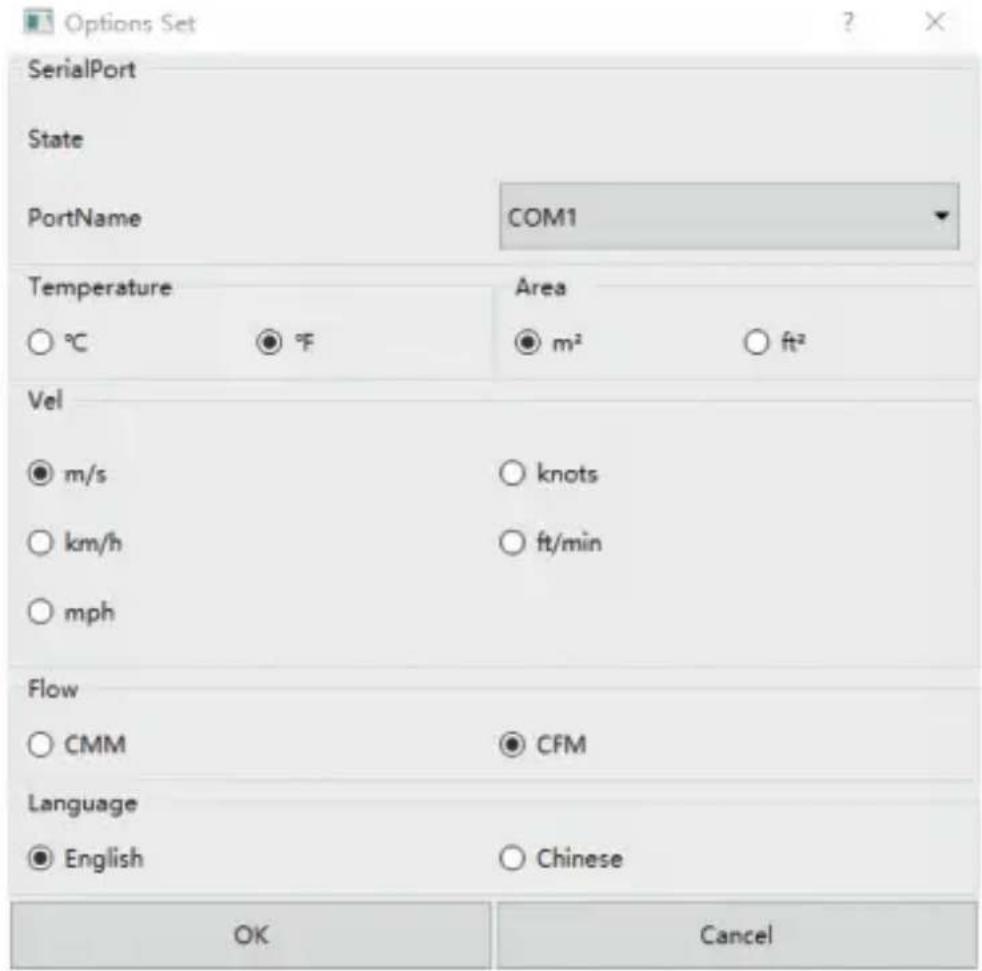
Connect the meter to the computer's USB port using a USB Type-C data cable and turn on the meter. Then open the software as an administrator via the shortcut and select the appropriate COM port in the settings window. After selecting, click "OK" to apply the settings, and then click "Download" or "Record" to enable the software to receive data transmitted from the meter.
- The functions of the icons in the figure below are as follows, from left to right: Download, Record, Export, Set.

● The option settings window is shown in the figure below.
Note:
Units for wind velocity, air flow, area, and temperature on the meter and computer software are independently adjustable.
The computer software can only connect with one anemometer unit at a time.
NOTE
- This manual is subject to change without notice.
- Our company will not take any other responsibilities for any loss.
- The contents of this manual cannot be used as a reason to use any special application.
LIST OF ACCESSORIES
- Operating instructions * 1
- Product lanyard * 1
- Product carrying case * 1
- Carbon batteries (AAA) * 4
- Telescopic line * 1
DISPOSAL OF THIS ARTICLE
Dear Customer,
If you at some point intend to dispose of this article, then please keep in mind that many of its components consist of valuable materials, which can be recycled.
Please do not discharge it in the garbage bin, but check with your local council for recycling facilities in your area.
Address: Baoshanqu Shuangchenglu 803long 11hao 1602A-1609shi Shanghai
Imported to AUS: SIHAO PTY LTD, 1 ROKEVA STREETEASTWOOD NSW 2122 Australia
Imported to USA: Sanven Technology Ltd, Suite 250, 9166 Anaheim Place, Rancho Cucamonga, CA 91730
SHUNSHUN GmbH
C Römeräcker 9 Z2021, 76351
Kinit 5 Albert Edward House, The
Pavilions Preston, United Kingdom
Made In China
VEVOR®
TOUGH TOOLS, HALF PRICE
Technical Support and E-Warranty Certificate www.vevor.com/support
VEVOR®
TOUGH TOOLS, HALF PRICE
www.vevor.com/support
ANEMOMETER
INSTRUCTION SHEET
MODEL: EM2250
NEED HELP? CONTACT US!
THE DISPLAY
| Symbol | Description | |
| 1 |  | Battery charge level indicator. |
| 2 |  | Automatic power-off feature is enabled. |
| 3 |  | 2/3Vmax air flow reading is being shown on the primary display. |
| 4 | 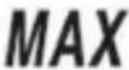 | Maximum reading is being shown on the primary display. |
| 5 | 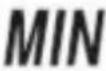 | Minimum reading is being shown on the primary display. |
| 6 | 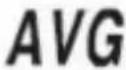 | Average reading is being shown on the primary display. |
| 7 |  | The meter is in setting mode. |
| 8 | 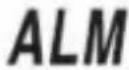 | An alarm symbol which indicates that the vane unit is disconnected. |
| 9 |  | Wind velocity |
| 10 |  | Air flow |
| 11 |  | Data are being transmitted to the computer software. |
| 12 |  | The readings are locked. |
| 13 |  | Flashing symbol on the display indicates that the meter is saving data.Steady display of the symbol indicates that the EPROM is full. |
| 14 | 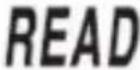 | Stored data are being displayed. |
| 15 | [2YD3] | The secondary function of buttons is enabled. |
| 16 |  | Beaufort scale, which is used to indicate wind force. |
| 17 |  | Wind chill temperature |
| 18 |  | Record number |
| 19 | 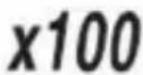 | The current air flow is 100000 . (When it is 10000 , "x10" will be displayed). |
| 20 | 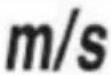 | Meters per second. The unit of velocity. |
| 21 | 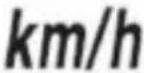 | Kilometers per hour. The unit of velocity. |
| 22 | 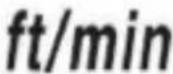 | Feet per minute. The unit of velocity. |
| 23 | 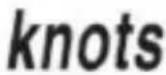 | Nautical miles per hour.The unit of velocity. |
| 24 | 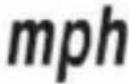 | Miles per hour. The unit of velocity. |
| 25 |  | Square feet. The unit of area. |
| 26 |  | Square meter. The unit of area. |
| 27 | 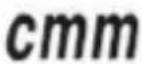 | Cubic meters per minute. The unit of flow. |
| 28 | 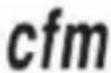 | Cubic feet per minute. The unit of flow. |
| 29 |  | Celsius degree. The unit of temperature. |
| 30 | [DHEY] | Fahrenheit degree.The unit of temperature. |
BUTTONS
| Button | Description | |
| 1 | [y8WD] | Used to turn on or off the backlight. |
| 2 | VEL/FLOW | Used to switch between wind velocity and air flow measurement mode. |
| 3 | AREA | Used to enter or exit area setting mode. |
| 4 | READ | Used to enter or exit the mode of recalling stored data. |
| 5 | [x67W] | Used to enable other button's secondary function. If the other button do not have a secondary function, pressing it will have no effect. |
| 6 |  | Used to save the present readings or to stop automatic saving of readings.Secondary Function:Used to start automatic saving of the present readings at preset intervals. |
| 7 |  | Used to select a desired measurement unit or to exit the setting mode of saving interval of automatic storage.Secondary Function:Used to enter the setting mode of saving interval of automatic storage. |
| 8 | 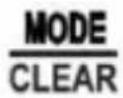 | Used to enter MAX/MIN/AVG/2/3VMAX recording mode as well as to display maximum reading, minimum reading, average reading and 2/3Vmax reading.Secondary Function:When recalling the storage, press and hold this button to erase stored data. |
| 9 | 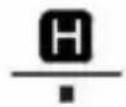 | Used to lock the present reading on the display.Secondary Function:Used to move the decimal point when you set the area for air flow measurements. |
| 10 |  | Used to turn on or off the meter;Used to enable or disable the automatic power-off feature. |
OPERATING INSTRUCTIONS
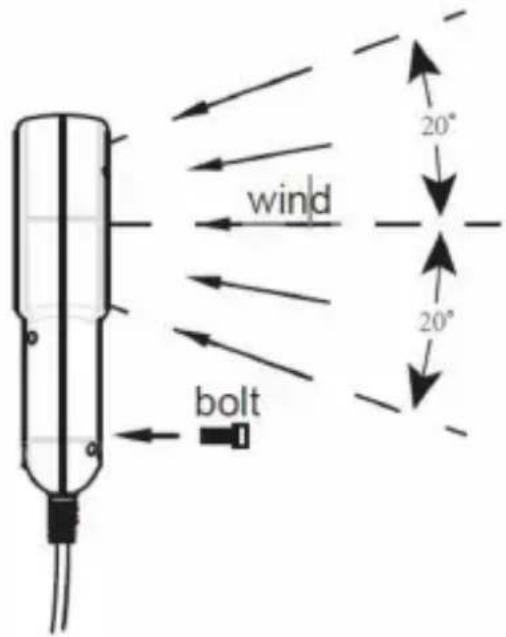
Vane Unit (side view)
Tips:
| Range | Resolution | |
| Scale | 1~12 | 1 |
CONVERSION TABLE
| Scale | 0 | 1 | 2 | 3 | 4 |
| Wind Velocity | 0 ~ 0.2 | 0.3~1.5 | 1.6~3.3 | 3.4~5.4 | 5.5~7.9 |
| Scale | 5 | 6 | 7 | 8 |
| Wind Velocity | 8.0~10.7 | 10.8~13.8 | 13.9~17.1 | 17.2~20.7 |
| Scale | 9 | 10 | 11 | 12 |
| Wind Velocity | 20.8~24.4 | 24.5~28.4 | 28.5~32.6 | >32.6 |
MAINTENANCE
http://www.all-sun.com/app/EM2250_Setup.exe
3. Installation
DISPOSAL OF THIS ARTICLE
Dear Customer,
If you at some point intend to dispose of this article, then please keep in mind that many of its components consist of valuable materials, which can be recycled.
Please do not discharge it in the garbage bin, but check with your local council for recycling facilities in your area.
Address: Baoshanqu Shuangchenglu 803long 11hao 1602A-1609shi
Shanghai
Imported in Australia: SIHAO PTY LTD, 1 ROKEVA STREETESTWOOD
NSW 2122 Australia
Place, Rancho Cucamonga, CA 91730
| REPRÉSENTANT CE |
SHUNSHUN GmbH
Römeräcker 9 Z2021, 76351
Linkenheim-Hochstetten, Germany
| REPRÉSENTANT | DU ROYAUME-UNI |
Groupe Pooledas Ltd
www.vevor.com/support
ANEMOMETER
INSTRUCTION SHEET
MODEL: EM2250
NEED HELP? CONTACT US!
THE DISPLAY
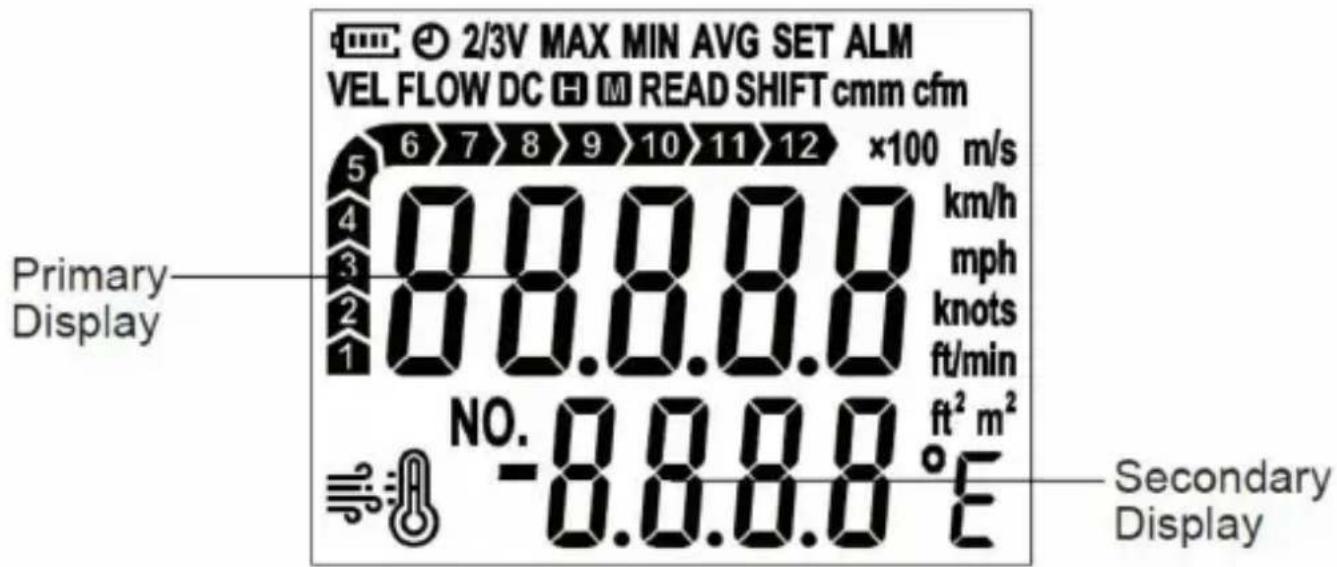
| Symbol | Description | |
| 1 | | Battery charge level indicator. |
| 2 | | Automatic power-off feature is enabled. |
| 3 | | 2/3Vmax air flow reading is being shown on the primary display. |
| 4 | | Maximum reading is being shown on the primary display. |
| 5 | | Minimum reading is being shown on the primary display. |
| 6 | | Average reading is being shown on the primary display. |
| 7 | | The meter is in setting mode. |
| 8 | | An alarm symbol which indicates that the vane unit is disconnected. |
| 9 | | Wind velocity |
| 10 | | Air flow |
| 11 | | Data are being transmitted to the computer software. |
| 12 | | The readings are locked. |
| 13 | | Flashing symbol on the display indicates that the meter is saving data.Steady display of the symbol indicates that the EPROM is full. |
| 14 | | Stored data are being displayed. |
| 15 | 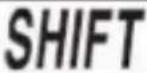 | The secondary function of buttons is enabled. |
| 16 | | Beaufort scale, which is used to indicate wind force. |
| 17 | | Wind chill temperature |
| 18 | | Record number |
| 19 | | The current air flow is 100000 . (When it is 10000 , "x10" will be displayed). |
| 20 | | Meters per second. The unit of velocity. |
| 21 | | Kilometers per hour. The unit of velocity. |
| 22 | | Feet per minute. The unit of velocity. |
| 23 | | Nautical miles per hour.The unit of velocity. |
| 24 | | Miles per hour. The unit of velocity. |
| 25 | | Square feet. The unit of area. |
| 26 | | Square meter. The unit of area. |
| 27 | | Cubic meters per minute. The unit of flow. |
| 28 | | Cubic feet per minute. The unit of flow. |
| 29 | | Celsius degree. The unit of temperature. |
| 30 |  | Fahrenheit degree.The unit of temperature. |
BUTTONS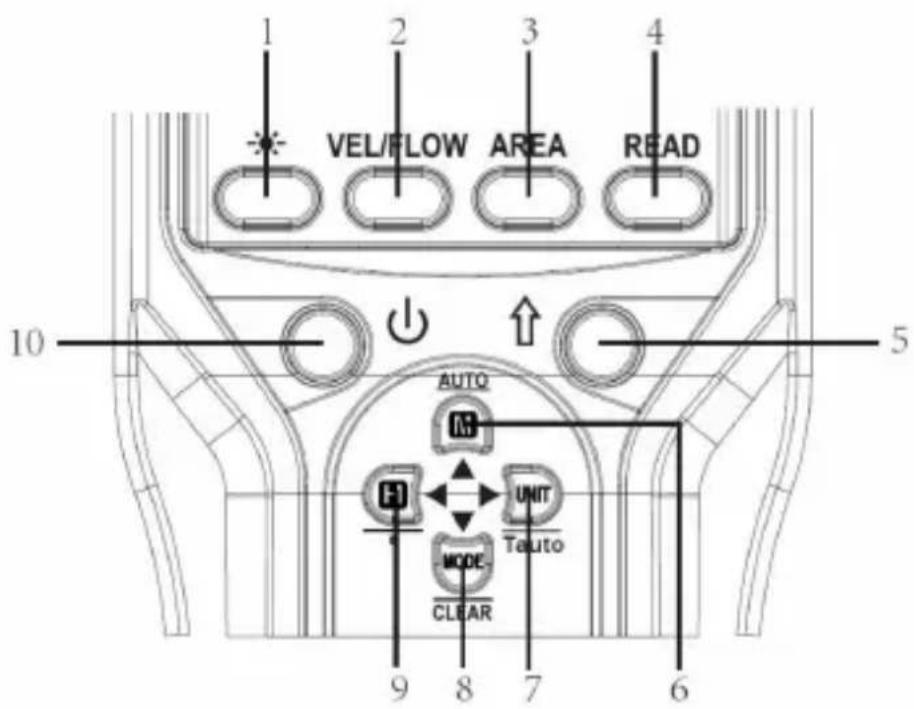
| Button | Description | |
| 1 |  | Used to turn on or off the backlight. |
| 2 | VEL/FLOW | Used to switch between wind velocity and air flow measurement mode. |
| 3 | AREA | Used to enter or exit area setting mode. |
| 4 | READ | Used to enter or exit the mode of recalling stored data. |
| 5 |  | Used to enable other button's secondary function. If the other button do not have a secondary function, pressing it will have no effect. |
| 6 | | Used to save the present readings or to stop automatic saving of readings.Secondary Function:Used to start automatic saving of the present readings at preset intervals. |
| 7 | | Used to select a desired measurement unit or to exit the setting mode of saving interval of automatic storage.Secondary Function:Used to enter the setting mode of saving interval of automatic storage. |
| 8 | | Used to enter MAX/MIN/AVG/2/3VMAX recording mode as well as to display maximum reading, minimum reading, average reading and 2/3Vmax reading.Secondary Function:When recalling the storage, press and hold this button to erase stored data. |
| 9 | | Used to lock the present reading on the display.Secondary Function:Used to move the decimal point when you set the area for air flow measurements. |
| 10 | | Used to turn on or off the meter;Used to enable or disable the automatic power-off feature. |
OPERATING INSTRUCTIONS
Vane Unit (side view)
Tips:
| Range | Resolution | |
| Scale | 1~12 | 1 |
CORRESPONDENCE TABLE
| Scale | 0 | 1 | 2 | 3 | 4 |
| Wind Velocity | 0 ~ 0.2 | 0.3~1.5 | 1.6~3.3 | 3.4~5.4 | 5.5~7.9 |
| Scale | 5 | 6 | 7 | 8 |
| Wind Velocity | 8.0~10.7 | 10.8~13.8 | 13.9~17.1 | 17.2~20.7 |
| Scale | 9 | 10 | 11 | 12 |
| Wind Velocity | 20.8~24.4 | 24.5~28.4 | 28.5~32.6 | >32.6 |
MAINTENANCE
Battery replacement
http://www.all-sun.com/app/EM2250_Setup.exe
3. Installation
Note:
DISPOSAL OF THIS ARTICLE
Dear Customer,
If you at some point intend to dispose of this article, then please keep in mind that many of its components consist of valuable materials, which can be recycled.
Please do not discharge it in the garbage bin, but check with your local council for recycling facilities in your area.

Address: Baoshanqu Shuangchenglu 803long 11hao 1602A-1609shi
Shanghai
www.vevor.com/support
ANEMOMETER
NEED HELP? CONTACT US!
electronics www.vevor.com/support
THE DISPLAY

| Symbol | Description | |
| 1 | | Battery charge level indicator. |
| 2 | | Automatic power-off feature is enabled. |
| 3 | | 2/3Vmax air flow reading is being shown on the primary display. |
| 4 | | Maximum reading is being shown on the primary display. |
| 5 | | Minimum reading is being shown on the primary display. |
| 6 | | Average reading is being shown on the primary display. |
| 7 | | The meter is in setting mode. |
| 8 | | An alarm symbol which indicates that the vane unit is disconnected. |
| 9 | | Wind velocity |
| 10 | | Air flow |
| 11 | | Data are being transmitted to the computer software. |
| 12 | | The readings are locked. |
| 13 | | Flashing symbol on the display indicates that the meter is saving data.Steady display of the symbol indicates that the EPROM is full. |
| 14 | | Stored data are being displayed. |
| 15 | | The secondary function of buttons is enabled. |
| 16 | | Beaufort scale, which is used to indicate wind force. |
| 17 | | Wind chill temperature |
| 18 | | Record number |
| 19 | | The current air flow is 100000 . (When it is 10000 , "x10" will be displayed). |
| 20 | | Meters per second. The unit of velocity. |
| 21 | | Kilometers per hour. The unit of velocity. |
| 22 | | Feet per minute. The unit of velocity. |
| 23 | | Nautical miles per hour.The unit of velocity. |
| 24 |  | Miles per hour. The unit of velocity. |
| 25 |  | Square feet. The unit of area. |
| 26 | | Square meter. The unit of area. |
| 27 | | Cubic meters per minute. The unit of flow. |
| 28 | | Cubic feet per minute. The unit of flow. |
| 29 | | Celsius degree. The unit of temperature. |
| 30 |  | Fahrenheit degree.The unit of temperature. |
BUTTONS
| Button | Description | |
| 1 | [86Z4] | Used to turn on or off the backlight. |
| 2 | VEL/FLOW | Used to switch between wind velocity and air flow measurement mode. |
| 3 | AREA | Used to enter or exit area setting mode. |
| 4 | READ | Used to enter or exit the mode of recalling stored data. |
| 5 |  | Used to enable other button's secondary function. If the other button do not have a secondary function, pressing it will have no effect. |
| 6 | | Used to save the present readings or to stop automatic saving of readings.Secondary Function:Used to start automatic saving of the present readings at preset intervals. |
| 7 |  | Used to select a desired measurement unit or to exit the setting mode of saving interval of automatic storage.Secondary Function:Used to enter the setting mode of saving interval of automatic storage. |
| 8 | | Used to enter MAX/MIN/AVG/2/3VMAX recording mode as well as to display maximum reading, minimum reading, average reading and 2/3Vmax reading.Secondary Function:When recalling the storage, press and hold this button to erase stored data. |
| 9 | | Used to lock the present reading on the display.Secondary Function:Used to move the decimal point when you set the area for air flow measurements. |
| 10 | | Used to turn on or off the meter;Used to enable or disable the automatic power-off feature. |
INSTRUCTIONS FOR USE
Vane Unit (side view)
Suggestion:
| Range | Resolution | |
| Scale | 1~12 | 1 |
CORRESPONDENCE TABLE
| Scale | 0 | 1 | 2 | 3 | 4 |
| Wind Velocity | 0 ~ 0.2 | 0.3~1.5 | 1.6~3.3 | 3.4~5.4 | 5.5~7.9 |
| Scale | 5 | 6 | 7 | 8 |
| Wind Velocity | 8.0~10.7 | 10.8~13.8 | 13.9~17.1 | 17.2~20.7 |
| Scale | 9 | 10 | 11 | 12 |
| Wind Velocity | 20.8~24.4 | 24.5~28.4 | 28.5~32.6 | >32.6 |
MAINTENANCE
http://www.all-sun.com/app/EM2250_Setup.exe
3. Installation
Note:
DISPOSAL OF THIS ARTICLE
Dear Customer,
If you at some point intend to dispose of this article, then please keep in mind that many of its components consist of valuable materials, which can be recycled.
Please do not discharge it in the garbage bin, but check with your local council for recycling facilities in your area.

Address: Baoshanqu Shuangchenglu 803long 11hao 1602A-1609shi Shanghai
Imported into Australia: SIHAO PTY LTD, 1 ROKEVA STREETEASTWOOD NSW 2122Australia
www.vevor.com/support
ANEMOMETER
INSTRUCTION SHEET
MODEL: EM2250
www.vevor.com/support
THE DISPLAY
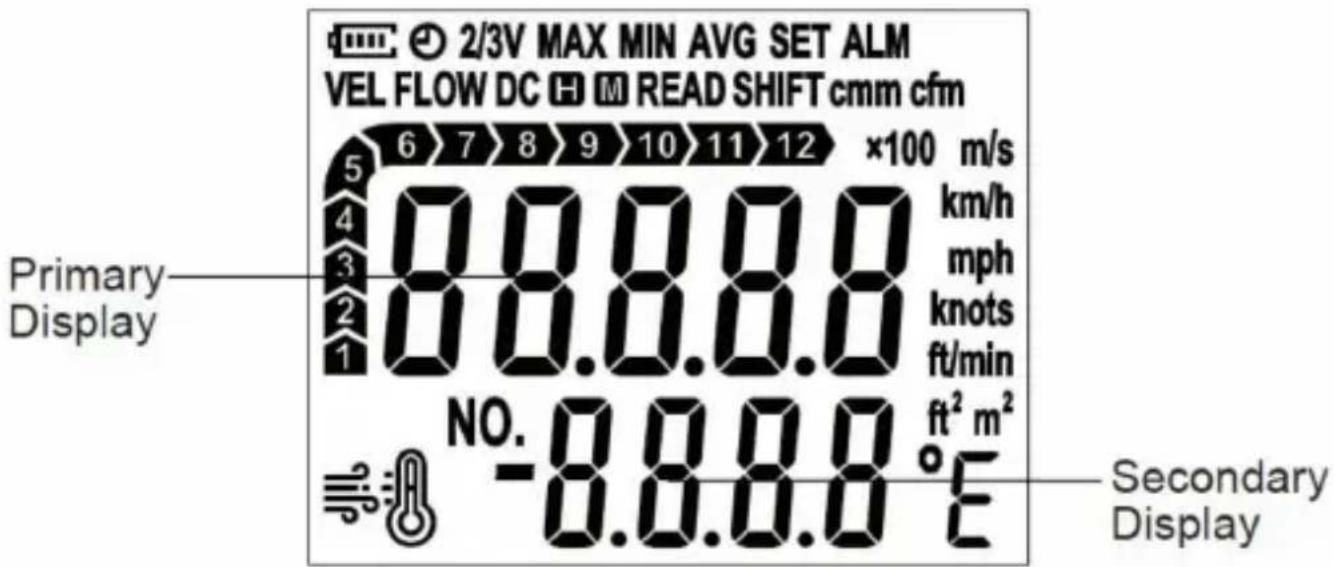
| Symbol | Description | |
| 1 | | Battery charge level indicator. |
| 2 | | Automatic power-off feature is enabled. |
| 3 | | 2/3Vmax air flow reading is being shown on the primary display. |
| 4 | | Maximum reading is being shown on the primary display. |
| 5 | | Minimum reading is being shown on the primary display. |
| 6 | | Average reading is being shown on the primary display. |
| 7 | | The meter is in setting mode. |
| 8 | | An alarm symbol which indicates that the vane unit is disconnected. |
| 9 | | Wind velocity |
| 10 | | Air flow |
| 11 | | Data are being transmitted to the computer software. |
| 12 | | The readings are locked. |
| 13 | | Flashing symbol on the display indicates that the meter is saving data.Steady display of the symbol indicates that the EPROM is full. |
| 14 | | Stored data are being displayed. |
| 15 | | The secondary function of buttons is enabled. |
| 16 | | Beaufort scale, which is used to indicate wind force. |
| 17 | | Wind chill temperature |
| 18 | | Record number |
| 19 | | The current air flow is 100000 . (When it is 10000 , "x10" will be displayed). |
| 20 | | Meters per second. The unit of velocity. |
| 21 | | Kilometers per hour. The unit of velocity. |
| 22 | | Feet per minute. The unit of velocity. |
| 23 | | Nautical miles per hour.The unit of velocity. |
| 24 | | Miles per hour. The unit of velocity. |
| 25 | | Square feet. The unit of area. |
| 26 | | Square meter. The unit of area. |
| 27 | | Cubic meters per minute. The unit of flow. |
| 28 | | Cubic feet per minute. The unit of flow. |
| 29 | | Celsius degree. The unit of temperature. |
| 30 | | Fahrenheit degree.The unit of temperature. |
BUTTONS
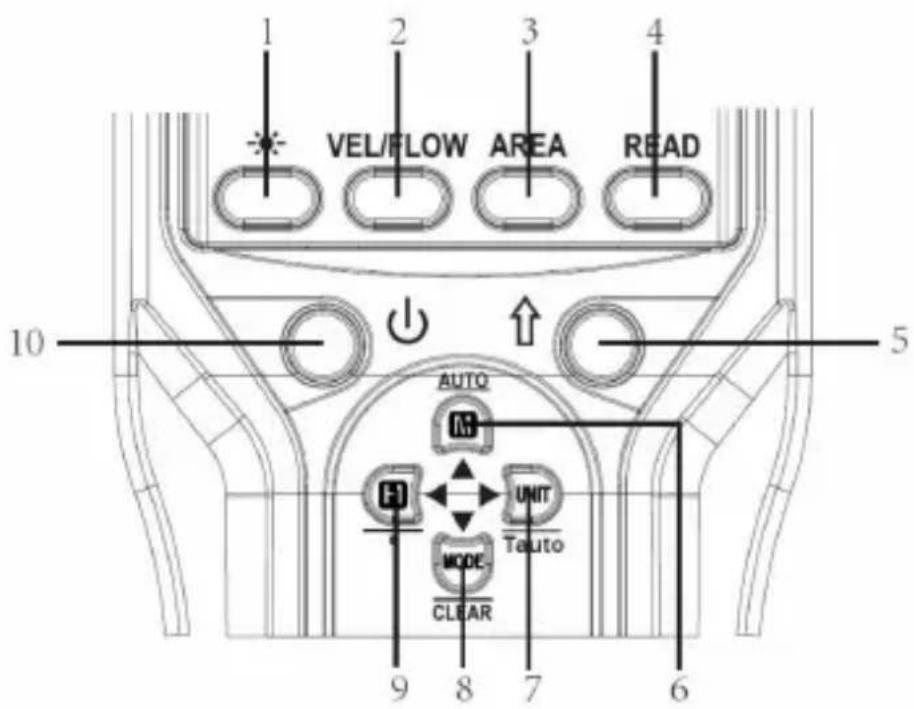
| Button | Description | |
| 1 |  | Used to turn on or off the backlight. |
| 2 | VEL/FLOW | Used to switch between wind velocity and air flow measurement mode. |
| 3 | AREA | Used to enter or exit area setting mode. |
| 4 | READ | Used to enter or exit the mode of recalling stored data. |
| 5 | [22XT] | Used to enable other button's secondary function. If the other button do not have a secondary function, pressing it will have no effect. |
| 6 | | Used to save the present readings or to stop automatic saving of readings.Secondary Function:Used to start automatic saving of the present readings at preset intervals. |
| 7 | | Used to select a desired measurement unit or to exit the setting mode of saving interval of automatic storage.Secondary Function:Used to enter the setting mode of saving interval of automatic storage. |
| 8 | | Used to enter MAX/MIN/AVG/2/3VMAX recording mode as well as to display maximum reading, minimum reading, average reading and 2/3Vmax reading.Secondary Function:When recalling the storage, press and hold this button to erase stored data. |
| 9 | | Used to lock the present reading on the display.Secondary Function:Used to move the decimal point when you set the area for air flow measurements. |
| 10 | | Used to turn on or off the meter;Used to enable or disable the automatic power-off feature. |
Vane Unit (side view)
Tips:
| Range | Resolution | |
| Scale | 1~12 | 1 |
http://www.all-sun.com/app/EM2250_Setup.exe
3. Installation
Note:
DISPOSAL OF THIS ARTICLE
Dear Customer,
If you at some point intend to dispose of this article, then please keep in mind that many of its components consist of valuable materials, which can be recycled.
Please do not discharge it in the garbage bin, but check with your local council for recycling facilities in your area.
www.vevor.com/support
WIATROMIERZ
INSTRUCTION
MODEL: EM2250
NEED HELP? CONTACT US!
www.vevor.com/support
DISPLAY
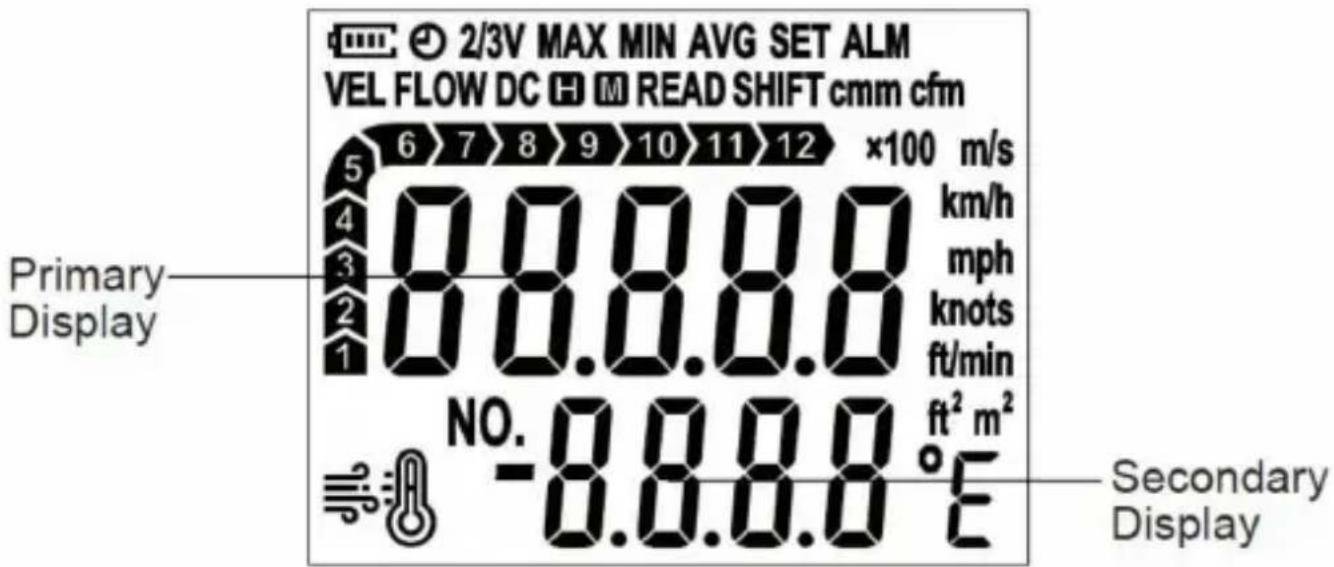
| Symbol | Description | |
| 1 | | Battery charge level indicator. |
| 2 | | Automatic power-off feature is enabled. |
| 3 | | 2/3Vmax air flow reading is being shown on the primary display. |
| 4 | 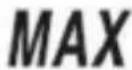 | Maximum reading is being shown on the primary display. |
| 5 | 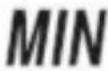 | Minimum reading is being shown on the primary display. |
| 6 | | Average reading is being shown on the primary display. |
| 7 | 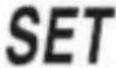 | The meter is in setting mode. |
| 8 | | An alarm symbol which indicates that the vane unit is disconnected. |
| 9 | | Wind velocity |
| 10 | | Air flow |
| 11 | | Data are being transmitted to the computer software. |
| 12 |  | The readings are locked. |
| 13 |  | Flashing symbol on the display indicates that the meter is saving data.Steady display of the symbol indicates that the EPROM is full. |
| 14 | | Stored data are being displayed. |
| 15 | [6SSZ] | The secondary function of buttons is enabled. |
| 16 | | Beaufort scale, which is used to indicate wind force. |
| 17 | | Wind chill temperature |
| 18 | | Record number |
| 19 | | The current air flow is 100000 . (When it is 10000 , "x10" will be displayed). |
| 20 | | Meters per second. The unit of velocity. |
| 21 | | Kilometers per hour. The unit of velocity. |
| 22 | | Feet per minute. The unit of velocity. |
| 23 | | Nautical miles per hour.The unit of velocity. |
| 24 | | Miles per hour. The unit of velocity. |
| 25 | | Square feet. The unit of area. |
| 26 | | Square meter. The unit of area. |
| 27 | | Cubic meters per minute. The unit of flow. |
| 28 | | Cubic feet per minute. The unit of flow. |
| 29 | | Celsius degree. The unit of temperature. |
| 30 | | Fahrenheit degree.The unit of temperature. |
BUTTONS
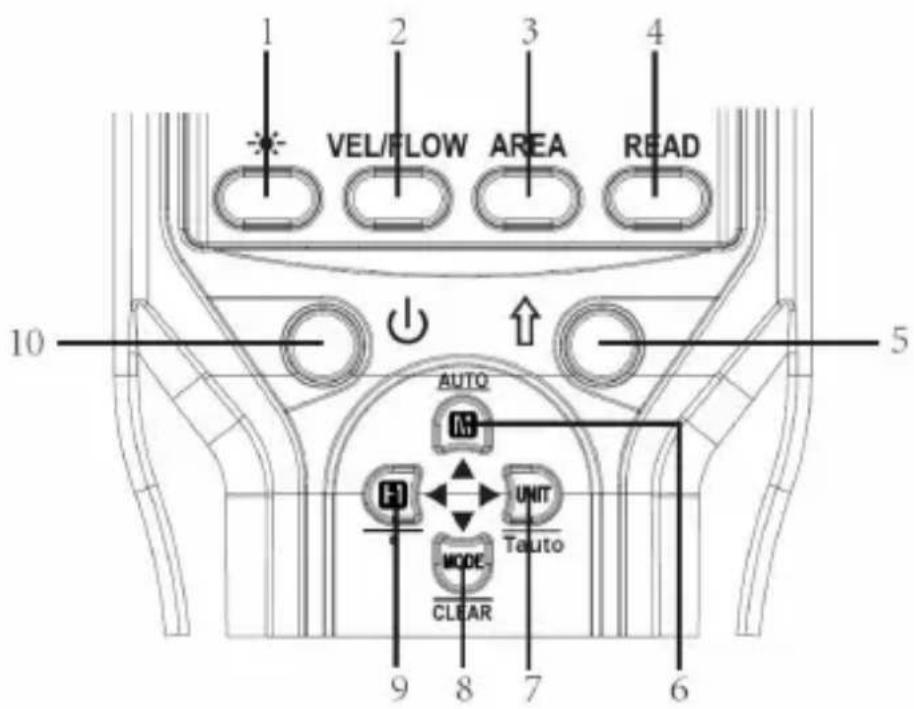
| Button | Description | |
| 1 | | Used to turn on or off the backlight. |
| 2 | VEL/FLOW | Used to switch between wind velocity and air flow measurement mode. |
| 3 | AREA | Used to enter or exit area setting mode. |
| 4 | READ | Used to enter or exit the mode of recalling stored data. |
| 5 | | Used to enable other button's secondary function. If the other button do not have a secondary function, pressing it will have no effect. |
| 6 | | Used to save the present readings or to stop automatic saving of readings.Secondary Function:Used to start automatic saving of the present readings at preset intervals. |
| 7 | | Used to select a desired measurement unit or to exit the setting mode of saving interval of automatic storage.Secondary Function:Used to enter the setting mode of saving interval of automatic storage. |
| 8 | | Used to enter MAX/MIN/AVG/2/3VMAX recording mode as well as to display maximum reading, minimum reading, average reading and 2/3Vmax reading.Secondary Function:When recalling the storage, press and hold this button to erase stored data. |
| 9 | | Used to lock the present reading on the display.Secondary Function:Used to move the decimal point when you set the area for air flow measurements. |
| 10 | | Used to turn on or off the meter;Used to enable or disable the automatic power-off feature. |
OPERATION INSTRUCTION
Vane Unit (side view)
Tips:
| Range | Resolution | |
| Scale | 1~12 | 1 |
CORRESPONDENCE TABLE
| Scale | 0 | 1 | 2 | 3 | 4 |
| Wind Velocity | 0 ~ 0.2 | 0.3~1.5 | 1.6~3.3 | 3.4~5.4 | 5.5~7.9 |
| Scale | 5 | 6 | 7 | 8 |
| Wind Velocity | 8.0~10.7 | 10.8~13.8 | 13.9~17.1 | 17.2~20.7 |
| Scale | 9 | 10 | 11 | 12 |
| Wind Velocity | 20.8~24.4 | 24.5~28.4 | 28.5~32.6 | >32.6 |
MAINTENANCE
Battery replacement
http://www.all-sun.com/app/EM2250_Setup.exe
3. Installation
Note:
DISPOSAL OF THIS ARTICLE
Dear Customer,
If you at some point intend to dispose of this article, then please keep in mind that many of its components consist of valuable materials, which can be recycled.
Please do not discharge it in the garbage bin, but check with your local council for recycling facilities in your area.
Address: Baoshanqu Shuangchenglu 803long 11hao 1602A-1609shi Szanghaj
Import to AUS: SIHAO PTY LTD, 1 ROKEVA STREETEASTWOOD
www.vevor.com/support
VEVOR®
TOUGH TOOLS, HALF PRICE
www.vevor.com/support
ANEMOMETER
INSTRUCTION MANUAL
MODEL: EM2250
NEED HELP? CONTACT US!
THE SCREEN
| Symbol | Description | |
| 1 | | Battery charge level indicator. |
| 2 | | Automatic power-off feature is enabled. |
| 3 | | 2/3Vmax air flow reading is being shown on the primary display. |
| 4 | | Maximum reading is being shown on the primary display. |
| 5 | | Minimum reading is being shown on the primary display. |
| 6 | | Average reading is being shown on the primary display. |
| 7 | | The meter is in setting mode. |
| 8 | | An alarm symbol which indicates that the vane unit is disconnected. |
| 9 | | Wind velocity |
| 10 | | Air flow |
| 11 | | Data are being transmitted to the computer software. |
| 12 | | The readings are locked. |
| 13 | | Flashing symbol on the display indicates that the meter is saving data.Steady display of the symbol indicates that the EPROM is full. |
| 14 | | Stored data are being displayed. |
| 15 | | The secondary function of buttons is enabled. |
| 16 | | Beaufort scale, which is used to indicate wind force. |
| 17 | | Wind chill temperature |
| 18 | | Record number |
| 19 | | The current air flow is 100000 . (When it is 10000 , "x10" will be displayed). |
| 20 | | Meters per second. The unit of velocity. |
| 21 | | Kilometers per hour. The unit of velocity. |
| 22 | | Feet per minute. The unit of velocity. |
| 23 | | Nautical miles per hour.The unit of velocity. |
| 24 | | Miles per hour. The unit of velocity. |
| 25 | | Square feet. The unit of area. |
| 26 | | Square meter. The unit of area. |
| 27 | 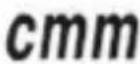 | Cubic meters per minute. The unit of flow. |
| 28 | | Cubic feet per minute. The unit of flow. |
| 29 | | Celsius degree. The unit of temperature. |
| 30 | | Fahrenheit degree.The unit of temperature. |
KEYS
| Button | Description | |
| 1 |  | Used to turn on or off the backlight. |
| 2 | VEL/FLOW | Used to switch between wind velocity and air flow measurement mode. |
| 3 | AREA | Used to enter or exit area setting mode. |
| 4 | READ | Used to enter or exit the mode of recalling stored data. |
| 5 | [203X] | Used to enable other button's secondary function. If the other button do not have a secondary function, pressing it will have no effect. |
| 6 | | Used to save the present readings or to stop automatic saving of readings.Secondary Function:Used to start automatic saving of the present readings at preset intervals. |
| 7 | | Used to select a desired measurement unit or to exit the setting mode of saving interval of automatic storage.Secondary Function:Used to enter the setting mode of saving interval of automatic storage. |
| 8 | | Used to enter MAX/MIN/AVG/2/3VMAX recording mode as well as to display maximum reading, minimum reading, average reading and 2/3Vmax reading.Secondary Function:When recalling the storage, press and hold this button to erase stored data. |
| 9 | | Used to lock the present reading on the display.Secondary Function:Used to move the decimal point when you set the area for air flow measurements. |
| 10 | | Used to turn on or off the meter;Used to enable or disable the automatic power-off feature. |
OPERATING INSTRUCTIONS
Vane Unit (side view)
Tips:
| Range | Resolution | |
| Scale | 1~12 | 1 |
CORRESPONDENCE TABLE
| Scale | 0 | 1 | 2 | 3 | 4 |
| Wind Velocity | 0 ~ 0.2 | 0.3~1.5 | 1.6~3.3 | 3.4~5.4 | 5.5~7.9 |
| Scale | 5 | 6 | 7 | 8 |
| Wind Velocity | 8.0~10.7 | 10.8~13.8 | 13.9~17.1 | 17.2~20.7 |
| Scale | 9 | 10 | 11 | 12 |
| Wind Velocity | 20.8~24.4 | 24.5~28.4 | 28.5~32.6 | >32.6 |
MAINTENANCE
http://www.all-sun.com/app/EM2250_Setup.exe
3. Installation
DISPOSAL OF THIS ARTICLE
Dear Customer,
If you at some point intend to dispose of this article, then please keep in mind that many of its components consist of valuable materials, which can be recycled.
Please do not discharge it in the garbage bin, but check with your local council for recycling facilities in your area.
Address: Baoshanqu Shuangchenglu 803long 11hao 1602A-1609shi
Shanghai
www.vevor.com/support
ANEMOMETER
INSTRUCTION MANUAL
MODEL: EM2250
NEED HELP? CONTACT US!
www.vevor.com/support
DISPLAY
| Symbol | Description | |
| 1 | | Battery charge level indicator. |
| 2 | | Automatic power-off feature is enabled. |
| 3 | | 2/3Vmax air flow reading is being shown on the primary display. |
| 4 | | Maximum reading is being shown on the primary display. |
| 5 | | Minimum reading is being shown on the primary display. |
| 6 | | Average reading is being shown on the primary display. |
| 7 | | The meter is in setting mode. |
| 8 | | An alarm symbol which indicates that the vane unit is disconnected. |
| 9 | | Wind velocity |
| 10 | | Air flow |
| 11 | | Data are being transmitted to the computer software. |
| 12 |  | The readings are locked. |
| 13 |  | Flashing symbol on the display indicates that the meter is saving data.Steady display of the symbol indicates that the EPROM is full. |
| 14 | | Stored data are being displayed. |
| 15 | [ASGW] | The secondary function of buttons is enabled. |
| 16 | | Beaufort scale, which is used to indicate wind force. |
| 17 | | Wind chill temperature |
| 18 | | Record number |
| 19 | | The current air flow is 100000 . (When it is 10000 , "x10" will be displayed). |
| 20 | | Meters per second. The unit of velocity. |
| 21 | | Kilometers per hour. The unit of velocity. |
| 22 | | Feet per minute. The unit of velocity. |
| 23 | | Nautical miles per hour.The unit of velocity. |
| 24 | | Miles per hour. The unit of velocity. |
| 25 | | Square feet. The unit of area. |
| 26 | | Square meter. The unit of area. |
| 27 | | Cubic meters per minute. The unit of flow. |
| 28 | | Cubic feet per minute. The unit of flow. |
| 29 | [7H25] | Celsius degree. The unit of temperature. |
| 30 | [XAA6] | Fahrenheit degree.The unit of temperature. |
BUTTONS
| Button | Description | |
| 1 | | Used to turn on or off the backlight. |
| 2 | VEL/FLOW | Used to switch between wind velocity and air flow measurement mode. |
| 3 | AREA | Used to enter or exit area setting mode. |
| 4 | READ | Used to enter or exit the mode of recalling stored data. |
| 5 | [SWAS] | Used to enable other button's secondary function. If the other button do not have a secondary function, pressing it will have no effect. |
| 6 | | Used to save the present readings or to stop automatic saving of readings.Secondary Function:Used to start automatic saving of the present readings at preset intervals. |
| 7 | | Used to select a desired measurement unit or to exit the setting mode of saving interval of automatic storage.Secondary Function:Used to enter the setting mode of saving interval of automatic storage. |
| 8 | | Used to enter MAX/MIN/AVG/2/3VMAX recording mode as well as to display maximum reading, minimum reading, average reading and 2/3Vmax reading.Secondary Function:When recalling the storage, press and hold this button to erase stored data. |
| 9 | | Used to lock the present reading on the display.Secondary Function:Used to move the decimal point when you set the area for air flow measurements. |
| 10 | | Used to turn on or off the meter;Used to enable or disable the automatic power-off feature. |
OPERATING INSTRUCTIONS
Vane Unit (side view)
Tips:
"MODE/CLEAR" button
| Range | Resolution | |
| Scale | 1~12 | 1 |
CORRESPONDENCE TABLE
| Scale | 0 | 1 | 2 | 3 | 4 |
| Wind Velocity | 0 ~ 0.2 | 0.3~1.5 | 1.6~3.3 | 3.4~5.4 | 5.5~7.9 |
| Scale | 5 | 6 | 7 | 8 |
| Wind Velocity | 8.0~10.7 | 10.8~13.8 | 13.9~17.1 | 17.2~20.7 |
| Scale | 9 | 10 | 11 | 12 |
| Wind Velocity | 20.8~24.4 | 24.5~28.4 | 28.5~32.6 | >32.6 |
MAINTENANCE
Battery replacement
SOFTWARE USER MANUAL
http://www.all-sun.com/app/EM2250_Setup.exe
3. Installation
4. Initial installation
DISPOSAL OF THIS ARTICLE
Dear Customer,
If you at some point intend to dispose of this article, then please keep in mind that many of its components consist of valuable materials, which can be recycled.
Please do not discharge it in the garbage bin, but check with your local council for recycling facilities in your area.
Address: Baoshanqu Shuangchenglu 803long 11hao 1602A-1609shi
Shanghai
Imported to AUS: SIHAO PTY LTD, 1 ROKEVA STREETEASTWOOD
NSW 2122 Australia
Imported to USA: Sanven Technology Ltd, Suite 250, 9166 Anaheim
Place, Rancho Cucamonga, CA 91730
| EC | REP |
SHUNSHUN GmbH
Römeräcker 9 Z2021, 76351
Linkenheim-Hochstetten, Germany
| UK | REP |
Pooledas Group Ltd
Unit 5 Albert Edward House, The
Pavilions Preston, United Kingdom
Made in China
VEVOR®
TOUGH TOOLS, HALF PRICE
- ANEMOMETER
- INSTRUCTION SHEET
- VEVOR®
- NEED HELP? CONTACT US
- INTRODUCTION
- FEATURES
- WARNING
- CHECK UP
- BUTTONS
- TIPS
- CONNECTING THE VANE UNIT
- TURNING ON THE METER
- ENABLING AND DISABLING THE AUTOMATIC POWER-OFF
- ENABLING AND DISABLING THE SECONDARY FUNCTION
- SELECTING THE WIND VELOCITY/AIR FLOW MEASUREMENT
- LOCKING/UNLOCKING THE READINGS
- SELECTING A DESIRED UNIT
- SWITCHING DISPLAY BETWEEN WIND TEMPERATURE AND WIND CHILL TEMPERATURE
- SETTING THE AREA FOR AIR FLOW MEASUREMENT
- MEASURING MAXIMUM AIR FLOW, MINIMUM AIR FLOW, AVERAGE
- INSTRUCTION FOR AIR FLOW
- INSTRUCTION FOR WIND CHILL TEMPERATURE
- USING THE DATA STORAGE FUNCTION
- BEFORE YOU START AUTOMATIC SAVING OF READINGS, MAKE SURE THAT YOU HAVE SET THE SAVING INTERVAL TO MEET YOUR NEED
- IN THE INSTANTANEOUS MEASUREMENT MODE, PRESS THE " " BUTTON TO RECALL THE STORED DATA. THE DISPLAY SHOWS " " AS AN INDICATOR. AND THE LAST SAVED DATA AND ITS CORRESPONDING RECORD NUMBER ARE DISPLAYED ON THE SCREEN. (THE DEFAULT IS TO RECALL THE INSTANTANEOUS WIND VELOCITY READING.)
- SETTING SAVING INTERVAL OF AUTOMATIC STORAGE OF
- TRANSMITTING DATA
- SPECIFICATIONS
- OPERATING ENVIRONMENT
- STORAGE ENVIRONMENT
- OVERRANGE INDICATION
- BATTERY LEVEL INDICATION
- MAINTENANCE
- ● BATTERY REPLACEMENT
- ● GENERAL MAINTENANCE
- SOFTWARE USER'S MANUAL
- SYSTEM REQUIREMENTS
- DOWNLOAD
- INSTALLATION
- INITIAL SETUP
- NOTE
- LIST OF ACCESSORIES
- DISPOSAL OF THIS ARTICLE
- TOUGH TOOLS, HALF PRICE
- OPERATING INSTRUCTIONS
- BATTERY REPLACEMENT
- INSTRUCTIONS FOR USE
- MODEL: EM
- WIATROMIERZ
- INSTRUCTION
- OPERATION INSTRUCTION
- INSTRUCTION MANUAL
- KEYS
- SOFTWARE USER MANUAL
- INITIAL INSTALLATION
Brand : Vevor
Model : EM2250
Category : Measuring equipment