
EM2220A - Measuring equipment Vevor - Free user manual and instructions
Find the device manual for free EM2220A Vevor in PDF.
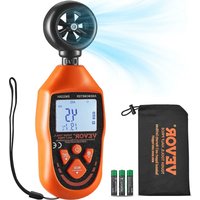


| Product Type | Portable digital anemometer |
| Brand and model | Vevor EM2220A |
| Dimensions | 163 mm × 54 mm × 32 mm |
| Weight | Approx. 121 g (batteries included) |
| Power supply | 3×1.5 V AAA batteries (included) |
| Wind speed measurement range | 0.8~31.0 m/s; 2.86~111.6 km/h; 153.4~6102 ft/min; 1.82~69.35 mph; 1.56~60.26 knots |
| Wind speed accuracy | ±(5% + 0.5 m/s) or equivalent for each unit |
| Wind temperature range | -10 °C ~ 45 °C (14 °F ~ 113 °F) |
| Temperature resolution | 0.1°C / 0.1°F |
| Main functions | Instant, maximum, minimum and average measurement of wind speed, air flow and temperature (wind temperature and wind chill temperature); data hold; auto power off; over-range and low battery indication |
| Available measurement units | m/s, km/h, mph, knots, ft/min, °C, °F, CFM (cubic feet per minute), CMM (cubic meters per minute) |
| Adjustable area for air flow | Yes, area setting in m² or ft² |
| Display | LCD with backlight |
| Protection rating | IP40 (except vane unit) |
| Operating temperature | 0°C~40°C, relative humidity <80% |
| Storage temperature | -20°C~60°C, relative humidity <90% |
| Housing material | ABS plastic |
| Safety and compliance | Complies with FCC Part 15; European Directive 2012/19/EC (WEEE) |
| Maintenance and cleaning | Wipe the housing with a damp cloth and mild detergent. Do not use abrasives or solvents. |
| Included accessories | User manual, cable (depending on model), storage bag, 3 AAA batteries |
| Repairability and support | Spare parts available via Vevor after-sales service (technical support: www.vevor.com/support) |
Frequently Asked Questions - EM2220A Vevor
User questions about EM2220A Vevor
0 question about this device. Answer the ones you know or ask your own.
Ask a new question about this device
Download the instructions for your Measuring equipment in PDF format for free! Find your manual EM2220A - Vevor and take your electronic device back in hand. On this page are published all the documents necessary for the use of your device. EM2220A by Vevor.
USER MANUAL EM2220A Vevor
Technical Support and E-Warranty Certificate
www.vevor.com/support
ANEMOMETER
INSTRUCTION SHEET
MODEL: EM2220A
We continue to be committed to providing you with tools at competitive prices.
"Save Half", "Half Price", or any other similar expressions used by us only represent an estimate of savings you might benefit from buying certain tools with us compared to the major top brands and do not necessarily mean to cover all categories of tools offered by us. You are kindly reminded to verify carefully when placing an order with us if you are actually saving half in comparison with the top major brands.
MODEL: EM2220A
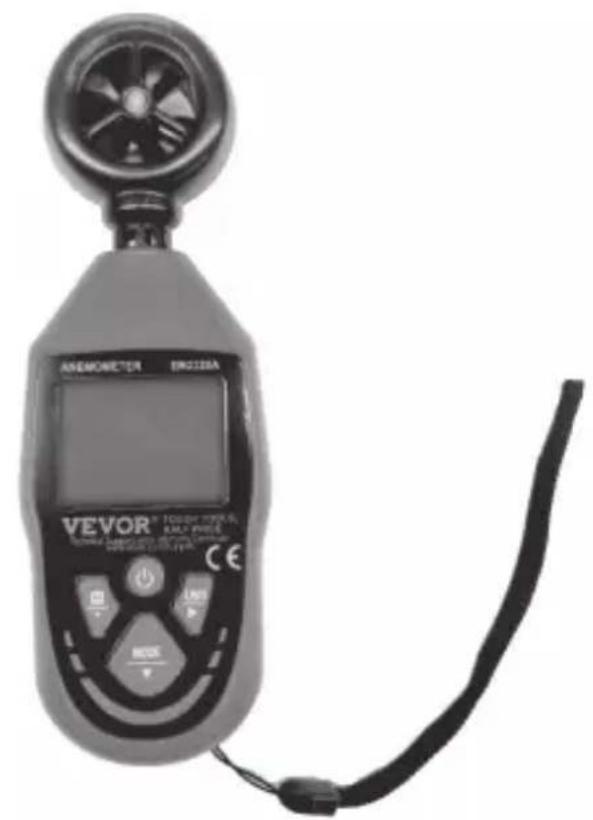
NEED HELP? CONTACT US!
Have product questions? Need technical support? Please feel free to contact us:
Technical Support and E-Warranty Certificate www.vevor.com/support
This is the original instruction. Please read all manual instructions carefully before operating. VEVOR reserves a clear interpretation of our user manual. The appearance of the product shall be subject to the product you received. Please forgive us that we won't inform you again if there are any technology or software updates on our product.
| Warning-To reduce the risk of injury, user must read instructions manual carefully. | |
| This device complies with Part 15 of the FCC Rules. Operation is subject to the following two conditions:(1)This device may not cause harmful interference, and (2)this device must accept any interference received, including interference that may cause undesired operation. | |
| This product is subject to the provision of European Directive 2012/19/EC. The symbol showing a wheelie bin crossed through indicates that the product requires separate refuse collection in the European Union. This applies to the product and all accessories marked with this symbol. Products marked as such may not be discarded with normal domestic waste, but must be taken to a collection point for recycling electrical and electronic devices |
INTRODUCTION
This meter is a portable anemometer that can be used to measure instantaneous, maximum, minimum, and average values of wind velocity, air flow, and temperature (wind temperature and wind chill temperature).
FEATURES
- Measurements of instantaneous, maximum, minimum, and average values of wind velocity, air flow, and temperature (wind temperature and wind chill temperature).
- Five kinds of wind velocity measurement units to select from.
- Two kinds of air flow measurement units to select from.
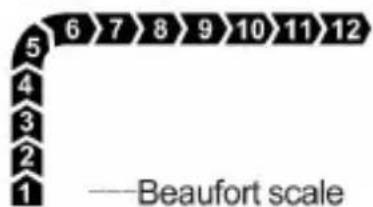
- Two kinds of temperature measurement units to select from. Area setting for air flow, with two unit options. Wind force indication.
- Wind chill temperature calculation. Data hold.
- Auto power off.
- Overrange indication.
- Low battery indication.
STRUCTURE
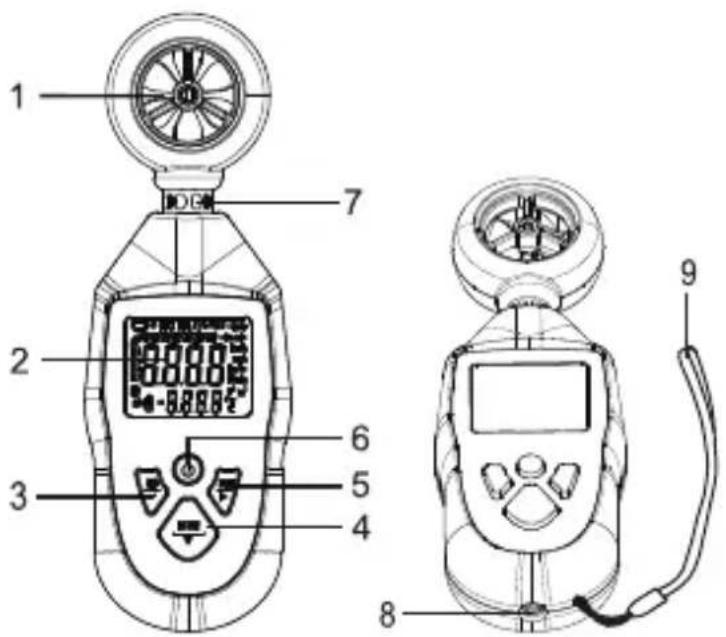
- Vane
Used to sense air flow.
- Display
- " " button
Used to enter/exit Data Hold mode or move the decimal point when setting the area.
- "Button
Used to select measurement mode or change the number or unit when setting the area.
- " " button
Used to select a desired measurement unit or move the flashing digit when setting the area.
- " " Botton
Used to turn on/off the meter or enable/disable the automatic power-off feature.
- Temperature Sensor
Used to measure temperature.
- American standard nut, 1/4-20 UNC
- Carrying Strap
Temperature/Area Display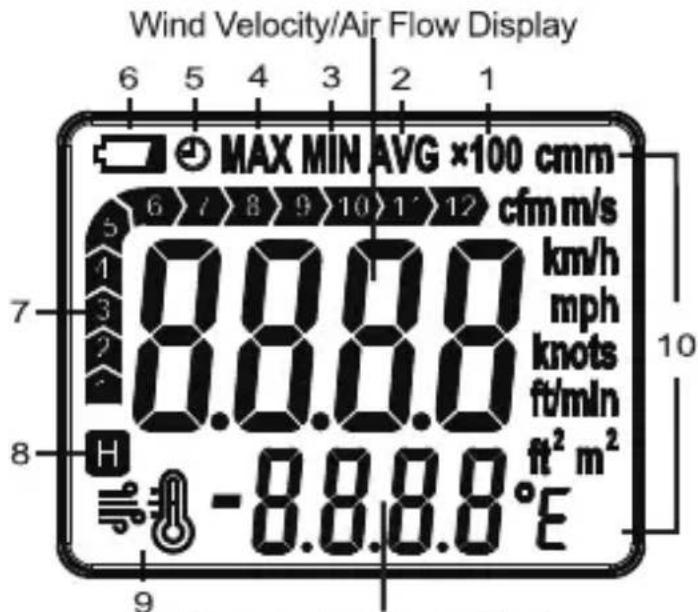
Explanations:
- × 100 — The current air flow is ≥ 100000. (When it is ≥ 10000, "× 10" will be displayed).
- AVG — The meter is in AVG recording mode, and the average wind velocity/air flow reading and the average temperature reading of all readings taken since entering this mode are being displayed.
- MIN — The meter is in MIN recording mode, and the minimum wind velocity/air flow reading and the minimum temperature reading of all readings taken since entering this mode are being displayed.
- MAX — The meter is in MAX recording mode, and the maximum wind velocity/air flow reading and the maximum temperature reading of all readings taken since entering this mode are being displayed.
- The automatic power-off feature is enabled.
- Low battery indicator
- — The meter is in Data Hold mode, and the readings on the display are locked.
- — Wind chill temperature is displayed.
10. Units
| Unit | Meaning °C Celsius degree |
| m/s meters per second °F fahrenheit | degree |
| km/h | kilometers per hour |
| mph miles per hour cmm cubic meters | cfm cubic feet per minute |
| knots nautical miles per hour m | nute |
| ft/min feet per minute ft | 2 square meter |
| 2 square feet |
- Turning on the Meter.
Install three new batteries (1.5V, AAA or equivalent) into the battery compartment, the display will show all segments briefly. Press the "●" button to turn on the meter and enter the measurement mode. The backlight will remain on after the meter is turned on.
- Enabling and Disabling the Automatic Power-Off Feature.
When the meter is on, you can hold down the "●" button for about 2 secs to enable or disable the automatic power-off feature. When the automatic power-off feature is enabled, "⊙" is displayed as an indicator.
- Selecting a Desired Unit.
Press the "UNIT" button once to enter the unit setting mode, you can repeatedly press the "UNIT" button to scroll through the "m/s", "km/h", "mph", "knots", "ft/min", "cmm", "cfm", "°C", "°F", "℃", "℃" and "℃", "℃" units. When the desired unit appears, release the button. About 2 secs later, the meter saves the unit automatically and exits the unit setting mode. (The setting is not saved after power loss.)
- Measuring Wind Velocity, Air Flow and Temperature.
Hold and position the meter so that the air flow passes through the vanes from the rear of the meter. For more accurate test results, try to keep the axis of the vanes within 20 degrees of the wind direction. Wait about 4 seconds, then read the readings on the display.
- Locking/Unlocking the Readings.
In measurement mode, briefly press the "H" button to enter the Data Hold
mode. The present readings are locked and the symbol "H" appears on the display as an indicator.
To exit the Data Hold mode, briefly press this "H" button again. The readings are unlocked and the symbol "H" disappears.
- How to Use MAX Recording Mode, MIN Recording Mode and AVG Recording Mode.
In instantaneous wind velocity/air flow/temperature measurement mode, press the "MODE" button once. The meter enters the MAX recording mode and the display shows the symbol "MAX" as an indicator. In this mode, the display always shows the maximum readings of all readings taken since entering this mode. Whenever the meter detects a new value which is higher than the presently displayed reading, the meter replaces the presently displayed reading with this new value.
Press the "MODE" button a second time. The meter enters the MIN recording mode and shows the symbol "MIN" on the display as an indicator. In this mode, the display always shows the minimum readings of all readings taken since entering this mode. Whenever the meter detects a new value which is lower than the presently displayed reading, the meter replaces the presently displayed reading with this new value.
Press the "MODE" button a third time. The meter enters the AVG recording mode and shows the symbol "AVG" on the display as an indicator. In this mode, the display always shows the average readings of all readings taken since entering this mode.
To exit the AVG recording mode and erase all recorded readings, press the "MODE" button once more; the meter will return to the instantaneous wind velocity/air flow/temperature measurement mode.
Note:
In MAX recording mode, MIN recording mode, or AVG recording mode, if you press the "H" button to lock the readings, the meter will stop measuring and detecting new readings until you unlock the readings on the display.
- How to Switch Display Between Wind Velocity, Air Flow, Wind Temperature and Wind Chill Temperature.
Press the "UNIT" button to select the corresponding unit to switch display between wind velocity, air flow, wind temperature and wind chill temperature.
- Setting the Area for Air Flow Measurements.
When the meter is off, simultaneously press and hold the "UNIT" and "O" buttons to turn on the meter and display the area setting interface (with a default value of 1.000).
You can press the "UNIT" button to move the flashing digit or unit; press the "MODE" button to adjust the value of the selected digit or change the unit; and press the "H" button to move the decimal point.
After you finish setting the area, press the "●" button to turn off the meter and exit the setting mode. When the meter is turned on, it can be used to measure air flow. (Settings are not saved after power loss.)
- Instruction for Wind Chill Temperature.
After selecting the unit for wind chill temperature, the symbol "≡" will be displayed. When the wind velocity is >1.34 m/s, and the wind temperature is ≤10°C, the wind chill temperature is calculated; when the wind velocity is ≤1.34 m/s, and the wind temperature is ≤10°C, the wind chill temperature is equal to the wind temperature; when the wind temperature is >10°C, the display shows "Hi".
- Instruction for Air Flow.
When the air flow exceeds 9999, the display will show the first four digits of the air flow value. The multiplier "x10" will be displayed when the air flow is ≥10000; and when it is ≥100000, the multiplier "x100" will be shown.
Note: The area should be set before measuring air flow.
- Turning off the Meter
If you have not pressed any button for about 5 minutes, the meter will turn off automatically if the automatic power-off feature is enabled. At any time, you can manually turn off the meter by briefly pressing the "●" button.
SPECIFICATIONS
| Wind Velocity | Range | Resolution | Accuracy |
| m/s | 0.8 ~ 31.0 | 0.1 | ±(5% + 0.5m/s) |
| km/h | 2.86 ~ 111.6 | 0.22 | ±(5% + 1.80km/h) |
| ft/min | 153.4 ~ 6102 | 11.8 | ±(5% + 98.4ft/min) |
| mph | 1.82 ~ 69.35 | 0.14 | ±(5% + 1.12mph) |
| knots | 1.56 ~ 60.26 | 0.12 | ±(5% + 0.97knots) |
| Wind Temperature | Range | Resolution | Accuracy |
| °C | -10°C~45°C | 0.1°C | ±2°C |
| °F | 14°F~113°F | 0.2°F | ±3.6°F |
| Air Flow | Range | Resolution |
| cfm | 0 ~ 999900 | 0.001 ~ 100 |
| cmm | 0 ~ 999900 | 0.001 ~ 100 |
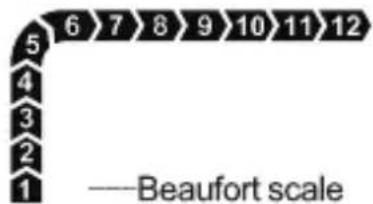
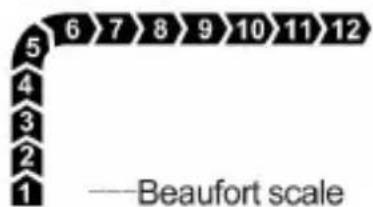
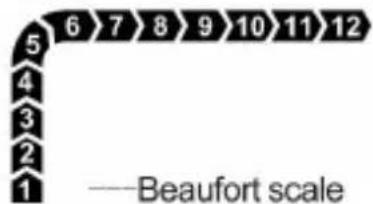
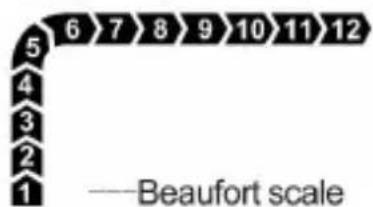
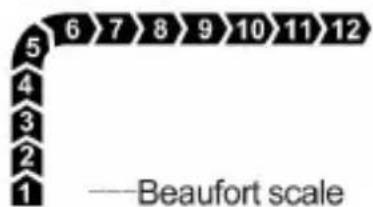
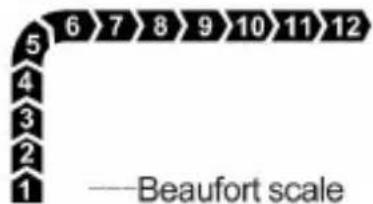
| Beaufort Scale | Range | Resolution |
| Scale | 1 ~ 12 | 1 |
| Area | Range | Resolution |
| m2 | 0.001 ~ 9999 | 0.001 ~ 1 |
| ft2 | 0.001 ~ 9999 | 0.001 ~ 1 |
| Wind Chill Temperature | Range | Resolution | Condition |
| °C | -25.7°C~10°C | 0.1°C | Ambient temperature: -10°C~10°C Wind velocity: 1.34m/s~31m/s |
| °F | -14.2°F~50°F | 0.2°F | Ambient temperature: 14°F~50°F Wind velocity: 1.34m/s~31m/s |
- Overrange Indication:
- When the measured wind velocity exceeds 31 m/s (111.6 km/h, 6102 ft/min, 69.35 mph, or 60.26 knots), the display shows "OL".
- When the wind temperature is below -10°C (14°F), the display shows "Lo"; when it is above 45°C (113°F), the display shows "Hi".
- When the air flow exceeds the display range (9999 × 100), the display shows "OL".
- When the wind chill temperature is below -25.7°C (-14.2°F), the display shows "Lo"; when it is above 10°C (50°F), the display shows "Hi".
- Auto Power Off:
The meter will turn off automatically if there is no button press for about 5 minutes.
- Low Battery Indicator: " " shown on the display.
- IP Degree: IP40 (excluding the vane unit)
- Battery: 1.5V battery, AAA or equivalent, 3 pieces
- Operating Environment: Temperature: 0°C 40°C Relative Humidity: < 80%
- Storage Environment: Temperature: -20°C 60°C Relative Humidity: < 90%
- Dimensions: 163mm× 54mm× 32mm
- Weight: About 121g (including batteries)
BATTERY REPLACEMENT
- When the display shows " ", the batteries are low and must be replaced immediately.
- Before battery replacement, make sure that the meter has been turned off. To replace the batteries, remove the battery cover on the back of the meter. Then replace the old batteries with new ones of the same type, make sure that the polarity connections are correct. Reinstall the battery cover.
CLEANING
Periodically wipe the case with a damp cloth and a little mild detergent. Do not use abrasives or solvents.
NOTE
- This Instruction Sheet is subject to change without notice.
- Our company will not take the other responsibilities for any loss.
- The contents of this Instruction Sheet can not be used as the reason to use the meter for any special application.
LIST OF ACCESSORIES
- Operating instructions * 1
- Product lanyard * 1
- Storage bags * 1
- Carbon batteries(AAA) * 3
DISPOSAL OF THIS ARTICLE
Dear Customer,
If you at some point intend to dispose of this article, then please keep in mind that many of its components consist of valuable materials, which can be recycled.
Please do not discharge it in the garbage bin, but check with your local council for recycling facilities in your area.
Address: Baoshanqu Shuangchenglu 803long 11hao 1602A-1609shi Shanghai
Imported to AUS: SIHAO PTY LTD, 1 ROKEVA STREETEASTWOOD NSW 2122
Australia
Imported to USA: Sanven Technology Ltd, Suite 250, 9166 Anaheim Place,
Rancho Cucamonga, CA 91730
SHUNSHUN GmbH
Romeracker 9 Z2021, 76351
Kit 5 Albert Edward House, The
Pavilions Preston, United Kingdom
Made In China
VEVOR
TOUGH TOOLS, HALF PRICE
Technical Support and E-Warranty Certificate www.vevor.com/support
VEVOR
TOUGH TOOLS, HALF PRICE
Technical assistance and warranty certificate
Temperature/Area Display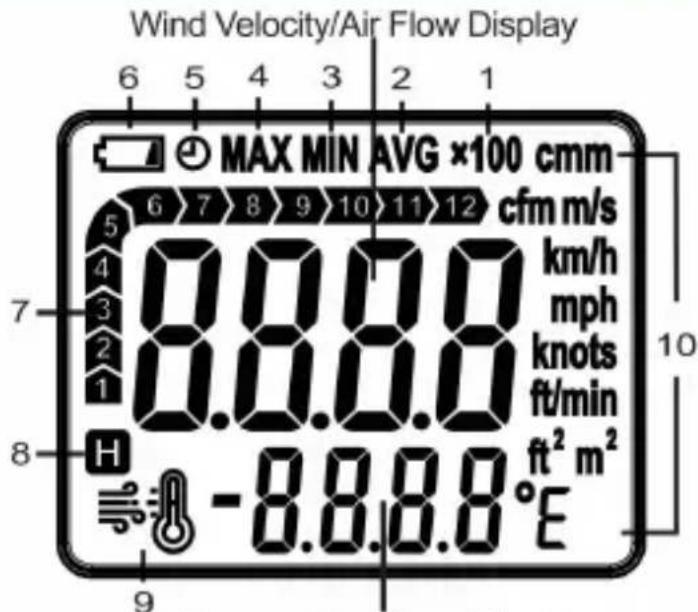
Explanations:
- x100---The current air flow is ≥100000. (When it is ≥10000, "x10" will be displayed).
- AVG--- The meter is in AVG recording mode, and the average wind velocity/air flow reading and the average temperature reading of all readings taken since entering this mode are being displayed.
- MIN The meter is in MIN recording mode, and the minimum wind velocity/air flow reading and the minimum temperature reading of all readings taken since entering this mode are being displayed.
- MAX The meter is in MAX recording mode, and the maximum wind velocity/air flow reading and the maximum temperature reading of all readings taken since entering this mode are being displayed.
- The automatic power-off feature is enabled.
- Low battery indicator
- ---The meter is in Data Hold mode, and the readings on the display are locked.
- Wind chill temperature is displayed.
10. Units
| Wind Temperature | Range | Resolution | Accuracy |
| °C | -10°C~45°C | 0.1°C | ±2°C |
| °F | 14°F~113°F | 0.2°F | ±3.6°F |
| Air Flow | Range | Resolution |
| cfm | 0 ~ 999900 | 0.001 ~ 100 |
| cmm | 0 ~ 999900 | 0.001 ~ 100 |
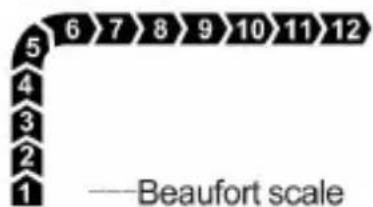
| Beaufort Scale | Range | Resolution |
| Scale | 1 ~ 12 | 1 |
| Area | Range | Resolution |
| m2 | 0.001 ~ 9999 | 0.001 ~ 1 |
| ft2 | 0.001 ~ 9999 | 0.001 ~ 1 |
| Wind Chill Temperature | Range | Resolution | Condition |
| °C | -25.7°C~10°C | 0.1°C | Ambient temperature: -10°C~10°C Wind velocity: 1.34m/s~31m/s |
| °F | -14.2°F~50°F | 0.2°F | Ambient temperature: 14°F~50°F Wind velocity: 1.34m/s~31m/s |
Rancho Cucamonga, California 91730
SHUNSHUN GmbH
Romeracker 9 Z2021, 76351
Linkenheim-Hochstetten, Germany
Groupe Pooledas Ltd
Unit 5 Albert Edward House, The
www.vevor.com/support
ANEMOMETER
INSTRUCTION SHEET
MODEL: EM2220A
- x100---The current air flow is y 100000. (When it is y 10000, " x10" will be displayed).
- AVG--- The meter is in AVG recording mode, and the average wind velocity/air flow reading and the average temperature reading of all readings taken since entering this mode are being displayed.
- MIN The meter is in MIN recording mode, and the minimum wind velocity/air flow reading and the minimum temperature reading of all readings taken since entering this mode are being displayed.
- MAX The meter is in MAX recording mode, and the maximum wind velocity/air flow reading and the maximum temperature reading of all readings taken since entering this mode are being displayed.
- The automatic power-off feature is enabled.
- Low battery indicator
- ---The meter is in Data Hold mode, and the readings on the display are locked.
- Wind chill temperature is displayed.
10. Units
| Wind Temperature | Range | Resolution | Accuracy |
| °C | -10°C~45°C | 0.1°C | ±2°C |
| °F | 14°F~113°F | 0.2°F | ±3.6°F |
| Air Flow | Range | Resolution |
| cfm | 0 ~ 999900 | 0.001 ~ 100 |
| cmm | 0 ~ 999900 | 0.001 ~ 100 |
| Beaufort Scale | Range | Resolution |
| Scale | 1 ~ 12 | 1 |
| Area | Range | Resolution |
| m2 | 0.001 ~ 9999 | 0.001 ~ 1 |
| ft2 | 0.001 ~ 9999 | 0.001 ~ 1 |
| Wind Chill Temperature | Range | Resolution | Condition |
| °C | -25.7°C~10°C | 0.1°C | Ambient temperature: -10°C~10°C Wind velocity: 1.34m/s~31m/s |
| °F | -14.2°F~50°F | 0.2°F | Ambient temperature: 14°F~50°F Wind velocity: 1.34m/s~31m/s |
Temperature/Area Display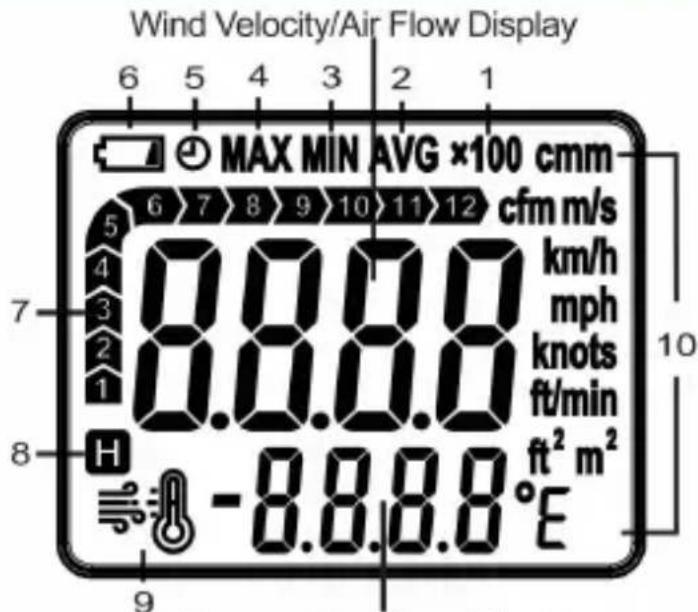
Explanations:
- x100---The current air flow is y 100000. (When it is y 10000, " x10" will be displayed).
- AVG--- The meter is in AVG recording mode, and the average wind velocity/air flow reading and the average temperature reading of all readings taken since entering this mode are being displayed.
- MIN The meter is in MIN recording mode, and the minimum wind velocity/air flow reading and the minimum temperature reading of all readings taken since entering this mode are being displayed.
- MAX The meter is in MAX recording mode, and the maximum wind velocity/air flow reading and the maximum temperature reading of all readings taken since entering this mode are being displayed.
- The automatic power-off feature is enabled.
- Low battery indicator
- ---The meter is in Data Hold mode, and the readings on the display are locked.
- Wind chill temperature is displayed.
10. Units
| Wind Temperature | Range | Resolution | Accuracy |
| °C | -10°C~45°C | 0.1°C | ±2°C |
| °F | 14°F~113°F | 0.2°F | ±3.6°F |
| Air Flow | Range | Resolution |
| cfm | 0 ~ 999900 | 0.001 ~ 100 |
| cmm | 0 ~ 999900 | 0.001 ~ 100 |
| Beaufort Scale | Range | Resolution |
| Scale | 1 ~ 12 | 1 |
| Area | Range | Resolution |
| m2 | 0.001 ~ 9999 | 0.001 ~ 1 |
| ft2 | 0.001 ~ 9999 | 0.001 ~ 1 |
| Wind Chill Temperature | Range | Resolution | Condition |
| °C | -25.7°C~10°C | 0.1°C | Ambient temperature: -10°C~10°C Wind velocity: 1.34m/s~31m/s |
| °F | -14.2°F~50°F | 0.2°F | Ambient temperature: 14°F~50°F Wind velocity: 1.34m/s~31m/s |
Imported in AUS: SIHAO PTY LTD, 1 ROKEVA STREET EASTWOOD NSW 2122 Australia
- x100---The current air flow is ≥100000. (When it is ≥10000, "x10" will be displayed).
- AVG--- The meter is in AVG recording mode, and the average wind velocity/air flow reading and the average temperature reading of all readings taken since entering this mode are being displayed.
- MIN The meter is in MIN recording mode, and the minimum wind velocity/air flow reading and the minimum temperature reading of all readings taken since entering this mode are being displayed.
- MAX The meter is in MAX recording mode, and the maximum wind velocity/air flow reading and the maximum temperature reading of all readings taken since entering this mode are being displayed.
- The automatic power-off feature is enabled.
- Low battery indicator
- ---The meter is in Data Hold mode, and the readings on the display are locked.
- Wind chill temperature is displayed.
10. Units
| Wind Temperature | Range | Resolution | Accuracy |
| °C | -10°C~45°C | 0.1°C | ±2°C |
| °F | 14°F~113°F | 0.2°F | ±3.6°F |
| Air Flow | Range | Resolution |
| cfm | 0 ~ 999900 | 0.001 ~ 100 |
| cmm | 0 ~ 999900 | 0.001 ~ 100 |
| Beaufort Scale | Range | Resolution |
| Scale | 1 ~ 12 | 1 |
| Area | Range | Resolution |
| m2 | 0.001 ~ 9999 | 0.001 ~ 1 |
| ft2 | 0.001 ~ 9999 | 0.001 ~ 1 |
| Wind Chill Temperature | Range | Resolution | Condition |
| °C | -25.7°C~10°C | 0.1°C | Ambient temperature: -10°C~10°C Wind velocity: 1.34m/s~31m/s |
| °F | -14.2°F~50°F | 0.2°F | Ambient temperature: 14°F~50°F Wind velocity: 1.34m/s~31m/s |
- ×100 ——The current air flow is 100000. (When it is 10000, "×10" will be displayed).
- AVG--- The meter is in AVG recording mode, and the average wind velocity/air flow reading and the average temperature reading of all readings taken since entering this mode are being displayed.
- MIN The meter is in MIN recording mode, and the minimum wind velocity/air flow reading and the minimum temperature reading of all readings taken since entering this mode are being displayed.
- MAX The meter is in MAX recording mode, and the maximum wind velocity/air flow reading and the maximum temperature reading of all readings taken since entering this mode are being displayed.
- The automatic power-off feature is enabled.
- Low battery indicator
- ---The meter is in Data Hold mode, and the readings on the display are locked.
- Wind chill temperature is displayed.
10. Units
| Wind Temperature | Range | Resolution | Accuracy |
| °C | -10°C~45°C | 0.1°C | ±2°C |
| °F | 14°F~113°F | 0.2°F | ±3.6°F |
| Air Flow | Range | Resolution |
| cfm | 0 ~ 999900 | 0.001 ~ 100 |
| cmm | 0 ~ 999900 | 0.001 ~ 100 |
| Beaufort Scale | Range | Resolution |
| Scale | 1 ~ 12 | 1 |
| Area | Range | Resolution |
| m2 | 0.001 ~ 9999 | 0.001 ~ 1 |
| ft2 | 0.001 ~ 9999 | 0.001 ~ 1 |
| Wind Chill Temperature | Range | Resolution | Condition |
| °C | -25.7°C~10°C | 0.1°C | Ambient temperature: -10°C~10°C Wind velocity: 1.34m/s~31m/s |
| °F | -14.2°F~50°F | 0.2°F | Ambient temperature: 14°F~50°F Wind velocity: 1.34m/s~31m/s |
MODEL: EM2220A
NEED HELP? CONTACT US!
Temperature/Area Display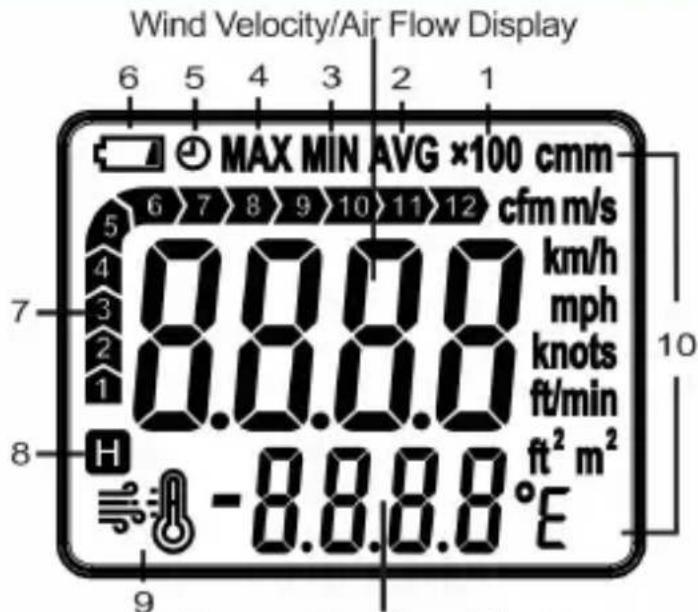
Explanation:
- x100---The current air flow is y 100000. (When it is y 10000, " x10" will be displayed).
- AVG--- The meter is in AVG recording mode, and the average wind velocity/air flow reading and the average temperature reading of all readings taken since entering this mode are being displayed.
- MIN The meter is in MIN recording mode, and the minimum wind velocity/air flow reading and the minimum temperature reading of all readings taken since entering this mode are being displayed.
- MAX The meter is in MAX recording mode, and the maximum wind velocity/air flow reading and the maximum temperature reading of all readings taken since entering this mode are being displayed.
- The automatic power-off feature is enabled.
- Low battery indicator
- ---The meter is in Data Hold mode, and the readings on the display are locked.
- Wind chill temperature is displayed.
10. Units
"knots", "ft/min", "cmm", "cfm"
"°C", "°F", " C" and
", "F" units.
| Wind Temperature | Range | Resolution | Accuracy |
| °C | -10°C~45°C | 0.1°C | ±2°C |
| °F | 14°F~113°F | 0.2°F | ±3.6°F |
| Air Flow | Range | Resolution |
| cfm | 0 ~ 999900 | 0.001 ~ 100 |
| cmm | 0 ~ 999900 | 0.001 ~ 100 |
| Beaufort Scale | Range | Resolution |
| Scale | 1 ~ 12 | 1 |
| Area | Range | Resolution |
| m2 | 0.001 ~ 9999 | 0.001 ~ 1 |
| ft2 | 0.001 ~ 9999 | 0.001 ~ 1 |
| Wind Chill Temperature | Range | Resolution | Condition |
| °C | -25.7°C~10°C | 0.1°C | Ambient temperature: -10°C~10°C Wind velocity: 1.34m/s~31m/s |
| °F | -14.2°F~50°F | 0.2°F | Ambient temperature: 14°F~50°F Wind velocity: 1.34m/s~31m/s |
- x100---The current air flow is y 100000. (When it is y 10000, " x10" will be displayed).
- AVG--- The meter is in AVG recording mode, and the average wind velocity/air flow reading and the average temperature reading of all readings taken since entering this mode are being displayed.
- MIN The meter is in MIN recording mode, and the minimum wind velocity/air flow reading and the minimum temperature reading of all readings taken since entering this mode are being displayed.
- MAX The meter is in MAX recording mode, and the maximum wind velocity/air flow reading and the maximum temperature reading of all readings taken since entering this mode are being displayed.
- The automatic power-off feature is enabled.
- Low battery indicator
- ---The meter is in Data Hold mode, and the readings on the display are locked.
- Wind chill temperature is displayed.
10. Units
| Enhet | Betyder |
| Fröken | meter per sekund |
| km/h | kilometer per timme |
| mph miles per timme knop | |
| nautiska mil per timme ft/min fot | |
| per minut | |
| °C | celsius grad |
| °F | fahrenheit grad |
| cfm | kubikfot per minut |
| cmm kubikmeter per minut | |
| m2 kvadratmeter | |
| fot 2 | kvadratifot |
INSTRUCTIONS FOR USE
1. Turn on the meter.
Insert three new batteries (1.5V, AAA or equivalent) into the battery
compartment. The display will show all segments briefly. Press the "
" button
| Wind Temperature | Range | Resolution | Accuracy |
| °C | -10°C~45°C | 0.1°C | ±2°C |
| °F | 14°F~113°F | 0.2°F | ±3.6°F |
| Air Flow | Range | Resolution |
| cfm | 0 ~ 999900 | 0.001 ~ 100 |
| cmm | 0 ~ 999900 | 0.001 ~ 100 |
| Beaufort Scale | Range | Resolution |
| Scale | 1 ~ 12 | 1 |
| Area | Range | Resolution |
| m2 | 0.001 ~ 9999 | 0.001 ~ 1 |
| ft2 | 0.001 ~ 9999 | 0.001 ~ 1 |
| Wind Chill Temperature | Range | Resolution | Condition |
| °C | -25.7°C~10°C | 0.1°C | Ambient temperature: -10°C~10°C Wind velocity: 1.34m/s~31m/s |
| °F | -14.2°F~50°F | 0.2°F | Ambient temperature: 14°F~50°F Wind velocity: 1.34m/s~31m/s |
Unit 5 Albert Edward House, The
Pavilions Preston, United Kingdom
Made in China
VEVOR
TOUGH TOOLS, HALF PRICE
- ANEMOMETER
- INSTRUCTION SHEET
- MODEL: EM2220A
- NEED HELP? CONTACT US
- INTRODUCTION
- FEATURES
- STRUCTURE
- EXPLANATIONS
- UNITS
- SPECIFICATIONS
- BATTERY REPLACEMENT
- CLEANING
- NOTE
- LIST OF ACCESSORIES
- DISPOSAL OF THIS ARTICLE
- MADE IN CHINA
- VEVOR
- TOUGH TOOLS, HALF PRICE
- EXPLANATION
- INSTRUCTIONS FOR USE
- TURN ON THE METER
Brand : Vevor
Model : EM2220A
Category : Measuring equipment