USER MANUAL EML3500-24L Vevor
Technical Support and E-Warranty Certificate
www.vevor.com/support
HYBRID SOLAR INVERTER/CHARGER
MODEL: EML3500-24L/EM5500-48L
We continue to be committed to providing you with tools at competitive prices. "Save Half", "Half Price", or any other similar expressions used by us only represent an estimate of savings you might benefit from buying certain tools with us compared to top brands, and does not necessarily mean to cover all categories of tools offered. We kindly remind you to verify carefully when placing an order with us if you are actually saving half in comparison with the top major brands.
MODEL: EML3500-24L/EM5500-48L
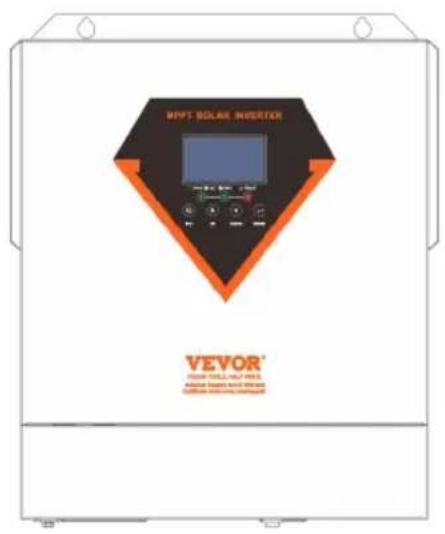
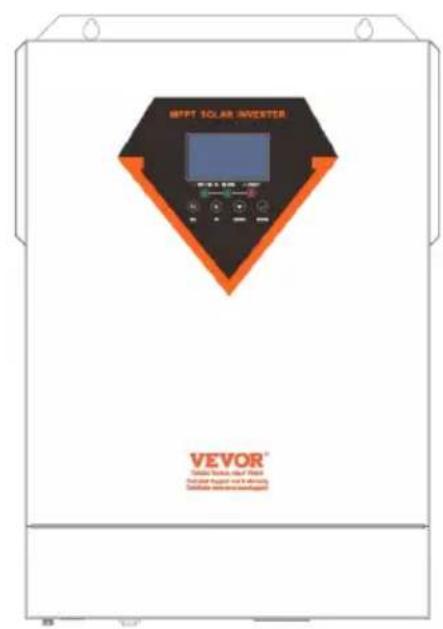
EML3500-24L EM5500-48L
Have product questions? Need technical support? Please feel free to contact us:
Technical Support and E-Warranty Certificate
www.vevor.com/support
This is the original instruction. Please read all manual instructions carefully before operating. VEVOR reserves a clear interpretation of our user manual. The appearance of the product shall be subject to the product you received. Please forgive us that we won't inform you again if there are any technology or software updates on our product.
 | Warning-To reduce the risk of injury, user must read instru manual carefully. |
 | This product is subject to the provision of European Direct 2012/19/EC. The symbol showing a wheelie bin crossed through indicates that the product requires separate refuse collection in the European Union. This applies to the produ and all accessories marked with this symbol. Products mar as such may not be discarded with normal domestic waste must be taken to a collection point for recycling electrical electronic devices |
WARNING: DANGER OF ELECTRICAL SHOCK
The product is used in combination with a permanent energy source (battery). Even if the equipment is switched off, a dangerous electrical voltage can occur at the input and/or output terminals. Always switch the AC power off and disconnect the battery before performing maintenance. The product contains no internal user-serviceable parts. Do not remove the front panel and do not put the product into operation unless all panels are fitted. All maintenance should be performed by qualified personnel.
Never use the product at sites where gas or dust explosions could occur. Refer to the specifications provided by the manufacturer of the battery to ensure that the battery is suitable for use with this product. The battery manufacturer's safety instructions should always be observed.
WARNING: do not lift heavy objects unassisted.
Installation
Read the installation instructions before commencing installation activities. This product is a safety class I device (supplied with a ground terminal for safety purposes). Its AC input and/or output terminals must be provided with uninterruptible grounding for safety purposes. An additional grounding point is located on the outside of the product. If it can be assumed that grounding protection is damaged, the product should be taken out of
operation and prevented from accidentally being put into operation again; contact qualified maintenance personnel.
Ensure that the connection cables are provided with fuses and circuit breakers. Never replace a protective device by a component of a different type. Refer to the manual for the correct part.
Check before switching the device on whether the available voltage source conforms to the configuration settings of the product as described in the manual.
Ensure that the equipment is used under the correct operating conditions. Never operate it in a wet or dusty environment.
Ensure that there is always sufficient free space around the product for ventilation, and that ventilation openings are not blocked.
Install the product in a heatproof environment. Ensure therefore that there are no chemicals, plastic parts, curtains or other textiles, etc. in the immediate vicinity of the equipment.
Transport and storage
On storage or transport of the product, ensure that the mains supply and battery leads are disconnected.
No liability can be accepted for damage in transit if the equipment is not transported in its original packaging.
Store the product in a dry environment; the storage temperature should range from -10°C to 50°C.
Refer to the battery manufacturer's manual for information on transport, storage, charging, recharging and disposal of the battery.
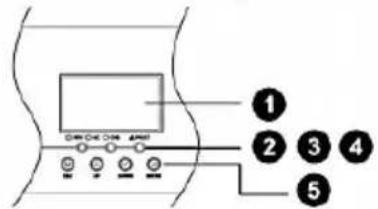
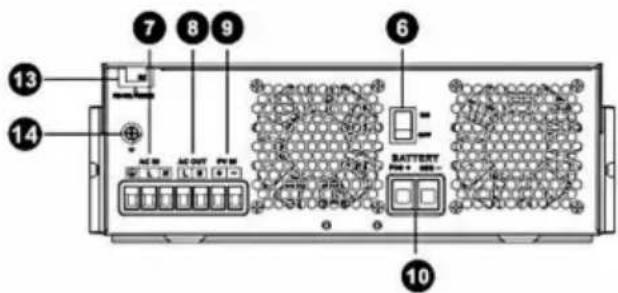
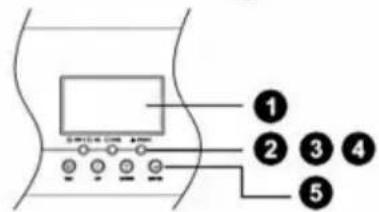
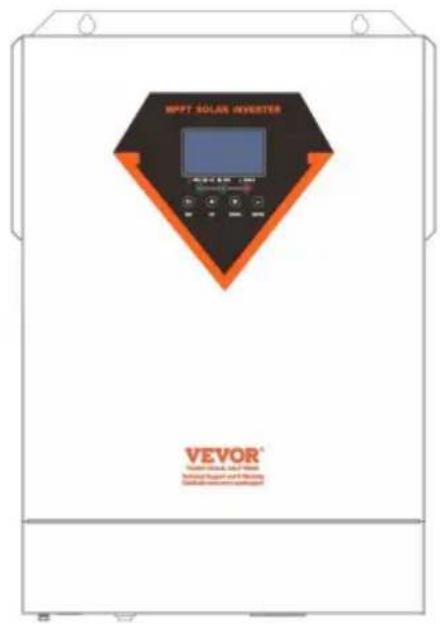
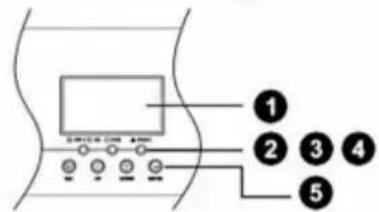
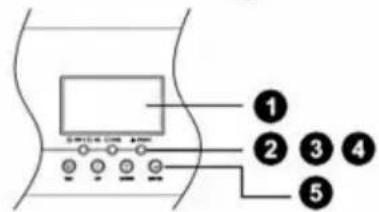
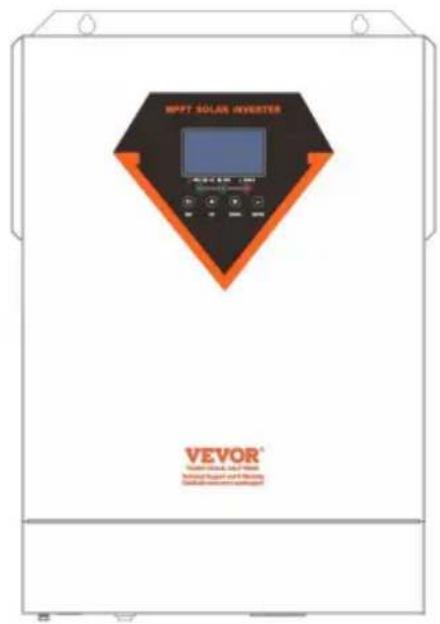
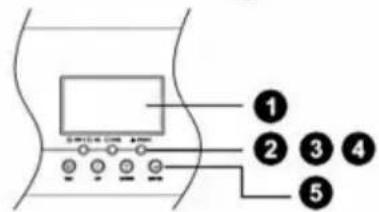
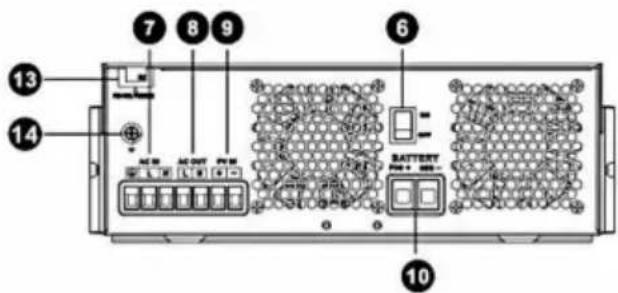
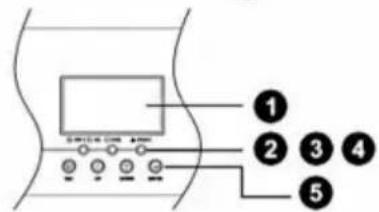
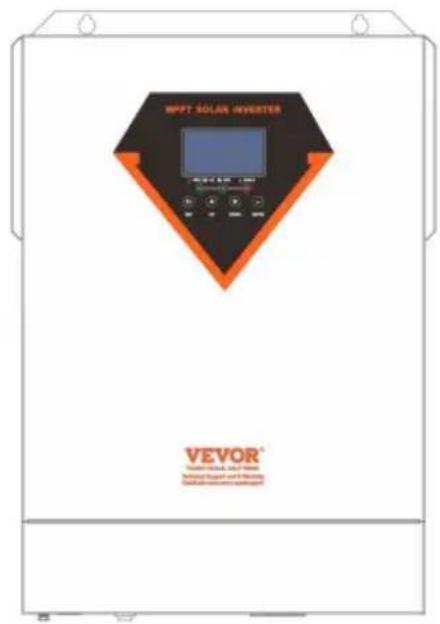
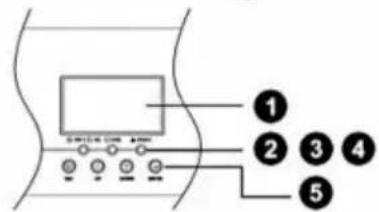
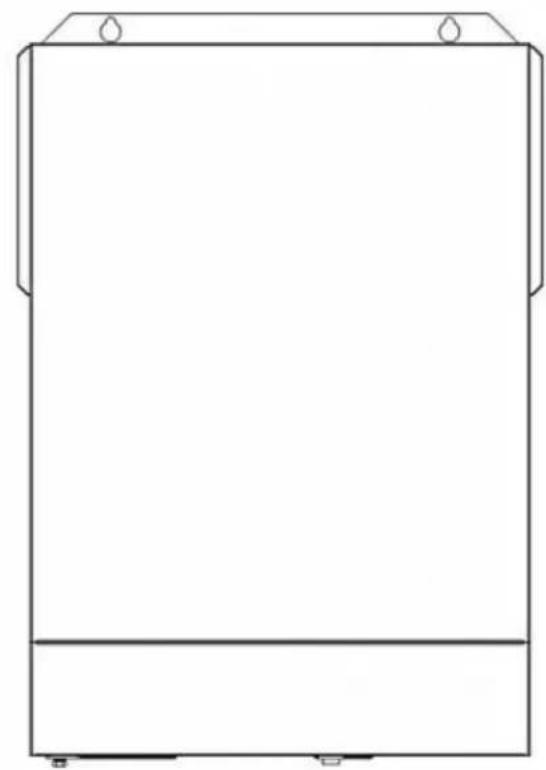
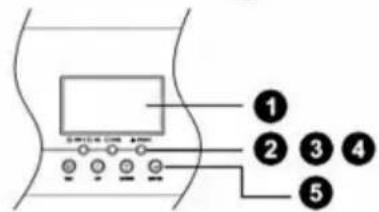
- LCD display
- Status indicator
- Charging indicator
- Fault indicator
- Function buttons
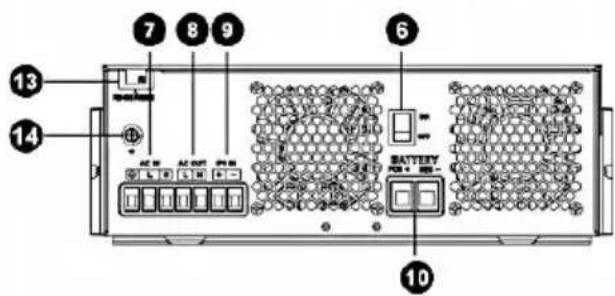
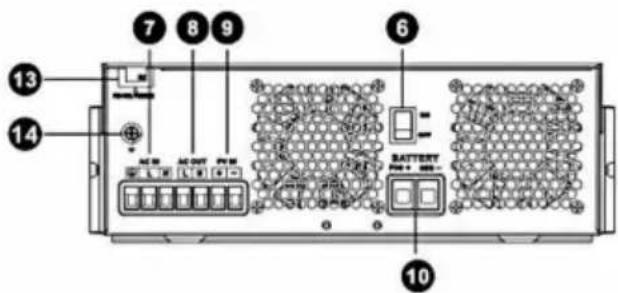
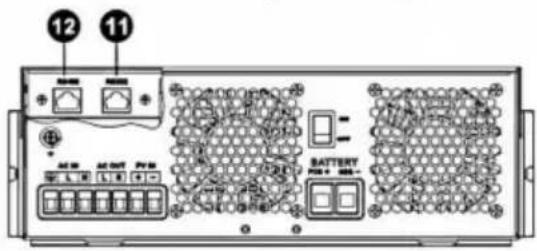
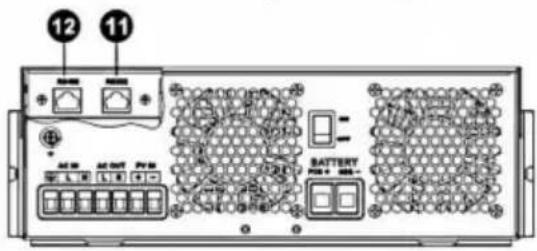
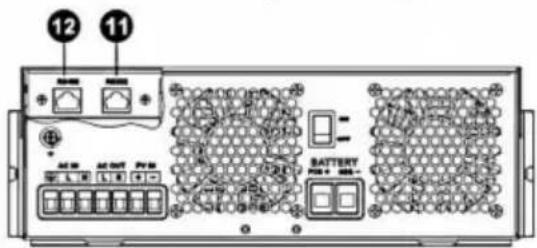
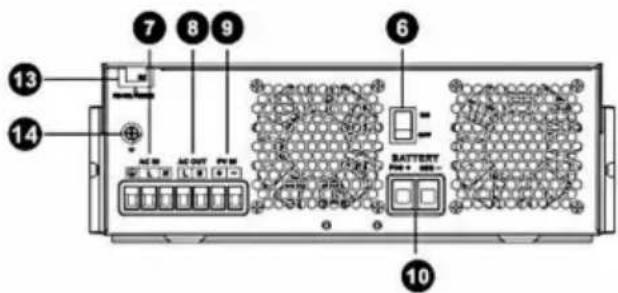
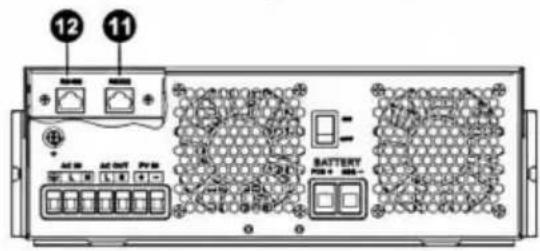
- Power on/off switch
- AC input
- AC output
- PV input
- Battery input
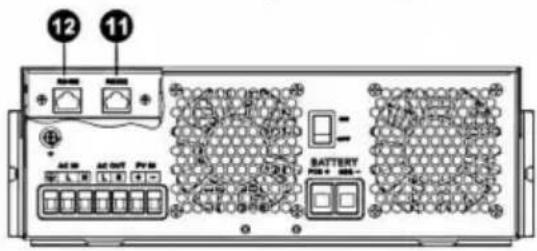
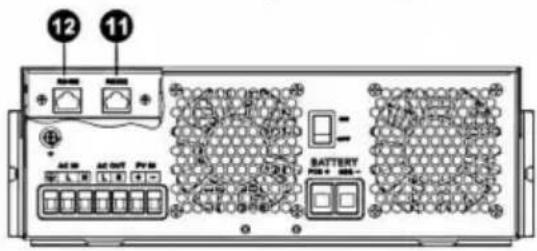
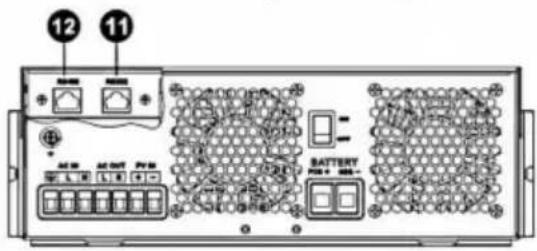
- RS232 communication port
- RS485 communication port
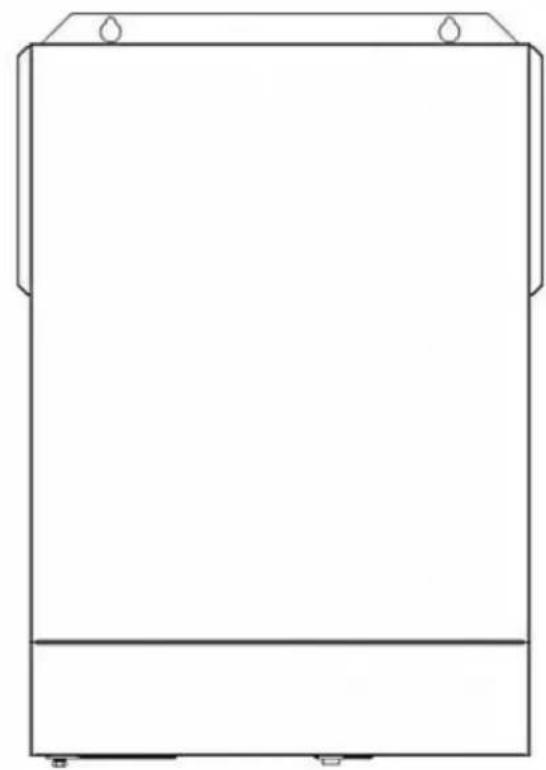
- Wire outlet hole
- Grounding
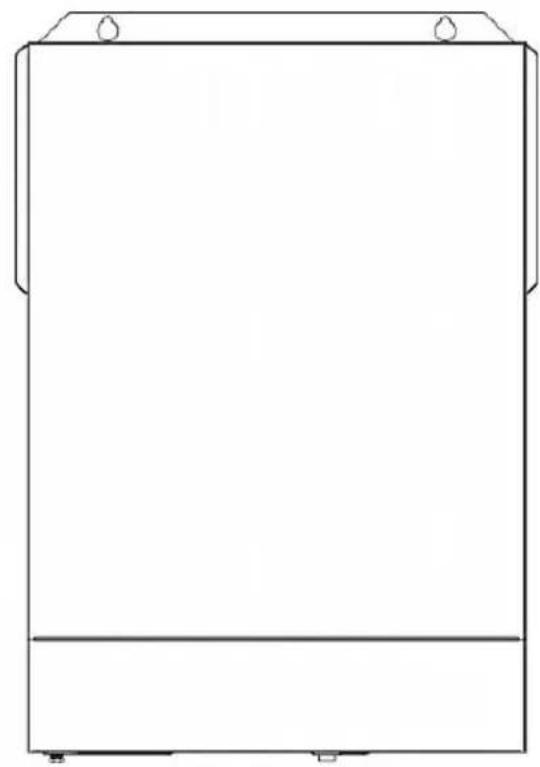
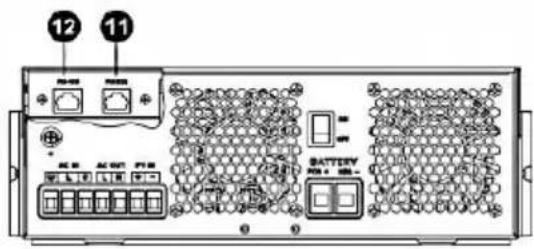
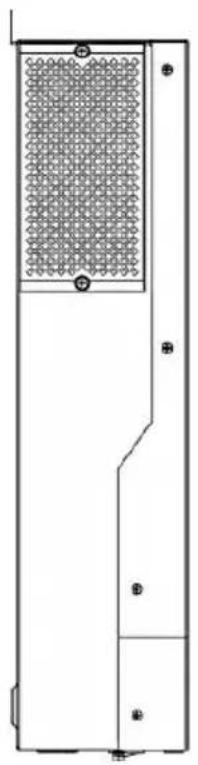
INSTALLATION
- Unpacking and Inspection
Before installation, please inspect the unit. Be sure that nothing inside the package is damaged. You should have received the following items inside of package:
The unit x 1
User manual x 1
- Preparation
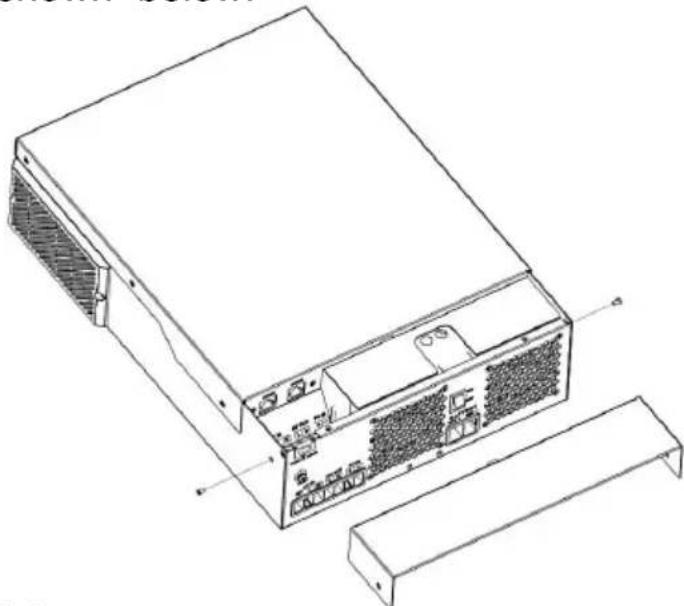
Before connecting all wirings, please take off bottom cover by removing two screws as shown below.
- Mounting the Unit
Consider the following points before selecting where to install:
- Do not mount the inverter on flammable construction materials.
- Mount on a solid surface
- Install this inverter at eye level in order to allow the LCD display to be read at all times.
- The ambient temperature should be between 0°C and 55°C to ensure optimal operation.
- The recommended installation position is to be adhered to the wall vertically.
- Be sure to keep other objects and surfaces as shown in the right diagram to guarantee sufficient heat dissipation and to have enough space for removing wires.
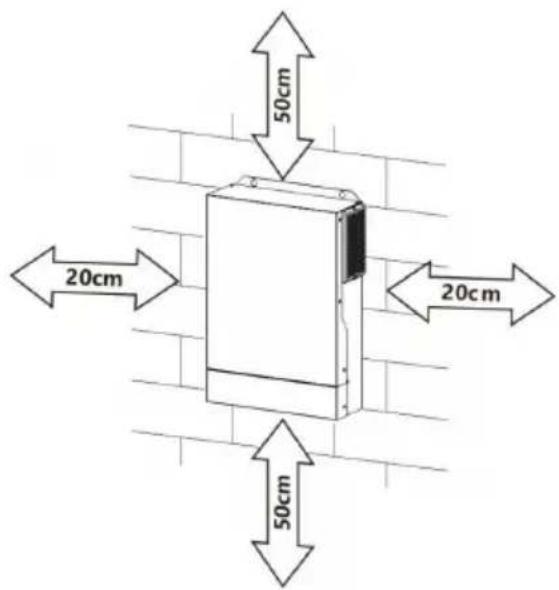

SUITABLE FOR MOUNTING ON CONCRETE OR OTHER NON-COMBUSTIBLE SURFACE ONLY.
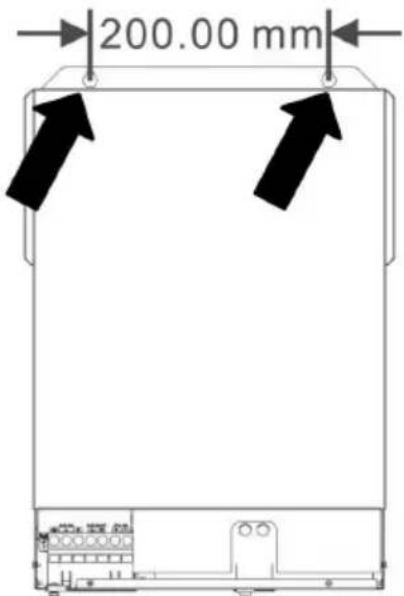
Install the unit by screwing three screws. It's recommended to use M4 or M5 screws.
4. Battery Connection
CAUTION: For safety operation and regulation compliance, it's requested to install a separate DC over-current protector or disconnect device between battery and inverter. It may not be requested to have a disconnect device in some applications, however, it's still requested to have over-current protection installed. Please refer to typical amperage in below table as required fuse or breaker size.
WARNING! All wiring must be performed by qualified personnel.
WARNING! It's very important for system safety and efficient operation to use appropriate cable for battery connection. To reduce risk of injury, please use the proper recommended cable, stripping length (L2) and tinning length (L1) as below.
Stripping Length: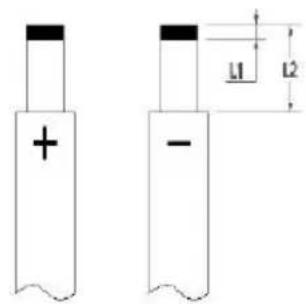
- Recommended battery cable, stripping length (L2) and tinning length (L1):
| Model | Maximum Amperage | Battery capacity | Wire Size | Cable mm2 | L1 (mm) | L 2 (mm) | Torque value |
| 3.5KVA | 137A | 100AH | 2AWG | 38 | 3 | 18 | 2~3 Nm |
| 5.5KVA/6.2KVA | 137A | 200AH | 2AWG | 38 | 3 | 18 | 2~3 Nm |
Please follow below steps to implement battery connection:
- Remove insulation sleeve 18 mm for positive and negative cables based on recommended stripping length.
- Connect all battery packs as units requires. It's suggested to use recommended battery capacity.
- Insert battery cable flatly into battery connector of inverter and make sure the bolts are tightened with torque of 2-3 Nm. Make sure polarity at both the battery and the inverter/charge is correctly connected and battery cables are tightly screwed to the battery connector.
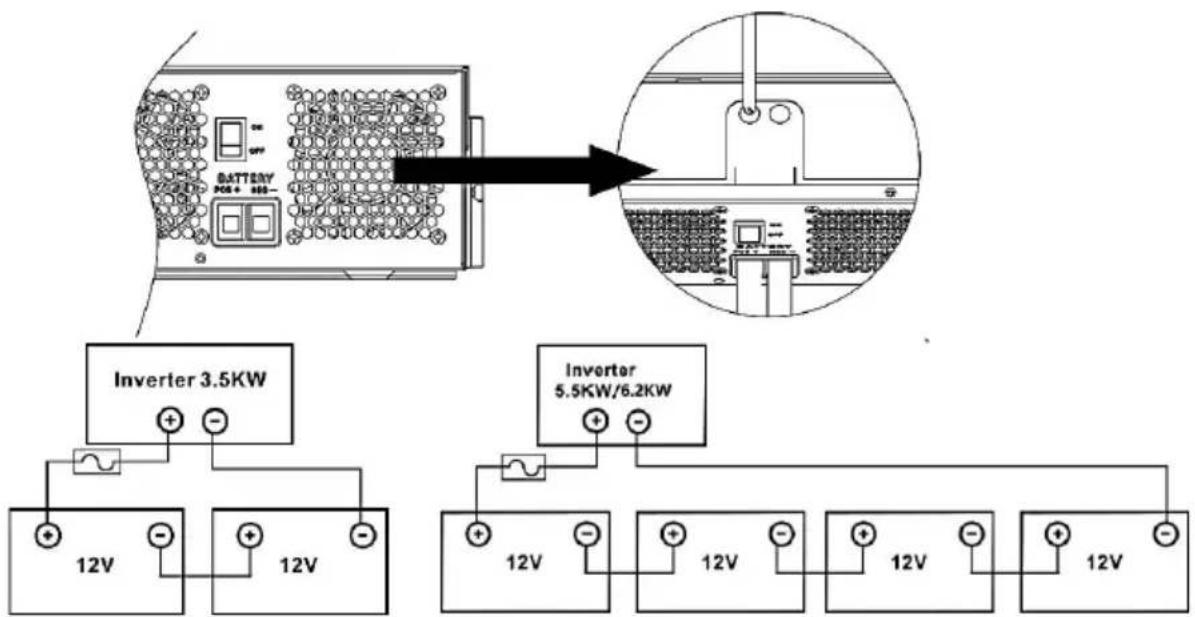

WARNING: Shock Hazard
Installation must be performed with care due to high battery voltage in series.

CAUTION!! Do not place anything between the flat part of inverter terminal. Otherwise, overheating may occur.
CAUTION!! Do not apply anti-oxidant substance on the terminals before terminals are connected tightly.
CAUTION!! Before making the final DC connection or closing DC breaker/disconnector, be sure positive (+) must be connected to positive (+) and negative (-) must be connected to negative (-).
CAUTION!! Before connecting to AC input power source, please install a separate AC breaker between inverter and AC input power source. This will ensure the inverter can be securely disconnected during maintenance and fully protected from over current of AC input. The recommended spec of AC breaker is 50A.
CAUTION!! There are two terminal blocks with "IN" and "OUT" markings. Please do NOT mis-connect input and output connectors.
WARNING! All wiring must be performed by qualified personnel.
WARNING! It's very important for system safety and efficient operation to use appropriate cable for AC input connection. To reduce risk of injury, please use the proper recommended cable size as below.
Suggested cable requirement for AC wires
| Model | Gauge | Torque Value |
| 3.5KVA | 10AWG | 1.4~ 1.6Nm |
| 5.5KVA/6.2KVA | 8 AWG | 1.4~ 1.6Nm |
Please follow below steps to implement AC input/output connection:
- Before making AC input/output connection, be sure to open DC protector or disconnector first.
- Remove insulation sleeve 10mm for six conductors. And shorten phase L and neutral conductor N 3mm.
- Insert AC input wires according to polarities indicated on terminal block and tighten the terminal screws. Be sure to connect PE protective conductor ( )first.

→Ground (yellow-green) L→LINE (brown or black) N→Neutral (blue)
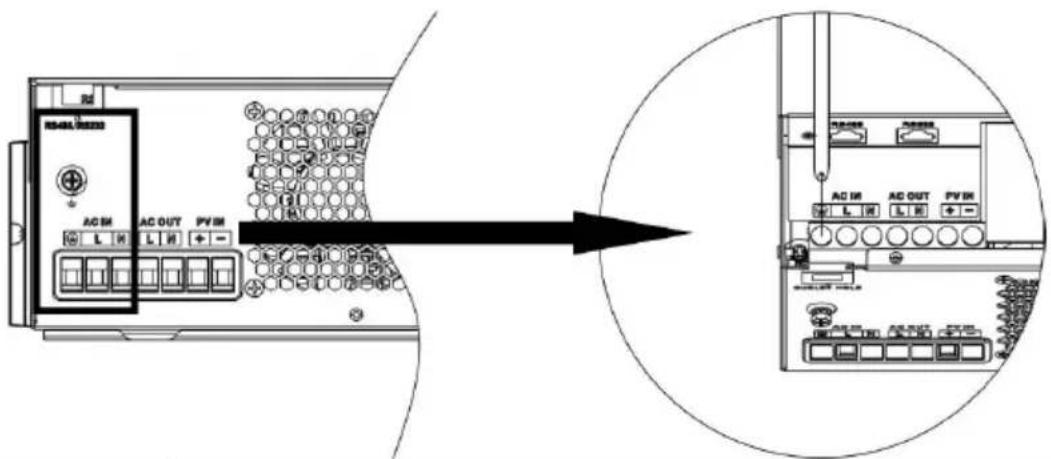

WARNING:
Be sure that AC power source is disconnected before attempting to hardwire it to the unit.
- Then, insert AC output wires according to polarities indicated on terminal block and tighten terminal screws. Be sure to connect PE protective conductor ( )first.

→Ground (yellow-green)
L→LINE (brown or black)
N→Neutral (blue)
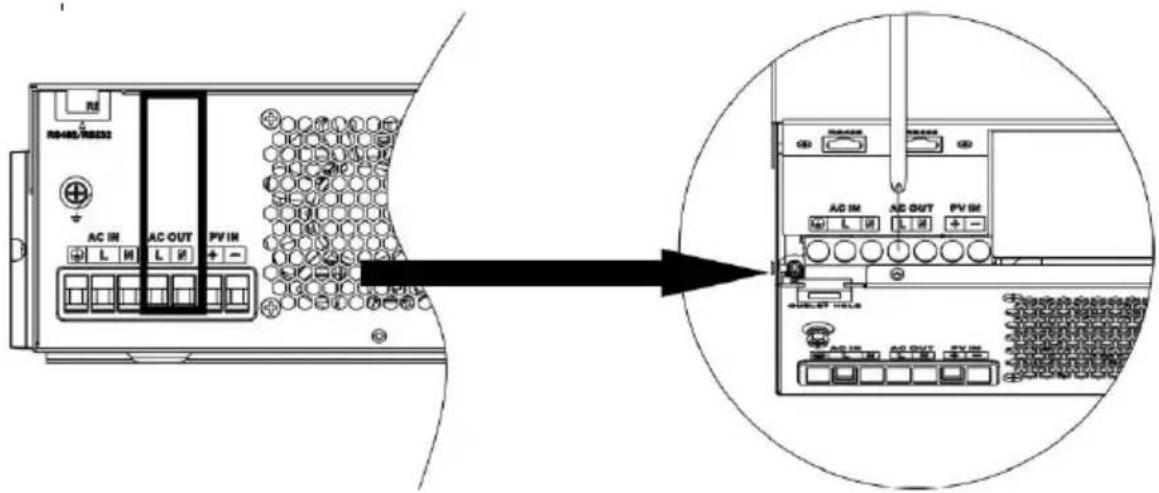
- Make sure the wires are securely connected.
CAUTION: Important
Be sure to connect AC wires with correct polarity. If L and N wires are connected in reverse, it may cause a utility short circuit when these inverters are operated in parallel.
CAUTION: Appliances such as air conditioners require at least a few minutes to restart because it is necessary to allow enough time for the refrigerant gas inside the circuits to settle. If a power shortage occurs and recovers in a short time, it can cause damage to your connected appliances. To prevent this kind of damage, please check with the manufacturer of the air conditioner to see if it is equipped with a time-delay function before installation. Otherwise, this inverter/charger will trigger an overload fault and cut off output to protect your appliance, but sometimes it can still cause internal damage to the air conditioner.
6. PV Connection
CAUTION: Before connecting to PV modules, please install a separate DC circuit breaker between the inverter and the PV modules.
WARNING! All wiring must be performed by qualified personnel.
WARNING! It is very important for system safety and efficient operation to use the appropriate cable for PV module connection. To reduce the risk of injury, please use the proper recommended cable size as below.
| Model | Typical Amperage | Cable Size | Torque |
| 3.5KVA (PVmax=160V) | 40A | 8 AWG | 1.4~1.6 Nm |
| 3.5KVA | 15A | 12 AWG | 1.4~1.6 Nm |
| 5.5KVA | 18A | 12 AWG | 1.4~1.6 Nm |
| 6.2KVA | 27A | 12 AWG | 1.4~1.6 Nm |
PV Module Selection:
When selecting proper PV modules, please be sure to consider the following parameters:
- Open circuit voltage (Voc) of PV modules must not exceed the max. PV array open circuit voltage of the inverter.
- Open circuit voltage (Voc) of PV modules should be higher than the min. battery voltage.
| Solar Charging Mode |
| INVERTER MODEL | | 5.5KVA | 6.2KVA | 3.5KVA(PVmax=160V) |
| Max. PV Array Open Circuit Voltage | 500DC | 160VDC |
| PV Array MPPT Voltage Range | 60VDC~500VDC | 30-160V |
| Max. PV INPUT CURRENT | 15A | 18A | 27A | 50A |
Take the 450Wp and 550Wp PV modules as an example. After considering the above two parameters, the recommended module configurations are listed in the table below.
| Solar Panel Spec. (reference) - 450Wp - Vmp: 34.67Vdc - Imp: 13.82A - Voc: 41.25Vdc - Isc: 12.98A | SOLAR INPUT | Q'ty of panels | Total input power | Inverter Model |
| 3 pcs in serial | 3 pcs | 1,350 W | 5/5.5KVA/6.2KVA |
| 4 pcs in serial | 4 pcs | 1,800 W |
| 5 pcs in serial | 5 pcs | 2,250 W |
| 6 pcs in serial | 6 pcs | 2,700 W |
| 7 pcs in serial | 7 pcs | 3,150 W |
| 8 pcs in serial | 8 pcs | 3,600 W |
| 9 pcs in serial | 9 pcs | 4,050 W |
| 10 pcs in serial | 10 pcs | 4,500 W | 5.5KVA/6.2KVA |
| 11 pcs in serial | 11 pcs | 4,950 W |
| 12 pcs in serial | 12 pcs | 5,400 W |
| 6 pieces in serial and 2 sets in parallel | 12 pcs | 5,400 W | 6.2KVA |
| 8 pieces in serial and 2 sets in parallel | 14 pcs | 6,300 W |
| 1 pcs in serial | 1 pcs | 450W | 3.5KVA(PVmax=160V) |
| 2 pcs in serial | 2 pcs | 900W |
| 3 pcs in serial | 3 pcs | 1,350 W |
| Solar Panel Spec. (reference) - 550Wp - Vmp: 42.48Vdc - Imp: 12.95A - Voc: 50.32Vdc - Isc: 13.70A | SOLAR INPUT | Q'ty of panels | Total input power | Inverter Model |
| 3 pcs in serial | 3 pcs | 1,650 W | 5.5KVA/6.2KVA |
| 4 pcs in serial | 4 pcs | 2,200 W |
| 5 pcs in serial | 5 pcs | 2,750 W |
| 6 pcs in serial | 6 pcs | 3,300 W |
| 7 pcs in serial | 7 pcs | 3,850 W |
| 8 pcs in serial | 8 pcs | 4,400 W | 5.5KVA/6.2KVA |
| 9 pcs in serial | 9 pcs | 4,950 W |
| 10 pcs in serial | 10 pcs | 5,500 W | 5.5KVA/6.2KVA |
| 11 pcs in serial | 11 pcs | 6,050 W | 6.2KVA |
| 12 pcs in serial | 12 pcs | 6,600 W |
| 4 pieces in serial and 2 sets in parallel | 8 pcs | 4,400 W | 6.2KVA |
| 5 pieces in serial and 2 sets in parallel | 10 pcs | 5,500 W |
| 6 pieces in serial and 2 sets in parallel | 12 pcs | 6,600 W |
| 1 pcs in serial | 1 pcs | 550W | 3.5KVA(PVmax=160V) |
| 2 pcs in serial | 2 pcs | 1000W |
| 3 pcs in serial | 3 pcs | 1,500 W |
PV Module Wire Connection:
Please follow the steps below to implement the PV module connection:
- Remove the insulation sleeve 10 mm from the positive and negative conductors.
- Check the correct polarity of the connection
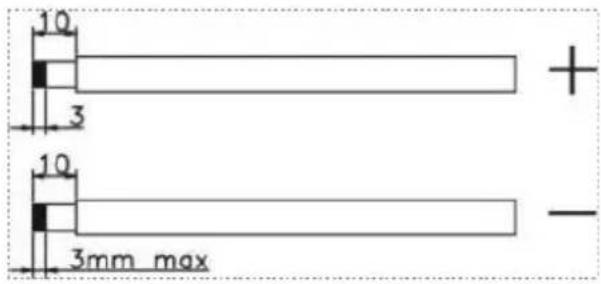
cable from the PV modules and PV input connectors. Then, connect the positive pole (+) of the connection cable to the positive pole (+) of the PV input connector. Connect the negative pole (-) of the connection cable to the negative pole (-) of the PV input connector.
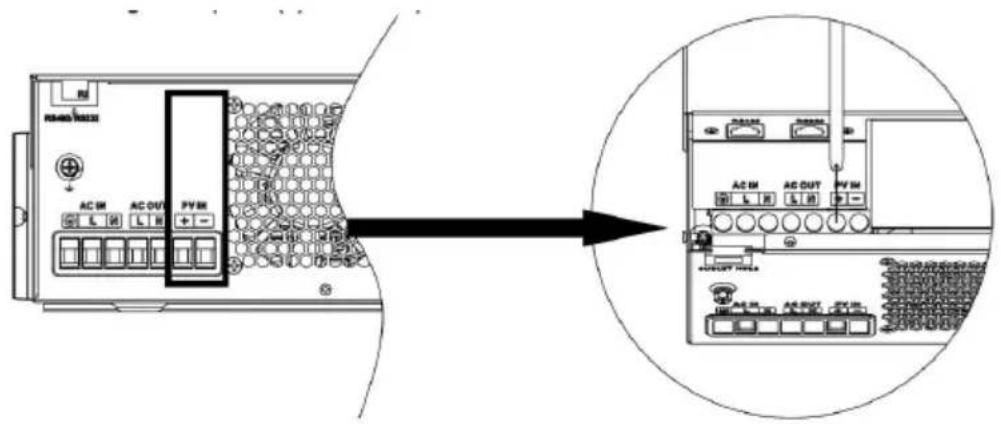
● Make sure the wires are securely connected.
7. Final Assembly
After connecting all wiring, please put the bottle cover back by screwing the two screws as shown below.
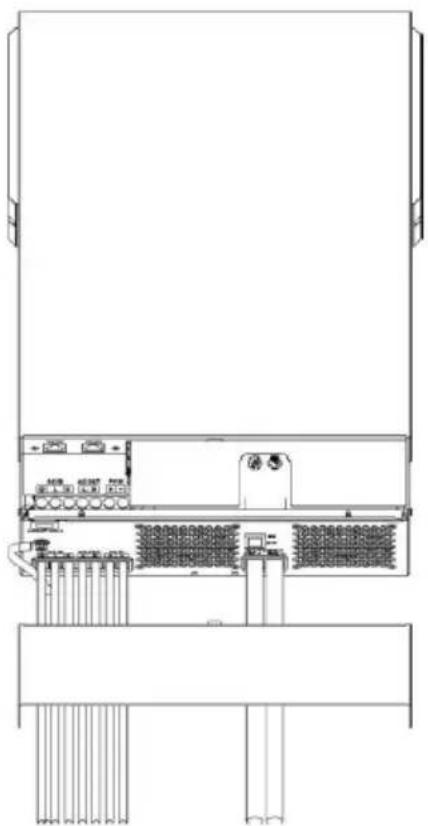
OPERATION
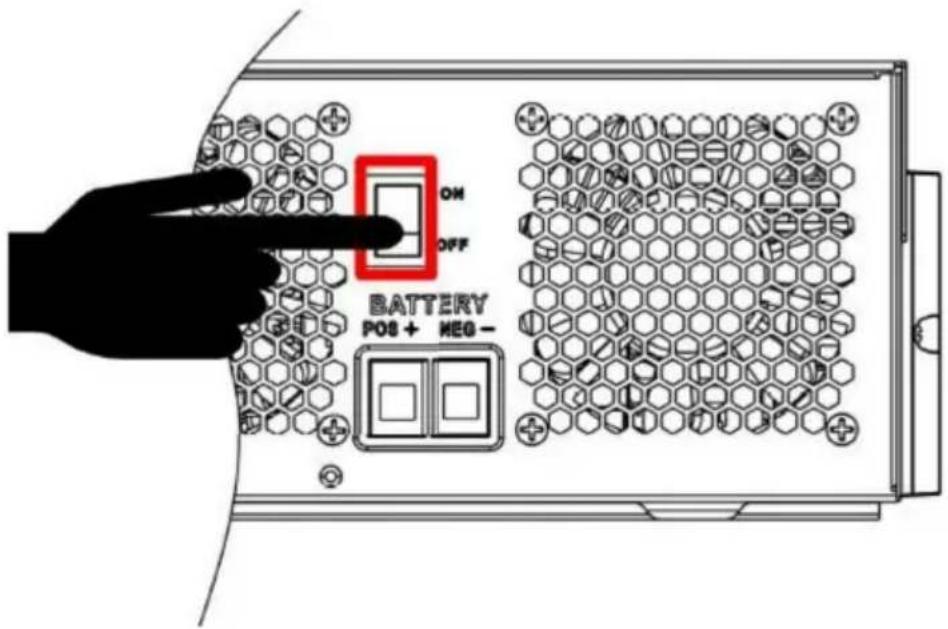
1. Power ON/OFF
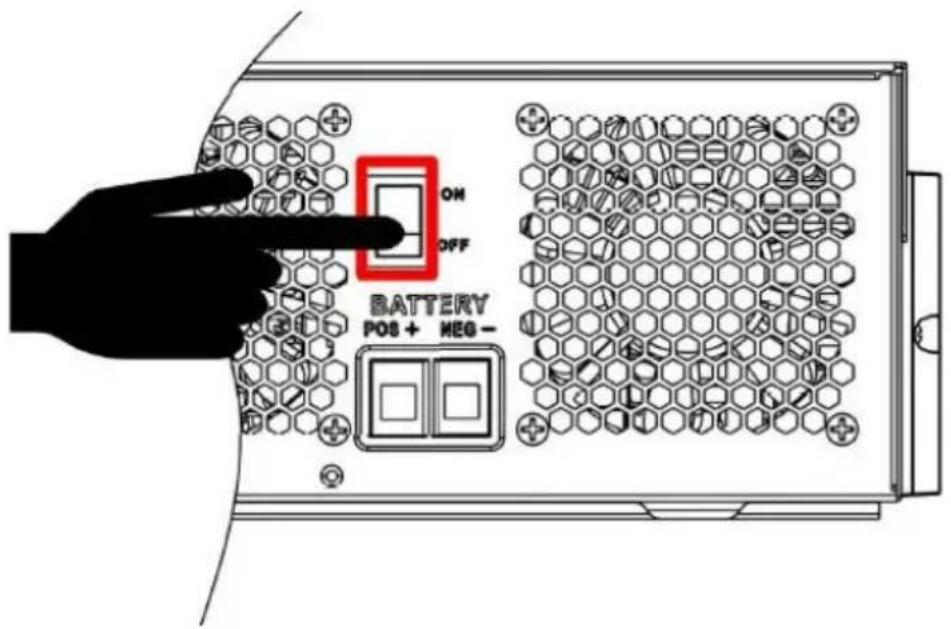
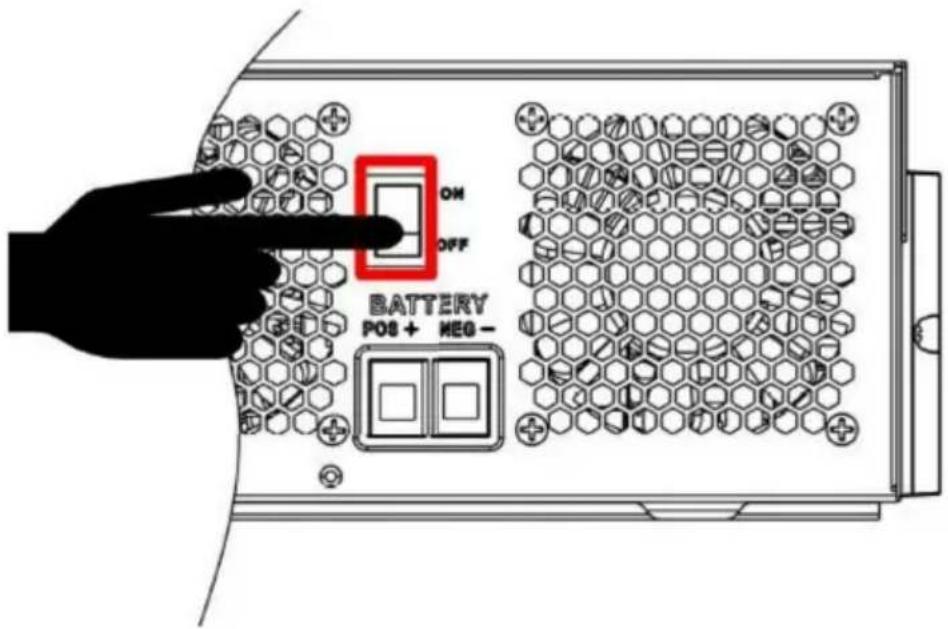
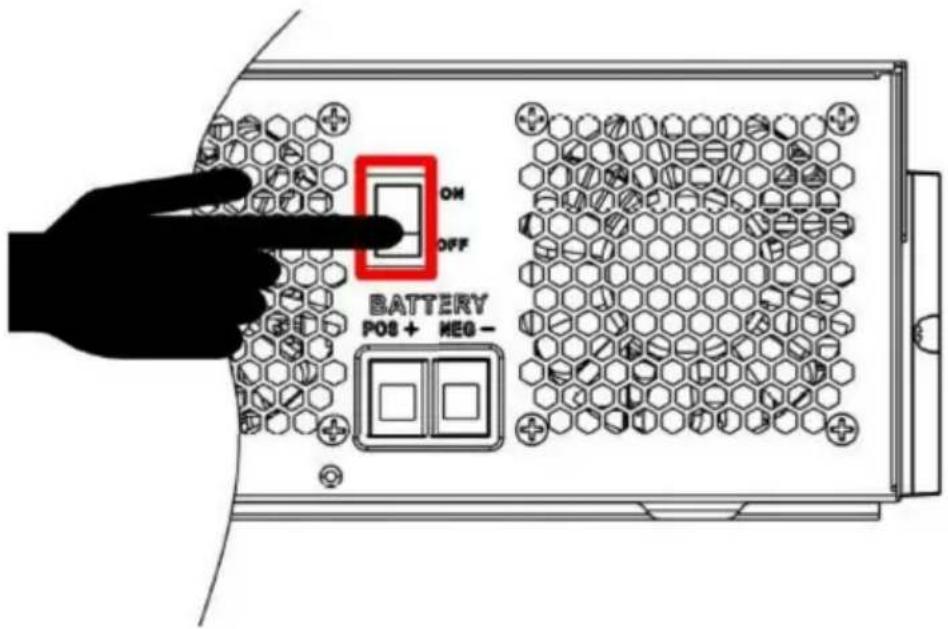
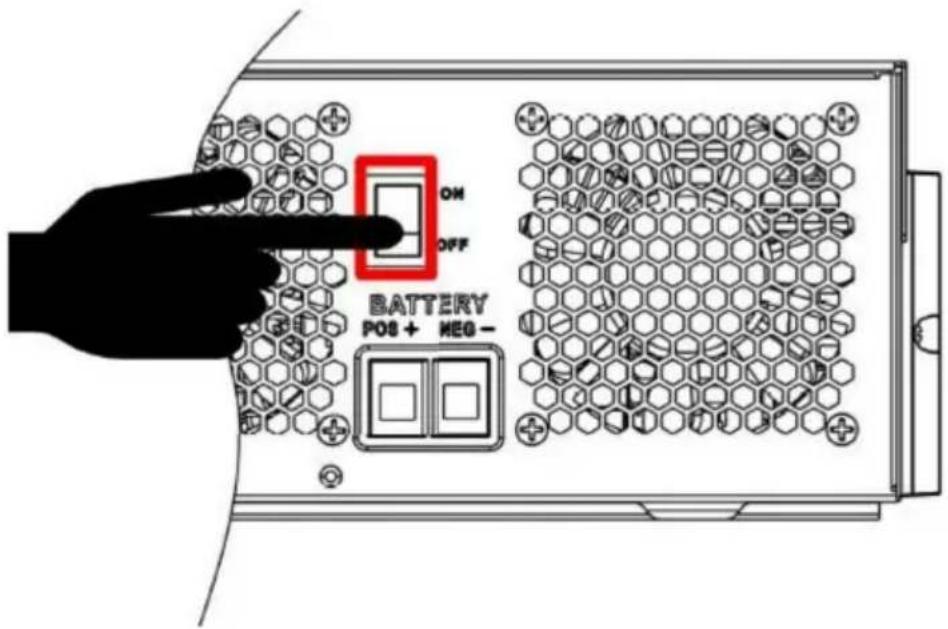
Once the unit has been properly installed and the batteries are connected well, simply press the On/Off switch (located on the bottom of the case) to turn on the unit.
2. Operation and Display Panel
The operation and display panel, shown in the chart below, is on the front panel of the inverter. It includes three indicators, four function keys, and an LCD display, indicating the operating status and input/output power information.
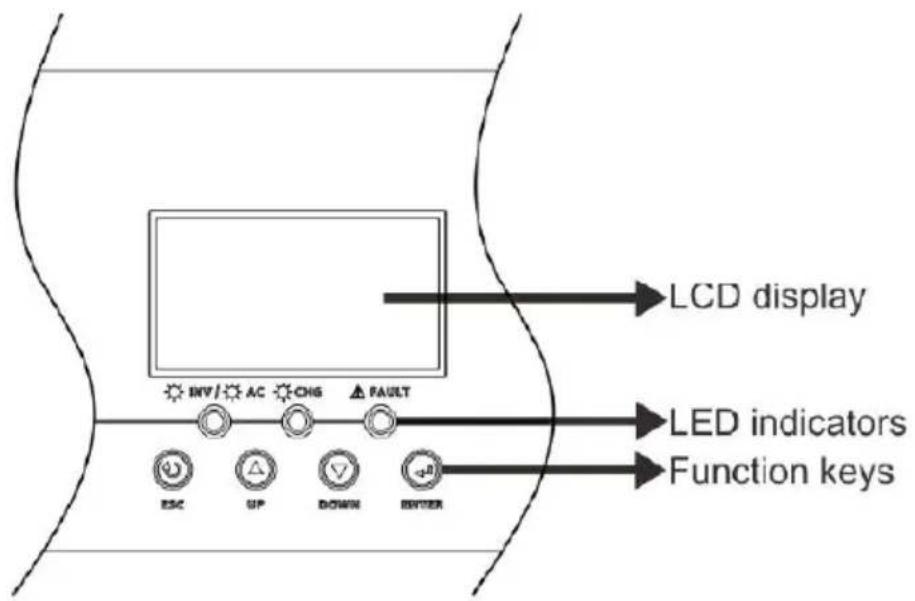
LED Indicator
| LED Indicator | Messages |
| AC/INV | Green | Solid On | Output is powered by utility in Line mode. |
| Flashing | Output is powered by battery or PV in battery mode. |
| CHG | Green | Solid On | Battery is fully charged. |
| Flashing | Battery is charging. |
| FAULT | Red | Solid On | Fault occurs in the inverter. |
| Flashing | Warning condition occurs in the inverter. |
Function Keys
| Function Key | Description |
| ESC | To exit setting mode |
| UP | To go to previous selection |
| DOWN | To go to next selection |
| ENTER | To confirm the selection in setting mode or enter setting mode |
3. LCD Setting
After pressing and holding the ENTER button for 3 seconds, the unit will enter setting mode. Press the "UP" or "DOWN" button to select setting programs. Then, press the "ENTER" button to confirm the selection or the ESC button to exit.
Setting Programs:
| Program | Description | Selectable option |
| 01 | Output source priority: To configure load power source priority | Solar first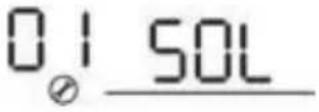 | Solar energy provides power to the loads as first priority. If solar energy is not sufficient power all connected loads, battery energy will supply power the loads at the same time. Utility provides power to the loads only when any one condition happens:- Solar energy is not available- Battery voltage drops to either low-level warning voltage or the setting point in program 12. |
Utility first (default)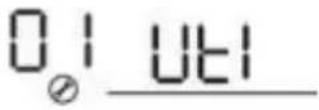 | Utility will provide power to the loads as first priority.Solar and battery energy will provide power to the loads only when utility power is not available. |
SBU priority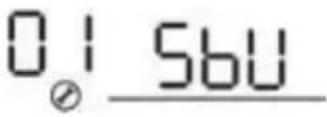 | Solar energy provides power to the loads as first priority. If solar energy is not sufficient power all connected loads, battery energy will supply power to the loads at the same time. Utility provides power to the loads only when battery voltage drops to either low-level warning voltage or the setting point in program 12. |
SUB priority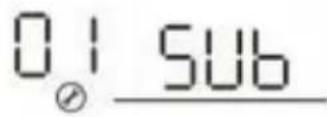 60A (default) 60A (default)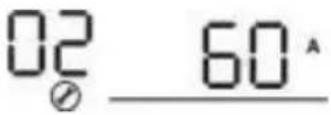 | Solar energy is charged first a then power to the loads. If solar energy is not sufficient power all connected loads, Utility energy will supply power to the loads at the same time.Note: SUB priority is just for PVmax=500Vdc model.If selected, acceptable charging current range will be from Max AC charging current to Max. Charging current of SPEC , but it shouldn't be less than the A charging current (program 11) |
| 02 | Maximum charging current: To configure total charging current for solar and utility chargers. (Max. charging current = utility charging current + solar charging current) | | |
| 03 | AC input voltage range | Appliances (default)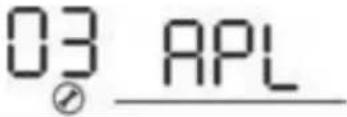 | If selected, acceptable AC input voltage range will be within 90-280VAC. |
UPS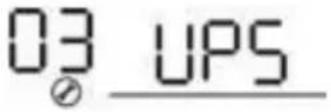 | If selected, acceptable AC input voltage range will be within 170-280VAC. |
Generator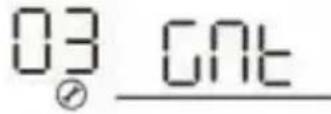 | If selected, acceptable AC input voltage range will be within 17 280VAC and compatible with generators.Note: Because generators are unstable, maybe the output of inverter will be unstable too. |
| 05 | Battery type | AGM (default)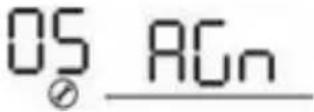 | FloodedOS FLD |
User-Defined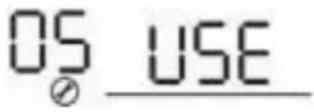 | If “User-Defined” is selected, battery charge voltage and low DC cut-off voltage can be set in program 26, 27 and 29. |
OS 112 | Support PYLON US2000Protocol 3.5 Version |
| OS 114 | Standard communicationProtocol form inverter supplier |
| 06 | Auto restart when overload occurs | 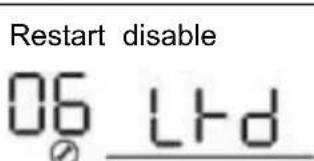 | Restart enable (default)OS LFE |
| 07 | Auto restart when over temperature occurs | Restart disable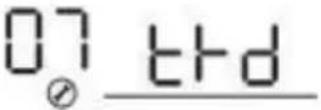 | Restart enable (default)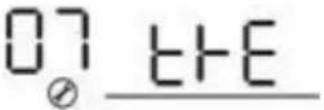 |
| 08 | Output voltage | 220V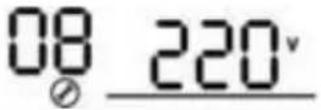 | 230V (default)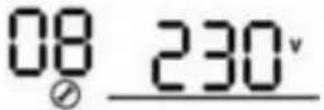 |
240V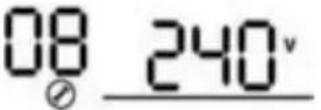 | |
| 09 | Output frequency | 50Hz (default)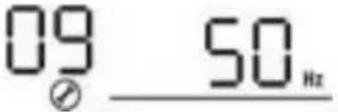 | 60Hz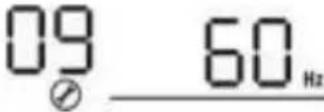 |
| 10 | Auto bypassWhen selecting “auto”, if the mains power is normal, it will automatically bypass, even if the switch is off. | manual(default)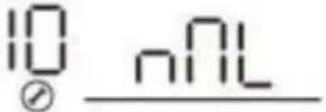 | auto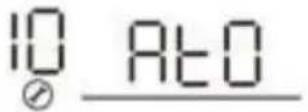 |
| 11 | Maximum utility charging current | 30A (default)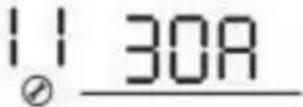 If selected, acceptable charging current range will be within Max. AC charging current of SPEC. If selected, acceptable charging current range will be within Max. AC charging current of SPEC. |
| 12 | Setting voltage point back to utility source when selecting “SBU priority” or “Solar first” in program 01. | 48V models:46V (default)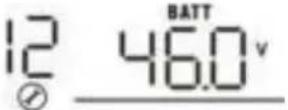 | Setting range is from 44.0V to 57.2V for 48v model, but the max setting value must be less than the value of program13. |
24V models:23V (default)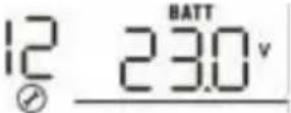 | Setting range is from 22.0V to 28.6V for 24v model, but The max setting value must be less than the value of program13. |
| 13 | Setting voltage point back to battery mode whenSelecting “SBU priority” or “Solar first” in program 01. | Battery fully charged (default)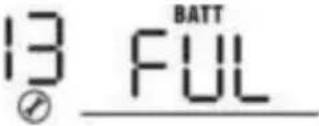 | 48V models:Setting range is from 48V to f (the value of program26-0.4V), but the max setting value mus be more than the value of program12.24V models:Setting range is from 24V to f (the value of program26-0.4V), but the max setting value mus be more than the value of program12. |
| 16 | Charger source priority: To configure charger source priority | If this inverter/charger is working in Line, Standby or Fault mode, charger source can be programmed as below: |
Solar first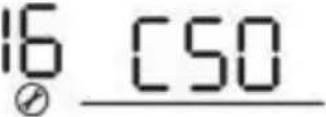 | Solar energy will charge batter as first priority.Utility will charge battery only when solar energy is not available. |
Solar and Utility (default)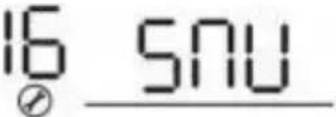 | Solar energy and utility will charge battery at the same tim |
Only Solar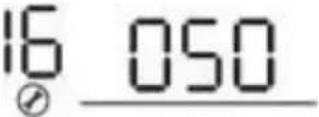 | Solar energy will be the only charger source no matter utility is available or not. |
| If this inverter/charger is working in Battery mode, only so energy can charge battery. Solar energy will charge batter it's available and sufficient. |
| 18 | Buzzer mode | Mode1 | Buzzer mute |
Mode2 | The buzzer sounds when the input source changes or there a specific warning or fault |
Mode3 | The buzzer sounds when there is a specific warning or fault |
Mode4(default) | The buzzer sounds when there is a fault |
| 19 | Auto return to default display screen | Return to default display screen (default)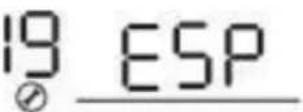 | If selected, no matter how use switch display screen, it will automatically return to default display screen (Input voltage /output voltage) after no button is pressed for 1 minute. |
Stay at latest screen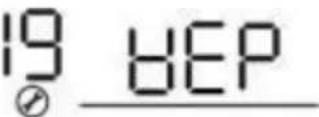 | If selected, the display screen will stay at latest screen user finally switches. |
| 20 | Backlight control | Backlight on (default)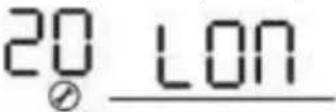 | Backlight off20 LOF |
| 23 | Overload bypass: When enabled, the unit will transfer to line mode if overload occurs in battery mode. | Bypass disable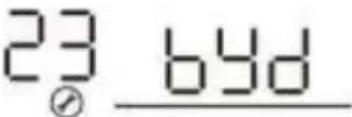 | Bypass enable(default)23 BYE |
| 25 | Modbus ID Setting | Modbus ID Setting Range : 001(default) ~247 |
| 26 | Bulk charging voltage (C.V voltage) | 48V models default setting: 56.4V |
24V models default setting: 28.2V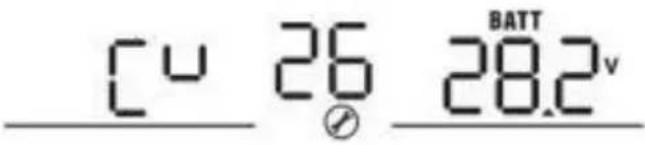 |
| If self-defined is selected in program 5, this program can up. Setting range is from 24.0V to 30.0V for 24v model a 48.0V to 62.0V for 48v model. But the setting value must more than or equal the value of program27. Increment of click is 0.1V. |
| 27 | Floating charging voltage | 48V models default setting: 54.0V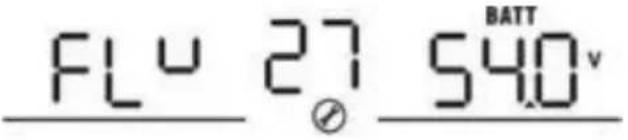 |
24V models default setting: 27.0V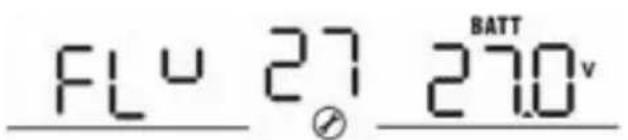 |
| If self-defined is selected in program 5, this program can up. Setting range is from 24.0V to the value of program 24v model and 48.0V to the value of program 26 for 48v Increment of each click is 0.1V. |
| 29 | Low DC cut-off voltage | 48V models default setting: 42.0V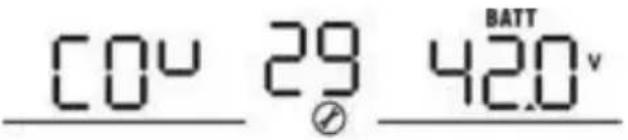 |
24V models default setting: 21.0v |
| If self-defined is selected in program 5, this program can up. Setting range is from 20.0V to 27.0V for 24v model a 40.0V to 54.0V for 48v model. The setting value must be than the value of program12. Increment of each click is 0.1V.Low DC cut-off voltage will be fixed to setting value matter what percentage of load is connected. |
| 32 | Bulk charging time (C.V stage) | Automatically (Default): 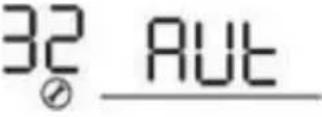 | If selected, inverter will judge this charging time automatically |
5 min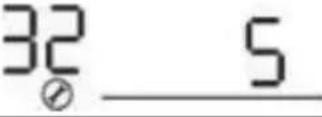 | The setting range is from 5 m to 900 min. Increment of each click is 5 min. |
900 min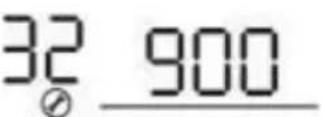 |
| If “USE” is selected in program 05, this program can be set up. |
| 33 | Battery equalization | Battery equalization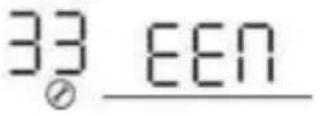 | Battery equalization disable (default)33 EdS |
| If “Flooded” or “User-Defined” is selected in program 05, t program can be set up. |
| 34 | Battery equalization voltage | 48V models default setting is 58.4V. Setting range is from floating voltage ~ 64V. Increment of each click is 0.1V.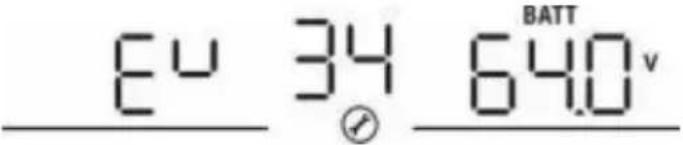 |
24V models default setting is 29.2V. Setting range is from floating voltage ~ 31V. Increment of each click is 0.1V.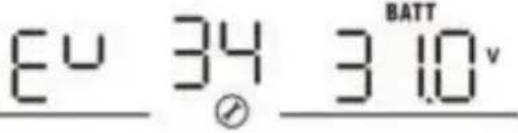 |
| 35 | Battery equalized time | 60min (default)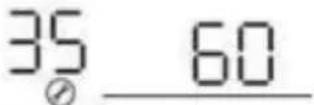 | Setting range is from 0 min to 900min. |
| 36 | Battery equalized timeout | 120min (default)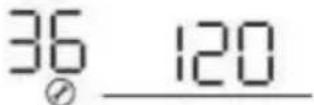 | Setting range is from 0min to 900 min. |
| 37 | Equalization interval | 30days (default)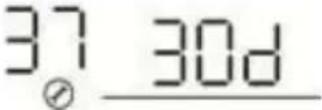 | Setting range is from 1 to 90 days. |
| 39 | Equalization activated immediately | Enable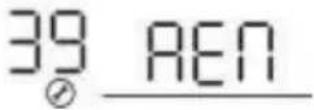 | Disable (default)39 Ads |
| If equalization function is enabled in program 33, this prog can be set up. If “Enable” is selected in this program, it's activate battery equalization immediately and LCD main pa will shows “”. If “Disable” is selected, it will cancel equalization function until next activated equalization time arrives based on program 37 setting. At this time, “Eq” wi not be shown in LCD main page.. |
| 41 | Automatic activation for lithium battery |  | Disable automatic activation (default) |
 | When Program05 is selected “Llx” as lithium battery and when the battery is not detected, the unit will activate automatically the lithium battery at a time. If you want to activate automatically the lithium battery, you must restart the unit. |
| 42 | Manual activation for lithium battery |  | Default: disable activation |
 | When Program05 is selected “Llx” as lithium battery, when the battery is not detected, If you want to activate the lithium battery at a time, you could selected it. |
| 43 | Setting SOC point back to utility source when selecting “SBU priority” or “Solar first” in program 01 | 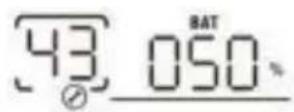 | Default 50%, 20%~50% Settable |
| 44 | Setting SOC point back to battery mode when selecting “SBU priority” or “Solar first” in program 01 | 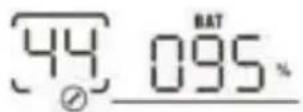 | Default 95%, 60%~100% Settable |
| 45 | Low DC cut-off SOC | 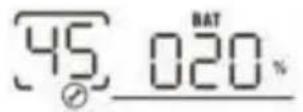 | Default 20%, 3%~30% Settable |
| 46 | Maximum discharge current protection |  | Default OFFDisable current discharge current protection function |
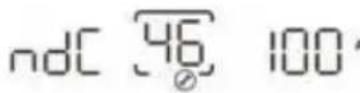 | When the discharge current exceeds setting value, the battery will stop discharging.The setting range is from 50A 500A. |
4. BATTERY EQUALIZATION
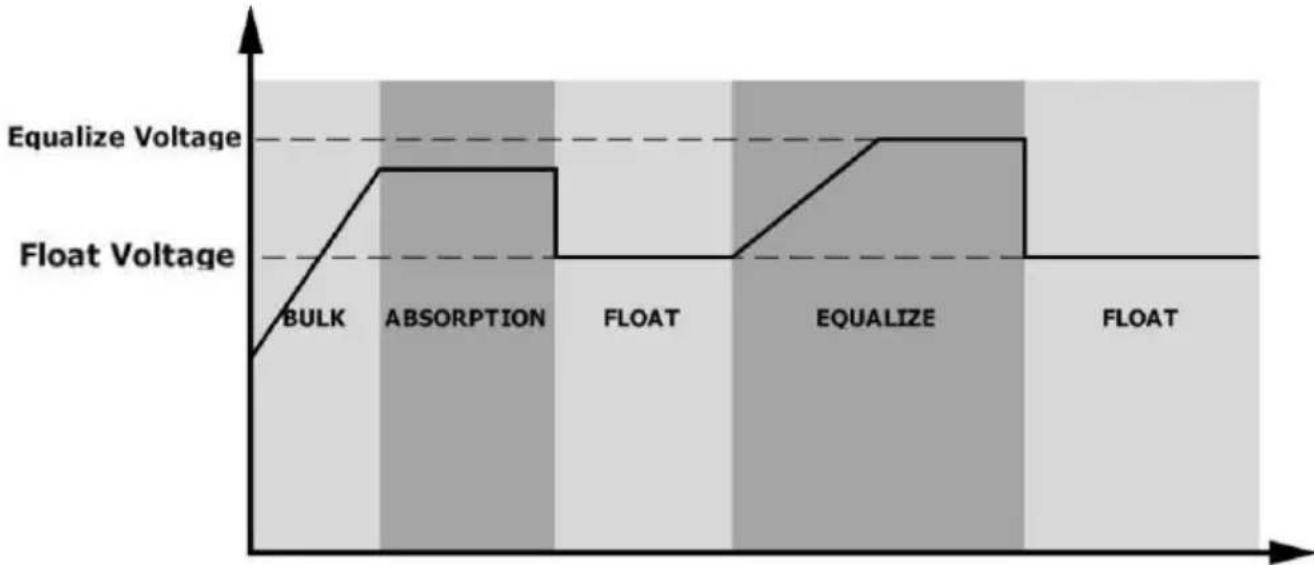
The equalization function is added into the charge controller. It reverses the buildup of negative chemical effects like stratification, a condition where acid concentration is greater at the bottom of the battery than at the top. Equalization also helps to remove sulfate crystals that might have built up on the plates. If left unchecked, the condition, called sulfation, will reduce the overall capacity of the battery. Therefore, it is recommended to equalize the battery periodically.
- How to Apply Equalization Function
You must enable the battery equalization function in the monitoring LCD setting program 33 first. Then, you may apply this function in the device by either one of the following methods:
Setting the equalization interval in program 37.
Activating equalization immediately in program 39.
- When to Equalize
In the float stage, when the set equalization interval (battery equalization cycle) is reached, or equalization is activated immediately, the controller will start to enter the Equalize stage.
● Equalize charging time and timeout
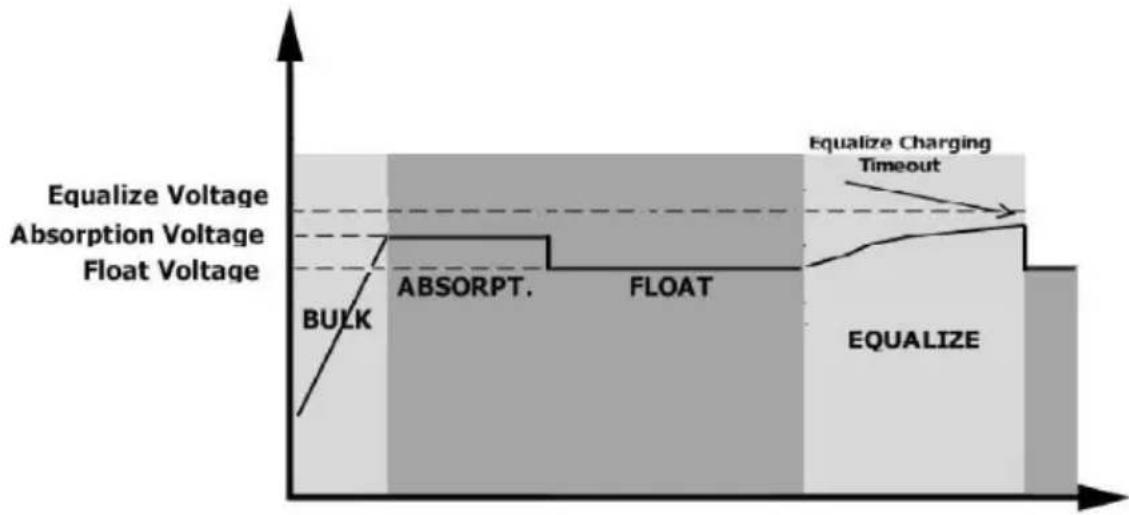
In the Equalize stage, the controller will supply power to charge the battery as much as possible until the battery voltage rises to the battery equalization voltage. Then, constant-voltage regulation is applied to maintain the battery voltage at the battery equalization voltage. The battery will remain in the Equalize stage until the set battery equalized time is reached.
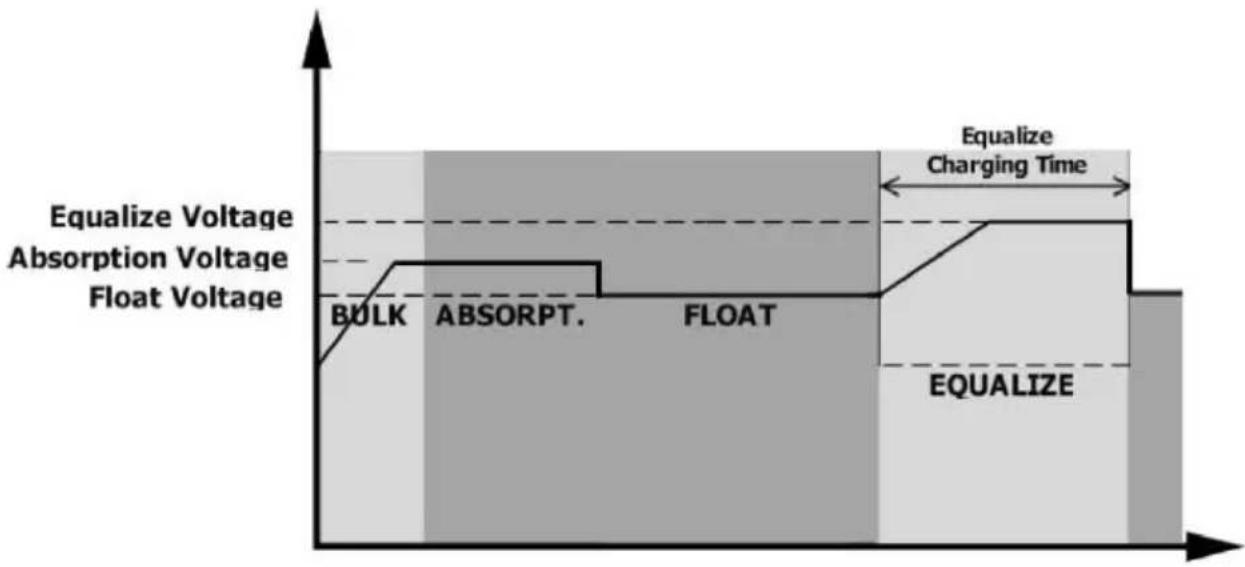
However, in the Equalize stage, when the battery equalized time expires and the battery voltage does not rise to the battery equalization voltage point, the charge controller will extend the battery equalized time until the battery voltage achieves the battery equalization voltage. If the battery voltage is still lower than the battery equalization voltage when the battery equalized timeout setting is over, the charge controller will stop equalization and return to the float stage.
5. SETTING FOR LITHIUM BATTERY
Lithium Battery Connection
If choosing lithium battery for the inverter, you are allowed to use the lithium battery only which we have configured. There're two connectors for the lithium battery, RS485 port of BMS and power cable.
Please follow below steps to implement lithium battery connection:
- Assemble battery terminal based on recommended battery cable and terminal size (same as Lead acid, see section Lead-acid Battery connection for details).
- Connect the end of RS485 port of battery to BMS(RS485) communication port of inverter.
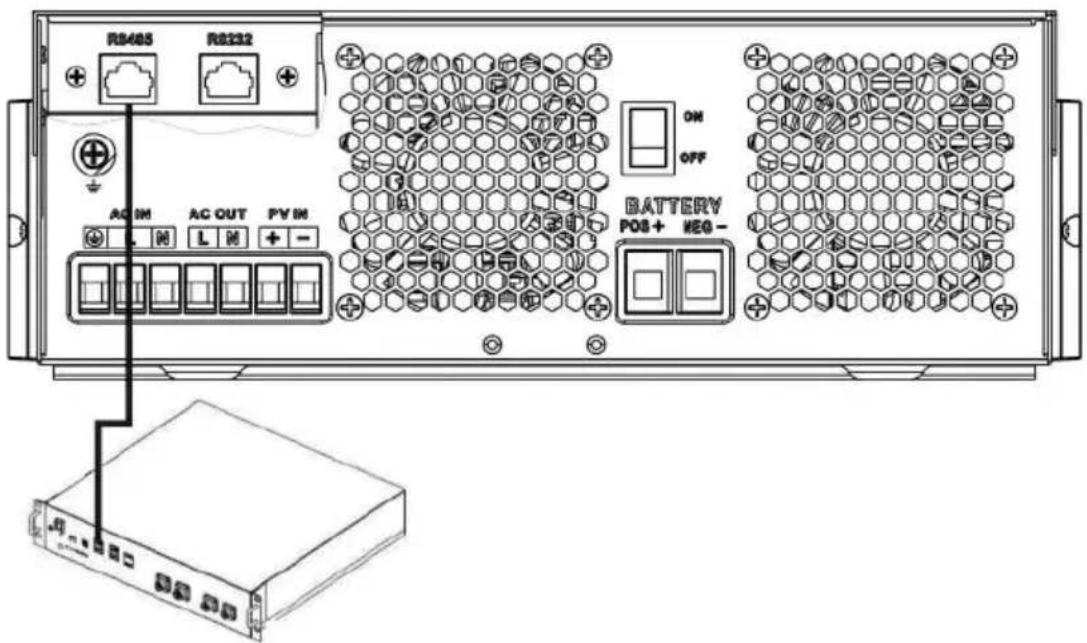
Fig 1
Lithium battery communication and setting
If choosing lithium battery, make sure to connect the BMS communication cable between the battery and the inverter. This communication cable delivers information and signal between lithium battery and the inverter. This information is listed below:
- Re-configure charging voltage, charging current and battery discharge cut-off voltage according to the lithium battery parameters.
- Have the inverter start or stop charging according to the status of lithium battery.
Connect the end of RS485 of battery to RS485 communication port of inverter
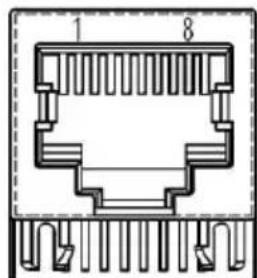
Make sure the lithium battery RS485 port connects to the inverter is Pin to Pin, communication cable is inside of package and the inverter RS485 port pin assignment shown as below:
| Pin number | RS485 Port |
| PIN1 | RS485-B |
| PIN2 | RS485-A |
| PIN7 | RS485-A |
| PIN8 | RS485-B |
LCD setting
After connecting, you need to finish and confirm some settings as follow:
- Select program 05 as lithium battery type.
- Confirm program 41/42/43/44/45 setting value.
Note: Programs 43/44/45 are only available with successful communication; they will replace the functions of programs 12/13/29, and at the same time, programs 12/13/29 become unavailable.
LCD Display
If communication between the inverter and battery is successful, some information is shown on the LCD as follows:
| Item | Description | LCD display |
| 1 | Communication successful icon | 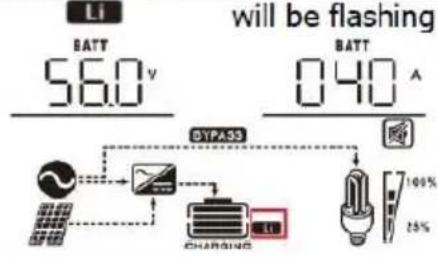 |
| 2 | Max lithium battery charging voltage | 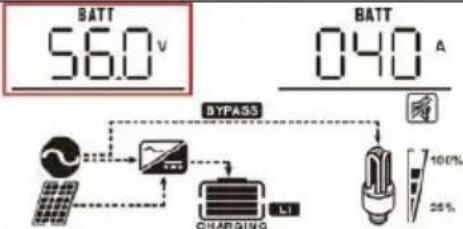 Max lithium battery charging voltage is 56.0V. Max lithium battery charging voltage is 56.0V. |
| 3 | Max lithium battery charging current | 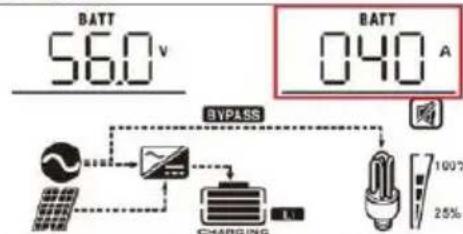 Max lithium battery charging current is 40A. Max lithium battery charging current is 40A. |
| 4 | Lithium battery discharging is forbidden | Li will flash once every 1 second |
| 5 | Lithium battery charging is forbidden | Li will flash once every 2 second |
| 6 | Lithium battery SOC(%) | 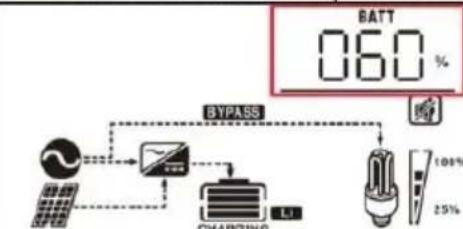 Lithium battery SOC is 63AH and 60% Lithium battery SOC is 63AH and 60% |
Setting for PYLON US2000 lithium battery
- PYLONTECH US2000 lithium battery setting:
Dip Switch: There are 4 Dip Switches that set different baud rates and battery group addresses. If a switch position is turned to the "OFF" position, it means "0". If a switch position is turned to the "ON" position, it means "1".
Dip 1 is "ON" to represent the baud rate 9600.
Dip 2, 3, and 4 are reserved for the battery group address.
Dip switches 2, 3, and 4 on the master battery (first battery) are used to set up or change the group address.
NOTE: "1" is the upper position and "0" is the bottom position.
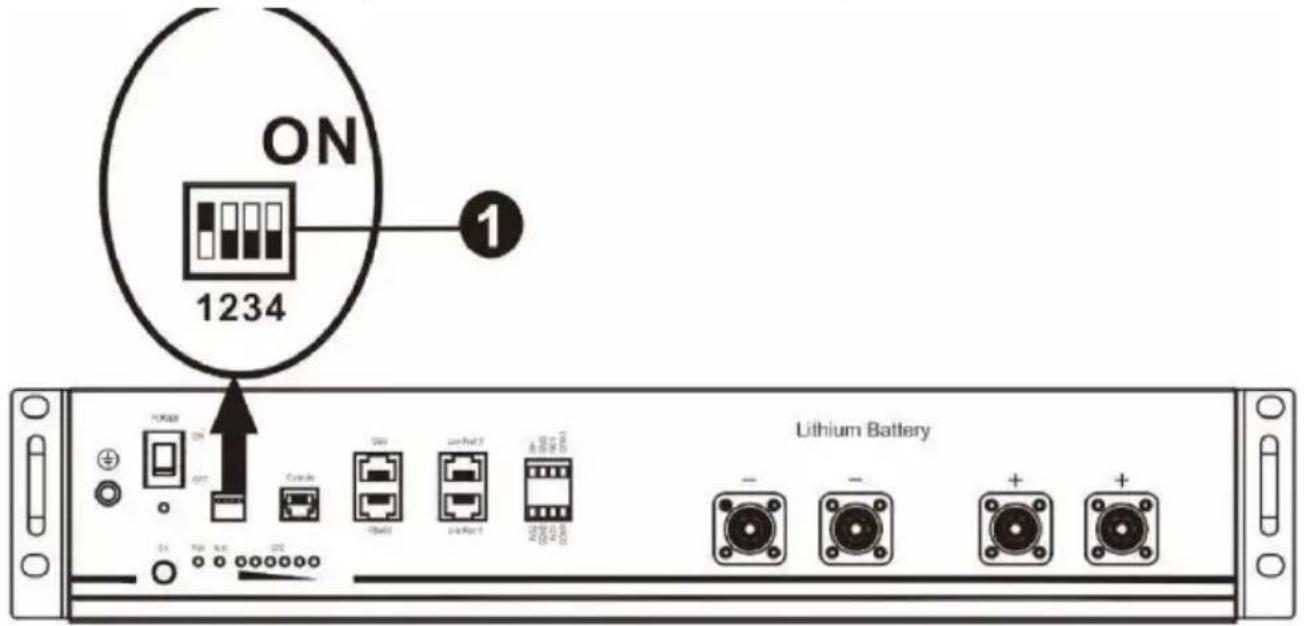
- Installation process:
Step 1. Use the RS485 cable to connect the inverter and lithium battery as shown in Fig 1.
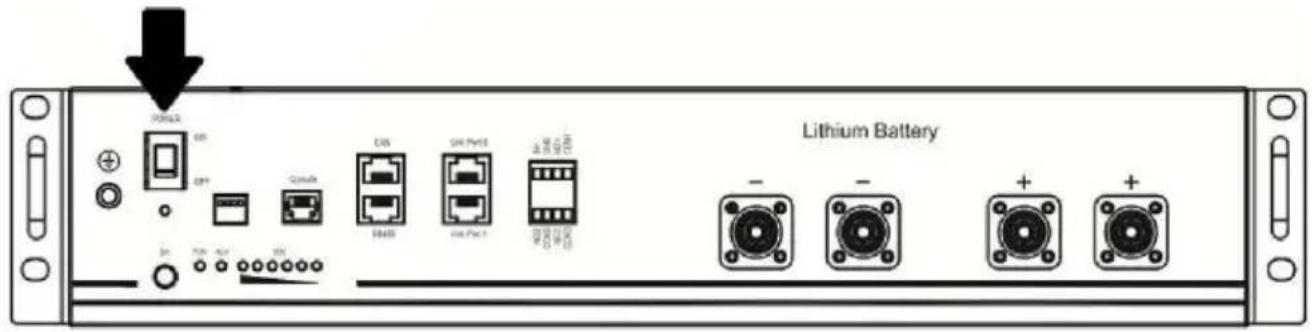
Step 2. Switch on the lithium battery.
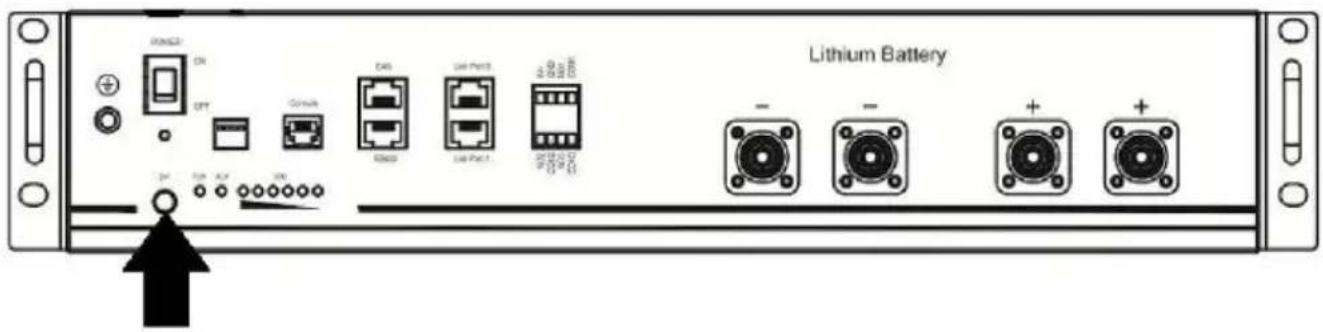
Step 3. Press and hold for more than three seconds to start the lithium battery; power output is ready.
Step 4. Turn on the inverter.
Step 5. Be sure to select battery type as "Li2" in LCD program 5.
If communication between the inverter and battery is successful, the battery icon on LCD display will light.
Setting for lithium battery without communication
This suggestion is used for lithium battery application and to avoid lithium battery BMS protection without communication. Please finish the setting as follows:
- Before starting setting, you must get the battery BMS specification:
A. Max charging voltage B. Max charging current
C. Discharging protection voltage
- Set battery type as "USE" (user-defined)
| 05 | Battery type | AGM (default)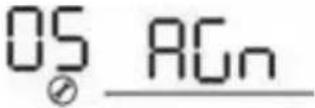 | Flooded |
User-Defined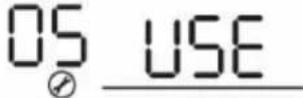 | If “User-Defined” is selected, battery charge voltage and low DC cut-off voltage can be set up in program 26, 27 and 29. |
- Set C.V voltage as Max charging voltage of BMS - 0.5V.
| 26 | Bulk charging voltage (C.V voltage) | default setting: 56.4V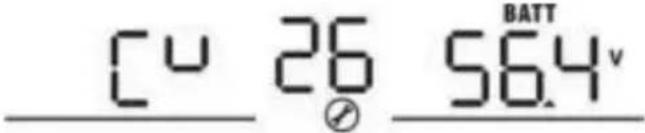 |
| If self-defined is selected in program 5, this program can be set up. range is from 24.0V to 31.0V for 24v model and 48.0V to 62.0V for model. But the setting value must be more than or equal the value of program27. Increment of each click is 0.1V. |
- Set floating charging voltage as C.V voltage.
| 27 | Floating charging voltage | default setting: 54.0V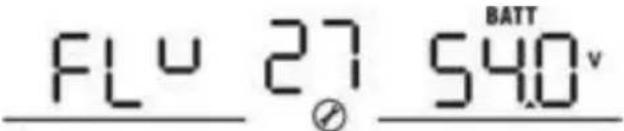 |
| If self-defined is selected in program 5, this program can be set up. Setting range is from 24.0V to the value of program 26 for 2 model and 48.0V to the value of program 26 for 48v model. Increment of each click is 0.1V. |
- Set Low DC cut-off voltage ≥ discharging protection voltage of BMS + 2V.
| 29 | Low DC cut-off voltage | default setting: 42.0V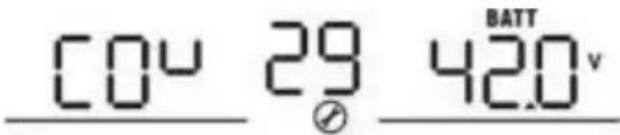 |
| If self-defined is selected in program 5, this program can be set u Setting range is from 20.0V to 27.0V for 24v model and 40.0V to 54.0V for 48v model. The setting value must be less the value of program12. Increment of each click is 0.1V.Low DC cut-off voltage will be fixed to setting value no matter what percent of load is connected. |
- Set Max charging current which must be less than the Max charging current of BMS.
| 02 | Maximum charging current: To configure total charging current for solar and utility chargers. (Max. charging current = utility charging current + solar charging current) | 60A (default) 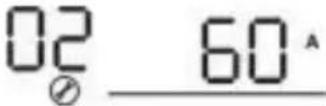 | If selected, acceptable charging current range will be within 1-Max. charging current of SPEC, but shouldn't be less than the AC charging current ( program 11 |
- Setting voltage point back to utility source when selecting "SBU priority" or "Solar first" in program 01. The setting value must be ≥ Low DC cut-off voltage + 1V, or else the inverter will have a warning as battery voltage low.
| 12 | Setting voltage point back to utility source when selecting “SBU priority” or “Solar first” in program 01. | Available options in 48V models: 46V (default)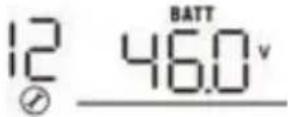 |
Available options in 24V models: 23V (default)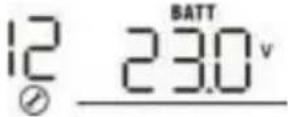 |
It is better to finish the settings without turning on the inverter (just let the LCD show, no output); when you finish the settings, please restart the inverter.
Fault Reference Code
| Fault Code | Fault Event | Icon on |
| 01 | Over temperature of inverter module | |
| 02 | Over temperature of DCDC module | |
| 03 | Battery voltage is too high | |
| 04 | Over temperature of PV module | |
| 05 | Output short circuited. | |
| 06 | Output voltage is too high. | |
| 07 | Overload time out | |
| 08 | Bus voltage is too high | |
| 09 | Bus soft start failed | |
| 10 | PV over current | |
| 11 | PV over voltage | |
| 12 | DCDC over current | |
| 13 | Over current or surge | |
| 14 | Bus voltage is too low | |
| 15 | Inverter failed (Self-checking) | |
| 18 | Op current offset is too high | |
| 19 | Inverter current offset is too high | |
| 20 | DC/DC current offset is too high | |
| 21 | PV current offset is too high | |
| 22 | Output voltage is too low | |
| 23 | Inverter negative power | |
Warning Indicator
| Warning Code | Warning Event | Audible Alarm | Icon flashing |
| 02 | Temperature is too High | Beep three times every second | 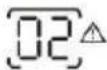 |
| 04 | Low battery | Beep once every second |  |
| 07 | Overload | Beep once every 0.5 second | 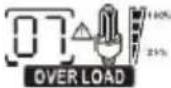 |
| 10 | Output power derating | Beep twice every 3 seconds | 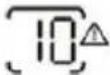 |
| 14 | Fan blocked | None | 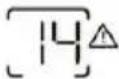 |
| 15 | PV energy is low | Beep twice every 3 seconds | 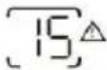 |
| 19 | Lithium Battery communication is failed | Beep once every 0.5 second | 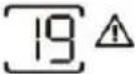 |
| 21 | Lithium Battery over current | None | 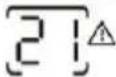 |
| E9 | Battery equalization | None | 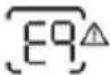 |
| bP | Battery is not connected | None |  |
Table 1 Line Mode Specifications
| INVERTER MODEL | 3.5KVA PVmax=160V | 5.5KVA |
| Input Voltage Waveform | Sinusoidal (utility or generator) |
| Nominal Input Voltage | 230Vac |
| Low Loss Voltage | 170Vac±7V (UPS)90Vac±7V (Appliances) |
| Low Loss Return Voltage | 180Vac±7V (UPS);100Vac±7V (Appliances) |
| High Loss Voltage | 280Vac±7V |
| High Loss Return Voltage | 270Vac±7V |
| Max AC Input Voltage | 300Vac |
| Nominal Input Frequency | 50Hz / 60Hz (Auto detection) |
| Low Loss Frequency | 40±1Hz |
| Low Loss Return Frequency | 42±1Hz |
| High Loss Frequency | 65±1Hz |
| High Loss Return Frequency | 63±1Hz |
| Output Short Circuit Protection | Battery mode: Electronic Circuits |
| Efficiency (Line Mode) | >95% ( Rated R load, battery full charged ) |
| Transfer Time | 10ms typical (UPS);20ms typical (Appliances) |
| Output power derating:When AC input voltage drops to 95V or 170V depending on models, the output power will be derated. | 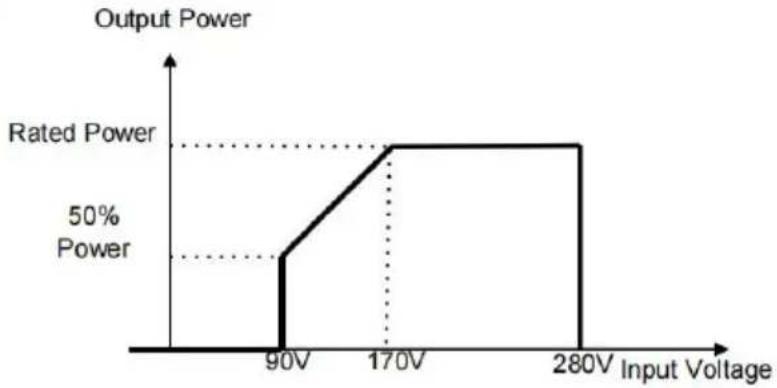 |
Table 2 Inverter Mode Specifications
| INVERTER MODEL | 3.5KVA PVmax=160V | 5.5KVA |
| Rated Output Power | 3.5KVA/3.5KW | 5.5KVA/5.5KW |
| Output Voltage Waveform | Pure Sine Wave |
| Output Voltage Regulation | 230Vac±5% |
| Output Frequency | 60Hz or 50Hz |
| Peak Efficiency | 94% |
| Surge Capacity | 2* rated power for 5 seconds |
| Nominal DC Input Voltage | 24Vdc | 48Vdc |
| Cold Start Voltage | 23.0Vdc | 46.0Vdc |
| Low DC Warning VoltageJust for AGM and Flooded@ load < 20%@ 20% ≤ load < 50%@ load ≥ 50% | 22.0Vdc21.4Vdc20.2Vdc | 44.0Vdc42.8Vdc40.4Vdc |
| Low DC Warning Return VoltageJust for AGM and Flooded@ load < 20%@ 20% ≤ load < 50%@ load ≥ 50% | 23.0Vdc22.4Vdc21.2Vdc | 46.0Vdc44.8Vdc42.4Vdc |
| Low DC Cut-off VoltageJust for AGM and Flooded@ load < 20%@ 20% ≤ load < 50%@ load ≥ 50% | 21.0Vdc20.4Vdc19.2Vdc | 42.0Vdc40.8Vdc38.4Vdc |
Table 3 Charge Mode Specifications
| Utility Charging Mode |
| INVERTER MODEL | 3.5KVA PVmax=160V | | 5.5KVA | |
| Max Charging Current (PV+AC) (@ VI/P =230Vac) | 120Amp 100Amp | | | |
| Max Charging Current (AC) (@ VI/P =230Vac) | 80Amp |
| Bulk Charging Voltage | Flooded Battery | 29.2Vdc 58.4Vdc | |
| AGM / Gel Battery | 28.2Vdc 56.4Vdc | |
| Floating Charging Voltage | 27Vdc 54Vdc | |
| Overcharge Protection 33Vdc 63Vdc | |
| Charging Algorithm 3-Step | |
| Charging Curve | 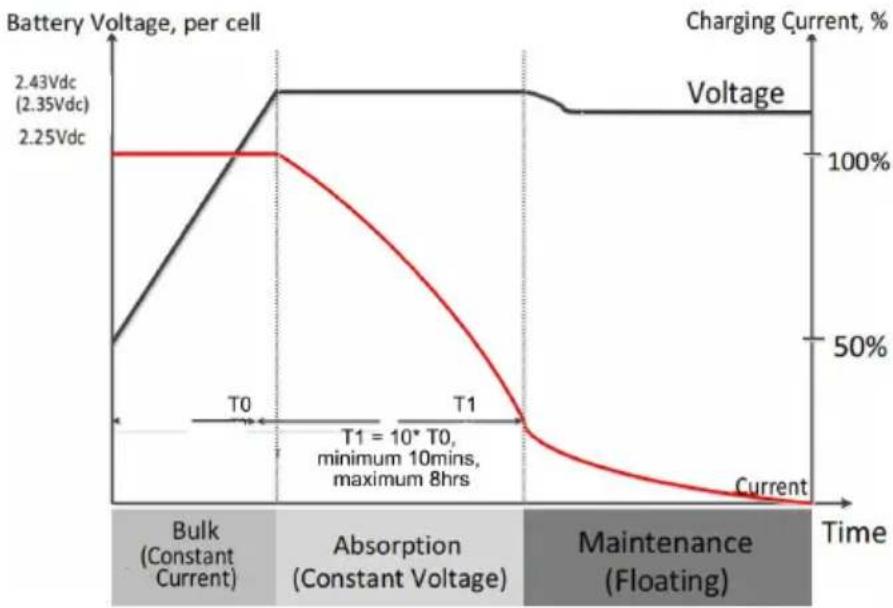 |
| Solar Input |
| INVERTER MODEL | 3.5KVA PVmax=160V | 5.5KVA |
| Rated Power | 1500W | 5500W |
| Max. PV Array Open Circuit Voltage | 160Vdc | 500Vdc |
| PV Array MPPT Voltage Range | 30Vdc~160Vdc | 60Vdc~500Vdc |
| Max. Input Current | 50A | 18A |
| Max. Charging Current(PV) | 60A | 100A |
Table 4 General Specifications
| INVERTER MODEL | 3.5KVA PVmax=160V | 5.5KVA |
| Safety Certification | CE |
| Operating Temperature Range | -10°C to 55°C |
| Storage temperature | -15°C~ 60°C |
| Humidity | 5% to 95% Relative Humidity (Non-condensing) |
| Dimension(D*W*H), mm | 358x295x105 | 438x295x105 |
| Net Weight, kg | 6.2 | 8.2 |
TROUBLESHOOTING
| Problem | LCD/LED/Buzzer | Explanation / Possible cause | What to do |
| Unit shuts down automatically during startup process. | LCD/LEDs and buzzer will be active for 3 seconds and then complete off. | The battery voltage is too low | 1. Re-charge battery.2. Replace battery. |
| No response after power on. | No indication. | 1. The battery voltage is far too low.2. Battery polarity is connected reversed. | 1. Check if batteries and the wiring are connected well.2. Re-charge battery.3. Replace battery. |
| Mains exist but the unit works in battery mode. | Input voltage is displayed as 0 on the LCD and green LED is flashing. | Input protector is tripped | Check if AC breaker is tripped and AC wiring is connected well. |
| Green LED is flashing. | Insufficient quality of AC power.(Shore or Generator) | 1. Check if AC wires are too thin and/or too long.2. Check if generator (if applied) is working well of input voltage range setting is correct.(UPS Appliance) |
| Green LED is flashing. | Set “Solar First” as the priority of output source. | Change output source priority to Utility first. |
| When the unit is turned on, internal relay is switched on and off repeatedly. | LCD display and LEDs are flashing | Battery is disconnected. | Check if battery wires are connected well. |
| Buzzer beeps continuously and red LED is on. | Fault code 07 | Overload error. The inverter is overload 110% and time is up. | Reduce the connected load by switching off somequipment. |
| Fault code 05 | Output short circuited. | Check if wiring is connected well and remove abnormal load. |
| Fault code 02 | Internal temperature of inverter component is over 100°C. | Check whether the air floor of the unit is blocked or whether the ambient temperature is too high. |
| Fault code 03 | Battery is over-charged. | Return to repair center. |
| The battery voltage is too high. | Check if spec and quantit of batteries are meet requirements. |
| Fault code 06/22 | Output abnormal (Inverter voltage below than 190Vac or is higher than 260Vac) | 1. Reduce the connected load.2. Return to repair center |
| Fault code 08/09/15 | Internal components failed. | Return to repair center. |
| Fault code 13 | Over current or surge. | Restart the unit, if the error happens again, please return to repair center. |
| Fault code 14 | Bus voltage is too low. |
| Another fault code | | If the wires is connected well, please return to repair center. |
Manufacturer: Shanghai Muxin Muye Youxiangongsi
Address: Shuangcheng Road 803, Lane 11, Room 1602A-1609, Baoshan District, Shanghai 200000 CN.
Imported to AUS: SIHAO PTY LTD, 1 ROKEVA STREET, EASTWOOD NSW 2122 Australia
Imported to USA: Sanven Technology Ltd., Suite 250, 9166 Anaheim Plaza, Rancho Cucamonga, CA 91730
E-CrossStu GmbH
Mainzer Landstr. 69, 60329 Frankfurt am Main.
YH CONSULTING LIMITED.
K/O YH Consulting Limited Office 147, Centurion House,
London Road, Staines-upon-Thames, Surrey, TW18 4AX
VEVOR®
TOUGH TOOLS, HALF PRICE
Technical Support and E-Warranty Certificate
www.vevor.com/support
VEVOR®
EM5500-48L
- LCD Screen 2.
INSTALLATION
| Solar Panel Spec.(reference)- 450Wp- Vmp: 34.67Vdc- Imp: 13.82A- Voc: 41.25Vdc- Isc: 12.98A | SOLAR INPUT | Q'ty of panels | Total input power | Inverter Model |
| 3 pcs in serial | 3 pcs | 1,350 W | Э/5.5KVA/6.2KVA |
| 4 pcs in serial | 4 pcs | 1,800 W |
| 5 pcs in serial | 5 pcs | 2,250 W |
| 6 pcs in serial | 6 pcs | 2,700 W |
| 7 pcs in serial | 7 pcs | 3,150 W |
| 8 pcs in serial | 8 pcs | 3,600 W |
| 9 pcs in serial | 9 pcs | 4,050 W |
| 10 pcs in serial | 10 pcs | 4,500 W | 5.5KVA/6.2KVA |
| 11 pcs in serial | 11 pcs | 4,950 W |
| 12 pcs in serial | 12 pcs | 5,400 W |
| 6 pieces in serial and 2 sets in parallel | 12 pcs | 5,400 W | 6.2KVA |
| 8 pieces in serial and 2 sets in parallel | 14 pcs | 6,300 W |
| 1 pcs in serial | 1 pcs | 450W | 3.5KVA(PVmax=160V) |
| 2 pcs in serial | 2 pcs | 900W |
| 3 pcs in serial | 3 pcs | 1,350 W |
| Solar Panel Spec.(reference)- 550Wp- Vmp: 42.48Vdc- Imp: 12.95A- Voc: 50.32Vdc- Isc: 13.70A | SOLAR INPUT | Q'ty of panels | Total input power | Inverter Model |
| 3 pcs in serial | 3 pcs | 1,650 W | 5.5KVA/6.2KVA |
| 4 pcs in serial | 4 pcs | 2,200 W |
| 5 pcs in serial | 5 pcs | 2,750 W |
| 6 pcs in serial | 6 pcs | 3,300 W |
| 7 pcs in serial | 7 pcs | 3,850 W |
| 8 pcs in serial | 8 pcs | 4,400 W | 5.5KVA/6.2KVA |
| 9 pcs in serial | 9 pcs | 4,950 W |
| 10 pcs in serial | 10 pcs | 5,500 W | 5.5KVA/6.2KVA |
| 11 pcs in serial | 11 pcs | 6,050 W | 6.2KVA |
| 12 pcs in serial | 12 pcs | 6,600 W |
| 4 pieces in serial and 2 sets in parallel | 8 pcs | 4,400 W | 6.2KVA |
| 5 pieces in serial and 2 sets in parallel | 10 pcs | 5,500 W |
| 6 pieces in serial and 2 sets in parallel | 12 pcs | 6,600 W |
| 1 pcs in serial | 1 pcs | 550W | 3.5KVA(PVmax=160V) |
| 2 pcs in serial | 2 pcs | 1000W |
| 3 pcs in serial | 3 pcs | 1,500 W |
OPERATION
1. On/Off
LED Indicator
| LED Indicator | Messages |
 | Green | Solid On | Output is powered by utility in Line mode. |
| Flashing | Output is powered by battery or PV in battery mode. |
 | Green | Solid On | Battery is fully charged. |
| Flashing | Battery is charging. |
 | Red | Solid On | Fault occurs in the inverter. |
| Flashing | Warning condition occurs in the inverter. |
Function keys
| Function Key | Description |
| ESC | To exit setting mode |
| UP | To go to previous selection |
| DOWN | To go to next selection |
| ENTER | To confirm the selection in setting mode or enter setting mode |
5. SETTINGS FOR THE LITHIUM BATTERY
| Item | Description | LCD display |
| 1 | Communication successful icon | 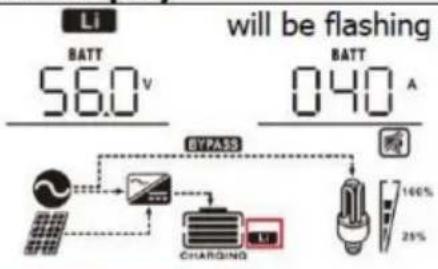 |
| 2 | Max lithium battery charging voltage | 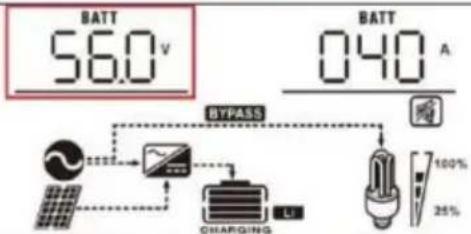 Max lithium battery charging voltage is 56.0V. Max lithium battery charging voltage is 56.0V. |
| 3 | Max lithium battery charging current | 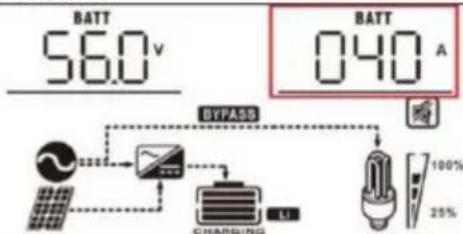 Max lithium battery charging current is 40A. Max lithium battery charging current is 40A. |
| 4 | Lithium battery discharging is forbidden |  |
| 5 | Lithium battery charging is forbidden |
| 6 | Lithium battery SOC(%) | 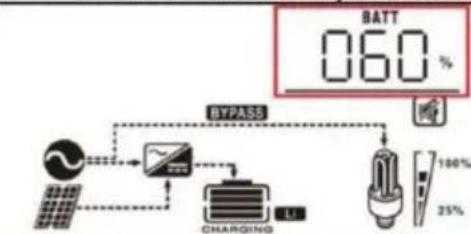 Lithium battery SOC is 63AH and 60% Lithium battery SOC is 63AH and 60% |
| Fault Code | Fault Event | Icon on |
| 01 | Over temperature of inverter module | |
| 02 | Over temperature of DCDC module | |
| 03 | Battery voltage is too high | |
| 04 | Over temperature of PV module | |
| 05 | Output short circuited. | |
| 06 | Output voltage is too high. | |
| 07 | Overload time out | |
| 08 | Bus voltage is too high | |
| 09 | Bus soft start failed | |
| 10 | PV over current | |
| 11 | PV over voltage | |
| 12 | DCDC over current | |
| 13 | Over current or surge | |
| 14 | Bus voltage is too low | |
| 15 | Inverter failed (Self-checking) | |
| 18 | Op current offset is too high | |
| 19 | Inverter current offset is too high | |
| 20 | DC/DC current offset is too high | |
| 21 | PV current offset is too high | |
| 22 | Output voltage is too low | |
| 23 | Inverter negative power | |
| Warning Code | Warning Event | Audible Alarm | Icon flashing |
| 02 | Temperature is too High | Beep three times every second | 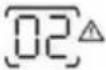 |
| 04 | Low battery | Beep once every second |  |
| 07 | Overload | Beep once every 0.5 second | 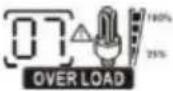 |
| 10 | Output power derating | Beep twice every 3 seconds | 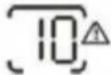 |
| 14 | Fan blocked | None | 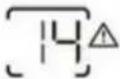 |
| 15 | PV energy is low | Beep twice every 3 seconds | 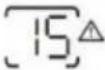 |
| 19 | Lithium Battery communication is failed | Beep once every 0.5 second | 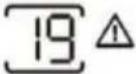 |
| 21 | Lithium Battery over current | None | 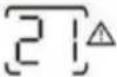 |
| E9 | Battery equalization | None | 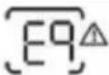 |
| bP | Battery is not connected | None | 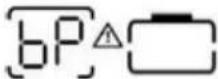 |
SPECIFICATIONS
C/O YH Consulting Limited Office 147, Centurion House,
London Road, Staines-upon-Thames, Surrey, TW18 4AX
VEVOR®
EML3500-24L
EM5500-48L
- LCD display 2.
Status indicator 3.
INSTALLATION
- Mounting the device
| Solar Panel Spec. (reference) - 450Wp - Vmp: 34.67Vdc - Imp: 13.82A - Voc: 41.25Vdc - Isc: 12.98A | SOLAR INPUT | Q'ty of panels | Total input power | Inverter Model |
| 3 pcs in serial | 3 pcs | 1,350 W | Э/5.5KVA/6.2KVA |
| 4 pcs in serial | 4 pcs | 1,800 W |
| 5 pcs in serial | 5 pcs | 2,250 W |
| 6 pcs in serial | 6 pcs | 2,700 W |
| 7 pcs in serial | 7 pcs | 3,150 W |
| 8 pcs in serial | 8 pcs | 3,600 W |
| 9 pcs in serial | 9 pcs | 4,050 W |
| 10 pcs in serial | 10 pcs | 4,500 W | 5.5KVA/6.2KVA |
| 11 pcs in serial | 11 pcs | 4,950 W |
| 12 pcs in serial | 12 pcs | 5,400 W |
| 6 pieces in serial and 2 sets in parallel | 12 pcs | 5,400 W | 6.2KVA |
| 8 pieces in serial and 2 sets in parallel | 14 pcs | 6,300 W |
| 1 pcs in serial | 1 pcs | 450W | 3.5KVA(PVmax=160V) |
| 2 pcs in serial | 2 pcs | 900W |
| 3 pcs in serial | 3 pcs | 1,350 W |
| Solar Panel Spec. (reference) - 550Wp - Vmp: 42.48Vdc - Imp: 12.95A - Voc: 50.32Vdc - Isc: 13.70A | SOLAR INPUT | Q'ty of panels | Total input power | Inverter Model |
| 3 pcs in serial | 3 pcs | 1,650 W | 5.5KVA/6.2KVA |
| 4 pcs in serial | 4 pcs | 2,200 W |
| 5 pcs in serial | 5 pcs | 2,750 W |
| 6 pcs in serial | 6 pcs | 3,300 W |
| 7 pcs in serial | 7 pcs | 3,850 W |
| 8 pcs in serial | 8 pcs | 4,400 W | 5.5KVA/6.2KVA |
| 9 pcs in serial | 9 pcs | 4,950 W |
| 10 pcs in serial | 10 pcs | 5,500 W | 5.5KVA/6.2KVA |
| 11 pcs in serial | 11 pcs | 6,050 W | 6.2KVA |
| 12 pcs in serial | 12 pcs | 6,600 W |
| 4 pieces in serial and 2 sets in parallel | 8 pcs | 4,400 W | 6.2KVA |
| 5 pieces in serial and 2 sets in parallel | 10 pcs | 5,500 W |
| 6 pieces in serial and 2 sets in parallel | 12 pcs | 6,600 W |
| 1 pcs in serial | 1 pcs | 550W | 3.5KVA(PVmax=160V) |
| 2 pcs in serial | 2 pcs | 1000W |
| 3 pcs in serial | 3 pcs | 1,500 W |
OPERATION
1. On/Off
LED display
| LED Indicator | Messages |
| Green | Solid On | Output is powered by utility in Line mode. |
| Flashing | Output is powered by battery or PV in battery mode. |
| Green | Solid On | Battery is fully charged. |
| Flashing | Battery is charging. |
| Red | Solid On | Fault occurs in the inverter. |
| Flashing | Warning condition occurs in the inverter. |
Function keys
| Function Key | Description |
| ESC | To exit setting mode |
| UP | To go to previous selection |
| DOWN | To go to next selection |
| ENTER | To confirm the selection in setting mode or enter setting mode |
3. LCD setting
5. SETTINGS FOR LITHIUM BATTERY
LCD setting
| Item | Description | LCD display |
| 1 | Communication successful icon | 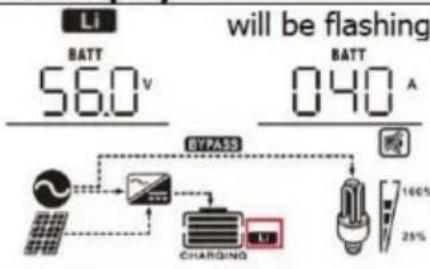 |
| 2 | Max lithium battery charging voltage | Max lithium battery charging voltage is 56.0V. |
| 3 | Max lithium battery charging current | 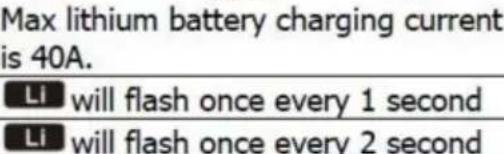 |
| 4 | Lithium battery discharging is forbidden |
| 5 | Lithium battery charging is forbidden |
| 6 | Lithium battery SOC(%) | Lithium battery SOC is 63AH and 60% |
| Fault Code | Fault Event | Icon on |
| 01 | Over temperature of inverter module | |
| 02 | Over temperature of DCDC module | |
| 03 | Battery voltage is too high | |
| 04 | Over temperature of PV module | |
| 05 | Output short circuited. | |
| 06 | Output voltage is too high. | |
| 07 | Overload time out | |
| 08 | Bus voltage is too high | |
| 09 | Bus soft start failed | |
| 10 | PV over current | |
| 11 | PV over voltage | |
| 12 | DCDC over current | |
| 13 | Over current or surge | |
| 14 | Bus voltage is too low | |
| 15 | Inverter failed (Self-checking) | |
| 18 | Op current offset is too high | |
| 19 | Inverter current offset is too high | |
| 20 | DC/DC current offset is too high | |
| 21 | PV current offset is too high | |
| 22 | Output voltage is too low | |
| 23 | Inverter negative power | |
Warning indicator
| Warning Code | Warning Event | Audible Alarm | Icon flashing |
| 02 | Temperature is too High | Beep three times every second | |
| 04 | Low battery | Beep once every second | |
| 07 | Overload | Beep once every 0.5 second | |
| 10 | Output power derating | Beep twice every 3 seconds | |
| 14 | Fan blocked | None | 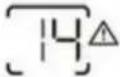 |
| 15 | PV energy is low | Beep twice every 3 seconds | |
| 19 | Lithium Battery communication is failed | Beep once every 0.5 second | |
| 21 | Lithium Battery over current | None | |
| E9 | Battery equalization | None | 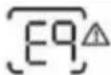 |
| bP | Battery is not connected | None | |
Specifications
C/O YH Consulting Limited Office 147, Centurion House,
London Road, Staines-upon-Thames, Surrey, TW18 4AX
VEVOR®
TOUGH TOOLS, HALF PRICE
www.vevor.com/support
VEVOR®
electronics www.vevor.com/support
HYBRID SOLAR INVERTER/CHARGER
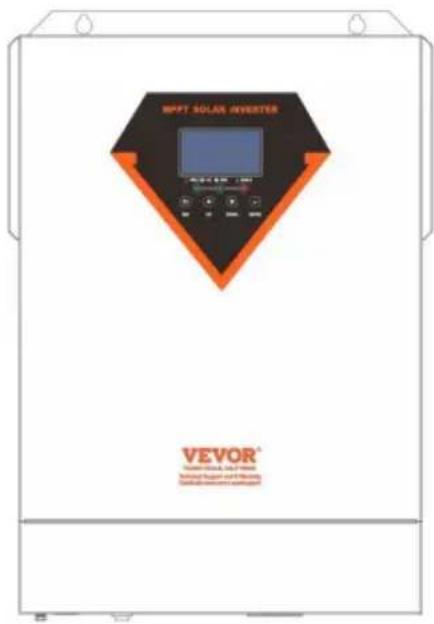
MODEL: EML3500-24L/EM5500-48L
Model EML3500-24L
Model EM5500-48L

- 2. LCD Display
INSTALLATION
| Solar Panel Spec. (reference) - 450Wp - Vmp: 34.67Vdc - Imp: 13.82A - Voc: 41.25Vdc - Isc: 12.98A | SOLAR INPUT | Q'ty of panels | Total input power | Inverter Model |
| 3 pcs in serial | 3 pcs | 1,350 W | 3/5.5KVA/6.2KVA |
| 4 pcs in serial | 4 pcs | 1,800 W |
| 5 pcs in serial | 5 pcs | 2,250 W |
| 6 pcs in serial | 6 pcs | 2,700 W |
| 7 pcs in serial | 7 pcs | 3,150 W |
| 8 pcs in serial | 8 pcs | 3,600 W |
| 9 pcs in serial | 9 pcs | 4,050 W |
| 10 pcs in serial | 10 pcs | 4,500 W | 5.5KVA/6.2KVA |
| 11 pcs in serial | 11 pcs | 4,950 W |
| 12 pcs in serial | 12 pcs | 5,400 W |
| 6 pieces in serial and 2 sets in parallel | 12 pcs | 5,400 W | 6.2KVA |
| 8 pieces in serial and 2 sets in parallel | 14 pcs | 6,300 W |
| 1 pcs in serial | 1 pcs | 450W | 3.5KVA(PVmax=160V) |
| 2 pcs in serial | 2 pcs | 900W |
| 3 pcs in serial | 3 pcs | 1,350 W |
| Solar Panel Spec. (reference) - 550Wp - Vmp: 42.48Vdc - Imp: 12.95A - Voc: 50.32Vdc - Isc: 13.70A | SOLAR INPUT | Q'ty of panels | Total input power | Inverter Model |
| 3 pcs in serial | 3 pcs | 1,650 W | 5.5KVA/6.2KVA |
| 4 pcs in serial | 4 pcs | 2,200 W |
| 5 pcs in serial | 5 pcs | 2,750 W |
| 6 pcs in serial | 6 pcs | 3,300 W |
| 7 pcs in serial | 7 pcs | 3,850 W |
| 8 pcs in serial | 8 pcs | 4,400 W | 5.5KVA/6.2KVA |
| 9 pcs in serial | 9 pcs | 4,950 W |
| 10 pcs in serial | 10 pcs | 5,500 W | 5.5KVA/6.2KVA |
| 11 pcs in serial | 11 pcs | 6,050 W | 6.2KVA |
| 12 pcs in serial | 12 pcs | 6,600 W |
| 4 pieces in serial and 2 sets in parallel | 8 pcs | 4,400 W | 6.2KVA |
| 5 pieces in serial and 2 sets in parallel | 10 pcs | 5,500 W |
| 6 pieces in serial and 2 sets in parallel | 12 pcs | 6,600 W |
| 1 pcs in serial | 1 pcs | 550W | 3.5KVA(PVmax=160V) |
| 2 pcs in serial | 2 pcs | 1000W |
| 3 pcs in serial | 3 pcs | 1,500 W |
OPERATION
LED Indicator
| LED Indicator | Messages |
| Green | Solid On | Output is powered by utility in Line mode. |
| Flashing | Output is powered by battery or PV in battery mode. |
| Green | Solid On | Battery is fully charged. |
| Flashing | Battery is charging. |
| Red | Solid On | Fault occurs in the inverter. |
| Flashing | Warning condition occurs in the inverter. |
Function Keys
| Function Key | Description |
| ESC | To exit setting mode |
| UP | To go to previous selection |
| DOWN | To go to next selection |
| ENTER | To confirm the selection in setting mode or enter setting mode |
3. Setting
LCD Setting
| Item | Description | LCD display |
| 1 | Communication successful icon | |
| 2 | Max lithium battery charging voltage | Max lithium battery charging voltage is 56.0V. |
| 3 | Max lithium battery charging current |  |
| 4 | Lithium battery discharging is forbidden | Li will flash once every 1 second |
| 5 | Lithium battery charging is forbidden | Li will flash once every 2 second |
| 6 | Lithium battery SOC(%) | Lithium battery SOC is 63AH and 60% |
| Fault Code | Fault Event | Icon on |
| 01 | Over temperature of inverter module | |
| 02 | Over temperature of DCDC module | |
| 03 | Battery voltage is too high | |
| 04 | Over temperature of PV module | |
| 05 | Output short circuited. | |
| 06 | Output voltage is too high. | |
| 07 | Overload time out | |
| 08 | Bus voltage is too high | |
| 09 | Bus soft start failed | |
| 10 | PV over current | |
| 11 | PV over voltage | |
| 12 | DCDC over current | |
| 13 | Over current or surge | |
| 14 | Bus voltage is too low | |
| 15 | Inverter failed (Self-checking) | |
| 18 | Op current offset is too high | |
| 19 | Inverter current offset is too high | |
| 20 | DC/DC current offset is too high | |
| 21 | PV current offset is too high | |
| 22 | Output voltage is too low | |
| 23 | Inverter negative power | |
| Warning Code | Warning Event | Audible Alarm | Icon flashing |
| 02 | Temperature is too High | Beep three times every second | |
| 04 | Low battery | Beep once every second |  |
| 07 | Overload | Beep once every 0.5 second | |
| 10 | Output power derating | Beep twice every 3 seconds | |
| 14 | Fan blocked | None | |
| 15 | PV energy is low | Beep twice every 3 seconds | |
| 19 | Lithium Battery communication is failed | Beep once every 0.5 second | |
| 21 | Lithium Battery over current | None | |
| E9 | Battery equalization | None | |
| bP | Battery is not connected | None | |
SPECIFICATIONS
Imported in AUS: SIHAO PTY LTD, 1 ROKEVA STREETEASTWOOD NSW 2122 Australia
Imported in USA: Sanven Technology Ltd., Suite 250, 9166 Anaheim Place, Rancho Cucamonga, CA 91730
EML3500-24L
EM5500-48L
- 2. LCD Screen
INSTALLATION

WARNING:
| Solar Panel Spec.(reference)- 450Wp- Vmp: 34.67Vdc- Imp: 13.82A- Voc: 41.25Vdc- Isc: 12.98A | SOLAR INPUT | Q'ty of panels | Total input power | Inverter Model |
| 3 pcs in serial | 3 pcs | 1,350 W | Э/5.5KVA/6.2KVA |
| 4 pcs in serial | 4 pcs | 1,800 W |
| 5 pcs in serial | 5 pcs | 2,250 W |
| 6 pcs in serial | 6 pcs | 2,700 W |
| 7 pcs in serial | 7 pcs | 3,150 W |
| 8 pcs in serial | 8 pcs | 3,600 W |
| 9 pcs in serial | 9 pcs | 4,050 W |
| 10 pcs in serial | 10 pcs | 4,500 W | 5.5KVA/6.2KVA |
| 11 pcs in serial | 11 pcs | 4,950 W |
| 12 pcs in serial | 12 pcs | 5,400 W |
| 6 pieces in serial and 2 sets in parallel | 12 pcs | 5,400 W | 6.2KVA |
| 8 pieces in serial and 2 sets in parallel | 14 pcs | 6,300 W |
| 1 pcs in serial | 1 pcs | 450W | 3.5KVA(PVmax=160V) |
| 2 pcs in serial | 2 pcs | 900W |
| 3 pcs in serial | 3 pcs | 1,350 W |
| Solar Panel Spec.(reference)- 550Wp- Vmp: 42.48Vdc- Imp: 12.95A- Voc: 50.32Vdc- Isc: 13.70A | SOLAR INPUT | Q'ty of panels | Total input power | Inverter Model |
| 3 pcs in serial | 3 pcs | 1,650 W | 5.5KVA/6.2KVA |
| 4 pcs in serial | 4 pcs | 2,200 W |
| 5 pcs in serial | 5 pcs | 2,750 W |
| 6 pcs in serial | 6 pcs | 3,300 W |
| 7 pcs in serial | 7 pcs | 3,850 W |
| 8 pcs in serial | 8 pcs | 4,400 W | 5.5KVA/6.2KVA |
| 9 pcs in serial | 9 pcs | 4,950 W |
| 10 pcs in serial | 10 pcs | 5,500 W | 5.5KVA/6.2KVA |
| 11 pcs in serial | 11 pcs | 6,050 W | 6.2KVA |
| 12 pcs in serial | 12 pcs | 6,600 W |
| 4 pieces in serial and 2 sets in parallel | 8 pcs | 4,400 W | 6.2KVA |
| 5 pieces in serial and 2 sets in parallel | 10 pcs | 5,500 W |
| 6 pieces in serial and 2 sets in parallel | 12 pcs | 6,600 W |
| 1 pcs in serial | 1 pcs | 550W | 3.5KVA(PVmax=160V) |
| 2 pcs in serial | 2 pcs | 1000W |
| 3 pcs in serial | 3 pcs | 1,500 W |
OPERATION
LED indicator
| LED Indicator | Messages |
| Green | Solid On | Output is powered by utility in Line mode. |
| Flashing | Output is powered by battery or PV in battery mode. |
| Green | Solid On | Battery is fully charged. |
| Flashing | Battery is charging. |
| Red | Solid On | Fault occurs in the inverter. |
| Flashing | Warning condition occurs in the inverter. |
Function keys
| Function Key | Description |
| ESC | To exit setting mode |
| UP | To go to previous selection |
| DOWN | To go to next selection |
| ENTER | To confirm the selection in setting mode or enter setting mode |
3. Setting the
| Item | Description | LCD display |
| 1 | Communication successful icon | |
| 2 | Max lithium battery charging voltage | Max lithium battery charging voltage is 56.0V. |
| 3 | Max lithium battery charging current | Max lithium battery charging current is 40A. |
| 4 | Lithium battery discharging is forbidden | |
| 5 | Lithium battery charging is forbidden |
| 6 | Lithium battery SOC(%) | Lithium battery SOC is 63AH and 60% |
| Fault Code | Fault Event | Icon on |
| 01 | Over temperature of inverter module | |
| 02 | Over temperature of DCDC module | |
| 03 | Battery voltage is too high | |
| 04 | Over temperature of PV module | |
| 05 | Output short circuited. | |
| 06 | Output voltage is too high. | |
| 07 | Overload time out | |
| 08 | Bus voltage is too high | |
| 09 | Bus soft start failed | |
| 10 | PV over current | |
| 11 | PV over voltage | |
| 12 | DCDC over current | |
| 13 | Over current or surge | |
| 14 | Bus voltage is too low | |
| 15 | Inverter failed (Self-checking) | |
| 18 | Op current offset is too high | |
| 19 | Inverter current offset is too high | |
| 20 | DC/DC current offset is too high | |
| 21 | PV current offset is too high | |
| 22 | Output voltage is too low | |
| 23 | Inverter negative power | |
| Warning Code | Warning Event | Audible Alarm | Icon flashing |
| 02 | Temperature is too High | Beep three times every second | |
| 04 | Low battery | Beep once every second | |
| 07 | Overload | Beep once every 0.5 second | |
| 10 | Output power derating | Beep twice every 3 seconds | |
| 14 | Fan blocked | None | |
| 15 | PV energy is low | Beep twice every 3 seconds | |
| 19 | Lithium Battery communication is failed | Beep once every 0.5 second | |
| 21 | Lithium Battery over current | None | |
| E9 | Battery equalization | None | |
| bP | Battery is not connected | None | |
BUDGET
Imported into Australia: SIHAO PTY LTD, 1 ROKEVA STREET EASTWOOD NSW
2122 Australia
Imported into the USA: Sanven Technology Ltd., Suite 250, 9166 Anaheim Place, Rancho
Cucamonga, CA 91730
C/O YH Consulting Limited Office 147, Centurion House,
London Road, Staines-upon-Thames, Surrey, TW18 4AX
VEVOR®
MODEL:EML3500-24L/EM5500-48L
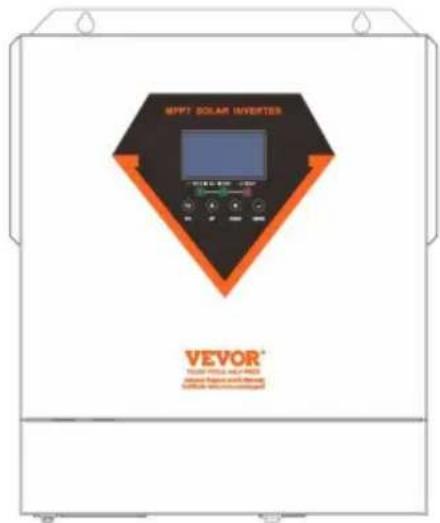
EML3500-24L
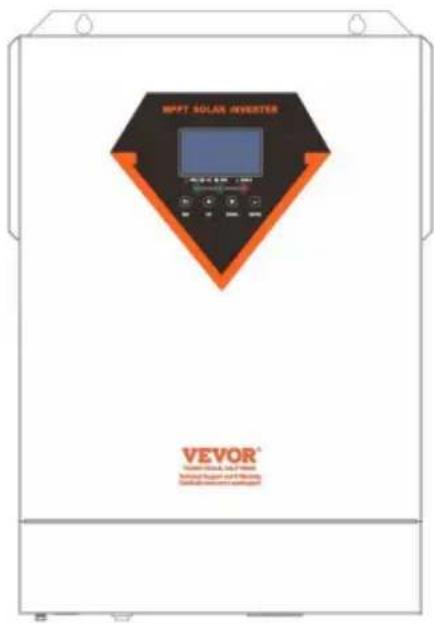
EM5500-48L
NEED HELP? CONTACT US!
INSTALLATION
- Device installation

WARNING:
| Solar Panel Spec. (reference) - 450Wp - Vmp: 34.67Vdc - Imp: 13.82A - Voc: 41.25Vdc - Isc: 12.98A | SOLAR INPUT | Q'ty of panels | Total input power | Inverter Model |
| 3 pcs in serial | 3 pcs | 1,350 W | 3/5.5KVA/6.2KVA |
| 4 pcs in serial | 4 pcs | 1,800 W |
| 5 pcs in serial | 5 pcs | 2,250 W |
| 6 pcs in serial | 6 pcs | 2,700 W |
| 7 pcs in serial | 7 pcs | 3,150 W |
| 8 pcs in serial | 8 pcs | 3,600 W |
| 9 pcs in serial | 9 pcs | 4,050 W |
| 10 pcs in serial | 10 pcs | 4,500 W | 5.5KVA/6.2KVA |
| 11 pcs in serial | 11 pcs | 4,950 W |
| 12 pcs in serial | 12 pcs | 5,400 W |
| 6 pieces in serial and 2 sets in parallel | 12 pcs | 5,400 W | 6.2KVA |
| 8 pieces in serial and 2 sets in parallel | 14 pcs | 6,300 W |
| 1 pcs in serial | 1 pcs | 450W | 3.5KVA(PVmax=160V) |
| 2 pcs in serial | 2 pcs | 900W |
| 3 pcs in serial | 3 pcs | 1,350 W |
| Solar Panel Spec. (reference) - 550Wp - Vmp: 42.48Vdc - Imp: 12.95A - Voc: 50.32Vdc - Isc: 13.70A | SOLAR INPUT | Q'ty of panels | Total input power | Inverter Model |
| 3 pcs in serial | 3 pcs | 1,650 W | 5.5KVA/6.2KVA |
| 4 pcs in serial | 4 pcs | 2,200 W |
| 5 pcs in serial | 5 pcs | 2,750 W |
| 6 pcs in serial | 6 pcs | 3,300 W |
| 7 pcs in serial | 7 pcs | 3,850 W |
| 8 pcs in serial | 8 pcs | 4,400 W | 5.5KVA/6.2KVA |
| 9 pcs in serial | 9 pcs | 4,950 W |
| 10 pcs in serial | 10 pcs | 5,500 W | 5.5KVA/6.2KVA |
| 11 pcs in serial | 11 pcs | 6,050 W | 6.2KVA |
| 12 pcs in serial | 12 pcs | 6,600 W |
| 4 pieces in serial and 2 sets in parallel | 8 pcs | 4,400 W | 6.2KVA |
| 5 pieces in serial and 2 sets in parallel | 10 pcs | 5,500 W |
| 6 pieces in serial and 2 sets in parallel | 12 pcs | 6,600 W |
| 1 pcs in serial | 1 pcs | 550W | 3.5KVA(PVmax=160V) |
| 2 pcs in serial | 2 pcs | 1000W |
| 3 pcs in serial | 3 pcs | 1,500 W |
OPERATION
LED indicator
| LED Indicator | Messages |
| Green | Solid On | Output is powered by utility in Line mode. |
| Flashing | Output is powered by battery or PV in battery mode. |
| Green | Solid On | Battery is fully charged. |
| Flashing | Battery is charging. |
| Red | Solid On | Fault occurs in the inverter. |
| Flashing | Warning condition occurs in the inverter. |
Function keys
| Function Key | Description |
| ESC | To exit setting mode |
| UP | To go to previous selection |
| DOWN | To go to next selection |
| ENTER | To confirm the selection in setting mode or enter setting mode |
3. LCD settings
5. SETTINGS FOR LITHIUM BATTERY
| Item | Description | LCD display |
| 1 | Communication successful icon | |
| 2 | Max lithium battery charging voltage | Max lithium battery charging voltage is 56.0V. |
| 3 | Max lithium battery charging current | Max lithium battery charging current is 40A. |
| 4 | Lithium battery discharging is forbidden | |
| 5 | Lithium battery charging is forbidden |
| 6 | Lithium battery SOC(%) | Lithium battery SOC is 63AH and 60% |
Installation process:
| Fault Code | Fault Event | Icon on |
| 01 | Over temperature of inverter module | |
| 02 | Over temperature of DCDC module | |
| 03 | Battery voltage is too high | |
| 04 | Over temperature of PV module | |
| 05 | Output short circuited. | |
| 06 | Output voltage is too high. | |
| 07 | Overload time out | |
| 08 | Bus voltage is too high | |
| 09 | Bus soft start failed | |
| 10 | PV over current | |
| 11 | PV over voltage | |
| 12 | DCDC over current | |
| 13 | Over current or surge | |
| 14 | Bus voltage is too low | |
| 15 | Inverter failed (Self-checking) | |
| 18 | Op current offset is too high | |
| 19 | Inverter current offset is too high | |
| 20 | DC/DC current offset is too high | |
| 21 | PV current offset is too high | |
| 22 | Output voltage is too low | |
| 23 | Inverter negative power | |
| Warning Code | Warning Event | Audible Alarm | Icon flashing |
| 02 | Temperature is too High | Beep three times every second | |
| 04 | Low battery | Beep once every second | |
| 07 | Overload | Beep once every 0.5 second | |
| 10 | Output power derating | Beep twice every 3 seconds | |
| 14 | Fan blocked | None | |
| 15 | PV energy is low | Beep twice every 3 seconds | |
| 19 | Lithium Battery communication is failed | Beep once every 0.5 second | |
| 21 | Lithium Battery over current | None | |
| E9 | Battery equalization | None | |
| bP | Battery is not connected | None | |
SPECIFICATIONS
Imported into AUS: SIHAO PTY LTD, 1 ROKEVA STREETEASTWOOD NSW 2122 Australia
Imported into USA: Sanven Technology Ltd., Suite 250, 9166 Anaheim Place, Rancho Cucamonga, CA 91730
E-Cr sStu GmbH os
C/O YH Consulting Limited Office 147, Centurion House, London Road, Staines-upon-Thames, Surrey, TW18 4AX
VEVOR®
MODEL:EML3500-24L/EM5500-48L
EML3500-24L
EM5500-48L
- LCD screen 2.
Status indicator 3.
Charge indicator 4.
Fault indicator
INSTALLATION
3. Mounting the unit
| Solar Panel Spec.(reference)- 450Wp- Vmp: 34.67Vdc- Imp: 13.82A- Voc: 41.25Vdc- Isc: 12.98A | SOLAR INPUT | Q'ty of panels | Total input power | Inverter Model |
| 3 pcs in serial | 3 pcs | 1,350 W | Э/5.5KVA/6.2KVA |
| 4 pcs in serial | 4 pcs | 1,800 W |
| 5 pcs in serial | 5 pcs | 2,250 W |
| 6 pcs in serial | 6 pcs | 2,700 W |
| 7 pcs in serial | 7 pcs | 3,150 W |
| 8 pcs in serial | 8 pcs | 3,600 W |
| 9 pcs in serial | 9 pcs | 4,050 W |
| 10 pcs in serial | 10 pcs | 4,500 W | 5.5KVA/6.2KVA |
| 11 pcs in serial | 11 pcs | 4,950 W |
| 12 pcs in serial | 12 pcs | 5,400 W |
| 6 pieces in serial and 2 sets in parallel | 12 pcs | 5,400 W | 6.2KVA |
| 8 pieces in serial and 2 sets in parallel | 14 pcs | 6,300 W |
| 1 pcs in serial | 1 pcs | 450W | 3.5KVA(PVmax=160V) |
| 2 pcs in serial | 2 pcs | 900W |
| 3 pcs in serial | 3 pcs | 1,350 W |
| Solar Panel Spec.(reference)- 550Wp- Vmp: 42.48Vdc- Imp: 12.95A- Voc: 50.32Vdc- Isc: 13.70A | SOLAR INPUT | Q'ty of panels | Total input power | Inverter Model |
| 3 pcs in serial | 3 pcs | 1,650 W | 5.5KVA/6.2KVA |
| 4 pcs in serial | 4 pcs | 2,200 W |
| 5 pcs in serial | 5 pcs | 2,750 W |
| 6 pcs in serial | 6 pcs | 3,300 W |
| 7 pcs in serial | 7 pcs | 3,850 W |
| 8 pcs in serial | 8 pcs | 4,400 W | 5.5KVA/6.2KVA |
| 9 pcs in serial | 9 pcs | 4,950 W |
| 10 pcs in serial | 10 pcs | 5,500 W | 5.5KVA/6.2KVA |
| 11 pcs in serial | 11 pcs | 6,050 W | 6.2KVA |
| 12 pcs in serial | 12 pcs | 6,600 W |
| 4 pieces in serial and 2 sets in parallel | 8 pcs | 4,400 W | 6.2KVA |
| 5 pieces in serial and 2 sets in parallel | 10 pcs | 5,500 W |
| 6 pieces in serial and 2 sets in parallel | 12 pcs | 6,600 W |
| 1 pcs in serial | 1 pcs | 550W | 3.5KVA(PVmax=160V) |
| 2 pcs in serial | 2 pcs | 1000W |
| 3 pcs in serial | 3 pcs | 1,500 W |
PV module wire connection:
OPERATION
1. Turning on/off
LED indicator
| LED Indicator | Messages |
| Green | Solid On | Output is powered by utility in Line mode. |
| Flashing | Output is powered by battery or PV in battery mode. |
| Green | Solid On | Battery is fully charged. |
| Flashing | Battery is charging. |
| Red | Solid On | Fault occurs in the inverter. |
| Flashing | Warning condition occurs in the inverter. |
Function keys
| Function Key | Description |
| ESC | To exit setting mode |
| UP | To go to previous selection |
| DOWN | To go to next selection |
| ENTER | To confirm the selection in setting mode or enter setting mode |
3. LCD setting
ÿ Equalize charge time and timeout In the Equalize-
5. SETTING FOR LITHIUM BATTERY
LCD setting
| Item | Description | LCD display |
| 1 | Communication successful icon | |
| 2 | Max lithium battery charging voltage | Max lithium battery charging voltage is 56.0V. |
| 3 | Max lithium battery charging current |  |
| 4 | Lithium battery discharging is forbidden |
| 5 | Lithium battery charging is forbidden |
| 6 | Lithium battery SOC(%) | [Lithium battery SOC is 63AH and 60%] |
| Fault Code | Fault Event | Icon on |
| 01 | Over temperature of inverter module | |
| 02 | Over temperature of DCDC module | |
| 03 | Battery voltage is too high | |
| 04 | Over temperature of PV module | |
| 05 | Output short circuited. | |
| 06 | Output voltage is too high. | |
| 07 | Overload time out | |
| 08 | Bus voltage is too high | |
| 09 | Bus soft start failed | |
| 10 | PV over current | |
| 11 | PV over voltage | |
| 12 | DCDC over current | |
| 13 | Over current or surge | |
| 14 | Bus voltage is too low | |
| 15 | Inverter failed (Self-checking) | |
| 18 | Op current offset is too high | |
| 19 | Inverter current offset is too high | |
| 20 | DC/DC current offset is too high | |
| 21 | PV current offset is too high | |
| 22 | Output voltage is too low | |
| 23 | Inverter negative power | |
| Warning Code | Warning Event | Audible Alarm | Icon flashing |
| 02 | Temperature is too High | Beep three times every second | |
| 04 | Low battery | Beep once every second | |
| 07 | Overload | Beep once every 0.5 second | |
| 10 | Output power derating | Beep twice every 3 seconds | |
| 14 | Fan blocked | None | |
| 15 | PV energy is low | Beep twice every 3 seconds | |
| 19 | Lithium Battery communication is failed | Beep once every 0.5 second | |
| 21 | Lithium Battery over current | None | |
| E9 | Battery equalization | None | |
| bP | Battery is not connected | None | |
SPECIFICATIONS
C/O YH Consulting Limited Office 147, Centurion House, London Road, Staines-upon-Thames, Surrey, TW18 4AX
VEVOR®
TOUGH TOOLS, HALF PRICE
Technical support and e-warranty certificate www.vevor.com/support
VEVOR®
www.vevor.com/support
HYBRID SOLAR INVERTER/CHARGER
MODEL: EML3500-24L/EM5500-48L
MODEL: EML3500-24L/EM5500-48L
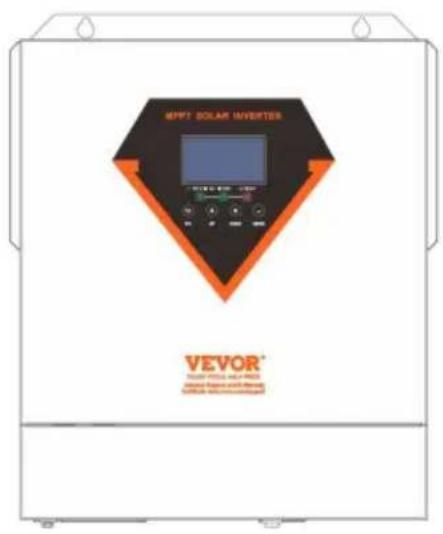
EML3500-24L
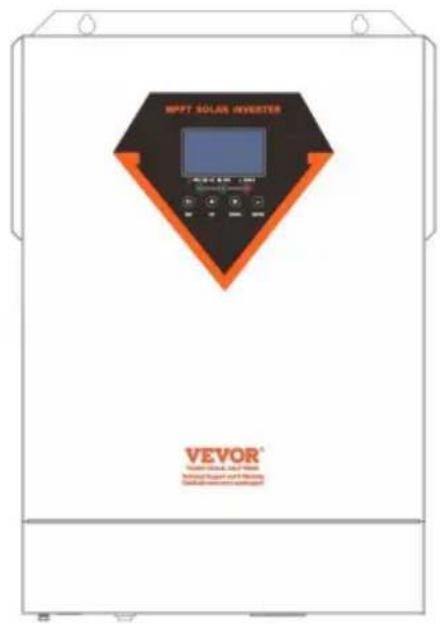
EM5500-48L
NEED HELP? CONTACT US!
- LCD display 2.
Status indicator 3.
INSTALLATION
| Solar Panel Spec. (reference) - 450Wp - Vmp: 34.67Vdc - Imp: 13.82A - Voc: 41.25Vdc - Isc: 12.98A | SOLAR INPUT | Q'ty of panels | Total input power | Inverter Model |
| 3 pcs in serial | 3 pcs | 1,350 W | 3/5.5KVA/6.2KVA |
| 4 pcs in serial | 4 pcs | 1,800 W |
| 5 pcs in serial | 5 pcs | 2,250 W |
| 6 pcs in serial | 6 pcs | 2,700 W |
| 7 pcs in serial | 7 pcs | 3,150 W |
| 8 pcs in serial | 8 pcs | 3,600 W |
| 9 pcs in serial | 9 pcs | 4,050 W |
| 10 pcs in serial | 10 pcs | 4,500 W | 5.5KVA/6.2KVA |
| 11 pcs in serial | 11 pcs | 4,950 W |
| 12 pcs in serial | 12 pcs | 5,400 W |
| 6 pieces in serial and 2 sets in parallel | 12 pcs | 5,400 W | 6.2KVA |
| 8 pieces in serial and 2 sets in parallel | 14 pcs | 6,300 W |
| 1 pcs in serial | 1 pcs | 450W | 3.5KVA(PVmax=160V) |
| 2 pcs in serial | 2 pcs | 900W |
| 3 pcs in serial | 3 pcs | 1,350 W |
| Solar Panel Spec. (reference) - 550Wp - Vmp: 42.48Vdc - Imp: 12.95A - Voc: 50.32Vdc - Isc: 13.70A | SOLAR INPUT | Q'ty of panels | Total input power | Inverter Model |
| 3 pcs in serial | 3 pcs | 1,650 W | 5.5KVA/6.2KVA |
| 4 pcs in serial | 4 pcs | 2,200 W |
| 5 pcs in serial | 5 pcs | 2,750 W |
| 6 pcs in serial | 6 pcs | 3,300 W |
| 7 pcs in serial | 7 pcs | 3,850 W |
| 8 pcs in serial | 8 pcs | 4,400 W | 5.5KVA/6.2KVA |
| 9 pcs in serial | 9 pcs | 4,950 W |
| 10 pcs in serial | 10 pcs | 5,500 W | 5.5KVA/6.2KVA |
| 11 pcs in serial | 11 pcs | 6,050 W | 6.2KVA |
| 12 pcs in serial | 12 pcs | 6,600 W |
| 4 pieces in serial and 2 sets in parallel | 8 pcs | 4,400 W | 6.2KVA |
| 5 pieces in serial and 2 sets in parallel | 10 pcs | 5,500 W |
| 6 pieces in serial and 2 sets in parallel | 12 pcs | 6,600 W |
| 1 pcs in serial | 1 pcs | 550W | 3.5KVA(PVmax=160V) |
| 2 pcs in serial | 2 pcs | 1000W |
| 3 pcs in serial | 3 pcs | 1,500 W |
OPERATION
1. Power ON/OFF
LED indicator
| LED Indicator | Messages |
| Green | Solid On | Output is powered by utility in Line mode. |
| Flashing | Output is powered by battery or PV in battery mode. |
| Green | Solid On | Battery is fully charged. |
| Flashing | Battery is charging. |
| Red | Solid On | Fault occurs in the inverter. |
| Flashing | Warning condition occurs in the inverter. |
Function keys
| Function Key | Description |
| ESC | To exit setting mode |
| UP | To go to previous selection |
| DOWN | To go to next selection |
| ENTER | To confirm the selection in setting mode or enter setting mode |
3. LCD setting
5. SETTING FOR LITHIUM BATTERY
LCD setting
| Item | Description | LCD display |
| 1 | Communication successful icon | |
| 2 | Max lithium battery charging voltage | Max lithium battery charging voltage is 56.0V. |
| 3 | Max lithium battery charging current | |
| 4 | Lithium battery discharging is forbidden |
| 5 | Lithium battery charging is forbidden |
| 6 | Lithium battery SOC(%) | 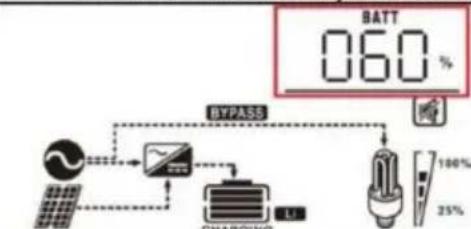 Lithium battery SOC is 63AH and 60% Lithium battery SOC is 63AH and 60% |
| Fault Code | Fault Event | Icon on |
| 01 | Over temperature of inverter module | |
| 02 | Over temperature of DCDC module | |
| 03 | Battery voltage is too high | |
| 04 | Over temperature of PV module | |
| 05 | Output short circuited. | |
| 06 | Output voltage is too high. | |
| 07 | Overload time out | |
| 08 | Bus voltage is too high | |
| 09 | Bus soft start failed | |
| 10 | PV over current | |
| 11 | PV over voltage | |
| 12 | DCDC over current | |
| 13 | Over current or surge | |
| 14 | Bus voltage is too low | |
| 15 | Inverter failed (Self-checking) | |
| 18 | Op current offset is too high | |
| 19 | Inverter current offset is too high | |
| 20 | DC/DC current offset is too high | |
| 21 | PV current offset is too high | |
| 22 | Output voltage is too low | |
| 23 | Inverter negative power | |
Warning indicator
| Warning Code | Warning Event | Audible Alarm | Icon flashing |
| 02 | Temperature is too High | Beep three times every second | |
| 04 | Low battery | Beep once every second | |
| 07 | Overload | Beep once every 0.5 second | |
| 10 | Output power derating | Beep twice every 3 seconds | |
| 14 | Fan blocked | None | |
| 15 | PV energy is low | Beep twice every 3 seconds | |
| 19 | Lithium Battery communication is failed | Beep once every 0.5 second | |
| 21 | Lithium Battery over current | None | |
| E9 | Battery equalization | None | |
| bP | Battery is not connected | None | |
SPECIFICATIONS
C/O YH Consulting Limited Office 147, Centurion House, London Road, Staines-upon-Thames, Surrey, TW18 4AX
VEVOR®
TOUGH TOOLS, HALF PRICE
www.vevor.com/support