
T021K - IPL hair remover Vevor - Free user manual and instructions
Find the device manual for free T021K Vevor in PDF.
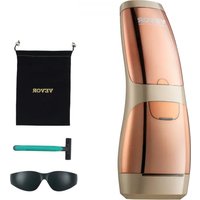


| Product Type | Intense Pulsed Light (IPL) Hair Removal Device |
| Brand | Vevor |
| Model | T021K |
| Dimensions | 73.2 × 81.1 × 202.2 mm |
| Weight | 323.5 g |
| Power Supply | AC Adapter 100-240 V AC, 50/60 Hz, 1.5 A |
| Main Unit Input | 24 V DC, 2.0 A |
| Wavelength | 510 - 1200 nm |
| Maximum Energy Density | 4.8 J/cm² |
| Pulse Duration | 4 - 12 ms |
| Output Energy | 5.6 - 14.5 J |
| Maximum Number of Flashes | 400,000 |
| Treatment Area | 3.0 cm² |
| Operating Modes | Manual, Automatic, Skin Color Recognition |
| Cooling | Sapphire Cooling Plate with Semiconductor |
| Intensity Levels | 5 Levels |
| Operating Temperature | 5 - 30 °C |
| Operating Humidity | 20 - 90 % (non-condensing) |
| Warranty | 1 year for main unit |
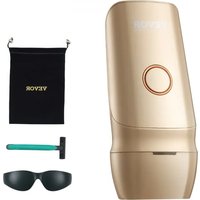
| Included Accessories | Adapter, protective glasses, razor, storage bag, manual |
| Maintenance | Clean with 70% isopropyl alcohol wipes |
| Safety | Skin contact sensor, skin tone detection, automatic shutdown in case of overheating |
| Skin Tone Compatibility | Light to moderate brown skin (types I to IV) |
| Repairability | Do not disassemble, contact after-sales service |
Frequently Asked Questions - T021K Vevor
User questions about T021K Vevor
0 question about this device. Answer the ones you know or ask your own.
Ask a new question about this device
Download the instructions for your IPL hair remover in PDF format for free! Find your manual T021K - Vevor and take your electronic device back in hand. On this page are published all the documents necessary for the use of your device. T021K by Vevor.
USER MANUAL T021K Vevor
Technical Support and E-Warranty Certificate www.vevor.com/support
Intense Pulsed Light (IPL) System
Model: T021K
VEVOR®
TOUGH TOOLS, HALF PRICE
Technical Support and E-Warranty Certificate www.vevor.com/support
We continue to be committed to provide you tools with competitive price.
"Save Half", "Half Price" or any other similar expressions used by us only represents an estimate of savings you might benefit from buying certain tools with us compared to the major top brands and does not necessarily mean to cover all categories of tools offered by us. You are kindly reminded to verify carefully when you are placing an order with us if you are actually
saving half in comparison with the top major brands.
Table of Contents
- Safety Instruction ....03
- Symbols....06
- Device Description....07
3.1. General introduction 08 3.2. Indications for use 08 3.3. Introduction of device ....08 3.3.1. Device picture....08 3.3.2. Configuration of Main unit....09 3.3.3. Introduction of Display screen....10
- How to Use....11
4.1. Device Operation Introduction....11 4.2. Skin Test Patch....17 4.3. Using Suggestions....18 4.4. Using Steps....19
- Rare Side Effects....22
- Cleaning & Maintenance....22
6.1. Cleaning....22 6.2. Maintenance....23
- Storage....23
- Recycling....24
- Warranty & Support....24
- Packing List....26
- Specification Parameters....26
- Frequently Asked Questions....28
- Important Information Regarding Electro Magnetic Compatibility (EMC)....30 14. Operating Record....37
VEVOR®
TOUGH TOOLS, HALF PRICE
Intense Pulsed Light
(IPL) System
Model: T021K
NEED HELP? CONTACT US!
Have product questions? Need technical support? Please feel free to contact us:
Technical Support and E-Warranty Certificate
www.vevor.com/support
This is the original instruction. Please read all manual instructions carefully before operating. VEVOR reserves a clear interpretation of our user manual. The appearance of the product shall be subject to the product you received. Please forgive us that we won't inform you again if there are any technology or software updates on our product.
1. Safety Instructions
Before using the Intense Pulsed Light (IPL) System for the first time, please read the user manual carefully.
Warning
• This device is not a toy, keep out of reach of children.
- Please verify the device before you start using it. DO NOT use if there is any
damage.
- Keep the device and power adapter dry.
- Make sure the device operating voltage complies with the rated voltage of the power source.
Caution
The Intense Pulsed Light (IPL) System is an electrical device. As such, it should be used with special attention to safety. Please read all warnings and cautions before use, and strictly follow them when using the device.
Contraindications:
The following persons should not use this device:
- Pregnant women or while nursing, or during menstruation: children.
- Your skin is sensitive to light and is prone to develop a rash or allergic reaction.
- You have skin type V and VI (You rarely to never sunburn, very dark tanning).
In this case you run a high risk of developing skin reactions, such as hyperpigmentation and hypopigmentation, strong redness or burns.
- Persons with a history of skin diseases, or those who are currently being treated for skin related diseases.
- Persons with precancerous lesions or multiple atypical birthmarks (moles) on the areas you want to use the device.
- If the area you want to treat has infections, burns, eczema, hair follicle inflammation, scratches, open wounds, herpes simplex, lacerations or hematomas.
- Persons with a history of collagen disorder, keloid scar formation or difficulty in healing wounds.
- Persons with a history of vascular diseases, such as varicose veins, etc.
- Persons with diabetes, lupus erythematosus, porphyria, congestive heart disease, and bleeding disorders.
- Persons who have a history of immunosuppressive disease (including HIV infection and AIDS).
- If you are receiving or have received in the last couple of months radiotherapy or chemotherapy.
Warning
DO NOT use this device on the following areas:
- On areas with hyperpigmentation or hypopigmentation, intense redness, or burns.
- On areas where you had surgery.
- Around the eyes and eyebrows to avoid eye injury.
- On the nipples, areolas, labia minora, vagina, anus, inside the nostril and ears.
Men cannot use this device on the scrotum and face.
- Near silicone implants, pacemakers, subcutaneous injection port (such as insulin
dispensers), body piercings. Any artificial surface should be avoided.
- On moles, freckles, large veins, darker pigmented areas, scars, and skin abnormalities without doctor supervision.
- On tattoos or permanent makeup, as it can cause burns to the skin and change its pigmentation.
- On areas where you use long-lasting deodorants, as it may cause skin irritation.
- Do not use this device on skin with sunburns, recently tanned or false tanned.
DO NOT use this device if you take the following medications or treatments:
- Your skin is being treated or has recently been treated with alpha-hydroxy acids (AHAs), beta-hydroxy acids (BHAs), topical isotretinoin and azelaic acid.
- If you have taken oral or topical Accutane or Roaccutane acid in the past six months. This treatment makes skin more susceptible to lacerations, trauma, and irritation.
- If you are taking any kind of photosensitizing agent or medication, always verify the patient information leaflet of the medicine, and do not use the device if it is specified that it can cause light allergy reactions, photo-toxic reactions, or if you should avoid sun exposure while taking the medicine.
- If you are taking anticoagulant medicines, including the use of large quantities of aspirin and cannot stop at least one week before each treatment.
Immediately STOP using the device and consult a doctor if you feel any discomfort.
Do not leave the equipment unattended when it is switched on to avoid the risk of fire or burns.
This equipment is not intended for use by persons with reduced physical, sensory or mental capabilities, or lack of experience and knowledge, unless they have
been given supervision or instruction concerning use of the equipment to avoid the risk of fire or burns.
This equipment is not intended for use by children. Keep it away from children. This is not a toy, the charging cord could lead to strangulation. Water and electricity are a dangerous combination! To avoid risk of electrocution. - do not use this equipment in wet surroundings (e.g. in the bathroom or near a shower or swimming pool); - do not let water run into the appliance. ➢ Check if the voltage indicated on the equipment corresponds to the local mains voltage before you connect the equipment to avoid risk of electrocution or permanent damage to the equipment. If the wall socket used to power the equipment has poor connections, the plug of the equipment becomes hot. Make sure you plug the equipment into a properly installed wall socket to avoid the risk of fire and burns. The PATIENT is an intended OPERATOR. Do not service and maintain while the device is in use. Do not locate the device so that it is difficult to operate the disconnection device. ➢ Preventive inspection, maintenance shall be performed Periodically to ensure the continued Safety of the device. At least 10 minutes is required for the device to warm from the minimum storage temperature between uses until the device is ready for its intended use when the ambient temperature is 20°C. At least 10 minutes is required for the device to cool from the maximum storage temperature between uses until the device is ready for its intended use when the ambient temperature is 20°C.
Caution
DO NOT touch the internal parts to avoid electric shock, if the device is damaged, ➢ DO NOT insert any objects into the device. The adapter contains a transformer, DO NOT cut the power converter to replace it with another plug as it is dangerous. ➢ DO NOT use the device if the filter of the light exit window is damaged. ➢ Regularly clean the device surface to extend its lifetime.
DO NOT attempt to disassemble, repair or modify the device by yourself to avoid accidents. DO NOT use this device in an environment with flammable materials, solutions, gases, or an oxygen-rich environment to avoid fire risk. When using this device, ensure you (and other people in the same room) do
not look directly into the light exit window to avoid eye discomfort. ALWAYS use protective goggles (included) when using the device.
DO NOT cover the vent during use. DO NOT wrap the cable around neck. DO NOT use power adapter other than provided by the manufacturer. This device is for single patient reuse. DO NOT use the device after sunbathing. Please do a cutaneous sensibility test and wait for 24 hours, if you are not sure whether your skin has been tanned or burned. Please unplug the adapter after using. The warning list is not exhaustive. If you are not sure whether you can or cannot use this device, please consult a doctor. Do not subject the equipment to heavy shocks to avoid risk of damage to the lamp. Always unplug the appliance after use and in case of a power failure to avoid risk of damage to the equipment. Lint, dust, light (including sunlight) can affect your device, please avoid use or storage of your product in such situations. Please ensure your product cannot be reached by pets, children.
Please ensure your product cannot be reached by pets, children. 2. Symbols
 | Alternating current This way up | |
 | Direct current Date of mar  e e | |
 | CLASS II equipment Tem  limit limit | |
 | Caution Humidity limitation  | |
 | Warning Atmospheric pres  imitation imitation | |
 | Type BF applied part  | The device should be sent to the special agencies according to local regulations for separate collection after its useful life |
 | Refer to instruction manual |  | This device has not been tested for use in an MR environment and should not be used exposed to MR environments while patients are wearing the device. Keep it outside the MRI scanner room. |
 | Manufacturer Wear eye p |  | |
 | Serial number |  | Indicates a medical device that can be broken or damaged if not handled carefully. |
 | Indicates a medical device that needs protection from light sources. | [8008] | Indicates a medical device that needs to be protected from moisture. |
| FC | Federal Communications Commission | ||
3. Device Description
Intense Pulsed Light (IPL) System is a device for hair removal based on Intense Pulsed Light (IPL). It works below the skin's surface. The device is only powered by the external power adapter and its IPL emission activation is by finger switch, the purpose of the IPL light is to heat the root where the hair grows. The device incorporates Intense Pulsed Light (IPL) technology.
The Intense Pulsed Light (IPL) System features cooling care function which is realized through semiconductor cooling plate, this function auto starts when device is powered on and auto off when device is powered off. The cold side of semiconductor cooling plate contacts Sapphire Cooling Plate which is the surface of Light Exit Window and contact with skin surface directly. Since the temperature of Sapphire Cooling Plate is lower than temperature of skin surface, it generates cooling feeling when device contacts with skin surface during it works, this is a physical heat transfer process.
The device is intended to be used for adults aged over 18.
3.1. General introduction
Device Name: Intense Pulsed Light (IPL) System Model: T021K
3.2. Indications for use
The Intense Pulsed Light (IPL) System is an over-the-counter device intended for the removal of unwanted body hair.
3.3. Introduction of device
3.3.1. Device picture
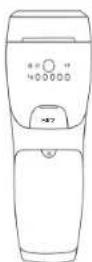
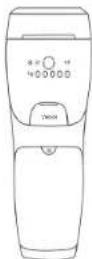
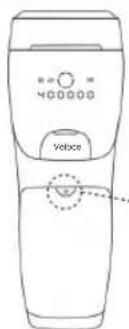
Main unit (picture 1):
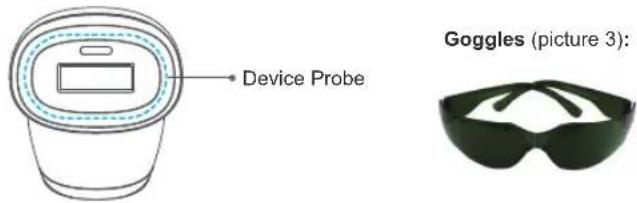
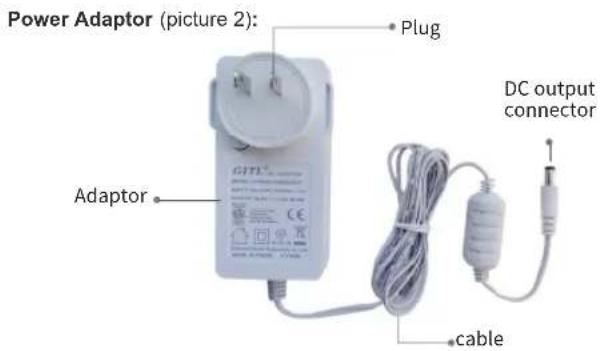
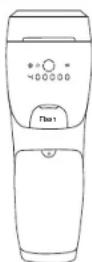
3.3.2. Configuration of Main unit
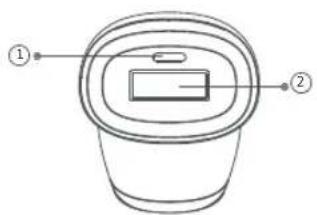
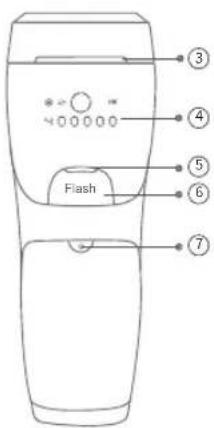
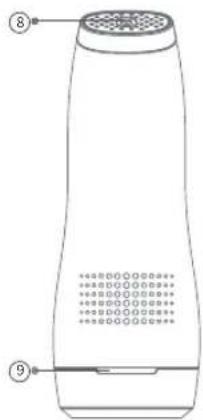
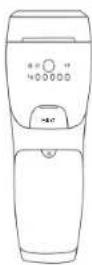
①Skin color recognition Window ②Light Exit Window (3cm 4 )/ Sapphire Crystal Cooling Compress ③Air Vents (Air outlet) ④Display screen ⑤Flash Ready Light
⑥Flash Button ⑦On/Off / Level adjustment button ⑧DC Plug-in Port ⑨Air Vents (Air inlet)
| Status of Flash Ready Light | When | Graphical representation |
| Light on | 1. In “Manual Emit Flash mode”, the Device probe is not in full contact with the skin.2. In "Skin Color Recognition mode", the device probe is not in full contact with the skin. | 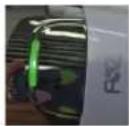 |
| Light with blinking | 1. In “Manual Emit Flash mode”, the Device probe fully contact the skin and device is ready to trigger a flash, but you haven't pressed the Flash Button[Flash] yet.2. In “Auto Emit Flash mode”, the Device probe is not in full contact with the skin. | 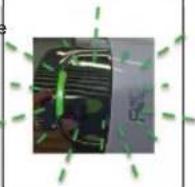 |
3.3.3. Introduction of Display screen
The following items are shown on the display after the device is turned on:
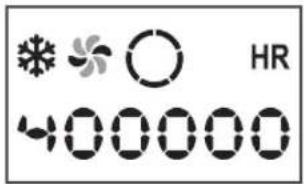
| Intensity level | Indicates Intensity level which is adjustable from level 1 to 5.This circle is divided into five parts means the five Intensity level, during device working, the number of parts lighting up is the Intensity level, e.g.: one part of the sign lights up, means the Intensity level is 1. | |
| HR | Hair removal | Sign of Hair removal.When device is powered on, the sign Rights up and generating cooling feeling all the time once contacting with device until device powered off.When the device enters "Skin Color Recognition mode", the sign "Will disappear. |
| Fan | Cooling the internal parts of the main unit during device working;When device is powered on, the two blades of sign lights up and rotates and fan begins working, it will continues working for 30 seconds after device powered off. | |
| Cooling care function | Generating cooling feeling.When device is powered on, the sign lights up and generating cooling feeling all the time once contacting with device until device powered off. | |
| 400000 | Number of remaining flashes | The number of remaining flash times decreases by 1 if flash emits once,This number will gradually decrease to 0 due to increasing use. |
4. How to Use
To ensure the correct operation of this device, please read the instructions carefully before use.
4.1. Device Operation Introduction
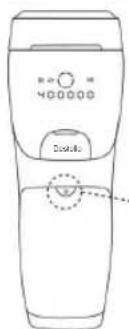
Preparation: Connect power adaptor and main unit like following picture 4:
Picture 4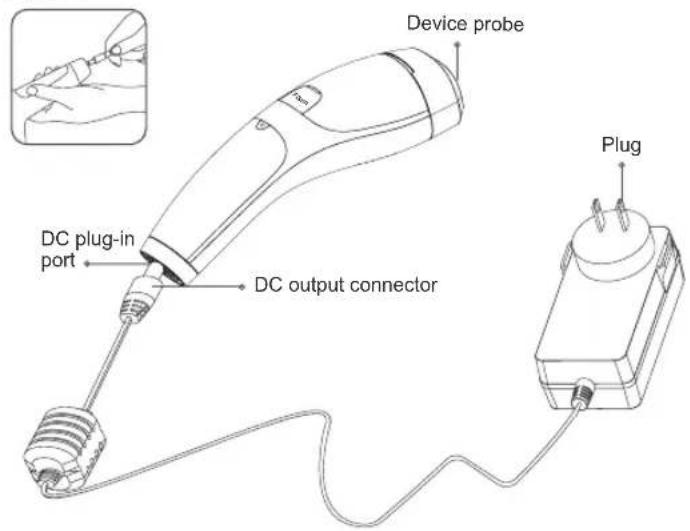
Insert the plug into a power socket and the device gets in standby with about a one-second-long continuous beeping sound.
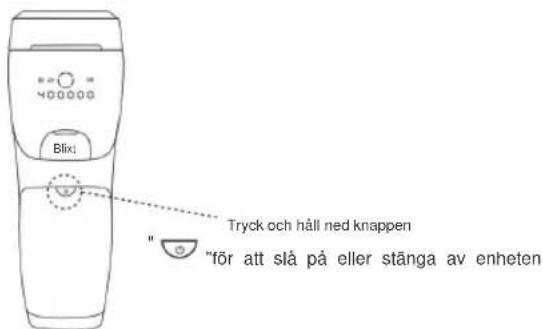
- Powered on: With the device in standby, press and hold the "On/Off/Level adjustment button" for about 2 seconds, the device will be powered on at the first intensity level setting with a one beeping sounds, at the same time the Fan and cooling care function begin working. (Picture 5)
Picture 5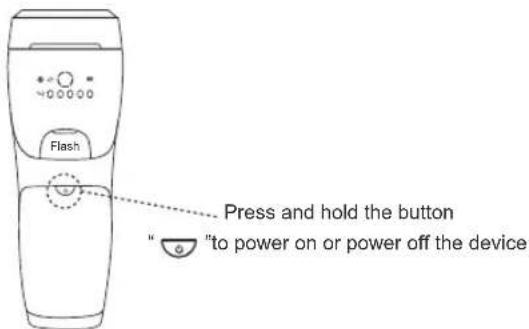
- Powered OFF: Press and hold the "On/Off/Level adjustment button" flop about 2 seconds, the display screen will stop lighting and show "OFF", and the device powered off after one beeping sound, and only fan continues working for another 30 seconds after device powered off.
- Intensity Level Adjustment: With the device Powered on, press the "On/Off / Level adjustment button" to adjust the treatment intensity level in a cycle-a total of 5 levels. First-time users should start the first session at the lowest intensity level. You can gradually increase the intensity level. (Picture 6) Picture 6
- Manual Emit Flash mode:
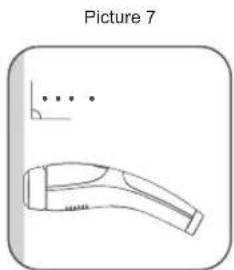
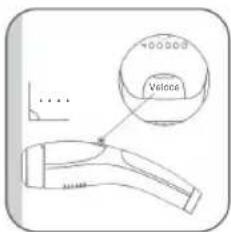
(1) With the device powered on, it automatically enters "Manual Emit Flash mode". (2) Place the device probe against the area to be treated and press (Picture 7).
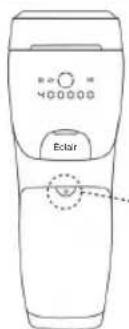
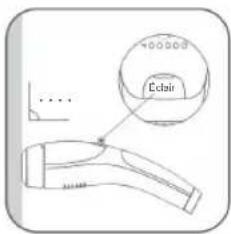
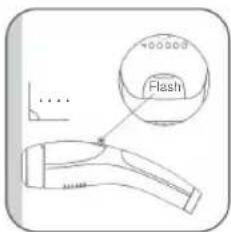
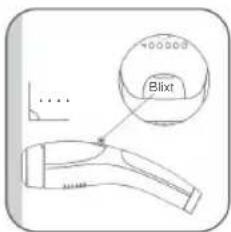
(3) When the Flash Ready Light is blinking, press the Flash Button to trigger a flash. (Picture 8).
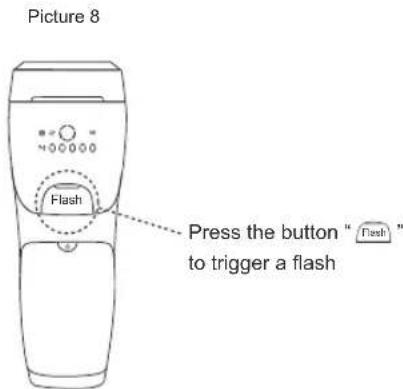
Notes: 1). In "Manual Emit Flash mode", if the device probe is not in full contact with the skin, the Flash Ready Light will light up and the device will not emit a flash when pressing the Flash Button "Flash". 2). In "Manual Emit Flash mode", if the device probe is in full contact with the skin but the Flash Button "Flash" is not pressed to trigger a flash, the Flash Ready Light will blink.
3). If the Light Exit Window is close to the skin and does not move, and the flash is continuously exposed for 8 seconds, the Flash Ready Light will light up without blinking and the device will emit a flash. 4). "Manual Emit Flash mode" is recommended for small area hair removal.
- Auto Emit Flash mode: With the device in "Manual Emit Flash mode", press and hold the Flash Button "Flash" for about 2 seconds. The device enters "Auto Emit Flash mode" with a short beeping sound and the Flash Ready Light blinks. Press the device probe against the area to be treated, and the device will emit the flash automatically without pressing the Flash Button.
The parameter under Auto Emit Flash mode
| Level 1 2 3 4 5 | |||||
| Exposure time 8s 8s 8s | 8s 8s | ||||
| Quantity of pulses (times) 7 ± 2 5 ± 2 4 ± 1 3 ± 1 | 3 ± 1 | ||||
| Energy density of each pulse (J/cm2) | 1.9 ± 20% | 2.6 ± 20% 3.3 | ± 20% 4.2 ± 20% | 4.8 ± 20% | |
| Pulse duration of each flash | 4-12ms 4 | -12ms 4-12ms | 4-12ms 4-12ms | 4-12ms | |
| Interval time between flashes | 0.5s-6s | ||||
Notes: 1). In "Auto Emit Flash mode", if the device probe is not in full contact with the skin, the Flash Ready Light will blink and the device will not emit a flash.
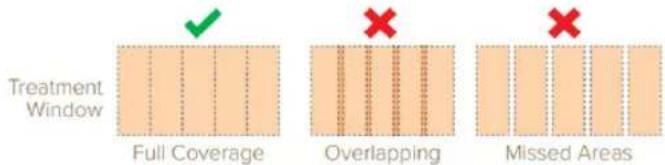
2). Once the Light Exit Window is close to the skin, the flash is continuously exposed for 8 seconds, the Flash Ready Light will blink and the device stops emitting flash. 3). "Auto Emit Flash mode" is recommended for large area hair removal. 4) Ensure that the ENTIRE AREA receives treatment, but DO NOT overlap treatment pulses.
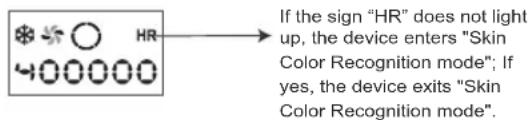
Skin color recognition mode: When the device is working, take the device away from the skin and press the "Flash Button" and "On/Off / Level adjustment button" at the same time. If there is a "beeping" sound but the sign "HR" does not light up, the device enters "Skin Color Recognition mode".
You need to identify your skin tone before treatment according to the skin tone table in section 4.3, and confirm whether the product is applicable to you. If your skin tone is suitable for treatment based on the skin tone table, the device can be used.
Press the device probe against the area to be treated, the device will emit the flash automatically without pressing the Flash Button.
Notes: 1). In "Skin color recognition mode", if the Device probe is not in full contact with the skin, the device does not emit the flash. 2). "Skin color recognition mode" is recommended for large area hair removal. 3) In "Skin Color Recognition mode", the device's skin sensor automatically detects skin tone for your protection. If your skin tone is not in the tone table suitable for treatment, the device must not be used. You need to identify your skin tone before treatment according to the skin tone table in section 4.3, and confirm whether the product is applicable to you after the skin color sensor detects a skin tone. 4) In "Skin Color Recognition mode", every time the light exit window is moved, the Intense Pulsed Light System will re-detect the skin color and adjust the output intensity.
- Mode switch: During device working, take the device away from the skin, press and hold the Flash Button for about 2 seconds. If there is one short beeping sound and the Flash Ready Light lights with blinking, the device is switched into "Auto Emit Flash mode". If there is one beeping sound and the Flash Ready Light lights on, the device is switched into "Manual Emit Flash mode".
- Mode switch: When the device is working, take the device away from the skin
and press "Flash Button" and "On/Off / Level adjustment button" at the same time. If there is a "beeping" but the sign "HR" does not light up, the device enters "Skin Color Recognition mode"; if there is a "beeping" and the sign "HR" lights up, the device exits "Skin Color Recognition mode".
4.2. Skin Test Patch
※For first-time users, we recommend you to test the device on the arm for reactions with the following skin test patch:
a. Turn on the device, select the intensity level 1, press the Device probe on the skin and apply one flash. b. Wait 24 hours and check your skin for any reaction such as discomfort or pain. c. If the skin on the test site is normal (no discomfort or pain), you can continue to use it; if it is abnormal, please stop using it. d. Increase the intensity by one level, and slide the device to the next area (do not flash multiple times on the same area). Test each intensity level according to the above steps a) to c). Stop increasing the intensity level and stop the testing when the device causes any discomfort (or pain). Example: You can increase the intensity to level 2 and test it according to the above steps a) to c) only when the device does not cause any discomfort (or pain) at level 1.
※After you test the skin, choose the intensity levels that did not cause a reaction on your skin.
※Wait for 24h each time after following the test patch to verify if your skin has an adverse reaction to the treatment. If there is no visible reaction, you can use the device.
4.3. Using Suggestions
※Before using the device, if you have removed hairs by using a long-lasting removing method, such as plucking, waxing, etc., wait until hairs start growing again to use the device.
- Treatment areas
Suitable for body parts: small areas such as underarms and facial hair below the chin line, and large areas such as legs.
- Treatment time
According to the hair growth cycle, it is recommended to use the IPL Hair Removal Device once every two weeks for the first 3-4 times, and gradually reduce the frequency of use according to the condition of the hair.
- Skin tone/hair color reference chart
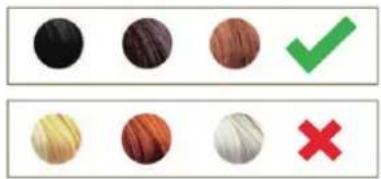
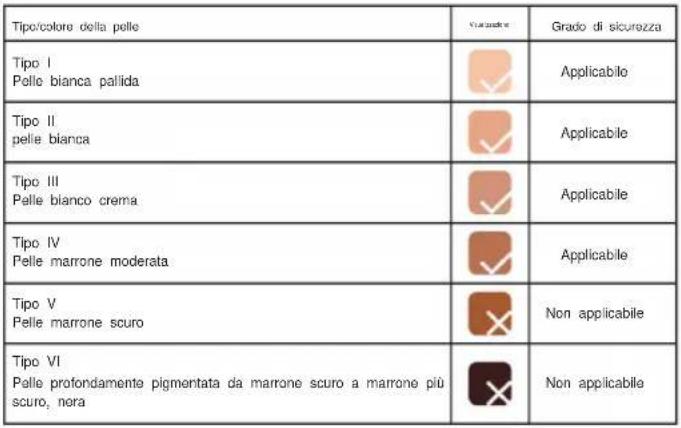
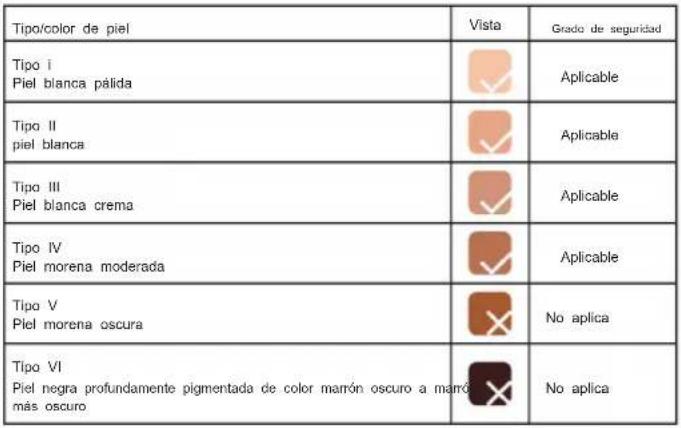
Please refer to the chart below before you start using the device to determine if your skin tone and hair color are suitable for use ("√" means the device is suitable for you; "X" means the device is not suitable for you).
Darker skin tones absorb more light easily, causing skin irritation. Therefore, persons with darker skin tones are recommended to use a lower flash intensity light. For brown skin tone, please start from the lowest speed mode and adjust the speed setting according to your pain sensation.
SKIN TONE:
The product is suitable for skin tones in Type I to Type IV. Please identify your skin tone and check the following table to see whether the product is applicable.
Skin tone table:
| Skin type/color View Safety grade | ||
| Type IPale white skin | Applicable | |
| Type IIWhite skin | Applicable | |
| Type IIICream white skin | Applicable | |
| Type IVModerate brown skin | Applicable | |
| Type VDark brown skin | Not Applicable | |
| Type VIDeeply pigmented dark brown to darkest brown, black skin | Not Applicable |
HAIR COLOUR:
The IPL system is suitable for use on naturally black or brown hair. It may not be as effective on white, grey, blonde, or red hair.
4.4. Using Steps
- Before you start using the device, use a razor or trimmer to shave all hairs on the surface of the skin (do not pluck or use chemical hair removal products) (Figure 9), completely dry the skin and remove any oily substances (such as body fragrance, lotion, perfume, sunscreen, and other cosmetics).
Figure 9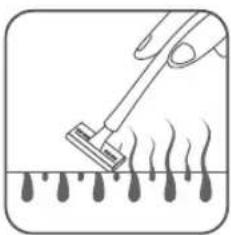
- Connect the power adaptor to the main unit and then insert the plug into a power socket.
- Press and hold the "On/Off /Level adjustment button" to turn on the device.
- Select the appropriate flash intensity for your skin tone and hair color (for first-time users, use the lowest light intensity recommended and adjust it gradually).
- Wear protective goggles to avoid looking into the light (Figure 10).
Figure 10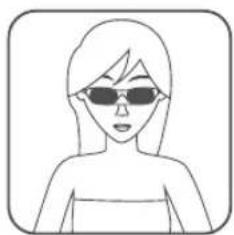
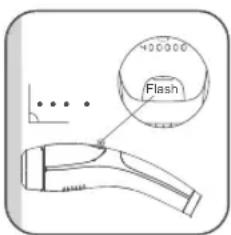
Press the device probe on the skin, ensuring the device probe is fully in contact with the skin (Figure 11). Wait for a few seconds; when the Flash Ready Light lights up and blinks, press the Flash Button to apply the flash. You will feel a slight burning sensation (flash light energy being absorbed). If you want to reduce the burning sensation, adjust the intensity level.
Figure 11
After use, turn off the device, unplug the power adapter, and clean the device. Note:
- This device features a cooling care function. This function auto-starts when the device is powered on and auto-off when the device is powered off. The cold side of the semiconductor cooling plate contacts the Sapphire Cooling Plate, which is the surface of the Light Exit Window and contacts the skin surface directly. Since the temperature of the Sapphire Cooling Plate is lower than the temperature of the skin surface, it generates a cooling feeling when the device contacts the skin surface during operation. This is a physical heat transfer process.
- The device is equipped with a fan in the main unit, which is used to cool the internal parts of the main unit during device operation. When the device is powered on, the fan begins working with a sound of wind all the time until 30 seconds after the device is powered off.
- Clean the device according to chapter 6 of this manual after unplugging the power adapter for 20 minutes.
- After cleaning, put the device and adapter back in the packing box and store it according to the specified storage conditions.
Caution
- After using the device, DO NOT apply any fragrant skin care or cosmetic product on your skin.
- DO NOT use deodorant immediately after using the device on the armpits. Wait until the skin redness completely disappears to start using deodorant.
- After each treatment, make sure your skin doesn't show any signs of redness after 24 hours.
- Keep the treated area covered and away from direct sunlight for two weeks after the treatment, or use sunscreen (SPF30+) on the treated area.
5. Rare Side Effects
• Burns, abnormal redness and swelling
These reactions are very rare; they may be caused by using a high flash intensity. If these adverse reactions continue for 3 days or more, immediately consult a doctor. Only start the next treatment if the skin is clear of any problem, and make sure you use a lower flash intensity.
- Skin discoloration
Normal but very rare. When using the device, the skin may suffer from discoloration; this may happen because you are using a high-intensity flash. When the discoloration disappears, reduce the flash intensity during the next treatments. If the skin discoloration does not disappear after two weeks, please consult a doctor.
• Skin infections and inflammation
Very rare. If the device is used on existing wounds and cuts (which might happen when shaving the area), it can cause the mentioned side effects.
• Possible causes of excessive pain during and after the treatment
You used the device on an area that was not shaved before you started the treatment; the flash intensity is too high for your skin tone and hair color; you used the device on the same exact area more than once; you used the device on an open wound; the area you are treating has any sort of inflammation or infection; you are using the device on areas with tattoos or sunburns.
6. Cleaning & Maintenance
6.1. Cleaning
After each use, clean this device following the tips below:
Purpose: This device is for reuse to remove unwanted hair; you may clean the device surface since it can be contaminated during use with organic soil and microorganisms carried by human hands immediately after each use.
Cleaning Agent: 70% isopropyl alcohol wipe.
Method of Cleaning: To thoroughly clean the device, immediately after each use, wipe the device (including markings) such as the Light Exit Window, shell, button, and display screen by hand without undue pressure with 70% isopropyl alcohol wipes for 15 seconds, and the Light Exit Window for 3 seconds.
Note:
- Ensure that no liquid enters the interior of the device.
- NEVER use abrasive cleaning agents, thinners, or benzene for cleaning.
- NEVER immerse the instrument in water or other cleaning liquids.
- Wait 10 minutes after cleaning, allowing the device to air-dry.
Visual Inspection: After cleaning, there should be no visible blotches or soil stains on the device under natural light. If there are still blotches and/or soil stains, repeat the cleaning steps mentioned above until there are no visible blotches or soil stains.
Dispose of the device if there is corrosion, discoloration, pitting, or cracked seals after cleaning. Enquire about options for environmentally friendly and appropriate disposal. Take local regulations into account.
Reuse Life: 400,000 flashes
6.2. Maintenance
- The Light Exit Window is very delicate. It is very important to protect the Light Exit Window from dirt and damage. Do not touch or use tools to press it. It must be carefully protected.
- This device is not waterproof. DO NOT immerse it or wash it under running water.
- DO NOT use steel wool, abrasive cleansers, chemicals, or corrosive liquids to clean the device.
7. Storage
DO NOT place or store the device for long periods in a hot or humid environment. Store this device under the following conditions:
| Storage environment | Temperature: -20 ~ 55°CRelative humidity: 5 ~ 95%, without condensationAtmospheric Pressure:70 kPa ~ 106 kPa |
8. Recycling

At the end of its life, do not dispose of this device with household waste. Please take this device to a local recycling point for proper disposal. Proper disposal and recycling practices contribute to environmental protection.
9. Warranty & Support
- Troubleshooting
| Problem Possible Cause | Solution | |
| No Display Screen light | The power cable is not properly connected. | Check the connection of the power supply and adjust the cable. |
| Only press “On/Off/Level adjustment button” but not hold it, fail to turn on the device. | Press and hold the “On/Off/ Level adjustment button” for about 2 seconds to turn on the device. | |
| The device does not emit the flash | The power cable is not correctly connected. | Check the connection of the power supply and adjust the cable. |
| The Device probe is not close enough to the skin. | Re-adjust the position of the Device Probe on your skin until the Flash Ready Light lights with blinking. | |
| During use the device has enter standby mode. | The device power off automatically if no light is emitted within 5 minutes. | press and hold the “On/Off/ Level adjustment button” for about 2 seconds to turn on the device. |
| The device produces an odd smell | The light exit window filter is dirty | Carefully clean the light exit window filter with 70% isopropyl alcohol wipe. |
| Hairs were not properly removed before the treatment. The flash burns the hair causing an odd smell. | Before you start using the device, remove all hairs from the area you want to treat with a razor blade or trimmer. | |
| You feel pain when using the device. | The flash intensity is too high. | Verify the flash intensity and reduce it |
| The filter of the light exit window is damaged. | Please stop using the device and contact your Fansizhe local dealer for assistance. | |
| You are using the device in a non-applicable area. | Please read the instruction manual, warnings and prohibited use are mentioned. | |
| After using the device, the treated area shows signs of redness. | Mild redness is a normal and harmless reaction to the hair removal. | Do not take any action, is a normal reaction. |
| The treatment results are not satisfactory. | The flash intensity used is too low. | Next treatment, adjust the flash intensity |
| The frequency is lower than recommended. | In order to keep the skin smooth and without hairs, it's recommended to use the device once every two weeks. Treatment intervals depend on each person hair growth cycle, do not use the device more than once every two weeks Overusing the device increases the risk of adverse skin reactions. |
| The treatment results are not satisfactory. | Your skin tone and hair color are not suitable to use with this device. | If your body hairs are blonde, red, gray white, or if your skin tone is very dark, do not use this device. |
| Other problems. Contact your local dealer. | ||
| Note: If the device still does not work properly after using the above solutions, please stop using the device and contact your local dealer. | ||
10. Packing List
| Main unit 1PCS Power adapto 1PCS | ||
| Instruction book 1PCS Safety goggles 1PCS | ||
| Shaver 1PCS Storage bag 1PCS |
11. Specification Parameters
| Device Name Intense Pulsed Light (IPL) System | |
| Model | T021K |
| Dimension | 73.2×81.1×202.2mm |
| Risk group | Exempt Group |
| Irradiation area | Light outlet: 3.0cm2 |
| Adaptor Input 100-240 Va.c., 50/60Hz, 1.5 A | |
| IPL main part input | 24 Vd.c., 2.0 A |
| Wavelength | 510 ~ 1200nm |
| Max. Fluence 4.8J/cm2 | |
| Pulse duration | 4 ~ 12ms |
| Output energy | 5.6J~14.5J |
| Service life | 400,000 flashes |
| Service life for power adapter 10 years | |
| Service life for goggles 3 years | |
| Weight 323.5g | |
| Operating environment | Temperature: 5 ~ 30°CRelative humidity: 20 ~ 90%, without condensationAtmospheric Pressure:70 kPa ~ 106 kPa |
| Storage and transportation environment | Temperature: -20 ~ 55°CRelative humidity: 5 ~ 95%, without condensationAtmospheric Pressure:70 kPa ~ 106 kPa |
| Warranty period One year warranty for main unit | |
| Applied part Type BF | |
| Software version T021K-V1.0 | |
| No Sterilize requirement | |
| Not category AP / APG equipment | |
| Mode of operation: continuous | |
Adaptor Technical Specifications:
| Item Parameters | |
| Model of adaptor | GJ48WA-2400200DP |
| Manufacturer of adaptor | Shenzhen Guijin Technology Co., Ltd |
| Input Voltage 100Vac~240Vac | |
| Input Frequency 50Hz/60Hz | |
| Service life for power adapte 10 years | |
| Output voltage range 22.8 ~ 25.2Vdc | |
| Output current range 0 ~ 2A | |
| output power ≤48W |
| output over voltage ≤ 170% of output | voltage |
| current-limiting protection | 4.5-7.5A |
12. Frequently Asked Questions
Q: The device powers off automatically during use.
A: The device will power off automatically when the internal temperature of the device is too high. Please restart the device after 10 minutes.
Q: What is the cooling care function?
A: The Intense Pulsed Light (IPL) System features a cooling care function which is realized through a semiconductor cooling plate. This function automatically starts when the device is powered on and automatically turns off when the device is powered off. The cold side of the semiconductor cooling plate contacts the Sapphire Cooling Plate, which is the surface of the Light Exit Window and contacts the skin surface directly. Since the temperature of the Sapphire Cooling Plate is lower than the temperature of the skin surface, it generates a cooling feeling when the device contacts the skin surface during operation. This is a physical heat transfer process.
Q: Must I shave hair before each use?
A: No. But you are advised to shave the hair when it is longer than 5mm.
Q: Why is my hair still growing after a few treatments? Why is it not falling out immediately after treatment?
A: The Intense Pulsed Light (IPL) System is a home IPL hair removal device that applies very gentle pulses of light to the hair root. It works step by step gradually. First of all, the hair goes into its resting phase—the hair you have falls out, and gradually your body grows less hair in that area. Finally, the hair stops growing back. It takes time.
It is a permanent hair remover. Hairs cannot be removed permanently until you have used the device for one period. It can only repress hair growth and slow down hair growth speed at the beginning. The hair enters the sleep state under continuous action. Thus, permanent hair removal effect is achieved.
Q: Why didn't I achieve the same effect as the others, or no effect at all?
A: People have different physiques, and the difference of hair thickness and treated parts can affect the effecting cycle. The using cycle is an average value, of which the specific time may be slightly different.
Q: Which level is suitable?
A: There is no unified standard of the suitable levels. It all depends on your skin tolerance. The darker the skin color, the lower the level should be used. And start choosing the suitable level from the lowest one. The higher the level is, the more obvious the treatment effect is and the shorter the treatment time is. On the contrary, if you use a low level, the treatment time will be extended accordingly. It is recommended to do local skin tests on the treated skin part before each hair removal, and then start treatment on large skin areas after, making sure that no skin discomfort occurs on the second day.
Q: Will it hurt?
A: During the hair removal process, light waves will generate heat when they encounter hair melanins, causing slight pain. Due to the different skin sensitivity and pain tolerance of different individuals, the actual feelings are different. It is recommended to accelerate the level slowly from the lowest one according to your actual situation.
Q: How to shave? What kinds of hair should be shaved off?
A: Generally speaking, you should shave hair on the armpit parts, bikini parts, and legs before use. The method makes shaving easier:
- Use shaving cream or mild shower gel to lubricate the shaving area.
- Or, apply a hot towel on the shaving area for a few minutes, and gently shave the hair immediately after removing the towel, which will make shaving easier.
Q: Why is there a smell of scorched hair after use?
A: That's because the hair is not completely shaved. While using the light waves will generate heat when encountering melanin, which causes the smell of scorched hair. And that is normal.
Q: I want to remove my hair quickly. Can I use the device every day?
A: It is not advised to use the device every day. Hair has a growth cycle; you can use it according to the normal cycle: Use once every two weeks during the first 3
~4 times and gradually decrease the number of uses after the hair growth slows down.
13. Important Information Regarding Electro Magnetic Compatibility (EMC)
Warning: Using cell phone or microwave oven, HF surgical equipment, magnetic resonance imaging or other radio radiant equipment near this device may cause malfunction or lead to loss of essential performance.
Warning: Use of this equipment adjacent to or stacked with other equipment should be avoided because it could result in improper operation. If such use is necessary, this equipment and the other equipment should be observed to verify that they are operating normally.
Warning: Use of adapter other than those specified or provided by the manufacturer of this equipment could result in increased electromagnetic emissions or decreased electromagnetic immunity of this equipment and result in improper operation.
Warning: Portable RF communications equipment (including peripherals such as antenna cables and external antennas) should be used no closer than 30 cm (12 inches) to any part of Intense Pulsed Light (IPL) System, including cables specified by the manufacturer. Otherwise, degradation of the performance of this equipment could result.
FCC Information:
CAUTION: Changes or modifications not expressly approved by the party responsible for compliance could void the user's authority to operate the equipment! This device complies with Part 15 of the FCC Rules. Operation is subject to the following two conditions:
1) This product may cause harmful interference.
2) This product must accept any interference received, including interference that may cause undesired operation.
WARNING: Changes or modifications to this product not expressly approved by the party responsible for compliance could void the user's authority to operate the product.
Note: This product has been tested and found to comply with the limits for a Class B digital device pursuant to Part 15 of the FCC Rules. These limits are designed to provide reasonable protection against harmful interference in a residential
installation.
This product generates, uses, and can radiate radio frequency energy, and if not installed and used in accordance with the instructions, may cause harmful interference to radio communications. However, there is no guarantee that interference will not occur in a particular installation. If this product does cause harmful interference to radio or television reception, which can be determined by turning the product off and on, the user is encouraged to try to correct the interference by one or more of the following measures.
- Reorient or relocate the receiving antenna.
- Increase the distance between the product and receiver.
- Connect the product to an outlet on a circuit different from that to which the receiver is connected.
- Consult the dealer or an experienced radio/TV technician for assistance.
Table 1
| Guidance and Manufacturer's declaration – electromagnetic emission | ||
| The device is intended for use in the electromagnetic environment specified below. The customer of the user of the device should assure that it is used in such an environment. | ||
| Emission test Compliance | Electromagnetic environment – guidance | |
| Conducted and Radiated RF emissionsCISPR 11 | Group 1Class B | The device uses RF energy only for its internal function. Therefore, its RF emissions are very low and are not likely to cause any interference in nearby electronic equipment. |
| Conducted RF emissionsCISPR 11 | Group 1Class B | The device is suitable for use in all establishments, including domestic and those directly connected to the public low-voltage power supply network that supplies buildings used for domestic purposes except for near active HF surgical equipment and the RF shielded room for magnetic resonance imaging. |
| Radiated RF emissionsCISPR 11 | Group 1Class B | |
| Harmonic emissionsIEC 61000-3-2 | Class A | |
| Voltage fluctuations and flicker emissionsIEC 61000-3-3 | Applicable | |
Table 2
| Guidance and Manufacturer's declaration – electromagnetic immunity | |||
| The device is intended for use in the electromagnetic environment specified below. The customer or the user of the device should assure that it is used in such an environment. | |||
| Immunity test | IEC 60601-1-2 test level | Compliance level | Electromagnetic environment-guidance |
| Electrostatic dischargeIEC 61000-4-2 | ±8kV contact; ±2kV, ±4kV, ±8kV, ±15 kV air | ±8kV contact; ±2kV, ±4kV, ±8kV, ±15kV air | Floors should be wood, concrete or ceramic tile. If floors are covered with synthetic material, the relative humidity should be at least 30%. |
| Radiated RF EM fieldsIEC 61000-4-3 | 3V/m(Professional healthcare facility environment); 10V/m(Home healthcare environment), 80MHz - 2.7GHz 80% AM at 1kHz | 10V/m(Home healthcare environment) 80 MHz - 2.7GHz 80% AM at 1kHz | |
| Electrical fast transients/burstsIEC 61000-4-4 | ±2kV AC power supply lines; ±1kV DC power/ Signal lines. 100 kHz repetition frequency | ±2kV AC power supply lines; | Mains power quality should be that of a HOME HEALTHCARE ENVIRONMENT or a Professional healthcare facility environment. |
| SurgesIEC 61000-4-5 | ±0.5kV, ±1kV lines to lines; ±0.5kV, ±1kV, ±2kV lines to earth | ±0.5kV, ±1kV lines to lines; | Mains power quality should be that of a HOME HEALTHCARE ENVIRONMENT or a Professional healthcare facility environment. |
| Conducted disturbances induced by RF fieldsIEC 61000-4-6 | 3V0.15 MHz - 80MHz,6V in ISM bands between 0.15MHz and 80 MHz (Professional healthcare facility environment), 6V in ISM and amateur radio bands between | Applicable | |
| Note: The ISM (industrial, scientific and medical) bands between 0,15 MHz and 80 MHz are 6,765 MHz to 6,795 MHz; 13,553 MHz to 13,567 MHz; 26,957 MHz to 27,283 MHz; and 40,66 MHz to 40,70 MHz. The amateur radio bands between 0,15 MHz and 80 MHz are 1,8 MHz to 2,0 MHz, 3,5 MHz to 4,0 MHz, 5,3 MHz to 5,4 MHz, 7 MHz to 7,3 MHz, 10,1 MHz to 10,15 MHz, 14 MHz to 14,2 MHz, 18,07 MHz to 18,17 MHz, 21,0 MHz to 21,4 MHz, 24,89 MHz to 24,99 MHz, 28,0 MHz to 29,7 MHz and 50,0 MHz to 54,0 MHz. | |||
| Rated power frequency magnetic fieldsIEC 61000-4-8 | 30A/m50Hz or 60Hz | 30A/m50Hz | Power frequency magnetic fields should be at levels characteristic of a HOME HEALTHCARE ENVIRONMENT or a Professional healthcare facility environment. |
| Voltage dipsIEC 61000-4-11 | 0% UT, 0.5 cycleAt 0°, 45°, 90°,135°, 180°, 225°,270° and 315°;0% UT, 1 cycleand70% UT, 25/30cycle Single phase: at 0° | Applicable | Mains power quality should be that of a HOME HEALTHCARE ENVIRONMENT or a Professional healthcare facility environment... |
| Voltage interruptionsIEC 61000-4-11 | 0% UT, 250/300cycle | Applicable | |
| NOTE: UT is the a.c. mains voltage prior to application of the test level.E.g.: 25/30 means 25 periods at 50 Hz or 30 periods at 60 Hz. | |||
Table 3
| Guidance and Manufacturer's declaration – electromagnetic immunity | |||
| The device is intended for use in the electromagnetic environment specified below. The customer or the user of the device should assure that it is used in such an environment. | |||
| Immunity test | IEC 60601-1-2 test level | Compliance level | Electromagnetic environment - guidance |
| Proximity fields from RF wireless communications equipment IEC 61000-4-3 | See the following table | Complies | |
Test specifications for ENCLOSURE PORT IMMUNITY to RF wireless communications equipment
| Test frequency (MHz) | Banda) (MHz) | Servicea) | Modulationb) | Maximum power (W) | Distance (m) | Immunity Test Level (V/m) |
| 385 380 | -390 TETRA | 400 | Pulse modulationb) 18 Hz | 1,8 0,3 | 27 | |
| 450 430 | -470 | GMRS 460, FRS 460 | FMc) ± 5 kHz deviation 1 kHz sine | 2 0,3 | 28 | |
| 710 | 704 - 787 | LTE Band 13, 17 | Pulse modulationb) 217 Hz | 0,2 0,3 | 9 | |
| 745 | ||||||
| 780 | ||||||
| 810 | 800 - 960 | GSM 800/900, TETRA 800, iDEN 820, CDMA 850, LTE Band 5 | Pulse modulationb) 18 Hz | 2 0,3 | 28 | |
| 870 | ||||||
| 930 | ||||||
| 1720 | 1700 - 1990 | GSM 1800; CDMA 1900; GSM 1900; DECT; LTE Band 1, 3, 4, 25; UMTS | Pulse modulationb) 217 Hz | 2 0,3 | 28 | |
| 1845 | ||||||
| 1970 | ||||||
| 2450 2400 - 2570 | Bluetooth, WLAN, 802.11 b/g/n, RFID 2450, LTE Band 7 | Pulse modulationb) 217 Hz | 2 0,3 | 28 | ||
| 5240 | 5100 - 5800 | WLAN 802.11 a/n | Pulse modulationb) 217 Hz | 0,2 0,3 | 95500 | |
| 5785 | ||||||
| NOTE If necessary to achieve the IMMUNITY TEST LEVEL, the distance between the transmitting antenna and the ME EQUIPMENT or ME SYSTEM may be reduced to 1 m. The 1 m test distance is permitted by IEC 61000-4-3. |
| a. For some services, only the uplink frequencies are included.b. The carrier shall be modulated using a 50 % duty cycle square wave signal.c. As an alternative to FM modulation, 50 % pulse modulation at 18 Hz may be used because while it does not represent actual modulation, it would be worst case. |
Table 4
| Recommended separation distances between portable and mobile RF communication equipment and The device | |||
| The device is intended for use in an electromagnetic environment in which radiated RF disturbances are controlled. The customer or the user of the devices can help prevent electromagnetic interference by maintaining a minimum distance between portable and mobile RF communications equipment (transmitters) and the device as | |||
| Rated maximum output power of transmitter/W. | Separation distance according to frequency of transmitter/m | ||
| 150kHz ~ 80MHz d = 1.2 | 80MHz ~ 800MHz d = 1.2 | 800MHz ~ 2.5GHz d = 2.3 | |
| 0.01 0.12 0.12 0.23 | |||
| 0.1 | 0.38 0.38 0.73 | ||
| 1 | 1.2 | 1.2 | 2.3 |
| 10 | 3.8 | 3.8 | 7.3 |
| 100 | 12 | 12 | 12 |
| For transmitters rated at a maximum output power not listed above, the recommended separation distance d in meters (m) can be estimated using the equation applicable to the frequency of the transmitter, where P is the maximum output power rating of the transmitter in watts(W) according to the transmitter manufacturer.NOTE 1 At 80MHz and 800MHz, the separation distance for the higher frequency range applies.NOTE 2 These guidelines may not apply in all situations. Electromagnetic propagation is affected by absorption and reflection from structures, objects and people. | |||
Operation Record
| No. | Date Remark | |
| 1 | ||
| 2 | ||
| 3 | ||
| 4 | ||
| 5 | ||
| 6 | ||
| 7 | ||
| 8 | ||
| 9 | ||
| 10 |
Operation Record
| No. | Date Remark | |
| 1 | ||
| 2 | ||
| 3 | ||
| 4 | ||
| 5 | ||
| 6 | ||
| 7 | ||
| 8 | ||
| 9 | ||
| 10 |
Operation Record
| No. | Date Remark | |
| 1 | ||
| 2 | ||
| 3 | ||
| 4 | ||
| 5 | ||
| 6 | ||
| 7 | ||
| 8 | ||
| 9 | ||
| 10 |
Operation Record
| No. | Date Remark | |
| 1 | ||
| 2 | ||
| 3 | ||
| 4 | ||
| 5 | ||
| 6 | ||
| 7 | ||
| 8 | ||
| 9 | ||
| 10 |
Operation Record
| No. | Date Remark | |
| 1 | ||
| 2 | ||
| 3 | ||
| 4 | ||
| 5 | ||
| 6 | ||
| 7 | ||
| 8 | ||
| 9 | ||
| 10 |
Operation Record
| No. | Date Remark | |
| 1 | ||
| 2 | ||
| 3 | ||
| 4 | ||
| 5 | ||
| 6 | ||
| 7 | ||
| 8 | ||
| 9 | ||
| 10 |
Operation Record
| No. | Date Remark | |
| 1 | ||
| 2 | ||
| 3 | ||
| 4 | ||
| 5 | ||
| 6 | ||
| 7 | ||
| 8 | ||
| 9 | ||
| 10 |
Operation Record
| No. | Date Remark | |
| 1 | ||
| 2 | ||
| 3 | ||
| 4 | ||
| 5 | ||
| 6 | ||
| 7 | ||
| 8 | ||
| 9 | ||
| 10 |
Machine Translated by Google
VEVOR®
TOUGH TOOLS, HALF PRICE
Machine Translated by Google
Table of Contents
Machine Translated by Google
VEVOR®
TOUGH TOOLS, HALF PRICE
For questions regarding the following: a guarantee of electronic support technical www.reagent.com/support.
and/or, for a member of the capital and the common capital. No FAS inhibitor of penta
do not say.
hypographical net, the interest measures, not less interference
by a question that is possible.
SME PAS affected out expand a large area substance
«Surling, spines, presenlats, etc. hydropytoeabation in some hydropytoation, etc. micaite infestee in some culline
more putative the mechanism, and influence case for partial and real process equal to pre-separation the behavior mechanism is required. The related case pharmonic open can be seen because the line. For less: the condition was added pendant case weak prevent the mechanism
Machine Translated by Google
Machine Translated by Google
Machine Translated by Google
Machine Translated by Google
Machine Translated by Google
Image 5

Machine Translated by Google
Machine Translated by Google
Machine Translated by Google
Machine Translated by Google
installation.
VEVOR®
TOUGH TOOLS, HALF PRICE
IPL-System (Intense Pulsed Light).
Model: T021K
VEVOR®
TOUGH TOOLS, HALF PRICE
Table of Contents
VEVOR®
TOUGH TOOLS, HALF PRICE
Intense Pulsed Light
(IPL) System
Model: T021K
NEED HELP? CONTACT US!
Figure 5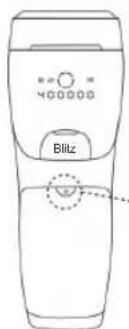

Installation.
Operation protocol
Machine Translated by Google
VEVOR®
TOUGH TOOLS, HALF PRICE
electronics www.vevor.com/support
electronics www.vevor.com/support
Machine Translated by Google
Machine Translated by Google
VEVOR®
TOUGH TOOLS, HALF PRICE
Intense Pulsed Light
(IPL) System
Model: T021K
NEED HELP? CONTACT US!
Supporting technologies to sell a technology in the USA. www.vevor.com/support
 |
HAIR COLOR:
installation.
VEVOR®
TOUGH TOOLS, HALF PRICE
Table of Contents
VEVOR®
TOUGH TOOLS, HALF PRICE
Intense Pulsed Light
(IPL) System
Model: T021K
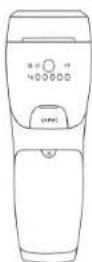
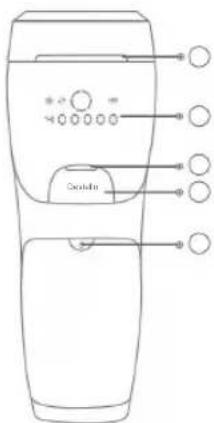
Image 5
 |
HAIR COLOR:
4.4. Using steps
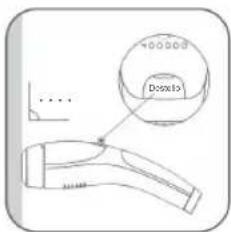
installation.
VEVOR®
TOUGH TOOLS, HALF PRICE
Table of contents
VEVOR®
TOUGH TOOLS, HALF PRICE
Photo 5
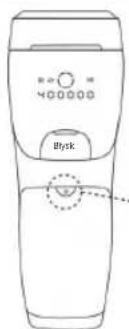
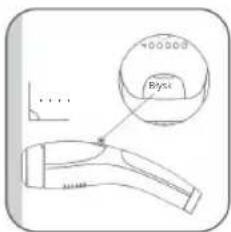
installation.
Operation log
Level:
| NIC. NIE UnBrgsUnwaga | |
| 1 | |
| 2 | |
| 3 | |
| 4 | |
| 5 | |
| 6 | |
| 7 | |
| 8 | |
| 9 | |
| 10 |
Operation log
VEVOR®
TOUGH TOOLS, HALF PRICE
Technical support and e-warranty certificate www.vevor.com/support
Intense Pulsed Light (IPL) system
Model: T021K
VEVOR®
TOUGH TOOLS, HALF PRICE
Technical support and e-warranty certificate www.vevor.com/support
Table of Contents
VEVOR®
TOUGH TOOLS, HALF PRICE
•Person with diabetes, lupus erythematosus, paralysis, congestive heart failure.
•On areas with type or hypopigmentation, intense redness or hand warts.
Figure 5
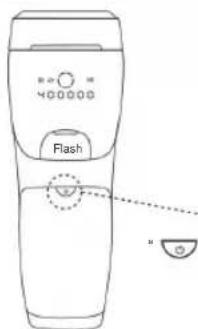
Hold the button pressed
installation.
Operation report
| Opmerking Datum Opmerking | ||
| 1 | ||
| 2 | ||
| 3 | ||
| 4 | ||
| 5 | ||
| 6 | ||
| 7 | ||
| 8 | ||
| 9 | ||
| 10 |
Operation report
| Nee. | Datum | Opmerking Nee. |
| 1 | ||
| 2 | ||
| 3 | ||
| 4 | ||
| 5 | ||
| 6 | ||
| 7 | ||
| 8 | ||
| 9 | ||
| 10 |
Operation report
| Datum | Opmarking Opmarking | |
| 1 | ||
| 2 | ||
| 3 | ||
| 4 | ||
| 5 | ||
| 6 | ||
| 7 | ||
| 8 | ||
| 9 | ||
| 10 |
Operation report
| Nee. | Opmerking | |
| 1 | ||
| 2 | ||
| 3 | ||
| 4 | ||
| 5 | ||
| 6 | ||
| 7 | ||
| 8 | ||
| 9 | ||
| 10 |
Operation report
| Opmerking | ||
| 1 | ||
| 2 | ||
| 3 | ||
| 4 | ||
| 5 | ||
| 6 | ||
| 7 | ||
| 8 | ||
| 9 | ||
| 10 |
Operation report
| Nee. | Datum DatumDatum | OpmarkingNee. |
| 1 | ||
| 2 | ||
| 3 | ||
| 4 | ||
| 5 | ||
| 6 | ||
| 7 | ||
| 8 | ||
| 9 | ||
| 10 |
Operation report
| Nee.Nee. | DatumDatum | |
| 1 | ||
| 2 | ||
| 3 | ||
| 4 | ||
| 5 | ||
| 6 | ||
| 7 | ||
| 8 | ||
| 9 | ||
| 10 |
Operation report
| Niveau: | ||
| Noa. | ||
| 1 | ||
| 2 | ||
| 3 | ||
| 4 | ||
| 5 | ||
| 6 | ||
| 7 | ||
| 8 | ||
| 9 | ||
| 10 | ||
Machine Translated by Google
VEVOR®
TOUGH TOOLS, HALF PRICE
Machine Translated by Google
Machine Translated by Google
VEVOR®
TOUGH TOOLS, HALF PRICE
Intense pulsating light
(IPL) System
Model: T021K
NEED HELP? CONTACT US
Figure 5
4.4. Using steps
installation.
Operation Record
| Nej. No. | AnnBörlating Annmarkning |
| 1 | |
| 2 | |
| 3 | |
| 4 | |
| 5 | |
| 6 | |
| 7 | |
| 8 | |
| 9 | |
| 10 |
Operation Record
- VEVOR®
- TABLE OF CONTENTS
- NEED HELP? CONTACT US
- SAFETY INSTRUCTIONS
- WARNING
- CAUTION
- CONTRAINDICATIONS
- DEVICE DESCRIPTION
- GENERAL INTRODUCTION
- INDICATIONS FOR USE
- INTRODUCTION OF DEVICE
- DEVICE PICTURE
- CONFIGURATION OF MAIN UNIT
- INTRODUCTION OF DISPLAY SCREEN
- HOW TO USE
- DEVICE OPERATION INTRODUCTION
- SKIN TEST PATCH
- USING SUGGESTIONS
- TREATMENT AREAS
- TREATMENT TIME
- SKIN TONE/HAIR COLOR REFERENCE CHART
- SKIN TONE
- HAIR COLOUR
- USING STEPS
- RARE SIDE EFFECTS
- CLEANING & MAINTENANCE
- CLEANING
- MAINTENANCE
- STORAGE
- RECYCLING
- WARRANTY & SUPPORT
- PACKING LIST
- SPECIFICATION PARAMETERS
- FREQUENTLY ASKED QUESTIONS
- Q: WHICH LEVEL IS SUITABLE
- Q: WILL IT HURT
- Q: HOW TO SHAVE? WHAT KINDS OF HAIR SHOULD BE SHAVED OFF
- Q: WHY IS THERE A SMELL OF SCORCHED HAIR AFTER USE
- Q: I WANT TO REMOVE MY HAIR QUICKLY. CAN I USE THE DEVICE EVERY DAY
- IMPORTANT INFORMATION REGARDING ELECTRO MAGNETIC COMPATIBILITY (EMC)
- FCC INFORMATION
- INSTALLATION
- TOUGH TOOLS, HALF PRICE
- MACHINE TRANSLATED BY GOOGLE
- HAIR COLOR
Brand : Vevor
Model : T021K
Category : IPL hair remover