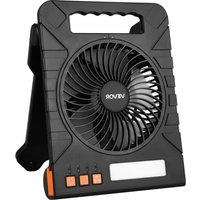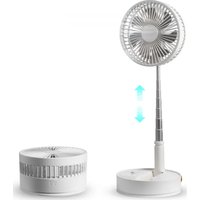
P1000 - Fan Vevor - Free user manual and instructions
Find the device manual for free P1000 Vevor in PDF.


| Product Type | Foldable Floor Fan |
| Brand | Vevor |
| Model | P1000 |
| Main Material | Aluminum alloy and ABS plastic |
| Dimensions (folded) | 198 × 198 × 104 mm |
| Dimensions (unfolded) | 198 × 198 × 1020 mm |
| Power Supply | Lithium battery 18650, 7200 mAh |
| Charging Voltage | DC 5V, 3A (via USB-C) |
| Battery Life | 4 to 35 hours depending on speed |
| Charging Time | 5 to 6 hours |
| Speeds | 4 speeds (1 to 4) |
| Oscillation | 60° ± 5° |
| Remote Control Range | Up to 4 meters |
| Remote Control Functions | On/off, speed, oscillation, timer, night light |
| Timer | 1 h, 2 h, 4 h, 6 h |
| Battery Level Display | 4 white LEDs (25%, 50%, 75%, 100%) |
| Power Bank Function | Yes, USB output port |
| Noise Level | Approximately 10 to 45 dB |
| Operating Temperature | < 50 °C |
| Warranty | 1 year limited |
| Safety | Do not disassemble, avoid drops and heat sources |
Frequently Asked Questions - P1000 Vevor
User questions about P1000 Vevor
0 question about this device. Answer the ones you know or ask your own.
Ask a new question about this device
Download the instructions for your Fan in PDF format for free! Find your manual P1000 - Vevor and take your electronic device back in hand. On this page are published all the documents necessary for the use of your device. P1000 by Vevor.
USER MANUAL P1000 Vevor
Technical Support and E-Warranty Certificate www.vevor.com/support
POWERFUL FLOOR FAN
MODEL:P1000
We continue to be committed to provide you tools with competitive price. "Save Half", "Half Price" or any other similar expressions used by us only represent of savings you might benefit from buying certain tools with us compared top brands and does not necessarily mean to cover all categories of tools offered are kindly reminded to verify carefully when you are placing an order with us actually saving half in comparison with the top major brands.
VEVOR®
TOUGH TOOLS, HALF PRICE
POWERFUL FLOOR FAN
MODEL:P1000

natural_image
Line drawing of a standard office desk fan with visible blades and base (no text or symbols)NEED HELP? CONTACT US!
Have product questions? Need technical support? Please feel fr contact us:
Technical Support and E-Warranty Certificate www.vevor.com/support
This is the original instruction, please read all manual instruction carefully before operating. VEVOR reserves a clear interpretation user manual. The appearance of the product shall be subject to product you received. Please forgive us that we won't inform you there are any technology or software updates on our product.
PRODUCTPARAMETERS
| Product name: Folding Fan | Working time: 4~35 hours |
| Productmodel: P1000 | Chargingtime: 5~6 hours |
| Main material:Aluminum alloy &ABS plastic | Noise decibel: 10~245db |
| Battery model: lithium battery 1865 | Battery capacity: 7200mAh |
| Foldingsize:198*198*104mm | Chargingvoltage:DC5V/3A~4A |
| Stretchingsize:198*198*1020mm | Working wind speed:2.5~4.5 ± 0.5 |
| Oscillating:60°± 5 | Working temperature:<50C |
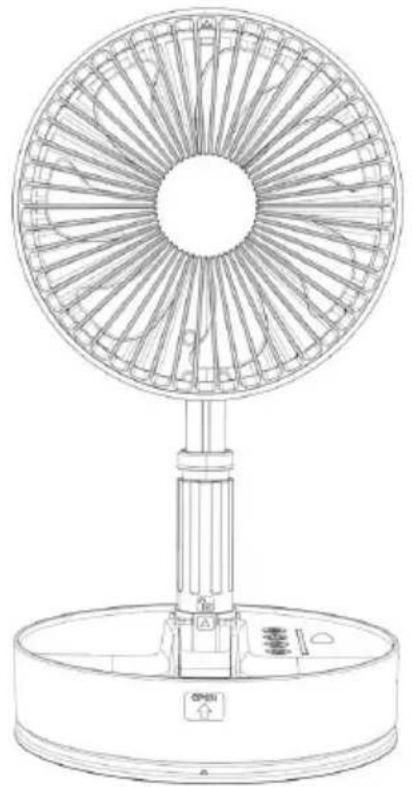
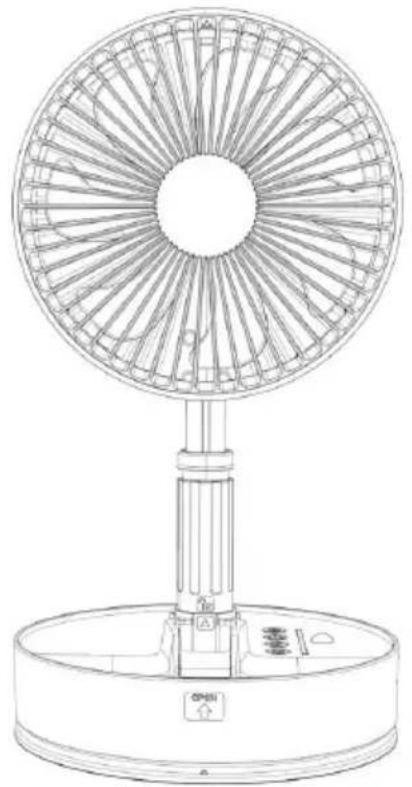
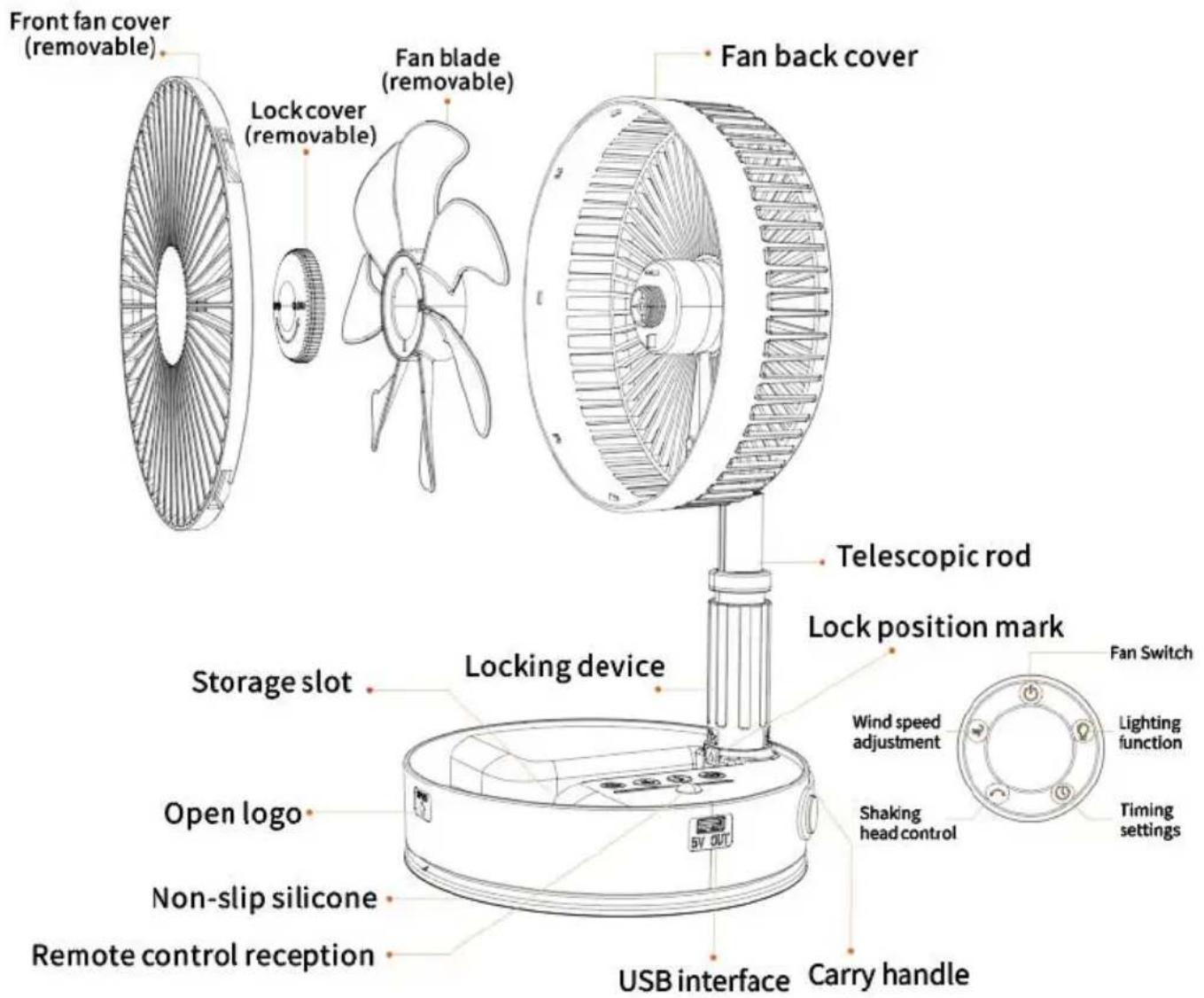
PRODUCT LEGEND
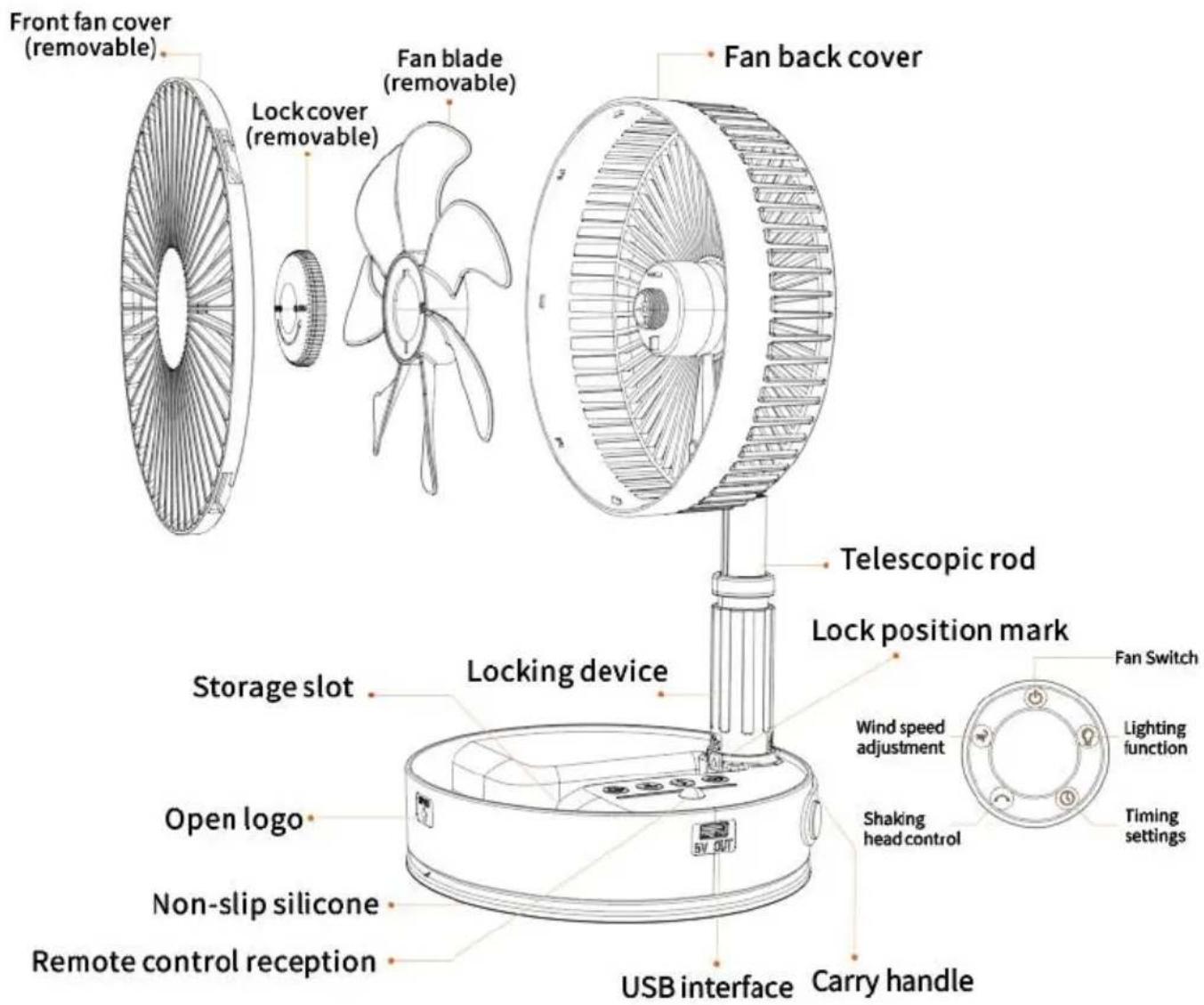
FUNCTION DESCRIPTION
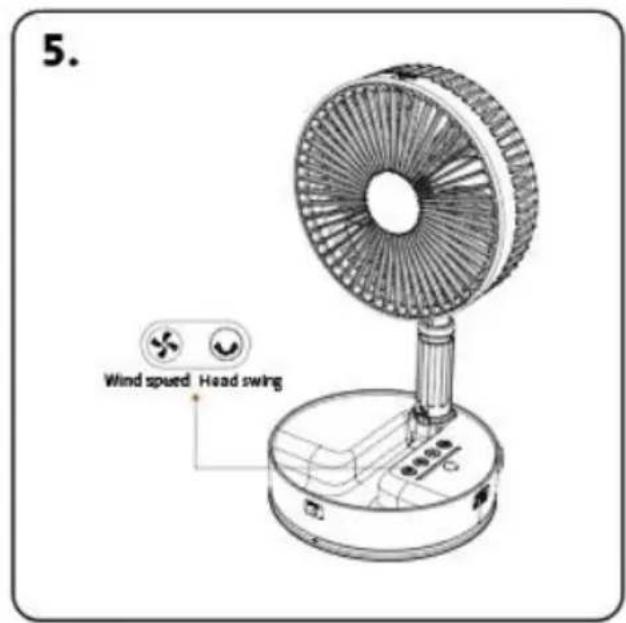
- Gear button function: off state, single press the switch key fan on default 1 gear soft wind and then single press the switch key to turn fan; single press the switch key after the default1 gear soft wind, sin press the gear key once for 2 gear comfortable wind, single press the key twice for 3 gear cool wind, single press the gear key three time gear strong wind, single press the gear key four times to switch to soft wind, and cycle the above step poly; white indicator corresponds gear switching.
- Shaking head function: In the fan on state, single press the remote button to open the shaking head function, single press the remote head button again to close Shaking head function. In the off state single press remote head no function.
- Battery level display function: When any key is not operated for m than 3 seconds in the power-on state, the LED indicator will be automatically converted to the current battery level display.LED 1 white light is about 1-25% power; LED 2 white light is about 26%-50% power; LED 3 white light is about 51%\~75% power; LED 4 white light is about 51%-75% power, LED 1 white light is about 1-25% power; LED 2 white is about 26%-50% power; LED 3 white light is about 51%-75% power; 4 white light is about 76%\~100% power. 76% to 100% power.
- Charging function: use the standard DC-5V/3.0A charging head prop connected to the 3Acharging cable plugged into the Type-c interface t charge the host, charging process, the battery power will correspond to LED flashing, fully charged 4 white LEDs When the battery power is low,LED1 will flash and shut down.
- USB mobile power function: when the fan is used outdoors or which charging, it can be connected to the fan The USB output port can be connected to the cell phone or electrical appliances for charging, which protect the electrical appliances from low power at any time.
- Remote control function: This product is equipped with infrared receive remote control, which can be used normally within 4 meters in a stra
line. Remote control The remote control is equipped with on/off key, shaking head control key, timing control key, air volume 1.2.3.4. gear adjustment key, and three night light The lighting key can be controlled according to the corresponding icon on the remote control panel in the power-on state. When the remote control presses any key, the buzzer emit a "drip" sound to indicate and enter the working state.
- Remote control timing function: in the power-on state, single press remote control timing button, the host power indicator LED1 light flash times after the start of the timing 1 hour; single press the second L flashes 3 times after the start of the timing 2 hours; single press the thirdLED3 light flashes 3 times after the start of the timing 4 hours; press the fourth LED4 light flashes 3 times after the start of the time hours; single press the fifth LED4-3-2-1 in turn off, timing off, single again will cycle above Single press again will cycle through the above steps.
PRODUCT OPERATION STEPS
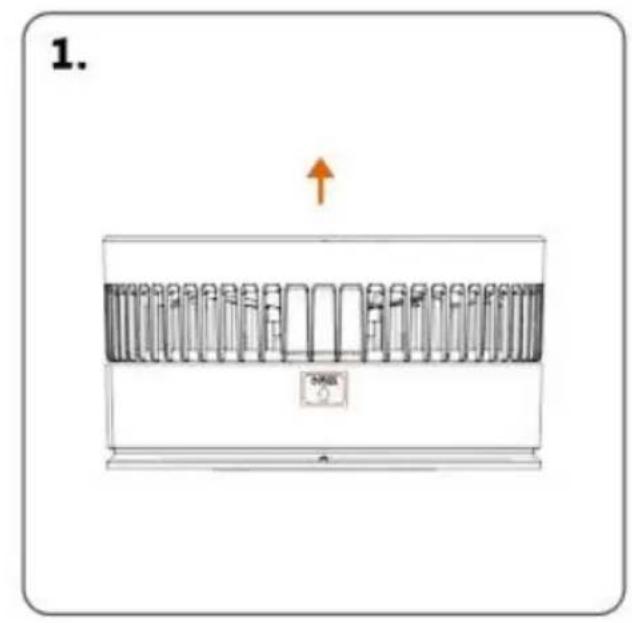
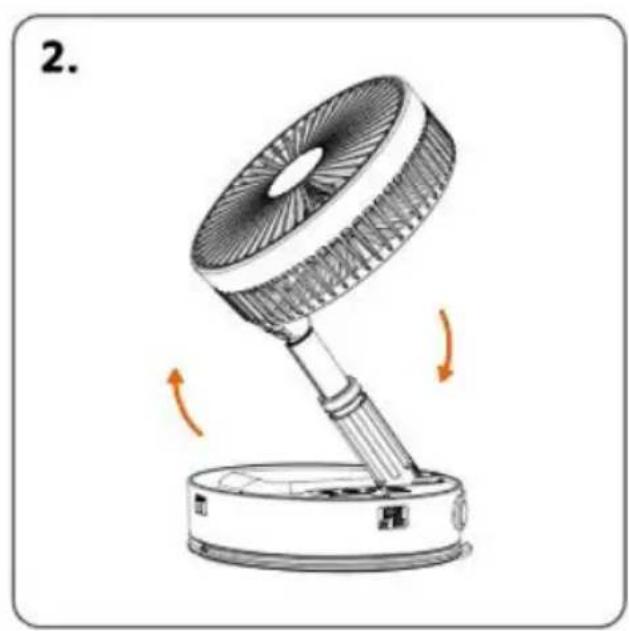
In the folded state, pull up at "OPEN" and then open the fan
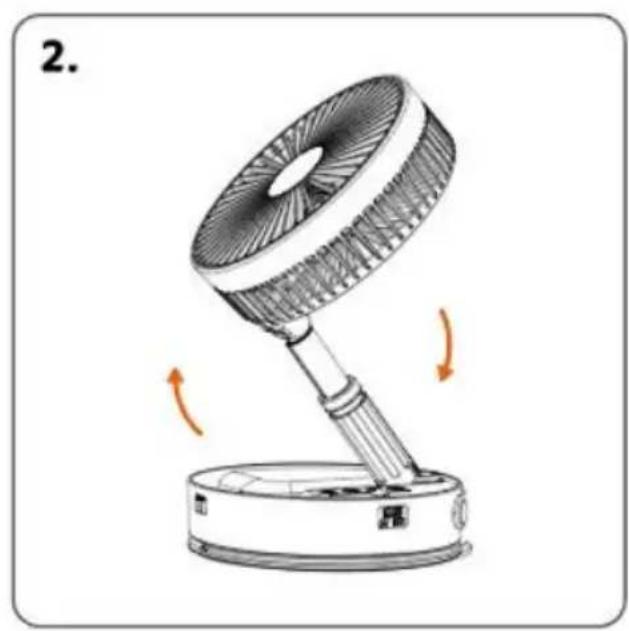
natural_image
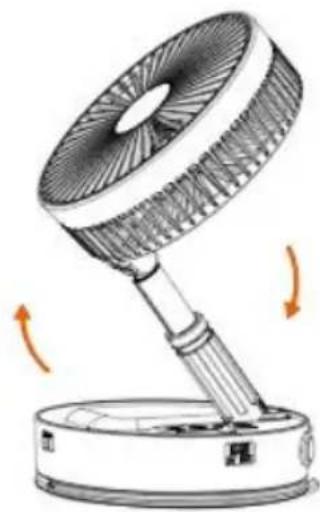
Illustration of a desk lamp with rotating arm and base, showing motion arrows (no text or symbols)Turn on the fan in the direction of the arrow
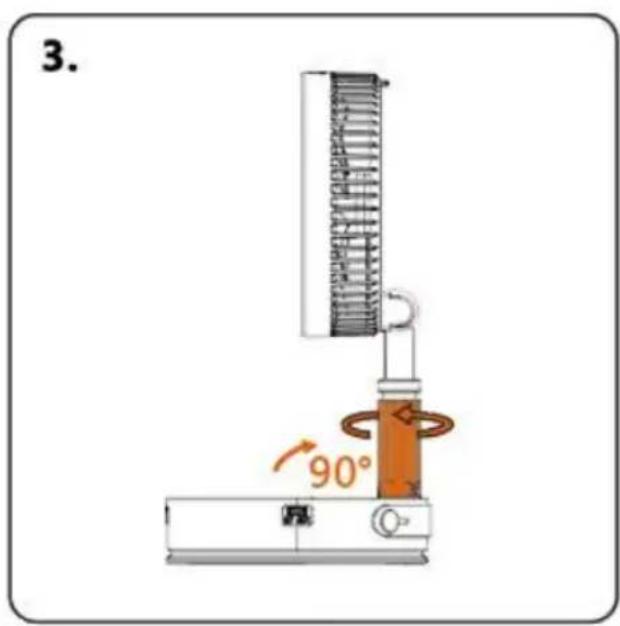
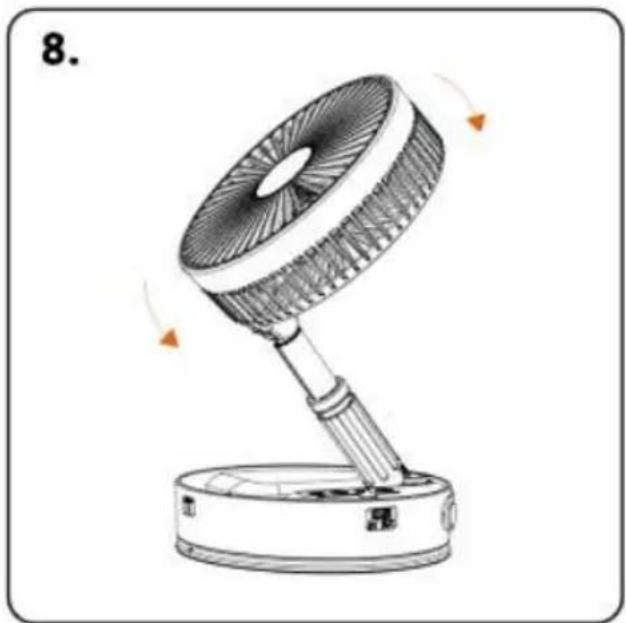
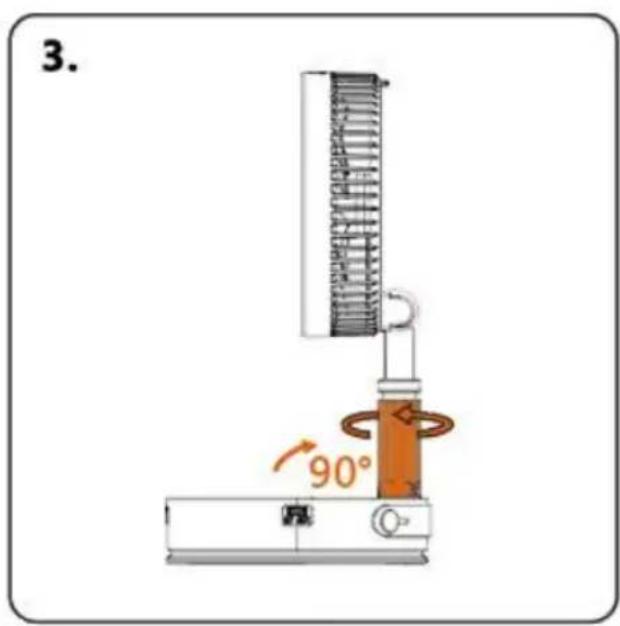
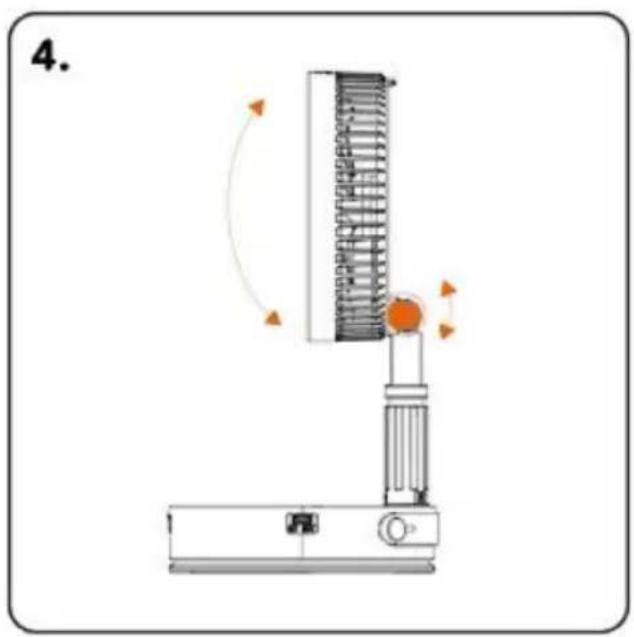
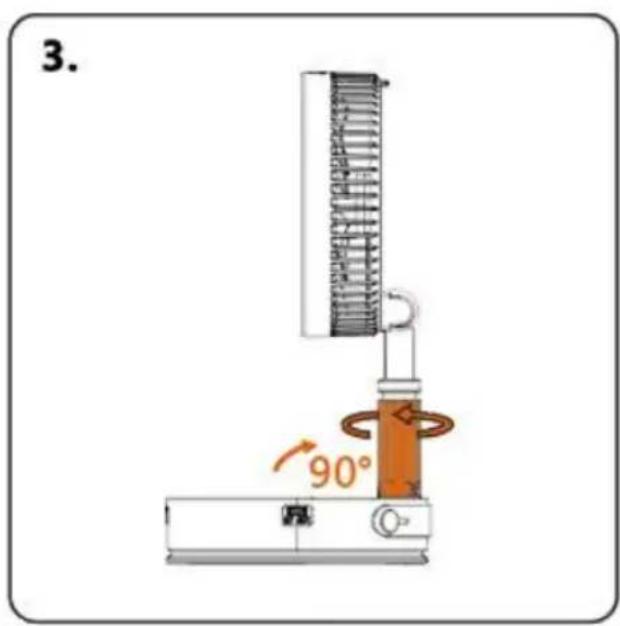
After turning on the fan, adjust the angle to vertical 90°. Then turn the locking device clockwise to fix the angle
natural_image
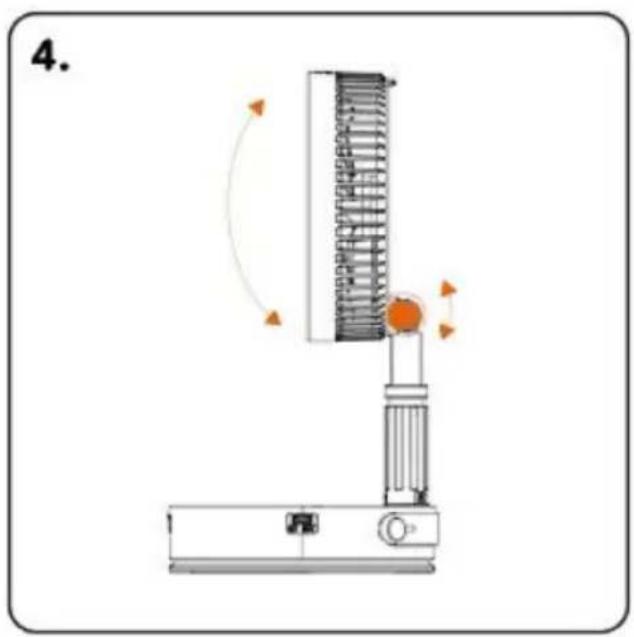
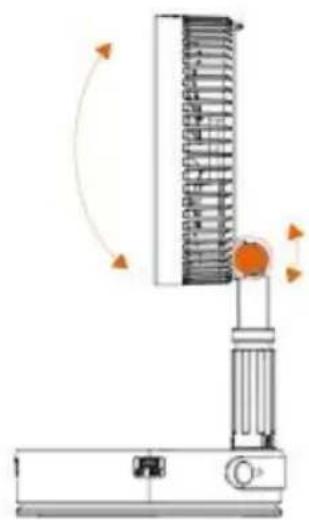
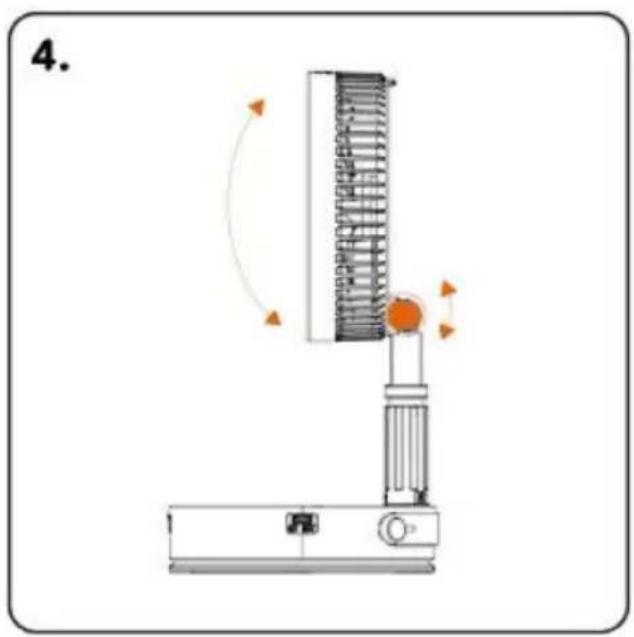
Diagram of a vertical spring scale device with rotating arm and base, no text or symbols presentThe fan can adjust the wind direction up and down 180°
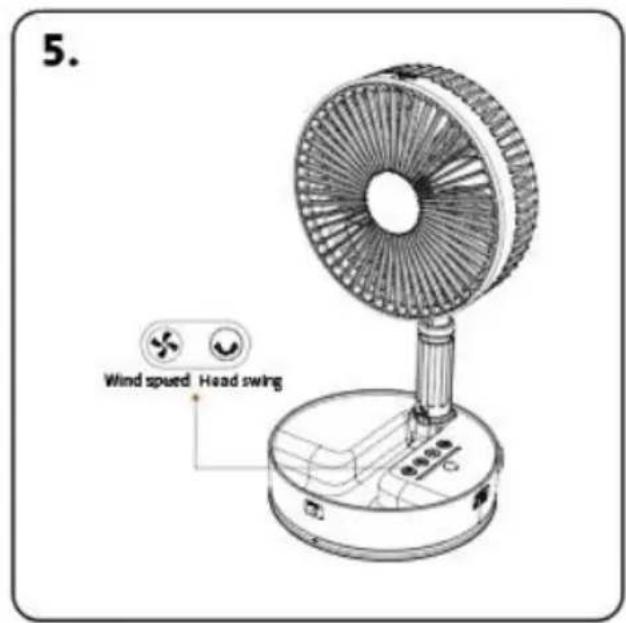

Wind speed adjustment

Head swing
natural_image
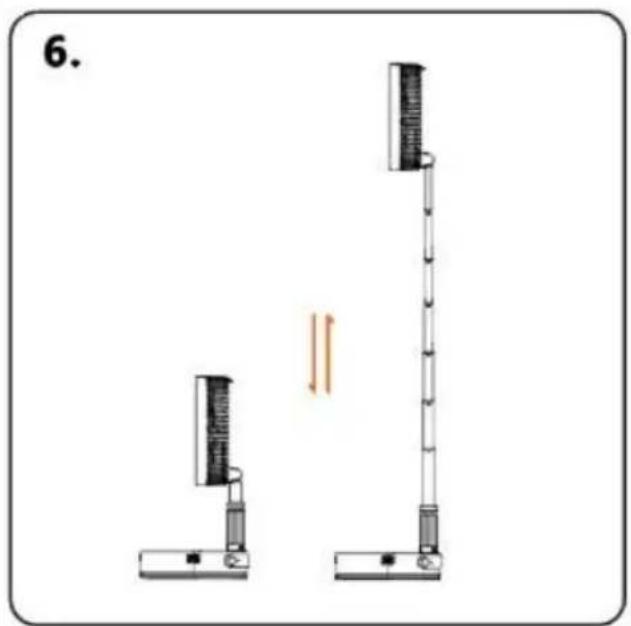
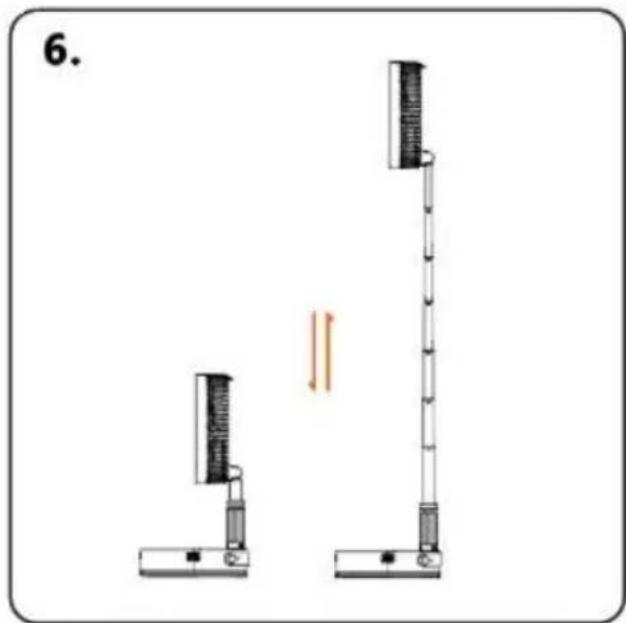
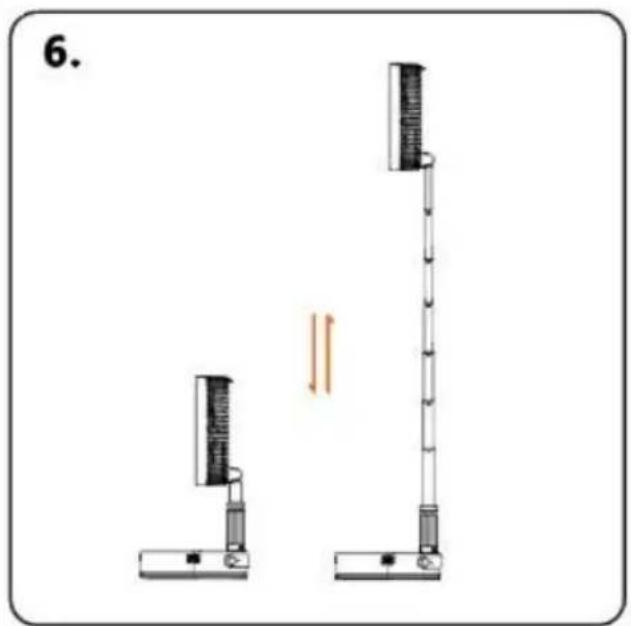
Diagram of two vertical scientific apparatuses with a double-headed arrow indicating motion or force (no text or symbols)The fan can be adjusted in height Pay attention to gently pulling and closing the lever during use
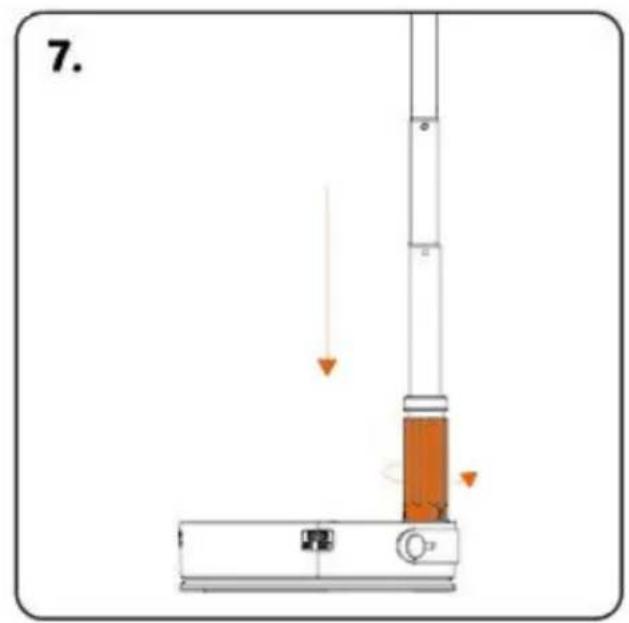
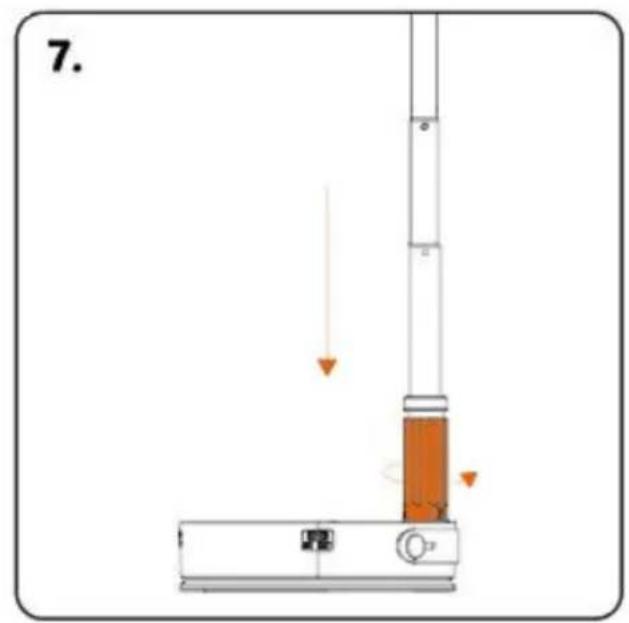
Storage ①: fully retract the telescopic rod, and rotate the locking device counterclockwise to completely loosen it
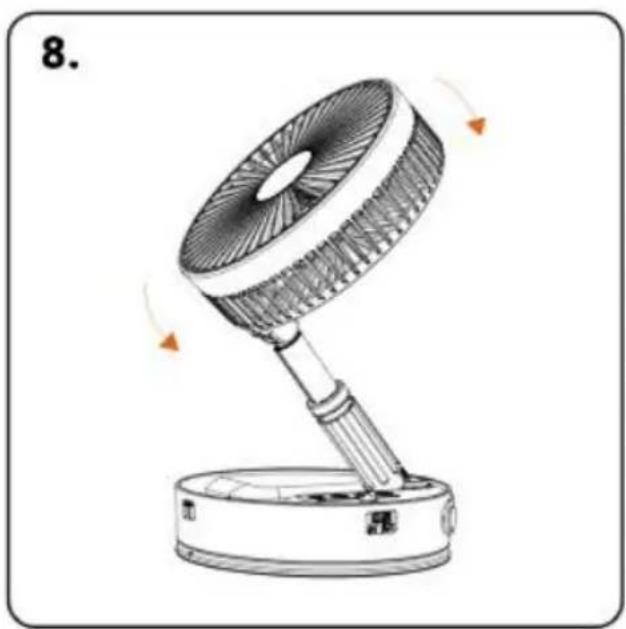
natural_image
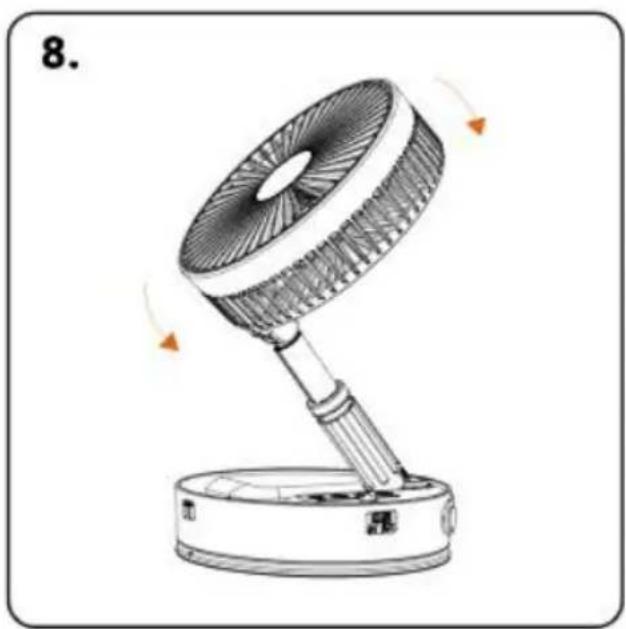
Line drawing of a desk fan with rotating blades and base, no text or symbols presentStorage ②: Loosen the locking device, wait for the telescopic rod, and retract the fan after it is fully retracted
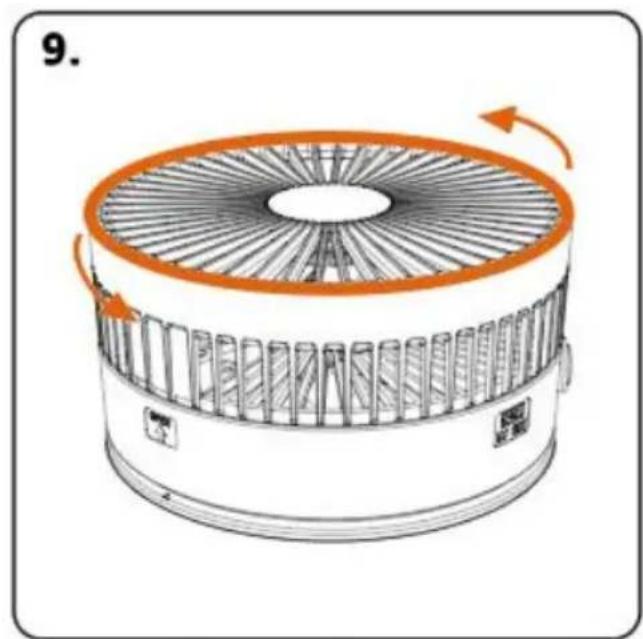
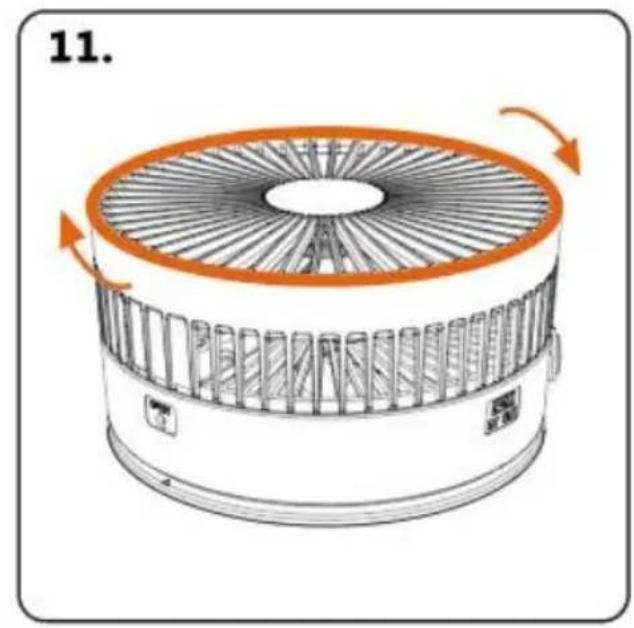
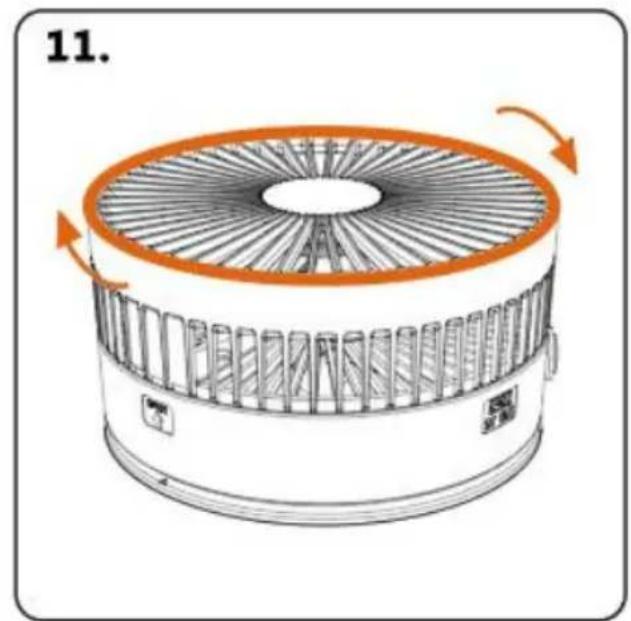
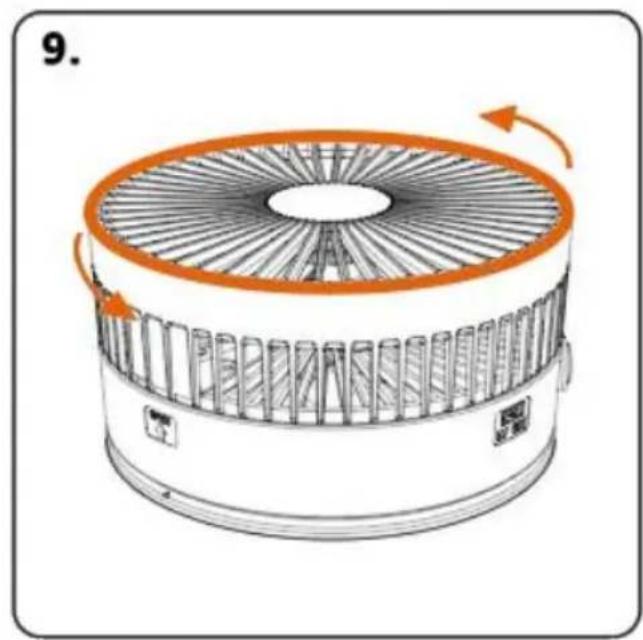
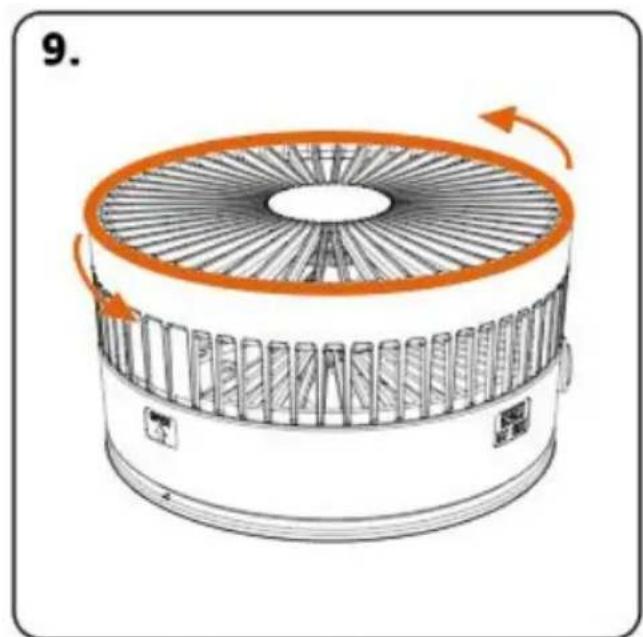
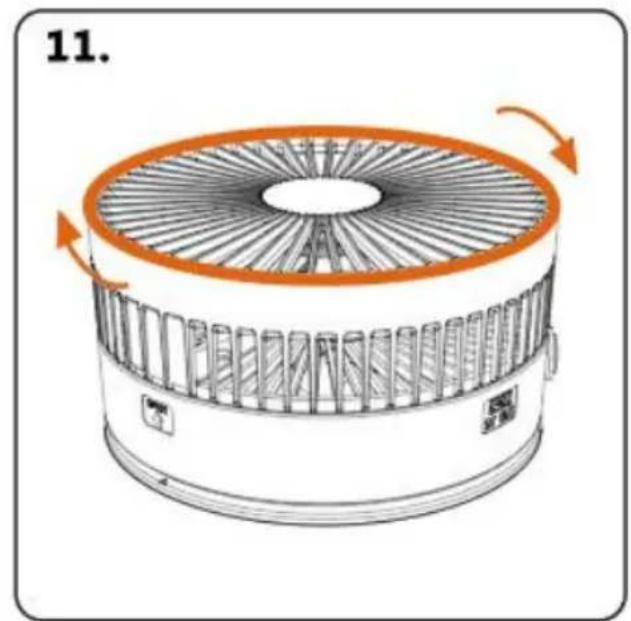
Hold the fan mask frame with both hands Turn counterclockwise to the left to open
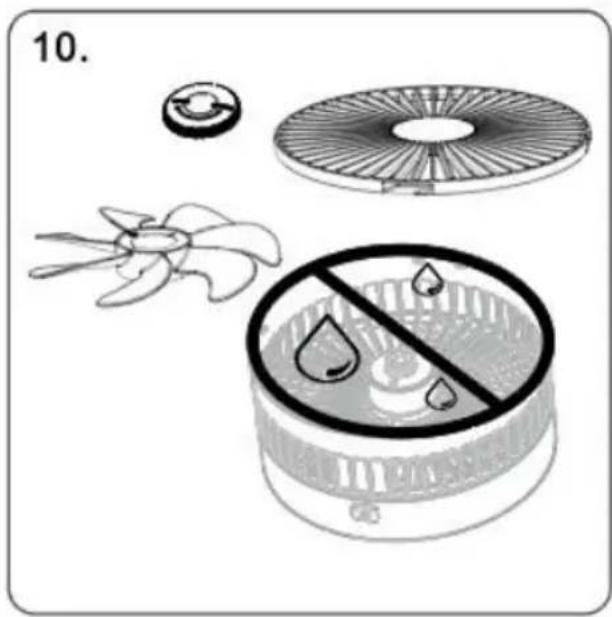
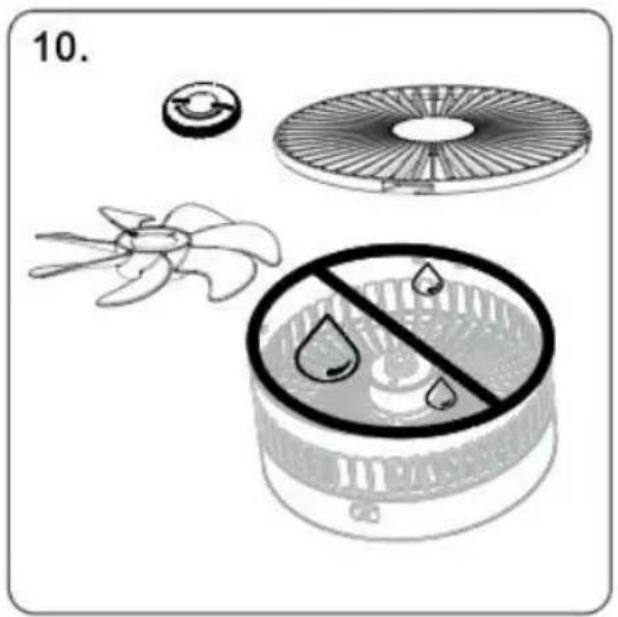
The fan blades of the mask can be removed to clean the dust. The body can be wiped with a dry cloth, and it is strictly prohibited
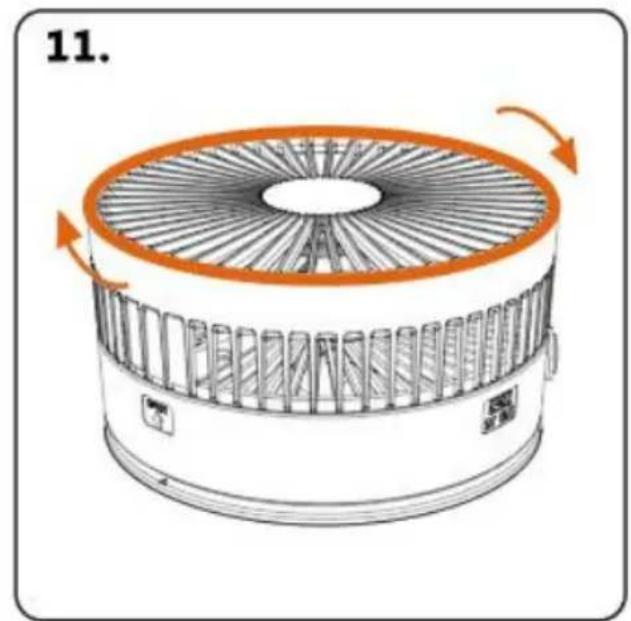
After the mask is left to dry Align the buckle and install it clockwise
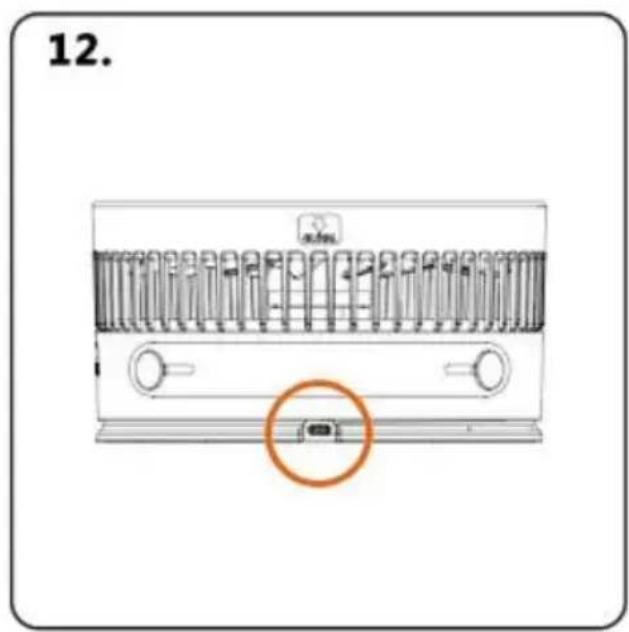
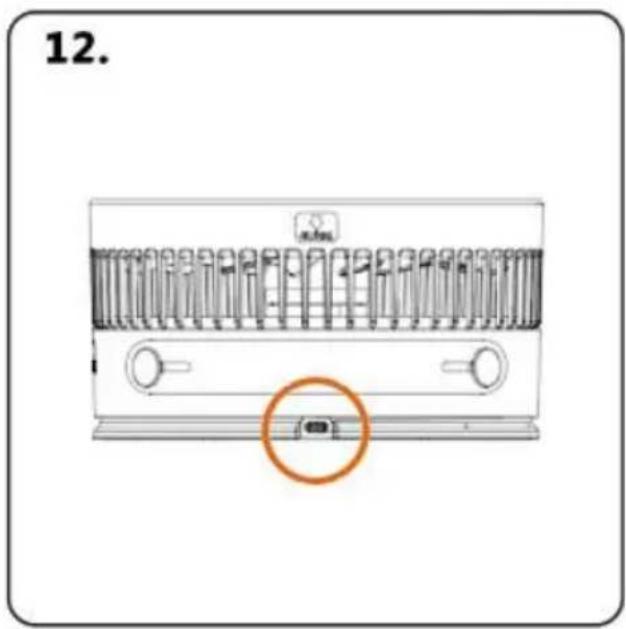
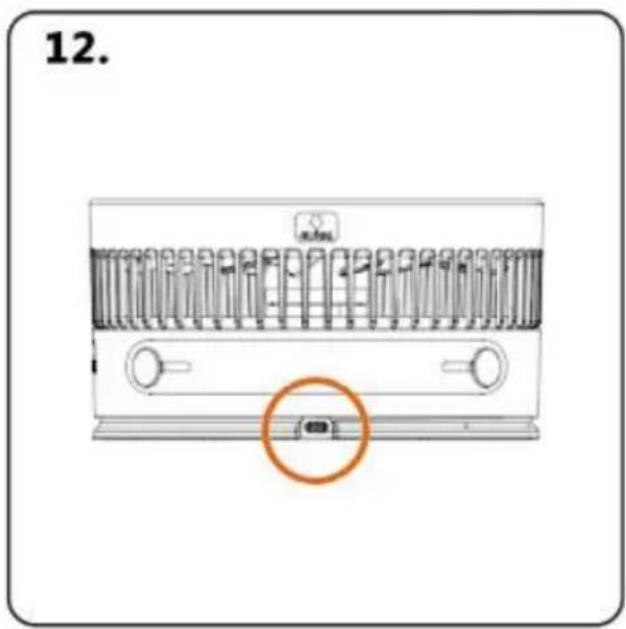
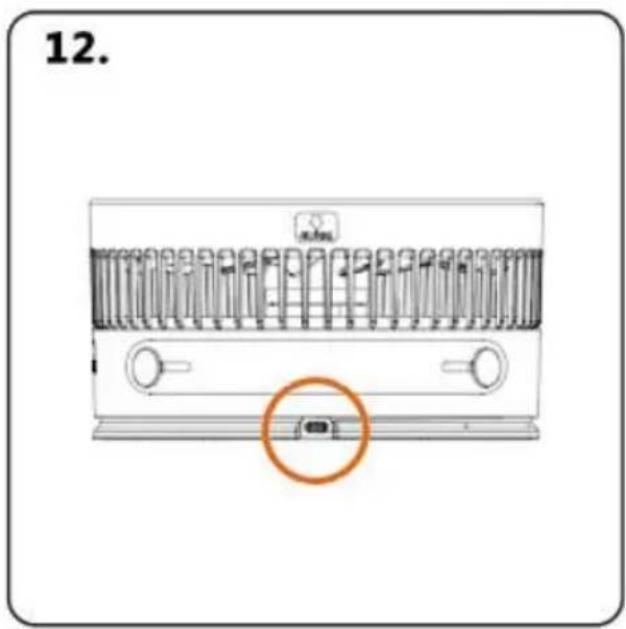
Type-C charging port Use regular DC 5V2.0A charger to charge
SAFETY CAUTION

Safety Caution:
- Before use, please confirm the use of the area and facilities restri places, and prohibitthe violation of public order.
- Do not place the product on high places or uneven countertops on to prevent damage from falling.
- Please do not use the power supply beyond the product load, which cause the product to heat up and burn out the circuit board.
- Please do not disasserble or modify this product by yourself.
- Please do not hit or throw this product, it may cause internal mal
- Do not place the product in a cold or humid place.
- Do not throw the product into the fire and keep it away from the source.
- Warning: This product is not intended for use by children aged 3 and under on their own.
PRODUCT WARRANTY CARD
| Product Model number: |
| Purchasing Date: |
| Client Name: |
| Warranty content: |
| Contact Address: |
| Order Number: |
| Contact: |
Our company guarantees that the attached hardware products are free from defects in materials and workmanship within one year from the original retail purchase, and can accept after-sales problems. Our company does not guarantee normal wear and tear, nor does it guarantee damage caused by accident or abuse. To obtain the service, you can the retail store owned by Our company or the authorized service provides of Our company to repair and replace your products at your discretion. Your warranty rights are in addition to the rights provided by local consumer law. When you file a claim under this warranty policy, you need to provide details of the proof of purchase.
RoHS C€ FC
Address: Baoshanqu Shuangchenglu 803long 11hao 1602A-1609shi Shanghai
Imported to AUS: SIHAO PTY LTD. 1 ROKEVA STREETEASTWOOD NSW 2122 Australia
Imported to USA: Sanven Technology Ltd. Suite 250, 9166 Anaheim Place, Rancho Cucamonga, CA 91730
| UK | REP |
| EC | REP |
Pooledas Group Ltd
Unit 5 Albert Edward House, The Pavilion Preston, United Kingdom
SHUNSHUN GmbH
Römeräcker 9 Z2021, 76351
Technical Support and E-Warranty Certificate
www.vevor.com/support
VEVOR®
TOUGH TOOLS, HALF PRICE
We continue to be committed to provide you tools with competitive price. "Save Half", "Half Price" or any other similar expressions used by us only represent of savings you might benefit from buying certain tools with us compared top brands and does not necessarily mean to cover all categories of tools offered are kindly reminded to verify carefully when you are placing an order with us actually saving half in comparison with the top major brands.
VEVOR®
TOUGH TOOLS, HALF PRICE
POWERFUL FLOOR FAN
MODÈLE : P1000
natural_image
Line drawing of a standard office desk fan with visible blades and base (no text or symbols)NEED HELP? CONTACT US!
Have product questions? Need technical support? Please feel fr contact us:
Technical Support and E-Warranty Certificate www.vevor.com/support
This is the original instruction, please read all manual instruction carefully before operating. VEVOR reserves a clear interpretation user manual. The appearance of the product shall be subject to product you received. Please forgive us that we won't inform you there are any technology or software updates on our product.
PRODUCTPARAMETERS
FUNCTION DESCRIPTION
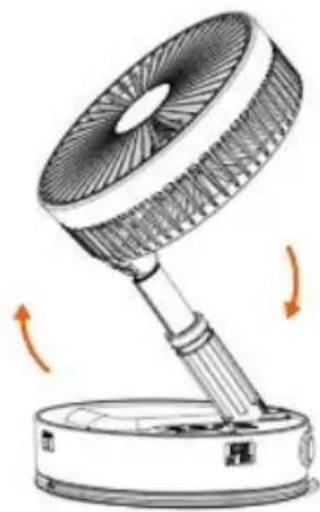
In the folded state, pull up at "OPEN" and then open the fan
natural_image
Illustration of a desk lamp with rotating arm and base, showing fan blade and base (no text or symbols)Turn on the fan in the direction of the arrow
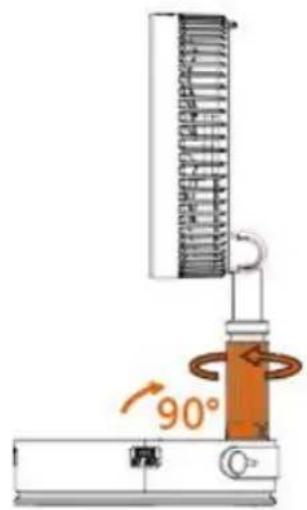
After turning on the fan, adjust the angle to vertical 90°. Then turn the locking device clockwise to fix the angle
natural_image
Diagram of a mechanical device with rotating arm and base, showing no text or symbolsThe fan can adjust the wind direction up and down 180°
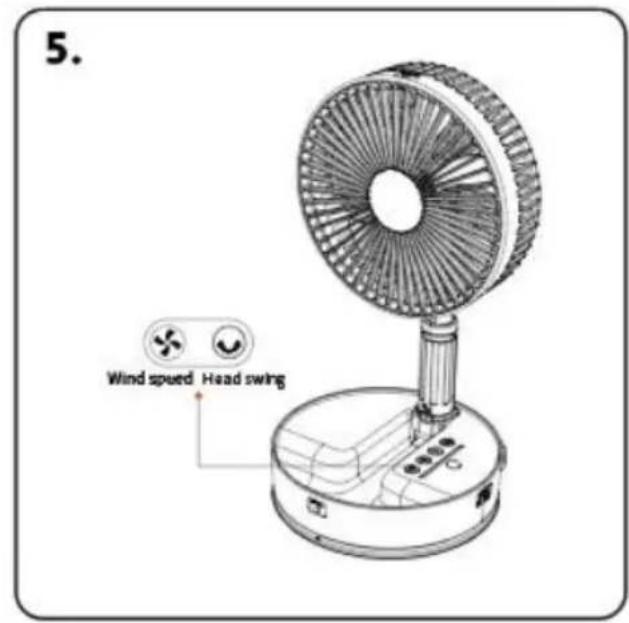

Wind speed adjustment

Head swing
natural_image
Diagram of two vertical scientific apparatuses with a vertical rod and base, connected by a double-headed arrow (no text or symbols present)The fan can be adjusted in height Pay attention to gently pulling and closing the lever during use
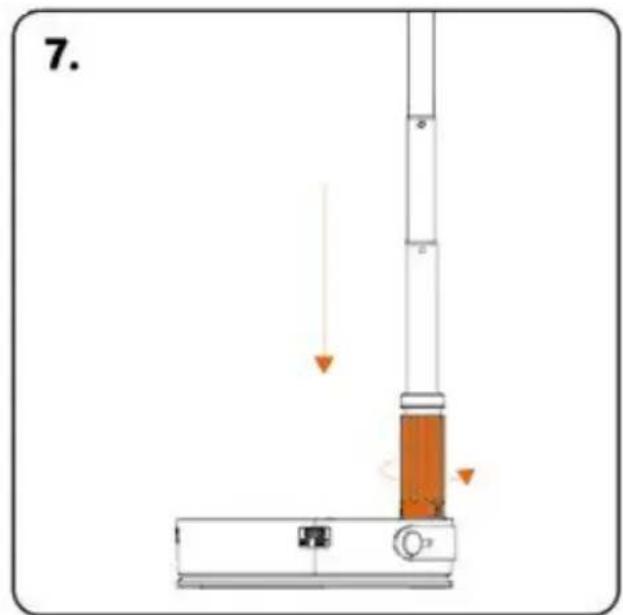
Storage ①: fully retract the telescopic rod, and rotate the locking device counterclockwise to completely loosen it
natural_image
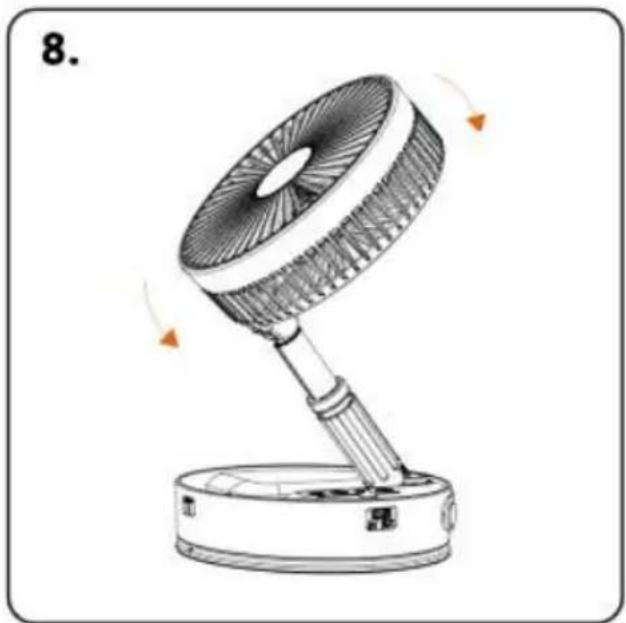
Line drawing of a desk lamp with rotating blades and base, no text or symbols presentStorage ②: Loosen the locking device, wait for the telescopic rod, and retract the fan after it is fully retracted
natural_image
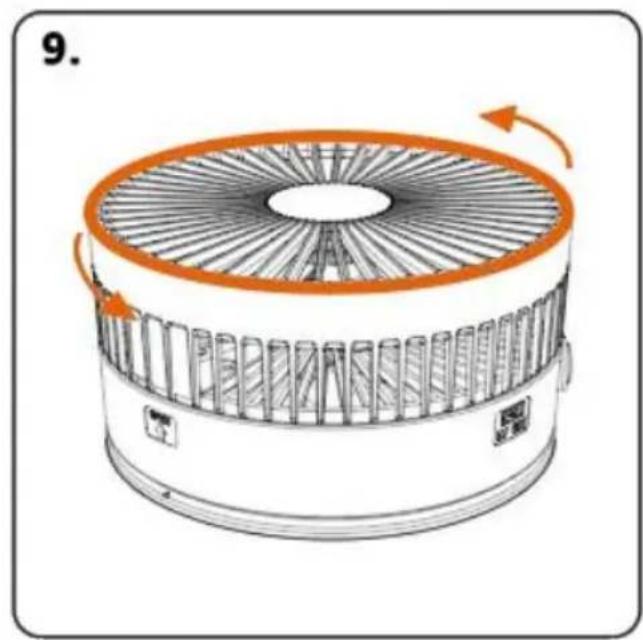
Diagram of a circular fan or fan device with internal blades and orange rotation arrows indicating rotational motion (no text or symbols)Hold the fan mask frame with both hands Turn counterclockwise to the left to open
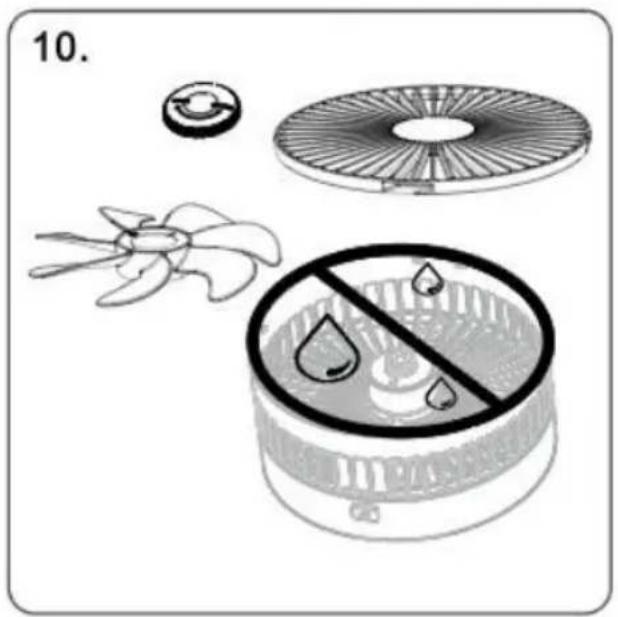
The fan blades of the mask can be removed to clean the dust. The body can be wiped with a dry cloth, and it is strictly prohibited
After the mask is left to dry Align the buckle and install it clockwise
Type-C charging port Use regular DC 5V2.0A charger to charge
SAFETY CAUTION

PRODUCT WARRANTY CARD
Anaheim Place, Rancho Cucamonga, CA 91730
| UK | REP |
| EC | REP |
Pooledas Group Ltd
Unit 5 Albert Edward House, The Pavilion
Preston, United Kingdom
SHUNSHUN GmbH
Römeräcker 9 Z2021, 76351
www.vevor.com/support
VEVOR®
TOUGH TOOLS, HALF PRICE
We continue to be committed to provide you tools with competitive price. "Save Half", "Half Price" or any other similar expressions used by us only represent estimate of savings you might benefit from buying certain tools with us compared top brands and does not necessarily mean to cover all categories of tools offered are kindly reminded to verify carefully when you are placing an order with us actually saving half in comparison with the top major brands.
VEVOR®
TOUGH TOOLS, HALF PRICE
POWERFUL FLOOR FAN
MODELL: P1000
natural_image
Line drawing of a standard office desk fan with visible blades and base (no text or symbols)NEED HELP? CONTACT US!
Have product questions? Need technical support? Please feel fr contact us:
Technical Support and E-Warranty Certificate www.vevor.com/support
This is the original instruction, please read all manual instruction carefully before operating. VEVOR reserves a clear interpretation user manual. The appearance of the product shall be subject to product you received. Please forgive us that we won't inform you there are any technology or software updates on our product.
PRODUCTPARAMETERS
FUNCTION DESCRIPTION
In the folded state, pull up at "OPEN" and then open the fan
natural_image
Illustration of a desk lamp with rotating arm and base, showing fan blade and base (no text or symbols)Turn on the fan in the direction of the arrow
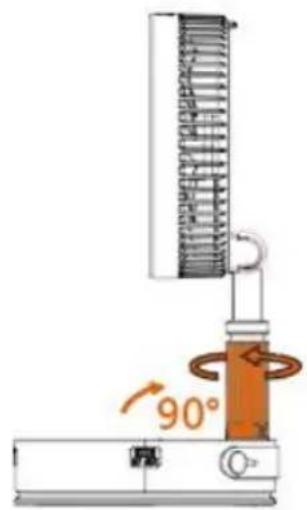
After turning on the fan, adjust the angle to vertical 90°. Then turn the locking device clockwise to fix the angle
natural_image
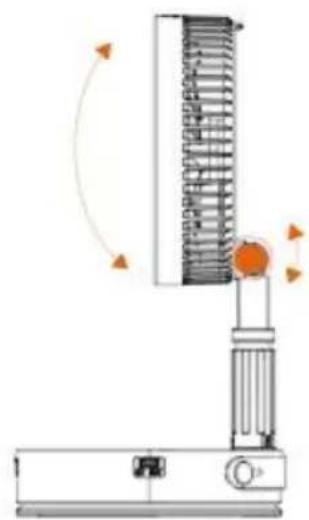
Diagram of a mechanical device with rotating arm and base, showing no text or symbolsThe fan can adjust the wind direction up and down 180°


Wind speed adjustment

Head swing
natural_image
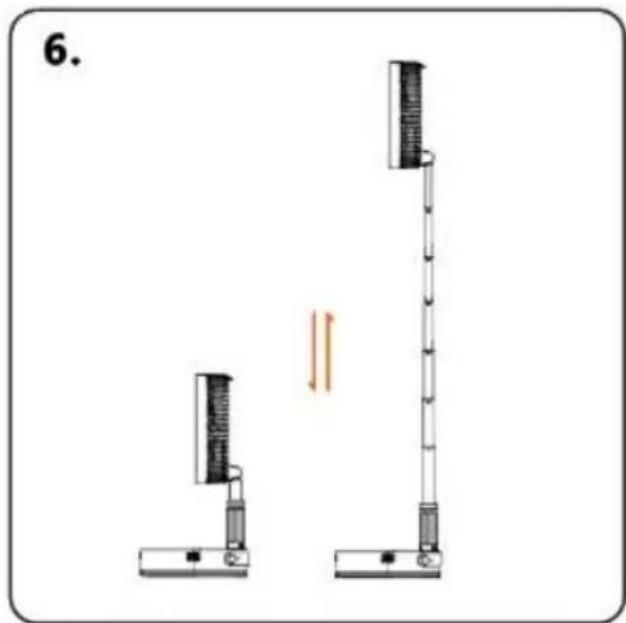
Diagram of two vertical scientific apparatuses with a vertical rod and base, showing alignment or measurement (no text or symbols)The fan can be adjusted in height Pay attention to gently pulling and closing the lever during use
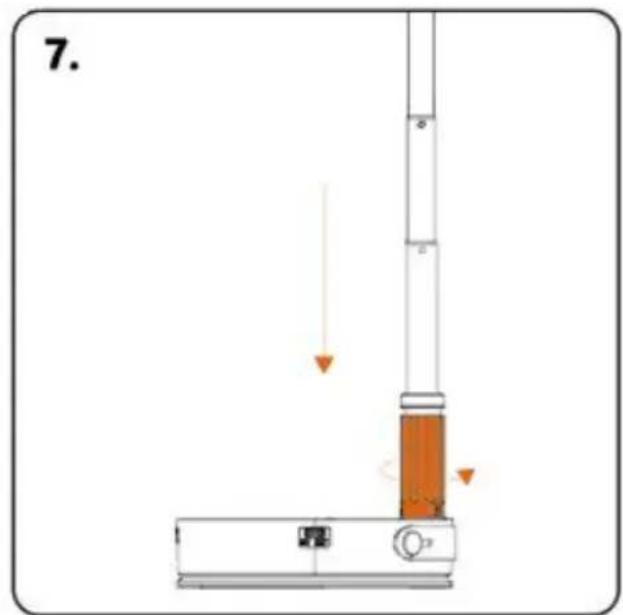
Storage ①: fully retract the telescopic rod, and rotate the locking device counterclockwise to completely loosen it
natural_image
Illustration of a desk lamp with rotating blades and base, no text or symbols presentStorage ②: Loosen the locking device, wait for the telescopic rod, and retract the fan after it is fully retracted
natural_image
Diagram of a circular fan or fan device with internal blades and orange rotation arrows indicating rotational motion (no text or symbols)Hold the fan mask frame with both hands Turn counterclockwise to the left to open
The fan blades of the mask can be removed to clean the dust. The body can be wiped with a dry cloth, and it is strictly prohibited
After the mask is left to dry Align the buckle and install it clockwise
natural_image
Diagram of a portable air conditioner unit with a highlighted orange button (no text or symbols)Type-C charging port Use regular DC 5V2.0A charger to charge
SAFETY CAUTION

Sicherheitshinweis:
PRODUCT WARRANTY CARD
Unit 5 Albert Edward House, The Pavilion Preston, United Kingdom
| EC | REP |
SHUNSHUN GmbH
Römeräcker 9 Z2021, 76351
www.vevor.com/support
VEVOR®
TOUGH TOOLS, HALF PRICE
We continue to be committed to provide you tools with competitive price. "Save Half", "Half Price" or any other similar expressions used by us only represent of savings you might benefit from buying certain tools with us compared top brands and does not necessarily mean to cover all categories of tools offered are kindly reminded to verify carefully when you are placing an order with us actually saving half in comparison with the top major brands.
VEVOR®
TOUGH TOOLS, HALF PRICE
POWERFUL FLOOR FAN
MODELLO: P1000
natural_image
Line drawing of a standard office desk fan with visible blades and base (no text or symbols)NEED HELP? CONTACT US!
Have product questions? Need technical support? Please feel fr contact us:
Technical Support and E-Warranty Certificate www.vevor.com/support
This is the original instruction, please read all manual instruction carefully before operating. VEVOR reserves a clear interpretation user manual. The appearance of the product shall be subject to product you received. Please forgive us that we won't inform you there are any technology or software updates on our product.
PRODUCTPARAMETERS
FUNCTION DESCRIPTION
In the folded state, pull up at "OPEN" and then open the fan
natural_image
Illustration of a desk lamp with rotating arm and base, showing airflow direction (no text or symbols)Turn on the fan in the direction of the arrow
After turning on the fan, adjust the angle to vertical 90°. Then turn the locking device clockwise to fix the angle
natural_image
Diagram of a vertical spring scale device with rotating arm and base, no text or symbols presentThe fan can adjust the wind direction up and down 180°


Wind speed adjustment

Head swing

natural_image
Diagram of two vertical scientific apparatuses with a double-headed arrow indicating motion or force (no text or symbols)The fan can be adjusted in height Pay attention to gently pulling and closing the lever during use
Storage ①: fully retract the telescopic rod, and rotate the locking device counterclockwise to completely loosen it
natural_image
Line drawing of a desk fan with rotating blades and base, no text or symbols presentStorage ②: Loosen the locking device, wait for the telescopic rod, and retract the fan after it is fully retracted
Hold the fan mask frame with both hands Turn counterclockwise to the left to open
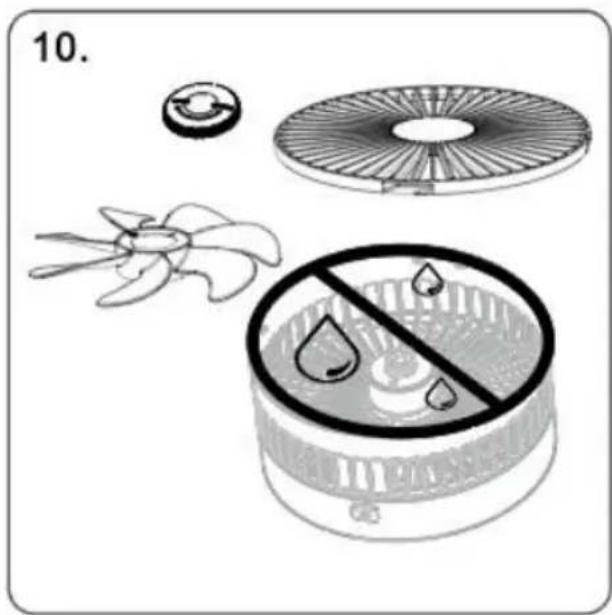
The fan blades of the mask can be removed to clean the dust. The body can be wiped with a dry cloth, and it is strictly prohibited
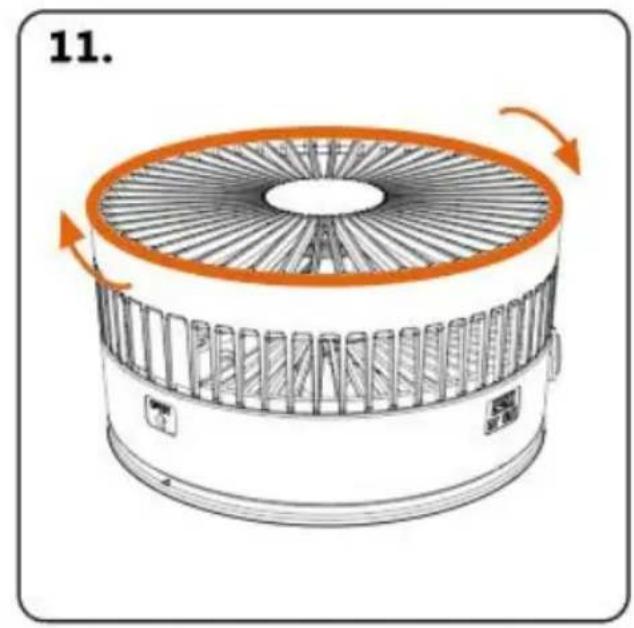
After the mask is left to dry Align the buckle and install it clockwise
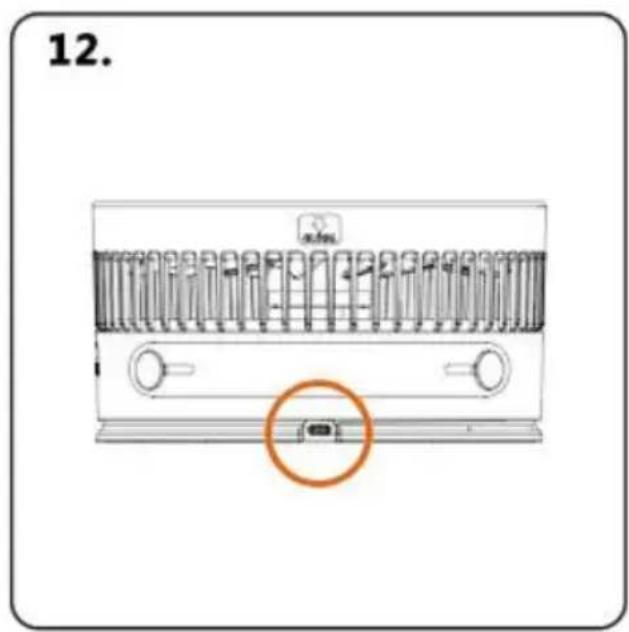
Type-C charging port Use regular DC 5V2.0A charger to charge
SAFETY CAUTION

PRODUCT WARRANTY CARD
Importato in Australia: SIHAO PTY LTD. 1 ROKEVA STREETEASTWOOD NSW 2122 Australia
Unit 5 Albert Edward House, The Pavilion Preston, United Kingdom
SHUNSHUN GmbH
Römeräcker 9 Z2021, 76351
www.vevor.com/support
VEVOR®
TOUGH TOOLS, HALF PRICE
We continue to be committed to provide you tools with competitive price. "Save Half", "Half Price" or any other similar expressions used by us only represent of savings you might benefit from buying certain tools with us compared top brands and does not necessarily mean to cover all categories of tools offered are kindly reminded to verify carefully when you are placing an order with us actually saving half in comparison with the top major brands.
VEVOR®
TOUGH TOOLS, HALF PRICE
POWERFUL FLOOR FAN
MODELO: P1000
natural_image
Line drawing of a standard office desk fan with visible blades and base (no text or symbols)NEED HELP? CONTACT US!
Have product questions? Need technical support? Please feel fr contact us:
Technical Support and E-Warranty Certificate www.vevor.com/support
This is the original instruction, please read all manual instruction carefully before operating. VEVOR reserves a clear interpretation user manual. The appearance of the product shall be subject to product you received. Please forgive us that we won't inform you there are any technology or software updates on our product.
PRODUCTPARAMETERS
FUNCTION DESCRIPTION
In the folded state, pull up at "OPEN" and then open the fan
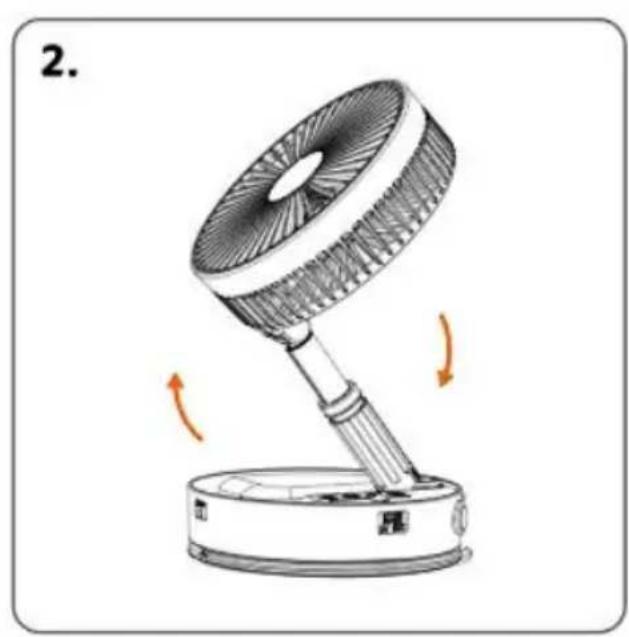
natural_image
Illustration of a desk lamp with rotating arm and base, showing airflow direction (no text or symbols)Turn on the fan in the direction of the arrow

After turning on the fan, adjust the angle to vertical 90°. Then turn the locking device clockwise to fix the angle
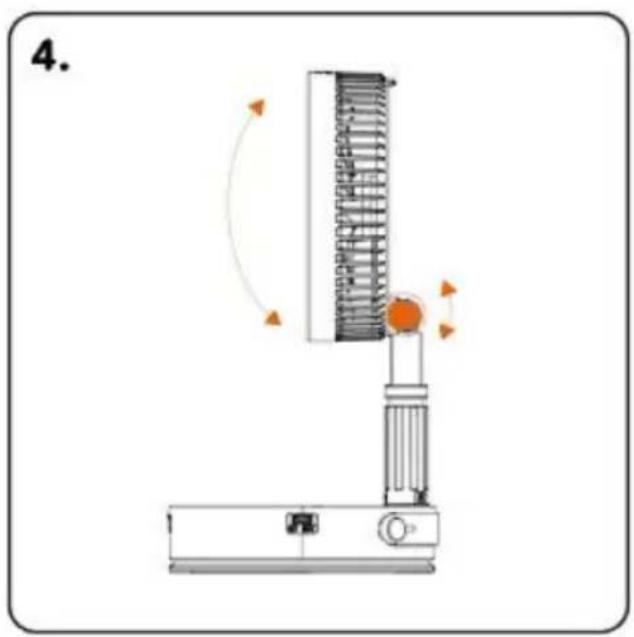
natural_image
Diagram of a vertical spring scale device with rotating arm and base, no text or symbols presentThe fan can adjust the wind direction up and down 180°
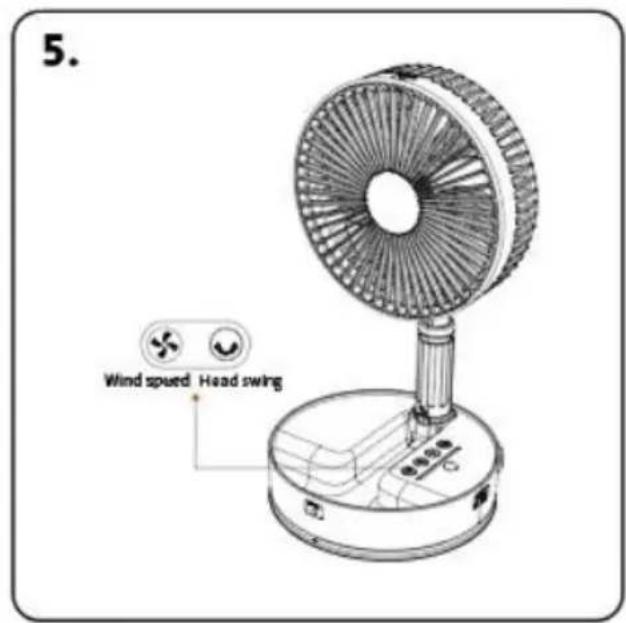

Wind speed adjustment

Head swing
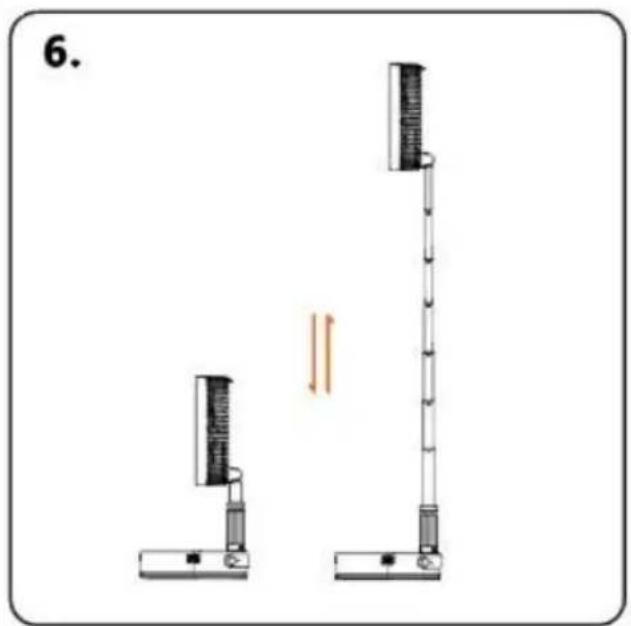
natural_image
Diagram of two vertical scientific apparatuses with a double-headed arrow indicating motion or force (no text or symbols)The fan can be adjusted in height Pay attention to gently pulling and closing the lever during use
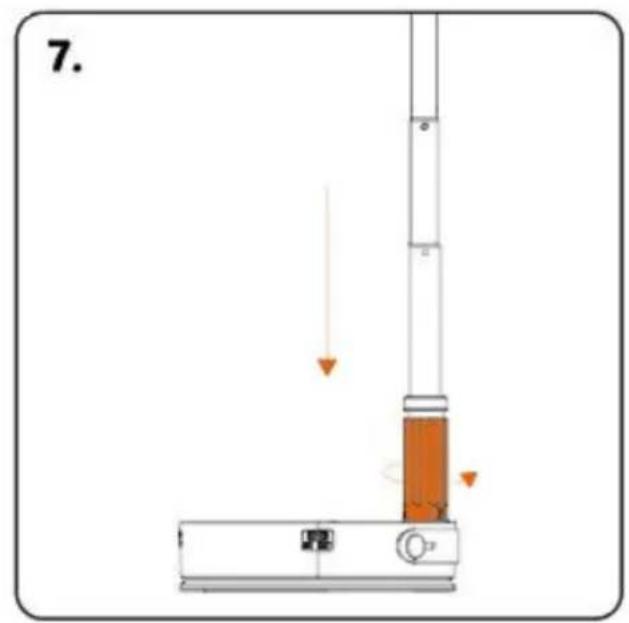
Storage ①: fully retract the telescopic rod, and rotate the locking device counterclockwise to completely loosen it
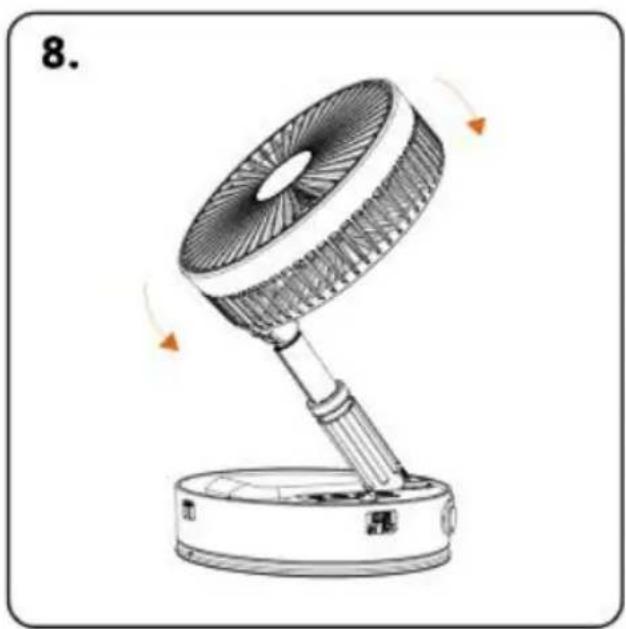
natural_image
Line drawing of a desk fan with rotating blades and base, no text or symbols presentStorage ②: Loosen the locking device, wait for the telescopic rod, and retract the fan after it is fully retracted
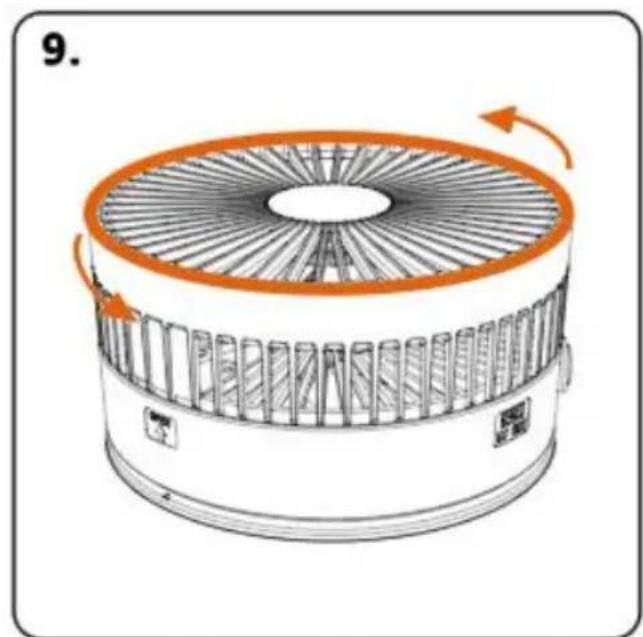
Hold the fan mask frame with both hands Turn counterclockwise to the left to open
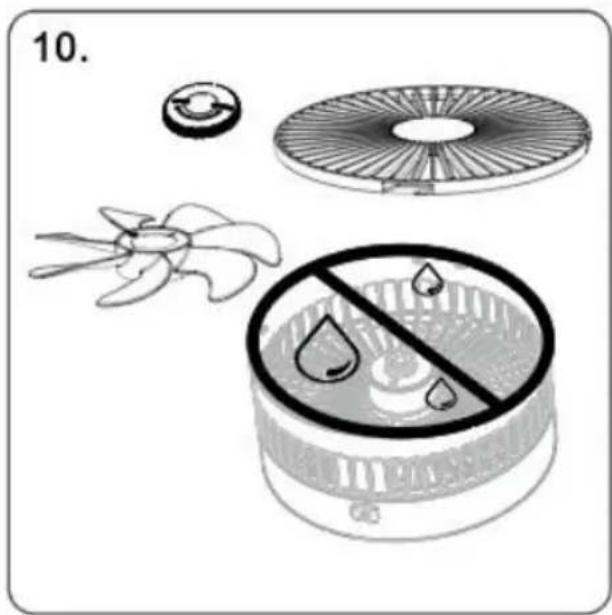
The fan blades of the mask can be removed to clean the dust. The body can be wiped with a dry cloth, and it is strictly prohibited
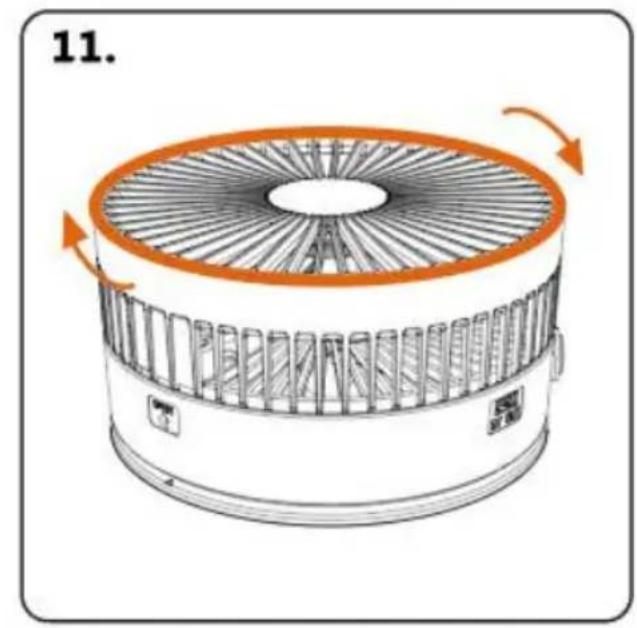
After the mask is left to dry Align the buckle and install it clockwise
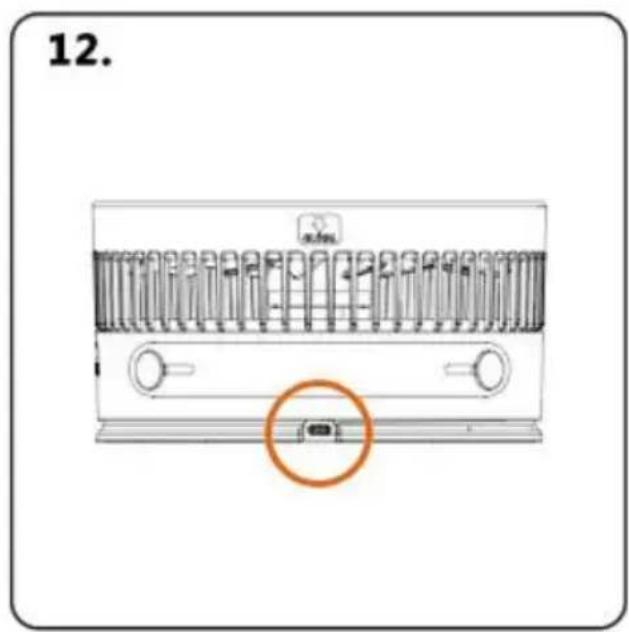
Type-C charging port Use regular DC 5V2.0A charger to charge
SAFETY CAUTION

PRODUCT WARRANTY CARD
Unit 5 Albert Edward House, The Pavilion Preston, United Kingdom
| EC | REP |
SHUNSHUN GmbH
Römeräcker 9 Z2021, 76351
www.vevor.com/support
VEVOR®
TOUGH TOOLS, HALF PRICE
We continue to be committed to provide you tools with competitive price. "Save Half", "Half Price" or any other similar expressions used by us only represent of savings you might benefit from buying certain tools with us compared top brands and does not necessarily mean to cover all categories of tools offered are kindly reminded to verify carefully when you are placing an order with us actually saving half in comparison with the top major brands.
VEVOR®
TOUGH TOOLS, HALF PRICE
POWERFUL FLOOR FAN
MODEL: P1000
natural_image
Line drawing of a standard office desk fan with visible blades and base (no text or symbols)NEED HELP? CONTACT US!
Have product questions? Need technical support? Please feel fr contact us:
Technical Support and E-Warranty Certificate www.vevor.com/support
This is the original instruction, please read all manual instruction carefully before operating. VEVOR reserves a clear interpretation user manual. The appearance of the product shall be subject to product you received. Please forgive us that we won't inform you there are any technology or software updates on our product.
PRODUCTPARAMETERS
FUNCTION DESCRIPTION
natural_image
Diagram of a vertical cylindrical device with internal components and an upward arrow, no text or symbols presentIn the folded state, pull up at "OPEN" and then open the fan
natural_image
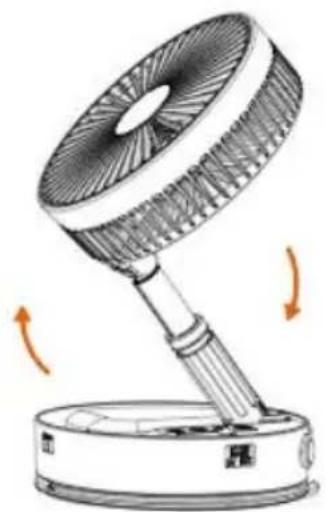
Illustration of a desktop fan with rotating arm and base, showing airflow direction (no text or symbols)Turn on the fan in the direction of the arrow
After turning on the fan, adjust the angle to vertical 90°. Then turn the locking device clockwise to fix the angle
natural_image
Diagram of a vertical spring scale device with rotating arm and base, no text or symbols presentThe fan can adjust the wind direction up and down 180°

Wind speed adjustment

Head swing
natural_image
Diagram of two vertical scientific apparatuses with a double-headed arrow indicating motion or force (no text or symbols)The fan can be adjusted in height Pay attention to gently pulling and closing the lever during use
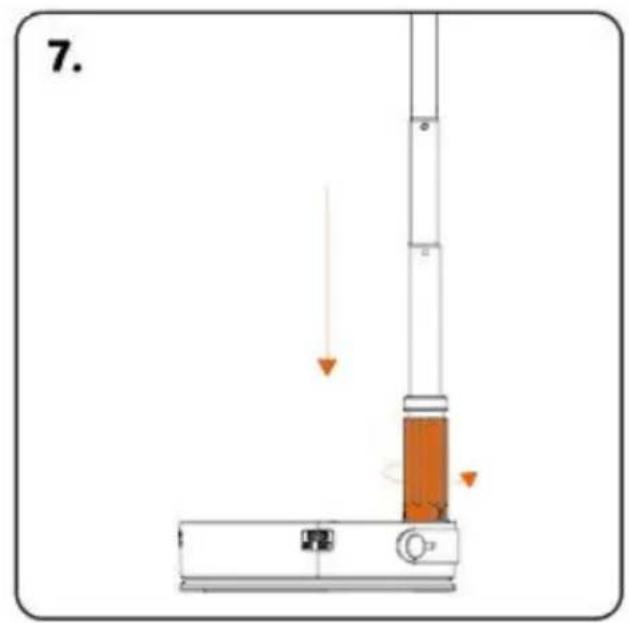
Storage ①: fully retract the telescopic rod, and rotate the locking device counterclockwise to completely loosen it
natural_image
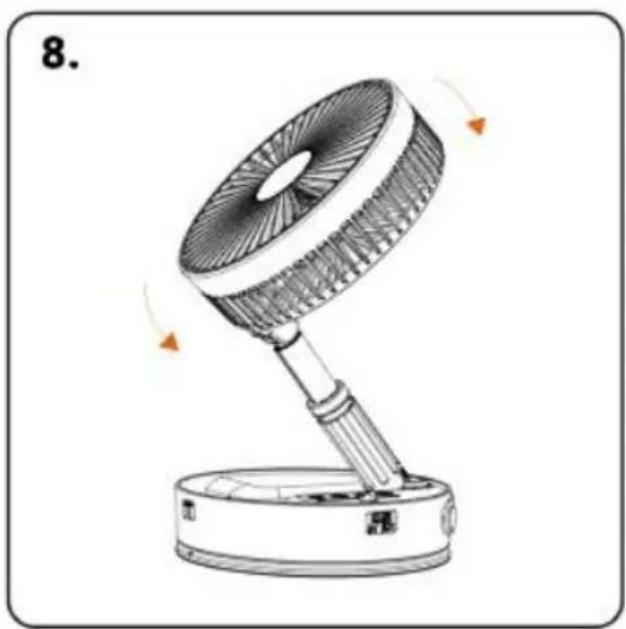
Line drawing of a desk fan with rotating blades and base, no text or symbols presentStorage ②: Loosen the locking device, wait for the telescopic rod, and retract the fan after it is fully retracted
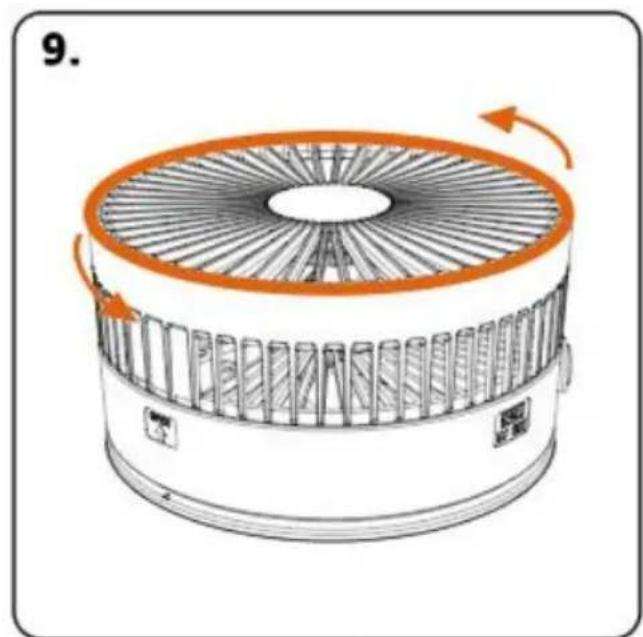
Hold the fan mask frame with both hands Turn counterclockwise to the left to open
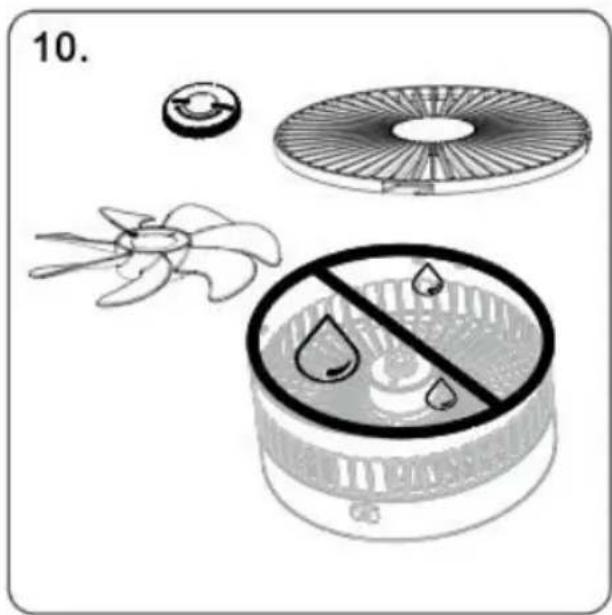
The fan blades of the mask can be removed to clean the dust. The body can be wiped with a dry cloth, and it is strictly prohibited
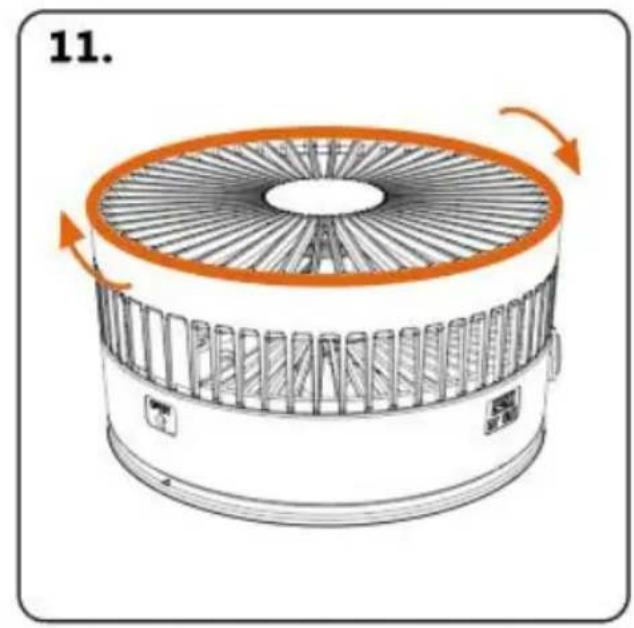
After the mask is left to dry Align the buckle and install it clockwise
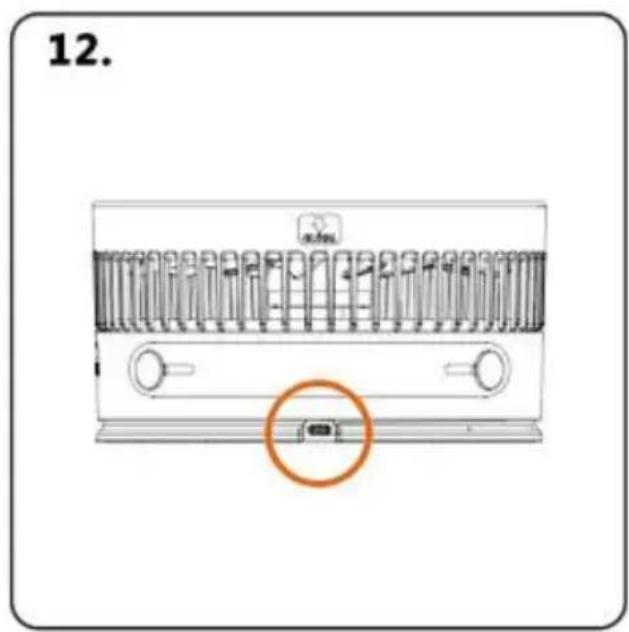
Type-C charging port Use regular DC 5V2.0A charger to charge
SAFETY CAUTION

PRODUCT WARRANTY CARD
Unit 5 Albert Edward House, The Pavilion Preston, United Kingdom
| EC | REP |
SHUNSHUN GmbH
Römeräcker 9 Z2021, 76351
www.vevor.com/support
VEVOR®
TOUGH TOOLS, HALF PRICE
Technisch Ondersteuning en e-garantiecertificaat www.vevor.com/support
KRACHTIGE VLOERVENTILATOR
MODEL: P1000
We continue to be committed to provide you tools with competitive price. "Save Half", "Half Price" or any other similar expressions used by us only represent of savings you might benefit from buying certain tools with us compared top brands and does not necessarily mean to cover all categories of tools offered are kindly reminded to verify carefully when you are placing an order with us actually saving half in comparison with the top major brands.
VEVOR®
TOUGH TOOLS, HALF PRICE
POWERFUL FLOOR FAN
MODEL: P1000
natural_image
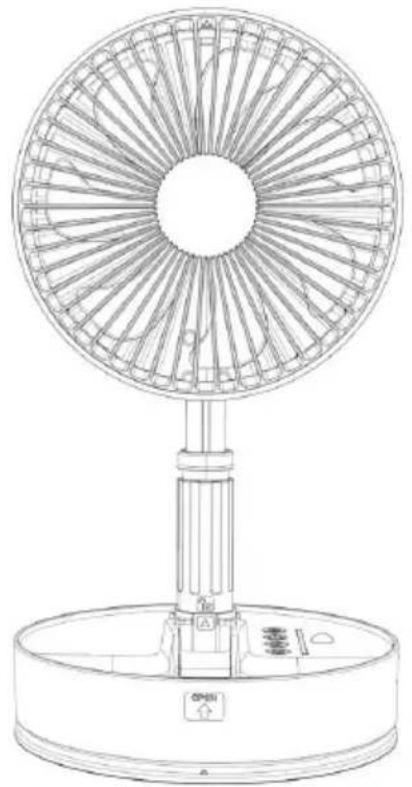
Line drawing of a standard office desk fan with visible blades and base (no text or symbols)NEED HELP? CONTACT US!
Have product questions? Need technical support? Please feel fr contact us:
Technical Support and E-Warranty Certificate www.vevor.com/support
This is the original instruction, please read all manual instruction carefully before operating. VEVOR reserves a clear interpretation user manual. The appearance of the product shall be subject to product you received. Please forgive us that we won't inform you there are any technology or software updates on our product.
PRODUCTPARAMETERS
FUNCTION DESCRIPTION
In the folded state, pull up at "OPEN" and then open the fan
natural_image
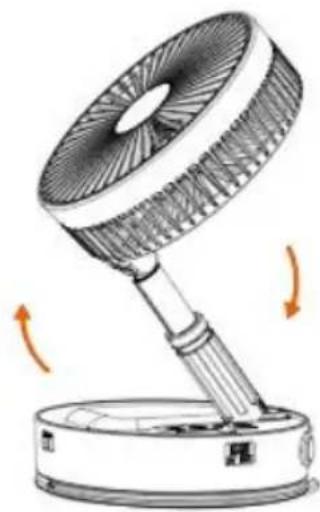
Illustration of a desk lamp with rotating arm and base, showing fan blade and base (no text or symbols)Turn on the fan in the direction of the arrow
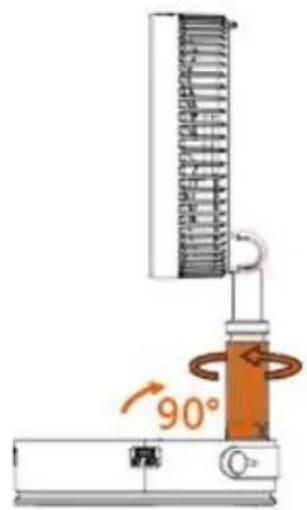
After turning on the fan, adjust the angle to vertical 90°. Then turn the locking device clockwise to fix the angle
natural_image
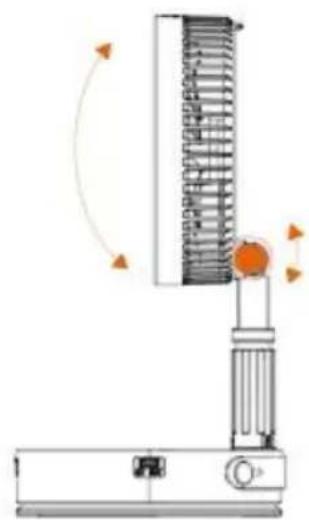
Diagram of a mechanical device with rotating arm and base, showing no text or symbolsThe fan can adjust the wind direction up and down 180°
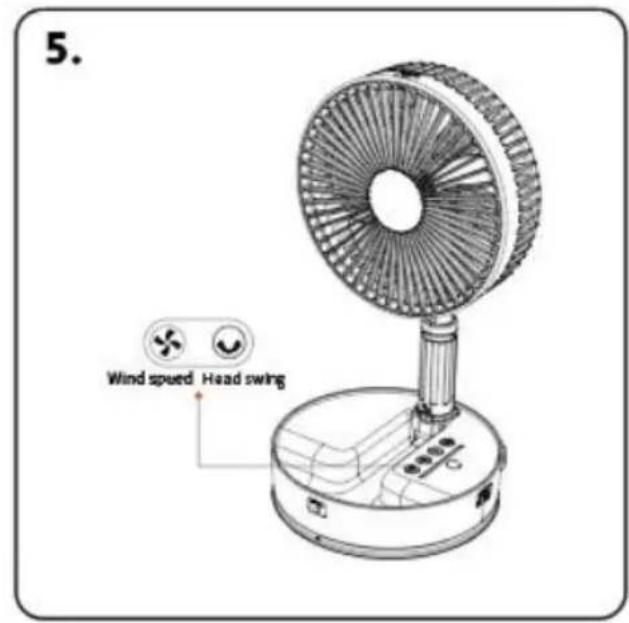

Wind speed adjustment

Head swing
natural_image
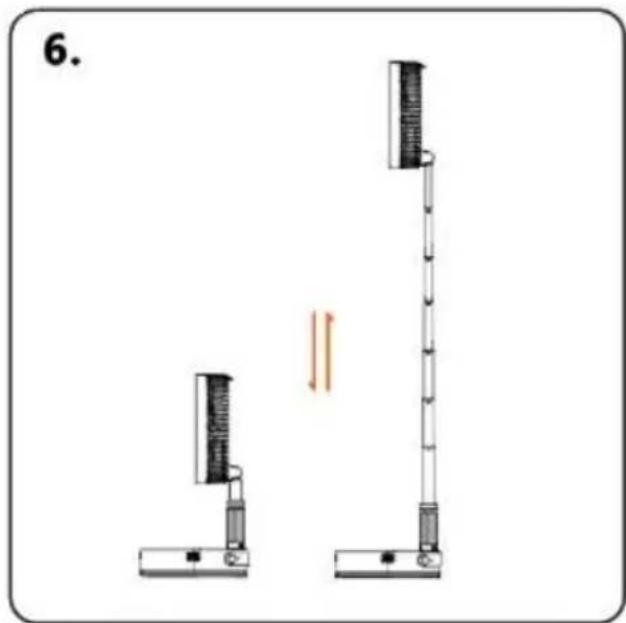
Diagram of two vertical scientific apparatuses with a vertical rod and base, connected by a double-headed arrow (no text or symbols present)The fan can be adjusted in height Pay attention to gently pulling and closing the lever during use
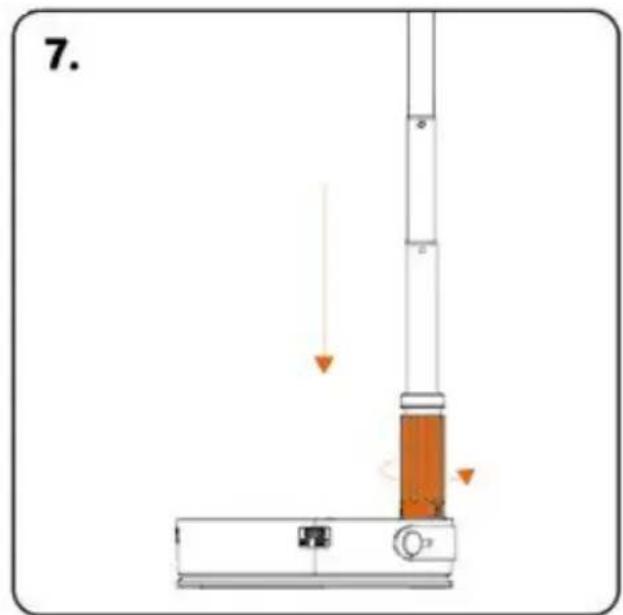
Storage ①: fully retract the telescopic rod, and rotate the locking device counterclockwise to completely loosen it
natural_image
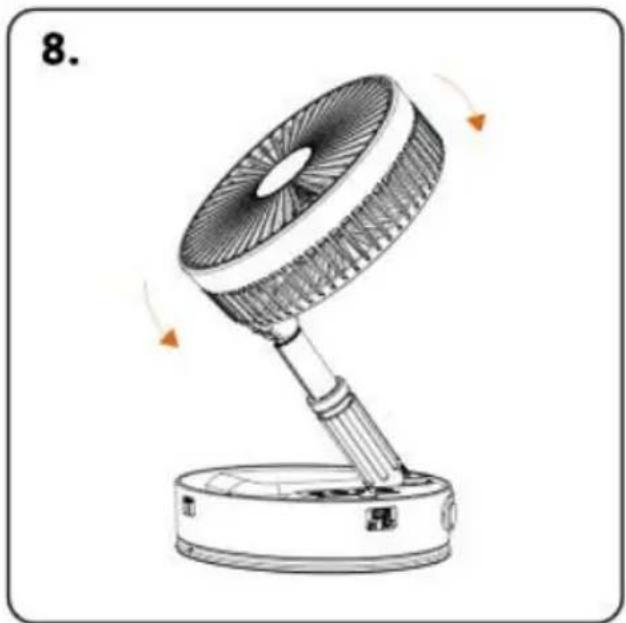
Line drawing of a desk lamp with rotating blades and base, no text or symbols presentStorage ②: Loosen the locking device, wait for the telescopic rod, and retract the fan after it is fully retracted
natural_image
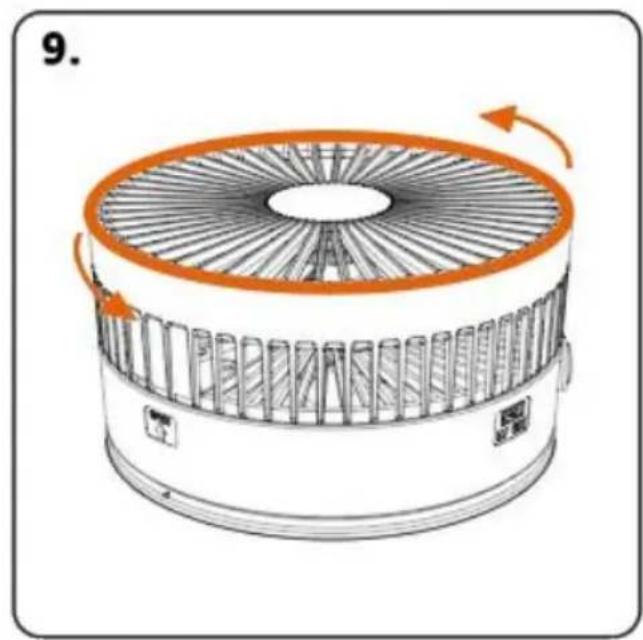
Diagram of a circular fan or fan device with internal blades and orange rotation arrows indicating rotational motion (no text or symbols)Hold the fan mask frame with both hands Turn counterclockwise to the left to open
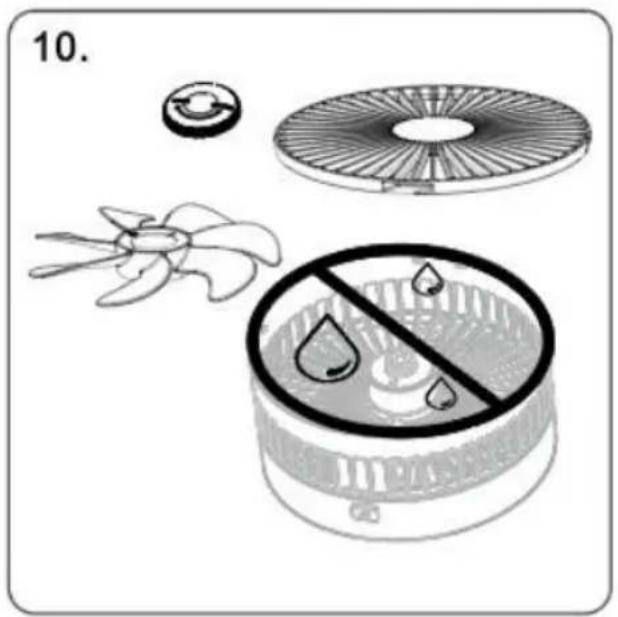
The fan blades of the mask can be removed to clean the dust. The body can be wiped with a dry cloth, and it is strictly prohibited
After the mask is left to dry Align the buckle and install it clockwise
natural_image
Diagram of a portable air conditioner unit with a highlighted orange button (no text or symbols)Type-C charging port Use regular DC 5V2.0A charger to charge
SAFETY CAUTION

PRODUCT WARRANTY CARD
Anaheim Place, Rancho Cucamonga, CA 91730
| UK | REP |
| EC | REP |
Pooledas Group Ltd
Unit 5 Albert Edward House, The Pavilion
Preston, United Kingdom
SHUNSHUN GmbH
Römeräcker 9 Z2021, 76351
www.vevor.com/support
VEVOR®
TOUGH TOOLS, HALF PRICE
We continue to be committed to provide you tools with competitive price. "Save Half", "Half Price" or any other similar expressions used by us only represent of savings you might benefit from buying certain tools with us compared top brands and does not necessarily mean to cover all categories of tools offered are kindly reminded to verify carefully when you are placing an order with us actually saving half in comparison with the top major brands.
VEVOR®
TOUGH TOOLS, HALF PRICE
POWERFUL FLOOR FAN
MODELL: P1000
natural_image
Line drawing of a standard office desk fan with visible blades and base (no text or symbols)NEED HELP? CONTACT US!
Have product questions? Need technical support? Please feel fr contact us:
Technical Support and E-Warranty Certificate www.vevor.com/support
This is the original instruction, please read all manual instruction carefully before operating. VEVOR reserves a clear interpretation user manual. The appearance of the product shall be subject to product you received. Please forgive us that we won't inform you there are any technology or software updates on our product.
PRODUCTPARAMETERS
| Produktnamn: Folding Fan | Arbetstid: 4~35 timmar |
| Produktmodell: P1000 | Laddningstid: 5~6 timmar |
| Huvudmaterial: Aluminiumlegering & ABS-plast | Brusdecibel: 10~245db |
| Batterimodell: litiumbatteri 18650 | Batterikapacitet: 7200mAh |
| Vikstorlek: 198*198*104mm | Laddningsspänning: DC5V/3A~4A |
| Stretchingstorlek: 198*198*1020mm | Arbetsvindhastighet: 2,5 ~ 4,5 ± m/s |
| Oscillerande: 60°± 5 | Arbetstemperatur: <50C |
PRODUCT LEGEND
FUNCTION DESCRIPTION
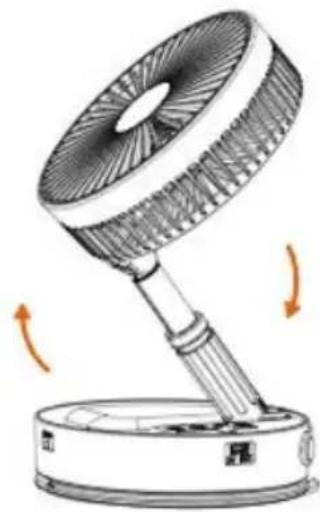
In the folded state, pull up at "OPEN" and then open the fan
natural_image
Illustration of a desktop fan with rotating arm and base, showing airflow direction (no text or symbols)Turn on the fan in the direction of the arrow
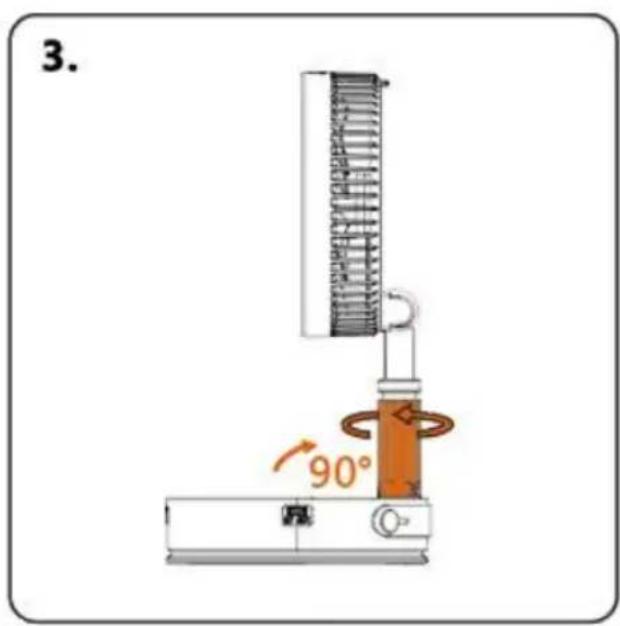
After turning on the fan, adjust the angle to vertical 90°. Then turn the locking device clockwise to fix the angle
natural_image
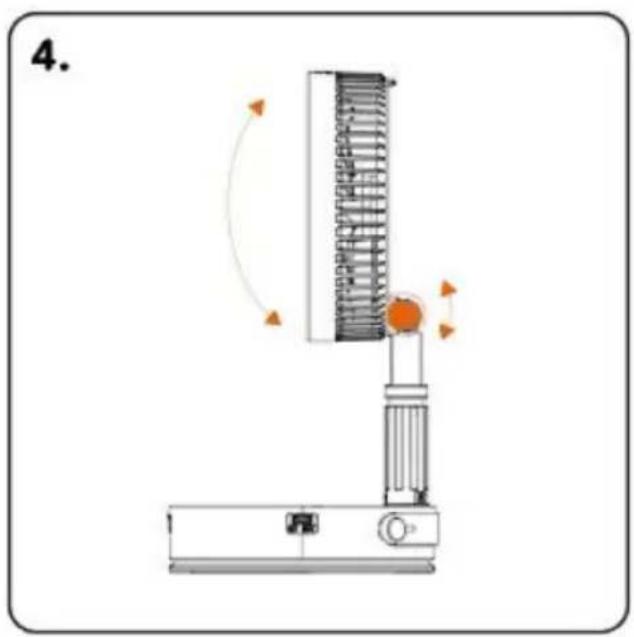
Diagram of a vertical spring scale device with rotating arm and base, no text or symbols presentThe fan can adjust the wind direction up and down 180°
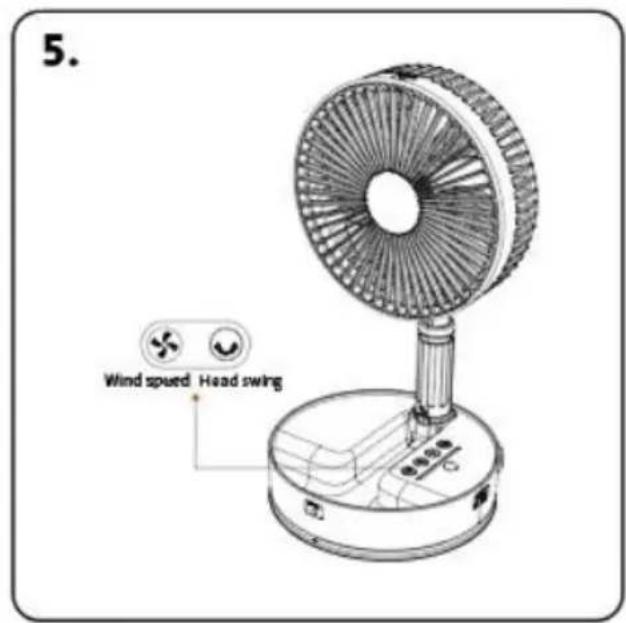

Wind speed adjustment

Head swing
natural_image
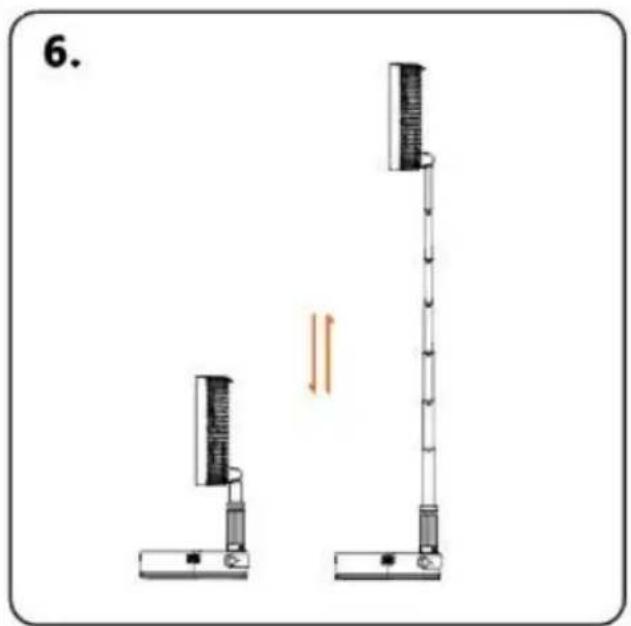
Diagram of two vertical scientific apparatuses with a double-headed arrow indicating motion or force (no text or symbols)The fan can be adjusted in height Pay attention to gently pulling and closing the lever during use
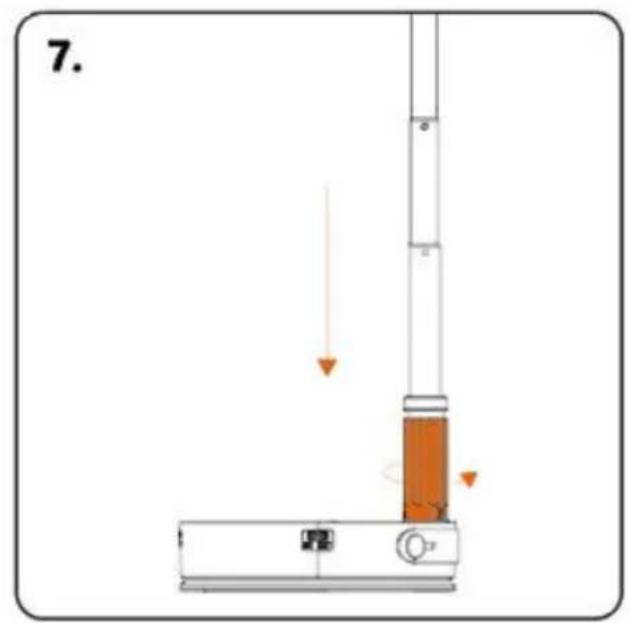
Storage ①: fully retract the telescopic rod, and rotate the locking device counterclockwise to completely loosen it
natural_image
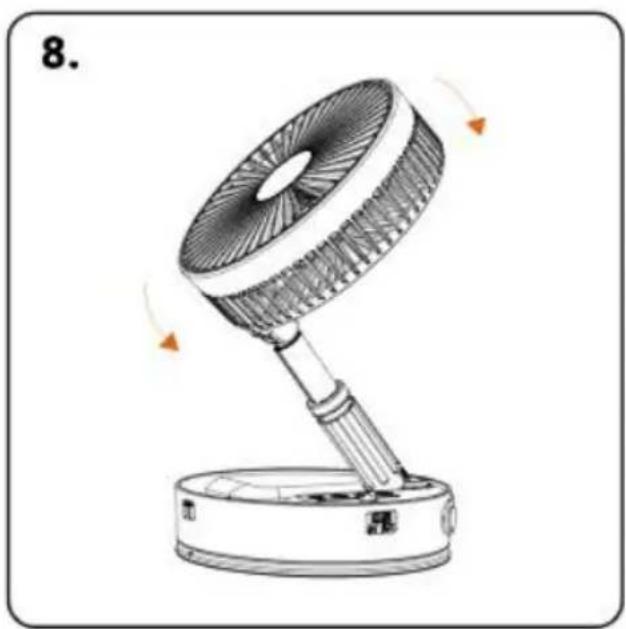
Line drawing of a desk fan with rotating blades and base, no text or symbols presentStorage ②: Loosen the locking device, wait for the telescopic rod, and retract the fan after it is fully retracted
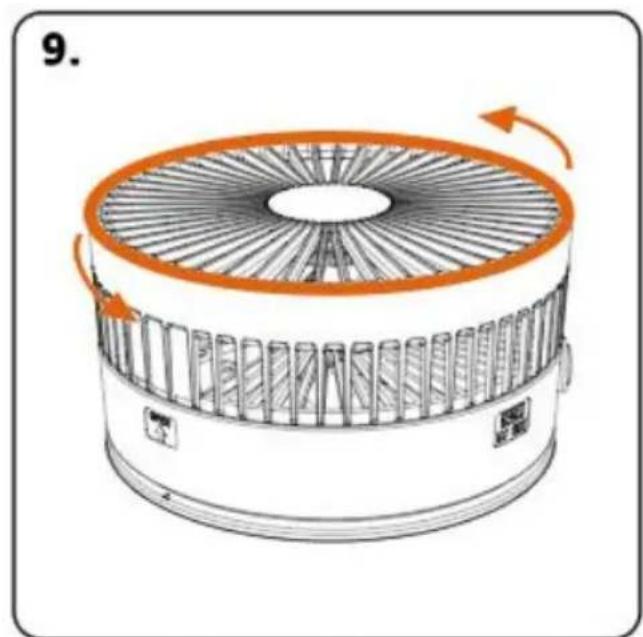
Hold the fan mask frame with both hands Turn counterclockwise to the left to open

The fan blades of the mask can be removed to clean the dust. The body can be wiped with a dry cloth, and it is strictly prohibited
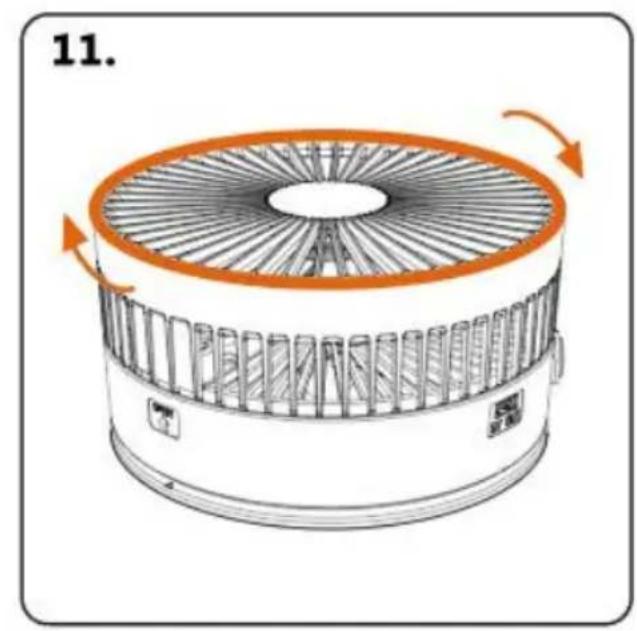
After the mask is left to dry Align the buckle and install it clockwise
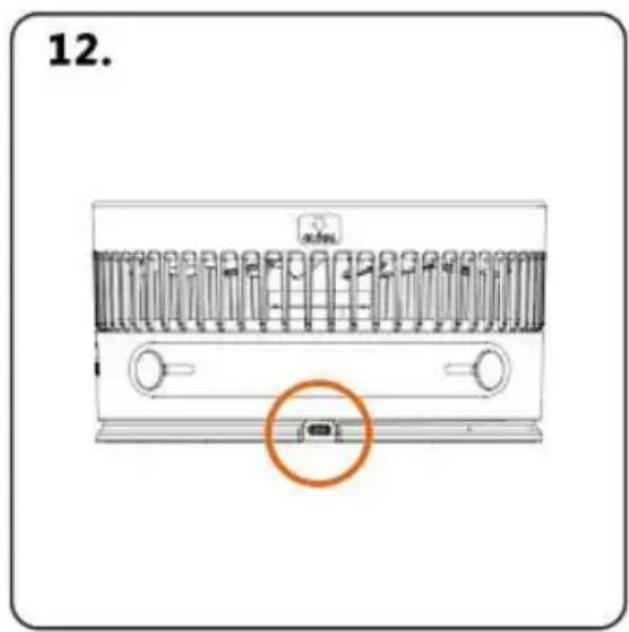
Type-C charging port Use regular DC 5V2.0A charger to charge
SAFETY CAUTION

Säkerhet varning:
PRODUCT WARRANTY CARD
Unit 5 Albert Edward House, The Pavilion Preston, United Kingdom
| EC | REP |
SHUNSHUN GmbH
Römeräcker 9 Z2021, 76351
www.vevor.com/support