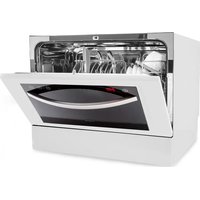
Havasia UV 6 Luminance - Dishwasher Klarstein - Free user manual and instructions
Find the device manual for free Havasia UV 6 Luminance Klarstein in PDF.


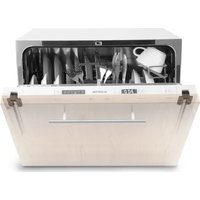
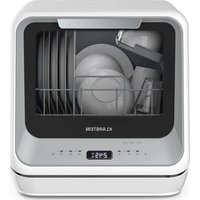
| Product type | Dishwasher (6 place settings) |
| Brand | Klarstein |
| Model | Havasia UV 6 Luminance |
| Dimensions (H x W x D) | 440 x 550 x 550 mm |
| Capacity | 6 standard place settings |
| Energy efficiency class | E |
| Energy consumption (ECO) | 0.553 kWh per cycle |
| Water consumption (ECO) | 6.5 L per cycle |
| ECO program duration | 3 h 35 min |
| Noise level | 49 dB(A) - Class C |
| Installation type | Freestanding |
| Washing programs | Intensive, Universal, ECO, Glass, 90 min, Quick, Soak |
| Special functions | Delay start (up to 24 h), Child lock, UV light, Automatic door opening |
| Filtration system | Coarse particle filter, fine filter, main filter |
| Water softener | Adjustable (H1 to H6) according to water hardness |
| Standby consumption | 0.49 W |
| Delay start consumption | 1.00 W |
| Warranty | 24 months |
| Availability of spare parts | Until December 31, 2028 |
| Article numbers | 10041827, 10041828 |
Frequently Asked Questions - Havasia UV 6 Luminance Klarstein
User questions about Havasia UV 6 Luminance Klarstein
0 question about this device. Answer the ones you know or ask your own.
Ask a new question about this device
Download the instructions for your Dishwasher in PDF format for free! Find your manual Havasia UV 6 Luminance - Klarstein and take your electronic device back in hand. On this page are published all the documents necessary for the use of your device. Havasia UV 6 Luminance by Klarstein.
USER MANUAL Havasia UV 6 Luminance Klarstein
HAVASIA UV 6 LUMINANCE
Geschirrspüler
Dishwasher
Lavavajillas
Lave-vaisselle
Lavastoviglie
10041827 10041828
CLEANINGCI LEANINGLE ANINGLEAN NINGCLEAN NGCLEANINGCI CLEANINGCI LEANINGLE ANINGLEAN

KLARSTEIN
www.klarstein.com

bar
| Category | Value | |---|---| | Category 1 | 100 | | Category 2 | 100 | | Category 3 | 100 | | Category 4 | 100 | | Category 5 | 100 | | Category 6 | 100 | | Category 7 | 100 | | Category 8 | 100 | | Category 9 | 100 | | Category 10 | 100 | | Category 11 | 100 | | Category 12 | 100 | | Category 13 | 100 | | Category 14 | 100 | | Category 15 | 100 | | Category 16 | 100 | | Category 17 | 100 | | Category 18 | 100 | | Category 19 | 100 | | Category 20 | 100 | | Category 21 | 100 | | Category 22 | 100 | | Category 23 | 100 | | Category 24 | 100 | | Category 25 | 100 | | Category 26 | 100 | | Category 27 | 100 | | Category 28 | 100 | | Category 29 | 100 | | Category 30 | 100 | | Category 31 | 100 | | Category 32 | 100 | | Category 33 | 100 | | Category 34 | 100 | | Category 35 | 100 | | Category 36 | 100 | | Category 37 | 100 | | Category 38 | 100 | | Category 39 | 100 | | Category 40 | 100 | | Category 41 | 100 | | Category 42 | 100 | | Category 43 | 100 | | Category 44 | 100 | | Category 45 | 100 | | Category 46 | 100 | | Category 47 | 100 | | Category 48 | 100 | | Category 49 | 100 | | Category 50 | 100 | | Category 51 | 100 | | Category 52 | 100 | | Category 53 | 100 | | Category 54 | 100 | | Category 55 | 100 | | Category 56 | 100 | | Category 57 | 100 | | Category 58 | 100 | | Category 59 | 100 | | Category 60 | 100 | | Category 61 | 100 | | Category 62 | 100 | | Category 63 | 100 | | Category 64 | 100 | | Category 65 | 100 | | Category 66 | 100 | | Category 67 | 100 | | Category 68 | 100 | | Category 69 | 100 | | Category 70 | 100 | | Category 71 | 100 | | Category 72 | 100 | | Category 73 | 100 | | Category 74 | 100 | | Category 75 | 100 | | Category 76 | 100 | | Category 77 | 100 | | Category 78 | 100 | | Category 79 | 100 | | Category 80 | 100 | | Category 81 | 100 | | Category 82 | 100 | | Category 83 | 100 | | Category 84 | 100 | | Category 85 | 100 | | Category 86 | 100 | | Category 87 | 100 | | Category 88 | 100 | | Category 89 | 100 | | Category 90 | 100 | | Category 91 | 100 | | Category 92 | 100 | | Category 93 | 100 | | Category 94 | 100 | | Category 95 | 100 | | Category 96 | 100 | | Category 97 | 100 | | Category 98 | 100 | | Category 99 | 100 | | Total (Total) = [sum of bars] / [values] * (sum of bars + bars) * (sum of bars + bars) * (sum of bars + bars) * (sum of bars + bars) * (sum of bars + bars) * (sum of bars + bars) * (sum of bars + bars) * (sum of bars + bars) * (sum of bars + bars) * (sum of bars + bars) * (sum of bars + bars) * (sum of bars + bars) * (sum of bars + bars) * (sum in brackets) * (sum in brackets) * (sum in brackets) * (sum in brackets) * (sum in brackets) * (sum in brackets) * (sum in brackets) * (sum in brackets) * (sum in brackets) * (sum in brackets) * (sum in brackets) * (sum in brackets) * (sum in brackets) * (sum in brackets) * (sum in brackets) * (sum in brackets) * (sum in brackets) * (total).* (sum in brackets) * (sum in brackets) * (sum in brackets) * (sum in brackets) * (sum in brackets) * (sum in brackets) * (sum in brackets) * (sum in brackets) * (sum in brackets) * (sum in brackets) * (sum in brackets) * (sum in brackets) * (total).* (sum in brackets) * (sum in brackets) * (sum in brackets) * (sum in brackets)INHALTSVERZEICHNIS
natural_image
Line drawing of a hand using a tool to adjust or install a valve (no text or symbols present)natural_image
Illustration of a hand pressing down on a control panel with icons (no text or symbols)natural_image
Hand inserting a plug into a device with icons (no text or symbols)natural_image
Line drawing of a basket filled with various items including a bag, documents, and folders (no text or symbols)natural_image
Illustration of a basket containing various kitchen utensils (no text or symbols)natural_image
Technical line drawing of a mechanical assembly with no visible text or symbolsnatural_image
Symbol of a trash bin crossed with a diagonal line, no text or labels presentBerlin Brands Group UK Limited
PO Box 42
272 Kensington High Street
London, W8 6ND
United Kingdom
Dear customer,
Congratulations on the purchase of your device. Please read the following instructions carefully and follow them to prevent potential damage. We accept no liability for damage caused by disregarding the instructions and improper use. Please scan the QR code to access the latest operating instructions and further information about the product.

CONTENTS
Safety Instructions 36
Installation 38
Quick Start 40
Device Overview 41
Display and Button functions 42
Before first Use 44
Filling the Rinsing Salt Dispenser 44
Filling the Rinse Aid Dispenser 46
Filling the Detergent Dispenser 47
Loading the Dishwasher correctly 49
Loading the Baskets (EN 60436) 51
Rinsing Programmes (EN 60436) 53
Energy Saving Recommendations 54
Operation 54
Cleaning And Care 56
Troubleshooting 59
Product Data Sheet 63
Disposal Considerations 64
Manufacturer & Importer (UK) 64
SAFETY INSTRUCTIONS

WARNING
Risk of explosion! Under certain conditions, hydrogen gas can form in a hot water system that has not been used for more than two weeks.
HYDROGEN GAS IS HIGHLY EXPLOSIVE! If you have not used the dishwasher for a long time, open all hot water taps and let the water flow for a few minutes before using the dishwasher. This causes the accumulated hydrogen gas to escape from the system. As the gas can ignite, avoid open flames and do not smoke during this time.
- Do not pull on the door. Do not sit or stand on the door and the dish rack.
- Do not touch the heating rod of the dishwasher during or shortly after operation.
- Do not start the dishwasher until the door is firmly closed.
- Open the door very carefully during operation and take care that no water splashes in your direction.
- Do not place anything heavy on the open door, this could cause the machine to tip forward.
- Make sure that plastic objects do not come into contact with the heating element during operation.
• Make sure that the detergent compartment is empty after the washing cycle. - Only wash plastic objects that are dishwasher safe and marked accordingly.
- Only use detergents and rinse aids that are suitable for dishwashers. Do not use soap, detergent or hand wash.
- The building's power supply must include a main switch with a contact gap of at least 3 mm between each pole to allow the circuit to be broken in the event of a malfunction.
- Keep children away from the detergent and rinse aid and make sure they do not steal any detergent from the open door.
• Make sure that children do not play with the device. - Children, physically and physically impaired persons should only use the appliance if they have been familiarised in detail with the functions and safety precautions by a supervisor.
- Dishwashing detergents are strongly alkaline. If they are swallowed, poisoning can occur. Avoid any skin or eye contact and keep children away from the dishwasher when the door is open.
• To make sure no one can trip over it, do not leave the door permanently open.
- If the mains cable is damaged, it must be replaced by the manufacturer or a qualified specialist.
- Please dispose of the packaging material properly.
- During installation, make sure that the mains cable is neither severely kinked nor squeezed.
- Do not play with the controls.
- When connecting the machine, use new hoses and discard the old ones.
• Make sure that no carpet is blocking the openings underneath.
- Use the dishwasher only for the purpose for which it was designed.
• Use the dishwasher indoors only.
- The dishwasher is not intended for commercial use, but only for use in households and similar environments.

CAUTION
Risk of injury! When loading the machine, take special care that sharp items are placed in the machine so that they do not damage the door seal. Sharp knives must be placed in the cutlery basket with the handle facing upwards. Knives and other objects with sharp points must be placed in the cutlery basket with the point facing downwards or placed horizontally.

WARNING
Risk of suffocation! Children could injure themselves on the packaging materials and old appliances. When disposing of the old appliance, make sure that you cut off the power cable and render the door lock unusable.
INSTALLATION
Preparation
- Place the appliance near a water inlet or drain and a power socket.
• Make sure that the hoses and the plug are accessible at all times.
Setting up the unit
Place the unit in the preferred location. The back should face the wall, the sides towards the built-in cupboard or a wall. The dishwasher is equipped with a water drain that can be directed to the right or the left to facilitate installation.
Power connection
Do not use an extension cord or adapter. Make sure that the socket is earthed and complies with local regulations. Only connect the appliance to sockets that correspond to the specified voltage of the appliance. If the plug does not fit the socket, have it replaced by a professional.
Attach and remove the water inlet
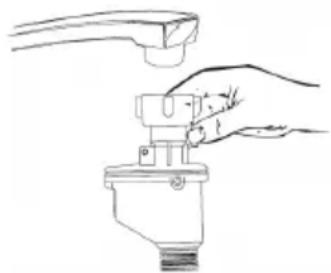
Use new hoses for the connection. Do not use old hoses. The water pressure must be between 0.04-1 MPa. If the pressure is lower than this, ask a specialist company for advice.
- Attach the inlet hose: Completely unwind the safety inlet hose from the bracket on the back of the appliance. Attach the screw to a 34 inch water tap. Turn on the water supply fully before use.
- Remove the supply hose: Close the water supply. Unscrew the inlet hose from the water tap.
natural_image
Line drawing of a hand using a tool to adjust or install a mechanical component (no text or symbols present)Note: Make sure the screw is tight on the tap. If you have never used the connection before or have not used it for a long time, drain some water beforehand until clear water comes out of the tap. This precaution ensures that the inlet valve is not clogged or damaged by particles in the water.
Attaching the water drain
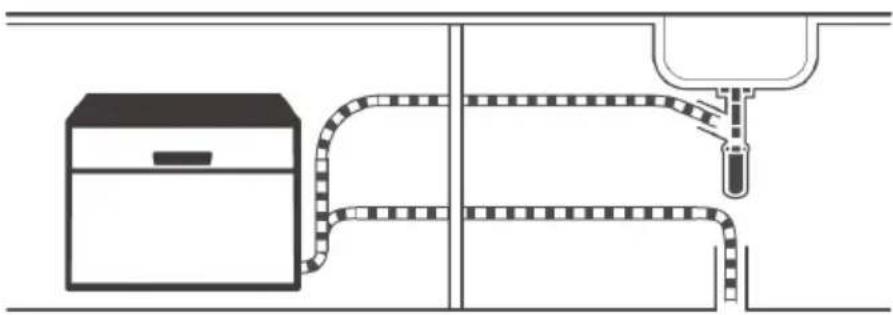
Insert the water drain hose into a water drain pipe with a minimum diameter of 4 cm or leave it hanging in the drain. Make sure that the hose is not bent or curved.
Use the supplied hose clamp for fastening. To prevent backflow, the water drain pipe (A) must not be higher than 75 cm and the drain hose (B) must not be immersed in water.
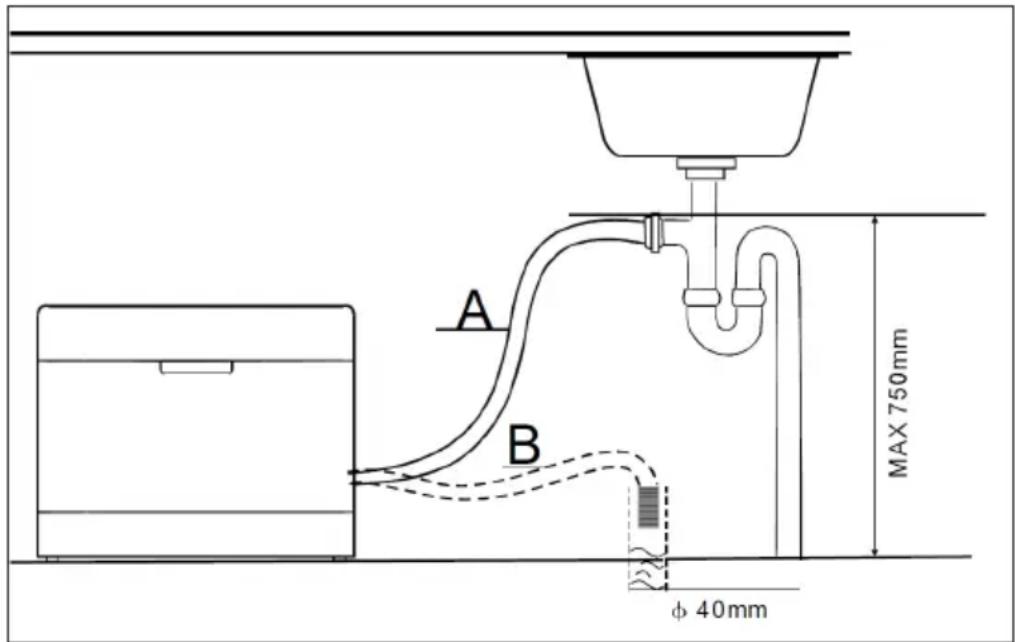
Note: Secure the drain hose firmly to the drain with the supplied hose clamp to prevent it from moving and leaking waste water.
Collecting waste water
If your drain is more than 1 metre below the appliance, you cannot direct the water directly into the drain. In this case, you must collect the waste water in an appropriate collection container, which must be located lower than the water outlet.
Extension hose
If you need an extension hose, use a similar type and make sure it is not longer than 4 metres. Longer hoses can have a negative effect on the cleaning performance of the dishwasher.
QUICK START
| 1 | |
 | |
| Install the dishwasher (see chapter INSTALLATION) | |
| 2 | 3 |
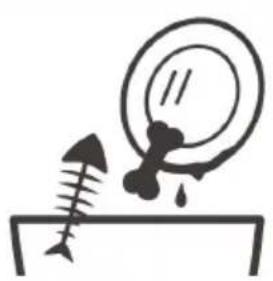 | 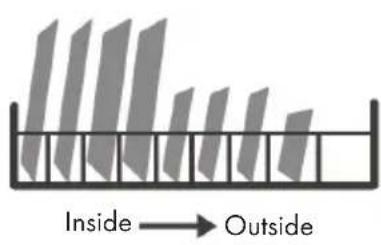 |
| Remove larger residues from the dishes to avoid pre-rinsing. | Load the baskets. |
| 4 | 5 |
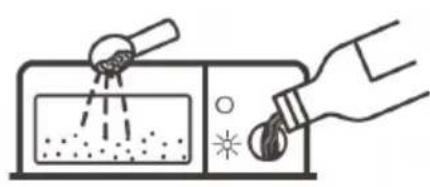 | 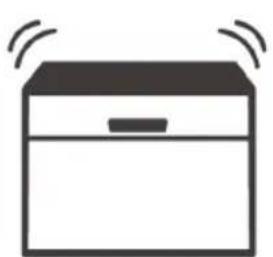 |
| Fill the dispenser with detergent and rinse aid. | Select a suitable programme and start the dishwasher. |
DEVICE OVERVIEW
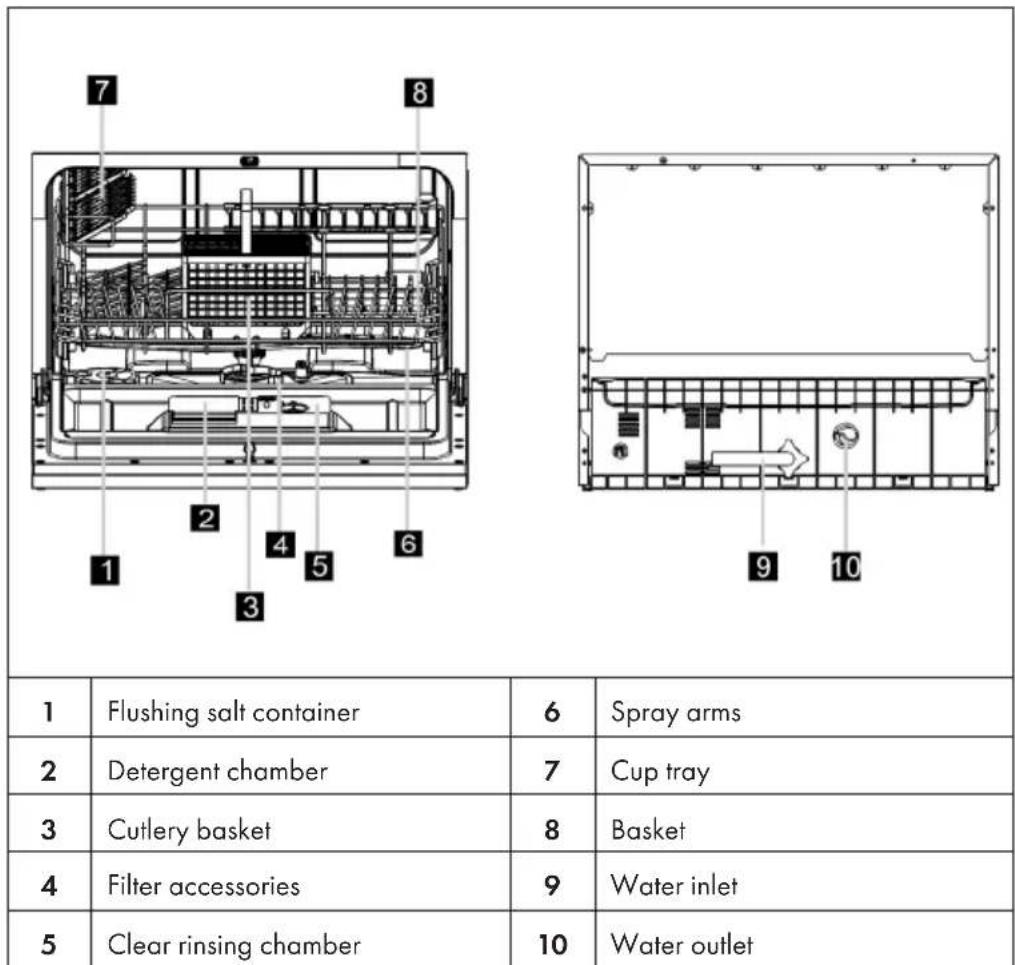
| 1 | Flushing salt container | 6 | Spray arms |
| 2 | Detergent chamber | 7 | Cup tray |
| 3 | Cutlery basket | 8 | Basket |
| 4 | Filter accessories | 9 | Water inlet |
| 5 | Clear rinsing chamber | 10 | Water outlet |
DISPLAY AND BUTTON FUNCTIONS
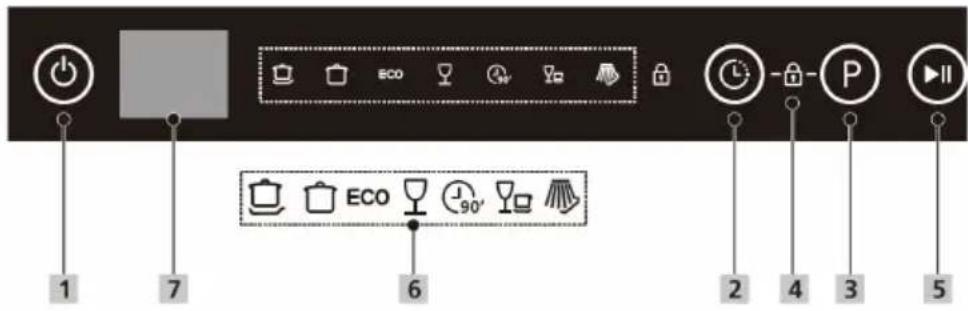 | ||
| 1 | On/off Press this | button to switch on the dishwasher. |
| 2 | Delay | Press the delay button to increase the start delay time.Delay the start of the dishwasher by up to 24 hours in 1-hour increments. After setting the start delay time, press the start/pause button to start the unit. |
| 3 | Programme | Press this button to select the corresponding washing programme. The indicator for the selected programme lights up. |
| 4 | Child safety lock | This option allows you to lock the buttons on the control panel (except the power button) so that children cannot accidentally start the dishwasher by pressing the buttons.To lock or unlock the buttons on the control panel, press and hold the delay button and the programme button simultaneously for 3 seconds. When the child lock is activated, the corresponding indicator (4) lights up. |
| 5 | Start/pause Press | this button to start or pause the selected programme. |
| 6 | Programmes |  | Intensive: For heavily soiled pots and pans and for dishes with dried-on food residues. |
 | Universal: For normally soiled loads, such as pots, plates, glasses and lightly soiled pans. | ||
| [SYK2] | Eco: Standard programme for cleaning dishes with a normal degree of soiling. Environmentally friendly programme, as it is very energy- and water-saving. | ||
 | Glass: For light soiling and glasses. | ||
 | 90 minutes: For dishes with a normal degree of soiling that need to be cleaned quickly. | ||
 | Quick: Short wash cycle for dishes with light soiling and dishes that do not need to be dried. | ||
 | Soak: For soaking dishes that are to be washed later. | ||
| 7 | Display | Displays the remaining time, delay time, error codes and other information. | |
BEFORE FIRST USE
Be sure to check the following points before starting the dishwasher for the first time:
• The dishwasher is standing firm and level.
• The inlet tap is open, firmly attached and is not leaking.
• The mains cable is securely plugged into the socket.
- The power is on.
• The packaging material and all stickers have been completely removed.
FILLING THE RINSING SALT DISPENSER
- Only use rinsing salt that is suitable for dishwashers. All other types of salt, such as table salt, can damage the appliance. The manufacturer is not liable for damage caused by using the wrong rinsing salt.
- Fill in the rinsing salt before starting a complete rinsing programme. This prevents grains of salt or salt water from remaining at the bottom of the machine and causing corrosion.
The rinsing salt chamber is located under the basket and is filled as follows:
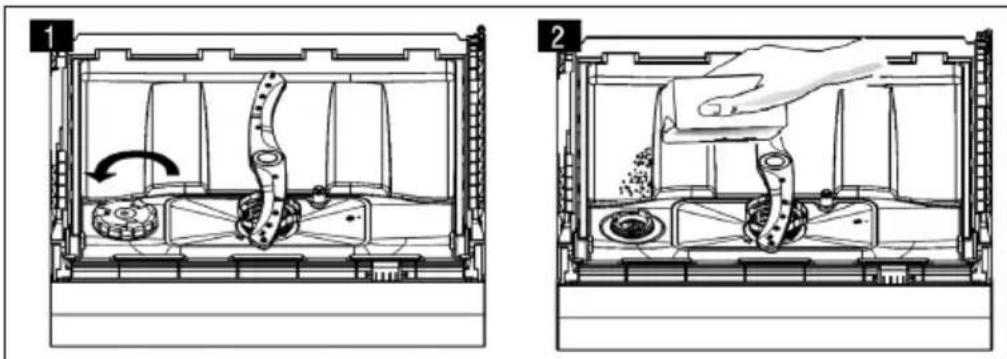
- Remove the basket and unscrew the lid of the salt container (1).
• Before the first wash, add one litre of water to the salt container. - Put the funnel provided into the salt container and add about 1 kg of rinsing salt (2). It is normal for some water to leak out of the container.
- Screw the cover back on clockwise.
- Normally, the flushing salt indicator light goes out 2-6 days after filling, when the salt has completely dissolved. Start a washing programme immediately after filling. Otherwise the filter system, the pump or important parts could be damaged by salt water.
Note: The salt container must only be refilled when the indicator light comes on. Depending on how well the salt dissolves, the indicator may light up, even though there is salt in the container. If salt stains remain after rinsing, run a quick or soak programme to remove the excess salt.
Setting the salt quantity
The dishwasher is designed so that the amount of salt can be adjusted according to the hardness of the water being used. This is to optimise and individually adjust salt consumption. To adjust the salt consumption, please proceed as follows.
1 Close the door and switch on the appliance.
2 Within 60 seconds after switching on the appliance, press and hold the programme button for more than 5 seconds to start the water softener setting mode.
3 Press the programme button again to select the correct setting according to local conditions; the setting changes in the following order: H1 > H2 > H3 > H4 > H5 > H6.
4 If you do not press any button within five seconds or if you press the power button to exit the setting mode, the setting will be saved by the programme.
| Water hardness | Hardness level5 | Regeneration6(takes place after every Xth programme sequence) | Salt consumption (gram/cycle) | |||
| ^^1) | ^^3 | ^^3 | mmol/ I^4 | |||
| 0 - 5 0 | -9 0 - 6 | 0 - 0.94 H | no regeneration 0 | |||
| 6 - 11 | 10 - 20 7 - | 14 1.0 - 2.0 | H2 10 | 9 | ||
| 12 - 17 | 21 - 30 | 15 - 21 | 2.1 - 3.0 | H3 | 5 | 12 |
| 18 - 22 | 31 - 40 | 22 - 28 | 3.1 - 4.0 | H4 | 3 | 20 |
| 23 - 34 | 41 - 60 | 29 - 42 | 4.1 - 6.0 | H5 | 2 | 30 |
| 35 - 55 | 61 - 98 | 43 - 69 | 6.1 - 9.8 | H6 | 1 | 60 |
^1 German hardness level
^2 French hardness level
^3 British hardness level
^4 International hardness level
^5 Default factory setting is hardness level H4
^6 Each cycle with a regeneration process consumes an additional 2.0 litres of water, the energy consumption increases by 0.02 kWh and the programme duration is extended by 4 minutes.
FILLING THE RINSE AID DISPENSER
The rinse aid is released during the last rinse cycle and prevents the water from forming drops on the dishes, which can leave stains and streaks. It also improves drying by making the water roll off the dishes. This dishwasher is designed for the use of liquid rinse aids.
Note: Only use branded rinse aid for dishwashers. Never fill the rinse aid dispenser with other substances such as dishwasher detergent or liquid detergent. This would damage the device.
Refilling the rinse aid dispenser
If the rinse aid warning light ( ) then the control panel is not lit, you can estimate the amount by looking at the colour of the visual level indicator next to the lid. When the rinse aid tank is full, the display is completely dark. The size of the dark spot decreases as the amount of rinse aid decreases. The rinse aid level should never be less than 1/4.
When the amount of rinse aid decreases, the size of the black dot on the rinse aid level indicator changes as shown below.

To top up the rinse aid
| 1 | 2 |
 | 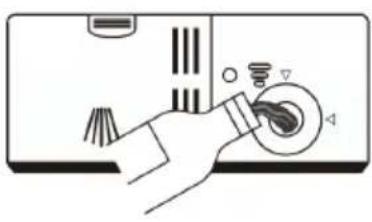 |
| Remove the lid of the rinse aid dispenser by turning it anticlockwise. | Carefully fill the rinse aid into the dispenser, making sure that it does not overflow. |
3
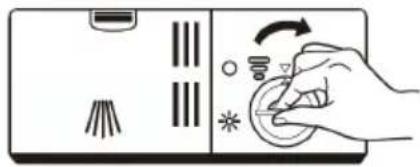
natural_image
Illustration of a hand pressing down on a control panel with icons (no text or symbols)Close the rinse aid dispenser lid by turning it clockwise.
Note:
Wipe up spilled rinse aid with an absorbent cloth to avoid excessive foaming during the next wash cycle.
Setting the correct amount of rinse aid
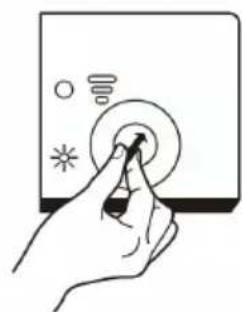
natural_image
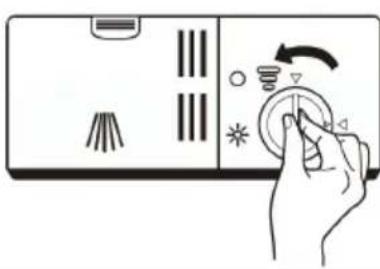
Hand inserting a button into a device (no text or symbols visible)Remove the lid of the rinse aid dispenser. Turn the rinse aid indicator to a number. The higher the number, the more rinse aid the dishwasher uses. If the dishes do not dry properly or are stained, turn the knob to the next higher number until your dishes are stain-free. Decrease the value if there are whitish stains on the dishes. Then close the lid of the rinse aid dispenser again.
FILLING THE DETERGENT DISPENSER
The chemical components of the detergent are necessary to remove the dirt, break it down and remove all the dirt from the dishwasher. Most commercially available dishwashing detergents are suitable for this purpose.
Important notes on the use of dishwashing detergent
Only use detergents that are specifically suitable for dishwashers. Keep your detergent fresh and dry. Only fill the detergent into the dispenser when you are ready to start the dishwasher.

WARNING
Dishwashing detergent is corrosive. Keep dishwashing detergent out of the reach of children.
To refill detergent
| 1 | 2 |
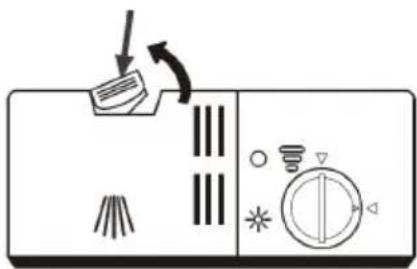 | 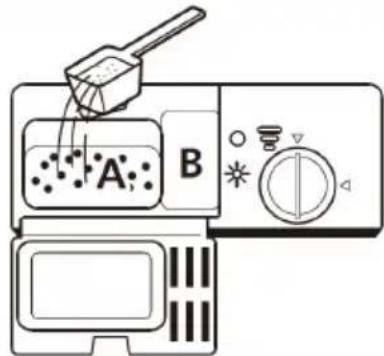 |
| Press the release button on the dispenser to open the lid. | Fill the detergent into the larger cavity (A) for the main wash. For more heavily soiled dishes, also add some detergent to the smaller cavity (B) to release it during the prewash. |
| Note:Please follow the manufacturer's recommendations on the detergent packaging. | |
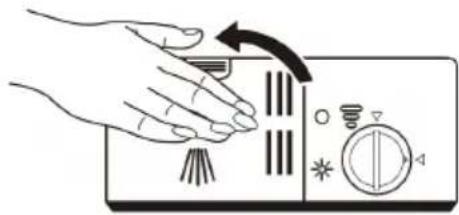 | |
| Close the lid and press it until it clicks into place. |
LOADING THE DISHWASHER CORRECTLY
Unsuitable crockery and cutlery
| Unsuitable crockery/cutlery Conditionally suitable crockery and cutlery | |
| Cutlery with wooden, horn or mother-of-pearl handlesHeat-resistant plastic tablewareOlder cutlery with glued parts that are not heat resistant.Coated cutlery or crockery.Things made of tin and copper.Crystal glassThings made of non-stainless steelWooden dishesPlastic crockery and cutlery | Certain types of glass, as they can become cloudy over time.Silver and aluminium parts, as they can change colour over time.Glazed crockery, as the glaze disappears over time the more often you wash it. |

What you should bear in mind when loading
Remove larger food scraps. Soak burnt-on residues in pans beforehand. It is not necessary to rinse the dishes until clear beforehand. Place the items in the dishwasher as follows:
- Place cups, glasses, pots and pans in the dishwasher with the inside facing down.
- You should load curved objects standing up so that the water can run off.
- Load the objects inside the device in such a way that they cannot fall over.
- Make sure that the spray arms can rotate freely and are not obstructed by dishes or protruding objects.
- Do not wash small items in the dishwasher as they could easily fall out of the basket.
• Make sure that dishes and cutlery do not overlap or cover each other.
• To avoid glass breakage, glasses must not touch each other. - Load large items that are difficult to clean into the basket.
- Long and sharp objects must be placed horizontally in the basket to avoid injury.
- For best results, do not overload the dishwasher.
Notes on the end of the programme
CAUTION
Risk of burns! The parts are very hot after rinsing! To avoid damage, do not remove glasses and cutlery from the dishwasher until about 15 minutes after the programme has ended.
Loading the baskets
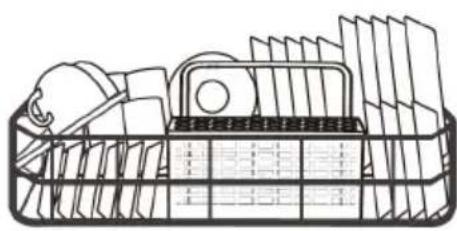
natural_image
Line drawing of a basket filled with various items, no text or symbols presentTo improve the cleaning surface and the rinsing performance, it is recommended to place the dirty side towards the spray arm. To ensure that the movement of the spray arm is not blocked, do not let the dishes protrude from the bottom of the basket. The recommended maximum diameter for is 19 cm so as not to obstruct the opening of the dispenser.
Loading the cutlery basket
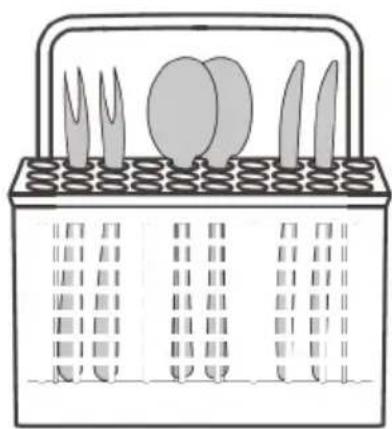
natural_image
Illustration of a basket containing various kitchen utensils and cutlery (no text or symbols)Put the cutlery in the basket and make sure it is not touching.
• The utensils must not get caught in each other.
• The cutlery is inserted with the handles facing downwards.
- Knives and other potentially dangerous utensils are inserted with the handle facing upwards.

Do not allow any objects to protrude through the floor. Always load sharp objects with the sharp tip pointing downwards!
LOADING THE BASKETS (EN 60436)
Dish rack
| With cup tray Without cup tray | |||
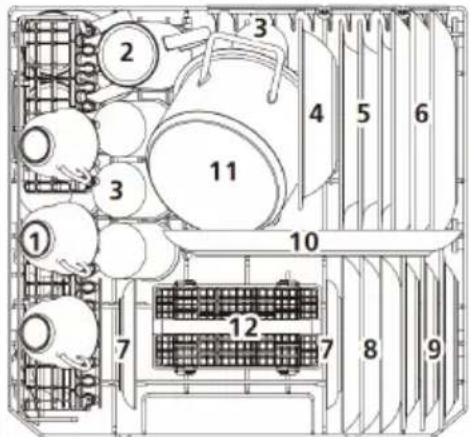 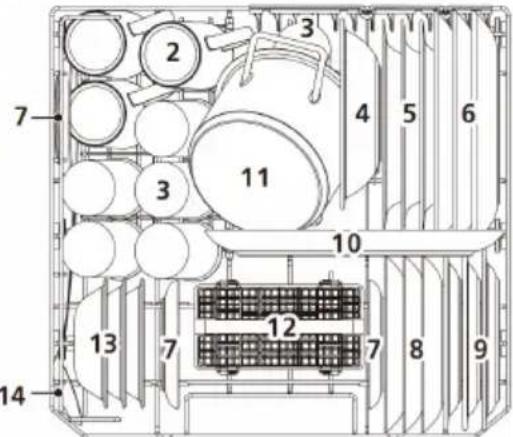 | |||
| No. | Designation No. Designation | ||
| 1 | Cups 8 Dessert plate | ||
| 2 | Mug 9 Melamine dessert plate | ||
| 3 | Glasses 10 Oval plate | ||
| 4 | Melamine bowl 11 Small pot | ||
| 5 | Soup plate 12 Cutlery basket | ||
| 6 | Dinner plate 13 Dessert bowls | ||
| 7 | Saucer 14 Serving spoon | ||
Cutlery basket
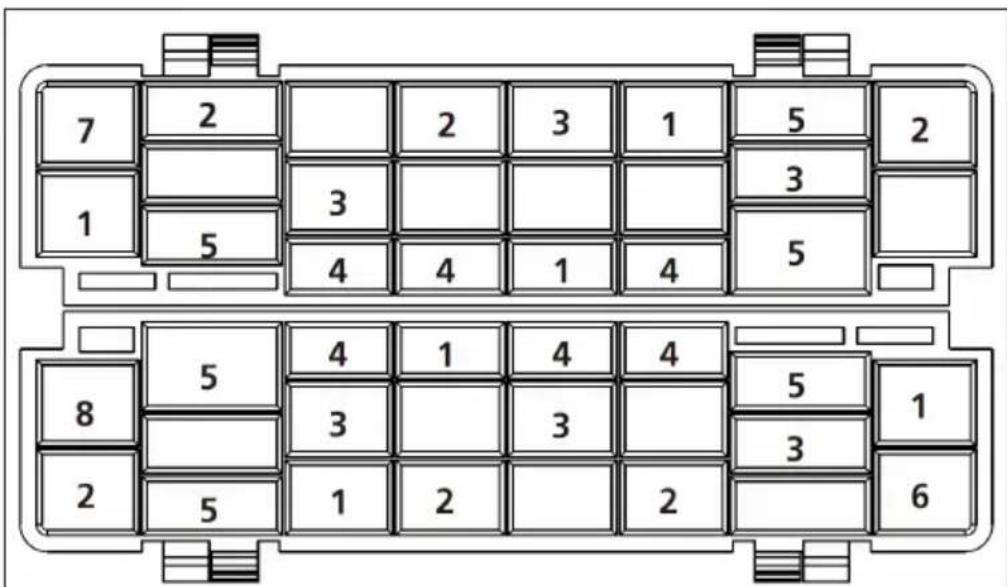
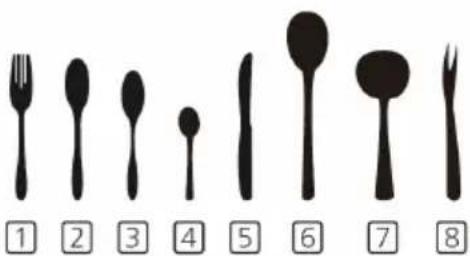
Information for comparability tests according to EN 60436
• Capacity: 6 place settings
- Programme: ECO
- Rinse aid setting: Max
- Softener setting: H4
No. Designation
| 1 | Forks |
| 2 | Tablespoon |
| 3 | Dessert spoon |
| 4 | Teaspoon |
| 5 | Knife |
| 6 | Serving spoon |
| 7 | Sauce ladles |
| 8 | Serving forks |
RINSING PROGRAMMES (EN 60436)
The table below shows which programmes are most suitable depending on the amount of food residues and how much detergent is needed. It also contains various information about the programmes. The consumption values and programme duration are only guide values, except for the ECO programme.
| Programme Rinsing cycle | Rinse aid front/main | Time (min) | Energy (KWh) | Water (L) | Rinse aid | |
| [244H]Intensive | Prewash (50°C)Wash (70°C)RinsingRinsingRinse (60 °C)Drying | 4/10 g or 1 tab | 135 0.790 9.6 yes | |||
 Universal Universal | PrewashWash (60°C)RinsingRinse (60 °C)Drying | 4/10 g or 1 tab | 11 0 0.580 7.7 yes | |||
| ECO(*EN 60436) | PrewashWash (45°C)Rinse (50 °C)Drying | 4/10 g or 1 tab | 215 0.553 6.5 yes | |||
| [8508]Glass | Wash (45°C)RinsingRinse (50 °C)Drying | 14 g or 1 tab | 70 0.400 5.8 yes | |||
 90 min. 90 min. | Wash (65°C)RinsingRinsingRinse (60 °C)Drying | 14 g or 1 tab | 90 0.590 6.6 yes | |||
| [0236]Quick | Wash (40 °C)RinsingRinsing | 12 g or 1 tab | 30 0.244 5.8 no | |||
 Soak Soak | Prewash | - | 15 | 0.020 | 20 | no |
| *EN 60436: The ECO programme was used for the test run in accordance with EN 60436. The ECO programme is suitable for cleaning normally soiled dishes and is the most efficient programme for this purpose in terms of energy and water consumption. | ||||||
ENERGY SAVING RECOMMENDATIONS
- The eco programme is suitable to clean normally soiled tableware, that for this use, it is the most efficient programme in terms of its combined energy and water consumption, and that it is used to assess compliance with the EU ecodesign legislation.
- Loading the household dishwasher up to the capacity indicated by the manufacturer will contribute to energy and water.
- Incorrect loading can have these consequences:
- a deteriorated cleaning result
- damage to property due to the blocking of the spraying arms.
- Manual pre-rinsing of tableware items leads to increased water and energy consumption and is not recommended.
- Washing tableware in a household dishwasher usually consumes less energy and water in the use phase than hand dishwashing when the household dishwasher is used according to the manufacturer's instructions.
- The values given for programmes other than the eco programme are indicative only.
OPERATION
Starting a programme
1 Pull out the lower and upper baskets, load the dishes and push them back in. It is recommended to load the lower basket first and then the upper basket.
2 Fill in the detergent.
3 Plug the power plug into the mains socket.
4 Make sure that the water supply is set to full pressure.
5 Close the door and press the On/off button to switch on the machine.
6 Select a programme, the corresponding symbol lights up. Then press the start/pause button and the dishwasher will start the programme.
Changing the programme while the dishwasher is running
A programme can only be changed if it has only been running for a short time, otherwise the detergent has already been released or the rinse water has been drained with detergent. In this case, the dishwasher must be reset and the dispenser refilled. To reset the dishwasher, proceed as follows:
1 Press the start/pause button to pause the rinsing process.
2 Press the programme button for more than 3 seconds to put the machine in programme selection mode.
3 Press the programme button again to select the desired programme.
4 Press the start/pause button. After 1 second, the dishwasher starts.

flowchart
graph LR
    A["Foot Icon"] --> B["3 sec"]
    B --> C["ECO Battery Icon"]
    C --> D["Foot Icon"]
Adding dishes while the dishwasher is running

CAUTION
Risk of burns! It is dangerous to open the DOOR during operation as you may be scalded by the hot steam.
Forgotten dishes can be added at any time before the dispenser opens. In this case, follow the instructions below.
5 Press the start/pause button to pause the washing process.
6 Wait 5 seconds and then open the door.
7 Add the forgotten dishes.
8 Close the door.
9 Press the start/pause button. After 10 seconds, the dishwasher starts.

flowchart
graph LR
    A["Initial Hand"] --> B["After 5 sec"]
    B --> C["Device Inserted"]
    C --> D["Device Closed"]
    D --> E["Final Touch"]
Note on automatic opening of the door
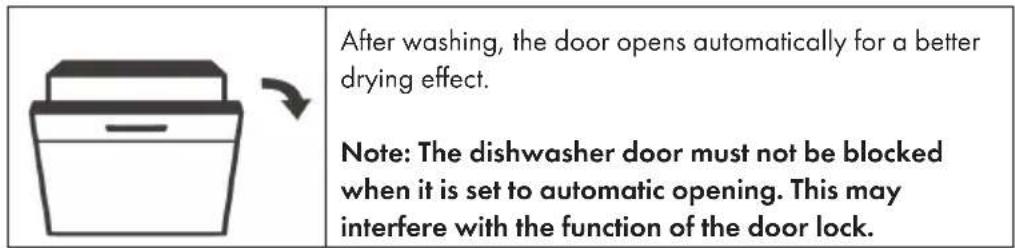
Note on UV light
- During the drying time of a cycle, the UV lamp switches on automatically.
- If the drying time of a cycle is interrupted, the UV lamp goes off.
- When the door is opened, the UV lamp switches off automatically.
CLEANING AND CARE
Filter system
The filter prevents coarse residues and other large food debris from entering the pump. The filter system consists of a coarse filter, a flat filter (main filter) and a fine filter.
| Coarse filter (C)Coarse residues, such as bones or glass splinters, are absorbed by the coarse filter. To remove them from the filter, gently pull the filter out by the feet on the top and empty it.Fine filter (B):Filters dirt and food residues and prevents them from getting back onto the dishes during the washing process.Main filter (A):Food residues and dirt particles are crushed by a special nozzle on the spray arm and discharged through the drain. | 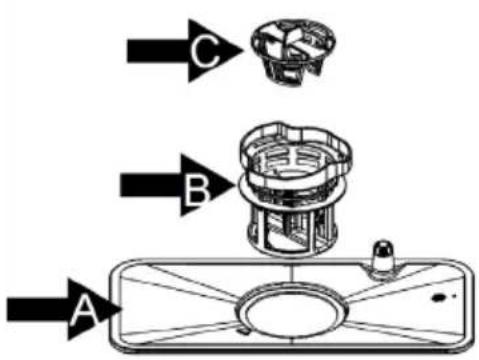 |
Dismantling the filter system for cleaning
The filter system removes dirt and food residues, allowing the clean water to be returned to the circuit for cleaning. In order for the appliance to work at optimum performance, you should clean the filters once a week. We recommend that you remove coarse dirt and food residues after each wash cycle and then rinse the filter under clear water.
Important: Never use the dishwasher without filters. Irregular cleaning of the filters reduces the washing performance and can damage the dishes.
- Turn the coarse filter (C) anticlockwise and remove the filters.
- Take the filters apart.
- When you have cleaned the filters, put them back in place in the order given.
Important filter cleaning instructions
• Clean the coarse filter with a cleaning brush.
- Do not knock on the filters when cleaning, otherwise they may bend, which will have a negative effect on the dishwasher's performance.
Removal of foreign objects
- Check the sieves and the tub after each use of the dishwasher. Foreign objects (e.g. broken glass, plastic particles, bones or toothpicks, etc.) reduce the cleaning performance and can cause damage to the drain pump. Remove the sieve system as described in this chapter. Remove foreign objects by hand.
- Caution. If you cannot remove the objects, contact an authorised service centre. Reinstall the filter system as described in this chapter.
Cleaning the dishwasher
- Clean the control panel with a slightly damp cloth and then dry it carefully.
- Maintain the housing with a suitable polishing wax.
- Do not use any sharp objects, scouring pads or aggressive cleaning agents for cleaning.
- Clean the edge of the door with a warm, damp cloth. To prevent water from entering the locking mechanism, do not use spray cleaners.
How to protect the appliance from frost damage
In winter, observe the following precautions to protect the machine from frost. Perform the following steps after each programme run:
- Pull the plug out of the socket.
- Close the water supply and remove the inlet hose from the inlet valve.
- Drain the water from the hose and the valve into a container.
- Reattach the inlet hose to the inlet valve.
- Remove the filter at the bottom of the tub and soak up excess water with a sponge.
Cleaning the spray arms
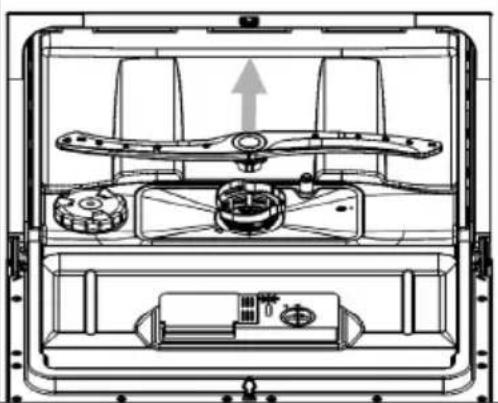
You can remove the spray arm for regular cleaning. Grasp the spray arm in the middle and pull it off. Wash it off under running water and put it back in.
After insertion, check that the spray arms can rotate freely. If not, check that they have been reinserted correctly.
natural_image
Technical line drawing of a mechanical device interior with no visible text or symbolsHow to care for your dishwasher properly
• After each wash: Close the water supply and leave the door slightly open to allow the humid air to escape.
- Unplug: Always unplug the appliance before cleaning or performing maintenance on it.
- No solvents or abrasives: Do not use any solvents or abrasives to clean the housing or the rubber seals. Only use a soft cloth and a little soapy water for cleaning. To remove stains or streaks, use a damp cloth with a little vinegar or a special cleaner for dishwashers.
- If you will not use it for a longer period of time: We recommend that you run a programme without dishes. Then unplug the appliance, close the water supply and leave the door slightly open so that the seals last longer and no unpleasant odours form in the appliance.
- Move the unit: If you need to move the unit, try to keep it upright. If there is no other way, you can also tip it onto its back.
- Door seals: One cause of unpleasant odours is food residue in the door seals. Therefore, clean the seals regularly with a damp sponge.
TROUBLESHOOTING
| Problem Potential cause Solution | ||
| The dishwasher does not start. | The fuse is out or blown. Replace the fuse or flip the switch again. Remove all other devices that are connected to the circuit themselves. | |
| No power. Make sure that the appliance is switched on, the door is firmly closed and the mains cable is firmly plugged into the socket. | ||
| The door is not closed properly. | When closing, make sure that the door lock engages. | |
| No water is pumped out of the dishwasher. | The drain hose is kinked. Check the hose. | |
| The filter is clogged. Check the coarse filter. | ||
| The drain is blocked. Check your drain and clean it if necessary. If you still have problems. Contact a specialist company. | ||
| Rust stains on the cutlery. The cutlery is not stainless. Only wash stainless cutlery. | ||
| Coloured stains in the tub. Coloured detergent. Only use detergent without colour. | ||
| Problem Potential cause olution | ||
| White film on the inner surfaces. | Mineral residues from hard water. | Clean the inside surfaces with a damp cloth and some dishwasher detergent. Use gloves when doing this and do not use any other detergent. |
| Knocking noises in the interior. | The spray arm hits an object in the basket. | Pause the programme and place the dishes in a way that the spray arm is not obstructed. |
| Rattling noises in the interior. | The dishes are not standing securely. | Pause programme and place dishes so that they are secure. |
| Knocking noise in the water pipe. | Can be caused by crossing the water pipes. | Does not affect the performance of the dishwasher. If you are not sure, contact a specialist company. |
| Foam in the tub. Unsuitable | dishwashing detergent. | Only use detergent that is suitable for dishwashers. If there is still foam in the tub, open the door and allow the foam to evaporate. Pour some cold water into the tub and close the door. Run any washing programme to remove the residue. |
| Rinse aid overflow. Wipe | up any rinse aid that has spilled over immediately. | |
| Problem Potential cause Solution | ||
| The dishes are not clean. The | dishes were not loaded properly. | Follow the instructions for loading the dishwasher. |
| The programme was not powerful enough. | Use the intensive programme. | |
| Too little detergent. Use more detergent or use a different detergent. | ||
| Objects block the spray arms. | Place the dishes in the appliance in a way that the spray arms are not obstructed. | |
| The filter system is dirty or incorrectly used. | Clean the filters or insert them correctly. Clean the spray arms. | |
| The dishes do not dry. Incorrect loading. Follow the instructions for loading the dishwasher. | ||
| Problem Potential causeolution | ||
| The glass is fogged up. Combination of soft water and too much detergent. | Use less detergent and use the shortest programme to wash and clean the glass. | |
| Black or grey stripes on dishes | Aluminium parts have rubbed against the dishes. | Use a mild abrasive cleaner. |
| Detergent residues in the chamber. | The dishes are obstructing the dissolution of the detergent. | Load the dishes carefully into the dishwasher. |
Error codes
For some faults, the display shows an error code to warn you: In the event of some faults, the display shows an error code to warn you. In these cases, call in specialist personnel.

WARNING
Risk of electric shock or other personal injury!
Do not repair the appliance yourself. The dishwasher may only be repaired by qualified personnel. The repair must be carried out professionally.
| Code | Meaning Potential cause | |
| E1 | Water supply disrupted. The tap is not open, the water supply is interrupted or the water pressure is too low. | |
| E3 | The water temperature is not reached. | The heating element is broken. Contact a specialist company. |
| E4 | Water leak. Part of the dish washer is leaking. Turn off the main tap and call a professional. If there is still water in the tub after the end of the programme, remove it before restarting the dishwasher. | |
| Ed | Fault in communication between main circuit board and display circuit board | Open circuit or interrupted wiring for communication. Contact a specialist company. |
In case of repair, please contact a qualified repair service in your area Spare parts for the item are available until 31.12.2028.
PRODUCT DATA SHEET
Information according to Regulation (EU) No 2019/2017
| Manufacturer's name or trade mark: Klarstein | ||||
| Manufacturer's address: Wallstraße 16, 10179 Berlin, Germany. | ||||
| Article numbers: 10041827, 10041828 | ||||
| General product parameters: | ||||
| Parameter Value Parameter | Value | |||
| Standard place settings 6 | Dimensions in mm | Height 440 | ||
| Width 550 | ||||
| Depth 550 | ||||
| EEI 55.9 Energy efficiency class E | ||||
| Cleaning performance index | 1,125 | Drying performance index | 1,065 | |
| Energy consumption in kWh [per cycle], based on the eco programme with cold water filling. The actual energy consumption depends on how the unit is used. | 0.553 | Water consumption in litres [per cycle], based on the Eco programme. The actual water consumption depends on the use of the appliance and the water hardness. | 6.5 | |
| Programme duration (h:min) | 3:35 | Construction type: | Freestanding | |
| Airborne sound emissions (dB(A) re 1 pW) | 49 | Acoustic emission class | C | |
| Off mode (W) | 0.49 | Standby mode (W) | N/A | |
| Start delay (W) (if applicable) | 1.00 | Networked on-call service (W) (if applicable) | N/A | |
| Minimum term of the warranty offered by the manufacturer: 24 months | ||||
| Further information: | ||||
| Web link to the website of the supplier where the information according to Annex II point of Commission Regulation (EU) 2019/2022 can be found: www.klarstein.de | ||||
DISPOSAL CONSIDERATIONS
natural_image
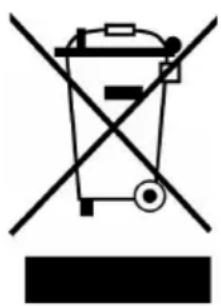
Symbol of a trash bin crossed with a diagonal line, no text or labels presentIf there is a legal regulation in your country regarding the disposal of electrical and electronic equipment, this symbol on the product or on the packaging indicates that this product must not be disposed of with household waste. Instead, it must be taken to a collection point for the recycling of electrical and electronic equipment. By disposing of this product in accordance with the regulations, you protect the environment and the health of those around you from negative consequences. For information on recycling and disposal of this product, contact your local government or household waste disposal service.
MANUFACTURER & IMPORTER (UK)
Manufacturer:
Chal-Tec GmbH, Wallstrasse 16, 10179 Berlin, Germany.
Importer for Great Britain:
Berlin Brands Group UK Limited
PO Box 42
272 Kensington High Street
London, W8 6ND
United Kingdom
Estimado cliente:
natural_image
Line drawing of hands operating a mechanical tool with a handle (no text or symbols)natural_image
Illustration of a hand pressing down on a control panel with icons (no text or symbols)natural_image
Hand inserting a plug into a device with icons around the button (no text or symbols)natural_image
Line drawing of a basket filled with items, no text or symbols presentnatural_image
Illustration of a basket containing six kitchen utensils (no text or symbols)natural_image
Technical line drawing of a mechanical device interior showing internal components and a directional arrow (no text or symbols)natural_image
Symbol of a trash bin crossed with a diagonal line, no text or numbers presentBerlin Brands Group UK Ltd
PO Box 1145
Oxford, OX1 9UW
Reino Unido
Cher client, chère cliente,
SOMMAIRE
natural_image
Line drawing of a hand using a tool to adjust or install a valve (no text or symbols present)natural_image
Hand pressing down on a control panel with icons (no text or symbols)natural_image
Hand inserting a plug into a device with icons (no text or symbols)natural_image
Line drawing of a basket filled with various items, no text or symbols presentnatural_image
Illustration of a basket containing six kitchen utensils (no text or symbols)natural_image
Technical line drawing of a mechanical device interior with no visible text or symbolsFICHE DE DONNÉES PRODUIT
natural_image
Symbol of a trash bin crossed out by a diagonal line, with no text or labels present.Berlin Brands Group UK Limited
PO Box 42
272 Kensington High Street
London, W8 6ND
United Kingdom
Gentile cliente,
INDICE
natural_image
Line drawing of hands using a tool to adjust or install a mechanical component (no text or symbols present)natural_image
Illustration of a hand pressing down on a control panel with icons (no text or symbols)natural_image
Hand inserting a plug into a device with icons around the button (no text or symbols)natural_image
Line drawing of a basket filled with various items, no text or symbols presentnatural_image
Illustration of a basket containing various kitchen utensils (no text or symbols)natural_image
Simple line drawing of a file organizer with an arrow indicating rotation (no text or symbols)Filtro grossolano (C):
natural_image
Technical line drawing of a mechanical device interior showing internal components and a directional arrow (no text or symbols)natural_image
Symbol of a trash bin crossed with a diagonal line, no text or labels presentPRODUTTORE E IMPORTATORE (UK)
Produttore:
Chal-Tec GmbH, Wallstraße 16, 10179 Berlino, Germania.
Berlin Brands Group UK Limited
PO Box 42
272 Kensington High Street
London, W8 6ND
United Kingdom

bar
| Category | Value | |---|---| | Category 1 | 100 | | Category 2 | 100 | | Category 3 | 100 | | Category 4 | 100 | | Category 5 | 100 | | Category 6 | 100 | | Category 7 | 100 | | Category 8 | 100 | | Category 9 | 100 | | Category 10 | 100 | | Category 11 | 100 | | Category 12 | 100 | | Category 13 | 100 | | Category 14 | 100 | | Category 15 | 100 | | Category 16 | 100 | | Category 17 | 100 | | Category 18 | 100 | | Category 19 | 100 | | Category 20 | 100 | | Category 21 | 100 | | Category 22 | 100 | | Category 23 | 100 | | Category 24 | 100 | | Category 25 | 100 | | Category 26 | 100 | | Category 27 | 100 | | Category 28 | 100 | | Category 29 | 100 | | Category 30 | 100 | | Category 31 | 100 | | Category 32 | 100 | | Category 33 | 100 | | Category 34 | 100 | | Category 35 | 100 | | Category 36 | 100 | | Category 37 | 100 | | Category 38 | 100 | | Category 39 | 100 | | Category 40 | 100 | | Category 41 | 100 | | Category 42 | 100 | | Category 43 | 100 | | Category 44 | 100 | | Category 45 | 100 | | Category 46 | 100 | | Category 47 | 100 | | Category 48 | 100 | | Category 49 | 100 | | Category 50 | 100 | | Category 51 | 100 | | Category 52 | 100 | | Category 53 | 100 | | Category 54 | 100 | | Category 55 | 100 | | Category 56 | 100 | | Category 57 | 100 | | Category 58 | 100 | | Category 59 | 100 | | Category 60 | 100 | | Category 61 | 100 | | Category 62 | 100 | | Category 63 | 100 | | Category 64 | 100 | | Category 65 | 100 | | Category 66 | 100 | | Category 67 | 100 | | Category 68 | 100 | | Category 69 | 100 | | Category 70 | 100 | | Category 71 | 100 | | Category 72 | 100 | | Category 73 | 100 | | Category 74 | 100 | | Category 75 | 100 | | Category 76 | 100 | | Category 77 | 100 | | Category 78 | 100 | | Category 79 | 100 | | Category 80 | 100 | | Category 81 | 100 | | Category 82 | 100 | | Category 83 | 100 | | Category 84 | 100 | | Category 85 | 100 | | Category 86 | 100 | | Category 87 | 100 | | Category 88 | 100 | | Category 89 | 100 | | Category 90 | 100 | | Category 91 | 100 | | Category 92 | 100 | | Category 93 | 100 | | Category 94 | 100 | | Category 95 | 100 | | Category 96 | 100 | | Category 97 | 100 | | Category 98 | 100 | | Category 99 | 100 | | Total (Total) = [sum of bars] / [values] * (sum of bars + bars) * (sum of bars + bars) * (sum of bars + bars). The values in the table represent the sum of the bars and the corresponding sum of the bars. There is no additional data series or categories specified in the code.
KLARSTEIN

- HAVASIA UV 6 LUMINANCE
- INHALTSVERZEICHNIS
- Dear customer,
- CONTENTS
- SAFETY INSTRUCTIONS
- WARNING
- CAUTION
- INSTALLATION
- Preparation
- Setting up the unit
- Power connection
- Attach and remove the water inlet
- Attaching the water drain
- Collecting waste water
- Extension hose
- QUICK START
- DEVICE OVERVIEW
- DISPLAY AND BUTTON FUNCTIONS
- BEFORE FIRST USE
- FILLING THE RINSING SALT DISPENSER
- Setting the salt quantity
- FILLING THE RINSE AID DISPENSER
- Refilling the rinse aid dispenser
- To top up the rinse aid
- Note:
- Setting the correct amount of rinse aid
- FILLING THE DETERGENT DISPENSER
- Important notes on the use of dishwashing detergent
- To refill detergent
- LOADING THE DISHWASHER CORRECTLY
- Unsuitable crockery and cutlery
- What you should bear in mind when loading
- Notes on the end of the programme
- Loading the baskets
- Loading the cutlery basket
- LOADING THE BASKETS (EN 60436)
- RINSING PROGRAMMES (EN 60436)
- ENERGY SAVING RECOMMENDATIONS
- OPERATION
- Starting a programme
- Changing the programme while the dishwasher is running
- Note on automatic opening of the door
- Note on UV light
- CLEANING AND CARE
- Filter system
- Dismantling the filter system for cleaning
- Important filter cleaning instructions
- Removal of foreign objects
- Cleaning the dishwasher
- How to protect the appliance from frost damage
- Cleaning the spray arms
- How to care for your dishwasher properly
- TROUBLESHOOTING
- Error codes
- PRODUCT DATA SHEET
- DISPOSAL CONSIDERATIONS
- MANUFACTURER & IMPORTER (UK)
- Manufacturer:
- Importer for Great Britain:
- Estimado cliente:
- Cher client, chère cliente,
- SOMMAIRE
- FICHE DE DONNÉES PRODUIT
- Gentile cliente,
- INDICE
- PRODUTTORE E IMPORTATORE (UK)
- Produttore:
- KLARSTEIN
Brand : Klarstein
Model : Havasia UV 6 Luminance
Category : Dishwasher