
HILTIS36WHNB - Basket FABER - Free user manual and instructions
Find the device manual for free HILTIS36WHNB FABER in PDF.


User questions about HILTIS36WHNB FABER
0 question about this device. Answer the ones you know or ask your own.
Ask a new question about this device
Download the instructions for your Basket in PDF format for free! Find your manual HILTIS36WHNB - FABER and take your electronic device back in hand. On this page are published all the documents necessary for the use of your device. HILTIS36WHNB by FABER.
USER MANUAL HILTIS36WHNB FABER
natural_image
Technical line drawing of a mechanical assembly with two rectangular components mounted on a base plate (no text or symbols)HIGH - LIGHT
Installation Instructions
Use and Care Information
Important Safety Instructions 4
Range hood Dimensions 7
Installation Height Requirements 7
Main Parts 8
Combinations Hoods And Motor Kits 10
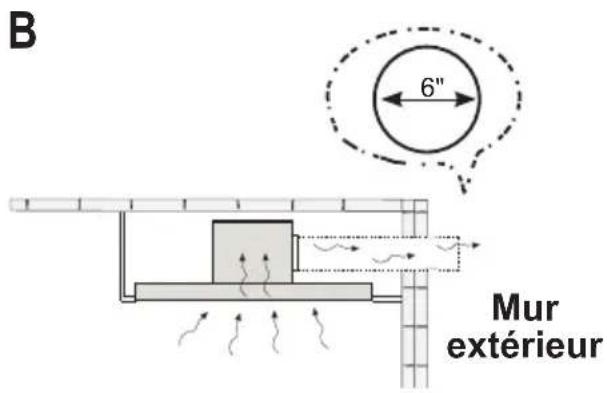
Choose Your Ducting Method 11
Wiring Preparation 12
Ceiling Hood Install Preparation 13
Installation Information 14
Internal Blower Installation 15
External Blower Installation 17
Installation of Range Hood Body 19
Connect The Ducting 25
Wiring Box 2 Connection (Remote Blower Wiring Only) 27
House Wiring Box Connection 28
Use and Care Information 29
IMPORTANT SAFETY INSTRUCTIONS
READ AND SAVE THESE INSTRUCTIONS BEFORE YOU START INSTALLING THIS RANGE HOOD
WARNING: - TO REDUCE THE RISK OF A RANGE TOP GREASE FIRE:
a) Never leave surface units unattended at high settings. Boilovers cause smoking and greasy spillovers that may ignite. Heat oils slowly on low or medium setting.
b) Always turn hood ON when cooking at high heat or when flambeing food (i.e. Crepes Suzette, Cherries Jubilee, Peppercorn Beef Flambé).
c) Clean ventilating fans frequently. Grease should not be allowed to accumulate on fan or filter.
d) Use proper pan size. Always use cookware appropriate for the size of the surface element.
WARNING: - TO REDUCE THE RISK OF INJURY TO PERSONS IN THE EVENT OF A RANGE TOP GREASE FIRE, OBSERVE THE FOLLOWING*:
a) SMOTHER FLAMES with a close-fitting lid, cookie sheet, or metal tray, then turn off the burner. BE CAREFUL TO PREVENT BURNS. If the flames do not go out immediately EVACUATE AND CALL THE FIRE DEPARTMENT.
b) NEVER PICK UP A FLAMING PAN - You may be burned.
c) DO NOT USE WATER, including wet dishcloths or towels - a violent steam explosion will result.
d) Use an extinguisher ONLY if:
- You know you have a Class ABC extinguisher, and you already know how to operate it.
- The fire is small and contained in the area where it started.
- The fire department is being called.
- You can fight the fire with your back to an exit.
* Based on "Kitchen Firesafety Tips" published by NFPA
WARNING - TO REDUCE THE RISK OF FIRE OR ELECTRIC SHOCK, do not use this fan with any solid-state speed control device.
WARNING - TO REDUCE THE RISK OF FIRE, ELECTRICAL SHOCK, OR INJURY TO PERSONS, OBSERVE THE FOLLOWING:
- Use this unit only in the manner intended by the manufacturer. If you have any questions, contact the manufacturer.
- Before servicing or cleaning unit, switch power off at service panel and lock the service disconnecting means to prevent power from being switched on accidentally. When the service disconnecting means cannot be locked, securely fasten a prominent warning device, such as a tag, to the service panel.
CAUTION: For General Ventilating Use Only. Do Not Use To Exhaust Hazardous or Explosive Materials and Vapors.
WARNING - TO REDUCE THE RISK OF FIRE, ELECTRICAL SHOCK, OR INJURY TO PERSONS, OBSERVE THE FOLLOWING:
- Installation Work And Electrical Wiring Must Be Done By Qualified Person(s) In Accordance With All Applicable Codes And Standards, Including Fire-Rated Construction.
- Sufficient air is needed for proper combustion and exhausting of gases through the flue (chimney) of fuel burning equipment to prevent backdrafting. Follow the heating equipment manufacturer's guideline and safety standards such as those published by the National Fire Protection Association (NFPA), and the American Society for Heating, Refrigeration and Air Conditioning Engineers (ASHRAE), and the local code authorities.
- When cutting or drilling into wall or ceiling, do not damage electrical wiring and other hidden utilities.
- Ducted fans must always be vented to the outdoors.
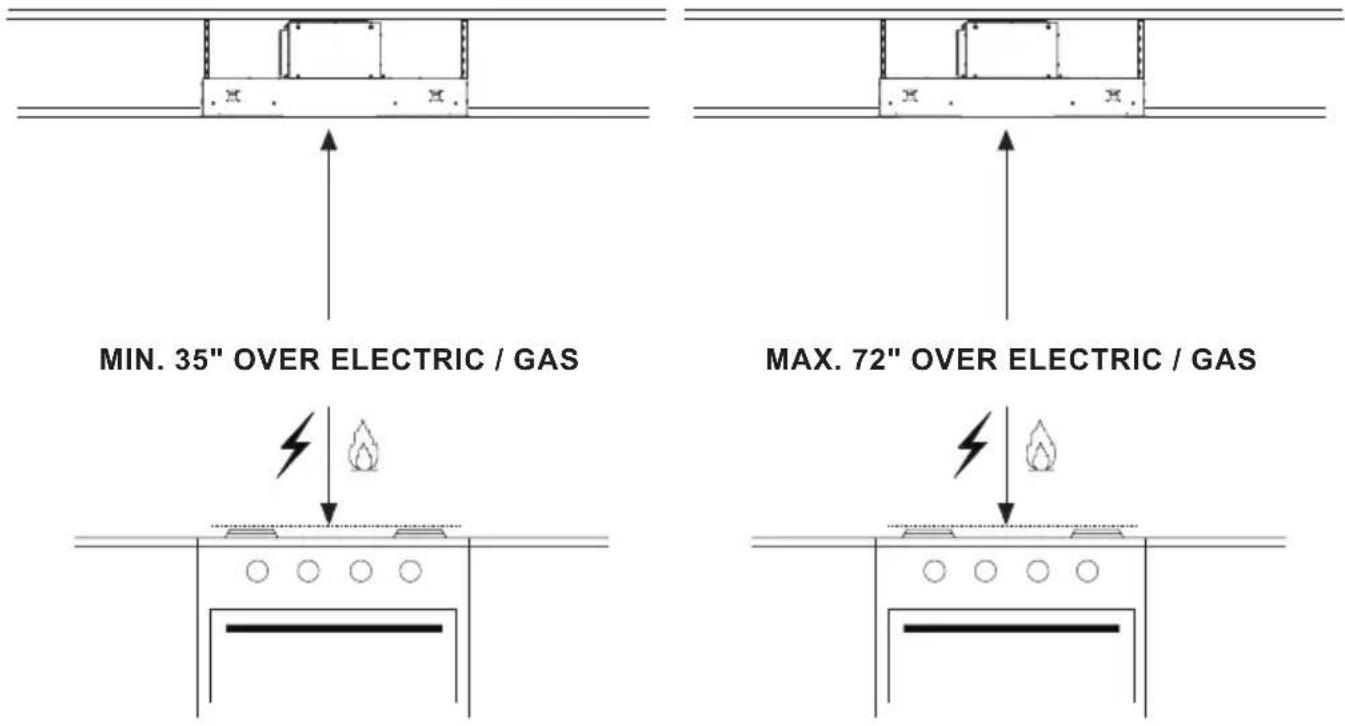
ALL WALL AND FLOOR OPENINGS WHERE THE RANGE HOOD IS INSTALLED MUST BE SEALED. This Range Hood requires at least 35" of clearance between the bottom of the Range Hood and the cooking surface or countertop. This hood has been approved by UL at this distance from the cooktop.
Consult the cooktop or range installation instructions given by the manufacturer before making any cutouts. MOBILE HOME INSTALLATION The installation of this Range Hood must conform to the Manufactured Home Construction and Safety Standards, Title 24 CFR, Part 3280 (formerly Federal Standard for Mobile Home Construction and Safety, Title 24, HUD, Part 280).
VENTING REQUIREMENTS
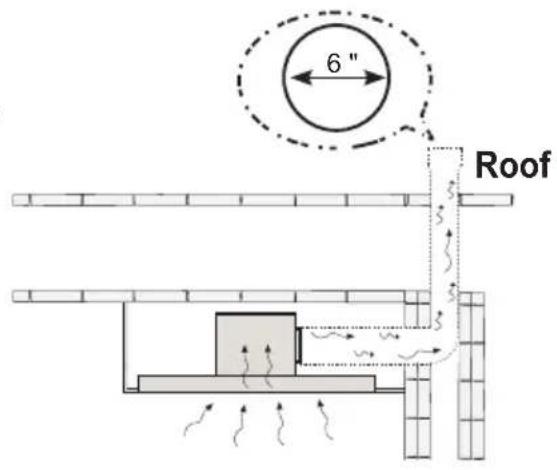
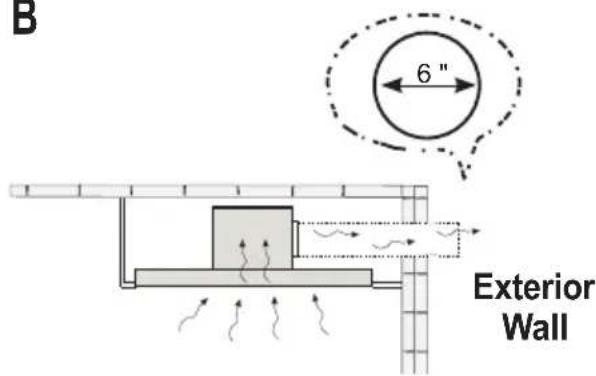
Determine which venting method is best for your application. Ductwork can extend either through the wall or the roof.
The length of the ductwork and the number of elbows should be kept to a minimum to provide efficient performance. The size of the ductwork should be uniform. Do not install two elbows together. Use duct tape to seal all joints in the ductwork system. Use caulking to seal exterior walls and ceiling space opening around the cap.
Flexible ductwork is not recommended. Flexible ductwork creates back pressure and air turbulence that greatly reduces performance.
Make sure there is proper clearance within the walls and ceiling space for exhaust duct before making cutouts. Do not cut a joist or stud unless absolutely necessary. If a joist or stud must be cut, then a supporting frame must be constructed.
WARNING - To Reduce The Risk Of Fire, Use Only Metal Ductwork.
CAUTION - To reduce risk of fire and to properly exhaust air, be sure to duct air outside – Do not vent exhaust air into spaces within walls or ceilings or into attics, crawl spaces, or garages.
Cold Weather installations
An additional back draft damper should be installed to minimize backward cold air flow and a nonmetallic thermal break should be installed to minimize conduction of outside temperatures as part of the vent system. The damper should be on the cold air side of the thermal break. The break should be as close as possible to where the vent system enters the heated portion of the house.

WARNING
- Venting system MUST terminate outside the home.
- DO NOT terminate the ductwork in an attic or other enclosed space.
- DO NOT use 4" laundry-type wall caps.
- Flexible-type ductwork is not recommended.
- DO NOT obstruct the flow of combustion and ventilation air.
- Failure to follow venting requirements may result in a fire.
ELECTRICAL REQUIREMENTS
A 120 volt, 60 Hz AC-only electrical supply is required on a separate 15 amp fused circuit. A time-delay fuse or circuit breaker is recommended. The fuse must be sized per local codes in accordance with the electrical rating of this unit as specified on the serial/rating plate located inside the unit near the field wiring compartment.
ELECTRICAL INSTALLATION WITH WIRING BOX
THIS UNIT MUST BE CONNECTED WITH COPPER WIRE ONLY. Wire sizes must conform to the requirements of the National Electrical Code, ANSI/NFPA 70 - latest edition, and all local codes and ordinances. Wire size and connections must conform with the rating of the appliance. Copies of the standard listed above may be obtained from:
National Fire Protection Association
Batterymarch Park
Quincy, Massachusetts 02269
This appliance should be connected directly to the fused disconnect (or circuit breaker) through flexible, armored or nonmetallic sheathed copper cable. Allow some slack in the cable so the appliance can be moved if servicing is ever necessary. A UL Listed, 1/2" conduit connector must be provided at each end of the power supply cable (at the appliance and at the junction box).
When making the electrical connection, cut a 1 1/4" hole. A hole cut through wood must be sanded until smooth. A hole through metal must have a grommet.

WARNING
• Electrical ground is required on this Range Hood.
- If cold water pipe is interrupted by plastic, nonmetallic gaskets or other materials, DO NOT use for grounding.
- DO NOT ground to a gas pipe.
- DO NOT have a fuse in the neutral or grounding circuit. A fuse in the neutral or grounding circuit could result in electrical shock.
- Check with a qualified electrician if you are in doubt as to whether the Range Hood is properly grounded.
- Failure to follow electrical requirements may result in a fire.
State of California Proposition 65 Warning (US only)
WARNING
This product contains chemicals known to the State of California to cause cancer and birth defects or other reproductive harm.
For more information go to www.P65Warnings.ca.gov
RANGE HOOD DIMENSIONS
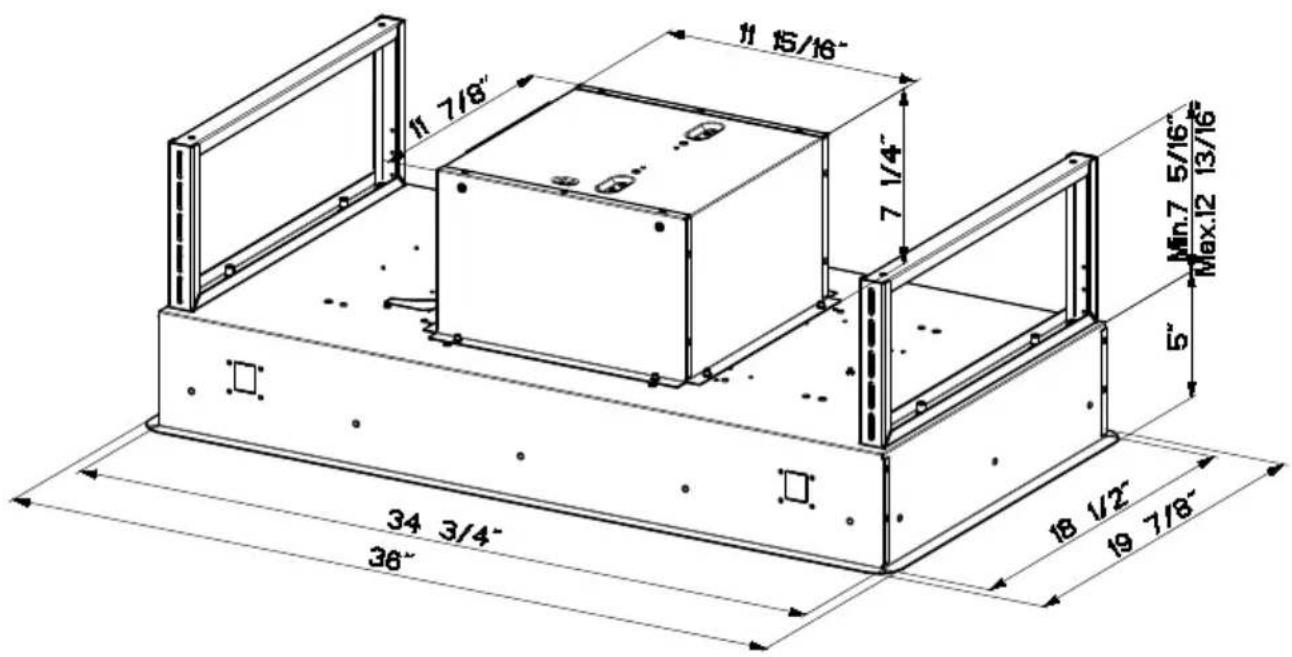
INSTALLATION HEIGHT REQUIREMENTS
Recommended 60" mounting height above the cooking surface for best performance, but can be mounted up to 72" maximum away the cooking surface.
An access point to the hood from the ceiling or soffit must be made for installation and future access to the range hood.
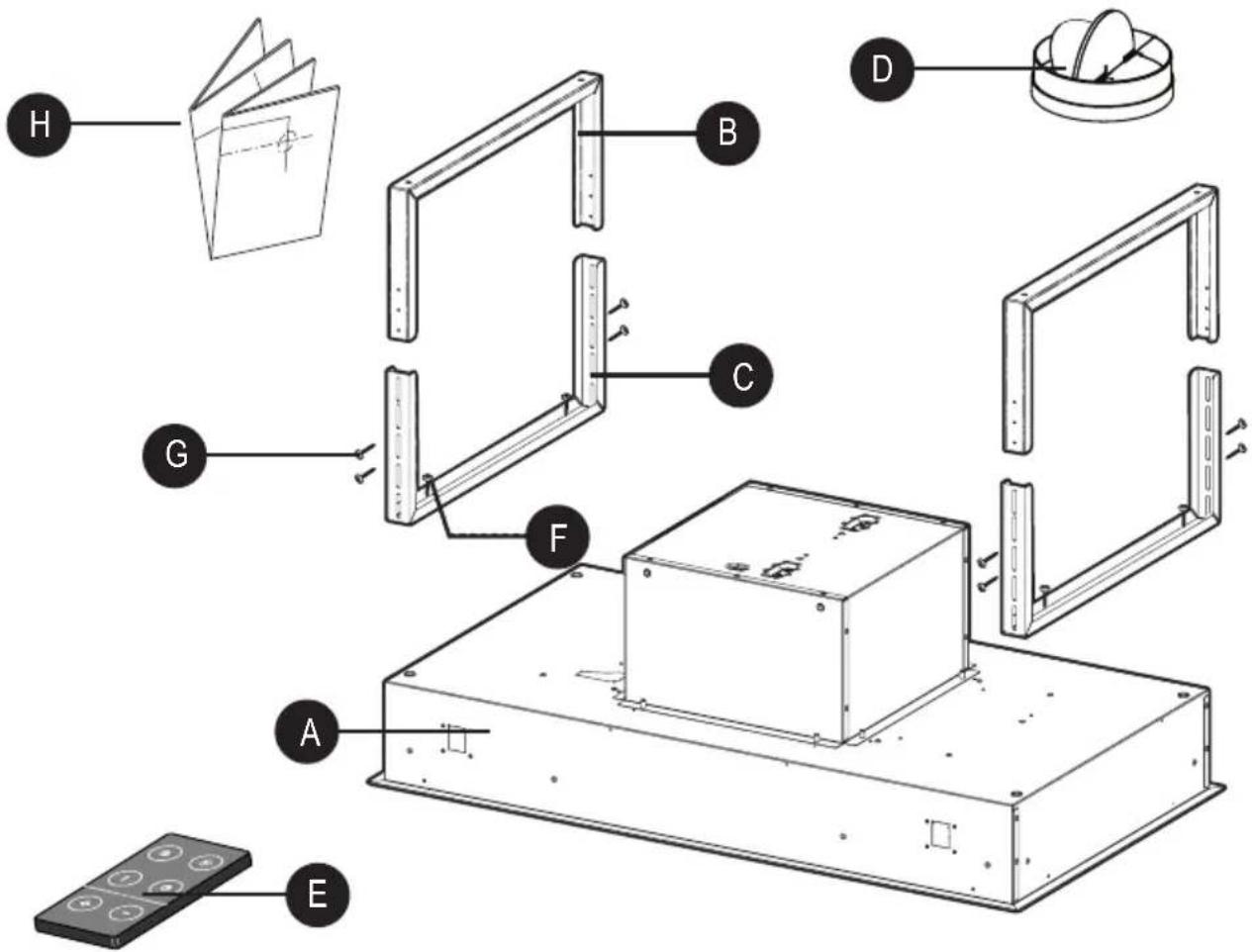
MAIN PARTS
| REF. PART QTY | |||
| A | Hood Body, complete with: Controls, Lights, Filters. 1 | ||
| B | Upper Mounting Bracket 2 | ||
| C | Lower Mounting Bracket 2 | ||
| D | Damper ø 6" 1 | ||
| E | Remote Control 1 | ||
| H | Drilling Template 1 | ||
| REF | PART | QTY | |
| F | Torx Bolts (1/4" x 9/16") | 4 | |
| G | Pozi Screws (1/8" x 3/8") | 8 | |
PARTS NEEDED
| PART | |
| 6" Round Metal Ductwork |  |
| Wire connectors. |  |
| Drywall plugs or other suitable wall fasteners based on your installation. | 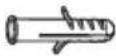 |
ACCESSORIES AVAILABLE
| ACCESSORY SKU# | |
| Activated Charcoal Filter Accessory Kit #FILTER1 | |
| Washable Long-Lasting Activated Charcoal Filter Kit #FILTER1LL | |
| Internal 600 PRO Blower IB600 #IB600 kit | |
| Internal 400 Blower IB400 #IB400 kit | |
| Internal 300 Blower IB300 #IB300 kit | |
| Remote Blower 900 RB900 (10” Flange Included) #RB900 kit | |
| Remote Blower 1200 RB1200 (10” Flange Included) #RB1200 kit | |
| 10" Flange for In-Line Blower #FLANGE10 |
CAUTION - To Reduce The Risk Of Fire And Electric Shock, Install This Range Hood Only With Remote Blower Models RB900 kit or RB1200 kit Manufactured by Faber Or Integral Blowers Manufactured by Faber, Model(s) IB600 kit, IB400 kit, IB300 kit or generic remote blower rated max 2.7A suitable for use with solid state speed control.
COMBINATIONS HOODS AND MOTOR KITS
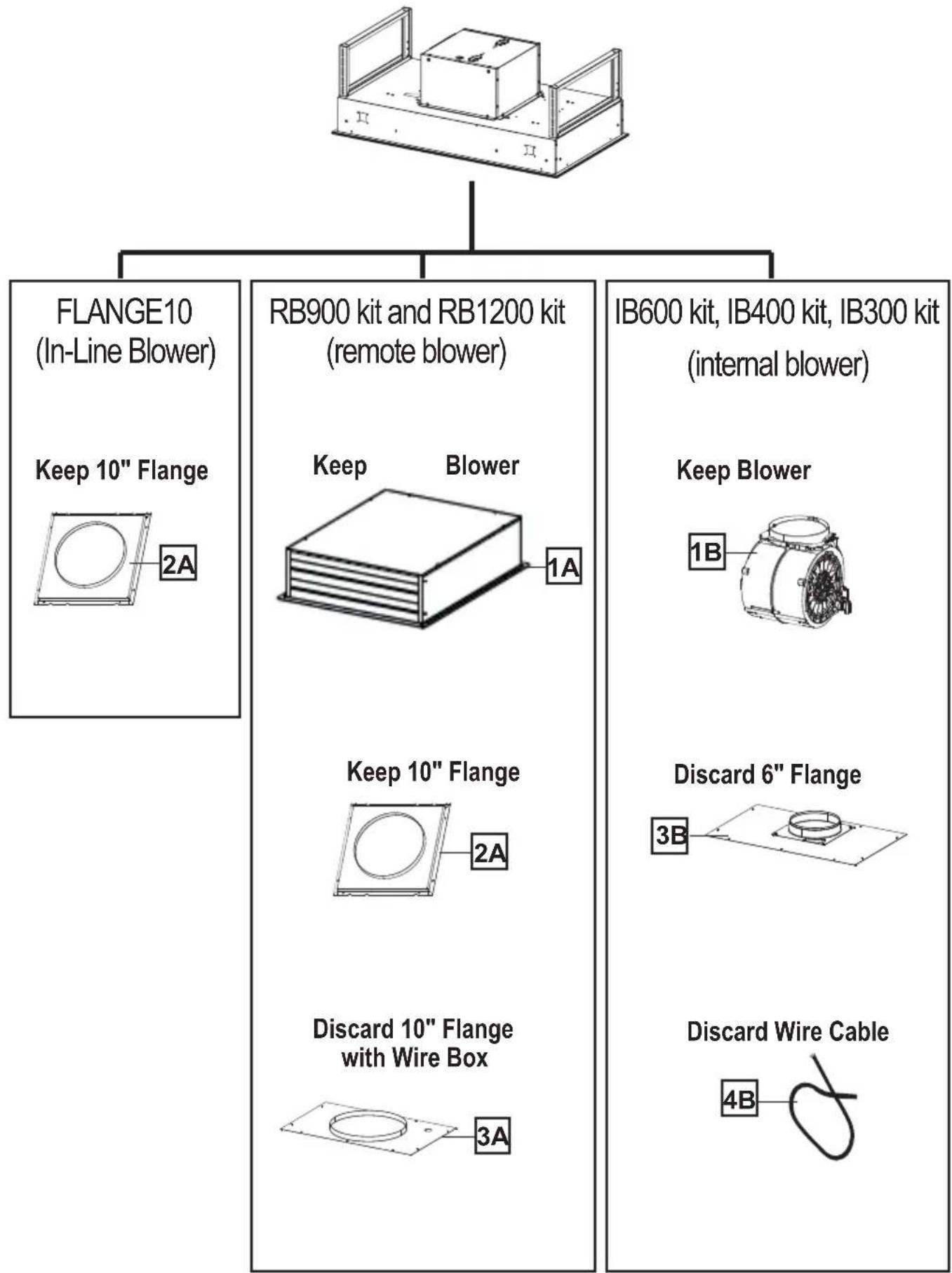
flowchart
graph TD
    A["Device"] --> B["FLANGE10 (In-Line Blower)"]
    A --> C["RB900 kit and RB1200 kit (remote blower)"]
    A --> D["IB600 kit, IB400 kit, IB300 kit (internal blower)"]
    B --> E["Keep 10" Flange"]
    B --> F["Blower 1A"]
    C --> G["Keep 10" Flange"]
    C --> H["Blower 2A"]
    D --> I["Keep Blower 1B"]
    D --> J["Blower 3B"]
    C --> K["Discard 10" Flange with Wire Box"]
    C --> L["Discard Wire Cable 4B"]
CHOOSE YOUR DUCTING METHOD
Ducted Venting Options
Caution: If an elbow is required, do it as far away from the hood's exhaust opening as possible
A
B
Non Ducted - Recirculation Options
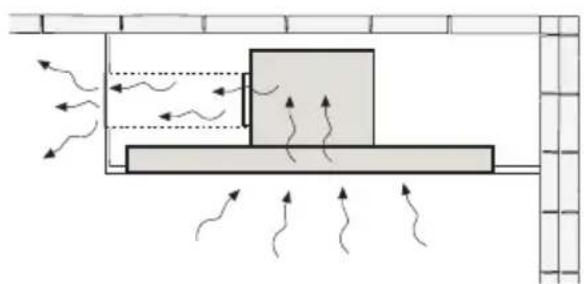
Activated Charcoal Filter Accessory FILTER1 or FILTER1LL required (Purchased separately). Register cover for air duct exit is shown for design not included.
natural_image
Diagram of airflow around a rectangular block with directional arrows indicating movement (no text or symbols)Register cover for air duct exit is suggested.
Attention: When used in recirculation mode, To Reduce the Risk of Fire and Shock use only conversion kit Model FILTER1 or FILTER1LL.
Two men required for installation Wear work gloves for safety



OK!

natural_image
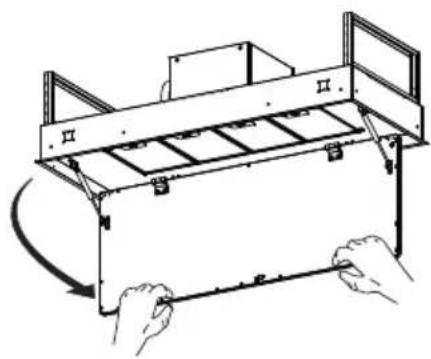
Illustration of two gloves, one plain and one with visible texture (no text or symbols)1 Open the filter cover panel. The filter cover panel is held by a magnet catch, pull down with enough force to release as shown below.
natural_image
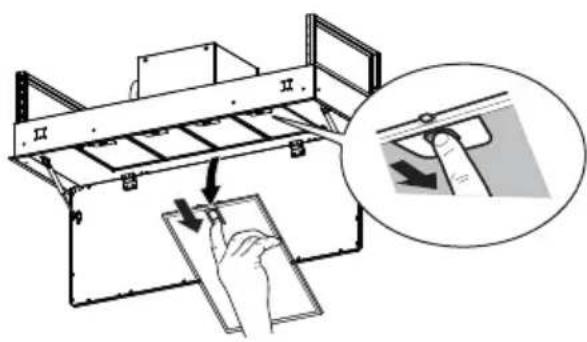
Line drawing of a mechanical device with hands holding a tool, no text or symbols present2 Remove the grease filters one at a time, pushing them towards the back of the unit, and at the same time pulling downward and set aside.
WIRING PREPARATION
Choose wiring method based on blower type
House Power Supply Cable Wiring Box 1 & Remote Blower Wiring Box 2
WIRING BOX 1 for connecting the Home power supply cable with the Hood.
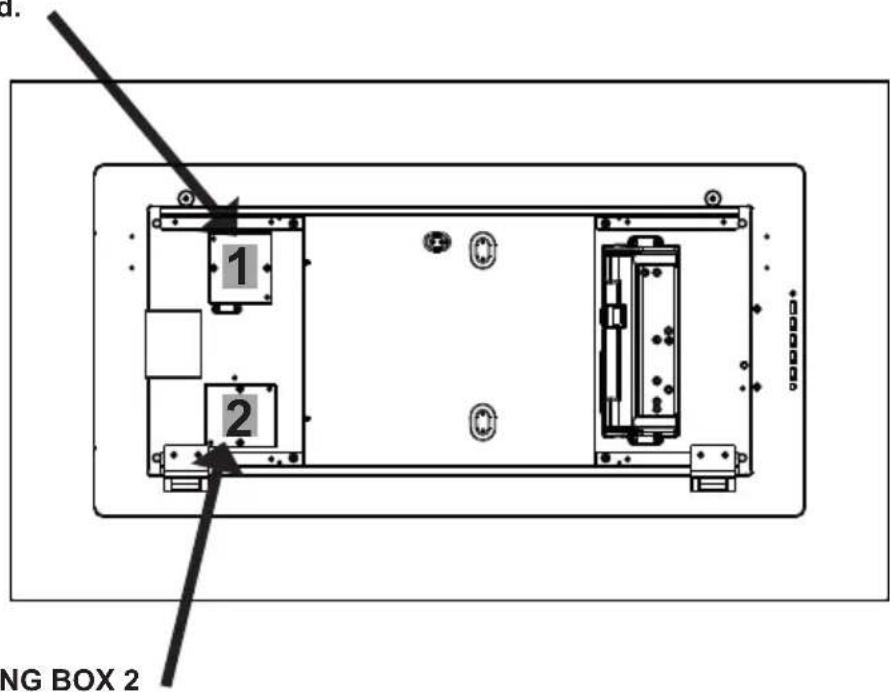
WIRING BOX 2 for connecting the External Blower with the Hood.
CEILING HOOD INSTALL PREPARATION
Do not make any cutouts until you have decided whether this installation will be: ducted or non-ducted and wiring has been prepared based on based on blower type.
3 Use a plumb line to mark the center of the range on the ceiling.
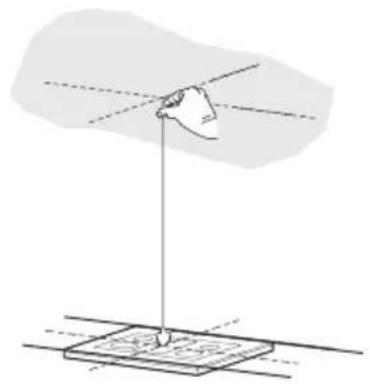
natural_image
Diagram showing a hand holding a pointer above a rectangular object with dashed lines, no text or symbols present.4 Mark the centers.
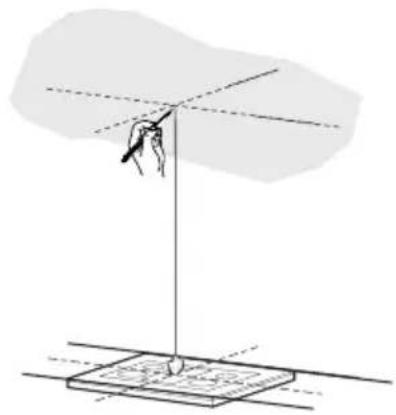
natural_image
Diagram of a hand holding a pointer above a rectangular base with dashed lines, no text or symbols present5 • For all installations, an access point to the hood must be created for installation and future maintenance of the hood.
- Put a thick, protective covering over cooktop to protect from damage or dirt.
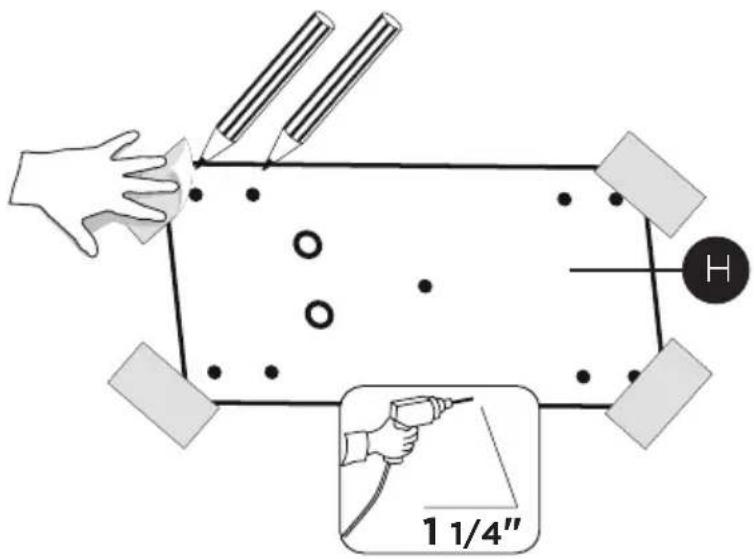
- Use the mounting template on the ceiling to determine placement of mounting screws on the ceiling.
- Mark the center of the holes in the ceiling template.
• Determine and make necessary cuts for the ductwork.
• Install ductwork before mounting the hood.
- Determine the proper location for the Power Supply Cable as indicated on the Template.
- Use a 1 1/4" Drill Bit to make this hole.
- Run the Power Supply Cable. Use caulking to seal around the hole.
- A knockout for threading through the Power Supply from the ceiling is located on the top of the Range Hood.
- Do not connect the Power Cable to the Wiring Box or power up the hood at this time.
- Run enough power cable from the ceiling to reach the wiring box on the hood.

WARNING
DUE TO THE SIZE AND WEIGHT OF THIS Range Hood, THE SUPPORT MUST BE FIRMLY ATTACHED TO THE CEILING. For plaster or sheet rock ceiling, the support must be attached to the joists. If this is not possible, a support structure must be built behind the plaster or sheet rock. The manufacturer assumes no responsibility for injury or damage caused by improper installations.
INSTALLATION INFORMATION
In preparation for installation of the hood orient the hood with the control panel on the right as shown below
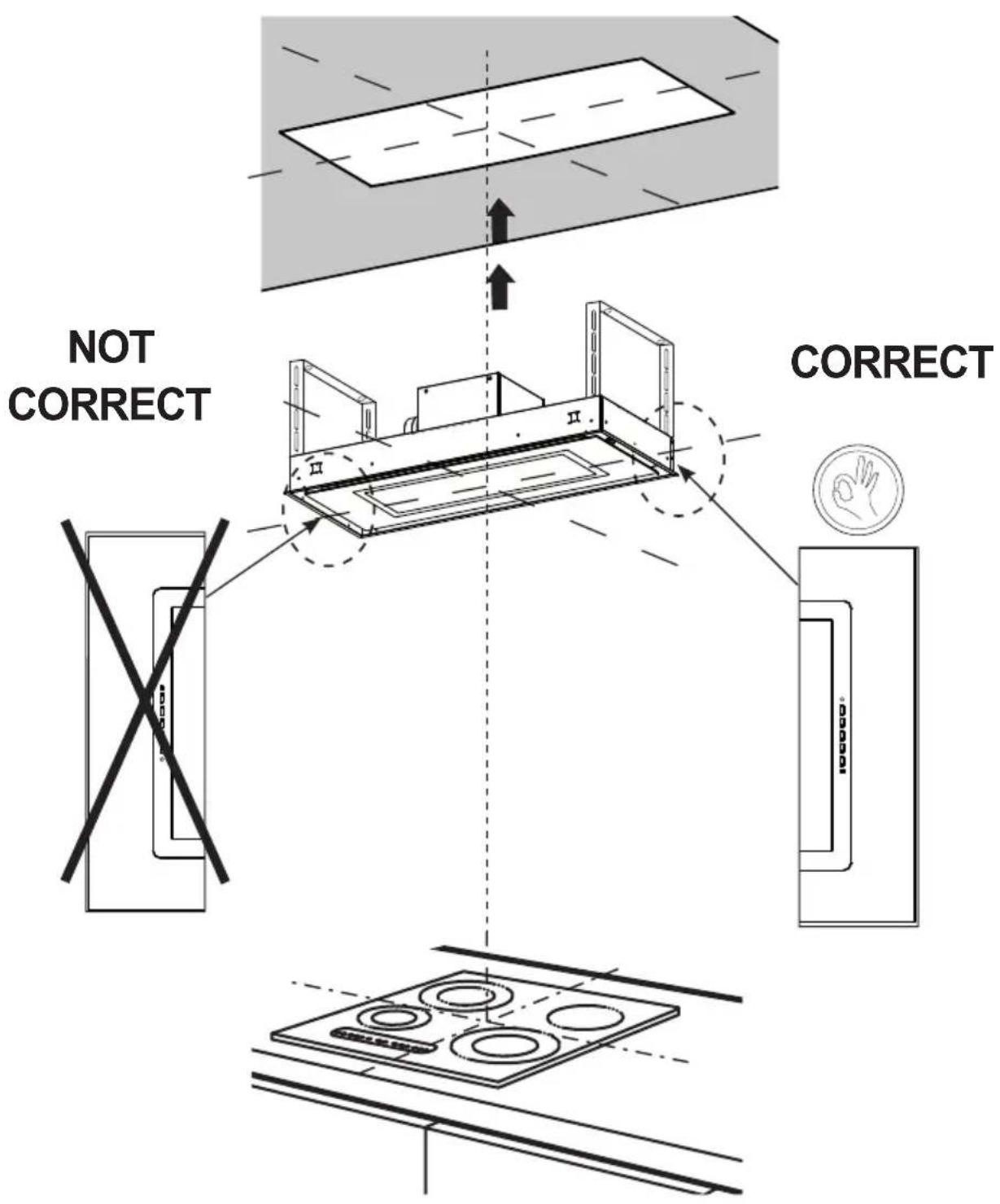
INTERNAL BLOWER INSTALLATION
If you use the internal blower kit, IB600 kit or IB400 kit or IB300 kit, please throw away the flange (3B) and the cable (4B), given with the internal blower kit, shown on page 10 and use only 10" Flange.
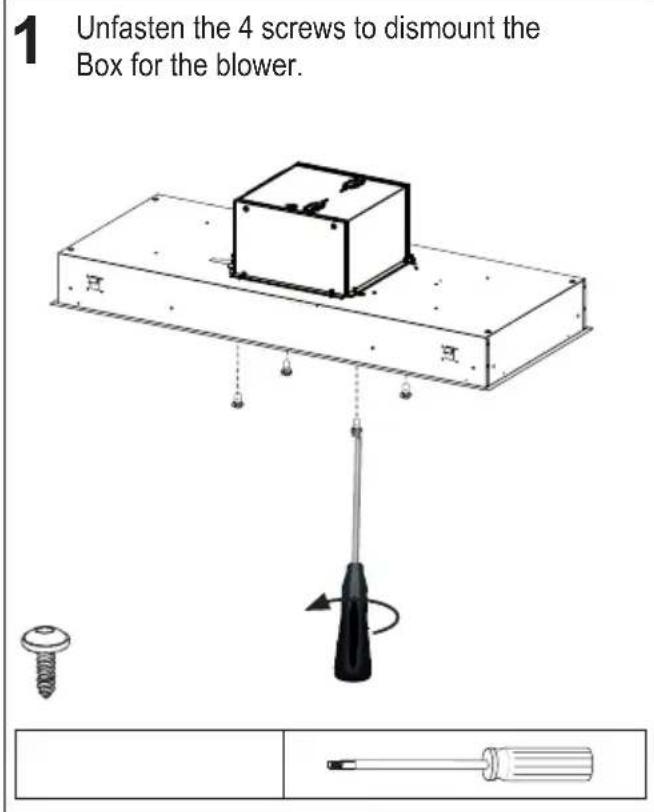
Separate Box and Range Hood
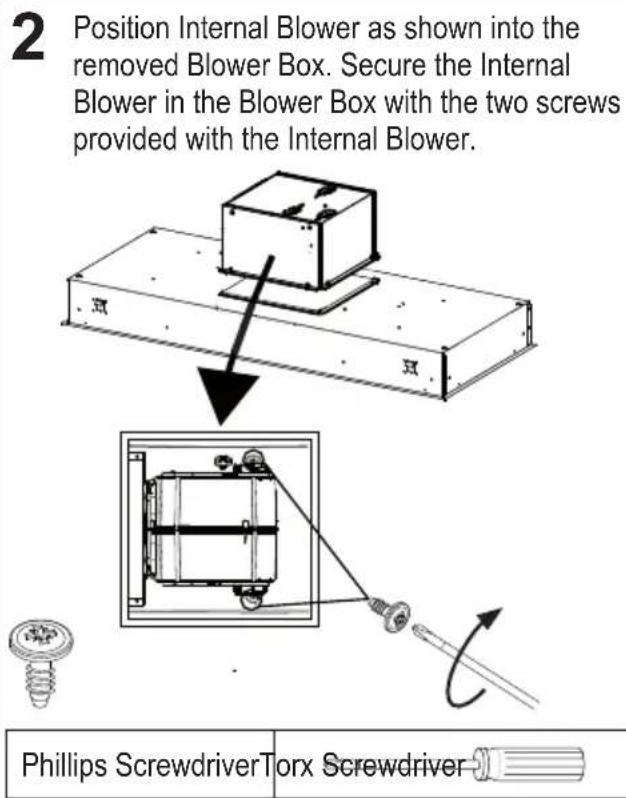
Attach the Internal Blower
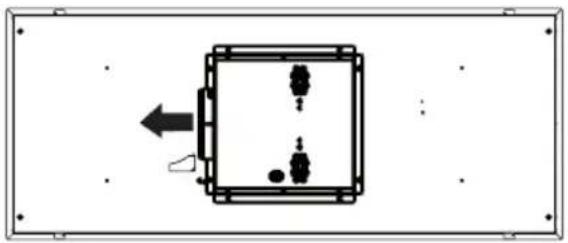
Choose the Box position (Left-Right-Back-Front)
3 The blower can be positioned in four different venting directions as shown. Rotate the Box with Blower in the correct position.
Left
natural_image
Simple line drawing of a square box with internal components and an arrow pointing left (no text or symbols)Back
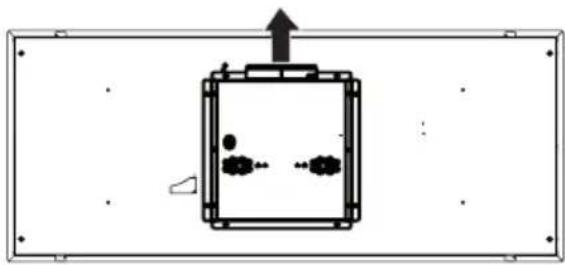
natural_image
Simple line drawing of a rectangular chamber with internal particles and an upward arrow, enclosed in a rectangular frame (no text or symbols)Right
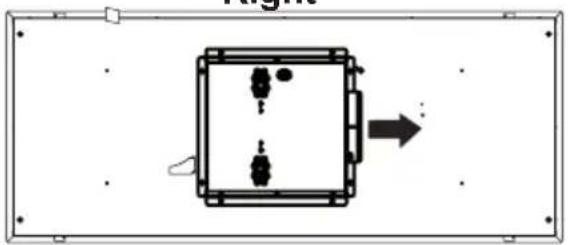
natural_image
Simple diagram of a rectangular box with internal components and an arrow pointing right (no text or symbols)Front
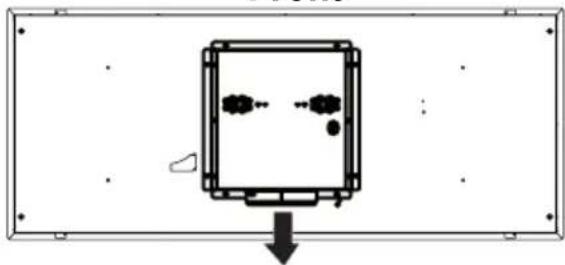
natural_image
Simple diagram of a device with two circular components and a downward arrow, no text or symbols present.Connect the Electric Cable
4
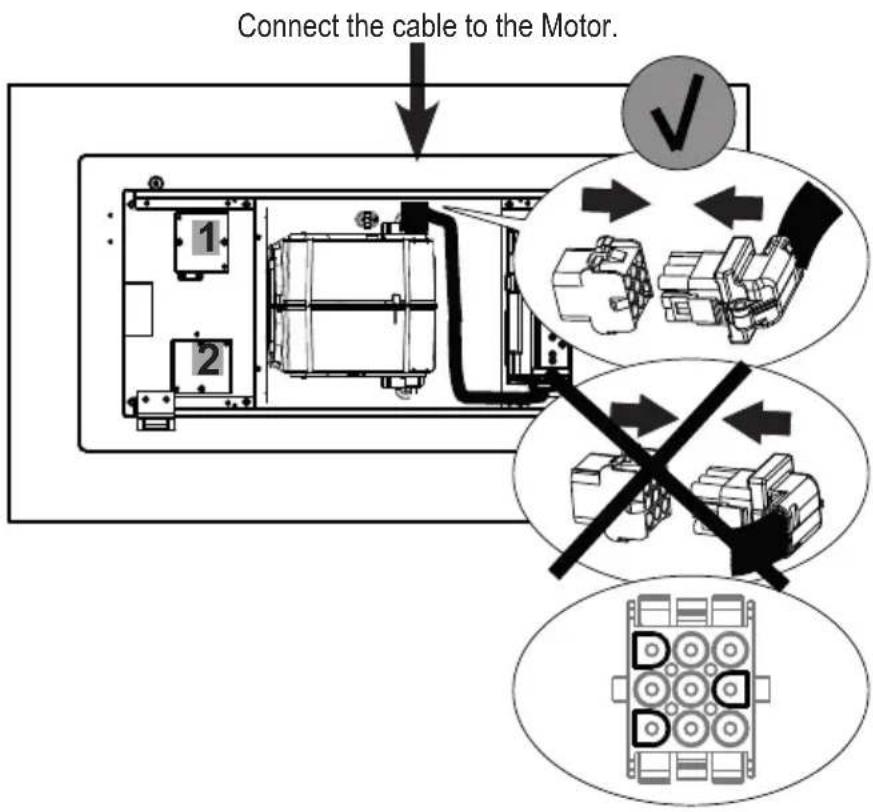
After the blower is mounted in the hood, plug the harness with molex originating from the control box, into the blower.
IMPORTANT: Do not use the harness that came with your internal blower kit (IB600 kit, IB400 kit, IB300 kit).
IMPORTANT: Do not connect the Control Cable to Wiring Box 1 or Wiring Box 2 for internal blower installation.
IMPORTANT: Do NOT use wiring box 2 for an internal blower installation.
Attach Motor Box to the Range Hood
5 Attach the Box with the Blower with the same 4 screws removed previously.
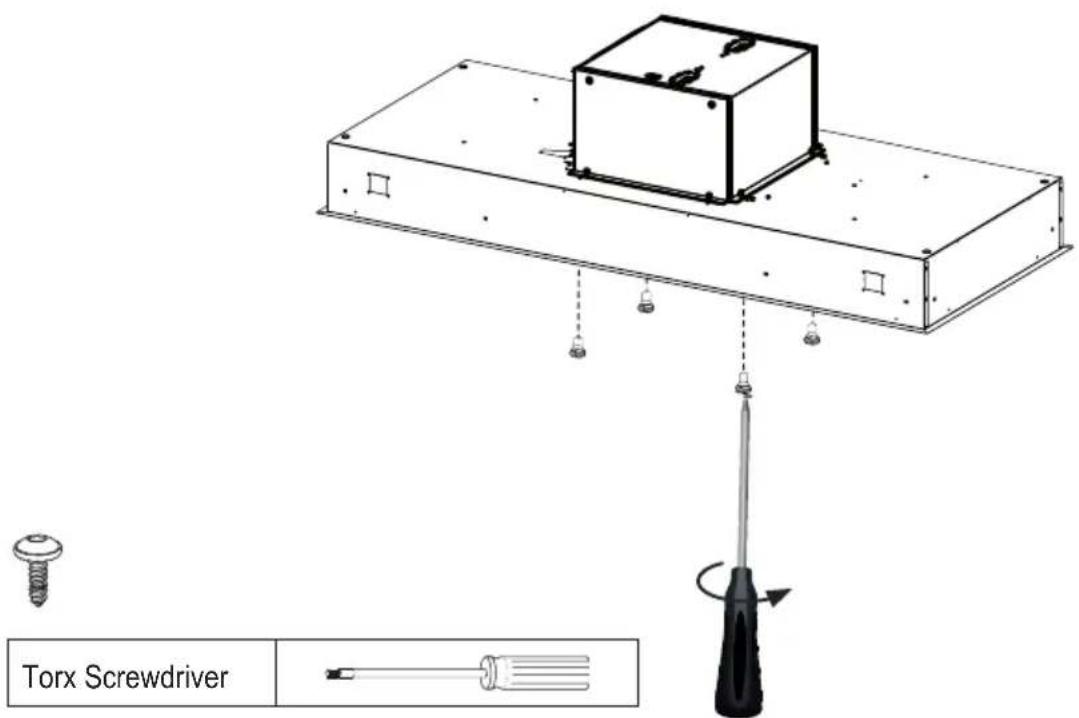
EXTERNAL BLOWER INSTALLATION
If you use the remote blower kit, RB900 kit or RB1200 kit or In-Line Blower Option, please throw away the flange (3A) given with the remote blower kit, shown on page 10.
Separate the Box from the Range Hood
1 Unfasten the 4 screws to dismount the Blower Box from the hood body and to save screws. The Blower Box is not used for Remote Blower installation and can be discarded or saved for future use if converted to Internal Blower.
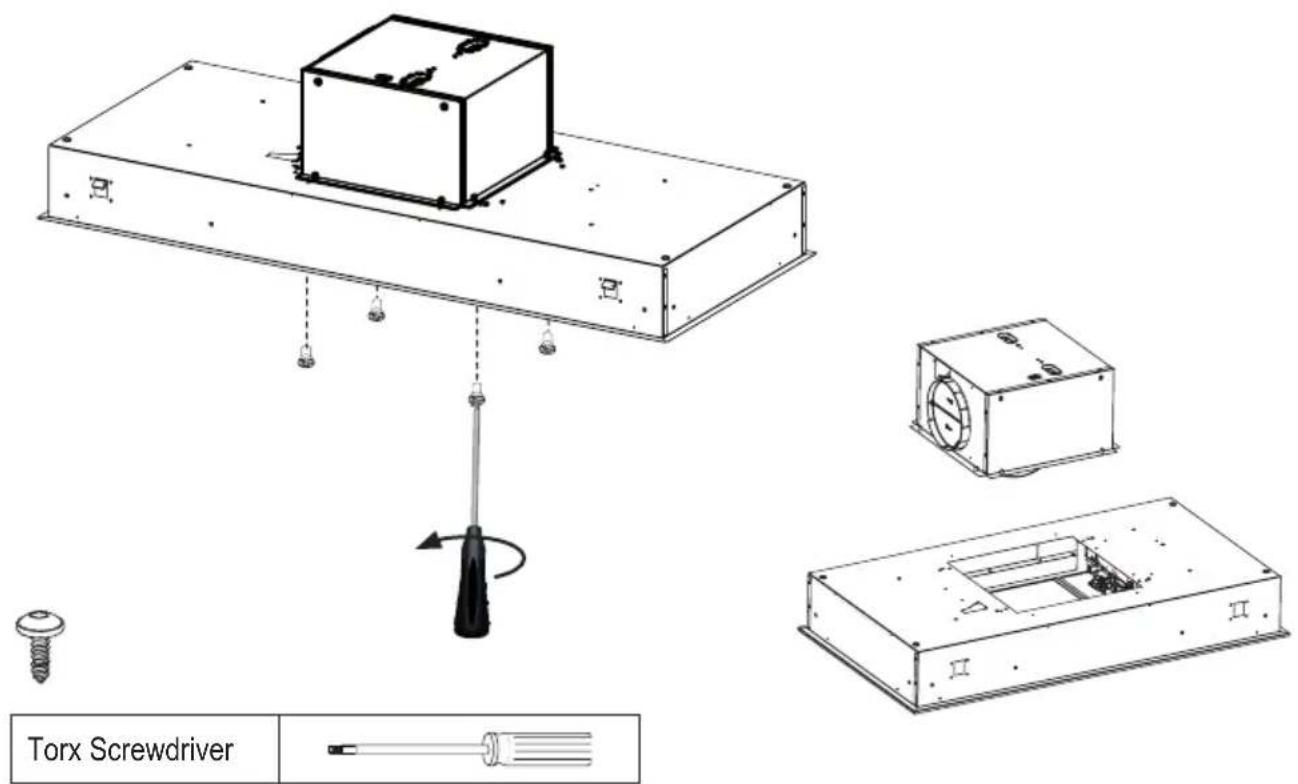
Attach optional FLANGE 10" (2A)
2 Attach 10" FLANGE (2A) with 4 screws provided in the hardware bag as shown.

Torx Screwdriver
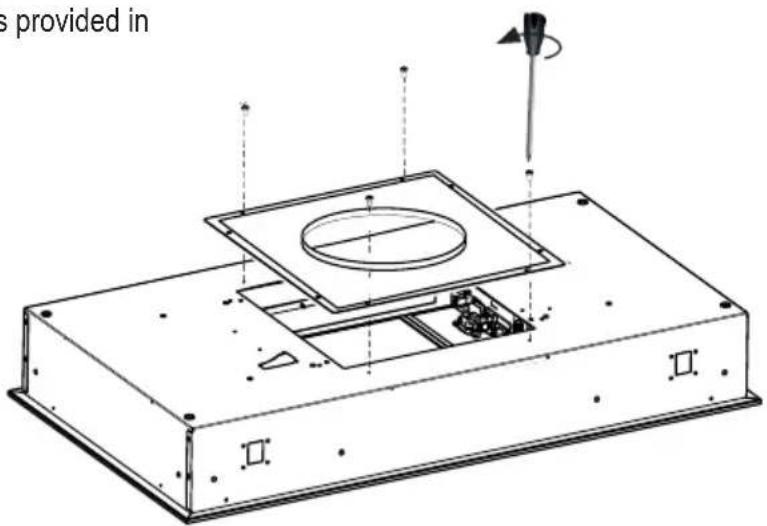

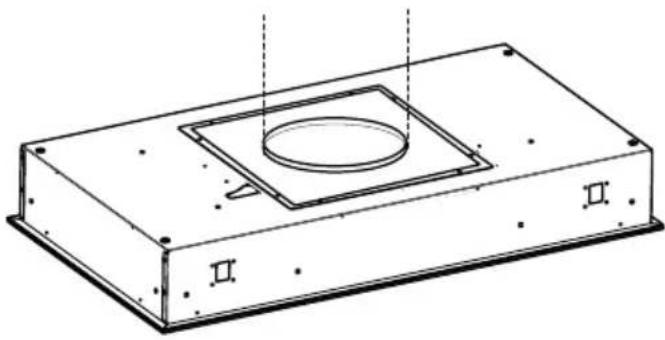
Connect to Air Outlet
3 Connect the Hood body air outlet with the Remote Blower air outlet.
natural_image
Technical line drawing of a rectangular electronic component with a central square recess and two labeled sections (II and II), no text or symbols present.Connection to Box 2 (Remote Blower Wiring Box)
4
- From inside the hood connect the cable to the wiring box 2 as shown in the image to the right.
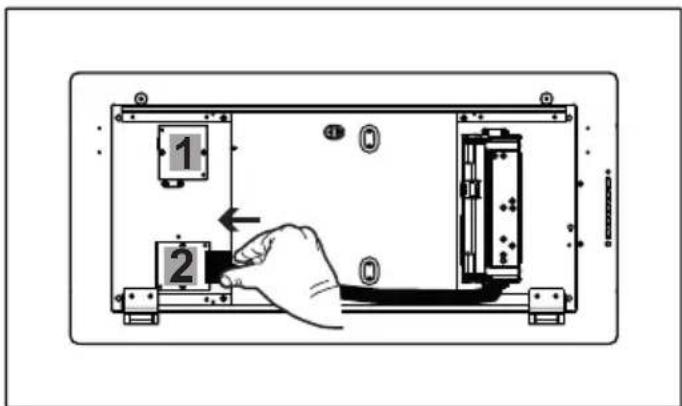
-
From inside the hood, remove the cover from the wiring box 2 by removing two screws.
-
Break the correct hole in the Wiring Box 2 for passing the cables from the remote blower.
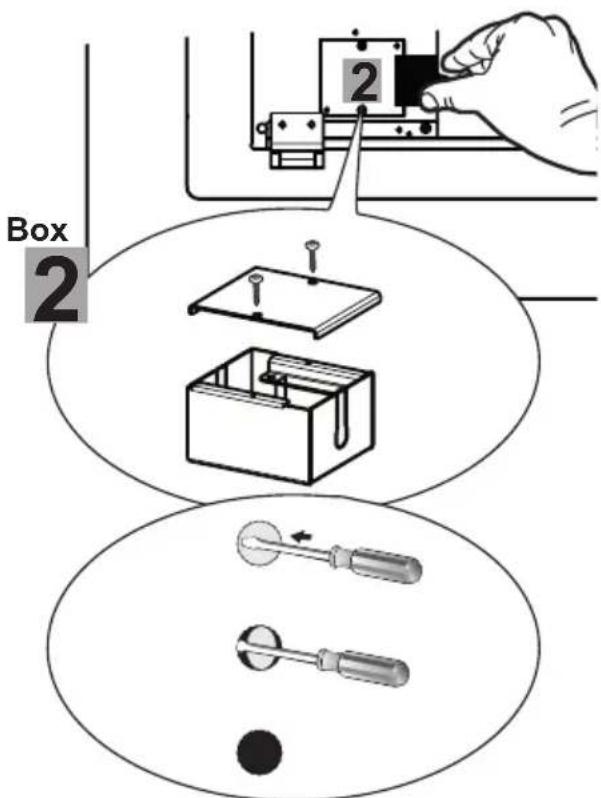
INSTALLATION OF RANGE HOOD BODY
Choose the correct method of bracket installation
Option A
Steps 7a-7b-7c is an option for mounting and hood when access is available from above the ceiling/soffit (See page 20).
Option B
Steps 8a-8b-8c is an option for mounting the hood to the brackets when no access is available from above and the soffit is already completed (See page 22).
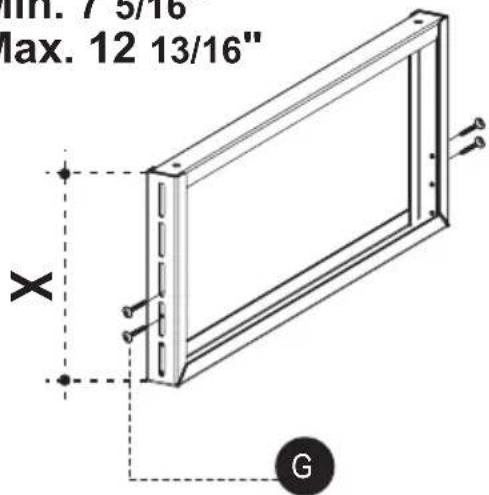
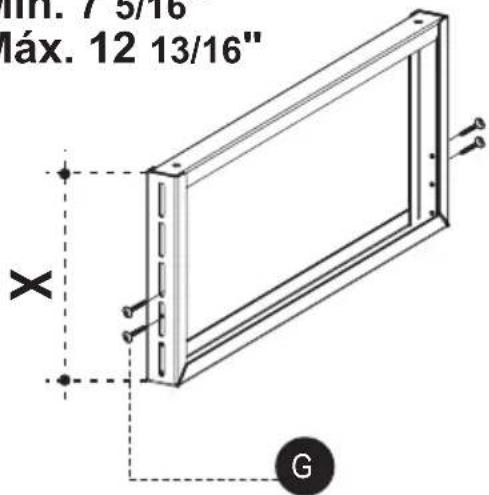
Assemble the Range Hood Mounting Brackets
6
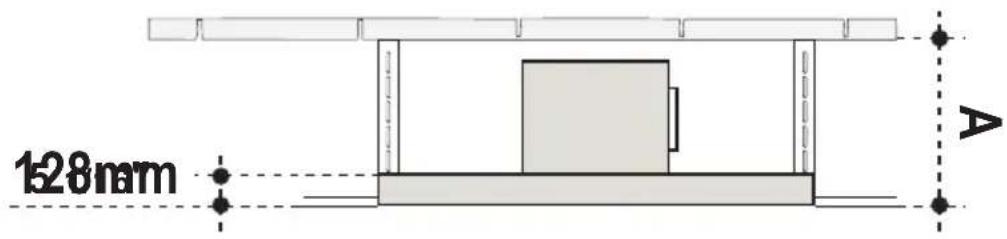
$$ X = A - 5 1 / 1 6 ^ {\prime \prime} $$
As shown, you have to accommodate for the height of the hood body into your space overhead. After determining bracket height use the 8 Screws from Component Page 8 to assemble brackets.
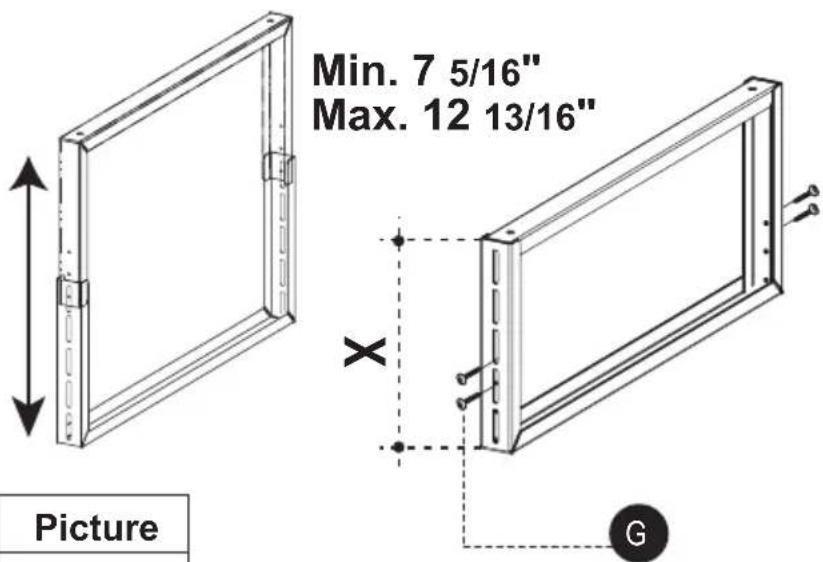
| Ref. | Size | Picture |
 | 1/8" x 3/8" | [SZDW] |
OPTION A - HOOD INSTALLATION BEFORE THE SOFFIT IS COMPLETED
Use this installation if you have access from above to install the range hood
Ceiling Mark
7.a
See below for a detailed image on drilling the holes onto the fastening surface (inside ceiling or soffit) that will then be used to mount the bracket fixtures.
The fasteners used must be compatible with the 5/16" hole and are purchased separately.
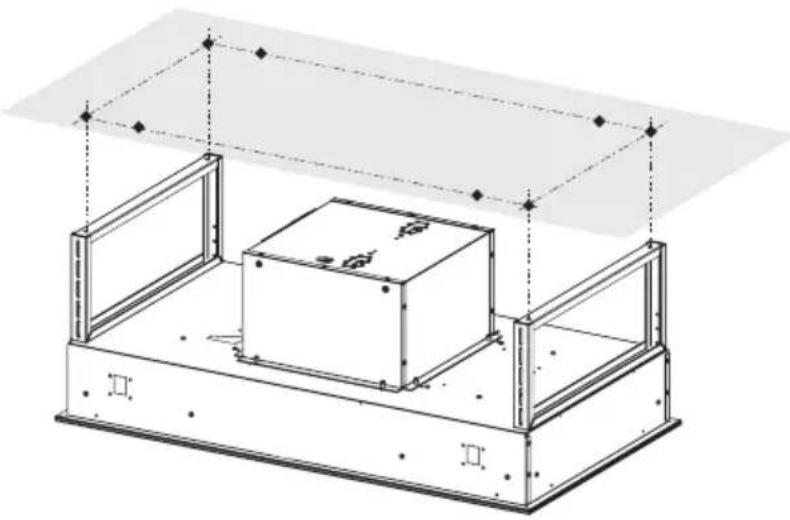
natural_image
Technical line drawing of a mechanical assembly with two rectangular components and mounting brackets (no text or symbols)Bracket Installation on Ceiling
7.b
Use external holes created with drilling template for location of the ceiling fasteners (purchased separately). Use wall plugs or other securing hardware in conjunction with the ceiling fasteners (purchased separately).
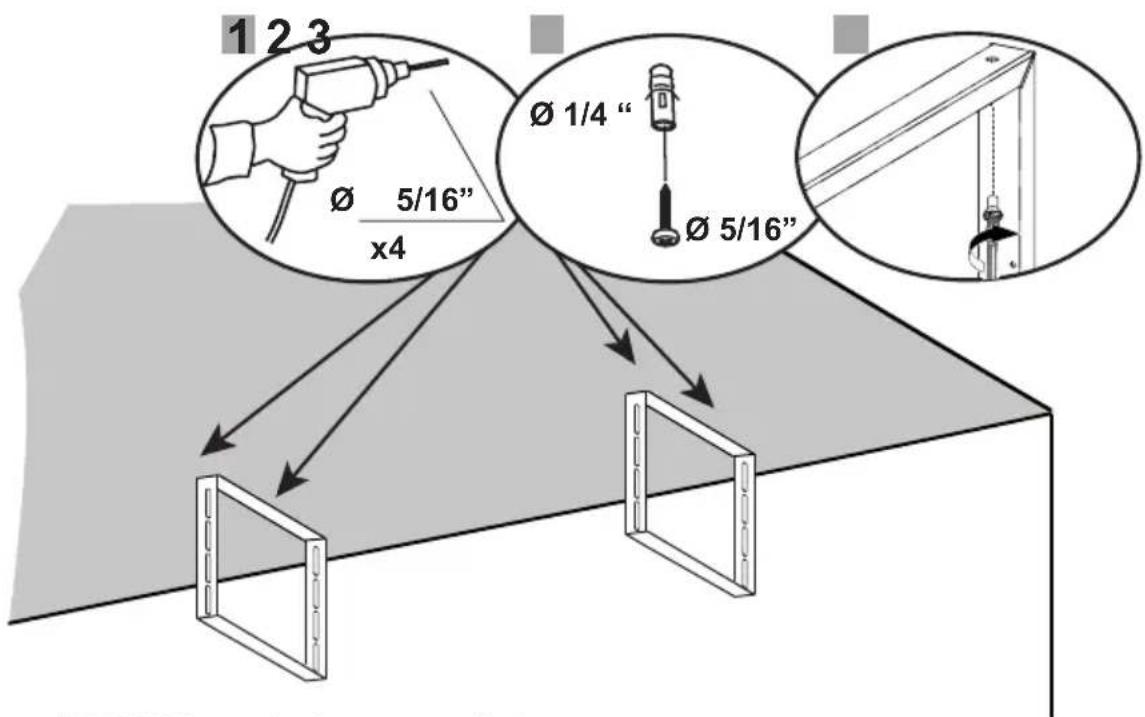
(1) Use a 5/16" Drill Bit to make these external hole.
(2) Use wall plugs if appropriate or other securing hardware in conjunction with the ceiling fasteners (purchased separately).
(3) Use appropriate screws or other securing hardware in conjunction with the ceiling fasteners (purchased separately) to attach the brackets.
Attach the Range Hood on the Bracket
7.c
Attach the Hood body to the hood ceiling brackets by use the 4 Screws F from the component list on Page 6 to attach the hood body to the hood ceiling brackets.
Access is needed in the space above. Leave an access point in the soffit for future access to the range hood.
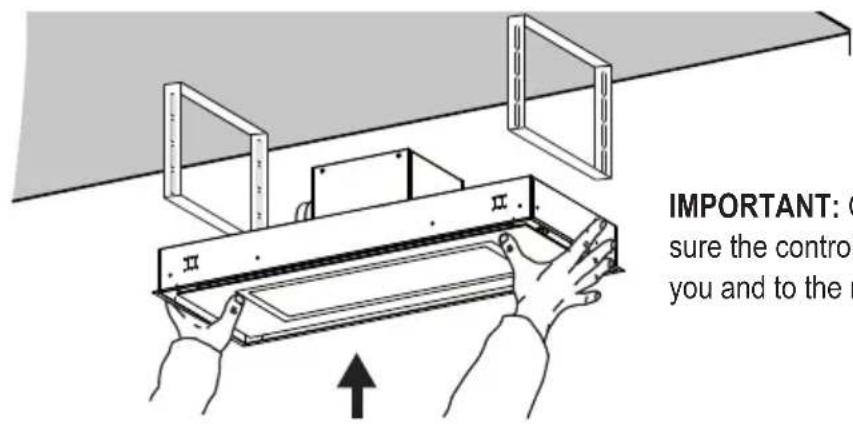
IMPORTANT: Check to make sure the controls are facing you and to the right.
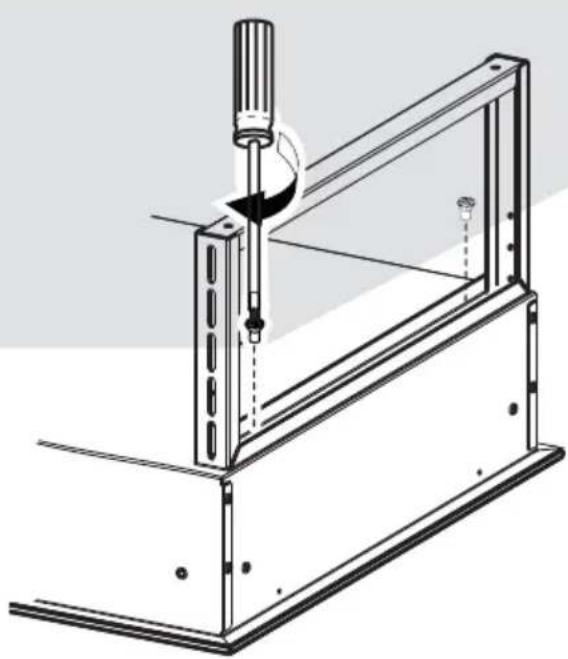
natural_image
Technical line drawing of a mechanical clamp or bracket assembly (no text or symbols)| Ref. Size Picture | ||
 | 1/4" x 9/16" | 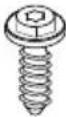 |
OPTION B - HOOD INSTALLATION AFTER THE SOFFIT IS COMPLETED
Use this installation if don't have access from above to install the range hood
Important:
- Steps 8a-8b-8c-8d is the option for mounting the hood to the brackets when access is NOT available from above the ceiling/soffit.
- The brackets are first mounted into the ceiling soffit and the hood is mounted to the brackets from in side the hood.
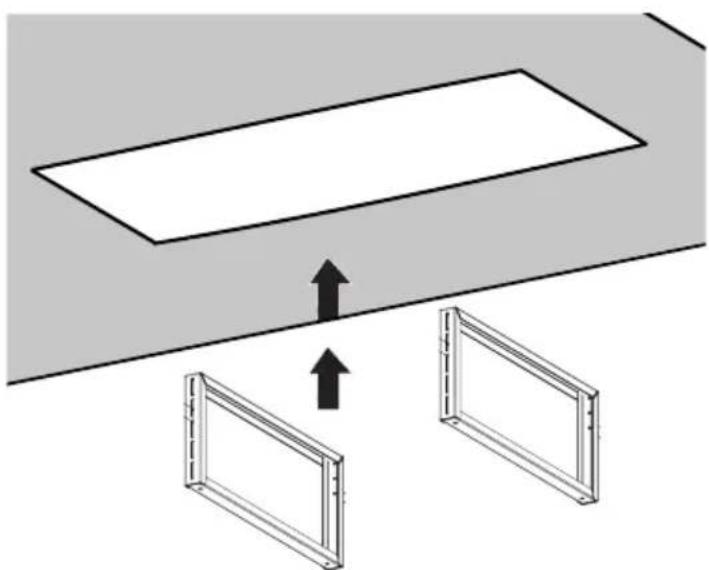
Cutout for Ceiling / Soffit
8.a
See image with dimensions for ceiling cutout.
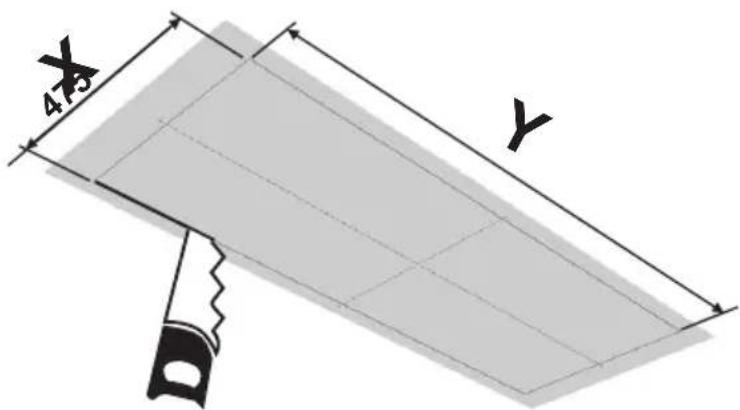
| Hood X | Y | |
| 36" 18 | 11/16" 34 9/16' |
natural_image
Diagram showing two rectangular frames with upward arrows pointing to a rectangular panel on a gray surface (no text or symbols)Ceiling Bracket Installation for Soffit
8.b
See below for a detailed image on drilling the holes onto the fastening surface (inside ceiling or soffit) that will then be used to mount the bracket fixtures. The fasteners used must be compatible with the 5/16" hole and are purchased separately.
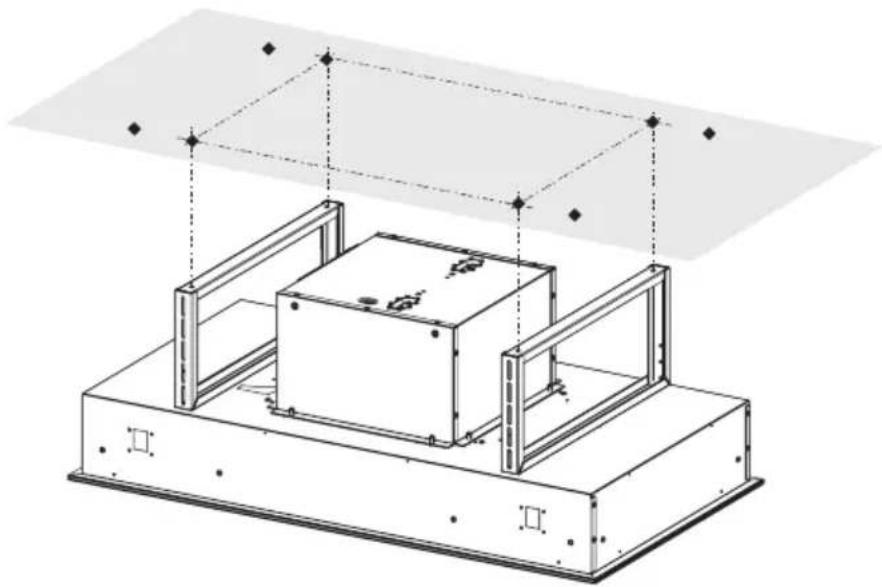
natural_image
Technical line drawing of a mechanical assembly with a central box and support frame (no text or symbols)Bracket Installation on Ceiling
8.c
Use more internal holes created with drilling template for location of the ceiling fasteners(purchased separately).
Use wall plugs or other securing hardware in conjunction with the ceiling fasteners (purchased separately).
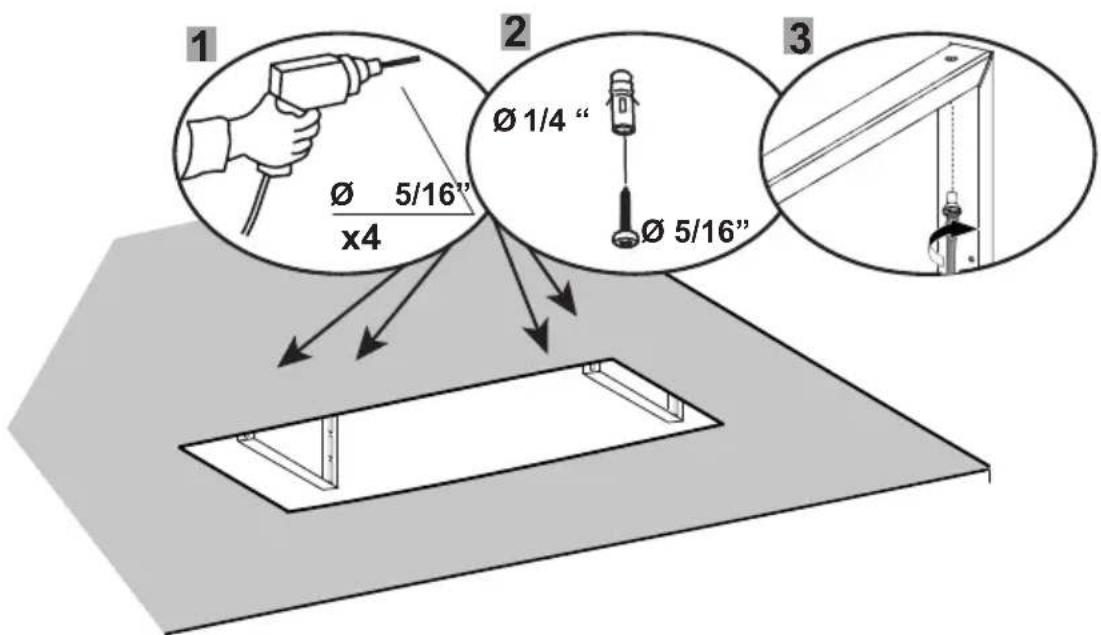
(1) Use a 5/16" Drill Bit to make these internal hole.
(2) Use wall plugs if appropriate or other securing hardware in conjunction with the ceiling fasteners (purchased separately).
(3) Use appropriate screws or other securing hardware in conjunction with the ceiling fasteners (purchased separately) for attach the Brackets.
Attach the Range Hood on the Bracket
8.d
Attach the Range Hood on the brackets.
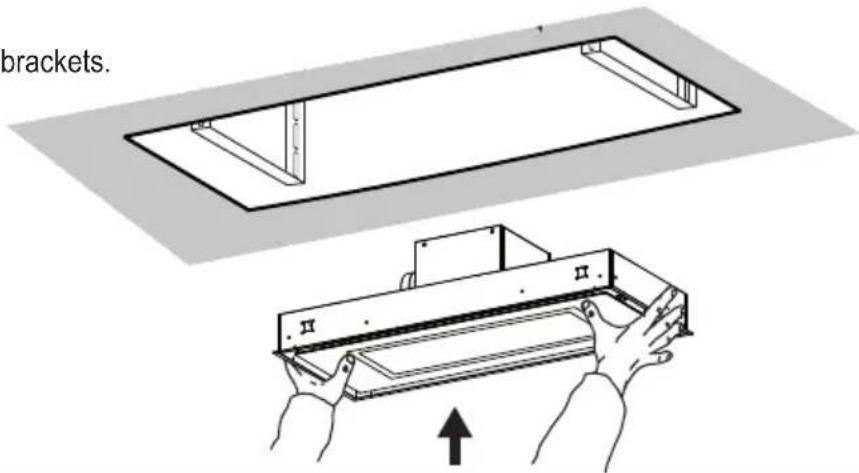
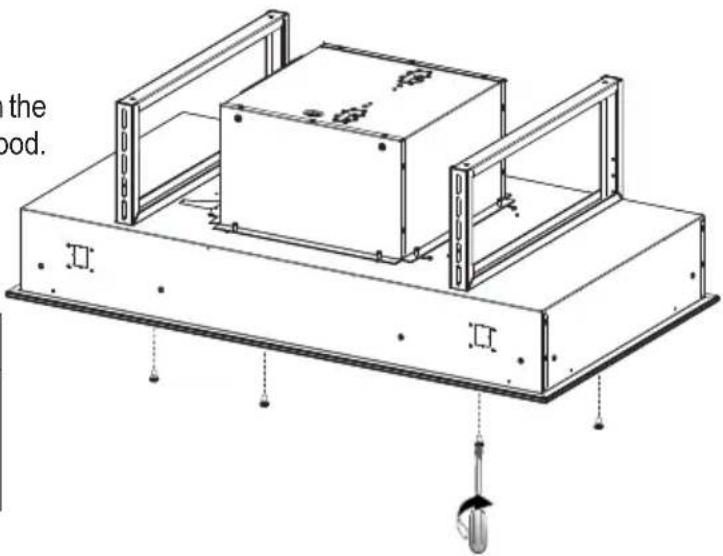
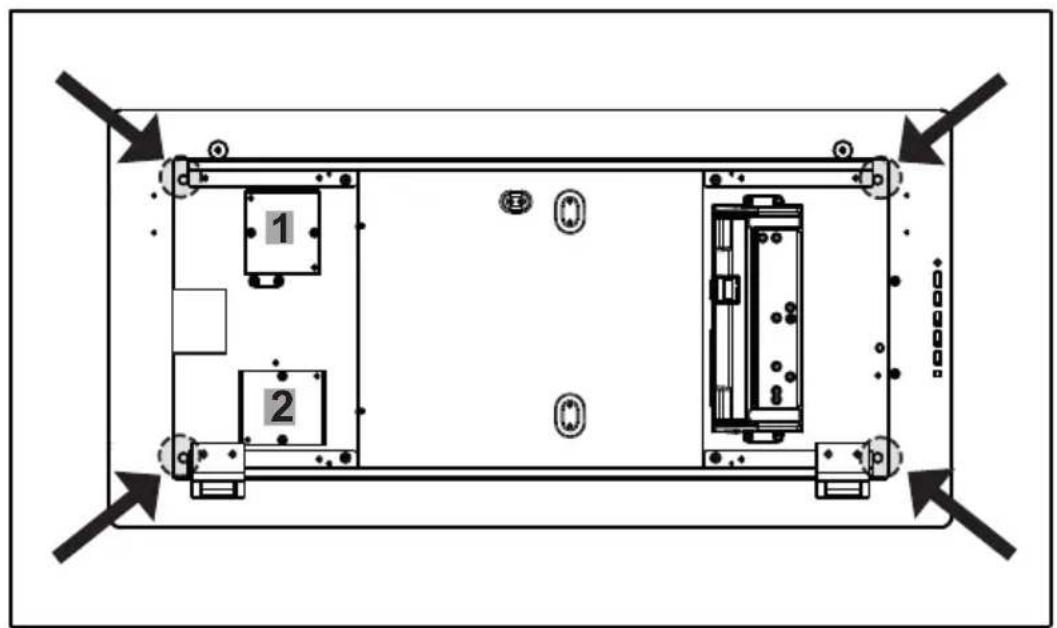
Use the Screws to attach the hood to the ceiling brackets
Use the 4 Screws from the Component list to attach the hood ceiling brackets from the bottom inside the hood.
| Ref. Size Picture | ||
| F | 1/4" x 9/16" | |
CONNECT THE DUCTING
Ducted Venting Installation
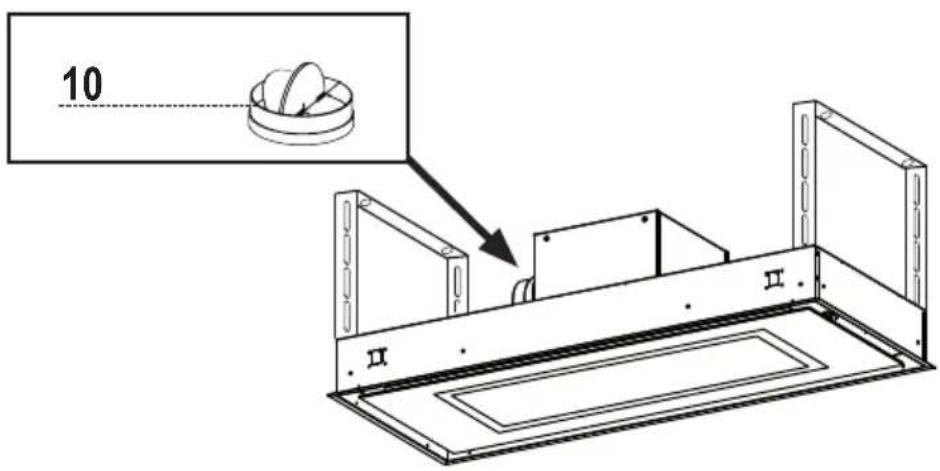
Install the Damper
9 Install Damper that is included with the Hood before connecting to the ductwork. Seal with foil duct tape.
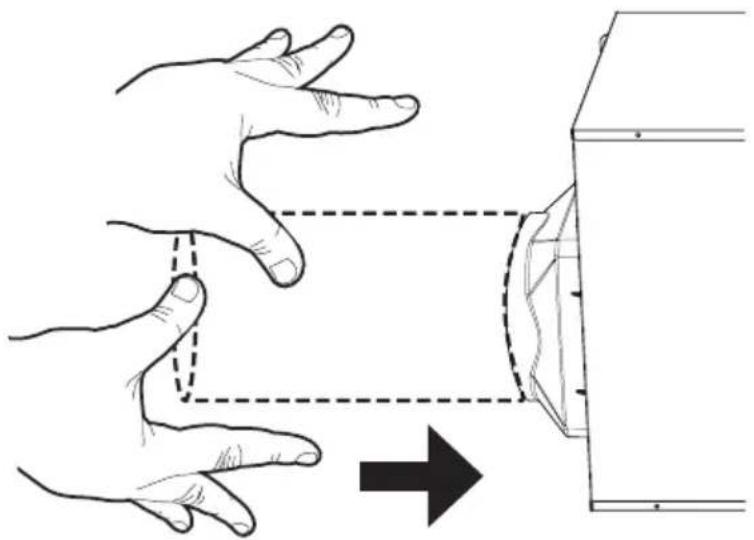
Connect to Air Outlet
10 Connect the hood to the pipe for air outlet. Use foil duct tape to seal the joint.
natural_image
Illustration of two hands projecting a curved object from a rectangular frame, with an arrow indicating direction (no text or symbols)Non Ducted - Recirculation Options
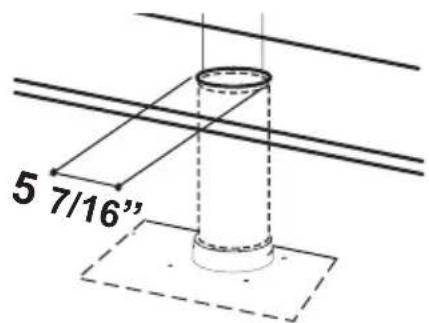
11a
Recirculation Hole
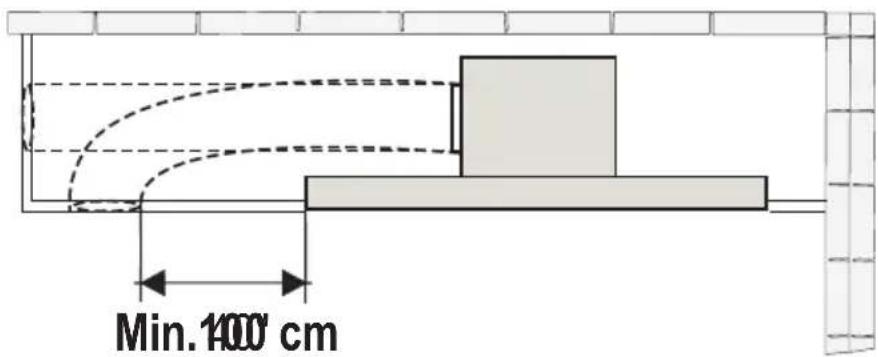
11b
Information for Recirculation Hole
Keep the return air duct at least 40" away from the side of the Range Hood.
12
Install Activated Charcoal Filter Kit
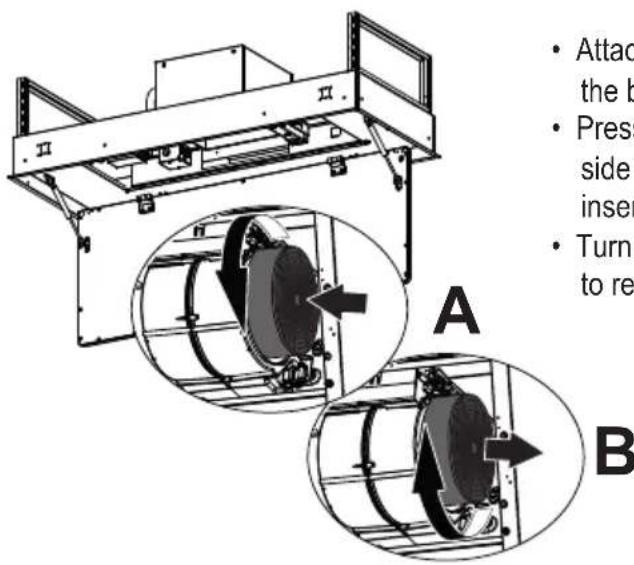
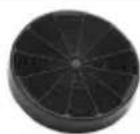
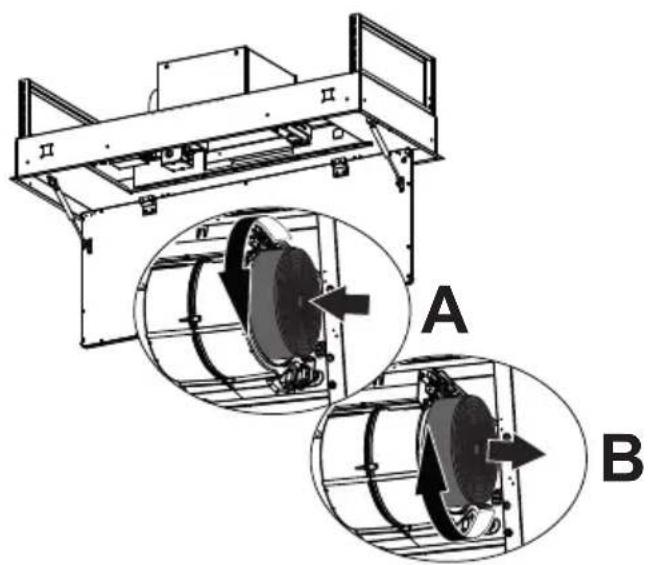
- Attach each charcoal filter to the black grid on each side of the blower.
- Press the charcoal filter tightly to the black grid on the blower side and rotate the filter clockwise (towards the front of the insert hood) until it locks into place (A).
- Turn counterclockwise (towards the back of the insert hood) to remove (B).
Required Activated Charcoal Filter Accessory - sku # - FILTER1 or FILTER1LL (purchased separately)
WIRING BOX 2 CONNECTION
(Remote Blower Wiring Box)
13
IMPORTANT: ONLY FOR EXTERNAL BLOWER INSTALLATION
- Connect the cable from the Remote Blower with the two wires inside the Wiring Box 2 by twist-on type wire connector and matching the color:
- Black with Black
-
White with White
-
Connect the green ground wire from remote blower to green ground screw.
- Replace the field wiring compartment cover.
- Check the Wiring Diagram.
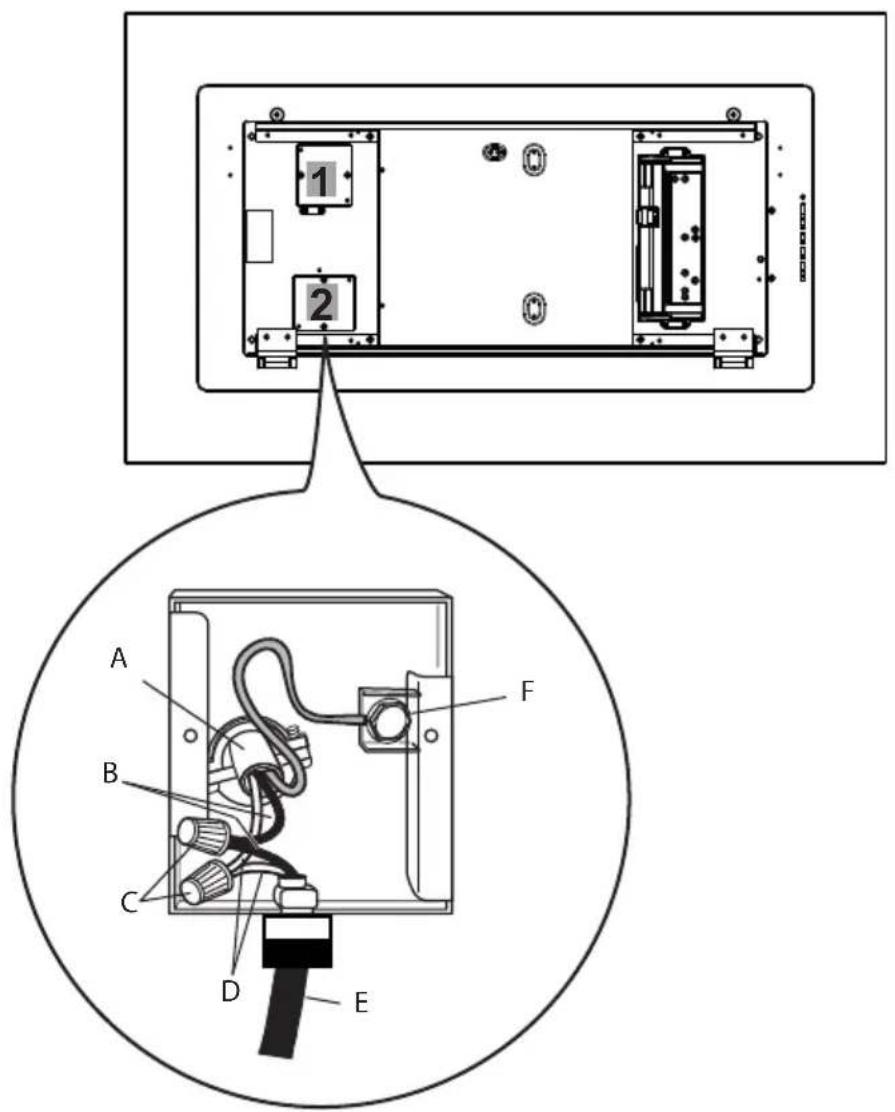
A. Remote Blower power supply cable.
B. Black wires.
C. UL listed wire connectors.
D. White wires.
E. Internal Hood Cable.
F. Green ground screw.
HOUSE WIRING BOX CONNECTION
Wiring House Power to the Hood
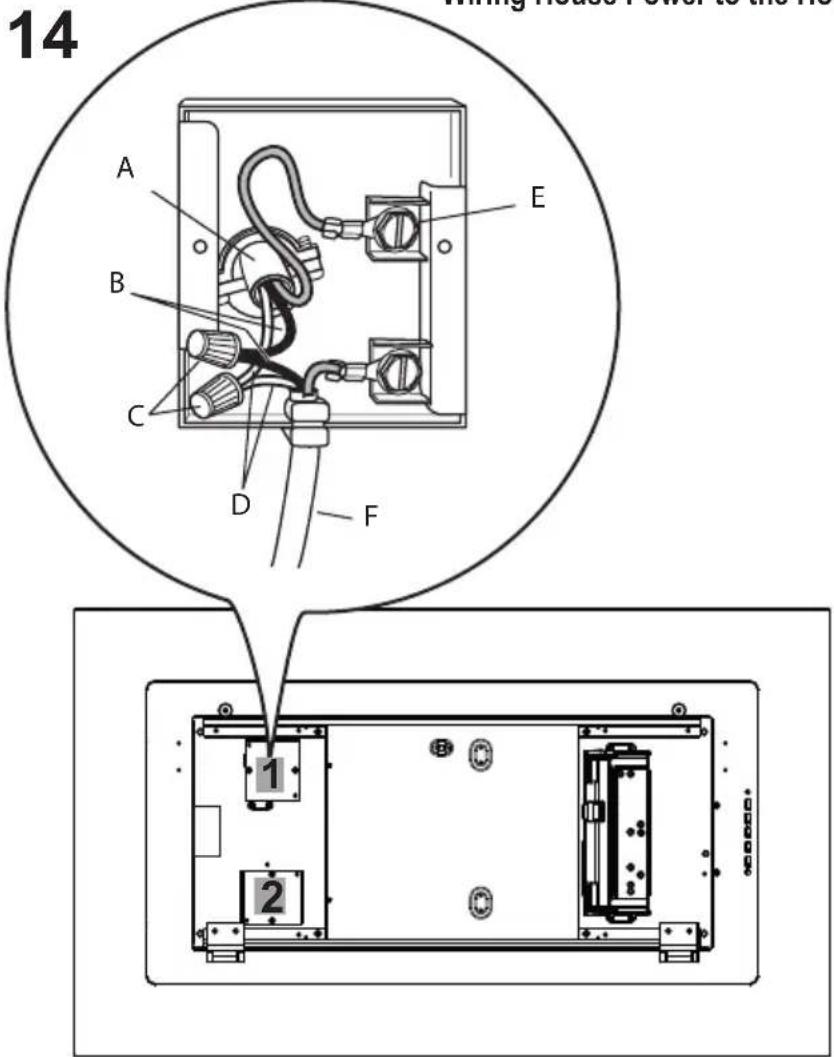
Installation Of House Power Wiring Box Connection 1
- Remove the cover from the field wiring compartment. DO NOT turn on the power until installation is complete!
- Connect the Power Supply Cable to the Range Hood.
- Connect the Green (Green and Yellow) ground wire under the Green grounding screw.
- Attach the White lead of the power supply to the White lead of the Range Hood with a twist-on type wire connector.
- Attach the Black lead of the power supply to the Black lead of the Range Hood with a twist-on type wire connector.
- Replace the Wiring Box 1 cover and the grease filters.
- Check the Wiring Diagram.
A. Home power supply cable.
B. Black wires.
C. UL listed wire connectors.
D. White wires.
E. Green (or bare) ground wire from home power supply to be connected to green ground screw.
F. Range hood power supply cable.
natural_image
Line drawing of a mechanical device with a hand pressing a button on a panel (no text or symbols)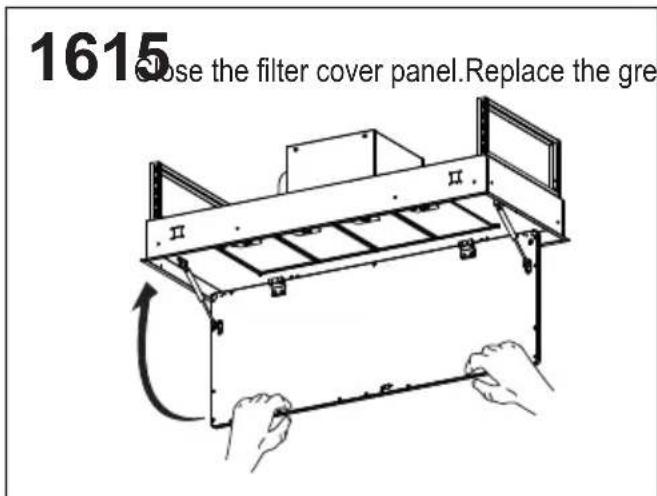
USE AND CARE INFORMATION
For Best Results
Start the Range Hood several minutes before cooking to develop proper airflow. Allow the Range Hood to operate for several minutes after cooking is complete to clear all smoke and odors from the kitchen.
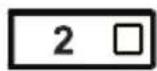
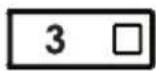
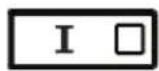
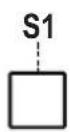
| Button Function Led | ||
 | Turns the lights on/off at maximum strength. - | |
| Press and hold the button for approximately 2 seconds to turn the Dimmer Lights On/Off. | - | |
 | Turns the motor on/off at speed one. ON | |
| Delay function:Press and hold the button for approx. 3 seconds to Activate/Deactivate the Delay function (automatic switching off of the Motor, and the Lighting with a 30 min. delay). Cannot be enabled when Intensive is on. | ||
 | Turns the Motor on at speed two. ON | |
| Activate Charcoal Filter AlarmPress and hold the button for approximately 5 seconds, with all the hood turned off (Motor and Lights), to turn the alarm on. The relevant LED flashes twice to confirm. To turn the alarm off, press the button again and hold for at least 5 seconds. The relevant LED flashes once. | ||
 | Turns the Motor on at speed three. ON | |
| Grease Filter AlarmTo reset the alarm: press and hold the button for approximately 3 seconds, with the hood turned off (Motor and Lights), and until the LED S1 flashes three times. | ||
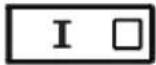 | Turns the Motor on at INTENSIVE Speed.This speed is timed to run for 6 minutes. At the end of this time, the system returns automatically to the speed that was set before. If it is activated with the motor turned off, the hood will switch to OFF at the end of the time. | ON |
| S1 | Signals the Metal Grease Filter saturation alarm, indicating that it is necessary to wash the filters. The alarm is triggered after the Hood has been in operation for 100 working hours. | ON |
| When this is activated, it signals:The Activated Charcoal Filter saturation alarm, indicating that the filter must be changed;The Metal Grease Filters must also be washed. The Activated Charcoal Filter saturation alarm turns on after the Hood has been working for 200 hours. | Flashing. | |
Remote control information
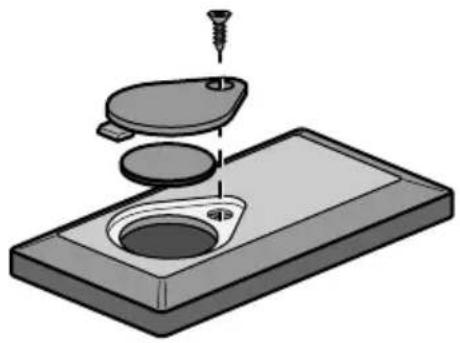
Installing the Battery
- The remote control is powered by a CR2032 type 3 V battery (not included).
- Remove the screw and install the battery.
- Check that the battery is installed with the "+" side up.
Caution:
- Do not place the remote control near heat sources.
- Do not discard the batteries with normal waste, they must be put into the specific containers.
- Make sure the battery compartment is screwed down flat and is fully tightened..
natural_image
3D illustration of a mechanical assembly with a screw and two circular components on a base (no text or symbols)Remote Control control panel
| Motor On/Off. | ||
| - | ||
| - | ||
| Lights On / Off. | ||
| Press for 2 seconds to Activate Dimmer. | ||
| Activates/Deactivates Intensive operation | ||
| Brief pressure: Activates/Deactivates the Delay function: automatic switch-off with a 30' delay. The display shows the operating speed and the dot at the bottom right flashes once a second. | ||
| + | Increases the working speed each time it is pressed | |
| - | Decreases the working speed each time it is pressed | |
Attention: This hood has been engineered to minimize electromagnetic interference (EMI) originating from the consumer's home power source. However, in some home application, ambient EMI and excessive EMI from other electronic sources can compromise the reliability of the remote control.
Please speak with your Faber Distributor about an optional spare part to further reduce EMI from home sources.
Cleaning metal grease filters
These can be washed in the dishwasher, and need to be cleaned whenever the S1 LED comes on or at least once every 2 months of use, or more frequently if use is particularly intensive.
Resetting the Grease Filter Alarm
• Turn the Lights and the Hood off.
- Press 3 □ and hold for at least 3 seconds, until LED flashes three times in confirmation.
Cleaning the Filters
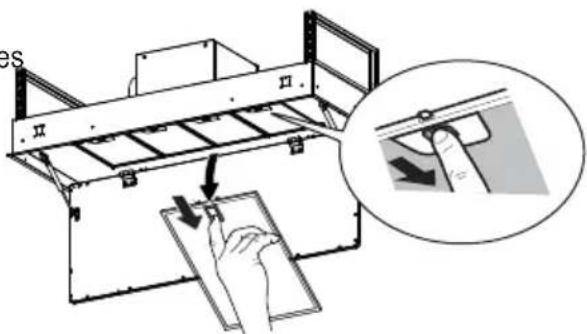
- Open the Panel.
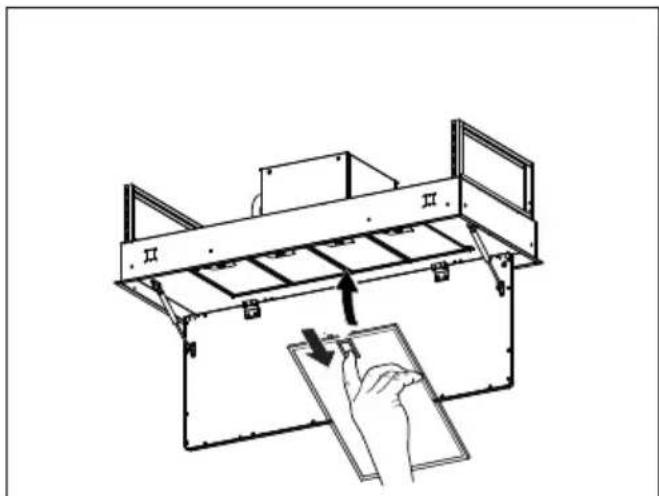
- Remove the Filters one at a time, pushing them towards the back of the unit and at the same time pulling downward.
- Wash the Filters without bending them, and leave them to dry completely before replacing. (If the surface of the filter changes color as time goes by, this will have absolutely no effect on the efficiency of the filter itself.)
- Replace the grease filters, taking care to ensure that the handle faces forward.
- Completely dry the filters before reinstalling. Otherwise, left over grease may heat and drip.
- Close the Panel.
Replacing Activated Charcoal Filter
They cannot be washed or regenerated, and must be changed when LED S1 starts to flash, or at least once every 4 months. The Alarm signal, if it has been activated, only appears when the Hood Blower is turned on.
Resetting the alarm signal
- Turn the Lights and the Hood Blower off.
- Press 3 □ and hold for at least 3 seconds, until LED flashes three times in confirmation.
Cleaning the Filters
- Open the Panel.
- Remove the Metal Grease Filter.
- Remove the saturated Activated Charcoal Filters, as indicated (A).
• Fit the new Filters, as indicated (B). - Replace the Metal grease filters.
- Close the Panel.
natural_image
Technical diagram of a mechanical device with two circular insets labeled A and B showing internal components (no text or symbols present)Cleaning Exterior surfaces
Cleaning Exterior surfaces:
Please note, abrasives and scouring agents can scratch range hood finishes and should not be used to clean finished surfaces.
Stainless Steel finish cleaning instructions:
Clean exterior surfaces with a commercially available stainless steel cleaner.
Painted Gray finish cleaning instructions:
Clean exterior surfaces with hot soapy water.
Lighting
- LED lights must be replaced by Faber factory authorized service.
FABER
FABER CONSUMER WARRANTY & SERVICE
All Faber products are warranted against any defect in materials or workmanship for the original purchaser for a period of 1 year from the date of original purchase (requires proof of purchase). This warranty covers labor and replacement parts. Faber, at its option, may repair or replace the product or components necessary to restore the product to good working condition. To obtain warranty service, contact the dealer from whom you purchased the range hood, or the local Faber distributor. If you cannot identify a local Faber distributor, contact us at (508) 358-5353 for the name of a distributor in your area.
The following is not covered by Faber's warranty:
- Service calls to correct the installation of your range hood, to instruct you how to use your range hood, to replace or repair house fuses or to correct house wiring or plumbing.
- Service calls to repair or replace range hood light bulbs, fuses or filters. Those consumable parts are excluded from warranty coverage.
- Repairs when your range hood is used for other than normal, single-family household use.
- Damage resulting from accident, alteration, misuse, abuse, fire, flood, acts of God, improper installation, installation not in accordance with electrical or plumbing codes or Faber documentation, or use of products not approved by Faber.
- Replacement parts or repair labor costs for units operated outside the United States or Canada, including any non-UL or C-UL approved Faber range hoods.
- Repairs to the hood resulting from unauthorized modifications made to the range hood.
- Expenses for travel and transportation for product service in remote locations and pickup and delivery charges. Faber range hoods should be serviced in the home.
THIS WARRANTY DOES NOT ALLOW RECOVERY OF INCIDENTAL OR CONSEQUENTIAL DAMAGES, INCLUDING, WITHOUT LIMITATION, DIRECT, INDIRECT, INCIDENTAL, SPECIAL OR CONSEQUENTIAL DAMAGES, PERSONAL INJURY/WRONGFUL DEATH OR LOST PROFITS FABER WARRANTY IS LIMITED TO THE ABOVE CONDITIONS AND TO THE WARRANTY PERIOD SPECIFIED HEREIN AND IS EXCLUSIVE. EXCEPT AS EXPRESSLY SPECIFIED IN THIS AGREEMENT, FABER DISCLAIMS ALL EXPRESS OR IMPLIED CONDITIONS, REPRESENTATIONS, AND WARRANTIES INCLUDING, WITHOUT LIMITATION, ANY IMPLIED WARRANTIES OF MERCHANTABILITY OR FITNESS FOR A PARTICULAR PURPOSE.
This warranty gives you specific legal rights that may vary from state to state.
Model#:
Serial #:
Table des matières
National Fire Protection Association
Batterymarch Park
HAUTEUR REQUISE POUR L'INSTALLATION
natural_image
Two identical architectural floor plan diagrams showing structural elements with arrows indicating upward movement (no text or labels)MIN. 35" D'ÉCART (ÉLECTRIQUE/AU GAZ) MAX. 72" D'ÉCART (ÉLECTRIQUE/AU GAZ)
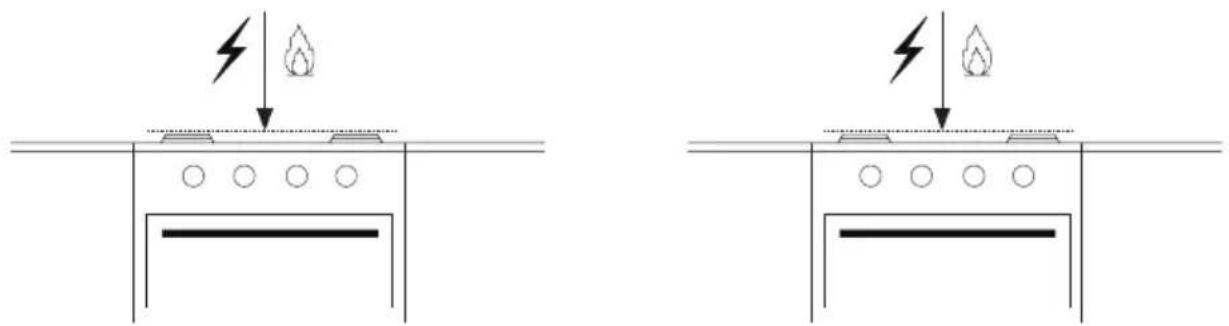
natural_image
Two identical diagrams showing a fire hazard symbol above a barrier, with no text or labels present.PIÈCES PRINCIPALES
PIÈCES REQUISES
ACCESSOIRES DISPONIBLES
natural_image
Diagram of a mechanical or fluidic system with directional arrows and flow indicators, no readable text or symbols present.natural_image
Illustration of two gloves, one light gray and one dark gray, with no text or symbols present.natural_image
Line drawing of hands holding a mechanical device with a curved arrow indicating motion (no text or symbols)PRÉPARATION DU BRANCHEMENT
natural_image
Diagram of a hand holding a pointer above a rectangular object with dashed lines, no text or symbols presentnatural_image
Diagram of a hand holding a pointer above a rectangular object with dashed lines, no text or symbols present.natural_image
Technical diagram of a mechanical assembly with a central box and screwdriver, showing no text or symbols.
natural_image
Simple line drawing of a screwdriver with a handle and screw head (no text or symbols)Tournevis cruciforme Tournevis étoile
natural_image
Simple line drawing of a square enclosure with internal compartments and an arrow indicating direction (no text or symbols)Droite
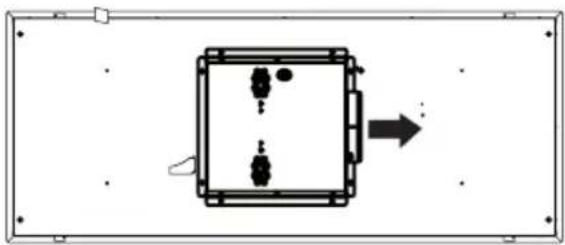
natural_image
Simple diagram of a rectangular device with internal components and an arrow indicating direction (no text or symbols)Arrière
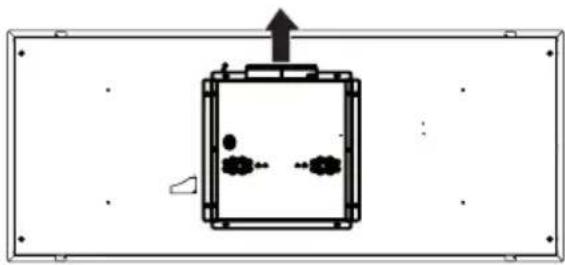
natural_image
Simple line drawing of a rectangular chamber with internal particles and an upward arrow, no text or symbols present.Avant
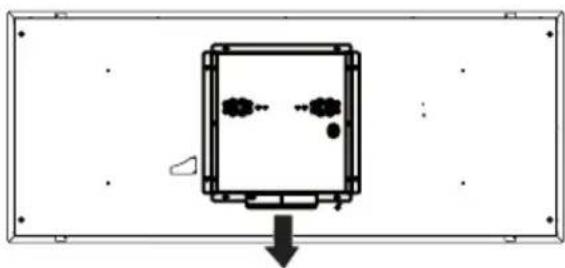
natural_image
Simple diagram of a device with internal components and directional arrow (no text or symbols)natural_image
Technical line drawing of a rectangular electronic component with a central square and two labeled sections (II and II), no text or symbols present.natural_image
Technical line drawing of a rectangular frame with vertical supports and a central horizontal double-headed arrow (no text or symbols)Min. 7 5/16"
Max. 12 13/16"
| Réf. | Mesures | Illustration |
 | 1/8" x 3/8" | [HXSW] |
OPTION A - INSTALLATION DE LA HOTTE
QUAND LE PAREMENT N'A PAS ÉTÉ COMPLÉTÉ
natural_image
Isometric technical diagram of a mechanical assembly with two rectangular components and mounting brackets (no text or symbols)natural_image
Technical line drawing of a mechanical clamp or bracket assembly (no text or symbols)| Réf. Mesures Illustration | ||
 | 1/4" x 9/16" | 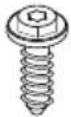 |
OPTION B - INSTALLATION DE LA HOTTE QUAND LE PAREMENT A ÉTÉ COMPLÉTÉ
natural_image
Diagram showing two rectangular frames with upward arrows pointing to a rectangular panel on a gray surface (no text or symbols)natural_image
Technical line drawing of a mechanical assembly with a central box and support frame (no text or symbols)natural_image
Technical illustration showing a mechanical assembly with hands holding a box, no text or symbols presentRACCORDER LES CANALISATIONS
natural_image
Illustration of a hand holding a mirror with an arrow indicating direction (no text or symbols)1615
natural_image
3D illustration of a mechanical assembly with a screw and two circular components on a base plate (no text or symbols)natural_image
Technical diagram of a mechanical device with two circular insets labeled A and B showing internal components (no text or symbols present)National Fire Protection Association
Batterymarch Park
Quincy, Massachusetts 02269
PIEZAS NECESARIAS
natural_image
Diagram of airflow or heat transfer through a mechanical or structural component with no visible text or symbolsnatural_image
Line drawing of hands holding a mechanical device with a curved arrow indicating motion (no text or symbols)natural_image
Diagram of a hand using a tool to extend a rectangular object, with no visible text or symbolsnatural_image
Diagram of a person using a handheld device to stand on a rectangular base, with no visible text or symbols.natural_image
Technical line drawing of a rectangular electronic component with a central square recess and two labeled sections (II and II), no text or symbols present.natural_image
Technical line drawing of a rectangular frame with vertical supports and a central horizontal double-headed arrow (no text or symbols)Mín. 7 5/16"
Máx. 12 13/16"
| Ref. | Tamaño | Imagen |
| 1/8" x 3/8" |  |
natural_image
Isometric technical diagram of a mechanical assembly with two rectangular components and mounting brackets (no text or symbols)natural_image
Technical line drawing of a mechanical clamp or bracket assembly (no text or symbols)natural_image
Diagram showing two rectangular frames with upward arrows pointing to a rectangular panel on a gray surface (no text or symbols)natural_image
Technical line drawing of a mechanical assembly with a central box and support frame (no text or symbols)CONECTE EL CONDUCTO
natural_image
Illustration of two hands projecting a curved object from a rectangular frame, with an arrow indicating direction (no text or symbols)natural_image
Diagram of a mechanical device with a hand inserting a component into a tray (no text or symbols)1615


