Octopus Pack 1 - Electric cooktop Adventys - Free user manual and instructions
Find the device manual for free Octopus Pack 1 Adventys in PDF.


User questions about Octopus Pack 1 Adventys
0 question about this device. Answer the ones you know or ask your own.
Ask a new question about this device
Download the instructions for your Electric cooktop in PDF format for free! Find your manual Octopus Pack 1 - Adventys and take your electronic device back in hand. On this page are published all the documents necessary for the use of your device. Octopus Pack 1 by Adventys.
USER MANUAL Octopus Pack 1 Adventys
natural_image
Line drawing of a device with two top-mounted units and a control panel, no text or symbols present.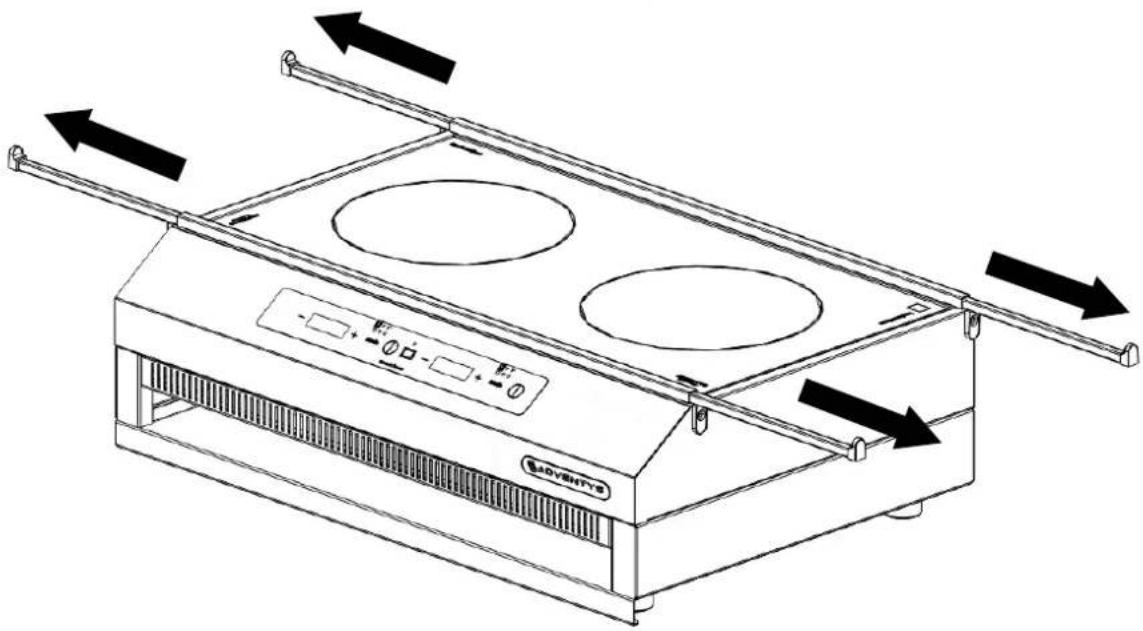
natural_image
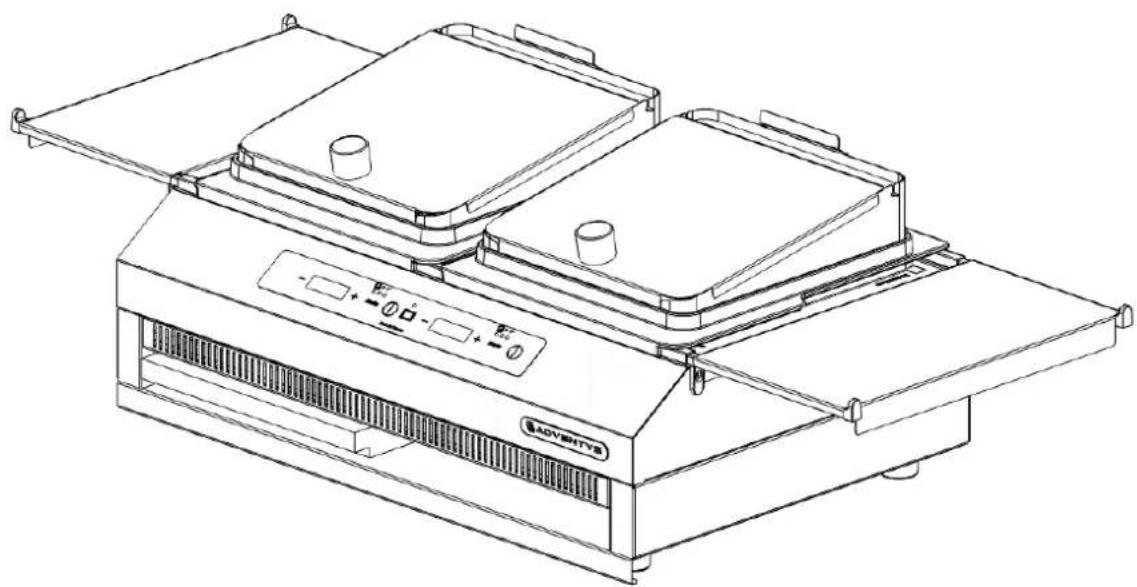
Line drawing of a double boiler with two burners and a control panel, showing airflow direction arrows (no text or symbols)ADVENTYS
natural_image
Exterior view of a modern outdoor food stall with cutlery, featuring a baking tray, kitchen utensils, and a breadboard (no signage or text visible)FRANCAIS
RECOMMANDATIONS RECIPIENTS.... 16
PRESERVER VOTRE APPAREIL.... 17
NETTOYAGE.... 17
AFFICHAGE DE MESSAGES SPECIFIQUES.... 19
SERVICE APRES-VENTE.... 20
GARANTIE.... 20
text_image
- + Mode - + Mode Made in FranceMode Grill (accessoire inclus):
Mode Plancha (accessoire inclus):
natural_image
Line drawing of a server unit with ventilation grilles and control panel (no text or symbols)natural_image
Two black square objects with loop handles, resembling stylized gloves or containers (no text or symbols)
natural_image
Icon of a computer monitor with a bar chart inside, set against a black circular background (no text or symbols)APPLICATION DE LA GARANTIE
text_image
QR code image containing encoded data, no visible human-readable text
ADVENTYS
Made in France
USER MANUAL
L'OCTOPUS 3500
natural_image
Line drawing of a modern kitchen appliance with two top compartments and control panel (no text or symbols)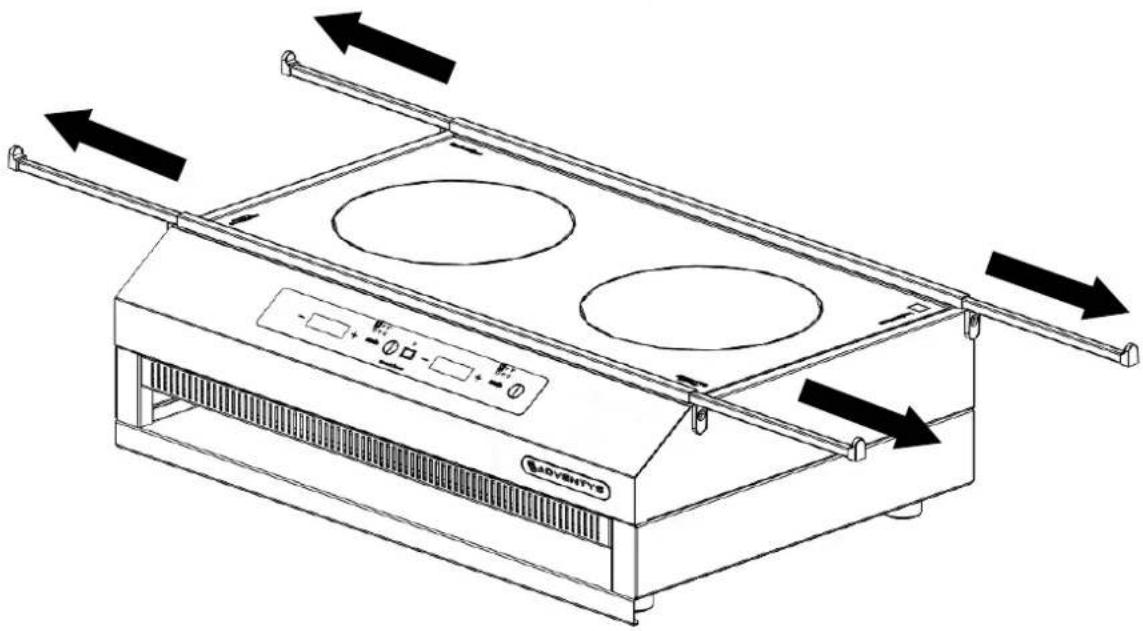
natural_image
Line drawing of a double boiler with two burners and a control panel, showing airflow direction arrows (no text or symbols)ADVENTYS
Thank you for choosing Adventys / Before using your device, please read these instructions carefully. You have purchased quality equipment 100% made in France which guarantees optimal performance. Bon appétit!
natural_image
Exterior view of a modern outdoor food stall with cutlery, featuring a baking tray, kitchen utensils, and a breadboard (no signage or text visible)ENGLISH
SAFETY AND PRECAUTIONS
INSTRUCTIONS TO BE READ CAREFULLY BEFORE USING YOUR APPLIANCE AND KEEP FOR FUTURE USE. THE MANUFACTURER CANNOT BE HELD RESPONSIBLE FOR ANY DAMAGE RELATED TO NON-COMPLIANCE WITH SAFETY AND INSTALLATION INSTRUCTIONS.
1.1 Safety of vulnerable people and children
This device may be used by children aged 8 years and over, and by persons with reduced physical, sensory or mental capacities, or lacking experience and knowledge, if they have been able to benefit from supervision or instructions. requirements regarding the safe use of the device and have understood the risks involved. Children must not play with the device.
Children under 8 should be kept away unless they are constantly supervised.
Cleaning and maintenance operations must not be carried out by children left unattended.
The device and its accessible parts become hot during use. Care should be taken to avoid touching the heating elements.
1.2 General safety
Check the general appearance of the appliance after unpacking. Do not connect the device if it is damaged.
All electrical connections and replacement of the power cable must be carried out by a qualified technician.
The socket outlet must be accessible after installation.
Damage due to incorrect electrical connection is not covered by the warranty.
Make sure that the power cable of an electrical appliance connected near the hob does not come into contact with the cooking zones.
Metal objects such as knives, forks, spoons and lids should not be placed on the surface, as they can get hot.
Do not use a steam or high pressure cleaner to clean your cooktop. This appliance is not intended to be operated by means of an external timer or a separate remote control system.
CAUTION
Cooking unsupervised with oil or fat on a hob can be dangerous and may cause fire. Never attempt to extinguish a fire with water but turn off the appliance, then cover the flame with a lid or fire blanket.
Risk of fire: do not place anything on the cooking surfaces.
If the surface is cracked, disconnect the device to avoid the risk of electric shock. Stop using your device before changing the glass top.
Avoid shocks with the containers:
The ceramic glass surface is very strong, but still is not unbreakable.
Do not lay a hot lid flat on your hob. A "suction cup" effect could damage the ceramic glass top.
Avoid rubbing containers which can over time degrade the decoration on the top of the glass ceramic.
For baking, never use aluminum foil. Never place products wrapped in aluminum, or in aluminum trays on your hob. Aluminum will melt and permanently damage your cooking appliance.
Do not store your cleaning products or flammable products in the cabinet located under your hob.
SAFETY AND PRECAUTIONS
After use, stop the operation of the hob by means of its control device and do not rely on the pan detector.
Your device complies with the European Directives and Regulations to which it is subject. So that there is no interference between your hob and a cardiac pacemaker or another type of implant (eg: insulin pump), the latter must be designed and adjusted in accordance with the regulations governing it. concerned. Check with its manufacturer or your doctor.
Never leave the device running unattended. The cooking process should be monitored. A short cooking process must be monitored without interruption.
Warning: Use only table protectors designed by the manufacturer of the cooking appliance, referenced in the user manual as being suitable, or incorporated into the appliance. The use of improper protection can cause accidents.
Do not leave magnetizable objects (eg credit cards, memory cards) or electronic items on your table as they could be damaged by the magnetic field.

Indicates that the device is emitting a magnetic field. For more information, please refer to the relevant paragraph in this manual.

Indicates that the device is under high voltage and should not be opened.
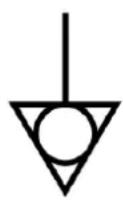
Used to identify the terminals which, when connected, bring different parts of an equipment or system to the same potential, without necessarily being the potential of the earth (ground), e.g. for the local link.

Indicates that care is needed when using the device or control near where the symbol is placed, or to indicate that the current situation requires operator awareness or action. operator in order to avoid undesirable consequences.

Indicates that this equipment should not be used without having read and understood the contents of this manual.
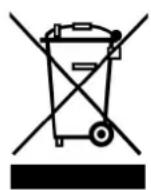
Indicates that the device should not be thrown into the household waste and that it should be taken to a recycling center for electrical equipment.

Indicates that the device is C.E.
SUMMARY
INSTRUCTIONS AND SAFETY INFORMATION...... 33
DECLARATION OF COMPLIANCE AND DISPOSAL OF APPLIANCE...... 34
UNBOXING.... 35
- Package content
- Control panel
HOW TO USE YOUR DEVICE.... 36
- Turning on your device
- Modes
- Setting a zone
- Timer
- Specificities
COOKWARE....41
MAINTAIN YOUR PRODUCT.... 38
CLEANING.... 38
DISPLAY OF SPECIFIC MESSAGES.... 40
AFTER-SALES SERVICE.... 40
GUARANTEE 40-41
| Technical information | |
| Model OCTOPUS 3500 ADV | |
| Reference DPCS 3500 | |
| Power 3500W | |
| Current 230V | |
| Control panel 2 capacitive touches control panel | |
| Product dimensions 600 x 410 x 190 mm | |
| Net weight 12kg without accessories | |
| Gross weight 21kg | |
- Principe de l'induction
When the appliance is switched on, as soon as a power level is selected, the electronic circuits produce induced currents in the bottom of the container which instantly restores the heat produced to the food.
⇒ If a crack appears on the surface of the glass, disconnect the appliance immediately, to avoid the risk of electric shock.
⇒ The device should not be used to store anything.
⇒ Make sure that the power cable of an electrical appliance plugged into a socket located near the appliance is not in contact with the cooking zones
Never use a sheet of aluminum foil or place products wrapped with aluminum directly on the appliance (tray).
⇒ If the power cable is damaged, it must be replaced to avoid any danger.
⇒ Never leave the appliance running unsupervise.
⇒ Pay attention to objects carried by users of the appliance such as rings, watches or similar objects which can heat up if they are placed very close to the hob.
⇒ Use only cookware of the type and size recommended.
⇒ Take care that the siding and surrounding areas are free of metallic surfaces.
⇒ Keep a distance of at least 10 cm from the wall
⇒ Protect the appliance from frost and humidity
⇒ The appliance must not be used with an external timer or a separate remote control system.
Do not clean the device with plenty of water. Use a little rubbing alcohol.
DECLARATION OF COMPLIANCE AND DISPOSAL OF APPLIANCE
This product complies with current EC directives. We certify this point in the CE declaration of conformity. If necessary, we can send you the relevant declaration of conformity.

The packaging materials for this appliance are recyclable. Participate in their recycling and thus contribute to the protection of the environment by depositing it in the municipal containers provided for this purpose.
At the end of its useful life, the discarded device must be destroyed in accordance with the applicable national waste disposal and recycling regulations. It is advisable to contact a company specializing in waste disposal.
UNBOXING
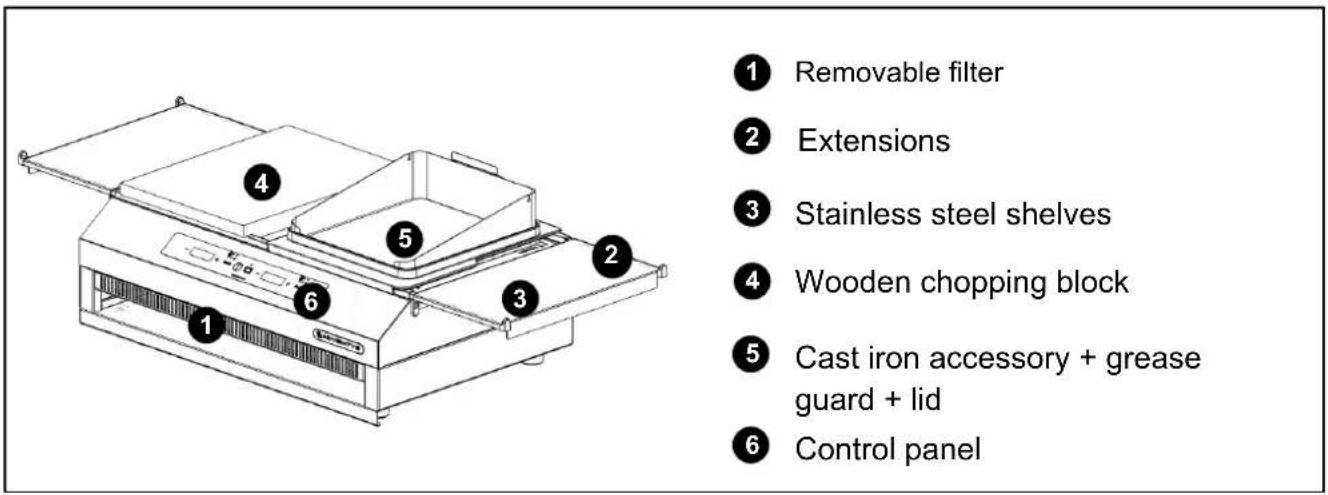
- Content of your box
text_image
Removable filter Extensions Stainless steel shelves Wooden chopping block Cast iron accessory + grease guard + lid Control panel- Control panel

text_image
- + Mode - + Mode Made in France| Control panel | |
 | Switch on/off your device |
 | Turn on timer |
 | Turn on double plancha mode. |
 | Choose between power level, temperature or simple grill/ plancha accessories mode |
  | Set power level/temperature or timer |
| Displays | |
| 1-30 Power level | |
| H Residual heat* | |
| 30° - 250° | Temperature |
| ti Timer | |
| tE / Po Start-up temperature/power level | |
| Grill Grill Mode | |
| PLAn Plancha Mode | |
Some surfaces of your device are covered with a protective film, remove these films before first use.
Before using your device, clean the surfaces with a damp cloth. We also recommend that you run all the accessories with clean water to remove any dust residue.
HOW TO USE YOUR DEVICE
Connect your appliance to a standard 230V earthed socket.
- Turn on your device
Press the key ⏻ to turn on your device, you will hear a signal, this mean that your device is On. You will then automatically enter the « ACCESSORIES » mode which allows you to use your GRILL and PLANCHA cast iron accessories.

Cast iron is a heat conductive material! Do not handle a heated plate with your bare hands, use potholder.
CAUTION: For safety reasons, if you have chosen to use Grill or Plancha Mode on one of your zones, you can no longer switch to the power / temperature setting. However, if you want to remove your cast iron accessory and use a saucepan, you can turn the unit off, turn it back on and enter Power / Temperature MODE.
- ACCESSORIES Mode
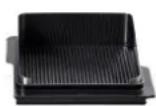
Grill Mode (accessory included):
This accessory is recommended for cooking meat
Your product is equipped with a program specially designed for the use of your cast iron grill accessory. This program has been developed to heat the grill to the ideal temperature. To use the program, all you need to do is turn on your product, press 📄, the word Grill is displayed.
This value continues to flash as long as you do not put the plate on the device.
The light corresponding to Grill Mode lights up. Using the +/- selection keys you can choose between 3 presets levels :
$$ \begin{array}{rlr}&\cdots \rightarrow \text{Low}&\&\cdots \rightarrow \text{Medium}&\&\cdots \rightarrow \text{High}\end{array} $$
The led corresponding to grill mode lights up and flashes until the correct temperature has been reached. Once the LED is fixed, you can adjust the temperature using the + / - selection keys.
The +: Your accessory has a grease trap that prevents grease splatter during cooking
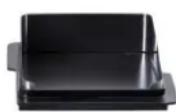
Plancha Mode (accessory included):
This accessory is recommended for cooking fish, seafood and vegetables
Your product is equipped with a program specially designed for the use of your cast iron plancha accessory. This program has been developed to heat the plancha to the ideal temperature. To use the program, you just need to turn on your device, you will go directly into Plancha Mode press, the PLAn value will be displayed..
This value continues to flash until you place the plate on the device.
The LED corresponding to the Plancha mode lights up. Using the +/- selection keys you can choose between 3 preset levels:

text_image
- - → Low -- -- --> Medium -- -- --> HighThe values flash until the required temperature is reached. Once the LED is fixed, you can adjust the temperature using the +/- selection keys.
The +: Your accessory has a grease trap that prevents grease splatter during cooking
Double Plancha Mode (accessory not included):
This mode works the same way than the single plancha mode, unlike that it allows to control both zones at the same time in order to obtain the most even heat distribution possible. To use this program, you'll just have to turn on one of the zone and press the Double Plancha key in the middle of the control panel. A rectangle appears on left display and the right one display PL.
In this mode, to turn on your device, you'll have to turn off the right zone by pressing ⏻
You can also use your device without any of those accessories by simply using a compatible pan/pot.
If your device is turned off
If you have been using your zone with Grill/Plancha MODE
- You cannot immediately switch your zone to Power or Temperature MODE. Turn off your device, remove the cast iron accessory and then turn on the area again.
WARNING: As a safety measure, once you have chosen to use Grill or Plancha Mode on one of your zones, you can no longer switch to power/temperature settings. However, if you wish to remove your cast iron attachment and use a pan, you can turn the unit off, turn it back on and enter POWER/TEMPERATURE MODE.
natural_image
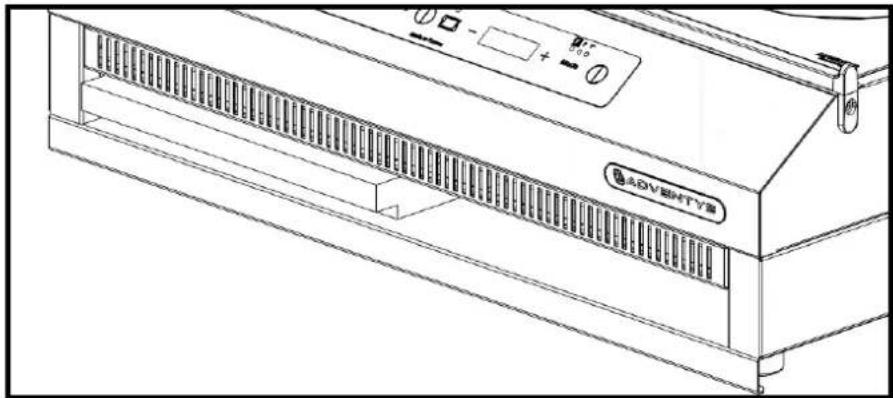
Line drawing of a server rack unit with ventilation grilles and control panel (no text or symbols)On the front of your product, below the removable filter, is a storage space for your accessories. You can store your wooden chopping block, your plancha or cast iron grill.

PRECAUTIONS FOR USE

Cast iron is a heat-conducting material, your plancha and your grill remain hot for a long time even after the appliance has been switched off.
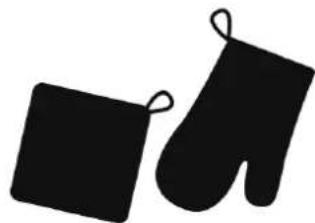
Use pot holders to handle your accessories and make sure to let them cool before cleaning.
natural_image
Two black square objects with loop handles, resembling food items (no text or symbols)
Do not place your accessory on a non-heat resistant surface!

natural_image
Icon of a computer monitor with a bar chart inside, set against a black circular background (no text or symbols)Always use the Mode button according to your accessory (grill / plancha).
NEVER select a temperature or power setting when using your cast iron accessories, they risk breaking.
- Setting a zone in power level
Once your product is on, simply press the Mode button until the display shows Po, the P indicator light comes on, then use the + / - selection buttons to adjust the power level. The values flash until the heating zone reaches the required power.
Your device can deliver a maximum total power of 3000W. Each zone can deliver this maximum power when the second fireplace is off. If the 2 cooking zones are on, the sum of the powers of the 2 cooking zones cannot exceed 3000W. If you have lit a zone with a certain power and you want to light the second on a power that would exceed the total power of 3000W, in this case the power of the first zone will go down automatically and the maximum power will always be the same.
Examples :
- Left zone off ; maximum power on right zone = 3000W
- Right zone = 1500W ; maximum power on left zone = 1500W
- Right zone = 2300W ; maximum power on left zone = 700W
- Left zone = 2500W ; requested power on right zone = 2000W ; left zone will go down to 1000W
Each power level corresponds to a step of 100W.
| Power level Power in watts | |
| 1 100 | |
| 2 200 | |
| 3 300 | |
| 4 400 | |
| 5 500 | |
| 6 600 | |
| 7 700 | |
| 8 800 | |
| 9 900 | |
| 10 1000 | |
| 11 1100 | |
| 12 1200 | |
| 13 1300 | |
| 14 1400 | |
| 15 1500 | |
| Power level Power in watts | |
| 16 1600 | |
| 17 1700 | |
| 18 1800 | |
| 19 1900 | |
| 20 2000 | |
| 21 2100 | |
| 22 2200 | |
| 23 2300 | |
| 24 2400 | |
| 25 2500 | |
| 26 2600 | |
| 27 2700 | |
| 28 2800 | |
| 29 2900 | |
| 30 3000 | |
Temperature setting
With your device, you can manage your cooking in temperature mode, for even more precision.
To do this, you'll have to press Mode key display indicates tE, the led light T^ comes on, use then the selection key +/- to adjust temperature. The values flash until the heating zone reaches the required temperature.
You can select a temperature between 30^ to 250^ C, the setting is made in steps of 5^ C ( 10^ C by pressing for more than 3 seconds).
- Switch off your device
To turn off the device, press the button ① again until you hear an audible signal. Your appliance is switched off, only the residual heat indicator H remains on until the hotplates have cooled down sufficiently.
Only use cookware suitable for induction cooking. Your induction cooker is able to recognize most cookware.
- Container test
- Type of containers
Enamelled steel containers with or without non-stick coating.
Cast iron with or without enamelled bottom. An enamelled bottom prevents scratching the glass top of your device.
Stainless steel containers suitable for induction.
Most of the ferromagnetic stainless steel containers are suitable if they pass the container test (saucepan, pot, pan, fryer).
- WARNING
Glass, ceramic or earthenware, aluminum (without a special bottom), copper and certain non-magnetic stainless steel containers are incompatible with induction cooking.
The selected power level indicator will keep flashing to alert you.
- Recommended dimensions
On each of the cooking zones, you can use pots with a base diameter of 16cm to 28cm. If you use a larger container, it may not be able to fit between the two rails.
(!) A poor quality pan will inevitably affect the efficiency of your induction cooker. A selection of suitable pans is available on our website www.adventys.com
Avoid shocks with containers. The glass top is very durable, but is not shatterproof.
Avoid rubbing the containers on the top of the appliance. In the long run, they can degrade the screen printing of the glass ceramic.
Avoid containers with rough or dented bottoms. They can hold and transport materials that will cause stains or scratches on the glass ceramic.
Center your container on the cooking zone.
Do not leave an empty container on the cooking zone.
Do not reheat a closed can, it may burst.
Do not preheat food on the set maximum power level, when using a container with a non-stick interior coating (Teflon type) without addition or with very little fat.
The maximum power level is reserved for boiling and frying.
All these faults, which do not result in non-operation or inability for use, are not covered by the warranty.

Store your device away from the elements that could damage the electronic system. Do not leave your device unprotected in the rain, snow without adequate protection.
CLEANING

Before any cleaning operation, allow the appliance to cool down and disconnect the power supply. Never immerse the body of the device in water or any other liquid.
- Filter cleaning
Take care to clean your filter after each use. Remove the filter from the front of the product and clean the surface with soapy water or in the dishwasher. The filter must be completely dry before repositioning.
- Cleaning the vitroceramic glass
If you have a lime or water stain, you can use a vitroceramic cooktop cleaner, white vinegar or glass cleaner.
In case of food residue, use a glass scraper or sanitary sponge.
Do not use any abrasive sponges or powder.
• Stainless steel surface cleaning
Stainless steel is corrosion resistant. However, it is necessary to maintain your device regularly. Clean the stainless steel surfaces with clear water using a non-abrasive sponge and dry with a soft cloth.

Cast iron is a heat conductive material! Do not handle a hot plate with bare hands.
- Cleaning your cast iron accessories
Cleaning your cast iron grill / plancha accessories is essential to ensure their efficiency and durability. Cleaning the cast iron preserves the quality of the food as well as the performance of your appliance.
For cold cleaning, check that the attachment is completely cool for safe working. Remove the cast iron accessory from the unit for easier cleaning, use a standard cleaner and a non-abrasive sponge.
For hot cleaning, clean during or directly after cooking. Cleaning is easier because the food does not yet adhere completely to the cast iron.
2 methods:
- Pour water from the baking sheet between two uses, the food will then be directly peeled off, you just need to remove it with a spatula.
- If you prefer to clean your accessory at the end of use, use alcohol vinegar which will loosen overcooked foods instantly and effortlessly. Then use a spatula to remove the waste.

Cast iron is sensitive to thermal shock. Never pour cold water on your cast iron plate, it may crack.
To prevent rust from appearing: pour oil on your cast iron plate to cover the surface with a thin protective layer. Store it in a dry place in its original packaging or covered with cling film. Regular cleaning will extend the life of your accessory.
In case of rust: Pour a thin layer of oil on the surface and place your hob on your induction appliance. Turn on the heating zone in grill / plancha mode then use a spatula to remove excess rust.

Prefer non-abrasive utensils (spatula) to avoid damaging the cast iron.
In case of display on the keypad type ER.XX (with XX 01 to 19), disconnect and reconnect the device. If the problem persists, contact our after-sales service for assistance:
AFTER-SALES SERVICE
Our after-sales service is available if your product needs repair. We will do our best to find the most suitable solution for your situation.
To contact our after-sales service, you must either:
Fill out our after-sales service request form on www.adventys.com/particulier/sav
- Contact us on 03 80 58 58 21 from Monday to Friday from 8 a.m. to 5 p.m.
- Or by email at bonjour@adventys.com
Have the serial number located under your product (ADVXXXX-X / XX....).
In the event of a repair under the product warranty, Adventys undertakes to send you an identical product as soon as possible.
ADVENTYS
ROUTE DE PAGNY 21250 SEURRE
GUARANTEE
APPLICATION OF THE GUARANTEE
Your device is guaranteed for 2 years against any manufacturing defect and malfunction from the date of purchase.
During the warranty period, the ADVENTYS after-sales service fully covers parts and labor costs for the repair of the device.
To benefit from this warranty, you must present the purchase invoice and return your product to us in its original or similar packaging, shipping costs to be borne by Adventys.
- In the event that the device can be repaired by Adventys, your product will be returned to you functional as soon as possible.
- In the event that the device is deemed non-repairable and the reason for the damage is covered by the warranty, Adventys undertakes to send you a new device as soon as possible and upon confirmation of the non-repairability of the device. product.
(!) Before any return, the warranty must be subject to prior acceptance by Adventys. The device must be returned cleaned and well packaged, accompanied by the after-sales service number and the name located on the purchase invoice. Otherwise, the device will be left at the disposal of its sender.
RESERVATIONS OF THE GUARANTEE
The warranty provided by Adventys does not cover incidents due to faulty maintenance or misuse: impact, fall, abrasive products / equipment. It also does not cover misuse of the product that does not comply with the recommendations of the user guide.
The warranty does not apply in the event that a third party not approved by Adventys performs repairs or interventions.
The warranty also excludes:
- Wear parts
• Vitroceramic glass and control panels - Cast iron accessories
- The wooden block
• Damage related to the use of cleaning products not recommended in this manual
• Damage related to packaging or transport problems in the event of a return
• Structural, mechanical and electrical modifications made to the product

ADVENTYS
ADVENTYS
Route de Pagny
21250 SEURRE - France
Tel: 03.80.58.58.21 - bonjour@adventys.com
www.adventys.com
Join us