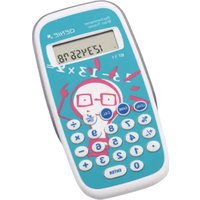
BT 11 - Calculator Genie - Free user manual and instructions
Find the device manual for free BT 11 Genie in PDF.


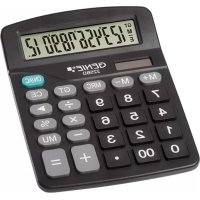
| Product Type | Educational calculator with games |
| Approximate dimensions | 14.5 x 7.5 x 1.2 cm |
| Approximate weight | 90 g |
| Power supply | 1 LR44 button cell (included) |
| Display | 8-digit LCD screen |
| Main functions | Basic arithmetic operations (+, -, ×, ÷) and educational games G1 to G4 |
| Difficulty levels | 5 levels (G3: 3 levels) |
| Auto power-off | After approximately 6 minutes of inactivity |
| Sound | Enable/disable via dedicated key |
| Warranty | Return to store with original packaging and receipt |
| Care and cleaning | Wipe with a dry cloth. Do not use water or liquid products. |
| Safety | Keep out of reach of children. Do not expose to water or impact. |
| Spare parts | Not available individually. Only the battery is replaceable. |
| Repairability | Not repairable by the user (except battery replacement). |
Frequently Asked Questions - BT 11 Genie
User questions about BT 11 Genie
0 question about this device. Answer the ones you know or ask your own.
Ask a new question about this device
Download the instructions for your Calculator in PDF format for free! Find your manual BT 11 - Genie and take your electronic device back in hand. On this page are published all the documents necessary for the use of your device. BT 11 by Genie.
USER MANUAL BT 11 Genie
flowchart
graph LR
    A["LEVEL"] --> B["LEVEL"]
    B --> C["LEVEL"]
    C --> D["LEVEL"]
    D --> E["LEVEL"]
flowchart
graph LR
    A["LEVEL"] --> B["LEVEL"]
    B --> C["LEVEL"]
    C --> D["LEVEL"]
    D --> E["LEVEL"]
At a glance (Features)
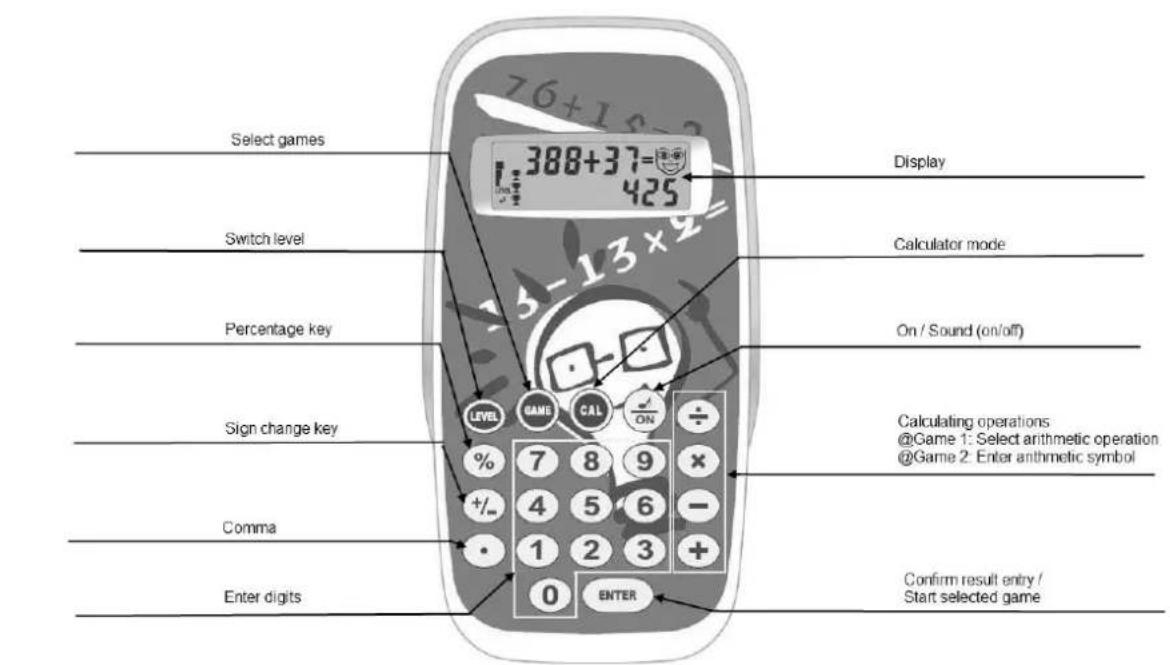
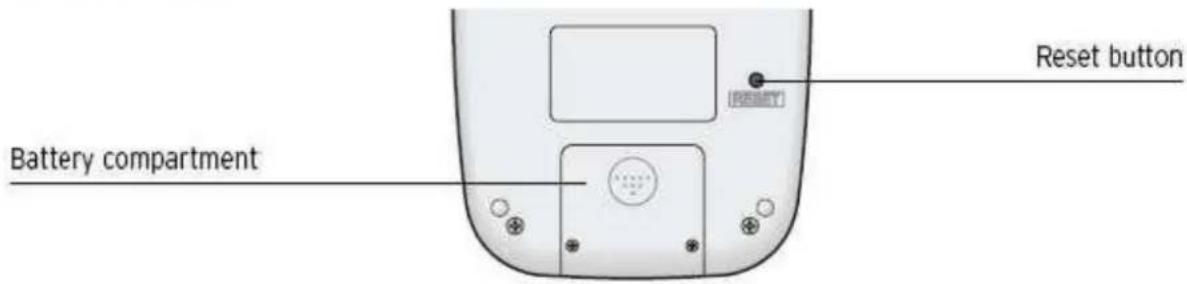
Rear of device
Games
G1 Practising basic arithmetic operations (+ - x :)
G2 Finding correct arithmetic symbols
G3 Continuing logical sequence
G4 Memorising series of digits
SAFETY
Please read the following safety instructions. The manufacturer assumes no liability for damage arising from failure to observe these safety instructions. Keep this manual together with the calculator for later reference and pass it on with the product.
Calculator
- This product is not a toy. Children could injure each other or themselves when playing with the calculator; they could break off and swallow small parts such as keys or damage the display.
- Keep the calculator away from water. Moisture or liquids can damage the calculator.
● Avoid dropping the product orexposing it to shocks. Pressure can damage the calculator irreparably, forexample, by carrying it around in a tight trouser pocket.
● Never subject the calculator to direct sunlight and protect it from dust.
● The calculator should only be opened for disposal purposes or in order to replace the battery.
Safety information regarding handlingWarning! Risk of suffocation through batteries.
- Keep batteries out of reach of children.
- Seek medical attention immediately if one is swallowed.
Caution! There are different risks involved when dealing with batteries.
- Never attempt to recharge standard batteries, never short circuit batteries and/or open batteries. Doing so leads to a potential risk of overheating, fire or explosion.
- Improper handling of batteries/rechargeable batteries can endanger your health and the environment. Batteries/rechargeable batteries may contain toxic and environmentally harmful heavy metals (Cd= cadmium, Hg= mercury, Pb = lead). Therefore, hand in used batteries at a municipal collection point. Therefore, separate disposal and recycling of spent batteries is essential for the environment and health.
- Ensure the connection terminals are not short-circuited.
● Never throw batteries into a fire or water.
● Never expose batteries to any mechanical loads.
● Leaking batteries could cause damage to the device. If a battery should start to leak, remove it from the device immediately to prevent any further damage. Take the most care when handling damaged or leaking batteries and always wear protective gloves. - Avoid any contact with the skin, eyes and mucous membranes. Rinse any parts of the body which have come into contact with battery acid with plenty of clean water and contact a doctor immediately. Avoid extreme conditions and temperatures which could affect the batteries, e.g. byplacing them on radiators or exposing them to direct sunlight.
● Only use batteries of the type specified.
● Never use batteries of different types or new and old batteries together. - Ensure batteries are inserted with the correct polarity.
- If the device will not be used for a longer period, switch the device off and remove the batteries.
- Remove empty batteries from the device and dispose of them according to the applicable directives.
● The batteries must be removed from the device before its disposal. - You are legally obliged to dispose of batteries at your dealer or at the collection points provided by the responsible waste disposal authority.
INTENDED USE
- This calculator has been produced for calculating only. It is not a toy and was not designed as such. It is intended for private use only. The manufacturer assumes noliability for damage arising from improper use.
Symbols in display

Blank face = Wait for result

Smiling face = Correct answer / evaluation: Mainly correct answers (at least 3 cups)

Sad face = Wrong answer / evaluation: Mainly wrong answers (no more than 2 cups)
flowchart
graph LR
    A["LEVEL"] --> B["LEVEL"]
    B --> C["LEVEL"]
    C --> D["LEVEL"]
    D --> E["LEVEL"]
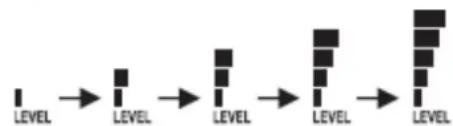
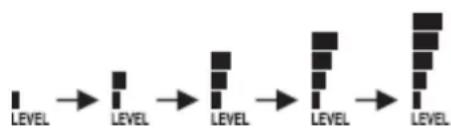
Difficulty levels 1 to 5 (1 bar = easiest level / 5 bars = toughest level)

Cup = 1 correct answer (maximum of 5 cups possible)
Sound switched on

The evaluation of a game is displayed in points or as a percentage (maximum 100 points or 0%)
Basic operation
Switching on the arithmetic trainer and starting a game
-
Press the ON key, to switch on the computer trainer.
-
Press the ON key several times in succession to select a game (G1, G2, G3 or G4) and then start it by pressing the ENTER key.
OR: Press one of the game keys G1, G2, G3 or G4, to start a game straight away.
Automatic switch off
The arithmetic trainer does not have an off switch. If no keys are pressed for approx. 6 minutes the arithmetic trainer switches off automatically.
Switching sound on/off
If the note symbol 📂 can be seen in the display, then the key tone is switched on and a melody can be heard while the result is being evaluated.
To switch the sound off, press the key. The note symbol in the display is hidden from view. To switch the sound back on again, press the key again. The note symbol appears again in the display.
General rules
Each round of games consists of 5 exercises. You have two attempts at solving each exercise.
The time for entering a solution is limited. The specified time depends on the game involved and the chosen difficulty level.
An evaluation is made at the end of each round.
You can alter the difficulty level (LEVEL) in 5 levels (for the G3 game in 3 levels).
Selecting and starting a game
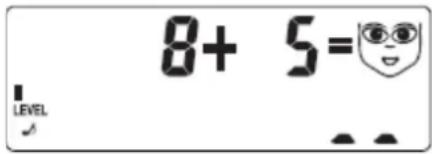
Press the desired game key G1, G2, G3 or G4. The game starts straight away.
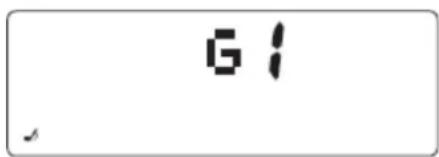
OR: Keep pressing the ON key until the desired game (G1, G2, G3 or G4) is shown on the display. Press ENTER to start the game.
Changing difficulty level
flowchart
graph LR
    A["LEVEL"] --> B["LEVEL"]
    B --> C["LEVEL"]
    C --> D["LEVEL"]
    D --> E["LEVEL"]
When you start a game, it starts off at the easiest level (LEVEL 1) first. You can use the LEVEL key to change the difficulty level in 5 levels (for the G3 game in 3 levels).
Each press of the key raises the difficulty level by one level. After reaching the highest level you then switch back to the lowest one.
Pressing the LEVEL key starts a new round automatically.
Tip: Your child should play in a difficulty level suitable to his/her capabilities. The success rate shouldn't be too low. Once your child starts to solve all the exercises with ease it should move on to the next level.
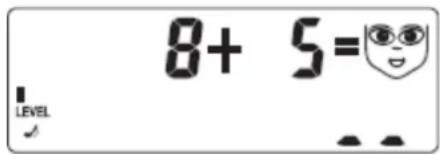
The first exercise is presented as soon as the game starts. A
blank face can be seen in the display. The bars at the bottom right indicate the number of digits for the correct solution.
Enter the result using the numerical keys (or for the G2 game using the arithmetic symbol keys).
Press the ENTER key if you wish to check the result.
Before pressing the ENTER key you can overwrite your result using the numerical keys (arithmetic symbol keys) and thus enter a new result.
Correct result
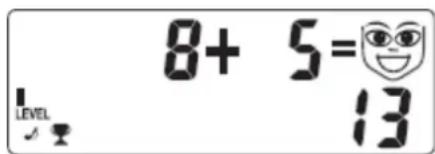
If the result is correct, a smiling face appears in the display and a success melody is sounded (if the sound is switched on).
A cup appears in the left of the display. The cups are added up during a round.
Correct result
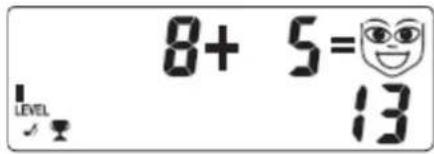
If the result is correct, a smiling face appears in the display and a success melody is sounded (if the sound is switched on).
A cup appears in the left of the display. The cups are added up during a round.
Wrong result
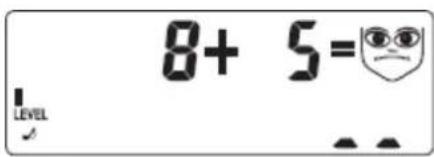
If the result is wrong, a sad face appears in the display and a sad melody is sounded (if the sound is switched on). The wrong result is then hidden from view.
If, after a wrong result, the blank face
appears again you can enter another solution.
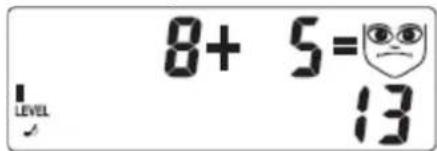
If you have entered two wrong results for an exercise, the
correct result is then displayed and the next exercise presented (or the round is evaluated). If you fail to enter a result within the allotted time span, a wrong result is assumed. Don't forget to press the ENTER key! Otherwise the result will be classified as not entered and therefore wrong!
Evaluation of round
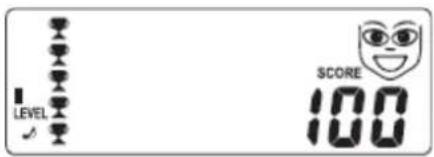
Once you have finished 5 exercises the results of the round are evaluated.
The number of cups flashing on and off indicates how many exercises were correctly solved.
SCORE indicates the percentage of exercises correctly solved.
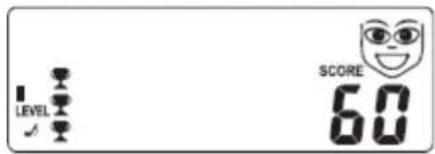
If the majority of exercises have been solved correctly, (at least 3) a smiling face appears.
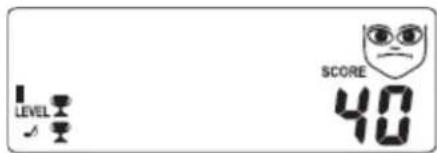
If 3 or more results are wrong, a sad face appears.
New round
A new round is automatically started after each evaluation.
If you alter the difficulty level, change the arithmetic operation (G1 game only) or change the game a new round is automatically started. Any cups that have been won are then lost.
The individual games
G1 game: Basic arithmetic operation training
In this game you can practise working out the basic arithmetic operations (+ - x :) in your head. One type of arithmetic operation each is practised, for example adding exercises only.

Example:
8 + 5 = 1 3
The two bars in the lower row indicate that the resulting number contains two digits.
Press one of the keys to select the desired arithmetic operation. This automatically starts a new round.
Press the LEVEL key to raise the difficulty by 1 level. This automatically starts a new round. The higher the difficulty level the higher the numbers used for the arithmetic operation.
G2 game: Finding the correct arithmetic symbol
In the exercises in this game, the result is already known, what we are looking for is the arithmetic symbol. Insert the correct arithmetic symbol to solve the exercise.
In order to solve this exercise you will really need a good understanding of basic arithmetic operations. It requires flexibility to switch between the various basic arithmetic operations and the ability to make rough calculations.
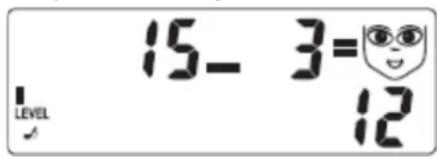
Example:
1 5 - 3 = 1 2
Only the right arithmetic symbol - gives you the correct solution.
Press the LEVEL button to raise the difficulty by 1 level. This automatically starts a new round. The higher the difficulty level the higher the numbers used for the arithmetic operation.
G3 game: Continuing the logical sequence
In the G3 game the arithmetic trainer displays a logical sequence of 3 numbers. Now find the fourth number to logically continue the sequence. Type in the fourth number.
Find out which arithmetic operation takes you from the first to the second number and then from the second to the third number. The same arithmetic operation then takes you from the third number to the final result.
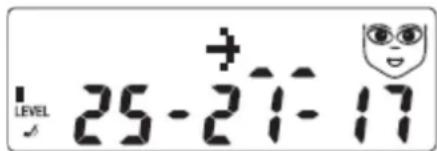
Example:
2 5 - 4 = 2 1 2 1 - 4 = 1 7 1 7 - 4 = 1 3
The result is 13.
In this game there are only 3 difficulty levels:
LEVEL 1: The arithmetic steps between the numbers are either addition steps(e. g. always + 4) or subtraction steps (e. g. always -2).
LEVEL 2: The arithmetic steps can be multiplication ones (e. g. always x 3) or division steps (e. g. always: 2).
LEVEL 3: All arithmetic operations (+, -, x or :) are possible.
G4 game: Memorising series of digits
The idea behind this game is to memorise a series of digits as displayed by the arithmetic trainer for a few seconds.
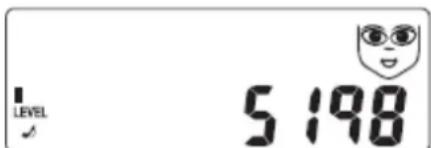
- Memorise the series of digits 5 1 9 8 as exactly as you can.
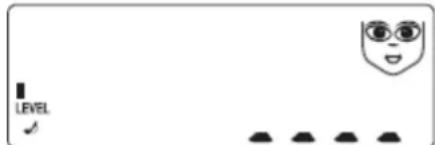
- Enter the series of digits in the correct sequence: 5 1 9 8.
- Press the ENTER button.
If your result was wrong, the same series of digits is shown again.
If you wish to enter another series of digits before you press the ENTER key, enter the entire series of digits again. The previous series of digits is overwritten, one number after the next.
Press the LEVEL key to raise the difficulty by 1 level. The higher the difficulty levels the longer the series of digits.
Warranty
Dear customer,
We are delighted that you have chosen this equipment. In the case of a defect, please return the device together with the receipt and original packing material to the point of sale.
Disposal

Find out about the possibilities of taking back old appliances and used batteries freeof charge from your dealer.

The adjacent symbol indicates laws dictatethat electrical and electronic apparatus nolonger required must be disposed ofseparate from domestic waste. Dispose ofyour device at a collection point provided by your local public waste authority.Packaging materials must be disposed ofaccording to local regulations.

Defective or empty batteries must berecycled in accordance with Directive2006/66/EC and its amendments. Return batteries and the device via the collection points provided.

Packaging materials must be disposed of according to local regulations.

Observe the identification on the packagingmaterials during the waste sorting process;they are identified by abbreviations (b) andnumbers (a) which have the followingsignificance: 1–7: plastic/20–22: paper and cardboard/80–98: composite materials.

The device and packaging materials can be recycled; sort them for disposal to simplify waste management. The Triman logo is only valid for France and Spain.
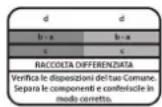
The device and the packaging material can be recycled, so sort them prior to disposal for better waste management. Contact your local authorities for information on the various options available to ensure correct disposal. Observe the following identifications of the packaging materials: (a) numbers, (b) abbreviations and (c) materials which have the following significance: 1–7: plastics / 20–22: paper and cardboard /80–98: composite materials and (d) typeof packaging. The logo is only applicable to Italy.
Declaration of Conformity

The CE Mark on the device confirms conformity.
The Declaration of Conformity can be read online at www.go-europe.com.
Manufacturer
GO Europe GmbH
Zum Kraftwerk 1
D-45527 Hattingen
Germany
GUIDE D'UTILISATION
flowchart
graph LR
    A["LEVEL"] --> B["LEVEL"]
    B --> C["LEVEL"]
    C --> D["LEVEL"]
    D --> E["LEVEL"]
flowchart
graph LR
    A["LEVEL"] --> B["LEVEL"]
    B --> C["LEVEL"]
    C --> D["LEVEL"]
    D --> E["LEVEL"]
flowchart
graph LR
    A["LEVEL"] --> B["LEVEL"]
    B --> C["LEVEL"]
    C --> D["LEVEL"]
    D --> E["LEVEL"]
Defective or empty batteries must berecycled in accordance with Directive2006/66/EC and its amendments. Returnbatteries and the device via the collectionpoints provided.

flowchart
graph LR
    A["LEVEL"] --> B["LEVEL"]
    B --> C["LEVEL"]
    C --> D["LEVEL"]
    D --> E["LEVEL"]
flowchart
graph LR
    A["LEVEL"] --> B["LEVEL"]
    B --> C["LEVEL"]
    C --> D["LEVEL"]
    D --> E["LEVEL"]
- Games
- SAFETY
- Calculator
- Caution! There are different risks involved when dealing with batteries.
- INTENDED USE
- Symbols in display
- Basic operation
- Automatic switch off
- Switching sound on/off
- General rules
- Selecting and starting a game
- Changing difficulty level
- Correct result
- Wrong result
- Evaluation of round
- New round
- The individual games
- G1 game: Basic arithmetic operation training
- G2 game: Finding the correct arithmetic symbol
- G3 game: Continuing the logical sequence
- G4 game: Memorising series of digits
- Warranty
- Disposal
- Declaration of Conformity
- Manufacturer
- GUIDE D'UTILISATION
Brand : Genie
Model : BT 11
Category : Calculator