DD300 - Calculator Genie - Free user manual and instructions
Find the device manual for free DD300 Genie in PDF.



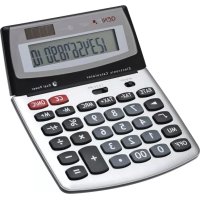
| Product type | Desktop calculator |
| Brand | Genie |
| Model | DD300 |
| Power supply | Solar and button cell L1131 |
| Display | LCD screen |
| Arithmetic functions | Addition, subtraction, multiplication, division |
| Percentage function | Percentage calculation, markup, discount |
| Memory function | M+, M-, MRC (recall/clear) |
| Tax function | Rate recording, tax-inclusive/exclusive calculation |
| Auto power-off | Yes, after a few minutes of inactivity |
| Error correction | ON/C key to clear the entire calculation |
| Reset button | Present on the back of the device |
| Water protection | Do not expose to water or humidity |
| Intended use | Personal calculation operations |
| Maintenance | Clean with a dry cloth |
| Battery replacement | Yes, button cell L1131 |
| Repairability | Opening possible only for battery replacement |
| Child safety | Do not leave within reach of children (choking hazard) |
| WEEE directive | Compliant with directive 2012/19/EU |
| Manufacturer | GENIE GmbH & Co. KG, Berta-Cramer-Ring 22, 65205 Wiesbaden, Germany |
Frequently Asked Questions - DD300 Genie
User questions about DD300 Genie
0 question about this device. Answer the ones you know or ask your own.
Ask a new question about this device
Download the instructions for your Calculator in PDF format for free! Find your manual DD300 - Genie and take your electronic device back in hand. On this page are published all the documents necessary for the use of your device. DD300 by Genie.
USER MANUAL DD300 Genie
Operating Instructions
CONTENTS
Desktop calculator including L1131 battery.
Before using for the first time
- Please check that everything is included
- Check if there are any signs of damage
- If the article is damaged or incomplete, please return it to the place of purchase.
NORMAL OPERATIONS
This article has been produced for calculating. It is not a toy and was not designed as such. It is intended for private use. The manufacturer assumes no liability for damage arising from improper use.
SAFETY PRECAUTIONS / CARE
Please note the following safety instructions.
The manufacturer assumes no liability for damage arising from failure to observe these safety instructions.
Risk of injury/suffocation
- This article is not a toy. Children could injure each other when playing with the calculator, they could break off and swallow small parts such as keys, or damage the display or solar cell.
- Keep the calculator away from water. Moisture can irreparably damage the calculator. Please do not subject to any other type of liquid.
- Avoid dropping the calculator or exposing it to knocks. Pressure, for example carrying around in a tight trouser pocket, can damage the calculator irreparably
- Never subject the calculator to direct sunlight.
- Please protect it from dust.
- The calculator should only be operated with moderate pressure.
- Please do not attempt to take it apart. The calculator should only be opened for disposal purposes in order to remove the battery, which should be disposed of separately.
- Clean the calculator only with a dry cloth.
SWITCHING CALCULATOR ON/OFF
Press the ON/C key to switch the calculator on. A zero will be displayed.
Switching off: Calculator switches off automatically after a few minutes. The device runs primarily from the solar cell provided that light conditions (daylight or artificial light) are sufficient. When light conditions are unfavourable, the calculator runs from the battery.
FUNCTION DESCRIPTION
ON/C Switches calculator on. Clears complete calculation.
M+; M- Memory keys
MRC Memory recall/ clear
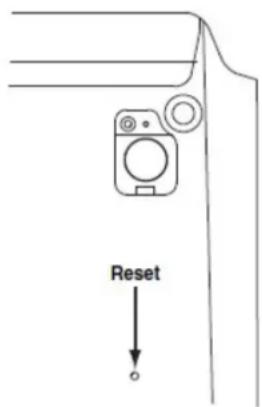
In case of malfunction, please press reset button on the back of the calculator.
EXAMPLE CALCULATIONS
| PROBLEM | INPUT | RESULT |
| 100 + 50 - 10 = | 100 + 50 - 10 = | 140 |
| 200 × (30 - 50) = | 30 - 50 × 200 = | - 4000 |
| (20 × 4 - 100) ÷ 4,5 + 70 = | 20 × 4 - 100 ÷ 4.5 + 70 = | 65,555556 |
| 12345600 × 789100 = | 12345600 × 789100 = | E 974,191296000 (E in the display signifies an error, the number in the display is too large) |
| Entry correction 1234 × 2 = 2468 | 12345600 × 789100 = | 2468 |
| 3 × 5 - 2 × 3 × 5 - 2 = 13 | ||
| 4 × 2,5 = 4 × 2.5 = 10 | ||
| 50 ÷ 7,8 = | 50 ÷ 7,8 = | 6,4102564 |
| 32 % of 2500 = ? | 2500 × 32 % | 800 |
| 85 expressed as a % of 300? | 85 ÷ 300 % | 28,33333333 |
| 30% markup on 150 euros | 150 + 30 % | 195 |
| 10% discount on 200 × 200 - 10 % | 180 | |
| Power Calculation 23=8 | 2x== 8 | |
| Tax calculation Setting the Tax Rate (17%) | 17 SET TAX+ | TAX% 17 |
| Checking the Tax Rate | SET TAX- | TAX% 17 |
| 200 + TAX=? | 200 TAX+ | TAX+ 234 |
| Calculating using memory 4) 10 × 9 = 90 | ON/C 10 × 9 M+M 90 | 90 |
| 5) - 5 × 6 = - 30 | 5 × 6 M-M 30 | |
| 6) 20 + 10 = 30 | 20 + 10 M+M 30 | |
| MRC M 90 |
Our service hot line
Tel. +49 (0) 6122-7279891 • Fax +49 (0) 6122-705952 •
E-mail: hotline@genie-online.de
Address: GENIE GmbH & Co. KG, -Service-, Berta-Cramer-Ring 22,
D-65205 Wiesbaden. Deutschland/Germany
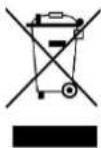
Guideline 2012/19/EU concerning the handling, collection, recycling and disposal of electrical and electronic equipment and their components ('waste electrical and electronic equipment', known as WEEE).
The crossed symbol on a rubbish container indicates that the machine or device is not allowed to be disposed of but it must be handed over to a suitably equipped collection centre for proper recycling or disposal.

We declare that this device has been manufactured in accordance with the applicable rules and regulations.
Notre Hotline service clients: