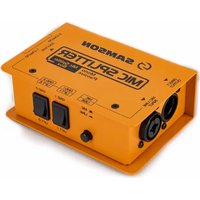
Mic Splitter - Audio Equipment SAMSON - Free user manual and instructions
Find the device manual for free Mic Splitter SAMSON in PDF.


| Type | Passive 3-way Microphone Splitter |
| Application | For 150 Ω microphone sources and 2.5 kΩ microphone preamp loads |
| Frequency Response | 20 Hz – 20 kHz ±0.5 dB |
| Input Impedance | 833 Ω (Mic), 6.6 kΩ (Line) |
| Output Impedance | 127 Ω |
| Gain | -1.4 dB typical |
| Transformer | Passive isolation designed by Samson |
| Controls | Ground lift switches (×2), Mic/Line push-button |
| Connectors | XLR / 6.35 mm TRS combo input, 3 XLR outputs (2 isolated, 1 direct) |
| Power | Passive (no external power required) |
| Construction | 14-gauge steel chassis |
| Dimensions (W × H × D) | 127 × 86 × 49.6 mm (5" × 3.38" × 1.95") |
| Weight | 680 g (1.5 lb) |
| Main Functions | Audio signal distribution, galvanic isolation via transformer, elimination of ground loops |
| Care and Cleaning | Clean with a dry, lint-free cloth. Avoid moisture and abrasive products. |
| Safety | Use in a dry, shock-free environment. Disconnect before cleaning. |
| Spare Parts and Repairability | Passive device with no user-serviceable parts. In case of failure, contact Samson after-sales service. |
| Brand and Model | Samson Mic Splitter |
| Category | Audio equipment |
Frequently Asked Questions - Mic Splitter SAMSON
User questions about Mic Splitter SAMSON
0 question about this device. Answer the ones you know or ask your own.
Ask a new question about this device
Download the instructions for your Audio Equipment in PDF format for free! Find your manual Mic Splitter - SAMSON and take your electronic device back in hand. On this page are published all the documents necessary for the use of your device. Mic Splitter by SAMSON.
USER MANUAL Mic Splitter SAMSON
Quick Start Guide
SAMSON

If you want to dispose this product, do not mix it with general household waste. There is a separate collection system for used electronic products in accordance with legislation that requires proper treatment, recovery and recycling.
Private household in the 27 member states of the EU, in Switzerland and Norway may return their used electronic products free of charge to designated collection facilities or to a retailer (if you purchase a similar new one).
For Countries not mentioned above, please contact your local authorities for a correct method of disposal. By doing so you will ensure that your disposed product undergoes the necessary treatment, recovery and recycling and thus prevent potential negative effects on the environment and human health.
©2025 Samson. All product descriptions and specs subject to change.
Copyright 2025, Samson Distribution LLC
v1
Samson Distribution LLC
278-B Duffy Ave
Hicksville, New York 11801
Phone: 1-800-3-SAMSON (1-800-372-6766)
www.samsontech.com
Introduction
The Samson Mic Splitter is a passive audio signal duplicator designed for use in both live and studio environments. With one XLR-1/4" TRS combo input and three XLR outputs (one direct and two transformer-isolated), it provides a reliable solution for distributing a single microphone or line signal to multiple destinations—such as front-of-house mixers, stage monitors, and recording interfaces.
Its ground lift switches on both the isolated output channels to ensure the cleanest possible signal in environments prone to grounding noise or hum. Housed in a 14-gauge steel chassis, the Mic Splitter delivers dependable performance on the road or in the studio as part of Samson's rugged S-Max line.

Callouts

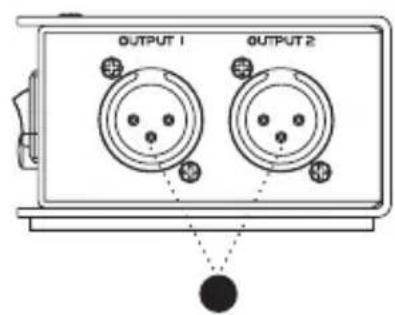
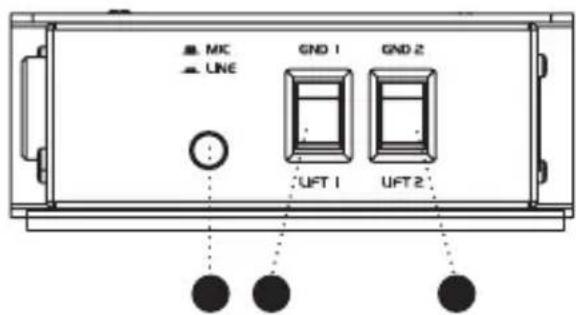
- COMBO INPUT - XLR / 1/4" TRS input for mic- or line-level signals.
- DIRECT OUT – Direct XLR output for sending an unaltered signal to a primary destination and supplying +48v phantom power to the microphone.
- ISOLATED OUT 1 / ISOLATED OUT 2 – Transformer-isolated XLR outputs for feeding additional mixers, monitors, or broadcast systems.
- GROUND LIFT 1 (OUTPUT 1) – Lifts the ground on isolated output (1) to further reduce noise in complex setups.
- GROUND LIFT 2 (OUTPUT 2) – Lifts the ground on isolated output (2) to further reduce noise in complex setups.
- MIC/LINE PUSH BUTTON SWITCH – Switches the input between mic and line level.
Setup
The Mic Splitter is useful in a variety of configurations—from mic duplication to audio distribution for live events or broadcast setups. Here's a typical usage scenario:
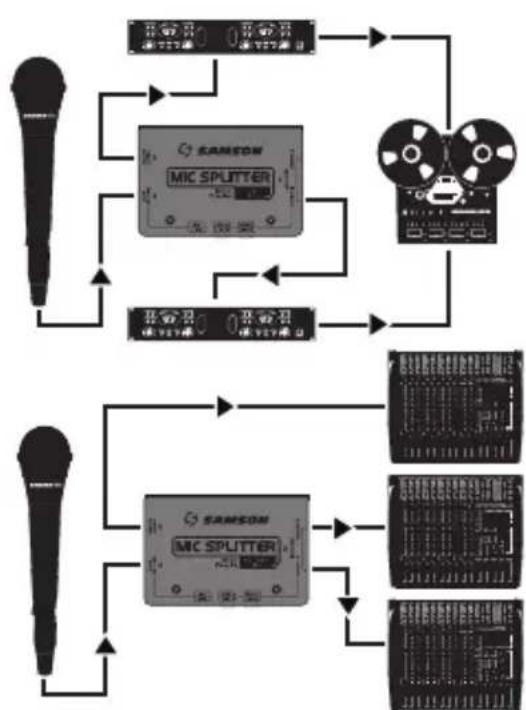
flowchart
graph TD
    A["扬声器"] --> B["麦克风"]
    B --> C[" mic Splitter "]
    C --> D["输出面板1"]
    C --> E["输出面板2"]
    C --> F["输出面板3"]
    C --> G["输出面板4"]
    H["扬声器"] --> I["麦克风"]
    I --> J[" mic Splitter "]
    J --> K["输出面板5"]
    J --> L["输出面板6"]
    J --> M["输出面板7"]
    J --> N["输出面板8"]
- Ensure all volume controls on connected equipment are turned down before making connections.
- Connect your microphone or line-level source to the COMBO INPUT and set the MIC-LINE push button switch to match the source.
- Connect the DIRECT OUT to your main mixer or audio interface, and supply +48v power if needed.
- Connect ISOLATED OUT 1 and ISOLATED OUT 2 to additional mixers, monitor consoles, or recording devices.
- Use the GROUND LIFT switches if you experience any noise or hum caused by grounding issues.
- Slowly raise the volume on your connected gear.

Versatile by Design
Mic Splitter accepts either XLR or 1/4" TRS connections via its combo input, making it compatible with microphones, instruments, or line-level devices. From a single source, you can send a direct feed to a mixer or monitor system and route transformer-isolated signals to additional gear with no power required. Whether you're setting up stage monitoring or broadcasting from one signal source, Mic Splitter offers plug-and-play flexibility.
Clean Signal Delivery
The unit includes dedicated ground lift switches on both isolated outputs helping to eliminate unwanted hum and buzz caused by ground loops. The direct output maintains a straight-through signal path, while the transformer-isolated outputs offer added protection and signal integrity.
S-Max Durability
Part of Samson's trusted S-Max series, Mic Splitter is built into a 14-gauge steel enclosure tough enough to handle demanding use on tour, in venues, or at broadcast events. Its rugged construction and passive design ensure long-lasting, maintenance-free operation.
Specifications
Type Passive 3-way Mic Splitter
Application For 150Ω Microphone Sources and 2.5kΩ Mic Preamp Loads on the Direct and Both Isolated Outputs
Frequency Response 20Hz–20kHz ±0.5dB
Input impedance 833Ω (Mic), 6.6kΩ (Line)
Output Impedance 127Ω
Gain -1.4dB Typical (With 150Ω Mic and 2.5kΩ Preamp Loads)
Transformer Samson Custom Designed Passive Isolation
Controls Ground Lift (1) and Ground Lift (2) Switches, Mic/Line Button
Connectors XLR-1/4" TRS Combo Input, 3 × XLR Outputs (2 Isolated Outputs and 1 Direct)
Construction 14-gauge steel chassis
Dimensions 5" × 3.38" × 1.95"
127mm x 86mm x 49.6mm
Weight 1.5lb
680g
Block Diagram
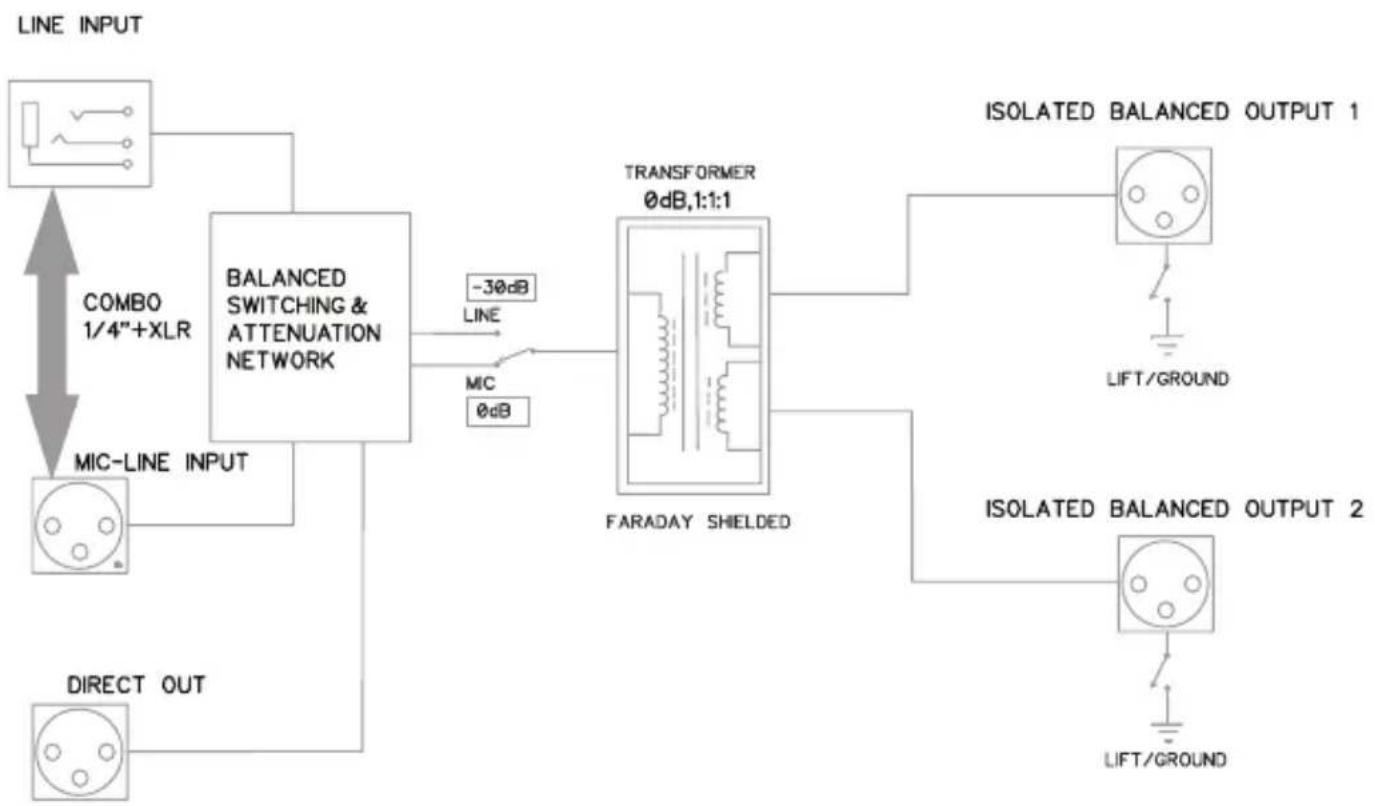
flowchart
graph TD
    A["LINE INPUT"] --> B["BALANCED SWITCHING & ATTENUATION NETWORK"]
    B --> C["TRANSFORMER 0dB,1:1"]
    C --> D["ISOLATED BALANCED OUTPUT 1"]
    C --> E["ISOLATED BALANCED OUTPUT 2"]
    B --> F["MIC-LINE INPUT"]
    B --> G["MIC"]
    B --> H["-30dB LINE"]
    B --> I["0dB"]
    B --> J["DIRECT OUT"]
    C --> K["FARADAY SHIELDED"]
    D --> L["LIFT/GROUND"]
    E --> M["LIFT/GROUND"]

Copyright 2025, Samson Distribution LLC
v1
Samson Distribution LLC
278-B Duffy Ave
Hicksville, New York 11801
Phone: 1-800-3-SAMSON (1-800-372-6766)
www.samsontech.com
ENFRÉESIT
Introduction
Copyright 2025, Samson Distribution LLC
v1
Samson Distribution LLC
278-B Duffy Ave
Hicksville, New York 11801
Phone: 1-800-3-SAMSON (1-800-372-6766)
www.samsontech.com
Einführung
Copyright 2025, Samson Distribution LLC
v1
Samson Distribution LLC
278-B Duffy Ave
Hicksville, New York 11801
Phone: 1-800-3-SAMSON (1-800-372-6766)
www.samsontech.com
ENFRÉESIT
Introducción
Copyright 2025, Samson Distribution LLC
v1
Samson Distribution LLC
278-B Duffy Ave
Hicksville, New York 11801
Phone: 1-800-3-SAMSON (1-800-372-6766)
www.samsontech.com
Introduzione
Samson Distributions LLC
278-B Duffy Ave.
Hicksville, New York 11801
Phone: 1-800-3-SAMSON (1-800-372-6766)
www.samsontech.com
Brand : SAMSON
Model : Mic Splitter
Category : Audio Equipment