PKCWC12 - Deep fryer Nutrichef - Free user manual and instructions
Find the device manual for free PKCWC12 Nutrichef in PDF.


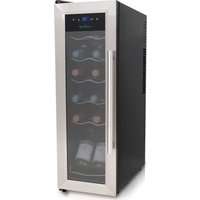
| Product Type | Compressor Wine Cooler |
| Brand | Nutrichef |
| Model | PKCWC12 |
| Estimated Capacity | 12 bottles |
| Power Supply | 110 V - 60 Hz |
| Adjustable Temperature Range | 5 °C to 32 °C (41 °F to 90 °F) |
| Temperature Display | LED, selectable °C/°F |
| Temperature Control | Digital with △ and √ buttons |
| Interior Light | LED, auto shut-off after 10 minutes |
| Panel Lock | Automatic after 20 seconds of inactivity |
| Door Material | Glass |
| Handle | Stainless steel (installation required) |
| Number of Shelves | Multiple (depending on model) |
| Door Gasket | Removable for handle installation |
| Ventilation Required | 6 inches at rear, 10 inches on sides |
| Ideal Ambient Temperature | 16 °C to 26 °C (60 °F to 80 °F) |
| Cleaning | Hot water and baking soda solution |
| Safety | Grounding required, 3-prong plug |
| Repairability | Do not repair yourself, contact customer service |
| Customer Service | Phone: (1) 718-535-1800 |
| Included Accessories | Handle, screws, Phillips screwdriver (for installation) |
Frequently Asked Questions - PKCWC12 Nutrichef
User questions about PKCWC12 Nutrichef
0 question about this device. Answer the ones you know or ask your own.
Ask a new question about this device
Download the instructions for your Deep fryer in PDF format for free! Find your manual PKCWC12 - Nutrichef and take your electronic device back in hand. On this page are published all the documents necessary for the use of your device. PKCWC12 by Nutrichef.
USER MANUAL PKCWC12 Nutrichef
natural_image
Row of six wine bottles in various colors including purple, red, maroon, yellow, orange, and pink (no text or labels visible)CLASSIC GLASS DOOR SERIES STAINLESS STEEL DOOR SERIES
| PKCWC120 | 12 bottles | PKCWC12 | 12 bottles |
| PKCWC150 | 15 bottles | PKCWC15 | 15 bottles |
| PKCWC180 | 18 bottles | PKCWC18 | 18 bottles |
| PKCWCS188 | 18 bottles (Dual-Zone) | PKCWCS185 | 18 bottles (Dual-Zone) |
| PKCWC240 | 24 bottles (Dual-Zone) | PKCWC24 | 24 bottles (Dual-Zone) |
CONTENTS
I. IMPORTANT SAFETY INSTRUCTIONS 2
II. PARTS DIAGRAM 3
INSTALLING THE STAINLESS STEEL HANDLE 5
III. TEMPERATURE CONTROL 6
IV. ELECTRIC DIAGRAM 8
V. INSTRUCTION 9
VI. VENTILATION 9
VII. CLEANING 9
VIII. TROUBLESHOOTING 10
Please read all instructions carefully and follow all guidelines and rules for optimum performance and proper appliance usage.
I. IMPORTANT SAFETY INSTRUCTIONS
WARNING
To reduce the risk of fire, electrical shock, or injury when using your appliance, follow these basic precautions
- Read all instructions before using the Cooler.
• DANGER or WARNING: Risk of child entrapment. - Child entrapment and suffocation are not problems of the past. Junked or abandoned appliances are still dangerous even if they will “just sit in the garage a few days”
- Before you throw away your old Cooler: Take off the door. Leave the shelves in place so that children may not easily climb inside.
- Never allow children to operate, play with, or crawl inside the appliance.
- Never clean appliance parts with flammable fluids. The fumes can create a fire hazard or explosion.
- Do not store or use gasoline or any other flammable vapors and liquids in the vicinity of this or any other appliance. The fumes can create a fire hazard or explosion.
- Do not repair or replace any part of the Cooler or attempt any servicing unless specifically recommended in the user-maintenance instructions or in published user-repair instructions.
- Replace the fuse with the same type.
-Save these instructions-
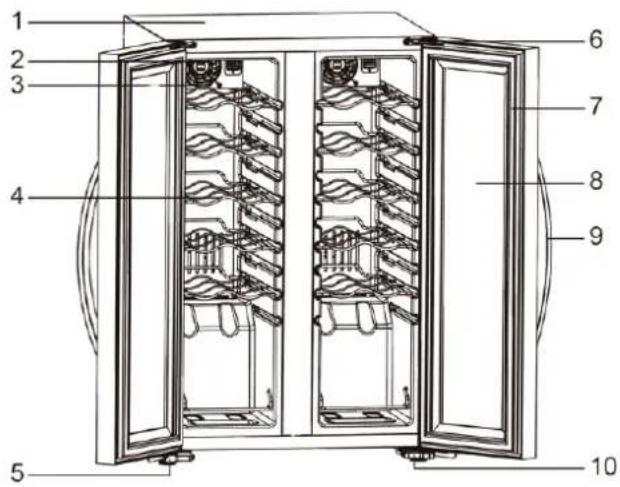
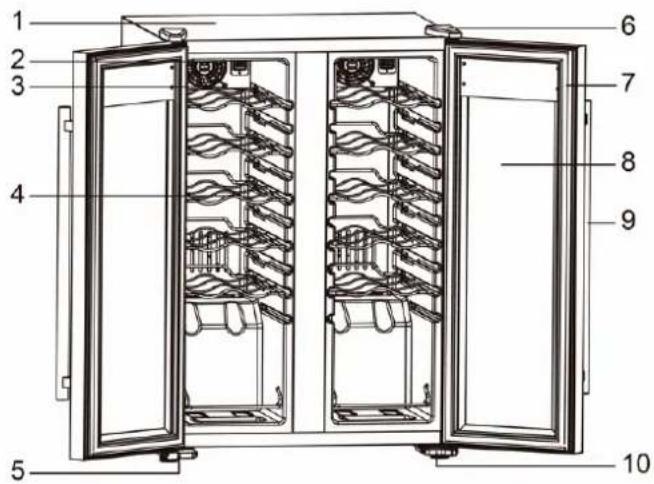
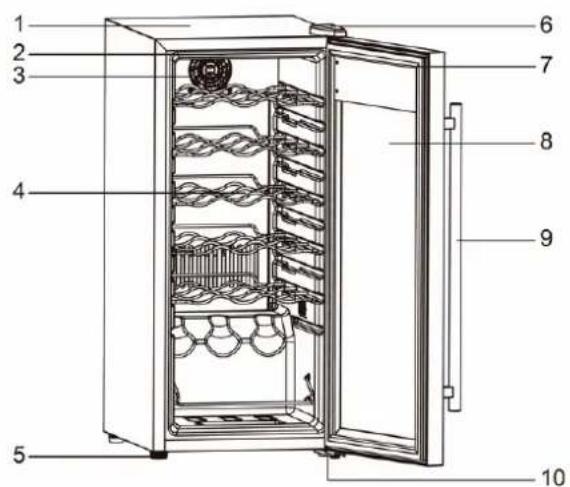
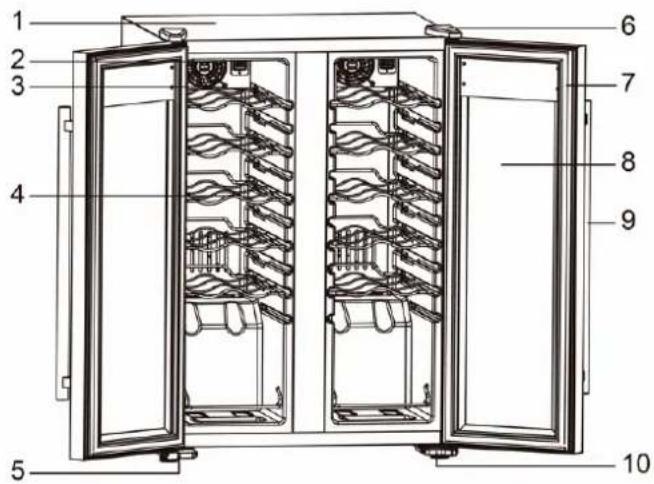
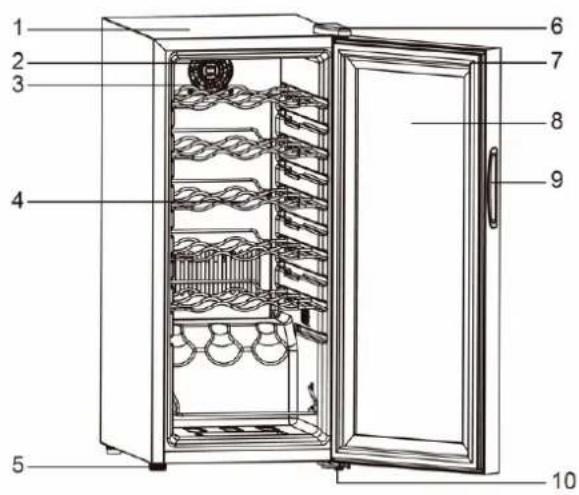
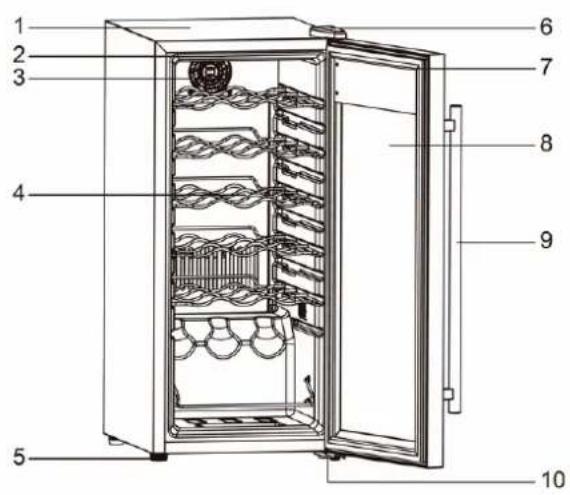
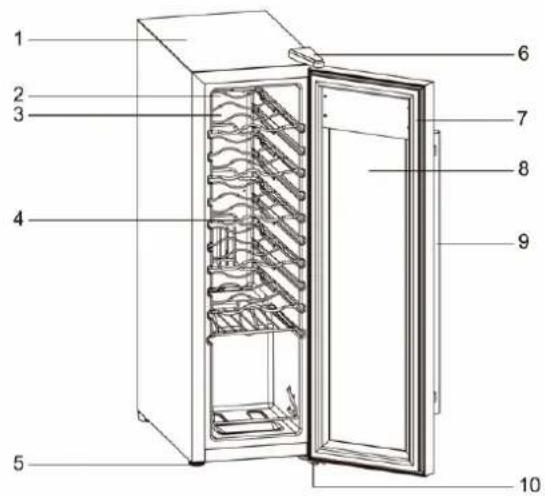
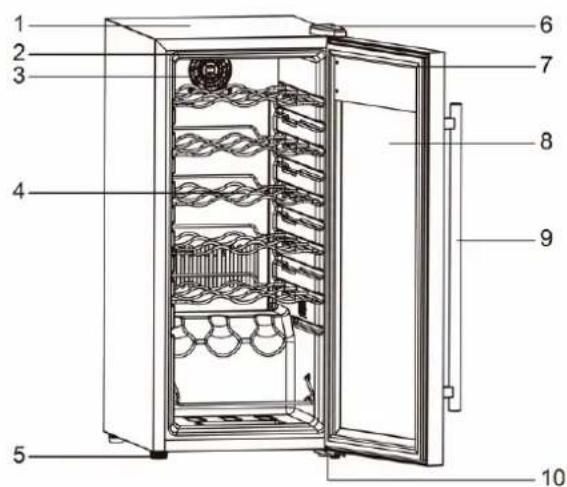
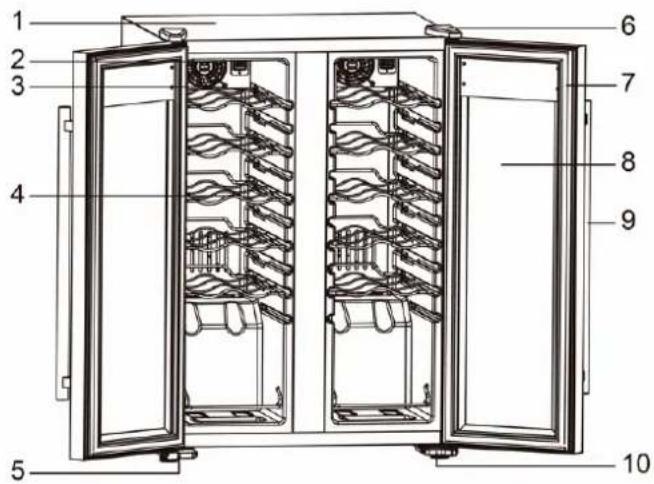
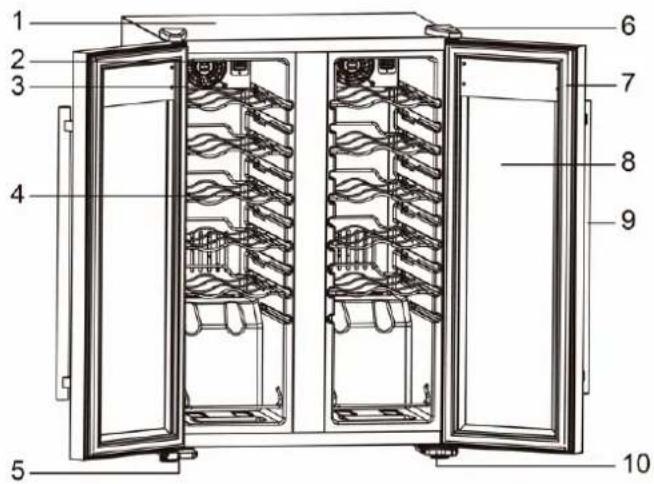
II. PARTS DIAGRAM
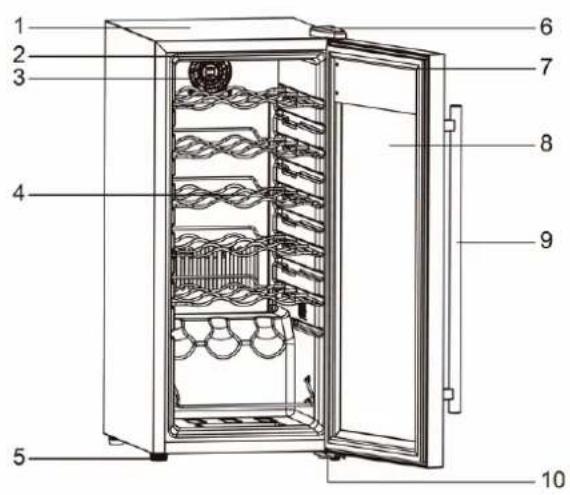
• Model No: PKCWC120 Model No: PKCWC12
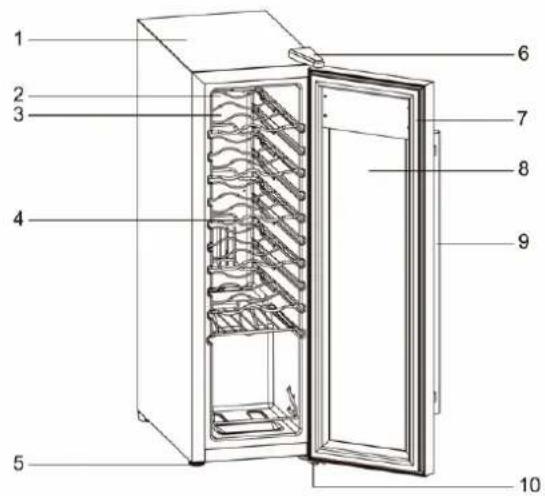
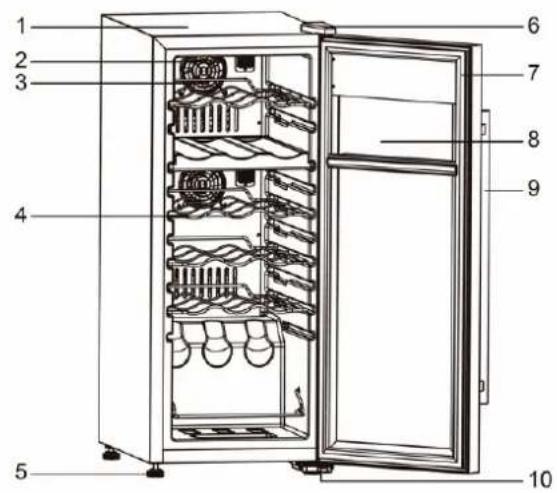
• Model No: PKCWC150 Model No: PKCWC15
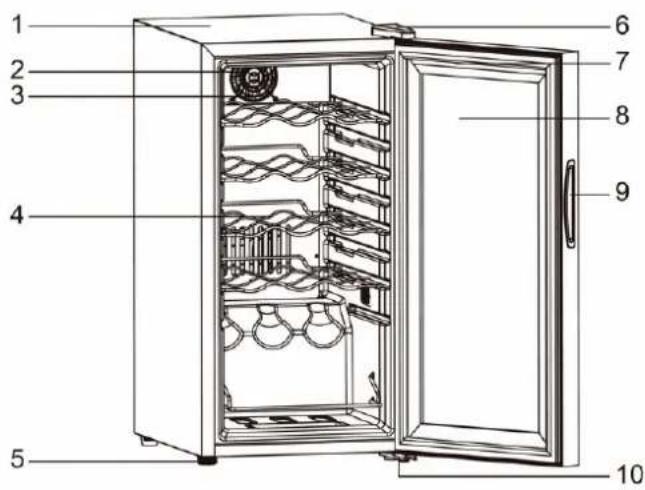
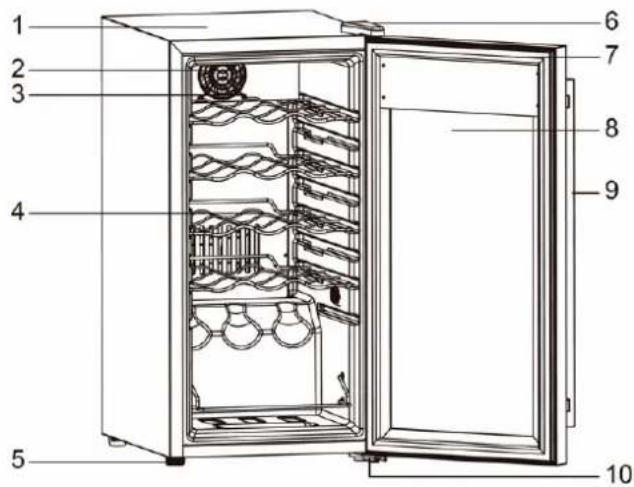
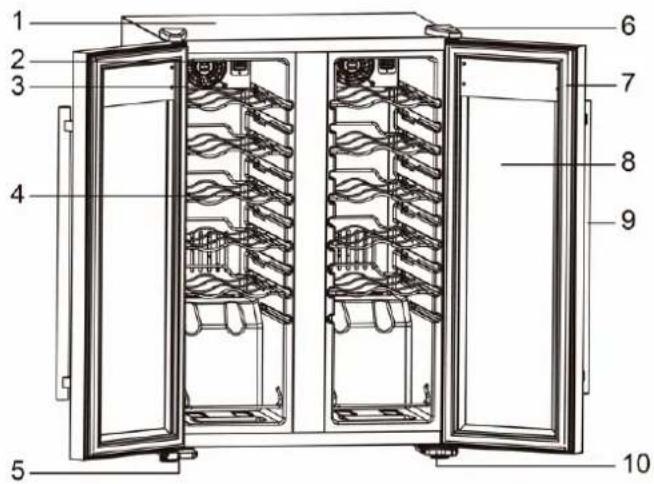
• Model No: PKCWC180 Model No: PKCWC18
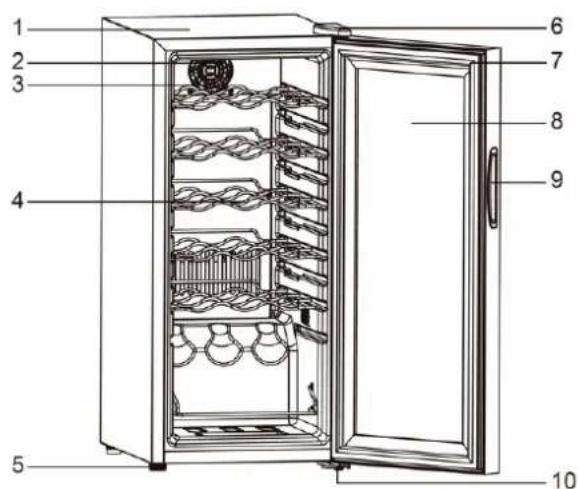
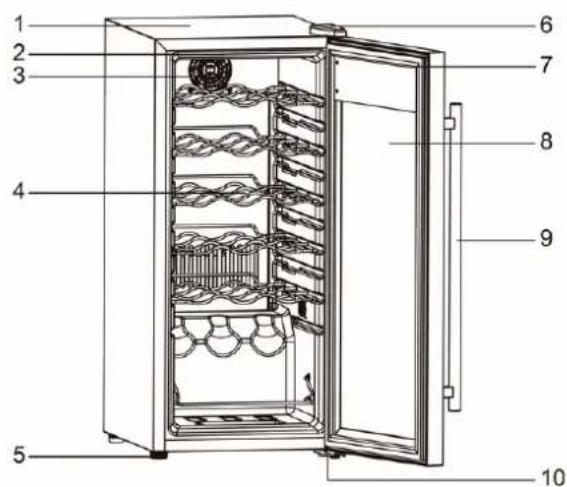
II. PARTS DIAGRAM
• Model No: PKCWC150 Model No: PKCWC15
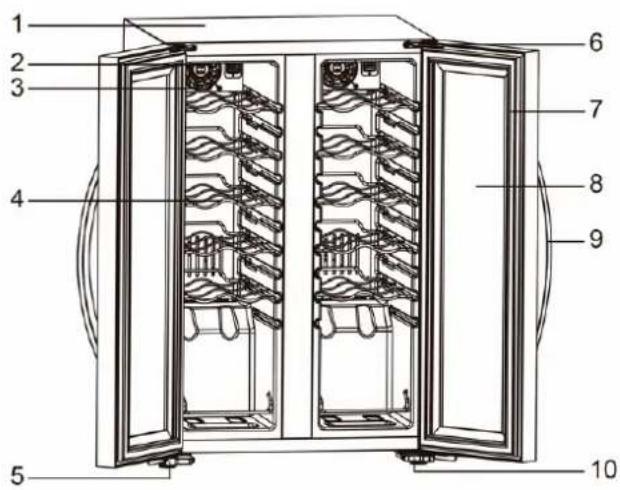
•

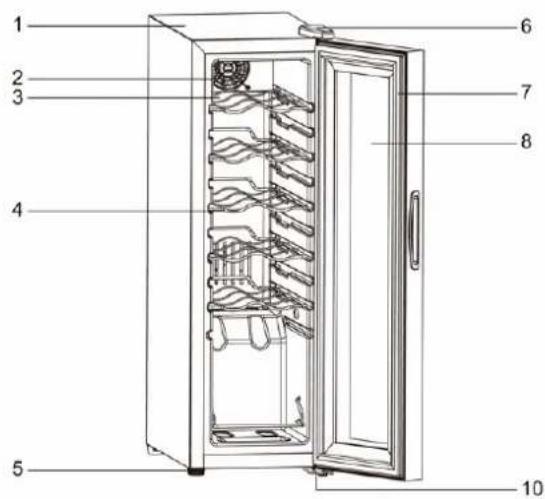
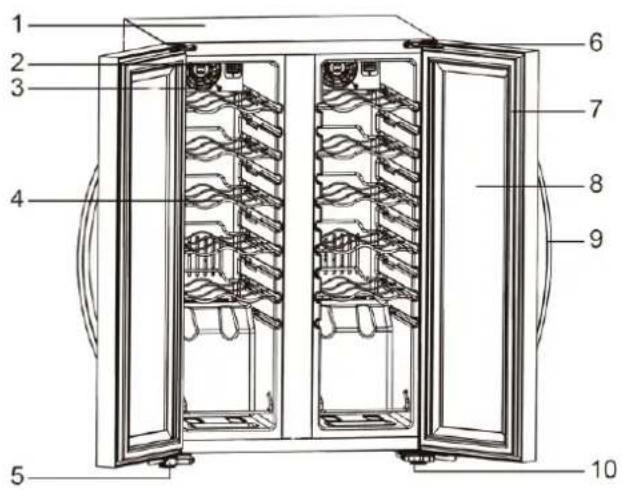
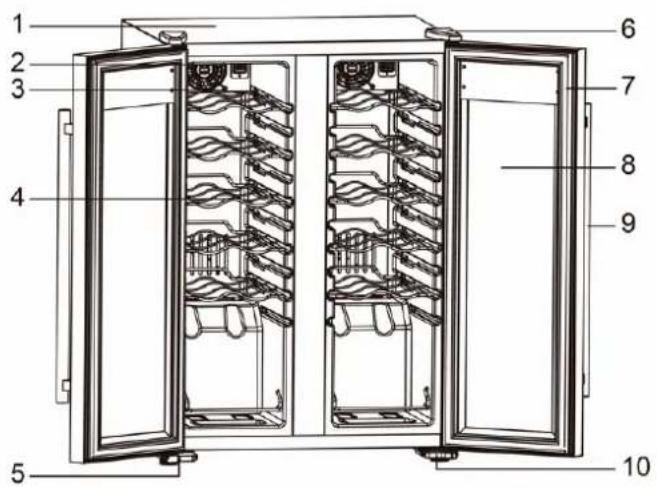
Cabinet1. 6. Upper Hinge
Fan2. 7. Door Gasket
Fan Cover3. 8. Glass Door
Shelves4. 9. Stainless Steel Handle
Foot5. 10. Bottom Hinge
INSTALLING THE STAINLESS STEEL HANDLE
For PKCWC12, PKCWC15 Models only
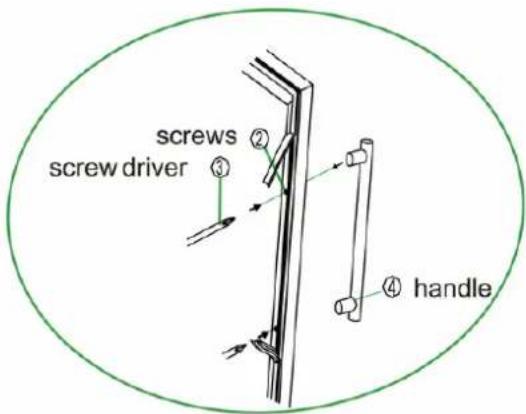
This wine cellar includes a stainless steel handle. To install the handle please follow the below instructions:
- Pull away the door gasket in the area where the handle is to be installed on the left side as shown below in illustration #1. The gasket can easily displaced by hand, no tools are necessary.
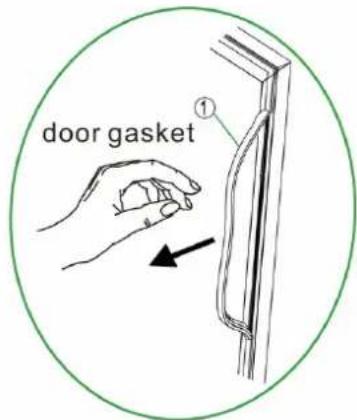
- Align the handle with the screws installed. Tighten the screws using a Phillips head screwdriver until the handle sets both ush and secured tightly against the door frame.
(DO NOT over tighten as this will cause damage to the handle assembly).
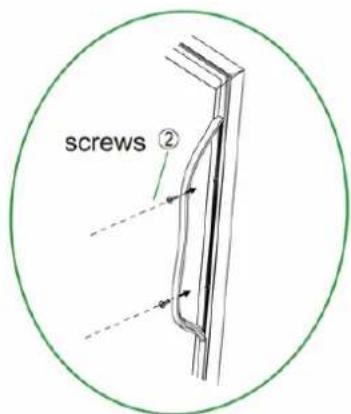
- Replace the door gasket to its original position.
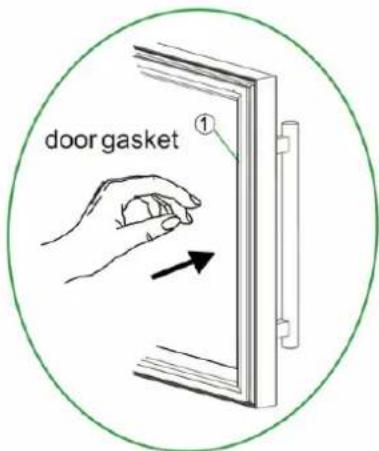
| 1. Gasket | 2. Phillips Head Screw Driver |
| 3. Phillips Head Screw | 4. Handle |
III. TEMPERATURE CONTROL
It is recommended that the wine cooler should be installed in an area where the ambient temperature is between 16-26°( (60-80°F).
If the ambient temperature is above or below the recommended ranges, the unit's performance may be affected, and extreme cold or hot conditions may cause the interior temperature to fluctuate. This will prevent the optimal range from being reached. In addition, keep in mind that the temperature may fluctuate depending on whether the interior light is on or off, and whether the bottles are located on the upper, middle, or lower racks.
RECOMMENDED TEMPERATURES FOR CHILLING WINE
RED WINES
DRY/WHITE WINES
ROSE WINES
RECOMMENDED TEMPERATURES FOR CHILLING WINE
| 5 - 18°C | 41 - 64°F |
| 5 - 18°C | 41 - 64°F |
| 5 - 18°C | 41 - 64°F |
| 5 - 18° C (Upper Zone) | 41 - 64° F (Upper Zone) |
| 5 - 18° C (Lower Zone) | 41 - 64° F (Lower Zone) |
| 5 - 18° C (Left Zone) | 41 - 64° F (Left Zone) |
| 5 - 18° C (Right Zone) | 41 - 64° F (Right Zone) |
CONTROL PANEL
For PKCWC12 / PKCWC120 / PKCWC15 / PKCWC150 / PKCWC18 / PKCWC180 / PKCWC24 / PKCW Models only.
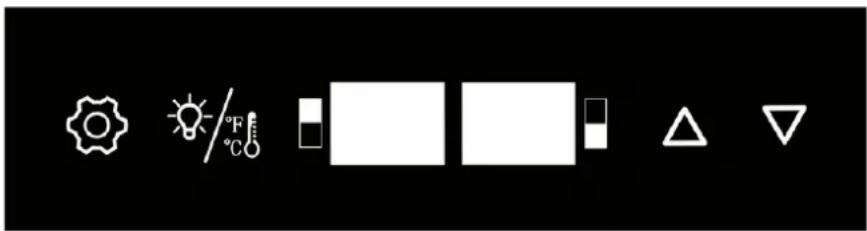
You can select temperature display between Fahrenheit and Celsius setting by pressing this button. You can turn the interior light ON or OFF by short pressing this button.
SETTING THE TEMPERATURE CONTROL
Your cooler is equipped with a control panel lock feature which will lock itself automatically 20 seconds after the last time a button is pressed.
- Press the button to unlock the control panel. You will hear a “BEEP” sound to alert you that the control is now active.
- You can manually adjust the temperature inside Cooler by pressing the button △ an ▼ on the display panel.
- The two buttons on the panel △ and ▽ adjust the temperature in increments of 1 °C or 1 °F.
- You can also turn the interior light on or off by pressing the button.
- The light will be turned OFF automatically if it remains ON for 10 minutes. You have to push the
• CONTROL PANEL
You can select temperature display between Fahrenheit and Celsius setting by pressing this button.
You can turn the interior light ON or OFF by short pressing this button.
SETTING THE TEMPERATURE CONTROL
- Your cooler is equipped with a control panel lock feature which will lock itself automatically 20 seconds after the last time a button is pressed.
- Press the button to unlock the control panel. You will hear a “BEEP” sound to alert you that the control is now active.
- Press the button shortly to select and switch the lower zone and switch upper zone for temperature setting. The digital ash will be displayed in setting temperature.
- You can manually adjust the temperature inside Cooler by pressing the button △ an ▽ on the display panel.
- The two buttons on the panel △ and ▽ adjust the temperature in increments of 1 °C or 1 °F.
- You can also turn the interior light on or off by pressing the button.
- The light will be turned OFF automatically if it remains ON for 10 minutes. You have to push the
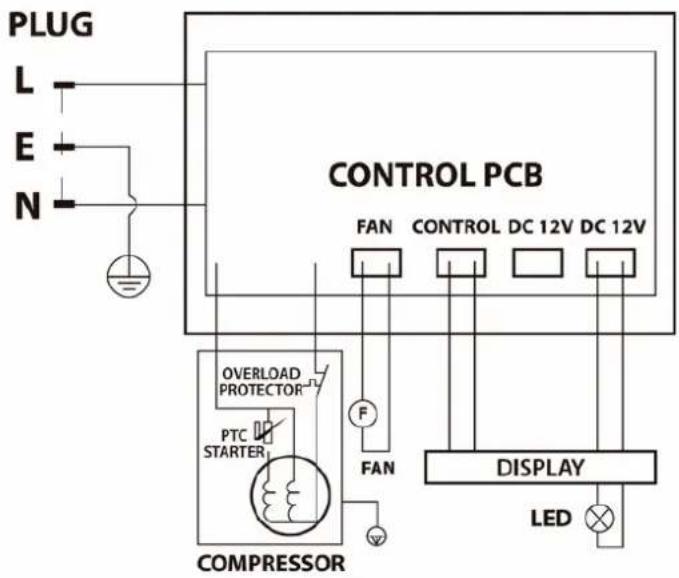
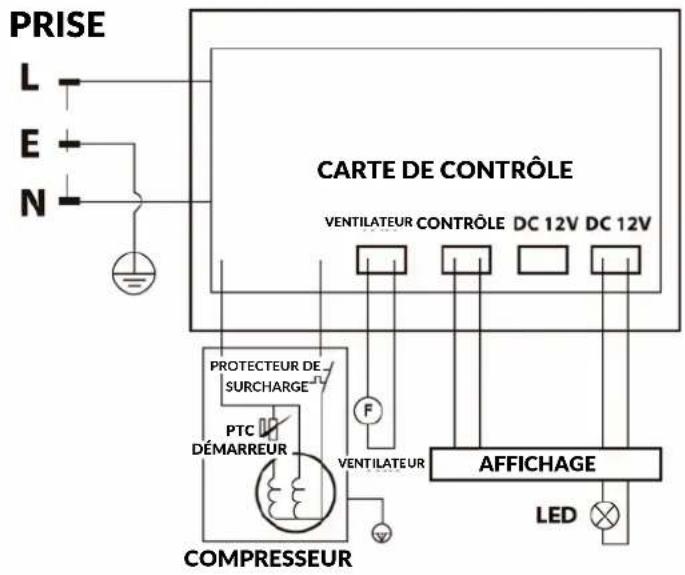
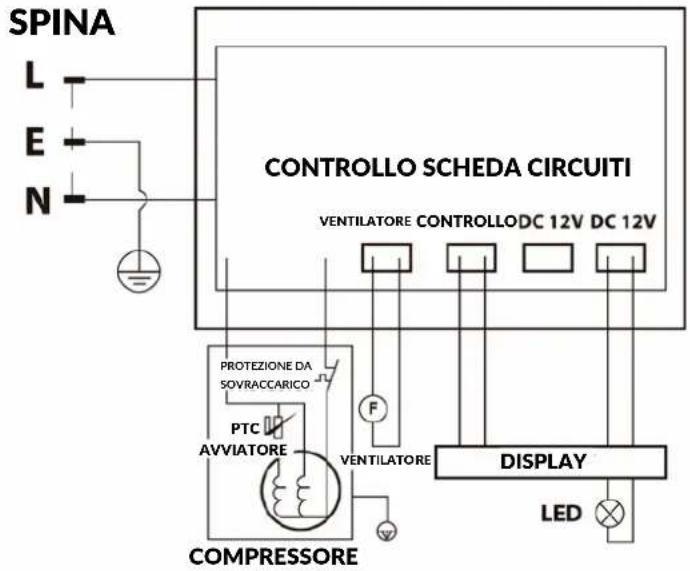
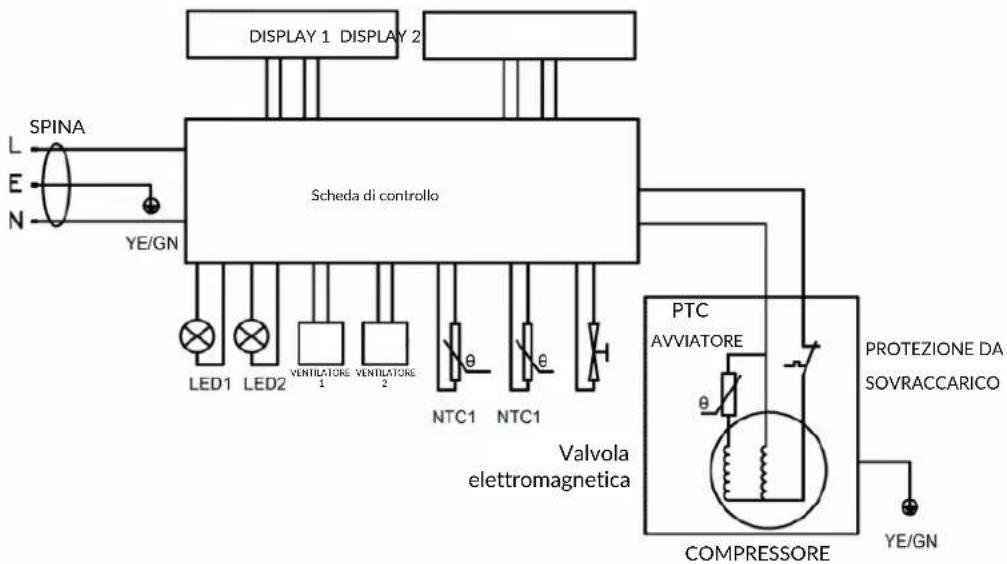
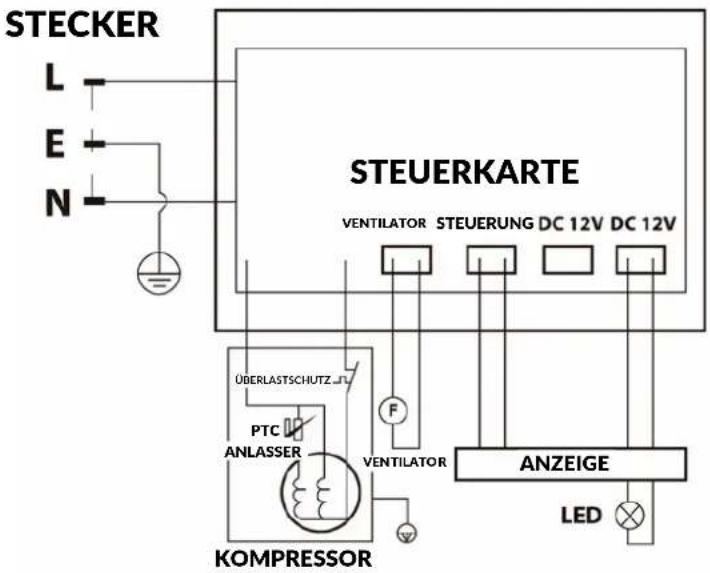
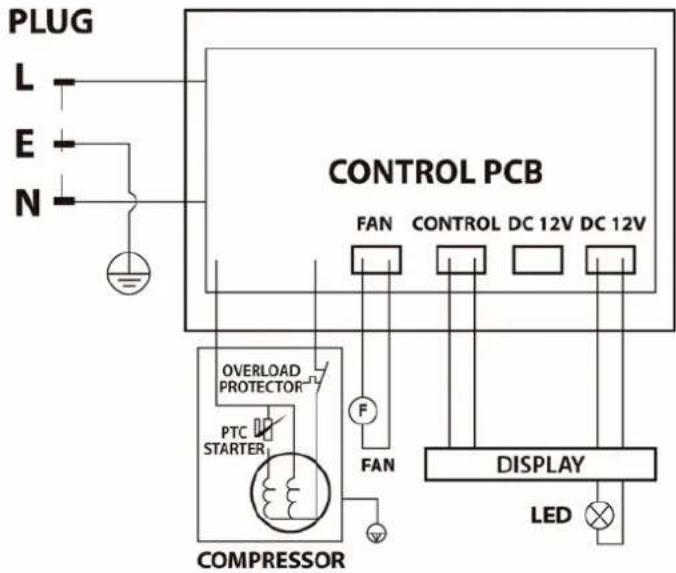
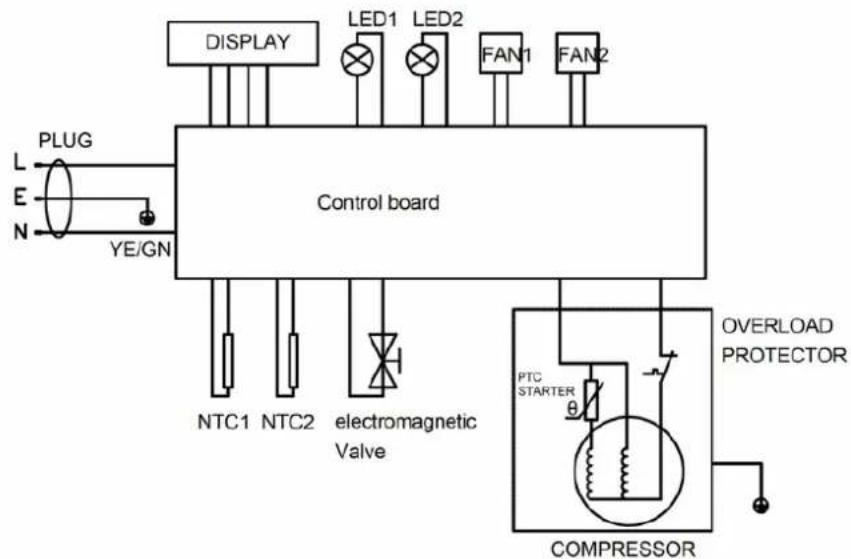
IV. ELECTRIC DIAGRAM
(For PKCWC120, PKCWC150, PKCWC180, PKCWC12, PKCWC15, PKCWC18 only)
(For PKCWC240, PKCWC24 only)
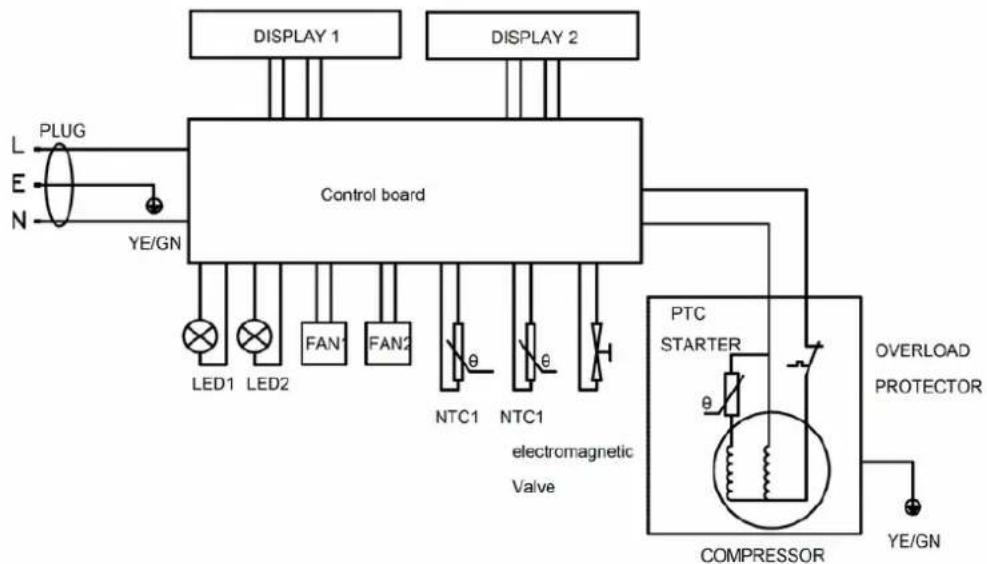
flowchart
graph TD
    A["PLUG"] --> B["Control board"]
    C["L"] --> B
    D["E"] --> B
    E["N"] --> B
    B --> F["LED1"]
    B --> G["LED2"]
    B --> H["FAN1"]
    B --> I["FAN2"]
    B --> J["NTC1"]
    B --> K["NTC1"]
    B --> L["electromagnetic Valve"]
    M["DISPLAY 1"] --> B
    N["DISPLAY 2"] --> B
    O["PTC STARTER"] --> P["COMPRESSOR"]
    Q["OVERLOAD PROTECTOR"] --> P
    R["YE/GN"] --> P
    S["YE/GN"] --> P
V. INSTRUCTION
Note:
- Position your wine cooler so that the plug is accessible
- Keep your wine cooler out of direct sunlight.
- Do not place next to heat generating appliance.
- Place the wine cooler on a leveled surface that is strong enough to support the unit when it is fully loaded. To level your wine cooler, adjust the front feet located at the bottom of the unit.
Important:
- Position the cooler in a dry and airy place with ambient temperature between 5-32°( (41-90°F).
- Before connecting the unit to a power source, allow it stand upright for approximately 2 hours. This will reduce the possibility of any system malfunctions which may have occurred from handing during transportation.
- When positioning the wine cooler, 6 inches of space at the back and 10 inches of space both sides are suggested. Do not put any objects on top of the unit which may block the air circulation.
Power Connection:
- This wine cooler should be properly grounded for your safety and in order to minimize the possibility of electrical shock, the power cord of this unit is equipped with a 3-pin plug which fits with 3-pin wall outlets.
- Never cut or remove the ground wire from the supplied power cord.
- The use of extension cords is not recommended.
- This unit requires a standard 11 0V-60Hz electrical outlet with a 3-pin plug.
- The cord should be secured behind the wine cooler. Also, to prevent accidental injury, do not expose or dangle the cord.
VI. VENTILATION
- Do not install the wine cooler in a closed cabinet without proper ventilation.
- Please leave at least 6 inches distance between the wall and the wine cooler.
- Do not remove the feet of the wine cooler. Keep at least 50mm of ground clearance.
VII. CLEANING
- UNPLUG the Wine Chiller, and remove all items including shelves.
- Wash the inside surfaces with a warm water and baking soda solution. The solution should be about 2 tablespoons of baking soda to a quart of water.
- Wash the shelves with a mild detergent solution.
- Wring excess water out of the sponge or cloth when cleaning area of the controls, or any electrical parts.
- Wash the outside cabinet with warm water and mild liquid detergent. Rinse well and wipe dry with a clean soft cloth.
VIII. TROUBLE SHOOTING
| PROBLEM POSSIBLE CAUSES AND MAINTENANCE MEASURES | |
| The wine cooler will not operate | · The unit may be plugged in using a different voltage. Also, the circuit breaker may be tripped or there is a blown fuse. |
| The wine cooler is not cold enough | · Check the temperature control settings, as the external environment may be too hot and affect the cooling capacity.· The most ideal ambient temperature for thermoelectric cooling wine cooler is 16°C-26°C (60°F-79°F).· The door may be opened too frequently.· The door is not closed completely.· The door seal does not seal properly.· The wine cooler does not have sufficient clearance, as it will affect the heat dissipation. Please make sure there is nothing near Heat sink fan on the back within 10cm area.· The wine cooler includes too much items, as the IT need some time to cool down and remain stable. Please wait for 24h and check again. |
| The wine cooler vibrates while operating | · Make sure the unit is leveled.· Please adjust the foot if necessary |
| The wine cooler produces a lot of noise | · The unit may not be leveled.· Check the fan, as noise will increasing if your wine cooler have much dust on the fan after using for a long time.· Please use hair dryer and set strong position to blow away dust on the fan. |
| The wine cooler will not close properly | · The unit may not be leveled.· The doors are reversed and not properly installed.· The seal is weak. |
| The LED display does not work | · There may be a problem with the main control board.· There is a problem with the plug. Please check to assure plug is be in good connection with socket or already plugged in.· The digital control panel will lock automatically after 10 seconds if no further operation Please press the unlock button to activate the wine cooler. |
| There is an LED display error | · There is a PCB problem. |
| The buttons do not function | · The temperature control panel may be damaged. |
| Frost or ice developed inside the wine cooler | · Ambient temperature too low.· The wine cooler needed to be restarted. |

WARNING:
This product can expose you to a chemical or group of chemicals, which may include "Styrene" which is known in the state of California to cause cancer, birth defects, or other reproductive harm. For more info, go to https://www.p65warnings.ca.gov/.
nutrichef™

Questions? Comments?
We are here to help!
Phone: (1) 718-535-1800
Nutrichefkitchen.com/contact us
nutrichef™
PKCWC
natural_image
Close-up of six wine bottles with different colored caps, arranged in a row against a white background (no text or symbols visible)| SERIE CLÁSICA / PUERTAS DE CRISTAL SERIE - PUERTA DE ACERO INOXIDABLE | |||
| PKCWC120 | 12 botellas | PKCWC12 | 12 botellas |
| PKCWC150 | 15 botellas | PKCWC15 | 15 botellas |
| PKCWC180 | 18 botellas | PKCWC18 | 18 botellas |
| PKCWCD188 | 18 botellas (Zona Doble) | PKCWCD185 | 18 botellas (Zona Doble) |
| PKCWC240 | 24 botellas (Zona Doble) | PKCWC24 | 24 botellas (Zona Doble) |
CONTENIDO
• Modelo: PKCWC150 Modelo: PKCWC15
•
Encimeral.
- Bisagra Superior
Ventilador2.
- Goma de la Puerta
natural_image
Pure graphical icons for weather, temperature, and symbols on black background (no text or labels)AJUSTE DEL CONTROL DE TEMPERATURA
AJUSTE DEL CONTROL DE TEMPERATURA
Nutrichefkitchen.com/contact us
nutrichef™
PKCWC
natural_image
Row of six wine bottles with different colored caps, arranged in a row against a white background (no text or symbols visible)| SERIE CLÁSICA / PUERTAS DE CRISTAL SERIE - PUERTA DE ACERO INOXIDABLE | |||
| PKCWC120 | 12 bouteilles | PKCWC12 | 12 bouteilles |
| PKCWC150 | 15 bouteilles | PKCWC15 | 15 bouteilles |
| PKCWC180 | 18 bouteilles | PKCWC18 | 18 bouteilles |
| PKCWCD188 | 18 bouteilles (Double zone) | PKCWCD185 | 18 bouteilles (Double zone) |
| PKCWC240 | 24 bouteilles (Double zone) | PKCWC24 | 24 bouteilles (Double zone) |
SOMMAIRE
I. CONSIGNES DE SÉCURITÉ IMPORTANTES 2
II. SCHÉMA DES PIÈCES 3
INSTALLATION DE LA POIGNÉE EN ACIER INOXYDABLE 5
III. CONTRÔLE DE LA TEMPÉRATURE 6
IV. SCHÉMA ÉLECTRIQUE 8
V. INSTRUCTION 9
VI. VENTILATION 9
VII. NETTOYAGE 9
VIII. DÉPANNAGE 10
II. SCHÉMA DES PIÈCES
Armoire1.
- Stainless Steel Handle
Support5.
natural_image
Pure graphical icons for weather, temperature, and symbols on black background (no text or labels)RÉGLAGE DE LA TEMPÉRATURE
RÉGLAGE DE LA TEMPÉRATURE
Pour PKCWC120, PKCWC150, PKCWC180, PKCWC12, PKCWC15, PKCWC18 uniquement
Des questions? Des commentaires?
Nutrichefkitchen.com/contact us
nutrichef™
PKCWC
natural_image
Close-up of six wine bottles with different colored caps, arranged in a row against a white background (no text or symbols visible)| SERIE CLÁSICA / PUERTAS DE CRISTAL SERIE - PUERTA DE ACERO INOXIDABLE | |||
| PKCWC120 | 12 bottiglie | PKCWC12 | 12 bottiglie |
| PKCWC150 | 15 bottiglie | PKCWC15 | 15 bottiglie |
| PKCWC180 | 18 bottiglie | PKCWC18 | 18 bottiglie |
| PKCWCD188 | 18 bottiglie (Zona Duale) | PKCWCD185 | 18 bottiglie (Zona Duale) |
| PKCWC240 | 24 bottiglie (Zona Duale) | PKCWC24 | 24 bottiglie (Zona Duale) |
CONTENUTI
I. IMPORTANTI ISTRUZIONI DI SICUREZZA 2
II. DIAGRAMMA DELLE PARTI 3
INSTALLAZIONE DELLA MANIGLIA IN ACCIAIO INOX 5
III. CONTROLLO DELLA TEMPERATURA 6
IV. SCHEMA ELETTRICO 8
V. ISTRUZIONI 9
VI. VENTILAZIONE 9
VII. PULIZIA 9
VIII. RISOLUZIONE DEI PROBLEMI 10
• Modello No: PKCWC180 Modello No: PKCWC18
II. DIAGRAMMA DELLE PARTI
• Modello No: PKCWC150 Modello No: PKCWC15
Vetrinal.
- Cerniera superiore
Ventilatore2.
natural_image
Pure graphical icons for weather, humidity, temperature, and symbols (no text or labels)Solo per PKCWC120, PKCWC150, PKCWC180, PKCWC12, PKCWC15, PKCWC18
Solo per PKCWC240, PKCWC24
flowchart
graph TD
    A["SPINA"] --> B["Scheda di controllo"]
    C["L"] --> B
    D["E"] --> B
    E["N"] --> B
    B --> F["LED1"]
    B --> G["LED2"]
    B --> H["VENTILATORE 1"]
    B --> I["VENTILATORE 2"]
    B --> J["NTC1"]
    B --> K["NTC1"]
    L["YE/GN"] --> B
    M["COMPRESSORE"] --> N["PTC AVVIATORE"]
    O["PROTEZIONE DA SOVRACCARICO"] --> N
    P["Valvola elettromagnetica"] --> N
    Q["DISPLAY 1 DISPLAY 2"] --> B
    R["YE/GN"] --> N
V. ISTRUZIONE
Nota:
Domande? Commenti?
Nutrichefkitchen.com/contact us
nutrichef™
PKCWC
natural_image
Close-up of six wine bottles with different colored caps, arranged in a row against a white background (no text or symbols visible)Weinkühler
| SERIE CLÁSICA / PUERTAS DE CRISTAL SERIE - PUERTA DE ACERO INOXIDABLE | |||
| PKCWC120 | 12 flaschen | PKCWC12 | 12 flaschen |
| PKCWC150 | 15 flaschen | PKCWC15 | 15 flaschen |
| PKCWC180 | 18 flaschen | PKCWC18 | 18 flaschen |
| PKCWCD188 | 18 Flaschen (Doppelte Zone) | PKCWCD185 | 18 Flaschen (Doppelte Zone) |
| PKCWC240 | 24 Flaschen (Doppelte Zone) | PKCWC24 | 24 Flaschen (Doppelte Zone) |
INHALT
Schrank1.
- Oberes Scharnier
Ventilator2.
- Türdichtung
natural_image
Pure graphical icons for weather, humidity, temperature, and geometric shapes on black background (no text or symbols)Nur für PKCWC120, PKCWC150, PKCWC180, PKCWC12, PKCWC15, PKCWC18
Fragen? Kommentare?
Nutrichefkitchen.com/contact us
nutrichef™
PKCWC
natural_image
Row of six wine bottles with different colors and caps, arranged in a row against a white background (no text or symbols visible)Chłodziarka do wina
INSTRUKCJA OBSŁUGI
II. SCHEMAT CZEŚCI
• Nr modelu: PKCWCDS185
Blat roboczy1.
- Zawias górny
Wentylator2.
- Guma drzwi
Ostona wentylatora3.
- Szkło drzwi
Półki4.
natural_image
Pure graphical icons for weather, temperature, and symbols on black background (no text or labels)USTAWIENIE KONTROLI TEMPERATURY
USTAWIENIE KONTROLI TEMPERATURY
Tylko dla modeli PKCWC120, PKCWC150, PKCWC180, PKCWC12, PKCWC15, PKCWC18
Tylko dla modeli PKCWCDS188, PKCWCDS185
flowchart
graph TD
    A["PLUG"] --> B["Control board"]
    C["L E N"] --> B
    B --> D["DISPLAY"]
    B --> E["LED1"]
    B --> F["LED2"]
    B --> G["FAN1"]
    B --> H["FAN2"]
    B --> I["NTC1"]
    B --> J["NTC2"]
    B --> K["electromagnetic Valve"]
    B --> L["PTC STARTER"]
    L --> M["OVERLOAD PROTECTOR"]
    M --> N["COMPRESSOR"]
    N --> O["Ground"]
Nutrichefkitchen.com/contact us
nutrichef™
PKCWC
natural_image
Row of six wine bottles in various colors including purple, red, maroon, yellow, orange, and pink (no text or labels visible)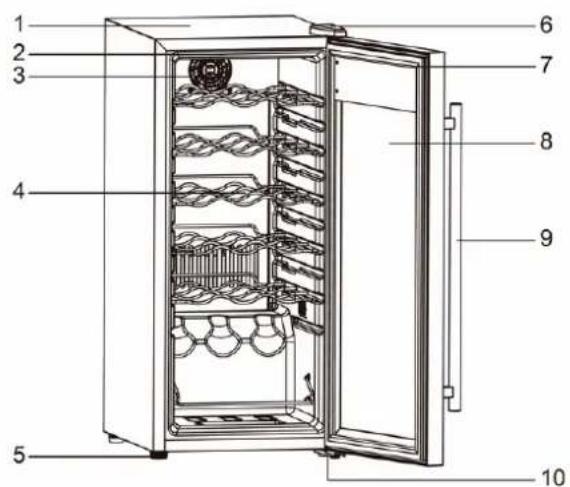
II. PARÇA ŞEMASI
Dolap1. 6. Üst Mentes, e
natural_image
Pure graphical icons for weather, temperature, and symbols on black background (no text or labels)SICAKLIK KONTROLÜNÜN AYARLANMASI
SICAKLIK KONTROLÜNÜN AYARLANMASI
Nutrichefkitchen.com/contact us