MCF25GRB - Fan MIDEA - Free user manual and instructions
Find the device manual for free MCF25GRB MIDEA in PDF.


User questions about MCF25GRB MIDEA
0 question about this device. Answer the ones you know or ask your own.
Ask a new question about this device
Download the instructions for your Fan in PDF format for free! Find your manual MCF25GRB - MIDEA and take your electronic device back in hand. On this page are published all the documents necessary for the use of your device. MCF25GRB by MIDEA.
USER MANUAL MCF25GRB MIDEA
natural_image
Line drawing of a standard electric fan with a circular top and handle (no text or symbols)natural_image
Diagram of a laboratory apparatus with a funnel and a vertical tube, showing a rotation arrow (no text or symbols)DE
natural_image
Diagram showing a rotating cylindrical component being placed on a base, with an arrow indicating rotation and a separate view of the same component (no text or symbols present)natural_image
Symbol of a trash bin crossed with no text or numbers, representing environmental restriction (no text present)DE
natural_image
Recycling symbol with three chasing arrows forming a triangle (no text or labels)DATENSCHUTZHINWEISE
Thank you for choosing Midea! Before using your new Midea product, please read this manual thoroughly to ensure that you know how to operate the features and functions that your new appliance offers in a safe way.
CONTENTS
THANK YOU LETTER 01
SAFETY INSTRUCTIONS 02
SPECIFICATIONS 03
PRODUCT OVERVIEW 04
PRODUCT INSTALLATION 05
OPERATION INSTRUCTIONS 07
CLEANING AND MAINTENANCE 10
TROUBLESHOOTING 11
TRADEMARKS, COPYRIGHTS AND LEGAL STATEMENT 12
DISPOSAL AND RECYCLING 13
DATA PROTECTION NOTICE 14
SAFETY INSTRUCTIONS
Intended Use
The following safety guidelines are intended to prevent unforeseen risks or damage from unsafe or incorrect operation of the appliance. Please check the packaging and appliance on arrival to make sure everything is intact to ensure safe operation. If you find any damage, please contact the retailer or dealer. Please note modifications or alterations to the appliance are not allowed for your safety concern. Unintended use may cause hazards and loss of warranty claims.
Explanation of Symbols
 | DangerThis symbol indicates that there are dangers to the life and health of persons due to extremely flammable gas. |
 | Warning of electrical voltageThis symbol indicates that there is a danger to life and health of persons due to voltage. |
 | WarningThe signal word indicates a hazard with a medium level of risk which, if not avoided, may result in death or serious injury. |
 | CautionThe signal word indicates a hazard with a low degree of risk which, if not avoided, may result in minor or moderate injury. |
 | AttentionThe signal word indicates important information (e.g., damage to property), but not danger. |
 | Observe instructionsThis symbol indicates that a service technician should only operate and maintain this appliance in accordance with the operating instructions. |
Read these operating instructions carefully and attentively before using/commissioning the unit and keep them in the immediate vicinity of the installation site or unit for later use!

CAUTION
- Read Rules for Safe Operation and Instructions Carefully.
- This appliance can be used by children aged from 8 years and above and persons with reduced physical, sensory or mental capabilities or lack of experience and knowledge if they have been given supervision or instruction concerning use of the appliance in a safe way and understand the hazards involved. Children shall not play with the appliance. Cleaning and user maintenance shall not be made by children without supervision.
- Keep electrical appliances out of reach from children or infirm persons. Do not let them use the appliances without supervision.
- Never insert fingers, pencils, or any other object through the grille when fan is running.
- Disconnect fan when moving from one location to another.
- Be sure fan is on a stable surface when operating to avoid overturning.
- DO NOT use fan in window, rain may create electrical hazard.
- Indoor use only.

WARNING
- If the supply cord is damaged, it must be replaced by manufacturer or its service agent or a similarly qualified person in order to avoid a hazard.
- To protect against the risk of electrical shock, do not immerse the unit, cord or plug in water or other liquid.
- When the appliance is not in use and before cleaning, unplug the appliance from the outlet.
- Indoor and household use only.
- When the fan was assembled, the rotor blade guard shall not be taken off anymore.
- Prior cleaning unplugs the fan.
- The rotor guard shall not be dissembled/opened to clean the rotor blades.
- Wipe the fan enclosure and rotor blade guard with a slightly damp cloth.
- The appliance is only to be used with the power supply unit provided with the appliance.
SPECIFICATIONS
| MCF25GRBProduct Model | |
| Working Voltage | 24V --- |
| Rated Power | 18W |
| Noise | ≤59dB(A) |
| AdapterParts | |
| Input | 100-240V~ 50/60Hz 1.5A |
| Output | 24V == 1.5A |
| Description SymbolValueUnit | |||
| Maximum fan flow rate F 13.19 m/min | ^3 | ||
| Fan power input | P 14.3 W | ||
| Service value | S_v | 0.92 | (m^3/min)W |
| Standby power consumption | P_SB | 0.195 | W |
| Off power consumption | P_OFF | —— | W |
| Fan sound power level | LWA | 58.1 dB(A) | |
| Maximum air velocity | C 5.262 meters/sec | ||
| Seasonal electricity consumption | Q 4.794 kWh/a | ||
| Measurement standard for service value | EN IEC 60879:2019 | ||
| Contact details for obtaining more information | GD Midea Environment Appliances MFG. Co., Ltd No.28, Dong Fu Road, HeSui East Industrial Area, Dong Feng Town, ZhongShan, GuangDong, China. | ||
PRODUCT OVERVIEW
Part Name
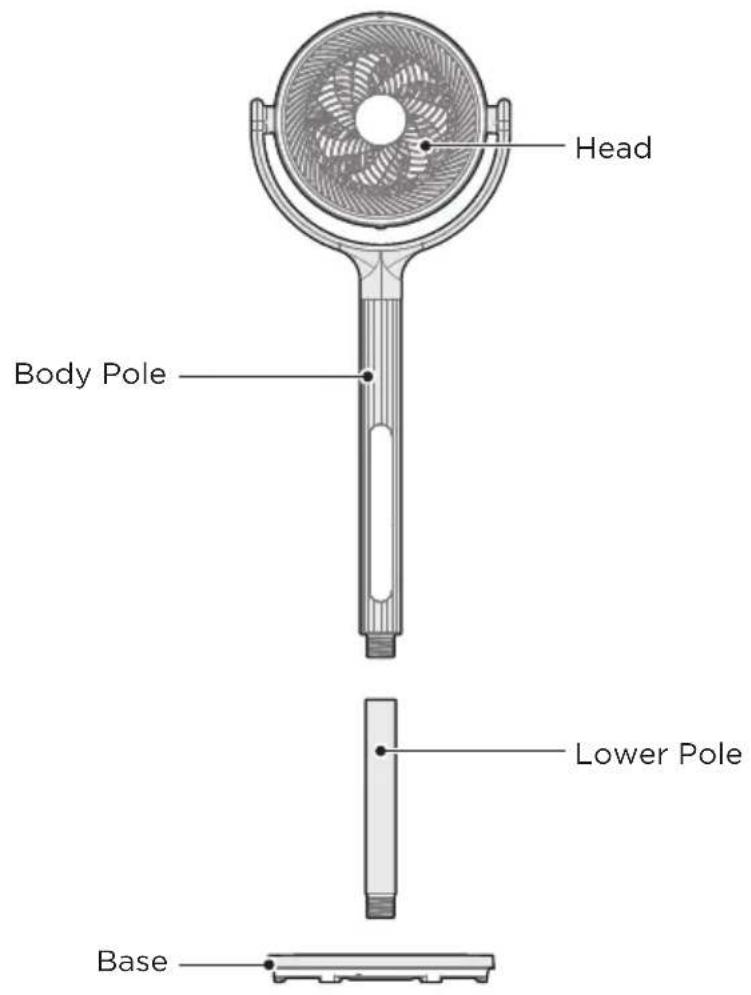
Part List
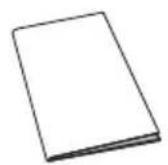
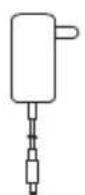
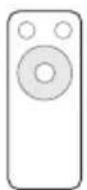
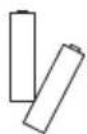
Adapter x 1User Guide x 1 Battery x 2Remote Controller x 1

NOTE
All the pictures in this manual are for explanation purpose only. Any discrepancy between the real object and the illustration in the drawing shall be subject to the real object.
PRODUCT INSTALLATION
Installing the Pole
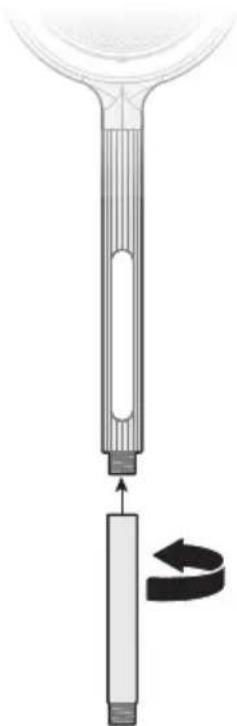
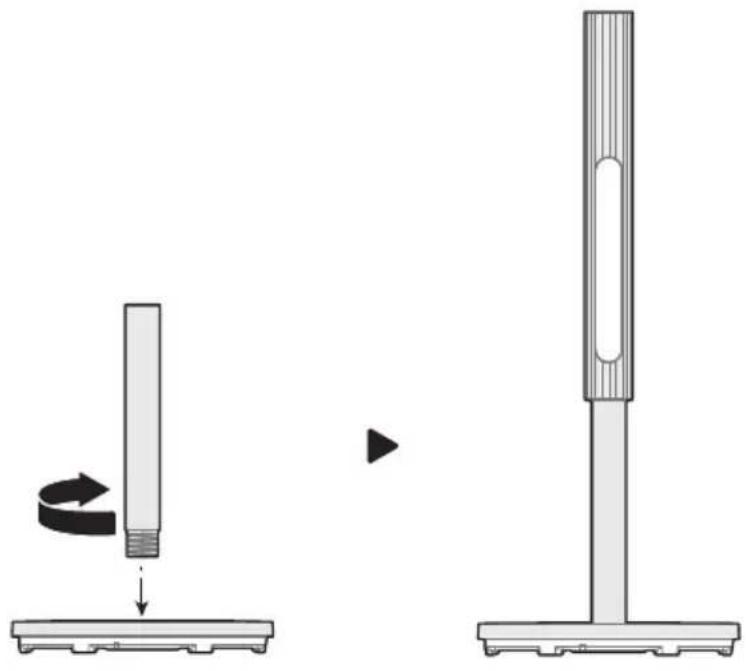
- Align the lower pole tube port as shown in the figure with the lower end of the body pole, and tighten the lower pole tube by rotating counterclockwise.
natural_image
Diagram of a laboratory apparatus with a funnel and a vertical tube, showing a rotation arrow (no text or symbols)EN
- Align the lower pole tube port as shown in the figure with the base interface, and tighten the lower pole tube by rotating clockwise.
natural_image
Diagram showing a rotating cylindrical component and its side view with a vertical post (no text or symbols)OPERATION INSTRUCTIONS
Description of Keys and Display
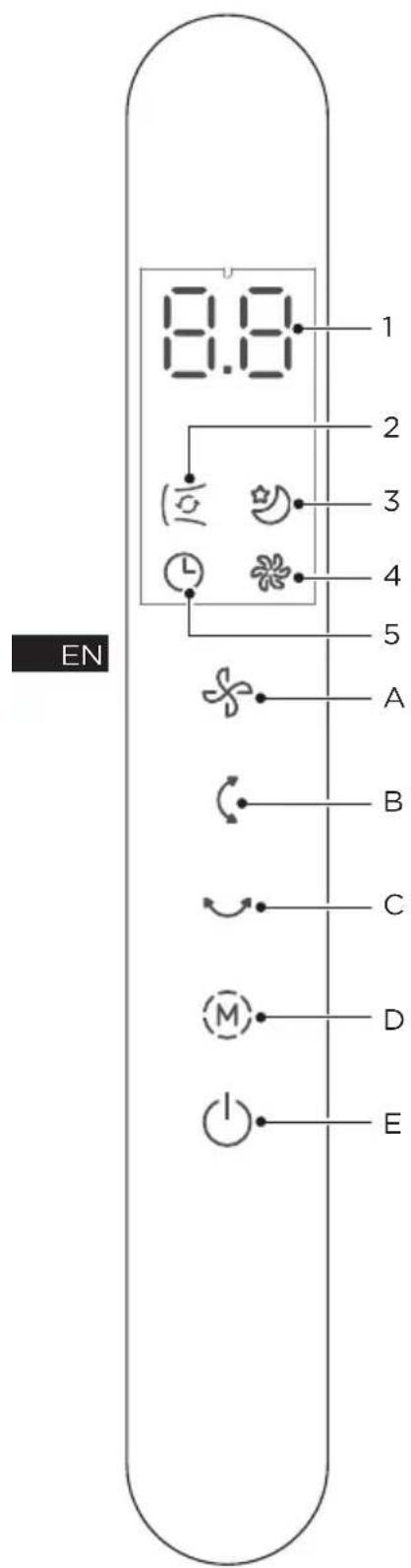
Display Area
| Description function No Icon | ||
| 1 | 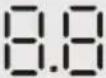 | • Comprehensive display area |
| 2 |  | • Cycle wind indicator light |
| 3 |  | • Sleeping wind indicator light |
| 4 |  | • Custom wind indicator light |
5 • Time  | |licator light |
Operation Area
| Description function No Button | ||
| A |  SpeedButton SpeedButton | • In the power-on state, press to adjust the speed of custom wind and cycle in the following sequence: 1→2→3 →4...12→1; or cycle the sleeping wind in the following sequence: 1→2→3; in cycle wind mode, it runs at the highest level of custom wind by default, and vertical and horizontal swing are turned on. |
| B |  VerticalswingButton VerticalswingButton | • Press in power on state to cycle in the following sequence:30°-60°-135°-stop-30°.... The corresponding display screen is as follows: --→30°==→60°≡≡→135°. |

| Description function No Button | ||
| C |  Horizontal swing Button Horizontal swing Button | Press in power on state to cycle in the following sequence: 30^ - 60^ - 120^ -stop- 30^ .... The corresponding display screen is as follows: -- → 30^ == → 60^ ≡≡ → 120^ Press and hold this key to enter the timer setting state; in the timer setting state, press this key to set the schedule time and cycle in the following sequence: 1 2 3 4 15 1 .If there is no operation in 3 seconds, horizontal swing setting automatically exits. |
| D |  Mode Button Mode Button | In power on state, press to cycle in the following sequence: custom wind → sleep wind → cycle wind (switch circularly). |
| E |  On/Standby Button On/Standby Button | Press in standby state to enter power on state.Press in power on state to enter standby state. |
Description of Other Functions
- Memory Function
When the power is not disconnected (i.e., in standby), the fan has a memory function; it can remember the wind speed and mode before standby.
• Automatically Shut Down Function
After plugging in the power supply and entering the power-on state, if the fan is not operated, it will automatically shut down after 24 hours.
- Screen Automatically OFF Function
If there is no operation for 30 seconds while the fan is running, the screen will automatically turn off.
After the screen is off, touch any button except the standby button to wake up the screen.
Remote Control
- The remote control is valid within 5 meters in front of the fan and within 30 degrees of the deviation angle.
- Batteries contain many heavy metals and acid-base substances, which threaten human health; used batteries should be recycled by category.
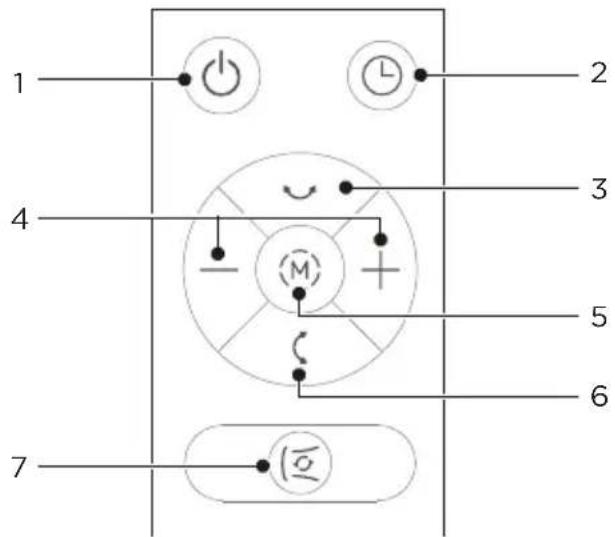
| FunctionNO Description | ||
| EN | 1 |  • On/Standby • On/Standby |
| 2 |  • Touch directly to set the scheduled on/off time. • Touch directly to set the scheduled on/off time. | |
| 3 |  • Press this key to switch the horizontal swing in the following sequence: 30°, 60°, 120°, OFF. • Press this key to switch the horizontal swing in the following sequence: 30°, 60°, 120°, OFF. | |
| 4 |  • Directly touch to increase/decrease the wind speed; the schedule time can be set in the timer state. • Directly touch to increase/decrease the wind speed; the schedule time can be set in the timer state. | |
| 5 |  • Press this key to set the wind mode: custom → sleep → cycle (switch circularly). • Press this key to set the wind mode: custom → sleep → cycle (switch circularly). | |
| 6 |  • Press this key to switch the vertical swing in the following sequence: 30°, 60°, 135°, OFF. • Press this key to switch the vertical swing in the following sequence: 30°, 60°, 135°, OFF. | |
| 7 |  • Press this key to enter the cycle wind mode. • Press this key to enter the cycle wind mode. | |

NOTE
- Use manganese or alkaline batteries of type "AAA".
- Do not dispose of batteries in fire, batteries may explode or leak.
- Do not mix old and new batteries.
- Do not mix alkaline, standard (carbon-zinc) or rechargeable (nickel-cadmium) batteries.
CLEANING AND MAINTENANCE
The fan requires minimal maintenance. Do not try to fix it by yourself. Refer it to qualified service personnel if service is needed.
- Before cleaning and assembling, unplug the fan power.
- To ensure adequate air circulation to the motor, keep vents at the rear of the motor free of dust.
Do not disassemble the fan to remove dust. - Please wipe the exterior parts with a soft cloth soaking a mild detergent.
- Do not use any abrasive detergent or solvents to avoid scratching the surface.
- Do not use any of the following as a cleaner: gasoline, thinner.
- Do not allow water or any other liquid entering into the motor housing or interior parts.
- Be sure to unplug from the electrical supply source before cleaning.
- Plastic parts should be cleaned with a soft cloth moisten with mild soap Thoroughly remove soapsuds with dry cloth.
TROUBLESHOOTING
Operation of your appliance can lead to errors and malfunctions. The following tables contain possible causes and notes for resolving an error message or malfunction. It is recommended to read the table below carefully in order to save your time and money that may cost for calling to the service center.
| Cause SolutionProblem | ||
| The machine does not work properly after installed | · The power cable is not plugged in or has poor contact. | Make sure the plug is properly inserted into the socket. |
| · The power button has not been depressed. | Press the power button on the pole. | |
| The remote does not work | · The battery needs replacing. | Replace the battery. |
| · The remote is being used more than 16 feet away from the fan. | Use the remote closer to the fan and make sure it is pointing directly at the display panel. | |
EN
TRADEMARKS, COPYRIGHTS AND LEGAL STATEMENT
Midea logo, word marks, trade name, trade dress and all versions thereof are valuable assets of Midea Group and/or its affiliates (“Midea”), to which Midea owns trademarks, copyrights and other intellectual property rights, and all goodwill derived from using any part of an Midea trademark. Use of Midea trademark for commercial purposes without the prior written consent of Midea may constitute trademark infringement or unfair competition in violation of relevant laws.
This manual is created by Midea and Midea reserves all copyrights thereof. No entity or individual may use, duplicate, modify, distribute in whole or in part this manual, or bundle or sell with other products without the prior written consent of Midea.
All the described functions and instructions were up to date at the time of printing this manual. However, the actual product may vary due to improved functions and designs.
EN
DISPOSAL AND RECYCLING
Important instructions for environment
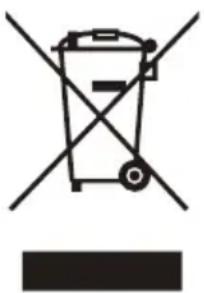
Compliance with the WEEE Directive and Disposing of the Waster Product: This product complies with EU WEEE Directive (2012/19/EU). This product bears a classification symbol for waster electrical and electronic equipment (WEEE).
This symbol indicates that this product shall not be disposed with other household wastes at the end of its service life. Used device must be returned to official collection point for recycling of electrical electronic devices. To find these collection systems please contact to your local authorities or retailer where the product was purchased. Each household performs important role in recovering and recycling of old appliance. Appropriate disposal of used appliance helps prevent potential negative consequences for the environment and human health.
natural_image
Symbol of a trash bin crossed with no text or labels, accompanied by a black rectangular block below (no text or symbols present)EN
Compliance with RoHS Directive
The product you have purchased complies with EU RoHS Directive (2011/65/EU). It does not contain harmful and prohibited materials specified in the Directive.
Package information
Packaging materials of the product are manufactured from recyclable materials in accordance with our National Environment Regulations. Do not dispose of the packaging materials together with the domestic or other wastes. Take them to the packaging material collection points designated by the local authorities.

natural_image
Recycling symbol with three chasing arrows forming a triangle (no text or labels)DATA PROTECTION NOTICE
For the provision of the services agreed with the customer,
we agree to comply without restriction with all stipulations of applicable data protection law, in line with agreed countries within which services to the customer will be delivered, as well as, where applicable, the EU General Data Protection Regulation (GDPR).
Generally, our data processing is to fulfil our obligation under contract with you and for product safety reasons, to safeguard your rights in connection with warranty and product registration questions. In some cases, but only if appropriate data protection is ensured, personal data might be transferred to recipients located outside of the European Economic Area.
Further information is provided on request. You can contact our Data Protection Officer via MideaDPO@midea.com. To exercise your rights such as right to object your personal date being processed for direct marketing purposes, please contact us via MideaDPO@midea.com. To find further information, please follow the QR Code.
EN
natural_image
Diagram of a laboratory apparatus with a funnel and a vertical tube, showing a rotation arrow (no text or symbols)IT
natural_image
Diagram showing a rotating cylindrical component being placed on a base, with an arrow indicating rotation and a separate view of the same component (no text or symbols present)ISTRUZIONI PER L'USO
natural_image
Symbol of a trash bin crossed out by two crossed lines, with a blank rectangular base below (no text or symbols)natural_image
Recycling symbol icon with three chasing arrows forming a triangle (no text or labels)INSTALACE PRODUKTU 05
NÁVOD K OBSLUZE 07
ČIŠTĚNÍ A ÚDRŽBA 10
ŘEŠENÍ PROBLÉMŮ 11
OCHRANNÉ ZNÁMKY, AUTORSKÁ PRÁVA A PRÁVNÍ PROHLÁŠENÍ 12
NOTA WS. OCHRONY DANYCH OSOBOWYCH 13
OZNÁMENÍ O OCHRANĚ OSOBNÍCH ÚDAJŮ 14
natural_image
Diagram of a laboratory apparatus with a funnel and a vertical tube, showing a rotation arrow (no text or symbols)natural_image
Diagram showing a rotating cylindrical component being placed on a base, with an arrow indicating rotation and a separate view of the same component (no text or symbols present)NÁVOD K OBSLUZE
natural_image
Symbol of a trash bin crossed with no text or numbers, representing waste sorting or restriction (no text present)natural_image
Recycling symbol icon with three chasing arrows forming a triangle (no text or labels)DATENSCHUTZHINWEISE
DISPOSAL AND RECYCLING 13
OZNÁMENIE O OCHRANE OSOBNÝCH ÚDAJOV 14
BEZPEČNOSTNÉ POKYNY
Zamýšlané použitie
natural_image
Diagram of a laboratory apparatus with a funnel and a vertical tube, showing a rotation arrow (no text or symbols)natural_image
Diagram showing a rotating cylindrical component being placed on a base, with an arrow indicating rotation and a separate view of the same component (no text or symbols present)SK
NÁVOD NA OBSLUHU
Popis tlačidiel a displeja

Zobrazovacia oblast
DISPOSAL AND RECYCLING
Dôležité pokyny pre životné prostredie
natural_image
Symbol of a trash bin crossed with no text or numbers, representing waste sorting or disposal (no text present)Súlad so smernicou RoHS:
natural_image
Recycling symbol with three chasing arrows forming a triangle (no text or labels)OZNÁMENIE O OCHRANE OSOBNÝCH ÚDAJOV
VUE D'ENSEMBLE DU PRODUIT 04
INSTALLATION DU PRODUIT 05
INSTRUCTIONS D'UTILISATION 07
NETTOYAGE ET ENTRETIEN 10
DÉPANNAGE 11
MARQUES, DROITS D'AUTEUR ET MENTIONS LEGALES 12
MISE AU REBUT ET RECYCLAGE 13
AVIS SUR LA PROTECTION DES DONNEES 14
CONSIGNES DE SÉCURITÉ
Usage prévu
VUE D'ENSEMBLE DU PRODUIT
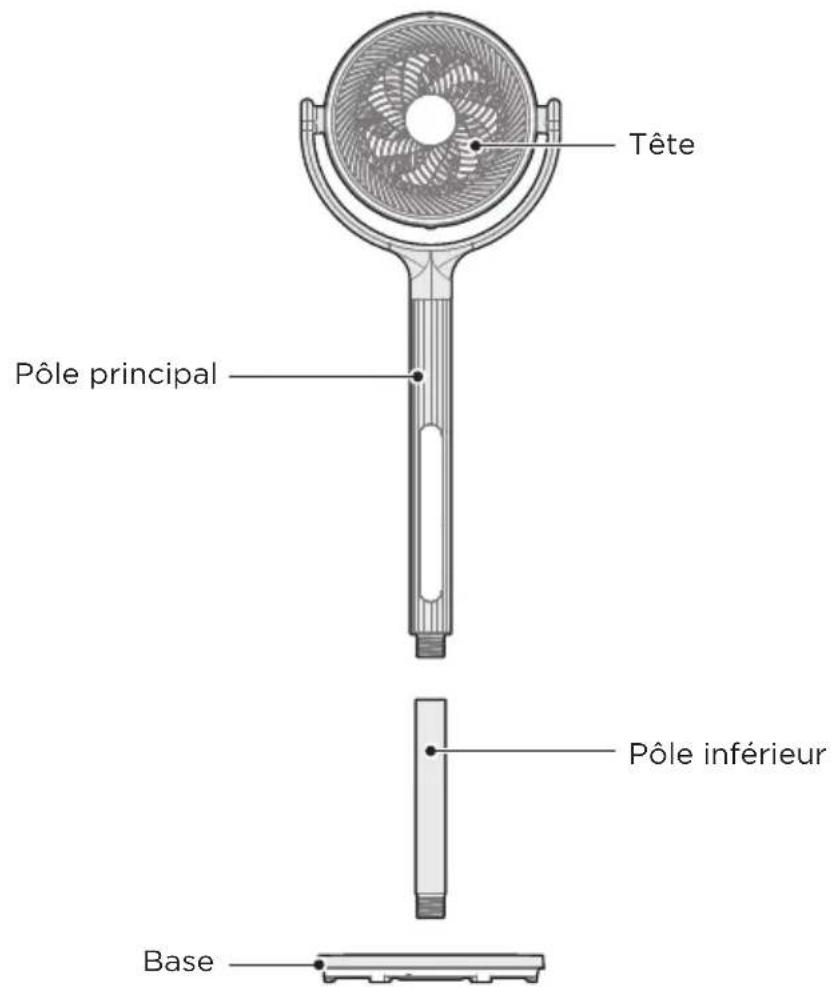
Noms des Pièces
INSTALLATION DU PRODUIT
natural_image
Diagram of a laboratory apparatus with a funnel and a vertical tube, showing a rotation arrow (no text or symbols)natural_image
Diagram showing a rotating cylindrical component being placed on a base, with an arrow indicating rotation and a separate view of the same component (no text or symbols present)FR
INSTRUCTIONS D'UTILISATION
natural_image
Symbol of a trash bin crossed with no text or numbers, representing waste sorting or disposal (no text present)natural_image
Recycling symbol icon with three chasing arrows forming a triangle (no text or labels)AVIS SUR LA PROTECTION DES DONNEES
make yourself at home