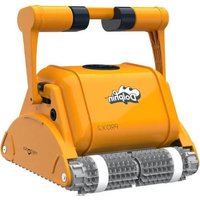
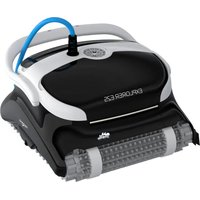
PROX 2 - Vacuum Cleaner DOLPHIN - Free user manual and instructions
Find the device manual for free PROX 2 DOLPHIN in PDF.


| Product type | Robotic pool cleaner |
| Brand | Dolphin |
| Model | PROX 2 |
| Minimum depth | 0,80 m |
| Maximum depth | 5 m |
| Motor protection | IP 68 |
| Power supply | Input 100-250 V AC, 50-60 Hz, 180 W, output <30 V DC, IP 54 |
| Float cable | Included |
| Brushes | Wonder Brush and Wonder Rings |
| Remote control | With control panel, radio reception indicator and battery charge indicator |
| Cleaning modes | Standard, Ultra-clean, Floor only, Walls only |
| Cleaning cycles | Quick (4 h), Efficient (6 h), Extra (8 h) |
| Timer delay | 0 h, 1 h, 2 h |
| Filter bag indicator | Red light (flashing: partially full, solid: full) |
| Filter maintenance | Rinse with water hose; machine wash on delicate cycle |
| Brush maintenance | Rinse with water hose |
| Impeller cleaning | Open and remove debris after unplugging |
| Safety | Use original power supply; outlet protected by circuit breaker; power supply within 3 m of pool; do not enter pool while operating; disconnect before maintenance |
| Off-season storage | Drain water, clean filter, rewind cable without kinks, store in a sheltered place on the caddy or upside down, temperature 5-45°C |
| Required water conditions | Chlorine max 4 ppm, pH 7,0-7,8, temperature 6-34°C, NaCl max 5000 ppm |
Frequently Asked Questions - PROX 2 DOLPHIN
User questions about PROX 2 DOLPHIN
0 question about this device. Answer the ones you know or ask your own.
Ask a new question about this device
Download the instructions for your Vacuum Cleaner in PDF format for free! Find your manual PROX 2 - DOLPHIN and take your electronic device back in hand. On this page are published all the documents necessary for the use of your device. PROX 2 by DOLPHIN.
USER MANUAL PROX 2 DOLPHIN
Dolphin PROX 2 Gyro Pool Cleaner
EN Operating Instructions
Dolphin PROX 2 Gyro Pool Cleaner.... p. 1-10
natural_image
Exterior view of a modern office building (no signage)_
-
| _
一
1
EN
Dolphin PROX 2 Gyro Robotic Pool Cleaner
Operating Instructions
Contents
- INTRODUCTION 2
- SPECIFICATIONS 2
- WARNINGS AND CAUTIONS....2
3.1. Warnings....2
3.2. Cautions....2
- POOL CLEANER PARTS....3
- USING THE POOL CLEANER....4
5.1. Setup....4
5.2. Putting the Pool Cleaner into the pool....5
5.3. Removing the Pool Cleaner from the pool....5
5.4. Maintenance....6
5.5. Off-season storage 7
- POWER SUPPLY 8
- REMOTE CONTROL UNIT 9
CADDY ASSEMBLY 81
Dolphin PROX 2 Gyro Pool Cleaner
Operating Instructions
1. INTRODUCTION
Thank you for purchasing a Maytronics Robotic Pool Cleaner.
We are sure that your Maytronics Robotic Pool Cleaner will provide you with reliable, convenient and cost effective pool cleaning. Its reliable filtration in all pool conditions and all-surface climbing brush enhance maximum pool hygiene.
The Robotic Pool Cleaners by Maytronics deliver advanced cleaning technologies, long lasting performance and easy maintenance.
2. SPECIFICATIONS
Motor protection: IP 68
Minimum depth: 0.80m/2.6ft
Maximum depth: 5m/16.4ft
3. WARNINGS AND CAUTIONS
3.1. Warnings

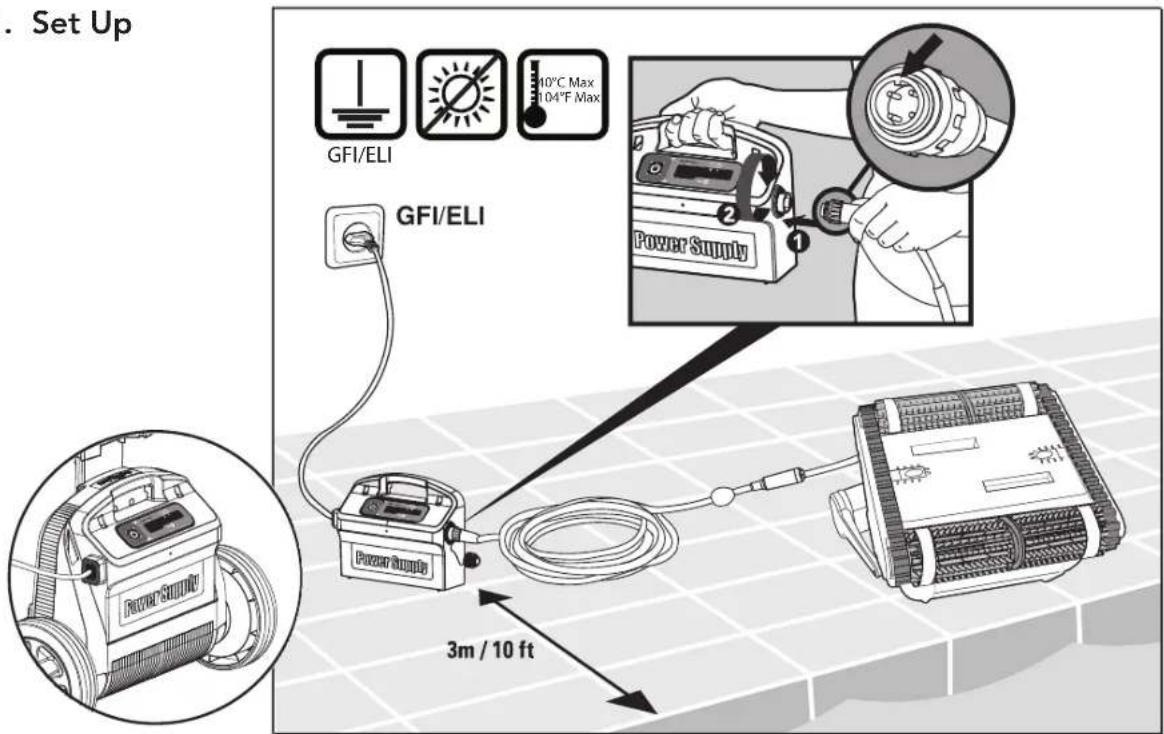
• Use the originally supplied power supply only
- Ensure the electrical outlet is protected by a ground fault interrupter (GFI) or an earth leakage interrupter (ELI)
- Keep the power supply out of standing water
- Position the power supply at least 3m/10ft away from the edge of the pool
- Do not enter the pool while the pool cleaner is working
• Unplug the power supply before servicing
3.2. Cautions
When not in use store the Pool Cleaner on the Caddy in a shaded area.
Use the Pool Cleaner in the following water conditions only:
| Chlorine Max 4 ppm | |
| pH 7.0 - 7.8 | |
| Temperature 6 – 34°C (43-93°F) | |
| NaCl Maximum = 5000 ppm | |
4. POOL CLEANER PARTS
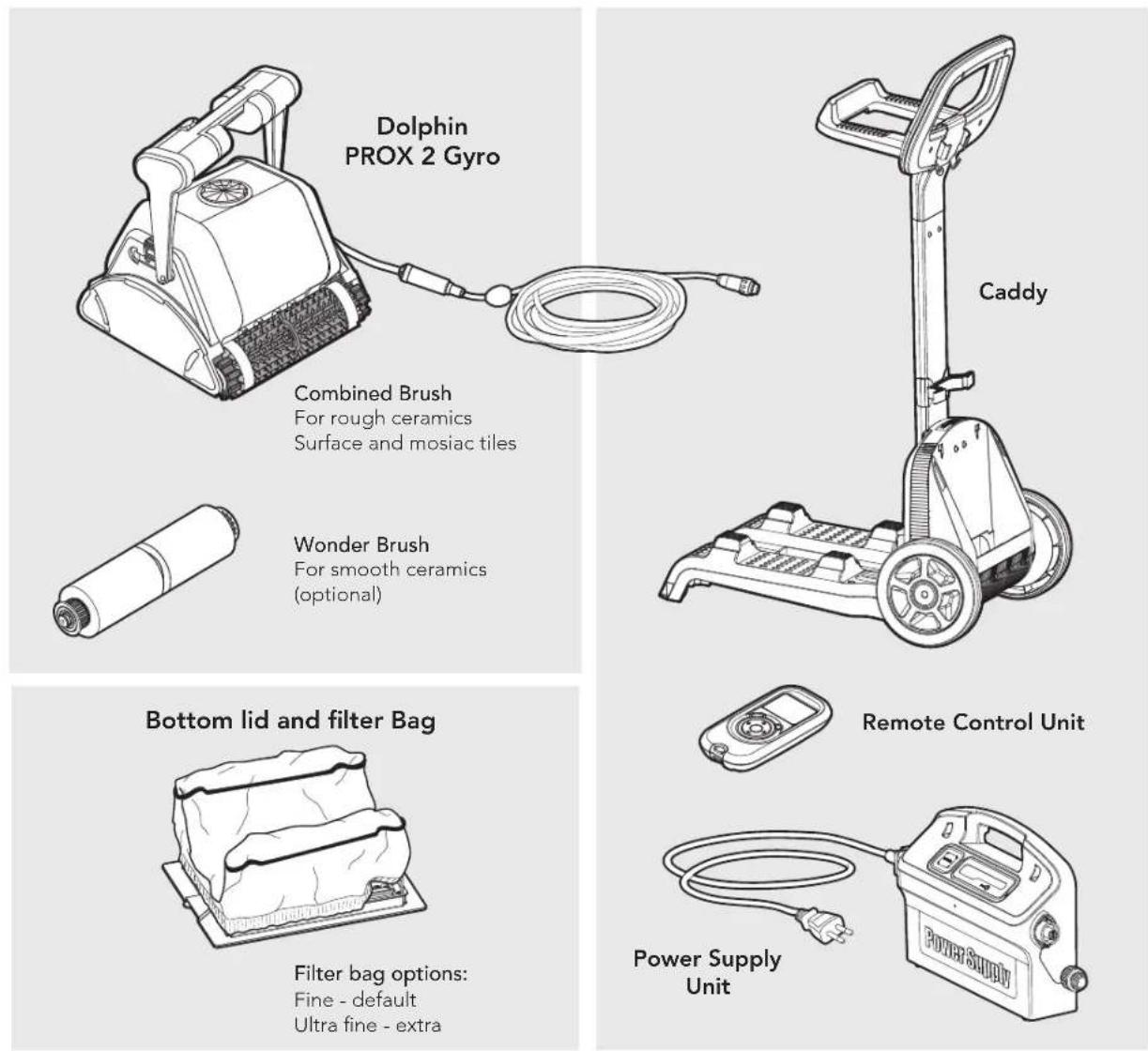
5. USING THE POOL CLEANER
5.1. Set Up
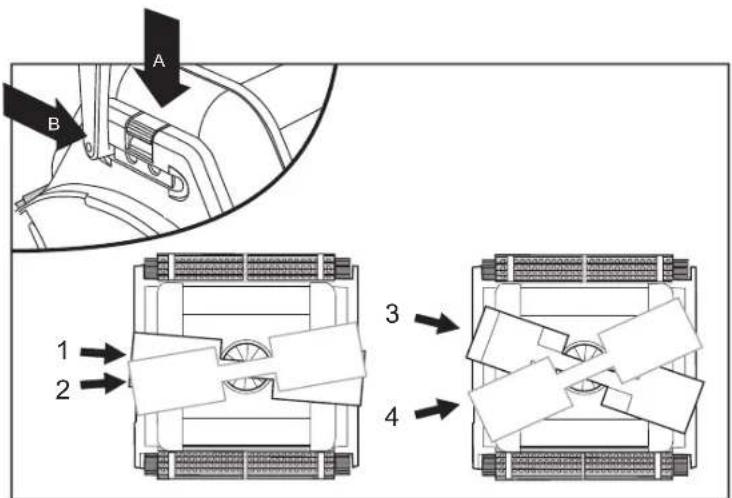
Change diagonal handle position for water line sideway movement.
To adjust the handle angle:
A. Press the latch down and hold it in position.
B. Move the handle to the desired position and release the latch to hold the handle in place.
5.2. Putting the Pool Cleaner into the pool
If Wonder brush/ Wonder rings are dry, soak them in water until soft.
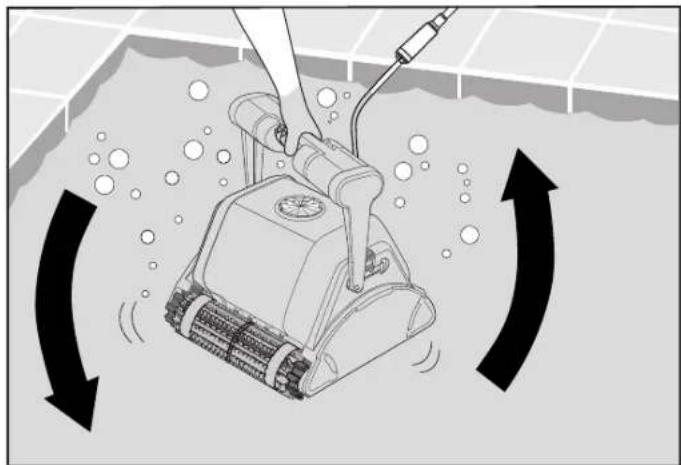
Shake the robot from side to side or turn it upside down to release trapped air. Let it sink to the pool floor.
natural_image
Illustration of a robotic vacuum cleaner inside a pool with directional arrows indicating flow or movement (no text or symbols)Turn the power supply ON
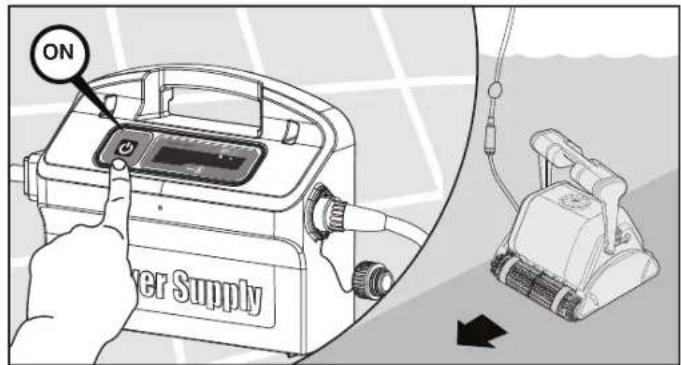
5.3. Removing the Pool Cleaner from the pool
The robot will perform automatic shut-off at the end of the cleaning cycle.

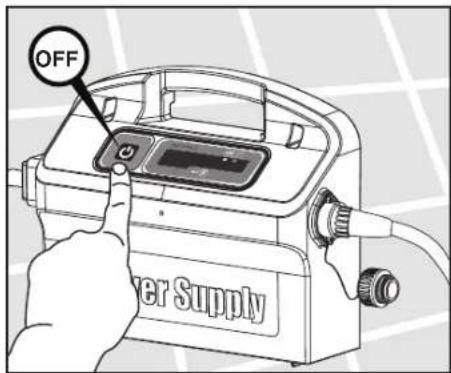
Turn Off and unplug the power supply
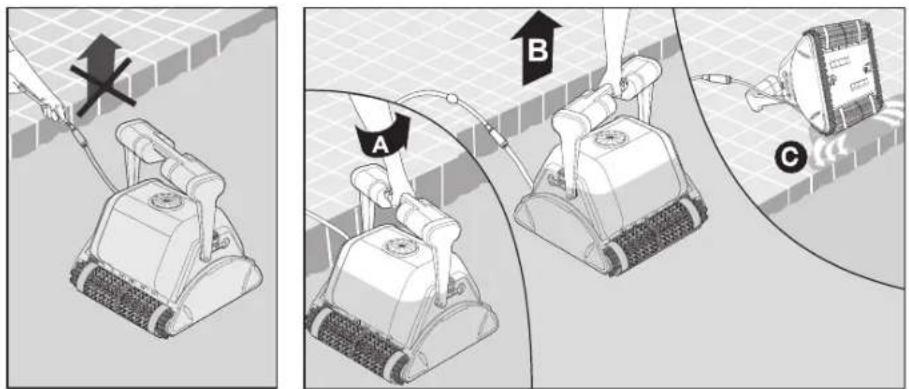
Using the floating cable, bring the Pool Cleaner to the pool's edge.

DO NOT PULL THE POOL CLEANER FROM THE POOL USING THE CABLE
5.4. Maintenance
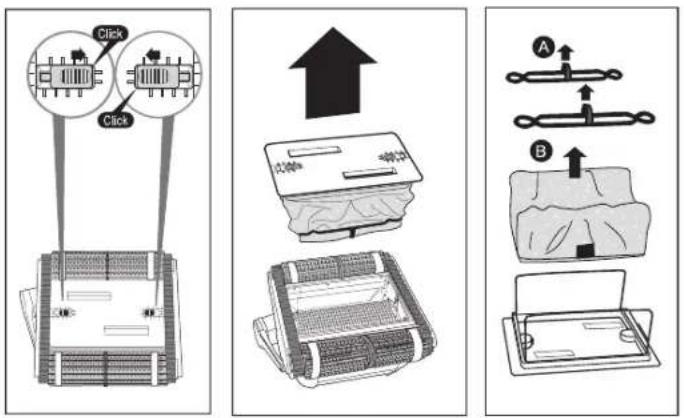
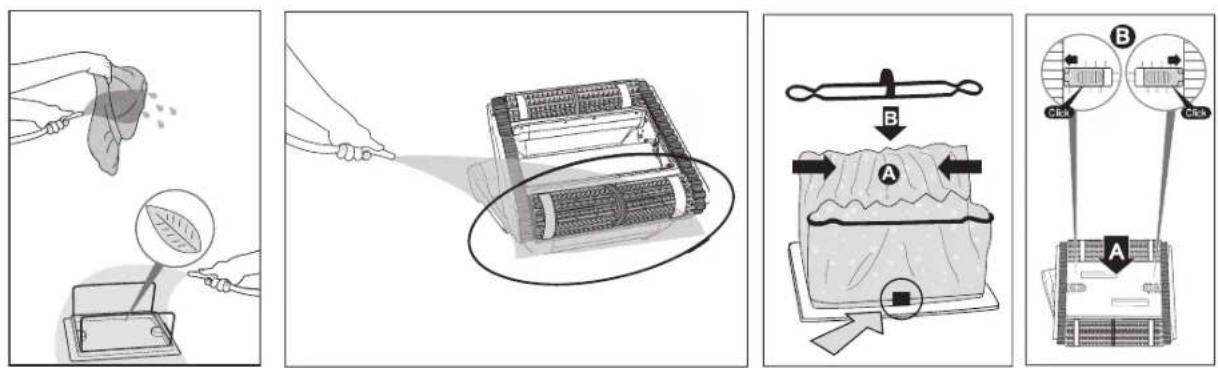
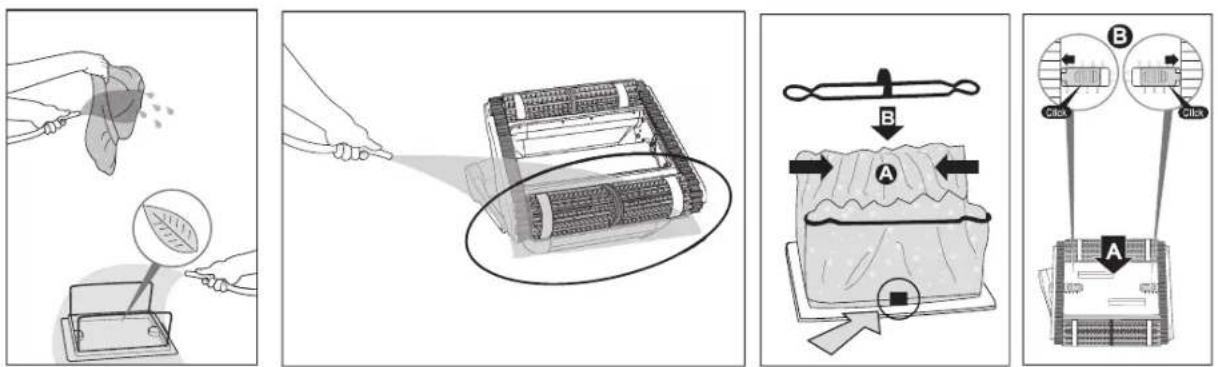
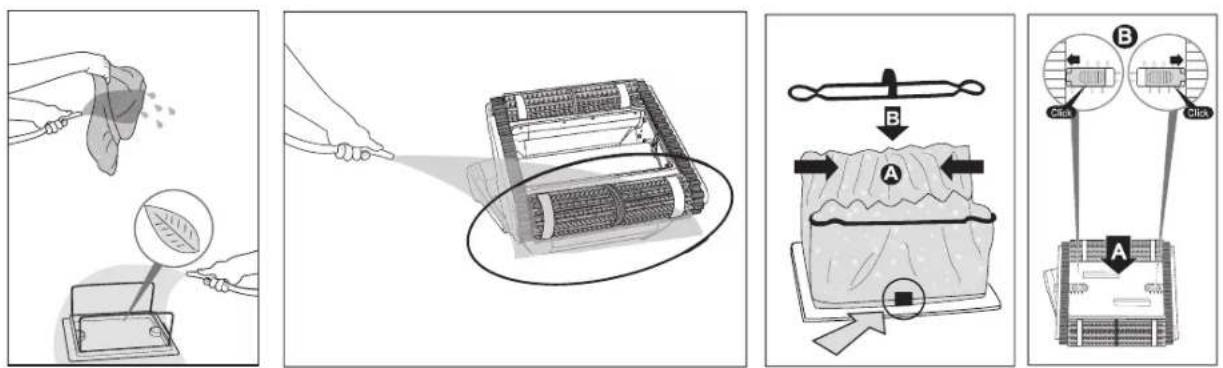
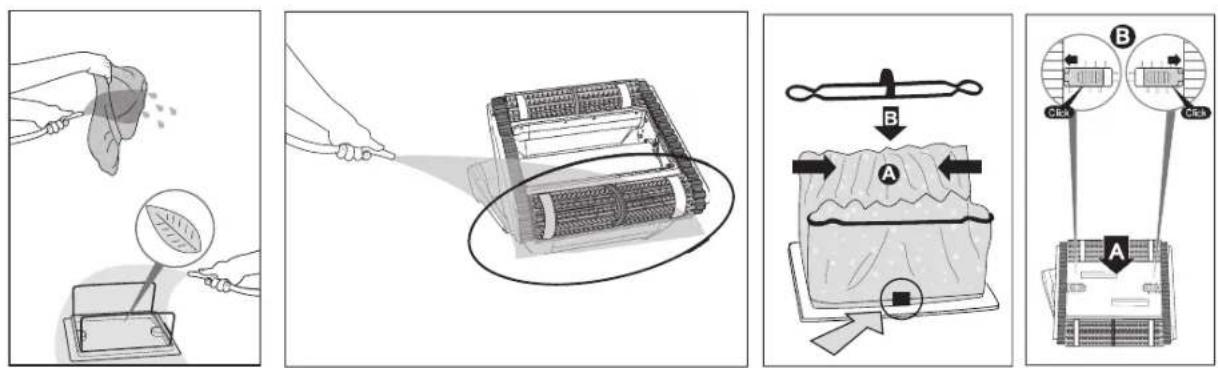
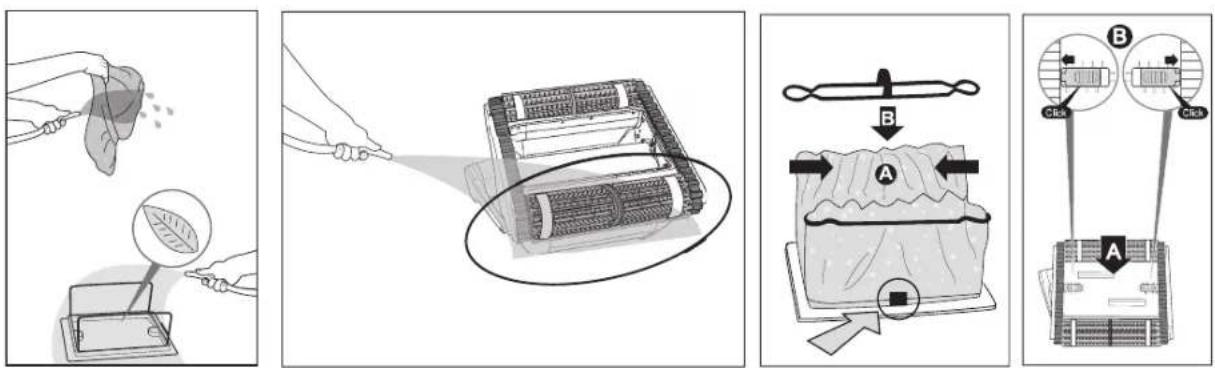
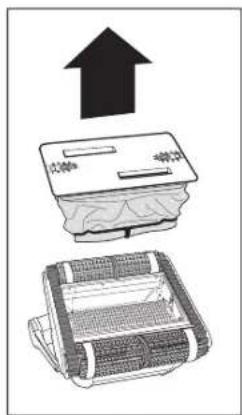
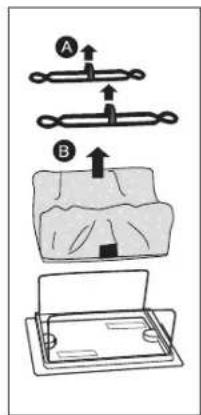
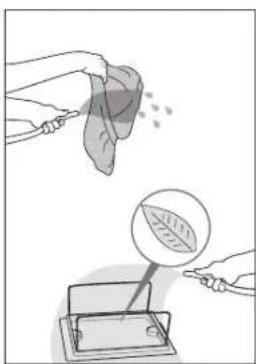
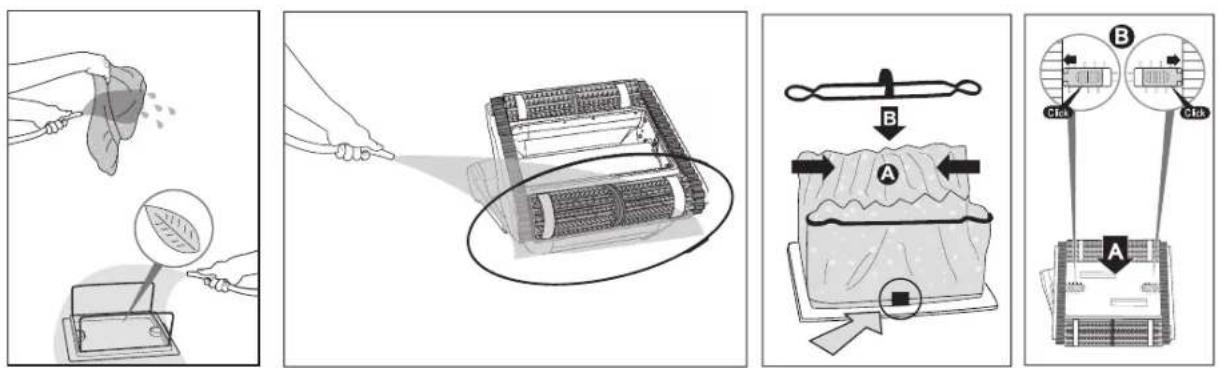
Clean the filter bag with a hose. Periodically clean the brushes with a hose. It is recommended to periodically wash the filter bag in a washing machine. Use gentle cycle program.
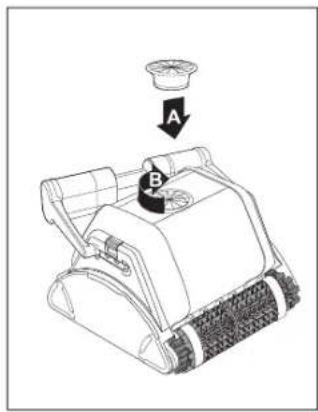
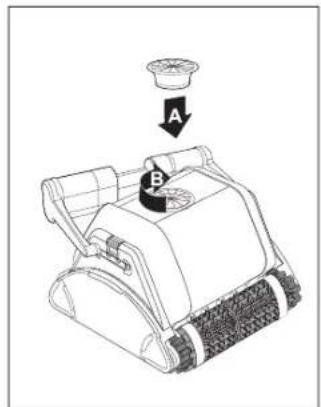
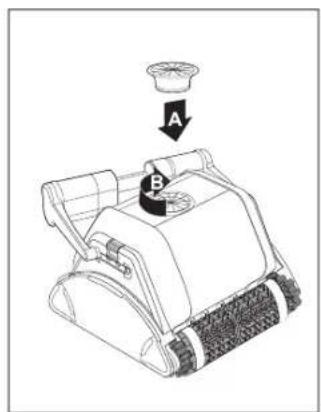
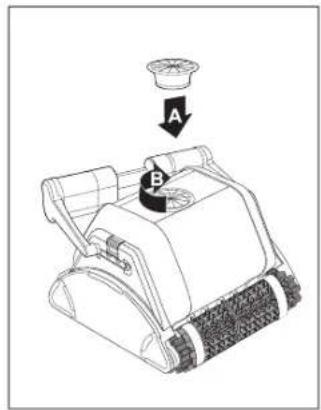
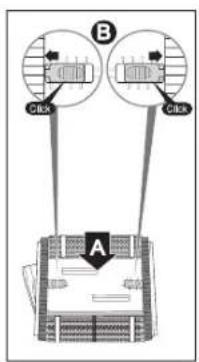
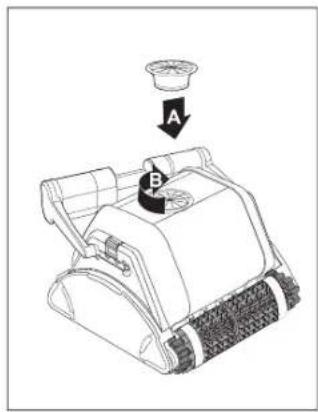
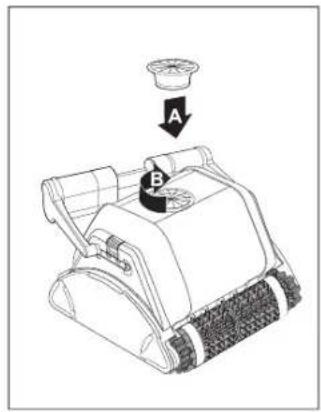
Cleaning the impeller

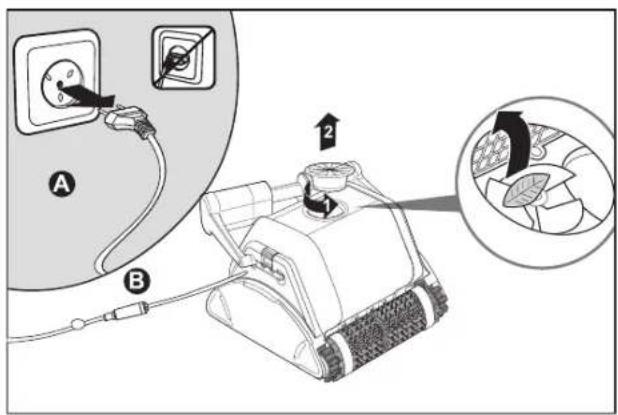
Unplug the power supply
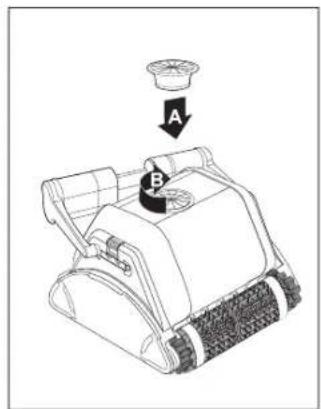
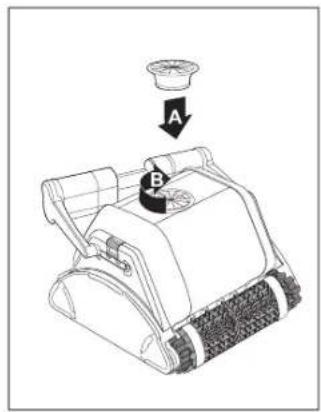
If you notice debris trapped in the impeller open the impeller and remove the debris.
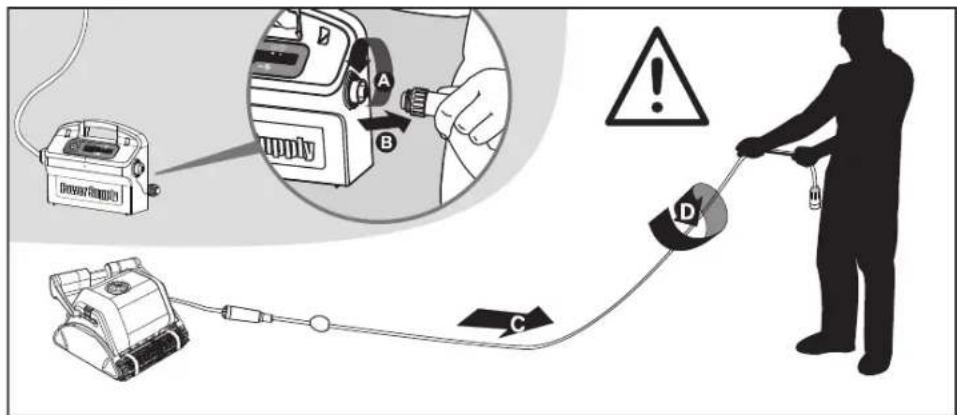
Cable
To remove the kinks, stretch the cable out completely and let it sit for at least a day in the sun.
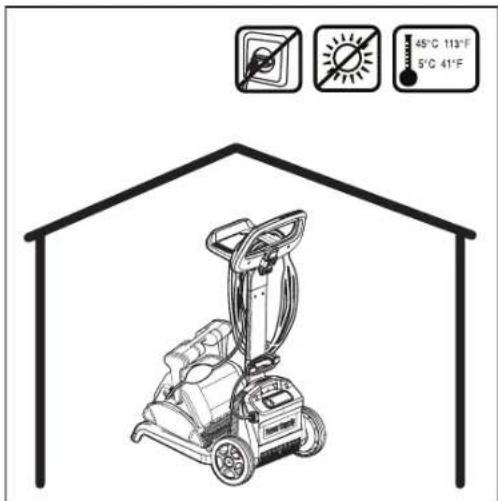
5.5. Off-season storage
If the pool cleaner will not be in use for an extended period, perform the following storage steps:
• Make sure that no water is left in the pool cleaner
• Thoroughly clean the filter bag and insert in place
- Roll up the cable so that it has no kinks and place on the Caddy
- Store the pool cleaner in a protected area either on its Caddy or simply upsidedown
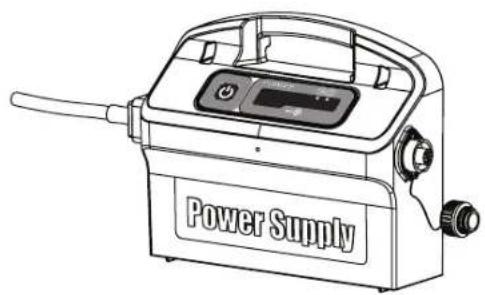
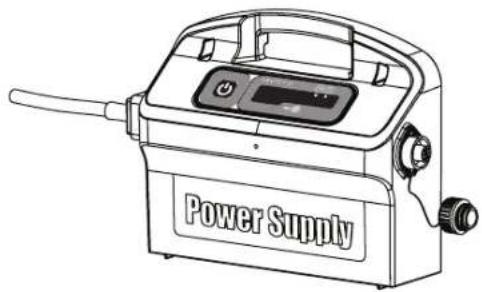
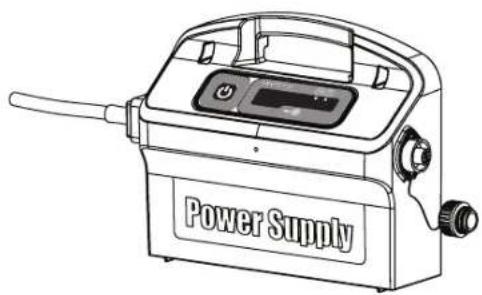
6. POWER SUPPLY
Digital "Switch-Mode" Power Supply with full filter bag and delay indicator.
• Input - 100-250 AC Volts
- 50-60 Hertz
• 180 Watt
• Output - <30 VDC
IP 54
natural_image
Line drawing of a power supply device with control panel and handle (no text or symbols on the device itself)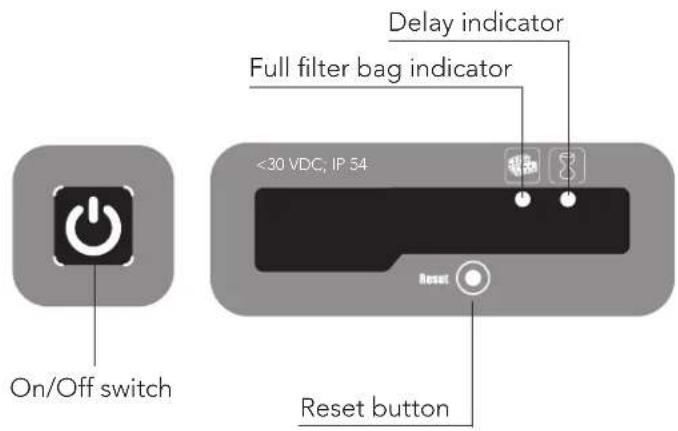

Full filter bag indicator and Reset button
The power supply is equipped with a filter bag status indicator.
The red LED indicates two filter conditions.
- When blinking - The filter is partially blocked.
- When lighted - The filter is blocked and must be emptied and cleaned.
If the LED does not turn off after the filter bag had been emptied and cleaned, press the RESET button while the robot is working.

Delay indicator
The power supply is equipped with a Delay indicator that indicates if the Delay option is activated (through the remote control unit).
7. REMOTE CONTROL UNIT
The Control Panel
The remote control unit (RCU) offers two operation modes – Automatic mode and manual direction control mode.
In automatic mode, the cleaning parameters can be changed.
In manual direction mode, the robot's motion can be controlled manually.
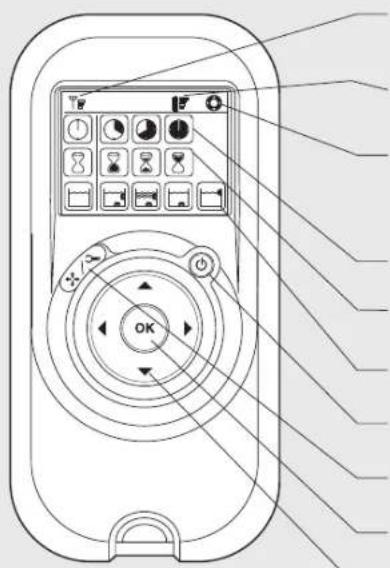
Radio reception meter
When no black lines are showing, move closer to the power supply unit
Battery level meter
When flashing, change the batteries
Manual control indicator
When flashing, you are in manual direction control mode
Cleaning cycle icons
Delay timer icons
Cleaning mode icons
ON/OFF button
Manual/automatic select button
Set/OK button
Direction control arrows
| Manual Direction Control Mode | ||
| 1. Press the On/Off button once. The remote control will start in manual direction control mode.2. Use the direction control arrows (see right) to control the movement of the robot around the pool. | ||
| Exiting Manual Direction Control Mode and setting the Automatic Mode | ||
| Manual/AutomaticSelectbutton | 1. To exit the manual direction control mode, press the Manual/Automatic select button once only.2. The digital screen will light up and three rows of function icons will be displayed in default mode. | |
| Directioncontrolarrows | 1. To change the parameters press the up or down arrows.2. To select the parameter settings use the right or left arrows. When you reach the required function press the Set/OK button. | |
Press the Manual/Automatic select button and then choose the desired parameters according to the following table:
 Cleaning cycle indicatorThis determines the length of the cleaning cycle. Cleaning cycle indicatorThis determines the length of the cleaning cycle. |  Fast4-hour cycle Fast4-hour cycle |  Efficient6-hour cycle for everyday use.(Default setting) Efficient6-hour cycle for everyday use.(Default setting) |  Extra8-hour cycle Extra8-hour cycle | |
 Delay time indicatorThis determines when the pool cleaner starts to work. Delaying allows the dirt to settle to the bottom of the pool. Delay time indicatorThis determines when the pool cleaner starts to work. Delaying allows the dirt to settle to the bottom of the pool. |  Immediate start (Default setting) Immediate start (Default setting) |  One-hour delay One-hour delay |  Two-hour delay Two-hour delay | |
 Cleaning action indicatorAllowing you to choose from the following options. Cleaning action indicatorAllowing you to choose from the following options. |  StandardFloor and wall cleaning.(Default setting) StandardFloor and wall cleaning.(Default setting) |  Ultra-cleanStronger suction and slower movement.(floor and wall) Ultra-cleanStronger suction and slower movement.(floor and wall) |  Floor onlyCleans only the floor and the area where the floor and walls meet Floor onlyCleans only the floor and the area where the floor and walls meet | Walls onlyCleans walls and waterline only |
Note:
- After 2 minute if no button is pressed, the Remote Control Unit will shut-down and the Pool cleaner will continue to work in the previous settings.
- When the "Ultra-Clean" and "Walls Only" options finish their cycles, the Pool Cleaner will return to default settings.
FR
natural_image
Illustration of a robotic vacuum cleaner in a pool with circular flow arrows indicating direction (no text or symbols)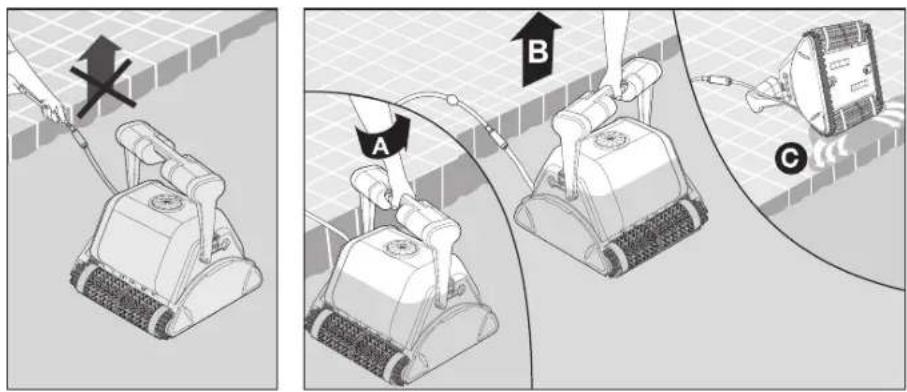
Câble
natural_image
Line drawing of a power supply device with control panel and buttons (no text or symbols on body)
natural_image
Illustration of a cleaning or cleaning robotic device with rotating arrows indicating flow or movement (no text or symbols)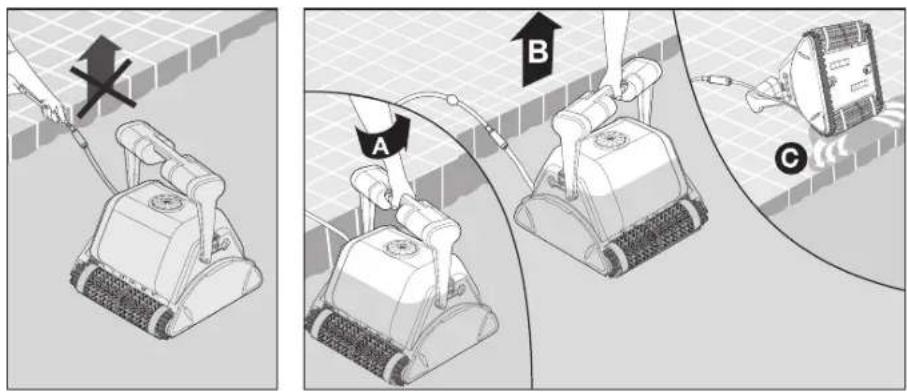
IT
Cavo
natural_image
Line drawing of a power supply device with handle and control panel (no text or symbols on body)
natural_image
Illustration of a cleaning or cleaning robotic device with rotating arrows indicating flow or movement (no text or symbols)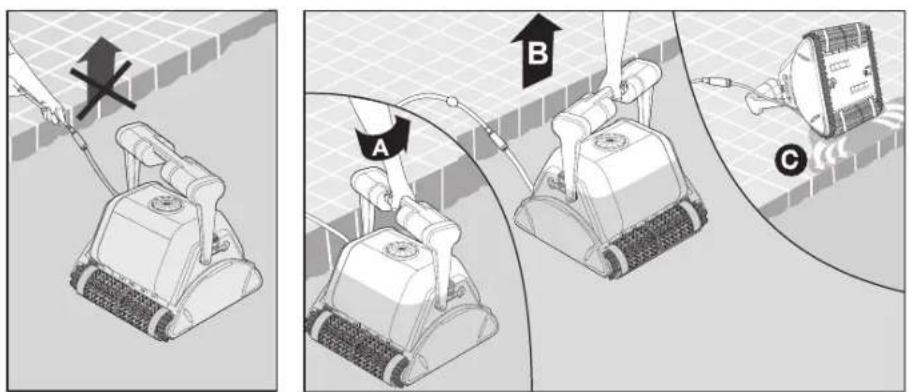
Cable
natural_image
Line drawing of a power supply device with control panel and handle (no text or symbols on the device itself)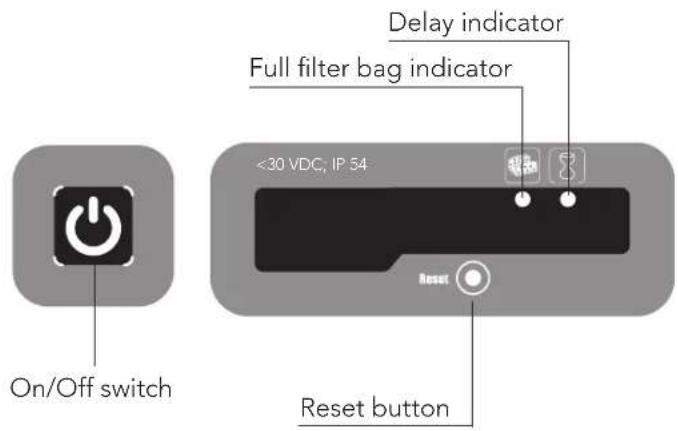

natural_image
Illustration of a cleaning or cleaning robotic device with rotating arrows indicating flow or movement (no text or symbols)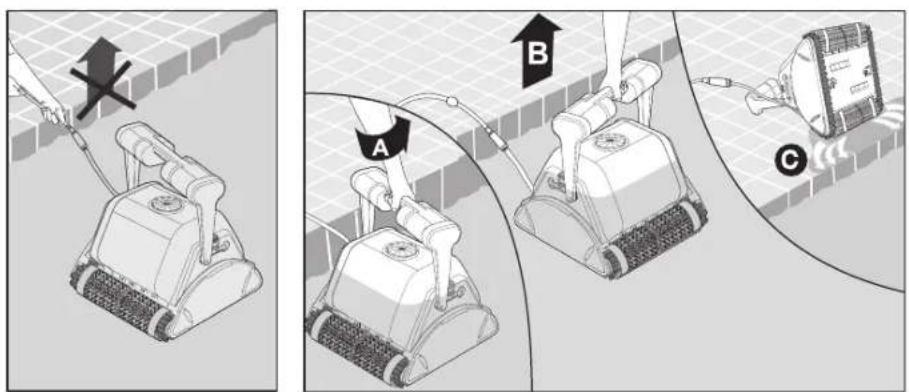
Kabel
natural_image
Line drawing of a power supply device with control panel and handle (no text or symbols on body)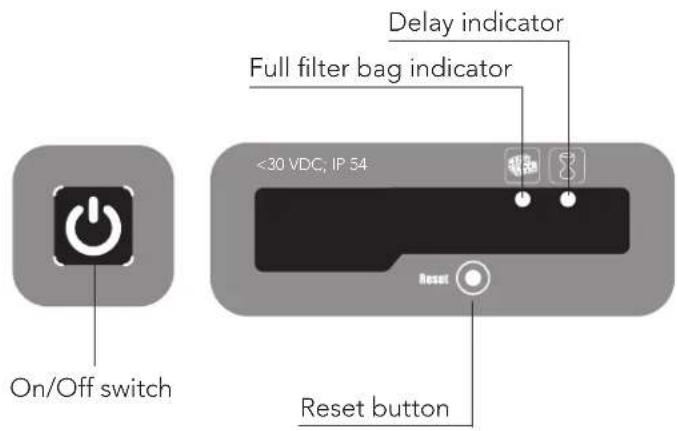

natural_image
Illustration of a cleaning or cleaning robotic device with circular flow arrows indicating process (no text or symbols)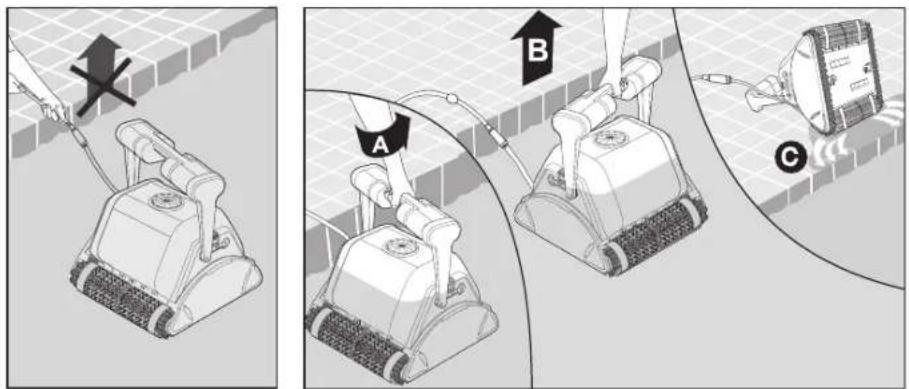
De impeller reinigen

Kabel
natural_image
Line drawing of a power supply device with control panel and handle (no text or symbols on the device itself)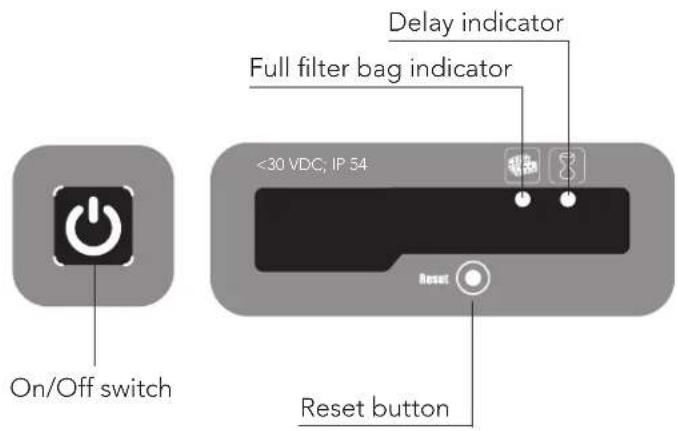

Volle filterzak indicatie en Reset knop
natural_image
Illustration of a cleaning or cleaning robotic device with directional arrows indicating flow or movement (no text or symbols)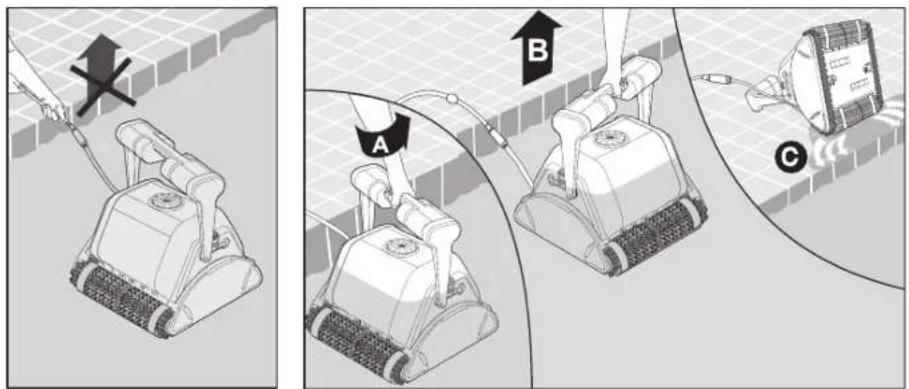
natural_image
Illustration showing a leaf being injected from a container with a magnified view of the leaf inside (no text or symbols)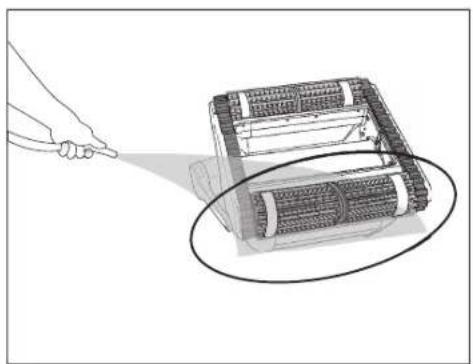
natural_image
Illustration of a robotic device with a hand pointing to it, showing internal components and motion lines (no text or symbols)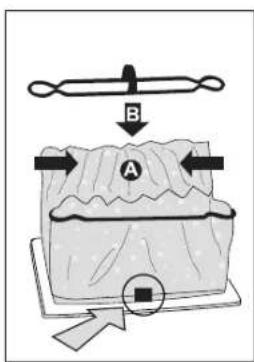
flowchart
graph TD
    B["Component B"] --> C["CIBX"]
    B --> D["CIBX"]
    C --> E["Central Structure"]
    D --> E
    E --> F["Output"]
Limpeza do impulsor

Cabo
5.5. Armazenamento fora de época
natural_image
Line drawing of a power supply device with control panel and hose (no text or symbols on body)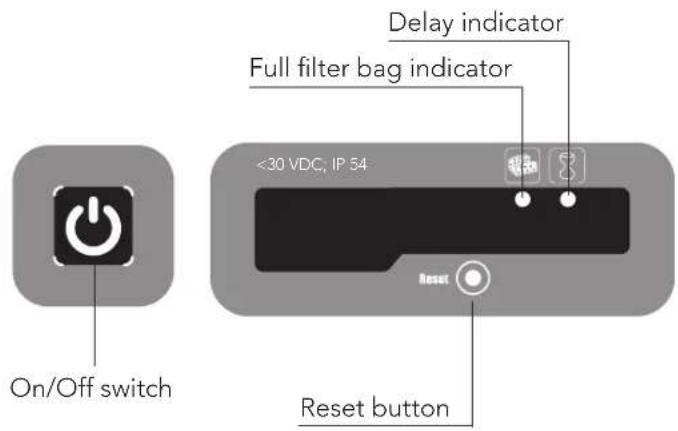

natural_image
Diagram of a cleaning or cleaning robotic device with directional arrows indicating flow or movement (no text or symbols present)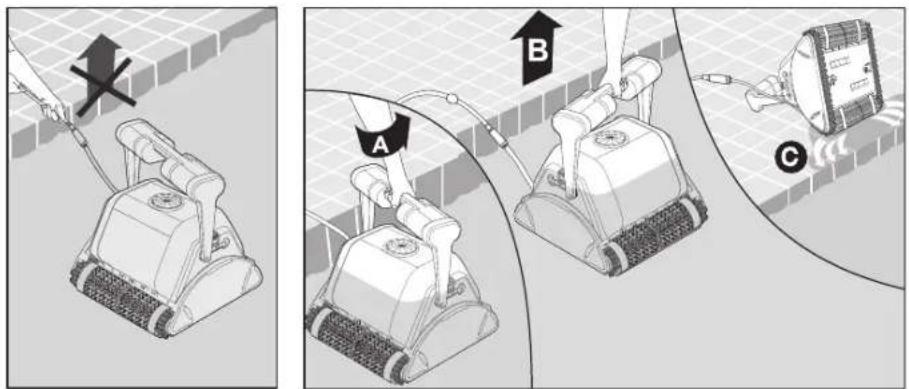
Кабель
natural_image
Line drawing of a power supply device with control panel and buttons (no text or symbols on body)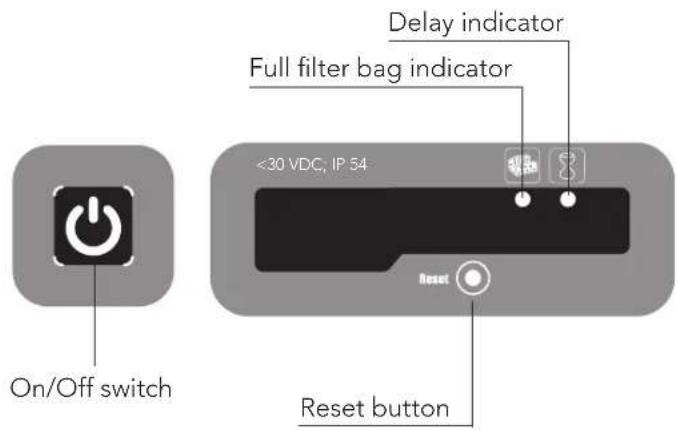

Dolphin PROX 2 Gyro Pool Cleaner
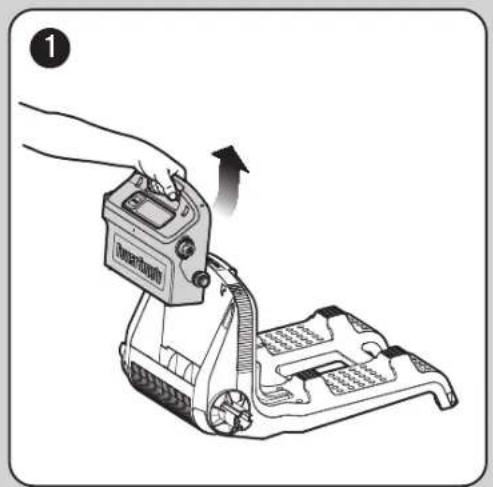
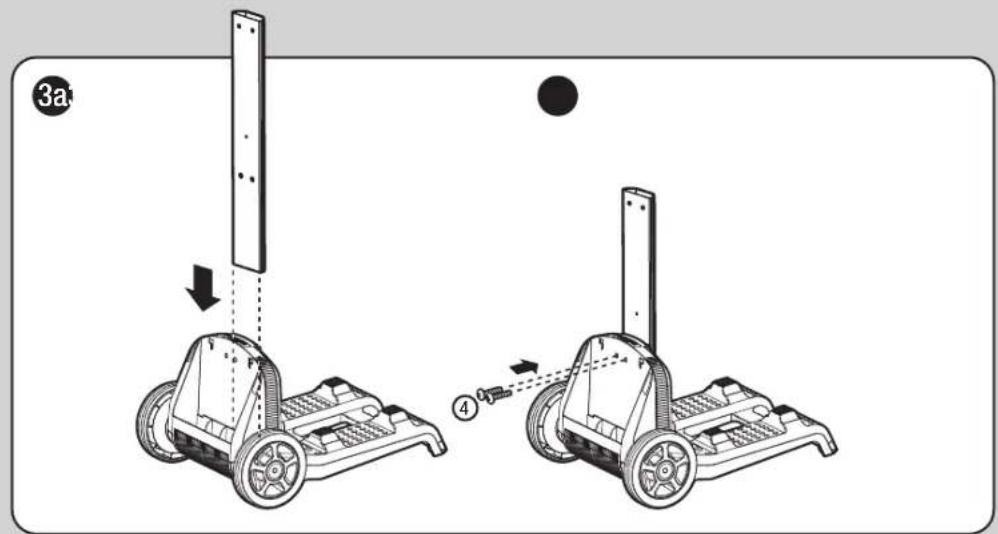
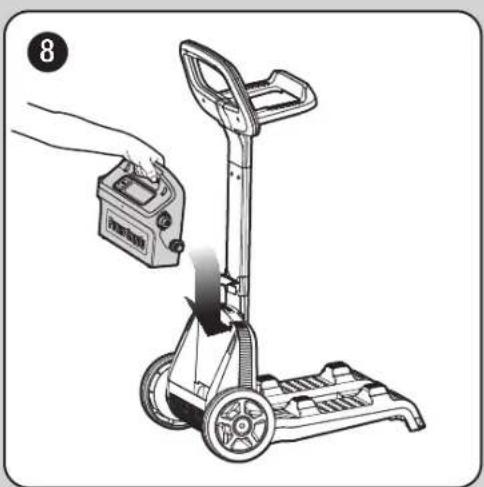
EN Caddy assembly
FR Caddy de montage
natural_image
Line drawing of a cleaning or cleaning tool with wheels and handle (no text or symbols)| 1 | DIN 7985 A2 M5X35 | x2 | |
| 2 | DIN 127B A2 M5 | x2 | |
| 3 | DIN 1587 A2 M5 | x2 | |
| 4 | WN 1412 A2 KA50X16 | x6 |
natural_image
Illustration of a hand operating a device with an arrow indicating motion (no text or symbols present)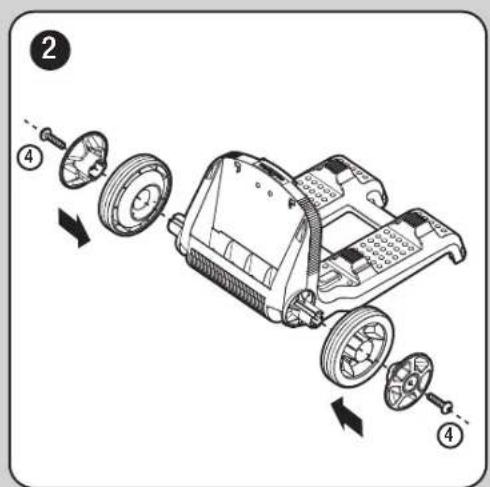
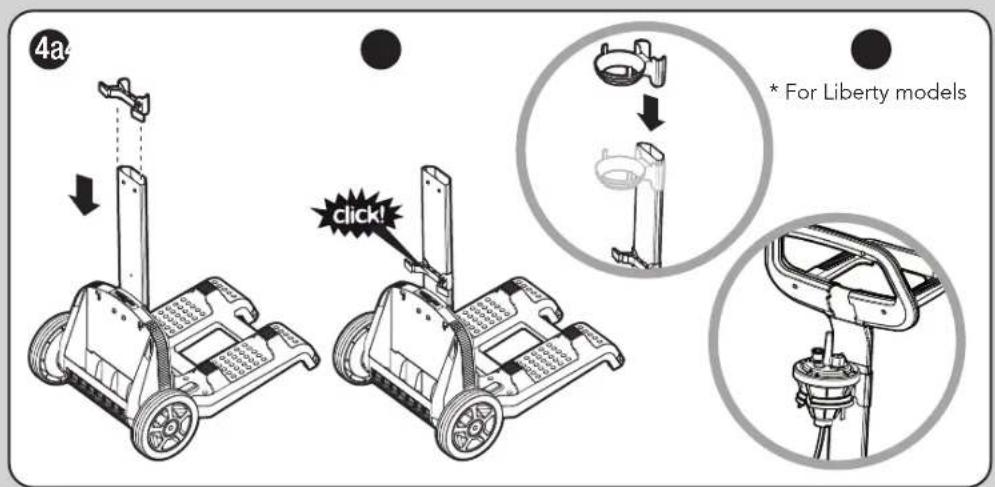
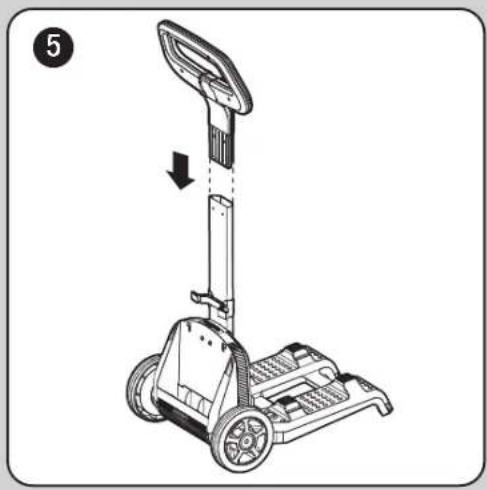
natural_image
Line drawing of a mobile phone with wheels and a vertical-mounted device, no text or symbols present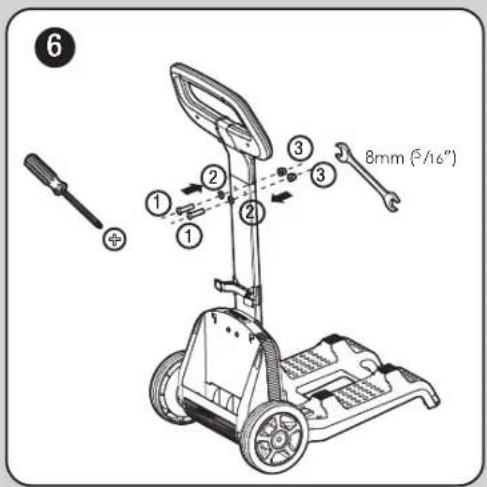
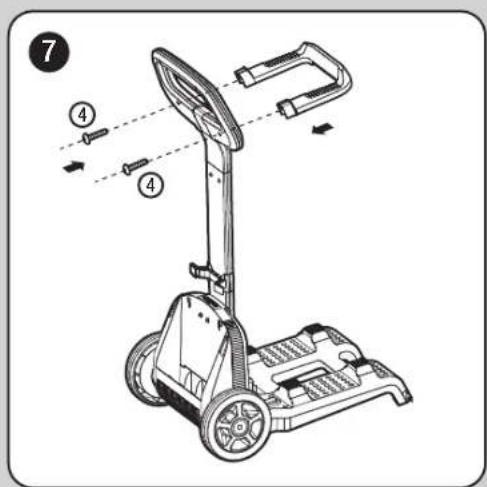
natural_image
Illustration of a hand using a handheld device to lift a cart, showing mechanical components and wheels (no text or symbols)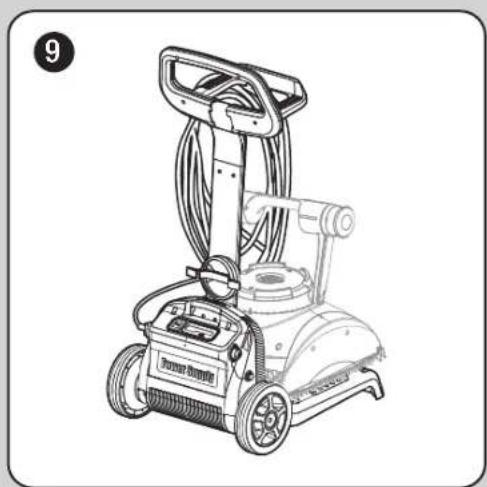
natural_image
Line drawing of a portable cleaning or cleaning machine with visible wheels and control panel (no text or symbols)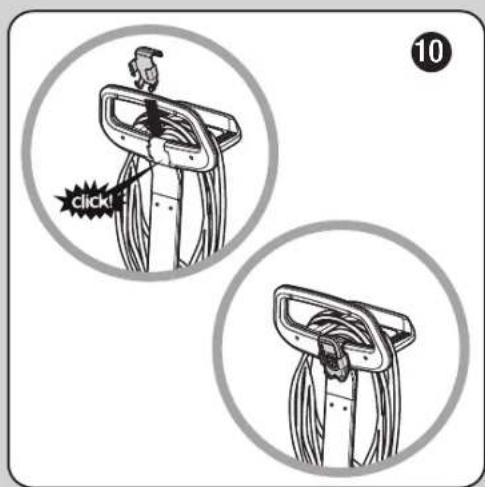


Dolphin PROX 2 GYRO Pool Cleaner
- Dolphin PROX 2 Gyro Pool Cleaner
- EN Operating Instructions
- EN
- Dolphin PROX 2 Gyro Robotic Pool Cleaner
- Operating Instructions
- Contents
- INTRODUCTION
- SPECIFICATIONS
- WARNINGS AND CAUTIONS
- Warnings
- Cautions
- POOL CLEANER PARTS
- USING THE POOL CLEANER
- Set Up
- Putting the Pool Cleaner into the pool
- Removing the Pool Cleaner from the pool
- Maintenance
- Cleaning the impeller
- Unplug the power supply
- Cable
- Off-season storage
- POWER SUPPLY
- Full filter bag indicator and Reset button
- Delay indicator
- REMOTE CONTROL UNIT
- Note:
- FR
- Câble
- Cavo
- Kabel
- De impeller reinigen
- Volle filterzak indicatie en Reset knop
- Limpeza do impulsor
- Cabo
- Armazenamento fora de época
- Кабель
Brand : DOLPHIN
Model : PROX 2
Category : Vacuum Cleaner