BCS7P8PHTSK - Oven BAUKNECHT - Free user manual and instructions
Find the device manual for free BCS7P8PHTSK BAUKNECHT in PDF.


| Product type | Multifunction built-in oven |
| Brand | Bauknecht |
| Model | BCS7P8PHTSK |
| Power supply | Electric, 230 V / 50 Hz |
| Maximum power | 3.68 kW (16 A) or 3 kW (13 A) depending on setting |
| Main functions | Forced air, Natural convection, Turbo Grill, Grill, Steam + Forced air, 100% steam, Dynamic Menu |
| Special functions | Keep warm, Rising, Yogurt, Dehydration, Sterilization, Steam defrost, Steam reheat, Eco program, Cook 3 |
| Cleaning | Steam cleaning, Descaling, Quick drying |
| Provided accessories | Metal grid, Drip tray, Steam drip tray, Self-supporting probe |
| Temperature probe | Yes, self-supporting |
| Display type | Digital display with button navigation |
| Installation type | Built-in |
| Door | Removable for cleaning |
| Interior lighting | Bulb (replacement by after-sales service) |
| Safety | Key lock |
| Water tank | Removable, for steam cooking |
| Timer | Yes, independent |
| Delayed start function | Yes |
| Favorite presets function | Yes, up to 10 |
| Grid levels | 5 levels |
Frequently Asked Questions - BCS7P8PHTSK BAUKNECHT
User questions about BCS7P8PHTSK BAUKNECHT
0 question about this device. Answer the ones you know or ask your own.
Ask a new question about this device
Download the instructions for your Oven in PDF format for free! Find your manual BCS7P8PHTSK - BAUKNECHT and take your electronic device back in hand. On this page are published all the documents necessary for the use of your device. BCS7P8PHTSK by BAUKNECHT.
USER MANUAL BCS7P8PHTSK BAUKNECHT
DANKE, DASS SIE SICH FÜR EIN BAUKNECHT-PRODUKT ENTSCHIEDEN HABEN
natural_image
Line drawing of a microwave oven with an open lid and internal compartments, showing internal structure and mounting points (no text or symbols)natural_image
Hand holding a mechanical component with a rotation arrow indicating motion (no text or symbols)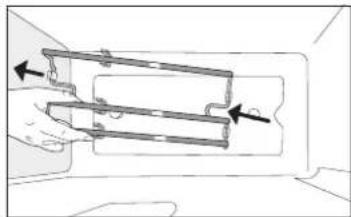
natural_image
Diagram of a hand holding a mechanical component with arrows indicating direction (no text or symbols)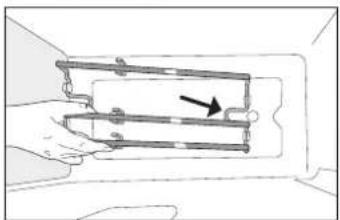
natural_image
Diagram of a hand holding a mechanical component with a directional arrow indicating movement (no text or symbols present)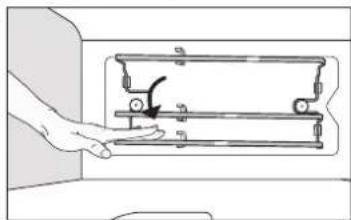
natural_image
Hand operating a mechanical device with a handle and lever (no text or symbols visible)FUNCTIONS (FUNKTIONEN)

DYNAMIC MENÜ
natural_image
Illustration of four different steps of a cleaning or cleaning procedure: opening a door, pressing a button, pouring liquid into a drain, and finally adjusting a tray (no text or symbols present)12. DESCALE (ENTKALKEN)
natural_image
Two illustrations of a fish inside a tray, one with a cable and the other with a curved rod (no text or symbols)Fisch Fleisch
LÖSEN VON PROBLEMEN

THANK YOU FOR BUYING BAUKNECHT PRODUCT
In order to receive a more complete assistance, please register your product on www.register10.eu

Before using the appliance carefully read the Safety Instruction.
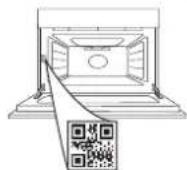
PLEASE SCAN THE QR CODE ON YOUR APPLIANCE IN ORDER TO REACH MORE INFORMATION
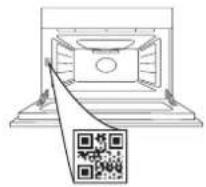
PRODUCT DESCRIPTION
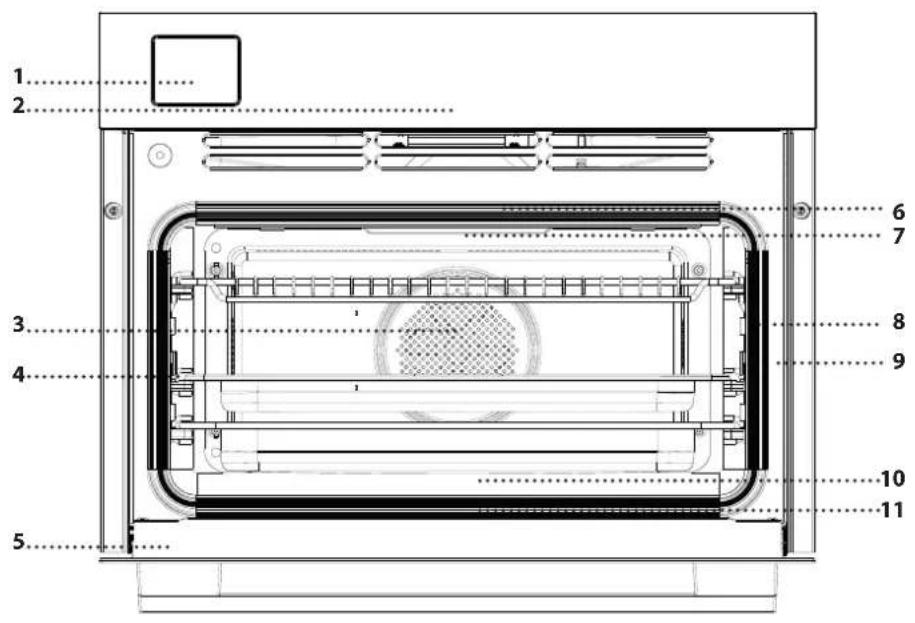
- Extractable drawer
- Control panel
- Cavity Fan (not visible)
- Ladder racks (the level is indicated on the front of the oven)
- Door
- Upper heating element/grill
- Lamp
- Food probe insert point (if present)
- Identification plate (do not remove)
- Lower heating element (not visible)
- Drip tray (not visible)
CONTROL PANEL DESCRIPTION

- ON / OFF
For switching the oven on and off and for stopping an active function.
- MENU / FUNCTIONS DIRECT ACCESS
For quick access to the functions and menu.
- NAVIGATION BUTTON MINUS
For scrolling through a menu and decreasing the settings or values of a function.
- BACK
For returning to the previous screen.
During cooking, allows settings to be changed.
-
DISPLAY
-
CONFIRM
For confirming a selected function or a set value.
- NAVIGATION BUTTON PLUS
For scrolling through a menu and increasing the settings or values of a function.
- OPTIONS / FUNCTIONS DIRECT ACCESS
For quick access to the functions, settings and favorites.
- START
For starting a function using the specified or basic settings.
ACCESSORIES
Before purchasing other accessories that are available on the market, make sure that they are heat-resistant and suitable for steaming.
Make sure that there is a gap of at least 30 mm between the top of any container and the walls of the cooking compartment in order to allow steam to flow sufficiently.
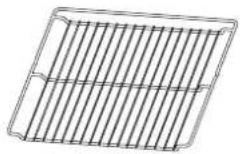 | WIRE SHELFThe wire shelf is suitable for all cooking modes.You can place food directly on the wire shelf or use it to support baking trays and tins or other oven-ware resistant to heat. |
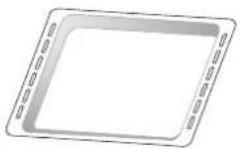 | BAKING TRAYThe baking tray is suitable for all cooking modes and functions. Can be used to cook all kind of foods without container. Use it to collect the cooking juices, placing it below the wire shelf. |
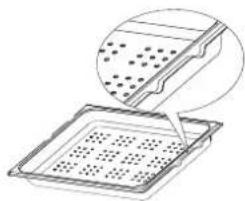 | STEAM TRAYThis special perforated tray makes it easier for steam to circulate, which helps cook the food evenly.Place the drip tray on the level below to collect the cooking juices with the stopping features towards the back of the product. |
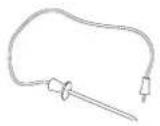 | FOOD PROBETO accurately measure the core temperature of food during cooking.It can be used for meat and fish. |
The number of accessories may vary depending on which model is purchased.
*Other accessories can be purchased separately from the After-sales Service.
INSERTING THE WIRE SHELF AND OTHER ACCESSORIES
Insert the wire shelf onto the level you require by holding it tilted slightly upwards and resting the raised rear side (pointing upwards) down first.
Then slide it horizontally along the runners as far as possible. Other accessories, like the baking tray, are to be inserted horizontally, letting them slide on the runners
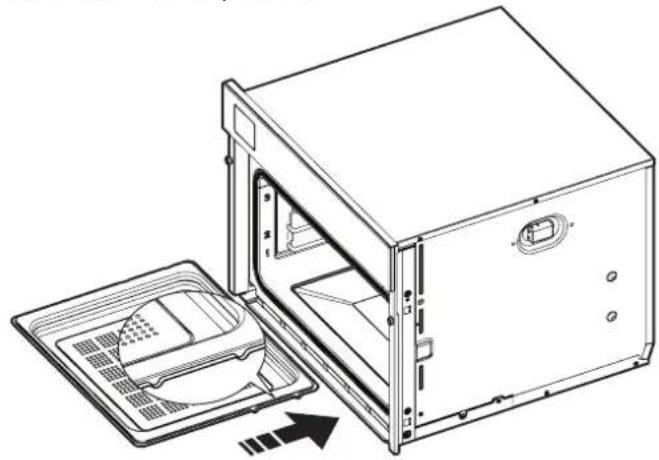
The steam tray must be inserted with the reference lateral embosses towards the back of the cavity as illustrated in the picture:
natural_image
Line drawing of a microwave oven with open door and internal tray, showing internal components (no text or symbols)REMOVING AND REFITTING THE LADDER RACKS
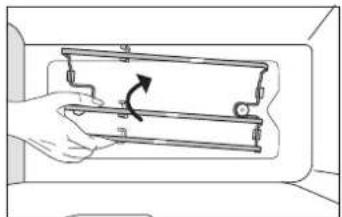
There is a ladder rack on both sides of the oven cavity, anchored on two button-shaped supports. The ladder racks are removable to make cleaning more convenient.
- To remove the ladder racks, firmly grip the external part of the guide, and pull it upwards to extract it from the frontal support while rotating on the rear support, then slide out the whole part from the cavity.
- To reposition the ladder racks, slide the back part on the back support. Then, once slipped, by pivoting the rear support, pull the assy down until the ladder rack hooks on the frontal support.
natural_image
Hand holding a mechanical component with a rotational arrow indicating motion (no text or symbols)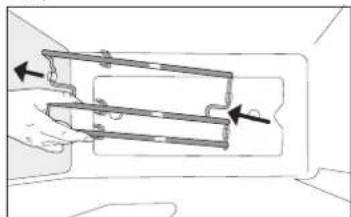
natural_image
Diagram of a hand holding a mechanical component with arrows indicating direction (no text or symbols)
natural_image
Diagram of a mechanical assembly with a hand holding a bracket and an arrow indicating direction (no text or symbols present)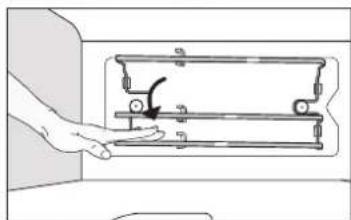
natural_image
Hand operating a mechanical device with a hand holding a lever (no text or symbols visible)FUNCTIONS

DYNAMIC MENU
With the Dynamic Menu, simply select the type and weight or the quantity of the food items to obtain the best results. The oven will automatically calculate the optimum settings and continue to change them as cooking progresses. To use at best this function, follow the indications on the relative cooking table.
Due to food variability, the cooking duration is set on an average grade. We always recommend to check the internal doneness of food and in case prolong the cooking time to achieve proper doneness.
Some automatic cycles give the possibility of previously setting a cooking level lower or higher than the default (see the Doneness paragraph in the Daily Use section).
DYNAMIC COOK TABLE
For cooking several kind of dishes and foods and achieving optimal results in the easiest and quickest way. To get the best from this function, follow the indications on the relative cooking table.
| CATEGORY FOOD | WEIGHT/THICKNESS/PORTIONS/PIECES | NOTE ACCESSORIES | ||
| PASTA & CEREALS | Lasagna 600 g - 2.0 kg | Prepare according to your favorite recipe. Pour bechamel sauce on top and sprinkle with cheese to get perfect browning | 1 | |
| Rice 100 - 500 g | Add water and rice into a heat proof container. Use one and half cups of water for each cup of rice. For good results is suggested not to open the door | 2118.9.2F + | ||
| Spelt 100 - 500 g | Add water and spelt into a heat proof container. Use one and half cups of water for each cup of spelt. For good results is suggested not to open the door | 2118.9.2F + | ||
| Barley 100 - 500 g | Add water and barley into a heat proof container. Use one and half cups of water for each cup of barley. For good results is suggested not to open the door | 2118.9.2F + | ||
| Dumpling 1 batch | Distribute evenly in the steam tray, for good results is suggested not to open the door | 2118.9.2F + | ||
| MEAT | Roast Beef - | Brush with oil and rub with salt and pepper. Season with garlic and herbs as you prefer. At the end of cooking let it rest for at least 15 minutes before carving. | 2 | |
| Burger Patties 1 - 3cm | Brush with oil and sprinkle with salt before cooking. Use wire shelf on level 2 and baking tray with one cup of water on level 1 to collect foods essudates. To get perfect results, during cooking you will be asked to turn food. | 12 | ||
| Roast Beef - Slow cooking | - | Brush with oil and rub with salt and pepper. Season with garlic and herbs as you prefer. At the end of cooking let it rest for at least 15 minutes before carving. | 2 | |
| Roast Pork - | Brush with oil and rub with salt and pepper. Season with garlic and herbs as you prefer. At the end of cooking let rest for at least 15 minutes before carving. | 2 | ||
| Sausages & Wurstel | 400 g - 1.5 kg | Distribute evenly on the wire shelf. Pierce the sausages with a fork to prevent burst-ing. Use wire shelf on level 2 and baking tray with one cup of water on level 1 to collect foods essudates. | 11 | |
| Pork Ribs 400 g - 1.5 kg | Brush with oil and season as you prefer. Rub with salt and pepper. Distribute evenly on the wire shelf. Use wire shelf on level 2 and baking tray with one cup of water on level 1 to collect foods essudates. | 11 | ||
| Roast Chicken 800 g - 2.5 kg | Brush with oil and season as you prefer. Rub with salt and pepper. Insert into the oven with the breast side up. | 2 | ||
| Poultry Pieces 1 batch | Brush with oil and season as you prefer. Distribute evenly on the wire shelf. Use wire shelf on level 2 and baking tray with one cup of water on level 1 to collect foods essudates. | 21 | ||
| Poultry Breast Steamed | 1 - 4 cm | Distribute evenly in the steam tray, for good results is suggested not to open the door. | 2118.9.2F + | |
| ACCESSORIES | ||||||
| Wire shelf | Heathproof tray on wire shelf | Drip tray /Baking tray | Heath-proof container | Food Probe | Steam tray |
| CATEGORY FOOD | WEIGHT/THICKNESS/PORTIONS/PIECES | NOTE ACCESSORIES | ||
| FISH | Roasted Whole Fish | - Brush with oil and season as you prefer. | 2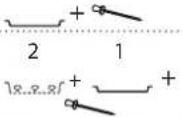 | |
| Steamed Whole Fish | - | Season as you prefer, for good results is suggested not to open the door. | ||
| Fish Steak Roasted | 200 - 800 g Brush with oil and season as you prefer. | 2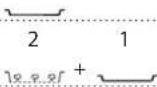 | ||
| Fish Fillets Steamed | 0.5 - 3 cm | Distribute evenly in the steam tray, for good results is suggested not to open the door. | ||
| Steamed Mussels | 500 g - 2.0 kg | Distribute evenly in the steam tray, for good results is suggested not to open the door. | 2 1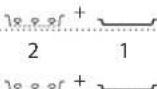 | |
| Steamed Shrimps | 500 g - 1.5 kg | Distribute evenly in the steam tray, for good results is suggested not to open the door. | ||
| Octopus - | Place in the center of steam tray, for good results is suggested not to open the door. | 2 1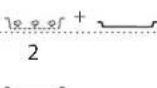 | ||
| VEGETABLES | Roasted Potatoes | 400 g - 1.5 kg | Cut in pieces, season with oil, salt and flavor with herbs before placing into the oven. | 2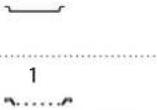 |
| Stuffed Vegetables | 600 g - 2.0 kg | Scoop out the vegetable and fill with a mixture of the vegetable flesh itself, minced meat and shredded cheese. Season with garlic, salt and flavor with herbs as you prefer. | ||
| Potatoes Gratin | 400 g - 1.5 kg | Slice and place into a large container. Sea-son with salt, pepper and pour over cream. Sprinkle cheese on top. | ||
| Potatoes Whole | 50 - 200 g | The weight refers to the single potato. To have uniform cooking in each potato, it is advisable to choose them all of similar size. Distribute the potatoes in their skins evenly in the steam tray, for good results is suggested not to open the door. | 2 1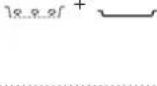 | |
| Potatoes Pieces Steamed | 400 g - 1.0 kg | Cut in pieces. Distribute evenly in the steam tray, for good results is suggested not to open the door. | 2 1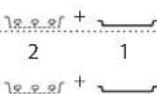 | |
| Roots Vegetables Steamed | 200 g - 1.0 kg | Cut in pieces. Distribute evenly in the steam tray, for good results is suggested not to open the door. | ||
| Soft Vegetables Steamed | 400 g - 1.0 kg | Cut in pieces. Distribute evenly in the steam tray, for good results is suggested not to open the door. | 2 1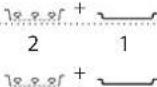 | |
| Fruit Pieces Steamed | 400 g - 1.5 kg | Cut in pieces. Distribute evenly in the steam tray, for good results is suggested not to open the door. | ||
| Vegetables Steamed [frozen] | 400 g - 1.5 kg | Distribute evenly in the steam tray, for good results is suggested not to open the door. | 2 1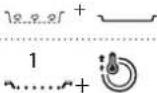 | |
| SALTY BAKERY | Sandwich Loaf | 400 g - 1.0 kg | Prepare dough according to your favorite recipe for a light bread. Form into a loaf container before rise. Use the oven's dedi-cated rise function. | 2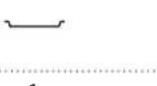 |
| Pizza 400 g - 1.2 kg | Prepare pizza dough according to your favorite recipe. Leave it to rise using the oven's dedicated function. Roll out the dough into a lightly greased baking tray. Add topping as you prefer. | |||
| Pizza [frozen] | 250 g - 1.2 kg | Take out from packaging and distribute evenly on the wire shelf. | 1 | |
| Salty Cake 800 g - 1.5 kg | Line a pie dish for 8-10 portions with a pas-try and pierce it with a fork, Fill the pastry according to your favorite recipe. | 1 | ||
| ACCESSORIES | Wire shelf | Heathproof tray on wire shelf | Drip tray /Baking tray | Heath-proof container | Food Probe | Steam tray |
| CATEGORY FOOD | WEIGHT/THICKNESS/PORTIONS/PIECES | NOTE ACCESSORIES | ||
| SWEET BAKERY | Sponge Cake 400 g - 1.2 kg | Prepare a fatless sponge cake batter. Pour into lined and greased baking pan. | 1 | |
| Marble Cake 400 g - 1.2 kg | Prepare a marble cake batter according to your favorite recipe. Pour into lined and greased baking pan. | 1 | ||
| Muffins 1 batch | Prepare a batter for 16-18 pieces accord-ing to your favorite recipe and fill in paper moulds. Distribute evenly on the baking tray. | 2 | ||
| Cookies 1 batch | Prepare the biscuit cookies as you prefer and let cool down. Stretch evenly the dough and shape as you prefer. Lay the cookies on a baking tray. | 2 | ||
| Brownies 800 g - 1.5 kg | Prepare according to your favorite recipe. Spread batter on the baking pan covered with baking paper. | 1 | ||
| Strudel 1 batch | Prepare a mix of diced apple, pine nuts, cinnamon and nutmeg. Put some butter in a pan, sprinkle with sugar and cook for 10-15 minutes. Roll it into a pastry and fold the external part. | 2 | ||
| Apple Pie 800 g - 1.5 kg | Line a pie dish with the pastry and sprinkle the bottom with bread crumbs to absorb the juice from the fruit. Fill with chopped fresh fruit mixed with sugar and cinnamon. Roll out the pastry scraps to make a lid, seal the edges and brush with egg. | 1 | ||
| DESSERTS | Baked Apples 1 batch | Remove the core and fill with marzipan or cinnamon, sugar and butter. | 2 | |
| Caramel Flan 1 batch | Distribute cups with flan evenly in the steam tray, for good results is suggested not to open the door. | 2 1 | ||
| EGGS | Chicken Eggs 50 - 80 g | The weight refers to the single egg. To have uniform cooking in each egg, it is advisable to choose them all of similar size. Distribute evenly in the steam tray, for good results is suggested not to open the door. If the eggs will be eaten cold, rinse them immediately in cold water. | 2 1 | |
| Quail Eggs 1 batch | Distribute evenly in the steam tray, for good results is suggested not to open the door. If the eggs will be eaten cold, rinse them immediately in cold water. | 2 1 | ||
| ACCESSORIES | ||||||
| Wire shelf | Heathproof tray on wire shelf | Drip tray /Baking tray | Heath-proof container | Food Probe | Steam tray |

SOUS VIDE
Sous vide is a professional cooking technique that requires the use of vacuumized food grade plastic pouches, cooking at precisely controlled temperatures using steam. The gradual and accurate cooking process contributes to the development of exceptional tenderness, flavor, and also ensures cooking uniformity within the whole food. This function allows you to cook meat, fish, vegetables and fruits, achieving chef's results.
Check the Sous Vide cooking table to properly use the function.
| MW Sous Vide Recipes How to Accessories | ||
| Beef Sous Vide | Distribute evenly the packs around the center of the steam tray. Make sure that the pack is under vacuum. For good results is suggested not to open the door. | 218.9.81+1 |
| Pork Sous Vide | ||
| Fish Sous Vide | ||
| Vegetables Sous Vide | ||
| Fruit Sous Vide | ||

STEAM + AIR
Combining the properties of steam with those of the forced air, this function allows you to cook dishes pleasantly crispy and browned outside, but at the same time tender and succulent inside. To achieve the best cooking results, we recommend to select a HIGH steam level for fish cooking, MEDIUM for meat and LOW for bread and desserts.
Recommended accessories: Baking tray / Wire rack

PURE STEAM
For cooking natural and healthy dishes using steam to preserve the food's natural nutritional value. This function is particularly suited to cooking vegetables, fish and fruit, and also for blanching. Unless otherwise indicated, remove all packaging and protective film before placing the food in the oven
Recommended accessories: Steam tray at level 2 and Baking tray at level 1
Cooking with steam generates a lot of humidity inside the oven. This is a completely normal phenomenon that does not compromise the correct functioning of the appliance. At the end of each cooking period we recommend using the Fast Dry cycle to eliminate humidity from the oven.
Alternatively we suggest to:
- let the appliance cool down;
-
carefully dry the cooking compartment and the accessories including drip tray placed behind the door just below the door gasket used with a soft cloth or absorbent paper;
-
leave the door open for the time necessary for the cooking compartment to dry completely.

OTHER FUNCTIONS MENU
TRADITIONAL FUNCTIONS
FAST PREHEAT
For quickly preheating the oven before a cooking cycle. Wait for the function to finish before placing food inside the oven. Once preheating has finished, the oven will select the "Forced Air" function
automatically.
Required accessories: wire shelf with pan or baking tray
GRILL
For browning, grilling and gratins. We recommend turning the food during cooking.
Recommended accessories: wire shelf
For perfect results, combining the grill and oven air convection. We recommend turning the food during cooking.
Recommended accessories: wire shelf
CONVECTION BAKE
For cooking meat, baking cakes and pies with fillings on one shelf only. To achieve best results this function have the preheating phase: wait the end of preheat to insert the food.
Required accessories: wire shelf with pan or baking tray

CONVENTIONAL
For perfectly cooking and browning both on the top and bottom any kind of dish on one shelf only. To achieve best results this function have the preheating phase: wait the end of preheat to insert the food.
Required accessories: baking tray or wire shelf and heatproof container.
| FOOD TEMP. (°C) | DURATION (min) | |
| Cupcake / Smallcake | 160 | 30 - 35 |
| Cookies | 145 | 35 - 40 |

FORCED AIR
For cooking sweets and meats with hot air circulation. To achieve best results this function have the preheating phase: wait the end of preheat to insert the food. Is possible to use it for cooking different foods that require the same cooking temperature on several shelves at the same time. This function can be used to cook different foods without odours being transferred from one food to another. Required accessories: baking tray or wire shelf and heatproof container.

CLEANING FUNCTIONS
STEAM SELF CLEAN
The action of water vapor released during this special cycle of cleaning by means of a low temperature, facilitates removal of grime. Activate the function when the oven is at room temperature.
DESCALE
For removing limescale deposits from the boiler. We recommend using this function at regular intervals. If yo do not, a message will appear on the display reminding you to clean the oven.
FAST DRY
After a steam cycle, the oven will automatically suggest you to start the fast dry cycle to help to remove the moisture from the cavity. If you desire, you can start a fast dry cycle from the cleaning menu. Follow the instructions on the display. Clean the drip tray below the door with a soft cloth of absorbent paper to remove the water drops.
S□-SPECIAL FUNCTIONS
KEEP WARM
For keeping just-cooked food hot and crisp, including meat, fried foods or cakes.
RISING
For optimal proving of sweet or savoury dough. To maintain the quality of proving, do not activate the function if the oven is still hot following a cooking cycle.
Required accessories: wire shelf and heatproof container.
YOGURT
For making yoghurt.
Required accessories: wire shelf and heatproof container.
DEHYDRATION
To dehydrate fruits and vegetables. Cut in thin slices and place directly on wire shelf.
Required accessories: wire shelf
MAXI-COOKING
For cooking large joints of meat (above 2.5 kg). It is advisable to turn the meat over during cooking, to obtain even browning on both sides. It is best to baste the meat every now and again to prevent it from drying out.
Required accessories: baking tray at level 2.
DISINFECTION
For disinfecting baby bottles or jars using steam. Insert the baking tray on level 1 and the steam tray on level 2, place the items on it, with sufficient space in between to allow steam to reach all parts.
STEAM DEFROST
For defrosting any kind of food. Place foods such as meat and fish without package or wrappings, on the steam tray on level 2. Place the baking tray on the level 1 to collect the thawing water. For best results, do not defrost the food completely but allow the process to finish during standing time. We recommend keeping bread wrapped up to prevent it from becoming too soft.
STEAM REHEAT
For reheating ready-made food that is either frozen, chilled or at room temperature. This function uses steam to gently reheat food without drying it out, thus enabling it to retain its original flavour. Standing time improves the result. We recommend placing smaller or thinner pieces of food in the middle and larger or thicker pieces around the outside. If using the steamer tray, place the baking tray below it to collect any liquid running out of the food.
ECO CYCLE
For cooking roasted meat and fish, leavening cakes, tarts and biscuits on a single shelf. When this ECO function is in use, the light will remain switched off during cooking. To use the ECO cycle and therefore optimise power consumption, the oven door should not be opened until the food is completely cooked. Required accessories: wire shelf with pan or baking tray.
* Function used as reference for the energy efficiency declaration in accordance with Regulation (EU) No. 65/2014
COOK 3
For cooking different foods that require the same cooking temperature on three levels at the same time without mixing flavors and smells.
This function can be used to cook cookies, tarts, frozen pizzas and to prepare a complete meals. The oven does have to be preheated.
COOKIES
Use this function to cook three trays of similar shortbread biscuits to maximize results. The function includes a preheat. Take the three trays out of the oven at the same time.
TART
Use this function to cook three trays of similar tarts to maximize results. The function includes a preheat. Take the three trays out of the oven at the same time. PIZZA (frozen)
Use this function to cook three trays of similar frozen pizzas to maximize results. The function includes a preheat. Take the three trays out of the oven at the same time.
COOK 3 MENU 1
This cycle is designed to cook a complete meat-based meal and a dessert. The oven requires preheating. Example of complete meal Prepare a fruit tart according to your preferences in a round pan to be placed on the wire shelf at level 3. Prepare a lasagna according to your preferences (1.5-2kg) in a pan to be placed on the wire shelf at level two. Prepare 6-10 chicken drumsticks with diced potatoes (500-800g) directly in the baking tray to be placed on level 1. After preheating, bake all the dishes at the same time. After 50-60 minutes take out the tart, after 60-70 minutes take out the lasagna, after 80-90 minutes take out the chicken with potatoes.
COOK 3 MENU 2
This cycle is designed to cook a complete fish or vegetarian meal and a dessert. The oven requires preheating.
Example of complete meal
Prepare a fruit tart according to your preferences in a round pan to be placed on the wire shelf at level 3. Prepare pesto lasagna or cannelloni according to your preference (1.5-2kg) in a metal or pyrex tray to be placed on the wire shelf at level two. Prepare fish fillets in foil (700-900g) with sliced vegetables (600-900g) directly in the baking tray to be placed on level 1. After preheating, bake all the dishes at the same time. After 45-55 minutes take out the tart, after 55-65 minutes take out the lasagna, after 60-70 minutes take out the fish with vegetables.
°C TEMPERATURE To adjust the ten
To adjust the temperature or the grill level manually during cooking.

MINUTEMINDER
For keeping time without activating a function.

FAVORITES
For retrieving the list of 9 favorite functions.

SETTINGS
For adjusting the oven settings.
When "ECO" mode is active the brightness of the display will be reduced to save energy and lamp switches off after 1 minute. When "DEMO" is "On" all commands are active and menus available but the oven doesn't heat up. To deactivate this mode, access "DEMO" from "SETTINGS" menu and select "Off". By selecting "FACTORY RESET", the product switches off and then it returns to first switch on. All settings will be deleted.
FIRST TIME USE
1. SELECT THE LANGUAGE
You will need to set the language and the time when you switch on the appliance for the first time: "English" will show on the display.
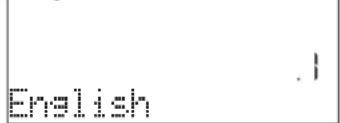
Press or to scroll through the list of available languages and select the one you require.
Press to confirm your selection.
Please note: The language can subsequently be changed by selecting "LANGUAGE" in "SETTINGS" menu, available by pressing 🔒
2.SET THE TIME
After selecting the language, you will need to set the current time: The two digits for the hour will flash on the display.
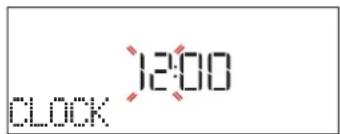
Press + or — to set the correct hour and press √: The two digits for the minutes will flash on the display. Press + or — to set the minutes and press √ to confirm.
Please note: You may need to set the time again following lengthy power outages. Select "CLOCK" in "SETTINGS" menu, available by pressing 🔒
3. SET THE POWER CONSUMPTION
The oven is programmed to consume a level of electrical power that is compatible with a domestic network that has a rating of more than 3 kW (16): if your household uses a lower power, you will need to decrease this value (13).
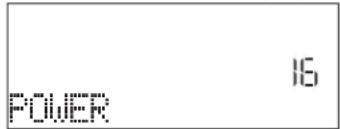
Press to enter "SETTINGS" menu, then select
DAILY USE
1. SELECT A FUNCTION
Press ⏻ to switch on the oven: the display will show the last running main function or the main menu. The functions can be selected by pressing the icon for one of the main functions or by scrolling through a menu: To select an item from a menu (the display will show the first available item), press + or — to select the desired one, then press √ to confirm.
2.SET THE FUNCTION
After having selected the function you require, you can change its settings. The display will show the settings that can be changed in sequence. Pressing ◀◀ allows you to change the previous setting again. TEMPERATURE / GRILL LEVEL / STEAM LEVEL
"POWER" and select desired power setting.
Press + or to select 16 "High" or 13 "Low" and press √ to confirm.
4. SET THE WATER HARDNESS LEVEL
In order to allow the oven to work efficiently, and to guarantee that it regularly prompts the user to perform Descale cycle when needed, it is important to set the correct water hardness level. To set it, switch on the oven by pressing Ⓐ, press ⚙ Settings and use navigation buttons + and to select "WATER HARDNESS". Press to confirm. Use navigation buttons + and to select the correct level for the water of your area, based on the following table:
Press √ to confirm.
For Water Hardness level, "Hard" is preset.
| WATER HARDNESS LEVELS TABLE | ||||
| Level | °dH German degrees | °fH French degrees | °Clark English degrees | |
| 1 | Very soft | 0-6 | 0-10 | 0-7 |
| 2 | Soft | 7-11 | 11-20 | 8-14 |
| 3 | Mid | 12-16 | 21-29 | 15-20 |
| 4 | Hard | 17-34 | 30-60 | 21-42 |
| 5 | Very hard | 35-50 | 61-90 | 43-62 |
5. HEAT THE OVEN
A new oven may release odours that have been left behind during manufacturing: This is completely normal.
Before starting to cook food, we therefore recommend heating the oven with it empty in order to remove any possible odours. Remove any protective cardboard or transparent film from the oven and remove any accessories from inside it. Heat the oven to 200 °C for around one hour, ideally using a function with air circulation (e.g. "Forced Air" or "Convection Bake").
Please note: It is advisable to air the room after using the appliance for the first time.
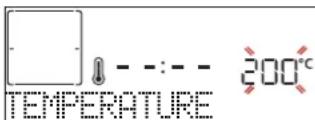
When the value flashes on the display, press + or — to change it, then press √ to confirm and continue with the settings that follow (if possible). In the same way, it is possible to set the grill level: There are three defined power levels for grilling: 3 (high), 2 (mid), 1 (low).
In "Steam + Air" function, you can select the amount of steam from the following values: STEAM 1, STEAM 2.
Once the function has been activated, the temperature/grill level can be changed tapping on ^ C
button, then using or to adjust it. DURATION
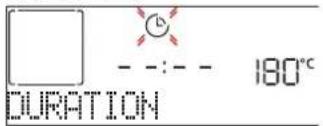
When the icon flashes on the display, press + or to set the cooking time you require and then press √ to confirm. You do not have to set the cooking time if you want to manage cooking manually (untimed): Press √ or to confirm and start the function. By selecting this mode, you cannot program a delayed start.
Please note: You can adjust the cooking time that has been set during cooking by pressing :press or to — amend it and then press to confirm.
END TIME (START DELAY)
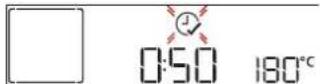
In many functions, once you have set a cooking time you can delay starting the function by programming its end time. The display shows the end time while the icon flashes.
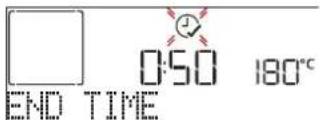
Press or to set the time you want cooking to end, then press √ to confirm and activate the function. Place the food in the oven and close the door: The function will start automatically after the period of time that has been calculated in order for cooking to finish at the time you have set.
Please note: Programming a delayed cooking start time will disable the oven preheating phase: The oven will reach the temperature your require gradually, meaning that cooking times will be slightly longer than those listed in the cooking table. During the waiting time, you can press to amend the programmed end time or press to change other settings. By pressing, order to visualize information, it is possible to switch between end time and duration.
3. DYNAMIC MENU
These functions automatically select the best cooking mode, temperature and duration to cook, roast or bake all the dishes available.
When required, simply indicate the characteristic of food to obtain an optimal result.
WEIGHT / HEIGHT (ROUND-TRAY-LAYERS)
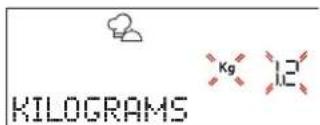
To set the function correctly, follow the indications on the display, when prompted, and press + or to set the required value then press √ to confirm.
DONENESS
In some Dynamic functions it is possible to adjust the doneness level.
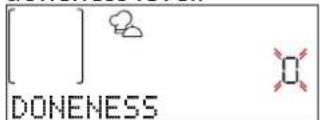
When prompted, press of to select the desired level between rare (-1) and well done (+1). Press √ or to confirm and start the function.
4. COOKING WITH STEAM
By selecting the "Steam+ Air" inside the Manual Functions or one of the several Dynamic dedicated recipes it is possible cook any kind of food thanks to the use of the steam. Steam spreads more quickly and more evenly through food compared to just the hot air typical of Conventional Functions: this reduce cooking times, locking in food's precious nutrients and ensuring you obtain excellent, truly delicious results with all your recipes. Through the complete duration of the steam cooking the door must be kept closed.
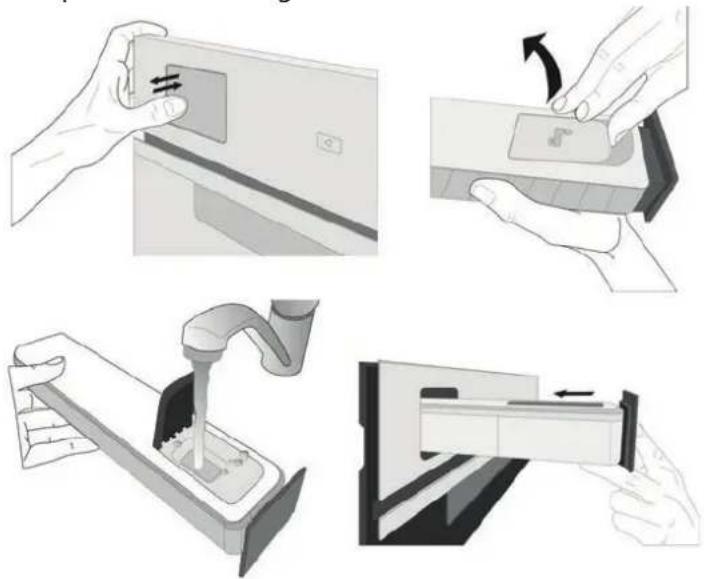
To proceed with steam cooking, it will be necessary to provide water to the boiler located inside the oven using the extractable drawer on the control panel. When requested on the display with "ADD WATER" indications, extract the drawer, open drawer's lid and fill it with water until the level requested on the display. Close the drawer by pushing it carefully towards the panel until completely closed. After the drawer insertion, press START to proceed with the cooking cycle. The drawer must always remain closed, except for water filling.
natural_image
Four-step diagram illustrating a mechanical process: pressing a component, moving a package, pouring liquid into a drain, and finally adjusting a final container (no text or symbols present)After the first filling, in case of longer cooking cycles, once water will have ran out, it could be necessary to add it again, in order to complete the cycle: the oven will prompt it in case it is needed.
Avoid to fill the drawer when the oven is switched off or up to it is requested from the display. We suggest emptying the drawer after the cooking steam cycle.
5. START THE FUNCTION
At any time, if the default values are those desired or once you have applied the settings you require, press to activate the function.
During the delay phase, by pressing ▶ the oven will ask if you want to skip this phase, starting immediately the function.
Please note: Once a function has been selected, the display will recommend the most suitable level for each function. At any time you can stop the function that has been activated by pressing ⏻
If the oven is hot and the function requires a specific maximum temperature, a message will shown on the
display. You can either select a different function or wait for a complete cooling.
6. PREHEATING
Some functions have an oven preheating phase: Once the function has started, the display indicates that the preheating phase has been activated.

Once this phase has finished, an audible signal will sound and the display will indicate that the oven has reached the set temperature, requiring to "ADD FOOD". At this point, open the door, place the food in the oven, close the door.
Please note: Placing the food in the oven before preheating has finished may have an adverse effect on the final cooking result. Opening the door during the preheating phase will stop pause it.
The cooking time does not include a preheating phase. You can always change the temperature you want the oven to reach using + or .—
7. TURN OR CHECK FOOD
Some Dynamic functions will require the food to be turned during cooking.
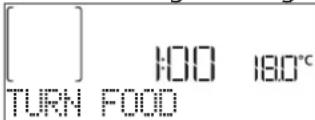
An audible signal will sound and the display shows the action to be done. Open the door, do the action prompted by the display and close the door. In the same way, at 10% of time before the end of cooking, the oven prompts you to check the food.
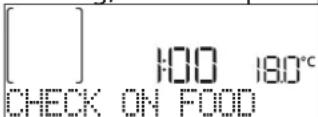
An audible signal will sound and the display shows the action to be done. Check the food, close the door. Please note: Press ☐ skip these actions. Otherwise, if no action is done after a certain time the oven will continue the cooking.
8.END OF COOKING
An audible signal will sound and the display will indicate that cooking is complete.
![[ ] - - : - - °S 180°C END](/content/2026/04/729577/images/c65b7e78be1df66fd19d7affc102f1a0adecd98e9975547b0b10f4da544c45b1.jpg)
Press to continue cooking in manual mode (untimed) or press + to extend the cooking time by setting a new duration. In both cases, the cooking parameters will be retained.
9. FAVORITES
Once cooking is complete the display will prompt you to save the function in a number between 1 and 10 on your list of favorites.
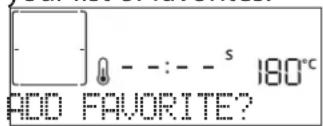
If you would like to save a function as a favorite and store the current settings for future use, press √ otherwise, to ignore the request press ◀. Once √ has been pressed, press the ⬆ — to select the number position, then press √ to confirm.
Please note: If the memory is full or the number chosen has already been taken, the oven will ask you to confirm overwriting the previous function.
To call up the functions you have saved at a later time, press ♥: The display will show your list of favorite functions.
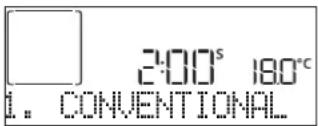
Press or to select the function, confirm by pressing √, and then press to activate.
10. CLEANING FUNCTIONS
STEAM SELF CLEAN
Press ⚙ to show "Steam Self Clean" on the display.
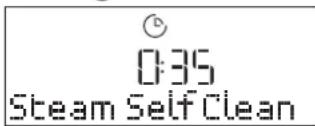
Press to activate the function: the display will prompt you to do all actions needed to obtain the best cleaning results: Follow the indications and then press √ when done. Once you have done all steps, when required press ▶ to activate the cleaning cycle.
Please note: It is recommended to do not open the oven door during the cleaning cycle to avoid a loss of water vapor that could get an adverse effect on the final cleaning result.
An appropriate message will start flashing on the display once the cycle has finished. Leave the oven to cool and then wipe and dry the interior surfaces with a cloth or sponge.
11. DRAIN
The drain function allows the water to be drained in order to prevent stagnation in the boiler. This product has been developed in order to automatically run a drain cycle once cooking has been stopped/has ended.
Approximately 30min after the stop/end of cooking, the oven will automatically drain the system, moving the residual water in the drawer (be careful not to remove the drawer after cooking). Once done, the drawer can be extracted and emptied. We recommend emptying the drawer as soon as the drain is completed.
12. DESCALE
This special function, activated at regular intervals, allows you to keep the steam system in the best condition. Once the function is started, follow all the steps indicated on the display. The average duration of the full function is around 100 minutes. Descale can be initiated anytime by the entering the then selecting the "CLEANING FUNCTIONS" menu and the Descale function. The display will show you when it is time to run a Descale cycle. The number of hours of steam cycles that must pass before the Decale messages are shown depends on the water hardness level set on the appliance and on the selected steam functions, proportionally with the amount of steam generated. The descaling procedure can also be performed whenever the user desires a deeper cleaning of the internal steam circuit. Before to run the descaling phase, the appliance will check if some residual water is contained into the boiler, and a Drain cycle could be performed, if needed. In this case, you will have to empty the drawer after the Drain cycle, before continuing with the Descale Phase.
Please note: to ensure that the water is cold, it is not possible to perform this activity before 40 minutes have elapsed from the last cycle (or the last time the product was powered). During this waiting time, the display will show the following feedback "WATER IS HOT".
» PHASE 1/2: DESCALING (70 MIN)
When display will show
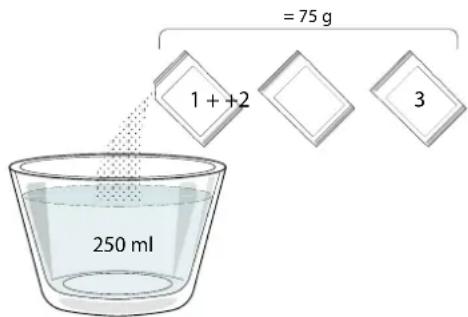
Once the descaling phase has been completed, the boiler will be drained: the descaling solution used during this phase will be poured
into the extractable drawer. At the end of the drain, drawers has to be extracted and emptied.
» PHASE 2/2: RINSING (30 MIN.)
To remove descale residuals from the drawer and the steam circuit, rinse cycle has to be done. When display shows
Please note: if needed from the system, it could be requested to emty the drawer and to repeat this operation.
When Descale procedure is completed drawer has to be extracted and emptied, it is suggested to dry the cavity from potential water residuals. It will be then possible to use all the steam functions.
Please note: during the Descale cycle, some noise could potentially be heard since the oven pumps are activated in order to guarantee the optimal descale efficiency.
Once the maintenance cycle has started, do not remove the drawer unless requested by the appliance.
Please note: After the boiler gets filled by the descaling solution and the display shows "DESCALING PHASE 1/2", the cycle should not be interrupted, otherwise the entire descaling cycle must be repeated before being able to run any steam function.
13. MINUTEMINDER
When the oven is switched off, the display can be used as a timer. To activate this function, make sure that the oven is switched off. Press and hold ⏻ icon for 5 seconds: The ⏻ icon will flash on the display. Press + or to set the length of time you require and then press √ to activate the timer.
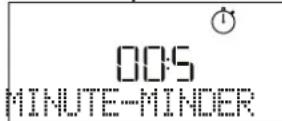
An audible signal will sound and the display will indicate once the minuteminder has finished counting down the selected time.
Please note: The minuteminder does not activate any of the cooking cycles. Press or to change the time set on the timer.
Once the minuteminder has been activated, you can also select and activate a function.
Press ⏻ to switch on the oven and then select the function you require. Once the function has started, the timer will continue to count down independently without interfering with the function itself.
Please note: During this phase, it isn't possible to see the minuteminder (only the icon will be displayed), that will continue counting down in background. To retrieve the minuteminder screen press to stop the function that is currently active.
14. KEYLOCK
To lock the keypad, press and hold for at least
five seconds. Do this again to unlock the keypad.
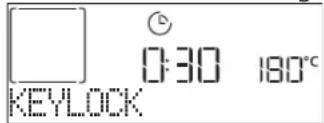
Please note: This function can also be activated during cooking. For safety reasons, the oven can be switched off at any time by pressing.
15. USING THE PROBE (IF PRESENT)
Using the probe enables you to measure the core temperature of the meat during cooking to ensure that it reaches the optimum temperature. The temperature of the oven varies according to the function that you have selected, but cooking is always programmed to finish once the specified temperature has been reached. Once you have inserted the probe, an audible signal is activated and "Probe Plugged" appears on the display.
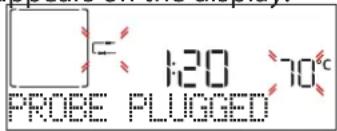
Select the function you require from those that are compatible (Steam, Forced Air + Steam, Turbo Grill, Forced Air, Convection Bake, Maxi Cooking, Eco Cycle, Dynamic functions): The display prompts to set the target temperature of the probe: Press + or — to set it and press √ to set the following cooking parameters.
As cooking is programmed to finish once the required temperature has been reached, it is not possible to set the cooking time or set a specific time for cooking to end. The light will remain switched on until the probe is removed.
If the probe is removed, the display inform to plug it correctly; in case the probe is still not inserted correctly, the cycle will continue for about 10 minutes cooking before canceling it.
An audible signal will sound and the display will indicate when the probe has reached the required temperature.
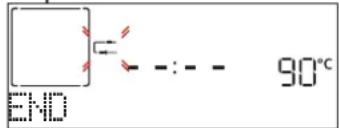
Please note: To change the settings subsequently, press + or for the probe temperature or press for other settings. An audible signal and a message will tell you if use of the probe is not compatible with the action done. If this is the case, remove the probe.
Place the food in the oven and connect the plug by inserting it into the connection provided on the righthand side of the oven's cooking compartment. Make sure that the cable does not touch the top heating element during cooking.
MEAT: Insert the probe deep into the meat, avoiding bones or fatty areas. For poultry, insert the probe lengthways into the centre of the breast, avoiding hollow areas.
FISH (whole): Position the tip in the thickest part, avoiding the thorns.

natural_image
Two illustrations of a fish inside a tray, one with a cable and the other with a bandaged body (no text or symbols)Fish Meat
CLEANING AND MAINTENANCE
Make sure that the oven has cooled down before carrying out any maintenance or cleaning. Do not use steam cleaners.
Do not use wire wool, abrasive scourers or abrasive/corrosive cleaning agents, as these could damage the surfaces of the appliance.
Wear protective gloves. The oven must be disconnected from the mains before carrying out any kind of maintenance work.
EXTERIOR SURFACES
- Clean the surfaces with a damp microfibre cloth. If they are very dirty, add a few drops of pH-neutral detergent. Finish off with a dry cloth.
- Do not use corrosive or abrasive detergents. If any of these products inadvertently comes into contact with the surfaces of the appliance, clean immediately with a damp microfibre cloth.
INTERIOR SURFACES
- After every use, leave the oven to cool and then clean it, preferably while it is still warm, to remove any deposits or stains caused by food residues. To dry any condensation that has formed as a result of cooking foods with a high water content, leave the oven to cool completely and then wipe it with a cloth or sponge.
-
Activate the "Steam Self Clean" function for optimum cleaning of the internal surfaces. (Only in some models).
-
Clean the glass in the door with a suitable liquid detergent.
- The oven door can be removed to facilitate cleaning.
ACCESSORIES
Soak the accessories in a washing-up liquid solution after use, handling them with oven gloves if they are still hot. Food residues can be removed using a washing-up brush or a sponge.
Do not clean Food Probe and Meat Probe (if present) in the dishwasher.
Air Fry tray (if present) can be cleaned in the dishwasher.
WATER DRAWER MAINTENANCE
Caution: The water drawer is not suitable for dishwasher use: risk of damage!
At the end of each cooking cycle with steam, after about 30 min the oven automatically performs a drain
cycle lasting about one minute, thus transferring all the water in the system to the extractable drawer. Note: Avoid to leave the water in the system more than 2 days. In order to completely remove the water inside or clean the internal surfaces, you can open the water drawer:
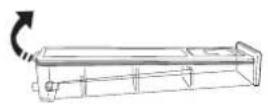
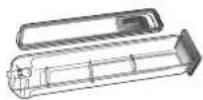
-
Push towards the top the back flap to remove the water drawer top cover.
-
Once the cleaning is done, you can close the drawer by inserting the two front flaps inside the front openings and pushing down the back side. Use only room temperature water when filling the
water drawer: hot water may affect the operation of the steam system. Use only drinking water.
BOILER
To ensure that the oven always works at optimum performance and to help prevent the build-up of limescale deposits over time, we recommend using the "Descale" function regularly. After a long period of non-use of the "Steam" functions, it is highly suggested to activate a cooking cycle with the empty oven by filling completely the tank.
REPLACING THE LAMP
For the replacement of the lamp, contact the after sales service.
CLEAN THE INTERNAL GLASS OF THE DOOR
-
Open the oven door completely and activate hinge stopper on both sides.
-
Then close the door until it stops in a safe position.
-
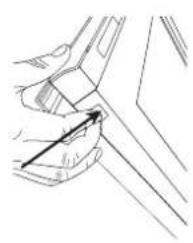
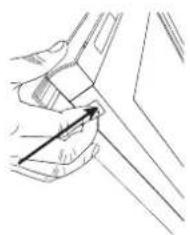
Simultaneously press the two retaining clips.
-
Remove the upper edge of the door by pulling it towards you.
-
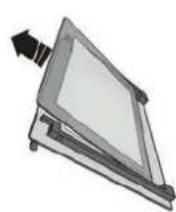
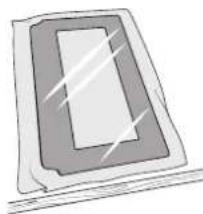
Lift and firmly hold the inner glass with both hands and remove it.
-
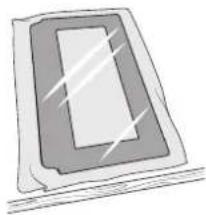
Place it on a soft surface before cleaning it. Do not remove intermediate glass from the door assembly.
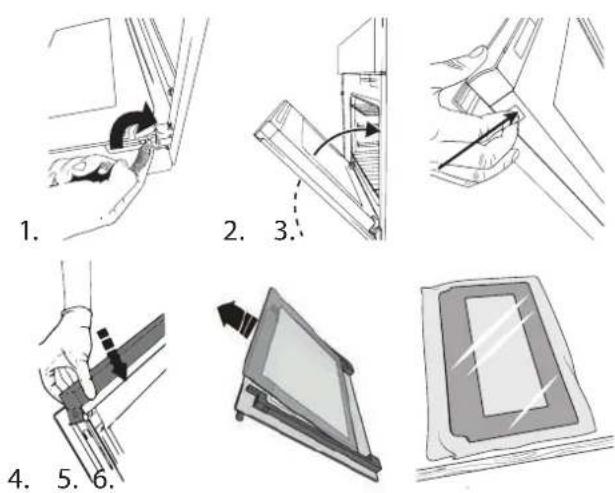
HOW TO REPOSITION THE DOOR GLASS
- Insert inner glass after cleaning into the door assembly with glossy side towards the oven cavity.
- Insert the upper edge of the door and gently press until it snaps in place
- Remove hinge stopper on both sides and then close the door.
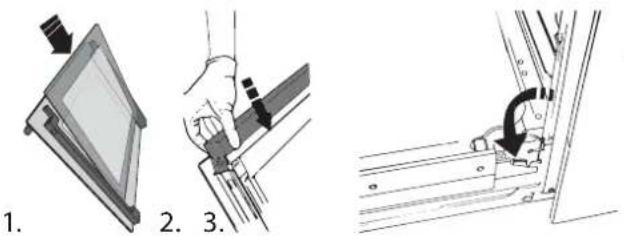
1.
TROUBLESHOOTING
Problem Possible cause Solution
| The display shows letter 'F' followed by a number or letter different from F4E1. | Oven failure. | Contact the Call Center and state the number following the letter 'F'. |
| The display shows F4E1. | Food probe is not properly connected. | Check if the probe is connected correctly, if yes but the problem persists, please contact Call Center. |
| The display shows unclear text and appears to be broken. | Another language set. Contact the Call Center | |
| The oven makes noises, even when it is switched off. | Cooling fan active. | Open the door or hold and wait until the cooling process has finished. |
| The oven does not heat up. | When "DEMO" is "On" all commands are active and menus available but the oven doesn't heat up.DEMO appears on display every 60 seconds. | Access "DEMO" from "SETTINGS" and select "Off". |
| The oven display shows F8E8 (or inability to use the Steam function because of failure F8E8) | Excessive pollution of the water and steam system. | Fill the drawer with clean water and then run the cleaning/descale function. After the process is completed, restart the descaling process using the target solution with the descaler and then carry out the process again.If error F8E8 still appears, contact the nearest service center. |
Policies, standard documentation and additional product information can be found by:
• Using the QR code in your appliance
• Visiting our website docs.bauknecht.eu
• Alternatively, contact our After-sales Service (See phone number in the warranty booklet). When contacting our After-sales Service, please state the codes provided on your product's identification plate.

MERCI D'AVOIR ACHETÉ UN PRODUIT BAUKNECHT
natural_image
Line drawing of a microwave oven with an open lid and internal compartments, showing internal structure and airflow direction (no text or symbols)DÉPOSE ET REPOSE DES SUPPORTS DE GRILLE
natural_image
Hand holding a mechanical component with a curved arrow indicating rotation (no text or symbols)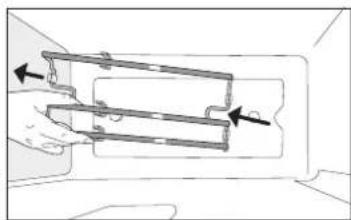
natural_image
Diagram of a hand holding a mechanical component with arrows indicating direction (no text or symbols)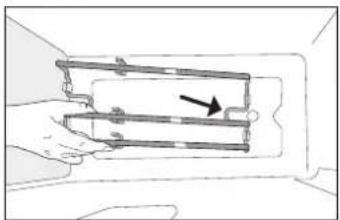
natural_image
Diagram of a hand holding a mechanical component with an arrow indicating direction (no text or symbols present)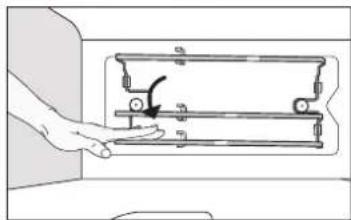
natural_image
Hand operating a mechanical device with a hand holding a tool (no text or symbols visible)FONCTIONS

MENU DYNAMIQUE
natural_image
Four-panel illustration showing hands performing a manual task: adding a card, handling a device, pouring liquid into a container, and finally adjusting a tray (no text or symbols present)natural_image
Two illustrations of a fish inside a tray, one with a cable and the other with a bandaged body (no text or symbols)Poisson Viande
NETTOYAGE ET ENTRETIEN
GUIDE DE DÉPANNAGE
natural_image
Line drawing of an open oven with a tray and lid, showing internal components and a directional arrow (no text or symbols)DE ROOSTERGELEIDERS VERWIJDEREN EN TERUGPLAATSEN
natural_image
Hand holding a mechanical component with a rotation arrow (no text or symbols)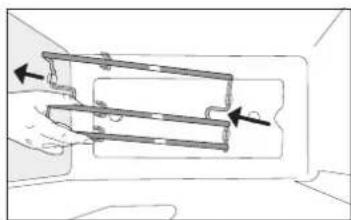
natural_image
Diagram of a hand holding a mechanical component with arrows indicating direction (no text or symbols)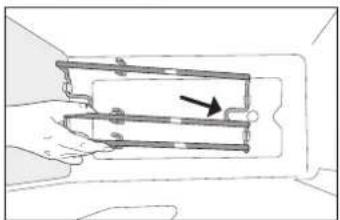
natural_image
Diagram of a hand holding a mechanical component with a directional arrow indicating movement (no text or symbols present)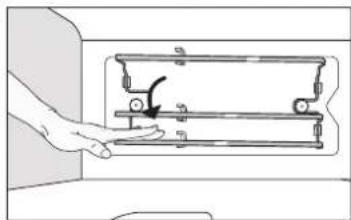
natural_image
Hand pressing a mechanical component on a device (no text or symbols visible)FUNCTIES

■DYNAMISCH MENU
TRADITIONELE FUNCTIONS
SNEL VOOR- VERWARMEN
natural_image
Four-step diagram illustrating a mechanical process: pressing a component, moving a component, pouring liquid into a washing machine, and finally adjusting a final container (no text or symbols present)natural_image
Two illustrations of a fish inside a tray, one with a cable and the other with a bandaged body (no text or symbols)Vis Vlees
REINIGEN EN ONDERHOUD
PROBLEEMOPLOSSING
natural_image
Diagram of a container with perforated contents being placed into a tray, showing a magnified view of the lid (no text or symbols present)TEGLIA PER COTTURA A VAPORE
natural_image
Line drawing of an open oven with a tray and lid, showing internal components and a directional arrow (no text or symbols)SMONTAGGIO E RIMONTAGGIO DEI RIPIANI A SCALETTA
natural_image
Hand holding a mechanical component with an arrow indicating rotation (no text or symbols)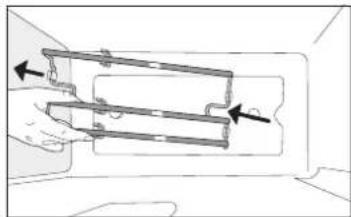
natural_image
Diagram of a hand holding a mechanical component with arrows indicating direction (no text or symbols)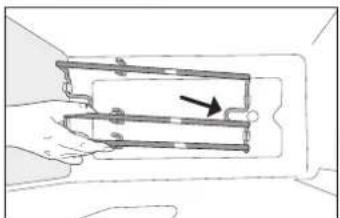
natural_image
Diagram of a hand holding a mechanical device with a black arrow pointing to a component (no text or symbols present)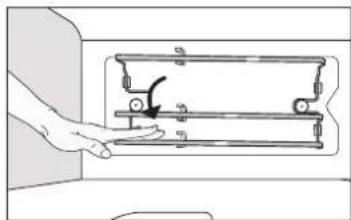
natural_image
Hand operating a mechanical device with a handle and lever (no text or symbols visible)FUNZIONI

■MENU DYNAMIC
natural_image
Four-step diagram illustrating a mechanical process: pressing a component, moving a device, pouring liquid into a drain, and finally adjusting a final container (no text or symbols present)natural_image
Two illustrations of a fish inside a tray, one with a cable and the other with a bandaged body (no text or symbols)Pesce Carne
natural_image
Simple line drawing of a person using a tool to clean or install a window (no text or symbols)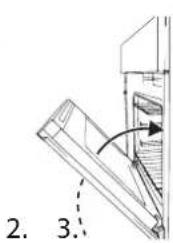
natural_image
Line drawing of a hand holding a small object, possibly a tool or component, with no visible text or symbols.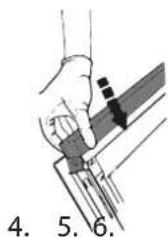
natural_image
Simple line drawing of a rectangular object with a central blank space, no text or symbols present.1.
natural_image
Line drawing of a microwave oven with an open lid and internal compartments, showing internal structure and airflow direction (no text or symbols)CÓMO EXTRAER Y VOLVER A COLOCAR LAS GUÍAS DE BANDEJAS
natural_image
Hand holding a mechanical component with a rotation arrow indicating motion (no text or symbols)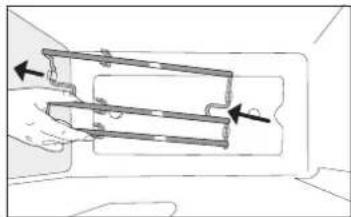
natural_image
Diagram of a hand holding a mechanical component with arrows indicating direction (no text or symbols)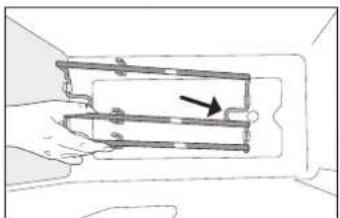
natural_image
Diagram of a hand holding a mechanical device with a black arrow pointing to a component (no text or symbols present)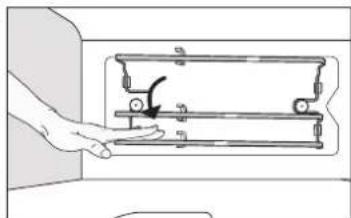
natural_image
Hand operating a mechanical device with a hand holding the left side (no text or symbols visible)FUNCIONES

MENÚ DINÁMICO
natural_image
Illustration showing two hands inserting a component into a device, with no visible text or symbols.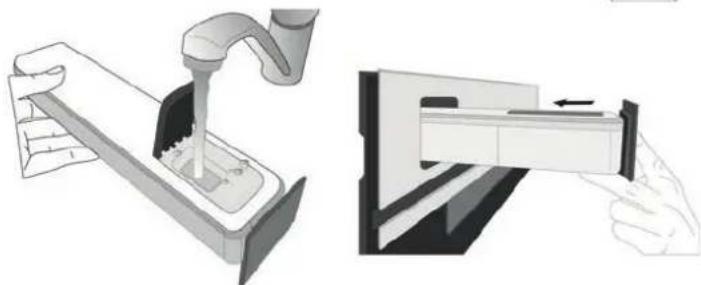
natural_image
Illustration showing a hand inserting a device into a container with liquid, alongside a close-up of the device's internal structure (no text or symbols present)natural_image
Two illustrations of a fish inside a tray, one with a cable and the other with a curved rod (no text or symbols)Pescado Carne
LIMPIEZA Y MANTENIMIENTO
natural_image
Line drawing of a microwave oven with an open lid and internal compartments, showing internal structure and airflow direction (no text or symbols)DEMONTÁŽ A ZPĚTNÁ MONTÁŽ ŽEBŘÍKOVÝCH STOJANŮ
natural_image
Hand holding a mechanical device with a rotating arrow indicating rotation (no text or symbols)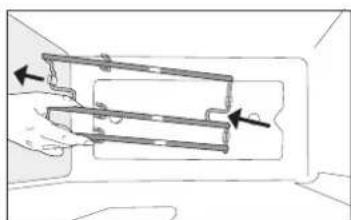
natural_image
Diagram of a hand holding a mechanical component with arrows indicating direction (no text or symbols)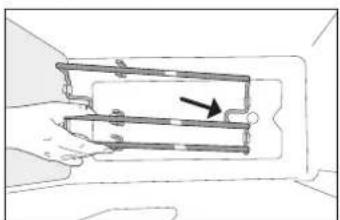
natural_image
Diagram of a hand holding a mechanical device with a black arrow pointing to a component (no text or symbols present)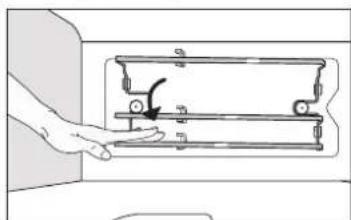
natural_image
Hand operating a mechanical device with a hand holding a tool (no text or symbols visible)ARTISAN

DYNAMICKÁ NABÍDKA
natural_image
Four-step diagram illustrating a mechanical process: pressing a component, moving a component, pouring liquid into a tank, and finally adjusting a final container (no text or symbols present)natural_image
Two illustrations of a fish inside a tray, one with a cable and the other with a curved band (no text or symbols)Ryby Maso
ČIŠTĚNÍ A ÚDRŽBA
ODSTRAŇOVÁNÍ ZÁVAD
INDSÆT OVNRIST OG ANDET TILBEH∅R
natural_image
Line drawing of a microwave oven with an open lid and internal compartments, showing internal structure and airflow direction (no text or symbols)AFTAGNING OG PÅSÆTNING AF SKINNESTATIVERNE
natural_image
Hand holding a mechanical component with a rotation arrow indicating motion (no text or symbols)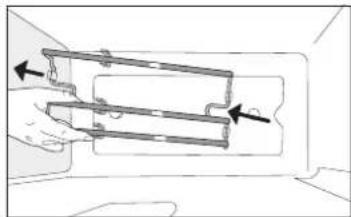
natural_image
Diagram of a hand holding a mechanical component with arrows indicating direction (no text or symbols)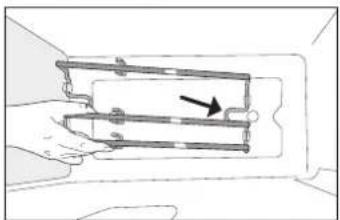
natural_image
Diagram of a hand holding a mechanical component with a directional arrow indicating movement (no text or symbols present)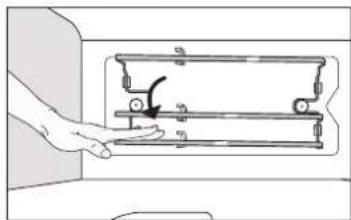
natural_image
Hand pressing a mechanical component on a device (no text or symbols visible)FUNKTIONER

■DYNAMISK MENU
natural_image
Four-panel illustration showing hands performing a manual task: adding a card, pressing a component, and inserting a device into a rack (no text or symbols)12. DESCALE (AFKALK)
» FASE 1/2: AFKALKNING (70 MIN)
natural_image
Two illustrations of a fish inside a tray, one with a cable and the other with a curved cable (no text or symbols)Fisk Kød
RENG∅RING OG VEDLIGEHOLDELSE
- VALINNAT / SUORA PÄÄSY TOIMINTOIHIN
natural_image
Line drawing of an open oven with internal compartments and a tray, showing internal structure and airflow direction (no text or symbols)KANNATINTELINEIDEN IRROTTAMINEN JA ASENTAMINEN
natural_image
Hand holding a mechanical component with an arrow indicating rotation (no text or symbols)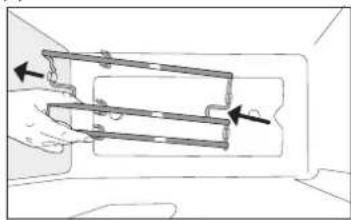
natural_image
Diagram of a hand holding a mechanical component with arrows indicating direction (no text or symbols)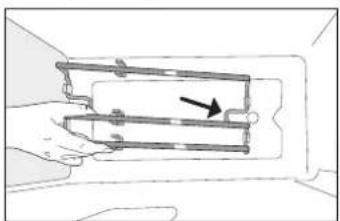
natural_image
Diagram of a mechanical assembly with a hand holding a rectangular component and an arrow indicating direction (no text or symbols present)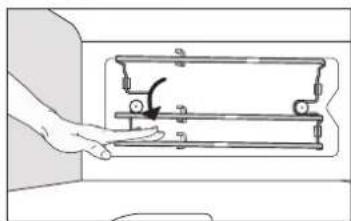
natural_image
Hand operating a mechanical device with a hand holding a lever (no text or symbols visible)TOIMINNOT

■DYNAAMINEN RUOKALISTA
PERINTEISET TOIMINNOT
NOPEA ESIKUUMEN.
natural_image
Four-panel illustration showing hands performing a manual task: adding a component, moving a device, pouring liquid into a container, and finally adjusting a tray (no text or symbols present)5. TOIMINNON KÄYNNISTYS
10. PUHDISTUSTOIMINNOT
ITSETOIMINEN HÖYRYPUHDISTUS
natural_image
Two illustrations of a fish inside a tray, one with a cable and the other with a bandaged body (no text or symbols)Kala Liha
PUHDISTUS JA KUNNOSSAPITO
natural_image
Illustration of a hand using a tool to adjust or install a component, no text or symbols present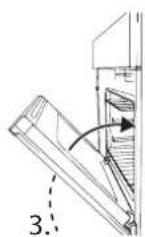
natural_image
Line drawing of a hand holding a small object near a vehicle (no text or symbols)
natural_image
Illustration of a hand holding a tool with numbered labels 4, 5, and 6 (no text or symbols on the diagram itself)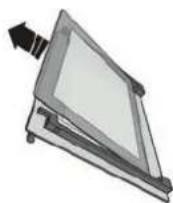
natural_image
Simple line drawing of a rectangular object with a central rectangle and diagonal lines, resembling a stylized document or panel (no text or symbols)MITEN LUUKUN LASI ASETETAAN UUDELLEEN PAIKOILLEEN
TAKK FOR AT DU HAR KJ∅PT ET BAUKNECHT-PRODUKT
natural_image
Line drawing of a microwave oven with an open lid and internal compartments, showing internal structure and airflow direction (no text or symbols)DEMONTERING OG MONTERING AV STIGEHYLLENE
natural_image
Hand holding a mechanical component with a rotation arrow indicating motion (no text or symbols)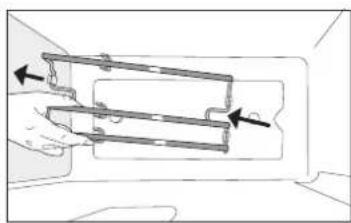
natural_image
Diagram of a hand holding a mechanical component with arrows indicating direction (no text or symbols)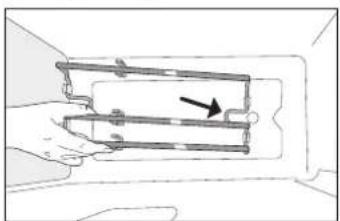
natural_image
Diagram of a mechanical assembly with a hand holding a bracket and an arrow indicating direction (no text or symbols)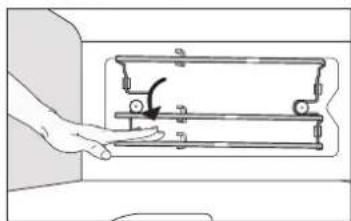
natural_image
Hand operating a mechanical device with a hand holding a lever (no text or symbols visible)FUNCTIONS (FUNKSJONER)

■DYNAMISK MENY
TRADISJONELL STEKING
SLUTTID (UTSATT START)
For mange funksjoner, när du först har stilt inn steketiden kan du utsette start av funksjonen ved å programmere sluttiden. Displayet viser sluttiden mens 🔒 ikonet blinker.
END TIME
natural_image
Four-panel illustration showing hands performing a manual task: adding a card, pressing a component, using a tool, and finally adjusting a tray (no text or symbols present)» FASE 1/2: AVKALKING (70 MIN)
natural_image
Two illustrations of a fish inside a tray, one with a cable and the other with a curved line (no text or symbols)Fisk Kjøtt
RENGJ∅RING OG VEDLIKEHOLD
VEDLIKEHOLD AV VANNSKUFF
NY MONTERING AV D∅RGLASSET
FEILS∅KING
natural_image
Line drawing of a microwave oven with open door and internal tray, showing internal components (no text or symbols)TA AV OCH SÄTTA PÅ UGNSSTEGARNA
natural_image
Hand holding a mechanical component with a curved arrow indicating rotation (no text or symbols)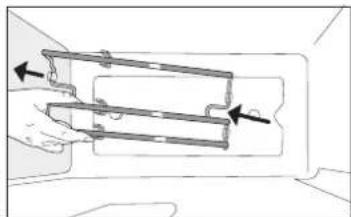
natural_image
Diagram of a hand holding a mechanical component with arrows indicating direction (no text or symbols)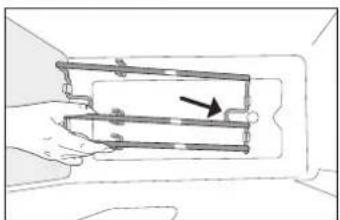
natural_image
Diagram of a hand holding a mechanical component with an arrow indicating direction (no text or symbols present)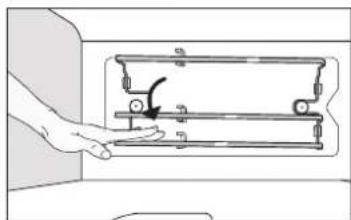
natural_image
Hand operating a mechanical device with a hand holding a lever (no text or symbols visible)FUNKTIONER

■DYNAMISK MENY
SLUTTID (FÖRDRÖJD START)
natural_image
Four-panel illustration showing hands performing a mechanical or electrical operation: pressing a component, moving a device, pouring liquid into a tank, and finally adjusting a device (no text or symbols present)natural_image
Illustration of a fish being carried on a tray with a cable (no text or symbols)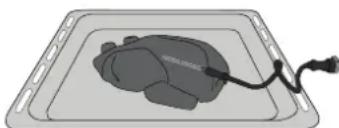
natural_image
Illustration of a gray tray with a black cable and a small object inside, no text or symbols present.Fisk Kött