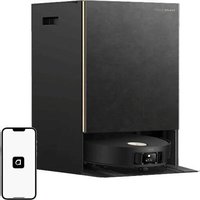
USER MANUAL X50 Ultra DREAME
Robot Vacuum and Mop with Auto-Empty and Mop Self-Cleaning User Manual
DREAME
The illustrations in this manual are for reference only. Please refer to the actual product.
Contents
EN User Manual 01
DE Benutzerhandbuch 35
FR Manuel d'utilisation 69
IT Manuale utente 102
ES Manual de usuario 135
PL Instrukcja obsługi 168
NL Gebruikershandleiding 203
NO Brukerhåndbok 236
SV Användarmanual 269
EL Εγχειρίδιο χρήστη 302
PT Manual do utilizador 335
HE 7000000000000000000000000000000000000000000000000000000000
AR دليل الاستخدام 401
TR Kullanıcı Kilavuzu 434
Ⅵ Huống dẫn sử dụng 467
TH คู่มือการใช้งาน 500
Contents
ID Panduan Pengguna 533
RU Инструкция по эксплуатации 566
KO사용 설명서 599
JA 取扱説明書 631
ZH-TW 使用說明書 665
ZH-HK 用户手册 695
FI Käyttöohjeet 728
DA Brugermanual 761
MS Manual Pengguna 794
кк Пайдаланушы нускаулығы 827
UZ Foydalanuvchi uchun qo'llanma 860
UA Посібник користувача 893
CS Uživatelská přiručka 926
5K Príručka používatela 959
5L Uporabniški priročnik 992
HU Használati útmutató 1025
Contents
SR Uputstvo za upotrebu 1058
LT Naudotojo vadovas 1091
LV Lietotāja rokasgrāmata 1124
RO Manual de utilizare 1157
EN
To avoid electric shock, fire or injury caused by improper use of the appliance, please read the user manual carefully before using the appliance and keep it for future reference.
Usage Restrictions
This product should not be used by children younger than 8 years old nor persons with physical, sensory, intellectual deficiencies, or limited experience or knowledge without the supervision of a parent or guardian to ensure safe operation and to avoid any risks. Cleaning and maintenance shall not be performed by children without supervision.
The appliance is only to be used with the power supply unit provided with the appliance.
· This appliance contains batteries that are only replaceable by skilled persons.
- Clear the area to be cleaned. Children shall not play with the appliance. Ensure children and pets are kept at a safe distance from the robot while it is operating.
- Do not install, charge or use the appliance in the bathrooms or around the pools.
This product is for floor cleaning in a home environment only. Do not use it outdoors, on non-floor surfaces, or in a commercial or industrial setting.
- Ensure that the appliance operates correctly in a proper environment. Otherwise, do not use the appliance.
- If the power cord is damaged, it must be replaced by a special cord or assembly available from the manufacturer or its service agent.
EN
Usage Restrictions
- Do not use the robot in an area suspended above ground level without a protective barrier.
- Do not place the robot upside down. Do not use the LDS cover, robot cover, or bumper as a handle for the robot.
- Use the robot in environments with an ambient temperature above 0°C and below 40°C. Make sure there is no liquid or sticky substance on the floor.
- To prevent damage or harm from dragging, clear any loose objects from the floor, and remove cables or power cords on the cleaning path before operating the appliance.
- Remove fragile or small items from the floor to prevent the robot from bumping into and damaging them.
- Keep hair, fingers, and other body parts away from the suction opening of the robot.
- Keep the cleaning tool out of reach of children.
Do not operate the appliance in a room where an infant or child is sleeping.
Do not place children, pets, or any item on top of the robot regardless of whether it is stationary or moving.
- Only clean water and the officially-approved cleaning solution can be added to the clean water tank. Do not add any other liquid such as alcohol or disinfectant. The ratio of the cleaning solution to clean water can be checked on the cleaning solution bottle. Keep the cleaning solution out of reach of children.
EN
Usage Restrictions
- Do not use the robot to clean any burning objects. Do not use the robot to pick up flammable or combustible liquids, corrosive gases, or undiluted acids or solvents.
- Do not vacuum hard or sharp objects. Do not use the appliance to pick up objects such as stones, large pieces of paper or any item that may clog the appliance.
- Plug must be removed from the socket-outlet before cleaning or maintaining the appliance.
- Do not wipe the robot or the base station with a wet cloth or rinse them with any liquid. After cleaning washable parts, fully dry the parts before reinstalling and using them.
- Please use this product in accordance with the instructions in the User Manual. Users are responsible for any loss or damage that arise from improper use of this product.
Batteries and Charging
Do not use any third-party battery or base station. The robot can only be used with the model RCXE0105/RCXE0108/RCXE0109 base station.
Do not attempt to disassemble, repair, or modify the battery or the base station on your own.
· Do not place the base station near a heat source.
Do not use a wet cloth or wet hands to wipe or clean the base station's charging contacts.
EN
Batteries and Charging
Do not improperly dispose of old batteries. Unneeded batteries should be discarded at an appropriate recycling facility.
- If the power cord becomes damaged or broken, stop using it immediately and contact after-sales service.
· Make sure the robot is turned off when being transported and kept in its original packaging if possible.
- If the robot will not be used for an extended period of time, fully charge it, then turn it off and store it in a cool, dry place. Recharge the robot at least once every 3 months to avoid over-discharging the battery.
The laser sensor in this product meets the IEC 60825-1:2014/EN 60825-1:2014/A11:2021 Standard for Class 1 laser products. Please avoid direct eye contact with it during use.
CLASS 1 LASER PRODUCT
CONSUMER LASER PRODUCT
EN 50689:2021

For indoor use only

Read operator's manual
Hereby, Dreame Trading (Tianjin) Co., Ltd. declares that the radio equipment type RLX85CE/RLX85CE-1/RLX85CE-3/RLX85CE-4/RLX85CE-5/RLX85CE-6 is in compliance with Directive 2014/53/EU. The full text of the EU declaration of conformity is available at the following internet address: https://global.dreametech.com
For detailed e-manual, please go to https://global.dreametech.com/pages/user-manuals-and-faqs
Product Overview
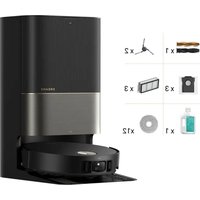
Package Contents
(Dreame X50 Ultra)
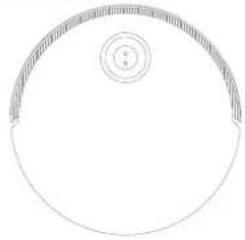
natural_image
Simple line drawing of a circular object with a small circular inset containing a number 5 (no text or symbols)
Robot
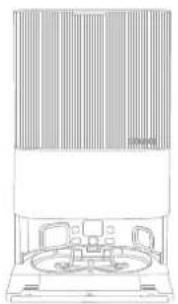
natural_image
Line drawing of a room interior with ceiling-mounted equipment and a central circular structure (no text or symbols)
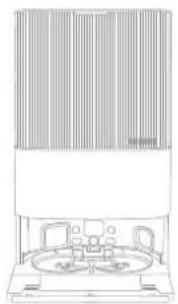
Base Station
Other Accessories
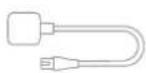
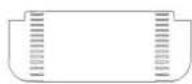
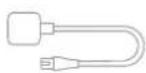
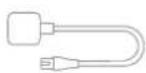
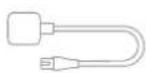
Power Cord Base Station Ramp Extension Plate
User Manual Auto-Detergent
Compartment
(pre-installed)
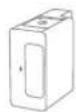
Compartment (pre-installed)
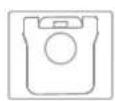
Dust Bag × 2 (1 pre-installed)
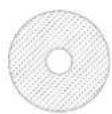
Mop Pad × 2 (pre-installed)
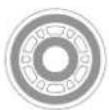
Mop Pad
Holder × 2
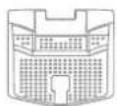
(pre-installed)
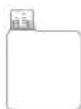
Cleaning Solution
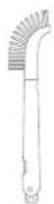
Cleaning ToolWashboard Fil
Product Overview
Package Contents
(Dreame X50 Ultra Complete)
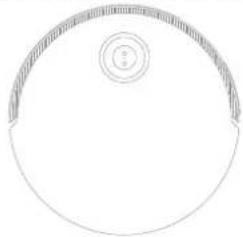
natural_image
Simple line drawing of a circular object with a small circular inset containing a number 2 (no text or symbols)
Robot
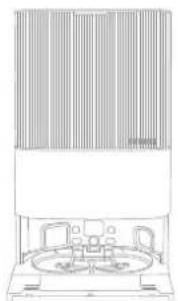
natural_image
Line drawing of a vintage office or gas station with two circular chambers and a large wall (no text or symbols)
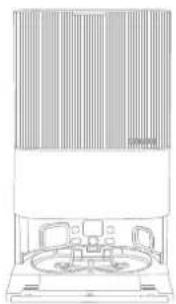
Base Station
Other Accessories
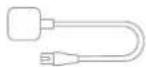
Power Cord
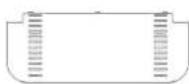
Base Station Ramp Extension Plate
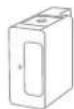
Auto-Detergent Compartment (pre-installed)
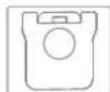
Dust Bag × 2
(1 pre-installed)
Mop Pad × 2 (pre-installed)
Mop Pad
Holder × 2
(pre-installed)
User Manual
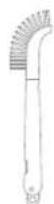
Cleaning ToolWashboard Fil
Extra Accessories Kit
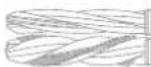
Main Brushes × 1 D6id@8gush × 2

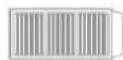
Dust Box's Filter
× 3

× 3

Mop Pad
× 12
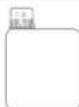
Cleaning Solution
× 1
Product Overview
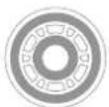
Robot
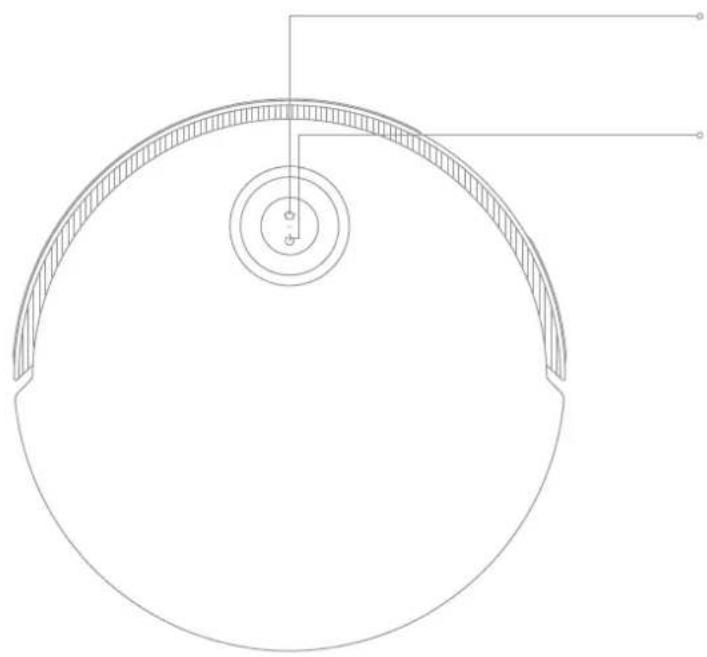
natural_image
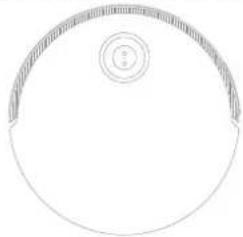
Technical line drawing of a circular mechanical component with concentric layers and mounting holes (no text or symbols)
- Press to send the robot back to the base station
- Press and hold for 3 seconds to disable Child Lock
- Press and hold for 3 seconds to turn on or off
- Press to start cleaning after the robot is turned on
Circular Status Indicator
· Solid Blue: Cleaning or cleanup completed
· Solid Green: Charging
Blinking Orange: Error
Solid White: Cleaning or cleanup completed
- Breathing White: Charging (not low battery)
Solid Orange: Standby at low battery or paused at low battery
- Breathing Orange: Charging (low battery)
· Blinking Orange: Error
· Blinking Pink: Camera activated
Note:
- Press any button on the robot to pause while the robot is cleaning or returning to charge.
- Child Lock can be enabled/disabled through the Dreamehome App.
EN
Product Overview
Robot and Sensors
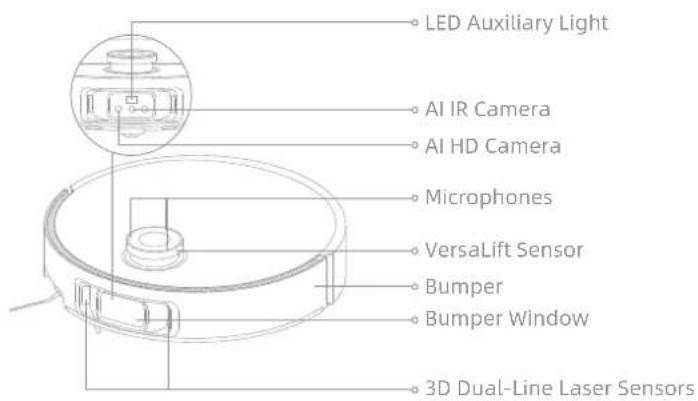
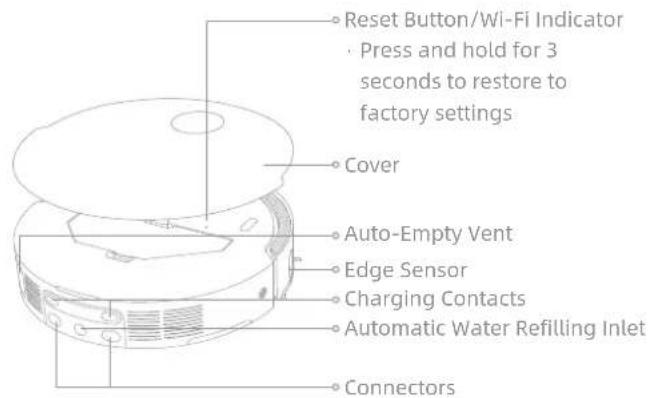
Note: The VersaLift sensor will be lowered when the robot is in standby mode, charging on the base station, or cleaning low-clearance areas. In the case of cleaning low-clearance areas, do not move the robot as it may affect its positioning.
Product Overview
Robot and Sensors
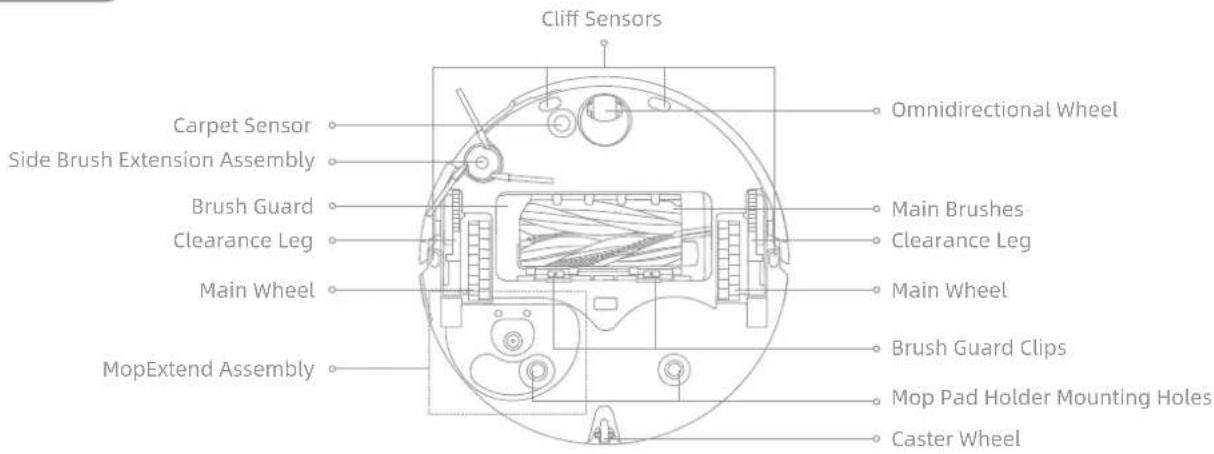
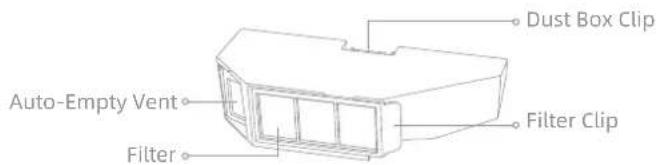
Dust Box
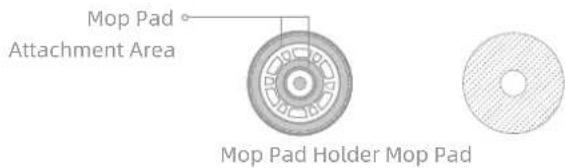
Mop Assembly
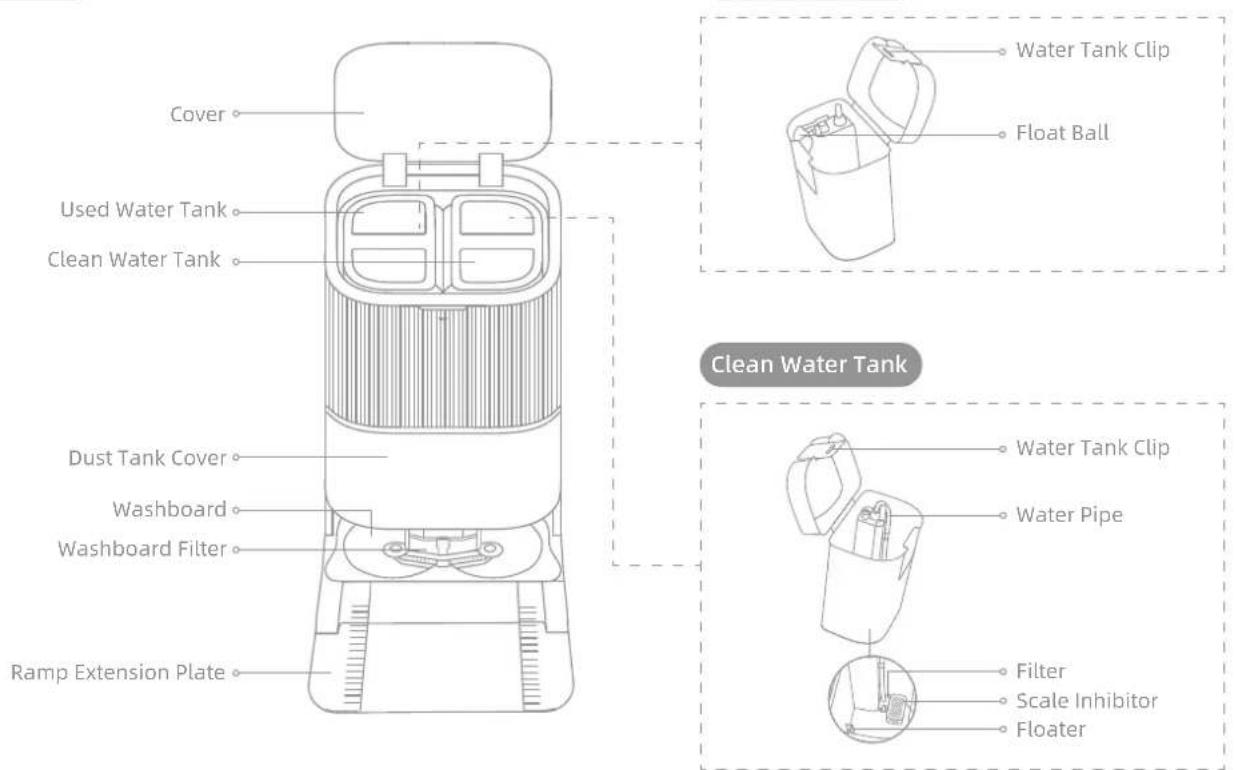
Product Overview
Base Station
Product Overview
Base Station
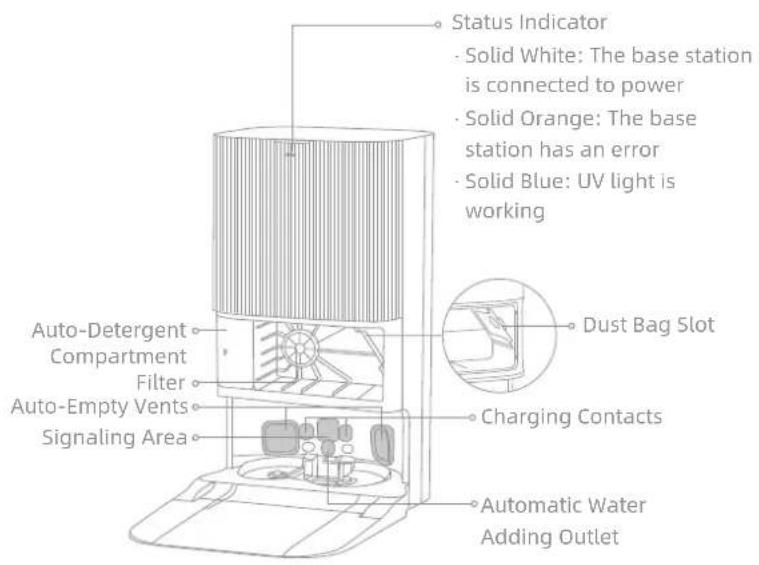
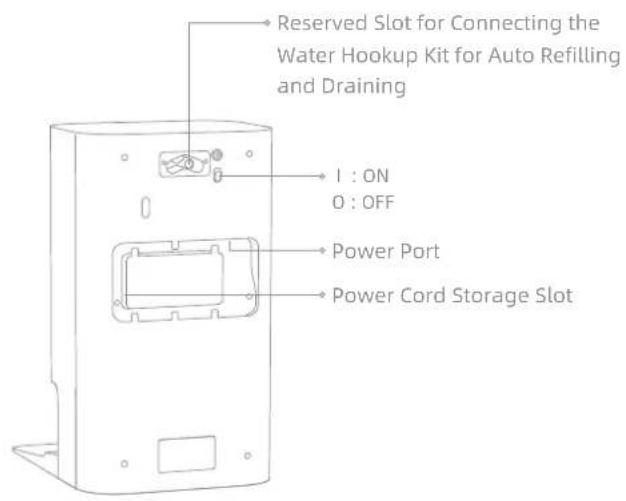
Note: The water hookup kit for auto refilling and draining needs to be purchased separately. (Only available in specific regions)
Preparing Your Home
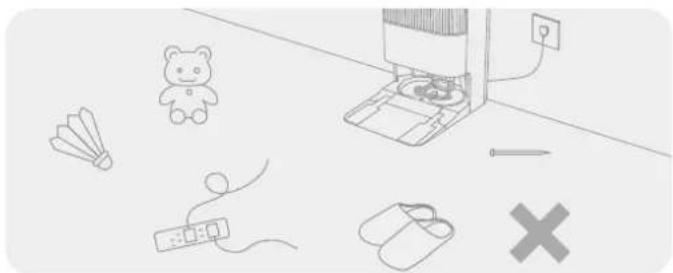
natural_image
Illustration of a desk setup with a teddy bear, keyboard, mouse, pencil, and crossed-out cross symbol (no text or labels)
Before cleaning, please move away unstable, fragile, valuable or dangerous items, and clean up cables, cloths, toys, hard objects and sharp objects on the ground to avoid being entangled, scratched or knocked over by the robot and causing losses.
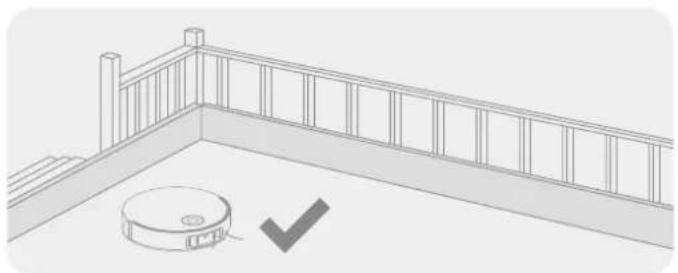
natural_image
Architectural line drawing of a balcony railing with a circular base and checkmark symbol (no text or labels)
Before cleaning, place a physical barrier at the edge of the stairs to ensure the secure and smooth operations of the robot.
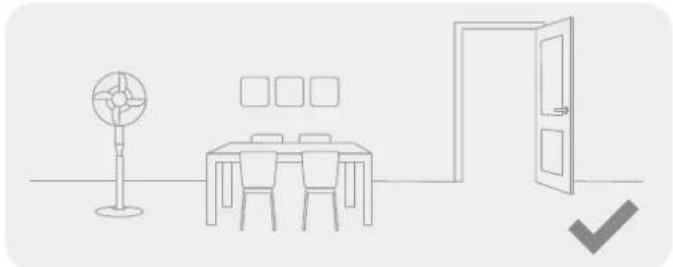
natural_image
Line drawing of a simple room layout with a desk, chair, fan, and door (no text or symbols)
Open the door of the room to be cleaned, and put the furniture in its proper place to leave more space.

natural_image
Interior hallway with a person standing at the doorway and a robot near the door, marked with a cross symbol (no text or labels)
To prevent the robot from missing areas that need to be cleaned, do not stand in front of the robot, threshold, hallway, or narrow places.
Note:
- When operating the robot for the first time, follow it around while cleaning to remove any potential obstacles in time.
- The LED auxiliary light will provide auxiliary lighting in dimly lit environments.
- Do not vacuum hard objects like stones, steel balls and toy parts, or sharp objects like construction waste, broken glass and nails, otherwise the ground may be scratched.
Before Use
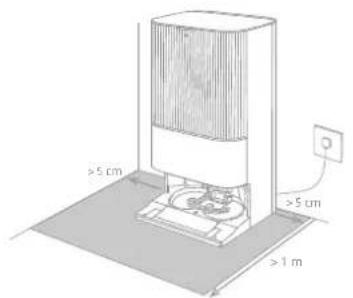
1. Place the Base Station and Connect to an Electrical Outlet
Place the base station in a location that is as open as possible with a good Wi-Fi signal. Leave enough space as shown in the figure and remove any objects in the shaded area. Insert the power cord into the base station and plug it into the socket.
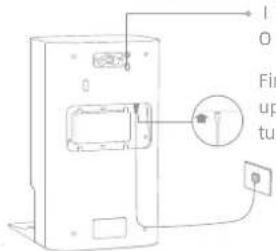
I:ON O:OFF
Firmly insert the power cord upwards until the indicator turns on.
Note:
• Make sure that no objects might block the signaling area.
- To prevent water stains from wetting wood floors or carpets, placing the base station on tile floors or marble floors is recommended.
2. Install the Ramp Extension Plate
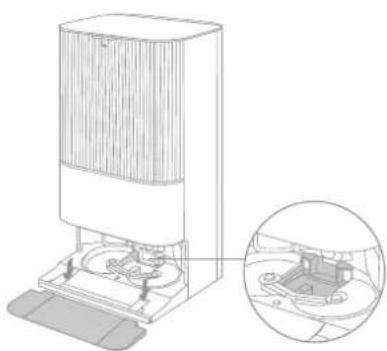
natural_image
Technical line drawing of a vacuum cleaner with an inset close-up showing internal components (no text or symbols)
Washboard Filter
Note: Ensure the washboard filter is installed into place.
EN
Before Use
- Remove Robot Protections and Install the Mop Assembly
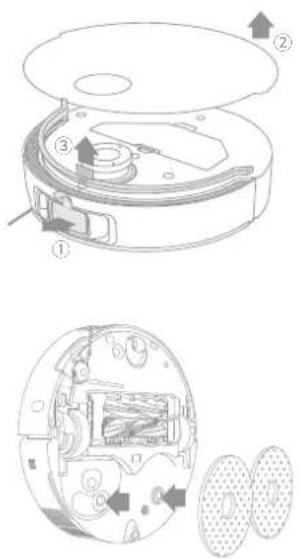
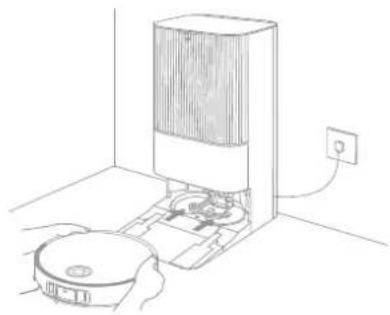
- Connect the Robot to the Base Station
Press and hold the button (on the robot for 3 seconds to turn it on. Place the robot onto the base station with the mop assembly facing toward the washboard. Then you will hear a voice notification when the robot successfully connects to the base station. After the robot is fully charged, the status indicators on the robot and the base station will remain lit for 10 minutes and then dim.
natural_image
Line drawing of a robotic vacuum cleaner inside a room with an electrical outlet (no text or symbols)
Note: It is recommended to fully charge the robot before its first use. When the robot cannot be turned on after the battery is depleted, manually connect the robot with the station to charge it.
Before Use
5. Add the Cleaning Solution
(1) Remove the dust tank cover and pull out the auto-detergent compartment.
(2) Open the upper lid of the compartment and add the cleaning solution.
(3) Close the lid of the compartment, put it back into the base station, and then reinstall the dust tank cover. The cleaning solution will be added automatically while working.

natural_image
Diagram showing three stages of a device operation: front view, internal processing, and final shipment (no text or symbols)
Note:
- The auto-detergent compartment can be filled up with cleaning solution for use. Do not add any liquid other than the officially-approved cleaning solution to prevent malfunction.
- Install the auto-detergent compartment until it clicks into place.
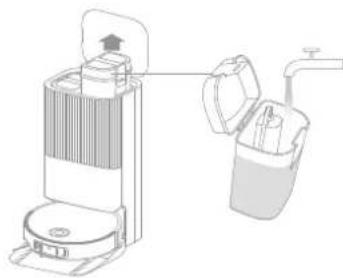
6. Add Water to the Clean Water Tank
Take out the clean water tank from the base station and fill up the tank with clean water. Then install it back into the base station.
natural_image
Diagram of a portable air purifier with a lid and base, connected to a water tap (no text or symbols present)
Note: Do not add hot water into the water tank, as this may cause the tank to become deformed.
EN
Connecting with the Dreamehome App
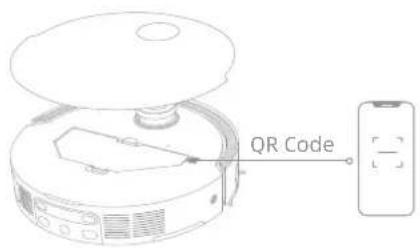
1. Download the Dreamehome App
Remove the robot cover and scan the QR code on the robot, or search "Dreamehome" in the app store to download and install the app.
Note:
- Only 2.4 GHz Wi-Fi is supported.
- Due to upgrades in the app software, the actual operations may differ from the directions in this manual. Please follow the instructions based on the current app version.
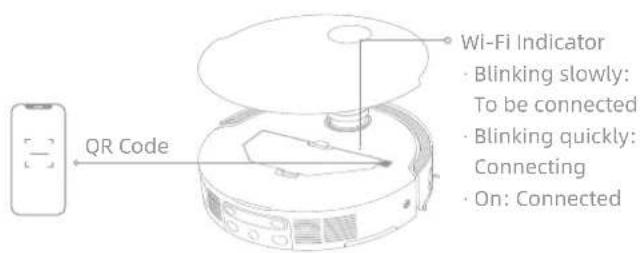
2. Add Device
Open the Dreamehome app, tap "Scan QR code to connect", and scan the same QR code on the robot again to add the device. Please follow the prompts to finish the Wi-Fi connection.
Note: To reset Wi-Fi, repeat step 2 and then follow the prompts to finish the Wi-Fi connection.
How to Use
Turn On/Off
Press and hold the button ⏻ for 3 seconds to turn on the robot. The power indicator will remain lit. Or, place the robot onto the base station by aligning the charging contacts of the robot with those of the base station, and then the robot will turn on automatically and begin charging. To turn off the robot, move the robot away from the base station and press and hold the button ⏻ for 3 seconds.
Fast Mapping
After configuring the network for the first time, follow the instructions in the app to quickly create a map. The robot will start mapping without cleaning. When the robot returns to the base station, the mapping process has been completed and the map will be saved automatically.
Pause/Sleep
When the robot is running, press any button to pause it.
If the robot is paused for more than 10 minutes, it automatically enters sleep mode. All indicators on the robot will turn off. Press any button on the robot, or use the app to wake up the robot.
Note: If the robot is paused and placed onto the base station, the current cleaning process will end.
Auto Resume Cleaning
If the battery is too low, the robot will automatically return to the base station to charge. After charging to the appropriate battery level, it will resume unfinished cleaning tasks.
Note: To use this function, please enable it in the app.
Do Not Disturb (DND) Mode
When the robot is set to the Do Not Disturb (DND) mode, the robot will be prevented from resuming cleaning. The DND mode is disabled by default at the factory. You can use the app to enable the DND mode or modify the DND period. The DND period is 22:00-8:00 by default.
Note:
- The scheduled cleaning tasks will be performed as usual during the DND period.
- The robot will resume cleanup where it left off after the DND period expires.
Robot Restarting
If the robot stops responding or cannot be turned off, press and hold the button ⏻ for 10 seconds to forcefully turn it off. Then, press and hold the button ⏻ for 3 seconds to turn the robot on.
How to Use
Vacuum and Mop
Note: After installing the mop assembly, the robot will operate in "Vacuum and Mop" mode by default during its first use.
1. Start cleaning
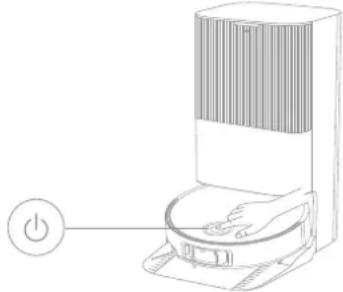
Press the button on the robot, or use the app to make the robot start from the base station. Then the robot will plan the optimal cleaning route and perform the cleaning task based on the created map.
natural_image
Line drawing of a smart air conditioner unit with a power button (no text or symbols)
Note:
- To ensure the robot easily returns to the base station after cleaning, it is recommended to make the robot start from the base station.
- The mop pads will be cleaned before the robot starts mopping, please wait patiently.
- Do not move the base station, the clean water tank, the used water tank, or the washboard filter during operation.
- Hot water cleaning can be enabled in the app for mop pad cleaning, which applies to all modes. To prevent scalding, do not touch the water outlet when the function is on.
2. Auto mop washing
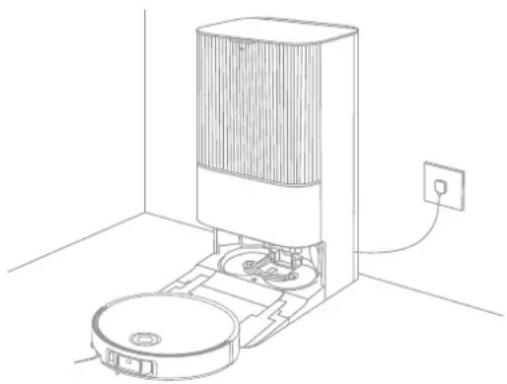
When cleaning, the robot will automatically return to the base station to wash mop pads based on the mop pad cleaning frequency specified in the app. The base station will automatically refill the robot's water tank and the robot will resume cleanup.
natural_image
Line drawing of a vacuum cleaner in a room with an electrical outlet (no text or symbols)
How to Use
3. Automatically empty the dust box and wash and dry the mop pads
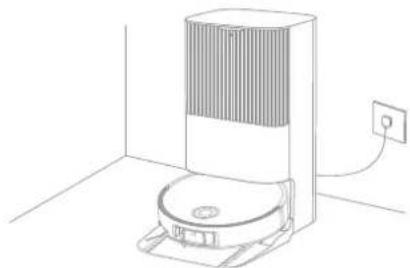
After the robot finishes a cleaning task and returns to the base station to charge, the base station will automatically empty the dust box and then wash and dry the mop pads.
natural_image
Line drawing of a vacuum cleaner in a room with an electrical outlet (no text or symbols)
Note:
- If the auto-empty function is turned off in the app, the base station will not automatically empty the dust box.
- The base station will empty the dust box according to the setting in the app.
4. Clean the used water tank
After the robot has completed its task, please clean the used water tank to prevent any odor.
Mop after Vacuuming
Enable the mopping after vacuuming function in the app, and the robot will automatically remove the mop assembly on the base station to vacuum the floor. After vacuuming is completed, the robot will return to the base station to install the mop assembly and the base station will automatically empty the dust box. And then, the robot will start mopping after the main brushes and side brush are raised.
Vacuum Only
Enable the vacuuming function in the app, and the robot will automatically remove the mop assembly on the base station and start vacuuming.
Mop Only
Enable the mopping function in the app, and the robot will automatically check if the mop assembly is installed on the base station. If not, the robot will install the mop assembly and start mopping after the main brushes and side brush are raised.
EN
Routine Maintenance
Parts
To keep the robot in good condition, it is recommended to refer to the accessory usage in the app or the following table for routine maintenance.
| Part Maintenance Frequency Replacement Period | |
| Used water tank After each use | / |
| Clean water tank | 12 monthsOnce every 2 weeks |
| Main brushes Every 6 to | |
| Dust box's filter | Every 3 to 6 months |
| Side brush |
| Mop pad holders / | |
| Washboard filter Once every 1 to 2 months | / |
| Base station's signaling area | Once every month |
| Charging contacts |
| Auto-empty vents |
| Omnidirectional wheel |
| Caster wheel |
| Edge sensor |
| VersaLift sensor |
| 3D dual-line laser sensors |
| Part Maintenance Frequency | Replacement Period |
| Carpet sensor | Once every month | / |
| Cliff sensors |
| Bumper window |
| Bumper |
| Robot's automatic water refilling inlet |
| Bottom of the robot |
| Dust box | Clean it as neededMain wheels |
|
| Clearance legs |
| Dust bag | months | Every 2 to 4 months |
| Mop pads Every 1 to 3 months | |
| Scale inhibitor | Every 18 to 36 months |
Note: The frequency of maintenance and replacement depends on actual usage. If an exception occurs due to special circumstances, prompt maintenance or replacement is recommended.
Routine Maintenance
Washboard Filter
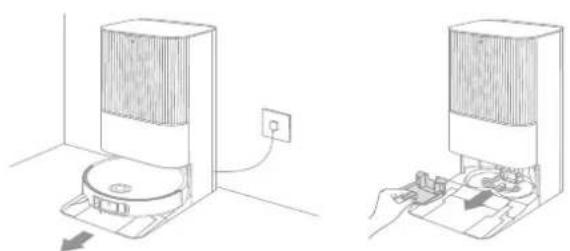
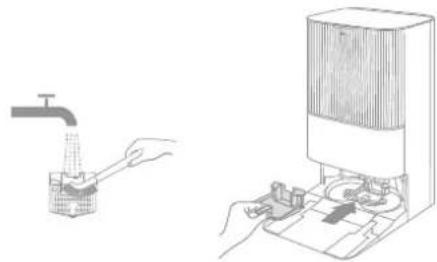
- Take out the robot and remove the washboard filter after the mop pad cleaning is complete.
natural_image
Two technical line drawings of a device with a power outlet and a hand inserting a component (no text or symbols)
- Rinse the washboard filter with clean water, wipe it clean, and then reinstall it in the washboard.
natural_image
Illustration of a hand using a tap to clean water, with a close-up of hands operating equipment (no text or symbols present)
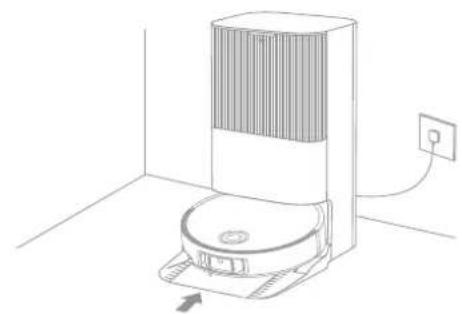
- Use the app or press the button to return the robot to the base station, or manually put the robot back.
natural_image
Line drawing of a robotic vacuum cleaner in a room with an electrical outlet (no text or symbols)
EN
Routine Maintenance
Dust Bag
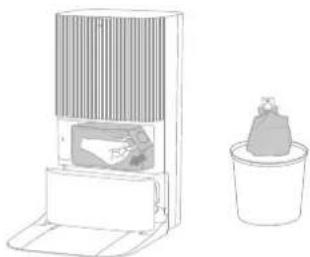
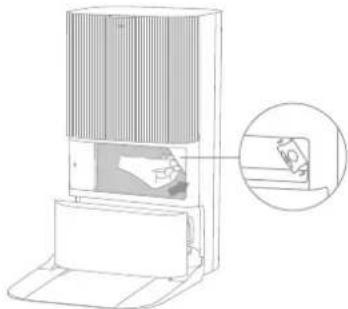
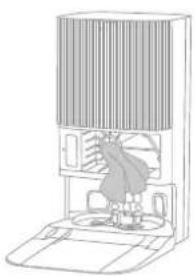
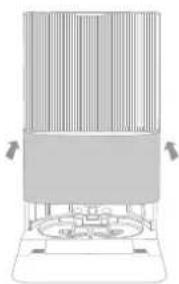
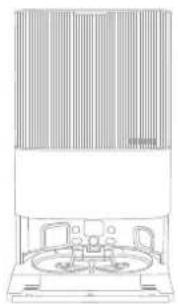
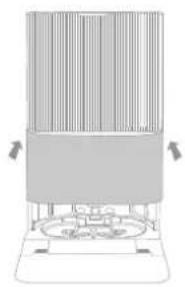
- Remove the dust tank cover and discard the dust bag. 3. Install a new dust bag.
natural_image
Line drawing of a microwave oven and a potted plant (no text or symbols)
Note: Pulling upwards on the handle will seal the bag to prevent the dust and debris from accidentally falling out.
natural_image
Diagram of a portable air conditioner unit with a close-up view of its internal components (no text or symbols)
- Reinstall the dust tank cover.2. Remove the dust and debris from the filte
natural_image
Line drawing of a mechanical device with a central component and surrounding components (no text or symbols)
natural_image
Diagram of a vertical panel mounted on a base with directional arrows indicating movement or force (no text or symbols present)
Routine Maintenance
Used Water Tank
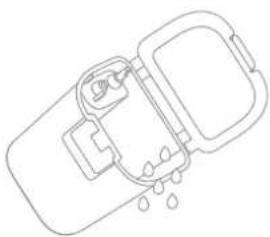
- Remove the used water tank, open its cover and pour out the used water.
natural_image
Line drawing of a device with a handle and water droplets (no text or symbols)
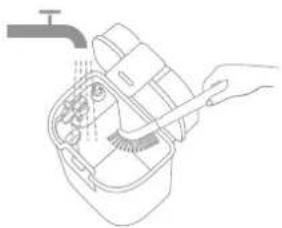
- Rinse the used water tank with clean water, and use the provided cleaning tool to clean the inner wall of the used water tank.
natural_image
Line drawing of a hand using a tool to clean or wash food inside a container (no text or symbols)
Note: The float ball in the used water tank is a movable part. Do not apply too much force when cleaning it to avoid damaging it.
EN
Routine Maintenance
Main Brushes
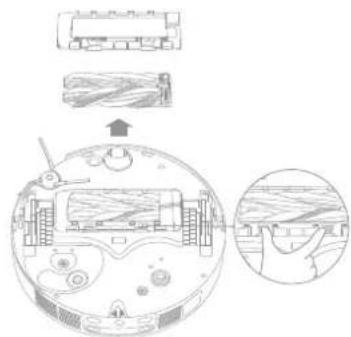
- Press the brush guard clips inwards to remove the brush guard, and then lift the brushes out of the robot.
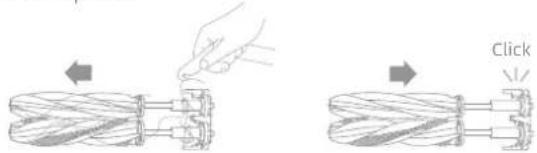
- Pull out the brushes as shown in the figure. Use the provided cleaning tool to remove any hair tangled in the brushes. After cleaning, push the brushes firmly into the main brush holder until they click into place.
natural_image
Diagram showing two mechanical components with arrows indicating movement, one being pushed and the other moving, labeled 'Click' (no text or symbols on components)
Note: Be careful while pulling out the main brushes to prevent injury.
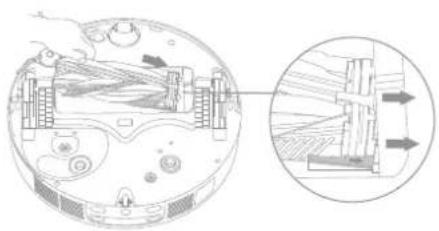
- With the screen-printed arrows facing upwards, insert the main brush holder into the slots downwards in an inclined way.
natural_image
Diagram of a mechanical device with internal components and an inset showing a close-up view of a structural assembly (no text or symbols present)
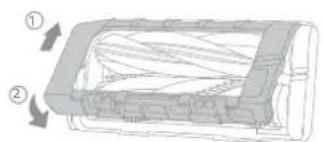
- Align the front end of the brush guard with the slot, insert it downwards in an inclined way, and then press it into place.
natural_image
Cross-sectional diagram of a mechanical component with numbered parts (1 and 2), showing internal layered structure and directional arrows (no text or symbols)
Routine Maintenance
Side Brush
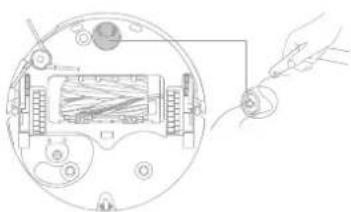
Unscrew the side brush with a screwdriver, clean the hair from the brush, and then screw it back on.
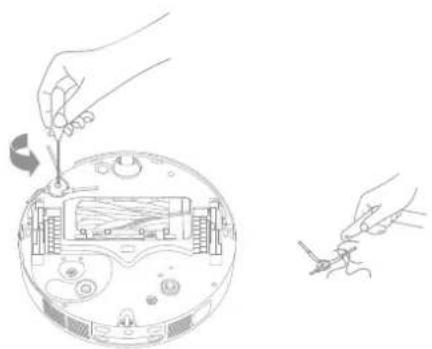
natural_image
Illustration of a robotic vacuum cleaner with tool and wiring, showing internal components and wiring (no text or symbols)
Mop Pad Holders
Remove and clean the mop pad holders.
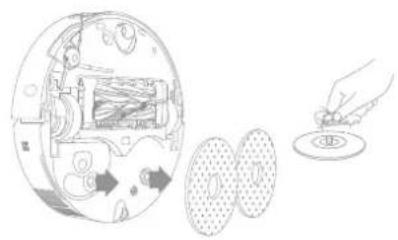
natural_image
Diagram showing a device interior with internal components and a hand inserting a coin into a slot (no text or symbols present)
Omnidirectional Wheel
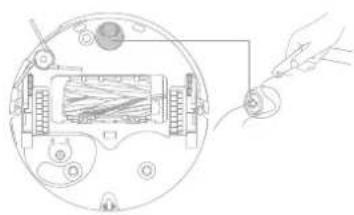
natural_image
Diagram of a device with a hand holding a small component, showing internal components and wiring (no text or symbols)
Note:
- Use a tool such as a small screwdriver to separate the axle and tire of the omnidirectional wheel. Do not use excessive force.
- Rinse the omnidirectional wheel under the running water and put it back after drying it completely.
EN
Routine Maintenance
Dust Box and Filter
- Remove the robot cover and press the dust box clip to remove the dust box.
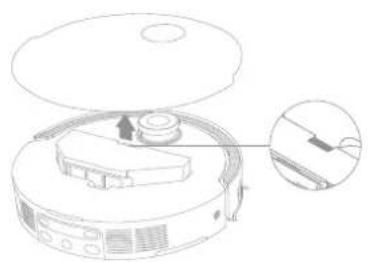
natural_image
Line drawing of a robotic vacuum cleaner with an inset close-up showing internal components (no text or symbols)
- Remove the dust box filter, and then empty the dust box.
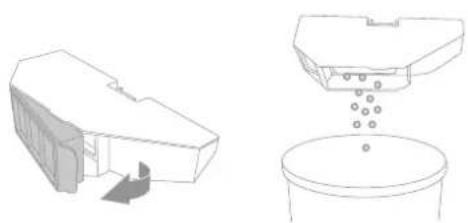
natural_image
Technical line drawing showing a 3D architectural model and its corresponding cross-section with particles, plus a cylindrical container (no text or symbols)
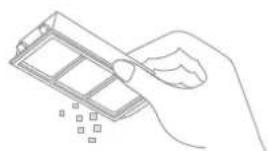
- Gently tap the basket of the filter to remove the dirt.
natural_image
Line drawing of a hand holding a rectangular object with scattered square markers (no text or symbols)
Note: Do not attempt to clean the filter with a brush, a finger or sharp objects to prevent damage.
- Rinse the dust box and filter with water and dry them completely before reinstalling.
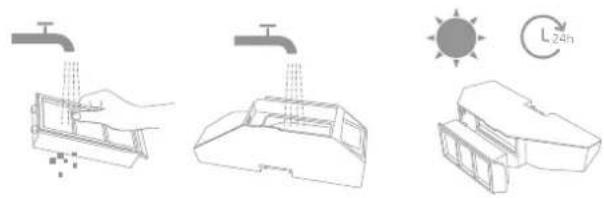
Note:
- Rinse the dust box and filter with clean water only. Do not use any detergent.
- Use the dust box and filter only when they are completely dry.
Routine Maintenance
Robot Sensors
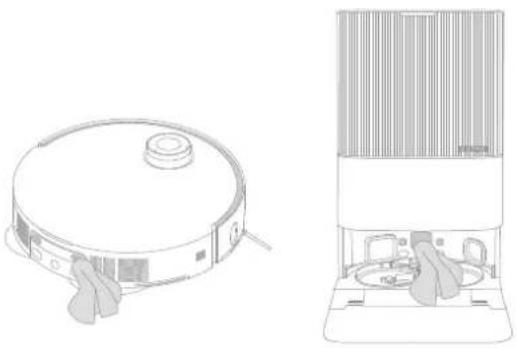
Wipe the robot sensors by using a soft and dry cloth, as shown in the below figure:
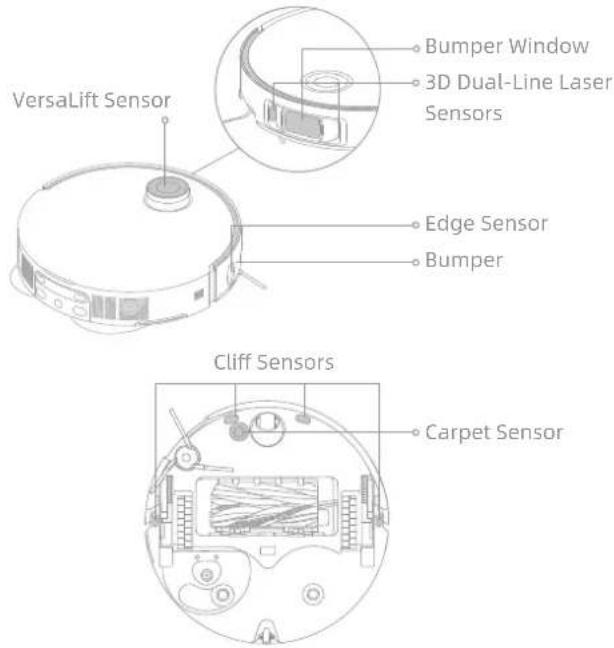
Note: A wet cloth can damage sensitive elements within the robot and the base station. Please use a dry cloth for cleaning.
Clean the charging contacts and the signaling area with a soft and dry cloth.
natural_image
Line drawings of a vacuum cleaner and a multi-tiered vacuum cleaner (no text or symbols)
EN
Routine Maintenance
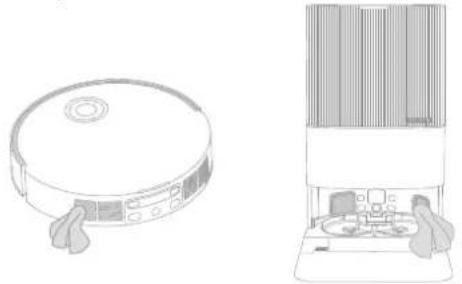
Auto-Empty Vents
Clean the auto-empty vents of the robot and the base station with a soft and dry cloth.
natural_image
Line drawings of a circular vacuum cleaner and a multi-tiered appliance with control panel (no text or symbols)
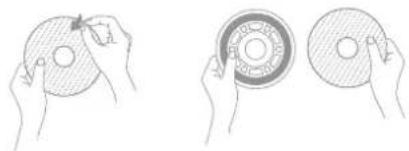
Mop Pads
Remove the mop pads from the mop pad holders to replace them.
natural_image
Three hand-drawn diagrams showing hands holding circular components with a central knob, no text or symbols present.
Battery
The robot contains a high-performance lithium-ion battery pack. Make sure that the battery remains well-charged for daily use to maintain optimal battery performance. If the robot is not used for an extended period of time, turn it off and put it away. To prevent damage from over-discharging, charge the robot at least once every three months.
Troubleshooting
| Problem Solution | |
| The robot will not turn on. | The battery is low. Recharge the robot on the base and try again.The temperature of the battery is too low or too high. It is recommended to operate the appliance at a temperature between 0°C (32°F) and 40°C (104°F). |
| The robot will not charge. | The base station is not connected to power, please make sure both ends of its power cord are correctly plugged in.The contact between the charging contacts on the base station and the robot is poor, please clean the charging contacts.Check whether there is any foreign object at the connectors of the robot and remove the foreign object if any. |
| The robot fails to connect to Wi-Fi. | The Wi-Fi network password is incorrect. Make sure the password used to connect to your Wi-Fi network is correct.The robot does not support a 5 GHz Wi-Fi connection. Make sure the robot is connected to a 2.4 GHz Wi-Fi connection.The Wi-Fi signal is weak. Make sure the robot is in an area with good Wi-Fi coverage.The robot may not be ready to be configured. Please exit and re-enter the app, and then try again as instructed. |
| The robot cannot find and return to the base station. | The base station is disconnected from power or moved when the robot is not on it. Please connect the base station to the power supply or place the robot onto the base station to charge.There are too many obstructions around the base station. Place the base station in a more open area.Moving the robot may cause it to re-position itself, and it will recreate a map if re-positioning fails. If the robot is too far from the base station, it might not be able to automatically return on its own, in which case you will need to manually place the robot onto the base station.Wipe the signaling area on the base station to remove dust or debris. |
Troubleshooting
| Problem Solution | |
| The robot gets stuck in front of the base station and cannot return to it. | Check whether there is enough space on both sides or in front of the base station to prevent the robot from being blocked. The route for returning to charge is blocked, e.g. the door is closed.The robot may slip if the floor in front of the base station is overly wet. If so, clean the excess water before trying again.It is recommended to move the base station to a different place and try again.Make sure the ramp extension plate is installed properly. |
| The robot will not turn off. | The robot cannot be turned off when it is charging. It is recommended to move the robot from the base station, and then press and hold the button ⏻for 3 seconds to turn it off.If the robot cannot be turned off by performing step 1, press and hold the button ⏻for 10 seconds to forcibly turn off the robot. If the problem persists, please contact after-sales service. |
| The charging speed is slow. | It takes about 4.5 hours to fully charge the robot when its battery is low.If you operate the robot at temperatures outside of the specified range, the charging speed will automatically slow down to extend the battery life.The charging contacts on both the robot and the base station may be dirty, please wipe them with a dry cloth. |
| The noise increases while the robot is operating. | Check whether the dust box filter is clogged. If so, clean it or replace it.A hard object may be caught in the main brushes or the dust box. Check and remove any hard object.The main brushes or the side brush may become tangled. Check and remove any foreign objects.Switch the suction mode to Standard or Quiet. |
| The robot moves without following the set route. | Objects such as power cords and slippers should be organized before using the robot.Working on wet slippery surfaces causes the main wheel to slip. It is recommended to dry the wet places before using the robot.Wipe the bumper window and 3D dual-line laser sensors on the robot with a clean, soft cloth to keep them clean and unobstructed. |
Troubleshooting
| Problem Solution | |
| The robot misses the rooms to be cleaned. | Make sure that the doors of the rooms to be cleaned are open.The place in front of the room to be cleaned may be wet and slippery, causing the robot to slip and work abnormally.Please try drying the floor before using the robot. |
| The robot will not resume cleaning after charging. | Make sure that the robot is not set to the Do Not Disturb (DND) mode, which will prevent it from resuming cleaning.The robot will not resume cleaning after you manually place the robot on the base station or send the robot to charge via the app or the button ⏻. |
| The station cannot automatically empty the dust box. | Check whether the dust bag in the dust tank is full.If the dust bag is not full, check whether there is any obstruction at the auto-empty vents of the robot, the base station, or the dust box. If any, clean the blocked part in time. |
| The water level in the washboard is abnormal. | Check whether the seal on the used water tank is loose or not correctly installed, and manually reset it if so. If the problem persists, please contact the after-sales service team.Gently press down on the used water tank to make sure it is installed correctly.Remove the washboard filter and check whether the sewage drain outlet is blocked and clean it.Check the cleaning solution. Do not add any liquid other than the officially-approved cleaning solution. |
| The mop pad holder is raised abnormally. | Please remove the mop pad holder to check if there is any foreign object stuck in it, and try to restart the robot. If the problem persists, please contact the after-sales service team. |
| There is water under the clean water tank or around the seal. | When taking out the clean water tank, some water in the pipe may be left under the tank or around the seal. This is normal. Please wipe with a dry cloth. |
For more support, contact us via https://global.dreametech.com
EN
Specifications
Robot
| Model | RLX85CE RLX85CE-1 | RLX85CE-3 | |
| RLX85CE-4 RLX85CE-5 | RLX85CE-6 | |
| Charging Time Approx. 4.5 hours |
| Rated Voltage 14.4 V --- |
| Rated Power 75 W |
| Operation Frequency | 2400-2483.5 MHz |
| Maximum Output Power | < 20 dBm |
Under normal use of condition, this equipment should be kept a separation distance of at least 20 cm between the antenna and the body of the user.
| Model RCXE0105 RCXE0108 | RCXE0109 | | |
| Rated Input 220-240 V 50~60 Hz ~ |
| Rated Output 20 V 2 A | --- |
| Rated Power (during dust emptying) | 700 W |
| Rated Power (during hot water cleaning) | 1160 W |
| Rated Power (during charging and drying) | 87 W |
Note:
- Rated Power (during hot water cleaning) is determined by the power value during the representative period (water temperature 25^ ).
- Rated Power (during charging and drying) is determined by the power value during full load period.
Battery Disposal and Removal
The built-in lithium-ion battery contains substances that are hazardous to the environment. Before disposing of the battery, make sure the battery is removed by qualified technicians and discarded at an appropriate recycling facility.
- the battery must be removed from the appliance before it is scrapped;
- the appliance must be disconnected from the supply mains when removing the battery;
- the battery is to be disposed of safely.
CAUTION:
Before removing the battery, disconnect the power and run out the battery as much as possible.
Unneeded batteries should be discarded at an appropriate recycling facility.
Do not expose to high temperature environment to avoid risks of explosion.
Under abusive conditions, liquid may be ejected from the battery. If contact occurs, flush with water and seek medical help.
Removal Guide:
- Turn over the robot, use a proper tool to remove the screws on the back of the robot, and then remove the cover.
- Unplug the terminals between the battery and PCB board to remove the battery.

All products bearing this symbol are waste electrical and electronic equipment (WEEE as in directive 2012/19/EU) which should not be mixed with unsorted household waste. Instead, you should protect human health and the environment by handing over your waste equipment to a designated collection point for the recycling of waste electrical and electronic equipment, appointed by the government or local authorities. Correct disposal and recycling will help prevent potential negative consequences to the environment and human health. Please contact the installer or local authorities for more information about the location as well as terms and conditions of such collection points.
Sicherheitshinweise
natural_image
Simple line drawing of a circular object with a small circular inset containing a number 5 (no text or symbols)
Roboter
natural_image
Line drawing of a room interior with ceiling, walls, and furniture (no text or symbols)
Basisstation
Sonstiges Zubehör
natural_image
Simple line drawing of a circular object with a small circular inset containing a number 2 (no text or symbols)
Roboter
natural_image
Line drawing of a vintage office chair with two chairs and a large wall (no text or symbols)
Basisstation
natural_image
Technical line drawing of a circular mechanical component with concentric layers and mounting holes (no text or symbols)
Dockingtaste
natural_image
Illustration of a desk setup with a teddy bear, keyboard, mouse, pencil, and crossed-out cross symbol (no text or labels)
natural_image
Architectural line drawing of a balcony railing with a circular base and checkmark symbol (no text or labels)
natural_image
Line drawing of a simple dining room layout with a desk, chair, and open door (no text or symbols)
natural_image
Interior hallway with a person standing at the doorway and a robot near the door, marked with a cross symbol (no text or labels)
natural_image
Technical line drawing of a water droplet filter device with an inset close-up view (no text or symbols)
natural_image
Line drawing of a robotic vacuum cleaner in a room with an electrical outlet (no text or symbols)
natural_image
Diagram showing three stages of a refrigerator interior: opening, adding air vent, and cooling unit (no text or symbols)
Hinweis:
natural_image
Diagram of a portable air purifier with a water dispenser and a water tap (no text or symbols)
natural_image
Line drawing of a robotic vacuum cleaner with a power button (no text or symbols)
Hinweis:
natural_image
Line drawing of a robotic vacuum cleaner with control panel and power outlet (no text or symbols)
Benutzung
natural_image
Line drawing of a vacuum cleaner in a room with an electrical outlet (no text or symbols)
Hinweis:
natural_image
Two technical line drawings of a device with a power outlet and a hand inserting a component (no text or symbols)
natural_image
Illustration of a hand using a tap to lift a container, and a close-up of a device with tools (no text or symbols visible)
natural_image
Line drawing of a robotic vacuum cleaner in a room with an electrical outlet (no text or symbols)
Regelmäßige Wartung
Staubbeutel
natural_image
Line drawing of a portable air conditioner unit and a small potted plant (no text or symbols)
natural_image
Line drawing of a mechanical device with a central component and surrounding components (no text or symbols)
natural_image
Diagram of a portable air conditioner unit with a close-up inset showing internal components (no text or symbols)
natural_image
Diagram of a cylindrical device with vertical bars and a base, showing directional arrows (no text or symbols)
Regelmäßige Wartung
natural_image
Line drawing of a device with water droplets and a handle (no text or symbols)
natural_image
Line drawing of a hand using a tool to clean or adjust a small container with a faucet (no text or symbols)
natural_image
Technical diagram of a mechanical assembly with cross-sectional view and magnified detail (no text or labels)
natural_image
Cross-sectional diagram of a mechanical component with numbered parts (1 and 2), showing internal layered structure and directional arrows (no text or symbols)
Regelmäßige Wartung
Seitenbürste
natural_image
Illustration of hands using a tool to adjust or install electronic components on a circular device (no text or symbols present)
Wischpadhalter
natural_image
Diagram showing a mechanical assembly with internal components and a hand holding a circular component (no text or symbols present)
natural_image
Diagram of a device with a hand holding a power outlet connected to a screen (no text or symbols visible)
Hinweis:
natural_image
Line drawing of a robotic vacuum cleaner with an inset close-up showing the internal components (no text or symbols)
natural_image
Diagram showing a 3D model of a device with an arrow pointing to it, and a close-up of a container with liquid and particles (no text or symbols)
natural_image
Line drawing of a hand holding a rectangular object with scattered square markers (no text or symbols)
Hinweis:
natural_image
Line drawings of a robotic vacuum cleaner and its side-mounted device (no text or symbols)
DE
Regelmäßige Wartung
natural_image
Line drawings of a circular vacuum cleaner and a multi-tiered appliance (no text or symbols)
Wischpads
natural_image
Three hand-drawn diagrams showing hands holding circular components with a central knob, no text or symbols present.
Akku
natural_image
Simple circular diagram with a central circle and a curved border (no text or symbols)
Robot
natural_image
Line drawing of a vintage office or gas station with a large cylindrical chamber and control panels (no text or symbols)
Station de base
Autres accessoires
natural_image
Simple line drawing of a circular object with a small circular inset containing a number 2 (no text or symbols)
Robot
natural_image
Line drawing of a cylindrical device with a central circular base and two side monitors (no text or symbols)
Station de base
natural_image
Technical line drawing of a circular mechanical component with concentric layers and mounting holes (no text or symbols)
Bouton de station de base
natural_image
Illustration of a desk setup with a teddy bear, keyboard, mouse, pencil, and crossed-out cross symbol (no text or labels)
natural_image
Architectural line drawing of a balcony railing with a circular base and checkmark symbol (no text or labels)
natural_image
Line drawing of a simple room layout with a desk, chair, fan, and door (no text or symbols)
natural_image
Interior hallway scene with a person standing near an open door, a robot on the floor, and four windows (no text or symbols)
Remarque :
natural_image
Technical line drawing of a portable electronic device with a close-up inset showing internal components (no text or symbols)
Filtrevderplanchpinderlavage
natural_image
Line drawing of a robotic vacuum cleaner with a mounted device and power outlet (no text or symbols)
natural_image
Diagram showing three stages of a household appliance: heating, cooling, and drying (no text or symbols present)
Remarque :
natural_image
Diagram of a portable air purifier with a water dispenser and a water tap (no text or symbols)
natural_image
Line drawing of a robotic vacuum cleaner with a power button (no text or symbols)
Remarque :
natural_image
Line drawing of a robotic vacuum cleaner with control panel and power outlet (no text or symbols)
Mode d'utilisation
natural_image
Line drawing of a vacuum cleaner in a room with an electrical outlet (no text or symbols)
Remarque :
natural_image
Two technical line drawings of a device with a power outlet and mechanical components, no text or symbols present.
natural_image
Illustration of a hand using a tap to clean water next to a digital device (no text or symbols present)
natural_image
Line drawing of a robotic vacuum cleaner in a room with an electrical outlet (no text or symbols)
FR
natural_image
Line drawing of a portable air conditioner unit and a small potted plant (no text or symbols)
natural_image
Line drawing of a mechanical device with a central component and ventilation slots (no text or symbols)
natural_image
Diagram of a device with a magnified inset showing a hand holding a small object (no text or symbols present)
natural_image
Diagram of a cylindrical device with vertical bars and a base, showing directional arrows (no text or symbols)
natural_image
Line drawing of a device with water droplets and a handle (no text or symbols)
natural_image
Line drawing of a hand cleaning a bucket with a tool, no text or symbols present
natural_image
Technical diagram of a mechanical assembly with cross-sectional view and magnified detail (no text or labels)
natural_image
Cross-sectional diagram of a mechanical component with numbered parts and directional arrows (no text or symbols)
natural_image
Illustration of a robotic vacuum cleaner with hands performing maintenance (no text or symbols)
Supports de serpillière
natural_image
Diagram showing a device interior with internal components and a hand inserting a component into a circular base (no text or symbols)
natural_image
Diagram of a device with a hand holding a small component, showing internal components and wiring (no text or symbols)
Remarque :
natural_image
Diagram of a robotic vacuum cleaner with an inset close-up showing the component (no text or symbols)
natural_image
Technical line drawing showing a 3D architectural model and its corresponding cross-section with particles, plus a cylindrical container (no text or symbols)
natural_image
Line drawing of a hand holding a tablet device with a magnifying glass (no text or symbols)
Remarque :
natural_image
Line drawings of a robotic vacuum cleaner and its internal air conditioner unit (no text or symbols)
FR
natural_image
Line drawings of a circular vacuum cleaner and a multi-tiered appliance (no text or symbols)
Serpillières
natural_image
Three hand-drawn diagrams showing hands holding circular components with a central knob, no text or symbols present.
Batterie
natural_image
Simple line drawing of a circular object with a small circular inset containing a number 5 (no text or symbols)
Robot
natural_image
Line drawing of a room interior with ceiling, walls, and furniture (no text or symbols)
Stazione base
Altri accessori
natural_image
Simple line drawing of a circular object with a small circular inset containing a symbol (no text or labels)
Robot
natural_image
Line drawing of a mechanical device with a cylindrical base and vertical panel (no text or symbols)
Stazione base
natural_image
Technical line drawing of a circular mechanical component with concentric layers and mounting holes (no text or symbols)
Pulsante Stazione
natural_image
Illustration of a desk with a teddy bear, keyboard, mouse, and computer monitor (no text or symbols)
natural_image
Line drawing of a simple dining room layout with a desk, chair, fan, and door (no text or symbols)
natural_image
Architectural line drawing of a balcony railing with a circular base and checkmark symbol (no text or labels)
natural_image
Interior hallway with a person standing at the entrance and a robot near the door, marked with a cross symbol (no text or labels)
natural_image
Technical line drawing of a device with an inset close-up showing internal components (no text or symbols)
natural_image
Line drawing of a robotic vacuum cleaner inside a room with an electrical outlet (no text or symbols)
natural_image
Diagram showing three stages of a refrigerator interior: opening, adding to the seat, and holding a tray (no text or symbols present)
Nota:
natural_image
Diagram of a portable air purifier with a lid and base unit, showing internal components (no text or symbols)
natural_image
Line drawing of a remote control unit with power button (no text or symbols)
Nota:
natural_image
Line drawing of a vacuum cleaner with control panel and power outlet (no text or symbols)

Modalità d'utilizzo
natural_image
Line drawing of a robotic vacuum cleaner in a room with an electrical outlet (no text or symbols)
Nota:
natural_image
Line drawings of two devices with a power outlet, one showing internal components and the other showing electrical connections (no text or symbols)
natural_image
Illustration of a hand using a tap to clean water from a drain while operating a digital device (no text or symbols present)
natural_image
Line drawing of a robotic vacuum cleaner in a room with an electrical outlet (no text or symbols)
natural_image
Line drawing of a portable air conditioner unit and a small container (no text or symbols)
natural_image
Illustration of a person standing at a desk with a computer monitor and a large panel (no text or symbols visible)
natural_image
Technical line drawing of a mechanical device with an inset close-up showing internal components (no text or symbols)
natural_image
Diagram of a cylindrical device with vertical bars and a base, showing directional arrows (no text or symbols)
natural_image
Line drawing of a device with a handle and water droplets (no text or symbols)
natural_image
Line drawing of a hand cleaning a small kitchen appliance with a faucet (no text or symbols)
natural_image
Diagram showing two mechanical components with a hand operating, one being twisted and the other being pulled (no text or symbols)
natural_image
Diagram of a mechanical device with internal components and a magnified inset showing directional arrows (no text or symbols)
natural_image
Cross-sectional diagram of a mechanical component with numbered parts (1 and 2), showing internal layered structure without any text or symbols.

natural_image
Illustration of a hand using a tool to adjust a device inside a circular device, with another hand holding a tool near it (no text or symbols present)
natural_image
Diagram showing a mechanical assembly with internal components and a hand holding a circular component (no text or symbols present)
natural_image
Diagram of a device with a hand holding a terminal connected to a cable, showing internal components without any text or symbols.
Nota:
natural_image
Line drawing of a robotic vacuum cleaner with an inset close-up showing internal components (no text or symbols)
natural_image
Diagram showing a building interior with an arrow indicating direction, and a container with liquid being poured into it (no text or symbols present)
natural_image
Line drawing of a hand holding a tray with small square markers (no text or symbols)
Nota:
natural_image
Line drawings of a robotic vacuum cleaner and a multi-tiered vacuum cleaner (no text or symbols)
natural_image
Line drawings of a circular vacuum cleaner and a multi-tiered appliance with control panel (no text or symbols)
Tamponi del mocio
natural_image
Three hand-drawn diagrams showing hands holding circular components with a central dial (no text or symbols)
Batteria
natural_image
Simple line drawing of a circular object with a small circular inset containing a number 5 (no text or symbols)
Robot
natural_image
Line drawing of a room interior with ceiling-mounted equipment and a central sink (no text or symbols)
Estación base
Otros accesorios
natural_image
Simple line drawing of a circular object with a small circular inset containing a symbol (no text or labels)
Robot
natural_image
Line drawing of a vintage office or kitchen appliance with a large wall and two circular chairs (no text or symbols)
Estación base
natural_image
Technical line drawing of a circular mechanical component with concentric layers and mounting holes (no text or symbols)
Botón de atraque
natural_image
Line drawing of a mechanical device with open and closed sections, showing internal components (no text or symbols)
natural_image
Illustration of a desk setup with a teddy bear, keyboard, mouse, pencil, and crossed-out cross symbol (no text or labels)
natural_image
Architectural line drawing of a balcony railing with a circular base and checkmark symbol (no text or labels)
natural_image
Line drawing of a simple dining room layout with a desk, chair, and open door (no text or symbols)
natural_image
Interior hallway with a person standing at the entrance and a robot near the door, marked with a cross symbol (no text or labels)
natural_image
Technical line drawing of a vacuum cleaner with internal components and a close-up inset showing internal wiring (no text or symbols)
natural_image
Line drawing of a robotic vacuum cleaner in a clean room with an electrical outlet (no text or symbols)
natural_image
Diagram showing three steps of a device operation: adding a fan to a rack, adding a fan blade, and adding a tray with a bag (no text or symbols present)
Nota:
natural_image
Diagram of a portable water dispenser with a water drop and water outlet (no text or symbols)
natural_image
Line drawing of a portable air conditioner unit with a power button (no text or symbols)
Nota:
natural_image
Line drawing of a robotic vacuum cleaner with control panel and power outlet (no text or symbols)
Modo de uso
natural_image
Line drawing of a robotic vacuum cleaner in a room with an electrical outlet (no text or symbols)
Nota:
natural_image
Two technical line drawings of a device with a power outlet and mechanical components, no text or symbols present.
natural_image
Illustration of a hand using a tap to clean water, with a close-up of hands operating equipment (no text or symbols present)
natural_image
Line drawing of a robotic vacuum cleaner in a room with an electrical outlet (no text or symbols)
ES
natural_image
Line drawing of a portable air conditioner unit and a small container (no text or symbols)
natural_image
Illustration of a person inside a refrigerator with a fan on the door (no text or symbols visible)
natural_image
Diagram of a portable air conditioner unit with a close-up inset showing internal components (no text or symbols)
natural_image
Diagram of a cylindrical device with vertical bars and a base, showing directional arrows (no text or symbols)
natural_image
Line drawing of a device with a handle and water droplets (no text or symbols)
natural_image
Line drawing of a hand using a tool to clean or wash food inside a container (no text or symbols)
natural_image
Diagram showing two mechanical components with arrows indicating motion, one being pushed and the other emitting a click (no text or symbols present)
natural_image
Cross-sectional diagram of a mechanical device with internal components and an inset showing internal structure (no text or labels)
natural_image
Cross-sectional diagram of a mechanical component with numbered parts and directional arrows (no text or symbols)
natural_image
Line drawing showing hands using a tool to adjust or install a device inside a circular device (no text or symbols present)
Soportes de mopa
natural_image
Diagram showing a mechanical assembly with internal components and a hand holding a circular component (no text or symbols present)
Rueda omnidireccional
natural_image
Diagram of a device with a hand holding a small component connected to a screen (no text or symbols visible)
Nota:
natural_image
Line drawing of a robotic vacuum cleaner with an inset close-up showing the internal components (no text or symbols)
natural_image
Technical line drawing showing a 3D architectural model and its corresponding cross-section of a container with liquid (no text or symbols)
natural_image
Line drawing of a hand holding a tray with small square markers (no text or symbols)
Nota:
natural_image
Technical line drawings of a vacuum cleaner and its internal components (no text or symbols)
ES
natural_image
Line drawings of a circular vacuum cleaner and a multi-tiered device with control panel (no text or symbols)
Mopas
natural_image
Three hand-drawn diagrams showing hands holding circular components with a central knob, no text or symbols present.
Batería
natural_image
Simple circular diagram with a central circle and curved border (no text or symbols)
Robot
natural_image
Line drawing of a vintage office interior with large windows and furniture (no text or symbols)
Stacja bazowa
Inne akcesoria
Kabel
zasilania
natural_image
Simple line drawing of a circular object with a small circular inset containing a symbol (no text or labels)
Robot
natural_image
Top-down line drawing of a vintage office or theater space with seating and overhead equipment (no text or symbols)
Stacja bazowa
natural_image
Technical line drawing of a circular mechanical component with concentric layers and mounting holes (no text or symbols)
Przycisk dokowania
natural_image
Line drawing of a mechanical device with open and closed sections, showing internal components (no text or symbols)
natural_image
Illustration of a desk setup with a teddy bear, keyboard, mouse, and a computer monitor (no text or symbols)
natural_image
Architectural sketch of a balcony railing with a circular base and checkmark indicating inspection (no text or symbols)
natural_image
Line drawing of a simple dining room with a desk, chair, and open door (no text or symbols)
natural_image
Interior hallway with a person standing near a robotic vacuum cleaner and a cross symbol (no text or labels)
natural_image
Technical line drawing of a washing machine with an inset close-up showing internal components (no text or symbols)
natural_image
Line drawing of a robotic vacuum cleaner in a clean room with an electrical outlet (no text or symbols)
natural_image
Diagram showing three stages of a device operation: front view, internal processing, and final shipment (no text or symbols)
Uwaga:
natural_image
Diagram of a portable air purifier with a lid and base unit, showing internal components (no text or symbols)
natural_image
Line drawing of a portable electronic device with a power button (no text or symbols)
Uwaga:
natural_image
Line drawing of a robotic vacuum cleaner with control panel and power outlet (no text or symbols)
Użytkowanie
natural_image
Line drawing of a vacuum cleaner in a room with an electrical outlet (no text or symbols)
Uwaga:
natural_image
Two technical line drawings of a device with an electrical outlet and a hand operating the base (no text or symbols present)
natural_image
Illustration of a hand using a tap to clean water and a digital device with tools (no text or symbols)
natural_image
Line drawing of a robotic vacuum cleaner in a room with an electrical outlet (no text or symbols)
PL
natural_image
Line drawing of a portable air conditioner unit next to a small potted plant (no text or symbols)
natural_image
Diagram of a portable air conditioner unit with a close-up view of its internal components (no text or symbols)
natural_image
Line drawing of a mechanical device with a central component and base mount (no text or symbols)
natural_image
Diagram of a vertical panel mounted on a base with directional arrows indicating orientation (no text or symbols)
natural_image
Line drawing of a device with a handle and water droplets (no text or symbols)
natural_image
Line drawing of a hand cleaning a small container with a tool, no text or symbols present
natural_image
Diagram of a mechanical device with internal components and a magnified inset showing internal structure (no text or symbols)
natural_image
Cross-sectional diagram of a mechanical component with numbered parts (① and ②), showing internal layered structure without any text or symbols.
natural_image
Illustration of a hand using a tool to adjust a device inside a circular device, with another hand holding a tool near it (no text or symbols present)
natural_image
Diagram showing a mechanical assembly with internal components and a hand holding a circular component (no text or symbols present)
natural_image
Diagram of a device with a hand holding a small component, showing internal components and wiring (no text or symbols)
Uwaga:
natural_image
Line drawing of a robotic vacuum cleaner with a close-up inset showing the component detail (no text or symbols)
natural_image
Diagram showing a building interior with an arrow indicating direction, and a container with particles rising from its side (no text or symbols)
natural_image
Line drawing of a hand holding a tray with small square markers (no text or symbols)
Uwaga:
natural_image
Technical line drawing of a robotic vacuum cleaner and its side-mounted device (no text or symbols)
natural_image
Line drawings of a circular vacuum cleaner and a multi-tiered appliance (no text or symbols)
Podkładki mopa
natural_image
Three hand-drawn diagrams showing hands holding circular components with a central knob (no text or symbols)
Akumulator
KLASSE 1 LASERPRODUCT
LASERPRODUCT VOOR CONSUMENTEN
EN 50689:2021

natural_image
Simple circular diagram with a central circular element and curved border (no text or symbols)
Robot
natural_image
Line drawing of a vintage office or meeting room setup with no visible text or symbols
Basisstation
Andere accessoires
natural_image
Simple line drawing of a circular object with a small circular inset containing a number 2 (no text or symbols)
Robot
natural_image
Line drawing of a vintage air conditioner unit with front panel and side legs (no text or symbols)
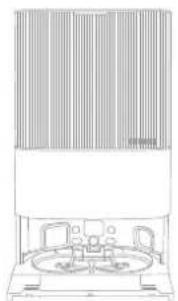
Basisstation
Andere accessoires
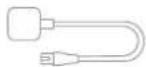
Netsnoer
natural_image
Technical line drawing of a circular mechanical component with concentric layers and mounting holes (no text or symbols)
Dockingknop
natural_image
Illustration of a desk setup with a teddy bear, computer mouse, and a pencil, no text or symbols present.
natural_image
Architectural line drawing of a balcony railing with a circular base and checkmark indicating inspection (no text or symbols)
natural_image
Line drawing of a simple dining area with a table, chairs, and a door (no text or symbols)
natural_image
Interior hallway with a person standing near a robotic vacuum cleaner and a cross symbol (no text or labels)
natural_image
Technical line drawing of a washing machine with a close-up inset showing internal components (no text or symbols)
natural_image
Line drawing of a robotic vacuum cleaner in a room with an electrical outlet (no text or symbols)
natural_image
Diagram showing three stages of a device operation: front view, side view with internal components, and top view with a device (no text or symbols present)
Opmerking:
natural_image
Diagram of a portable air purifier with a lid and base, connected to a water tap (no text or symbols present)
natural_image
Line drawing of a cleaning appliance with a power button (no text or symbols)
Opmerking:
natural_image
Line drawing of a vacuum cleaner in a room with an electrical outlet (no text or symbols)
Hoe te gebruiken
natural_image
Line drawing of a vacuum cleaner in a room with an electrical outlet (no text or symbols)
Opmerking:
natural_image
Two technical line drawings of a device with a power outlet and a hand inserting a component (no text or symbols)
natural_image
Illustration of a hand using a tap to clean water and a digital device with a lid (no text or symbols)
natural_image
Line drawing of a robotic vacuum cleaner in a room with an electrical outlet (no text or symbols)
NL
natural_image
Line drawing of a portable air conditioner unit and a small container (no text or symbols)
natural_image
Diagram of a portable air conditioner unit with a close-up view of its internal components (no text or symbols)
natural_image
Illustration of a vintage office chair with a person standing at the front (no text or symbols visible)
natural_image
Diagram of a vertical panel with horizontal bars and a circular base, no text or symbols present
natural_image
Line drawing of a device with a handle and water droplets (no text or symbols)
natural_image
Line drawing of a hand cleaning a small kitchen appliance with a tool (no text or symbols)
natural_image
Diagram showing two mechanical components with arrows indicating assembly or process (no text or symbols)
natural_image
Diagram showing a circular device with internal components and an inset view of a mechanical assembly (no text or symbols)
natural_image
Cross-sectional diagram of a mechanical component with numbered parts (no text or symbols)
natural_image
Line drawing showing hands using a tool to adjust or install a device on a circular base, with no visible text or symbols.
Dweilpadhouders
natural_image
Diagram showing a device interior with internal components and a hand inserting a coin into a slot (no text or symbols present)
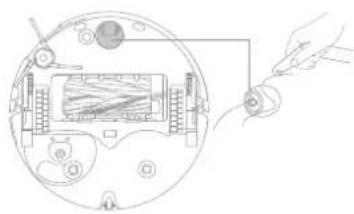
Rondomlopend wiel
natural_image
Diagram of a device inside a circular housing with a hand holding a small component (no text or symbols visible)
Opmerking:
natural_image
Technical line drawing of a vacuum cleaner with an inset close-up view showing internal components (no text or symbols)
natural_image
Technical line drawing showing a 3D architectural model and its corresponding cross-section with particles, plus a cylindrical container (no text or symbols)
natural_image
Line drawing of a hand holding a tablet device with scattered square buttons (no text or symbols)
Opmerking:
natural_image
Line drawings of a robotic vacuum cleaner and its side-mounted device (no text or symbols)
NL
natural_image
Line drawings of a circular vacuum cleaner and a multi-tiered appliance (no text or symbols)
Dweilpads
natural_image
Three hand-drawn diagrams showing hands holding circular components with a central knob, no text or symbols present.
Batterij
KLASSE 1-LASERPRODUKT
FORBRUKERLASERPRODUKT
EN 50689:2021

natural_image
Simple line drawing of a circular object with a small circular inset containing a symbol (no text or labels)
Robot
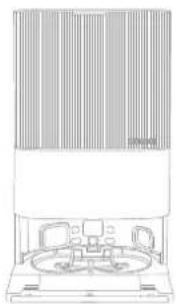
natural_image
Line drawing of a vintage office chair with large windows and seating (no text or symbols)
Basestasjon
Annet tilbehør
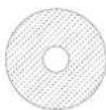
Moppepute × 2 (forhåndsmontert)
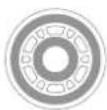
Moppepute-holder × 2
(forhåndsmontert)
Rengjøringsmiddel
Pakkens innhold
(Dreame X50 Ultra Complete)
natural_image
Simple line drawing of a circular object with a small circular inset containing a symbol (no text or labels)
Robot
natural_image
Line drawing of a vintage office chair with large windows and a central circular table (no text or symbols)
Basestasjon
Moppepute × 2 (forhåndsmontert)
Moppepute-holder × 2
(forhåndsmontert)
Bruksanvisning
natural_image
Technical line drawing of a circular mechanical component with concentric layers and mounting holes (no text or symbols)
Dokkingknapp
natural_image
Illustration of a desk setup with a teddy bear, keyboard, mouse, and computer monitor (no text or symbols)
natural_image
Line drawing of a simple room layout with a desk, chair, fan, and door (no text or symbols)
natural_image
Line drawing of a balcony railing with a circular object and checkmark symbol (no text or labels)
natural_image
Interior hallway with a person standing near a robotic vacuum cleaner and a cross symbol (no text or labels)
natural_image
Technical line drawing of a Vaskebrett filter device with an inset close-up showing internal components (no text or symbols)
natural_image
Line drawing of a robotic vacuum cleaner with a hand operating it, connected to an electrical outlet (no text or symbols present)
natural_image
Diagram showing three stages of a device operation: front view, internal processing, and final shipment (no text or symbols)
Merk:
natural_image
Diagram of a portable air purifier with a lid and base unit, connected to a water tap (no text or symbols present)
natural_image
Line drawing of a desktop computer with a power button connected to the front panel (no text or symbols)
Merk:
natural_image
Line drawing of a robotic vacuum cleaner in a room with an electrical outlet (no text or symbols)
NO
Bruk
natural_image
Line drawing of a vacuum cleaner in a room with an electrical outlet (no text or symbols)
Merk:
natural_image
Two technical line drawings of a device with a power outlet and mechanical components, no text or symbols present.
natural_image
Illustration of a hand using a tap to clean water from a drain, and a close-up of a digital device with ports and control panel (no text or symbols)
natural_image
Line drawing of a robotic vacuum cleaner in a room with an electrical outlet (no text or symbols)
Rutinemessig vedlikehold
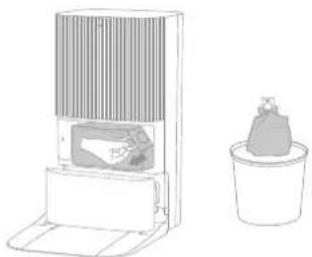
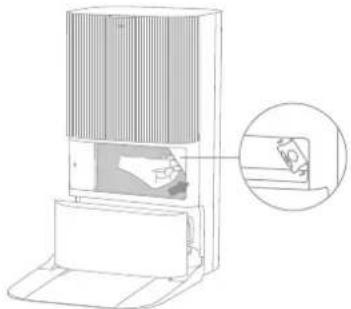
Støvpose
- Fjern støvtankdekselet og kast støvposen. 3. Installer en ny støvpose.
natural_image
Line drawing of a portable air conditioner unit and a small potted container (no text or symbols)
natural_image
Illustration of a mechanical device with a gear-like component mounted on a base (no text or symbols visible)
natural_image
Diagram of a portable air conditioner unit with a close-up view of its internal components (no text or symbols)
natural_image
Diagram of a cylindrical device with vertical bars and a base, showing directional arrows (no text or symbols)
NO
Rutinemessig vedlikehold
Skittenvannstank
natural_image
Line drawing of a device with a handle and water droplets (no text or symbols)
natural_image
Line drawing of a hand cleaning a bucket with a tool, no text or symbols present
natural_image
Technical diagram of a mechanical assembly with cross-sectional view and magnified detail (no text or labels)
natural_image
Cross-sectional diagram of a mechanical component with numbered parts (1 and 2), showing internal layered structure and directional arrows (no text or symbols)
NO
Rutinemessig vedlikehold
Sidebørste
natural_image
Illustration of a hand using a tool to clean a circular device with internal components (no text or symbols)
Moppeputeholdere
natural_image
Diagram showing a device interior with internal components and a hand holding a circular component (no text or symbols present)
natural_image
Diagram of a device with a hand holding a small component, showing internal components and wiring (no text or symbols)
Merk:
natural_image
Technical line drawing of a vacuum cleaner with component details (no text or symbols)
natural_image
Diagram showing a building interior with an arrow indicating direction and a container with particles falling into the liquid (no text or symbols)
natural_image
Line drawing of a hand holding a tablet device with a magnifying glass (no text or symbols)
Merk:
natural_image
Line drawing of a circular vacuum cleaner with a handle and control panel (no text or symbols)
natural_image
Line drawing of a washing machine with a sink and towel (no text or symbols)
Rutinemessig vedlikehold
natural_image
Line drawings of a circular vacuum cleaner and a multi-tiered appliance (no text or symbols)
Moppeputer
natural_image
Three hand-drawn diagrams showing hands holding circular components with a central ring (no text or symbols)
Batteri
LASERPRODUKT KLASS 1
LASERPRODUKT FÖR KONSUMENTBRUK
EN 50689:2021

natural_image
Simple line drawing of a circular object with a small circular inset containing a symbol (no text or labels)
Robot
natural_image
Line drawing of a vintage office chair with large windows and seating (no text or symbols)
Basstation
Andra tillbehör
natural_image
Simple line drawing of a circular object with a small circular inset containing a number 2 (no text or symbols)
Robot
natural_image
Line drawing of a vintage office chair with a large cabinet and two chairs (no text or symbols)
Basstation
natural_image
Technical line drawing of a circular mechanical component with concentric layers and mounting holes (no text or symbols)
Dockningsknapp
natural_image
Technical line drawing of a mechanical device with open and closed views (no text or symbols)
natural_image
Illustration of a desk with a teddy bear, keyboard, mouse, and computer monitor, plus a cross symbol (no text or labels)
natural_image
Architectural line drawing of a balcony railing with a circular base and checkmark symbol (no text or labels)
natural_image
Line drawing of a simple room layout with a desk, chair, fan, and door (no text or symbols)
natural_image
Interior hallway with a person standing at the entrance and a robot near the door, marked with a cross symbol (no text or labels)
natural_image
Technical line drawing of a portable electronic device with a magnified inset showing internal components (no text or symbols)
- Anslut roboten till basstationen
natural_image
Line drawing of a robotic vacuum cleaner in a clean room with an electrical outlet (no text or symbols)
natural_image
Diagram showing three stages of a device operation: opening, adding to a component, and finally adding a device (no text or symbols present)
Obs:
natural_image
Diagram of a portable water dispenser with a water tap and a bag, showing no text or symbols.
natural_image
Line drawing of a portable air conditioner unit with a power button (no text or symbols)
Obs:
natural_image
Line drawing of a vacuum cleaner with control panel and power outlet (no text or symbols)
Bruksanvisning
natural_image
Line drawing of a vacuum cleaner in a room with an electrical outlet (no text or symbols)
Obs:
natural_image
Two technical line drawings of a device with a power outlet and a hand inserting a component (no text or symbols)
natural_image
Illustration of a hand using a tap to clean water, with a close-up of hands operating equipment (no text or symbols present)
natural_image
Line drawing of a robotic vacuum cleaner in a room with an electrical outlet (no text or symbols)
Rutinunderhåll
Dammpåse
natural_image
Line drawing of a portable air conditioner unit and a small potted plant (no text or symbols)
natural_image
Diagram of a portable air conditioner unit with a close-up view of its internal components (no text or symbols)
natural_image
Line drawing of a mechanical device with a person inside, no text or symbols present
natural_image
Diagram of a vertical panel mounted on a base with directional arrows indicating movement or force (no text or symbols present)
Rutinunderhåll
Smutsvattentank
natural_image
Line drawing of a device with a handle and water droplets (no text or symbols)
natural_image
Line drawing of a hand cleaning a small kitchen appliance with a faucet (no text or symbols)
natural_image
Technical diagram of a mechanical assembly with cross-sectional view and magnified detail (no text or labels)
natural_image
Cross-sectional diagram of a mechanical component with numbered parts (1 and 2), showing internal layered structure without any text or symbols.
Rutinunderhåll
Sidoborste
natural_image
Illustration of hands using a tool to adjust or install electronic components on a circular device (no text or symbols present)
Moppdynans hållare
natural_image
Diagram showing a device interior with internal components and a hand placing a circular component (no text or symbols)
Vridbart hjul
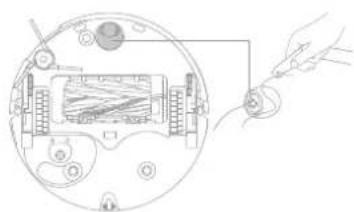
natural_image
Diagram of a device with a hand holding a small component connected to a circular panel (no text or symbols visible)
Obs:
natural_image
Technical line drawing of a vacuum cleaner with an inset close-up view showing internal components (no text or symbols)
natural_image
Diagram showing a building interior with an arrow indicating direction, and a container with liquid being poured into it (no text or symbols present)
natural_image
Line drawing of a hand holding a tray with small square markers (no text or symbols)
Obs:
natural_image
Technical line drawings of a vacuum cleaner and its internal air conditioner unit (no text or symbols)
Rutinunderhåll
natural_image
Line drawings of a circular vacuum cleaner and a multi-tiered appliance (no text or symbols)
Moppdynor
natural_image
Three hand-drawn diagrams showing hands holding circular components with a central ring (no text or symbols)
Batteri