ERB 3815 A - Steam cleaner CLATRONIC - Free user manual and instructions
Find the device manual for free ERB 3815 A CLATRONIC in PDF.


User questions about ERB 3815 A CLATRONIC
0 question about this device. Answer the ones you know or ask your own.
Ask a new question about this device
Download the instructions for your Steam cleaner in PDF format for free! Find your manual ERB 3815 A - CLATRONIC and take your electronic device back in hand. On this page are published all the documents necessary for the use of your device. ERB 3815 A by CLATRONIC.
USER MANUAL ERB 3815 A CLATRONIC
natural_image
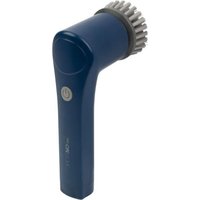
Blue electric toothbrush with brush head and power button (no text or symbols visible)WICHTIG:
natural_image
Four circular sample samples with different colors: black, blue, green, and dark (no text or symbols visible)Anwendungsbereich:
Be sure to read the separately enclosed safety instructions first.
Instruction Manual
Thank you for choosing our product. We hope you will enjoy using the appliance.
Read the instruction manual and the separately enclosed safety instructions very carefully before using this appliance. Keep these documents, including the warranty certificate, receipt and, if possible, the box with the inner packaging in a safe place. If you pass the appliance on to a third party, always include all the relevant documents.
Symbols in this Instruction Manual
Important information for your safety is specially marked. It is essential to comply with these instructions in order to avoid accidents and prevent damage to the appliance:

WARNING:
This warns you of dangers to your health and indicates possible injury risks.

CAUTION:
This refers to possible hazards to the appliance or other objects.
Unpacking the Appliance
- Remove the appliance from its packaging.
- Remove all packaging material, such as foils, filling material, cable ties and cardboard packaging.
- Check the scope of delivery for completeness.
- If the contents of the packaging are incomplete or if damage can be detected, do not operate the appliance. Return it to the dealer immediately.
Scope of Delivery
1×Appliance
1 × USB-A to USB-C charging cable
1 × Round brush attachment
1 × Oval brush attachment
1×Wire attachment
1 × 2-in-1 polishing attachment
1×Attachmentholder
3 × Sanding attachments for attachment holder (different densities)
Warnings for the Use of the Appliance

Read the instructions!

Do not use power supply with damaged plug! If the pins of the plug part are damaged, the plug-in power supply shall be scrapped. Read the instruction manual for the power supply unit you have selected before use.

WARNING:
Keep long hair, loose clothing, etc. away from the appliance during operation. These can be pulled in by the rotating cleaning attachments.

CAUTION:
- Choose the place for charging so that the appliance is not exposed to direct sunlight or other sources of heat.
- Only use the USB-A to USB-C charging cable included in the scope of delivery. Other charging cables may not work. Use a suitable power supply unit with a USB-A connection to charge the appliance.
- Do not charge the rechargeable battery unattended.
- Always unplug the power supply unit from the wall socket after charging.
- Never operate the appliance with the power supply unit connected.
Charging the Rechargeable Battery
- Fully charge the rechargeable battery before first use.
- Only use the charging cable supplied with the appliance for charging.
- Press and hold the button to switch off the appliance.
- Remove the cover on the underside of the appliance. To do this, turn the cover anti-clockwise as far as it will go.
- Pull the cover off.
- Connect the supplied charging cable to the charging socket. Then connect the charging cable with a power supply unit.
- Connect your power supply unit to a socket.
- During the charging process, the indicator next to the charging socket lights up red.
- When the rechargeable battery is fully charged, the indicator lights up green.
- Once fully charged, replace the cover on the appliance. Pay attention to the latches in the cover when replacing it. The cover must audibly click into place.
Cleaning Attachments
The various attachments are listed below with the respective areas of use and examples.
Round Brush Attachment
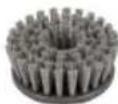
Area of use:
Cleaning work for flat surfaces.
Example: Floors, tiles, toilet
Oval Brush Attachment
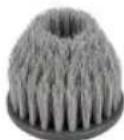
Area of use:
Cleaning work for corners that are difficult to access.
Example: Window corners, shower corners
Wire Attachment
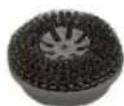
Area of use:
Cleaning work for non-sensitive surfaces.
Example: Gas hobs, grill grates
2-in-1 Polishing Attachment
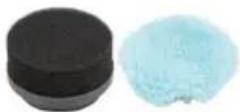
Area of use:
Cleaning work for sensitive surfaces.
Example:
Induction hob, windows, car
Attachment Holder with Three Sanding Attachments

natural_image
Four circular filter samples with different colors (black, blue, green, dark) and no visible text or symbolsArea of use:
Cleaning work for coarse soiling.
Example:
Stainless steel hob, pots
Using the Appliance
Switching On/Off
Press and hold the button for approx. 2 seconds to switch the appliance on or off.
Cleaning Surfaces

CAUTION:
An incorrectly selected attachment can damage the surface to be cleaned. Test the selected attachment on an inconspicuous area first.
- Before use, make sure that the cover of the charging socket is properly closed.
- Attach an attachment firmly to the drive axle.
-
Select the attachment according to the planned use.
-
Moisten the attachment slightly and apply a suitable cleaning agent if necessary.
-
The surface to be cleaned can also be sprayed directly, e. g. with a spray cleaner.
-
Soak stubborn dirt with water and a suitable cleaning agent first.
-
With the appliance switched off, place the attachment on the area to be cleaned.
- Switch the appliance on.
- Move the appliance slowly and without applying excessive pressure over the surface to be cleaned.
- To avoid splashes, always keep the cleaning attachment in direct contact with the surface to be cleaned!
- After cleaning, switch the appliance off.
Protection Mode
If excessive pressure is applied to the attachment, the appliance automatically switches to protection mode. The attachment will stop rotating.
- Wait a moment. Then switch the appliance on again to resume operation.
Cleaning

WARNING:
Switch off the appliance before cleaning. Unplug the power supply unit from the socket.

CAUTION:
- Do not immerse the appliance in water.
- Do not clean the appliance under running water! The electronics could be damaged.
- Do not use a wire brush or other abrasive objects.
- Do not use sharp or abrasive cleaning agents.
Housing
- Clean the appliance with a slightly damp, not wet, cloth. Make sure that no moisture or liquid penetrates the appliance!
• After cleaning, dry the appliance well with a dry, soft cloth.
Cleaning Attachments
Clean the attachments after each use.
- Remove the cleaning attachment.
- Rinse the attachment under warm running water with a mild detergent. Then rinse thoroughly with clear water.
- Allow the attachment to dry completely before attaching it to the appliance again.
Storage
- Clean the appliance as described. Allow the accessories to dry completely.
• We recommend storing the appliance in its original packaging if you do not intend to use it for a longer period of time.
• Always store the appliance out of the reach of children in a well-ventilated and dry place.
Technical Data
Model: ERB 3815 A
Net weight: .... approx. 0.3 kg
Protection class:....III
Degree of protection against liquids: IPX5*
Input voltage:.....DC 5 V, 1 A
Rechargeable battery: 1 × 3.7 V, 1300 mAh, Li-Ion
Running time:....approx. 1 hour
* The appliance complies with protection class IPX5. This means that the appliance is protected against water jets.
Power Supply Requirements
Connection: USB-A
Output voltage:.....DC 5 V, 1 A
The right to make technical and design modifications in the course of continuous product development remains reserved.
This appliance has been tested according to all applicable, current CE directives and built according to the latest safety regulations.
Disposal
Rechargeable battery/battery disposal
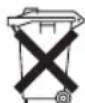
The appliance contains a rechargeable battery. Used batteries / rechargeable batteries should not be disposed of with household waste. As a consumer, you are legally obliged to return used batteries/rechargeable batteries.
The rechargeable battery must be removed before the appliance is disposed of. Please contact qualified specialists for this.
Information on where to dispose of batteries / rechargeable batteries can be obtained from your local authority or municipal administration. Your dealer and contractual partner is also obliged to take back batteries / rechargeable batteries free of charge.
Meaning of the "Dustbin" Symbol
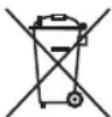
Protect our environment: do not dispose of electrical equipment in the domestic waste.
Please return any electrical equipment that you will no longer use to the collection points provided for their disposal.
This helps avoid the potential effects of incorrect disposal on the environment and human health.
This will contribute to the recycling and other forms of re-utilisation of electrical and electronic equipment.
Information concerning where the equipment can be disposed of can be obtained from your local authority. Your dealer and contractual partner is also obliged to take back the old appliance free of charge.
BELANGRIJK:
natural_image
Four circular filter samples with different colors (black, blue, green) arranged in a 2x2 grid, no text or symbols visible.Gebruiksgebied:
Schoonmaken van grove ver- vuiling.
Voorbeeld:
natural_image
Four circular filter samples with different material surfaces: black, blue, green, and dark (no text or symbols visible)natural_image
Four circular filter samples with different colors: black, blue, green, and dark (no text or symbols visible)Ámbito de uso:
natural_image
Four circular filter samples with different colors: black, blue, green, and dark (no text or symbols visible)Area di utilizzo:
natural_image
Four circular filter samples with different material surfaces (black, blue, green, dark) arranged in a 2x2 grid, no text or symbols visible.natural_image
Four circular samples of different colored filter or powder samples, including black, blue, green, and dark gray (no text or symbols visible)natural_image
Four circular filter samples with different material surfaces: black, blue, green, and dark (no text or symbols visible)Область применения: