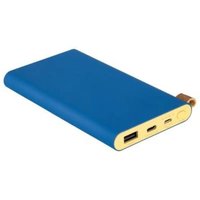
SCP 10000A1 - Power bank SILVERCREST - Free user manual and instructions
Find the device manual for free SCP 10000A1 SILVERCREST in PDF.


| Product Type | External Battery (Powerbank) |
| Brand | SilverCrest |
| Model | SCP 10000A1 |
| Battery Capacity | 10000 mAh (37 Wh) |
| Battery Type | Lithium-polymer |
| Input Voltage (micro USB) | 5 V, 2 A |
| Input Voltage (USB-C) | 5 V, 3 A |
| Output Voltage (USB-C) | 5 V, 3 A |
| Output Voltage (USB-A) | 5 V, 2 A |
| Max Total Output Current | 3 A |
| Operating Temperature | 5 °C to 35 °C |
| Storage Temperature | 0 °C to 45 °C |
| Air Humidity (non-condensing) | < 85 % |
| Available Ports | 1x micro USB (input), 1x USB-C (input/output), 1x USB-A (output) |
| Charge Indicator | 4 LEDs (charge level in 25% increments) |
| Control Button | On/Off |
| Package Contents | 1 external battery, 1 USB-A/micro USB cable with USB-C adapter, 1 instruction manual |
| Intended Use | Charging mobile devices via USB port |
| Safety | Overcharge, overheating, and short-circuit protection |
| Cleaning | Slightly damp cloth, mild detergent |
| Disposal | Do not dispose with household waste - recycle |
| Warranty | 3 years |
Frequently Asked Questions - SCP 10000A1 SILVERCREST
User questions about SCP 10000A1 SILVERCREST
0 question about this device. Answer the ones you know or ask your own.
Ask a new question about this device
Download the instructions for your Power bank in PDF format for free! Find your manual SCP 10000A1 - SILVERCREST and take your electronic device back in hand. On this page are published all the documents necessary for the use of your device. SCP 10000A1 by SILVERCREST.
USER MANUAL SCP 10000A1 SILVERCREST
Operation and safety notes
DK
POWERBANK - 10.000 mAh
Warnings and symbols used ......Page 6
Introduction......Page 7
Intended use......Page 7
Trademark notice ...... Page 7
Scope of delivery....Page 8
Before use......Page 8
Parts description Page 8
Technical data......Page 8
Safety notices......Page 9
Operation and use ......Page 11
Charging the power bank......Page 11
Checking the battery status ......Page 12
Charging mobile devices with the power bank .....Page 13
Troubleshooting Page 14
Cleaning and care......Page 15
Storage during non-use ......Page 15
Disposal Page 15
Note to EU declaration of conformity....Page 16
Warranty Page 16
Warranty claim procedure......Page 17
Service Page 18
| Warnings and symbols usedThese instructions for use contain the following symbols and warnings: | |
 | DANGER! This symbol with the signal word "DANGER" indicates a hazard with a high level of risk which, if not avoided, will result in serious injury or death. |
 | WARNING! This symbol with the signal word "WARNING" indicates a hazard with a medium level of risk which, if not avoided, could result in serious injury. |
 | CAUTION! This symbol with the signal word "CAUTION" indicates a hazard with a low level of risk which, if not avoided, could result in minor or moderate injury. |
 | ATTENTION! This symbol with the signal word "ATTENTION" indicates a possible property damage. |
 | NOTE: This symbol with the signal word "NOTE" provides additional useful information. |
 | Wear suitable protective gloves! |
 | Direct current |
 | Observe the warnings and safety instructions! |
 | Technology to optimize charging time |
 | This symbol means that the instructions for use must be read before using the product. |
10,000 mAh Power bank
- Introduction
We congratulate you on the purchase of your new product. You have chosen a high quality product. The instructions for use are part of the product. They contain important information concerning safety, use and disposal. Before using the product, please familiarise yourself with all of the safety information and instructions for use. Only use the product as described and for the specified applications. If you pass the product on to anyone else, please ensure that you also pass on all the documentation with it.
Intendeduse
This product is an IT device which is solely intended to be used to charge mobile devices which are normally charged through a USB port. This product is not intended for commercial use. Manufacturer is not liable for damages, which result from non-Intended use.
• Trademark notice
-USB ^® is a registered trademark of USB Implementers Forum, Inc.
- The SilverCrest trademark and trade name is the property of their respective owners.
- The Smart Fast Charge trademark and trade name is the property of their respective owners.
- Any other names and products may be trademarks or registered trademarks of their respective owners.
Scope of delivery
Please refer to fold out page.
1 Power bank
1 USB type A to micro USB cable with adapter to USB type C
1 Instructions for use
Before use
Note: Remove all packaging materials from the product.
Please also check the content of delivery inside packaging to see if any damages. If you notice any damage or missing parts, please contact the dealer who sold this product.
Parts description
Please refer to fold out page.
1 ON/OFF switch
2 Micro USB Input charging port (5 V=2 A)
3 USB Type C Input / Output (5 V—3 A)
4 USB Type A Output (5 V=7-2 A)
5 LED indicator
6 Power bank
7 USB type A to micro USB cable with adapter to USB type C
8 Instruction for use
• Technical data
Built-in battery: 3.7 V / 10000 mAh, 37 Wh (Lithium polymer)
| Micro-USB input | |
| voltage/current: 5V | ---, 2A |
| USB Type C input | |
| voltage/current: 5V | ---, 3A |
| USB Type C output | |
| voltage/current: 5V | ---, 3A |
| USB Type A output, | |
| voltage/current: 5V | ---, 2A |
Total max.
output current: 3 A *
Minimal output current: approx. 60 mA
Operating temperature: 5 °C–35 °C
Storage temperature: 0 °C–45 °C
Humidity
(no condensation): 10%-70%
Dimensions: approx. 138 x 77 x 16 mm
Weight:approx.260g
* If ALL USB output port using at the same time, the sum of the output current must not exceed 3A maximum.

Safety notices
Please familiarise yourself with all instructions for use and Safety notices before using the product for the first time.
When passing this product on to third parties, please be sure to include all documentation.
- Check the product for visible external damage before use. Do not use the product if damaged or dropped.
This product may be used by children age 8 years and up, as well as by persons with physical, sensory or mental impairments or lacking experience and / or knowledge, provided they are supervised or instructed in the safe use of the product and understand the associated risks. Do not allow children to play with the product. Never allow children to clean or maintain this product unsupervised.
DANGER! Packaging materials are not a toy.
Keep all packaging materials out of the reach of children. Suffocation hazard!
■ Always use the product on flat and smooth surface. The product could be damaged if it falls.
- Do not expose the product to direct sunlight or high temperatures. It may otherwise overheat and be damaged beyond repair.
- Do not operate the product near heat sources such as radiators or other devices producing heat.
- Do not operate the product near open flames, e.g. candles.
The product is not designed for use in rooms with high temperatures or humidity (i.e bathrooms) or those in which a great amount of dust is generated.
Do not expose the product to extremely high temperatures. This applies in particular if you are thinking about storing the product in your car. Over a prolonged period of time, the car and the glove compartment could become extremely hot. Remove electric and electronic devices from the car.
- Do not use the product immediately after it has brought from a cold room to a warm room. Allow the product to acclimatise before you switch it on.
WARNING! Never open the product casing. This product has no internal parts requiring maintenance.
WARNING! Improper handling of lithium polymer batteries can result in fire, explosions, hazardous substances leaking, or other dangerous situations! Do not throw the product into the fire, as this could lead to the built-in battery exploding.
- Do not independently convert or modify the product.
■ Repairs to the product must be performed by authorised specialised companies or customer service. Improper repairs may place the user in considerable danger. They will also void the warranty.
- Do not expose the product to dripping water or splashing water and do not place containers filled with liquids such as vases or open drinks on top of or beside the product.
- Immediately switch the product off and remove the charging cable from the product if you smell burning or see smoke. Have the product examined by a qualified technician before using it again.
If you use a USB power supply, the socket used must always be easily accessible so that the USB power supply can be quickly removed from the socket in the case of emergency. Please also refer to the manufacturer's instruction manual. - Observe the usage restrictions and prohibitions of use for battery-operated products in situations which may be hazardous such as at petrol stations, airports, hospitals, etc.
WARNING! During charging process, please be noticed that the product must not be covered. There is a risk of warming and overheating.
- Operation and use
- Charging the power bank
The built-in rechargeable battery must be fully charged before using the product.
☐ To charge the power bank only use power supplies with an output voltage of 5 V and an output current of at least 3 A.
ATTENTION! Due the high power consumptions, the power bank must not be charged from a PC or notebook.
Connect the USB type A to micro USB cable with adapter to USB type C 7 with the USB-C Input 3 of the power bank 6. Alternatively, the micro-USB input 2 can also be used for charging the power bank. In this case, the micro-USB-USB type C adapter must be removed from the cable.
Connect the other end of the USB type A to micro USB cable with adapter to USB type C 7 (USB Type A) to a USB power supply (not included in the scope of delivery) (see fig. B).
The current battery status is shown by LED indicator:
| LED indicator 5 status | Power bank capacity level* |
| 1 LED flash 0-25% | |
| 1 LED light up, 1 LED flash 25-50% | |
| 2 LED light up, 1 LED flash 50-75% | |
| 3 LED light up, 1 LED flash 75-100% | |
| 4 LED light up 100% |
* This is approx percentage of power bank capacity but not actual measurement.
☐ The required charging time for the power bank depends on the charging source and its output power. Fully charged this power bank by using 5 V / 3 A charging source approx. 6.5 hours.
- ATTENTION! Do not connect any device to the power bank for charging while the power bank itself is charging. Remove the charging cable from the Powerbank when it is fully charged.
- Checking the battery status
You can check the battery status on the LED indicator 5 anytime.
Lightly press the ON / OFF switch. The LED indicator 5 shows the current battery status of the power bank 6 for
approx. 30 seconds in terms of 4 LED indicators 5 to show overall power bank 6 capacity.
1 LED light up = 25 %
2 LEDs light up = 50 %
3 LEDs light up = 75 %
4 LEDs light up = 100 %
This is approx percentage of power bank capacity but not actual measurement.
• Charging mobile devices with the power bank
Use provided USB type A to micro USB cable with adapter to USB type C 7 or other charging cable purchased from reliable supplier. Connect USB type A port to USB output (Type A) 4 of the power bank 6.
And then connect the other end of the USB type A to micro USB cable with adapter to USB type C 7 to the micro USB or USB type C port of the mobile device to be charged. The charging process will start automatically.
In case if the charging process does not begin immediately, press the ON / OFF switch 1 shortly to begin the charging process. The current battery status of the power bank 6 is shown during the charging process by the LED indicator 5.
To end the charging process, separate the USB charging cable from the mobile device and the power bank 6, or interrupt the charging by pressing the ON / OFF switch 1 twice in quick succession. The LED indicator 5 will switch off after approx. 30 seconds.
- Troubleshooting
● = Problem
= Cause
O = Solution
● The power bank 6 is not being charged.
It may be that the power bank is not connected properly.
○ Check that it is connected.
In order to charge the power bank, a power supply with 5 V and at least 3 A has to be used.
● A connected device is not being charged.
The battery is drained.
- Charge the battery.
The device is not connected.
- Check that it is connected. Lightly press the ON / OFF switch 1 to begin the charging process.
The current consumption of the connected device might be too low.
- Check with your connected device manual and see if your connected device current consumption comply with this product.
● The power bank 6 does not react when the button is pressed or when a device is connected, even though the battery is charged.
The power consumption of the connected device is too high. Therefore, the internal overcurrent protection device was activated.
Please unplug your device to be charged and find another suitable power bank for charging.
- Cleaning and care
This product has no internal parts requiring maintenance. Moisture entering the product may result in damage.
■ Ensure no moisture enters the product during cleaning to prevent damaging the product beyond repair.
Do not use abrasive, solvent-based or aggressive cleaners. These can damage the surface of the product.
Only clean the product with a slightly damp cloth and mild washing-up liquid.
☐ Make sure that all plug contacts are free of dirt and foreign objects.
● Storage during non-use
Store the product in a dry, dust-free location, protected from direct sunlight.
☐ If the product is not used for a long time, the built-in battery should be fully charged to prolong its operating life. Regularly charge the built-in battery if you do not use the product for a long period of time. This is necessary to preserve the battery.
●Disposal
The packaging is made of environmentally friendly materials, which may be disposed of through your local recycling facilities.
Contact your municipality for information on how to dispose of your worn-out product.
The adjacent symbol of a crossed out dustbin on wheels indicates this device is subject to Directive 2012/19/EU. This directive states at the end of the life this device must not be disposed of through regular household refuse but must be returned to special collection sites, recycling depots or waste management companies.
This disposal is free of charge to you. Protect the environment and dispose properly.
Please contact your local waste management company or the city / municipal administration for more information. The built-in rechargeable battery cannot be removed for disposal.
● Note to EU declaration of conformity
We, OWIM GmbH & Co. KG, Stiftsbergstraße 1, 74167 Neckarsulm, GERMANY, hereby declare under our sole responsibility that the product: 10,000mAh Power Bank, Model No.: HG06004A, HG06004B, HG06004C, HG06004D, to which this declaration refers, this device complies with the basic standards and other relevant requirements of EMC directive 2014/30/EU and the RoHs Directive 2011/65/EU.
The full text of the EU declaration of conformity is available at the following internet address: www.owim.com
- Warranty
The product has been manufactured to strict quality guidelines and meticulously examined before delivery. In the event of product defects you have legal rights against the retailer of
this product. Your legal rights are not limited in any way by our warranty detailed below.
The warranty for this product is 3 years from the date of purchase. Should this product show any fault in materials or manufacture within 3 years from the date of purchase, we will repair or replace it – at our choice – free of charge to you.
The warranty period begins on the date of purchase. Please keep the original sales receipt in a safe location. This document is required as your proof of purchase. This warranty becomes void if the product has been damaged, or used or maintained improperly.
The warranty applies to defects in material or manufacture. This warranty does not cover product parts subject to normal wear, thus possibly considered consumables (e.g. batteries) or for damage to fragile parts, e.g. switches, rechargeable batteries or glass parts.
- Warranty claim procedure
To ensure quick processing of your case, please observe the following instructions:
Please have the till receipt and the item number (e.g.
IAN 123456_7890) available as proof of purchase.
You will find the item number on the type plate, an engraving on the front page of the instructions (bottom left), or as a sticker on the rear or bottom of the appliance.
If functional or other defects occur, please contact the service department listed either by telephone or by e-mail.
You can return a defective product to us free of charge to the service address that will be provided to you. Ensure that you
enclose the proof of purchase (till receipt) and information about what the defect is and when it occurred.
Service
GB Service Great Britain
Tel.: 0800 404 7657
E-Mail: owim@lidl.co.uk
IE Service Ireland
NI Service Northern Ireland
Tel.: 1890 930 034
(0,08 EUR / Min., (peak))
(0,06 EUR / Min., (off peak))
E-Mail: owim@lidl.ie
CE
condensation): 10%-70%
Dimensions : env. 138 x 77 x 16 mm
Poids : env. 260 g
● = Problème
● = Cause
O = Solution
