WOI9A8FPT2SBAF - Oven WHIRLPOOL - Free user manual and instructions
Find the device manual for free WOI9A8FPT2SBAF WHIRLPOOL in PDF.


User questions about WOI9A8FPT2SBAF WHIRLPOOL
0 question about this device. Answer the ones you know or ask your own.
Ask a new question about this device
Download the instructions for your Oven in PDF format for free! Find your manual WOI9A8FPT2SBAF - WHIRLPOOL and take your electronic device back in hand. On this page are published all the documents necessary for the use of your device. WOI9A8FPT2SBAF by WHIRLPOOL.
USER MANUAL WOI9A8FPT2SBAF WHIRLPOOL
THANK YOU FOR BUYING A WHIRLPOOL PRODUCT In order to receive a more complete assistance, please register your product on www.register10.eu

Before using the appliance carefully read the Safety Instruction.
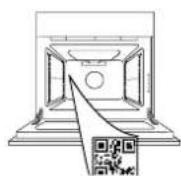
PLEASE SCAN THE QR CODE ON YOUR APPLIANCE IN ORDER TO REACH MORE INFORMATION
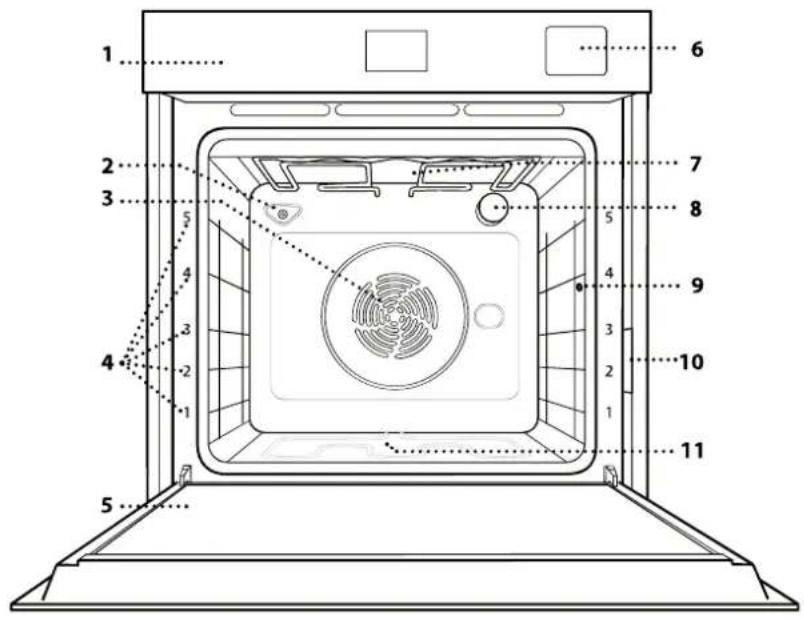
PRODUCT DESCRIPTION
text_image
1 2 3 4 5 -1 -2 -3 4 5 6 7 8 9 10 11- Control panel
- Humidity sensor
- Fan and circular heating element (non-visible)
- Shelf guides
(the level is indicated on the front of the oven)
- Door
- Water drawer
- Upper heating element/grill
- Lamp
- Food probe insert point
- Identification plate (do not remove)
- Lower heating element (non-visible)
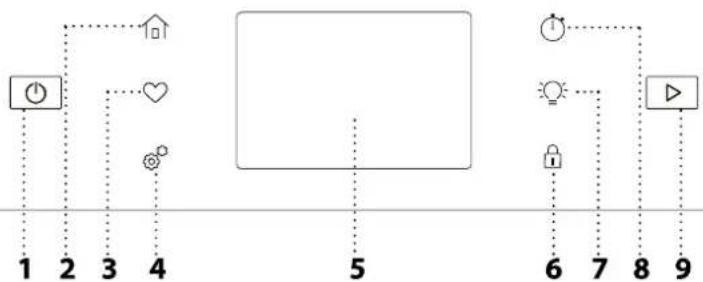
CONTROL PANEL
flowchart
graph TD
    A["1"] --> B["2"]
    B --> C["3"]
    C --> D["4"]
    D --> E["5"]
    E --> F["6"]
    F --> G["7"]
    G --> H["8"]
    H --> I["9"]
    style A fill:#f9f,stroke:#333
    style B fill:#f9f,stroke:#333
    style C fill:#f9f,stroke:#333
    style D fill:#f9f,stroke:#333
    style E fill:#ccf,stroke:#333
    style F fill:#ccf,stroke:#333
    style G fill:#ccf,stroke:#333
    style H fill:#ccf,stroke:#333
    style I fill:#ccf,stroke:#333
1. ON / OFF
For switching the oven on and off.
2. HOME
For gaining quick access to the main menu.
3. FAVORITE
For retrieving up the list of your favorite functions.
4. TOOLS
To choose from several options and also change the oven settings and preferences.
5. DISPLAY
6. CONTROL LOCK
The "Control Lock" enables you to lock the buttons on the touch pad so they cannot be pressed accidentally.
7. LIGHT
To switch on or off the oven lamp.
8. KITCHEN TIMER
This function can be activated either when using a cooking function or alone for keeping time.
9. START
To start the cooking function.
ACCESSORIES
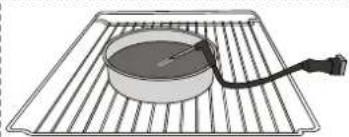
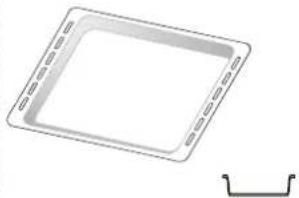
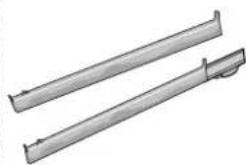
WIRE SHELF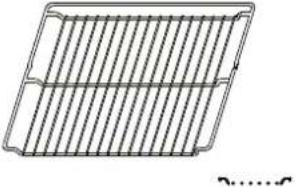 | DRIP TRAY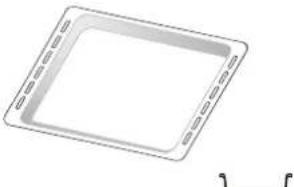 | BAKING TRAY*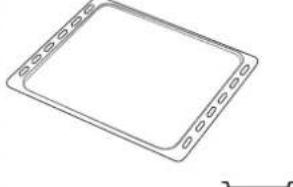 | SLIDING RUNNERS*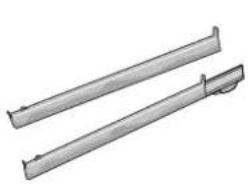 |
| Use to cook food or as a support for pans, cake tins and other ovenproof items of cookware. | Use as an oven tray for cooking meat, fish, vegetables, focaccia, etc. or position underneath the wire shelf to collect cooking juices. | Use for cooking all bread and pastry products, but also for roasts, fish en papillotte, etc. | To facilitate inserting or removing accessories. |
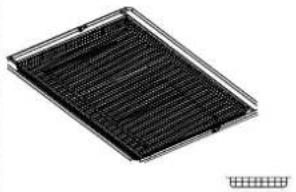
| FOOD PROBE | AIR FRY TRAY* | The number and the type of accessories may vary depending on which model is purchased.Other accessories can be purchased separately; for orders and information contact the after sales service.* Available only in certain models | |
| To accurately measure the core temperature of food during cooking.Thanks to its rigid support, it can be used for meat and fish, and also for bread, cakes and baked pastries. | To be used when cooking foods with Air Fry function, with a baking tray positioned at a lower level to collect possible crumbs and drip. It can be cleaned in the dishwasher. | ||
INSERTING THE WIRE SHELF AND OTHER ACCESSORIES
Insert the wire shelf horizontally by sliding it across the shelf guides, making sure that the side with the raised edge is facing upwards.
Other accessories, such as the drip tray and the baking tray, are inserted horizontally in the same way as the wire shelf.
REMOVING AND REFITTING THE SHELF GUIDES
- To remove the shelf guides, remove the fixing screws (if present) on both sides with the aid of a coin. Lift the guides up and pull the lower parts out of their seatings: the shelf guides can now be removed.
- To refit the shelf guides, first fit them back into their upper seating. Keeping them held up, side them into the cooking compartment, then lower them into position in the lower seating.
natural_image
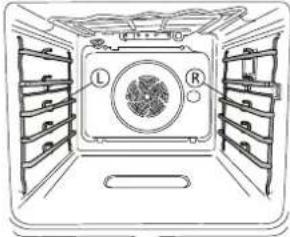
Diagram of a refrigerator interior showing labeled compartments (L and R) and a central air vent (no text or symbols beyond labels)The left ("L") and right ("R") shelf guides can be recognized by the logo indicated in this picture.
natural_image
Diagram of a mechanical assembly with metal rods and a central spring-like component, no text or symbols presentRemove the shelf guides from the oven and remove the protective plastic from the sliding runners.
Fasten the upper clip of the runner to the shelf guide and slide it along as far as it will go. Lower the other clip into position.
natural_image
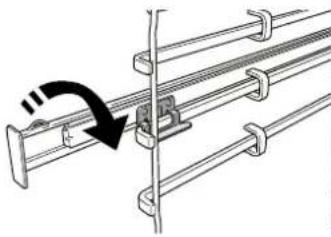
Technical diagram of a mechanical assembly with a curved arrow indicating rotation (no text or symbols present)To secure the guide, press the lower portion of the clip firmly against the shelf guide. Make sure that the runners can move freely. Repeat these steps on the other shelf guide on the same level.
Please note: The sliding runners can be fitted on any level.
FUNCTIONS

MANUAL MODES
• CONVENTIONAL
For cooking any kind of dish on one shelf only.
• CONVENTION BAKE
For cooking meat, baking cakes with fillings on one shelf only.
- FORCED AIR
For cooking different foods that require the same cooking temperature on several shelves (maximum three) at the same time. This function can be used to cook different foods without odours being transferred from one food to another.
• GRILL
For grilling steaks, kebabs and sausages, cooking vegetables au gratin or toasting bread. When grilling meat, we recommend using a drip tray to collect the cooking juices: Position the tray on any of the levels below the wire shelf and add 500 ml of drinking water.
• TURBO GRILL
For roasting large joints of meat (legs, roast beef, chicken). We recommend using a drip tray to collect the cooking juices: Position the pan on any of the levels below the wire shelf and add 500 ml of drinking water.
- FAST PREHEAT
For preheating the oven quickly.
• COOK4
For cooking different foods that require the same cooking temperature on four levels at the same time. This function can be used to cook cookies, cakes, round pizzas (also frozen) and to prepare a complete meal. Follow the cooking table to obtain the best results.
• STEAM
» STEAM AUTO
Combining the properties of steam with those of the forced air, this function allows you to cook dishes pleasantly crispy and browned outside, but at the same time tender and succulent inside.
The oven automatically injects the right amount of steam based on the selected temperature to achieve optimal cooking results.
» STEAM+AIR
Combining the properties of steam with those of the forced air, this function allows you to cook dishes pleasantly crispy and browned outside, but at the same time tender and succulent inside. To achieve the best cooking results, we recommend to select a HIGH steam level for fish cooking, MEDIUM for meat and LOW for bread and desserts.
For more information on forced air + steam manual cooking cycles head to the "Steam + Air" Cooking Table.
• SPECIAL FUNCTIONS
» PIZZA
This function allows you to cook great homemade pizza, in less than 10 minutes like in a restaurant.
The dedicated cooking cycle works at temperature level above 300 degree Celsius, delivering pizza soft inside, crunchy on the edges and with a perfectly even browning. Combining this function with the Pizza Stone WPro accessory and preheating for 30 minutes can bake a pizza in 5-8 min.
For orders and information contact the after sales service or www.whirlpool.eu
» AIR FRY
This function allows you to cook French fries, chicken nuggets and more using less oil, resulting pleasantly crispy. Heating elements cycle to properly heat the cavity, while the fan circulates hot air. Best expected cooking results can be achieved only by using an Air Fry tray (provided with some models). Position the food on the Air Fry tray in a single layer and follow Air Fry Cooking Table instructions for best performances. Avoid using more than one tray to prevent uneven cooking.
» DEFROST
To speed up defrosting of food. Place food on the middle shelf.
» KEEP WARM
For keeping just-cooked food hot and crisp.
» RISING
For optimal proving of sweet or savoury dough. To maintain the quality of proving, do not activate the function if the oven is still hot following a cooking cycle.
» CONVENIENCE
To cook ready-made food, stored at room temperature or in the refrigerator (biscuits, cake mix, muffins, pasta dishes and bread-type products). The function cooks all the dishes quickly and gently and can also be used to heat food already cooked. The oven does not need to be pre-heated. Follow the instructions on the packaging.
» MAXI COOKING
The function automatically selects the best cooking mode and temperature to cook large joints of meat (above 2.5 kg). It is advisable to turn the meat over during cooking, to obtain even browning on both sides. It is best to baste the meat every now and again to prevent it from drying out.
» ECO CYCLE \*
For cooking stuffed roasting joints and fillets of meat on a single shelf. When this Eco Cycle is in use, the light will remain switched off during cooking. To use the Eco Cycle and therefore optimise power consumption, the oven door should not be opened until the food is completely cooked.
- FROZEN FOOD
The function automatically selects the ideal cooking temperature and mode for 5 different types of ready frozen food. The oven does not have to be preheated.
HOW TO USE THE TOUCH DISPLAY

To select or confirm:
Tap the screen to select the value or menu item you require.
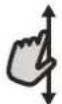
To scroll through a menu or a list:
Simply swipe your finger across the display to scroll through the items or values.
FIRST TIME USE
You will need to configure the product when you switch on the appliance for the first time.
The settings can be changed subsequently by pressing to access the "Tools" menu.
1. SELECT THE LANGUAGE PREFERENCES
You will need to set the language and the time when you switch on the appliance for the first time.
- Swipe across the screen to scroll through the list of available languages.
• Tap the language you require.
2. SETTING THE TIME AND DATE
Connecting the oven to your home network will set the time and date automatically. Otherwise you will need to set them manually
- Tap the relevant numbers to set the time.
- Tap "SET" to confirm.
Once you have set the time, you will need to set the date - Tap the relevant numbers to set the date.
- Tap "SET" to confirm.
After a long power loss, you need to set the time and date again.
3. SET THE POWER CONSUMPTION
The oven is programmed to consume a level of electrical power that is compatible with a domestic network that has a rating of more than 3 kW (16 Ampere): If your household uses a lower power, you will need to decrease this value (13 Ampere).
- Tap the value on the right to select the power.
- Tap "OKAY" to complete initial setup.
4. SET THE WATER HARDNESS LEVEL

AUTO MODES
These enable all types of food to be cooked fully automatically. To use at best this function, follow the indications on the relative cooking table. The oven does not have to be preheated.
* Function used as reference for the energy efficiency declaration in accordance with Regulation (EU) No. 65/2014
To confirm settings or access the next screen:
Tap "SET" or "NEXT".
To go back to the previous screen:
Tap ← .
In order to allow the oven to work efficiently, and to guarantee that it regularly prompts the user to perform Descale cycle when needed, it is important to set the correct water hardness level. To set it, switch on the oven by pressing ⏻, press ⚙. Open the Preferences and select "WATER HARDNESS". Tap "SET" to confirm. Select the correct level for the water of your area, based on the following table:
| WATER HARDNESS LEVELS TABLE | ||||
| Level | °dH German degrees | °fH French degrees | °Clark English degrees | |
| 1 | Very soft | 0-6 | 0-10 | 0-7 |
| 2 | Soft | 7-11 | 11-20 | 8-14 |
| 3 | Mid | 12-16 | 21-29 | 15-20 |
| 4 | Hard | 17-34 | 30-60 | 21-42 |
| 5 | Very hard | 35-50 | 61-90 | 43-62 |
Tap "SET" to confirm.
For Water Hardness level, "Hard" is preset.
5. HEAT THE OVEN
A new oven may release odours that have been left behind during manufacturing: this is completely normal. Before starting to cook food, we therefore recommend heating the oven with it empty in order to remove any possible odours.
Remove any protective cardboard or transparent film from the oven and remove any accessories from inside it. Heat the oven to 200 °C for around one hour. It is advisable to air the room after using the appliance for the first time
DAILY USE
1. SELECT A FUNCTION
To switch on the oven, press ⏻ or touch anywhere on the screen.
The display allows you to choose between Manual Modes and 6 ^th Sense Modes.
- Tap the main function you require to access the corresponding menu.
- Scroll up or down to explore the list.
- Select the function you require by tapping it.
2. SET MANUAL FUNCTIONS
After having selected the function you require, you can change its settings. The display will show the settings that can be changed.
According to the selected function, you can activate or deactivate the preheat with a specific toggle.
DURATION
You do not have to set the cooking time if you want to manage cooking manually. In timed mode, the oven cooks for the length of time you select. At the end of the cooking time, the cooking is stopped automatically.
- To set the duration, tap the Time section or the "Set Cook Time" after pressing START.
- Tap the relevant numbers to set the cooking time you require.
- Tap "NEXT" to confirm.
To cancel a set duration during cooking and so manage manually the end of cooking, you can tap the duration value and set "0" or you can open the three dots menu and edit the cooking time.
If you want to stop the cycle, open the three dots menu and select "Stop Cooking".
3. SET 6 ^TH SENSE AUTO MODES
The 6 ^th Sense Auto Modes enable you to prepare a wide variety of dishes, choosing from those shown in the list. Most cooking settings are automatically selected by the appliance in order to achieve the best results.
Furthermore, thanks to a special sensor able to recognize the moisture content of the food, some of the 6th Sense functions allow you to achieve optimal cooking for any kind of food without any setting: the sensor will stop the cooking at the perfect time. During the last few minutes of cooking only, a countdown will appear on the display, indicating the remaining cooking time.
- Choose a recipe from the list.
Functions are displayed by food categories in the "6 ^th SENSE FOOD" menu (see relative tables).
- Once you have selected a function, simply indicate the characteristic of the food (quantity, weight,
etc.) you want to cook to achieve the perfect result.
. COOKING WITH STEAM
By selecting the "Steam" or the "Forced Air + Steam" inside the Manual Functions or one of the several 6^th Sense dedicated recipes it is possible cook any kind of food thanks to the use of the steam. Steam spreads more quickly and more evenly through food compared to just the hot air typical of Conventional Functions: this reduce cooking times, locking in food's precious nutrients and ensuring you obtain excellent, truly delicious results with all your recipes. Through the complete duration of the steam cooking the door must be kept closed.
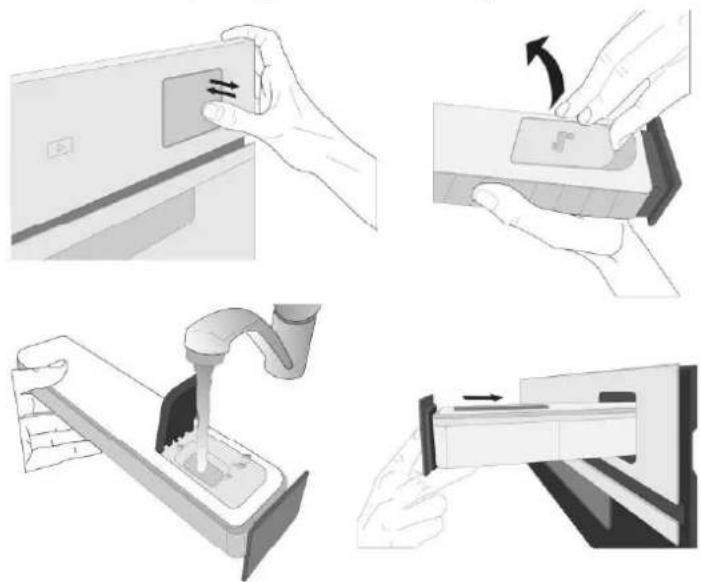
To proceed with steam cooking, it will be necessary to provide water to the boiler located inside the oven using the extractable drawer on the control panel.
When requested on the display with "FILL THE DRAWER" indications, extract the drawer, open drawer's lid and fill it with water until the level requested on the display. Close the drawer by pushing it carefully towards the panel until completely closed. After the drawer insertion, press START to proceed with the cooking cycle. The drawer must always remain closed, except for water filling.
natural_image
Four-step diagram illustrating a mechanical process: pressing a component, moving a package, pouring liquid into a washing machine, and finally inserting a slot into a container (no text or symbols present)After the first filling, in case of longer cooking cycles, once water will have ran out, it could be necessary to add it again, in order to complete the cycle: the oven will prompt it in case it is needed.
4. SET START TIME DELAY
You can delay cooking before starting a function: The function will start at the time you select in advance.
- Tap "DELAY" to set the start time you require. You can either select the start time or the time at which you would like the food to be ready according to the selected functions.
- Once you have set the required delay, tap "SET" to start the waiting time.
- Place the food in the oven and close the door: The
function will start automatically after the period of time that has been calculated.
Programming a delayed cooking start time will disable the oven preheating phase: The oven will reach the temperature your require gradually, meaning that cooking times will be slightly longer than those listed in the cooking table.
- To activate the function immediately and cancel the programmed delay time, tap "SKIP DELAY".
5. START THE FUNCTION
- Once you have configured the settings, tap "START" to activate the function.
If the oven is hot and the function requires a specific maximum temperature, a message will shown on the display. You can change the values that have been set at any time during cooking by tapping the value you want to amend. All the options available to be modified can be explored by opening the three dots menu in the bottom left part of the display.
At any time you can stop the function that has been activated by pressing ⏻.
6. PREHEATING
If previously activated, once the function has been started the display indicates the status of preheating phase. Once this phase has been finished, an audible signal will sound and the display will indicate "OVEN READY."
- Open the door.
- Place the food in the oven.
- Close the door and tap the "Start now" or the "START" Button to start cooking.
Placing the food in the oven before preheating has finished may have an adverse effect on the final cooking result. Opening the door during the preheating phase will stop pause it. The cooking time does not include a preheating phase.
You can change the default setting of the preheating option for cooking functions that allow you to do that manually.
- Select a function that allows you to select the preheating function manually.
- Use the Preheating dedicated toggle in the bottom right of the display to activate or deactivate preheating. It will be set as a default option.
7. TURN OR CHECK FOOD
Some 6th Sense Auto Modes will require the food to be turned during cooking. An audible signal will sound and the display shows the action to be done.
- Open the door.
- Carry out the action prompted by the display.
- Close the door, then tap "START" to resume cooking.
In the same way, in the last 5% of the cook time, before the end of cooking, the oven prompts you to check the food.
An audible signal will sound and the display shows the action to be done.
- Check the food
- Close the door, then tap "START" to resume cooking.
8. END OF COOKING
An audible signal will sound and the display will indicate that cooking is complete. With some functions, once cooking has finished you can give your dish extra browning, extend the cooking time or save the function as a favorite.
- Tap "ADD TO FAV" to save it as a favorite.
- Select "Extra Browning" to start a five-minute browning cycle.
- Tap " + 5 min" to prolong the cooking
9. FAVORITES
The Favourites feature stores the oven settings for your favorite recipe.
The oven automatically recognizes the most used functions. After a certain number of uses, you will be prompted to add the function to your favorites.
HOW TO SAVE A FUNCTION
Once a function has finished, tap "ADD TO FAV" to save it as a favourite. This will enable you to use it quickly in the future, keeping the same settings.
ONCE SAVED
To view the favorite menu, press ♥ : All the saved functions will be listed in this Menu. Tap "START" to activate the selected cooking function.
CHANGING THE SETTINGS
In the favorite screen, you can add an image or name to the favorite to customize it to your preferences.
- Select the function you want to change.
- Tap the three dots icon on the top right corner..
- Select the attribute you want to change.
- Tap "SAVE" to confirm your changes.
If you want to remove a specific function you will find in this Menu the "DELETE FAVORITE" option.
10. TOOLS
Press 🔗 to open the "Tools" menu at any time. This menu enables you to choose from several options and also change the settings or preferences for your product or the display.

LIGHT
To switch on or off the oven lamp.

SMARTCLEAN
The action of the steam released during this special low-temperature cleaning cycle allows dirt and food residues to be removed with ease. Pour 200 ml of drinking water on the bottom of the oven and only activate the function when the oven is cold.

PYRO SELF CLEANING
For eliminating cooking spatters using a cycle at very high temperature. Three selfcleaning cycles with different durations are available: High, Mid, Low.
Do not touch the oven during the Pyro cycle. Keep children and animals away from the oven during and after (until the room has finished airing) running the Pyro cycle.
- Remove all accessories - including shelf guides - from the oven before activating the function. If the oven is installed below a hob, make sure that all the burners or electric hotplates are switched off while running the selfcleaning cycle.
- For optimum cleaning results, remove excessive residuals inside the cavity and clean the inner door glass before using the pyrolytic function.
- Choose one of the available cycles according to your needs.
- Tap on "START" to activate the selected function. The oven will begin the self-cleaning cycle, while the door locks automatically: a warning message appears on the display, along with a countdown indicating the status of the cycle in progress.
Once the cycle has been completed, the door remains locked until the temperature inside the oven has returned to a safe level.
Please note: Pyrolytic cycle can also be activated when the tank is filled with water.
Once the cycle has been selected, it is possible to delay the start of the automatic cleaning. Tap on "DELAY" to set the end time as indicated in the relative paragraph.
DESCALE
This special function, activated at regular intervals, allows you to keep the steam system in the best condition. Once the function is started, follow all the steps indicated on the display. The average duration of the full function is around 140 minutes.
Descale can be initiated anytime by the user from the Cleaning Menu.
The display will show you when it is time to run a Descale cycle (see the table below).
| DESCALE MESSAGE | MEANING |
| It appears after around 15 hours of steam cycles* | It is recommended to run a Descale cycle. |
| It appears after around 20 hours of steam cycles* | Descale is mandatory. It is not possible to run a Steam cycle until a Descale cycle will be carried out. |
*considering the default value (4 - Hard) of water hardness level. The number of hours of steam cycles that must pass before the Decale messages are shown depends on the water hardness level set on the appliance.
The descaling procedure can also be performed whenever the user desires a deeper cleaning of the internal steam circuit.
Before to run the descaling phase, the appliance will check if some residual water is contained into the boiler, and a Drain cycle could be performed, if needed. In this case, you will have to empty the drawer after the Drain cycle, before continuing with the Descale Phase.
Please note: to ensure that the water is cold, it is not possible to perform this activity before 30 minutes have elapsed from the last cycle (or the last time the product was powered). During this waiting time, the display will show the following feedback "WATER IS HOT".
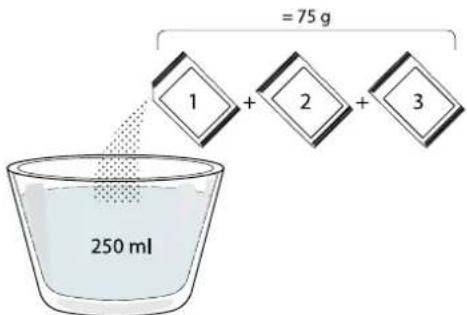
» PHASE 1/2: DESCALING (70 MIN)
When display will show
Whirlpool will not be held responsible for any damage caused by the use of other cleaning products available on the market.
text_image
= 75 g 1 + 2 + 3 250 mlOnce the descaling solution is poured inside the drawer, press ▶ to start the main descaling process. The descaling phases do not need you to stay in front of the appliance. After each phase is completed, an acoustical feedback will be played and the display will show instructions to proceed with the next phase.
Once the descaling phase has been completed, the boiler will be drained: the descaling solution used during this phase will be poured into the extractable drawer. Please drain the drawer.
» PHASE 2/2: RINSING (30 MIN.)
To remove descale residuals from the drawer and the steam circuit, rinse cycle has to be done. When display shows
Please note: if needed from the system, it could be requested to emty the drawer and to repeat this operation.
When Descale procedure is completed, it is suggested to dry the cavity from potential water residuals. It will
be then possible to use all the steam functions. Please drain the drawer. Descale cycle is completed.
Please note: during the Descale cycle, some noise could potentially be heard since the oven pumps are activated in order to guarantee the optimal descale efficiency.
Once the maintenance cycle has started, do not remove the drawer unless requested by the appliance.
Please note: After the boiler gets filled by the descaling solution and the display shows "DESCALING PHASE 1/2", the cycle should not be interrupted, otherwise the entire descaling cycle must be repeated before being able to run any steam function.

FOOD PROBE
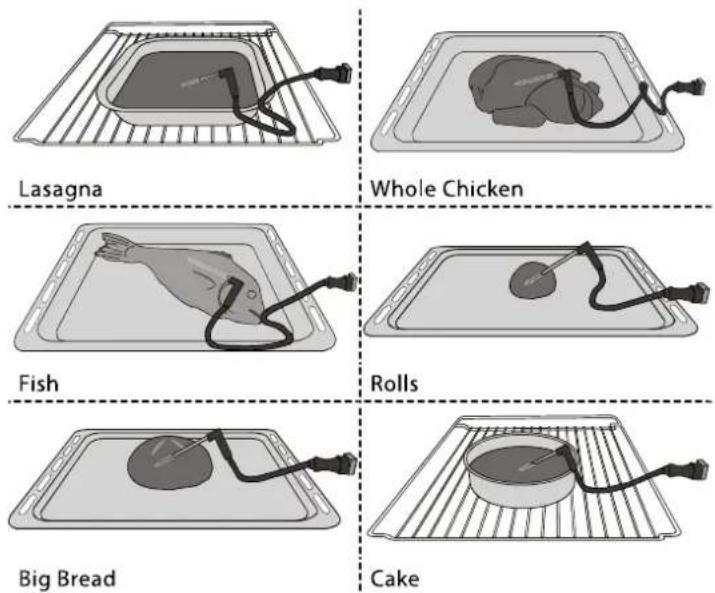
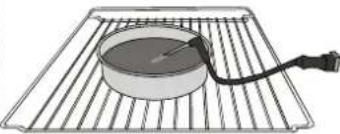
Using the probe enables you to measure the core temperature of different food types during cooking to ensure that it reaches the optimum temperature. The temperature of the oven varies according to the function that you have selected, but cooking is always programmed to finish once the specified temperature has been reached. Place food in the oven and connect the food probe to the socket. Keep the probe as far away from the heat source as possible. Close the oven door. Tap. You can choose between the manual (by cooking method) and 6 ^th Sense (by food type) functions if use of the probe is allowed or required.
Once a cooking function has been started, it will be cancelled if the probe is removed Always unplug and remove the probe from the oven when taking out the food.
USING THE FOOD PROBE
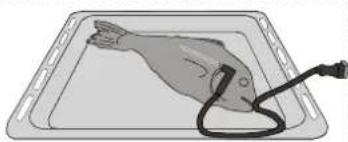
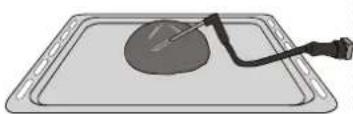
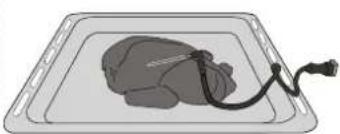
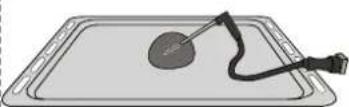
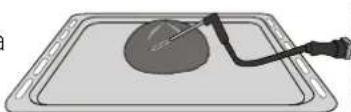
Place the food in the oven and connect the plug by inserting it into the connection provided on the righthand side of the oven's cooking compartment. The cable is semi-rigid and can be shaped as needed to insert the probe into different food types in the most effective way. Make sure that the cable does not touch the top heating element during cooking.
MEAT: Insert the probe deep into the meat, avoiding bones or fatty areas. For poultry, insert the probe lengthways into the centre of the breast, avoiding hollow areas.
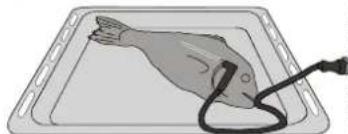
FISH (whole): Position the tip in the thickest part, avoiding the thorns.
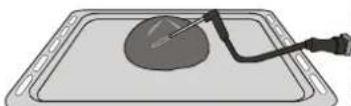
BAKERY & PASTA: Insert the tip deep into the dough by shaping the cable to achieve the optimum probe angle. It is required to use the compatible 6^th Sense functions in order to perform a probe controlled cooking for these food types. If you use the probe when cooking with the 6^th Sense functions, cooking will be stopped automatically when the selected recipe reaches the ideal core temperature, without the need to set the oven temperature.

CONTROL LOCK
The "Control Lock" enables you to lock the buttons on the touch pad so they cannot be pressed accidentally. To unlock the appliance, long press the lock key on the touch pad.

PREFERENCES
For changing several oven settings, selecting Sabbath Mode and switching off "Demo Mode".

INFO
For obtaining further information about the product.
.NOTES
- Do not cover the inside of the oven with aluminium foil.
- Never drag pots or pans across the bottom of the oven as this could damage the enamel coating.
- Do not place heavy weights on the door and do not hold on to the door.
- Due to the higher temperature of the Pizza cycle it is expected to experience slightly higher cooling fan noise.
USEFUL TIPS
HOW TO READ THE COOKING TABLE
The table lists the best function, accessories and level to use to cook different types of food. Cooking times start from the moment food is placed in the oven, excluding preheating (where required). Cooking temperatures and times are approximate and depend on the amount of food and the type of accessory used. Use the lowest recommended settings to begin with and, if the food is not cooked enough, then switch to higher settings. Use the accessories supplied and preferably dark-coloured metal cake tins and baking trays. You can also use Pyrex or stoneware pans and accessories, but bear in mind that cooking times will be slightly longer.
COOKING DIFFERENT FOODS AT THE SAME TIME
Using the "Forced Air" function, you can cook different foods which require the same cooking temperature at the same time (for example: fish and vegetables), using different shelves. Remove the food which requires a shorter cooking time and leave the food which requires a longer cooking time in the oven.
MEAT
Use any kind of oven tray or pyrex dish suited to the size of the piece of meat being cooked. For roast joints, it is best to add some stock to the bottom of the dish, basting the meat during cooking for added flavour. Please note that steam will be generated during this operation. When the roast is ready, let it rest in the oven for another 10-15 minutes, or wrap it in aluminium foil.
When you want to grill meat, choose cuts with an even thickness all over in order to achieve uniform cooking results. Very thick pieces of meat require longer cooking times. To prevent the meat from burning on the outside, lower the position of the wire shelf, keeping the food farther away from the grill. Turn the meat two thirds of the way through cooking. Take care when opening the door as steam will escape.
To collect the cooking juices, we recommend placing a dripping pan filled with half a litre of drinking water directly underneath the wire shelf on which the food is placed. Top-up when necessary.
DESSERTS
Cook delicate desserts with the conventional function on one shelf only.
Use dark-coloured metal baking pans and always place them on the wire shelf supplied. To cook on more than one shelf, select the forced air function and stagger the position of the cake tins on the shelves, aiding optimum circulation of the hot air.
To check whether a leavened cake is cooked, insert a wooden toothpick into the centre of the cake. If the toothpick comes out clean, the cake is ready.
If using non-stick baking pans, do not butter the edges as the cake may not rise evenly around the edges.
If the item "swells" during baking, use a lower temperature next time and consider reducing the amount of liquid you add or stirring the mixture more gently.
For desserts with moist fillings or toppings (such as cheesecake or fruit tarts), use the "Convection bake" function. If the base of the cake is soggy, lower the shelf and sprinkle the bottom of the cake with breadcrumbs or biscuit crumbs before adding the filling.
RISING
It is always best to cover the dough with a damp cloth before placing it in the oven. Dough proving time with this function is reduced by approximately one third compared to proving at room temperature (20-25°C). The rising time for pizza starts at around one hour for 1 kg of dough.
| FOOD CATEGORIES | QUANTITY | DONENESS LEVEL | BROWNING LEVEL | TURN (OF COOK TIME) | LEVEL AND ACCESSORIES | |||
| CASSEROLE & BAKED PASTA | Fresh | Lasagna | 0.5 - 3 kg* | -MED- | 2 | |||
| Cannelloni | 0.5 - 3 kg* | -MED- | 2 | |||||
| Frozen | Lasagna | 0.5 - 3 kg | --- | 2 | ||||
| Cannelloni | 0.5 - 3 kg | --- | 2 | |||||
| MEAT | Beef | Roast Beef | 0.6 - 2 kg* | MED MED- | 3 | |||
| Roast Veal | 0.6 - 2.5 kg* | -MED- | 3 | |||||
| Steak | 2 - 4 cm | MED - 2/3 | 5 | |||||
| Burger Patties | 1.5 - 3 cm | -- 3/5 | 5 4 | |||||
| Slow Cooking | 0.6 - 2 kg* | MED -- | 3 | |||||
| Pork | Roast Pork | 0.6 - 2.5 kg* | -MED- | 3 | ||||
| Shank | 0.5 - 2.0 kg* | -MED- | 3 | |||||
| Pork Ribs | 0.5 - 2.0 kg* | -- 2/3 | 5 4 | |||||
| Bacon | 0.5 - 1.5 cm | -- 1/2 | 5 | |||||
| Lamb | Roast Lamb | 0.6 - 2.5 kg* | MED MED- | 2 | ||||
| Lamb rack | 0.5 - 2.0 kg* | MED MED- | 2 | |||||
| Leg | 0.5 - 2.0 kg* | MED MED- | 2 | |||||
| Chicken | Roasted chicken | Roasted chicken | 0.6 - 3 kg* | -MED- | 2 | |||
| Stuffed Roast Chicken | 0.6 - 3 kg* | -MED- | 2 | |||||
| Chicken Pieces | 0.6 - 3 kg* | -MED- | 2 | |||||
| Air fried chicken | Whole Chicken | 0.6 - 2.5 kg | --- | 4 2 | ||||
| Chicken Breast | 1 - 4 (cm) | --- | 4 2 | |||||
| Chicken Pieces | 0.2 - 1.5 kg | --- | 4 2 | |||||
| Chicken drumsticks | - | --- | 4 2 | |||||
| Breaded cutlet | 1 - 4 (cm) | --- | 4 2 | |||||
| Chicken Wings | 0.2 - 1.5 kg | --- | 4 2 | |||||
| Chicken Nuggets [frozen] | - | --- | 4 2 | |||||
| Chicken Wings [frozen] | - | --- | 4 2 | |||||
| Roasted duck | Roast Duck | 0.6 - 3 kg* | -MED- | 2 | ||||
| Stuffed Roast Duck | 0.6 - 3 kg* | -MED- | 2 | |||||
| Duck Pieces | 0.6 - 3 kg* | -MED- | 2 | |||||
* Suggested quantity
| ACCESSORIES | ||||||
| Wire shelf | Oven tray / Cake tray/Pizza round tray on wire shelf | Drip tray / Baking tray | Drip tray with 500 ml of water | Air Fry tray | Food Probe |
| FOOD CATEGORIES | QUANTITY | DONENESS LEVEL | BROWNING LEVEL | TURN (OF COOK TIME) | LEVEL AND ACCESSORIES | ||
| MEAT | Roasted duck | Duck Fillet / Breast | 1 - 5 cm | -- 2/3 | 5 | ||
| Roasted turkey | Roast Turkey & Goose 🎨 | 0.6 - 3 kg* | -MED- | 2 | |||
| Stuffed Roast Turkey 🎨 | 0.6 - 3 kg* | -MED- | 2 | ||||
| Turkey & Goose Pieces 🎨 | 0.6 - 3 kg* | -MED- | 2 | ||||
| Turkey Fillet / Breast | 1 - 5 cm | -- 2/3 | 5 4 | ||||
| Air fried meat | Meat skewers | 0.2 - 1.5 kg | -- 1/2 | 4 2 | |||
| Pork chops | 1 - 4 (cm) | --- | 4 2 | ||||
| Burger Patties | 1 - 4 (cm) | --- | 4 2 | ||||
| Sausages & Wurstel | 1.5 - 3.5 (cm) | --- | 4 2 | ||||
| Breaded cutlet | 1 - 4 (cm) | --- | 4 2 | ||||
| FISH & SEAFOOD | Roasted fillets & steaks | Tuna Steak | 1 - 3 (cm) | MED - 3/4 | 3 2 | ||
| Salmon Steak | 1 - 3 (cm) | MED - 3/4 | 3 2 | ||||
| Swordfish Steak | 0.5 - 3 (cm) | -- 3/4 | 3 2 | ||||
| Cod Fillet | 0.1 - 0.3 kg | --- | 3 2 | ||||
| Seabass Fillet | 0.05 - 0.15 kg | --- | 3 2 | ||||
| Seabream Fillet | 0.05 - 0.15 kg | --- | 3 2 | ||||
| Others Fillets | 0.5 - 3 (cm) | --- | 3 2 | ||||
| Fillets [frozen] | 0.5 - 3 (cm) | --- | 3 2 | ||||
| Grilled seafood | Scallops | one tray* | --- | 4 | |||
| Mussels | one tray* | --- | 4 | ||||
| Shrimps | one tray* | --- | 4 3 | ||||
| King Prawns | one tray* | --- | 4 3 | ||||
| Roasted Whole Fish 🎨 | 0.2 - 1.5 kg* | --- | 4 3 | ||||
| Fish in salt crust | 0.2 - 1.5 kg* | --- | 3 3 | ||||
| Air fried fish | Breaded fish | 1.5 - 3.5 (cm) | --- | 4 2 | |||
| Fish fillet | 1.5 - 3.5 (cm) | --- | 4 2 | ||||
| Whole Fish | 0.4 - 0.8 kg | --- | 4 2 | ||||
| Shellfish | - | --- | 4 2 | ||||
* Suggested quantity
| ACCESSORIES | ||||||
| Wire shelf | Oven tray / Cake tray/Pizza round tray on wire shelf | Drip tray / Baking tray | Drip tray with 500 ml of water | Air Fry tray | Food Probe |
| FOOD CATEGORIES | QUANTITY | DONENESS LEVEL | BROWNING LEVEL | TURN (OF COOK TIME) | LEVEL AND ACCESSORIES | ||
| VEGETABLES | Roasted vegetables | Potatoes | 0.5 - 1.5 kg* | -MED- | 3 | ||
| Potatoes [frozen] | 0.5 - 1.5 kg* | -MED- | 4 | ||||
| Stuffed Vegetables | 0.1 - 0.5 kg [each] | --- | 3 | ||||
| Other Vegetables | 0.5 - 1.5 kg | -MED- | 3 | ||||
| Gratin vegetables | Potatoes Gratin | one tray* | --- | 3 | |||
| Tomatoes Gratin | one tray* | --- | 3 | ||||
| Peppers Gratin | one tray* | --- | 3 | ||||
| Broccoli Gratin | one tray* | --- | 3 | ||||
| Cauliflower Gratin | one tray* | --- | 3 | ||||
| Vegetables Gratin | one tray* | --- | 3 | ||||
| Air fried vegetables | Homemade fries | 0.3 - 0.8 kg | --- | 4 2 | |||
| Potatoes wedges | 1 - 4 (cm) | --- | 4 2 | ||||
| Mixed vegetables | 0.3 - 0.8 kg | -- 2/3 | 4 2 | ||||
| Zucchini chips | 0.2 - 0.5 kg | --- | 4 2 | ||||
| Fried Potatoes [frozen] | 0.3 - 0.8 kg | --- | 4 2 | ||||
| Spring rolls [frozen] | - | --- | 4 2 | ||||
| SALTY BAKERY | Salty Cake | 0.8 - 1.2 kg* | -MED- | 2 | |||
| Vegetable Strudel | 0.5 - 1.5 kg | -MED- | 2 | ||||
| Bread | Bread Rolls 🎨 | 60 - 150g [each]* | --- | 3 | |||
| Medium Size Bread | 200 - 500g [each]* | --- | 2 | ||||
| Sandwich Loaf 🎨 | 400 - 600 g [each]* | --- | 2 | ||||
| Big Bread 🎨 | 0.7 - 2.0kg * | --- | 2 | ||||
| Baguettes 🎨 | 200 - 300g [each]* | --- | 3 | ||||
| Special bread | one tray* | --- | 2 | ||||
| Pizza & focaccia | Round Pizza | round | --- | 2 | |||
| Pizza Thick | tray | --- | 2 | ||||
| Pizza [frozen] | 1 layer* | --- | 2 | ||||
| 2 layers* | --- | 4 1 | |||||
| 3 layers* | --- | 5 3 1 | |||||
| 4 layers* | --- | 5 4 2 1 | |||||
* Suggested quantity
| ACCESSORIES | ||||||
| Wire shelf | Oven tray / Cake tray/Pizza round tray on wire shelf | Drip tray / Baking tray | Drip tray with 500 ml of water | Air Fry tray | Food Probe |
| FOOD CATEGORIES | QUANTITY | DONENESS LEVEL | BROWNING LEVEL | TURN (OF COOK TIME) | LEVEL AND ACCESSORIES | ||
| SALTY BAKERY | Pizza & focaccia | Focaccia Thin | one tray* | --- | 2 | ||
| Focaccia Thick | one tray* | --- | 2 | ||||
| SWEET BAKERY | Rising cakes | Sponge Cake | 0.5 - 1.2 kg* | --- | 2 | ||
| Fruit Cake In Tin | 0.5 - 1.2 kg* | --- | 2 | ||||
| Chocolate Cake | 0.5 - 1.2 kg* | --- | 2 | ||||
| Cookies | 0.2 - 0.6 kg* | --- | 3 | ||||
| Muffin & Cup Cake | 40 - 80g [each]* | --- | 3 | ||||
| Croissants | one tray* | --- | 3 | ||||
| Croissants [frozen] | one tray* | --- | 3 | ||||
| Choux Pastry | one tray* | --- | 3 | ||||
| Meringues | 10 - 30g [each] | --- | 3 | ||||
| Tart | 0.4 - 1.6kg* | --- | 3 | ||||
| Strudel | 0.4 - 1.6kg | --- | 3 | ||||
| Fruit Pie | 0.5 -2 kg | --- | 2 | ||||
* Suggested quantity
| ACCESSORIES | ||||||
| Wire shelf | Oven tray / Cake tray/Pizza round tray on wire shelf | Drip tray / Baking tray | Drip tray with 500 ml of water | Air Fry tray | Food Probe |

STEAM + AIR COOKING TABLE
| RECIPE | STEAM LEVEL* | PREHEAT | TEMPERATURE (°C) | DURATION (MIN.) | SHELF AND ACCESSORIES |
| Shortbread / Cookies | LOW | YES 140 - 150 | 35 - 55 | 3 | |
| Small cake / Muffin | LOW | YES 160 - 170 | 30 - 40 | 3 | |
| Leavened cakes | LOW | YES 170 - 180 | 40 - 60 | 2 | |
| Sponge cakes | LOW | YES 160 - 170 | 30 - 40 | 2 | |
| Focaccia | LOW | YES 200 - 220 | 20 - 40 | 3 | |
| Bread loaf | LOW | YES 170 - 180 | 70 - 100 | 3 | |
| Small bread | LOW | YES 200 - 220 | 30 - 50 | 3 | |
| Baguette | LOW | YES 200 - 220 | 30 - 50 | 3 | |
| Roast potatoes | MID | YES 200 - 220 | 50 - 70 | 3 | |
| Veal / Beef / Pork 1 kg | MID | YES 180 - 200 | 60 - 100 | 3 | |
| Veal / Beef / Pork (pieces) | MID | YES 160 - 180 | 60 - 80 | 3 | |
| Roast Beef rare 1 kg | MID | YES 200 - 220 | 40 - 50 | 3 | |
| Roast Beef rare 2 kg | MID | YES 200 55 - 65 | 3 | ||
| Leg of lamb | MID | YES 180 - 200 | 65 - 75 | 3 | |
| Stew pork knuckles | MID | YES 160 - 180 | 85 - 100 | 3 | |
| Chicken / guinea fowl / duck 1 - 1.5 kg | MID | YES 200 - 220 | 50 - 70 | 3 | |
| Chicken / guinea fowl / duck (pieces) | MID | YES 200 - 220 | 55 - 65 | 3 | |
| Stuffed vegetables (tomatoes, courgettes, aubergines) | MID | YES 180 - 200 | 25 - 40 | 3 | |
| Fish fillet | HIGH | YES 180 - 200 | 15 - 30 | 3 | |
*Please consider that in case of selecting Steam Auto function this correlation must be skipped. The oven will automatically select the best level of steam suited for the temperature selected.
| ACCESSORIES | |||||
| Wire shelf | Oven tray or cake tray on wire shelf | Drip tray / Baking tray | Drip tray with 500 ml of water | Food Probe |

AIR FRY COOKING TABLE
| RECIPE | FUNCTION | SUGGESTED QUANTITY | PREHEAT | TEMPERATURE (°C) | DURATION (MIN.) | SHELF AND ACCESSORIES | |
| FROZEN FOOD | Frozen French Fries |  | 650 - 850g Yes 200 25 - 30 | 4 2 | |||
| Frozen Chicken Nugget |  | 500g Yes 200 15 - 20 | 4 2 | ||||
| Fish Sticks |  | 500g Yes 220 15 - 20 | 4 2 | ||||
| Onion Rings |  | 500g Yes 200 15 - 20 | 4 2 | ||||
| VEGETABLES | Fresh Breaded Zucchini |  | 400g Yes 200 15 - 20 | 4 2 | |||
| Homemade Fries |  | 300 - 800 g Yes 200 20 - 40 | 4 2 | ||||
| Mixed Vegetables |  | 300 - 800 g Yes 200 20 - 30 | 4 2 | ||||
| MEAT AND FISH | Chicken Breasts | [BY83] | 1 - 4 cm Yes 200 20 - 40 | 4 2 | |||
| Chicken Wings | [BTZG] | 200 - 1500 g Yes 220 30 - 50 | 4 2 | ||||
| Breaded Cutlet |  | 1 - 4 cm Yes 220 20 - 50 | 4 2 | ||||
| Fish Fillet |  | 1 - 4 cm Yes 220 15 - 25 | 4 2 | ||||
For cooking fresh or homemade foods, spread a thin layer of oil across the food surface.
In order to guarantee uniform cooking results, mix food halfway through the recommended cooking time.
| FUNCTIONS | Air Fry | ||
| ACCESSORIES | Air Fry tray | Oven tray or cake tray on wire shelf | Drip tray / Baking tray or oven tray on wire shelf |
COOKING TABLE
| RECIPE | FUNCTION | PREHEAT | TEMPERATURE (°C) | DURATION (MIN.) | SHELF AND ACCESSORIES |
| Leavened cakes / Sponge cakes | Yes | 170 | 30 - 50 | ||
| Yes | 160 | 30 - 50 | |||
| Yes | 160 | 30 - 50 | |||
| Filled cakes(cheesecake, strudel, apple pie) | Yes | 160 - 200 | 30 - 85 | ||
| Yes | 160 - 200 | 30 - 90 | |||
| Cookies | Yes | 150 | 20 - 40 | ||
| Yes | 140 | 30 - 50 | |||
| Yes | 140 | 30 - 50 | |||
| Yes | 135 | 40 - 60 | |||
| Small cakes / Muffin | Yes | 170 | 20 - 40 | ||
| Yes | 150 | 30 - 50 | |||
| Yes | 150 | 30 - 50 | |||
| Yes | 150 | 40 - 60 | |||
| Choux buns | Yes | 180 - 200 | 30 - 40 | ||
| Yes | 180 - 190 | 35 - 45 | |||
| Yes | 180 - 190 | 35 - 45* | |||
| Meringues | Yes | 90 | 110 - 150 | ||
| Yes | 90 | 130 - 150 | |||
| Yes | 90 | 140 - 160* | |||
| Pizza / Bread / Focaccia | Yes | 190 - 250 | 15 - 50 | ||
| Yes | 190 - 230 | 20 - 50 | |||
| Pizza (Thin, thick, focaccia) | Yes | 310 | 7 - 12 | ||
| Yes | 220 - 240 | 25 - 50* | |||
| Frozen pizza | Yes | 250 | 10 - 15 | ||
| Yes | 250 | 10 - 20 | |||
| Yes | 220 - 240 | 15 - 30 | |||
| Savoury pies(vegetable pie, quiche) | Yes | 180 - 190 | 45 - 55 | ||
| Yes | 180 - 190 | 45 - 60 | |||
| Yes | 180 - 190 | 45 - 70* |
* Estimated length of time: dishes can be removed from the oven at different times depending on personal preference.
| FUNCTIONS | |||||||||
| Conventional | Forced Air | Convection Bake | Grill | Turbo Grill | MaxiCooking | Cook4 | ECO | Pizza | |
| ACCESSORIES | |||||||||
| Wire shelf | Oven tray / Cake tray/ Pizza round tray on wire shelf | Drip tray / Baking tray or oven tray on wire shelf | Drip tray / Baking tray | Drip tray with 500 ml of water | |||||
| RECIPE | FUNCTION | PREHEAT | TEMPERATURE (°C) | DURATION (MIN.) | SHELF AND ACCESSORIES | ||||
| Vols-au-vent / Puff pastry crackers | Yes | 190 - 200 | 20 - 30 | 3 | |||||
| Yes | 180 - 190 | 20 - 40 | 4 1 | ||||||
| Yes | 180 - 190 | 20 - 40 * | 5 3 1 | ||||||
| Lasagna / Flans / Baked pasta / Cannelloni | Yes | 190 - 200 | 45 - 65 | 3 | |||||
| Lamb / Veal / Beef / Pork 1 kg | Yes | 190 - 200 | 80 - 110 | 3 | |||||
| Roast pork with crackling 2 kg | - | 170 | 110 - 150 | 2 | |||||
| Chicken / Rabbit / Duck 1 kg | Yes | 200 - 230 | 50 - 100 | 3 | |||||
| Turkey / Goose 3 kg | Yes | 190 - 200 | 80 - 130 | 2 | |||||
| Baked fish / en papillote (fillets, whole) | Yes | 180 - 200 | 40 - 60 | 3 | |||||
| Stuffed vegetables (tomatoes, courgettes, aubergines) | Yes | 180 - 200 | 50 - 60 | 2 | |||||
| Toast | - | 3 (High) | 3 - 6 | 5 | |||||
| Fish fillets / Steaks | - | 2 (Mid) | 20 - 30 ** | 4 3 | |||||
| Sausages / Kebabs / Spare ribs / Hamburgers | - | 2 - 3 (Mid - High) | 15 - 30 ** | 5 4 | |||||
| Roast chicken 1-1.3 kg | - | 2 (Mid) | 55 - 70 *** | 2 1 | |||||
| Leg of lamb / Shanks | - | 2 (Mid) | 60 - 90 *** | 3 | |||||
| Roast potatoes | - | 2 (Mid) | 35 - 55 *** | 3 | |||||
| Vegetable gratin | - | 3 (High) | 10 - 25 | 3 | |||||
| Cookies | Yes | 135 | 50 - 70 | 5 4 3 1 | |||||
| Tarts | Yes | 170 | 50 - 70 | 5 3 2 1 | |||||
| Round pizzas | Yes | 210 | 40 - 60 | 5 3 2 1 | |||||
| Complete meal: Fruit tart (level 5) / lasagna (level 3) / meat (level 1) | Yes | 190 | 40 - 120 * | 5 3 1 | |||||
| Complete meal: Fruit tart (level 5) / roasted vegetables (level 4) / lasagna (level 2) / cuts of meat (level 1) | Yes | 190 | 40 - 120 * | 5 4 2 1 | |||||
| Lasagna & Meat | Yes | 200 | 50 - 100 * | 4 1 | |||||
| Meat & Potatoes | Yes | 200 | 45 - 100 * | 4 1 | |||||
| Fish & Vegetables | Yes | 180 | 30 - 50 * | 4 1 | |||||
| Stuffed roasting joints | - | 200 | 80 - 120 * | 3 | |||||
| Cuts of meat (rabbit, chicken, lamb) | - | 200 | 50 - 100 * | 3 | |||||
** Turn food halfway through cooking.
*** Turn food two thirds of the way through cooking (if necessary).
| FUNCTIONS | Conventional | Forced Air | Convection Bake | Grill | Turbo Grill | MaxiCooking | Cook4 | ECO | Pizza |
| ACCESSORIES | Wire shelf | Oven tray / Cake tray/ Pizza round tray on wire shelf | Drip tray / Baking tray or oven tray on wire shelf | Drip tray / Baking tray | Drip tray with 500 ml of water | ||||
HOW TO READ THE COOKING TABLE
The table lists the best function, accessories and level to use to cook different types of food.
Cooking times start from the moment food is placed in the oven, excluding preheating (where required).
Cooking temperatures and times are approximate and depend on the amount of food and the type of accessory used.
Use the lowest recommended settings to begin with and, if the food is not cooked enough, then switch to higher settings.
Use the accessories supplied and preferably darkcoloured metal cake tins and baking trays. You can also use Pyrex or stoneware pans and accessories, but bear in mind that cooking times will be slightly longer.
MAINTENANCE AND CLEANING
Make sure that the oven has cooled down before carrying out any maintenance or cleaning.
Do not use steam cleaners.
Do not use wire wool, abrasive scourers or abrasive/corrosive cleaning agents, as these could damage the surfaces of the appliance.
Wear protective gloves.
The oven must be disconnected from the mains before carrying out any kind of maintenance work.
EXTERIOR SURFACES
- Clean the surfaces with a damp microfibre cloth. If they are very dirty, add a few drops of pH-neutral detergent. Finish off with a dry cloth.
- Do not use corrosive or abrasive detergents. If any of these products inadvertently comes into contact with the surfaces of the appliance, clean immediately with a damp microfibre cloth.
INTERIOR SURFACES
• After every use, leave the oven to cool and then clean it, preferably while it is still warm, to remove any deposits or stains caused by food residues. To dry any condensation that has formed as a result of cooking foods with a high water content, leave the oven to cool completely and then wipe it with a cloth or sponge.
- Activate the "Smart Clean" function for optimum cleaning of the internal surfaces. (Only in some models).
- Clean the glass in the door with a suitable liquid detergent.
• The oven door can be removed to facilitate cleaning.
ACCESSORIES
Soak the accessories in a washing-up liquid solution after use, handling them with oven gloves if they are still hot. Food residues can be removed using a washing-up brush or a sponge.
Do not clean Food Probe and Meat Probe (if present) in the dishwasher.
Air Fry tray (if present) can be cleaned in the dishwasher.
WATER DRAWER MAINTENANCE
Caution: The water drawer is not suitable for dishwasher use: risk of damage!
At the end of each cooking cycle with steam, after about 30 min the oven automatically performs a drain cycle lasting about one minute, thus transferring all the water in the system to the extractable drawer.
Note: Avoid to leave the water in the system more than 2 days.
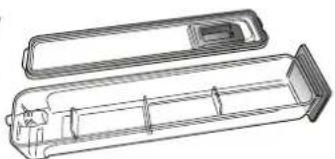
In order to completely remove the water inside or clean the internal surfaces, you can open the water drawer:
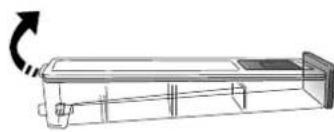
natural_image
Technical line drawing of a rectangular electronic device with internal components and a curved arrow indicating rotation (no text or symbols)-
Push towards the top the back flap to remove the water drawer top cover.
-
Once the cleaning is done, you can close the drawer by inserting the two front flaps inside the front openings and pushing down the back side.
natural_image
Technical line drawing of a cylindrical device with internal components (no text or symbols)Use only room temperature water when filling the water drawer: hot water may affect the operation of the steam system. Use only drinking water.
BOILER
To ensure that the oven always works at optimum performance and to help prevent the build-up of limescale deposits over time, we recommend using the "Descale" function regularly. After a long period of non-use of the "Steam" functions, it is highly suggested to activate a cooking cycle with the empty oven by filling completely the tank.
REMOVING AND REFITTING THE DOOR
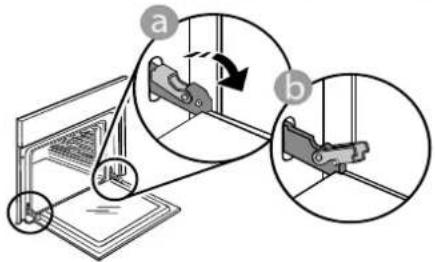
- To remove the door, open it fully and lower the catches until they are in the unlock position.
text_image
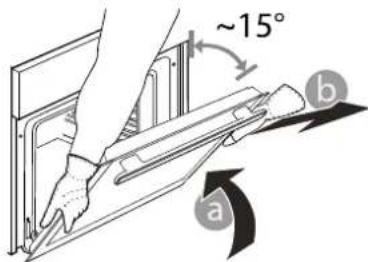
Diagram illustrating mechanical assembly steps with labeled components a and b, showing motion directions and component placement.- Close the door as much as you can.
Take a firm hold of the door with both hands – do not hold it by the handle.
Simply remove the door by continuing to close it while pulling it upwards at the same time until it is released from its seating. Put the door to one side, resting it on a soft surface.
text_image
~15° a b-
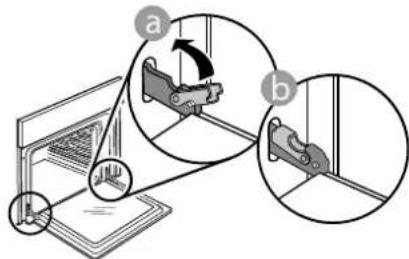
Refit the door by moving it towards the oven, aligning the hooks of the hinges with their seating and securing the upper part onto its seating.
-
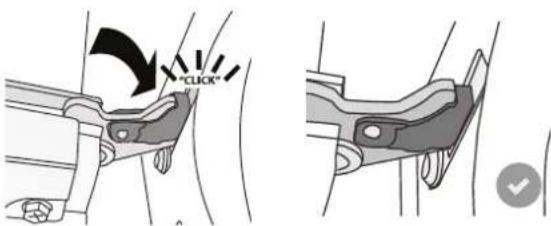
Lower the door and then open it fully. Lower the catches into their original position: Make sure that you lower them down completely.
text_image
Diagram illustrating mechanical assembly steps with labeled components and directional arrowsApply gentle pressure to check that the catches are in the correct position.
text_image
"CLICK"- Try closing the door and check to make sure that it lines up with the control panel. If it does not, repeat the steps above: The door could become damaged if it does not work properly.
REPLACING THE LAMP
For the replacement of the lamp, contact the after sales service.
TROUBLESHOOTING
| Problem | Possible cause | Solution |
| The oven is not working. | Power cut.Disconnection from the mains. | Check for the presence of mains electrical power and whether the oven is connected to the electricity supply.Turn off the oven and restart it to see if the fault persists. |
| The display shows the letter "F" followed by a number. | Software problem. | Contactthe Call Center and state the number following the letter "F". |
| A 6th Sense cooking function ends without displaying a countdown. Cooking ends before the end of the countdown. | Amount of food different from the recommended range. Door open during cooking. | Open the door and check the doneness of food. If necessary, complete cooking by selecting a traditional function. |
| The oven does not heat up. | When "DEMO" is "On" all commands are active and menus available but the oven doesn't heat up.DEMO appears on display every 60 seconds. | Access "DEMO" from "SETTINGS" and select "Off". |
| The light switches off. | "ECO" mode is "On". Access "ECO" from "SETTINGS" and select "Off". | |
| The door will not close properly. | The safety catches are in the wrong position. | Make sure that the safety catches are in the correct position by following the instructions for removing and refitting the door in the "Cleaning and Maintenance" section. |
| The home power goes off. | Power setting wrong. | Verify if your domestic network has at least a rating of more than 3 kW. If no, decrease the power to 13 Ampere. Access "POWER" from "SETTINGS" and select "LOW". |
| Cooking cycle with probe ended without evident cause or error F3E3 is printed on the screen. | Food Probe is not properly connected. | Check connection of the food probe. |
Policies, standard documentation and additional product information can be found by:
• Using the QR code in your appliance
• Visiting our website docs.whirlpool.eu/docs
• Alternatively, contact our After-sales Service (See phone number in the warranty booklet). When contacting our After-sales Service, please state the codes provided on your product's identification plate.
®/TM/© 2025 Whirlpool. Produced under license.

TAK FORDI DU HAR K∅BT ET WHIRLPOOL PRODUKT
INDSÆT RIST OG ANDET TILBEH∅R
natural_image
Diagram of a microwave oven with labeled components (L and R), showing internal structure without any text or symbols.natural_image
Diagram of a mechanical assembly with spring-loaded components and an arrow indicating direction (no text or symbols)natural_image
Technical line drawing of a mechanical assembly with no visible text or symbolsnatural_image
Four-step diagram showing hand positioning and handling a device, with no visible text or symbols.» FASE 1/2: AFKALKNING (70 MIN.)
natural_image
Diagram of a rectangular dish with a curved tube and cable inserted, placed on a rack (no text or symbols)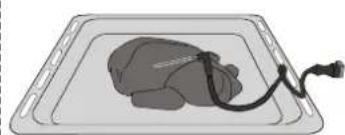
natural_image
Illustration of a medical device on a tray with a cable (no text or symbols)Lasagne Hel kylling
natural_image
Illustration of a fish inside a tray with a cable and plug (no text or symbols)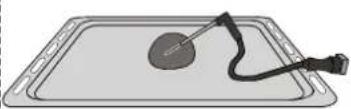
Fisk Småbrød
natural_image
Illustration of a tray with a circular object and a black cable attached (no text or symbols)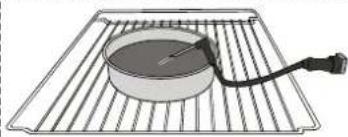
natural_image
Illustration of a heating element on a rack with a bulb and cable (no text or symbols)Stort brød Kage

KONTROLLÅS
natural_image
Technical line drawing of a rectangular device with internal components and a curved arrow indicating rotation (no text or symbols)natural_image
Technical line drawing of a cylindrical device with internal compartments and a lid (no text or symbols)text_image
Diagram illustrating mechanical assembly steps with labeled components and directional arrowstext_image
Diagram illustrating mechanical assembly steps with labeled components a and b, showing motion directions and component placement.®/TM/© 2025 Whirlpool. Produceret under licens.

KIITOS SIITÄ, ETTÄ OSTIT WHIRLPOOL-TUOTTEEN
natural_image
Line drawing of a refrigerator interior with shelves and a central air vent (no text or symbols)natural_image
Diagram of a mechanical assembly with metal rods and a directional arrow (no text or symbols)2. ASETA MANUALISET TOIMINNOT
5. TOIMINNON KÄYNNISTYS
natural_image
Illustration of a rectangular container with a black cable and plug, no text or symbols presentLasagne Kokonainen kana
natural_image
Illustration of a medical or laboratory procedure on a tray with a tool and cable (no text or symbols)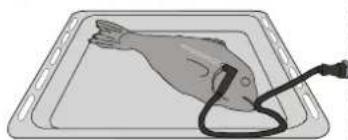
natural_image
Illustration of a fish lying on a tray with a medical device attached (no text or symbols)Kala Sämpylät
Suuri Leipä Kakku
natural_image
Illustration of a heating appliance on a rack with a coiled cable (no text or symbols)
SÄÄTIMIEN LUKITUS
KYPSENNYSTAULUKON LUKEMINEN
ERI RUOKIEN KYPSENNYS SAMANAIKAISESTI
KYPSENNYSTAULUKON LUKEMINEN
natural_image
Line drawing of a rectangular electronic device with a scroll wheel and indicator lights (no text or symbols)natural_image
Technical line drawing of a cylindrical device with internal components (no text or symbols)text_image
Diagram illustrating mechanical assembly steps with labeled components a and b, showing motion directions and component placement.text_image
Diagram illustrating mechanical assembly steps with labeled components and directional arrowsMERCI D'AVOIR CHOISI UN PRODUIT WHIRLPOOL
natural_image
Simple line drawing of a rectangular metal tray with horizontal slats (no text or symbols)LÈCHEFRITE
natural_image
Simple line drawing of a rectangular tray with dashed lines and a separate curved bracket (no text or symbols)natural_image
Simple line drawing of a rectangular frame with rounded corners and a small bracket at the bottom right (no text or symbols)RAILS TÉLESCOPIQUES *
natural_image
Two metallic cylindrical metal bars with flanged ends, no text or symbols visiblenatural_image
Simple line drawing of a mechanical tool or bracket with a separate close-up view (no text or symbols)ACCESSOIRE FRITURE À AIR*
natural_image
3D rendering of a black mesh fan or vent with a small grid pattern on the side (no text or symbols)natural_image
Diagram of a refrigerator interior showing the front panel with labeled parts (labeled I and R), no text or symbols present.natural_image
Diagram of a mechanical assembly with multiple rods and a central rod, showing no text or symbols.natural_image
Four-step diagram showing hand positioning and handling a device, with no visible text or symbols.natural_image
Technical line drawing of a mechanical component with no visible text or symbolsnatural_image
Technical line drawing of a cylindrical device with internal compartments and a lid (no text or symbols)text_image
Diagram illustrating mechanical assembly steps with labeled components a and b, showing motion directions and component placement.text_image
Diagram illustrating a mechanical assembly or mounting process with labeled parts (a) and (b), showing structural changes and alignment.natural_image
Diagram of an oven with labeled parts (l, R) and shelves, no readable text or symbols present.natural_image
Diagram of a mechanical assembly with metal rods and a directional arrow (no text or symbols)natural_image
Four-step diagram illustrating a mechanical process: pressing a component, moving a package, pouring liquid into a drain, and finally adding a final container (no text or symbols present)natural_image
Technical line drawing of a rectangular electronic device with a curved arrow indicating rotation (no text or symbols)natural_image
Technical line drawing of a mechanical component with internal channels and housing (no text or symbols)text_image
Diagram illustrating mechanical assembly steps with labeled components a and b, showing motion directions and component placement.text_image
Diagram illustrating a mechanical assembly or mounting process with labeled parts (a) and (b), showing tool positioning and alignment.Toccare "IMPOSTA" o "AVANTI".
natural_image
Four-step diagram showing hand positioning and cleaning process of a device (no text or symbols)natural_image
Line drawing of a rectangular electronic device with internal components and a scroll arrow indicating rotation (no text or symbols)natural_image
Technical line drawing of a cylindrical mechanical component with internal channels and a lid (no text or symbols)text_image
Diagram illustrating mechanical assembly steps with labeled components a and b, showing motion directions and component placement.text_image
Diagram illustrating mechanical assembly steps with labeled components a and b, showing motion directions and component placement.TAKK FOR AT DU KJ∅PTE ET WHIRLPOOL-PRODUKT
natural_image
Diagram of a refrigerator interior showing the front panel with labeled parts (no text or symbols present)natural_image
Diagram of a mechanical assembly with metal rods and a directional arrow (no text or symbols)VEDLIKEHOLD OG RENHOLD
VEDLIKEHOLD AV VANNSKUFF
natural_image
Line drawing of a rectangular electronic device with a scroll wheel and indicator lights (no text or symbols)natural_image
Technical line drawing of a mechanical component with internal channels and housing (no text or symbols)Bruk kun romtemperert vann når du fyller vannskuffen: varmtvann kan påvirke dampsystemets funksjon. Bruk kun drikkevann.
KJELE
text_image
Diagram illustrating mechanical assembly steps with labeled components a and b, showing motion directions and component placement.text_image
Diagram illustrating mechanical assembly steps with labeled components a and b, showing motion directions and component placement.natural_image
Diagram of an air vent with labeled chambers (L and R) and internal components, no text or symbols present.natural_image
Four-step diagram illustrating a mechanical process: pressing a component, moving a package, pouring liquid into a drain, and finally adjusting a tray (no text or symbols present)natural_image
Technical line drawing of a mechanical component with no visible text or symbolsnatural_image
Technical line drawing of a mechanical component with internal channels and housing (no text or symbols)text_image
Diagram illustrating a mechanical assembly with labeled parts (a) and (b), showing a 3D model and directional arrows indicating motion.text_image
Diagram illustrating mechanical assembly steps with labeled components a and b, showing motion directions and structural details.TACK FÖR ATT DU HAR KÖPT EN PRODUKT FRÅN WHIRLPOOL
natural_image
Diagram of a refrigerator interior showing the front panel with labeled parts (no text or symbols present)natural_image
Diagram of a mechanical assembly with multiple metal rods and a central spring-like component, no text or symbols present.natural_image
Technical line drawing of a mechanical assembly with no visible text or symbolsnatural_image
Simple line drawing of a rectangular dish with a curved cable and plug, placed on a grid-like surface (no text or symbols)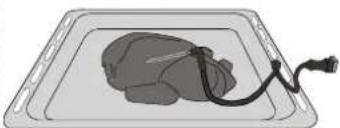
natural_image
Illustration of a medical device on a tray with a cable (no text or symbols)Lasagne Hel kyckling
natural_image
Illustration of a fish inside a tray with a medical device attached (no text or symbols)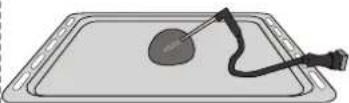
Fisk Bullar
natural_image
Illustration of a heating element on a rack with a cable and plug (no text or symbols)Stort bröd Tårta

REGLAGELÅS
natural_image
Line drawing of a rectangular electronic device with a scroll wheel and indicator lights, no text or symbols present.natural_image
Technical line drawing of a cylindrical device with internal components and housing (no text or symbols)text_image
Diagram illustrating mechanical assembly steps with labeled components a and b, showing motion directions and component placement.text_image
Diagram illustrating mechanical assembly steps with labeled components and directional arrows®/TM/© 2025 Whirlpool. Producerad under licens.