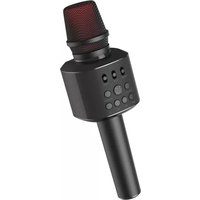
USER MANUAL Karamic Essentiel B
natural_image
Black handheld microphone with control buttons and a speaker grille (no visible text or symbols)
Notice d'utilisation / User guide / Instrucciones de uso / Bedienungsanleitung / Gebruiksaanwijzing
工
instructions for use
BEFORE USING THE DEVICE, READ THESE INSTRUCTIONS CAREFULLY AND KEEP THEM FOR LATER REFERENCE AS NEEDED.
Users should not attempt to repair or replace any part of this device. Repairs must be carried out by qualified personnel. Any disassembly of the device will void the warranty.
- This device is intended for domestic use only. Any other use is prohibited. Do not use this device outdoors. Only use the device as specified in these instructions for use.
- This device may be used by children who are over 8 years old, provided that they are supervised or instructed on how to use the device safely, and understand the danger involved in using it.
- Cleaning and maintenance should not be performed on the device by children unless they are over 8 years old and supervised by an adult.
- Keep the device and its cable out of reach of pets and children under 8 years of age.
- People with reduced physical, sensory or mental capacities or who lack experience or knowledge may use the device, provided they are supervised or given prior instruction on its safe use and they understand the potential dangers of its use.
• Children should not use the device as a toy. Make sure children do not play with the device.
• Always store the device in a dry place.
- Place the device on a dry, flat, solid surface. Do not put the device where it may be subject to vibration.
- Do not use or store your device in a dirty or dusty place. Dust can affect the proper functioning of the device.
- Use this device in a temperate environment. This device should not be used in a tropical climate.
- To ensure optimum battery capacity, use the device at room temperature.
- Do not expose your device to extreme temperatures (over 50°C) by placing it in direct sunlight in a closed vehicle, near a heat source or radiator, etc. High temperatures can reduce device performance and battery life.
- Do not store the device at low temperature. When it returns to a normal temperature, condensation may form inside the device and damage the electronic circuits.
- Do not place anything that produces a naked flame (such as a lighted candle) on or near the device.
- Do not charge the battery for longer than instructed. Overloading the battery will shorten its life and use.
- Do not drop, bump or shake the device.
• Do not use this device:
- If the USB power cable is damaged.
- If it is not functioning correctly.
- If the device has been in any way damaged.
- Never put the USB cable into water or any other liquid and never allow any liquid to get into the device.
Recycling the battery
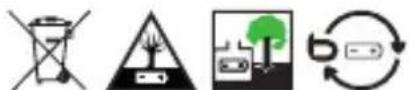
- This device contains an internal lithium battery which may explode or release dangerous chemicals. To reduce the risk of fire or burns, never dismantle, crush or puncture the battery.
- Do not throw the battery away with household waste.
- In order to protect the environment, the battery must be disposed of in accordance with current regulations.
Electronic equipment
Your Bluetooth* microphone uses Bluetooth*technology. It transmits and receives HF radio electric frequencies in the 2.4 GHz range.
These emissions can interfere with the operation of various electronic devices. To prevent accidents, do not use your Bluetooth* microphone when you are in the following locations: places where flammable gas is present, in hospitals or petrol stations, on trains, aeroplanes, near automatic doors or fire alarms or in areas where blasting is carried out.
If you have a pacemaker or other prosthesis, ask your doctor for advice.
*This Essentiel B product is compatible with the brands listed (belonging to third parties with no links to Sourcing & Creation).
technical features
Power supply: 5 V DC
Speaker output power: 6 W RMS
Audio range: Dynamic
Sound pressure level: > 115 dB 1 KHz
Frequency band: 100 Hz to 10 KHz
Bluetooth ^* : version 4.2
Battery: Built-in Lithium 2 000 mAh rechargeable (18650)
Operating life: 3 hours
Audio source: Bluetooth*, micro SD card, AUX
Sound effects: 4
Functions: Mute (voice only), Melody (music only), Echo
Dimensions : 25.6 x 8.2 x 8.2 cm
Weight : 530 g
Connections:
- Micro USB port
- Micro SD port
• 3.5 mm headphone jack output
- AUX 3.5 mm jack input
package contents
- Microphone
- Micro USB charging cable
- Micro USB cable with 3.5mm plug
- User guide
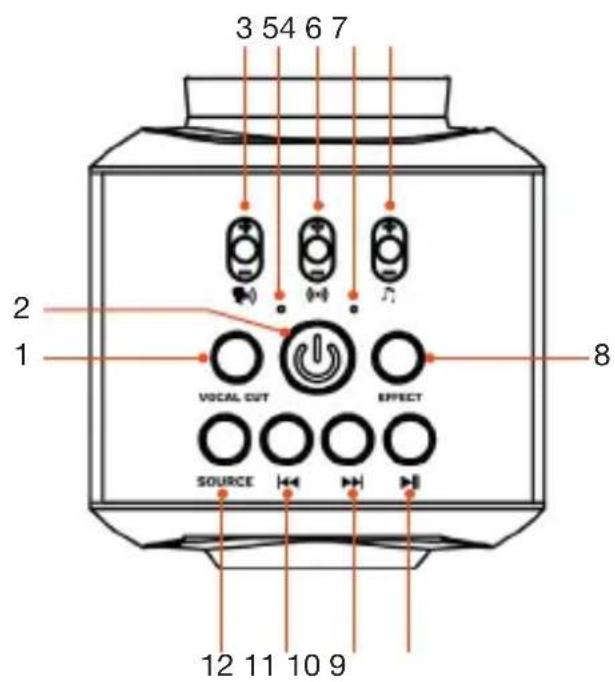
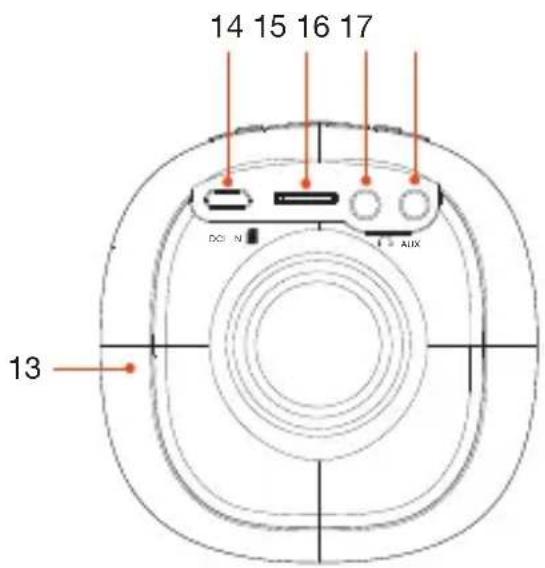
device description
| 1. VOCAL CUT Press to remove the vocals from the music. |
| 2. Power ON/OFF Press and hold to turn the device on or off. |
| 3. Voice vol +/- | In all modes: Slide up to increase the voice volume and down to decrease it. |
| 4. Indicator light | Power on and Bluetooth* indicator light:• Flashing blue light displays when the power is turned on and it is searching for a Bluetooth* device.• Steady blue light displays when connected to a Bluetooth* device. |
| 5. Echo vol +/- | In all modes: Slide up to increase the echo and down to decrease it. |
| 6. Indicator light | Battery indicator light:• The charge indicator is static red and it switches off once the charging is complete.• Flashing red light displays when the battery is low, and a sound prompt plays. |
| 7. Music vol +/- | In all modes: Slide up to increase the music volume and down to decrease it. |
| 8. EFFECT | Long press to activate Effect mode.Once activated, short presses will change the effect. There are 4 different voice effects.Long press again to exit the mode. |
| 9. Play/pause | In BT mode or micro SD card: Tap to play or pause music.In AUX mode or if connected to an external device using the micro USB port: Press to mute the sound. |
| 10. Next | In BT mode or micro SD card: Press to skip to the next track. |
| 11. Previous | In BT mode or micro SD card: Press to skip to the previous song. |
| 12. SOURCE | Press to select the music source: BT, micro SD or AUX card. |
| 13. Speaker | Speaker - emits sound (on the back of the microphone). |
| 14. DC IN | Micro USB port for:Charging the battery (DC 5 V, 1 A).Connecting an external device (mobile phone, tablet, etc). |
| 15. Micro SD slot Insert your micro SD card into this port. |
| 16. 3.5 mm jack port Headphone output port. |
| 17. 3.5 mm jack port AUX input port. |
charging the battery
-
Use the supplied USB / micro USB cable. Plug one end into the 5 V DC micro USB port on the back of the microphone. Plug the other end into a powered USB port or a USB mains adapter (not included). The charge indicator is static red and it switches off once the charging is complete. When fully charged, unplug the charging cable (the battery indicator light will turn off).
-
The battery takes 4-5 hours to fully charge. The charging time will be longer if you listen to music while charging. When fully charged, the microphone can be used for 4-5 hours.
- When the battery is low, the battery indicator light will display flash red, and a sound prompt plays. If the battery is depleted, no indicator will be displayed.
reading modes
Downloading a karaoke app
Visit your audio device's app store and download a karaoke app to enrich your microphone experience. To record music and singing, you must download a karaoke app.
Selecting the audio source
When more than one audio source is connected to the microphone, press the button SOURCE to select AUX mode, Bluetooth* or TF/micro SD card.
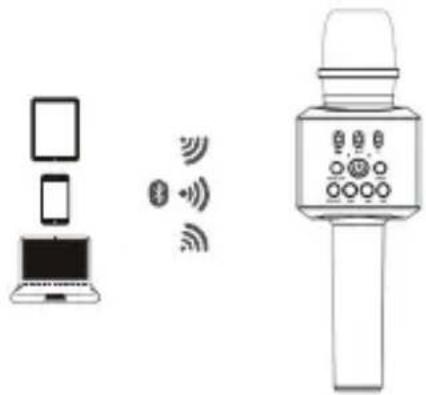
Listening to music wirelessly
If you are using a Bluetooth* audio device, make sure to stay within a maximum distance of 10 metres. The operating distance may vary based on the environment.
-
Press and hold the button to turn the microphone on. A sound prompt plays to indicate that the microphone is on and the Bluetooth* indicator light flashes to show it is in Bluetooth* mode and searching for a Bluetooth* device. If the microphone is already turned on and has been using another music source, press the button SOURCE to select Bluetooth* mode.
-
Activate Bluetooth * on your audio device.
-
When the list of devices appears, select "KARAMIC". No password is required. However, if your device asks for a password, enter "0000". A sound prompt plays and the Bluetooth* indicator light becomes steady when the devices are connected. Once paired, the devices will automatically reconnect afterwards.
-
If you are using a karaoke app, open it now to play music, sing and record, or play music on your audio device to singalong to. Not all karaoke apps are compatible with Apple iOS devices when using Bluetooth* mode.
-
You can adjust the volume and use the playback controls on your audio device or the microphone's controls.
-
Adjust the volume of the voice, echo and music ( ) by sliding the relevant switch up or down.
-
Press the button |◀◀ or ▶to go to the previous/next song.
-
Press the button ▶ to pause/play music.
-
Press the button VOCAL CUT to reduce the vocal's sound. Press again to go back to the music with vocals.
-
Long press the EFFECT button to activate Effect mode. Once activated, short presses will change the effect. There are 4 different voice effects. Long press again to exit the mode.
-
To use the microphone as a speaker, turn the echo and voice volume to the lowest setting.
Listening to music in wired mode
- Press and hold the button return the microphone on.
- Make sure the Bluetooth* connection is disconnected.
- There are two ways to connect the microphone to an audio device via a cable.
i. Plug the micro USB plug into the micro USB port on the microphone and plug the 3.5 mm audio cable into an audio device. A sound prompt plays to confirm the connection.
ii. Plug a 3.5 mm audio cable into your audio device's output jack. Plug the other end of the cable into the AUX port on the microphone. The microphone automatically switches to AUX mode. (The echo and vocal cut functions on the microphone are not available in AUX mode.)
- Open a karaoke app to play music, sing and record, or play music on your audio device to singalong to.
- To control playback functions (play, pause, next/previous song) use the controls on your audio device.
- Adjust the volume of the voice and music ( ) by sliding the relevant microphone switch up or down.
- Press and hold the button EFFECT to change the vocal effect. Press and hold again to turn off the vocal effect. A sound prompt plays to confirm when the function is turned on or off.
- Press the button ▶ to turn off the sound.
Playing content from a TF/micro SD card
- Press and hold the button to turn the microphone on.
- Insert the TF / micro SD card into the TF / micro SD port. A sound prompt plays to confirm the connection and the TF/micro SD card music will start to play.
- See points 5-11 in the "Listening to music wirelessly" for how to playback music and use the microphone's controls.
Answering, ending or muting a call
To answer a call, press the button ▶Press the button again to end a call.
To mute a call, press the button VOCAL CUT.
Using earphones
E
Z
Insert the 3.5 mm plug into the earphone port on the microphone or connect your earphones via Bluetooth*.
repair
| Problem Action | |
| The microphone does not work. | Check that your microphone is turned on.Make sure your microphone is completely charged. |
| There is no sound. | Check that the microphone volume is not set to minimum.Make sure that an audio file is playing on your connected audio device. |
| The sound is distorted. | Lower the volume on your microphone or connected device.Check that the audio device's speaker and microphone are not too close to each other as this can cause feedback.The power may be too low on the microphone. Recharge it. |
| The recording quality is poor. | The cell phone may not be compatible. Try to use another cell phone. |
Frequently asked questions
The microphone doesn't switch on, or the music playback is jerky
The battery is flat or low. Recharge the battery.
Check that the charging cable is not damaged or not properly connected and that the microphone is charging correctly. If the problem persists, replace the charging cable.
No sound is heard
The audio source emits no sound, or the sound volume is too low. Adjust the volume on both the audio source and the microphone.
Check the connection mode.
Also check that the audio source and the microphone are not connected through the micro USB charging cable. Sound can only be broadcast via a connection using the 3.5 mm jack cable.
The Bluetooth\* connection cannot be established
Ensure that your audio source is in pairing mode. Refer to the user manual of your audio source for more details.
Bring the microphone closer to the Bluetooth* device. For optimal transmission quality, make sure that the microphone and your Bluetooth* device are less than 10 metres apart and that no walls or electronic devices (such as phones, microwaves, wireless routers and any other Bluetooth* devices) are obstructing transmission.
Sourcing & Creation hereby declares that the Essentiel B wireless microphone type radio device (model number 8009708) is in compliance with Directive 2014/53 / EU. The full text of the EU declaration of conformity is available on the following website:
https://www.boulanger.com/info/assistance
Frequency band: 2 402-2 480 MHz
Emitted power: < 2.5 mW
*This Essentiel b product is compatible with the brands listed (belonging to third parties with no links to Sourcing & Creation).
All information, designs, drawings and pictures in this document are the exclusive property of SOURCING & CREATION. SOURCING & CREATION reserves all rights to its brands, designs and information. Any copy and reproduction through any means shall be deemed and considered as counterfeiting.

Protection of the environment
This symbol attached to the product means that it is an appliance whose disposal is subject to the directive on waste from electrical and electronic equipment (WEEE). This appliance may not in any way be treated as household waste and must be subject to a specific type of removal for this type of waste. Recycling and recovery systems are available in your area (waste removal) and by distributors. By taking your appliance at its end of life to a recycling facility, you will contribute to environmental conservation and prevent any harm to your health.
Tested in our laboratories
Warranty valid from the date of purchase (receipt as proof of purchase). This warranty does not cover defects or damage caused by improper set up, incorrect use, or normal wear and tear of this product.