B-Twig 8 Mobile - Portable speaker ANT - Free user manual and instructions
Find the device manual for free B-Twig 8 Mobile ANT in PDF.


User questions about B-Twig 8 Mobile ANT
0 question about this device. Answer the ones you know or ask your own.
Ask a new question about this device
Download the instructions for your Portable speaker in PDF format for free! Find your manual B-Twig 8 Mobile - ANT and take your electronic device back in hand. On this page are published all the documents necessary for the use of your device. B-Twig 8 Mobile by ANT.
USER MANUAL B-Twig 8 Mobile ANT
natural_image
Technical line drawing of a vertical cylindrical device with mounting base and mounting holes (no text or symbols)
text_image
ADVANCED NATIVE TECHNOLOGIES ADVANCEDES MANUAL DE USO | SECCION 1
DE BIDLENUGSANLTELUNG | KAPITEL 1
FR NOTICE D:\EPL01\I\section 1
IT MANUALÉ D'USO | SEZIONE 1
B-TWIG8 MOBILE
ACTIVE COLUMN SYSTEM WITH LITHIUM BATTERY & BLUETOOTH® SISTEMA ATTIVO A COLONNA CON BATTERIA AL LITIO & BLUETOOTH® SYSTÈME ACTIF À COLONNE AVEC BATTERIE LITHIUM & BLUETOOTH® AKTIVES SÄULENSYSTEM MIT LITHIUMBATTERIE & BLUETOOTH® SISTEMA ACTIVO DE COLUMNNA CON BATERÍA DE LITIO Y BLUETOOTH®
TABLE OF CONTENTS
1 | Introduction 3
2 | Installation 4
3 | Description 5
3.1 | Inputs & controls 5
3.2 | Power supply 8
3.3 | Battery management and safety procedures 9
3.4 | B-TWIG 8CS MOBILE KIT 12
4 | System assembly and disassembly instructions 12
5 | System control 15
5.1 | MAIN menu screen (fig.1) 15
5.2 | CHANNEL menu screen (fig.3) 16
5.3 | Bluetooth® menu screen (fig.4) 16
5.3.1| Bluetooth® connection 18
5.4 | CONFIG menu screen (fig.5) 18
5.5 | ABOUT menu screen (fig.6) 19
5.6 | Menu MAIN screen (fig.7) 19
6 | Troubleshooting 21
7 | Technical specifications 22
The warnings in this manual must be observed together with the "USER MANUAL - SECTION 2".
PACKAGE CONTENT
• 1x B-TWIG 8S MOBILE active subwoofer
• 1x B-TWIG 8CS kit, including:
- n.1 support element
- n.1 array speaker
- n.1 transport bag
- 1x Mains cable (VDE)
• 1x User manual - Section 1
• 1x User manual - Section 2
1 | INTRODUCTION
Thank you for choosing a A.N.T - Advanced Native Technologies - product!!
In B-TWIG 8S MOBILE array column system we have put our passion and our technological background gained over the years, to offer products that meet your needs, maintaining the quality over time.
Specifically designed for an immediate and user-friendly application, meeting the needs of those who are looking for an audio system delivering excellent performances, high connection versatility as well as the best value in its category.
The subwoofer unit incorporates a rechargeable lithium-ion battery pack which, thanks to its specific electronics, guarantees system operation without mains power up to a maximum of 20 hours. In addition, the dedicated ANT SPEAKER CONTROLLER app allows you to access various options and additional control functions, ensuring maximum use flexibility.
Please, dedicate some minutes to read this instruction manual in order to quickly achieve the best performances from this product.
For safety precautions, warranty and disposal, please refer to attached Section 2.
For further information about all ANT products catalog, please visit our website: www.ant-intomusic.com
2 | INSTALLATION
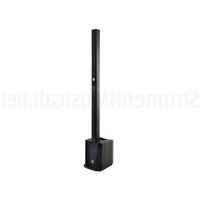
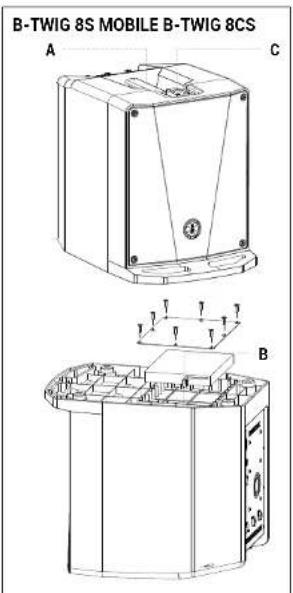
The system is composed by the active subwoofer B-TWIG 8S MOBILE, plus B-TWIG 8CS kit
A | Top recessed handle.
B | Battery compartment.
C | Sliding locking system for elements quick lock and release.
D | Support element/stand.
E | Passive column speaker.
text_image
B-TWIG 8S MOBILE B-TWIG 8CS A C T T T T T B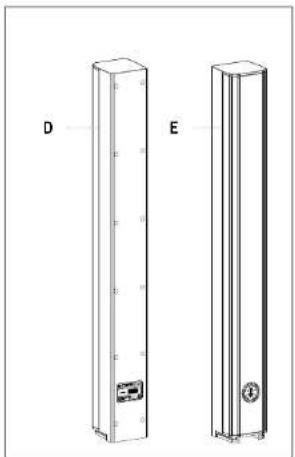
natural_image
Two vertical rectangular panels labeled D and E, each with internal components and mounting holes (no text or symbols beyond labels)
Download ANT SPEAKER CONTROLLER APP for use with Apple iPhone to access additional options and features.

3 | DESCRIPTION
3.1 | INPUTS & CONTROLS
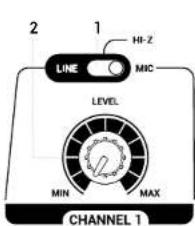
text_image
2 1 HI-Z MIC LEVEL MIN MAX CHANNEL 1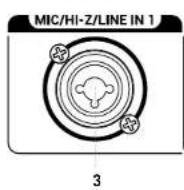
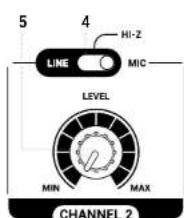
text_image
5 4 HI-Z LINE MIC LEVEL MIN MAX CHANNEL 2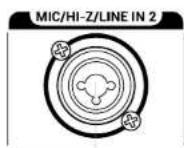
1 CHANNEL 1 LINE / HI-Z / MIC
This selector allows you to choose channel 1 input sensitivity.
LINE: line signal, most frequent application
HI-Z: high impedance signal from a musical instrument.
MIC: microphone signal, dynamic microphone connected to channel 1
2 CHANNEL 1 LEVEL
This control adjusts the level of channel 1. Turn the knob clockwise to raise the volume or counterclockwise to lower it.
3 CHANNEL 1 CONNECTOR
Balanced input with Combo socket (XLR-F + 6.35mm jack). Accepts line, microphone or high impedance signals (eg electro-acoustic or electric guitar). The microphone can be also connected with an unbalanced jack cable.
4 CHANNEL 2 LINE / HI-Z / MIC
This selector allows you to choose channel 2 input sensitivity.
LINE: line signal, most frequent application
HI-Z: high impedance signal from a musical instrument.
MIC: microphone signal, dynamic microphone connected to channel 2
5 CHANNEL 2 LEVEL
This control adjusts the level of channel 2. Turn the knob clockwise to raise the volume or counterclockwise to lower it.
6 CHANNEL 2 CONNECTOR
Balanced input with Combo socket (XLR-F + 6.35mm jack). Accepts line, microphone or high impedance signals (eg electro-acoustic or electric guitar). The microphone can be also connected with an unbalanced jack cable.
B-TWIG8 MOBILE
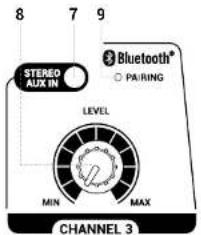
text_image
8 7 9 STEREO AUX IN Bluetooth® ○ PAIRING LEVEL MIN MAX CHANNEL 3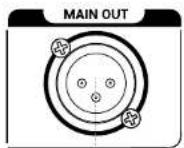
10
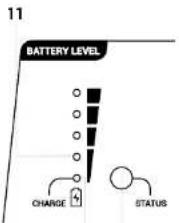
text_image
11 BATTERY LEVEL CHARGE STATUS12 13
7 STEREO AUX IN
Unbalanced input with 3.5mm mini-jack stereo socket. Connect to this input the signal from an external device such as Smartphone, Tablet or PC. It is possible to use this input and the Bluetooth ^® signal at the same time, but for better levels management, we do not recommend this option.
8 CHANNEL 3 LEVEL
This control adjusts channel 3 level. Turn the knob clockwise to increase the volume or counterclockwise to decrease it.
9 LED PAIRING
Status LED for Bluetooth® connection
- Flashing green light, synchronization and pairing with the mobile device.
- Steady green light, audio streaming in progress.
To synchronize and connect mobile phones or tablets, refer to chapter 5 SYSTEM CONTROL.
10 MAIN OUT CONNECTOR
Balanced XLR-M output for connection to another powered system. The signal of this output depends on the levels of the input channels. Using the APP menu the output can be set as LINK OUT or MIX OUT.
11 BATTERY LEVEL
Internal battery status LEDs, in descending order
1st LED: steady green light, battery fully charged
2nd LED: steady green light, battery half charged
3rd LED: steady green light, battery one quarter charged
4th LED: steady red light, battery close to discharging, recharge the battery as soon as possible.
12 CHARGE LED
While the internal battery is charging, this LED is lit.
When the battery is fully charged, the process stops automatically and the CHARGE LED turns off.
In order to charge the battery, it is necessary to connect the power cable to the wall socket and place the POWER button in CHARGE mode. Battery total charge is achieved in about 5 hours.
It is also possible to recharge the battery less effectively, even during system operation connecting the unit to the mains and moving the POWER button to ON position.
WARNING: Lithium-ion batteries, if fully discharged to zero, can suffer irreparable damage that abruptly shortens their
14
DIGITAL MATRIX CONTROLLER
15
16
life cycle. In order to preserve battery duration and reliability over time, avoid battery complete discharge during operation.
13 STATUS
Press for 3 seconds this button to view the charge status of the internal battery. Reporting occurs when the system is off (OFF) or when the unit is connected to the mains with the POWER switch in the CHARGE position.
14 DIGITAL MATRIX CONTROLLER
LCD control interface and digital menu display; for details see chapter 5 SYSTEM CONTROL.
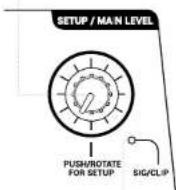
15 SETUP/MAIN LEVEL
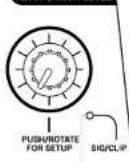
This rotary knob with integrated push button is the primary controller of system digital functions. It allows access to the control menu and adjustment of the parameters selected according to the connected devices or application preferences. It also acts as a classic MAIN LEVEL knob for adjusting the overall system output volume.
16 SIG/CLIP
Two-color output level indicator
Green LED: the signal is present
Red LED: the signal is very strong and is close to distortion.
If the red LED lights up continuously, it is necessary to reduce the MAIN LEVEL level or, otherwise, adjust the levels/parameters of CH1, CH2, CH3.
3.2 | POWER SUPPLY
text_image
DO NOT COVER, KEEP IT CLEAN! MIC/HI-Z/LINE IN 1 MIC/HI-Z/LINE IN 2 MAIN OUT DO NOT COVER, KEEP IT CLEAN! "CAUTION" AIR OF ELECTRONIC SHOCK DO NOT OPEN "ATTENTION" DRUM OF CHOCO ELECTRICAL NE PAS COVER SERIAL N. ON OFF CHARGE POWER FUSE TSA L 250V~ (Optake from with some markings) (Replace to double power in main type) AER INDUSTRIALE S.R.L. Via Broodini, IL - Localtia Crespetlano 40053 VALSAMOOHA (BO) - ITALY CE EAC MADE IN CHINA DO NOT COVER, KEEP IT CLEAN! B-TWIG 8S MOBILE POWERED SUBWOOFER UNIT 1 2 3
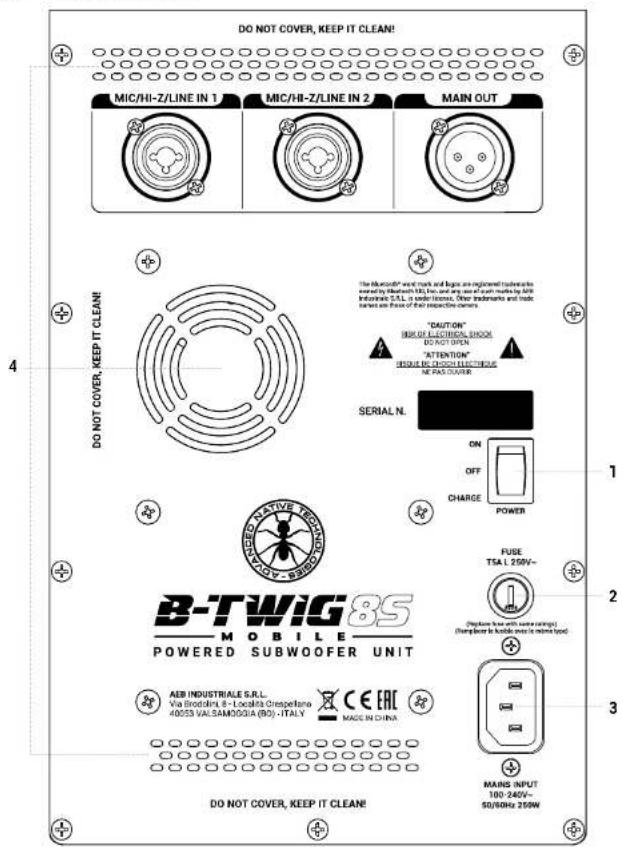
1 POWER ON/OFF/CHARGE
Three position switch
ON: Power on
OFF: Power off
CHARGE: Internal battery charging
2 FUSE
Protection fuse
WARNING: Replace the fuse only with one of the same type and with the same values. If the fuse continues to blow, contact an authorized service center.
3 MAINS INPUT
IEC input socket with integrated mains filter. Insert the power cord, supplied with the system, in this socket. Check that the unit is turned off before connecting the cable to mains. For your safety, never disconnect the grounding pole.
4 COOLING FAN AND VENTILATION SLOTS
The cooling process of the amplifier and panel temperature maintenance within the legal limits is guaranteed by proper device ventilation, therefore it is recommended not to obstruct or cover in any way subwoofer rear frame ventilation slot.
3.3 | BATTERY MANAGEMENT AND SAFETY PROCEDURES
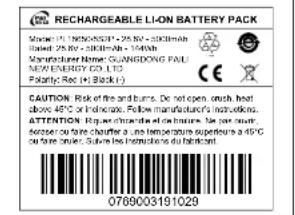
The B-TWIG 8S MOBILE subwoofer incorporates a 28.8V - 5000 mAh li-ion battery equipped with all protections complying with current safety regulations.
The internal battery offers the following features:
- Charge indicator integrated with the system: the internal electronic circuits allow you to monitor the state of charge. The upper panel relevant indicators will light up showing the state of charge as a percentage of the full battery charge.
- Safety and reliability: the numerous integrated safety protections provide protection for individual cells as well as for users.
- Quick charge: Lithium-ion batteries, not requiring a long-term compensating charge, charge quickly to their maximum capacity.
- Partial recharges tolerance: since the li-ion cells tolerate partial recharges, the suspension of the charge procedure and the use of the battery before full charge, when required by the installation needs, have no impact on battery life cycle.
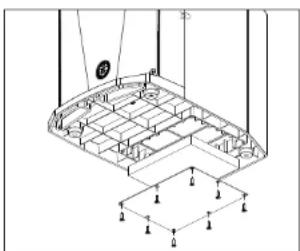
The access compartment to the battery pack is at the bottom of the subwoofer. To access the battery, remove the cover fixing screws (Fig.1)
WARNING: To replace the battery, it is recommended to contact qualified and authorized personnel, i.e. personnel with technical knowledge, experience and specific instructions sufficient to guarantee safety and correct connection of the power supply terminals.
WARNING Use only exactly the same battery pack in compliance with the indications and technical characteristics shown in Fig 2. This specially designed high-performance battery is the only one approved to ensure safe and effective use with the B-TWIG 8 MOBILE system.
natural_image
Architectural floor plan diagram showing structural grid and support structures (no text or labels)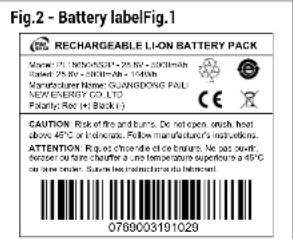
text_image
Fig.2 - Battery label Fig.1 RECHARGEABLE LI-ON BATTERY PACK Model: PUL 00065371 - 25kV - 2000mAh Label: 25kV - 300mAh - 140mAh Manufacturer Name: GUANGDONG FAIL NEW ENERGY CO., LTD. Balance Range: +3 (±3.4) CAUTION: Risk of fire and burns. Do not open, brush, heat above 45°C or inductors. Follow manufacturer's instructions. ATTENTION: Rules change the cold chain. We pass forward to the right. After a time temperature experience at 45°C on the next minute. Assume the maximum duration of the battery. 0789003191029BATTERY MAINTENANCE
Battery maintenance starts as soon as you get hold of a new battery and maintenance continues for battery entire life cycle. The following table shows the main maintenance activities:
| ACTIVITY EXECUTION | |
| Perform a visual inspection | Before inserting the battery inside the unit.Check the terminals for correct polarity, red positive (+) and black negative (-). Check the integrity of the frame and any dent/perforation. |
| Charge the battery | Upon delivery, after use or in the event of a low battery indication.To optimize performance, the battery that is completely (or almost completely) discharged should be charged as soon as possible. |
| Store the battery in a state of charge between 20% and 40% | When not used for an extended period of time. |
PRECAUTIONS FOR USE
Li-ion batteries are characterized by small size with high energy density. Be careful while handling the battery pack; incorrect or improper use could cause physical injury and/or material damage.
Strictly follow the following safety instructions:
- Do not short circuit: Make sure the terminals are not in contact with metal or other conductive materials during transportation and storage.
- Do not drop, crush or pierce the battery. Improper use can cause damage and internal short circuits, which are not always visible externally.
- Do not install the battery pack with reversed polarity.
- Do not expose the battery to contact with liquids.
- Do not ignite the battery or expose it to temperatures above 60^ degrees.
- Do not attempt to open the battery pack or disassemble the cells inside.
If the battery has dropped or hit a hard surface, regardless of outer frame condition:
- Immediately stop using.
- Dispose the battery complying with local regulations.
BATTERY LIFE
The life of a Li-ion battery depends on the frequency and duration of use. If used correctly, the cells inside have a duration of about 500 charge/discharge cycles, on average 3 years according to the wear associated with daily use. The risk of battery failures increases with time and with the conditions of use, such failures can cause the battery to overheat which, in rare cases, can cause the battery burning or exploding.
DISPOSAL
Before disposal, discharge the battery and insulate the terminals with tape. Promptly dispose of the used or faulty battery, applying disposal regulations in force.
3.4 | B-TWIG 8CS MOBILE KIT
The kit, supplied with the appropriate carrying case, consists of two column elements: a stand (element A) and a speaker (element B). Both are equipped with slide connection mechanism, allowing quick coupling and release of the elements composing the system, ensuring perfect functionality in complete safety.
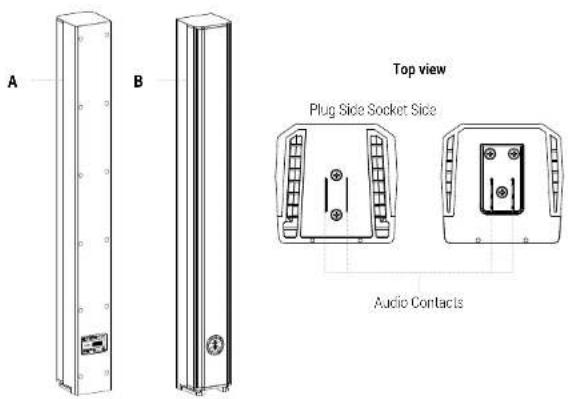
text_image
A B Top view Plug Side Socket Side Audio Contacts4 | SYSTEM ASSEMBLY AND DISASSEMBLY INSTRUCTIONS
To install the appliances and to ensure their correct operation, strictly follow the following instructions:
- Place the subwoofer upright on a flat and stable surface, making sure that all lower rubber feet are perfectly adherent to the floor or surface.
- Never install the system on movable carts, chairs, tables, or similar objects that are not stable or able of bearing system weight.
- Do not use the handle to suspend the system.
- Never obstruct the ventilation slots located on subwoofer rear frame.
- To allow proper dissipation of the amplification heat, leave a sufficient distance between the rear panel of the subwoofer and other objects such as walls, corners, curtains, and never place the unit near heat sources of any kind.
INSTALLATION:
- Place the subwoofer on a flat surface with no unevenness (Fig.1)
- Secure element A by sliding it into the slide coupling mechanism (Fig 2)
- Repeat the operation to fix element B in the upper part of the system (Fig.3)
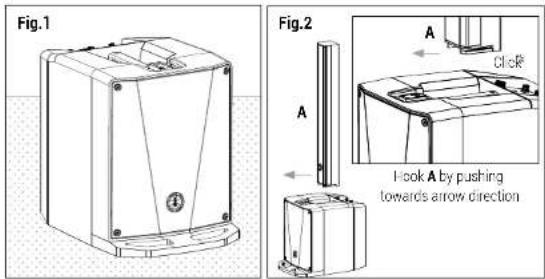
text_image
Fig.1 Fig.2 A Click A Hook A by pushing towards arrow direction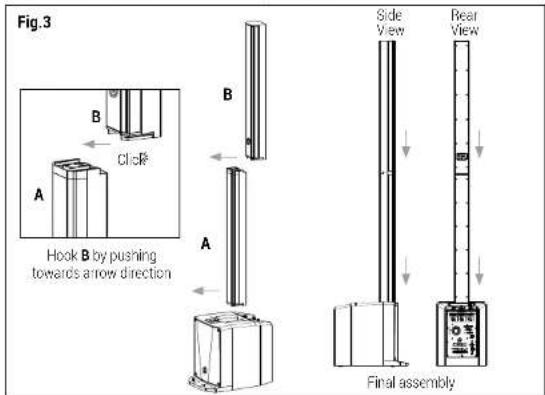
text_image
Fig.3 Click B Hook B by pushing towards arrow direction Side View Rear View Final assemblyUNINSTALLING:
- Push backwards element B to release it from the stand (Fig.4)
- Repeat the operation to release element A from the subwoofer (Fig.5)
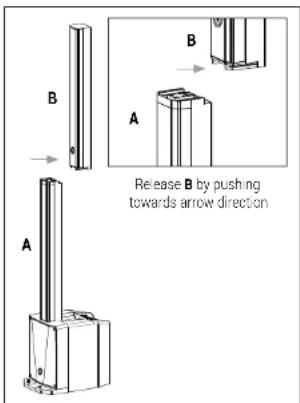
text_image
B A Release B by pushing towards arrow direction A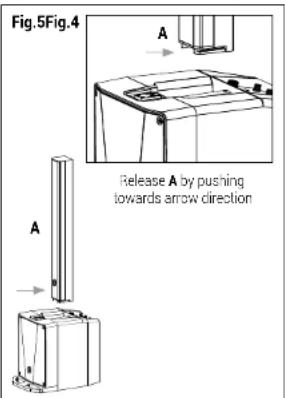
text_image
Fig.5Fig.4 A A Release A by pushing towards arrow direction5 | SYSTEM CONTROL
The B-TWIG 8 MOBILE system is incredibly simple to quickly set up. An advanced graphic interface allows you to enter directly into the heart of the system allowing you to configure each parameter, change presets, save or recall scenes, adjust the volume, set the equalization and create a mix for different uses to MIX OUT output. All setup operations are made easy by the use of a rotary encoder equipped with a confirmation button, making configuration of the entire system extremely fast and simple.
5.1 | MAIN MENU SCREEN (Fig.1)
When the system is turned on, the first screen shows the three-channel mixer with its levels, status indicator (SIG/CLIP) and signal type (LINE/HI-Z/MIC), the channel dedicated to the Main output, with its own level and signal indicator, the icons for activating the Bluetooth® - APP - Audio Streaming connection, and, finally, the Bluetooth® CONFIG and ABOUT menus.
You can highlight the icon, menu or desired parameter by simply turning the appropriate rotary knob to the right or to the left and press to select the desired function.
The arrow indicators aside of CH1-CH2-CH3 graphically represent the position and level of the analog knobs on the unit.
The ➕ APP - 🔍ons, if activated, change the color status to green (Fig.2), in detail:
: The system is synchronized via Bluetooth® with your Mobile device
APP: The system can be fully controlled by "ANT SPEAKER CONTROLLER" app
☐: Audio Streaming from the mobile device is activated and working.
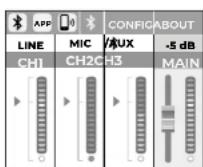
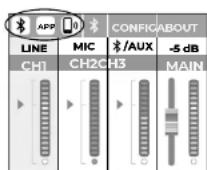
Fig.1 Fig.2
5.2 | CHANNEL MENU SCREEN (Fig.3)
Press the desired channel button to enter this menu. Once entered, it is possible to view and adjust the parameters of CH1-CH2-CH3 in detail:
- 3-band equalizer, HIGH/MID/LOW, operating from -12 dB to +12 dB
- HPF filter, frequency from 20 Hz to 400 Hz (only for CH1 and CH2)
Once the adjustments have been made, you can return to the main menu by pressing the green arrow.
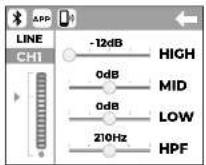
Fig.3
5.3 | BLUETOOTH® MENU SCREEN (Fig.4)
The B-TWIG 8 MOBILE system is equipped with a Bluetooth® 5.0 stereo receiver, which allows you to make a data connection with the APP and simultaneously stream audio from your mobile device.
Press the button ✪ access this menu. Once entered, it is possible to enable or disable the APP CONNECT and AUDIO STREAMING functions, in detail:
APP CONNECT ON: if activated, allows data synchronization with the "ANT SPEAKER CONTROLLER" app, available for Apple iPhone only. This function is already active in factory setting. Anyway, be sure to activate this function before opening the APP from your phone.
APP CONNECT SLAVE: if activated (Fig 4A), it configures the unit as an additional secondary system (Slave) perfectly controllable via APP. In this way it is possible to choose between Mono (Fig 4B) or Stereo (Fig 4C) listening. Make sure that the APP CONNECT control is set to ON in the main system (Master).
AUDIO STREAMING ON: if activated, allows audio streaming from your mobile device. This function is already active in factory setting. Be sure to enable this function before pairing your device via the Bluetooth® connection
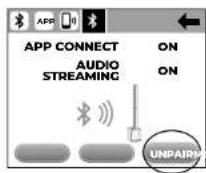
PAIR: if pressed, activates synchronization via Bluetooth® between the main (Master) and secondary (Slave) systems The PAIR button is generically designed for those who do not
desire controlling the system with the dedicated APP. It is possible to interrupt the synchronization to the secondary system by pressing ABORT (Fig.4D) or permanently disconnect it at the end of your session by pressing UNPAIR (Fig.4E).
Note: For iPhone users it is not necessary to press this button as the synchronization between two systems, carefully configured, takes place automatically after 10 seconds after APP launch.
It is always possible to return to the main menu by pressing the green arrow.
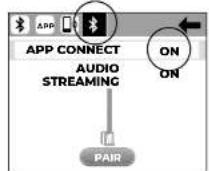
Fig.4 Fig.4A
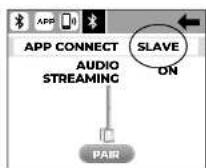
(No text)
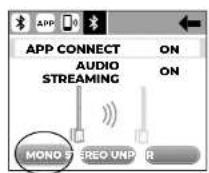
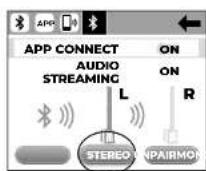
Fig.4C Fig.4B
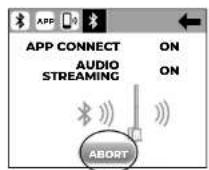
Fig.4D Fig.4E

5.3.1 | BLUETOOTH® CONNECTION
Make sure the mobile device to be paired is switched on and ready to be connected with the system:
Activate Bluetooth ^® synchronization by setting the AUDIO STREAMING control to ON. In this phase the status LED flashes quickly.
Check that the device searches for the available devices and identifies the system showing the message "B-TWIG 8 MOBILE".
Select "B-TWIG 8 MOBILE" from the list to synchronize the system with the mobile device. The status LED remains lit.
Now you can play the selected songs from the connected remote device.
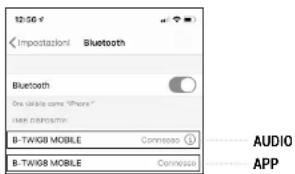
Note: when the data connection via APP is active, a second non-selectable identification "B-TWIG B MOBILE" will appear in the Bluetooth® menu of your mobile device. It is normal and allows the user to check the data connection between the APP and the system (Fig 4F).
text_image
12:50 € Importazioni Bluetooth Bluetooth One available come "Phone" New paraportiv B-TXV08 MOBILE Connosso B-TXV08 MOBILE Connosso AUDIO APPFig.4F
5.4 | CONFIG MENU SCREEN (Fig.5)
Press the CONFIG key to access this menu. Once entered, it is possible to enable or disable the AUTO STEREO PAIRING and SCREENSAVER functions. In detail:
AUTO STEREO PAIRING ON: if activated, it automatically allows audio and data synchronization via Bluetooth® between the main unit (Master) and the secondary unit (Slave). In the factory setting, and when the system is first turned on, this function is disabled.
SCREENSAVER: if activated, it enables the graphic display to be turned off after 5 seconds of system inactivity. This function allows you to extend the average life of the display and to preserve battery life while the system is operating. Press any APP control or the system control panel to disable the screensaver.
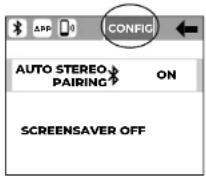
Fig.5
Turning on the unit for the first time, due to factory setting, this function is disabled. It is always possible to return to the main menu by pressing the green arrow.
5.5 | ABOUT MENU SCREEN (Fig.6)
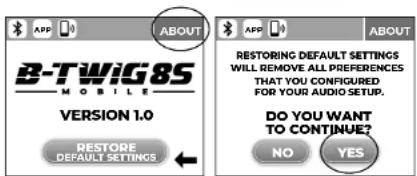
Press the ABOUT key to access this menu. Once entered, it is possible to view the firmware version and recall the factory settings using the dedicated RESTORE DEFAULT SETTINGS key (Fig.6A)
text_image
B-TWiG 85 MOBILE VERSION 1.0 RESTORE DEFAULT SETTINGS ABOUT ABOUT RESTORING DEFAULT SETTINGS WILL REMOVE ALL PREFERENCES THAT YOU CONFIGURED FOR YOUR AUDIO SETUP. DO YOU WANT TO CONTINUE? NO YESFig.6 Fig.6A
5.6 | MENU MAIN SCREEN (Fig.7)
Press the MAIN channel to access this menu. Once entered, you can configure the system with different equalization presets, adjust the DELAY and set the output mode on the MAIN OUT output. In detail:
PRESET: press on this control and use the rotary knob to choose between the four presets
PLAYBACK: For music listening and using (CD players, MP3 players, etc.), low and high frequencies are emphasized.
DJ SOUND: For all situations of background music diffusion. In this case the low frequencies are extended and enhanced, in order to create a more wrap-around sound even at low sound level.

B-TWIG8 MOBILE
LIVE SOUND: To be used during live performances. Suitable for musicians and singers
SPEECH: To be used for speech (presentations, demos, cabaret, etc ...). Unwanted low frequency low frequencies, outside voice range, are reduced.
DELAY: acts on the entire system by introducing a playback delay. Range from 0m to 12m with 1m steps.
MAIN OUT: this control allows you to determine which signal to send to the MAIN OUT output on the rear frame of the subwoofer. Use the LINK mode to connect in parallel the signal present on CH1-CH2-CH3. In this case the signal is taken before each single channel volume control. Set the MIX mode to have a mix of the signals present on CH1-CH2-CH3. In this case the output signal is determined by the volume controls of each individual channel and by the MAIN LEVEL.
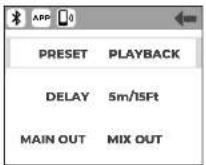
Fig.7
It is always possible to return to the main menu by pressing the green arrow.
6 | TROUBLESHOOTING
| PROBLEM LED SOLUTION | ||
| No sound or very low sound level | Power LED turned off. | Make sure the device is properly connected to the mains outlet. |
| Power LED turned on, but channel levels. | Check the connections between the sources and the inputs, than raise desired channel levels. | |
| LEVEL raised, with no signal | Check input selectors | |
| Channel 3 LEVEL raised but no Bluetooth® signal | Check input selector Sync again the Bluetooth® signal | |
| Distortion | ON/LIMIT LED lit red Lower channel levels | |
| ON/LIMIT LED lit green Check the source level | ||
| Check proper connection between subwoofer and A/B elements | ||
| Booming sound | Check EQ LOW levelTry distancing the system from the wallsCheck the perfect connection between subwoofer and A/B elements | |
| I harsh sound Check EQ IIGI level | ||
| Lower frequencies small attenuation | Check EQ LOW level | |

7 | TECHNICAL SPECIFICATIONS
| System type Active column system | ||
| Subwoofer (B-TWIC 8S) | Vented enclosure1 x 8" Ferrite - 1.5" VC - custom speaker | |
| Array speaker(B-TWIC 8CS) | 6 x 2.75" - 0.75" VC - neodymium custom speakers | |
| Average dispersion Horizontal 120° | ||
| Frequency response 50-lz - 20kHz | ||
| MAX SPL 120dB | ||
| Amplification D class | ||
| Peak power (LF + IF) 1000W | ||
| Crossover 24dB/Oct @ 250Hz | ||
| I/O connectors | CH 1, CH2: Combo XLR-F + jack 5,35mm (1/4")CH3: 2 x RCA (L+R), 1 x AUX jack 3,5mmMIX OUT: 1 x XLR-M | |
| Controls | Channel levels, input signal selectors, High and Low EQ, Bluetooth®Fair button | |
| Power supply 100-240V~ 50-60Hz | ||
| Fuse T5A L 250V~ | ||
| Fastening mechanism | Custom slide connector, with automatic lock | |
| Cabinet | Polypropylene | |
| B-TWIG 8S MOBILE | B-TWIG 8CS | |
| Dimensions (W x H x D) | 304 x 385 x 443 mm11.9" x 16.1" x 17.4" | 92 x 800 x 90.5 mm3.6" x 31.5" x 3.6" |
| Weight | 12.3kg - 27.1lbs | 4.1kg - 9lbs |
| LITHIUM POWER PACK | |
| Type of cell 3.6V - INR18650S / 2500mAh | |
| Battery pack 28.8V / 5000mAh - | |
| Battery indicators 5 LEDs | |
| Battery Life | Charging Time: about 5 hoursDischarge Time @ full power: 6.30 hoursDischarge Time @ 80% of power: 10 hoursDischarge Time @ 25% of power: 19 hours |
| DIGITAL MATRIX CONTROLLER | |
| Available I/O Bluetooth | ^6 , AUX IN |
| Bluetooth® version | 5.0 Dual Mode with Qualcomm TrueWireless Stereo ^ |
| APP | Ant Speaker Controller available from Apple Store |
INDICE
natural_image
Two vertical rectangular panels labeled D and E, showing internal components with no visible text or symbols.
10 CONNETTORE MAIN OUT
15
SETUP / MAIN LEVEL
16
text_image
DO NOT COVER, KEEP IT CLEAN! MIC/HI-Z/LINE IN 1 MIC/HI-Z/LINE IN 2 MAIN OUT DO NOT COVER, KEEP IT CLEAN! "CAUTION" RIO OF ELECTRONIC SHOCK DO NOT OPEN "ATTENTION" HOME BY CHOCO ELECTRICAL NE PAS COVER SERIAL N. ON OFF CHARGE POWER FUSE TSA L 250V~ (Optake less with some ratings) (Change to be stable over in terms typed) B-TWIG 8S MOBILE POWERED SUBWOOFER UNIT AEB INDUSTRIALE S.R.L. Via Broodini, IL - Localita Crespetano 40053 VALSAMOGUA (BG) - ITALY CE EAC MADE IN CHINA DO NOT COVER, KEEP IT CLEAN! MAINS INPUT 100-240V~ 50/60Hz 250W30 Manuale d'uso | B-TWIG 8 MOBILE

1 POWER ON/OFF/CHARGE
text_image
Technical diagram of a structural framework with labeled components and connection points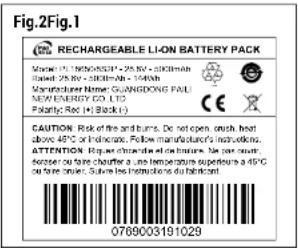
text_image
Fig.2Fig.1 RECHARGEABLE LI-ON BATTERY PACK Model: FL 360N0501 - 25kV = 360N45m Rated: 25kV = 360N45m = 1940h Manufacturer Name: GUANGDONG PAUL MOMENERGY CO.,LTD. Potarity: Red = Black (c) CAUTION: Risk of fire and burns. Do not open, check, heat above 45°C or lubricate. Follow manufacturer's instructions. ATTENTION: High quality of fire and lubricate. Use the circuit breaker to fare chatter for a single temperature superstore at 45°C or fare roller. Suivre the instructions do lubricant 07890031910295.5 | SCHERMATA MENU ABOUT (Fig.6)
5.6 | SCHERMATA MENU MAIN (FIG.7)
natural_image
Two identical vertical rectangular panels labeled D and E, with no visible text or symbols on the panels themselves.
text_image
DO NOT COVER, KEEP IT CLEAN! MIC/HI-Z/LINE IN 1 MIC/HI-Z/LINE IN 2 MAIN OUT DO NOT COVER, KEEP IT CLEAN! "CAUTION" RIO OF ELECTRONIC SHOCK DO NOT OPEN "ATTENTION" HOME BY CHOCO ELECTRICAL NE PAS COVER SERIAL N. ON OFF CHARGE POWER FUSE TSA L 250V~ (Optake less with some ratings) (Change to be stable over in terms typed) B-TWIG 8S MOBILE POWERED SUBWOOFER UNIT AEB INDUSTRIALE S.R.L. Via Broodini, IL - Localita Crespetano 40053 VALSAMOGUA (BG) - ITALY CE EAC MADE IN CHINA DO NOT COVER, KEEP IT CLEAN! MAINS INPUT 100-240V~ 50/60Hz 250Wtext_image
Technical diagram of a structural framework with labeled components and support pointsManufacturer Name: GUANGDONG PAUL
NEW ENERGY CO.,LTD Polarity Red (A) Black (C) CE
3.1075. Risk of the problems. For instance, each best
CAUTION: Risk of fire and burn. De not open, flush, heat above 45°C or indipede. Follow manufacturer's instructions.
5.5 | PAGE MENU ABOUT (Fig.6)
text_image
Technical diagram of a device with labeled components A, B, and C, showing internal structure and assembly details.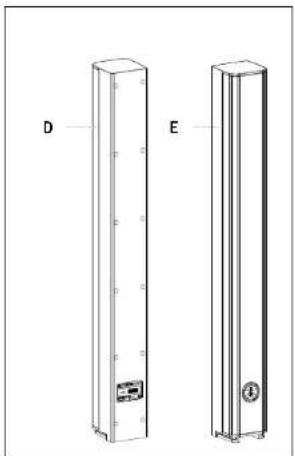
natural_image
Technical line drawing of two vertical rectangular panels labeled D and E, with no visible text or symbols on the panels themselves.
text_image
DO NOT COVER, KEEP IT CLEAN! MIC/HI-Z/LINE IN 1 MIC/HI-Z/LINE IN 2 MAIN OUT DO NOT COVER, KEEP IT CLEAN! "CAUTION" RIO OF ELECTRONIC SHOCK DO NOT OPEN "ATTENTION" HOME BY CHOCO ELECTRICAL NE PAS COVER SERIAL N. ON OFF CHARGE POWER FUSE TSA L 250V~ (Optake less with some ratings) (Change to be stable over in terms typed) B-TWIG 8S MOBILE POWERED SUBWOOFER UNIT AEB INDUSTRIALE S.R.L. Via Broodini, IL - Localita Crespetano 40053 VALSAMOGUA (BG) - ITALY CE EAC MADE IN CHINA DO NOT COVER, KEEP IT CLEAN! MAINS INPUT 100-240V~ 50/60Hz 250Wtext_image
Technical diagram of a structural framework with labeled components and connection pointsAbb.2 - BatterielabelAbb.1
text_image
RECHARGEABLE LION BATTERY PACK MILKEL (250kV) 1300mAh - 250kV - 2000mAh Risabel: 250kV - 300mAh - 1540h Manufacturer Name: GUANGDONG PAUL MINI ENSERY CO., LTD. Polarity: Red (▲) Black (▼) CAUTION: Risk of fire and burns. De set open, brush heat above 40°C or 180mm. Follow manufacturer's instructions. ATTENTION: R.E. of the first time of the next quarter, sequester ou faire chauffer à une température supérieure a d'6°C ou faire bleuver. Suivre les instructions du bidragant. 0789003191029BATTERIEWARTUNG
natural_image
Technical line drawing of a mechanical device with cross-sectional views (A, B, C) showing internal components and mounting features (no text or symbols)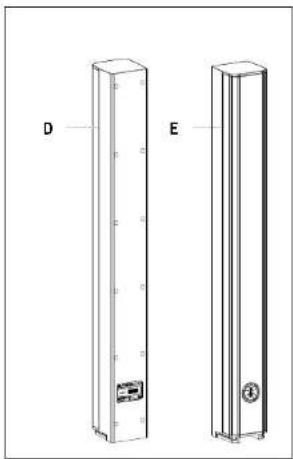
natural_image
Technical line drawing of two vertical rectangular electronic components labeled D and E (no text or symbols on the components themselves)10 CONECTOR MAIN OUT
text_image
DO NOT COVER, KEEP IT CLEAN! MIC/HI-Z/LINE IN 1 MIC/HI-Z/LINE IN 2 MAIN OUT DO NOT COVER, KEEP IT CLEAN! "CAUTION" RIO OF ELECTRONIC SHOCK DO NOT OPEN "ATTENTION" HOME BY CHOCO ELECTRICAL NE PAS COVER SERIAL N. ON OFF CHARGE POWER FUSE TSA L 250V~ (Optake less with some ratings) (Change to be stable over in terms typed) B-TWIG 8S MOBILE POWERED SUBWOOFER UNIT AEB INDUSTRIALE S.R.L. Via Broodini, IL - Localita Crespetano 40053 VALSAMOGUA (BG) - ITALY CE EAC MADE IN CHINA DO NOT COVER, KEEP IT CLEAN! MAINS INPUT 100-240V~ 50/60Hz 250Wnatural_image
Isometric technical diagram of a structural framework with supports and connection points (no text or labels)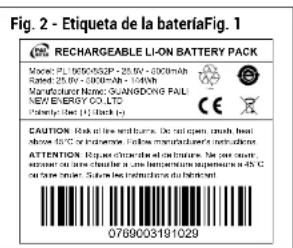
text_image
Fig. 2 - Etiqueta de la bateriaFig. 1 RECHARGEABLE LI-ON BATTERY PACK Model: PLUGO5032P + 20kV - 600mAh Rated: 25kV - 300mAh - 140mAh Manufacturer Name: SUNGONG FALI NEW ENERGY CO.,LTD. Partially Open (H): Black (C) CAUTION: Risk of line and turns. Do not open, reduce heat Close to C or insistently. Follow manufacturer's instructions. ATTENTION: Equities change the circuit. See your own exposure to the next time. Use the temperature range is 0°C on time per pair. Follow the instructions for the circuit. 07890031910295.5 | PANTALLA MENÚ ABOUT (Fig.6)
ENG The information contained in this manual have been carefully driven and checked. However no responsibility will be assured for any interests. This manual cannot cover all the possible trading environment which may arise during the product installation and use. Should further information be desired, please contact us or our local distributor. A.E.S. Industries Inc. can not be considered responsible for purchases which may be used to people and things when using their product. Specifications and features are subject to change without prior notice.
ENG - Download this manual in other languages on www.art-internusic.com
The Bluetooth ^® were marked and logos are registered trademarks owned by the Bluetooth ^® SIO, Inc. and any use of such marks by ATE Industrie S.P. is under license. Other trademarks and trade names are those of their respective owners.
Qualcomm is a trademark of Qualcomm Incorporated, registered in the United States and other countries. Qualcomm is wireless is a trademark of Qualcomm Incorporated.
Apple the Apple logo and Phone are trademarks of Apple Inc., registered in the U.S. and other countries
Other company names, product name and logo in this document and the trademarks or registered trademarks of their respective owners.
Made in China
Made in China
Prodotto in Cina
Fabriqué en Chine
Fabricado en China