
SS-8590 - Speakers Sogo - Free user manual and instructions
Find the device manual for free SS-8590 Sogo in PDF.
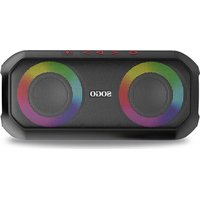


| Type de produit | Portable wireless Bluetooth speaker with LED lighting |
| Marque | Sogo |
| Modèle | SS-8590 |
| Dimensions (L x l x H) | 22 x 10 x 10 cm |
| Poids | Approximately 500 g (estimated) |
| Alimentation | Li-ion battery 2000 mAh / 3.7 V; DC 5V-2A input via USB-C port |
| Autonomie | 3 to 10 hours depending on volume and lighting |
| Temps de charge | Approximately 4 hours |
| Version Bluetooth | Bluetooth V5.0 |
| Portée Bluetooth | 10 meters |
| Puissance de sortie | 2 x 12W (24W RMS) |
| Réponse en fréquence | 20 Hz - 20 kHz |
| Distorsion harmonique | ≤ 1% |
| Sensibilité sonore | ≥ 70 dB |
| Indice de protection | IP6 (resistant to strong water jets) |
| Connectivité | Bluetooth, auxiliary input (AUX), micro SD card reader (max 64 GB) |
| Fonctions principales | Play/pause, volume control, track skip, hands-free, TWS (stereo with 2 speakers), 9 RGB lighting effects |
| Accessoires inclus | USB-C charging cable, instruction manual |
| Entretien et nettoyage | Soft, dry cloth; no abrasive cleaners |
| Sécurité | Do not immerse, do not expose to heat, do not attempt to repair yourself |
| Réparabilité | Built-in battery not replaceable by user; repairs by qualified technician |
| Garantie | Manufacturer warranty (see after-sales service) |
| Service après-vente | www.sogosat.com / email: sogosat@sogosat.com / tel: 0034 902 222 161 |
Frequently Asked Questions - SS-8590 Sogo
User questions about SS-8590 Sogo
0 question about this device. Answer the ones you know or ask your own.
Ask a new question about this device
Download the instructions for your Speakers in PDF format for free! Find your manual SS-8590 - Sogo and take your electronic device back in hand. On this page are published all the documents necessary for the use of your device. SS-8590 by Sogo.
USER MANUAL SS-8590 Sogo
BLUETOOTH SPEAKER
Caution: please read and preserve these important instructions
INDEX
Press briefly 1 time
- Important Notice p. 15
- Safety Instruction for the User p. 15
I. Restrictions p. 15-17 II. Precautions while during the usage of product p. 17-18
- Product Features p. 18
- Technical Specifications p. 19
- Product and accessories Information p. 19
- Slots and Key functions p. 19-20
- Bluetooth Speaker functions p. 20-24
- Charging instructions p. 24
- Cleaning and maintenance p. 24
- Disposal of electronic goods p. 24
- Declaration of conformity p. 74
- Disposal responsibility, Manufacturer and after sales service details p. 75
IMPORTANT NOTICE
• Always read the instruction book carefully before using. • This manual can be downloaded from our web page www.sogo.es - Keep these instructions for future reference.
2. SAFETY INSTRUCTIONS FOR THE USER
I. Restrictions
- Never immerse the speaker or the charging cable in water or any other liquid. In the event of the speaker falling in water take it to an authorized service agent for repair before reusing.
- Do not place or operate the speaker on or near hot surfaces (e.g., stove plates) or open flames.
- In case of hardware problems, do not attempt to repair the product yourself. Repairs should only be carried out by qualified technicians.
- Never use accessories that are not recommended by the
manufacturer.
- The use of accessories not recommended or sold by the appliance manufacturer may result in fire, electric shock or irreparable damage to the product.
- Do not use the speaker for any other purpose than described in this manual.
- Do not leave the speaker charging longer than recommended by the manufacturer, as this may damage the battery or the speaker itself.
- Do not use the speaker while in charge, otherwise it may also damage the speaker.
- Do not drop, disassemble, deform, modify or insert any objects into this product as operating damage may result.
- Do not attempt to repair, modify or disassemble the product yourself. This product does not contain any user-serviceable components and may void the warranty.
- Do not clean the product with alcohol, ammonia based cleaners and abrasive cleaners.
- Do not place this product in
contact with any sharp objects as this may cause scratches and operating damage.
- Do not attempt to replace the product battery, it is built-in and is not user changeable. • Children should be supervised to ensure that they do not play with the appliance.
- Cleaning and user maintenance shall not be made by children.
II. Precautions while during the usage of product
- Keep the speaker away from direct sunlight, fire, or other high voltage equipment.
- ⚠️ WARNING: the device might get warm during charging. Always ensure the speaker is turned off when you plug and unplug the device. If the device is not turned off you might damage the speaker or injure yourself.
- Observe all signs and displays that require an electrical device or RF radio product to be switch off in designated areas.
- Dispose of the product and the product's battery in accordance with local laws and regulations.
- In case of speaker malfunction, or if it has been damaged in any manner, return it to the nearest authorized service facility for examination, repair or adjustment.
3. Product Features
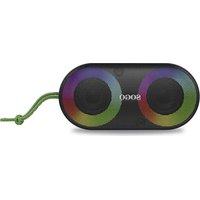
- Wireless portable Bluetooth speaker with LED light
- Enjoy the musical beats with RGB colour lightning effects (nine lighting effects and various colour changes) • TWS music system capable of working as a stereo pair with another speaker (same model)
- Dual power protection, to protect the device and user
- With 2000mAh high power performing battery capacity to enjoy the music for long period of time
- Accessory: USB power cable with type c
- Protected against strong jets of water: IP6 Protection
4. Technical Specifications
| Output power | 2 x 12W, 24W RMS |
| Driver unit size | 22 x 10 x 10 cm |
| Sound sensibility | ≥ 70 dB |
| Frequency response | 20Hz- 20Khz |
| Distortion | ≤ 1% |
| Bluetooth version | V5.0 |
| Bluetooth range | 10 metres |
| Bluetooth pairing name | SOGO SS-8590 |
| USB & TF max. memory supported | 64 GB |
| Battery capacity | Built-in 2000mAh 3.7V |
| Battery type | Li-ion |
| Input Power | DC 5V-2A |
| Working time | 3 – 10 hrs (Max) |
| Charging time | 4 hrs |
| Charging Port | Type C |
| Slot | Micro SD card (64GB) |
| Connection | Bluetooth |
Note: the playing time depends on the volume and LED light usage.
- If the volume is max and lights are turned off the playing time is 4H
- If the volume is 50% and lights are turned off the playing time is 10H
- If the volume is max and lights are turned on the playing time is 3H
- If the volume is 50% and lights are turned on the playing time is 9H
5. Product and accessories Information
This box contains 1 unit of Bluetooth speaker, 1 instruction manual and type C charging cable.
Bluetooth speaker*1 Type C charging cable*1 Instruction*1
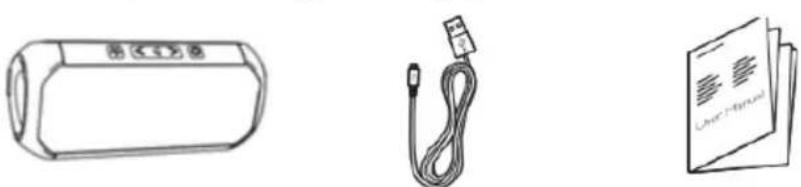
Type C charging cable*1
Instruction*1
6. Slots and Key functions
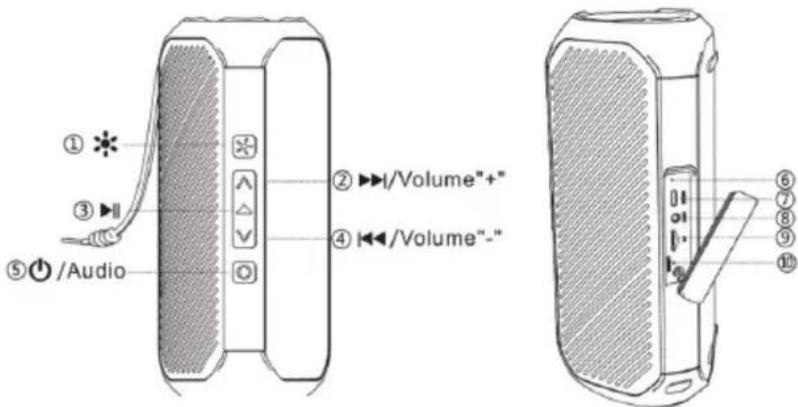
- Light Button
- Volume "+" / Next song
- Play/Pause
- Volume "-" / Previous song
- On/Off
- Charging indicator
- Charging port
- Auxiliary cable port
- Micro SD card (TF card)
- Reset Key
- Light key: This speaker has an attractive function of flashing lights automatically following the musical beats. With the help of the light button, the lighting function can be set as per need and as per choice.
- Volume "√" / previous song: This button can be used to decrease the volume and to move from a song to the previous song from the song list. To change the volume, press the "√" button once, it decreases the volume and in order to decrease it more, keep pressing it gradually.
To move to the previous song, hold the button and press it longer (long press) and it will move to the previous song and the same way, keep pressing the button until you get the desired song from the play list.
- Play/Pause: This button is located on the top part of the speaker. With the help of this button you play the music and by pressing the same button music can be paused at any point.
- Volume "^" / Next song: This button can be used to increase the volume and to move from a song to the next song from the song list. To change the volume, press the "^" button once, it increases the volume and in order to increase it more, keep pressing it gradually. To change to the next song, hold the button and press it longer (long press) and it will move to the next song and the same way, keep pressing the button until you get the desired song from the play list.
- On/Off: This button is simply used to turn the device on and off.
- Charging indicator: This speaker has a charging indicator, which indicates the charging status of the speaker. It is located on the lateral side, behind the silicone cover. When the charging cable is connected to the speaker and the other side to the wall outlet with the help of a charging adapter, the charging indicator turns on and once the battery gets fully charged it turns off.
- Charging port: This speaker has a Type-C charging port for charging. The unit also includes a Type-C charging cable.
- Auxiliary cable port: With the auxiliary cable, you can connect any device such as an MP4 player, radio, or other device and enjoy the content.
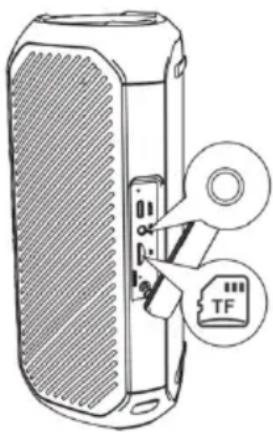
- Micro SD card (TF card): This speaker supports Micro SD cards up to 64 GB capacity. The Micro SD card slot is also located on the side behind the silicone cover.
- Reset key: This speaker also has a reset button, located on the side behind the silicone cover. This button helps reset the speaker settings to factory defaults.
7. Bluetooth Speaker Functions
1) Bluetooth Connection
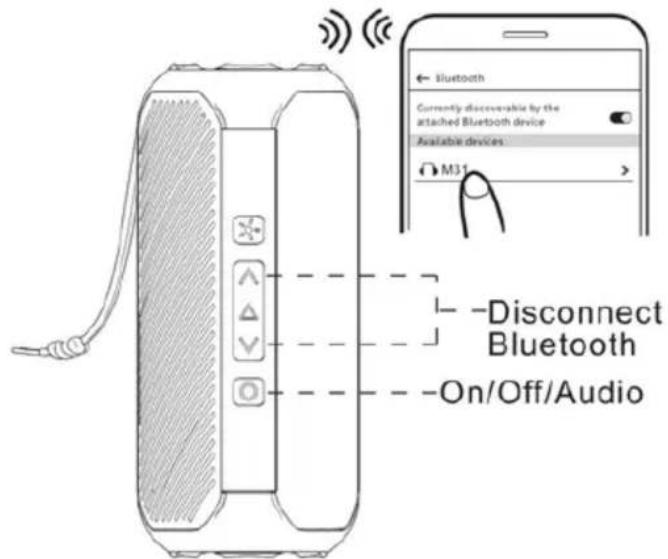
How to connect an electronic device to the Bluetooth speaker SS-8590?
1. Long press
To connect your electronic device, turn on the speaker. The speaker automatically enters pairing mode. Also, turn on the Bluetooth mode on your electronic device and make sure it is visible to all nearby devices.
Search for the Bluetooth pairing name SOGO SS-8590 on your device screen. Once it appears, press it to connect with the speaker and wait until connected.
Once your device is connected to the speaker, the lights start to move fast. Now you can play any music or song on your device to listen through the Bluetooth speakers.
2. Short press ×1
Audio switch mode (Micro SD card or TF card mode): This speaker works in 2 modes: one is Bluetooth mode and the other is Audio switch mode or Micro SD card mode.
The Bluetooth mode is the default mode, and when the speaker doesn't have any memory card inserted, it works only in the default mode. However, when a memory card is inserted, you can choose between the modes using the power button. By pressing it for a short period of time (short press), you can switch between the modes.
- & : In order to disconnect your Bluetooth device, press
the “^” and “v” buttons together (short press) and your device will disconnect from the speaker.
To connect it again, press the “^” and “v” buttons together (short press) and your device will connect again to the speaker.
2) Light mood
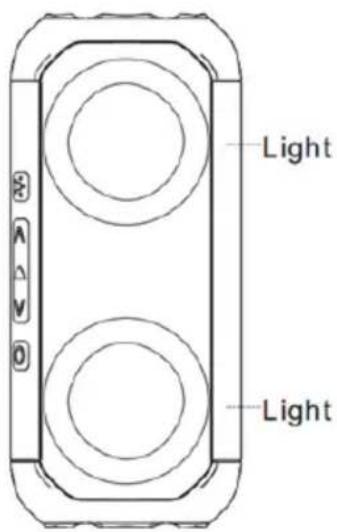
1. Lighting effect switch

The default light color is multiple colored moving rings. The rings continue moving with changing colors. When pressing the button the first time, single color rings appear and keep changing colors automatically. Pressing the button again, the single color rings revolve and constantly
change color, so in this way there are multiple colored ring options which keep changing and flashing according to the music beat. Also, you can turn off the light by keeping the button pressed until it turns off on its own.
2. * Short press x2
By pressing the Light button twice with a short press, the light function can be switched off, and by pressing the same button twice again, it can be switched on again.
3) Music control
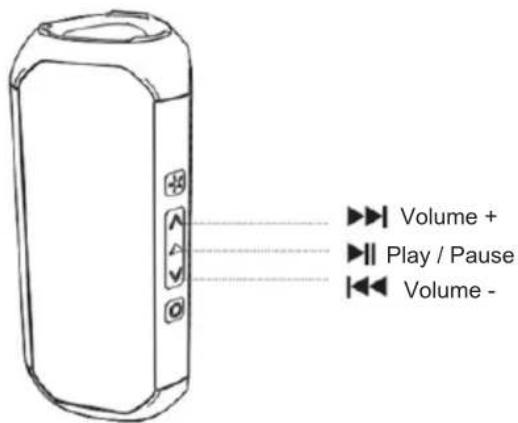
The song and music can be controlled with the help of the “^” and “v” buttons and the play button. The “^” and “v” buttons are used to increase and decrease the volume of the speaker, and the same buttons can be used to move to the previous and next song in the song list.
To increase or decrease the volume, press the button briefly. To move to the previous or next song, press and hold the button.
The play button can be used to play a song and pause it at any time.
4) Hands-free function
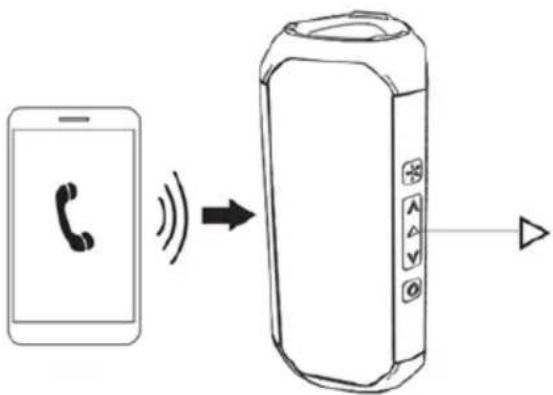
The very first time, although the mobile can be connected with the speaker, it has not activated the hands-free button, and you might not hear the incoming ring tone through the speaker. So, in order to activate the button, your device must be connected with the speaker and when you get a call, receive it manually using the device. Once you receive or accept it manually, that is the time when your hands-free function activates.
Also you can activate the hands-free function with the play button. So when your device is connected with the speaker and you receive any call, press the Play button located on the top part of the speaker and at the same time hands-free will be activated.
Use of Play button in Hands-free function:
Short press x1: Answer / Hang up: In hands-free mode, if you need to answer any call, just press the play button briefly, and the same button with a short press can hang up the call.
Long press: Reject call: In order to reject the call, the play button needs to be pressed for a long time.
Short press x2: Dial last call: If you need to redial the last call, press the play button twice and the phone automatically starts calling.
5) TWS Function
How to connect 2 speakers at a time?
In order to use the TWS function, you need 2 speakers of the same model with the same Bluetooth pairing name.
First, we will turn on both speakers and they will automatically enter Bluetooth mode. You need to short press the power button two times on any of the speakers and you will hear a prompt sound of "TWS ON", meaning both speakers are connected to each other.
Now you need to turn on the Bluetooth mode of the mobile or device that you want to connect. Once the device finds the Bluetooth pairing name of the speaker SS-8590, connect them by pressing the connect button, and both speakers will automatically connect to the device and be ready to start playing music.
To disable the TWS function, you need to short press the power button twice, and the function will be disabled with the prompt voice "TWS OFF".
Note:
- Make sure both speakers are of the same model and have the same Bluetooth pairing name.
- Once the device has been added to the TWS function, the speakers will connect automatically the next time.
- During TWS mode, functions can be operated by any speaker. 6) Auxiliary cable port: With the help of an auxiliary cable, you can connect any device like MP4 players, radios, or any other device and enjoy the content.
Aux-In / Line-In
With the help of the Aux-In input, you can connect all musical devices such as radios, laptops, televisions, and all devices that do not have a Bluetooth connection function.
To connect the devices, you need an audio cable. Connect one end to the speaker's Aux-in and the other end to the device you want to connect, and the device will automatically connect with the speaker.
Aux-In mode is automatic; once you insert the auxiliary cable, the speaker automatically enters the mode.
With the help of the device, you can play music and songs.
NOTE: In this mode, all functions are controlled by the external device.
7) Memory card function

short press ×1
Audio switch mode
To use the speaker with a memory card, first remove the lateral silicone cover and insert the memory card into the card slot. The speaker will automatically enter TF card mode, and then with the help of the Play and “” and “” buttons, you can enjoy your saved music. To enter Bluetooth mode again, press the same on/off button.
Note: The unit will work as a single mode unit without any memory card inserted. Once you insert the memory card, you can use either mode to listen to music.
8. Charging instructions
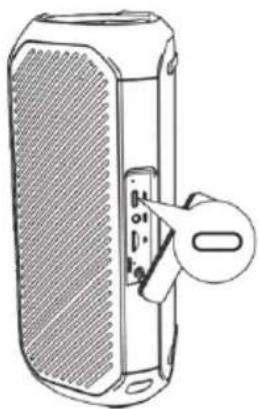
This unit has been provided with a USB-C charging cable. To charge the speaker, connect the speaker to a charging adapter and plug it into a wall outlet. You can use any charging adapter, including the one you use to charge your mobile phone. Once you connect the charging cable to the speaker, the red light will turn on, indicating that the unit is charging. When the battery is fully charged, the red light turns off.
Note:
- This unit does not include a USB charging adapter, but any USB charging adapter can be used, including your common mobile phone charging adapter.
- To increase battery life and ensure smooth operation, it is recommended to charge the unit fully once a month.
9. Cleaning and maintenance
When cleaning the product, use a soft, dry cloth. For severe stains, use a damp cloth.
Do not use abrasive cleaners, as they can damage the paint, plastic, or the speaker itself.
Keep it away from direct sunlight and do not place it in hot or humid environments. Make sure to remove the power adapter cable and store it in a cool, dry place.
10. Disposal of electronic goods
DISPOSAL OF BATTERY-OPERATED UNITS
Do not dispose of battery-operated units as regular rubbish. They should always be recycled properly and in accordance with local municipal laws. You can recycle them by taking them to government-authorized disposal centers or specialized bins, which can be found in nearby large supermarkets, electronics or home appliance stores, or malls that have such facilities.
INDEX

Premir ×1

Press once briefly
Audio mode
DECLARATION OF CONFORMITY
DECLARATION OF CONFORMITY
This device complies with EU RED Directive 2014/53/EU related to Health and Safety from usage of Radio spectrum in household electronic equipment.
Electromagnetic Compatibility Directive 2014/30/EU.
Directive 2015/863/EU on the restriction of the use of certain hazardous substances in electrical.

This symbol means that in case you wish to dispose of the product once its working life has ended, take it to an authorised waste agent for the selective collection of waste electrical and electronic equipment (WEEE).

Designed by: SOGO based on European quality standards
Imported by: Sanysan Appliances S.L, NIF: B98753056, C/ Barcas 2, 2, 46002 Valencia, Spain
Product manufactured in P.R.C
After-sales service: www.sogosat.com sogosat@sogosat.com / 0034 902 222 161
- INDEX
- IMPORTANT NOTICE
- SAFETY INSTRUCTIONS FOR THE USER
- RESTRICTIONS
- PRECAUTIONS WHILE DURING THE USAGE OF PRODUCT
- PRODUCT FEATURES
- TECHNICAL SPECIFICATIONS
- PRODUCT AND ACCESSORIES INFORMATION
- SLOTS AND KEY FUNCTIONS
- BLUETOOTH SPEAKER FUNCTIONS
- LONG PRESS
- SHORT PRESS ×
- LIGHT MOOD
- LIGHTING EFFECT SWITCH
- SHORT PRESS X
- MUSIC CONTROL
- HANDS-FREE FUNCTION
- TWS FUNCTION
- HOW TO CONNECT 2 SPEAKERS AT A TIME
- NOTE
- AUX-IN / LINE-IN
- MEMORY CARD FUNCTION
- AUDIO SWITCH MODE
- CHARGING INSTRUCTIONS
- CLEANING AND MAINTENANCE
- DISPOSAL OF ELECTRONIC GOODS
- DISPOSAL OF BATTERY-OPERATED UNITS
- AUDIO MODE
- DECLARATION OF CONFORMITY
Brand : Sogo
Model : SS-8590
Category : Speakers