
SS-8780 - Speakers Sogo - Free user manual and instructions
Find the device manual for free SS-8780 Sogo in PDF.
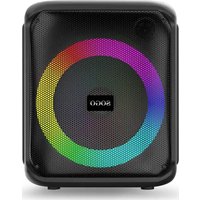


| Product type | Portable Bluetooth speaker |
| Brand | Sogo |
| Model | SS-8780 |
| Output power | 15W RMS (300W PMPO) |
| Sound sensitivity | ≤85dB |
| Frequency response | 100Hz - 18kHz |
| Distortion | ≤1% |
| Bluetooth version | V5.0 |
| Bluetooth range | 10 meters |
| Bluetooth pairing name | SOGO SS-8780 |
| Battery capacity | 2400 mAh (7.4V Lithium-ion) |
| Charging time | 2 to 4 hours |
| Operating time | 3 to 5 hours (max) |
| Power supply | DC 9V, 1.5A power adapter |
| Protection | IPX4 (water splashes) |
| Supported formats | USB up to 64GB, TF card up to 64GB |
| Main functions | Bluetooth, TWS, FM, AUX, MP3, Karaoke, Recording, RGB LED |
| Included accessories | Remote control, wired microphone, 9V/1.5A power adapter |
| Care and cleaning | Clean with a soft dry cloth. Do not use abrasive cleaners. |
| Batteries and recycling | Built-in battery not user-replaceable. Recycle according to local regulations. |
Frequently Asked Questions - SS-8780 Sogo
User questions about SS-8780 Sogo
0 question about this device. Answer the ones you know or ask your own.
Ask a new question about this device
Download the instructions for your Speakers in PDF format for free! Find your manual SS-8780 - Sogo and take your electronic device back in hand. On this page are published all the documents necessary for the use of your device. SS-8780 by Sogo.
USER MANUAL SS-8780 Sogo
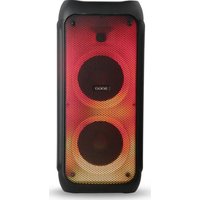
PORTABLE RECHARGEABLE PARTY SPEAKER
BATTERY CHARGING
• Always read the instruction book carefully before using. - This manual can be downloaded from our web page www.sogo.es - Keep these instructions for future reference.
2. SYMBOL DEFINITIONS
- DANGER: Indicates an imminently hazardous situation, which, if not avoided, will result in death or serious injury. This symbol appears only in the most extreme situations.
- WARNING: Indicates a potentially hazardous situation which could result in death or serious injury.
- CAUTION: Indicates a potentially hazardous situation, which, if not avoided, may result in minor/moderate injury or product/property damage. It also warns against unsafe practices.

The lightning flash with arrowhead symbol, within an equilateral triangle is intended to alert the user to the presence of insulated 'dangerous voltage' within the product's enclosure that may be of sufficient magnitude to constitute a risk of electric shock to persons.
WARNING: TO REDUCE THE RISK OF ELECTRIC SHOCK DO NOT REMOVE COVER (OR BACK), NO USER SERVICEABLE PARTS INSIDE, REFER SERVICING TO QUALIFIED SERVICE PERSONNEL.

The exclamation point within an equilateral triangle is intended to alert the user to the presence of important operating and maintenance (servicing) instructions in the manual book accompanying the appliance.
3. SAFETY INSTRUCTIONS FOR THE USER

I. Restrictions
- Do not use the appliance for any other purpose than described in this manual.
- Do not place or operate the Bluetooth speaker near water sources.
- Do not use or store the appliance outdoors.
- Do not leave the power cord hanging from sharp edges and keep it away from hot objects and flames. Do not wind the cord around the appliance and do not bend it.
- While using the appliance, make sure that the power cord is not caught or crushed.
- Do not use the appliance if it has fallen on the floor, if there are visible signs of damage, or if it has a leak.
- Do not use the appliance if the cable or plug is damaged. If the cord is damaged, it
must be replaced only by the manufacturer, its service agent, or similarly qualified persons in order to avoid hazard.
- Never immerse the speaker or the charging cable in water or any other liquid. If the speaker falls into water, take it to an authorized service agent for repair before reusing.
- Do not place or operate the speaker on or near hot surfaces (e.g., stove plates) or open flames.
- Never use accessories that are not recommended by the manufacturer.
- The use of accessories not recommended or sold by the appliance manufacturer may result in fire, electric shock, or irreparable damage to the product.
- Do not use the speaker for any purpose other than described in this manual.
- Do not leave the speaker charging longer than recommended by the manufacturer, as this may damage the battery or the speaker itself.
- Do not use the speaker while it is charging, as this may also damage the speaker.
- This product has no user-serviceable parts. Do not attempt to repair this product yourself. Only qualified service personnel should perform servicing. Take the product to the electronics repair shop of your choice for inspection and repair.
- Never let anyone, especially children, push anything into holes, slots, or any other openings in the unit's casing, as this could result in a fatal electric shock.
- Do not mount this product on a wall or ceiling.
- Do not place the unit near TVs, speakers and
other objects that generate strong magnetic fields.
Do not leave the unit unattended when it is in use.

NOTE: To disconnect the system completely if it is not to be used for a long time, remove the AC power plug from the wall outlet.
- Do not drop, disassemble, deform, modify or insert any objects into holes of the speaker as it may result in product damage.
- Do not clean the product with alcohol, ammonia-based cleaners and abrasive cleaners.
- Do not place this product in contact with any sharp objects as this may cause scratches and operating damage.
- Do not attempt to replace the product battery, it is built-in and is not user changeable.
- Children should be supervised to ensure that they do not play with the appliance.
- Cleaning and user maintenance shall not be made by children.
II. Precautions during the usage of the product
- This product is intended for indoor, non-industrial, non-commercial and only for household use. Do not use the item outdoors or for any other purpose. Misuse or improper handling may cause problems in the appliance and cause injury to the user.
- The unit must be used only for the intended purposes. No liability is accepted for damages arising from improper use or wrong handling.
- Ensure that the voltage indicated on the nameplate matches the mains voltage before plugging in the appliance.
- In case of speaker malfunction, or if it has been damaged in any manner, return it to the nearest authorized service facility for examination, repair or adjustment.
- In case of hardware problems, do not attempt to repair the product yourself. Repairs should only be carried out by qualified technicians.
- Always place the appliance on a flat and even surface.
- When you want to remove the plug from the wall contact, please do this at the plug itself and not by pulling on the cable or the appliance itself.
- Make sure your hands are dry before plugging or unplugging.

Keep the speaker away from direct sunlight, fire, or other high voltage equipment.

WARNING: the device might get warm during charging. Always ensure the speaker is turned off when you plug and unplug the device. If the device is not turned off you might damage the speaker or injure yourself.
- Place the unit where there is good ventilation. Place the system on a flat, hard and stable surface. Do not expose to temperatures above 40°C. Allow at least 30 cm clearance from the rear and the top of the unit and 5 cm from each side.
- Press the buttons of the unit gently. Pressing them too hard can damage the unit. • Always ensure that the product is unplugged
from the electrical outlet before moving or cleaning. Clean it with dry cloth only.
- Unplug the product during lightning, storms or when it will not be used for long periods of time.
- Observe all signs and displays that require an electrical device or RF radio product to be switch off in designated areas.
- Dispose of the product and the product's battery in accordance with local laws and regulations.
- Dispose of used batteries in an environmental-responsible manner.
4. Product Features
- 1*8" bass speaker with tweeter for high pitches sound
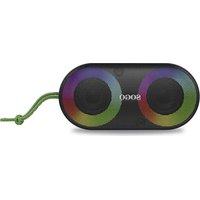
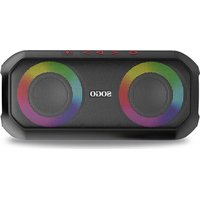
- Wireless portable Bluetooth speaker with LED light • Actual 15W RMS power (300W PMPO)
- Enjoy the musical beats with RGB colours lightning effects (Various lighting effects and various colour changes)
- TWS music system in capable of working as stereo pair with another speaker (same model) • MP3 and FM function
- With auxiliary cable input
- Memory card slot with 32/64 GB capacity and USB slot
- With 2400mAh high power performing battery capacity to enjoy the music for long period of time
- Protected against water splashes: IP4 Protection
- Karaoke function
- Accessory: Remote control, Wired Mic, Power adaptor of 9V, 1.5A
5. Technical Specifications
| Output power | 15W RMS power (300W PMPO) |
| Sound sensibility | ≤85dB |
| Frequency response | 100Hz- 18Khz |
| Distortion | ≤1% |
| Bluetooth version | V5.0 |
| Bluetooth range | 10 metres |
| Bluetooth pairing name | SOGO SS-8780 |
| USB & TF max. memory supported | 64 GB |
| Battery capacity | Built-in 7.4V / 2400mAh |
| Battery type | Li-ion |
| Power Adaptor | DC 9 V, 1.5A |
| Working time | 3 – 5 hrs (Max) |
| Charging time | 2 – 4 hrs |
| Slot | SD card / USB(64GB), Microphone |
| Connection | Bluetooth / Auxiliar input |
6. Product and accessories Information
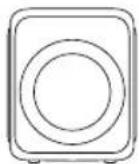
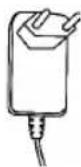
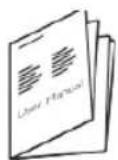
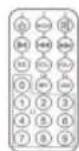
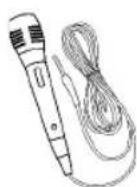
The box of this product contains 1 Bluetooth speaker, Instruction manual, Charging adapter, 1 Remote control and 1 Wired microphone.
1 Bluetooth speaker
1 Charging adapter
1 Instruction manual, 1 Remote control
1 Wired microphone
7. Product and Panel Overview
Back Panel
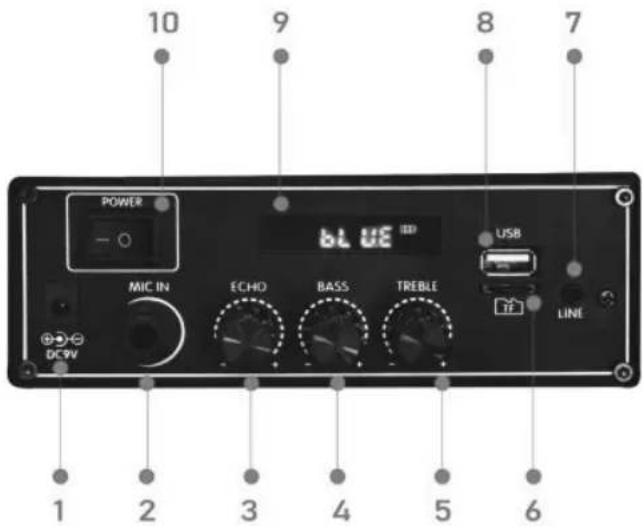
1: DC INPUT 9V: To connect the power adaptor to charge the speaker. 2: Wired mic input: Used to connect the wired mic and to use the speaker for Karaoke function. 3. ECHO: Press the ECHO button on the unit to turn on or off the microphone echo effect. 4. Bass: Press the SUPER BASS button on the unit to increase the music bass effect. 5. Treble: To change sound and music quality. 6. TF card: Supports up to 64GB memory card. 7. Line/AUX input: With the help of an auxiliary cable, you can connect any device like MP4, radios, or any other device and enjoy the content. 8. USB port: Supports 64GB USB card. 9. LED display: Located on the back part of the speaker, to show speaker functional mode and
1: DC INPUT 9V: To connect the power adapter to charge the speaker. 2: Wired mic input: Used to connect the wired mic and to use the speaker for karaoke function. 3. ECHO: Press the ECHO button on the unit to turn on or off the microphone echo effect. 4. Bass: Press the SUPER BASS button on the unit to increase the music bass effect. 5. Treble: To change sound and music quality. 6. TF card: Supports up to 64GB memory card. 7. Line/AUX input: With the help of an auxiliary cable, you can connect any device like MP4, radios, or any other device and enjoy the content. 8. USB port: Supports 64GB USB card. 9. LED display: Located on the back part of the speaker, to show the speaker's functional mode and
Power on/off: With the help of this button, you can switch on and switch off the unit.
- Power on/off: This button can be used to switch the unit on and off.
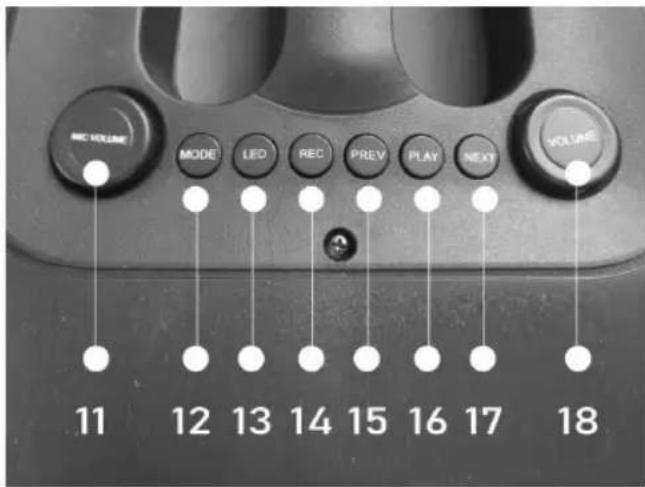
- Mic volume: This rotating knob helps to increase and decrease the mic volume. Rotating it in the clockwise direction increases the volume, and anticlockwise decreases it.
- Mode: Bluetooth / FM / AUX mode: When we switch on the speaker, it automatically enters into Bluetooth mode as the default mode. With the help of this button, we can change it into FM or Aux mode.
- LED Button: This speaker has an attractive function of RGB flashing lights automatically following the musical beats. There are multiple light functions; with the help of the LED light button, any lighting function can be set/choose as per need and as per choice.
- REC: Press and hold for 3 seconds to record. Press REC button to repeat it.
- Previous Song/Previous Channel: To move to the previous song or channel, hold the button and press it once. It will move to the previous song. Keep pressing the button until you get the desired song from the playlist.
- Play/Pause: Short press to play or pause. Long press for TWS pairing. The play/pause button can be used to turn on the music and stop it. The same button can be used to put the unit into TWS pairing mode. In TWS pairing mode, two same-model units can be connected to a single device, which helps enhance the sound power.
- Next Song/Next Channel: To change to the next song, hold the button and press it. It will move to the next song. Keep pressing the button until you get the desired song from the playlist.
- Music volume: This rotating knob helps increase and decrease the music volume. Rotating it clockwise increases the volume, and rotating it anticlockwise decreases it.
8. Remote control buttons overview
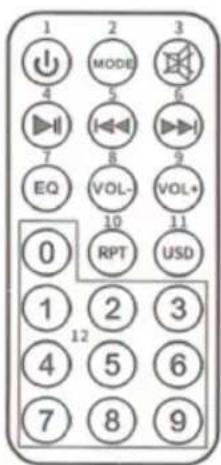
- Power / Standby: With the help of this button, the unit can be switched on and put into standby mode. To switch it off permanently, you need to switch it off with the button located on the back part of the speaker.
- Mode conversion (Media Player/AUX/FM): Audio switch mode (Memory card or TF card mode): This speaker works in multiple modes, including Bluetooth mode, Auxiliary, FM, USB drive, and Micro TF card mode.
The Bluetooth mode is the default mode. When the speaker does not have any memory card inserted, it works only in the default mode. However, when a memory card or USB drive is inserted, it enters the Memory SD card / USB drive mode.
This button helps to change and select from Bluetooth to Auxiliary or FM mode. 3. Mute: To mute or unmute the speaker sound.
- Play/pause: This button helps to play or pause the music in any mode. In FM mode, a short press can move to the next saved channel. If you press this button once in FM mode, the same button starts searching different FM channels and keeps saving them automatically.
- (Fast rewind): In Bluetooth audio mode, this button helps to move to the previous song or video. In FM mode, it moves to the previous channel to search manually.
- (Fast forward): In Bluetooth audio mode, this button helps to move to the next song or video. In FM mode, it moves to the next channel searching manually.
- EQ: This unit has a built-in equalizer system. Press the EQ button on the remote to select a setting that best matches the music style: FLAT, CLASSIC, ROCK, POP, and JAZZ. In Bluetooth audio mode, a short press can change the song equalizer.
- Vol- (volume): To reduce the volume.
- Vol+ (volume): To increase the volume.
- RPT: With the help of this button, you can listen to your favorite song multiple times and tirelessly. 11 USB/SD: To change the USB / Micro SD mode.
- 0-9 numbers: Directly select the channel that has already been saved in the speaker system.
9. Bluetooth Speaker functions
Before starting
Make sure to fully charge the battery of the speaker before first use, as it enhances the battery lifespan. The default mode is Bluetooth mode, and later you can change it to any mode with the help of the mode button.
IPX4 PROTECTION:
This unit provides IPX4 protection, meaning it is protected from water splashes. Therefore, ensure that while using it, any nearby water source and button panels are kept away from direct water contact. Also, make sure that the charging input does not get wet.
How to connect a device to the Bluetooth speaker?
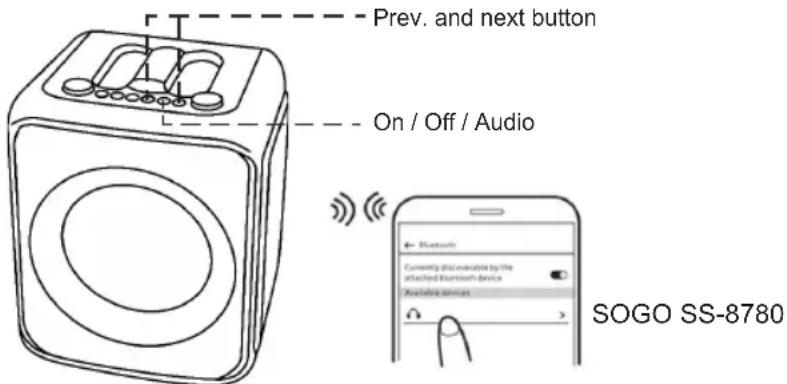
To connect your electronic device, turn on the speaker using the On/Off button located on the back panel. The speaker automatically enters pairing mode. Also, turn on the Bluetooth mode on your electronic device and make sure it is visible to all nearby devices.
Search for the Bluetooth pairing name SOGO SS-8780 on your device screen. Once it appears, press it to connect with the speaker and wait until connected.
Once your device is connected to the speaker, the RGB lights start to move quickly. Now you can play any music or song on your device to listen through the Bluetooth speakers. Using the Play/Pause button, you can play and stop the music anytime. With the Previous and Next buttons, you can choose songs from the song list.
NOTE: Once your device is connected to the Bluetooth speaker, there is no need to reconnect it. Whenever you turn on the Bluetooth of your device, it will automatically connect to the speaker.
TWS Functioning:
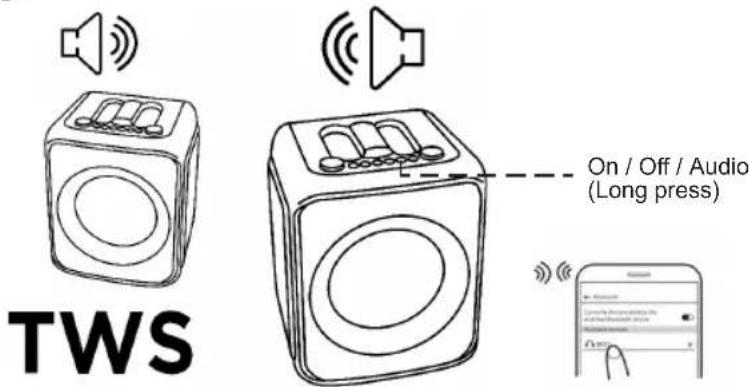
This speaker model has a special function known as TWS (True Wireless) function. With this function, you can connect two speakers at the same time to the same device without any wired connection. This function helps enhance the sound level and also helps cover a large area for parties and functions.
To turn on the TWS function, switch on two identical speakers of the same model. Press and hold the play button for a long period (long press), and in no time both speakers will be connected to the device.
Now you can enjoy music and songs with enhanced quality.
NOTE: To use the TWS function, make sure both speakers are of the same model and have the same Bluetooth pairing name.
Aux-In / Line-In
With the Aux-In input, you can connect all musical devices such as radios, laptops, televisions, and all devices that do not have Bluetooth connection capability. To connect the devices, you need an audio cable. Connect one end to the speaker's Aux-In and the other end to the device you want to connect, and the device will automatically connect to the speaker. Aux-In mode is automatic; once you insert the auxiliary cable, the speaker automatically enters the mode. Using the device, you can play music and songs.
NOTE: In this mode, all functions are controlled by the external device.
Music with the help of USB drive and Micro TF / SD card:
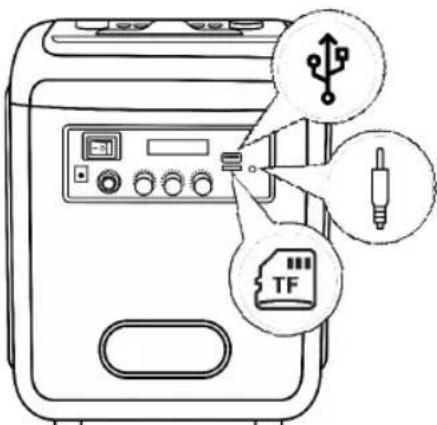
This speaker has USB and Micro TF card slots. With the help of these slots, you can listen to the music saved in your pen drive or memory card. To play the speaker in USB drive mode / TF card mode, firstly switch on the speaker with the help of the power button located on the back panel. Insert the USB pen drive or micro-SD card into the corresponding slots. For this mode as well, no
need to choose the mode, as just by inserting the USB card / micro-SD card, the unit speakers automatically start to play saved music.
In this mode, with the help of the Play button, music can be played or paused at any time, and with the prev. and next buttons, you can switch the songs from the song list saved into the external memory cards.
NOTE: Make sure while you insert the USB drive / Micro SD card, the speaker must be in Bluetooth mode.
FM mode:
Press the power button to switch on the speaker, and with the help of the Mode button, you can switch from Bluetooth mode to FM mode.
Press the "Play" button, and the speaker automatically starts to search different FM channels. Once it receives the signal of a channel, it keeps saving automatically.
Once all the FM channels are saved, you can search your favourite FM channels with the help of the prev. / next buttons and listen to the music.
NOTE: In FM mode, in order to get a better FM signal, please insert the audio cable into the Aux-in input, and it works as an antenna.
Recording function:
To use the recording function, make sure that the speaker has a USB pen drive or TF card inserted. Turn on the speaker and plug in the microphone. Once the microphone gets connected, your device is ready to record your voice.
Press the REC button to start the recording procedure, and the same button can be used to stop the recording.
RGB LED Light function
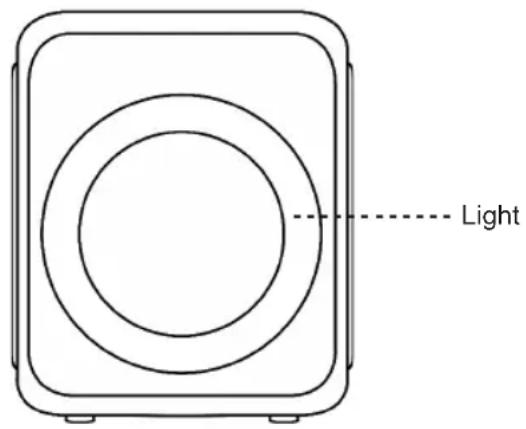
The default light colour is multiple colours moving rings. The rings continue moving with the changing colours. While pressing the first time, the single colour rings appear and keep changing colours automatically. Pressing the button again, the single colour rings revolve and constantly change the colour. So this way, there are multiple-coloured ring options which keep changing and flash as per the music beat. Also, you can turn off the light by keeping pressing until it turns off on its own.
Microphone connection
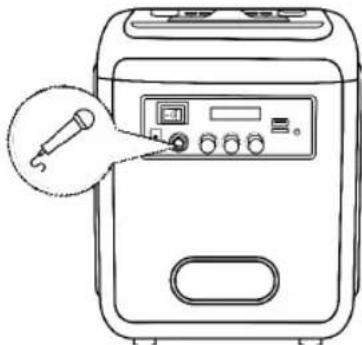
This speaker has a microphone input, allowing you to connect the microphone provided with the speaker unit.
Use the Mic volume knob to increase or decrease the microphone volume.
10. Charging instructions
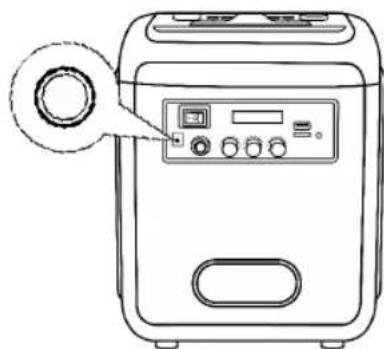
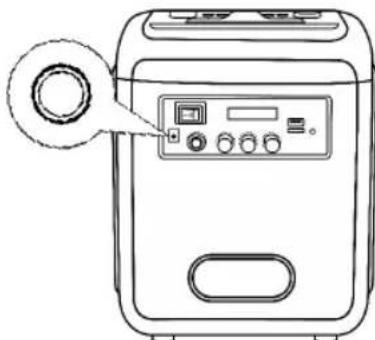
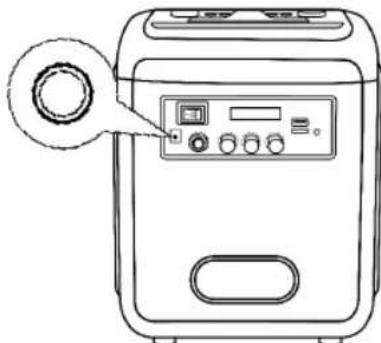
This unit has a built-in battery. To charge it, use the provided 9V, 1.5A power adapter. Turn off the unit, plug the adapter into a wall outlet, and connect it to the speaker's charging port. The indicator light will turn red, indicating that the unit is charging.
Charging takes approximately 4-5 hours. Once the battery is fully charged, the indicator light turns green.
To extend battery life, do not charge for more than 5 hours at a time.
NOTE: Play time depends on the type of music and volume. At 50% volume with normal music or sound, it works for approximately 5 hours.
The built-in battery is not replaceable. Do not attempt to remove or replace it yourself. In case of any issue, take it to an authorized service center for repair.
Ensure that the charging adapter input is dry before charging.
Do not use the speaker while it is charging, as this may reduce battery life.
11. Cleaning and maintenance
To clean the product, use a soft, dry cloth. For severe stains, use a damp cloth. Do not use abrasive cleaners, as they can damage the paint, plastic, or the speaker itself.
Keep it away from direct sunlight and do not place it in hot or humid environments.
Make sure to unplug the power adapter cable and store it in a cool, dry place.
12. Disposal of electronic goods
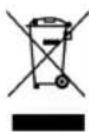
DISPOSAL OF BATTERY OPERATED UNITS
Do not dispose of battery-operated units as normal rubbish; always recycle them in a proper manner and according to local municipal laws. You can recycle them by taking them to government-authorized disposal centers or specialized bins, which you can find in any nearby large supermarkets, electronics or electro-domestic products stores, or malls that have these types of facilities available.
INDEX
SD/USB card (64GB), Microphone
Bluetooth / Auxiliary input
10. Charging instructions
- Charging instructions
DECLARATION OF CONFORMITY
DECLARATION OF CONFORMITY
This device complies with EU RED Directive 2014/53/EU related to Health and Safety from usage of Radio spectrum in household electronic equipment.
Low Voltage Directive 2014/35/EC.
Electromagnetic Compatibility Directive 2014/30/EU.
Directive 2015/863/EU on the restriction of the use of certain hazardous substances in electrical.
Directive 2009/125/EC on the eco-design requirements applicable to energy-related products.


151 263/EU
This symbol on the product or on the packaging indicates that this product cannot be disposed of as normal rubbish or household waste. All electrical, electronic equipment and battery-operated units must be recycled in a proper manner and according to local municipal laws. You can recycle them by taking them to government-authorized disposal centers or specialized bins, which you can find in any nearby big supermarkets, electronics or electro-domestic products stores, or malls that have these types of facilities available.
Designed by: SOGO based on European quality standards Imported by: Sanysan Appliances S.L, NIF: B98753056, C/ Barcas 2, 2, 46002 Valencia, Spain Product manufactured in P.R.C. After-sales service: www.sogosat.com sogosat@sogosat.com / 0034 902 222 161
- BATTERY CHARGING
- SYMBOL DEFINITIONS
- SAFETY INSTRUCTIONS FOR THE USER
- RESTRICTIONS
- PRECAUTIONS DURING THE USAGE OF THE PRODUCT
- PRODUCT FEATURES
- TECHNICAL SPECIFICATIONS
- PRODUCT AND ACCESSORIES INFORMATION
- BACK PANEL
- DC INPUT 9V: TO CONNECT THE POWER ADAPTOR TO CHARGE THE SPEAKER. 2: WIRED MIC INPUT: USED TO CONNECT THE WIRED MIC AND TO USE THE SPEAKER FOR KARAOKE FUNCTION. 3. ECHO: PRESS THE ECHO BUTTON ON THE UNIT TO TURN ON OR OFF THE MICROPHONE ECHO EFFECT. 4. BASS: PRESS THE SUPER BASS BUTTON ON THE UNIT TO INCREASE THE MUSIC BASS EFFECT. 5. TREBLE: TO CHANGE SOUND AND MUSIC QUALITY. 6. TF CARD: SUPPORTS UP TO 64GB MEMORY CARD. 7. LINE/AUX INPUT: WITH THE HELP OF AN AUXILIARY CABLE, YOU CAN CONNECT ANY DEVICE LIKE MP4, RADIOS, OR ANY OTHER DEVICE AND ENJOY THE CONTENT. 8. USB PORT: SUPPORTS 64GB USB CARD. 9. LED DISPLAY: LOCATED ON THE BACK PART OF THE SPEAKER, TO SHOW SPEAKER FUNCTIONAL MODE AND
- REMOTE CONTROL BUTTONS OVERVIEW
- BLUETOOTH SPEAKER FUNCTIONS
- BEFORE STARTING
- IPX4 PROTECTION
- TWS FUNCTIONING
- AUX-IN / LINE-IN
- MUSIC WITH THE HELP OF USB DRIVE AND MICRO TF / SD CARD
- FM MODE
- RECORDING FUNCTION
- RGB LED LIGHT FUNCTION
- MICROPHONE CONNECTION
- CHARGING INSTRUCTIONS
- CLEANING AND MAINTENANCE
- DISPOSAL OF ELECTRONIC GOODS
- DISPOSAL OF BATTERY OPERATED UNITS
- INDEX
- DECLARATION OF CONFORMITY
Brand : Sogo
Model : SS-8780
Category : Speakers