
SS-8760 - Speakers Sogo - Free user manual and instructions
Find the device manual for free SS-8760 Sogo in PDF.
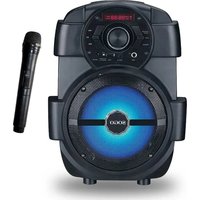


| Product type | Portable speaker |
| Brand | Sogo |
| Model | SS-8760 |
| Output power | 10 W |
| Frequency response | 80 Hz - 20 kHz |
| Impedance | 4 Ω |
| Power supply | DC 9V (AC adapter) or built-in rechargeable battery |
| Charging indicator | Red (charging), Green (fully charged) |
| Initial charging time | 4 hours minimum |
| Playback modes | Bluetooth, FM Radio, USB, Line-in |
| Additional features | Microphone recording, Repeat function (USB mode) |
| Inputs | Mic, Line-in (3.5 mm jack), USB, DC IN (9V) |
| Control buttons | Power/Input, Light, Repeat, Previous, Next, Play/Pause |
| Dimensions (approx.) | 20 x 10 x 10 cm |
| Weight (approx.) | 0.5 kg |
Frequently Asked Questions - SS-8760 Sogo
User questions about SS-8760 Sogo
0 question about this device. Answer the ones you know or ask your own.
Ask a new question about this device
Download the instructions for your Speakers in PDF format for free! Find your manual SS-8760 - Sogo and take your electronic device back in hand. On this page are published all the documents necessary for the use of your device. SS-8760 by Sogo.
USER MANUAL SS-8760 Sogo
6.5" Portable Speaker
This instruction manual can also be downloaded from our web page www.sogo.es
We greatly appreciate your purchase of the speaker. To be sure you take maximum advantage of all the speaker has to offer, read these instructions carefully and use the set properly. Be sure to keep this manual for future references, should any questions or problems arise.
CAUTION
No user serviceable parts inside. Please return to the agents or a similar qualified service center for repair.
- Before using, please carefully read the user manual. Retain for future reference.
- All WARNINGS on the speaker and in the user manual should be adhered to.
- Do not use the speaker near water.
- For ventilation purposes:
- Do not block any of the ventilation openings.
- Do not install near any heat sources or fire.
- Do not install in an airtight location.
- Keep the cord and plugs in good order.
- The speaker may be wiped down with a damp cloth once the unit has been switched off and the plug removed.
- Unplug the speaker during lightning storms or when not in use for long periods of time.
- Keep foreign objects and liquid from entering the unit to avoid a short circuit, fire and electrical accidents.
- Keep the speaker in a dry location.
- Refer all servicing to the agent or a similar qualified service center for repair.
CONTROL PANEL FUNCTION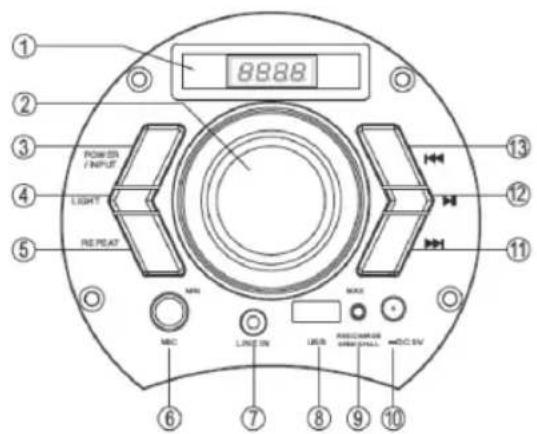
- LED Display
2. Volume Adjustor
- Power/Input (Hold for 3 seconds to switch on/off the unit and mode selection for Bluetooth, FM Radio, Line Input, USB)
- Light (Light mode selection & switch on/off button)
5. Repeat
6. Mic Input
7. Line Input
8. USB Port
- Charging Indicator
RED = Charging
GREEN = Fully Charged
10. DC Interface (9V)
- Next Track
12. Play/Pause (In FM mode, hold for 3 seconds to enter automatic scan)
13. Previous Track
SPECIFICATIONS
Power Output: 10W
Frequency Response for Main Speaker: 80Hz-20KHz
Power Supply: DC9V
Impedance (Ω): 4
POWER SOURCE
- Please charge the unit for at least 4 hours before using it for the first time.
- Long press the POWER/INPUT button on the panel to switch the speaker on or off.
CHARGING THE BATTERY
While the battery is charging, the CHARGE STATUS light is red. After the battery is fully charged, the light turns green.
- Connect the AC adapter firmly to the DC IN jack of the speaker, and plug it into a wall outlet.
- When the battery is fully charged, first disconnect the AC adapter from the speaker, then from the wall outlet.
- The speaker works normally while charging.
POWER/INPUT BUTTON
Press the POWER/INPUT button on the front panel to select the mode (LINE, USB, BT, or FM).
REPEAT FUNCTION
- During playback, press the REPEAT button on the front panel once to repeat the current track. To cancel the repeat option, press the REPEAT button again.
- The REPEAT function is only available for USB playback modes (not for Bluetooth/Line/FM).
RECORDER FUNCTION
Recording: Insert a USB drive, plug in the microphone, and long-press the REPEAT button on the front panel. The machine will display "REC" to start recording. Short-press the REPEAT button to stop recording and automatically play the recording. Press POWER/INPUT to return to USB playback mode. To play the recording: Insert the USB drive, select the recorded file, and press the play button.
PREVIOUS/NEXT BUTTON
By pressing the PREVIOUS/NEXT button on the front panel, you can select a specific song from the playlist.
PAUSE/PLAY BUTTON
To stop playing the current track, press the PAUSE/PLAY button on the front panel. Press it again to continue playing.
VOLUME ADJUSTMENT DIAL
Turn the dial counterclockwise to decrease the volume and clockwise to increase the volume.
MIC IN JACK
Plug in a microphone directly for playing.
USB JACK
Insert a USB drive directly for playing.
LINE IN JACK
- Connect an audio cable (not included) to the LINE IN JACK of the speaker and to the audio output socket on the external audio devices such as MP3 player, discman, etc, then select LINE by pressing the button POWER/INPUT on the front panel.
- Play from an external audio device.
FM FUNCTIONS
- Press POWER/INPUT button to select FM radio
- Press PLAY/PAUSE button on front panel for automatic searching and saving the radio stations.
- Press PREVIOUS/NEXT button to select a specific radio station.
BLUETOOTH
Please press POWER/INPUT button on control panel to select Bluetooth mode. Simultaneously open the Bluetooth setting on your phone, tablet or any other Bluetooth enabled audio device and select "SS-8760", the unit and device will then connect via Bluetooth. Press the "next song" and "previous song" button on the control panel to select the song, press "play/pause" button to control the playing status.
SAFETY INSTRUCTIONS AND PRECAUTIONS
- LED display
2. Volume adjustment
POWER SOURCE
DECLARATION OF CONFORMITY
This device complies with Low Voltage Directive 2014/35/EC, Electromagnetic Compatibility Directive 2014/30/EU, Directive 2015/863/EU on the restriction of the use of certain hazardous substances in electrical and electronic equipment and Directive 2009/125/EC on the eco-design requirements applicable to energy-related products.
DECLARATION OF CONFORMITY
This symbol means that in case you wish to dispose of the product once its working life has ended, take it to an authorised waste agent for the selective collection of waste electrical and electronic equipment (WEEE).

Imported by:
Sanysan Appliances S.L, NIF: B98753056, C/ Barcas 2, 2 46002 Valencia, Spain Product made in P.R.C. – Designed by SOGO based on the European Quality Standards Customer Service: www.sogosat.com / sogosat@sogosat.com / 0034 902 222 161
- CAUTION
- SPECIFICATIONS
- POWER SOURCE
- CHARGING THE BATTERY
- POWER/INPUT BUTTON
- REPEAT FUNCTION
- RECORDER FUNCTION
- PREVIOUS/NEXT BUTTON
- PAUSE/PLAY BUTTON
- VOLUME ADJUSTMENT DIAL
- MIC IN JACK
- USB JACK
- LINE IN JACK
- FM FUNCTIONS
- BLUETOOTH
- SAFETY INSTRUCTIONS AND PRECAUTIONS
- DECLARATION OF CONFORMITY
- IMPORTED BY
Brand : Sogo
Model : SS-8760
Category : Speakers