USER MANUAL R-70S QFX
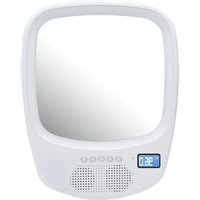
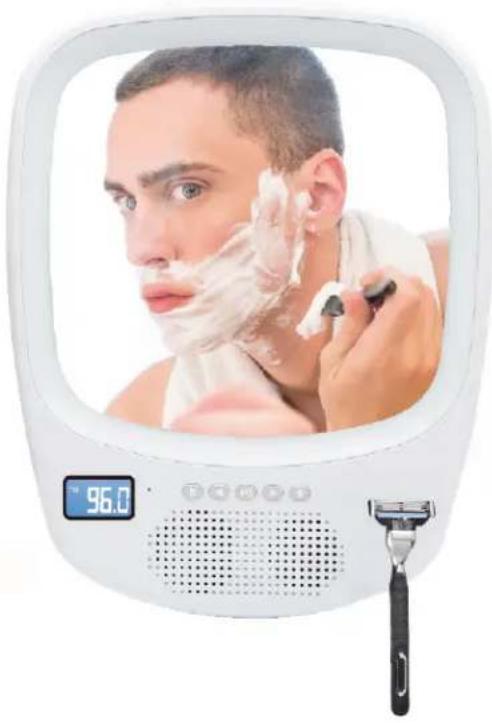
Fogless Light Up Mirror & Wireless Splash Proof Speaker
R-70S
INSTRUCTION MANUAL
PLEASE READ ALL INSTRUCTIONS CAREFULL & RETAIN FOR FUTURE USE
Getting Started
Remove the product from the box.
Remove any packaging from the product.
Please retain all packaging until you have checked and counted all the parts and the contents against the parts list.
Package Contents
Fogless Light Up Mirror & Wireless Splash Proof Speaker
USB charging cable
Instruction manual
Features
- Fogless Mirror holds up against misty conditions and stray sprays from the shower
- Bright LED Light for precise shave
- Built-in hook holds razor to keep it neat and within reach (razor is not included)
- Built-in microphone allows you to answer phone calls directly from the speaker with just the push of a button
- Bluetooth wireless speaker plays your favorite songs
- Tune in to live radio with its built-in AM/FM tuner
- Built-in digital clock & display
- USB rechargeable (USB cable included)
- Easy to mount (suction cups & screw included)
- Read all instructions before using this product.
- Do not leave this product unattended while connected to the power supply.
- Do not use if product has been dropped or damaged in any way.
- Repairs to electrical equipment should only be performed by qualified personnel. Improper repairs may place user at serious risk.
- Place product on sound, even surface, free of vibrations and away from sources of heat.
- Do not put objects into openings.
- Keep free of dust, lint, hair etc.
- Do not use this product for anything other than its intended use.
- Keep this product out of reach of children.
- This product is not a toy.
- Do not play music at excessive levels especially near children, as damage to hearing may occur.
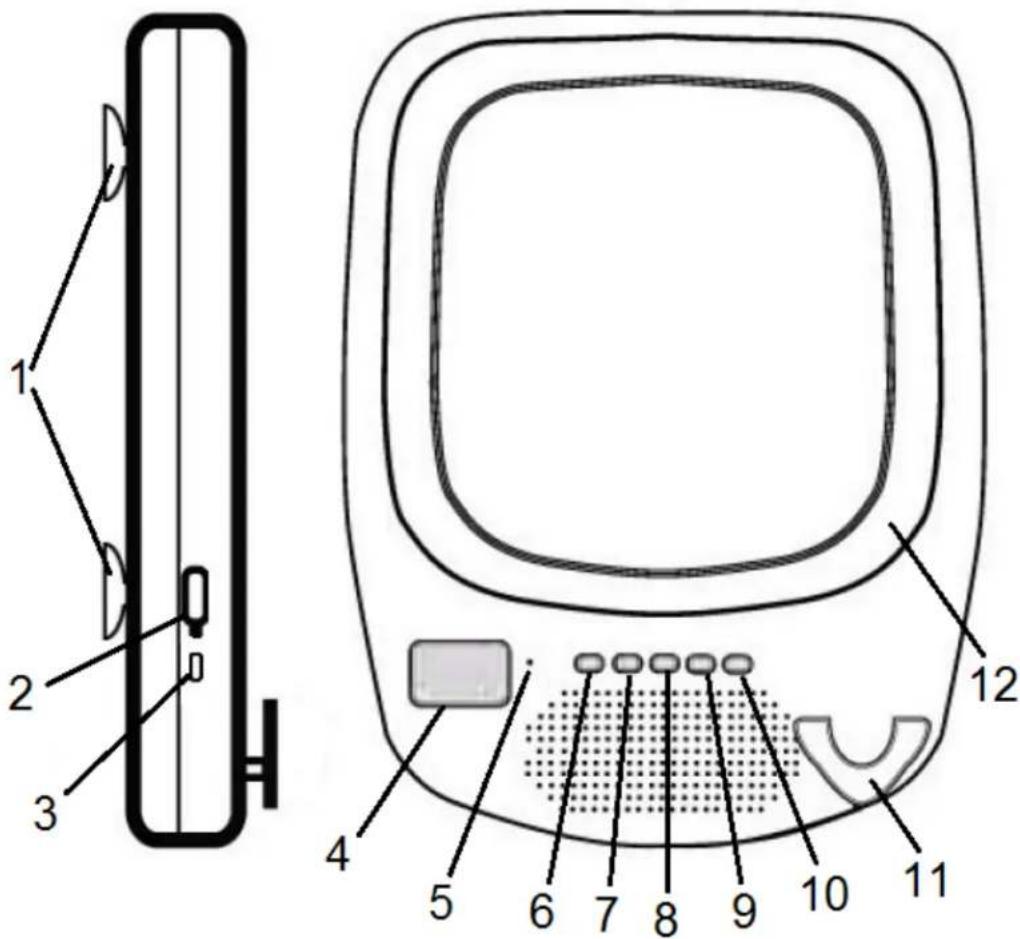
Description of Parts:
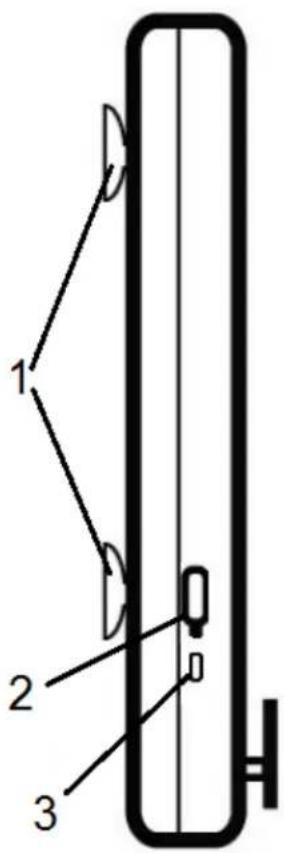
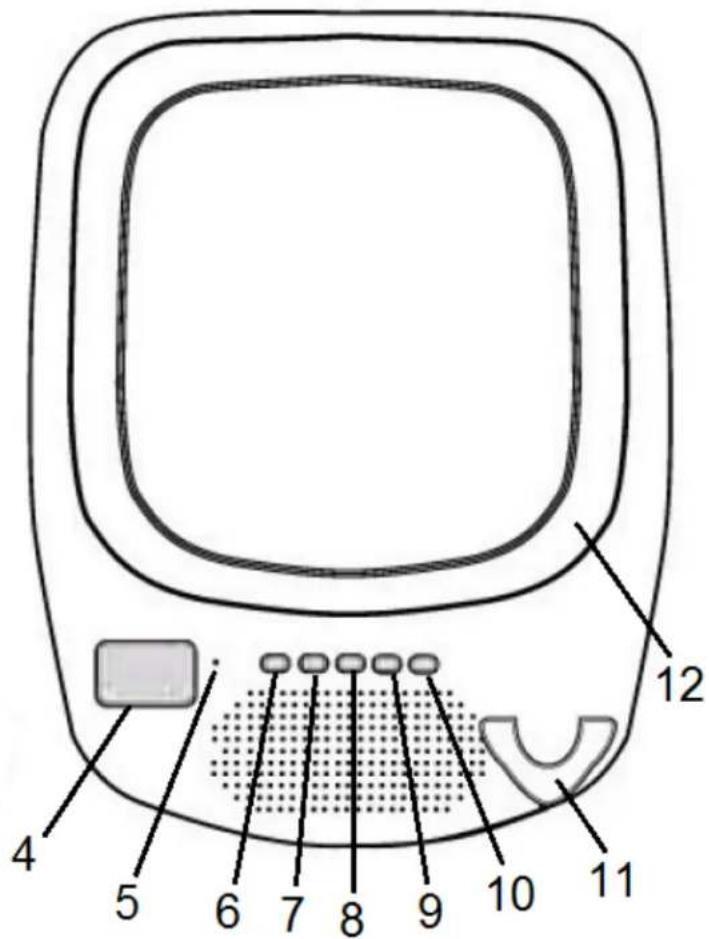
| S. No. | Description | S. No. | Description |
| 1 | Detachable Suction Cups | 7 | Skip Forward / Higher Volume |
| 2 | Rubber Flap | 8 | MF / Phone button |
| 3 | Charging port | 9 | Skip Backward / Lower Volume |
| 4 | Digital display (with backlight) | 10 | LED light button |
| 5 | Built-In Microphone | 11 | Razor hanger |
| 6 | Mode button | 12 | White LED light |
INSTRUCTIONS FOR USE
Charging the product
Note: For best results, fully charge the product before its first use.
- Connect the USB charging cord (included) to the DC 5V charging port of the product and insert the other end into a port on your computer or similar power source.
- The battery indicator will flash to indicate that the battery being charged (press the MF button to turn on the product, if necessary). Once it is fully charged, the battery indicator is full and stops flashing. It will take 5 - 6 hours to fully charge the battery.
- Once the product is fully recharged, disconnect the USB Cable and firmly close the Rubber Flap, to cover the USB Charging Port secure. If the USB charging port is not securely covered, water may seep into the electronics circuit and may damage the product. This damage will NOT be covered under product warranty.
Turn On/Off the Product
Press and hold the MF button for 2-4 seconds to turn on the product (*digital display with backlight will on, and the backlight will turn off automatically after around 15 seconds. Press the or button will also turn on the backlight again for around 15 seconds.)
Press and hold the MF button for 2-4 seconds to turn off the product.
Clock Setting
- After turning on the product, press the Mode button until digital display showing 'Lod'.
- Short press the MF button, and the "hour" field on digital display will flash quickly.
- Press the or repeatedly button to set the correct hour.
- Press the MF button to confirm and the "minute" field will flash to prompt for adjusting.
- Press the or button to set the correct minute.
- Press the MF button again to complete the clock setting.
Pairing your device with Bluetooth Speaker
Your Bluetooth Speaker can wirelessly stream audio from any Bluetooth enabled device within the distance of up to 26-33 Feet. Simply follow the below steps.
- After turning on the product, press the Mode button to enter Bluetooth mode with digital display showing 'bt', and an indication tone is heard. Your speaker is now ON and is entering "pairing" mode.
- Turn on the Bluetooth on your Mobile Phone or Tablet or Computer.
-
It will search for various devices.
-
The pairing name of our Bluetooth Speaker is "QFX R-70S", pair it with this device.
- If required, enter the password '0000' to confirm to finalize pairing.
- Once paired successfully, you would hear another indication tone.
- If you fail to pair it within the time frame or you want to pair it with a new device please follows the steps outlined above.
Select your favorite song at the Bluetooth device and music would now stream through Bluetooth speaker.
(Note: Speaker automatically pairs with the previously paired devices.)
Answering Phone Calls through the Bluetooth Speaker
Please ensure that your cell phone is paired with the Bluetooth Speaker to use the below functions.
| Function | Operation | Button |
| Answer Incoming Call | Incoming Call | Short press the Phone button to answer an incoming call. |
| End Call | Incoming Call | After your phone conversation, short press the Phone button |
| Volume Increase | During a call | Long press on the button will increase the volume |
| Volume Decrease | During a call | Long press on the button will decrease the volume |
| Redial last number | Standby mode and connected to a device | Short press the Phone button twice |
Listening to Music Wirelessly
Please ensure that your device (iPhone, Tablet or Other Smart Phone) is paired with the Bluetooth Speaker to stream music wirelessly. Once it is paired, play music from your device.
| Function | Operation | Button |
| Increase / Decrease Volume | Playing music | Long press the button to increase the volume or long press the button to decrease the volume |
| Pause | Playing music | Short press the MF button to pause the music |
| Play | Pause | Short press the MF button to resume the music |
| Skip Forward / Skip Backward | Playing music | Short press the button to skip forward the track. Short press the button to skip backward the track. |
FM Radio
- After turning on the product, press the Mode button to enter FM mode with digital display showing 'FM' and frequency value.
- To AUTO-SCAN the stations, press MF button once.
- It will take few minutes to search and store all the stations in memory.
- Press the or button to skip selected stations. (Remark: Relocate the position of the product, if the FM reception is not good.)
AM Radio
- After turning on the product, press the Mode button to enter AM mode with digital display showing 'AM' and frequency value.
- To AUTO-SCAN the stations, press MF button once.
- It will take few minutes to search and store all the stations in memory.
- Press the or button to skip selected stations. (Remark: Relocate the position of the product, if the AM reception is not good.)
Turning On/Off white LED light
Short press the LED light button will turn On/Off the white LED light.
Do's and Don'ts
Do not play music at excessive levels. Damage to hearing and/or equipment may result. Do not use outdoors in wet surroundings.
This unit can only be installed on glass or mirror surface. Please do not try to install on any Marbles, Tiles, Granite porous surface or any other surface as it will not hold the item properly.
Specification
Bluetooth version : V2.1+EDR
Speaker : 3 Watts
FM radio frequency : 87.5 to 108MHz
Unit Size : 8-5/8"x1-1/4"x11" (without Detachable Suction Cups)
Unit Weight : 21.6 oz (without Detachable Suction Cups)
Play time : 3-4 hours
Charge Voltage : DC 5V (USB)
Charging Time : 5-6 hours
Bluetooth Range : 26- 33 Feet
Built-In Rechargeable
Battery : 3.7V / 1200mAh
(Note: Battery life & charging time may vary, based on usage & types of devices used.)
Troubleshooting
| Problem | Possible Cause | Solution |
| Low sound level | Source (Tablet, Mobile Phone, Laptop, etc.) volume too low. Battery dead | Adjust source volume. Charge Battery. |
| Sound distorted | Battery nearly dead | Charge Battery. |
| No sound at all. | Source (Tablet, Mobile Phone, Laptop.) turned off. Speaker turned off. Volume turned down source. Media paused on source. | Turn the source on.
Turn the speaker on.
Adjust volume source.
Play media from source. |
Care and Maintenance
Clean the unit with a soft, damp cloth. Never use chemicals or hard abrasives. Keep this unit away from wet or damp surroundings.
The crossed out wheelie bin symbol on this item indicates that this product needs to be disposed of in an environmentally friendly way when it becomes of no further use or has worn out. Contact your local authorities for details of where to take the item for recycling.
Note: iPod and iPhone are trademarks of Apple Inc, registered in the US, and other countries.
FCC Instructions
Changes or modifications not expressly approved by the party responsible for compliance could void the user's authority to operate the product.
NOTE: This product has been tested and found to comply with the limits for a Class B digital device, pursuant to Part 15 of the FCC Rules. These limits are designed to provide reasonable protection against harmful interference in a residential installation. This product generates, uses and can radiate radio frequency energy and, if not installed and used in accordance with the instructions, may cause harmful interference to radio communications. However, there is no guarantee that interference will not occur in a particular installation. If the product does cause harmful interference to radio or television reception, which can be determined by turning the equipment off and on, the user is encouraged to try to correct the interference by one or more of the following measures :
This device complies with part 15 of the FCC Rules. Operation is subject to the following two conditions: (1) This device may not cause harmful interference, and (2) this device must accept any interference received, including interference that may cause undesired operation.
Limited Warranty
This manufacturer's product warranty extends to the original consumer purchaser of the product. Neither the retailer nor any other company involved in the sale or promotion of this product is a co-warrantor of this manufacturer warranty.
WARRANTY DURATION: All materials and workmanship are warranted to the original consumer purchaser for a period of ninety (90) days from the original purchase date.
WARRANTY COVERAGE: This product is warranted against defective materials or workmanship. This warranty is void if the product has been damaged by accident, in shipment, unreasonable use, misuse, neglect, improper service, commercial use, repairs by unauthorized personnel or other causes not arising out of defects in materials or workmanship. This warranty is effective only if the product is purchased and operated in USA, and does not extend to any units which have been used in violation of written instructions furnished by manufacturer or to units which have been altered or modified or, to damaged products or parts thereof which have had the serial number removed, altered, defaced or rendered illegible.
WARRANTY DISCLAIMERS: This warranty is in lieu of all warranties expressed or implied and no representative or person is authorized to assume for manufacturer any other liability in connection with the sale of our products. There shall be no claims for defects or failure under any theory of tort, contractor commercial law including but not limited to, negligence, gross negligence, strict liability, breach of warranty and breach of contract. Under no circumstances will Manufacturer's / Distributor's maximum liability exceed the retail value of the product.
WARRANTY PERFORMANCE: During the above 90 day warranty period, a product with a defect will be either repaired or replaced with a reconditioned comparable model (at manufacturer's option). The repaired or replacement product will be in warranty for the balance of the 90 day warranty period and an additional one-month period. No charge will be applicable for such repair or replacement.
SERVICE AND REPAIR: If service is required for this product, you should first contact Midwest Trading Group Customer Service at support@qfxusa.com or by calling Tel: (323) 588-6900 Ext. 34 or Toll Free: (800) 864-CLUB, Monday to Friday 10am to 6pm EST.
NOTE: Manufacturer cannot assume responsibility for loss or damage during incoming shipment. As a precautionary measure, carefully package the product for shipment, and insure it with the carrier. Be sure to enclose the following details with the product: your full
name, return address and daytime phone number, a note describing the problem you experienced, a copy of your sales receipt or other proof of purchase to determine warranty status. C.O.D. shipments cannot be accepted.
QFX
MANUEL D'INSTRUCTIONS
VEUILLEZ LIRE ATTENTIVEMENT TOUTES LES INSTRUCTIONS ET CONSERVER POUR UNE UTILISATION FUTURE
Commencer
Description of Parts:
Frequence radio FM : 87.5 to 108MHz