PBX2000 - Loudspeaker QFX - Free user manual and instructions
Find the device manual for free PBX2000 QFX in PDF.



| Product Type | Portable speaker with FM radio |
| Brand | QFX |
| Model | PBX2000 |
| Power Supply | DC 9V (AC adapter) or built-in rechargeable battery |
| Battery Life | Over 5 hours of continuous operation |
| Supported Audio Formats | MP3 (via USB and TF card, FAT32, up to 32GB) |
| FM Radio | High-quality digital, auto-scan, memory for 30 stations |
| Audio Inputs | Auxiliary 3.5mm, microphone (6.35mm), electric guitar |
| Audio Outputs | Headphone (6.35mm), external audio output jack |
| Recording Functions | Recording from USB/TF, FM radio, external microphone and auxiliary source |
| Equalizer | 5 modes: Normal, Pop, Rock, Jazz, Classic |
| Remote Control | Remote control included with numeric keys and full functions |
| Microphone | High sensitivity with long cable (optional), echo and volume adjustment |
| Display | LED (information display) |
| Cabinet Material | High-density wood with drop-resistant design |
| Portability | Strap and handle for easy transport |
| Protection | Charge and discharge protection, low battery and full charge indicator |
Frequently Asked Questions - PBX2000 QFX
User questions about PBX2000 QFX
0 question about this device. Answer the ones you know or ask your own.
Ask a new question about this device
Download the instructions for your Loudspeaker in PDF format for free! Find your manual PBX2000 - QFX and take your electronic device back in hand. On this page are published all the documents necessary for the use of your device. PBX2000 by QFX.
USER MANUAL PBX2000 QFX
- High sensitive magnetic circuit with large Radio music, high penetrating power, low-frequency shock, mid-high frequency perfect present
- The latest decoder chip supports up to Max. 32GB USB, TF card with MP3 file format to playback stability
- FM radio: high-quality digital FM radio, automatic station search and automatically store up to more than 30 radio stations.
- The 3.5mm AUX audio input gives easy access to a variety of sound sources
- The built-in high-capacity battery, can continuous play for more than five hours
- Long cable high-sensitivity microphone (microphone optional), adjustable echo, speech, Karaoke, etc. to get outstanding performance
- Equipped with charging protection, discharge protection and longer battery life
- Now you get more convenient control with the long distance infrared remote control
- Equipped with low battery and full charging reminder
- Includes High density wooden cabinet, drop resistance design, with strap and handle design for portable choice.
- Headphone output jack or external audio output
- You can record your favorite FM radio station or other AUX audio source to keep your favorite sounds around your ears.
- Recording microphone input can be used for conferences, lectures, classes and personal recordings
Recording Function:
AUX mode recording:
To access (USB/TF card) storage device, press the "Mode" button to enter the AUX mode. Short press the "REC" button to start recording. The maximum recording time is depending on the (USB/TF card) storage device capacity. While recording, the input signal is not too large nor too small, according to personal preference.
FM radio mode recording:
To Access (USB/TF card) storage device, press the "Mode" button to enter the FM mode and choose your favorite radio stations. Short press the "REC" button to start recording. The maximum recording time is depending on the (USB/TF card) storage device capacity. While recording, you should try to choose the best position to get the best FM sound to achieve the best record.
External microphone recording:
To Access (USB/TF card) storage devices, short press "REC" button to start recording. The maximum recording time is depending on the (USB/TF card) storage device capacity. While recording, turn the "ECHO" knob to the minimum.
Note: DO NOT put the microphone too close to the product, as this may cause howling noises.
Recording Note: When this product starts to record, the display shows the timing.
Function Operation and Features:
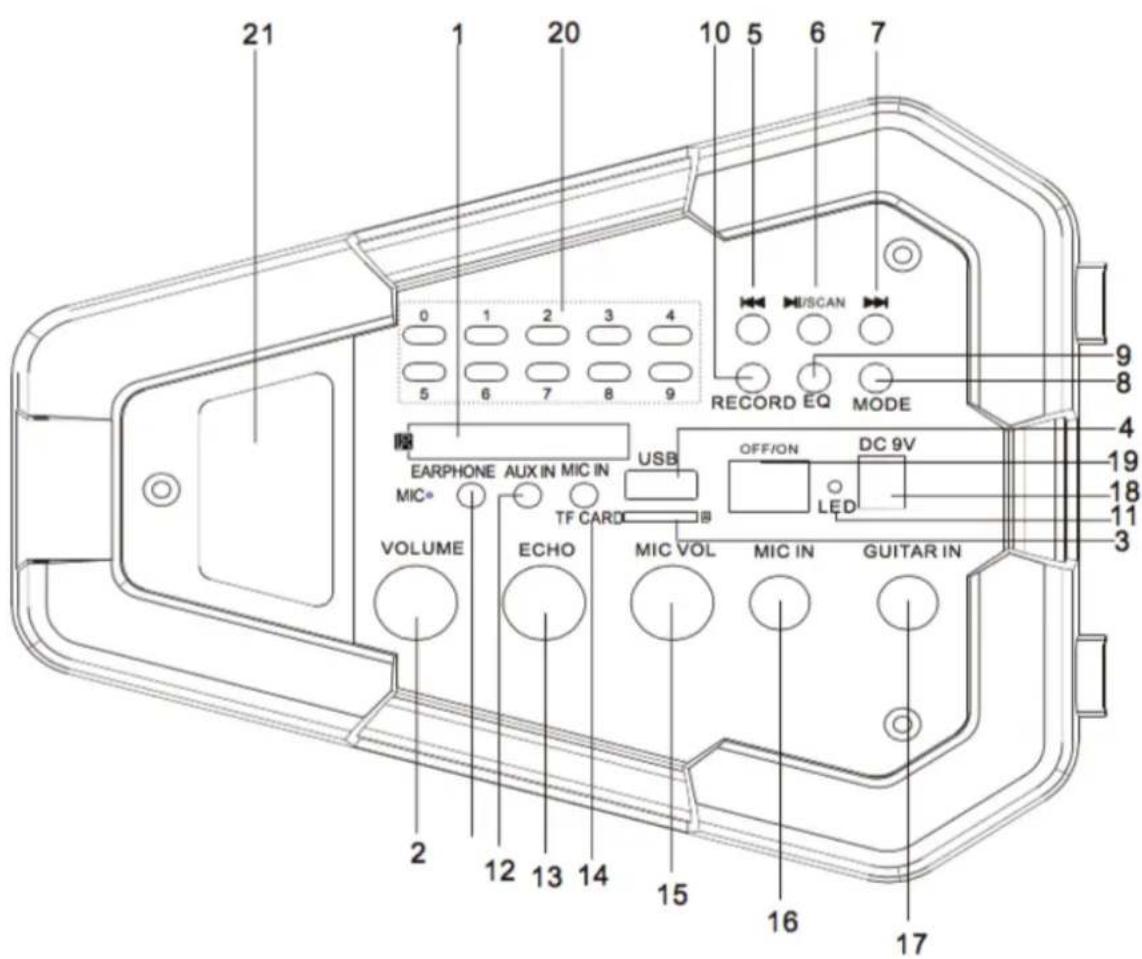
- LED display
- Master Volume: Under MP3, FM, AUX mode, the Radio music can be adjusted to increase or decrease the output of the electronic volume.
- TF interface: can read TF card (maximum support 32G) in the MP3 (FAT32) format audio files.
- USB interface: can read USB (maximum support 32G) in the MP3 (FAT32) format audio files.
- In Reading USB / TF card status, short press to get previous track, in FM radio status, after an automatic station search performance, short press to get the previous track
- Pause: In reading USB / TF card status, short press is playing or pause, long press to convert for the four cycle modes (ALL full circle, RAN random cycle, ONE single, Song cycle, FOLD folder cycle) switching. In FM radio mode, short press for FM automatic station search (recommended users before using the radio at least once a fully automatic station search, after searching, even power off, the radio stations also can automatically save). When audio input AUX, short press to get mute / un-mute conversion.
- In reading USB / TF card status, short press to get next track, in FM radio status, after an automatic station search performance, short press to get the next track
- Mode: Short press for USB / TF card / FM radio, various functional modes option.
- EQ: In reading USB / TF card status, short press is for switching five modes: NORMAL, POP, ROCK, JAZZ, CLASSIC mode.
- Recording: Short press to enter the recording mode (to be inserted into the USB / TF memory device), short press again to complete the recording, and auto-play record audio files, adjust the minimum echo while recording; Long press to delete
the recorded audio file / MP3 files; AUX / FM both can be recorded.
- Charging /Mic indicator: When connecting the charger, red light on; after full charging, red light off; When connecting a microphone or headset, blue lights on.
- AUX IN: external audio input interface, plug and play.
- ECHO: Microphone echo adjustment knob
- Microphone: Headset interface
- Mic Volume: microphone volume control knob
- Mic Input: Microphone input jack
- Guitar Input: electric guitar device access port
- DC 9V CHR: DC 9V recharging interface
- Power: " - " is the power on, "O" is power off.
- Numbering Keypad: with the same function as the number keys on the remote control 0-9.
- Logo
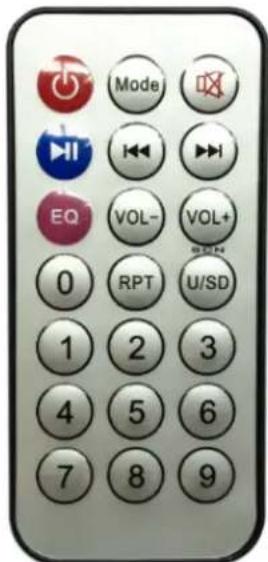
Remote Control Instruction:
-
POWER: Short press for standby function. After entering the power saving standby mode, short press again to turn back to the current mode. If there is no equipment, then it will go to "-HI-"
2.V: The same function as the same key on the product -
: The same function as the same key on the product
- V+ : The same function as the same key on the product
- Mode: The same function as the MODE on the product
- V + / V : For turning down or turning up the volume under USB, TF card, FM, AUX, modes
- Number keys 0-9: In reading USB/TF card status, if you want to listen the 12th song, you can enter the 1 and 2. (wait for two seconds) and it will automatically jump to play the 12th song. Pay attention to the input device when entering the number. If number entered is more than the total number of songs, the number is invalid. If want to listen to 107.5MHZ in FM mode, just directly enter 1075.
- EQ: in reading USB/TF card status, short press is for switching five modes: NORMAL, POP, ROCK, JAZZ, CLASSIC mode.
-
RPT: in reading USB/TF card status, short press is for switching the four cycle mode (ALL full circle, RAN random cycle, ONE single, Song cycle, FOLD folder cycle)
-
In USB, TF card, FM, mode, AUX mode, short press to mute.
- 100^+ Digital Select button: in MP3 mode (USB / TF card), short press to add the current track number plus 100.
Note:
- Do not allow water to spill onto the surface or into the product
- Unless the relevant regulatory or has been directed by a person responsible for the safety of the products they use, the product is not available for the body weak force, or there is a lack of sensory capabilities person (including children).
- This product is not intended for use by children, please supervise children. DO NOT let children play with the product.
- If the product surface is damaged or the case of mechanical or electronic equipment malfunction, do not use this product, please contact our service center.
- Do not shake up and down this product.
- Do not place the product in water.
- Do not place the product in hot light exposure. This product is to be placed in a dry and ventilated place.
- Do not place heavy objects on the product.
Thank you for choosing our products!
QFX
Modèle : PBX-2000
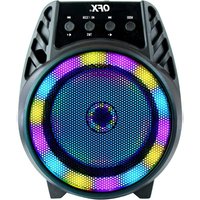
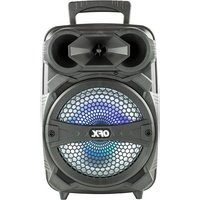
Brand : QFX
Model : PBX2000
Category : Loudspeaker