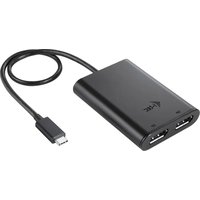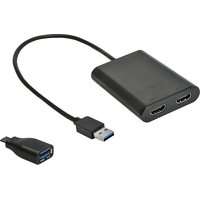
U3DUAL4KHDMI - Electronic adapter i-TEC - Free user manual and instructions
Find the device manual for free U3DUAL4KHDMI i-TEC in PDF.


| Product Type | Dual HDMI USB 3.0 A/C Adapter |
| Brand | i-TEC |
| Model | U3DUAL4KHDMI |
| Dimensions | 80 x 60 x 15 mm |
| Weight | 75 g |
| Power Supply | Via USB bus (max. 15 W), no external adapter |
| Connectors | 1x USB 3.0 (built-in cable 27 cm), 2x HDMI, USB-A to USB-C adapter included |
| Maximum Resolution | 4096 x 2160 @ 60 Hz (one or two monitors) |
| Display Modes | Extended, mirror, primary monitor |
| Chipset | DisplayLink DL6950 |
| Compatible Operating Systems | Windows 7/8/8.1/10 (32/64 bit), macOS X 10.10+, Android, Chrome OS, Ubuntu |
| Recommended Processor | Intel Core i5 2+ GHz / AMD Trinity or better (regular work); Intel Core i7 2+ GHz for 4K |
| Recommended RAM | 4 GB (regular work), 8 GB (4K playback) |
| Supported Colors | 16/32 bit |
| Maintenance and Cleaning | Avoid extreme temperatures and humidity; clean with a dry cloth |
| Safety | Place on a flat surface to prevent falls; do not expose to water |
| Spare Parts and Repairability | Not applicable (sealed product, no replaceable components) |
| General Information | Electronic adapter for connecting two HDMI monitors via USB 3.0 A/C or Thunderbolt 3 |
Frequently Asked Questions - U3DUAL4KHDMI i-TEC
User questions about U3DUAL4KHDMI i-TEC
0 question about this device. Answer the ones you know or ask your own.
Ask a new question about this device
Download the instructions for your Electronic adapter in PDF format for free! Find your manual U3DUAL4KHDMI - i-TEC and take your electronic device back in hand. On this page are published all the documents necessary for the use of your device. U3DUAL4KHDMI by i-TEC.
USER MANUAL U3DUAL4KHDMI i-TEC
natural_image
Black USB device with two ports and a coiled cable, no visible text or symbolsUser guide • Gebrauchsanweisung • Mode d'emploi Manual de instrucciones • Manuale • Uživatelská príručka Instrukcje obsługi • Užívatel'ská príručka • Vartotojo vadovas Handleiding
P/N: U3DUAL4KHDMI
EN Please read the entire instruction manual carefully. Detailed manual is available on our website www.i-tec.cz/en/ in the tab „Manuals, drivers“. In case of any issues, please contact our technical support at: support@itecproduct.com
Declaration of Conformity.... 46–47
FCC....48
INTRODUCTION
Thank You for purchasing i-tec USB 3.0 A/C Dual HDMI Adapter, which allows you to easily connect up to two monitors, TVs or projectors with HDMI interface to a laptop, tablet, PC or smartphone with USB-A, USB-C or Thunderbolt 3 interface. Max. resolution for two HDMI monitors is 4K@60Hz.
PACKAGE CONTENTS
- i-tec USB 3.0 A/C Dual HDMI Adapter with cable (27 cm)
• USB 3.0 to USB-C Adapter - Quick Start
SPECIFICATIONS
• 1x USB 3.0 connector, transfer speed up to 5 Gbps
- Graphic interface: 2x HDMI (spec. 2.0): - max. resolution 4096x2160@60Hz when connecting one or two monitors
- Mode: Mirror, Extend and Primary display
• Supported colours 16 / 32 bit
- Power supply from USB-A, USB-C or Thunderbolt 3 bus, no need for external power adapter; max. 15W
- Chipset: DI6950
- OS: Win 7 32/64bit, Win 8 32/64bit, Win 8.1 32/64bit, Win 10 32/64bit, macOS X 10.10 and higher, Android, Chrome OS, Ubuntu. Requires USB-A, USB-C or Thunderbolt 3 bus. Use the enclosed USB 3.0 to USB-C adapter to connect to USB-C or Thunderbolt 3 port. Thunderbolt 3 interface requires Windows 10 32/64bit, macOS X, Chrome OS (Google) with Intel Broadwell Processor and R51 and higher
• Product dimensions: 80 x 60 x 15 mm
• Product weight: 75 g
SYSTEM REQUIEMENTS
Operating system: Win 7 32/64bit, Win 8 32/64bit, Win 8.1 32/64bit, Win 10 32/64bit, macOS X 10.10 and higher, Android, Chrome OS, Ubuntu
For ordinary work on multiple monitors
- Processor: Intel Core i5 2+GHz / AMD Trinity or better
- RAM: 4GB
- Graphics processor: Intel HD 4000, ATI Radeon HD7xxx, NVidia GeForce 5xxM or better
• USB 2.0 port / we recommend USB 3.0
For video playback
• Procesor: Intel Core i7 2+GHz / AMD Richland A10-575x / AMD Kaveri A10-7400P or better
- RAM: 8GB
• Graphics processor: Intel HD 4000, ATI Radeon HD 8650, NVidia GeForce 7xxM or better
• USB 3.0, USB-C or Thunderbolt 3 port
For Ultra HD 4K video playback the computer must be able to decode the video using its primary graphics processor. Low end laptops can be able to playback the video but the quality might be less than ideal (video interruption, screen tearing).
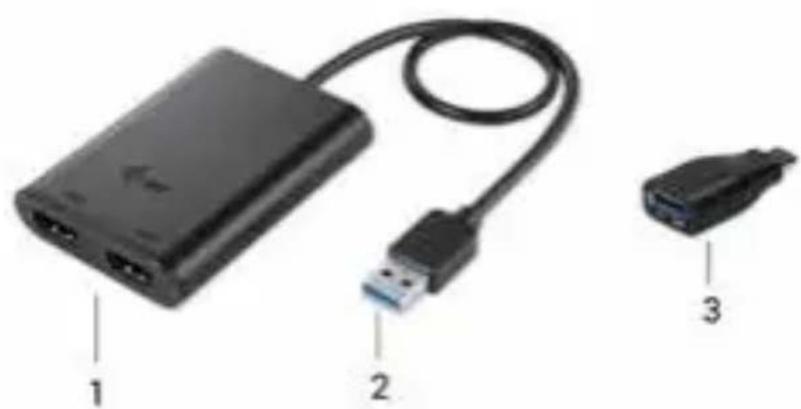
ADAPTER DESCRIPTION
- 2x HDMI Port – for connecting HDMI monitors
- Integrated cable with USB 3.0 connector – for connecting the adapter to laptop, tablet, PC or smartphone through USB-A port.
- USB 3.0 to USB-C adapter – for connecting adapter to laptop, tablet, PC or smartphone through USB-C or Thunderbolt 3 port.
natural_image
Diagram of a black USB device with labeled ports and connectors (no text or symbols beyond labels)DRIVER INSTALLATION
Do not connect the adapter to your laptop, PC, tablet or smartphone before installing the drivers. Drivers need to be installed prior to first use. Make sure that you have updated BIOS and newest drivers for your device before the installation.
You can download drivers for the adapter from our website www.i-tec.cz/en on the page for this product in the „Download“ tab. Then you just need to confirm automatic installation.
For Android, Chrome OS and Ubuntu use the drivers from the DisplayLink chipset manufacturer. You can download them here: http://www.displaylink.com/downloads or on our website www.i-tec.cz/en on page for this product in the „Download“ tab.
You can connect the adapter directly, when using Windows 10. The drivers will be installed automatically from the system, when connected to the internet.
CONNECTING HDMI MONITOR
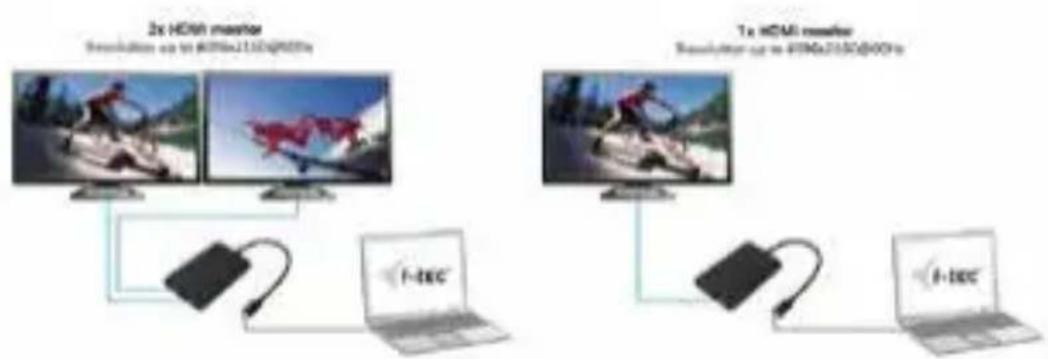
The adapter is equipped with 2x 4K@60Hz HDMI Port for connecting one or two monitors or projectors with HDMI interface. You can use modern plasma or LCD monitors and TVs as imaging device. It is recommended to use high quality HDMI cables with the adapter. The screen of your laptop, tablet, PC or smartphone might flicker during additional monitor installation, but this is normal.
Most problems with the adapter and connected devices can be solved by disconnecting the adapters USB 3.0 cable from the USB 3.0 port of your laptop, tablet, PC or smartphone and reconnecting it after approximately 10s.
Quick Start EN
flowchart
graph TD
    subgraph "2x HDMI monitor"
        A["Computer"] --> B["Network topology up to 4396x2150@00Hz"]
    end
    subgraph "1x HDMI monitor"
        C["Computer"] --> D["Network topology up to 4396x2150@00Hz"]
    end
    A --> E["Laptop"]
    C --> F["Laptop"]
    E --> G["F-tec"]
    F --> H["F-tec"]
SAFETY INSTRUCTIONS
- Do not expose to extreme temperatures and air humidity.
- Use the device on flat surfaces – you will prevent it from slipping and falling to the ground
- Keep the manual safe for possible future use.
In cooperation with the service department:
- Verify functionality after falling on the ground or in the water.
- Verify functionality when cover is broken.
- Claim the warranty if device doesn't work in accordance with the user manual
FREQUENTLY ASKED QUESTIONS
Available on our website www.i-tec.cz/en/ on the "FAQ" tab of this product.
EINLEITUNG
natural_image
Diagram of a black USB device with labeled ports and connectors (no text or symbols beyond labels)TREIBERINSTALLATION
natural_image
Diagram of a black USB drive with labeled ports and connectors (no text or symbols beyond labels)INSTALLATION DES PILOTES
INSTRUCTIONS DE SÛRETÉ
natural_image
Diagram of a USB drive with labeled ports and connectors (no text or symbols beyond labels)natural_image
Diagram of a black USB device with labeled ports and connectors (no text or symbols beyond labels)natural_image
Diagram of a USB device with labeled ports and connectors (no text or symbols beyond labels)INSTALACE OVLADAČŮ
BEZPEČNOSTNÍ POKYNY
natural_image
Diagram of a black USB device with labeled ports and connectors (no text or symbols beyond labels)flowchart
graph TD
    subgraph "2x HDMI monitor"
        A["Desktop up to 4000x2150@600Hz"] --> B["Device"]
        C["Desktop up to 4000x2150@600Hz"] --> D["Laptop"]
        E["Desktop up to 4000x2150@600Hz"] --> F["Laptop"]
    end
    subgraph "1x HDMI monitor"
        G["Desktop up to 4000x2150@600Hz"] --> H["Laptop"]
        I["Desktop up to 4000x2150@600Hz"] --> J["Laptop"]
        K["Desktop up to 4000x2150@600Hz"] --> L["Laptop"]
    end
INSTRUCKJE BEZPIECZEŃSTWA
natural_image
Diagram of a black USB device with labeled ports and connectors (no text or symbols beyond labels)INŠTALÁCIA OVLÁDAČOV
natural_image
Diagram of a black USB device with labeled ports and connectors (no text or symbols beyond labels)VALDIKLIŲ INSTALIAVIMAS
natural_image
Black USB device with labeled ports and cable, showing two connected components (no text or symbols visible)INSTALLATIE VAN DE STUURPROGRAMMA'S
This equipment is marked with the above recycling symbol. It means that at the end of the life of the equipment you must dispose of it separately at an appropriate collection point and not place it in the normal domestic unsorted waste stream. This wil benefit the environment for all. (European Union only)
DEUTSCH
Ing. Lumír Kraina
Executive Name and Signature, Geschäftsführer, Exécutif et signature, Nombre y firma del gerente, Jednatel, Konatel, Nazwisko osoby upowaznionej, Zaakvoerder
FCC COMPLIANCE STATEMENT
This equipment has been tested and found to comply within the limits of a Class B digital device pursuant to Part 15 of the FCC Rules. These limits are designed to provide reasonable protection against harmful interference in a residential installation.