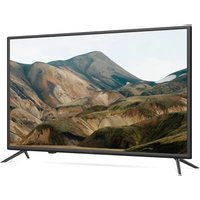
32H540LB - Television Kivi - Free user manual and instructions
Find the device manual for free 32H540LB Kivi in PDF.


| Product type | LED TV |
| Brand | Kivi |
| Model | 32H540LB |
| Screen size | 32 inches (81 cm) |
| Screen resolution | HD 1366 x 768 pixels |
| Panel type | LED LCD |
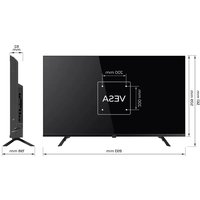
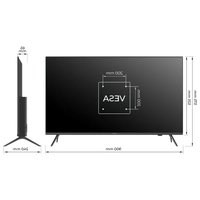
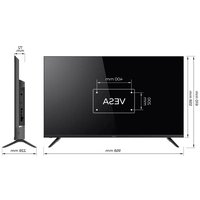
| Dimensions (without stand) | 730 x 427 x 68 mm |
| Dimensions (with stand) | 730 x 467 x 180 mm |
| Net weight | 4.3 kg |
| VESA standard | 200 x 100 mm, M4 screws |
| Antenna input | 75 ohms (DVB-T2/C) |
| HDMI ports | 4 (HDMI 2.1) |
| USB ports | 3 (USB 2.0) |
| Optical audio output | Yes |
| Headphone jack | Yes (3.5 mm jack) |
| CI slot | Yes (CAM) |
| Smart functions | Smart TV, Web browser, applications |
| Sound | Dolby Audio, certified Sound by JVC |
| Standby power consumption | < 1 W |
| Remote control | Yes, with AAA batteries |
| Warranty | 2 years |
| Screen cleaning | Soft dry cloth, no direct liquid |
| Operating temperature | +15 °C to +35 °C |
| Storage temperature | +5 °C to +40 °C |
Frequently Asked Questions - 32H540LB Kivi
User questions about 32H540LB Kivi
0 question about this device. Answer the ones you know or ask your own.
Ask a new question about this device
Download the instructions for your Television in PDF format for free! Find your manual 32H540LB - Kivi and take your electronic device back in hand. On this page are published all the documents necessary for the use of your device. 32H540LB by Kivi.
USER MANUAL 32H540LB Kivi
FN1 Available languages are English, Ukrainian, Romanian, Hungarian and Bulgarian.
Unfortunately, the supported languages of communication of operators is limited, therefore for customers from other countries we recommend contacting using instant messengers or chat on the website kivismart.com.
PL DostepeNJezyki:angielski,rumuNski,wegierskiibulgarski.
Niestety obstugiwane jezki komunakci z operatoriama są agronomiczone, dlatego klientom z innych krajówazolecamy kontaktne zimejne zimejne zimejne zimejne zimejne zimejne zimejne zimejne zimejne zimejne zimejne zimejne zimejne zimejne zimejne zimejne zimejne zimejne zimejne zimejne zimejne zimejne zimejne zimejne zimejne zime
This user manual is included with the TV. An electronic version is also available to users. This guide is available at doc.kivismart.com/manual and the QR code on the left.
Important notice regarding software
Software license included with the product
EN
The software for this product is made up of multiple software components, and each of these individual components is copyrighted by the developer.
This product uses a third party software component specified in the User Agreement.
All content, including images, software code, logos, graphics, sounds and services available through this device, belongs to third parties and is protected by copyright, patents, trademarks and/or other intellectual property laws.
Such content and services are provided solely for your personal, non-commercial use. You may use content or services only with permission from the content owner or service provider. Without limiting the general meaning of the foregoing, you may not, unless permission is obtained from the respective owner of the content or services, modify, copy, republish, upload, publish, transmit, translate, sell, create derivative works, promote or in any way distribute any content or services obtained using this device.
By starting to use the device, you acknowledge that there is no transfer or assignment of intellectual property rights to you, and this provision should not be interpreted as a transfer (alienation) and (or) assignment of any intellectual property rights. You acknowledge that you are liable in case you violate the intellectual property rights of the third parties, in particular copyright and related rights, as well as exclusive rights to an invention, utility model, industrial design or trademark. You acknowledge that you are responsible for the legality of the use of applications that will be installed by you or by third parties after you start using the device. The manufacturer and/or the company importing of KIVI TM products shall under no circumstances be liable for infringement of intellectual property rights of the third parties, if such infringement was caused by the creation, upload, posting, copying or modification of information, materials or images in the device made by you or third parties after you start using the device.
Warnings
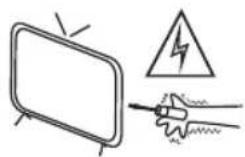
The TV is carrying high voltage. Do not try to disassemble the TV. Contact the authorized service center for assistance.
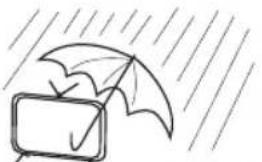
To reduce the risk of fire or electric shock, do not expose the TV to rain or moisture.
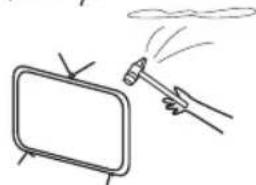
Protect the TV from falling, bumps and collisions with other objects, which may cause injury and damage.
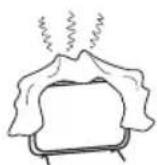
Do not block the ventilation openings on the cabinet. The device should be used by children only under adult supervision.
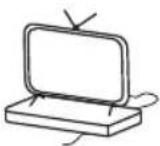
Do not place the TV on a power cord.
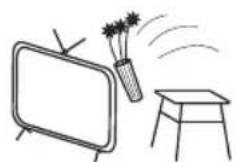
Do not place or drop any objects on the surface of the TV. Do not spill liquid on the device.
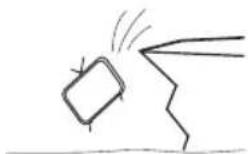
Do not place the TV on an unstable surface. TV falling may cause injury or damage to the device.
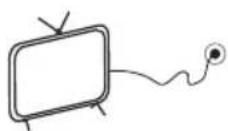
If you are not using the TV for a long time, unplug the power plug.
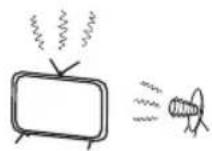
Do not expose the device to direct sunlight or other heat sources. Do not place open flame sources such as candles near the TV.
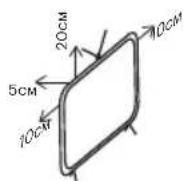
Observe the minimum distance between the TV and surrounding objects. Do not overheat the device.
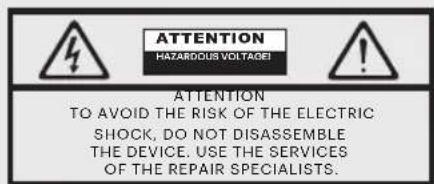

This symbol indicates the electric shock hazard.

This symbol indicates the need to comply with the relevant instructions.
EN
| Product name | KIVILCD LEDTV | |
| Warranty | 2 years | HDMI® HIGH-DEFINITION MULTIMEDIA INTERFACE The terms HDMI and HDMI High-definition Multimedia Interface and logo HDMI are trademarks or registered trademarks of HDMI Licensing Administrator, Inc. Manufactured under license from DOLBY LABORATORIES. The DOLBY, DOLBY AUDIO and double D symbols are trademarks of DOLBY LABORATORIES. |
| Operating temperature, °C | +15 - +35 | |
| Storage relative humidity,% | 45 - 75 | |
| Storage temperature, °C | +5 - +40 | |
| Atmospheric pressure, kPa / mm Hg. | 86 - 106 | |
| 650 - 800 | ||
| Operating relative humidity,% | 55 - 70 | |
| Consumed power in off mode | <1 W or absent | |
*Service life is the calendar period of product use for its intended purpose, starting from its introduction into circulation, during which the manufacturer (importer/supplier - legal entity accepting claims) guarantees its safety, ensures the possibility of its use and is responsible for significant shortcomings arising from his fault. Provision of the spare parts for repairs beyond the service life is in accordance with the current legislation of the country.
**The manufacturer's plant depends on the country of sale. Detailed information on the origin of the product in your region can be found on the packaging label or on the product itself.




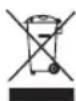

This symbol indicates that this product is double insulated between mains voltage and hazardous parts to the user. Only use original spare parts for maintenance.

At the end of its useful life, this product must be returned to the relevant drop-off point for recycling and disposal of the electrical and electronic equipment.
By ensuring this product is disposed correctly you help preserve natural resources and prevent damage to the environment and human health that can otherwise occur if not handled properly.
For more information on the drop-off and disposal points this type of equipment, please contact your local municipal authority or your household waste disposal company.
Safety rules and warnings
EN
- Use a certified undamaged cable with the HDMI logo. Otherwise, it may result in connection errors or the image may not be displayed.
- In order to ensure safety and to extend the life of the product, it is not recommended to use unlicensed software.
- Any damage, injury or malfunction resulting from the use of unlicensed components or software is not covered by the warranty.
- Make sure that all screws in the stands or bracket are correctly inserted and tightened securely (if the screws are not tightened firmly enough, the TV may tilt after installation or be unstable).
Transportation
- The TV must be transported strictly in an upright position, without movement to the sides, in the box and packing materials in which the TV is delivered.
- Disconnect the power cord and all other cables before lifting or carrying the TV.
- Hold the TV by the top and bottom of the cabinet. Never hold the device by the display or carry it by the stand.
Before using the TV, carefully remove the shipping tape slow so as not to damage the TV panel. You can turn on the TV for up to 1 minute to check the integrity of the matrix. This does not contradict the rules of operation.
Removing the shipping tape from the panels does not affect the warranty or return policy. There may be inscriptions and symbols on the film. It is recommended to remove the film before use.
The list of damages that prevent further use of the TV:
-
the power cord or plug is damaged.
-
the TV screen is damaged.
-
if the TV gets wet.
-
after the TV has been dropped.
The liquid crystal panel is a high-tech product. During operation, tiny black or colored dots may appear on the panel, which are noticeable only when you look at the screen closely at close range. Within certain limits, this effect is normal for this type of display and does not affect the device's performance and image quality. An accurate assessment of the condition of the panel (and other potential malfunctions of the device) is carried out only by an authorized service center using special equipment.
Depending on the viewing position (left / right / top / bottom), the brightness and color of the panel may change. This is due to the structural features of the panel. This has nothing to do with performance and is not a malfunction.
Terms and conditions for effective, safe use of goods
- Observe all safety precautions.
- Follow all the instructions.
- Do not block the ventilation holes, install in accordance with the instructions.
- Do not neglect the integrity of the power plug. If your outlet does not fit, contact a specialist.
- Turn off the device during lightning storms or when you are away for a long period.
- The service and repairs should be provided by the qualified personnel. Do not use a device damaged in any way (moisture ingress, damaged cable, etc.).
- Dispos of your device and accessories in accordance with applicable regulations and standards.
- Use the device in a dry, clean, ventilated area.
- Connect the TV using a relay or constant-voltage regulator to protect the TV from possible power surges.
Rules for cleaning the surface of the TV
- When cleaning, the outer surface of the product and the screen may be scratched. To prevent scratches, wipe the outside of the TV and its screen with a soft LCD cleaning cloth.
- Do not spray water or other liquids directly on the TV. Liquid entering the product may cause damage, fire, or electric shock.
- Use a soft dry cloth to clean the TV cabinet. Do not use flammable liquids (such as benzine, thinners) or detergents.
To remove stubborn stains, you may apply a small amount of screen cleaner to the fabric. Turn off the TV and use a microfiber cloth to gently wipe the screen to remove grease and fingerprints. Clean the unplugged TV.
EN
Specifications
| Model | 24H500LB | 32H540LB |
| Screen size diagonally, inch/cm | 32/8124/61 | |
| Display resolution | HD 1366x768 | |
| USB 2.0 | 2 | 3 |
| HDMI | 3 | 4 |
| HDMI | HDMI 1.4a | HDMI 2.1 |
| VESA standard, mm | 100x100 200x100 | |
| VESA screw type | M4 | M4 |
| Width, height, depth, mm | 550x325 x60 | 730x427 x68 |
| Dimensions incl. stand, mm | 550x366 x175 | 730x467 x180 |
| Net weight, kg | 2.7 | 4,3 |
Connecting the antenna to the TV
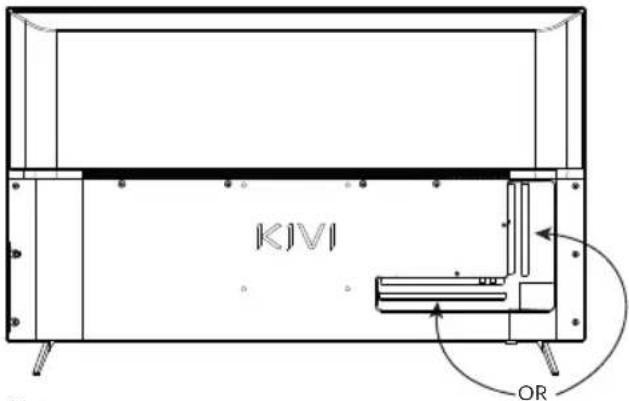
Note:
The manufacturer, importer, supplier is not responsible for damage to TV components as a result of high voltage supply through the antenna port.
Input impedance: 75Ω
For stable reception of digital TV channels, we recommend using an outdoor antenna with an amplifier (gain of 30 dB or more).
Equipment:
TV set, remote control, operation manual, warranty card, stands 2 pcs, mounting bolts 4 pcs, hexagon, AAA batteries 2 pcs, energy efficiency label.
*Package contents, appearance and specifications of the product may differ or may be changed by the manufacturer without notice.
Indicators of power supply and electricity consumption refer to the operation of TV in the "Home" mode, indicators in the "Shop" mode may differ upward.
REMOTE CONTROL
EN
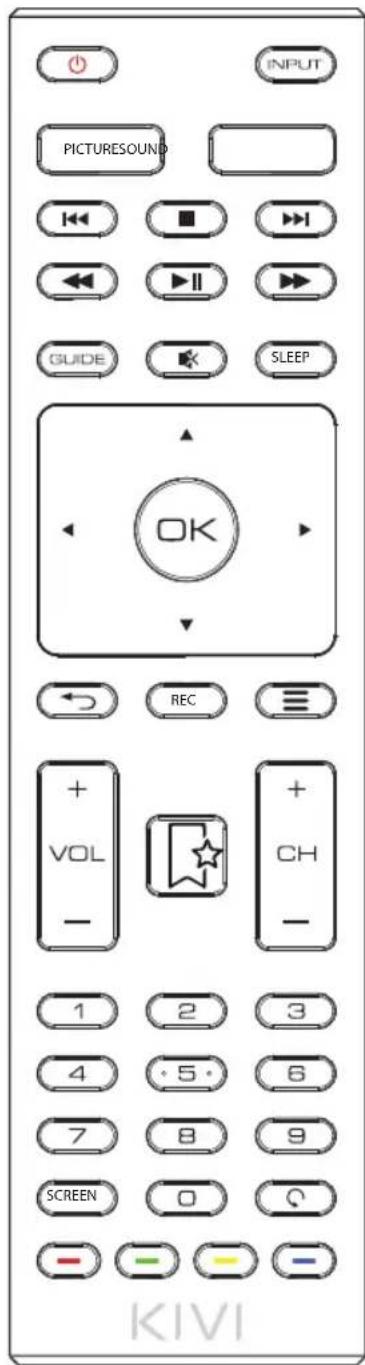
Key Assignments

Press to turn the TV on or off.
0-9 Use numbers to navigate channels.
FAV Favorites menu
Sleep Press to set the off timer.
Info Click to display channel information. In teletext mode to display hidden information.

OSD navigation arrows.
EPG Display program / channel information.

Colored buttons: access to TELETEXT items, access menu options.

Click to turn sound on or off.
VOL Volume control.
Picture Click to select a picture mode.
List Display the channel list.
Press to fast forward in playback mode.
Press to play / pause.
Press, to select the previous file in playback mode.
MTS/AUDIO Turn on / off audio description (AD only applies when this function is available in DTV) (Selecting Stereo / Dual Sound Reception in ATV mode).
Screen Click to change the aspect ratio of the image.
Input Input source menu.
Return to the previous viewing channel.
Menu Displays menus / options.
OK Confirms the selection.
Exit Exit/Close/Back.
CH Switching channels.
REC Press to record a TV program in DTV (digital television) mode.
Sound Sound mode selection.
Press to fast forward in playback mode.
Press to select the next file in multimedia mode.
Click to stop playback.
Text Turn teletext on and off.

NOTE:
1 Complete set and appearance are subject to change or change without notice.
2 The remote control is CE certified.
3 Operating range of the remote control (remote control) is up to 10 meters (in the absence of interference or other signal obstacles)
4 Do not mix new batteries with old ones. Do not store batteries in the remote for more than one month when not in use.
EN
Connecting devices
This TV is compatible with the majority of video playback devices. You may connect audio, video and other devices to it according to this manual and manuals of other devices.
The TV can be connected to the following devices: Blueray, Android TV Box, Game console, Audio system, etc.
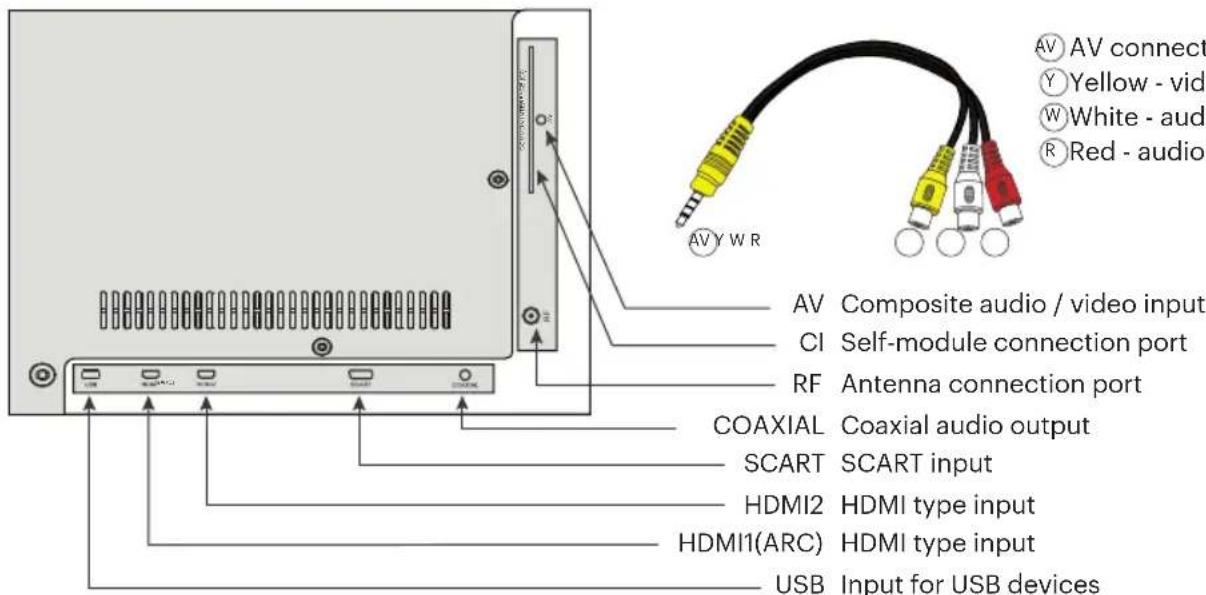
Component / AV input adapter
Note:
- When DVI signal is input to HDMI port, "AV Audio" input will automatically accept audio for HDMI port.
- Some adapters and devices may not work correctly. transmit the signal in non-standard ways.
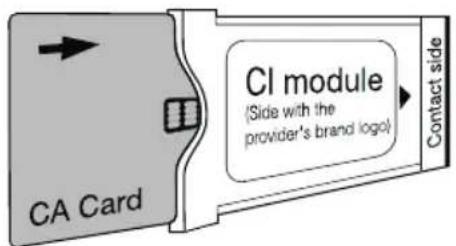
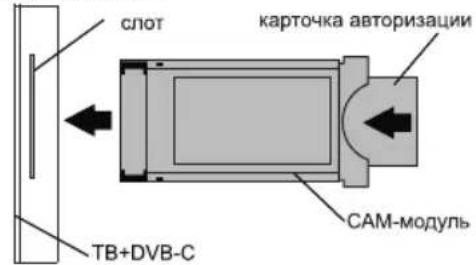
Connecting a CI Conditional Access Card
CAM - a CI Card Module can be purchased from your local digital cable service provider and can be provided with information on using the CI Card. If you have any difficulties when working with the CI card, please contact the service provider.
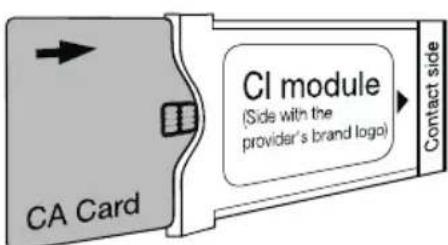
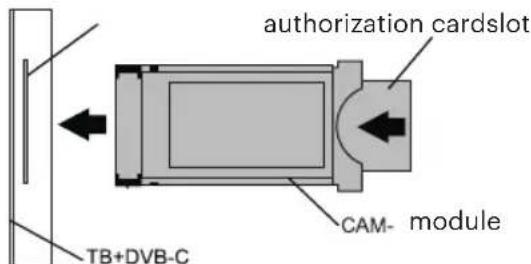
Due to the constant improvement of the products, the names of individual menu modes, the designation of some connectors on the connector panel and the place of their application, as well as the performance of certain ergonomic TV control functions, depending on the software version, may slightly differ from those described and depicted in this manual. which does not significantly affect the operation of the TV.
Troubleshooting
Smart TV is a technological device with software. In addition to malfunctions related to the hardware, in case of non-standard operation of the TV, first of all try to disconnect the TV for 30 seconds. If this is observed in joint work with other external devices (set-top box, router, etc.), we recommend you to disconnect the connected device.
| Unstable or missing terrestrial / cable TV signal | 1. Does not find channels, channels are shown with image distortion or sound interruptions (antenna) | 1. For stable reception of DVB-T2 (digital) and ATV (analog) signals, we recommend using an outdoor antenna with an amplifier (gain of 30 dB or more). ① Additional power supply for the antenna input from the TV side is not provided and cannot be supplied through the USB ports of the TV. Point the antenna towards the nearest TV tower. If an indoor antenna is used, raise it higher, rotate it around its axis and move it indoors. Make sure Antenna is selected under Settings - Channel - Channel Installation Mode. Tune channels manually (manual tune will show signal level and quality). For a stable picture and sound, the indicators should be from 50% and higher. Check the integrity of the cable. |
| 2. Does not find channels, channels are shown with image distortion or sound interruptions (cable) | 2. When using cable TV (DVB-C) or a common house antenna, we recommend connecting without using a splitter (splitter). If possible, connect the TV to a different antenna cable. Make sure Cable TV is selected under Settings - Channel - Channel Installation Mode. Tune channels manually (manual tune will show signal level and quality). Check the integrity of the cable. Use a signal preamplifier. | |
| No sound output to external speakers | 1. Connecting acoustics via Bluetooth | 1. Connect the acoustics via Bluetooth through the Settings - Remotes and accessories - Add device menu. Follow the operating instructions for the acoustics to select the audio input and switch it to synchronization mode. |
| 3. Connecting acoustics via AUX (3.5 headphone jack) | 3. Make sure that the audio cable is fully connected to the TV in the 3.5 (HEADPHONE) jack. Follow the instruction manual of the acoustics for the correct order of connection and selection of the audio input. |
Using a web browser as a video viewer or listening to music can lead to its closure and malfunction of the TV as a whole. Use multimedia apps that are content-responsive. For example, YouTube, Netflix, etc.
Cbbp3BaHe Ha yctpoiCTBaTa
To3n TeBn3Op e CbMecTm C NOBeYeTo yCtPoIcTba 3a Bb3npOn3BExKaHe Ha BnJeO. MoKeTe Da CbPKeTe ayDnO, BnDeo H npyRy UcTpoiCTBa KbM Hero Cnope ToBa pKOBODCTBO n PbKOBOcTBA Ha npyRy UcTpoiCTBa. TeBn3OpBT moKe da 6bJe CbBp3aH KbM cneHNte yCtPoIcTba: Blueray, irpOBA KOH3OJa, cTepeo cnCTema n dp.
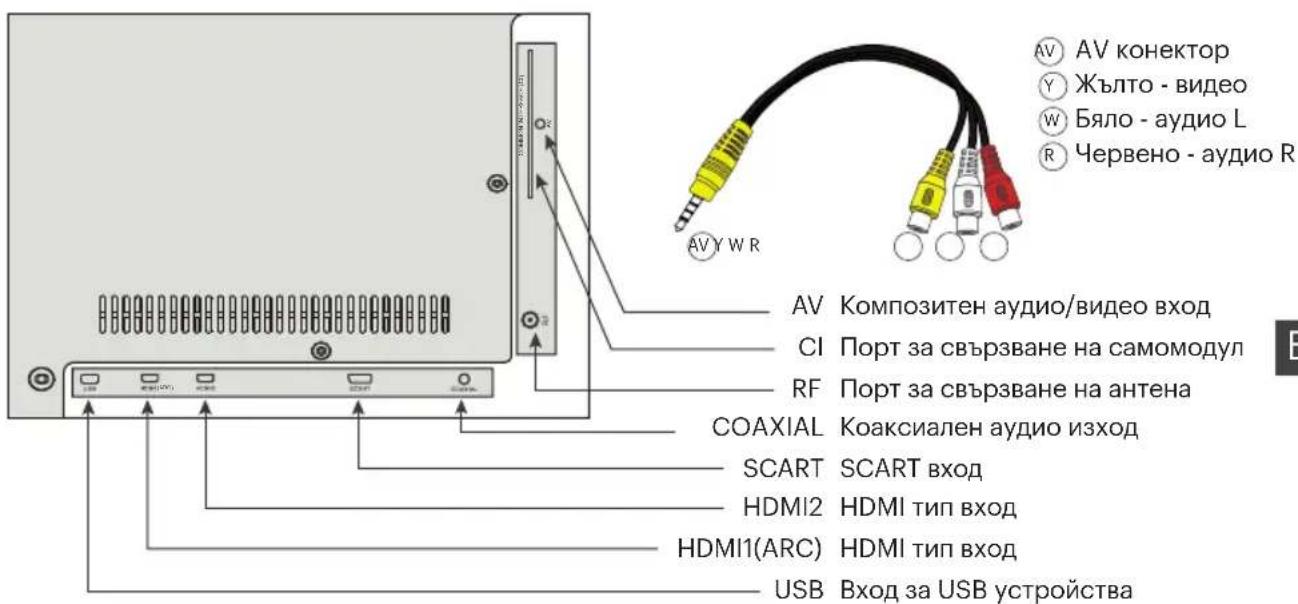
KOMnoHeTeH / AV bXoJeH aanTep
3a6eJekka:
- Korato DVI cnHan ce noDaba KbM HDMI nopT, BXoDbT "AV Audio" ABTomaTuHNo ue npneMe ayuio 3a HDMI nopT.
- HЯkon aadantepn u yctpoiCTBa moKe da He pa6oTt npabuHNO. npedaBt cnHana no HectaHapTHn HaunHn.
Cbbp3BaHe Ha CI KapTa 3a ycNoBEn IOCTbI
CAM e moyn 3a CI KapTa 3a ycnoBEN DocTbN, KOrTO MOxKeTe Da 3aKyPiNe OT MeCTHn JOCTaBvNK Ha UΦpOBN Ka6enHn ycIyIu N da IOnyUHTe INΦOpMaun 3a n3non3BaHeTo Ha CI KapTaTa. Ako Imate HraKaBn 3aTpPyDHeHn npu pa6oTa C CI KapTa, MoJ, CBbpXeTe ce c IOCTaBvNka Ha ycIyRnTe.
Iopadn NoCToHHOTO YcBbPseHCTBaHe Ha npOdyKTHTe, n3JIaHa Ha na3apa, IMeTO Ha OTJeHNITe peXIMn Ha MeHIOTo, Obo3NaueHneTo Ha HAKON KOHeKTopn Ha NaHena Ha KOHeKTopnE MxCTOTO Ha TExHOTO npINOxKeHne, KaTOn IIN3IIbIHeHneTo Ha ONpeJeHn epROHomUHn FyHKuN 3a ynpAbeHne Ha TeLEBn3Opa, B 3aBVCIMOCT OT BepCnTa HA coΦTyepa, Te MoXe JNeK Da ce pa3InuBaT OT ONiCAHtE N NOKa3AHn B TOBa PbKOBOCTBO, KoTo He OKa3Ba CbIeCTBeHO BnIaHne BbpxpY pa6oTata Ha TEleBn3Opa.
OTCTpaHЯBaHe Ha HeN3npaBHOCTN
Cmapr-TB e TexHONOruHOn yCTPOINCTBO cbc coTpyep. B dOnbJIHeHne KBM HEn3PpABHOCTnTe, Cbbp3aHN C xapnyepa, B cnuyan Ha npoBN Ha HeCTaHdApTHa pa60Ta Ha TeJeBu3Opa, NpBo OOnTAIne Ta n3KIOUHTe TeneBUN3opa 3a 30 cekynAko TOBa ce Na6IIOJABA pni CbBMeCTHa pa60Ta C npyRn BbHUnyCTPOINCTBA (npunctBaKa, pyTe n Dp.) , npenopbUbaMe da n3KIOUHTe Cbbp3aHOTO yCTPOINCTBO.
| Hecstaibinen или лимсваш ефирен/ kaбелен TB сигнал | 1. He otknirba kahandi, kahandite ce poka3batc изкрвявае на изобрахенито или有很大 п配电ьсвае на Звka (антес) | 1. 3a Stabiiho npriemae Na DVB-T2 (цифрава eфирна телевизу) и ATV (ahanoroba telевизу) сгнани, пэрорьчаведа илллвае вьшни anthea c услвател (коeфшиент Ha услвае от 30 dB поочу). Ддынително зхраимBERКьм BXODа Ha anthenaTo AT telевизор He e ocngурно И He мосяду сизу parhablaпраз USB portobete Na telевизор.Hacotte aHTeHata KM 30ahata Na haj-blin3Kite празытелны telевизионн КУЛ. Ако силлва Betpeшни ANTEHA, TORABAЯ NOBINrHete No-BVCSOKO, ZABPTeTe OOKO octa ИЯ пreameCTe ноту. НадурахуTo.YbepTe ce, Que B MeHOTo "Hactpoikn" - "KaHAN" - "Pexim 3a Инсталларе Na KaHani" e n36paHa "АNTeHa". Hactpoite KaHalnte рыно (рчнata Na chtpoikka size nookaxe HOBTO n kauchestBOTo Ha CINHala). 3a da se noLuyu ChstboHna KapTHNKa n 3Byk, ноказаелп'treябва DA ca OT 50% n nobee. Поверетe цeloctta Na KaBena. 2. Korato n3noI3BaTe Ka6enha Telenbina (DVB-C) Или obinknobeha domaSHA naHTeHa, пэрорьчаведа Na haprabte Bp3kata 6e3 DA n3noI3Ba- Te pa3KIOHHTEN (cPNIIEp). Ako e Bb3MOXNo, CBpbxete TelenbizaOpa CN KBM dpyr antheHnna Ka6en.YbepTe ce, Que B MeHOTo "Hactpoikn" - "KaHAN" "РжIM Na INCTaIpaHne Ha KaHANI" e n36paHa "Ka6eHna TelenbizaNia". Hactpoite KaHalnte рыно (рчнata Na chtpoikka size nookaxe HOBTO n kauchestBOTo Ha CINHala). Поверетe цeloctta Na Ka6ena. Изоллбайе п徴успВаТЕ Na CINHala. |
| Кьm Вьнши TOHkonOLHи He ces i3bexda 3BYK | 1.Свьрзвае на akystika nocpeintcbom Bluetooth 2.Свьрзвае на akystika? пpe3 HDMI 3.Свьрзвае на akystika? чpe3 Кавelli AUX (clyushankc 3.5 MM ЖAK) 4.Свьрзвае на akystika? C onttuhen Ka6el | 1.Свьржete akystika? чpe3 Bluteothпpe3 MeHOTo "Hactpoikn" - Дистанциони и aksecoar" - "Добаянe Ha uctpoiCTBO".Следыт инстукцип! Звьржete akystika? Кьm TelenbizaOpa c nomоцTa Na HDMI (ARC) KoHEKTop. B MeHOTo "Hactpoikn" - "3Byk" - "TOnKolONHn" and n36peTe "BvHsHa aydino cnsTeMa". B MeHOTo "Hactpoikn" - "Hactpoikn Na yctpoiCTBO" - "Bxodobe" - HDMI EDID Bercsia - zadaite CToiHOCTTa Na "EDID 1.4" B MeHOTo "Hactpoikn" - "Hactpoikn Na uctpoiCTBO" - "3Byk" "UdФroв n3xOД" - n36peTe "AByO", "Iponyuskahe", "PCM" n.T.H. cnopej посл'dу ржану ржIM. Следыт рьковodCTBOTo 3a ekcnoLoatauca Na akystika Na 3a павлини р ded Na Cbpr3BaHe n 36bop Na aydino BXOD. 4.Свьржete akystika? Кьm TelenbizaОpa c nomоцTa Na Jazka OPTICAL. MeHOTo "Hactpoikn" - "Hactpoikn Na uctpoiCTBO" - 3Byk - "LizФров i3xOД" - n36peTe "AByO", "Iponyuskahe", "PCM" n.T.H. cnopej, под; псьжану ржIM. Следыт рьковodCTBOTo 3a ekcnoLoatauca Na akystikaNa 3a правлини р ded Na Cbpr3BaHe n 36bop Na aydino BXOD. С пошta Na ByToHa VOL - Na dinstahunOHto uypablenHe KIVI, habalete сллота Na 3byka Na TelenbizaOpa, ДожATO He 6bde NapblINO 3a agrluyen. C помошta Na dinstahunOHTO ynpablenHe OT akystikaNa tay bveluote 3byka do Heobxodimoto NIBO. |
I3noJI3BaHeTo Ha ye6 6pay3bp KaTo KaTo CpeDCTBO 3a rIeJaHne Ha BnDeo IIN cIyUaHETo Ha My3uKa MoKe da IOBeJe Do HerOBOTO 3aTbApHRe H CpNB Ba60TaHa TeneBn3opa KaTo UAno.
I3no3BaTe MyTmEduHn npINOxehnKoTo ca OTbUBN KbM cbDbpxaHneTo. HanpImep, YouTube, Netflix n T.H
OSD navigeerimisnooled.
- Important notice regarding software
- Warnings
- EN
- Safety rules and warnings
- Transportation
- Terms and conditions for effective, safe use of goods
- Rules for cleaning the surface of the TV
- Specifications
- Connecting the antenna to the TV
- Note:
- Input impedance: 75Ω
- Equipment:
- REMOTE CONTROL
- Key Assignments
- Connecting devices
- Connecting a CI Conditional Access Card
- Troubleshooting
- Cbbp3BaHe Ha yctpoiCTBaTa
- 3a6eJekka:
- Cbbp3BaHe Ha CI KapTa 3a ycNoBEn IOCTbI
- OTCTpaHЯBaHe Ha HeN3npaBHOCTN
Brand : Kivi
Model : 32H540LB
Category : Television