32F760QB - TV Kivi - Free user manual and instructions
Find the device manual for free 32F760QB Kivi in PDF.


User questions about 32F760QB Kivi
0 question about this device. Answer the ones you know or ask your own.
Ask a new question about this device
Download the instructions for your TV in PDF format for free! Find your manual 32F760QB - Kivi and take your electronic device back in hand. On this page are published all the documents necessary for the use of your device. 32F760QB by Kivi.
USER MANUAL 32F760QB Kivi
EN KIVI LED TV User manual
Hello there! It's me, your KIVI color LED-TV, and I will tell you how to use me safely.
text_image
QR code with central Facebook logo, likely linking to a digital resource or website
| CONTENTS | EN | |
| 3 | General information about me. | |
| 4 | Attention! | |
| 5 | Who am I? My features. | |
| 6-7 | Remote control / night light. | |
| 8 | Connection ports. | |
| 9 | When something goes wrong. | |
| СЪДЪРЖАНИЕ | BG | |
| 10 | Обща информация за мен. | |
| 11 | Внимание! | |
| 12 | Кой съм аз? Моите характеристики. | |
| 13-14 | Дистанционно / нощна лампа. | |
| 15 | Портове за свързване. | |
| 16 | Когато нещо се обърка. | |
| OBSAH | CS | |
| 17 | Obecné informace o mně. | |
| 18 | Pozor! | |
| 19 | Kdo jsem? Moje charakteristiky. | |
| 20-21 | Dálkové ovládání / noční světlo. | |
| 22 | Spojovací porty. | |
| 23 | Když se něco pokazilo. | |
| INHALT | DE | |
| 24 | Allgemeine Informationen über mich. | |
| 25 | Achtung! | |
| 26 | Wer bin ich? Meine Eigenschaften. | |
| 27-28 | Fernbedienung / Nachtlicht. | |
| 29 | Verbindungsports. | |
| 30 | Wenn etwas schief läuft. | |
| ПЕПЕХОМЕНО | EL | |
| 31 | Гевикёс πληροφορίες για εμένα. | |
| 32 | Προσοχή! | |
| 33 | Ποιός είμαι? Τα характерπριστικά μου. | |
| 34-35 | Τηλεχειριστηριο / νυχτερινό φως. | |
| 36 | Θύρες σύνδεσης. | |
| 37 | Όταν κάτι πάει στραβά. | |
| CONTENIDO | ES | |
| 38 | Información general sobre mí. | |
| 39 | ¡Atención! | |
| 40 | ¡Quién soy! Mis especificaciones. | |
| 41-42 | Mando a distancia / luz nocturna. | |
| 43 | Puertos de conexión. | |
| 44 | Cuando algo anda mal. | |
| SISUKORD ET | ET | |
| 45 | Üldteave minu kohta. | |
| 46 | Tähelepanu! | |
| 47 | Kes mina olen? Minu omadused | |
| 48-49 | Kaugjuht / öölamp. | |
| 50 | Ühenduspordid. | |
| 51 | Juhul kui midagi läks valesti. | |
| SOMMAIRE | FR | |
| 52 | Informations générales sur moi. | |
| 53 | Attention! | |
| 54 | Qui suis-je? Mes caractéristiques. | |
| 55-56 | Télécommande / veilleuse. | |
| 57 | Ports de connexion. | |
| 58 | En cas de problème. | |
| SADRŽAJ | HR | |
| 59 | Opći podaci o meni. | |
| 60 | Pažnja! | |
| 61 | Tko sam ja? Moje osobine. | |
| 62-63 | Daljinski upravljač / noćno svjetlo. | |
| 64 | Priključni priključci. | |
| 65 | Kad nešto krene po zlu. | |
| TARTALOM | HU | |
| 66 | Általános információ rólam. | |
| 67 | Figyelem! | |
| 68 | Ki vagyok én? Jellemzóim. | |
| 69-70 | Távirányító / éjszakai lámpa. | |
| 71 | Csatlakoztató portok. | |
| 72 | Ha valami nem úgy sült el. | |
| CONTENUTI | IT | |
| 73 | Informazioni generali su di me. | |
| 74 | Attenzione! | |
| 75 | Chi sono? Le mie caratteristiche. | |
| 76-77 | Telecomando / luce notturna. | |
| 78 | Porte di connessione. | |
| 79 | Quando qualcosa va storto. |
| TURINYS | LT | |
| 80 | Bendra informacija apie mane | |
| 81 | Dèmesio! | |
| 82 | Kas aš? Mano charakteristikos. | |
| 83-84 | Tālvadības pults / nakts gaisma. | |
| 85 | Prijungimo prievadai. | |
| 86 | Kai kažkas nesigauna. | |
| 87 | Vispārīga informācija par mani. | |
| 88 | Uzmanību! | |
| 89 | Kas es esmu? Mani raksturojumi. | |
| 90-91 | Nuotolinio pultas / naktinė lemputė. | |
| 92 | Savienojuma porti. | |
| 93 | Kad kaut kas nogāja greizi. | |
| 94 | Informazzjoni generali dwari. | |
| 95 | Attenzjoni! | |
| 96 | Min jiena? Il-karatteristici tieghi. | |
| 97-98 | Kontroll mill-bogħod / dawl bil-lejl. | |
| 99 | Ports tal-konnessjoni. | |
| 100 | Meta tigri xi ħağa ŧažina. | |
| 101 | Ogólne informacje o mnie. | |
| 102 | Uwaga! | |
| 103 | Kim jestem? Moje cechy. | |
| 04-105 | Pilot / lampka nocna. | |
| 106 | Porty połączeń. | |
| 107 | Kiedy coś poszło nie tak. | |
| 108 | Informação geral sobre mim. | |
| 109 | Atenção! | |
| 110 | Quem soul! Minhas especificações. | |
| 11-112 | Controle remoto / luz noturna. | |
| 113 | Portos de conexão. | |
| 114 | Quando algo anda mal. | |
| 115 | Informații generale despre mine. | |
| 116 | Atenție! | |
| 117 | Cine sunt eu? Caracteristicile mele. | |
| 18-119 | Telecomanda / lumina de noapte. | |
| 120 | Porturi de conectare. | |
| 121 | Ceva nu a mers bine. | |
| 122 | Общая информация обо мне. | |
| 123 | Внимание! | |
| 124 | Кто я? Мои характеристики. | |
| 25-126 | Пульт / ночник. | |
| 127 | Порты подключения. | |
| 128 | Когда что-то пошло не так. | |
| 129 | Všeobecné informácie o mne. | |
| 130 | Upozornenia! | |
| 131 | Kto som? Moje vlastnosti. | |
| 32-133 | Dialkové ovládanie / nočné svetlo. | |
| 134 | Pripojovacie porty. | |
| 135 | Ked’sa niečo pokazí. | |
| 136 | Splošne informacije o meni. | |
| 137 | Pozor! | |
| 138 | Kdo sem jaz? Moje lastnosti. | |
| 39-140 | Daljinski upravljalnik / nočna lučka. | |
| 141 | Priključna vrata. | |
| 142 | Ko gre kaj narobe. | |
| 143 | Загальна інформація про мене. | |
| 144 | Увага! | |
| 145 | Хто я? Мої характеристики. | |
| 46-147 | Пульт / нічник. | |
| 148 | Порти підключення. | |
| 149 | Коли щось пішло не так. |
| PRODUCT NAME | KIVI COLOR LCD TV |
| Warranty period * | |
| Operating temperature, °C | +15 – +35 |
| Relative humidity while storing, % | 45 – 75 |
| Temperature while storing, °C | +5 – +40 |
| Atmospheric pressure, KPA / mmHg | 86 – 106 / 650 – 800 |
| Relative humidity while operating, % | 55 – 70 |
| Electricity consumption in off mode | <1 W or missing |
Recommendation only for countries where EU directives apply. This device complies with the standards and meets the requirements of Directive 2014/53 / EU.
*You can find information about the warranty period in the corresponding language of your country. The warranty period may be changed according to the update in the warranty legislation of the country.

TO BE SAFE WITH ME:
Make sure that all screws in the supports and bracket are properly tightened.
I do not recommend using unlicensed software.
Use a certified cable with the HDMI logo.
TO TRANSPORT ME:
I should be in upright position, fully complete and packaged. Do not place the box on the side of the display.
Hold me by the top and bottom of the body, not by the display or stand.
kivismart.com

DON'T USE ME IF:
• The power cord, plug, or screen is damaged.
• I fallen myself or your favorite cat fallen on me.

TO USE ME EFFECTIVELY AND SAFELYS:
- Read and follow all instructions and precautions.
- If your outlet doesn't fit, please, contact a specialist.
- Please connect me to power supply using a voltage stabilizer or relay only.
TO KEEP ME CLEAN:
- Wipe me with a cloth designed for the care and maintenance of the LCD screens.
- Do not spray liquids directly on me.
- If you touch me with greasy or sticky hands, turn me off, apply screen cleaner to a microfiber cloth, and wipe me down.
NOTE:
Do not place me on unstable or vibrating surfaces, or under TV objects that reflect and absorb sound.

Tiny black or colored spots can appear on my liquid crystal panel while in operation.
Depending on the viewing location, brightness, and color of the panel can change. And it is absolutely Okay.


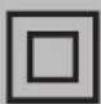

This symbol indicates that I have double isolation between the mains voltage and dangerous parts for you.
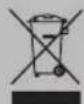
Friends, unfortunately, I am not eternal. Therefore, at the end of my term, I shall be handed over to the receiving point of electrical and electronic equipment. For more detailed information about receiving and disposal points, please contact local municipal authorities or a household waste disposal company.
FEATURES
| Model | 32H760QB32H760QW | 32F760QB32F760QW | 43U760QB43U760QW | 50U760QB40F760QB40F760QW | 55U760QB55U760QW | 65U760QB | ||
| Diagonal screen size, inches/cm | 32/80 32/80 | 32/80 | 40/102 43 | /109 50/127 | 55/140 65/165 | |||
| Resolution | HD1366x768 | FHD1920x1080 | UHD3840x2160 | |||||
| USB 2.0(FAT32, NTFS) | 2 | 2 | ||||||
| HDMI | 3 | 4 | ||||||
| HDMI | HDMI 1.4a | HDMI 2.1 | ||||||
| Wi-Fi | a/b/g/n/ac | |||||||
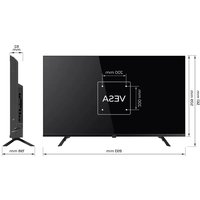
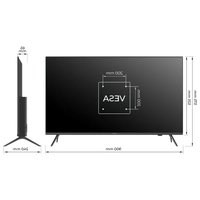
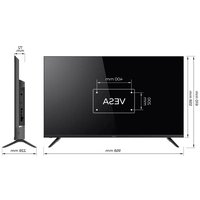
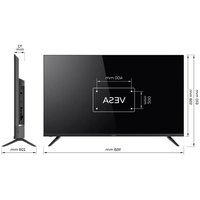
| VESA standard, mm | 200x100 200x150 200x200 400x200 | |||||||
| Type / size of VESA screws, mm | M4 /2x12 + 2x6 | M4 /2x12 + 2x6 | M4 /2x12 + 2x6 | M6 /2x12 + 2x8 | M6 /2x12 + 2x12 | M6 /2x12 + 2x12 | M6 /2x16 + 2x16 | M6 /2x16 + 2x16 |
| Width, height, depth, mm | 720x425x62 | 720x430x62 | 734x436x71 | 899x522x62 | 960x556x64 | 1116x642x61 | 1229x710x63 | 1448x835x63 |
| Dimensions with stand, mm | 720x465x180 | 720x465.5x183 | 734x481x195 | 899x575x240 | 960x620x240 | 1116x705x240 | 1229x772x260 | 1448x902x333 |
| Net weight, kg | 4.2 | 4,2 | 6.87.4 | 6.4 | 10.5 | 13 | 17.3 | |

NOTE:
The complete set, appearance and specifications of the product may differ or may be changed by the manufacturer without prior notice.
INPUT IMPEDANCE: 75 Ω
For stable reception of digital TV channels, I recommend using an external antenna with an amplifier (the gain ratio of 30 dB or more).

NOTE:
The manufacturer, importer, or supplier are not responsible for damage to my components due to high voltage supply through the antenna port.

Dolby Audio

HIGH-DEFINITION MULTIMEDIA INTERFACE
The terms HDMI, HDMI High-definition Multimedia Interface, and the HDMI logo are trademarks or registered trademarks of HDMI and Microsoft Administrator, Inc.
Manufactured under DOLBY LABORATORIES license. The DOLBY, DOLBY AUDIO, and Double D symbols are trademarks of DOLBY and laboratories.
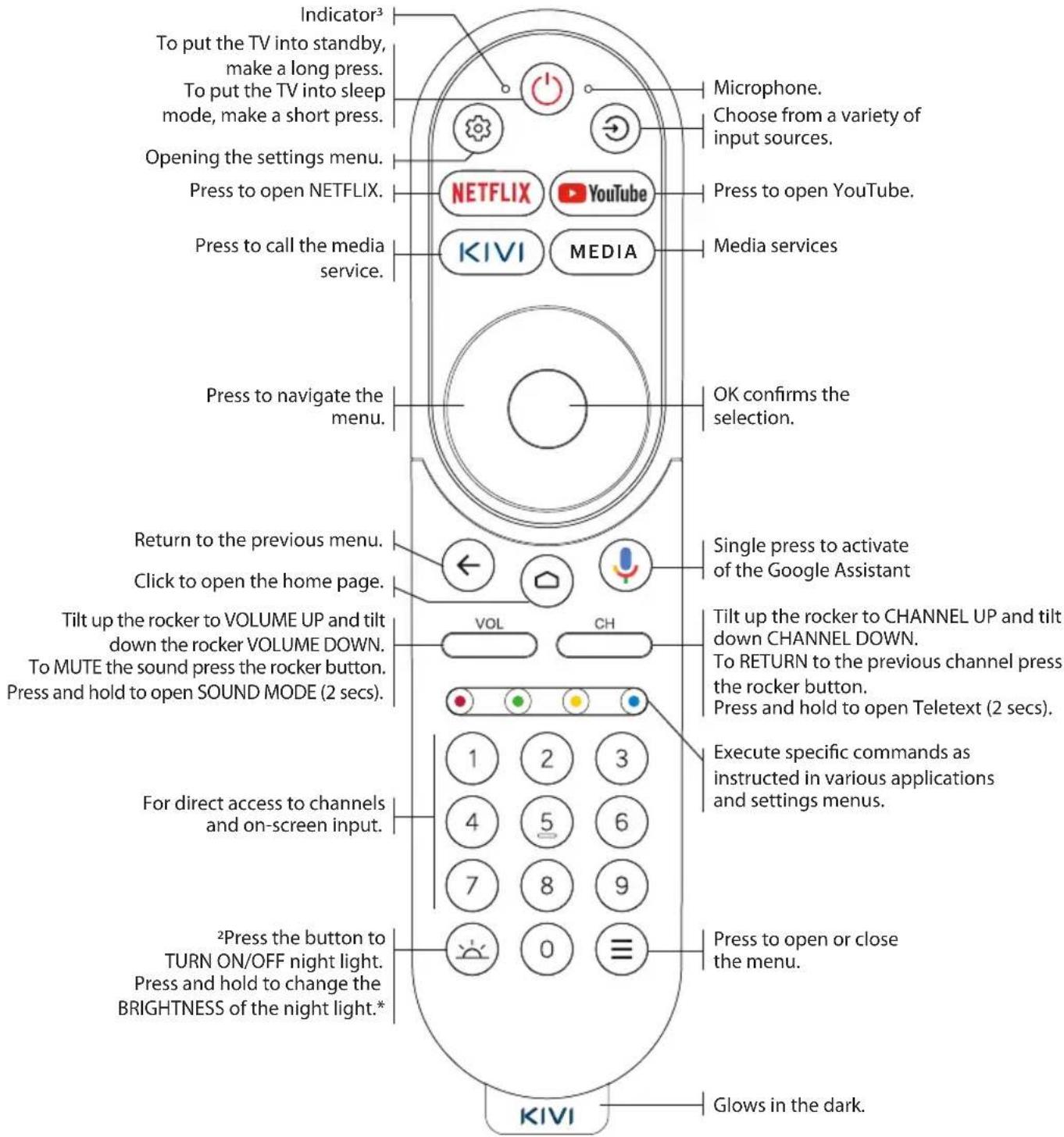
REMOTE CONTROL (RC70)
Key assignment:
text_image
Indicator³ To put the TV into standby, make a long press. To put the TV into sleep mode, make a short press. Opening the settings menu. Press to open NETFLIX. Press to call the media service. Press to navigate the menu. Return to the previous menu. Click to open the home page. Tilt up the rocker to VOLUME UP and tilt down the rocker VOLUME DOWN. To MUTE the sound press the rocker button. Press and hold to open SOUND MODE (2 secs). For direct access to channels and on-screen input. ²Press the button to TURN ON/OFF night light. Press and hold to change the BRIGHTNESS of the night light.* KIVI Indicator3 Microphone. Choose from a variety of input sources. Press to open YouTube. Media services OK confirms the selection. Single press to activate of the Google Assistant VOL CH Tilt up the rocker to CHANNEL UP and tilt down CHANNEL DOWN. To RETURN to the previous channel press the rocker button. Press and hold to open Teletext (2 secs). Execute specific commands as instructed in various applications and settings menus. Press to open or close the menu. Glows in the dark.NOTE:
1 The configuration and appearance of the TV, accessories, remote controls may differ or may be changed by the manufacturer without notice.
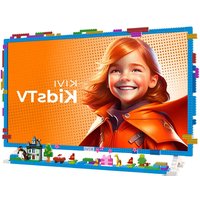
2 Light key works only for models with night light (43U760QW, 55U760QW and KidsTV).
3 The remote control operates in IR mode (red indicator color) and Bluetooth mode (green color).
Remote control (RC) range — up to 10 meters.
To make it work - insert the alkaline batteries and point it at me.
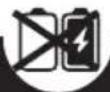
Do not mix new batteries with old ones, and do not leave the remote control near a heat source.

If you don't use the remote control for more than one month, get the batteries out of there.
text_image
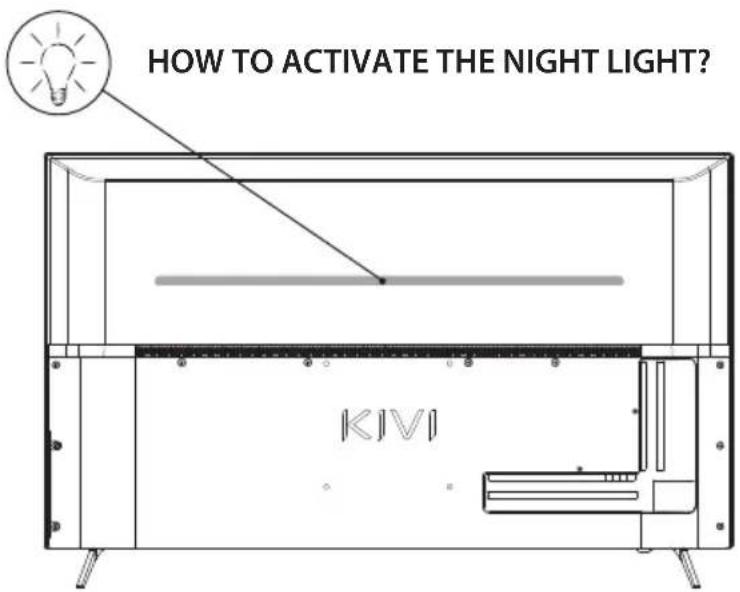
HOW TO ACTIVATE THE NIGHT LIGHT? KIVITo activate the Night Light Press the button 🙏. To operate the Night Light, connect the TV to the power supply.
text_image
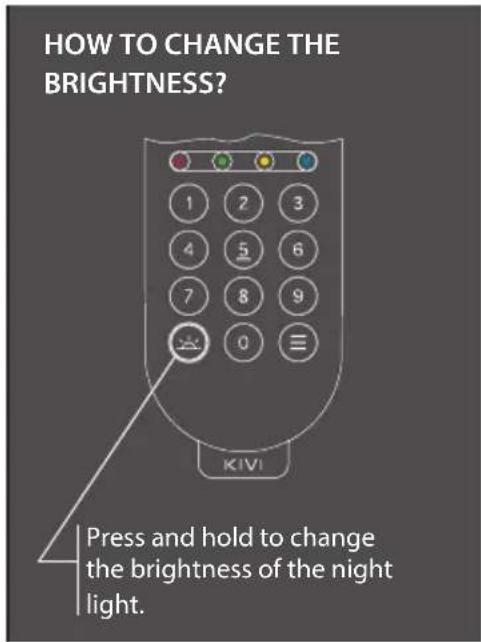
HOW TO CHANGE THE BRIGHTNESS? Press and hold to change the brightness of the night light.Detailed instructions with images are also available on the website kivismart.com, in the "Support" section
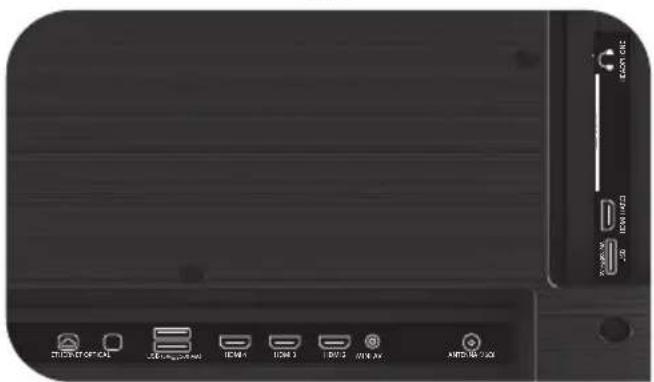
CONNECTING DEVICES
I am compatible with most devices for video and audio playback and can be connected to a Blu-ray, game console, stereo system, etc.
HD / FHD
MODELS
natural_image
Front view of a black electronic device with labeled ports and indicator lights (no readable text or symbols beyond component labels)UHD
MODELS
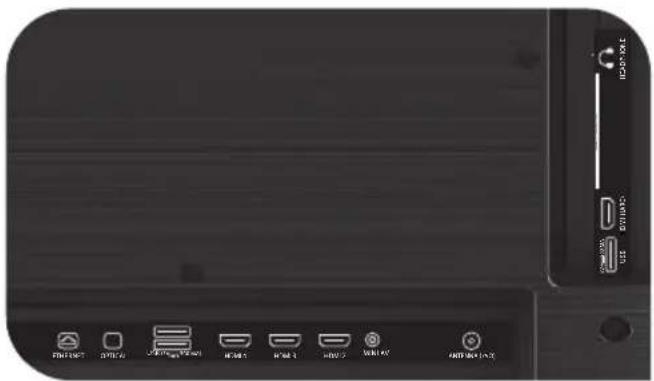
natural_image
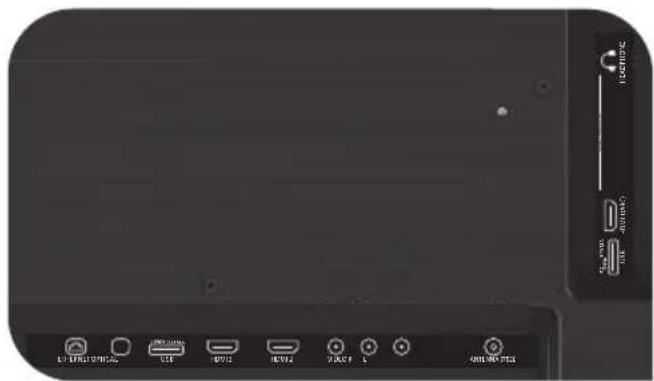
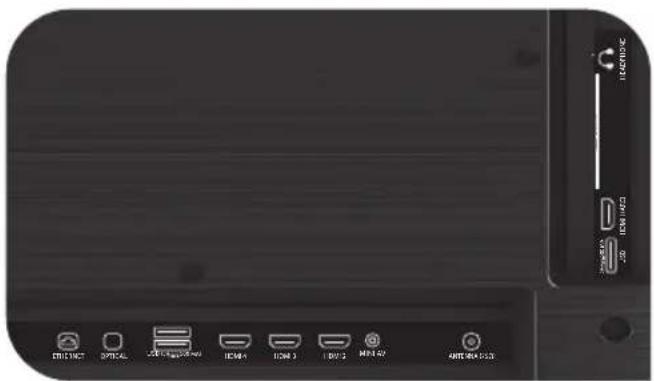
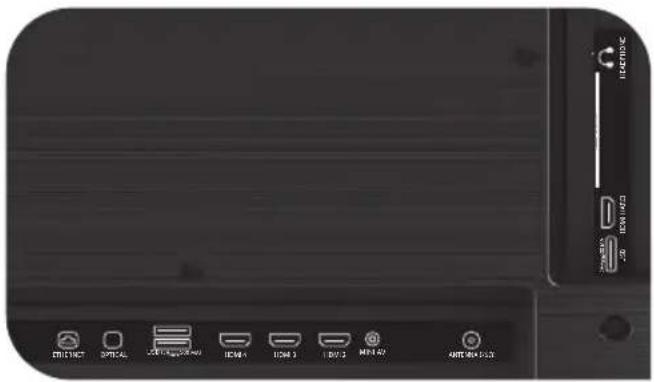
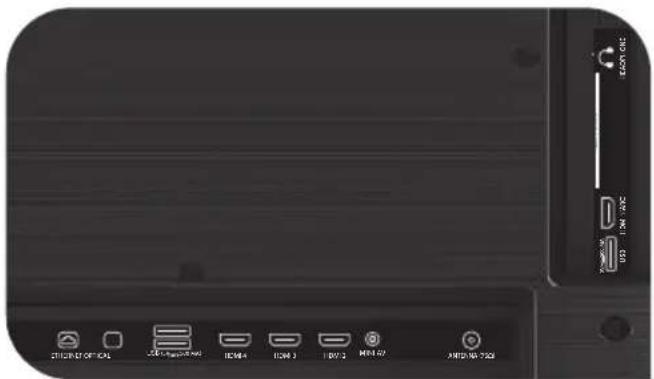
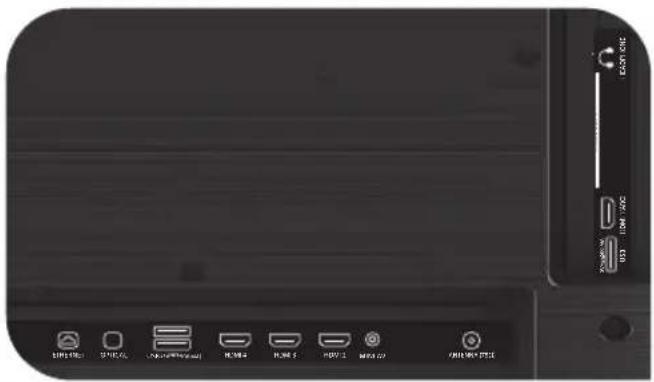
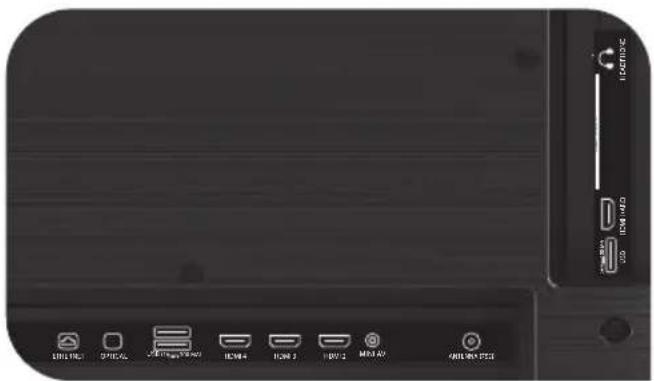
Front view of a black electronic device with labeled ports and buttons (no readable text or symbols beyond basic labels)USB Input for USB devices (500 mA)
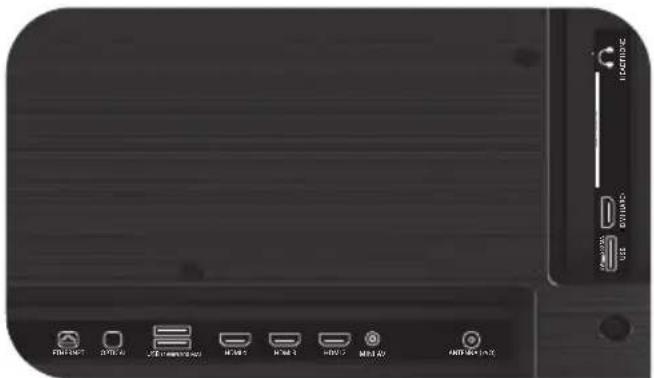
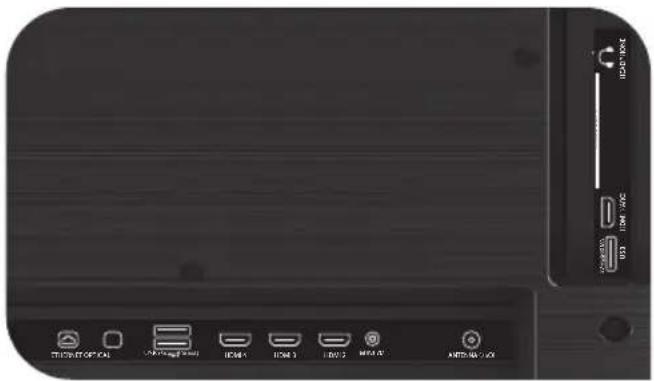
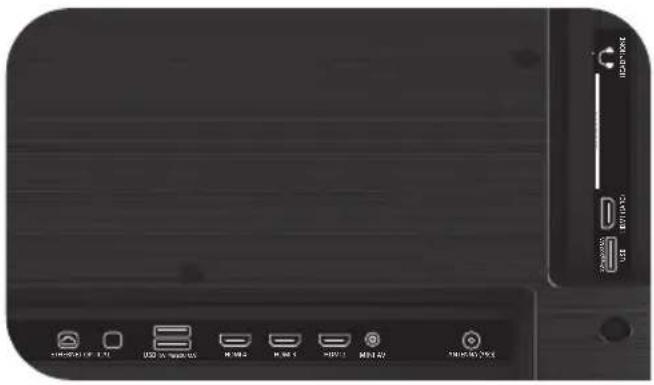
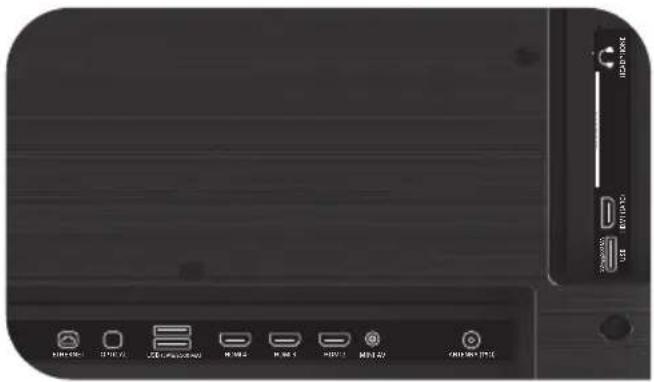
HDMI HDMI input
Antenna Antenna connection port
CI CAM module connection port
Mini AV Composite audio/video input-UHD
VIDEO Composite video input
ETHERNET Ethernet input
HEADPHONE Headphone output (3.5 mm)
OPTICAL Optical output
NOTE:
- All external devices should not be connected after you turn me off.
- The maximum load on the USB port should not exceed 0.5 A.
- The TV supports ARC, CEC. 2K supports HDMI 1.4 a, 4K supports HDMI 2.1 and eARC.
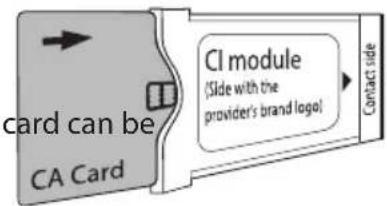
CONNECTING A CI CONDITIONAL ACCESS CARD
A CAM module with a CI conditional access attached to a digital cable broadcasting service provider along with information for use.
The names of individual menu modes, the designations of some connectors and places of application, and the performance of individual ergonomic control functions may differ slightly from those described and this manual.
text_image
card can be CA Card CI module (Slide with the provider's brand logo) Contact side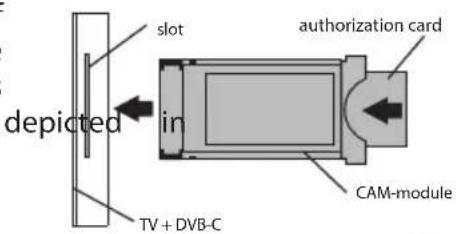
text_image
slot depicted in TV + DVB-C authorization card CAM-moduleIn addition to hardware-related malfunctions, if there are any non-standard power me off for 30 seconds.
| Unstable or missing broadcast/cable TV signal | I have an antenna connected, but I can't find channels, shows channels with distortion or sound interruptions | For stable reception of DVB-T2 (digital) and ATV (analog) signals - use an external antenna with an amplifier with an additional power supply.Additional power supply of the antenna input is not provided from the side of the TV and USB connectors.Point the antenna towards the nearest TV tower.If you use a room antenna, raise it higher, pay attention around your own axis and move the room.Make sure that the correct input source is selected - Antenna or Analog TV.Adjust the channels manually (with manual adjustment, the level and quality of the signal will be displayed).For the stability of the image and sound, the indicators should be from 50% to higher.Check the integrity of the cable. |
| I have cable TV connected, but I can't find channels, shows channels with distortion or sound interruptions | When using cable TV (DVB-C), I recommend connecting without using a splitter. Connect me to another antenna cable if possible.Make sure the correct input source is Cable TV.Adjust the channels manually (with manual adjustment, the level and quality of the signal will be displayed).Check the integrity of the cable.Use a signal booster. | |
| No sound is output to external speakers | Connecting speakers via Bluetooth | Connect Bluetooth speakers via the menu Settings → Remote controls and accessories → Add devices.Enable visibility / sync mode on the external device. |
| Connecting speakers via HDMI | Connect the speakers to me via the HDMI (ARC) connector.In Settings → Device Settings → Input Sources → HDMI EDID Version → select the EDID value.In Settings → Device Settings → Sound → Digital Output → select Auto, Skip, PCM, etc. | |
| Connection of acoustics through the 3.5 connector for headphones | Make sure the audio cable is fully inserted into the 3.5 jack. | |
| Connecting acoustics through optics | Connect the speakers to the OPTICAL jack.In Settings → Device Settings → Sound → Digital Output → select Auto, Skip, PCM, etc.Use the VOL button on the remote control to reduce the sound volume until it is completely turned off.The remote from the acoustics will increase the sound to the required level. | |
| The image from the PC / game console is not displayed | An external device is connected to me via HDMI, there is no image, the inscription “No signal” | Check the performance and version of the HDMI cable on another compatible device.HDR and 4K (Ultra HD) content can be transmitted via HDMI 2.0 and higher. Only UHD KIVI models are supported.► HDR. Go to Settings → Device settings → Picture → HDR → select On.► 4K (Ultra HD). In Settings → Device Settings → Input Sources → HDMI EDID Version → select EDID 2.0 or EDID 2.1.On a PC, change the resolution in the control menu of the video driver, and select the appropriate image broadcast mode.In the settings of the game console, configure the corresponding menu items according to the manufacturer's instructions. |
| No or unstable Internet connection | I am connected to a Wi-Fi or Ethernet network with no Internet access | Turn off the TV and router from the outlet for 1 minute.Check and set the correct date and time in Settings → Device settings → Date and time. |
natural_image
Technical line drawing of a mechanical assembly with labeled component 'KIVI' (no other text or symbols)natural_image
Front view of a black electronic device with labeled ports and buttons (no readable text or symbols beyond icons)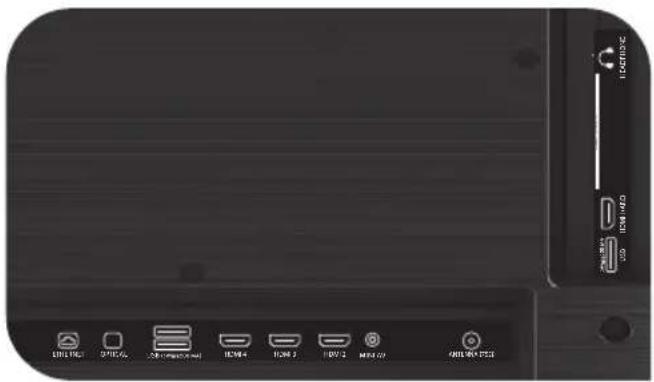
natural_image
Front view of a black electronic device with indicator lights and ports (no readable text or symbols)ABY SE MNOU BYLO BEZPEČNO:
text_image
CE RECO NOVATION CCT No DISENTVSTUPNÍ IMPEDANCE: 75 Ω
natural_image
Front view of a black electronic device with ports and indicator lights (no readable text or symbols)MODELY
UHD
natural_image
Front view of a black electronic device with labeled ports (no readable text or symbols beyond component labels)text_image
CE RECOCONOMICS CDnatural_image
Front view of a black electronic device with labeled ports and indicators (no readable text or symbols beyond standard labels)UHD
MODELLE
natural_image
Close-up of a black electronic device rear panel with labeled ports (no readable text or symbols beyond standard labels)text_image
KIVJ 0.00 η
natural_image
Technical line drawing of a rectangular electronic device with labeled 'KIVI' and internal components (no readable text or symbols beyond label)text_image
1 2 3 4 5 6 7 8 9 0 = KIVInatural_image
Front view of a black electronic device with labeled ports and indicators (no readable text or symbols beyond basic labels)MONTELA
UHD
natural_image
Close-up of a black electronic device rear panel with indicator lights and ports (no readable text or symbols)text_image
CE RECOCONOMICS CDnatural_image
Front view of a black electronic device with ports and indicator lights (no readable text or symbols)MODELOS UHD
natural_image
Front view of a black electronic device with indicator lights and ports (no readable text or symbols)natural_image
Front view of a black electronic device with ports and indicator lights (no readable text or symbols)MUDELID
UHD

text_image
FIRE ONION AUTO AUTO AUTO AUTO AUTOUSB USB-seadmete sisend (500 mA)
natural_image
Front view of a black electronic device rear panel with ports and indicator lights (no readable text or symbols)MODÈLES
UHD
natural_image
Close-up of a black electronic device front panel with labeled buttons (no readable text or symbols beyond basic labels)text_image
CE RECOCONOMICS CDnatural_image
Technical line drawing of a mechanical assembly with labeled component 'KIVI' (no text or symbols beyond label)natural_image
Front view of a black electronic device with ports and indicator lights (no readable text or symbols)UHD
MODELI
natural_image
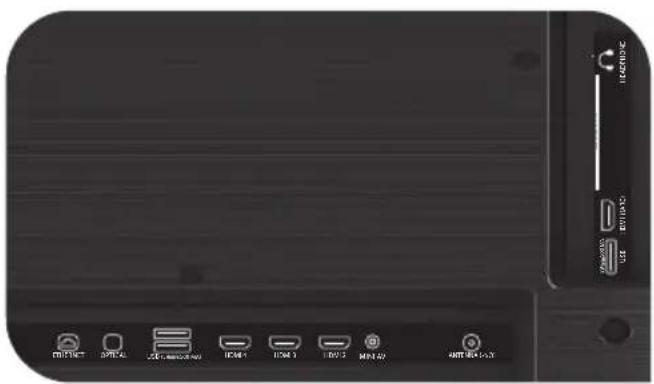
Close-up of a black electronic device rear panel showing ports and labels (no readable text or symbols beyond basic icons)USB ulaz za USB uređaje (500 mA)
HDMI HDMI ulaz
natural_image
Technical line drawing of a rectangular electronic device with internal components and mounting feet (no text or symbols)natural_image
Front view of a black electronic device with labeled ports and buttons (no readable text or symbols beyond basic labels)UHD
MODELLEK
text_image
USB Drive USB Drive USB Drive USB Drive USB Drive USB Drivetext_image
CE RECOCONOMICS No DEDUCATION CDnatural_image
Front view of a black electronic device rear panel with labeled ports (no readable text or symbols beyond labels)MODELLI
UHD
natural_image
Close-up of a black electronic device rear panel with indicator lights and ports (no readable text or symbols)natural_image
Front view of a black electronic device with indicator lights and ports (no readable text or symbols)UHD
MODELI

natural_image
Close-up of a black electronic device front panel with indicator lights and ports (no readable text or symbols)USB Ieeja USB iericēm (500 mA)
HDMI HDMI tipa ieeja
Antenna Antenas savienojuma ports
text_image
CE RECOCONOMICS CDnatural_image
Technical line drawing of a rectangular electronic device with internal components and mounting feet (no text or symbols)natural_image
Front view of a black electronic device with labeled ports and indicators (no readable text or symbols beyond basic labels)MODELIAI
UHD
text_image
STRAWF OFFICE 20000000000 ITEM 1 ITEM 2 ITEM 3 ITEM 4 ITEM 5 ITEM 6 ITEM 7 ITEM 8 ITEM 9 ITEM 10 ITEM 11 ITEM 12 ITEM 13 ITEM 14 ITEM 15 ITEM 16 ITEM 17 ITEM 18 ITEM 19 ITEM 20 ITEM 21 ITEM 22 ITEM 23 ITEM 24 ITEM 25 ITEM 26 ITEM 27 ITEM 28 ITEM 29 ITEM 30 ITEM 31 ITEM 32 ITEM 33 ITEM 34 ITEM 35 ITEM 36 ITEM 37 ITEM 38 ITEM 39 ITEM 40 ITEM 41 ITEM 42 ITEM 43 ITEM 44 ITEM 45 ITEM 46 ITEM 47 ITEM 48 ITEM 49 ITEM 50 ITEM 51 ITEM 52 ITEM 53 ITEM 54 ITEM 55 ITEM 56 ITEM 57 ITEM 58 ITEM 59 ITEM 60 ITEM 61 ITEM 62 ITEM 63 ITEM 64 ITEM 65 ITEM 66 ITEM 67 ITEM 68 ITEM 69 ITEM 70 ITEM 71 ITEM 72 ITEM 73 ITEM 74 ITEM 75 ITEM 76 ITEM 77 ITEM 78 ITEM 79 ITEM 80 ITEM 81 ITEM 82 ITEM 83 ITEM 84 ITEM 85 ITEM 86 ITEM 87 ITEM 88 ITEM 89 ITEM 90 ITEM 91 ITEM 92 ITEM 93 ITEM 94 ITEM 95 ITEM 96 ITEM 97 ITEM 98 ITEM 99 ITEM 100natural_image
Three black-and-white icons: a square, a recycling symbol, and a waste bin (no text or labels)
Dan is-simbolu jindika li ghandi izolament doppju bejn il-vultagg tal-mains u l-partijiet perikoluzi ghalik.

Hbieb, sfortunatament, jien m'inix etern. Ghaldaqstant, fit-tmiem tat-terminu tieghi, jien se ninghata lil punt ta'ričeviment ta'taghmir elettriku u elettroniku. Ghal informazzjoni aktar dettaljata dwar punti ta'ričeviment u rimi, jekk joghgbok ikkuntattja lill-awtoritajiet municipali lokali jew kumpanija ghar-rimi tal-iskart domestiku.
KARATTERISTIĆI
| Mudell | 32H760QB32H760QW | 32F760QB32F760QW | 43U760QB43U760QW | 50U760QB40F760QBKrdSTV65U760QB | ||||
| Daqs dijagonali tal-iskrin, pulzieri/cm | 32/80 32/80 | 32/80 | 40/102 43/109 50/127 | 55/140 65/165 | ||||
| Rizoluzzjoni | HD1366x768 | FHD1920x1080 | UHD3840x2160 | |||||
| USB 2.0(FAT32, NTF5) | 2 | 2 | ||||||
| HDMI | 3 | 4 | ||||||
| HDMI | HDMI 1.4a | HDMI 2.1 | ||||||
| Wi-Fi | a/b/g/n/ac | |||||||
| Standard VESA, mm | 200x100 200x150 | 200x200 400x200 | ||||||
| Tip / daqsViti VESA, mm | M4 /2x12 + 2x6 | M4 /2x12 + 2x6 | M4 /2x12 + 2x6 | M6 /2x12 + 2x8 | M6 /2x12 + 2x12 | M6 /2x12 + 2x12 | M6 /2x16 + 2x16 | M6 /2x16 + 2x16 |
| Wisa', gholi, fond, mm | 720x425x62 | 720x430x62 | 734x436x71 | 899x522x62 | 960x556x64 | 1116x642x61 | 1229x710x63 | 1448x835x63 |
| Dimensjonijietbl-istand, mm | 720x465x180 | 720x465.5x183 | 734x481x195 | 899x575x240 | 960x620x240 | 1116x705x240 | 1229x772x260 | 1448x902x333 |
| Piz nett, kg | 4.2 | 4,2 | 6.87.4 | 6.4 | 10.5 | 13 | 17.3 | |

NOTA:
Is-sett komplet, id-dehra u l-ispecifikazzjonijiet tal-prodott jistghu jkunu differenti jew jistghu jigu mibdula mill-manifattur minghajr avviż minn qabel.
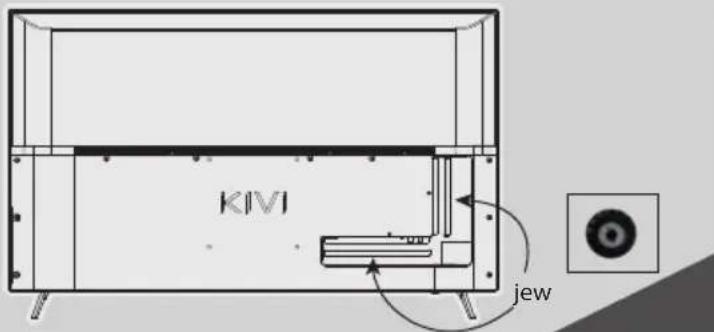
INSTALLA L-ANTENNA TIEGHI KIF MURI HAWN TAHT
text_image
KIVI jewIMPEDANZA TAL-INPUT: 75 Ω
natural_image
Front view of a black electronic device rear panel with labeled ports and indicators (no readable text or symbols beyond basic labels)MUDELLI
UHD
text_image
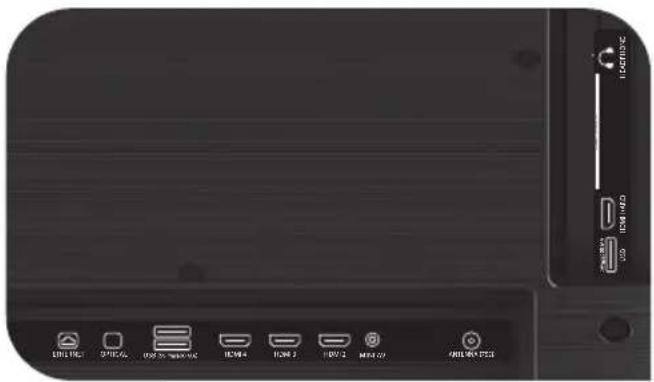
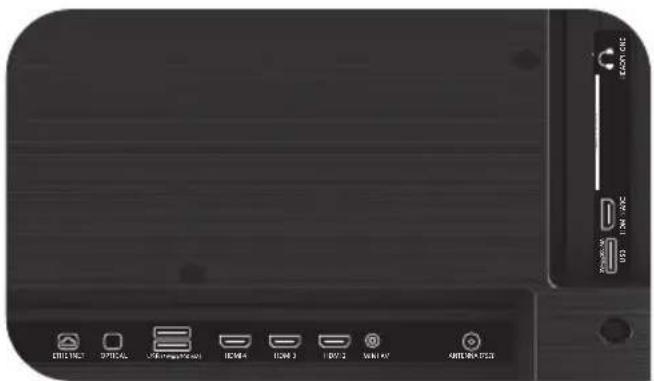
Device rear panel with labeled buttons and icons for ventilation or storage functionsUSB Input ghal apparati USB (500 mA)
HDMI Input HDMI
Antenna Port ghall-konnessjoni tal-antenna
CI Port tal-konnessjoni tal-modulu
Mini AV Input awdjo/vidjo kompost
VIDEO Input vidjo kompost
ETHERNET Input ethernet
HEADPHONE Hrug tal-headphone (3.5mm)
OPTICAL Output ottiku
! NOTA:
- L-apparati esterni kollha m'ghandhomx ikunu konnessi wara li titfini.
- It-taghbija massima fuq il-port USB m'ghandhiex taqbez 0.5 A.
- It-TV jappopgga ARC, CEC. 2K jappoğga HDMI 1.4 a, 4K jappoğga HDMI 2.1 u eARC.
KIF TQABBAD KARD TAL-AČČESS KUNDIZZJONALI CI
IMPEDANCJA WEJŚCIOWA: 75 OM
natural_image
Front view of a black electronic device with labeled buttons and ports (no readable text or symbols beyond basic labels)MODELE UHD
natural_image
Front view of a black electronic device rear panel with labeled ports and indicators (no readable text or symbols beyond basic labels)text_image
CE RECOCONOMICS CDnatural_image
Back view of a black electronic device with labeled ports and indicators (no readable text or symbols beyond basic labels)MODELOS UHD
text_image
EXTRUCT OFFIC USB USB 1 USB 2 MINT 40 MINT 50PENTRU CA SĂ FIU CURAT:
natural_image
Three black-and-white icons: a square, a recycling symbol, and a waste bin (no text or labels)NOTĂ:
natural_image
Technical line drawing of a two-tier TV setup with no visible text or symbolsnatural_image
Front view of a black electronic device with ports and indicator lights (no readable text or symbols)MODELE UHD
natural_image
Close-up of a black electronic device rear panel with indicator lights and ports (no readable text or symbols)natural_image
Front view of a black electronic device with labeled buttons and ports (no readable text or symbols beyond basic labels)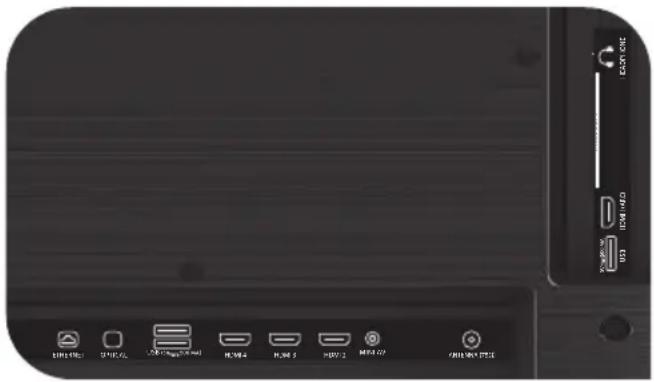
natural_image
Front view of a black electronic device with indicator lights and ports (no readable text or symbols)NEPOUŽÍVAJTE MA, AK:
natural_image
Front view of a black electronic device with labeled ports and indicators (no readable text or symbols beyond basic labels)MODELY UHD
natural_image
Front view of a black electronic device with indicator lights and ports (no readable text or symbols)USB Vstup pre USB zariadenia (500 mA) HDMI HDMI vstup Antenna Port na pripojenie antény CI Port na pripojenie CAM modulu Mini AV Kompozitný audio/video vstup
NE MOREM BITI UPORABLJEN, ČE:
text_image
CE RECOCONOMICS CD
Ta simbol pomeni, da imam dvojno izolirane dele pod napetostjo.

natural_image
Close-up of a black electronic device rear panel with labeled ports and buttons (no readable text or symbols beyond basic labels)MODELI UHD
natural_image
Front view of a black electronic device with labeled ports and connectors (no readable text or symbols beyond basic labels)USB za USB naprave (500 mA)
HDMI vrste HDMI
natural_image
Three black-and-white icons: a square, a recycling symbol, and a waste bin (no text or labels)! ПРИМИТКА:
natural_image
Front view of a black electronic device with labeled ports and buttons (no readable text or symbols beyond basic labels)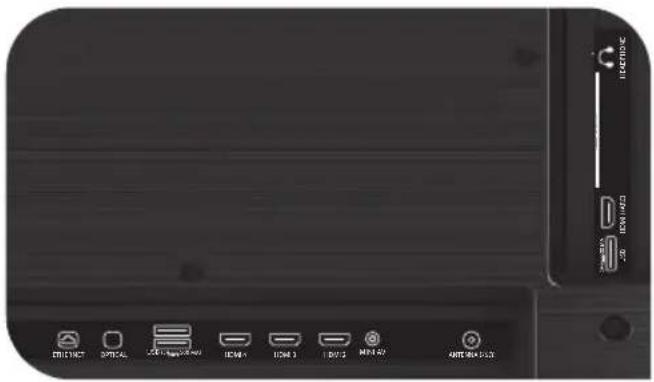
text_image
DR1367 OPTICAL 201-500V/400 ICM1 ICM 3 I/O 3 MIN 42 MIN 42+53Full troubleshooting instructions are available via the QR code.
Scan the QR code using your smartphone or Viber camera.