
SS-21710 - Air purifier Sogo - Free user manual and instructions
Find the device manual for free SS-21710 Sogo in PDF.
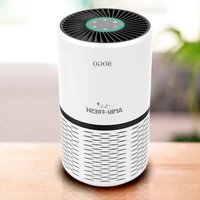


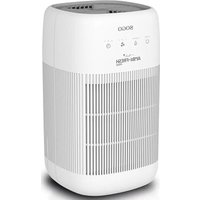
| Product type | Air purifier |
| Brand | Sogo |
| Model | SS-21710 |
| Power supply | 220-240 V~, 50/60 Hz |
| Power consumption | 23 W |
| Fan speed levels | 3 (I: low, II: medium, III: high) |
| Auto mode | Yes, adjusts speed based on air quality |
| Sleep mode | Yes, minimum speed with reduced lighting |
| Programmable timer | 2, 4 or 8 hours |
| Filter type | HEPA combined filter + pre-filter |
| Recommended coverage area | Up to 26 m² (280 sq ft) |
| Filter maintenance | Clean the pre-filter every 2 weeks with a vacuum |
| Filter replacement indicator | Yes, light indicator |
| Memory function | Yes, saves settings after power off |
| Air quality display | Light indicator: blue (very good), green (good), orange (unhealthy), red (hazardous) |
| Required installation | Stable, flat and horizontal surface |
| Recommended clearance | 40 cm on each side and above |
| Auto shutdown | Yes, via timer |
Frequently Asked Questions - SS-21710 Sogo
User questions about SS-21710 Sogo
0 question about this device. Answer the ones you know or ask your own.
Ask a new question about this device
Download the instructions for your Air purifier in PDF format for free! Find your manual SS-21710 - Sogo and take your electronic device back in hand. On this page are published all the documents necessary for the use of your device. SS-21710 by Sogo.
USER MANUAL SS-21710 Sogo
AIR PURIFIER
AIR PURIFIER
AIR PURIFIER
AIR PURIFIER
AIR PURIFIER
AIR PURIFIER
Caution: please read and preserve these important instructions
7. Storage
This instruction manual can also be downloaded from our web page www.sogo.es
1. IMPORTANT SAFETY INFORMATION
- Read this user manual carefully before you use the appliance and save it for future reference.
- Do not let water or any other liquid or flammable detergent enter the appliance to avoid electric shock and/or a fire hazard.
- Do not clean the appliance with water or any other liquid or a (flammable) detergent to avoid electric shock and/or a fire hazard.
- Check if the voltage indicated on the appliance corresponds to the local mains voltage before you connect the appliance.
- If the mains cord is damaged, you must have it replaced by the distributor, or a service centre authorised by the distributor or similarly qualified persons in order to avoid a hazard.
- Do not use the appliance if the plug, the mains cord or the appliance itself is damaged.
- This appliance is not intended for use by persons (including children) with reduced physical, sensory or mental capabilities, or lack of experience and knowledge, unless they have been given supervision or instruction concerning use of the appliance by a person responsible for their safety.
- Children should be supervised to ensure that they do not play with the appliance.
- Do not block the air inlet and outlet, e.g. by placing items on the air outlet or in front of the air inlet.
- To reduce the risk of fire or electric shock, DO NOT use the appliance with any solid-state speed control device.
- This appliance is not a substitute for proper ventilation, regular vacuum cleaning or use of an extractor hood or fan while cooking.
- If the wall socket used to power the appliance has poor connections, the plug of the appliance becomes hot. Make sure you plug the appliance into a properly connected wall socket. Always place and use the appliance on a dry, stable, level and horizontal surface.
- Leave at least 40 cm free space behind and on both sides of the appliance and leave at least 40 cm free space above the appliance.
- Do not place anything on top of the appliance and do not sit on the appliance.
- Do not place the appliance directly below an air conditioner to prevent condensation from dripping onto the appliance.
- Make sure all filters are properly installed before you switch on the appliance.
- Only use the original filters specially intended for this appliance. Do not use any other filters.
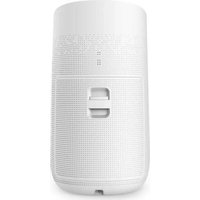
- Avoid knocking against the appliance (the air inlet and outlet in particular) with hard objects. Always lift or move the appliance by the handle at the back of the appliance.
- Do not insert your fingers or objects into the air outlet.
- Do not use this appliance when you have used indoor smoke-type insect repellents or in places with oily residues, burning incense or chemical fumes.
- Do not use the appliance near gas appliances, heating devices or fireplaces. Always unplug the appliance after use and before you clean it.
- Do not use the appliance near gas appliances, heating devices or fireplaces. • Always unplug the appliance after use and before you clean it.
- Do not use the appliance in a room with major temperature changes, as this may cause condensation inside the appliance.
- The appliance is only intended for household use under normal operating conditions.
- To prevent interference, the product should be kept at least 2 meters away from devices that use radio waves.
- The appliance does not remove carbon monoxide (CO) or radon (Rn). It cannot be used as a safety device in case of accidents with combustion processes and hazardous chemicals.
- To prevent interference, keep a distance of at least 2 meters between the product and devices that use radio waves or electrical equipment.
Technical Specification:
220 - 240V~ 50/60Hz, 23W
2. Product Structure
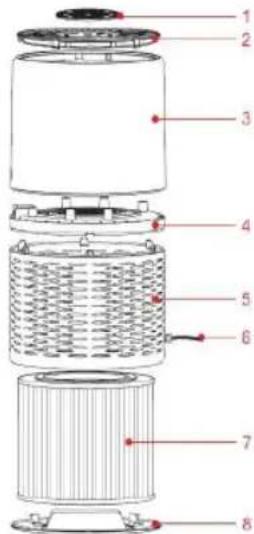
- Control panel
- Outlet cover
- Upper body
- Decorative ring
- Lower body
- Power cord
- Combination filter
- Base cover
3. Before first use
Placing the filters
The appliance comes with all filters fitted inside, but you have to remove the packaging of the filters before you can use the appliance. Remove all filters, unpack them and place them back into the appliance as described below.
Note: Make sure you insert the filters in the correct position.
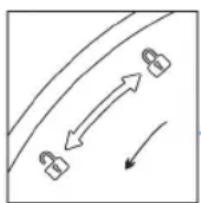
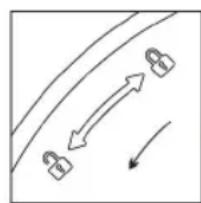
- Put the appliance upside down on a soft cloth to avoid scratching. To open the base cover, you need to align the LOCK position, turn the base cover counterclockwise from LOCK to OPEN position, then the lock is released.
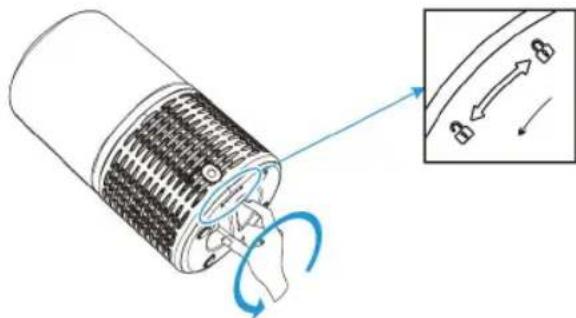
- Remove the base cover and take out the combination filters.
- Remove the packaging material from the filter.
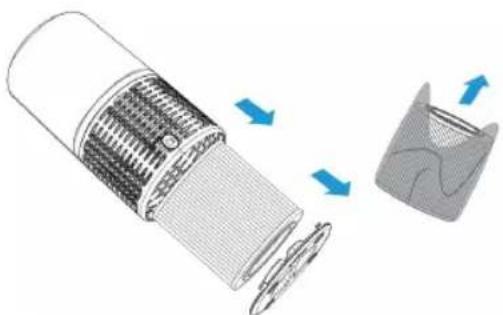
- Put the filter back into the appliance.
Note: Make sure that the side with the tag is pointing towards you.
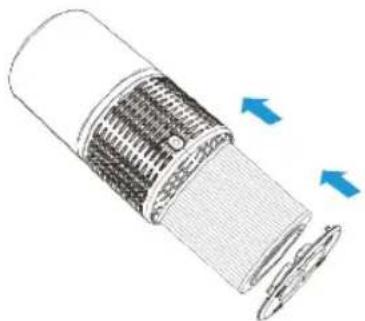
- Turn the base cover clockwise from OPEN position to LOCK position, you will hear a "click" sound, the base cover is fastened.
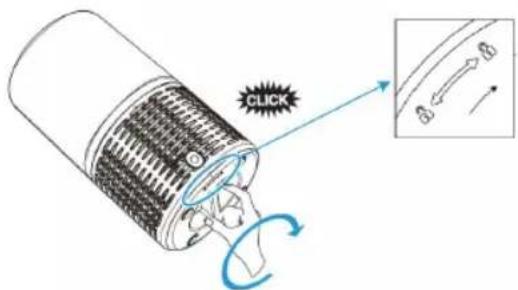
- Using the appliance
4.1 About the control panel

1. Plug and turn on the machine
All lights will be ON for 1 second and you hear a beep, all lights then stay OFF.

- Press the power button to switch on the appliance.
Press ⏻ button, AQ light turns on and Speed at level 1 (Low).
3). Fan speed adjustment
The fan speed light indicates at which fan speed the appliance is operating.
Press the Speed button ✝ to adjust the fan speed level; there are three levels.
I~III refers to Low, Medium, and High levels.
4). Auto mode
In Auto mode, the fan speed will be automatically adjusted according to the AQI level as follows:
| AQ Color Blur Green | Orange Red | |||
| Speed mode Sleep I (Low) II (Medium) III (High) | ||||
| AQ level Very good Good Unhealthy Hazardous | ||||
5). Sleep mode
- Press ☺ to turn Sleep Mode on, and the Sleep indicator will turn on.
All indicators will be at half brightness, and the air purifier will operate at the lowest fan speed.
- All indicators will be at half brightness while Sleep mode is on. The indicators will light up when switching to Speed mode or other modes.
- The AQ light indicator will display a color according to the air quality.
Note: The operation will not work in Standby Mode.
6). Light
Press the ⚡ button to turn off all indicators.
When the air purifier is in a mode where all indicators are off, pressing any other button (except the Power button) will light them up and keep them on.
Note: In the mode where all indicators turn off, tap the Power button to turn off.
7). Setting the timer
- Press ⏻ to turn the timer on or off, and to cycle through timer options (2 hours, 4 hours, or 8 hours).
- The air purifier will automatically power off once the timer is finished.
Note: Pressing ⏻ or unplugging the air purifier will cancel the timer.
8). Filter replacement light
When the indicator lights up, it means that you should check the filter to see if it needs to be cleaned or replaced.
Note: The filter's lifetime depends on your home's air quality and usage time.
Using the appliance in a humid environment will reduce the lifetime of the filter.
9). Memory Function
The air purifier has a memory function for settings when the user turns it off, including fan speed. It will return to the last setting when the user turns it on again.
5. Filter Replacement
- Switch off the appliance and unplug it. (a)
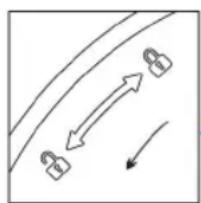
- Place the appliance upside down on a soft cloth to avoid scratching. To open the base cover, align it with the LOCK position, then turn the base cover counterclockwise from LOCK to OPEN position. The lock will be released. (b)
(a)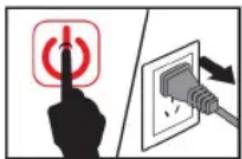
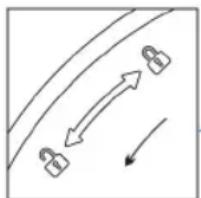
(b)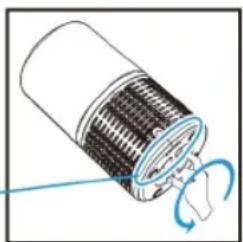
- To remove the base cover and combination filter, grab the filter tag and pull it towards you. (c)
- Remove the packaging material from the new combination filter. (d)
- Insert the new filter back into the appliance. (e) Note: For HEPA filter, make sure that the side with the tag is pointing towards you.
- Turn the base cover clockwise from OPEN position to LOCK position. You will hear a "click" sound, indicating that the base cover is fastened. (f)
- Plug the appliance back into the wall socket and switch it on again. (g)
- Reset Filter's lifetime. Even if you replace the filters, when you switch on the appliance, the filter icon still lights. You need to reset the filter's lifetime so that the appliance can cycle to calculate the filters' working time. Press and hold the 📋 button for 3 seconds. The filter light turns off, and the reset is finished. (h)
(c)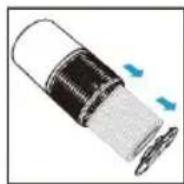
(d)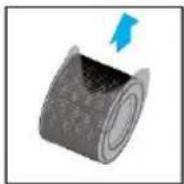
(e)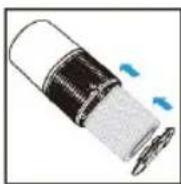
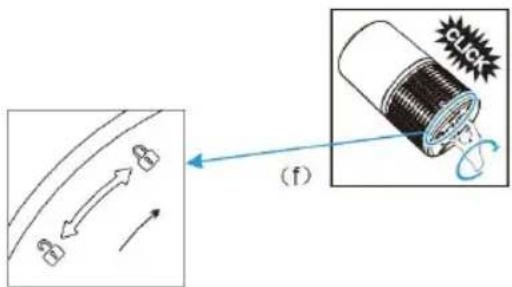
(g)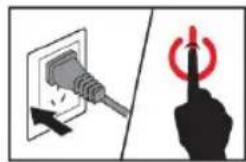
(h)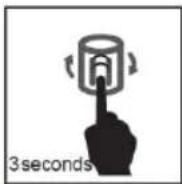
Filter replacement force mode
Suppose you use the appliance under air pollution environment. You can replace the filter even if the filter icon does not light. The filter replacing method is the same; please see chapter: Filter replacement.
To force reset the filter's lifetime:
At the standby mode (NOT pressing the power button), press and hold the button for 3 seconds. The icon lights on. Press and hold the button for 3 seconds again. The filter light turns off, and the reset is finished.
6. Keep Filter Clean:
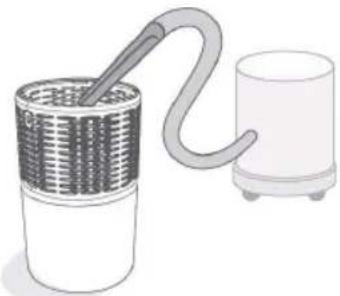
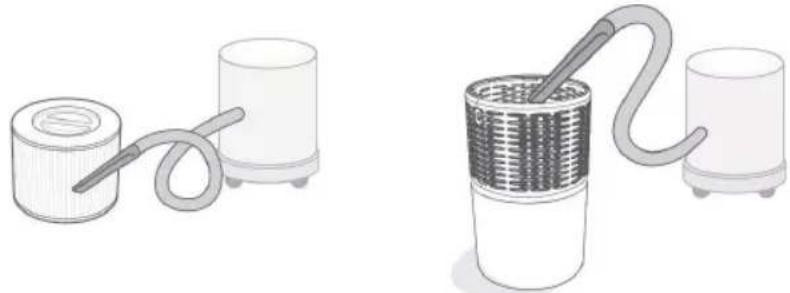
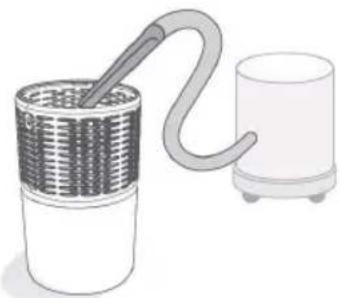
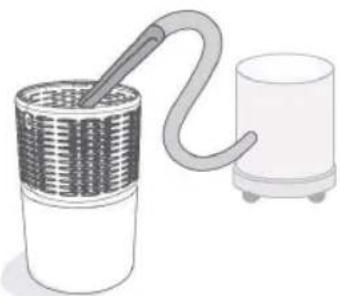
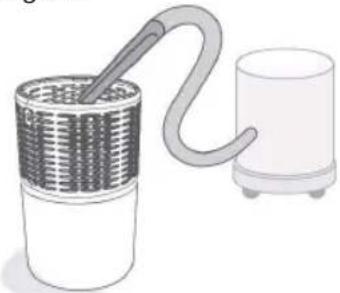
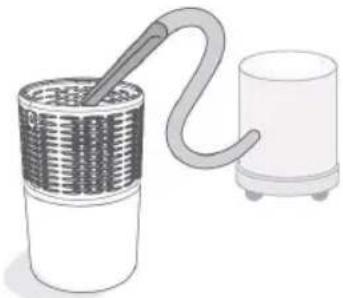
In order to keep your purifier working with more efficiency and lifetime, clean the filter (pre-filter side only) every 2 weeks with the instructions below:
1). Clean out any dust, hair, or furs remaining on the pre-filter by using the vacuum hose. 2). Clean out any dust, hair, or furs remaining on the bottom cover by using the vacuum hose. 3). DO NOT wash the filter with any water or liquid.
7. Storage
Unplug the power cord, then wipe the machine clean, put the appliance in the packing bag, and then place it in a dry place away from direct sunlight.
8. Environment
Do not dispose of the appliance with normal household waste at the end of its life; instead, hand it in at an official collection point for recycling. By doing this, you help to preserve the environment.
9. Troubleshooting
This chapter summarizes the most common problems you may encounter with the appliance. If you are unable to solve the problem with the information below, contact the Consumer Care Centre in your country.
| Problem Cause Solution | ||
| Air purifier does not power on | Unit is not plugged into an electrical outlet | Connect the plug to a powered electrical outlet |
| Outlet is not working properly Try plugging the air purifier into a different outlet | ||
| Power button has not been pressed after plugging in the air purifier | Press once to turn on the air purifier | |
| Power cord is damaged Immediately discontinue use and contact Customer Support | ||
| Air purifier is defective or malfunctioning | ||
| Air purifier does not respond to button controls | Air purifier is not plugged into an outlet Connect the plug to a powered electrical outlet | |
| Air purifier is defective or malfunctioning Immediately discontinue use and contact Customer Support | ||
| Air purifier makes an unusual noise while operating | Air filters are dirty Replace the air filter as instructed in the Filter Replacement section | |
| Filter does not fit properly Properly place filter(s) as noted in the Before first use and Filter Replacement sections | ||
| Foreign object inside the unit Immediately discontinue use and contact Customer Support. DO NOT attempt to open the air purifier | ||
| Significantly reduced airflow | Filter packaging has not been removed Remove filter from packaging before use | |
| Fan speed is low Press to adjust fan speed | ||
| Air filters need to be replaced Replace the air filters as instructed in the Filter Replacement section | ||
| Not enough clearance on all sides of the purifier | Ensure there is at least 38 cm (15 inches) of clearance on all sides of the purifier | |
| Poor air purification quality | Air filters need to be replaced Replace the air filters as instructed in the Filter Replacement section | |
| Room is too large for the air purifier's applicable area | Ensure the room is smaller than (280 ft 2 ) | |
| Air inlet or outlet is blocked | Remove objects blocking air inlet or outlet | |
| Filters not properly placed in housing | Properly place filters as noted in the Before first use and Filter Replacement sections | |
| Filter reset button is still illuminated after replacing the air filters | The air purifier has been reset incorrectly | See the Filter Replacement section on how to properly reset the unit |
| Air purifier turns on, then suddenly turns off | Air purifier is defective or malfunctioning Immediately discontinue use and contact Customer Support. DO NOT attempt to open the air purifier for self-servicing | |
| Air purifier beeps repeatedly after being powered on or plugged in | ||
(b)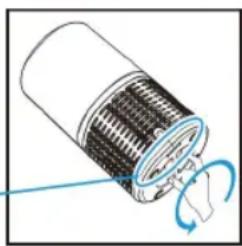
(g)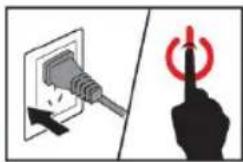
(h)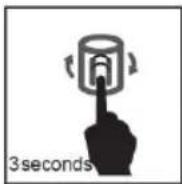
7. Storage
(b)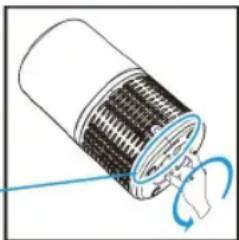
(g)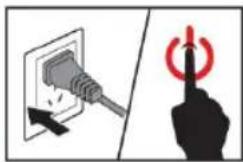
(h)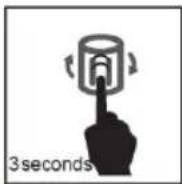
7. Storage
(g)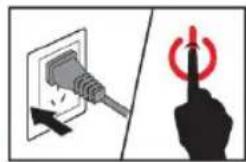
(h)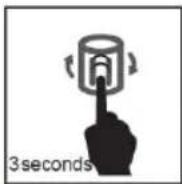
7. Storage
(b)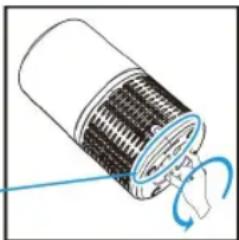
(g)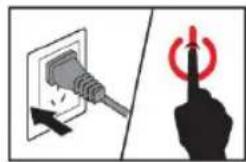
(h)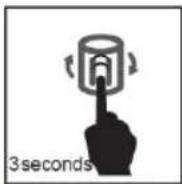
7. Storage
DECLARATION OF CONFORMITY
This device complies with Low Voltage Directive 2014/35/EC, Electromagnetic Compatibility Directive 2014/30/EU, Directive 2015/863/EU on the restriction of the use of certain hazardous substances in electrical and electronic equipment and Directive 2009/125/EC on the eco-design requirements applicable to energy-related products.
DECLARATION OF CONFORMITY
This symbol means that in case you wish to dispose of the product once its working life has ended, take it to an authorised waste agent for the selective collection of waste electrical and electronic equipment (WEEE).

Imported by:
Sanysan Appliances S.L, NIF: B98753056, C/ Barcas 2, 2
46002 Valencia, Spain Product made in P.R.C. – Designed by SOGO based on the European Quality Standards
Customer Service: www.sogosat.com / sogosat@sogosat.com / 0034 902 222 161
- STORAGE
- IMPORTANT SAFETY INFORMATION
- PRODUCT STRUCTURE
- BEFORE FIRST USE
- PLACING THE FILTERS
- PLUG AND TURN ON THE MACHINE
- ). FAN SPEED ADJUSTMENT
- ). AUTO MODE
- ). SLEEP MODE
- ). LIGHT
- ). SETTING THE TIMER
- ). FILTER REPLACEMENT LIGHT
- ). MEMORY FUNCTION
- FILTER REPLACEMENT
- FILTER REPLACEMENT FORCE MODE
- TO FORCE RESET THE FILTER'S LIFETIME
- KEEP FILTER CLEAN
- ENVIRONMENT
- TROUBLESHOOTING
- DECLARATION OF CONFORMITY
- IMPORTED BY
Brand : Sogo
Model : SS-21710
Category : Air purifier