
SS-21715 - Air purifier Sogo - Free user manual and instructions
Find the device manual for free SS-21715 Sogo in PDF.
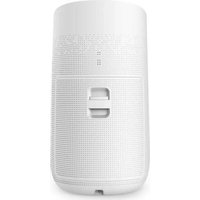


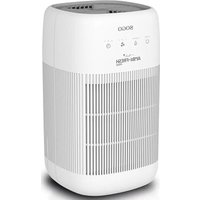
| Product type | Air purifier |
| Brand | Sogo |
| Model | SS-21715 |
| Dimensions (L x W x H) | 270 x 303 x 497 mm |
| Weight | 4.6 kg |
| Power supply | AC 100-240 V, 50/60 Hz |
| Power | 50 W |
| Noise level | ≤ 56 dB |
| Coverage area | ≤ 50 m² |
| Fan speeds | Auto, High, Medium, Silent |
| Timer | 2 h, 4 h, 8 h |
| Special functions | Adjustable light, child lock, UV, WiFi (Smart Life) |
| Filter replacement indicator | Yes (after 2200 h of operation) |
| Filter type | Specific filter (non-washable) |
| Filter maintenance | Clean regularly with a vacuum cleaner or dry cloth; do not wash |
| UV sterilization | Yes, can be activated/deactivated |
| Sensor | Infrared |
| Connectivity | Wi-Fi via Smart Life app |
| Safety | Automatic shutdown in case of overheating, child lock |
| Materials | ABS plastic |
| Color | White |
| Included accessories | Filter, user manual |
| Warranty | 2 years (according to local legislation) |
| After-sales service | www.sogosat.com / sogosat@sogosat.com / 0034 902 222 161 |
| Manufacturing | R.P. China, designed in Europe |
| Standards | CE, RoHS, WEEE |
Frequently Asked Questions - SS-21715 Sogo
User questions about SS-21715 Sogo
0 question about this device. Answer the ones you know or ask your own.
Ask a new question about this device
Download the instructions for your Air purifier in PDF format for free! Find your manual SS-21715 - Sogo and take your electronic device back in hand. On this page are published all the documents necessary for the use of your device. SS-21715 by Sogo.
USER MANUAL SS-21715 Sogo
PURIFICADOR DE AIRE
AIR PURIFIER
PURIFICATEUR D'AIR
PURIFICADOR DE AR
LUFTREINIGER
PURIFICATORE D'ARIA
Caution: please read and preserve these important instructions
This instruction manual can also be downloaded from our web page www.sogo.es
POINTS FOR ATTENTION
- To avoid electric shock and fire, do not allow water, liquid or any flammable detergent to get into the product.
- Do not spray any flammable materials such as pesticides or perfumes around the product.
- Before connecting the power supply, please check whether the voltage of the product is consistent with the local power supply voltage.
- If power cord is damaged, in order to avoid danger, it must be replaced by professional staffs.
- Please stop using if the plug, power cord or product is damaged.
- Keep the air inlet/outlet free from being blocked.
- Person with physical or mental disability, or without relevant experiences and skills (including children) should use it under guiding and instructing.
- This product cannot replace normal ventilation, daily dust collection or oil pumping when cooking.
- Ensure the product socket is well connected with plug. If not, the plug will be hot.
-
Do not place any items above the product.
-
Be sure to place and use the product on a firm, flat and horizontal surface.
- Leave at least 30cm of space on the back and sides of the product, and at least 50cm of space above the product when using.
- Do not place the product under air conditioner to prevent condensation water dropping into the product.
- Ensure both the filter and the back cover are properly installed before connected power.
- Please use the filter specially designed for this product.
- Do not take the filter as fuel or similar purposes to avoid irreversible harm.
- Do not use hard objects to strike the products, especially the air outlet and air inlet.
- Do not insert finger or other things into the air outlet/inlet to prevent physical damage or trouble.
- Do not use this product when you are using an indoor spray repellent, or in a place filled with grease, flammable gas or chemical fumes.
- Ensure the product is unplugged before moving, cleaning, maintaining and replacing filter.
Product Overview
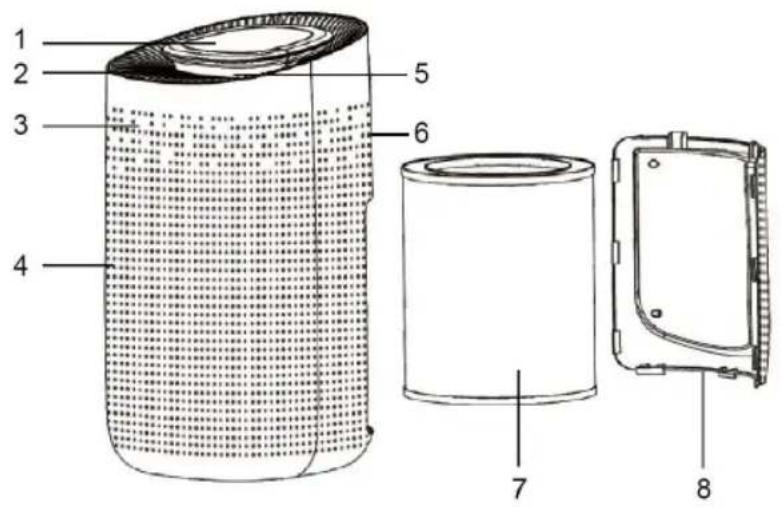
- Control Panel
- Air outlet
- Body
- Air inlet
- Light Box
- Infrared Sensor
- Filter
- Back Cover
Control Panel
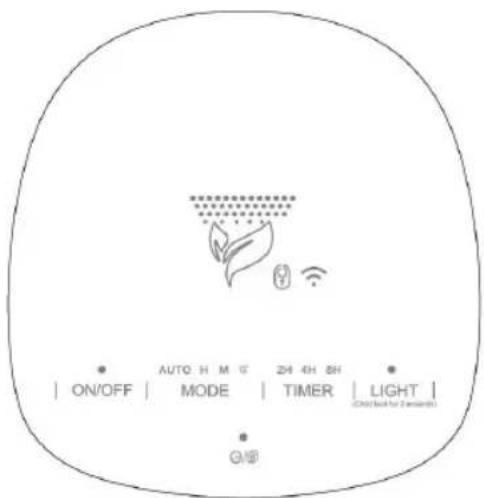
ON/OFF: Power Button
MODE: Wind Speed Button
LIGHT: Light / Child lock Button
TIMER: Timer / WIFI Button


V/Filter Button
SPECIFICATIONS
| Model No. SS-21715 | |
| Size L270* W303* H497 mm | |
| Input AC100-240V 50/60 Hz | |
| Power 50W | |
| Noise =<56dB | |
| Coverage area =<50m2 | |
| Weight 4.6KG | |
REMOVE FILTER PACKAGE
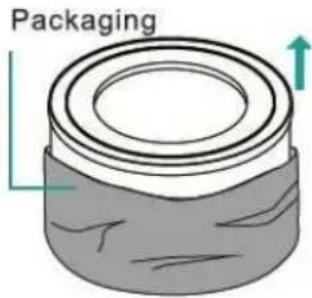
Before using, please remove the package of the filter.
Ensure the machine is unplugged before removing or installing the filter.
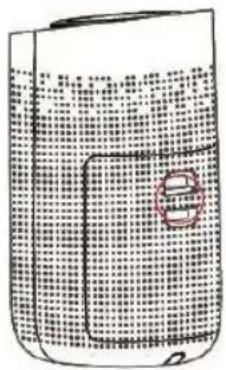
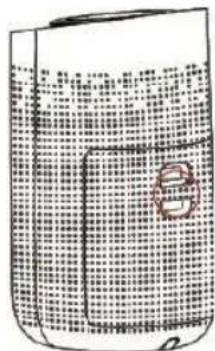
- Press the red circle switch to take out the back cover.

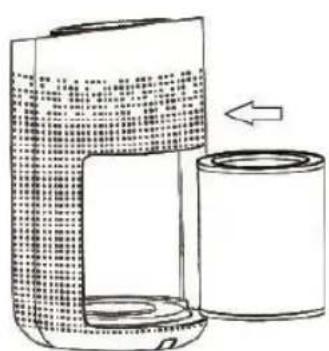
- Remove the filter from the machine.
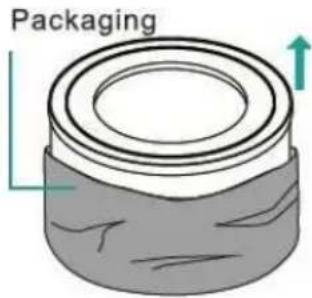
- Remove the packaging of the new filter.
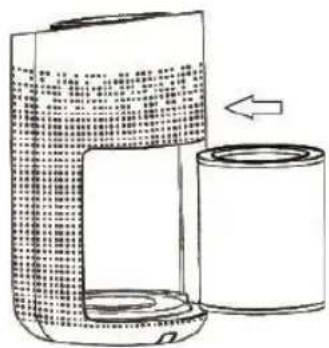
- Put the filter into the machine.
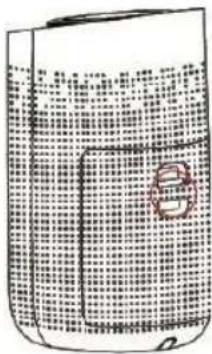
- Press the red circle switch button to close the back cover.
FUNCTION INSTRUCTION
Connect the power, all indicators will be on for few seconds and then it will turn off. After that, the machine will be in standby mode.
BUTTON OPERATION
Power Button
- Press the power button, the machine turns on at mid default mode, meanwhile, the buzzer rings for one time and the indicator will be on.
- Press again to turn off the machine, all the lights will be off, then the machine is in standby mode.
Wind Speed Button
In the condition of working, press the Wind Speed Button to adjust the wind speed among the circulation of Auto-H-M-S grade, meanwhile, the buzzer rings for one time and the indicator will be on.
Timer / WiFi Button
In the condition of working, press the Timer Button to set timer among the circulation of 2H, 4H and 8H. Every time you press the button, the buzzer rings for one time, and the indicator will be on. (Notice: Long press the Timer/WiFi Button for 3 seconds to start WiFi function, and the indicator will be on)
Light / Child lock Button
In the condition of working, press the Light Button, the indicator will be on. Every time you press it, the buzzer will ring for one time, and the light will be changed among Soft - Standard -Off mode. (Notice: In the condition of shutdown, the light adjustment can't be operated. During the first 30s preheating period, the Light Button just could be operated between on and off mode.)
In the condition of working, press the Light/Child lock button for 3s to start the Child lock function, the indicator will be on. Press again for 3s, the buzzer will ring for one time then the indicator will be off to unlock this function. (Note: Any functions cannot operate in the mode of Child lock function unless you long press this button to unlock it.)
UV/Filter Button
In the condition of working, press the UV Button to start UV function, the indicator will be on. Press again to turn off this function, the buzzer will ring for one time when you press it every time.e.
Reminder of Replacing Filter
In the condition of working, when the machine detects the filter is saturated after running for 2200 hours, the filter indicator light will keep flashing in red. Long press the Filter Button for 7s to stop flashing light and to reset after installing a new filter. Notice: The machine still works normally even in the reminder of replacing filter.)
Works With Smart Life APP
Download & Registration
1) Scan the QR code to download "Smart Life" APP. You can also search "Smart Life" in either APP store or Google Play to install the APP.
2) Open the "Smart Life" APP, tap "Register" to register a "Smart Life" account with your phone number or E-mail. Then sign in the APP.
3) Open the "Smart Life" APP, click "add device" or tap "+" on the top right corner of the APP homepage. There are two methods to enter the page of "add device" - Add WiFi manually or search for the devices automatically.
In the homepage of add device manually, choosing any one of product range to enter a new homepage and ensure the indicator light flash quickly.
The devices provide two configuration methods. In the homepage of Easy mode, tap “Other methods” on the top right corner to enter Easy mode and AP mode, then could choose one of mode to connect with WiFi.
Add Devices in Easy Mode(Recommend)
Make sure your smart device is energized and your mobile phone is connected to your WiFi network. If the WiFi indicator of smart device do not flash, please press the WiFi button for more than 5 seconds until the indicator light keeps flashing quickly, it means the devices is ready for configuration. Tap “+” on the top right corner of the APP, select type of service device and click it. When appearing “Add 1 device successfully”, it means the connection is completed and your device will be listed in your APP list.
Add Devices in AP Mode
1) If failed in Easy Mode, users could also add devices in AP Mode.
2) Press the WiFi button for more than 5 seconds until the WiFi indicator light begin to flash slowly, it means the device is already for configuration in the AP Mode.
3) Tap "+" on the top right corner of the APP. Select AP mode and tap it. Then tap "Ensure the indicator flash slowly". Then tap "Connect now" to go to the WLAN Settings interface in your mobile phone and select the WiFi network named "Smart Life XXXX" to connect it.
4) Return to the "Smart Life" APP, the connection will start automatically.
5) When appears “Added 1 device successfully”, it means the connection is completed and your device will be listed in your APP list.
Now you can control your smart device via your mobile phone APP anytime and anywhere (Make sure your mobile phone and smart device are all connected to the network).
MAINTENANCE
Notice:
- Ensure the machine is unplugged before maintenance.
- Do not immerse the air purifier into water or any liquid.
- Do not use abrasive, corrosive or flammable cleansers (such as bleach or alcohol) to clean any part of the unit.
- Clean the filter regularly. Do not wash or reuse the filter.
- Ensure the machine is unplugged before replacing the filter.
- Please sterilize the filter under sunlight regularly.
- Do not use a vacuum cleaner to clean the filter or wash it directly.
Cleaning & Storage
1) Ensure the machine is power-off and unplugged.
2) Take out the filter to clean any dust from the surface of it.
3) Use a soft cloth with neutral cleanser to clean away any dust or debris from the surface of the machine.
4) After the filter is dried, install it into the air purifier to restart.
5) If you do not use the machine for a long time, ensure the machine is dry out, put on the dust cover bag and place it in a cool and well-ventilated place.
6) To ensure a good performance of the machine, please turn on the machine for a few minutes from time to time.
FAQ
| SITUATION REASON | |
| No working • Is it plugged into a power socket? Is there a power outage?• Is the home leakage switch or fuse cut off?• Is the filter replacing indicator keep flashing | |
| Poor performance • Is there any dust in the surface of primary filter?• Is there any obstacle blocking the air inlet/outlet. | |
| Significant noise • Is there anything stuck on the fan in the air outlet?• Is the machine tilted?• Please set a lower grade of wind speed if the noise is too loud, or set low grade of wind speed when using in bedroom at night. | |
| Coming out nasty smell • It is thenormal phenomenon that the machine emits the smell of plastic for the first time.The machine will emit nasty smell if the filter is dusty, in this case, please clean or replace the filter.• If the burning smell emits from the machine, please unplug the power socket and contact with buyer or customer service. | |
| The reminder of replacing filter is still flashing after user replaced a new one. | • Please press the Filter button for 7s to reset the machine and the life counter of the filter will start. |
Notice: If the above FAQ cannot solve your problems and need maintenance, please contact the supplier or after sales service center. Please do not disassemble the machine to maintain by yourself.
- Retirez le filtre de la machine
DECLARATION OF CONFORMITY
This device complies with Low Voltage Directive 2014/35/EC, Electromagnetic Compatibility Directive 2014/30/EU, Directive 2015/863/EU on the restriction of the use of certain hazardous substances in electrical and electronic equipment and Directive 2009/125/EC on the eco-design requirements applicable to energy-related products.
DÉCLARATION DE CONFORMITÉ
This symbol means that in case you wish to dispose of the product once its working life has ended, take it to an authorised waste agent for the selective collection of waste electrical and electronic equipment (WEEE).

Imported by:
Sanysan Appliances S.L, NIF: B98753056, C/ Barcas 2, 2 46002 Valencia, Spain Product made in P.R.C. – Designed by SOGO based on the European Quality Standards Customer Service: www.sogosat.com / sogosat@sogosat.com / 0034 902 222 161
- POINTS FOR ATTENTION
- REMOVE FILTER PACKAGE
- FUNCTION INSTRUCTION
- BUTTON OPERATION
- POWER BUTTON
- WIND SPEED BUTTON
- TIMER / WIFI BUTTON
- LIGHT / CHILD LOCK BUTTON
- UV/FILTER BUTTON
- REMINDER OF REPLACING FILTER
- WORKS WITH SMART LIFE APP
- DOWNLOAD & REGISTRATION
- ADD DEVICES IN EASY MODE(RECOMMEND)
- ADD DEVICES IN AP MODE
- MAINTENANCE
- NOTICE
- CLEANING & STORAGE
- DECLARATION OF CONFORMITY
- DÉCLARATION DE CONFORMITÉ
- IMPORTED BY
Brand : Sogo
Model : SS-21715
Category : Air purifier