Graal - Food Processor Melchioni - Free user manual and instructions
Find the device manual for free Graal Melchioni in PDF.


User questions about Graal Melchioni
0 question about this device. Answer the ones you know or ask your own.
Ask a new question about this device
Download the instructions for your Food Processor in PDF format for free! Find your manual Graal - Melchioni and take your electronic device back in hand. On this page are published all the documents necessary for the use of your device. Graal by Melchioni.
USER MANUAL Graal Melchioni
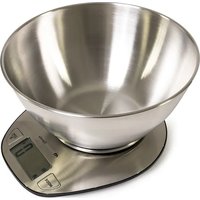
Electronic kitchen scale
Balanza de cocina electronica
natural_image
Close-up of a stainless steel kitchen scale with digital display (no visible text or symbols)IT Manuale d'uso 1
EN User manual 10
text_image
0.0 Unit 0.0 Unit- Indicate volume of water and milk.
- Two weight unit systems (g / lb:oz) convertible.
- Two volume unit systems (ml / fl:oz) convertible
- Low battery power / Overload indication.
- With high precision strain gauge sensor.
- With zero / tare function.
- Auto Off.
■ TO INSTALL OR REPLACE BATTERY
The battery type of scale depends on the product structure. Find the battery type of your scale according to the following pictures, then install and replace battery as described.
-
1x3V CR2032 lithium battery (included). Remove isolation sheet before use.
-
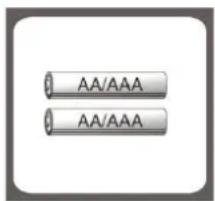
2x1.5V (AA/AAA) batteries (excluded). Remove package foil before use.
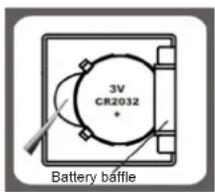
text_image
3V CR2032 Battery bafflea) Open the battery case cover at the bottom of scale.
b) Take out the used battery with the aid of a sharp object, as shown in picture.
c) Install new battery by putting one side of the battery beneath the battery baffle and then pressing down the other side.
text_image
AA/AAA AA/AAAa) Aprire il vano batteria che si trova sul fondo della bilancia.
b) Take out used batteries, with the aid of a sharp object if needed.
c) Install new batteries by putting one side of the battery down first and pressing down the other side. (Please observe the polarity).
LCD
text_image
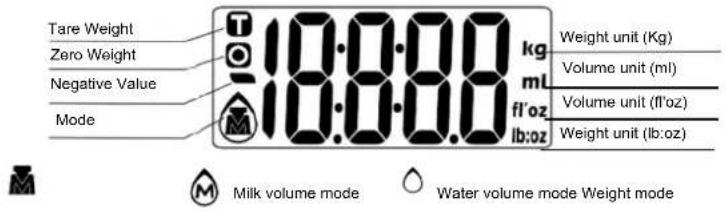
Tare Weight Zero Weight Negative Value Mode 10.888 kg ml fl'oz lb:oz Weight unit (Kg) Volume unit (ml) Volume unit (fl'oz) Weight unit (lb:oz) Milk volume mode Water volume mode Weight mode■ BUTTON FUNCTION
| MOD and unit conversion | |
| Turn on/ Turn off/ Zero/ TareZERO | |
| Convert unit systems of Metric or Imperial. UNH (Conversion button at the bottom of scale) | |
■ MODE CONVERSION
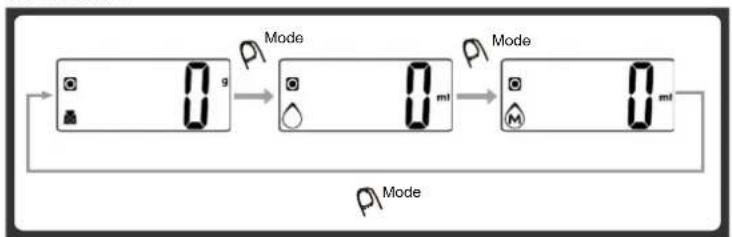
After turning on scale, press MODE button to select mode and unit, as shown below.
flowchart
graph LR
    A["Device 1: g"] --> B["Mode 1"]
    B --> C["Mode 2: ml"]
    C --> D["Mode 3: ml"]
    D --> E["Output"]
Remark: The unit system of scale depends on sales destination or the requirement of distributor.
■ TO CONVERT WEIGHT UNIT
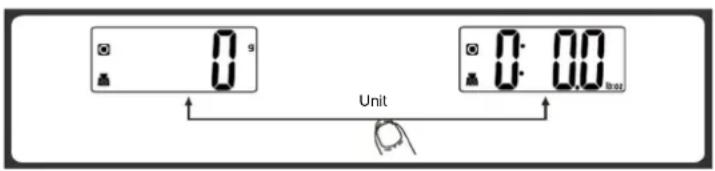
If the scale with both unit systems of Metric (g, ml) or Imperial (lb:oz, fl'oz), press MODE button to choose working mode (weight, milk volume, water volume) then press UNIT conversion button to convert between two systems. Take the conversion of weight unit for example:
text_image
Unit- When setting g as weight unit, the default volume unit is ml.
- When setting lb:oz as weight unit, the default volume unit is fl'oz.
Remark - The unit system of scale depends on scale destination or the requirement of distributor.
TO START WEIGHING
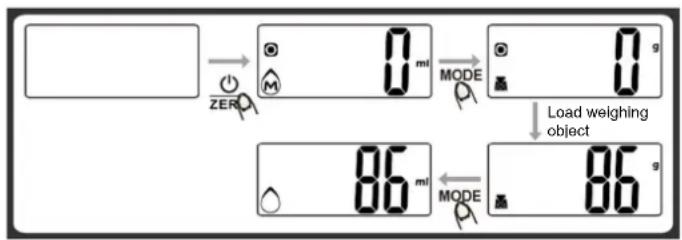
1. Weighing mode
A. Place the scale on a solid and flat surface.
B. Place bowl (if used) on the scale.
C. Press to turn on the scale.
D. Wait until LCD shows "0".
Press MODE button to convert to weighing mode.
E. Load weighing object on scale (or bowl) to start weighing. LCD will show the weight reading.
F. If the weighing object is water or milk, press MODE button to choose volume mode and view the volume of weighing object.
text_image
ZERO 0 mi MODE 0 g Load weighing object 86 mi MODE 86 g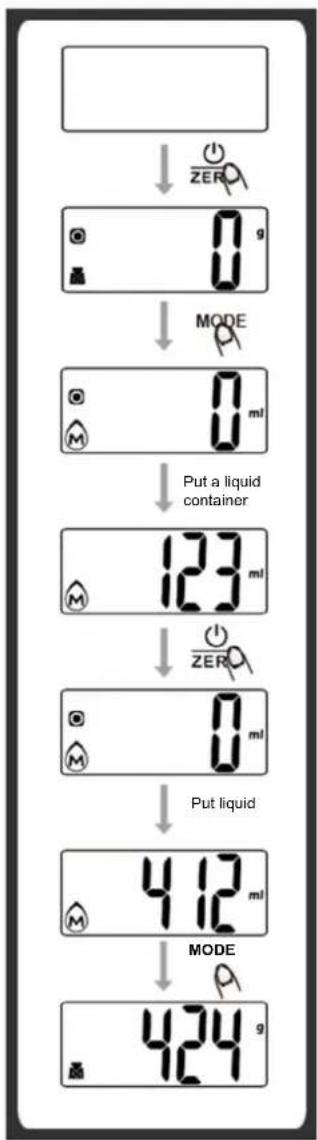
flowchart
graph TD
    A[" "] --> B["ZER"]
    B --> C["0 g"]
    C --> D["MODE"]
    D --> E["0 ml"]
    E --> F["Put a liquid container"]
    F --> G["123 ml"]
    G --> H["ZER"]
    H --> I["0 ml"]
    I --> J["Put liquid"]
    J --> K["412 ml"]
    K --> L["MODE"]
    L --> M["424 g"]
2. Volume indication mode
A. Place the scale on a solid and flat surface.
B. Press to turn on ZERO the scale.
C. Wait until LCD shows "0", and press MODE button to choose.
D. Put a liquid container onto the scale platform. LCD shows weight of container.
E. Press button to zero or tare weight.
F. Pour liquid (water or milk) into the container, LCD shows the volume of the liquid.
G. Press MODE button to choose "Weight" mode and view the weight of liquid.
■ "ZERO" OR "TARE" FUNCTION
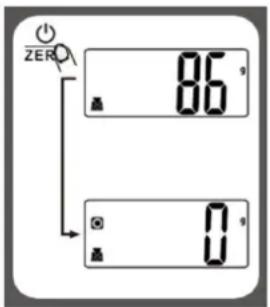
To weigh different loads consecutively without removing loads from the scale. Put first Load on the scale, get weight reading. Press ⏻ ZERO button to reset the LCD reading to "0" before adding next load. You can repeat this operation.
text_image
ZERO 86 0 0Condition 1: "ZERO" function When total sum of all loads on scale ≤4% of scale's max.weight capacity. (4%=80g when capacity is 2000g; 200g when capacity is 5000g)
LCD will show ---- or Og each time is pressed. ---- means not stable, please wait for a moment. Og and meanwhile an icon o on the left side of LCD mean ZERO function is activated. Max. weight capacity remains unchanged.
text_image
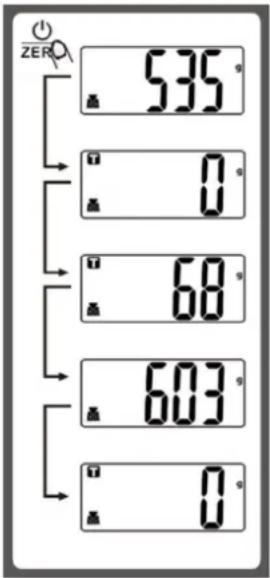
ZERO 535 g 0 g 68 g 603 g 0 gCondition 2: "TARE" function When total sum of all loads on scale >4% of scale's max.weight capacity. (4%=80g when capacity is 2000g; 200g when capacity is 5000g)
LCD will show ---- or Og each time ⏻ ZERO is pressed. ---- means not stable, please wait for a moment. Og and meanwhile an icon T on the left corner of LCD mean TARE function is activated. Max. weight capacity is reduced by total weight of all loads.
Under this condition
By pressing ⏻ ZERO you can see the total weight of all loads on the scale. If you want to weigh more loads, just press ⏻ ZERO to reset LCD reading to '0' again.
text_image
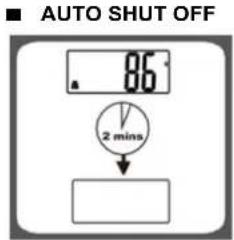
AUTO SHUT OFF 86° 2 minsAuto shut-off occurs if display shows '0' or shows the same weight reading for 2 minutes.
text_image
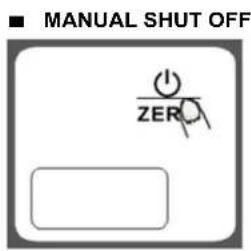
■ MANUAL SHUT OFF ZEROTo maximize battery life, always press ①ZERO again to turn off the scale after using.
Note: when display shows "0", press ⏻ ZERO
to turn off the scale; when display shows weight reading, press for 3 seconds to turn off the scale.
■ WARNING INDICATORS
text_image
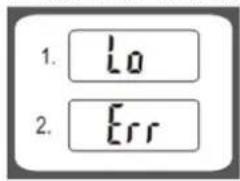
1. Lo 2. Err- Replace new battery.
- Scale overload. Remove item to avoid damage. Max. weight capacity is indicated on the scale.
■ CLEANING AND MAINTENANCE
- To clean the scale, use a soft, slightly damp cloth. Do not immerse the scale in water or other liquids, and do not use chemical solvents or abrasive detergents.
- All plastic parts must be cleaned immediately after any contact with fats,
spices or foods that tend to release the color. Avoid contact with lemon juice and other acidic liquids. - The scale must always be placed on a rigid, stable and level surface. Do not place it on soft or compliant surfaces.
■ WARNINGS REGARDING BATTERIES
- Indications for safely removing / replacing the battery:
- Do not expose batteries to excessive humidity or heat.
- Do not allow batteries to come into contact with liquids.
- Keep batteries at a safe distance from magnetic fields, heat sources and open flames.
- Do not reverse the polarity of the batteries or short-circuit them.
- Replace the batteries only with others of the same type or equivalent.
CONFORMITY OF THE PRODUCT
The producer Melchioni Spa declares that the product Kitchen scale Mod. GRAAL (cod. 11821009) is in compliance with Directive 2014/30/EU of the European Parliament and of the Council, of 26 february 2014, on the harmonisation of the laws of the Member States relating to electromagnetic compatibility.
The producer Melchioni Spa declares that the product Kitchen scale Mod. GRAAL (cod. 11821009) is in compliance with Directive 2011/65/EU of the European Parliament and of the Council, of 8 June 2011 and subsequent Commission Delegated Directive 2015/863, on the restriction of the use of certain hazardous substances in electrical and electronic equipment.
According to Directive 2012/19/EU of the European Parliament and of the Council, of 4 July 2012, on waste electrical and electronic equipment (WEEE), the presence of the crossed-out bin symbol indicates that this appliance is not to be considered as urban waste: its disposal must therefore be carried out by separate
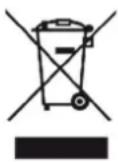
collection. Disposal in a non-separate manner may constitute a potential harm to the environment and health.
This product can be returned to the distributor when purchasing a new device. Improper disposal of the appliance constitutes misconduct and is subject to sanctions by the Public Security Authority. For further information, contact the local administration responsible for environmental matters.
PRODUCT WARRANTY
Melchioni Spa, based in Milan (Italy), via Colletta 37, recognizes a conventional guarantee on the product for a period of two years from the date of the first purchase by the consumer. This guarantee does not affect the validity of the legislation in force concerning consumer goods (Legislative Decree 6 September 2005 n. 206 art. 128 and following), of which the consumer remains the owner. This guarantee applies to the entire territory of the European Union. The components or parts that are found to be defective for ascertained manufacturing causes will be repaired or replaced free of charge through the dealer, during the above warranty period. Melchioni Spa reserves the right to make a complete replacement of the device, if repairability is impossible or excessively expensive, with another device of similar characteristics (Legislative Decree 6 September 2005 no. 206 art. 130) during the warranty period. In this case, the validity of the warranty remains that of the original purchase: the service provided under warranty does not extend the warranty period. In any case, this appliance will not be considered defective in terms of materials or manufacture should it be adapted, changed or adjusted, in order to comply with national or local safety and / or technical standards, in force in a country other than that for which it is was originally designed and manufactured. This appliance has been designed and built for domestic use only: any other use will invalidate the benefits of the guarantee.
The warranty does not cover:
- parts subject to wear or tear, nor those parts that require periodic replacement and / or maintenance
• professional use of the product - malfunctions or any defects due to incorrect installation, configuration, software / BIOS / firmware update not performed by authorized Melchioni Spa
- repairs or interventions carried out by persons not authorized by Melchioni Spa
- manipulation of assembly components or, where applicable, of the software
-
defects caused by fall or transport, lightning, voltage fluctuations, liquid infiltration, opening of the appliance, bad weather, fire, public disturbances, inadequate ventilation or incorrect power supply
-
any accessories, for example: boxes, bags, batteries, etc. used with this product
• home interventions for convenience checks or presumed defects
The recognition of the guarantee by Melchioni Ready S.r.l. is subject to the presentation of a tax document that proves the actual date of purchase. The same must not show any tampering or deletions, in the presence of which Melchioni Spa reserves the right to refuse the provision of treatment under warranty.
The warranty will not be recognized if the serial number or model of the appliance is non-existent, abraded or modified.
This warranty does not include any right to compensation for direct or indirect damage, of any nature, to people or things, caused by any inefficiency of the appliance. Any extensions, promises or services in this regard, insured by the retailer, will be borne by the latter.
■ CARACTERÍSTICAS PRINCIPALES
LCD will show ---- or Og each time is pressed ⏻ ---- means not stable, please wait for a moment. Og and meanwhile an icon T on the left corner of LCD mean TARE function is activated. Max. weight capacity is reduced by total weight of all loads.