
Activation - Calculator CASIO - Free user manual and instructions
Find the device manual for free Activation CASIO in PDF.


| Product Type | CASIO License Activation Software |
| System Compatibility | Windows 8.1, Windows 10 |
| License Type | Standalone license and network license |
| Activation Methods | Online and offline |
| Code Required for Activation | License Code (32 characters) or Claim Code (25 characters) |
| License Server | CASIO Network License Server |
| Required Disk Space (Server) | 100 MB for installation and uninstallation |
| Required Screen Resolution | XGA (1024×768) or higher, 16-bit or more |
| License Server Management Software | CASIO Network License Server, Sentinel RMS License Manager |
| Offline Activation | Possible via Lock Code File and License File |
| Multi-Device Activation | Combinable network licenses (e.g., 3×10 + 1×5 for 35 licenses) |
| Country/Region | Select during activation |
| Documentation | User manual and instructions available in multiple languages |
| Brand | CASIO |
| Model | Activation |
| Category | Calculator (activation software) |
| License Code Acquisition Website | https://edu.casio.com/all/activation/ |
| Offline Activation Website | Page "The Issuing of the License File" |
Frequently Asked Questions - Activation CASIO
User questions about Activation CASIO
0 question about this device. Answer the ones you know or ask your own.
Ask a new question about this device
Download the instructions for your Calculator in PDF format for free! Find your manual Activation - CASIO and take your electronic device back in hand. On this page are published all the documents necessary for the use of your device. Activation by CASIO.
USER MANUAL Activation CASIO
CASIO Worldwide Education Website
https://edu.casio.com
Manuals are available in multi languages at
https://world.casio.com/manual/calc/
CASIO Education Information Site
https://edu.casio.jp
Contents / Contenidos / Sommaire / Inhalt / Índice / Contingut / Edukiak / Obsah / Indice / Tartalom / Inhoud / Innhold / Spis treści / Sisältö / Innehåll / Obsah / Садржај / 目录 / 目录 / Mục lục / 目次
English EN-1 Español ES-1 Français FR-1 Deutsch DE-1 Português PT-1 Català CA-1 Euskara EU-1 Česky CS-1 Italiano IT-1 Magyar HU-1 Nederlands NL-1 Norsk NO-1 Polski PL-1 Suomi FI-1 Svenska SV-1 Slovenčina SK-1 Српски SR-1 中文(简体中文) ZH-1 Tiếng Việt VI-1 العربية AR-1 日本語 JA-1
English
Using This Manual
- This manual uses special terms as defined in the table below.
| Term Meaning | |
| Claim Code A 25-character string | required to obtain a License Code. |
| License Code | A 32-character string required to verify a license. |
| Lock Code File | A file included in your computer's hardware information. For details, see “Activating Off Line”. |
| Activation | The act of verifying a license. |
| “The Issuing of the License File” page | Access site for activation off line. |
| License File | A file that can be downloaded from the “The Issuing of the License File” page. |
| Standalone License | A license granted to a single computer. |
| Network License | A license granted to a license server on a network. The number of clients that can use the software is limited to the number of licenses available on the license server. |
| License server | A server that manages Network Licenses. |
| Client | A computer that uses the software under a Network License. |
Obtaining a License Code
A License Code is required for activation.
If you do not have a License Code, perform one of the operations below to obtain one.
Use your browser to access the following website: https://edu.casio.com/all/activation/.
If you have a Claim Code
At the website above, input your Claim Code. The site will issue you a License Code.
Important!
- You must complete user registration to be issued a License Code.
- The Claim Code and the License Code are two different things. You cannot activate using the Claim Code.
Note
- Your software validity period is counted from the date that the License Code is issued.
If you do not have a Claim Code
Access the site above and purchase a License Code.
Standalone License Activation

License Code
For Standalone License activation, you input a software License Code to activate.
Activating On Line
If you have not installed the software yet, download the trial version from the Worldwide Education Website.
Important!
When you perform activation, the software checks your computer's current time setting. Activation will not be performed correctly in the cases below.
- If the current time setting of your computer was not correct when you install the software
- If the current time setting of your computer was changed after the software was installed
- Start up the software.
- In the cases below, an activation screen will appear.
- You started up the trial version of the software.
- You started up the paid version of the software and there are 30 days or fewer left on your license.
- You selected [Activation...] on the software menu.
- You were unable to obtain a license using Network License.
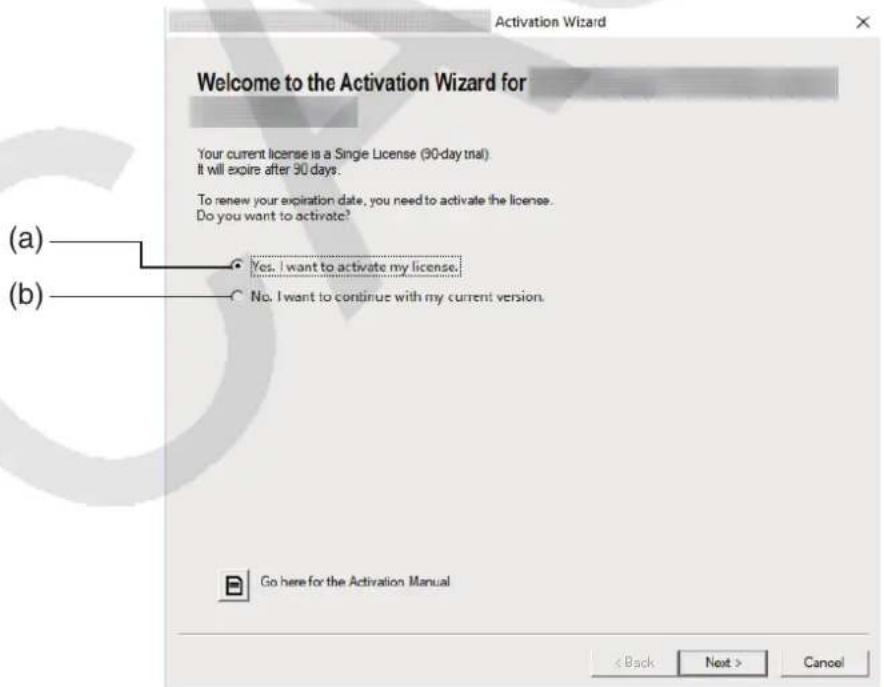
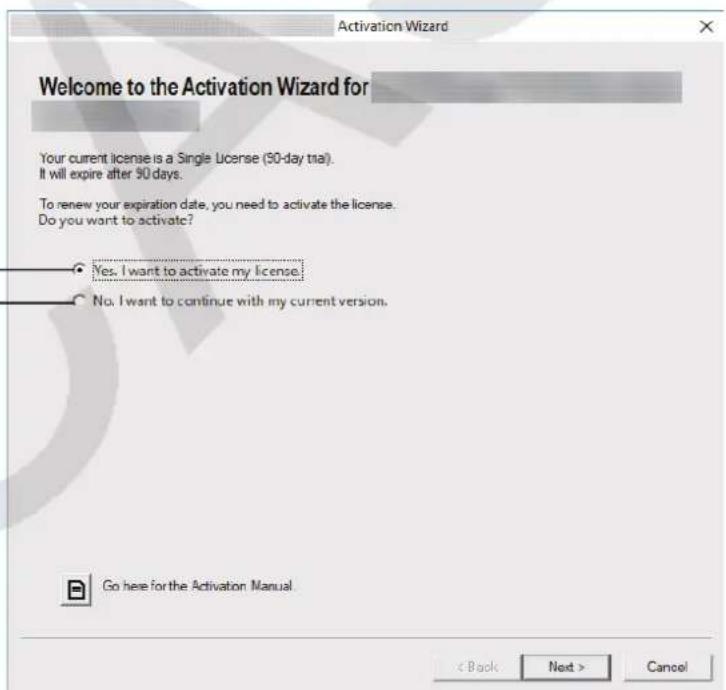
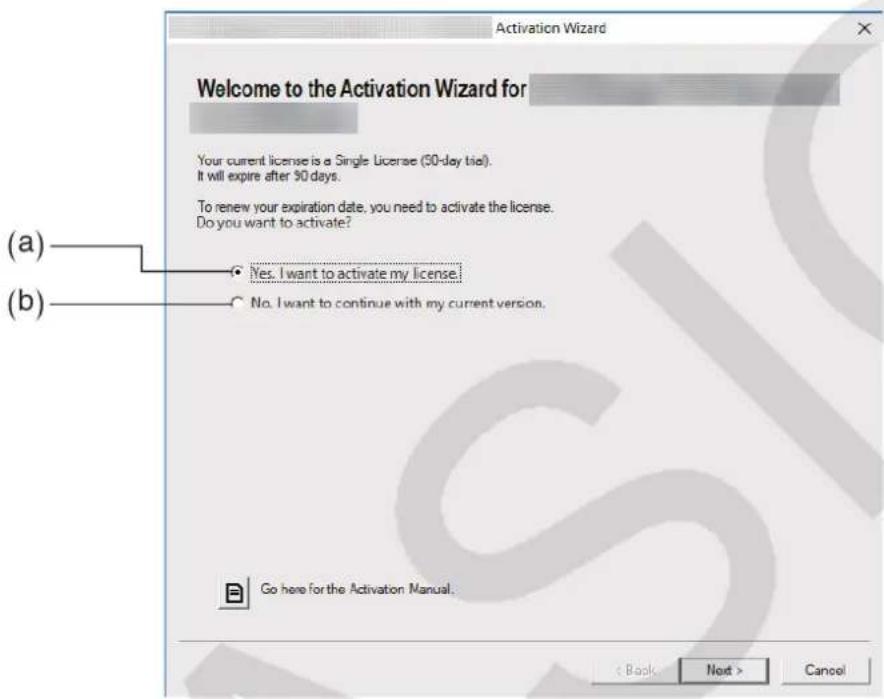
(a) Select this option to activate. (b) If you want to use the software with your current license without activation, select this option.
2. Click [Next].
- The dialog box shown below will appear if you selected option (a) in the above step.
- If you selected (b), clicking [Next] will exit the activation operation.
![CASIO Activation - Click [Next]. - 1](/content/2026/04/719674/images/3804a3f3cf693a18e2ee076d9b34664914d78ce2f2202c06dbdef5c0f008fec6.jpg)
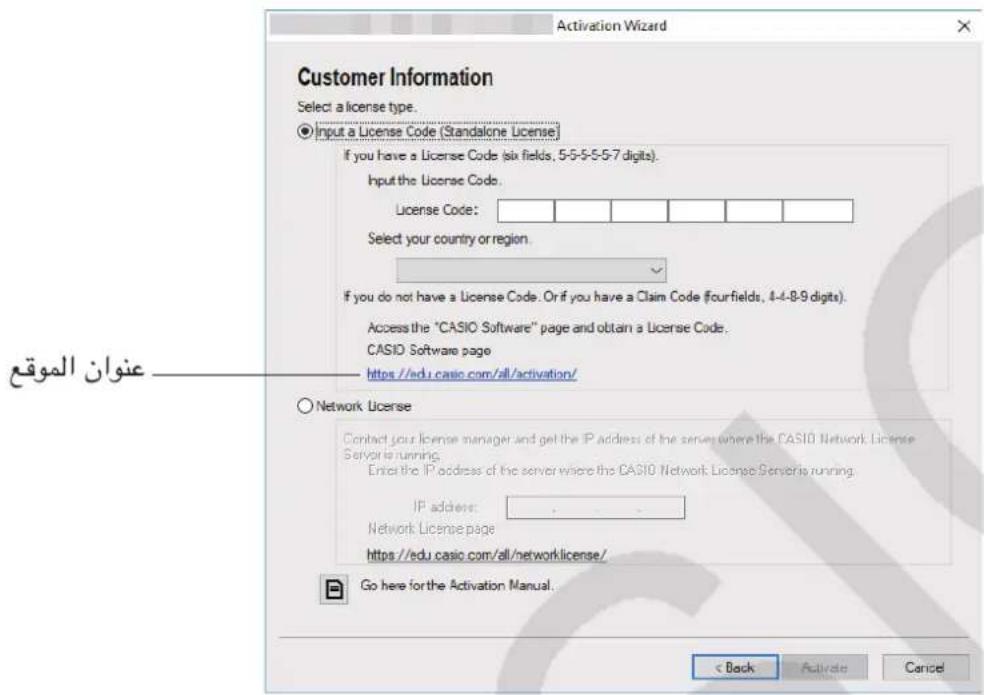
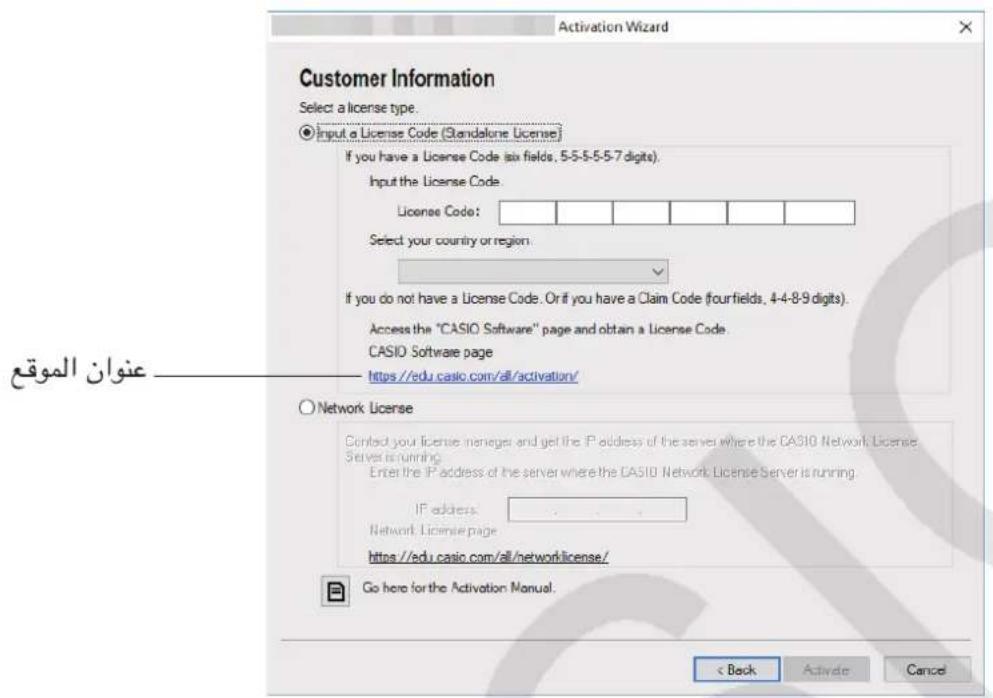
- Select "Input a License Code (Standalone License)".
- Input the License Code.
Important!
- If you do not have a License Code, click the URL. Follow the instructions on "Obtaining a License Code" to obtain a License Code.
- The License Code and the Claim Code are two different things.
The License Code is a 32-character string.
Example: ABCDE-ABCDE-ABCDE-ABCDE-ABCDEFG
The Claim Code is a 25-character string.
Example: ABCD-ABCD-ABCDEFGH-ABCDEFGHI - You cannot activate by inputting the Claim Code.
- Select your country/region.
- Click [Activate].
- Click [Finish].
- This completes activation.
Note
- If an error occurs during the activation process, a URL will appear on the screen. You can get information about dealing with the error by accessing the URL.
Activating Offline
- To activate when you have an Internet connection, but cannot access the activation server
- Perform steps 1 through 6 under "Activating On Line".
- This displays the screen shown below.
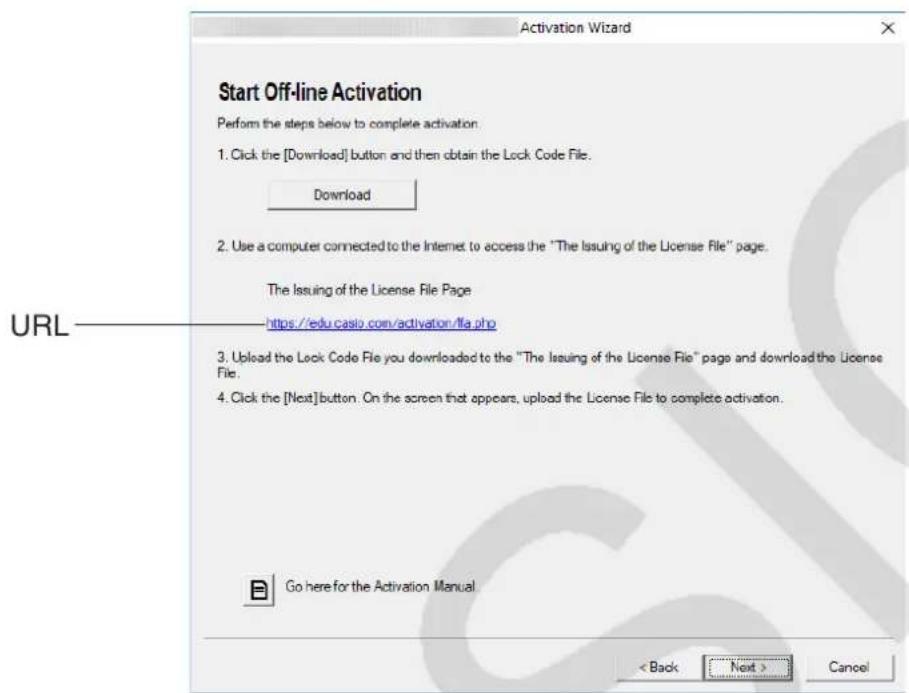
- Click [Download].
- This causes a Lock Code File to be created automatically.
- Save the Lock Code File.
- Click the URL.
- This will start up your web browser and display the "The Issuing of the License File" page.
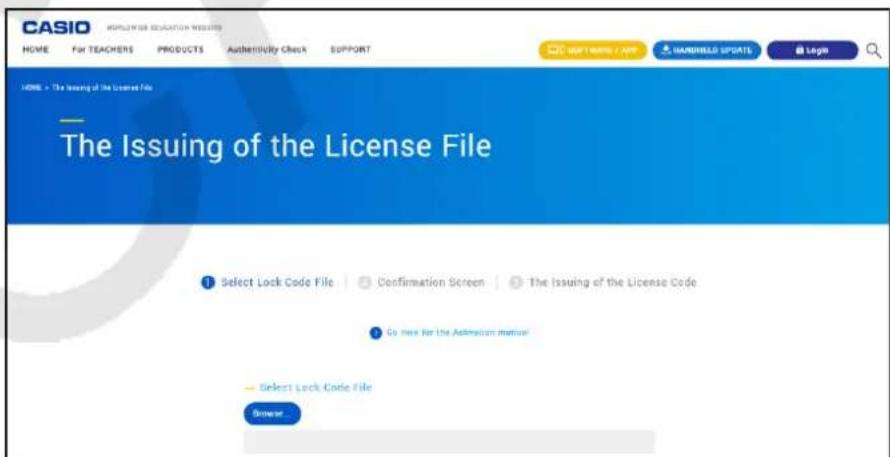
- Upload the saved Lock Code File.
- Download the License File.
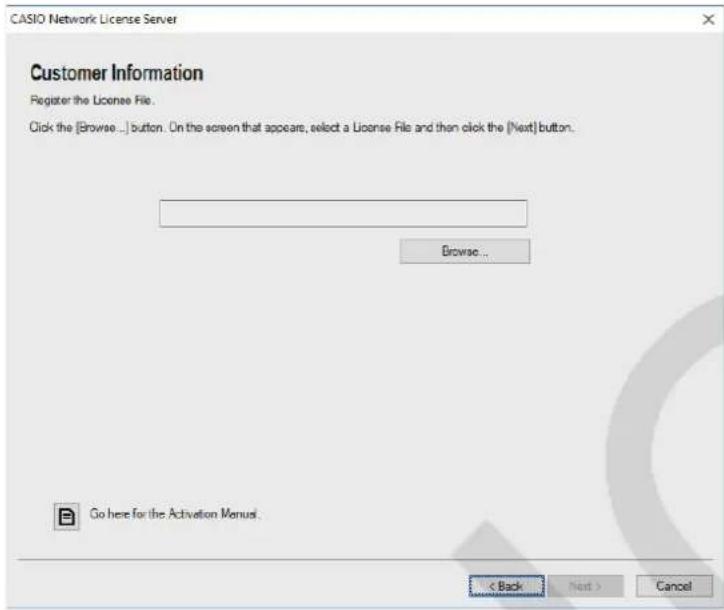
- On the screen shown in step 1 of this procedure, click [Next].
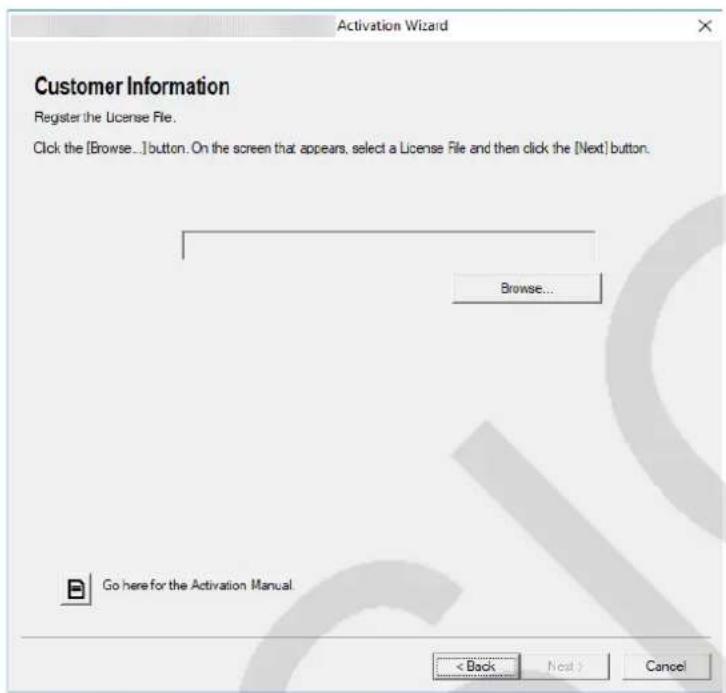
- Click [Browse...].
- Select the License File.
- Click [Next].
- This completes activation.
- To activate on a computer (Computer A) that is not connected to the Internet
- Prepare a second computer (Computer B), which is connected to the Internet.
- On Computer A, create a Lock Code File.
- Send the Lock Code File from Computer A to Computer B.
- On Computer B, access the "The Issuing of the License File" page.
- Upload the Computer A Lock Code File to the "The Issuing of the License File" page.
- Download the License File.
- Transfer the downloaded License File to Computer A.
- On Computer A, perform steps 1 through 6 under "Activating On Line".
- Click [Next].
- Click [Browse...].
- Select the License File you transferred from Computer B.
- Click [Next].
- This completes activation.
Network License Activation
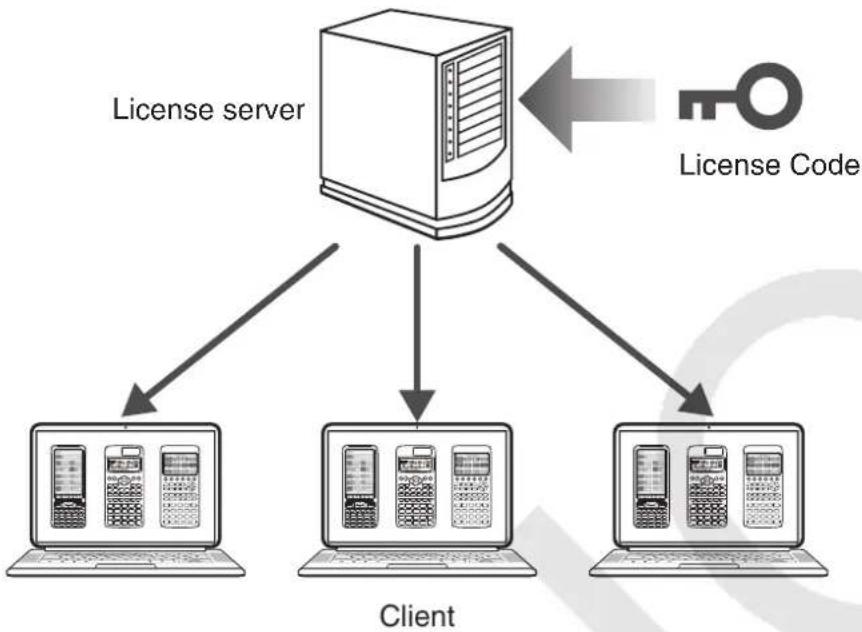
■ Network License
A Network License is a license granted to a license server.
Instead of a license being obtained by each client, the license server keeps track of the number of clients that can run the software.
A single license server can manage multiple licenses.
To use a Network License, you must perform license server activation and then perform client activation.
Important!
To perform activation with a license server, a dedicated license for Network License is required. - The license server must be running to use a Network License.
Note
- Multiple-device licenses can be used in combination to obtain the required number of licenses.
Example: To use 35 licenses, activate multiple-device licenses as shown below.
Three 10-device licenses, one 5-device license
■Installing License Server Management Software
Go to the Worldwide Education Website, download license server management software (CASIO Network License Server, Sentinel RMS License Manager), and then install it on the license server.
License Server Management Software System Requirements
CASIO Network License Server
Operating System: Windows 8.1, Windows 10
Your hardware configuration needs to exceed the functionality recommended by the operating system.
Computer: A computer with one of the Windows operating systems pre-installed (excluding computers with an upgraded operating system and self-built computers).
Disk Space: 100 MB for installation and uninstallation.
Note: Actual requirements and product functionality may vary based on your system configuration and operating system.
Video adapter and display must support a resolution of XGA (1024x768) or higher, with 16-bit or higher system color. Adobe Reader 8.0 or later is required.
Note
- For the latest information about system requirements, visit the website at the URL below: https://edu.casio.com/softwarelicense/networklicense/index.php
- Windows is a registered trademark or trademark of Microsoft Corporation in the United States and/or other countries.
- Adobe and Reader are either registered trademarks or trademarks of Adobe Systems Incorporated in the United States and/or other countries.
Sentinel RMS License Manager
Visit the website below.
https://edu.casio.com/all/networklicense/
License Server Activation
Activating Online
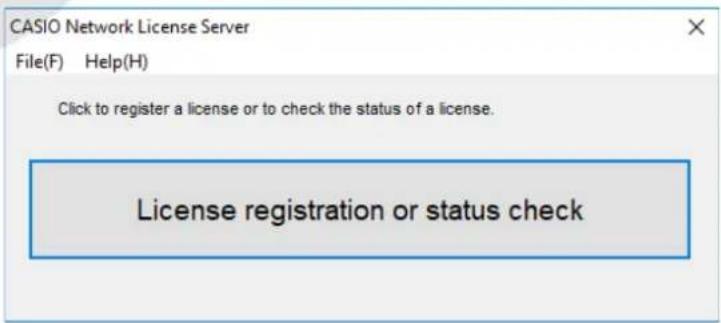
- Start up the CASIO Network License Server.
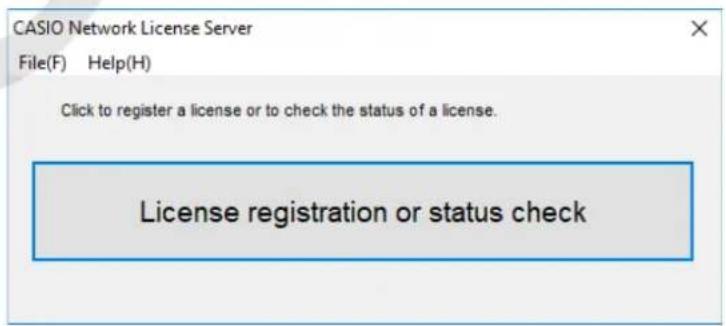
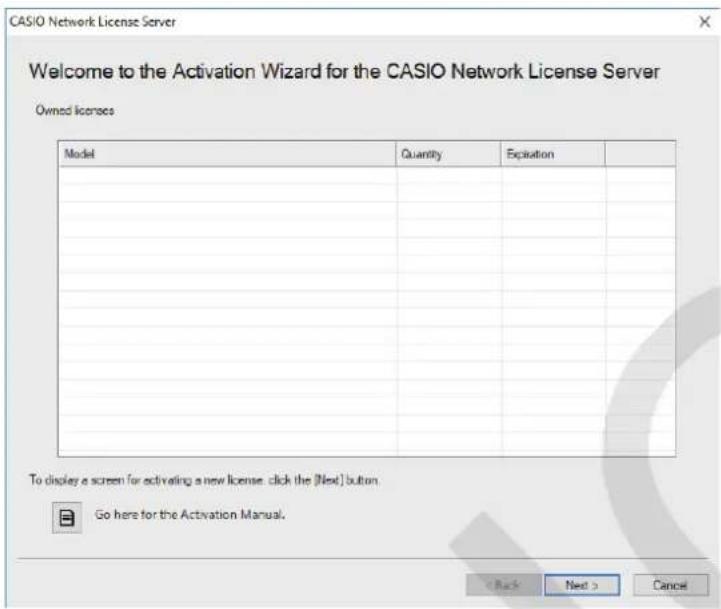
2. Click [License registration or status check].
![CASIO Activation - Click [License registration or status check]. - 1](/content/2026/04/719674/images/98b7e3723488a3781103ad56f24b4abe35020325a41332276d1b97851ec83ffe.jpg)
3. Click [Next].
![CASIO Activation - Click [Next]. - 1](/content/2026/04/719674/images/dec05fa860b1918c8161fa237720500147933f2b1ce7556dd6ae4fd6039840b1.jpg)
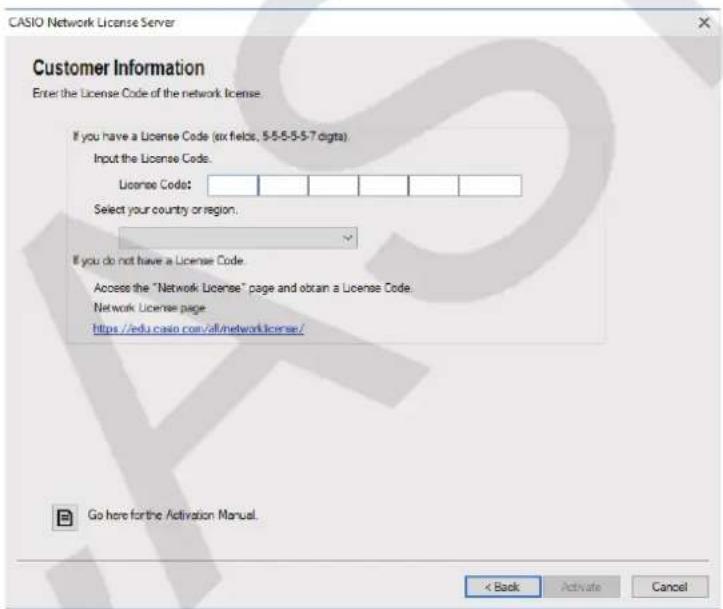
- Input the License Code.
- Select your country/region.
- Click [Activate].
- Click [Finish]. This completes activation.
-Activating Offline
To activate when you have an Internet connection, but cannot access the activation server
- Perform steps 1 through 6 under "Activating Online".
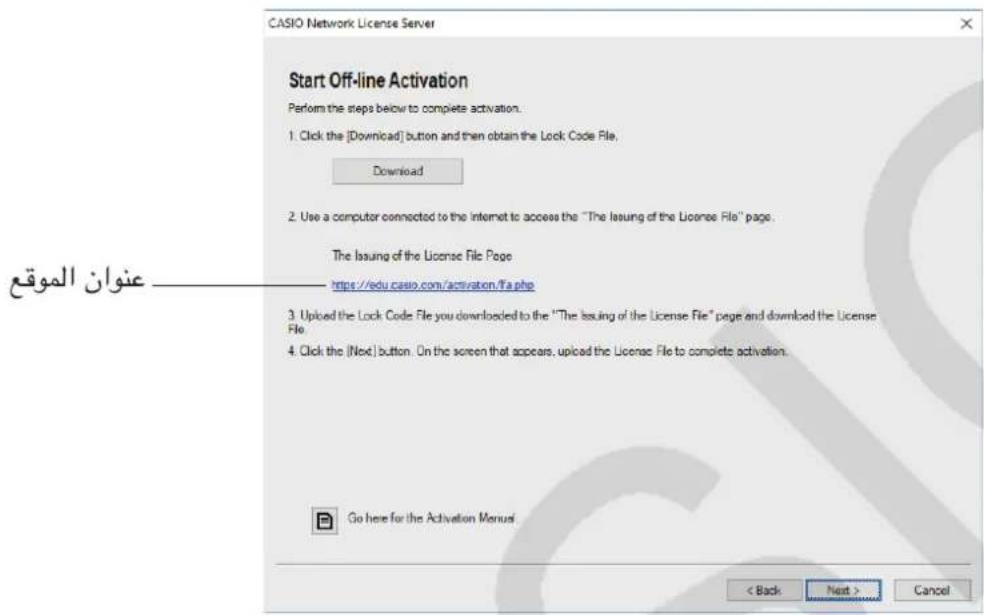
This displays the screen shown below.
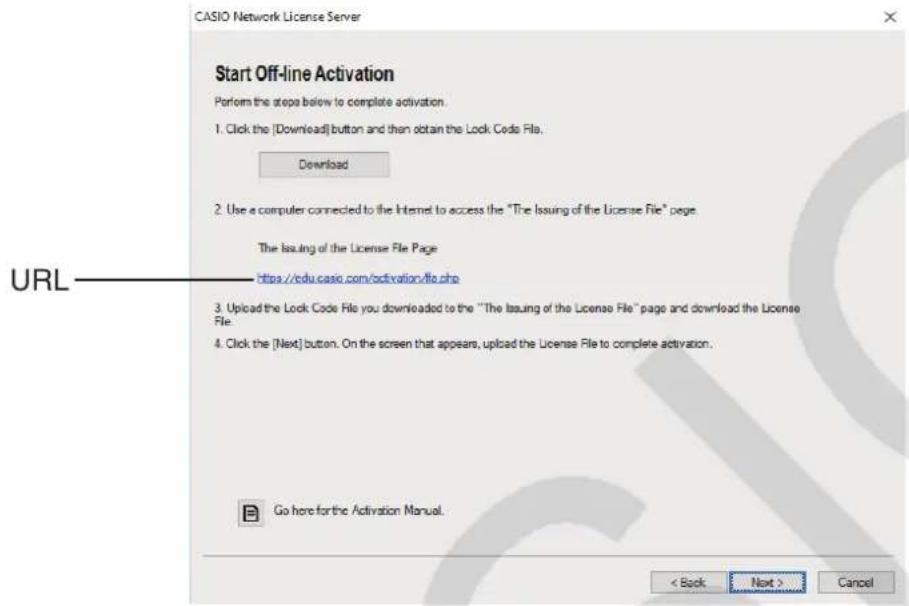
- Click [Download].
- Save the Lock Code File.
- Click the URL.
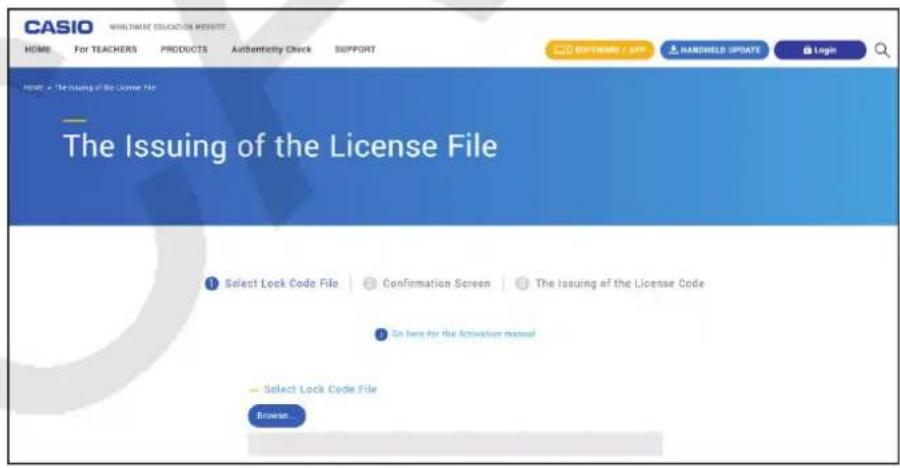
- This will start up your web browser and display the "The Issuing of the License File" page.
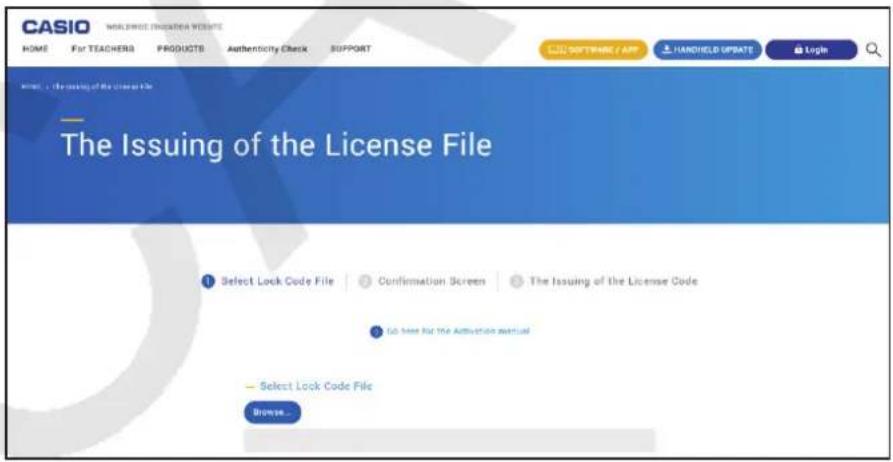
- Upload the saved Lock Code File.
- Download the License File.
- On the screen shown in step 1 of this procedure, click [Next].
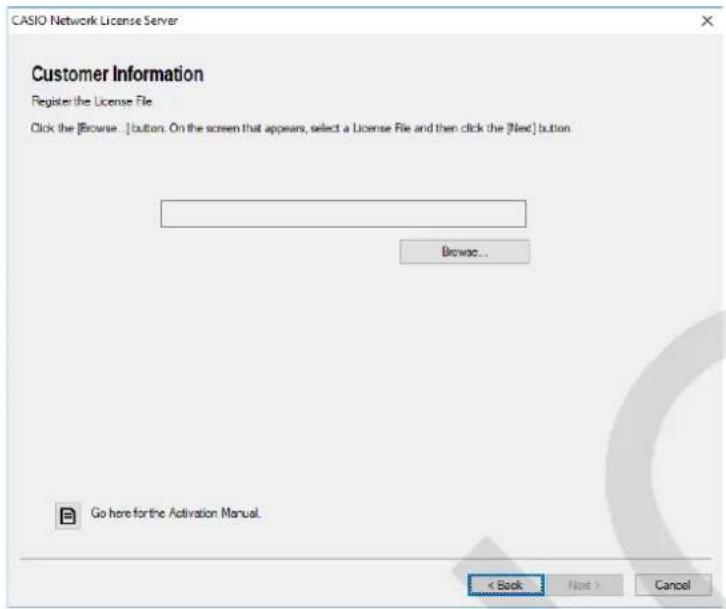
- Click [Browse...].
- Select the License File.
- Click [Next].
- This completes activation.
To activate on a computer (Computer A) that is not connected to the Internet
- Prepare a second computer (Computer B), which is connected to the Internet.
- On Computer A, create a Lock Code File.
- Send the Lock Code File from Computer A to Computer B.
- On Computer B, access the "The Issuing of the License File" page.
- Upload the Computer A Lock Code File to the "The Issuing of the License File" page.
- Download the License File.
- Transfer the downloaded License File to Computer A.
- On Computer A, perform steps 1 through 6 under "Activating On Line".
- Click [Next].
- Click [Browse...].
- Select the License File you transferred from Computer B.
- Click [Next]. This completes activation.
■Client Activation
If you have not installed the software yet, download the trial version from the Worldwide Education Website.
1. Start up the software.
- In the cases below, an activation screen will appear.
- You started up the trial version of the software.
- You started up the paid version of the software and there are 30 days or fewer left on your license.
- You selected [Activation...] on the software menu.
- You were unable to obtain a license using Network License.
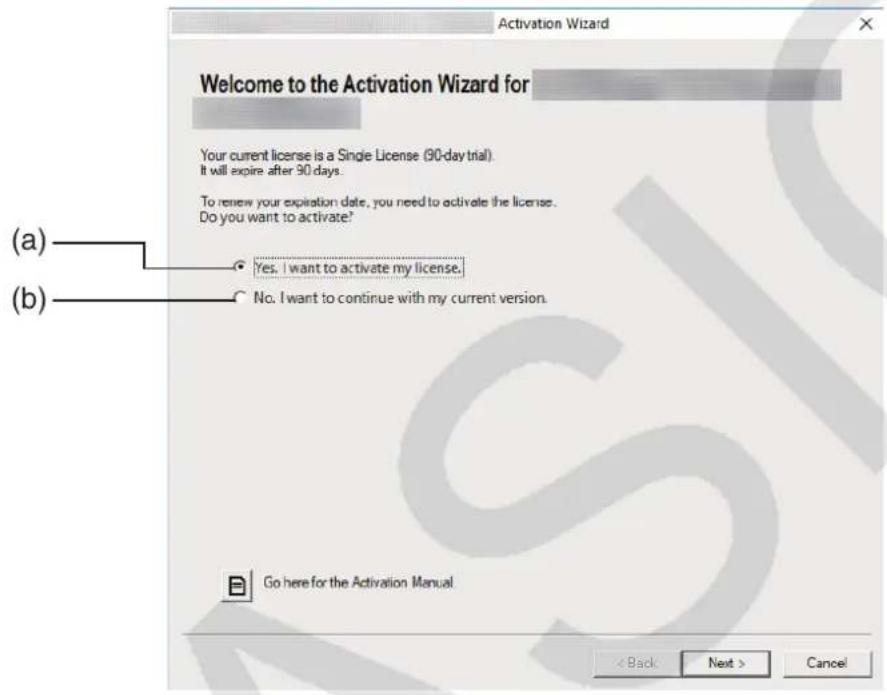
(a) Select this option to activate. (b) If you want to use the software with your current license without activation, select this option.
2. Click [Next].
- The dialog box shown below will appear if you selected option (a) in the above step.
- If you selected (b), clicking [Next] will exit the activation operation.
![CASIO Activation - Click [Next]. - 1](/content/2026/04/719674/images/b10e929c62e134fabbbd1b89c4ff1ea4c5750fa9c206c941af2531603e70586c.jpg)
- Select "Network License".
- Input the IP address of the license server.
- Click [Activate].
- Click [Finish].
This completes activation.
Note
- If an error occurs during the activation process, a URL will appear on the screen. You can get information about dealing with the error by accessing the URL.
Spanish
Using this manual
https://edu.casio.com/all/activation/.
- Start CASIO Network License Server.
2. Click [License registration or status check].
![CASIO Activation - Click [License registration or status check]. - 1](/content/2026/04/719674/images/8bc7d1b5415c97d3a9c41337eacd4e28b95b41c8033d531cd89208a8fb4854fb.jpg)
3. Click [Next].
![CASIO Activation - Click [Next]. - 1](/content/2026/04/719674/images/2da363b0e6d87ec48341f78057f7c574e6610fe0374c13d833fcbb782327b93a.jpg)
1. Start the software.
https://edu.casio.com/all/activation/.
4. Enter the License Code.
Important!
- If you do not have a License Code, click on the URL. Follow the instructions in "Obtaining a License Code" to obtain a License Code. License Code and Claim Code are two different things. License Code is a 32-character string. Example: ABCDE-ABCDE-ABCDE-ABCDE-ABCDEFG Claim Code is a 25-character string. Example: ABCD-ABCD-ABCDEFGH-ABCDEFGHI
- You cannot activate by entering the Claim Code.
5. Select country/region.
If you have a Claim Code
Visit the website to purchase a License Code.
Activating the license independently

License Code
To perform independent license activation, use the License Code activation software.
■ACTIVATION INSTRUCTIONS
If you still have the software, download the latest version from the Worldwide Education Website.
Important!
When you perform activation, the software checks the current system time. Activation will not be performed correctly in the cases described in the instructions.
If the current system time was not correct when you installed the software. If the current system time has been changed after installing the software
1. Start the software.
- In the cases listed below, the activation screen appears. -Start the software.
- After the software is installed, you can activate it within 30 days. -Select [Activation...] from the software menu.
- You can add a license to the license manager.
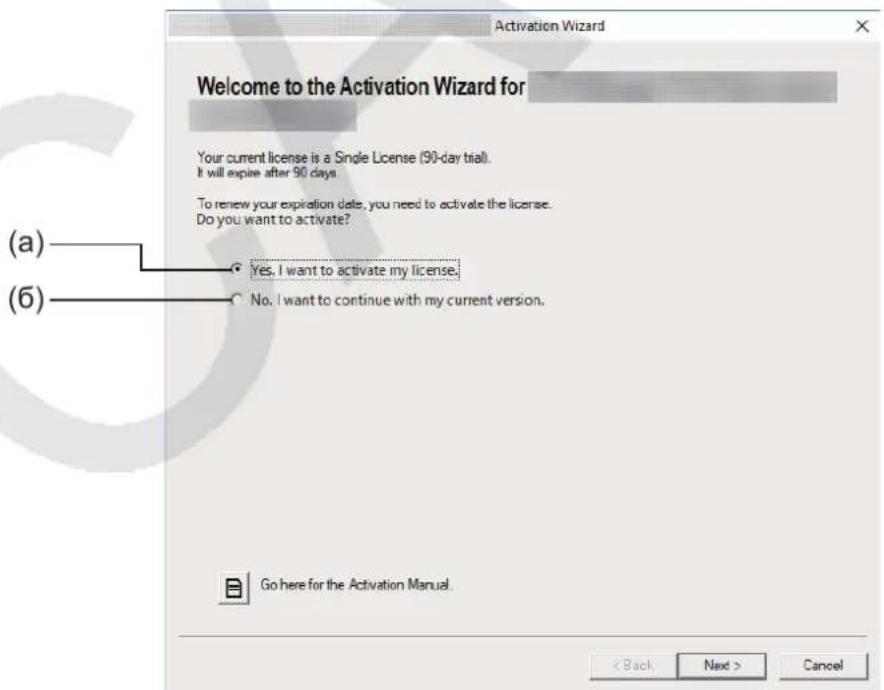
(a) Select this option to activate the software. (b) If you want to use the software with an activated license without activation, select this option.
Activation of the license
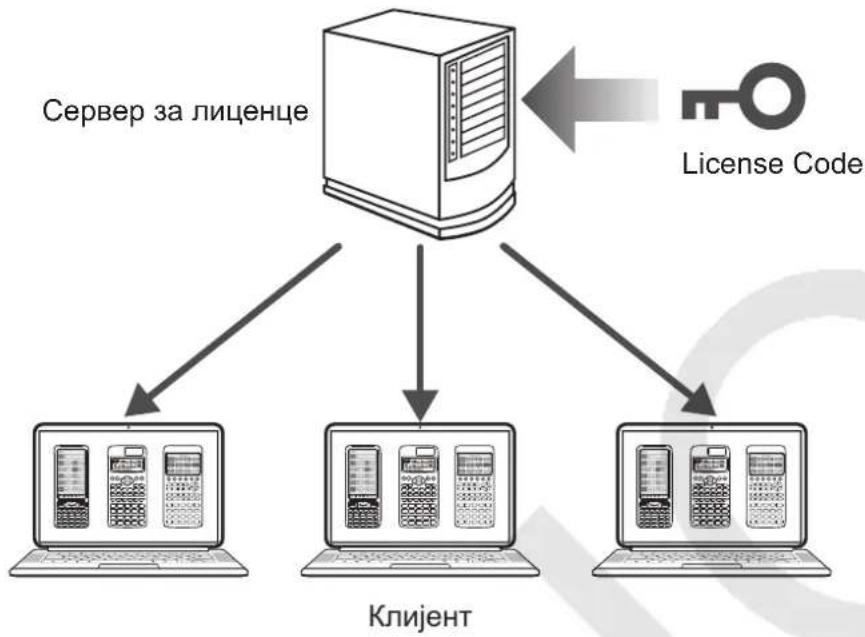
License Manager
A license manager is a license that is managed by a license server.
Instead of adding a license to each client, the license server tracks the number of clients that can run the software.
A single license server can manage multiple licenses.
Worldwide Education Website on the RAI-1000, Sentinel RMS License Manager)
LaiIinS 1
CASIO Network License Server
Windows 8.1, Windows 10
Windows 2003 Windows 2003 Windows 2003
Disk space: 100MB
Memory: 1
Other: BiDiO FarmerTM is a digital sample. It is an XGA (1024x768) 16-bit image; the size of a 16-bit image is 32 bits. BiDiO FarmerTM is a bit image of the same size as the image in the reader. Adobe Reader 8.0 or later is required.
System requirements for the license server management software
CASIO Network License Server
Operating system: Windows 8.1, Windows 10
The advanced technology of your computer must be higher than the functions that the operating system provides.
Computer: A computer with one of the above Windows operating systems preinstalled. (Excluding computers with upgraded operating systems and self-assembled computers.)
Hard disk space: 100 MB for installation and uninstallation
Note: Actual requirements and product functions may vary depending on your system configuration and operating system.
Other: The video board and monitor must support XGA (1024 x 768) or higher resolution, and 16-bit or higher system colors. Adobe Reader 8.0 or later.
Note
Activating the License Server
Online activation
- Start CASIO Network License Server.
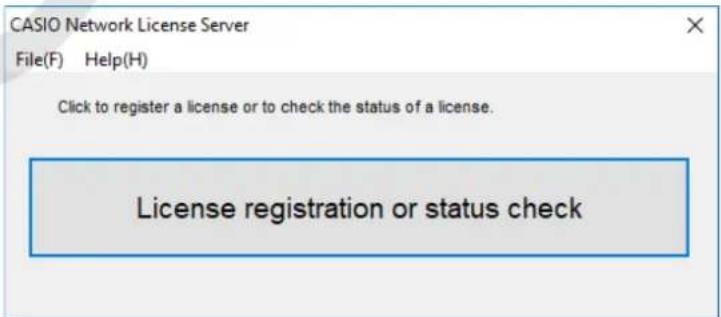
2. Enter [License registration or status check].
![CASIO Activation - Enter [License registration or status check]. - 1](/content/2026/04/719674/images/212c487a32fe99a9cf04dd4d4681f7862c7d4e93d3d3e2b24df746bd27f83dc0.jpg)
3. Click [Next].
![CASIO Activation - Click [Next]. - 1](/content/2026/04/719674/images/3893d7d64acea608d4386fbf72fab806e076c584a1ba4549ba63a47f98bba492.jpg)
- Enter the License Code.
- Select your country/region.
- Click [Activate].
- Click [Finish]. This action will complete the activation.
| الإستعمال | ||
| License Code license of the License | Claim Code | |
| license of the License | License Code | |
| "الترجمة الحرفية الحرفية الحرفية الحرفية الحرفية الحرفية الحرفية الحرفية الحرفية الحرفية الحرفية الحرفية الحرفية الحرفية الحرفية الحرفية الحرفية الحرفية الحرفية الحرفية الحرفية الحرفية الحرفية الحرفية الحرفية الحرفية الحرفية الحرفية الحرفية الحرفية الحرفية الحرفية الحرفية الحرفية EXCISED | Lock Code File | |
| "The Issuing of the License File" issued by the "The Issuing of the License File" issued by the "The Issuing of the License File" issued by the "The Issuing of the License File" issued by the "The Issuing of the License File" issued by the "The Issuing of the License File" issued by the "The Issuing of the License File" issued by the "The Issuing of the License File" issued by the "The Issuing of the License File" issued by the "The Issuing ofthe LicenseFile" issued by the "The Issuing of the LicenseFile" issued by the "The Issuing of the LicenseFile" issued by the "The Issuing of the LicenseFile" issued by the "The Issuing of the LicenseFile" issued by the "The Issuing of the LicenseFile" issued by the "The Issuing of the LicenseFile" issued by the "The Issuing of the LicenseFile" issued by the "The Issuing of the LicenseFile" issued by the "The Issuing of the LicenseFile"issued by the "The Issuing of the LicenseFile" issued by the "The Issuing of the LicenseFile" issued by the "The Issuing of the LicenseFile" issued by the "The Issuing of the LicenseFile" issued by the "The Issuing of the LicenseFile" issued by the "The Issuing of the LicenseFile" issued by the "The Issuing of the LicenseFile" issued by the "The Issuing of the LicenseFile" issued by the " The Issuing of the LicenseFile" issued by the " The Issuing of the LicenseFile" issued by the " The Issuing of the LicenseFile" issued by the " The Issuing of the LicenseFile" issued by the " The Issuing of the LicenseFile" issued by the " The Issuing of the LicenseFile" issued by the " The Issuing of the LicenseFile" issued by the " The Issuing of the LicenseFile" issued by the " The Issuing ofthe LicenseFile" issued by the " The Issuing of the LicenseFile" issued by the " The Issuing of the LicenseFile" issued by the " The Issuing of the LicenseFile" issued by the " The Issuing of the LicenseFile" issued by the " The Issuing of the LicenseFile" issued by the " The Issuing of the LicenseFile" issued by the " The Issuing of the LicenseFile" issued by the " The Issuing of the LicenseFile"issued by the " The Issuing of the LicenseFile" issued by the " The Issuing of the LicenseFile" issued by the " The Issuing of the LicenseFile" issued by the " The Issuing of the LicenseFile" issued by the " The Issuing of the LicenseFile" issued by the " The Issuing of the LicenseFile" issued by the " The Issuing of the LicenseFile" issued by the " The Issuing of the LicenseFile" issued by the "The Issuing of the LicenseFile" issued by the " The Issuing of the LicenseFile" issued by the " The Issuing of the LicenseFile" issued by the " The Issuing of the LicenseFile" issued by the " The Issuing of the LicenseFile" issued by the " The Issuing of the LicenseFile" issued by the " The Issuing of the LicenseFile" issued by the " The Issuing ofthe LicenseFile" issued by the " The Issuing ofthe LicenseFile" issued by the " The Issuing ofthe LicenseFile" issued by the " The Issuing ofthe LicenseFile" issued by the " The Issuing ofthe LicenseFile" issued by the " The Issuing ofthe LicenseFile" issued by the " The Issuing ofthe LicenseFile" issued by the " The Issuing ofthe LicenseFile" issued by the " The Issuing ofthe LicenseFile"issued by the " The Issuing ofthe LicenseFile" issued by the " The Issuing ofthe LicenseFile" issued by the " The Issuing ofthe LicenseFile" issued by the " The Issuing ofthe LicenseFile" issued by the " The Issuing ofthe LicenseFile" issued by the " The Issuing ofthe LicenseFile" issued by the " The Issuing ofthe LicenseFile" issued by the " The Issuing ofthe LicenseFile" issued by the "The Issuing ofthe LicenseFile" issued by the " The Issuing ofthe LicenseFile" issued by the " The Issuing ofthe LicenseFile" issued by the " The Issuing ofthe LicenseFile" issued by the " The Issuing ofthe LicenseFile" issued by the " The Issuing ofthe LicenseFile" issued by the " The Issuing ofthe LicenseFile" issued by the " The Issuing ofthe LicenseFile" issued by the " The Issuing of the LicenseFile" issued by the " The Issuing ofthe LicenseFile" issued by the " The Issuing ofthe LicenseFile" issued by the " The Issuing ofthe LicenseFile" issued by the " The Issuing ofthe LicenseFile" issued by the " The Issuing ofthe LicenseFile" issued by the " The Issuing ofthe LicenseFile" issued by the " The Issuing ofthe LicenseFile"issued by the " The Issuing ofthe LicenseFile"issued by the " The Issuing ofthe LicenseFile" issued by the " The Issuing ofthe LicenseFile" issued by the " The Issuing ofthe LicenseFile" issued by the " The Issuing ofthe LicenseFile" issued by the " The Issuing ofthe LicenseFile" issued by the " The Issuing ofthe LicenseFile" issued by the " The Issuing ofthe LicenseFile" issued by the "The Issuing ofthe LicenseFile" issued by the "The Issuing ofthe LicenseFile" issued by the " The Issuing ofthe LicenseFile" issued by the " The Issuing ofthe LicenseFile" issued by the " The Issuing ofthe LicenseFile" issued by the " The Issuing ofthe LicenseFile" issued by the " The Issuing ofthe LicenseFile" issued by the " The Issuing ofthe LicenseFile" issued by the " The Issuing of the LicenseFile" issued by the " The Issuing of the LicenseFile" issued by the " The Issuing ofthe LicenseFile" issued by the " The Issuing ofthe LicenseFile" issued by the " The Issuing ofthe LicenseFile" issued by the " The Issuing ofthe LicenseFile" issued by the " The Issuing ofthe LicenseFile" issued by the " The Issuing ofthe LicenseFile"issued by the " The Issuing ofthe LicenseFile" issued by the " The Issuing ofthe LicenseFile"issued by the " The Issuing ofthe LicenseFile" issued by the " The Issuing ofthe LicenseFile" issued by the " The Issuing ofthe LicenseFile" issued by the " The Issuing ofthe LicenseFile" issued by the " The Issuing ofthe LicenseFile" issued by the " The Issuing ofthe LicenseFile" issued by the "The Issuing ofthe LicenseFile" issued by the " The Issuing ofthe LicenseFile" issued by the "The Issuing ofthe LicenseFile" issued by the " The Issuing ofthe LicenseFile" issued by the " The Issuing ofthe LicenseFile" issued by the " The Issuing ofthe LicenseFile" issued by the " The Issuing ofthe LicenseFile" issued by the " The Issuing ofthe LicenseFile" issued by the " The Issuing of the LicenseFile" issued by the " The Issuing ofthe LicenseFile" issued by the " The Issuing of the LicenseFile" issued by the " The Issuing ofthe LicenseFile" issued by the " The Issuing ofthe LicenseFile" issued by the " The Issuing ofthe LicenseFile" issued by the " The Issuing ofthe LicenseFile" issued by the " The Issuing ofthe LicenseFile" issued by the " The Issuing ofthe LicenseFile"issued by the " The Issuing ofthe LicenseFile"issued by the " The Issuing ofthe LicenseFile"issued by the " The Issuing ofthe LicenseFile" issued by the " The Issuing ofthe LicenseFile" issued by the " The Issuing ofthe LicenseFile" issued by the " The Issuing ofthe LicenseFile" issued by the " The Issuing ofthe LicenseFile" issued by the " The Issuing ofthe LicenseFile" issued by the "The Issuing ofthe LicenseFile" issued by the "The Issuing ofthe LicenseFile" issued by the "The Issuing ofthe LicenseFile" issued by the "The Issuing ofthe LicenseFile" issued by the "The Issuing ofthe LicenseFile" issued by the "The Issuing ofthe LicenseFile" issued by the "The Issuing ofthe LicenseFile" issued by the "The Issuing ofthe LicenseFile" issued by the "The Issuing of the LicenseFile" issued by the "The Issuing ofthe LicenseFile" issued by the "The Issuing ofthe LicenseFile" issued by the "The Issuing ofthe LicenseFile" issued by the "The Issuing ofthe LicenseFile" issued by the "The Issuing ofthe LicenseFile" issued by the "The Issuing ofthe LicenseFile" issued by the "The Issuing ofthe LicenseFile" issued by the "The Issuing ofthe LicenseFile"issued by the "The Issuing ofthe LicenseFile" issued by the "The Issuing ofthe LicenseFile" issued by the "The Issuing ofthe LicenseFile" issued by the "The Issuing ofthe LicenseFile" issued by the "The Issuing ofthe LicenseFile" issued by the "The Issuing ofthe LicenseFile" issued by the "The Issuing ofthe LicenseFile" issued by the "The Issuing ofthe LicenseFile" issued by the " The Issuing ofthe LicenseFile" issued by the "The Issuing ofthe LicenseFile" issued by the "The Issuing ofthe LicenseFile" issued by the "The Issuing ofthe LicenseFile" issued by the "The Issuing ofthe LicenseFile" issued by the "The Issuing ofthe LicenseFile" issued by the "The Issuing ofthe LicenseFile" issued by the "The Issuing of the LicenseFile" issued by the "The Issuing of the LicenseFile" issued by the "The Issuing ofthe LicenseFile" issued by the "The Issuing ofthe LicenseFile" issued by the "The Issuing ofthe LicenseFile" issued by the "The Issuing ofthe LicenseFile" issued by the "The Issuing ofthe LicenseFile" issued by the "The Issuing ofthe LicenseFile" issued by the "The Issuing ofthe LicenseFile"issued by the "The Issuing ofthe LicenseFile"issued by the "The Issuing ofthe LicenseFile" issued by the "The Issuing ofthe LicenseFile" issued by the "The Issuing ofthe LicenseFile" issued by the "The Issuing ofthe LicenseFile" issued by the "The Issuing ofthe LicenseFile" issued by the "The Issuing ofthe LicenseFile" issued by the "The Issuing ofthe LicenseFile" issued by the " The Issuing ofthe LicenseFile" issued by the " The Issuing ofthe LicenseFile" issued by the "The Issuing ofthe LicenseFile" issued by the "The Issuing ofthe LicenseFile" issued by the "The Issuing ofthe LicenseFile" issued by the "The Issuing ofthe LicenseFile" issued by the "The Issuing ofthe LicenseFile" issued by the "The Issuing of the LicenseFile" issued by the "The Issuing ofthe LicenseFile" issued by the "The Issuing of the LicenseFile" issued by the "The Issuing ofthe LicenseFile" issued by the "The Issuing ofthe LicenseFile" issued by the "The Issuing ofthe LicenseFile" issued by the "The Issuing ofthe LicenseFile" issued by the "The Issuing ofthe LicenseFile" issued by the "The Issuing ofthe LicenseFile"issued by the "The Issuing ofthe LicenseFile" issued by the "The Issuing ofthe LicenseFile"issued by the "The Issuing ofthe LicenseFile" issued by the "The Issuing ofthe LicenseFile" issued by the "The Issuing ofthe LicenseFile" issued by the "The Issuing ofthe LicenseFile" issued by the "The Issuing ofthe LicenseFile" issued by the "The Issuing ofthe LicenseFile" issued by the " The Issuing ofthe LicenseFile" issued by the "The Issuing ofthe LicenseFile" issued by the " The Issuing ofthe LicenseFile" issued by the "The Issuing ofthe LicenseFile" issued by the "The Issuing ofthe LicenseFile" issued by the "The Issuing ofthe LicenseFile" issued by the "The Issuing ofthe LicenseFile" issued by the "The Issuing ofthe LicenseFile" issued by the "The Issuing of the LicenseFile" issued by the "The Issuing of the LicenseFile" issued by the "The Issuing of the LicenseFile" issued by the "The Issuing ofthe LicenseFile" issued by the "The Issuing ofthe LicenseFile" issued by the "The Issuing ofthe LicenseFile" issued by the "The Issuing ofthe LicenseFile" issued by the "The Issuing ofthe LicenseFile" issued by the "The Issuing ofthe LicenseFile"issued by the "The Issuing ofthe LicenseFile"issued by the "The Issuing ofthe LicenseFile"issued by the "The Issuing ofthe LicenseFile" issued by the "The Issuing ofthe LicenseFile" issued by the "The Issuing ofthe LicenseFile" issued by the "The Issuing ofthe LicenseFile" issued by the "The Issuing ofthe LicenseFile" issued by the "The Issuing ofthe LicenseFile" issued by the " The Issuing ofthe LicenseFile" issued by the " The Issuing ofthe LicenseFile" issued by the " The Issuing ofthe LicenseFile" issued by the "The Issuing ofthe LicenseFile" issued by the "The Issuing ofthe LicenseFile" issued by the "The Issuing ofthe LicenseFile" issued by the "The Issuing ofthe LicenseFile" issued by the "The Issuing of the LicenseFile" issued by the "The Issuing ofthe LicenseFile" issued by the "The Issuing ofthe LicenseFile" issued by the "The Issuing of the LicenseFile" issued by the "The Issuing ofthe LicenseFile" issued by the "The Issuing ofthe LicenseFile" issued by the "The Issuing ofthe LicenseFile" issued by the "The Issuing ofthe LicenseFile" issued by the "The Issuing ofthe LicenseFile"issued by the "The Issuing ofthe LicenseFile" issued by the "The Issuing ofthe LicenseFile" issued by the "The Issuing ofthe LicenseFile"issued by the "The Issuing ofthe LicenseFile" issued by the "The Issuing ofthe LicenseFile" issued by the "The Issuing ofthe LicenseFile" issued by the "The Issuing ofthe LicenseFile" issued by the "The Issuing ofthe LicenseFile" issued by the " The Issuing ofthe LicenseFile" issued by the "The Issuing ofthe LicenseFile" issued by the "The Issuing ofthe LicenseFile" issued by the " The Issuing ofthe LicenseFile" issued by the "The Issuing ofthe LicenseFile" issued by the "The Issuing ofthe LicenseFile" issued by the "The Issuing ofthe LicenseFile" issued by the "The Issuing ofthe LicenseFile" issued by the "The Issuing of the LicenseFile" issued by the "The Issuing ofthe LicenseFile" issued by the "The Issuing of the LicenseFile" issued by the "The Issuing of the LicenseFile" issued by the "The Issuing ofthe LicenseFile" issued by the "The Issuing ofthe LicenseFile" issued by the "The Issuing ofthe LicenseFile" issued by the "The Issuing ofthe LicenseFile" issued by the "The Issuing ofthe LicenseFile"issued by the "The Issuing ofthe LicenseFile" issued by the "The Issuing ofthe LicenseFile"issued by the "The Issuing ofthe LicenseFile"issued by the "The Issuing ofthe LicenseFile" issued by the "The Issuing ofthe LicenseFile" issued by the "The Issuing ofthe LicenseFile" issued by the "The Issuing ofthe LicenseFile" issued by the "The Issuing ofthe LicenseFile" issued by the " The Issuing ofthe LicenseFile" issued by the "The Issuing ofthe LicenseFile" issued by the " The Issuing ofthe LicenseFile" issued by the " The Issuing ofthe LicenseFile" issued by the "The Issuing ofthe LicenseFile" issued by the "The Issuing ofthe LicenseFile" issued by the "The Issuing ofthe LicenseFile" issued by the "The Issuing ofthe LicenseFile" issued by the "The Issuing of the LicenseFile" issued by the "The Issuing of the LicenseFile" issued by the "The Issuing ofthe LicenseFile" issued by the "The Issuing of the LicenseFile" issued by the "The Issuing ofthe LicenseFile" issued by the "The Issuing ofthe LicenseFile" issued by the "The Issuing ofthe LicenseFile" issued by the "The Issuing ofthe LicenseFile" issued by the "The Issuing ofthe LicenseFile"issued by the "The Issuing ofthe LicenseFile"issued by the "The Issuing ofthe LicenseFile" issued by the "The Issuing ofthe LicenseFile"issued by the "The Issuing ofthe LicenseFile" issued by the "The Issuing ofthe LicenseFile" issued by the "The Issuing ofthe LicenseFile" issued by the "The Issuing ofthe LicenseFile" issued by the "The Issuing ofthe LicenseFile" issued by the " The Issuing ofthe LicenseFile" issued by the " The Issuing ofthe LicenseFile" issued by the "The Issuing ofthe LicenseFile" issued by the " The Issuing ofthe LicenseFile" issued by the "The Issuing ofthe LicenseFile" issued by the "The Issuing ofthe LicenseFile" issued by the "The Issuing ofthe LicenseFile" issued by the "The Issuing ofthe LicenseFile" issued by the "The Issuing of the LicenseFile" issued by the "The Issuing of the LicenseFile" issued by the "The Issuing of the LicenseFile" issued by the "The Issuing of the LicenseFile" issued by the "The Issuing ofthe LicenseFile" issued by the "The Issuing ofthe LicenseFile" issued by the "The Issuing ofthe LicenseFile" issued by the "The Issuing ofthe LicenseFile" issued by the "The Issuing ofthe LicenseFile"issued by the "The Issuing ofthe LicenseFile"issued by the "The Issuing ofthe LicenseFile"issued by the "The Issuing ofthe LicenseFile"issued by the "The Issuing ofthe LicenseFile" issued by the "The Issuing ofthe LicenseFile" issued by the "The Issuing ofthe LicenseFile" issued by the "The Issuing ofthe LicenseFile" issued by the "The Issuing ofthe LicenseFile" issued by the " The Issuing ofthe LicenseFile" issued by the " The IssUSSING OF THE LicenseEQUIPMENT (EXCEPTED FROM THE USE OF THE LicenseEQUIPMENT) AND THE ISSUED FREIGHTS OF THE LicenseEQUIPMENT (EXCEPTED FROM THE USE OF THE LicenseEQUIPMENT) AND THE ISSUED FREIGHTS OF THE LicenseEQUIPMENT) AND THE ISSUED FREIGHTS OF THE LicenseEQUIPMENT") | ||
License Code
Jill License Code
. 15 J 1111111111111111111111111111111111111111111111111
Claim Code
License Code
10
.lli License Code 111111111111111111111111111111111111111111111111111
4b = 3b
License Code
Claim Code
License Code
Jaaal


License Code
Jlll JnJ License Code Jld!
JLJI.
P L
1 1
1 1
.
.
aaiy jolil aaii iaii Lioie
Lai jai gai Lgai y. Jllag aegall coljial aai Jai bai Loidie
[Activation...] [Ludic
i 1
(a)
(b)
(a)
1
.[Next] 1
a a a a a a a a a
[Next] (b)
Input a License Code (Standalone License)
License Code
therefore rho LAD = rho LAD
License Code 1e Jssall 1aagll 1glic 1e License Code 1e j
- License Code
.Lagao jao JiaLao Claim Code , License Code
License Code
ABCDE-ABCDE-ABCDE-ABCDE-ABCDE-ABCDEFG
aLi 0 no aIgK gA Claim Code
ABCD-ABCD-ABCDEFGH-ABCDEFGHI:J
Claim Code Jldj Jdcls
.10
.[Activate]
.[Finish] .V
Juaaia
ab = 120
j 1
yjg jagai gajg jzj jzj jzj jzj jzj jzj jzj jzj jzj jzj jzj jzj jzj jzj jzj jzj jzj jzj jzj jzj
JL
J 1 Jg 1 Jg 1 Jg 1 L 1 1 1 1 1 1 1 1 1 1 1 1 1 1 1
“
.
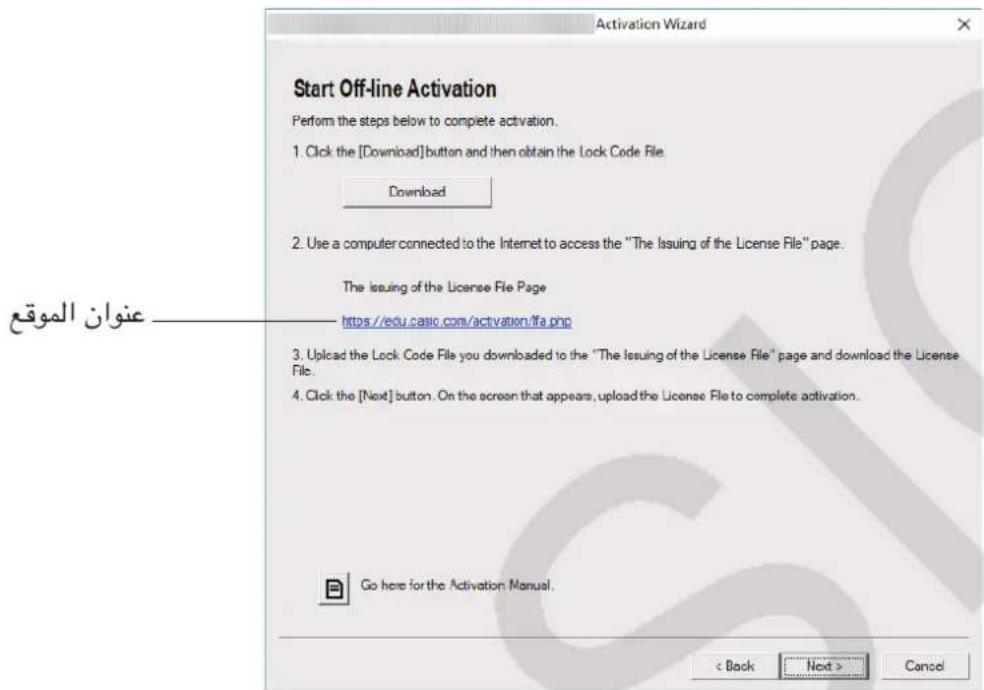
.[Download] 1e jai. Lalat Lock Code File alo Lii! sdy
.Lock Code File 1
The Issuing of the License File
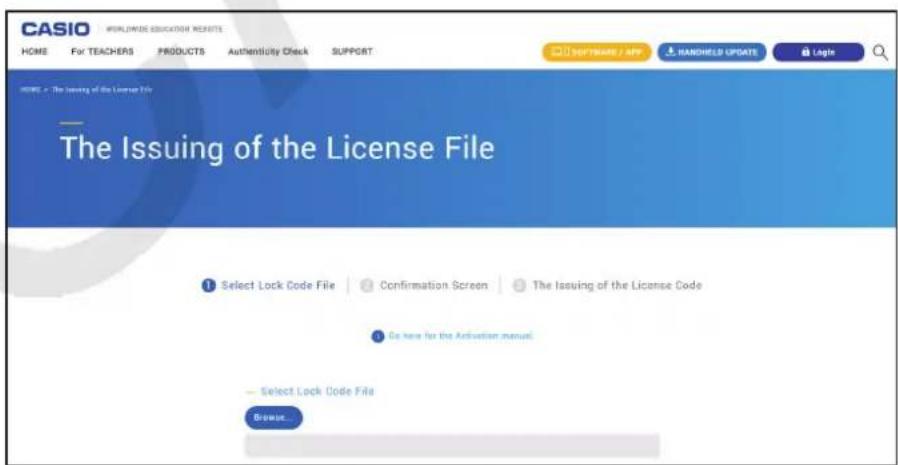
Lock Code File
License File
J 1
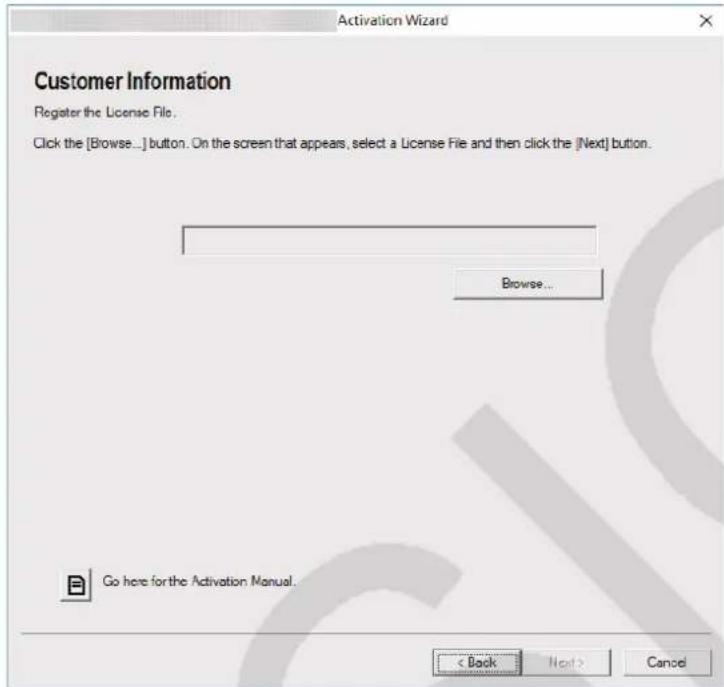
[Browse...]
License File
[Next]
A Joo<1 Je Lock Code File 1o Lj.
.Bj<1A JLock Code FileJwJ.
.B 11 "The Issuing of the License File" 11
"The Issuing of the License File" A Lock Code File
License File
License File
Therefore, ab = 12.
URL: https://edu.casio.com/softwarelicense/networklicense/index.php
Microsoft Corporation
Adobe Systems
Sentinel RMS License Manager
1111
https://edu.casio.com/all/networklicense/
JL
CASIO Network License Server
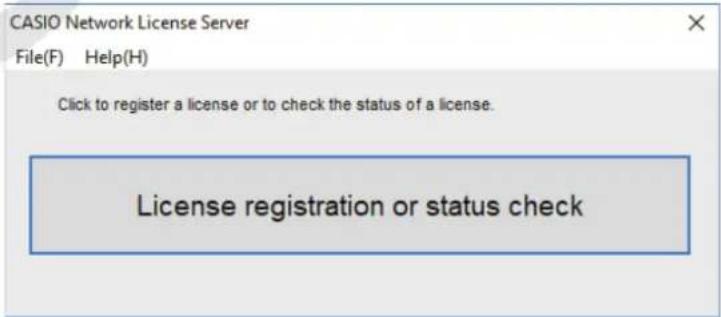
License registration or status check
Next
License Code
.
[Activate] 1
[Finish] .V
Jauuill aLac pLai
JL
J 10000000000000000000000000000000000000000000
“JyJyJyJyJyJyJyJyJyJyJyJyJyJyJyJyJyJyJyJyJyJyJyJy
.
[Download]
Lock Code File
gall jie 1c jai.
"The Issuing of the License File"
Lock Code File J.0
License File
[Next] [J]V
[Browse...] 1.
License File 9
[Next]
Jaiil iao pao! slyiia
A JooL Lock Code File 1o Luiy.
.B A Lock Code File Jzj.
.B 15 "The Issuing of the License File" 11
"The Issuing of the License File" A Lock Code File
License File
.AJ 11 J License File .V
A jssll 1e "cuiy Jlai Jusill" 7 J! 1 no gbi jiai.
.[Next] 1c jai.9
.[Browse...] 1c jai.
B JLicense File
[Next] 19
JauaI aLac pLai
Network License
Japanese
How to read this book
All rights reserved.
Permission to use, copy, modify, and distribute this software for any purpose with or without fee is hereby granted, provided that the above copyright notice and this permission notice appear in all copies.
THE SOFTWARE IS PROVIDED "AS IS", WITHOUT WARRANTY OF ANY KIND, EXPRESS OR IMPLIED, INCLUDING BUT NOT LIMITED TO THE WARRANTY OF MERCHANTABILITY, FITNESS FOR A PARTICULAR PURPOSE AND NONINFRINGEMENT OF THIRD PARTY RIGHTS. IN NO EVENT SHALL THE AUTHORS OR COPYRIGHT HOLDERS BE LIABLE FOR ANY CLAIM, DAMAGES OR OTHER LIABILITY, WHETHER IN AN ACTION OF CONTRACT, TORT OR OTHERWISE, ARISING FROM, OUT OF OR IN CONNECTION WITH THE SOFTWARE OR THE USE OR OTHER DEALINGS IN THE SOFTWARE.
Except as contained in this notice, the name of a copyright holder shall not be used in advertising or otherwise to promote the sale, use or other dealings in this Software without prior written authorization of the copyright holder.
The OpenSSL toolkit stays under a dual license, i.e. both the conditions of the OpenSSL License and the original SSLeay license apply to the toolkit.
See below for the actual license texts. Actually both licenses are BSD-style Open Source licenses.
In case of any license issues related to OpenSSL please contact openssl-core@openssl.org.
OpenSSL License
* Copyright (C) 1998-2016 The OpenSSL Project. All rights reserved. * Redistribution and use in source and binary forms, with or without modification, are permitted * provided that the following conditions are met:
- Redistributions of source code must retain the above copyright notice, this list of conditions and the following disclaimer.
- Redistributions in binary form must reproduce the above copyright notice, this list of
- conditions and the following disclaimer in the documentation and/or other materials provided
- with the distribution. * 3. All advertising materials mentioning features or use of this software must display the following acknowledgment:
* "This product includes software developed by the OpenSSL Project for use in the OpenSSL Toolkit. (http://www.openssl.org/)
- The names "OpenSSL Toolkit" and "OpenSSL Project" must not be used to endorse or
- promote products derived from this software without prior written permission. For written
- permission, please contact openssl-core@openssl.org.
- Products derived from this software may not be called "OpenSSL" nor may "OpenSSL"
- appear in their names without prior written permission of the OpenSSL Project. * 6. Redistributions of any form whatsoever must retain the following acknowledgment: "This product includes software developed by the OpenSSL Project for use in the OpenSSL Toolkit (http://www.openssl.org/)
- THIS SOFTWARE IS PROVIDED BY THE OpenSSL PROJECT "AS IS" AND ANY
- EXPRESSED OR IMPLIED WARRANTIES, INCLUDING, BUT NOT LIMITED TO, THE
- IMPLIED WARRANTIES OF MERCHANTABILITY AND FITNESS FOR A PARTICULAR
- PURPOSE ARE DISCLAIMED. IN NO EVENT SHALL THE OpenSSL PROJECT OR ITS
- CONTRIBUTORS BE LIABLE FOR ANY DIRECT, INDIRECT, INCIDENTAL, SPECIAL, EXEMPLARY, OR CONSEQUENTIAL DAMAGES (INCLUDING, BUT NOT LIMITED TO,
- PROCUREMENT OF SUBSTITUTE GOODS OR SERVICES; LOSS OF USE, DATA, OR
- PROFITS; OR BUSINESS INTERRUPTION) HOWEVER CAUSED AND ON ANY THEORY
- OF LIABILITY, WHETHER IN CONTRACT, STRICT LIABILITY, OR TORT (INCLUDING
- NEGLIGENCE OR OTHERWISE) ARISING IN ANY WAY OUT OF THE USE OF THIS
- SOFTWARE, EVEN IF ADVISED OF THE POSSIBILITY OF SUCH DAMAGE.
- This product includes cryptographic software written by Eric Young (eay@cryptsoft.com). This
- product includes software written by Tim Hudson (tjh@cryptsoft.com).
Copyright (C) 1995-1998 Eric Young (eay@cryptsoft.com) All rights reserved.
- This package is an SSL implementation written by Eric Young (eay@cryptsoft.com).
- The implementation was written so as to conform with Netscapes SSL.
- This library is free for commercial and non-commercial use as long as the following conditions
- are aheared to. The following conditions apply to all code found in this distribution, be it the
- RC4, RSA, Ihash, DES, etc., code; not just the SSL code. The SSL documentation included with
this distribution is covered by the same copyright terms except that the holder is Tim Hudson
(tjh@cryptsoft.com).
Copyright remains Eric Young's, and as such any Copyright notices in the code are not to be
- If this package is used in a product, Eric Young should be given attribution as the author of the
- parts of the library used.
- This can be in the form of a textual message at program startup or in documentation (online or
- textual) provided with the package.
- Redistribution and use in source and binary forms, with or without modification, are permitted
- provided that the following conditions are met:
- Redistributions of source code must retain the copyright notice, this list of conditions and the following disclaimer.
* 2. Redistributions in binary form must reproduce the above copyright notice, this list of
- conditions and the following disclaimer in the documentation and/or other materials provided with the distribution.
* 3. All advertising materials mentioning features or use of this software must display the following acknowledgement:
"This product includes cryptographic software written by Eric Young (eay@cryptsoft.com)"
- The word 'cryptographic' can be left out if the routines from the library being used are not cryptographic related :-).
- If you include any Windows specific code (or a derivative thereof) from the apps directory
- (application code) you must include an acknowledgement: "This product includes software
- written by Tim Hudson (tjh@cryptsoft.com)"
- THIS SOFTWARE IS PROVIDED BY ERIC YOUNG "AS IS" AND ANY EXPRESS OR IMPLIED
- WARRANTY, INCLUDING, BUT NOT LIMITED TO, THE IMPLIED WARRANTY OF
- MERCHANTABILITY AND FITNESS FOR A PARTICULAR PURPOSE ARE DISCLAIMED.
- IN NO EVENT SHALL THE AUTHOR OR CONTRIBUTORS BE LIABLE FOR ANY DIRECT,
- INDIRECT, INCIDENTAL, SPECIAL, EXEMPLARY, OR CONSEQUENTIAL DAMAGES
(INCLUDING, BUT NOT LIMITED TO, PROCUREMENT OF SUBSTITUTE GOODS OR
- SERVICES; LOSS OF USE, DATA, OR PROFITS; OR BUSINESS INTERRUPTION)
- HOWEVER CAUSED AND ON ANY THEORY OF LIABILITY, WHETHER IN CONTRACT,
- STRICT LIABILITY, OR TORT (INCLUDING NEGLIGENCE OR OTHERWISE) ARISING
- IN ANY WAY OUT OF THE USE OF THIS SOFTWARE, EVEN IF ADVISED OF THE
- POSSIBILITY OF SUCH DAMAGE.
- The licence and distribution terms for any publically available version or derivative of this code
* cannot be changed. i.e. this code cannot simply be copied and put under another distribution
- licence [including the GNU Public Licence.]
/
CASIO
CASIO COMPUTER CO., LTD.
6-2, Hon-machi 1-chome Shibuya-ku, Tokyo 151-8543, Japan
Casio Computer Co., Ltd.


- CONTENTS / CONTENIDOS / SOMMAIRE / INHALT / ÍNDICE / CONTINGUT / EDUKIAK / OBSAH / INDICE / TARTALOM / INHOUD / INNHOLD / SPIS TREŚCI / SISÄLTÖ / INNEHÅLL / OBSAH / САДРЖАЈ / 目录 / 目录 / MỤC LỤC / 目次
- ENGLISH
- USING THIS MANUAL
- OBTAINING A LICENSE CODE
- IF YOU HAVE A CLAIM CODE
- IMPORTANT
- NOTE
- IF YOU DO NOT HAVE A CLAIM CODE
- STANDALONE LICENSE ACTIVATION
- ACTIVATING ON LINE
- CLICK [NEXT]
- ACTIVATING OFFLINE
- TO ACTIVATE WHEN YOU HAVE AN INTERNET CONNECTION, BUT CANNOT ACCESS THE ACTIVATION SERVER
- TO ACTIVATE ON A COMPUTER (COMPUTER A) THAT IS NOT CONNECTED TO THE INTERNET
- NETWORK LICENSE ACTIVATION
- NETWORK LICENSE
- INSTALLING LICENSE SERVER MANAGEMENT SOFTWARE
- LICENSE SERVER ACTIVATION
- ACTIVATING ONLINE
- CLICK [LICENSE REGISTRATION OR STATUS CHECK]
- CLIENT ACTIVATION
- START UP THE SOFTWARE
- SPANISH
- START THE SOFTWARE
- ENTER THE LICENSE CODE
- SELECT COUNTRY/REGION
- ACTIVATING THE LICENSE INDEPENDENTLY
- ACTIVATION INSTRUCTIONS
- ACTIVATION OF THE LICENSE
- LICENSE MANAGER
- ACTIVATING THE LICENSE SERVER
- ONLINE ACTIVATION
- ENTER [LICENSE REGISTRATION OR STATUS CHECK]
- LICENSE CODE
- CLAIM CODE
- JAAAL
- JAPANESE
- HOW TO READ THIS BOOK
- OPENSSL LICENSE
- CASIO
- CASIO COMPUTER CO., LTD
- HON-MACHI 1-CHOME SHIBUYA-KU, TOKYO 151-8543, JAPAN
Brand : CASIO
Model : Activation
Category : Calculator