
BC 1/1.8 - Battery charger Kärcher - Free user manual and instructions
Find the device manual for free BC 1/1.8 Kärcher in PDF.
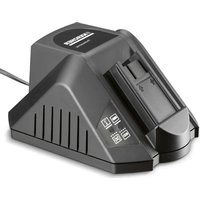


| Product type | Battery charger |
| Brand | Kärcher |
| Model | BC 1/1.8 |
| Dimensions (L x W x H) | 205 x 155 x 105 mm |
| Weight | 0.6 kg |
| Mains voltage | 220-240 V, 50/60 Hz |
| Max input power | 65 W |
| Charging current | 1.8 A |
| Charging voltage | 3.6 to 28.8 V |
| Compatible battery types | NiCd, NiMH, Li-Ion |
| LED indicators | Green (charging/charged), Red (error/temperature) |
| Trickle charge function | Yes (automatic switch after full charge) |
| Thermal protection | Yes (automatic shutdown if temperature too high/low) |
| Short-circuit protection | Yes |
| Usage | Indoor use only, do not expose to moisture |
| Charging temperature | 5 °C to 45 °C |
| Maintenance and cleaning | Clean with a dry cloth, do not immerse, check cable regularly |
| Child safety | Use by children aged 8 and above under supervision |
| Warranty | According to country conditions (material or manufacturing defect) |
Frequently Asked Questions - BC 1/1.8 Kärcher
User questions about BC 1/1.8 Kärcher
0 question about this device. Answer the ones you know or ask your own.
Ask a new question about this device
Download the instructions for your Battery charger in PDF format for free! Find your manual BC 1/1.8 - Kärcher and take your electronic device back in hand. On this page are published all the documents necessary for the use of your device. BC 1/1.8 by Kärcher.
USER MANUAL BC 1/1.8 Kärcher
Czech 48
Slovenian 51
Polish 54
Romanian 57
Slovak 60
Croatian 63
Serbian 66
Bulgarian 69
Estonian 72
Latvian 75
Lithuanian 78
Ukrainian 81
Register and win! www.kaercher.com/register-and-win


59616590 11/14

Please read and comply with these original instructions prior
to the initial operation of your appliance and store them for later use or subsequent owners.
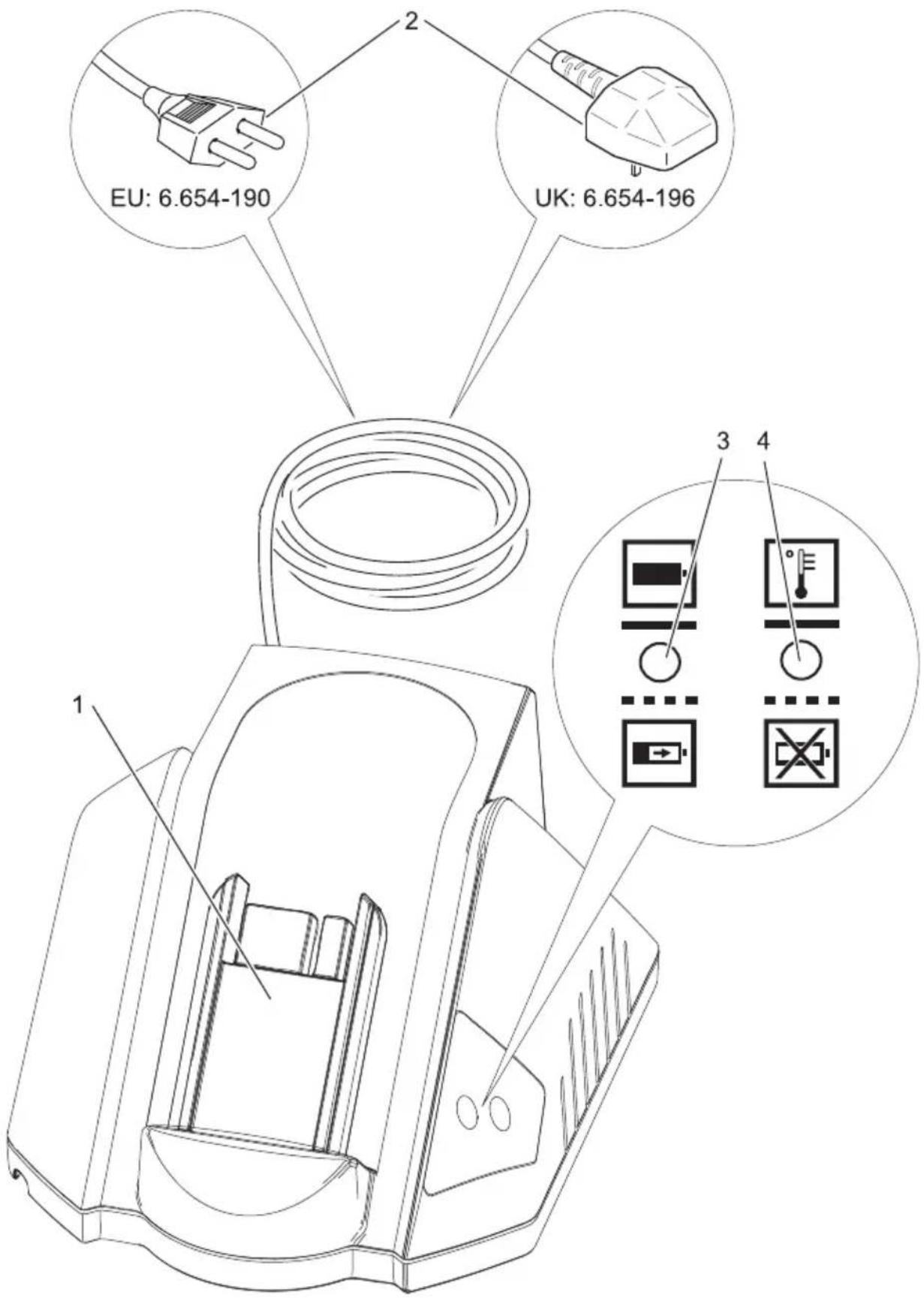
Control elements
1 Battery holder 2 Mains plug 3 LED green, battery is charging
- glows: Battery pack full
- blinks: Battery pack is being charged
4 LED red, function
- glows: Temperature too high/ low
- blinks: Contact problems; battery pack defective
Both LEDs are blinking: Battery pack is defective
For Your Safety
- This appliance can be used by children aged from 8 years and above and persons with reduced physical, sensory or mental capabilities or lack of experience and knowledge if they have been given supervision or instruction concerning use of the appliance in a safe way and understand the hazards involved. Children shall not play with the appliance. Cleaning and user maintenance shall not be made by children without supervision. – Children should be supervised to prevent them from playing with the appliance.
- Check charger, mains cable and battery pack for damages before every use. Do not use damaged devices and get the damaged parts repaired only by experts. Check extension wires regularly and replace them if damaged.
- Do not use the charger if dirty or wet.
- The mains voltage must match the voltage mentioned on the type plate of the charger.
- Do not operate the charger in explosive environment.
- Do not carry the charger by holding the mains cable.
- Protect the mains cable against heat, sharp edges, oil, and moving parts of the machine.
- Avoid using extension cords with multiple sockets and operating multiple devices simultaneously.
- Do not pull the plug from the socket by pulling the mains cable.
- Do not cover the charger and keep the air vents of the charger open.
- No metal parts should come into contact with battery holders; risk of short circuit.
- Do not open the charger. Have repairs done only by authorized experts.
- Use the charger only to charge approved battery packs; refer to "Use as intended".
- Place only clean and dry battery packs onto the battery holder of the charger.
- Do not charge primary cells (non-rechargeable batteries); risk of explosion.
- Do not charge damaged battery packs. Replace damaged battery packs.
- Do not store battery packs with metal objects; risk of short circuit.
- Do not dispose of battery packs by throwing them into fire or through household waste.
- Avoid contact with fluids oozing out of defective battery packs. Rinse with water in case of accidental contact with fluid. Consult a doctor if fluid comes into contact with eyes.
Symbols on the device

- Protect the charger against moisture and store it dry. The device is only suitable for use in rooms; do not expose the device to rain.
Proper use
The charger is suitable for charging the following battery packs with nominal voltage of 3.6 V to 28.8 V:
| Voltage | Rechargeable battery type | Nominal capacity | Charging time, approx. | Order number6.654... |
| V Ah min | ||||
| 7,2 NiCd 1,5 50 | -186.0 | |||
| 7,2 Li-Ion 1,3 58 | -257.0 | |||
| 7,2 Li-Ion 2,6 93 | -273.0 | |||
| 25,2 Li-Ion 3,3 1 | 15 -183.0 | |||
| 25,2 Li-Ion 3,3 1 | 15 -255.0 | |||
| 25,2 Li-Ion 4,5 1 | 60 -284.0 |
Environmental protection

The packaging material can be recycled. Please do not place the package in the ordinary refuse for disposal, but go for the proper recycling.

Old appliances contain valuable materials that can be recycled; these should be sent for recycling. Batteries and accumulators contain substances that must not enter the environment. Please dispose of old devices, batteries and rechargeable batteries through suitable waste collection systems.
Notes about the ingredients (REACH)
You will find current information about the ingredients at:
www.kaercher.com/REACH
Operation
Note
New battery packs reach their full capacity after approx. 5 charging and discharging cycles.
Recharge battery packs again if they have not been used for a long time.
The performance of the battery pack reduces when temperature falls below -10 °C.
Storage for a long time at temperatures above 40 °C can reduce the capacity of a battery pack.
Insert the mains plug into the socket. The device conducts a self-test. Both LEDs glow for 1 second. The device then goes into stand-by mode: both LEDs switch off. Slide the battery pack onto the battery holder of the charger. The battery pack will be charged automatically; the green LED blinks. If the battery pack is too hot or too cold, the red LED glows. The charging process starts when the battery pack has reached the correct charging temperature (5 °C ... 45 °C). When the battery pack is fully charged, the green LED glows. The charger automatically switches to retention charging. Remove the battery pack and insert it in the device.
Note
The charged battery pack can remain on the charger until it is to be used. There is no risk of over-charging.
Troubleshooting
Red LED glows:
The battery pack is too hot or too cold.
The charging process starts when the battery pack has reached the correct charging temperature.
Red LED blinks:
Battery pack has not been placed correctly on the battery holder.
Battery pack is defective.
Warranty
The warranty terms published by the relevant sales company are applicable in each country. We will repair potential failures of your appliance within the warranty period free of charge, provided that such failure is caused by faulty material or defects in manufacturing. In the event of a warranty claim, please contact your dealer or the nearest authorized Customer Service centre. Please submit the proof of purchase.
Technical specifications
| Voltage range of rechargeable battery | V 3,6 | ...28,8 |
| Charging current A | 1,8 | |
| Battery type -- NiCd, NiMH, Li-Ion | ||
| Mains voltage V 220...240 | ||
| Frequency Hz 50/60 | ||
| Max. input W 65 | ||
| Weight | kg | 0,6 |
| Dimensions (I x b x h) | mm 2 | 05x155x105 |

www.kaercher.com/REACH
Use
Note
www.kaercher.com/REACH
Use
Warning
www.kaercher.com/REACH
Operation
Instruction
New battery packs reach their full capacity after approximately 5 charge and discharge cycles.
www.kaercher.com/REACH
Handling
Note
www.kaercher.com/REACH
Handling
Notice
www.kaercher.com/REACH
Operation
Note
- lit: Battery pack full
- flashing: Battery pack charging
4 red LEDs, function
- lit: Temperature too high/low
- flashing: Contact problems, battery pack defective
Both LEDs flashing: Battery pack defective
For your safety
www.kaercher.com/REACH
Operation
Note
www.kaercher.com/REACH
Handling
Reference
www.kaercher.com/REACH
Use
Note
www.kaercher.com/REACH
Use
Note
www.kaercher.com/REACH
Operation
Note
www.kaercher.com/REACH
Use
Note
www.kaercher.com/REACH
Operation
Warning
www.kaercher.com/REACH
Use
Warning
www.kaercher.com/REACH
Operation
Note
www.kaercher.com/REACH
Use
Note
www.kaercher.com/REACH
Operation
Warning
www.kaercher.com/REACH
Operation
Note
New battery packs reach their full capacity after approximately 5 charge and discharge cycles.
Battery packs that have not been used for a longer period should be recharged before use again.
At temperatures below -10°C, the performance of the batteries decreases.
Long-term storage at temperatures above 40°C can reduce the capacity of the batteries.
→ Insert the power plug into the socket. – The device performs a self-check. Both LED indicators light up for 1 second. After that, the device switches to standby mode: both LED indicators go out. → Place the battery pack on the battery holder on the charger. - The battery pack charges automatically, the green LED indicator flashes. – If the battery pack is too hot or too cold, the red LED lights up. Charging begins when the battery pack reaches the required temperature (5°C to 45°C). – When the battery pack is charged, the green LED indicator lights up. The charger switches to maintenance charge mode. → Remove the battery pack and insert it into the device.
Note
www.kaercher.com/REACH
Operation
Note
New battery packs reach their full capacity after approximately 5 charge and discharge cycles.
Battery packs that have not been used for a longer period should be recharged before use again.
At temperatures below -10°C, the performance of the batteries decreases.
Long-term storage at temperatures above 40°C can reduce the capacity of the batteries.
Plug the mains plug into the socket. – The appliance automatically checks its functionality. Both LED indicators light up for 1 second. After that, the appliance switches to standby mode: both LED indicators go out. → Place the battery pack onto the battery holder on the charger. - The battery pack charges automatically, the green LED indicator flashes. – If the battery pack is too hot or too cold, the red LED lights up. Charging begins when the battery pack reaches the required temperature (5°C to 45°C). – When the battery pack is fully charged, the green LED indicator lights up. The charger switches to maintenance charge mode. → Remove the battery pack and insert it into the device.
Note
A fully charged battery pack can remain in the charger until use. There is no risk of overcharging.
Troubleshooting
– The red LED indicator lights up:
The battery pack is too hot or too cold.
www.kaercher.com/REACH
Maintenance
Note
www.kaercher.com/REACH
Operation
Note
www.kaercher.com/REACH
Maintenance
Note
– Red LED lights up:
- Red LED flashes:
www.kaercher.com/REACH
Control
Note
http://www.kaercher.com/dealersearch
Brand : Kärcher
Model : BC 1/1.8
Category : Battery charger