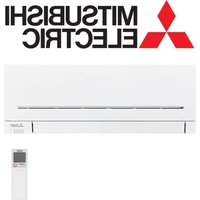
MSZ-AP71VGK - Air Conditioning MITSUBISHI - Free user manual and instructions
Find the device manual for free MSZ-AP71VGK MITSUBISHI in PDF.


| Product Type | Reversible air conditioning (heating and cooling) |
| Brand | Mitsubishi |
| Model | MSZ-AP71VGK |
| Associated Outdoor Unit | MUZ-AP71VG |
| Power Supply | 230 V ~ /N, 50 Hz |
| Cooling Capacity | 7,1 kW |
| Heating Capacity | 8,1 kW |
| Power Consumption (Cooling) | 2,01 kW |
| Power Consumption (Heating) | 2,12 kW |
| Indoor Unit Weight | 17 kg |
| Outdoor Unit Weight | 55 kg |
| Refrigerant | R32 (charge : 1,50 kg) |
| Sound Level (Indoor, Cooling) | 51 dB(A) (very high speed) |
| Sound Level (Outdoor, Cooling) | 56 dB(A) |
| Protection Rating (Outdoor Unit) | IP 24 |
| Maximum Allowable Pressure (High Pressure) | 4,17 MPa |
| Main Functions | Cooling, heating, dehumidification, ventilation, night mode, powerful mode, i-save mode, weekly timer |
| Built-in Wi-Fi Interface | Yes (model MAC-567IFB2-E, compatible with MELCloud) |
| Filter Maintenance | Air filter: clean every 2 weeks; purification filter: every 3 months |
| Safety | Automatic shutdown in case of anomaly, protection against refrigerant leaks, earth leakage circuit breaker recommended |
| Repairability | Spare parts available: air filter, purification filter (MAC-2360FT-E), remote control, Wi-Fi interface; intervention by professional mandatory |
Frequently Asked Questions - MSZ-AP71VGK MITSUBISHI
User questions about MSZ-AP71VGK MITSUBISHI
0 question about this device. Answer the ones you know or ask your own.
Ask a new question about this device
Download the instructions for your Air Conditioning in PDF format for free! Find your manual MSZ-AP71VGK - MITSUBISHI and take your electronic device back in hand. On this page are published all the documents necessary for the use of your device. MSZ-AP71VGK by MITSUBISHI.
USER MANUAL MSZ-AP71VGK MITSUBISHI
SPLIT-TYPE AIR CONDITIONERS
INDOOR UNIT
MSZ-AP60VG MSZ-AP71VG
MSZ-AP60VGK MSZ-AP71VGK
natural_image
Pure 3D rendering of a rectangular object with no visible text, numbers, or symbolsCE
OPERATING INSTRUCTIONS
BEDIENUNGSANLEITUNG
NOTICE D'UTILISATION
BEDIENINGSINSTRUCTIES
Meanings of symbols displayed on indoor unit and/or outdoor unit
| WARNING(Risk of fi re) | This unit uses a fl ammable refrigerant.If refrigerant leaks and comes in contact with fire or heating part, it will create harmful gas and there is risk of fire. | |
| Read the OPERATING INSTRUCTIONS carefully before operation. | ||
| Service personnel are required to carefully read the OPERATING INSTRUCTIONS and INSTALLATION MANUAL before operation. | ||
| Further information is available in the OPERATING INSTRUCTIONS, INSTALLATION MANUAL, and the like. | ||
- Since rotating parts and parts which could cause an electric shock are used in this product, be sure to read these "Safety Precautions" before use.
- Since the cautionary items shown here are important for safety, be sure to observe them.
- After reading this manual, keep it together with the installation manual in a handy place for easy reference.
Marks and their meanings

WARNING: Incorrect handling could cause serious hazard, such as death, serious injury, etc. with a high probability.

CAUTION : Incorrect handling could cause serious hazard depending on the conditions.
Meanings of symbols used in this manual

: Be sure not to do.

: Be sure to follow the instruction.

: Never insert your finger or stick, etc.

: Never step onto the indoor/outdoor unit and do not put anything on them.

: Danger of electric shock. Be careful.

: Be sure to disconnect the power supply plug from the power outlet.

: Be sure to shut off the power.

: Risk of fi re.

: Never touch with wet hand.

: Never splash water on the unit.

WARNING

Do not connect the power cord to an intermediate point, use an extension cord, or connect multiple devices to a single AC outlet.
• This may cause overheating, fire, or electric shock.
Make sure the power plug is free of dirt and insert it securely into the outlet.
• A dirty plug may cause fire or electric shock.
Do not bundle, pull, damage, or modify the power cord, and do not apply heat or place heavy objects on It.
• This may cause fire or electric shock.
Do not turn the breaker OFF/ON or disconnect/connect the power plug during operation.
• This may create sparks, which can cause fire.
- After the indoor unit is switched OFF with the remote controller, make sure to turn the breaker OFF or disconnect the power plug.
Do not expose your body directly to cool air for a prolonged length of time.
• This could be detrimental to your health.
The unit should not be installed, relocated, disassembled, altered, or repaired by the user.
- An improperly handled air conditioner may cause fire, electric shock, injury, or water leakage, etc. Consult your dealer.
- If the power supply cord is damaged, it must be replaced by the manufacturer or its service agent in order to avoid a hazard.
When installing, relocating, or servicing the unit, make sure that no substance other than the specified refrigerant (R32) enters the refrigerant circuit.
- Any presence of foreign substance such as air can cause abnormal pressure rise and may result in explosion or injury.
- The use of any refrigerant other than that specified for the system will cause mechanical failure, system malfunction, or unit breakdown. In the worst case this could lead to a serious impediment to securing product safety.
This appliance is not intended for use by persons (including children) with reduced physical, sensory or mental capabilities, or lack of experience and knowledge, unless they have been given supervision or instruction concerning use of the appliance by a person responsible for their safety.
Children should be supervised to ensure that they do not play with the appliance.

Do not insert your finger, a stick, or other objects into the air inlet or outlet.
- This may cause injury, since the fan inside rotates at high speeds during operation.

In case of an abnormal condition (such as a burning smell), stop the air conditioner and disconnect the power plug or turn the breaker OFF.
- A continued operation in the abnormal state may cause a malfunction, fire, or electric shock. In this case, consult your dealer.

When the air conditioner does not cool or heat, there is a possibility of refrigerant leakage. If any refrigerant leakage is found, stop operations and ventilate the room well and consult your dealer immediately. If a repair involves recharging the unit with refrigerant, ask the service technician for details.
- The refrigerant used in the air conditioner is not harmful. Normally, it does not leak. However, if refrigerant leaks and comes in contact with fi re or heating part of such a fan heater, kerosene heater, or cooking stove, it will create harmful gas and there is risk of fi re.
The user should never attempt to wash the inside of the indoor unit. Should the inside of the unit require cleaning, contact your dealer.
- Unsuitable detergent may cause damage to plastic material inside the unit, which may result in water leakage. Should detergent come in contact with electrical parts or the motor, it will result in a malfunction, smoke, or fire.
- The appliance shall be stored in a room without continuously operating ignition sources (for example: open flames, an operating gas appliance or an operating electric heater).
- Be aware that refrigerants may not contain an odour.
- Do not use means to accelerate the defrosting process or to clean the appliance, other than those recommended by the manufacturer.
- Do not pierce or burn.
The indoor unit must be installed in rooms which exceed the floor space specified. Please consult your dealer.
This appliance is intended to be used by expert or trained users in shops, in light industry and on farms, or for commercial use by lay persons.


CAUTION

Do not touch the air inlet or the aluminum fins of the indoor/outdoor unit. - This may cause injury.
Do not use insecticides or flammable sprays on the unit. - This may cause a fi re or deformation of the unit.
Do not expose pets or houseplants to direct airflow. • This may cause injury to the pets or plants.

SAFETY PRECAUTIONS
| Do not place other electric appliances or furniture under the indoor/outdoor unit.Water may drip down from the unit, which may cause damage or malfunction. | |
| Do not leave the unit on a damaged installation stand.The unit may fall and cause injury. | |
| Do not step on an unstable bench to operate or clean the unit.This may cause injury if you fall down. | |
| Do not pull the power cord.This may cause a portion of the core wire to break, which may cause over-heating or fi re. | |
| Do not charge or disassemble the batteries, and do not throw them into a fi re.This may cause the batteries to leak, or cause a fi re or explosion. | |
| Do not operate the unit for more than 4 hours at high humidity (80% RH or more) and/or with windows or outside door left open.This may cause the water condensation in the air conditioner, which may drip down, wetting or damaging the furniture.The water condensation in the air conditioner may contribute to growth of fungi, such as mold. | |
| Do not use the unit for special purposes, such as storing food, raising animals, growing plants, or preserving precision devices or art objects.This may cause deterioration of quality, or harm to animals and plants. | |
| Do not expose combustion appliances to direct airfl ow.This may cause incomplete combustion. | |
| Never put batteries in your mouth for any reason to avoid accidental ingestion.Battery ingestion may cause choking and/or poisoning. | |
| Before cleaning the unit, switch It OFF and disconnect the power plug or turn the breaker OFF.This may cause injury, since the fan inside rotates at high speeds during operation. | |
| When the unit will be unused for a long time, disconnect the power plug or turn the breaker OFF.The unit may accumulate dirt, which may cause overheating or fi re. | |
| Replace all batteries of the remote controller with new ones of the same type.Using an old battery together with a new one may cause overheating, leakage, or explosion. | |
| If the battery fl uld comes in contact with your skin or clothes, wash them thoroughly with clean water.If the battery fl uld comes in contact with your eyes, wash them thoroughly with clean water and immediately seek medical attention. | |
| Ensure that the area is well-ventilated when the unit is operated together with a combustion appliance.Inadequate ventilation may cause oxygen starvation. | |
| Turn the breaker OFF when you hear thunder and there is a possibility of a lightning strike.The unit may be damaged if lightning strikes. | |
| After the air conditioner is used for several seasons, perform inspection and maintenance in addition to normal cleaning.Dirt or dust in the unit may create an unpleasant odor, contribute to growth of fungi, such as mold, or clog the drain passage, and cause water to leak from the indoor unit. Consult your dealer for inspection and maintenance, which require specialized knowledge and skills. | |
| Do not operate switches with wet hands.This may cause electric shock. | |
| Do not clean the air conditioner with water or place an object that contains water, such as a fl ower vase, on it.This may cause fi re or electric shock. | |
| Do not step on or place any object on the outdoor unit.This may cause injury if you or the object falls down. |
IMPORTANT
Dirty fil liters cause condensation in the air conditioner which will contribute to the growth of fungi such as mold. It is therefore recommended to clean air fil liters every 2 weeks.
Before starting the operation, ensure that the horizontal vanes are in the closed position. If operation starts when the horizontal vanes are in the open position, they may not return to the correct position.
For installation
| WARNING | |
 | Consult your dealer for installing the air conditioner.· It should not be installed by the user since installation requires specialized knowledge and skills. An improperly Installed air conditioner may cause water leakage, fi re, or electric shock. |
| Provide a dedicated power supply for the air conditioner.· A non-dedicated power supply may cause overheating or fi re. | |
| Do not install the unit where fl ammable gas could leak.· If gas leaks and accumulates around the outdoor unit, it may cause an explosion. | |
 | Earth the unit correctly.· Do not connect the earth wire to a gas pipe, water pipe, lightning rod, or a telephone earth wire. Improper earthing may cause electric shock. |
| CAUTION | |
| [4ST8] | Install an earth leakage breaker depending on the installation location of the air conditioner (such as highly humid areas).· If an earth leakage breaker is not installed, it may cause electric shock. |
| Ensure that the drain water is properly drained.· If the drain passage is improper, water may drip down from the indoor/outdoor unit, wetting and damaging the furniture. | |
| In case of an abnormal conditionImmediately stop operating the air conditioner and consult your dealer. | |
For Wi-Fi interface
| WARNING(Improper handling may have serious consequences, including serious injury or death.) | |
 | This appliance can be used by children aged from 8 years and above and persons with reduced physical, sensory or mental capabilities or lack of experience and knowledge if they have been given supervision or instruction concerning use of the appliance in a safe way and understand the hazards involved. |
| Children shall not play with the appliance. Cleaning and user maintenance shall not be made by children without supervision. | |
| Do not use the Wi-Fi interface nearby the medical electrical equipment or people who have a medical device such as a cardiac pacemaker or an implantable cardioverter-defi brillator.It can cause an accident due to malfunctions of the medical equipment or device. | |
| Do not install the Wi-Fi interface nearby the automatic control devices such as automatic doors or fi re alarms.It can cause accidents due to malfunctions. | |
 | Do not touch the Wi-Fi interface with wet hands.It can cause damage to the device, electric shock, or fi re. |
| [BX6K] | Do not splash water on the Wi-Fi interface or use it in a bathroom.It can cause damage to the device, electric shock, or fi re. |
 | When the Wi-Fi interface is dropped, or the holder or cable is damaged, disconnect the power supply plug or turn the breaker OFF.It may cause fi re or electric shock. In this case, consult your dealer. |
| CAUTION(Improper handling may have consequences, including injury or damage to building.) | |
 | Do not step on unstable stepstool to set up or clean the Wi-Fi interface.It may cause injury if you fall down. |
| Do not use the Wi-Fi interface nearby other wireless devices, microwaves, cordless phones, or facsimiles.It can cause malfunctions. | |
DISPOSAL
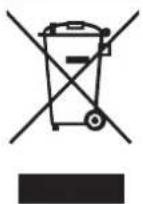
Fig. 1
To dispose of this product, consult your dealer.
Note:
This symbol mark is for EU countries only. This symbol mark is according to the directive 2012/19/EU Article 14 Information for users and Annex IX, and/or to the directive 2006/66/EC Article 20 Information for end-users and Annex II.
Your MITSUBISHI ELECTRIC product is designed and manufactured with high quality materials and components which can be recycled and/or reused. This symbol means that electrical and electronic equipment, batteries and accumulators, at their end-of-life, should be disposed of separately from your household waste. If a chemical symbol is printed beneath the symbol (Fig. 1), this chemical symbol means that the battery or accumulator contains a heavy metal at a certain concentration. This will be indicated as follows: Hg: mercury (0.0005%), Cd: cadmium (0.002%), Pb: lead (0.004%) In the European Union there are separate collection systems for used electrical and electronic products, batteries and accumulators. Please, dispose of this equipment, batteries and accumulators correctly at your local community waste collection/recycling centre. Please, help us to conserve the environment we live in!
NAME OF EACH PART
Indoor unit Outdoor unit
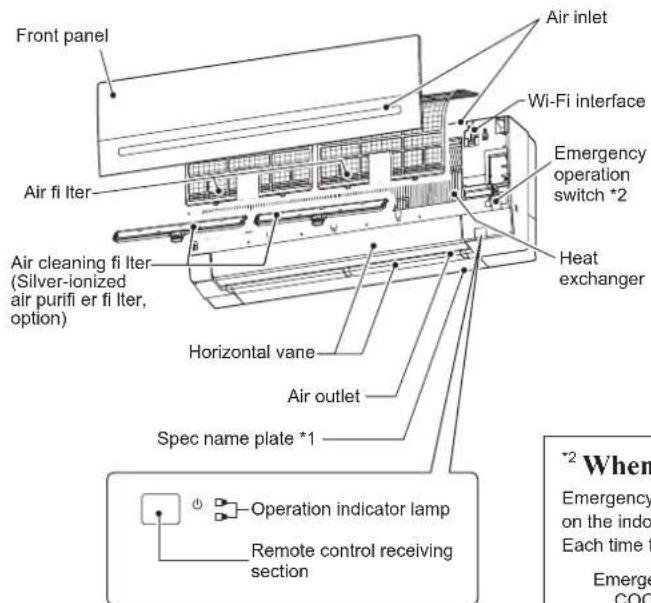
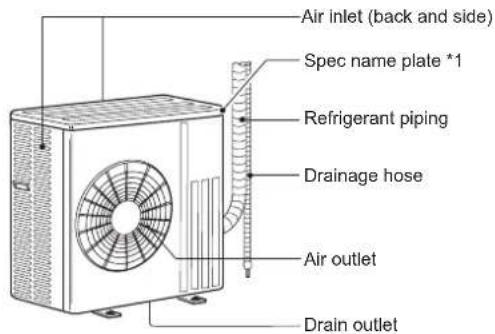
Outdoor units may be different in appearance.
*1 The manufacturing year and month are indicated on the spec name plate.
^2 When the remote controller cannot be used...
Emergency operation can be activated by pressing the emergency operation switch (E.O. SW) on the indoor unit.
Each time the E.O. SW is pressed, the operation changes in the following order:
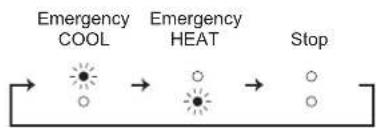
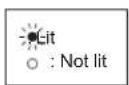
flowchart
graph LR
    A["Emergency COOL"] --> B["→"]
    B --> C["Emergency HEAT"]
    C --> D["→"]
    D --> E["Stop"]
Set temperature : 24°C
Fan speed : Medium
Horizontal vane : Auto
Before operation: Insert the power supply plug into the power outlet and/or turn the breaker on.
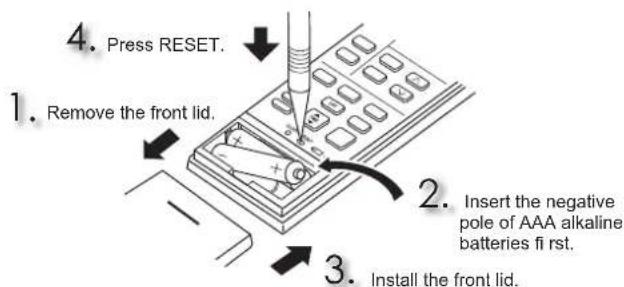
Installing the remote controller batteries
Setting current time
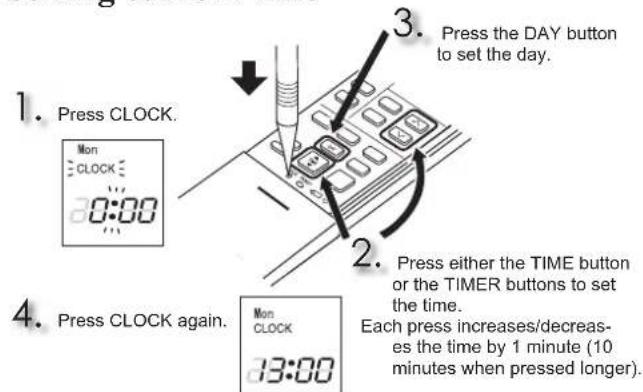
TIME, TIMER set button
Increase time Decrease time
ON (ON timer) : The unit turns ON at the set time.
OFF (OFF timer) : The unit turns OFF at the set time.
Press △ (Increase) and ▼ (Decrease) to set the time of timer.
WEEKLY TIMER set buttons
Press EDIT/SEND SET to enter the weekly timer setting mode.
Press DAY and 1\~4 to select setting day and number.

Press ON/OFF, TIME, and TEMP to set ON/OFF, time, and temperature.
Press EDIT/SEND SET to complete and transmit the weekly timer setting.
Press WEEKLY TIMER ON TO turn the weekly timer ON. ( WEEKLY lights.)
Press WEEKLY TIMER KNOFF again to turn the weekly timer OFF. ( WEEKLY goes out.)
OFF/ON

OFF/ON (stop/operate) button
MODE

Operation select button

+

Temperature buttons

Each press raises or lowers the temperature by 1°C.
FAN

FAN speed control button

WIDE VANE

Left-right airflow control button

flowchart
graph LR
    A["Start"] --> B["Step 1"]
    B --> C["Step 2"]
    C --> D["Step 3"]
    D --> E["Step 4"]
    E --> F["Step 5"]
    F --> G["Step 6"]
    G --> H["Step 7"]
    H --> I["(SWING)"]
VANE

Up-down airfl ow control button

flowchart
graph LR
    A["→ @"] --> B["→"]
    B --> C["→"]
    C --> D["→"]
    D --> E["→"]
    E --> F["→"]
    F --> G["→"]
    G --> H["SWING"]
LONG
LONG button
Fan speed increases and the horizontal vane moves to the position for LONG mode.
POWERFUL
POWERFUL button
Fan speed : Exclusive speed for POWERFUL mode
Horizontal vane : Set position, or downward airflow position during AUTO setting
i save
i-save button
A simplified set back function enables to recall the preferred (preset) setting with a single push of the save button. Press the button again and you can go back to the previous setting in an instance.
ECONO COOL
ECONO COOL button
The set temperature and the airflow direction are automatically changed by the microprocessor.
NIGHT MODE
NIGHT MODE button
NIGHT MODE operation changes the brightness of the operation indicator, disables the beep sound and limits the noise level of the outdoor unit.
CLEANING
Instructions:
- Switch off the power supply or turn off the breaker before cleaning.
- Be careful not to touch the metal parts with your hands.
- Do not use benzine, thinner, polishing powder, or insecticide.
• Use only diluted mild detergents. -
Do not use a scrubbing brush, a hard sponge, or the like.
-
Do not soak or rinse the horizontal vane.
- Do not use water hotter than 50^ .
- Do not expose parts to direct sunlight, heat, or fire to dry.
- Do not apply excessive force on the fan as it may cause cracks or breakage.
natural_image
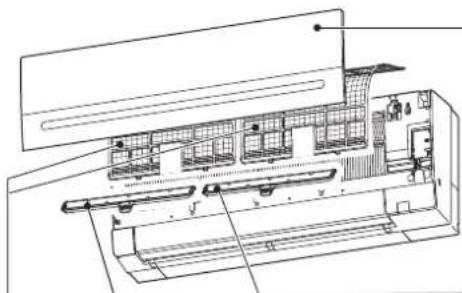
Technical line drawing of an internal air duct system with no visible text or symbolsAir fi lter (Air purifying fi lter)
• Clean every 2 weeks
- Remove dirt by a vacuum cleaner, or rinse with water.
• After washing with water, dry it well in shade.
Important
- Clean the filters regularly for best performance and to reduce power consumption.
- Dirty filters cause condensation in the air conditioner which will contribute to the growth of fungi such as mold. It is therefore recommended to clean air filters every 2 weeks.
Front panel
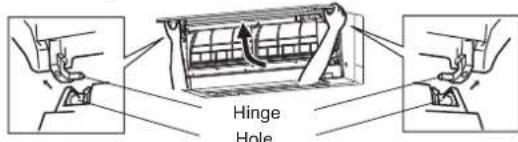
- Lift the front panel until a "click" is heard.
-
Hold the hinges and pull to remove as shown in the illustration above.
-
Wipe with a soft dry cloth or rinse it with water.
- Do not soak it in water for more than two hours.
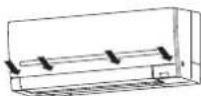
• Dry it well in shade before installing it. - Install the front panel by following the removal procedure in reverse. Close the front panel securely and press the positions indicated by the arrows.
Air cleaning fi lter
(Silver-ionized air purifi er fi lter, option)
Every 3 months:
- Remove dirt by a vacuum cleaner.
When dirt cannot be removed by vacuum cleaning: - Soak the filter and its frame in lukewarm water before rinsing it.
• After washing, dry it well in shade.
Every year:
- Replace it with a new air cleaning filter for best performance.
• Parts Number MAC-2360FT-E
Push to install into the unit along the fi Iter guide.
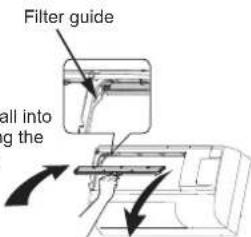
Pull to remove from the unit.
This information is based on REGULATION (EU) No 528/2012
| MODEL NAME | Treated Article(Parts name) | Active Substances(CAS No.) | Property | Instruction for Use(Safe handling information) |
| MSZ-AP60/71VG FILTER | Silver sodium hydrogen zirconium phosphate(265647-11-8)2-octyl-2H-isothiazol-3-one (OIT)(26530-20-1) | Antibacterial Antimold | Use this product in line with the instruction manual indications and for the intended purpose only.Do not put into mouth. Keep away from children. | |
| MAC-2360FT-E FILTER | Silver zinc zeolite(130328-20-0) | Antibacterial | Use this product in line with the instruction manual indications and for the intended purpose only.Do not put into mouth. Keep away from children. |
Wi-Fi INTERFACE SETTING UP (VGK type only)
This Wi-Fi interface, communicates the status information and controls the commands from the MELCloud by connecting to the indoor unit.
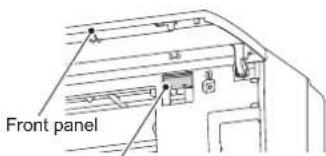
Wi-Fi interface
Note:
- Set up a connection between the Wi-Fi interface and the Router. Refer to the SETUP MANUAL and SETUP QUICK REFERENCE GUIDE provided with the unit.
- For SETUP MANUAL, please go to the website below. http://www.melcloud.com/Support
- For MELCloud User Manual, please go to the website below. http://www.melcloud.com/Support
SPECIFICATIONS
| Model | Indoor | MSZ-AP60VG(K) | MSZ-AP71VG(K) | |||
| Outdoor | MUZ-AP60VG | MUZ-AP71VG | ||||
| Function | Cooling | Heating | Cooling | Heating | ||
| Power supply | ~/N, 230 V, 50 Hz | |||||
| Capacity | kW | 6.1 | 6.8 | 7.1 | 8.1 | |
| Input | kW | 1.59 1.67 2 | 01 2.12 | |||
| Weight | Indoor | kg | 16 | 17 | ||
| Outdoor | kg | 40 | 55 | |||
| Refrigerant filling capacity (R32) | kg | 1.05 | 1.50 | |||
| IP code | Indoor | IP 20 | ||||
| Outdoor | IP 24 | |||||
| Permissible excessive operating pressure | LP ps | MPa | 2.77 | |||
| HP ps | MPa | 4.17 | ||||
| Noise level (SPL) | Indoor (Super High/High/Med./Low/Silent) | dB(A) 48/45/41/37/29 48/4 | 5/41/37/30 49/45/ | 41/37/30 51/45/41/ | 37/30 | |
| Outdoor | dB(A) | 56 | 57 | 56 | 55 | |
Guaranteed operating range
| Indoor | Outdoor | ||
| Cooling | Upper limit | 32°C DB23°C WB | 46°C DB— |
| Lower limit | 21°C DB15°C WB | -10°C DB— | |
| Heating | Upper limit | 27°C DB— | 24°C DB18°C WB |
| Lower limit | 20°C DB— | -15°C DB-16°C WB | |
DB: Dry Bulb WB: Wet Bulb
Note:
Rating condition
Cooling — Indoor: 27°C DB, 19°C WB
Outdoor: 35°C DB
Heating — Indoor: 20°C DB
Outdoor: 7°C DB, 6°C WB
Wi-Fi interface
| Model MAC-567IFB2-E | |
| Input Voltage DC12.7 V (from indoor unit) | |
| Power consumption MAX. 2 W | |
| Size H×W×D (mm) 79×44×18.5 | |
| Weight (g) 60 (including cable) | |
| Transmitter power level (MAX.) 17.5 dBm @IEEE 802.11b | |
| RF channel 1ch ~ 13ch (2412~2472 MHz) | |
| Radio protocol IEEE 802.11b/g/n (20) | |
| Encryption AES | |
| Authentication WPA2-PSK | |
| Software Version XX.00 | |
For Declaration of Conformity, please go to the website below. http://www.melcloud.com/Support
WHEN YOU THINK THAT TROUBLE HAS OCCURRED
In the following cases, stop using the air conditioner and consult your dealer.
- When water leaks or drips from the indoor unit.
- When the operation indicator lamp blinks.
- When the breaker trips frequently.
• The remote control signal is not received in a room where an electronic ON/OFF type fluorescent lamp (inverter-type fluorescent lamp, etc.) is used.
• Operation of the air conditioner interferes with radio or TV reception. An amplifier may be required for the affected device. - When an abnormal sound is heard.
- When any refrigerant leakage is found.
VORSICHTSMASSNAHMEN
natural_image
Technical line drawing of an internal mechanical or electrical assembly (no text or symbols visible)natural_image
Technical line drawing of an air conditioner unit with internal compartments and ventilation grilles (no text or labels)natural_image
Technical line drawing of an internal air conditioner unit with cooling fins and ventilation grilles (no text or labels)http://www.melcloud.com/Support
OPLOSSEN VAN PROBLEMEN
natural_image
Architectural cross-section diagram of a building with internal layout and structural elements (no text or labels)natural_image
Technical line drawing of an internal air conditioner unit with cooling fins and ventilation grilles (no text or labels)Filtro dell'aria
natural_image
Technical line drawing of an internal air duct system with no visible text or symbolshttp://www.melcloud.com/Support
natural_image
Technical line drawing of a mechanical assembly with internal components (no text or symbols)natural_image
Technical line drawing of an air conditioner unit with internal compartments and ventilation grilles (no text or labels)Wi-Fi-interface
Bemærk:
natural_image
Technical line drawing of an internal appliance or housing assembly (no text or symbols visible)Luftfilter (Luftreningsfilter)
Wi-Fi-gränssnitt
Obs:
natural_image
Technical line drawing of an internal appliance or housing assembly (no text or symbols visible)http://www.melcloud.com/Support
natural_image
Technical line drawing of a mechanical or electrical assembly with no visible text, numbers, or symbols.http://www.melcloud.com/Support
Uwaga:
Warunki oceny
OFF/ON (stopp/drift)-knapp

Driftsvalgknapp


Temperaturknapper

natural_image
Technical line drawing of an internal mechanical or architectural component (no text or symbols visible)Luftfi lter (Luftrensefi lter)
Wi-Fi-grensesnitt
Merk:
- Etabler en forbindelse mellom Wi-Fi-grensesnittet og ruteren. Se KONFIGURASJONSHÄNDBOKEN og SETUP QUICK REFERENCE GUIDE (HURTIGREFERANSEVEILEDNINGEN) som følger med enheten.
- Du fi nner KONFIGURASJONSHÄNDBOKEN på nettsiden nedenfor. http://www.melcloud.com/Support
- Du fi nner Brukerhåndbok for MELCloud på nettsiden nedenfor. http://www.melcloud.com/Support
SPESIFIKASJONER
| Modell | Inne | MSZ-AP60VG(K) | MSZ-AP71VG(K) | |||
| Ute | MUZ-AP60VG | MUZ-AP71VG | ||||
| Funksjon | Avkjøling | Oppvarming | Avkjøling | Oppvarming | ||
| Strømforsyning | ~ /N, 230 V, 50 Hz | |||||
| Kapasitet | kW | 6,1 | 6,8 | 7,1 | 8,1 | |
| Inngang | kW | 1,59 | 1,67 | 2,01 | 2,12 | |
| Vekt | Inne | kg | 16 | 17 | ||
| Ute | kg | 40 | 55 | |||
| Kjølemiddelkapasistet (R32) | kg | 1,05 | 1,50 | |||
| IP-kode | Inne | IP 20 | ||||
| Ute | IP 24 | |||||
| Tillatt overtrykk under drift | LP ps | MPa | 2,77 | |||
| HP ps | MPa | 4,17 | ||||
| Støynivå (SPL) | Inne (Ekstra høy/Høy/ Med./Lav/Stille) | dB(A) | 48/45/41/37/29 | 48/45/41/37/30 | 49/45/41/37/30 | 51/45/41/37/30 |
| Ute | dB(A) | 56 | 57 | 56 | 55 | |
Garantert driftsområde
| Inne | Ute | ||
| Avkjøling | ∅vre grense | 32°C DB23°C WB | 46°C DB— |
| Nedre grense | 21°C DB15°C WB | -10°C DB— | |
| Oppvarming | ∅vre grense | 27°C DB— | 24°C DB18°C WB |
| Nedre grense | 20°C DB— | -15°C DB-16°C WB | |
Merk:
| Merketilstand | |
| Avkjøling — | Inne: 27°C DB, 19°C WB |
| Ute: 35°C DB | |
| Oppvarming — | Inne: 20°C DB |
| Ute: 7°C DB, 6°C WB | |
DB : Dry Bulb (Tørr kolbe)
WB : Wet Bulb (Väta kolbe)
Wi-Fi-grensesnitt
| Modell MAC-567IFB2-E | |
| Inngangsspenning DC 12,7 V (fra innendørsenhet) | |
| Strømforbruk MAKS. 2 W | |
| Mål H×B×D (mm) 79 × 44 × 18,5 | |
| Vekt (g) 60 (inkl. kabel) | |
| Effektnivå for sender (MAKS.) 17,5 dBm @IEEE 802.11b | |
| RF-kanal 1 ch ~ 13 ch (2412~2472 MHz) | |
| Radioprotokoll IEEE 802.11b/g/n (20) | |
| Kryptering AES | |
| Autentisering WPA2-PSK | |
| Programvareversjon XX.00 | |
Du fi nner samsvarserklæringen på nettsiden nedenfor.
http://www.melcloud.com/Support
Når DU TROR AT DET HAR OPPSTÄTT PROBLEMER
natural_image
Technical line drawing of an internal appliance or housing assembly (no text or symbols visible)Wi-Fi-liitäntä
Huomautus:
http://www.melcloud.com/Support
KUN LUULET, ETTÄ ON SYNTYNYT ONGELMA
natural_image
Technical line drawing of an internal machine or enclosure with no visible text or symbolshttp://www.melcloud.com/Support
PŘI PODEZŘENÍ NA ZÁVADU
natural_image
Technical line drawing of an internal air duct system with labeled components (no text or symbols)natural_image
Technical line drawing of an internal air conditioner unit with cooling fans and ventilation grilles (no text or labels)http://www.melcloud.com/Support
HAÚGYVÉLI, HOGYVALAMIMEGHIBÁSODOTT
natural_image
Technical line drawing of an internal air duct system with labeled components (no text or symbols)Filter za zrak (fi lter za čiščenje zraka)
• Očistite ga vsaka 2 tedna
- S sesalcem posesajte prah ali pa ga izperite z vodo.
- Ko ga operete z vodo, ga pustite v senci, da se osuši.
! Pomembno
natural_image
Technical line drawing of an internal mechanical or architectural component with no visible text or symbolsnatural_image
Technical line drawing of a mechanical assembly with internal components (no text or symbols)Õhufi lter (Õhupuhastusfi lter)
natural_image
Technical line drawing of an internal air conditioner unit with cooling fans and ventilation grilles (no text or labels)natural_image
Technical line drawing of an internal air duct system with labeled components (no text or symbols)Oro fi ltras (oro valymo fi ltras)
http://www.melcloud.com/Support
JEIGU MANOTE, KAD İVYKO GEDIMAS
natural_image
Technical line drawing of an internal air duct system with labeled components (no text or symbols)natural_image
Technical line drawing of an internal air duct system with labeled components (no text or symbols)natural_image
Technical diagram showing a mechanical assembly with an arrow indicating direction (no text or symbols present)Povucite da biste izvadili iz jedinice.
Ove informacije su zasnovane na UREDBI (EU) br. 528/2012
| IME MODELA | Obrađen član (Ime delova) | Aktivne supstance (CAS br.) | Vlasništvo | Uputstvo za upotrebu (Informacije o bezbednom rukovanju) |
| MSZ-AP60/71VG FILTER | Srebro-natrijum-hidrogen-cirkonijum-fosfat (265647-11-8) 2-oktil-2H-izotiazol-3-on (OIT) (26530-20-1) | Antibakterijsko dejstvo Antigljivično dejstvo | Koristite ovaj proizvod u skladu sa indikacijama u uputstvu za upotrebu i samo u predviđenu svrhu.Ne stavljajte u usta. Držite van dohvata dece. | |
| MAC-2360FT-E FILTER | Srebro-cink-zeolit (130328-20-0) | Antibakterijsko dejstvo | Koristite ovaj proizvod u skladu sa indikacijama u uputstvu za upotrebu i samo u predviđenu svrhu.Ne stavljajte u usta. Držite van dohvata dece. |
POSTAVLJANJE Wi-Fi INTERFEJSA (samo tip VGK)
Ovaj Wi-Fi interfejs prenosi informacije o statusu i kontroliše komande sa MELCloud-a povezivanjem sa unutrašnjom jedinicom.
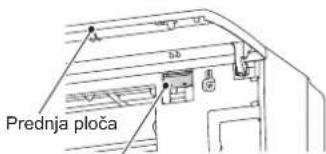
Wi-Fi interfejs
Napomena:
- Uspostavite vezu između Wi-Fi interfejsa i rutera. Pogledajte UPUTSTVO ZA PODEŠAVANJE i KRATKO UPUTSTVO ZA PODEŠAVANJE koje ste dobili uz jedinicu.
- UPUTSTVO ZA PODEŠAVANJE možete pronaći na dole navedenoj veb stranici. http://www.melcloud.com/Support
- Korisničko uputstvo za MELCloud možete pronaći na dole navedenoj veb stranici. http://www.melcloud.com/Support
SPECIFIKACIJE
| Model | Unutrašnja jedinica | MSZ-AP60VG(K) | MSZ-AP71VG(K) | |||
| Spoljna jedinica | MUZ-AP60VG | MUZ-AP71VG | ||||
| Funkcija | Hlađenje | Grejanje | Hlađenje | Grejanje | ||
| Napajanje | ~ /N, 230 V, 50 Hz | |||||
| Kapacitet | kW | 6,1 | 6,8 | 7,1 | 8,1 | |
| Ulazna snaga | kW | 1,59 | 1,67 | 2,01 | 2,12 | |
| Težina | Unutrašnja jedinica | kg | 16 | 17 | ||
| Spoljna jedinica | kg | 40 | 55 | |||
| Kapacitet punjenja rashladne tečnosti (R32) | kg | 1,05 | 1,50 | |||
| IP kôd | Unutrašnja jedinica | IP 20 | ||||
| Spoljna jedinica | IP 24 | |||||
| Maksimalni dozvoljeni radni pritisak | LP ps | MPa | 2,77 | |||
| HP ps | MPa | 4,17 | ||||
| Nivo buke (SPL) | Unutrašnja jedinica (Vrlo velika/Velika/ Srednja/Mala/Tihi rad) | dB(A) | 48/45/41/37/29 | 48/45/41/37/30 | 49/45/41/37/30 | 51/45/41/37/30 |
| Spoljna jedinica | dB(A) | 56 | 57 | 56 | 55 | |
Garantovani radni opseg
| Unutrašnja jedinica | Spoljna jedinica | ||
| Hlađenje | Gornja granica | 32 °C DB23 °C WB | 46 °C DB— |
| Donja granica | 21 °C DB15 °C WB | -10 °C DB— | |
| Grejanje | Gornja granica | 27 °C DB— | 24 °C DB18 °C WB |
| Donja granica | 20 °C DB— | -15 °C DB-16 °C WB | |
Napomena:
Uslovi prilikom procene
Hlađenje — Unutrašnja jedinica: 27 °C DB, 19 °C WB
Spoljna jedinica: 35 °C DB
Grejanje — Unutrašnja jedinica: 20 °C DB
Spoljna jedinica: 7 °C DB, 6 °C WB
Wi-Fi interfejs
| Model MAC-567IFB2-E | |
| Ulazni napon | 12,7 V jednosmerne struje (od unutrašnje jedinice) |
| Potrošnja struje MAKS. 2 W | |
| Veličina V׊×D (mm) 79×44×18,5 | |
| Težina (g) 60 (uključujući kabl) | |
| Nivo snage predajnika (MAKS.) 17,5 dBm @IEEE 802.11b | |
| RF kanal 1 kan. ~ 13 kan. (2.412~2.472 MHz) | |
| Radio protokol IEEE 802.11b/g/n (20) | |
| Enkripcija AES | |
| Potvrda identiteta WPA2-PSK | |
| Verzija softvera XX.00 | |
Izjavu o usaglašenosti možete pronaći na dole navedenoj veb stranici.
http://www.melcloud.com/Support
KADA MISLITE DA JE DOŠLO DO PROBLEMA
| Indoor unit model name | |
| Indoor unit serial number | |
| Outdoor unit model name | |
| Outdoor unit serial number | |
| Wi-Fi interface MAC address (MAC) | |
| Wi-Fi interface serial number (ID) | |
| Wi-Fi interface PIN (PIN) | |
| Wi-Fi interface SSID (SSID) | |
| Wi-Fi interface KEY (KEY) | |
| System commissioning date | |
| Wi-Fi interface installation date |
Installer contact details
| Name | |
| Telephone number |
MEMO
Name of Importer:
Mitsubishi Electric Europe B.V.
Capronilaan 46, 1119 NS, Schiphol Rijk, The Netherlands
French Branch
25, Boulevard des Bouvets, 92741 Nanterre Cedex, France
German Branch
Mitsubishi-Electric-Platz 1, 40882 Ratingen, Germany
Belgian Branch
Autobaan 2, 8210 Loppem, Belgium
Irish Branch
Westgate Business Park, Ballymount, Dublin 24, Ireland
Italian Branch
Travellers Lane, Hatfield, Herts., AL10 8XB, England, U.K.
Polish Branch
Krakowska 50, PL-32-083 Balice, Poland
MITSUBISHI ELECTRIC TURKEY ELEKTRİK ÜRÜNLERİ A.Ş
EC DECLARATION OF CONFORMITY
DÉCLARATION DE CONFORMITÉ CE
EG-CONFORMITEITSVERKLARING
DEKLARACJA ZGODNOŚCI WE
CE-ERKLÆRING OM SAMSVAR
EY-VAATIMUSTENMUKAISUUSVAKUUTUS
ES PROHLÁŠENÍ O SHODĚ
VYHLÁSENIE O ZHODE ES
EK MEGFELELÖSÉGI NYILATKOZAT
IZJAVA O SKLADNOSTI ES
DECLARATIE DE CONFORMITATE CE
EÜ VASTAVUSDEKLARATSIOON
EK ATBILSTÍBAS DEKLARÁCIJA
EB ATITIKTIES DEKLARACIJA
EC IZJAVA O SUKLADNOSTI
EZ IZJAVA O USAGLAŠENOSTI
hereby declares under its sole responsibility that the air conditioners and heat pumps described below for use in residential, commercial and light-industrial environments:
Note: Its serial number is on the nameplate of the product.
2006/42/EC: Machinery Directive
2014/30/EU: Electromagnetic Compatibility Directive
2011/65/EU: RoHS
Issued: 3 December, 2018 Akira HIDAKA
THAILAND Manager, Quality Assurance Department
EC DECLARATION OF CONFORMITY EG-KONFORMITÄTSERKLÄRUNG
DÉCLARATION DE CONFORMITÉ CE
EG-CONFORMITEITSVERKLARING
DEKLARACJA ZGODNOŚCI WE
CE-ERKLÆRING OM SAMSVAR
EY-VAATIMUSTENMUKAISUUSVAKUUTUS
ES PROHLÁŠENÍ O SHODĚ
VYHLÁSENIE O ZHODE ES
EK MEGFELELÖSÉGI NYILATKOZAT
IZJAVA O SKLADNOSTI ES
DECLARATIE DE CONFORMITATE CE
EÜ VASTAVUSDEKLARATSIOON
EK ATBILSTÍBAS DEKLARÁCIJA
EB ATITIKTIES DEKLARACIJA
EC IZJAVA O SUKLADNOSTI
EZ IZJAVA O USAGLAŠENOSTI
hereby declares under its sole responsibility that the air conditioners and heat pumps described below for use in residential, commercial and light-industrial environments:
Note: Its serial number is on the nameplate of the product.
2006/42/EC: Machinery Directive
2011/65/EU: RoHS
Issued: 3 December, 2018 Akira HIDAKA
THAILAND Manager, Quality Assurance Department