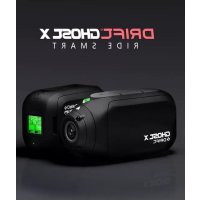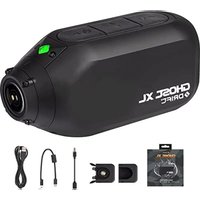
Ghost XL - Camcorder Drift - Free user manual and instructions
Find the device manual for free Ghost XL Drift in PDF.


User questions about Ghost XL Drift
0 question about this device. Answer the ones you know or ask your own.
Ask a new question about this device
Download the instructions for your Camcorder in PDF format for free! Find your manual Ghost XL - Drift and take your electronic device back in hand. On this page are published all the documents necessary for the use of your device. Ghost XL by Drift.
USER MANUAL Ghost XL Drift
Thank you for purchasing the Drift Ghost XL
CUSTOMER SUPPORT
Check our official website for firmware updates, customer support, and info on all our products.
https://driftinnovation.com/
If you have any suggestions, comments or concerns; please contact our customer support team at:
support@driftinnovation.com
WARRANTY
Warranty does not apply if the product is damaged due to physical abuse, mishandling, accident, fire, frostbite, water damage, negligence or failure to follow the supplied operating instructions. For more information on warranty, see:
https://driftinnovation.com/warranty
3-4 PACKAGE CONTENTS | ABOUT YOUR CAMERA
5-6 INITIAL SETUP | GETTING STARTED
7-10 MODE SELECTION & SETTINGS
11 MOUNTING THE CAMERA
12-17 FEATURE OVERVIEW
18-19 ACCESSORY GUIDE
20 Wi-Fi & FIMWARE
21 CONNECTING YOUR CAMERA
22-23 SPECIFICATIONS
24-26 DISCLOSURES
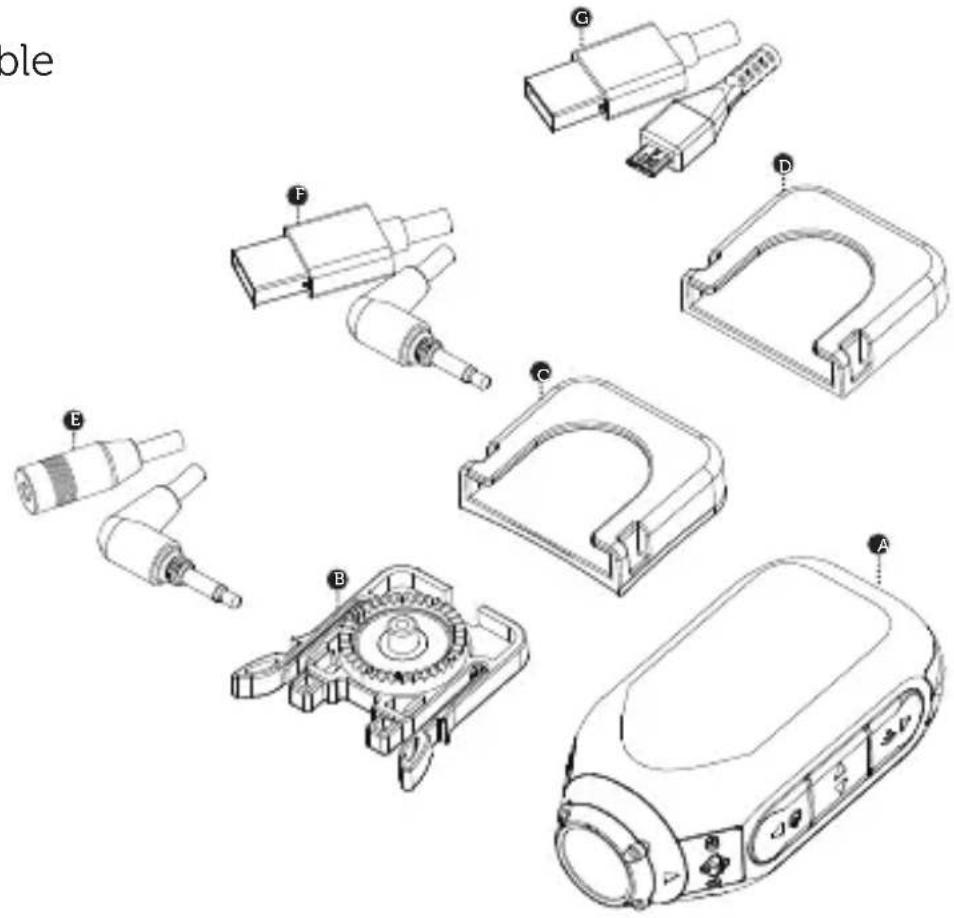
PACKAGE CONTENTS
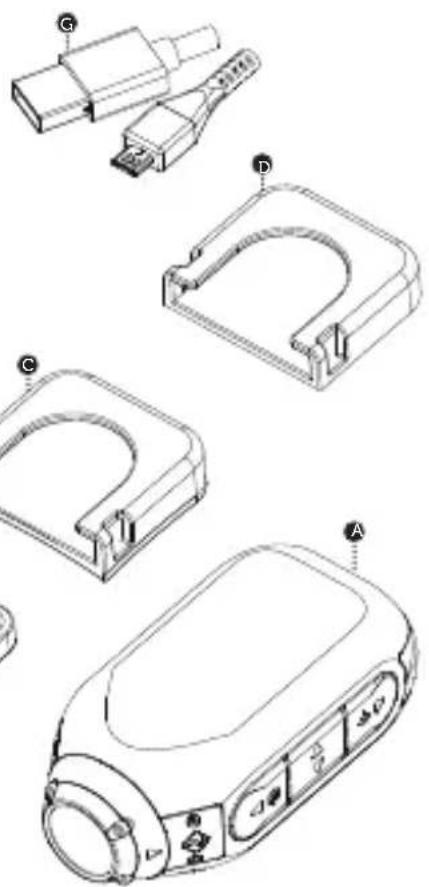
A Ghost XL
Universal Clip
Curved Adhesive Mount
Flat Adhesive Mount
E TRS-Audio Adaptor Cable
F TRS-Power Cable
USB Cable
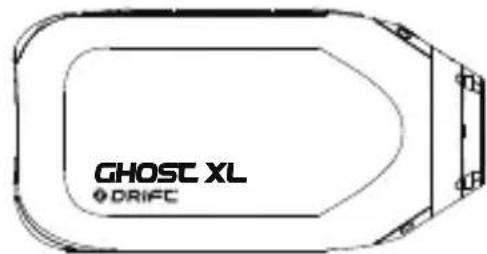
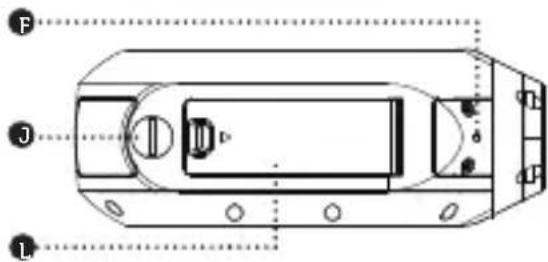
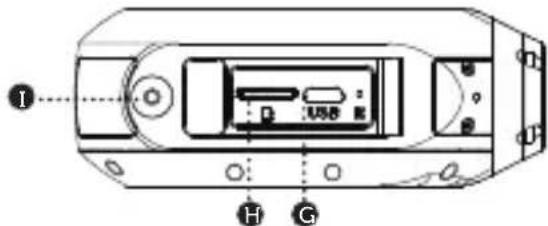
ABOUT YOUR CAMERA
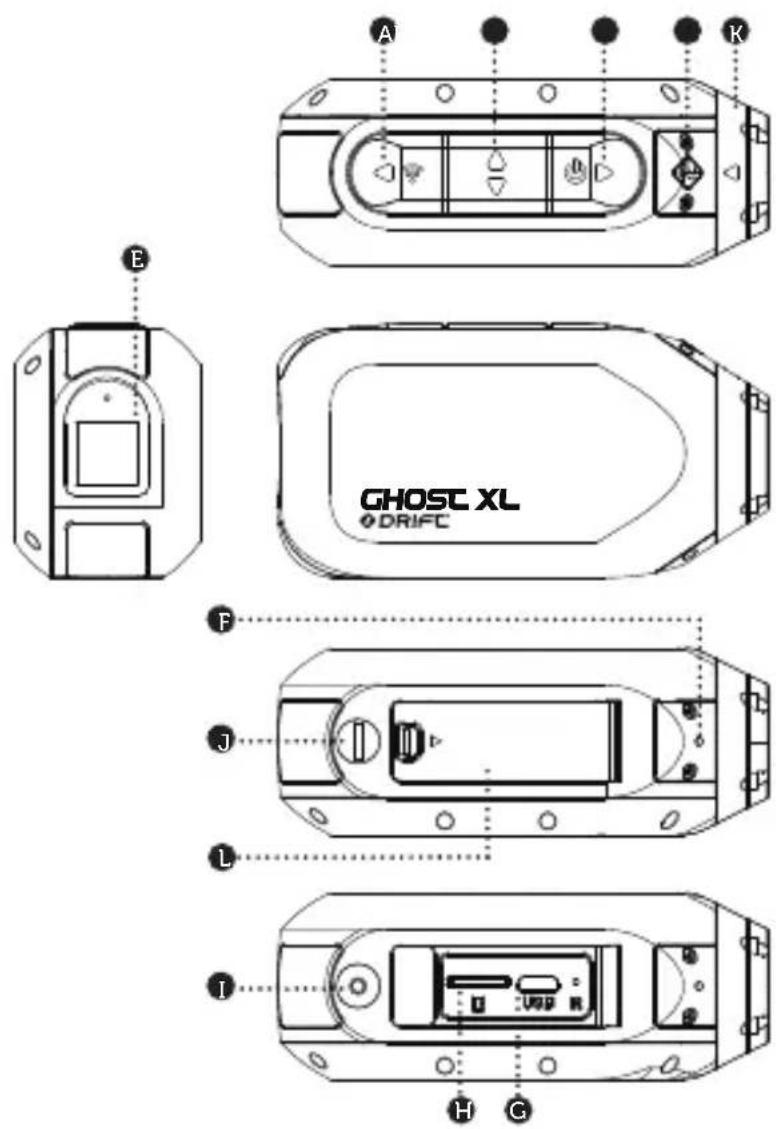
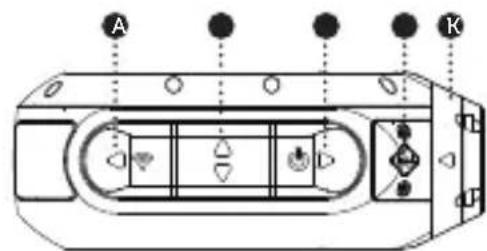
A Rear Button
Middle Button
C Front Button
Status LED
Rear Screen
Microphone
G5 PIN Micro USB Port
Micro SD Card Slot
External Mic/Power Connector
External Mic/Power Cover
K Rotating Lens
Memory Card and USB Door
-
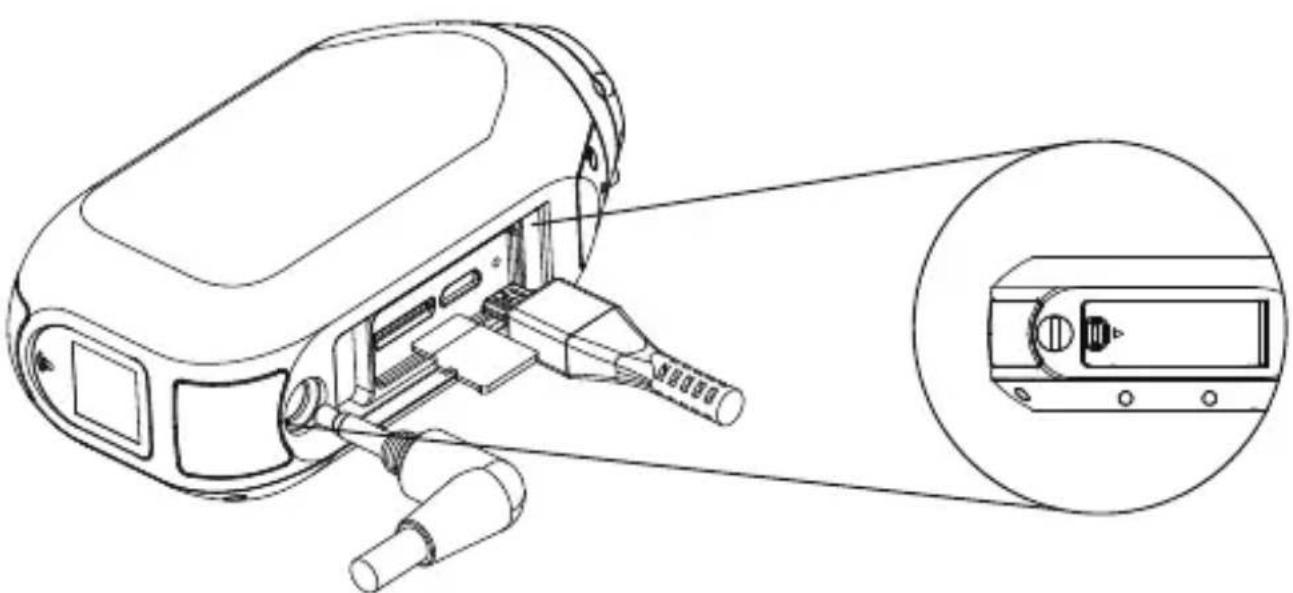
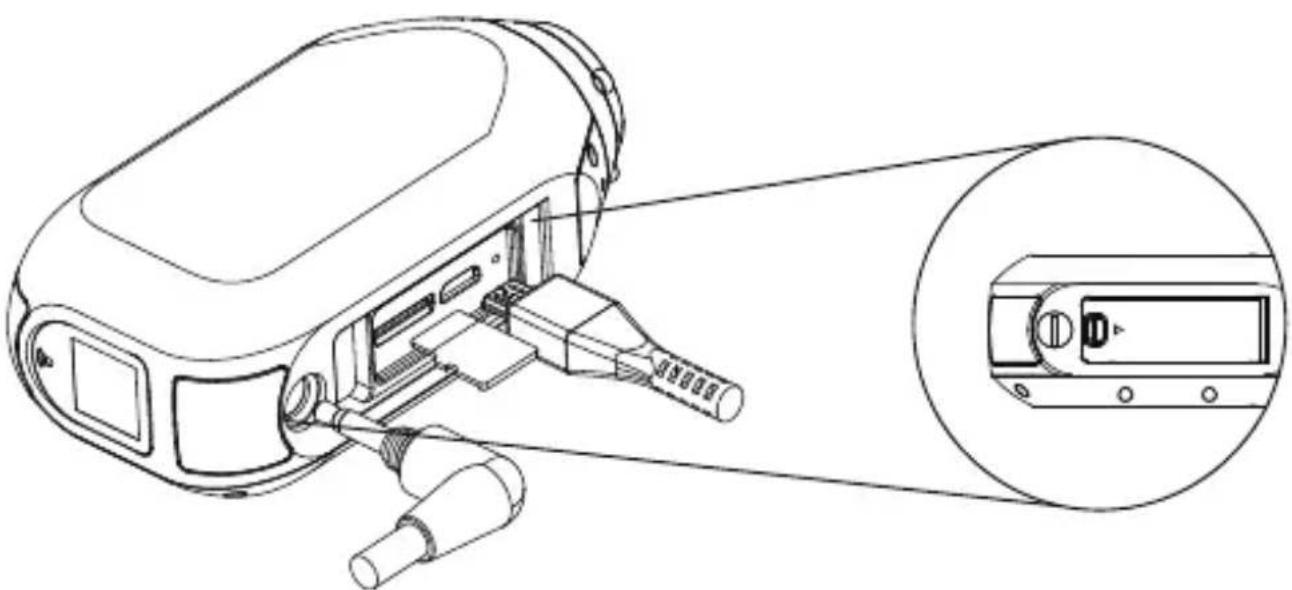
Open the Memory Card and USB door.
-
Insert a Class 10 or higher microSD/HC/XC card (up to 128GB). Format before first usage!
-
Connect the camera via a micro USB cable to a powered USB port, and charge the battery for 5 hours before first use
-
Close the Memory card and USB door, and ensure that the latch is secured. You are ready to go!
POWER ON/OFF
- Press and hold the button to power on.
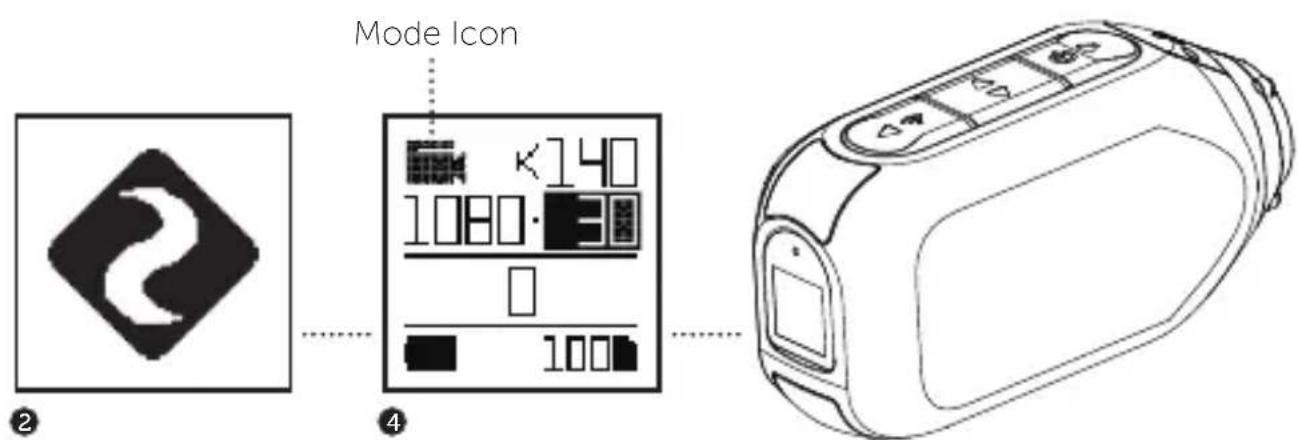
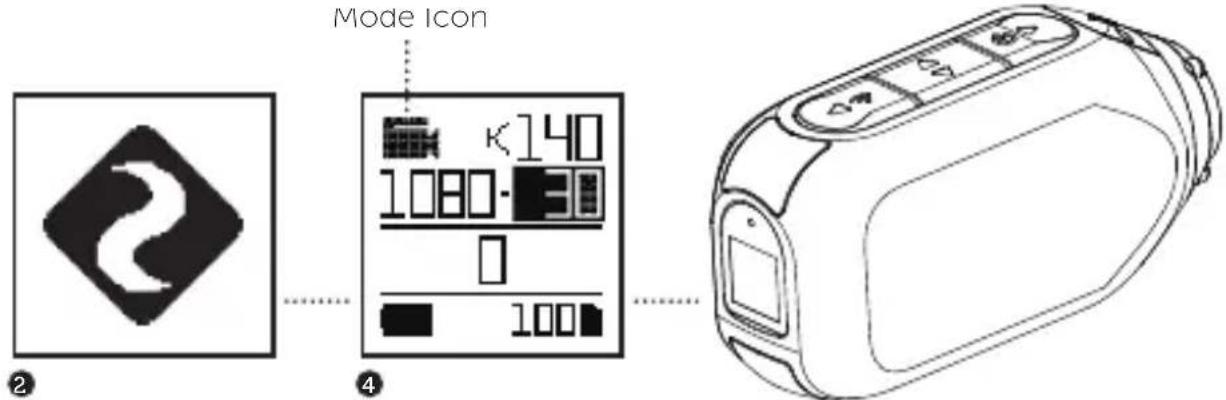
- The Rear Screen will power on, showing the welcome display.
- The camera is now ready to record video or take photos.
- Current camera mode is indicated by the colour of the Status LED and Rear Screen, along with the icon in the top left of the Rear Screen.
- To power off, press and hold the button for 3 seconds.
MODE NAVIGATION
To change the current camera recording mode, press the button; changing between Video, Photo, Timelapse, Photoburst, and General Settings modes.
MODE SETTINGS
To change the settings of the current mode press the button, this will move the highlight block from the mode icon onto each setting in turn.
VIDEO MODE
(Green LED) Press the button to start recording. The Status LED and LCD backlight will flash red to indicate recording. Press the button again to stop recording.
VIDEO SETTINGS
Resolution
Frame Rate
PHOTO MODE
(Yellow LED) The camera will capture still images when the button is pressed, and the status LED and LCD screen will flash red each time a photo is captured.
PHOTO SETTINGS
Resolution
TIMELAPSE MODE
(Purple LED) Press the button to capture a series of still images at a specified rate. The Status LED and LCD screen will flash red each time an image is captured. To stop recording, press the button once more.
TIMELAPSE SETTINGS
Resolution
- Timelapse Interval
PHOTOBURST MODE
(Cyan LED) The camera will capture a burst of still images for an allotted duration and at a specified rate, when the button is pressed. For best results, use a memory card with the highest possible data rate.
PHOTOBURST SETTINGS
Resolution
- Burst Duration
Capture Rate
GENERAL SETTINGS
(Red LED) Press the button to scroll through the available settings, press and hold the button to scroll backwards the Settings. and press cycle through the options of a highlighted setting.
MODE SELECTION & SETTINGS
- Dash Cam ON/OFF
- Dash Cam Interval 10s/30s/1min/2mins/5mins
Event Detection ON/OFF
Video Tagging ON/OFF - Tagging Interval 10s/30s/1min/2mins/5mins/10mins
Wi-Fi ON/OFF
BT ON/OFF
RC Paired/Unpaired
FOV 140/115/90 - Exposure +2/+1/0/-1/-2
Self Timer OFF/3s/5s/10s
Bit Rate High/Mid/Low - Filter Normal/Vivid/Low
ISO Auto/100/200/400/800
Mic Sensitivity 0/1/2/3/4/5 - Speaker Volume OFF/Low/Mid/High
Indicator LED ON/OFF
Vibrate Indication ON/OFF - Default Startup Mode Resume/Video/Photo/Timelapse/Burst
MODE SELECTION & SETTINGS
- Camera Off Never/2mins/5mins/10mins/20mins
- THM Files ON/OFF
Time and Date
- Date Stamp ON/OFF
Instant On ON/OFF
- Clone Mode ON/OFF
- Clone Group 0/1/2/3/4/5
Video-Lapse ON/OFF
Video-Lapse Interval 0.5s/1s/2s/5s/10s/30s
Language EN/DE/FR/IT/ES/CN
- Restore Default
Format SD Card - Serial Number
-
Firmware Version
-
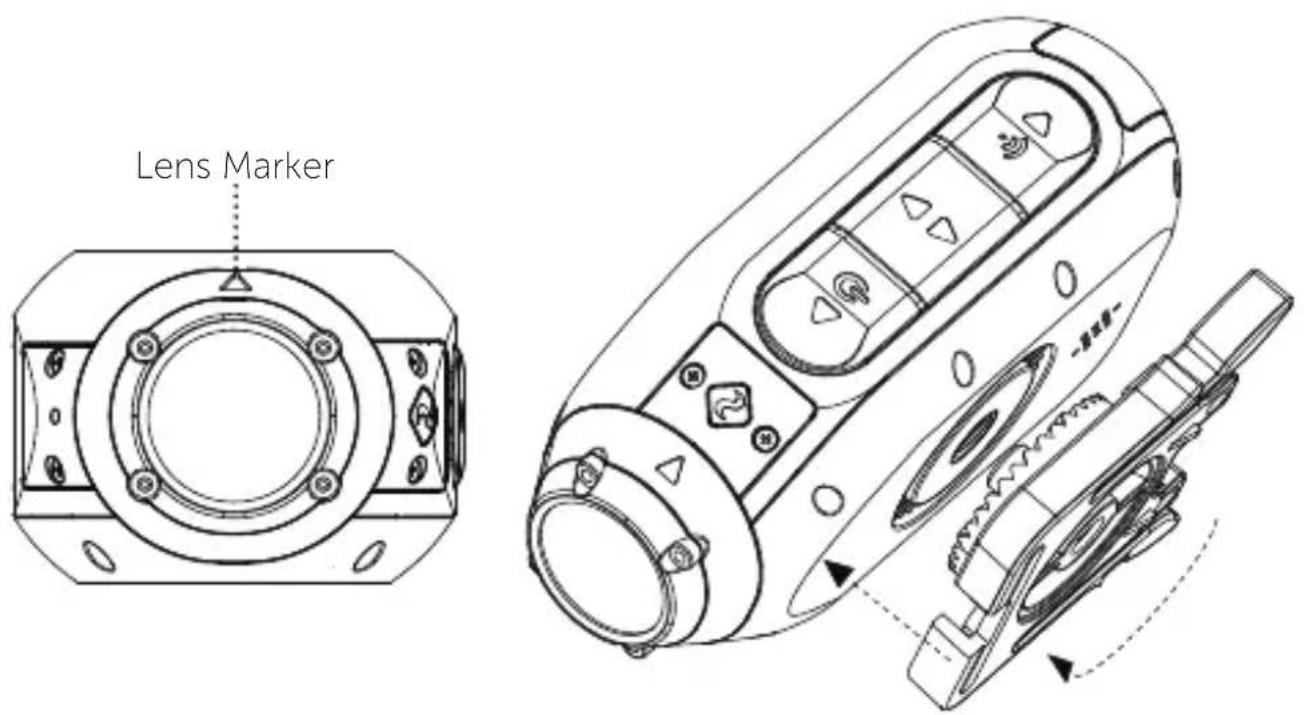
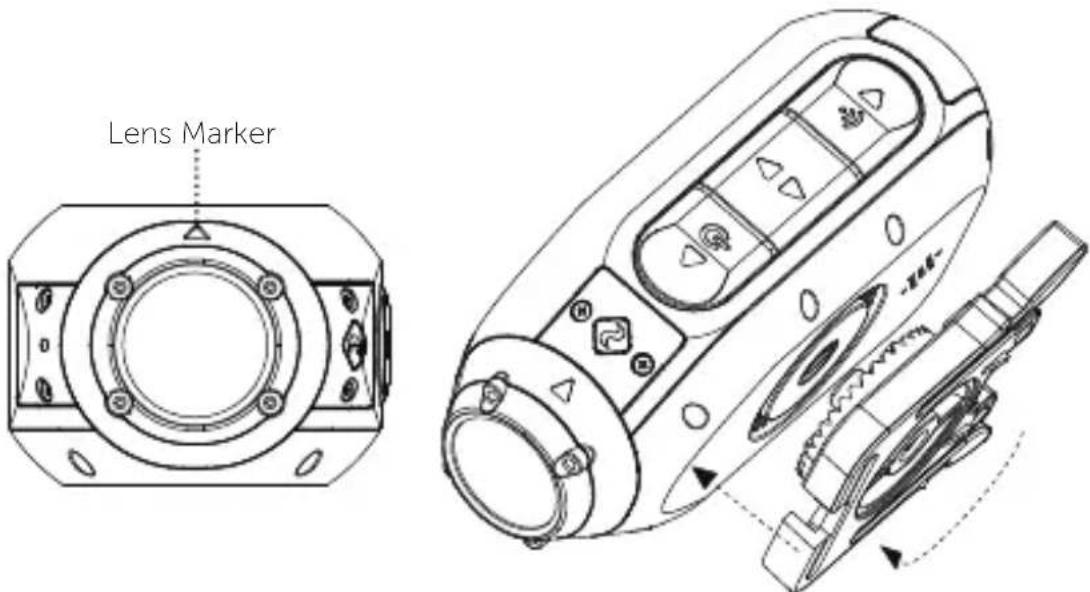
Attach the Universal Clip to the camera in any orientation as needed - first position the clip in the desired orientation, then secure by rotating the screw base by hand.
- Slide the Universal Clip into your chosen mount, ensuring that it 'clicks' into place. *Double check it has been fully inserted by pushing out the clips.
- Align your shot. Rotate the lens by hand until the screen is oriented correctly. Use the lens marker as an 'up' reference.
DASH CAM MODE
How Does Dash Cam Mode Work?
Dash Cam Mode allows your Ghost XL to record in a continuous loop. This means that when the memory card becomes full, the camera will record over the oldest footage. If an incident occurs, the Ghost XL Event Detection feature will protect this footage, to prevent it from being overwritten.
In Dash Cam Mode the Ghost XL will power on automatically when it detects a power supply. Connect the camera to a car or motorcycle power supply, and the camera will turn on and start recording when the ignition is turned on. When the ignition is turned off, the camera will save the footage and then power off instantly.
The interval setting is the duration of the loops that the Ghost XL will record. For example, if you select a 2m interval and record for 20 minutes, you'll find 10 videos saved on your memory card, each two minutes long.
- Press the button to scroll through the modes and navigate to the settings menu.
FEATURE OVERVIEW
- Press the button to scroll through the menu, until your reach the 'Dash Cam' option. Press the button to toggle Dash Cam Mode On/Off.
- Press the button to scroll to the next option in the menu, 'Dash Cam Interval'. Press button to scroll through the available options.
Dash Cam Mode can also be toggled On/Off by pressing and holding the button when camera is in Video mode.
Event Detection can be toggled On/Off in the settings menu if you prefer to protect your videos manually.
WATERPROOF POWER CONNECTION
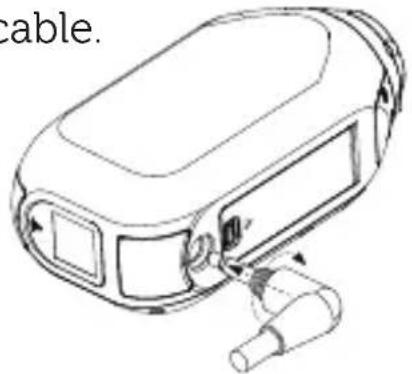
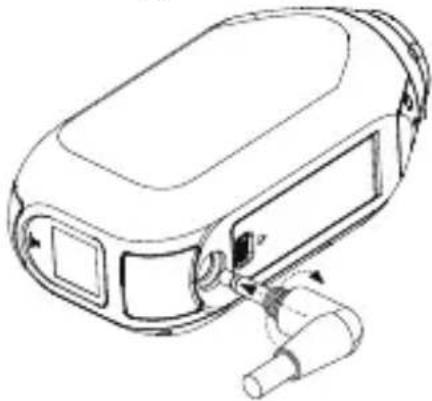
The Ghost XL can be connected to a car or motorcycle power supply for hands-free operation in Dash Cam Mode via the included 3.5mm Power cable.
Video-Lapse Mode
Captures a fast-motion video of your trip, allowing you to share a condensed record of your journey. When enabled, video lapse mode will automatically stitch together a timelapse video and save it to your memory card, with no editing required. Simply turn on Video-Lapse mode in the settings menu, select a Video-Lapse Interval, and navigate to Video mode.
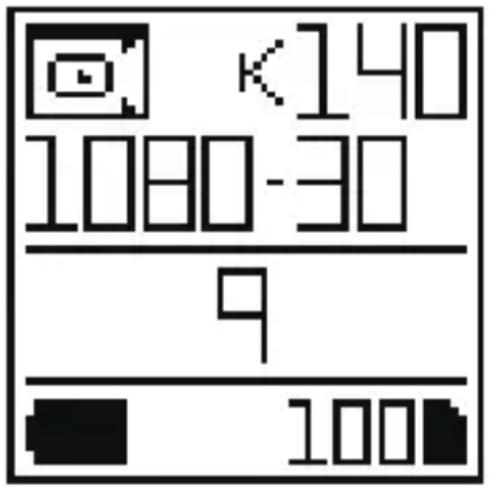
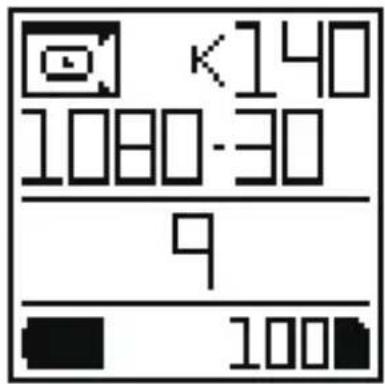
On the video mode screen a Video-lapse icon will indicate that the mode is enabled. Press the button to start recording, and press the button again to stop the Video-Lapse recording.
Note: The Video-Lapse interval indicates how many frames
per second are captured. A longer interval will result in a faster playback speed, and a shorter interval will result in a slower playback speed.
VIDEO TAGGING
Video tagging mode can be enabled in the Ghost XL settings menu. When activated, this feature allows the camera to continuously record video, but only save to the memory card when important footage is "Tagged".
A 'Tagging Interval' can be selected in the settings menu, and this will determine the duration of the videos recorded. For example, if a 30s interval is selected and the user presses the button the last 30s of video will be saved to the memory card. The camera will then continue to record for a further 30s, giving a total video duration of 1 min.
The Video Tagging feature requires a class 10 micro SD card with 4GB of free space to function correctly. Please note that video tagging mode cannot be enabled together with Dash Cam Mode.
CLONE MODE
Link two or more Ghost XL, Ghost X or Ghost 4K cameras into a single network wirelessly controlled by one master camera. To set up clone mode:
- Navigate to the 'Clone Mode' option in the settings menu, and press the button to select.
-Select the 'master' option, and press the + button to select. The master camera is now set up. - On a second camera repeat the above, selecting the 'slave' option.
-Repeat for each additional slave camera. - The master camera can now be used to wirelessly start and stop recordings, change settings and change modes on the entire group of cameras.
INSTANT ON MODE
Enabling Instant On Mode allows the camera to turn on, and immediately start recording with a single press of the button.
BIT RATE
Users can choose to keep the normal compression used by the H.264 codec, or if they prefer, allow a higher flow of data for preserving more of the original recording. This will result in a bigger file size.
FILTER
Quickly tailor your cameras settings to the recording conditions with filters. Choose between Normal / Vivid / Low Light.
BT REMOTE CONTROL (Compatible with Ghost 4K & Ghost XL)
The Drift BT Remote places intuitive control at your fingertips. Easily attached to a wrist or pack, the BT remote Control clearly communicates your camera's current status using Drift's innovative color system. Use it to stop or start recording, Initiate video tagging or easily switch between Video, Photo, Timelapse and Photoburst modes. All with the touch of a finger.

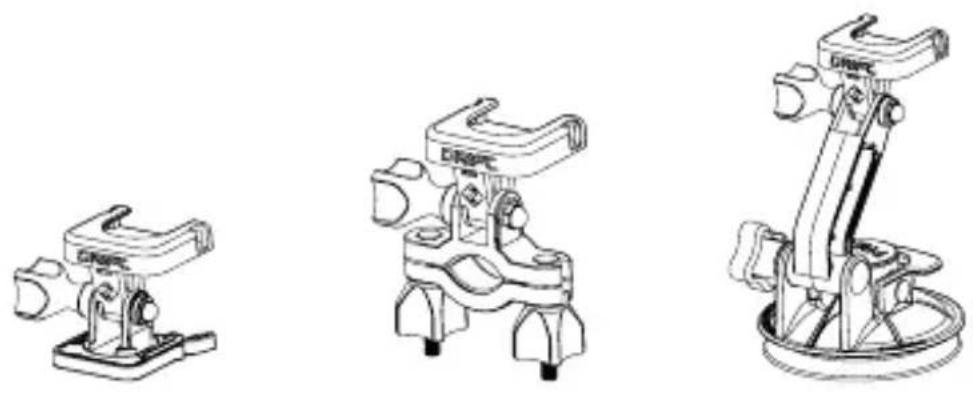
SUCTION CUP MOUNT
The perfect accessory for mounting your Ghost XL to any non-porous flat surface. Ideal for use on car windshields or bodywork, the Suction Cup makes it simple to turn, tilt, and rotate your camera 360^ .
PIVOT MOUNT
Mountable anywhere at nearly any angle, the Drift Pivot Mount is your tool to capture the moment from any point of view you can imagine. Includes flat and curved adhesives, and can be used together with any other Drift mount.
HANDLEBAR MOUNT
The Drift handlebar mount is the perfect accessory for riders, whatever your discipline. Compatible with bars between 19mm and 36mm, and capable of pivoting more than 180 degrees, the handlebar mount opens up almost any angle for your action video.
To turn on your Ghost XL Wi-Fi, simply press and hold the button. The LCD screen will show a Wi-Fi icon when the Wi-Fi is enabled.
Wi-Fi can also be turned on via the cameras settings menu, where you'll also find an option to permanently switch the Wi-Fi network on.
Setup your shot, capture, playback, edit and live stream on your mobile device.


Download the latest firmware from the Drift website and copy the Ghost_XL.bin file into the root of a formatted micro SD card. Insert the micro SD card into the camera and power on. The camera screen will display 'Firmware Updating' as the update is installed. Once complete, the camera will power down.
CONNECTING TO A PC
- Connect the camera using the USB cable (provided); the camera screen will show a USB icon.
- The camera's folder may open automatically; if not, open using My Computer.
- The camera should be recognised as a removable disk; double-click to open.
- Open the DCIM folder to access your files.
CONNECTING TO A MAC
- Connect the camera using the USB cable (provided); the camera screen will show a USB icon.
- The camera's folder may open automatically; if not, open using Finder.
- The camera should be recognised as an external device; double-click to open.
- Open the DCIM folder to access your files.
SPECIFICATIONS
1080P (1920 X 1080 16:9) @ 25, 30FPS, HDR Mode
960P (1280 X 960 4:3) @ 25, 30FPS
720P (1280 X 720 16:9) @ 25, 30, 48, 50, 60FPS
WVGA (848 X 480 16:9) @ 25, 30,50, 60FPS
File Format: .MP4 (H.264 Codec)
Sensor Type: CMOS
Field-of-view (diagonal): 90 / 115 / 140^
Lens Focal Range: 0.5m to infinity
Lens Rotation: 300^
Photo mode: 4 / 8 / 12 megapixels
Exposure: Auto / Step Manual (Advanced users)
LCD Screen: Colour Dot Matrix Backlit LCD
Microphones: Mono Microphone
Wi-Fi:
2.4G
Bluetooth Remote Control: Compatible
Memory Capacity: Micro SD, SDHC, SDXC memory cards up to 128GB
Inputs: Micro USB Port, AUX Jack for external power and Mic
SPECIFICATIONS
Connectivity: USB Plug And Play, Micro USB 5 pin
Compatibility: Windows XP and up / Mac OS 10.2 and up
Power: 3000 mAH internal battery.
Dimensions: 47(W) 92(L)35(D) mm
Weight: 127g
FCC Information
This device complies with Part 15 of the FCC Rules.
Operation is subject to the following two conditions:
(1) this device may not cause harmful interference, and
(2) this device must accept interference received, including interference that may cause undesired operation.
WARNING
Changes or modifications to this unit not expressly approved by the party responsible for compliance could void the user's authority to operate the equipment.
The equipment has been tested and found to comply with the limits for a Class B digital device, pursuant to Part 15 of the FCC Rules. These limits are designed to provide reasonable protection against harmful interference in a residential installation. This equipment generates, uses, and can radiate radio frequency energy and, if not installed and used in accordance with the instructions, may cause harmful interference to radio communications. However, there is no guarantee that interference will not occur in a particular installation. If
this equipment does cause harmful interference to radio or television reception, which can be determined by powering the equipment on and off, the user is encouraged to try to correct the interference by one or more of the following measures: Reorient or relocate the receiving antenna;
Increase the separation between the equipment and the receiver;
Connect the equipment into an outlet on a circuit different from that which the receiver is connected;
Consult the dealer or an experienced radio / TV technician for help.
This device complies with Industry Canada license-exempt RSS standard(s).
Operation is subject to the following two conditions:
(1) this device may not cause interference, and
(2) this device must accept any interference, including interference that may cause undesired operation of the device.
This equipment complies with FCC radiation exposure limits set forth for an uncontrolled environment. This equipment should be installed and operated with minimum distance 20cm between the radiator & your body. This transmitter must not be co-located or operating in conjunction with any other antenna or transmitter.
MOTORCYCLE DISCLAIMER
Interacting with the camera while riding could cause a crash and you or others may be seriously injured or killed.
- Keep your eyes and mind on the road;
- Avoid looking at the camera for too long;
- Stop the vehicle in a safe location before adjusting the camera.

https://driftinnovation.com/
support@driftinnovation.com
Garantie
https://driftinnovation.com/warranty
Sprache EN/GE/FR/IT/ES/CN/RU
WVGA (848 X 480 16:9) @ 25,30,50,60 FPS
1080P (1920 X 1080 16:9) @ 25,30 FPS, HDR Mode
960P (1280 X 960 4:3) @ 25,30 FPS
720P (1280 X 720 16:9) @ 25,30,48,50,60 FPS
WVGA (848 X 480 16:9) @ 25,30,50,60 FPS
https://driftinnovation.com/
EcJyBaCecTbKaKHe-JIN6OIIpeJIOJKeHnY, KOMMeHTapHH, POJaJyIcTa, CBJXHTecb CHaIeN cJyK6oN IOJIepKKN:
support@driftinnovation.com
YcIOBra rapaHTHHO ro pemOHTa
IOnoJIHHTeJIbHbIe CBeJeHnO rapaHTnCm.
https://driftinnovation.com/warranty
OrIaBJIeHHe
CoepKHMoe yIaKOBKN | O BaIIeBnDeOKaMepe
HaayaJIbHna HaCTpoNka | BBOJnBn Kypc
Bb6oppeKnMa nHaCTpOka
MOHTaK BnIeOKaMepbI
3 CoIepKHMoe yIaKOBKN
4-5 O BaIeB BnDeokamepe | HauJIbHaJ HaCTpoIka
6 KpaTKoe pyKOBOCTBO
7-10 BbI6oppeKHaMaHacTpoKa
11 MoHTaK BnIeOKaMEpbI
12-17 O63op yHKnH
18-19ДоПОЛНИТeЛьнIBLEakceccyuapbI
20-21 O6HOBJeHne Wi-Fi n IpoIIINBKN | IopKJIIOueHne BaIIeB BnIeOKaMEpbI
22-23 CnueHnKaunn H3JeJnna
Copejkmoe ypanokBkn
A BnIeokamepa Ghost XL
B YHHBepcaJIbHaJ KJIHIIca
HaKJIeIka Ha cfepeNueckyo NOBepxHocTb
HaKJIeIka Ha IIIOCKyIO IOBepXHOCTb
E CoeHHHTeJIbHbI ayIOKa6eJIb
Ka6eJIb IJIa 3apJIKN
USB-ka6eJIb IJIa IIpeIaHn IaHHbIX
Оваший видаекамеpe
A 3aHnKa KHOIIKa (HaCtpoNka H 3aIyckWi-Fi)
B CpeHnKa KHOIIka (BbIOp BBepx H BHN3)
C IepeHnKa KHOIIka (BKJIIOUcHHe HJIN BNDco)
CBeTOBbIe HnHKaTOpbI COCTOHHN
E KndkokpncTaJIInueckn 3KpaH
F MnkpofoH
G Iopr USB
H Cnot nja kapr microSD
BHeHHMnKpOoH/BHeHHN BXoHOn IOpT IHTaHH
JBoHHeHpoHHaemarKpbIIka
K Bpaiaioaiaocra oBeKTNB
LДверпа отсекa USB
HaujaJIbHaJaHacTpoIka
1.OTKpoIte KpbIIkky otceKa USB
2.BcTaBbTe KapTy MICROSD/HC/XC Class 10 nJIN 6oJIee BbICOKOуpoBn(MaKcHMaJIbHaIIOJIepJka 128 GB)HOTΦopMaTnpuYte ee HaBnIeOKaMepe,IIpeJTe Yem HcIIIOJIb3OBaTb ee B IIepBbI pa3.
3.ПОДКЛЮЧИТЕ ВИДЕOKамеру Зарядому устюстВу черп USB-кабьи Заряжайт e He MeHee 5 YacOB пи певOM ИСПОЛБ3OBaHHN.
4.3aKpoIe KpbIIky OTeKa USB n y6eIITecb, YTO OH IJIOTHO 3aKpbIT, TeIepb Bbl MoKeTe NcIOJIb3OBaTb BnDeOKaMepy.
KpaTkoe pyKOBODCTBO
BkIIOueHHe N BbIKIOueHne BnIeOKaMepbl
1.IpnIJIHTeJIbHOM HaJkaTHN KHOIIKN TeUHe 2 ceKyHn IpoIN3OJTeBKKIOUeHne BNDeOKaMepbl.
2.BKJIIOHTcJ KNDKOKPncTaJIINueckn 3KpaH Ha IHCIIIEe IOABNTcH3O6paXKeHHe.
3.BnIeOKaMePoJ MoKHO 3aIIHcBbA Tb BnIeO H fOTOrpaHnpoBaTb.
4. Pekim KaempebI OTo6paKaTcra CBETOM CBeTOHOHOTo HNDkaTopa HIN 3KpaHa, OINHOpeMeHNO Bbl TaKKe MoKTe ONpeJIHTb COCTOHNHe IIO NIEHTNΦHKATOpY B BepXHeM JIeBOM yIy 3KpaHa MaTpNUHOrO 3KpaHa.
1.Пи ДИТЕЛБHOM HaЖаTи KHOДКИ TeчЕнe 3 ceKунДпОнЗОДТ BыКЛЮЧЕНe BИДЕOKaМерьI.
IpeekJIIOueHHe peXHMOB
UTo6bI H3MeHHTb TeKyuIIH peJHM KaMepbI, HaJMMTe KHOIIKy TO6bI IpeKJIIOuATbcra MeJy BnJeO, FOTO, Cepna fOToIrpaΦn, BbICtpoN cBeMKoH peJHMOM HAcTpoiKN.
BbI6op peJkMa n HacTpoiKa
PexHM yctaHOBKN
TTO6bI H3MeHHTb HaCTpOJKN JJIa TeKyuIeRo peJIMa,HaJMMTe KHOIIKy TOrJa KypCop 6yJeT IBnRaTbCBy BHN3, TTO6bIBbIeJIHTb COOTBeTCTBYIOIIN IYHKT MeHIO.
Pexnmbn
HaKMnte KHOIIky 3eJIeHbI CBeToIIOI), YTO6bI Haayatb 3aIINcB. INdIKaTOp COCTOHNr CBeToIIOHa, a TaKKe IaAMIOUka IIOcBETKN 3KpaHa 6yDyT MInrABy KpaCHbIM ICBETOM, yKa3bIBaHa 3aIINcB. HaKMnte KHOIIKy OHe pa3, YTO6bI OCTaHOBHTb 3aIINcB.
HactpoKn Bndeo
Pa3peIeHne
UacToTa KaIPOB
PeknM oTo
IIpnHaKaTnKHOIIKn (JKeJIbIcBeToIDNoI),BHeOkaMepa DeJaetΦOTOrpaΦHn,N KaJbI pa3,PpNΦOTOrpaΦHnpOBaHH, CBeToIOHbI HnIKatop COCTOaHHa,aTaKKe JAmIOuKa IODCBETKN MaTPNuHOrO 3KpaHa 6yDyT MnRaTb KpacHBIM ZBeTom OINHpa3.
HactpoynKn foTo
Pa3peHHeHne
CepnaΦotorpaΦn
HaKmnte Ha KhoIky (HnoJIeTOBbIcBeToIHO), YTO6bICJeIaTb cepHIO CHHMKOB C yCTaHOBJIeHHoN cKOpocTH. Iprn CbeMKe, CBETOJHOHBI INHINKaTOP
Bb6op peKIma n HacTpoiKa
COCTOHN, a TaKKe JAmIOUKa IIOcBETKN 3KpaHa 6yIyT MnraTb KpaCHbIM 7BeTom. HaKMnte KHOIIKy 0e pa3, YTO6bIOCTaHOBHTb KaMepy.
HactpoKa peKHa m cepHH
pOToIpaHn
Pa3peHHe
CkOpocTb cBeMKn
PexnM cKopocTHoN cbemKn
IIpnHaKaTHN KHOHN (roJy6oBcBeToDnO),ΦOTOKaMepa B COOTBeTCTBHH C HAcTpoKoB cKOpocTHoHΦOTOCbEmKn 6yJeT DeIaTB Ha6opΦOTOrpaΦH. JJIa TOrO,HTo6bI IOCTNuH HAnJIyUHINX
pe3yIbTaTOB,IOxKaIyIcTa, HcnoJIb3yIte microSD KapTbI Class 10 HIN BbIe.
HactpoKapeKMaCKOpocTHOcBemKn
Pa3peHHe BpeMa cbeMKn CkopoocTb cbeMKn
O6HHe HacTpoKn
HaKMnte KJIaBNIy KpaCHbI
CBeToIOHOJ) IJIpyKpyTKN BceX
IyHKTOB MeHIO. IprIJIHTeJIbHOM
HaKaTHN KHOIIKN MoJHO
IPOkpyTHTb KHOIIKY IyHKtBi
MeHIO B O6paTHOM HaIIpaBJIeHHN,
HaKMnte KJIaBNIy IJIy UCTaHOBKn.
Bb6op pejknma n hactroka
PeKHM aBTOMo6HJIbHO BnIeopeHcTpaTopa BKJI/BBIKJI
ABTOMO6HbHbI BnJeOpErHcTaTOP HHTepBaJI 3aINCH
10cekyH/30ceK/1MHH/2MHH/5 MHN
TpHrepco6bITnBKJI/BBIKJI
PexnMa3MeTKN BHeo BKJI/BBIKJI
HHTepBaJI pa3MeTKn BnIeO 10 cek/30 cek/1 MHH/2 MHH/5 MHN
Wi-Fi BKJI/BbIKJI
Bluetooth BKJI/BBIKJI
CopjKeHne npb/He copjKeHo
YroI o63opa 140/115/90
BbIepeKka +2/+1/0/-1/-2
CnHxpoHn3aunCeJbIKJI/3 cek./5 cek./10 cek.
6HTpeIT BnIeO BbICOKH/cpeHN/HN3KN
CBeToΦHJIbTp HOpMaJIbHbI/ЯPkN/Hn3Kn CBET
ISO AByToMaTnuecka/100/200/400/800
UyBCTBHTeJIbHOCTb MHKpofoHa /1/2/3/4/5
TpynnnpOBka KJIOHOB 0/1/2/3/4/5
IIHKJIInueCKoe BnIeO BKJI/BbIKJI
HHTepBaJI IINKJIInuecKOro BnIeO 0.5ceK/1ceK./2ceK./5ceK./
10 cek. /30 cek.
J3bIK EN/GE/FR/IT/ES/CN/RU
C6poc HacTpoeK BKJI/BBIKJI
ΦopMaTHIpOBaHHe KapTbI NaMRTN BKJI/BBIKJI
CepHHbH Homep
Bercna npoiNBKN
Mонтуж Видаеокамеры
1.ПоДсоeДнHITe yHnBepcaJIbHbI 3aJHM K φOTOKaMepe B JIO6OM 360-rgaIychOM HaIIpaBJIeHHN, KaK Bam 3TO HUJHO, BO-ⅡepBbIX, yHnBepcaJIbHbI 3aJHM 3aKpeIHTe B COOTBeTCTByIOIeM HaIIpaBJIeHHN, a 3aTeM pyKoI NOBepHITe raIky, YTO6bl 3aKpeIHTb erO.
2.CBnHbTe yHBepcaJIbHbI 3aKHM B KPOHIteH IO BaIIeMy BbIbOpy, YTO6bI y6eIHTbcra, YTO OH HKcHpyetcHa MecTe, * CDBHHbTe yHBepcaJIbHbI 3aKHM IO MeCTa, Bbl OJIJXHbI ycJIbIIIaTb 3BYK «IeJIYka» IIpr BpaIeHnn
3.ObBeKTHBa c NOMOIIbIO peRyIINPOBKn yrJa cbeMKn. IcNoJIb3yIte MeTKy B BVHe TpeYrOJIbHNKa Ha ObBeKTHBe B KaueCTBe CcblKN, YTO6bI y6eINTbcra, YTO MetKa paCIOJIOKeHa IIepHdIKyJIaPHO K 3eMJIe, TaKHM o6pa3OM, ObecIeHTcra TOpN3OHTaJIbHOe IOJOKeHne BaIIeTeo BNdeO.
PexnmbneopernctpaTopa
Kak pa6oTaET peXnM BnDeOpErHcTpaTopa?
KaK ToJIbKO peJHM BnIeOpErHcTpaTopa aKTHBnPoBaH, BaIIa KaMepa Ghost XL BOJET B peJHM IIHKJIInueCKo 3aIINcH, 3TO O3HaayeT, YTO, KOrIa KapTa IaMaTH 3aIIOJIHeHa, fOToKamepa IpoIoJIJKHT 3aIINcBIBaTB H 6yJeT Ipe3aIINcBIBaTB caMOe paHHee BnIeO. KorJa JKe IpnCxOJNT «aBapN», TO ΦyHKIIINr TpIgRepa CObITnR 6yJeT IpeIbAPnTeJbHO 3aIyIeHa, y BnIeO IO N IocJIe aBapHH 6yJeT 3aMeHeHO HM N OHO 6yJeT IIOI 3aIINTOH, YTO6bI N36eKATb Ipe3aINcH HOBIMN aJAmH.
При ИспIOЛьЗOBaHHи ржима BИДeОргнСТраТopa, ВИДeOKamepa, КАК ПразВИЮ, ПОДКЛIOчЕHA K CSCTeme ПИТAHЯ MOTOИКЛЯ ИЛN aBTOMOБИЯ ЧереЗ BHEIIHIOU JINHHIO ПИТAHЯ. Когla MOTOИКЛ ИЛN aBTOMO6ИЛь 3aBOIHTcY, TO BИДeOKaMepa aBTOMaTHueCKN 3aIpyCKaETcY I NaHInHaETcY IHKJI cIbEMKN. ПocJIe TOrO KaK MOTOИKЛ ИЛN aBTOMO6ИЛь 3aIJIyIIaETcY, OTKЛIOuHaTeCЯ ПИТaHNe, И BИДeOKaMepa aBTOMaTHueCKN 3aKpbIBaEt IocJIeIHnФaJI,ΚΑΚ TOfIbKO OH 6byTe coXpaHeH.
XL BpeKHe MBHeOpErcTaOpa CHHMaet B CeFMeHTax C 3aJaHHbIMN HHTepBaJIaMn, H ecJIN Bbl BBi BbIbHpaeTe 2-MNHyTHbI HHTepBaJI C 3aIHcBIO B TeueHne 20 MnHyT, TOrIa Bbl 6ByTe IOnLyuATb 10 BnDeo, KaJIOe BnDeO B IIINTeJIbHOCTbIO 2 MNHyTbI.
-HaKMnTe KHOJky To6bI nepeKJIIOHTb peKmN IpeeINTE B MeHIO HAcTPOJKN.
-HaKMnTe KHOIIKy TO6bI IpOkpyTHTb MeHIO, NOKa KypcOp He 6yJeTpacIOJIOKeH BOIIINN «BnDeopeRHeCTpaTOP». HaKMnTe KHOIIKy
O630p Функцин
IpeKJIIOUeHnOtKpbITnI 3aKpbITnI yHKuHH.
-KHONKY ⅡIЯ IIpOKpyTKB MeHIO OIIuN «HHTepBaJI BnDEopeRnCTpaTopa».HaKMITE KHOINKy TTo6bIBbOpaTbДJIHy HHTepBaJa.
BbI TaKKe MoKTe 6bIcTpo 3aIycTHTb HJIH BbIKJIOUHTb peKHM BnIeOpEITcTpaTopa BpeKHe M BnIeO IJIITeJIbHbIM HaKaTHEm KHOIIKN
B o6IHX hacTpoiKaX MOJHO BKJIIOHTb HJN BbIKJIIOHTb MeHIO «TpHrRepa co6bITn», uTO6bl 3aIHTb BNJeO OT cJIyauHOrO CTnpaHn Iprn BO3HNKHOBeHHn aBapHn.
BdoHepoHuaemoe BHeHHee IOKJIoueHne HHTaHn
EcII BbI IcIIb3YeTe peXHM BnIeOpErHcTpaTopa H He XOTHe 6ecIOKoHTbcra O pa3pIke 6aTapeH, TOrIa Bbl MoJKeTe IcIOJIb3OBaTb IIprJIaRaEmbI 3,5 MM BHeIIHHN 3apIaHbI Ka6eJIb IIHTaHnI JJIa IOdkJIIOUeHnI φOTOKaMepbI K HCTOuHHKy IITaHnI MOTOIIKJIa IJIH aBTOMo6HJI. Ghost XL taKxe MoJKe 6bITb BOIoHepoHnIaEMbIM IIprI IOdkJIIOUeHnI BHeIIHero IIHypa IIITaHnI
Bnpeopexm Video-Lapse
CHHMaET cKaToe BnIeO O BaIIeN IIOe3IKe, IIO3BOJIaY BaM CO3IaTb KOHcHTpnpOBaHHoe BnIeO O BaIeM NytTeIeCTBHN. Ppr 3aIpycKe 3TOrO peKIma KaMepa aBTOMaTHueCKN CO3JaCT TaIMJIaIc BnIeO H COxpaHNT erO Ha BaIy KapTy IaMAY, IIOcJIeDyIOIIaY o6pa6OTka He Tpe6Byetc. IPoCtO BKJIIOHTe peKIm Video-Lapse B NaCTPOJkax MeHIO, BbI6epHte HjXhBn HHTepBaJI n cJIeDyIte B peKIm BnIeO.
Ha 3KpaHe peXHMa BnIeO nKOhKa peXHMa Video-Lapse IOKaKeT, YTO BKJIIOueH DaHHbI peXHM. HaXMITE KHOIIKy HauJa 3aIINcN H NaXMITE KHOIIKy OCTaHOBKn 3aIINcN BnIeO B peXHMe VideoLapse.
PexnMa3MeTKN (TeHnpOBaHH) BHeo
3Ta yHKIIHnIOJIb3YeTcIJIa CbeMKn OTpe3Ka TOrO CO6bITHa, KOTOpoe
O630pФyHKnI
yke npOn30IJIIO.
IocJIe 3aIyCsKa 3ToI cyHKiIN BnIeOKaMepa IpoIOJIxHr BnIeO3aIIHcB, HO He 6yIeT coXpaHrB BnIeO Ha KaPTy IIaMRTN, H TOJIbKO BaJHbIe KaIpbl 6yIyT IOMeUeHbI, IpeKJe Yem OHN 6yIyT coXpaHeHbI. B 3TOM peKIme, ecJIN IOJIb3OBaTeJIb BbIbHaet 30-ceKuHbI INHTepBaJI BpeMeHH N KOrJa HaxHMae T KHOIIKy ToIgA Ghost XL 6yIeT 3aIIncbIBaTB IpeIbIyIIHe 30 cek n IocJIeYIOUIee 30 cek BnIeO, co3JaB, B nTORe 1 MmHyTu BnIeO3aIIHcN..
Функця pa3MeTKI BnIeO Tpe6yeT KapTy Micro SD 10-ro ypoBnI 4GB cbo6oJHOrIo pocTpaHcTBa Ha Hei IJIЯ IIpaBnIbHoJ pa6OTbI.
: yHKnna pa3MeTKn BnJeO n yHKnna BnJeOpErHcTpaTopa He MOrTy pa6oTaB B TO JKe BpeM, ecJIn 3aIyckaeTcR OJHa yHKnna, To npYra8 ByTeA BVTOMaTHueCKN OTKJIIOUeHa.
PexnM KIOHnpoBaHHa
BbIMoKeTe coeHHTb IBe HJIH 6OJIee KaMep Ghost XL, Ghost X IIIN Ghost 4K B OAnHy ceTb, KOtOpOI MoJHO yIpaBJIaTb 6e3 IIpoBOIOB OJHO mAcTeP KaMepOI. IJIa YcTaHOBKN peJHMa:
-ПерейдenteВ«peжимКJOHнрOBaHHЯ»ВHaCTpoIKaX,a3aTeM HaЖмITE KHOIIkyTO6bI eRO BbI6paTb.
-By6epHTe HacTpoIky «Master», a 3aTeM HaKMITE KHOIIKy, HTo6bI
1080P (1920 X 1080 16:9) @ 25, 30FPS, HDR Mode
960P (1280 X 960 4:3) @ 25, 30FPS
720P (1280 X 720 16:9) @ 25, 30, 48, 50, 60FPS
WVGA (848 X 480 16:9) @ 25, 30, 50, 60FPS
ΦopMaT Φaɪla: MP4 (H.264 Codec)
Cencop: CMOS
Wi-Fi: BCtpoeHHbI, 2.4G
: BCTpoeHHbI, COBMeCTHMOCTb C IyJIbTOM INCTaHIIOHOHOrO yIpaBJeHnA
DriftGhost 4K
Kapta pamr: Micro SD, SDHC, SDXC, maKcHMaJIbHaI IOJIepKka
128 GB (He BXOJIT B KOMIIJEKT IOCTaBKN)
BxoI: USB-nOpT, MHOroΦyHKIIHOHaJIbHbI 3,5 MM ayINo BXOJ
CoBMeCTHMOcTb:WindowsXPnIN BbIIe/Mac OS 10,2 ININ BbIIe
Emkoctb aKKymyJrTopa: 3000 mAч
Pa3mep: IIINpHa 47 MM, JInHa 92 MM, BbICota 35 MM
Bec: 127 rpaMM

https://driftinnovation.com/
support@driftinnovation.com
Clauses de garantie
Intervalle de marquage video 0s/30s/1min/2mins/5mins
Wi-Fi activé/désactivé
Bluetooth activé/désactivé
Specifications deamera
WVGA (848 X 480 16:9) @ 25, 30, 50, 60FPS
Formedesfichiers .MP4(H.264Codec)
Capeur: CMOS
Angle de champ de vision(diagonale): 90 / 115 / 140°
support@driftinnovation.com
https://driftinnovation.com/warranty
CONTENIDO
1080P (1920 X 1080 16:9) @ 25, 30FPS, HDR Mode
960P (1280 X 960 4:3) @ 25, 30FPS
720P (1280 X 720 16:9) @ 25, 30, 48, 50, 60FPS
WVGA (848 X 480 16:9) @ 25, 30,50, 60FPS
1080P (1920 X 1080 16:9) @ 25, 30FPS, Modo HDR
960P (1280 X 960 4:3) @ 25, 30FPS
720P (1280 X 720 16:9) @ 25, 30, 48, 50, 60FPS
WVGA (848 X 480 16:9) @ 25, 30,50, 60FPS
https://driftinnovation.com/
support@driftinnovation.com
https://driftinnovation.com/warranty
Autoscatto in fase OFF/3s/5s/10s
Bit video Alto/Medic
Filtro Normale/Luminoso/Oscuro
ISO Auto/ 100/200
Documento THM ON/OFF
Intervallo video lasso temporale 0,5s/1s/2s/5s/10s/30s
Lingua
EN/GE/FR/IT/ES/CN
Reset
ON/OFF
Formatta_sched memoria ON/OFF
N.serie
Versionefirmware
WVGA (848 X 480 16:9) @ 25, 30, 50, 60FPS
Formato documento .MP4 (H.264 Codec)
Sensore: CMOS
https://driftinnovation.com/
support@driftinnovation.com
保修条款
有关保修的更多信息,请参阅:
https://driftinnovation.com/warranty
目录
Download on the App Store

ANDROID APP ON Google play
固件升级
1080P (1920 X 1080 16:9) @ 25, 30FPS, HDR Mode
960P (1280 X 960 4:3) @ 25, 30FPS
720P (1280 X 720 16:9) @ 25, 30, 48, 50, 60FPS
WVGA (848 X 480 16:9) @ 25, 30,50, 60FPS