
Smart Projector L1 - Projector Xiaomi - Free user manual and instructions
Find the device manual for free Smart Projector L1 Xiaomi in PDF.


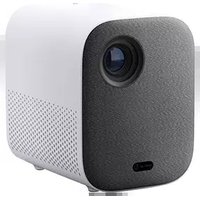
| Product Type | Smart LED Projector |
| Brand | Xiaomi |
| Model | Smart Projector L1 (XMTYY03FMG) |
| Dimensions (L × W × H) | 118 × 142 × 176 mm |
| Net Weight | 1.2 kg |
| Power Supply | External power adapter 19.0 V / 3.79 A |
| Power Consumption | Rated ≤ 72.0 W, standby < 0.50 W |
| Display Technology | LCD |
| Standard Resolution | 1920 × 1080 P |
| Projection Ratio | 1.2:1 |
| Screen Size | 40 to 120 inches (recommended: 60-100 inches) |
| Focus | Automatic and manual |
| Keystone Correction | Automatic and manual |
| Smart Functions | Google Assistant, obstacle avoidance, screen alignment |
| Operating System | Android TV |
| Storage | 2 GB DDR3 RAM, 16 GB eMMC |
| Wireless Connectivity | Wi-Fi 2.4/5 GHz, Bluetooth 5.0 |
| Speakers | 2 × 3 W wideband, Dolby Audio |
| Noise Level | ≤ 30 dB(A) (theater mode at 25 °C) |
| Operating Temperature | 0 °C to 40 °C, humidity 20-80% RH |
| Safety | Do not disassemble, avoid direct eye contact, ensure adequate ventilation |
| Maintenance | Clean with a soft dry cloth, do not use liquids |
| Repairability | Non-disassemblable device, repair by qualified technician only |
Frequently Asked Questions - Smart Projector L1 Xiaomi
User questions about Smart Projector L1 Xiaomi
0 question about this device. Answer the ones you know or ask your own.
Ask a new question about this device
Download the instructions for your Projector in PDF format for free! Find your manual Smart Projector L1 - Xiaomi and take your electronic device back in hand. On this page are published all the documents necessary for the use of your device. Smart Projector L1 by Xiaomi.
USER MANUAL Smart Projector L1 Xiaomi
Read this manual carefully before use, and retain it for future reference.
Safety Instructions
Before using the product, make sure to carefully read the following safety instructions.

This warning symbol informs the user that this product contains non-insulated voltage sources that can cause an electric shock. Coming into contact with any internal component may result in an electric shock.

This symbol informs the user about important handling and maintenance related information. Please read this information carefully to ensure proper use.

This symbol informs the user to be aware of high temperatures.

This symbol informs the user to avoid touching this part.

Transportation Instructions: It is recommended to transport this projector in its original or similar packaging.

Preventing Electric Shocks and Fire Hazards:
- Only use the provided genuine power adapter.
- Unplug the projector from the electrical outlet during thunderstorms or when it is not being used for a long time, so as to avoid damage caused by a power surge or lightning strike.
- Do not place any flammable objects near this projector so as to avoid fire.
- Do not block any of the vents as this may cause heat build-up inside the projector, and possibly result in a fire.
- Do not block the lens when the projector is turned on. Any object placed close to the lens may get very hot and/or deformed, and may even cause a fire.

Safety Precautions:
- Do not place this projector on an unstable platform, stand, or table so as to prevent it from falling and causing serious damage or personal injury.
- Do not look directly into the lens when the projector is turned on to avoid eye damage.
- Do not attempt to disassemble this projector as it may contain dangerous high voltage components. This projector must only be maintained and repaired by a qualified or authorized technician. Do not expose this projector to rain or moisture (operating humidity is 20%-80%).
- Do not immerse this projector in, nor expose it to water or other liquids. Immediately unplug the projector if any liquid or object got into its housing, and have it checked by a qualified technician before using it again.
- Do not place this projector in any of the following environments: In poorly ventilated or narrow spaces. Near devices that produce a strong magnetic field. In direct sunlight. In extremely hot, cold or humid environments.
- Close to a fire alarm.

Caution:
- Risk of explosion if the battery is replaced by an incorrect type.
- Disposal of a battery into fire or a hot oven, or mechanically crushing or cutting of a battery, that can result in an explosion. Leaving a battery in an extremely high temperature surrounding environment that can result in an explosion or the leakage of flammable liquid or gas.
- A battery subjected to extremely low air pressure that may result in an explosion or the leakage of flammable liquid or gas.
Product Overview
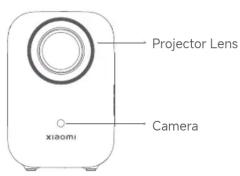
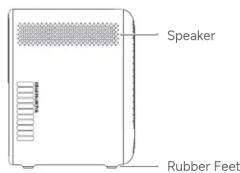
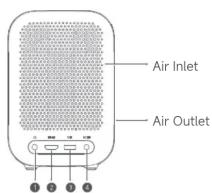
Power Button (Press to turn on the projector)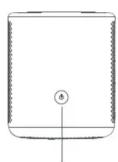
Nut Hole for Mounting Bracket (1/4 inch, depth < 8 mm)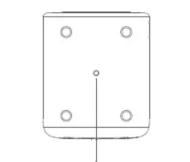
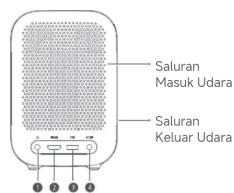
Headphone Port, HDMI, USB, DC IN. HDMI Signal Input Port, USB 2.0 Protocol Port, DC Port. Caution:
- Do not look directly into the projection lens to avoid eye damage as this projector emits strong light during use.
- Do not place any objects within a range of 20 cm around the air inlet and outlet to avoid affecting heat dissipation and causing damage or posing hazards.
- If mounting is required, please purchase a compatible mounting bracket with screws meeting the following specifications: a diameter of 1/4 inch and a length of less than 8 mm.
- Retain the original packaging for future storage or transportation.
Remote control
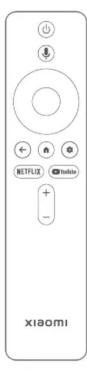
Power Button: Turn on or turn off the projector. Google Assistant: Ask Google Assistant to find movies, stream apps, play music, and control the projector – all with your voice. Navigation Button: Move up, down, left, or right. Confirm Button: Press to confirm. Back Button: Return to the previous screen. Home Button: Return to the home screen. Settings Button: Open the control panel. NETFLIX Netflix Button: Access the Netflix app. YouTube Button: Access the YouTube app.
Volume Button:
+ Volume up
- Volume down
Note:
- It is recommended to use the remote control within a distance of 5 meters from the projector.
- Make sure the positive and negative poles are installed correctly when placing the batteries into the remote control.
- Dispose of used batteries in accordance with local waste disposal regulations and guidelines of the country or region you live in.
Caution:
• Note: Illustrations of product, accessories, and user interface in the user manual are for reference purposes only. Actual product and functions may vary due to product enhancements. - The appearance or screen printing characters on the projector may vary for different sales regions. Please refer to the actual projector.
How to Use
Remote control pairing
Turning On
When the projector is connected to the power supply, press the power button on the projector or the power button on the remote control to turn on the projector.
Turning Off
Press the power button on the projector or the power button on the remote control to bring out the turning off menu, and select the corresponding option.
Make sure the remote control has batteries installed and the projector is turned on.

Place the remote control near the projector, within a distance of 20 cm, and simultaneously press and hold the back button and the home button for 3 seconds to trigger the remote control pairing.
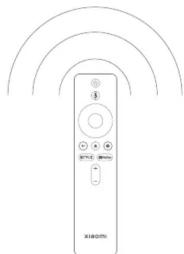
Once completed, the screen will indicate that the remote control is paired successfully.
Adjusting image focus
Auto focus
- The auto focus function is enabled by default. When this function is triggered by moving the projector, the image focus will be automatically adjusted. Alternatively, you can select Settings > Projector > Focus > Execute Focus, and the image focus will also be automatically adjusted.
- You can enable or disable the auto focus function by selecting Settings > Projector > Focus > Auto Focus.
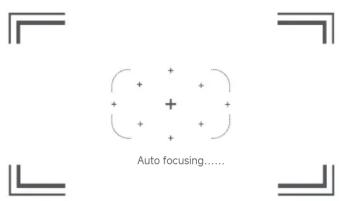
Manual focus
- You can select Settings > Projector > Focus > Manual Focus, and use the left and right buttons on the remote control to manually adjust the focus.
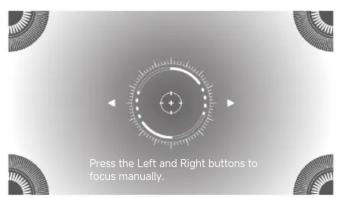
Note: After auto focus is completed, you can also press the confirm button to enter manual focus, and use the navigation button on the remote control to move left and right for further fine-tuning.
Image correction
Auto keystone correction Manual keystone correction
- The auto keystone correction function is enabled by default. When this function is triggered by moving the projector, the keystone correction will be automatically applied to the image. Alternatively, you can select Settings > Projector > Keystone > Execute auto keystone correction, and the keystone correction will be automatically applied to the image.
- You can enable or disable the auto keystone correction function by selecting Settings > Projector > Keystone.





- You can select Settings > Projector > Keystone > Manual keystone correction, and use the remote control to adjust the image corners for correction.
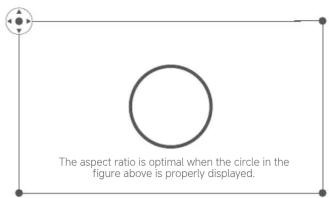
Press the Confirm button to edit and press the Back button to exit.
Note: After auto keystone correction is completed, you can also press the confirm button on the remote control to enter manual keystone correction, and use the remote control to fine-tune the image corners for correction.
Auto obstacle avoidance
• This function is enabled by default. During auto image correction, the projector will automatically detect and avoid obstacles in the projected area, ensuring an unobstructed and complete image. The image may zoom out based on the positions and sizes of the obstacles. - You can enable or disable this function by pressing the settings button on the remote control and selecting Settings > Projector > Keystone > EasyView.
Auto screen alignment
- This function is enabled by default. During auto image correction, the projector will automatically detect the screen (sold separately) and align the image with all four edges of the screen.
- You can enable or disable this function by pressing the settings button on the remote control and selecting Settings > Projector > Keystone > EasyFit.
Projection distance & screen dimensions
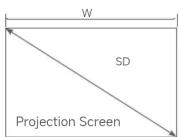
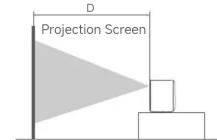
Determine the distance between the projector and the screen according to the desired screen size.
| Screen Dimensions (SD) | Projection Distance (D) | Screen Width (W) |
| 40" | 106 cm 88 cm | |
| 60" | 159 cm 132 cm | |
| 80" | 212 cm | 177 cm |
| 100" | 265 cm | 221 cm |
| 120" | 318 cm 265 cm |
Screen Dimensions (SD): The diagonal size of the projection screen (in inches). Projection Distance (D): The distance between the front end of the projector and the screen (in centimeters). Screen Width (W): The width of the image projected on the wall (in centimeters). Note: The values in the table above are for reference only. They may slightly differ from the actual values. Please refer to the actual values.
Specifications
| Basic Information | Name | Xiaomi Smart Projector L1 |
| Model | XMTYY03FMG | |
| Item Dimensions | 118 × 142 × 176 mm | |
| Net Weight | 1.2 kg | |
| Optical Parameters | Display Technology | LCD |
| Standard Resolution | 1920 × 1080P | |
| Projection Parameters | Throw Ratio (TR) | 1.2 : 1 |
| Screen Dimensions | 40-120 (Recommended: 60-100 ) | |
| Lens Focus | Auto focus | |
| Keystone Correction | Auto keystone correction | |
| System | Built-in Storage | 2 GB DDR3/16 GB eMMC |
| Operating System | Android TVTM OS | |
| Bluetooth | Bluetooth 5.0 | |
| Wireless Connectivity | Wi-Fi IEEE 802.11 a/b/g/n/ac 2.4 GHz/5 GHz | |
| Speaker | Audio Effects | Dolby Audio |
| Speaker | 3 W full-range × 2 | |
| Electrical Specifications | Power Consumption | Rated power 72.0 W, standby power < 0.50 WSupport auto power off |
| Others | Power Input | External power supply 19.0 V 3.79 A |
| Noise Level | 30 dB(A) (Theater mode at an ambient temperature of 25°C ) | |
| Storage Temperature/Humidity | -20°C to 55°C 90%RH | |
| Operating Temperature/Humidity | 0°C to 40°C / 20%RH – 80%RH |
Troubleshooting
| Issues Solutions | |
| No projected image | Turn off the projector and unplug the power cord. Then, plug the power cord back in and turn on the projector. |
| Screen display error | |
| Operating system crashes | Unplug the power cord. Then, plug it back in and turn on the projector. |
| Couldn't operate with the new remote control | Pair the remote control before use. |
| Remote control malfunction | Turn off the projector and unplug the power cord. After 5 minutes, plug the power cord back in and turn on the projector. Then, pair the remote control again. |
| The projector automatically turns off due to overheating | Clear obstacles around the projector, wait for it to cool off, and turn it on again. |
| Other internal system errors | Contact the after-sales service team. |
Regulatory Compliance
CE
Hereby, [Xiaomi Communications Co., Ltd.] declares that the radio equipment type [Xiaomi Smart Projector L1/ XMTYY03FMG] is in compliance
with Directive 2014/53/EU. The full text of the EU declaration of conformity is available at the following internet address:
http://www.mi.com/global/service/support/declaration.html
Operation Frequency: 2.4 GHz–2.4835 GHz (for Bluetooth)
Maximum RF Power Output: < 10 mW (for Bluetooth)
Operation Frequency: 2.4 GHz–2.4825 GHz (for Wi-Fi 2.4 GHz)
Maximum RF Power Output: < 100 mW (for Wi-Fi 2.4 GHz)
Operation Frequency: 5.15 GHz–5.35 GHz and 5.47 GHz–5.725 GHz (for Wi-Fi 5 GHz)
Maximum RF Power Output: < 200 mW (for Wi-Fi 5.15 GHz-5.25 GHz),
< 100 mW (for Wi-Fi 5.25GHz-5.35 GHz & 5.47 GHz-5.725 GHz)
Note:
Under normal use conditions, this equipment should be kept at a separation distance of at least 20 cm between the antenna and the body of
the user.
Warning: The use of the 5470–5650 MHz band of 5 GHz Wi-Fi is restricted in Russia.
Warning: The use of the 5470–5725 MHz band of 5 GHz Wi-Fi is restricted in Indonesia.
This device is restricted to indoor use when operating in the 5150 to 5350 MHz
| AT | BE | BG | HR | CY | CZ | DK | |
| EE | FI | FR | DE | EL | HU | IE | |
| IT | LV | LT | LU | MT | NL | PL | |
| PT | RO | SK | SI | ES | SE | UK(NI) |
Product Certifications
Hereby, [Xiaomi Communications Co., Ltd.] declares that the radio equipment type [Bluetooth® Voice Remote/RC604-MG1] is in compliance with Directive 2014/53/EU. The full text of the EU declaration of conformity is available at the following internet address: http://www.mi.com/global/service/support/declaration.html Operation Frequency: 2.4 GHz–2.4835 GHz Maximum RF Power Output: < 10 mW
Note:
The Bluetooth® Voice Remote has been evaluated to meet general RF exposure requirements. It can be used in portable exposure conditions without restriction.

All products bearing this symbol are waste electrical and electronic equipment (WEEE as in directive 2012/19/EU) which should not be mixed with unsorted household waste. Instead, you should protect human health and the environment by handing over your waste equipment to a designated collection point for the recycling of waste electrical and electronic equipment, appointed by the government or local authorities. Correct disposal and recycling will help prevent potential negative consequences to the environment and human health. Please contact the installer or local authorities for more information about the location as well as terms and conditions of such collection points.
| Ecodesign requirements of (EU) 2023/826 | |
| Power consumption | Off mode: not applicable |
| Standby mode: < 0.5 W | |
| Network standby mode: < 2.0 W | |
| Time to enter the conditions automatically | Standby mode: < 15 min |
| Network standby mode: < 15 min | |
| Ecodesign requirements of (EU) 2019/1782 | |
| Manufacturer Shenzhen Honor Electronic Co., Ltd. | |
| Model | ADS-96HLA-19-3 19072E |
| Rated Input | 100-240 V AC, 50/60 Hz, 1.5 A |
| Rated Output | 19.0 V DC, 3.79 A, 72.0 W |
| Average Active Efficiency | 88.0 % |
| Efficiency at Low Load (10 %) | 86.09 % |
| No-load Power Consumption | 0.21 W |

HIGH-DEFINITION MULTI
The terms HDMI, HDMI High-Definition Multimedia Interface, HDMI Trade dress and the HDMI Logos are trademarks or registered trademarks of HDMI Licensing Administrator, Inc.

The Bluetooth® word mark and logos are registered trademarks owned by Bluetooth SIG, Inc. and any use of such marks by [Xiaomi Inc.] is under license. Other trademarks and trade names are those of their respective owners.
Dolby Audio
Dolby, Dolby Audio, and the double-D symbol are registered trademarks of Dolby Laboratories Licensing Corporation. Manufactured under license from Dolby Laboratories.
Google TV is the name of this device's software experience and a trademark of Google LLC. Google, YouTube and Android TV are trademarks of Google LLC.
Google Assistant is not available in all languages and countries. Availability of services varies by country and language.
The product label and certification information are located at the bottom of the product.
Manufacturer: Xiaomi Communications Co., Ltd. Address: #019, 9th Floor, Building 6, 33 Xi'ergi Middle Road, Haidian District, Beijing, 100085, China For further information, please go to www.mi.com User Manual Version: V1.0
http://www.mi.com/global/service/support/declaration.html
http://www.mi.com/global/service/support/declaration.html
http://www.mi.com/global/service/support/declaration.html
http://www.mi.com/global/service/support/declaration.html
Operating frequency: 2.4 GHz - 2.4835 GHz
http://www.mi.com/global/service/support/declaration.html
http://www.mi.com/global/service/support/declaration.html
http://www.mi.com/global/service/support/declaration.html
Address: #019, 9th Floor, Building 6, 33 Xi'erqi Middle Road, Haidian District, Beijing, 100085, China
http://www.mi.com/global/service/support/declaration.html
http://www.mi.com/global/service/support/declaration.html
Once pairing is complete, the remote control will appear on the screen.
A message will appear indicating that pairing was successful.
It will be displayed.
Image focus adjustment
Auto focus
Address: #019, 9th Floor, Building 6, 33 Xi'erqi Middle Road, Haidian District, Beijing, 100085, China
Dolby Laboratories Licensing Corporation.
Address: #019, 9th Floor, Building 6, 33 Xi'erqi Middle Road, Haidian District, Beijing, 100085, China
Address: #019, 9th Floor, Building 6, 33 Xi'erqi Middle Road, Haidian District, Beijing, 100085, China
http://www.mi.com/global/service/support/declaration.html Islam Exchange: 2.4 GHz, 2.4875 GHz (Bluetooth join)
http://www.mi.com/global/service/support/declaration.html
Address: #019, 9th Floor, Building 6, 33 Xi'erqi Middle Road, Haidian District, Beijing, 100085, China
Xiaomi Technology Netherlands B.V.
Prinses Beatrixlaan 582, 2595BM, The Hague, The Netherlands
contact@support.mi.com
UK REP
Xiaomi Technology UK Limited
Davidson House, Forbury Square, Reading, Berkshire RG1 3EU
contact@support.mi.com




- SAFETY INSTRUCTIONS
- SAFETY PRECAUTIONS
- CAUTION
- PRODUCT OVERVIEW
- REMOTE CONTROL
- NOTE
- HOW TO USE
- ADJUSTING IMAGE FOCUS
- AUTO FOCUS
- MANUAL FOCUS
- IMAGE CORRECTION
- AUTO OBSTACLE AVOIDANCE
- AUTO SCREEN ALIGNMENT
- PROJECTION DISTANCE & SCREEN DIMENSIONS
- REGULATORY COMPLIANCE
- CE
- PRODUCT CERTIFICATIONS
- DOLBY AUDIO
- IMAGE FOCUS ADJUSTMENT
- ADDRESS: #019, 9TH FLOOR, BUILDING 6, 33 XI'ERQI MIDDLE ROAD, HAIDIAN DISTRICT, BEIJING, 100085, CHINA
Brand : Xiaomi
Model : Smart Projector L1
Category : Projector