
Mi Smart Projector 2 Pro - Projector Xiaomi - Free user manual and instructions
Find the device manual for free Mi Smart Projector 2 Pro Xiaomi in PDF.


Pick your language and provide your email: we'll send you a specifically translated version.
| Product Type | Projector |
| Brand | Xiaomi |
| Model | Mi Smart Projector 2 Pro |
| Display Technology | DLP |
| Native Resolution | 1920 x 1080 (Full HD) |
| Max Input Resolution | 4K (3840 x 2160) |
| Brightness | 1600 ANSI Lumens |
| Contrast Ratio | 2000:1 |
| Throw Ratio | 1.2:1 |
| Projection Size | 40 - 200 inches |
| Built-in Speakers | 2 x 10W |
| Smart Platform | Android TV 9.0 |
| RAM | 2GB |
| Storage | 16GB |
| Connectivity | HDMI, USB 2.0, Wi-Fi, Bluetooth 5.0, Ethernet |
| Power Consumption | 150W (typical) |
| Light Source Life | 25000 hours (laser) |
| Dimensions (W x D x H) | 215 x 115 x 185 mm |
| Weight | 3.4 kg |
| Safety Features | Thermal protection, automatic power-off |
| Cleaning Instructions | Wipe with a dry, soft cloth |
| Repairability | Only authorized service centers |
| Spare Parts Availability | Power supply, remote control (official channels) |
Frequently Asked Questions - Mi Smart Projector 2 Pro Xiaomi
What is the native resolution of the Xiaomi Mi Smart Projector 2 Pro?
The native resolution is 1920 x 1080 (Full HD). It also supports 4K input for upscaled content.
Can I use the projector outdoors?
It is not recommended for outdoor use due to ambient light interference and lack of weatherproofing. Use indoors with controlled lighting for best results.
How do I connect the projector to Wi-Fi?
Go to Settings > Network & Internet on the Android TV interface, select your Wi-Fi network, and enter the password.
What is the expected lamp life?
The laser light source has a lifespan of up to 25,000 hours, which translates to about 8.5 years of daily use (8 hours per day).
Can I project onto any wall surface?
Yes, but for optimal image quality, use a white or light-colored wall or a dedicated projection screen to reduce distortion and enhance contrast.
Does the projector support Netflix?
Yes, Netflix is available via the Android TV platform. You can download the app from the Google Play Store and sign in to stream.
How should I clean the lens?
Use a soft, dry microfiber cloth or a lens cleaning brush to gently remove dust. Avoid using liquids or abrasive materials.
Can the projector be mounted on the ceiling?
Yes, it has screw holes for ceiling mounts (standard projector mount). Ensure the mount supports the weight of 3.4 kg.
What is the throw distance for a 100-inch screen?
With a throw ratio of 1.2:1, you need approximately 2.6 meters to get a 100-inch diagonal image.
Is the projector 3D capable?
No, the Mi Smart Projector 2 Pro does not support 3D playback or display.
User questions about Mi Smart Projector 2 Pro Xiaomi
0 question about this device. Answer the ones you know or ask your own.
Ask a new question about this device
No questions yet. Be the first to ask one.
Download the instructions for your Projector in PDF format for free! Find your manual Mi Smart Projector 2 Pro - Xiaomi and take your electronic device back in hand. On this page are published all the documents necessary for the use of your device. Mi Smart Projector 2 Pro by Xiaomi.
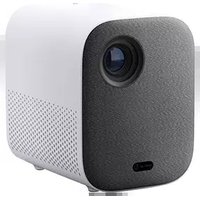
USER MANUAL Mi Smart Projector 2 Pro Xiaomi

Manual assistant
Powered by Anthropic
Waiting for your message
Product information
Brand : Xiaomi
Model : Mi Smart Projector 2 Pro
Category : Projector