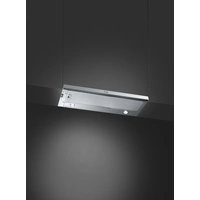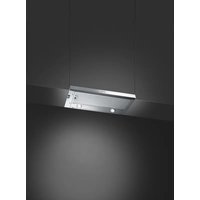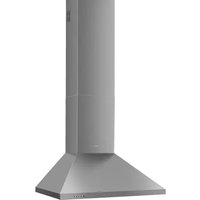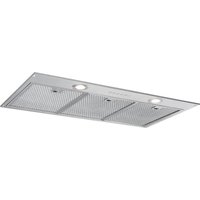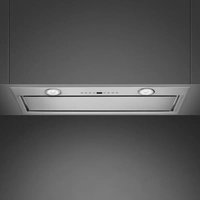
KICGR70X2 - Basket SMEG - Free user manual and instructions
Find the device manual for free KICGR70X2 SMEG in PDF.


User questions about KICGR70X2 SMEG
0 question about this device. Answer the ones you know or ask your own.
Ask a new question about this device
Download the instructions for your Basket in PDF format for free! Find your manual KICGR70X2 - SMEG and take your electronic device back in hand. On this page are published all the documents necessary for the use of your device. KICGR70X2 by SMEG.
USER MANUAL KICGR70X2 SMEG
natural_image
Technical line drawing of a rectangular electronic device with a circular top component and mounting holes (no text or symbols)IT 3
EN 9
FR 14
DE 21
NL 27
ES 33
PT 39
DA 45
NO 50
RU 55
PL 62
SV 69
FI 74
AR 80
IT
natural_image
Illustration of a hand holding a smartphone with a finger, inside a circular frame containing the letter 'Z' (no text or symbols on the device itself)For your own safety and to ensure proper operation of the appliance, please read this manual carefully before installation and operation. Keep these instructions together with the appliance, even if it is sold or transferred to third parties. It is important that users know all the appliance's operating and safety characteristics.
The cables must be connected by a trained technician.
- The manufacturer shall not be considered responsible for any injury or damage caused by improper installation or use.
- The minimum safety distance between the hob and the suction hood is 650 mm (some models may be fitted at a lower height; please see the paragraph relating to working dimensions and installation).
- If the instructions for installation of the gas hob specify a distance greater than the one indicated, this must be taken into account.
- Check that the mains power supply corresponds to the one indicated on the data plate affixed inside the hood.
-
The cut-out devices must be installed in the fixed system according to wiring system regulations.
-
For Class I appliances, check that the domestic power supply is adequately earthed.
- Connect the hood to the flue using a pipe with a minimum diameter of 120 mm. The fumes must travel the shortest distance possible.
- All the air venting regulations must be complied with.
- Do not connect the ducting hood to flues that also carry combustion fumes (e.g. boilers, chimneys, etc.).
- If the hood is used in combination with non electric appliances (e.g. gas appliances), a sufficient level of ventilation must be guaranteed in the room to prevent any exhaust backflow. If the kitchen hood is used in combination with appliances that are not electrically powered, the negative pressure in the room must not exceed 0.04 mbar to avoid any risk of the fumes being sucked back into the room by the hood.
- The air must not be extracted through a flue that is also used as an exhaust flue for fumes from gas or other fuel powered combustion devices.
- If it is damaged, the power cable must be replaced by the manufacturer or by a service technician.
- Connect the plug to a socket that complies with current regulations and is in an accessible position.
- As regards the technical and safety measures to be taken for exhausting of fumes, it is important that the regulations set by local authorities be complied with scrupulously.

CAUTION: remove the protective films before installing the hood.
- Only use screws and hardware of a sort suitable for the hood.

CAUTION: failure to install the screws or fixing devices as described in these instructions may mean there is a risk of electric shocks.
- Do not look directly at the light through optical devices (binoculars, magnifying glasses...).
- Do not flambé food under the hood: you might cause a fire.
- This appliance may be used by children over the age of 8 years and by persons with limited psycho-physical and sensory abilities or with insufficient experience and knowledge, provided they are carefully supervised and instructed on how to use the appliance safely and on the dangers that it involves. Make sure that children are not allowed to play with the appliance. Cleaning and maintenance to be performed by the user must not be carried out by children, unless they are under supervision.
- Supervise children, to make sure they do not play with the appliance.
- The appliance must not be used by persons (including children) with limited psycho-physical or sensory capacities or with insufficient experience and knowledge, unless they are carefully supervised and instructed.

Accessible parts may become extremely hot during the use of cooking appliances
- Clean and/or replace the fil- ters after the period of time in- dicated (danger of fire). See the paragraph on Mainten- ance and cleaning.
- The room must be adequately ventilated when the hood is used simultaneously with appliances that use gas or other fuels (not applicable to appliances that only discharge air into the room).
- The symbol 📁 on the product or on its packaging indicates that the product must not be disposed of with the normal domestic waste. The product must be disposed of at a specialist re-cycling centre for electrical and electronic components. By making sure that this product is disposed of properly, you will help prevent possible negative consequences for the environment and for health that might result from its improper disposal. For more detailed in-
formation on how to re-cycle this product, please contact your local municipal offices, local waste disposal service or the shop in which the product was purchased.
2. USE
- The suction hood has been designed exclusively for domestic use, to eliminate kitchen odours.
- Never use the hood for purposes other than those for which it was designed.
- Never leave high flames under the hood when it is in operation.
- Adjust the intensity of the flame so that it is directed onto the bottom of the cooking pan, making sure it does not wrap around the sides.
- Deep-fryers must be kept under constant supervision when in use: the oil may catch fire if it gets too hot.
3. CLEANING AND MAINTENANCE
- The activated charcoal filter cannot be washed or regenerated, and must be changed approximately every 4 months of operation, or more frequently in the case of particularly intensive use (W).
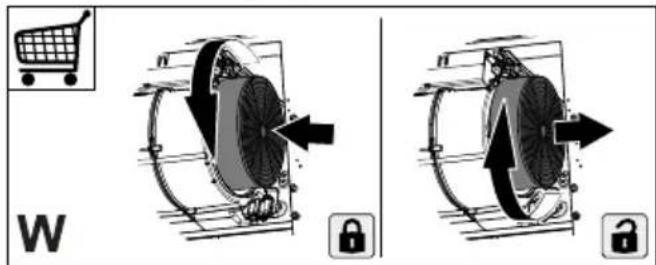
text_image
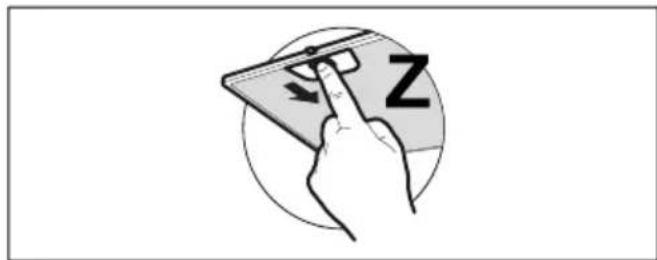
W- The grease filters must be cleaned every 2 months of operation, or more frequently in the case of particularly intensive use. They can be washed in a dishwasher (Z).
natural_image
Illustration of a hand holding a smartphone with a finger pointing at it, no text or symbols present- Clean the hood using a damp cloth and neutral liquid detergent. - For external and internal cleaning of the hood avoid alcoholic or silicone products.
If the product or one of its parts is made of stainless steel, use specific non-ab-rasive products for cleaning and follow the lines of the satin finish during cleaning.
4. CONTROLS
 |  |  |  |  |  |  |  |  | |
| A | B | C | D | E | F | G | H | ||
| Key Function LED | |||||||||
| A | Turns the motor on/off at the first speed. Displays the speed set. | ||||||||
| B | Decreases the operating speed. Displays the speed set. | ||||||||
| C | Increases the operating speed. Displays the speed set. | ||||||||
| D Activates/Deactivates the motor at Intensive speed.This speed is timed for 6 minutes. When the time is up, the system automatically returns to the previous speed. | Alternately displays HI and the remaining time once per second. | ||||||||
| FC+Dot (2 Flashes)-Alarm Active.FC+Dot (1 Flash)-Alarm Deactivated. | |||||||||
| E 24h | FunctionActivates/Deactivates the motor in the 24h mode, a speed that allows suction of 10 minutes every hour, for a 24-hour cycle. | Displays 24 and the lower right dot flashes once per second while the motor is in operation.It is disabled by pressing the key. | |||||||
| With the filters alarm in progress, pressing the button for approximately 3 seconds resets the alarm.These signals are only visible with the motor off. | FF flashes three times.At the end of the procedure, the previously displayed signal goes out:FG indicates the need to wash the metal greasefilters. The alarm goes into operation after 100 hours of actual work of the hood.FC signals the need to replace the activated carbon filters and the metal grease filters must also be washed. The alarm goes into operation after 200 hours of actual hood work. | ||||||||
| F Delay FunctionActivates the automatic shutdown delayed by 30'.Ideal for eliminating any residual odours.It can be activated from any position and is deactivated by pressing the button or by switching off the motor. | Displays the operating speed and the lower right dot flashes once per second. | ||||||||
| G | Switches the lighting system on and off to maximum brightness. - | ||||||||
| H | Turns the lighting system on and off in Courtesy Light mode. | - | |||||||
When turned on, the card recognises the mains frequency.
Recognition is indicated on the display:
- 50Hz: the number "50" will appear on the display for one second
- 60Hz: the number "60" will appear on the display for one second
Auto-Vent
This is an advanced automatic function that connects the hob to a special hood. Both the hob and the hood have an infra-red signal communicator. The fan
speed is automatically defined based on the mode settings and on the temperature of the hottest pan on the hob. It is also possible to operate the fan from the hob manually.
Automatic activation of the function
To automatically activate the function, set the automatic mode from H1 to H6. The hob is factory set to H5. The hob reacts every time the hob is used. The hob automatically detects the temperature of the pans and adjusts the fan speed.
Automatic modes
| Automatic lighting | Boiling1) Frying2) | |
| Mode H0 | Off Off Off | |
| Mode H1 | On Off Off | |
| Mode H2 3) | On Fan 1 speed Fan 1 speed | |
| Mode H3 | On Off Fan 1 speed | |
| Mode H4 | On Fan 1 speed Fan 1 speed | |
| Mode H5 | On Fan 1 speed Fan 2 speed | |
| Mode H6 | On Fan 2 speed Fan 3 speed |
1) The hob detects the boiling process and activates the fan speed according to the automatic mode.
2) The hob detects the frying process and activates the fan speed according to the automatic mode.
3) This mode activates the fan and light and is not related to the temperature.
Changing the automatic mode
- Deactivate the equipment.
- Touch the key for 3 seconds. The display turns on and off.
- Touch the key for 3 seconds.
- Touch "Timer" a few times until "H" comes on.
- Tap on the Timer to select an automatic mode.
To operate the hood directly from the hood panel itself, deactivate the automatic mode of the function.
When cooking is completed and the hob is deactivated, the hood fan continues to operate for a while. After this time, the system deactivates the fan automatically and prevents accidental activation of the same for the following 30 seconds.
Manual fan speed operation
It is also possible to activate the function manually. To do so, touch when the hob is active. This deactivates the automatic operation of the function and the fan speed can be changed manually.
Pressing increases the fan speed by one level. Having reached a high level and pressing again, the fan speed is set to 0 and the hood fan turns off. To start the fan again at speed 1, touch
To activate automatic operation of the function, deactivate the hob and re-activate it.
Activating the light
It is also possible to set the hob to automatically activate the light every time the hob is turned on. To do so, set the automatic mode from H1 to H6.
The light on the hood turns off 2 minutes after the hob is deactivated.
5. LIGHTING
- Please contact the Service Department to change it ("Please contact the service department to purchase it").
FR
1. INFORMATIONS RELATIVES À LA SÉCURITÉ
natural_image
Illustration of a hand holding a smartphone with a finger pointing at it, no text or symbols presentnatural_image
Illustration of a hand holding a smartphone with a finger pointing at it, no text or symbols presentnatural_image
Illustration of a hand interacting with a smartphone displaying a 'Z' symbol (no text or symbols on the device itself)natural_image
Illustration of a hand holding a smartphone with a finger, showing a stylized 'Z' on its screen (no text or symbols beyond the letter)natural_image
Illustration of a hand holding a smartphone with a finger, next to a stylized 'Z' logo (no text or symbols on the device itself)natural_image
Hand interacting with a smartphone displaying a Z symbol (no text or symbols on the device itself)natural_image
Illustration of a hand holding a smartphone with a finger pointing at it, no text or symbols presentnatural_image
Illustration of a hand interacting with a smartphone screen, showing a finger pointing at the screen (no text or symbols present)natural_image
Illustration of a hand interacting with a smartphone displaying a Z symbol (no text or symbols present)natural_image
Illustration of a hand holding a smartphone with a finger, next to a stylized 'Z' logo (no text or symbols on the device itself)natural_image
Illustration of a hand holding a smartphone with a finger, next to a circular logo containing the letter 'Z' (no text or symbols on the device itself)natural_image
Illustration of a hand interacting with a smartphone displaying a 'Z' symbol (no text or symbols on the device itself)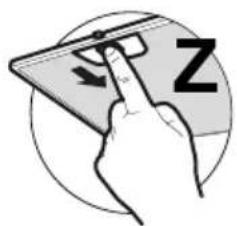
natural_image
Illustration of a hand interacting with a smartphone displaying a Z symbol (no text or symbols on the device itself)ومنظف سائل معtedل.