HF5010 - Vacuum Cleaner KENMORE - Free user manual and instructions
Find the device manual for free HF5010 KENMORE in PDF.


User questions about HF5010 KENMORE
0 question about this device. Answer the ones you know or ask your own.
Ask a new question about this device
Download the instructions for your Vacuum Cleaner in PDF format for free! Find your manual HF5010 - KENMORE and take your electronic device back in hand. On this page are published all the documents necessary for the use of your device. HF5010 by KENMORE.
USER MANUAL HF5010 KENMORE
Hard Floor Wet/Dry Vacuum Cleaner Help Line:
1-877-531-7321 (US) / 1-844-608-3081 (CA)
8:00am-5:00pm EST, M-F
www.kenmorefloorcare.com

text_image
Kenmore ©/MDTABLE OF CONTENTS
Before Using Your New Hard Floor Wet/Dry Vacuum Cleaner ......2
Packing List....2
Important Safety Instructions....3-6
Hard Floor Wet/Dry Vacuum Cleaner Warranty....7
Parts and Features....8-10
Range of Usage 11
Assembly Instructions....12-14
Operating Instructions....14-18
Vacuum Maintenance and Care....19-22
Troubleshooting 23-24
Requesting Assistance Or Service .... Back Cover
BEFORE USING YOUR NEW HARD FLOOR WET/DRY VACUUM CLEANER
Read this Use & Care Guide. It will help you assemble and operate your new Kenmore hard floor wet/dry vacuum cleaner in the safest and most effective way.
For more information about hard floor wet/dry vacuum cleaner care and operation, call the Hard Floor Wet/Dry Vacuum Cleaner Help Line at 1-877-531-7321 (US) / 1-844-608-3081 (CA). You will need the complete model and serial numbers when requesting information.
Your hard floor wet/dry vacuum cleaner's model and serial numbers are located on the Model and Serial Number Plate. Use the space below to record the model number and serial number of your new Kenmore hard floor wet/dry vacuum cleaner.
Model No.
Serial No. ____
Date of Purchase ____
Keep this book and your sales check (receipt) in a safe place for future reference.
PACKING LIST
Your KENMORE HARD FLOOR WET/DRY VACUUM CLEANER is packaged with the following parts and components included separately in the carton:
1 Handle
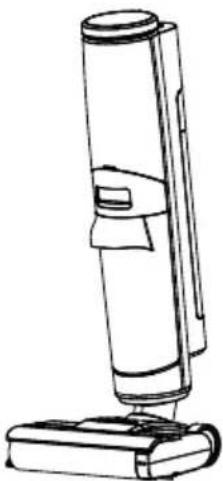
1 Main Body
2 Brush Rollers (with one
preinstalled in the floor head)
1 HEPA Filter
1 Charging Adapter
1 Storage Base
1 Accessory Holder
1 Cleaning Tool
116 oz. Cleaning Formula
1 Use & Care Guide
IMPORTANT SAFETY INSTRUCTIONS
WARNING!
READ ALL INSTRUCTIONS IN THIS GUIDE BEFORE ASSEMBLING OR USING YOUR HARD FLOOR WET/DRY VACUUM CLEANER. To reduce the risk of fire, electrical shock, injury to persons or damage when using your hard floor wet/dry vacuum cleaner, follow all safety precautions listed below.
- Use your hard floor wet/dry vacuum cleaner only as described in this Use & Care Guide.
- Use on indoor hard floors only.
- Do not allow it to be used as a toy. Close attention is necessary when used by or near children, pets or plants.
- Use only manufacturer's recommended attachments.
- Do not put any object into openings. Do not use with any opening blocked; keep openings free of dust, lint, hair, and anything that may reduce air flow.
- Keep hair, loose clothing, fingers, and parts of body away from openings and moving parts.
- Use extra care when cleaning on stairs.
- Do not use to pick up flammable or combustible materials (lighter fluid, gasoline, kerosene, etc.) or use in areas where they may be present.
-
Do not use the appliance in an enclosed space filled with vapors given off by oil-based paint, paint thinner, some moth-proofing substances, flammable dust, or other explosive or toxic vapors.
-
Do not pick up toxic material (chlorine bleach, ammonia, drain cleaner, etc.).
- Do not pick up anything that is burning or smoking, such as cigarettes, matches, or hot ashes.
- Do not pick up hard or sharp objects such as glass, nails, screws, coins, etc.
- Do not carry the appliance while in use.
- Do not immerse. Use only on surfaces moistened by the cleaning process.
- Packing materials can be dangerous.
- Do not use without filters or tanks in place.
• Always connect to a proper electrical socket. - Do not charge the appliance outdoors.
- Do not charge with a damaged cord or plug.
- Do not pull or carry the charging adapter by cord, use the cord as a handle, close a door on the cord, or pull the cord around sharp edges or corners. Keep cord away from heated surfaces.
- Do not unplug by pulling on the charging adapter cord. To unplug, grasp the charging plug, not the cord.
IMPORTANT SAFETY INSTRUCTIONS
- Do not handle storage base, charging plug, or appliance with wet hands.
- Do not incinerate the appliance even if it is severely damaged. The batteries can explode in a fire.
- Only charge the appliance with the charging adapter and storage base specified by the manufacturer.
- Do not use a charging adapter or a storage base that is damaged or modified. Damaged or modified charging adapter or storage base may exhibit unpredictable behavior resulting in fire, explosion, or risk of injury.
- Do not expose a charging adapter or a storage base to fire or excessive temperature. Exposure to fire or temperature above 104°F (40°C) may cause an explosion.
- Follow all charging instructions and do not charge the appliance outside the temperature range of 39.2-104°F (4-40°C). Charging improperly or at temperatures outside this range may damage the appliance and increase the risk of fire.
- The charging adapter and storage base output terminals are not to be short-circuited.
- Do not allow the appliance, charging adapter or storage base to get wet to avoid the risk of a fire or injury caused by a short circuit.
- Use with charger type GangQi
GQ 24-27100-AU or Chanzeho CZH024270100USWQ.
- This appliance contains batteries that are only replaceable by skilled persons.
- Store charger indoors in a cool, dry area, not exposed to weather to avoid electrical shock and/or damage to the hard floor cleaner.
- Prevent the unit from unintentional starting. Ensure the switch is turned off before placing onto the storage base, picking up or carrying the appliance.
- Do not carry the appliance with your finger on the switch or energizing appliances that have the switch on.
- If the appliance is not working as it should, has been dropped, damaged, left outdoors, or dropped into water, immediately discontinue use and call 1-877-531-7321 (US) / 1-844-608-3081 (CA) for assistance.
- Have service performed by a qualified repair person using only identical replacement parts. This will ensure that the safety of the product is maintained.
- Do not turn ON your appliance until you are familiar with all instructions and operating procedures.
- Risk of injury from moving parts. The brush roller may start unexpectedly. Turn OFF before cleaning or servicing.
IMPORTANT SAFETY INSTRUCTIONS
- Cleaning solution must not be directed towards equipment containing electrical components.
- Use the type and amount of liquids specified under the operation section of this guide.
- Use only provided cleaning products intended for use with this appliance to prevent internal component damage.
- Add cleaning formula as instructed in the product operation section. We recommend using the provided cleaning formula. Do not use the product with an acidic, alkaline floor formula or any substances harmful to the environment.
- A large amount of cleaning formula entering into the motor may cause damage to the appliance.
- Once you have used all of the sample hard floor cleaning solution, use Kenmore hard floor cleaning solution only.
- Keep out of reach of children. If any formula gets into the eyes, immediately flush them with clean water. If any formula is swallowed by accident, seek medical care immediately.
- Dirty water and cleaning formula disposal should comply with local environmental regulations.
-
Do not modify or attempt to repair the appliance except as indicated in the instructions for use and care.
-
Keep appliance on a level surface.
- If your appliance has a motorized brush roller, do not leave the appliance running in the same spot without the handle fully upright.
- Do not store where freezing may occur.
- Use on indoor hard floors only, such as vinyl, tile, sealed wood, etc. Use on a rough surface may not get the best performance.
- Keep your appliance away from heat sources, such as a fireplace or heater, to avoid causing damage.
- Do not lay flat or lean the appliance to prevent dirty water from entering into the motor.
- To avoid being tripped accidentally, please place the appliance onto the storage base after use. The storage base should be placed against the wall.
• Always install the dirty water tank and clean water tank properly before use. - This appliance can be used by children aged from 8 years and above and persons with reduced physical, sensory or mental capabilities or lack of experience and knowledge, if they have been given supervision or instruction concerning use of the appliance in a safe way and understand the hazards involved.
• Children shall not play with the appliance.
IMPORTANT SAFETY INSTRUCTIONS
• Cleaning and user maintenance shall not be made by children without supervision.
- Changes or modifications to this appliance not expressly approved by the party responsible for compliance could void the user's authority to operate the equipment.
- You are responsible for making sure that your hard floor wet/dry vacuum cleaner is not used by anyone who is unable to operate it properly.
- This appliance is designed for household use only! Commercial use of this appliance voids the hard floor cleaner warranty.

WARNING
Any changes or modifications to this unit not expressly approved by the party responsible for compliance could void the user's authority to operate the equipment.
NOTE: This equipment has been tested and found to comply with the limits for a Class B digital device, pursuant to part 15 of the FCC Rules. These limits are designed to provide reasonable protection against harmful interference in a residential installation. This equipment generates, uses and can radiate radio frequency energy and, if not installed and used in accordance with the instructions, may cause harmful interference to radio communications. However, there is no guarantee that interference will not occur in a particular installation. If this equipment does cause harmful interference to radio or television reception, which can be determined by turning the equipment off and on, the user is encouraged to try to correct the interference by one or more of the following measures:
- Reorient or relocate the receiving antenna.
- Increase the separation between the equipment and receiver.
- Connect the equipment into an outlet on a circuit different from that to which the receiver is connected.
- Consult the dealer or an experienced radio / TV technician for help.
SAVE THESE INSTRUCTIONS
Proper assembly and safe use of your hard floor wet/dry vacuum cleaner are your responsibilities. Your hard floor wet/dry vacuum cleaner is intended for Household Use. Read this Use & Care Guide carefully for important use and safety information. This guide contains safety statements under warning and caution symbols.
HARD FLOOR WET/DRY VACUUM CLEANER WARRANTY
LIMITED WARRANTY
FOR ONE YEAR from the date of sale (or, for deliveries in the State of California, one year from the date of delivery) this product is warranted against defects in material or workmanship.
WITH PROOF OF SALE a defective product will be replaced free of charge.
The Kenmore brand is used under license. Direct all claims for warranty service to: 1-877-531-7321 (US) / 1-844-608-3081 (CA).
This warranty does not cover filters or belts, which are expendable parts that can wear out from normal use within the warranty period.
This warranty is void if this product is ever used for other than private household purposes.
This warranty gives you specific legal rights, and you may also have other rights which vary from state to state.
Cleva North America, Inc., Greenville SC 29607
PARTS AND FEATURES
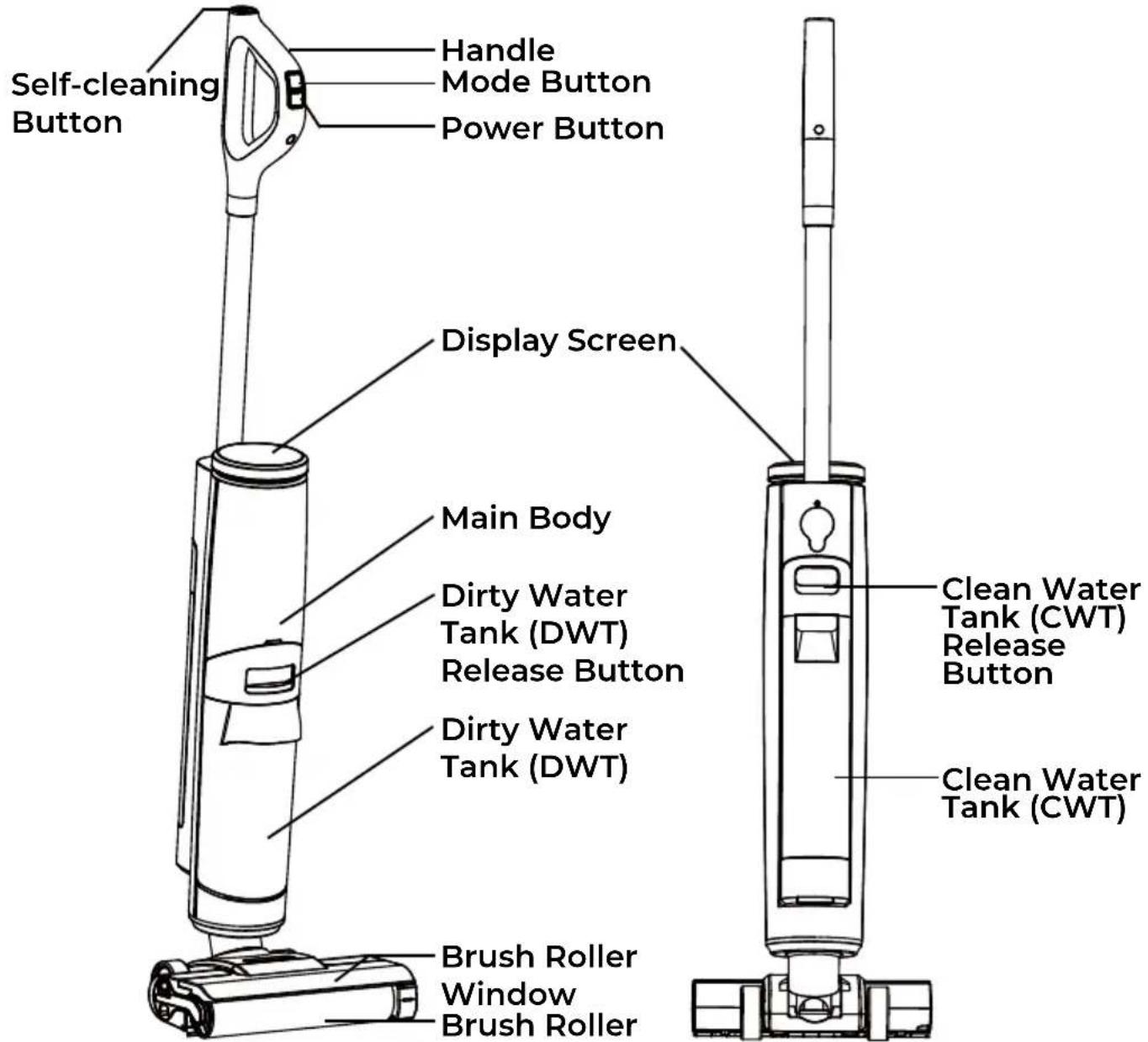
It is important to know your hard door wet/dry vacuum cleaner's parts and features to ensure its proper and safe use. Review these before using your cleaner.
REPLACEMENT PARTS
| Item Part No.(US) Part | No.( CA) | |
| Handle 741001101 7410 | 01101 | |
| HEPA Filter 741001102 | 741001102 | |
| Charging Adapter 7410 | 001103 74100 | 1103 |
| Storage Base 741001104 | 741001104 | |
| Brush Roller 741001105 | 741001105 | |
| Cleaning Tool 741001106 | 741001106 | |
| Cleaning Formula 7410 | 001107 74100 | 1107 |
To order a replacement part, call 1-877-531-7321 (US) / 1-844-608-3081 (CA).
text_image
Self-cleaning Button Handle Mode Button Power Button Display Screen Main Body Dirty Water Tank (DWT) Release Button Dirty Water Tank (DWT) Clean Water Tank (CWT) Release Button Clean Water Tank (CWT) Brush Roller Window Brush RollerPARTS AND FEATURES
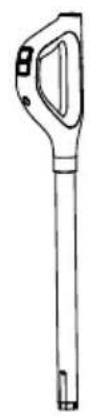
Handle
natural_image
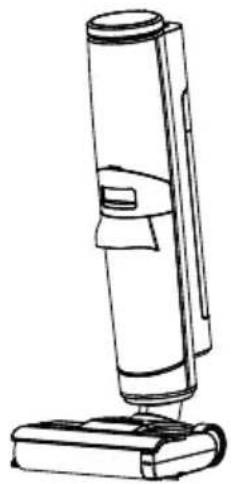
Line drawing of a vacuum cleaner with a cylindrical body and base (no text or symbols)Main Body
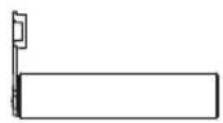
Brush Roller (X2, with 1 preinstalled)
natural_image
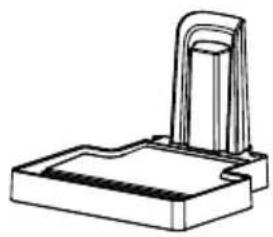
Technical line drawing of a mechanical component with a bracket and base (no text or symbols)Storage Base
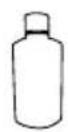
Cleaning Formula
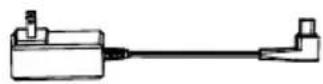
Charging Adapter
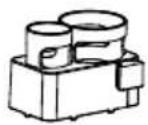
Accessory Holder
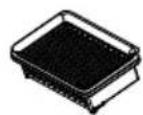
HEPA Filter

Cleaning Tool (with brush roller cleaning tool inside handle)
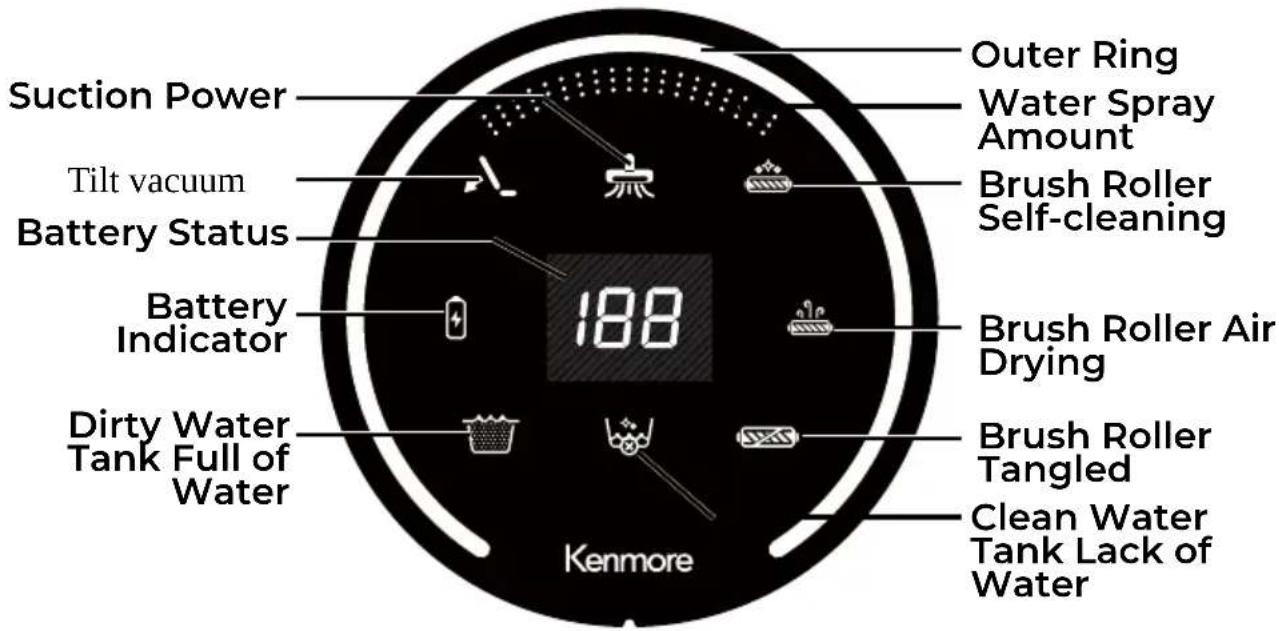
DISPLAY SCREEN
text_image
Suction Power Tilt vacuum Battery Status Battery Indicator Dirty Water Tank Full of Water Outer Ring Water Spray Amount Brush Roller Self-cleaning 188 Brush Roller Air Drying Brush Roller Tangled Clean Water Tank Lack of Water KenmorePARTS AND FEATURES
INDICATORS
| When in Use | Meaning |
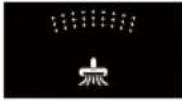 | Standard Mode: Standard suction power and spray water. |
 | Max/Mopping Mode: Maximum suction power and spray water for deeper cleaning. |
 | Suction Mode: Absorbs water only with no spray. |
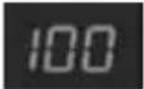 | Battery Status: Indicates the battery level. |
 | Tilt Vacuum indicator flashing: The appliance is standing upright, recline the appliance for operation. |
 | The appliance is self-cleaning. |
 | Battery indicator turning red: Battery power low and requires charging. |
 | The appliance is air drying. |
 | Dirty water tank is full, needs to be emptied. |
 | Clean water tank is lack of water, please refill. Add cleaning solution to clean water per manufacturers instructions. |
 | Brush roller stalled or tangled, remove the blockages. |
RANGE OF USAGE
- Use on indoor hard floors only, such as vinyl, tile, sealed wood, etc. Use on a rough surface may not get the best performance.

WARNING
- Do not pick up anything that is burning or smoking, such as cigarettes, matches, or hot ashes.
- Do not use to pick up ammable or combustible materials (lighter fluid, gasoline, kerosene, etc.) or use in areas where they may be present.
- Keep your appliance away from heat sources, such as a replace or heater, to avoid causing damage.
ASSEMBLY INSTRUCTIONS

Please pay special attention to these hazard alert boxes, and follow any instructions given. WARNING statements alert you to such hazards as fire, electric shock, burns and personal injury. CAUTION statements alert you to such hazards as personal injury and/or property damage.
Before assembling the hard floor wet/dry vacuum cleaner, check the PACKING LIST (Page 2). Use this list to verify that you have received all the components of your new Kenmore Hard Floor Wet/Dry Vacuum Cleaner.
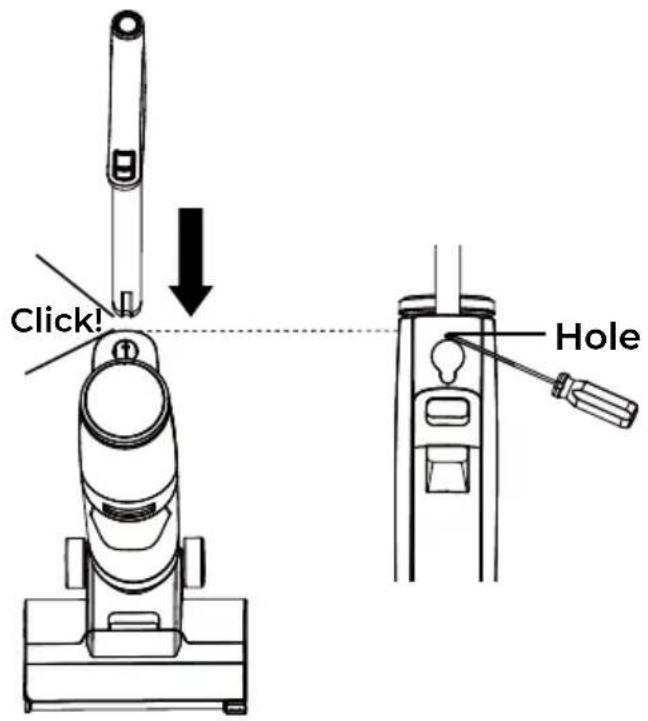
- Insert the handle into the top of the main body until you hear a "click".
To remove: Press the hole located on the back of the main body with a tool (like a screwdriver) and lift the handle at the same time.
text_image
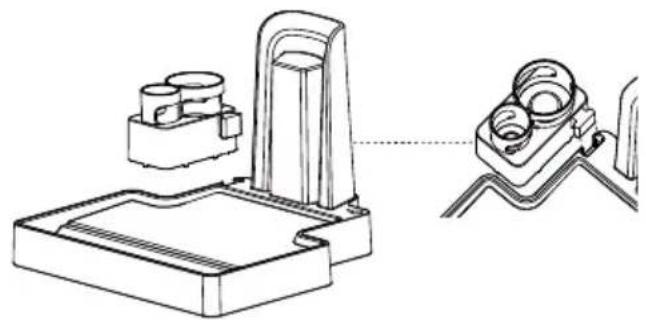
Click! Hole- Align the accessory holder with the slot of the storage base. Slide down the accessory holder until it secures into place. The brush roller and cleaning tool can be stored in the accessory holder.
natural_image
Technical line drawing of a mechanical device with two views (top and side), no text or symbols presentCHARGING AND BRUSH ROLLER AIR DRYING

WARNING
Before charging make sure the hard floor cleaner is turned OFF. Ensure the dirty water tank is empty.
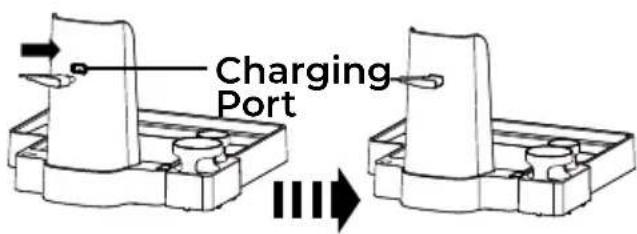
- Insert the charging adapter into the charging port located on the back of the storage base.
CHARGING AND BRUSH ROLLER AIR DRYING
text_image
Charging Port- Place the hard floor cleaner onto the storage base.
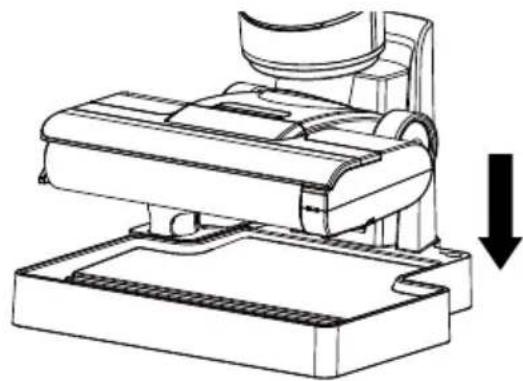
natural_image
Technical line drawing of a mechanical assembly with a downward arrow indicating motion (no text or symbols present)- Plug the charging adapter into a wall outlet.
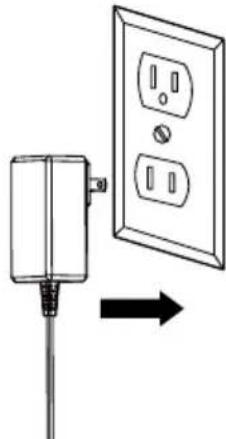
natural_image
Diagram showing a wall-mounted electrical outlet connected to a power plug, with an arrow indicating direction (no text or symbols present)-
The hard floor cleaner begins to charge. The battery indicator on the display screen flashes continuously. The battery status indicator turns on, while the cleaner is being charged.
-
The hard floor cleaner starts roller air drying automatically while being charged. The air dry light on the storage base illuminates steadily. The roller air drying indicator on the display screen flashes continuously.
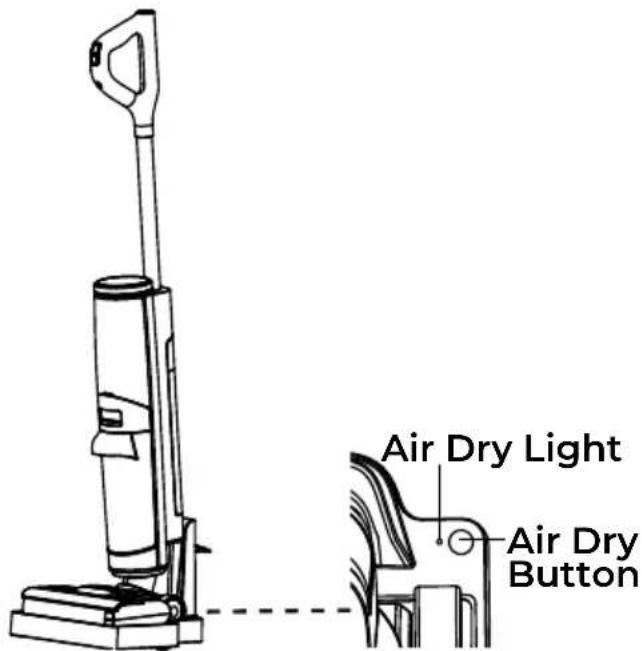
text_image
Air Dry Light Air Dry Button- Optional: If you want to stop roller from air drying, press the air dry button located on the storage base as shown. The air dry light turns off. The roller air drying indicator on the display screen turns off.
NOTE: The charging process continues.
- When the hard floor cleaner has been fully charged (100%) and the roller air drying has completed, the display screen turns off.
NOTE: Make sure the hard floor cleaner is fully charged before using for the first time. It may take up to 4 hours to charge completely if fully discharged.
NOTE: If the cleaner completes charging, but the air drying has not completed, the battery indicator and battery status indicator will turn off first. The roller air drying continues. It takes 4 hours for the brush roller to air dry completely every time.
CHARGING AND BRUSH ROLLER AIR DRYING
NOTE: If the battery indicator and the roller air drying indicator on the display screen do not lash when charging, ensure that:
- The charging plug is plugged into the power supply properly.
- The electrical supply at the outlet is powered on.
- The charging adapter is fully inserted into the charging port.
NOTE: Never charge the hard loor cleaner in temperatures above 104°F (40°C) or below 39.2°F (4°C). It is normal for the charger to become warm when charging.
WARNING
- Only charge the hard floor cleaner with the adapter supplied by the manufacturer.
• To avoid tripping hazards, place the hard floor cleaner on the storage base near a wall during charging. - During long periods of not being used, the hard floor cleaner must be charged once every 3 months for optimal performance. It may take 4 ± 0.5 hours for a full charge.
OPERATING INSTRUCTIONS

CAUTION
Moving parts! To reduce the risk of personal injury, DO NOT touch the brush roller when hard floor cleaner is on. Always turn off before servicing. Use caution when operating near children or pets.
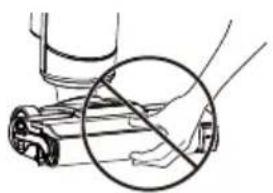
natural_image
Illustration of a hand holding a cylindrical object with a circular arrow indicating no text or symbols (no readable text or symbols)FILLING THE CLEAN WATER TANK
- Press the clean water tank (CWT) release button to remove the clean water tank from the cleaner.
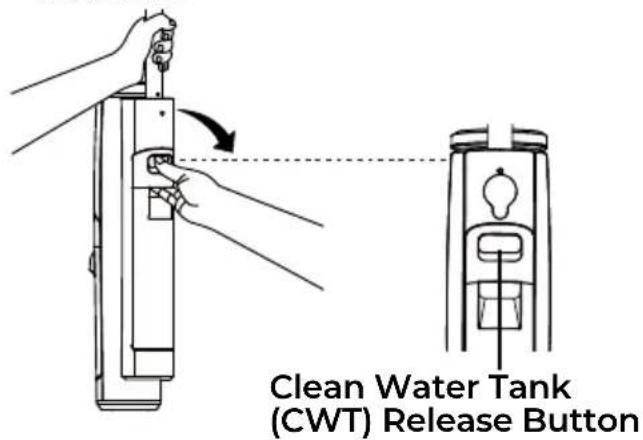
text_image
Clean Water Tank (CWT) Release Button- Open the tank cap on the back of the clean water tank.
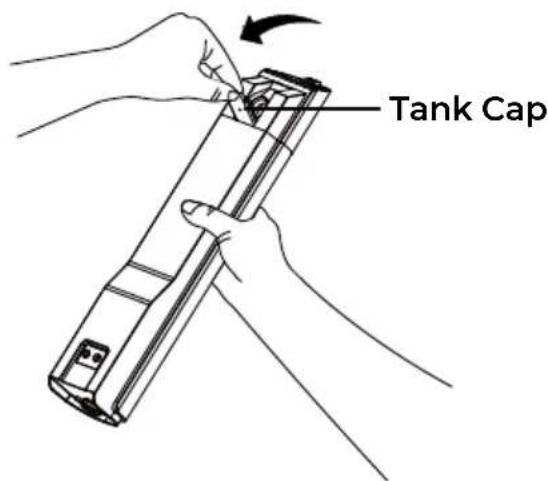
text_image
Tank CapFILLING THE CLEAN WATER TANK
- Fill the clean water tank with tap water and formula. Ensure the correct proportion of water and cleaning formula is used by referring to the formula label. Do not exceed filling the clean water tank over the Max line indicated on the clean water tank.
NOTE: The recommended ratio of cleaning formula and water is 1:20.
- Place the clean water tank back into the hard floor cleaner. You should hear a "click" if done correctly.
Click!
- Close the tank cap back into place.
WARNING
• To reduce the risk of fire and electric shock due to internal component damage, use the provided cleaning formula intended for use with the hard floor cleaner. Once depleted, call 1-877-531-7321 (US) / 1-844-608-3081 (CA) to purchase a new cleaning formula.
- Only use water under 104F° (40°C). DO NOT USE HOT WATER.
- Ensure the water level in the CWT does not exceed the Max line.
USING YOUR HARD FLOOR WET/DRY VACUUM CLEANER
Before vacuuming, check that the brush roller is clear from any obstructions such as hair or sharp objects to avoid scratching ☐ors, and that the dirty water tank is empty.
NOTE: It is recommended to dry vacuum rst and remove any large loose debris.
- Recline the hard door cleaner by placing a foot on the door head and lowering the main body towards the door.
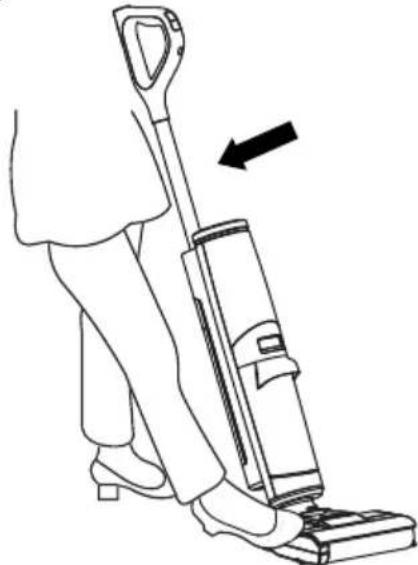
natural_image
Line drawing of a person using a vacuum cleaner (no text or symbols present)- Turn the hard door cleaner ON by pressing the power button. The cleaner starts in standard mode by default.
NOTE: When the hard door cleaner is in the upright position, pressing the power button cannot start the cleaner. The tilt vacuum indicator on the display screen will lash for 5 seconds, please recline the cleaner for operation.
- Pressing the mode button will switch the cleaner into: Standard Mode→Max/Mopping Mode→Suction Mode→Standard Mode. The corresponding indicators
on the display screen will illuminate to indicate the mode. Refer to page 10.
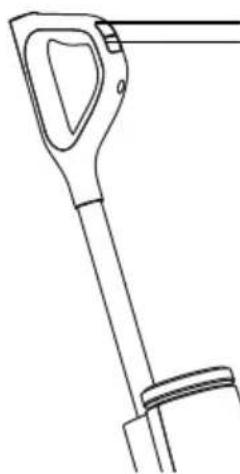
natural_image
Line drawing of a mechanical tool or device with handle and lever (no text or symbols)Mode Button Power Button
- Move the hard door cleaner slowly forwards and backwards.
NOTE: Placing the hard door cleaner in the upright position while operating the appliance will turn the cleaner off.
NOTE: When the battery status indicator —ashes and the battery indicator changes from green to red, the battery charge is low and needs recharging. The hard door cleaner will automatically turn off when the battery charge is depleted.
-
After 20 minutes of continuous cleaning, the brush roller self-cleaning indicator will ash. Although the hard door wet/dry vacuum cleaner will continue to operate, it is recommended to clean the brush roller when the brush roller self-cleaning indicator ashes. See instructions in BRUSH ROLLER SELF-CLEANING (page 19-20).
-
Empty the dirty water tank when the DWT full indicator lashes. See instructions in EMPTYING THE DIRTY WATER TANK. Clean the dirty water tank immediately after use to avoid odor.
USING YOUR HARD FLOOR WET/DRY VACUUM CLEANER
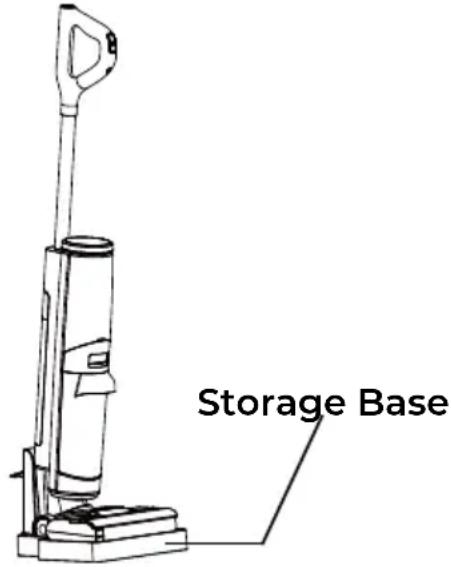
- Once you have completed cleaning, press the power button to stop the hard floor cleaner and put the hard floor cleaner back in the upright position.
NOTE: After pressing the power button, the brush roller stops immediately. The cleaner still keeps on to vacuum dirty water on the floor. The cleaner will shut off after 3 seconds.
text_image
Storage Base- Place the hard floor cleaner back onto the storage base to charge and air dry brush roller.
WARNING
- Do not vacuum foamed liquid.
- This hard floor cleaner is to be used on indoor hard floors only, such as vinyl, tile, sealed wood, etc. Use on a rough surface may not get the best performance.
- During operation, make sure the water level in the DWT does not exceed the Max line.
• To vacuum water left on the surface, the hard floor cleaner will switch off in 3 seconds after power off.
EMPTYING THE DIRTY WATER TANK
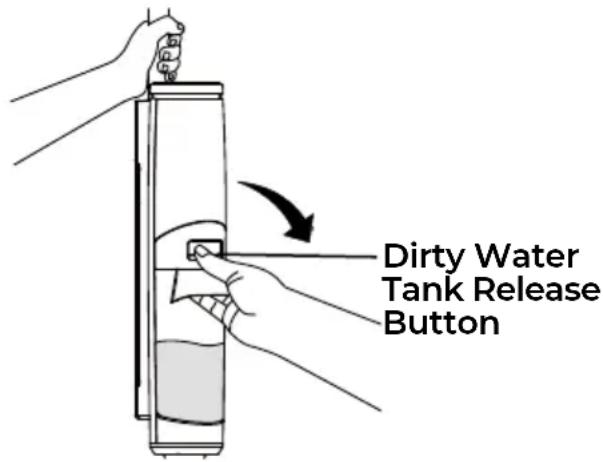
Empty the dirty water tank when the DWT full indicator flashes. During normal use, debris may accumulate in the dirty water tank. For best performance, empty and rinse the dirty water tank after each use. Never operate the hard floor cleaner without the dirty water tank and filter in place.
Before emptying the dirty water tank, ensure the appliance is turned off.
- Remove the dirty water tank (DWT) from the hard floor cleaner by pressing the dirty water tank release button.
text_image
Dirty Water Tank Release ButtonEMPTYING THE DIRTY WATER TANK
-
Pull the tank lid up and empty the dirty water tank. Clean the dirty water tank with the cleaning tool.
-
Reinstall the tank lid to the dirty water tank, and then place the HEPA filter onto the tank lid.
-
Remove the HEPA filter from the tank lid. If needed, wash the HEPA filter with clean water.
NOTE: Allow the wet filter to air dry completely before storing or reinstalling onto the tank lid. The HEPA filter does not need to be washed every time. Wash the HEPA filter when there is a lack of suction and or visibly dirty.
- Place the dirty water tank back into the hard floor cleaner until you hear a "click". Ensure the dirty water tank is secured in place.
Click!
- Wash the tank lid and fill tubes with clean water and allow to air dry. Make sure the visible dirt on the fill tubes is cleaned up.
Fill Tubes
MAINTENANCE AND CARE
Always follow all safety precautions when performing maintenance to the hard floor wet/dry vacuum cleaner.

WARNING
To reduce the risk of an electric shock, ensure the hard floor cleaner is turned off before performing any maintenance.

WARNING
Do not operate the hard floor cleaner without filters in place.
BRUSH ROLLER SELF-CLEANING

WARNING
- Ensure the storage base is plugged in.
-
Before brush roller self-cleaning, clean the DWT and ensure the water level in the CWT is above 40% full.
-
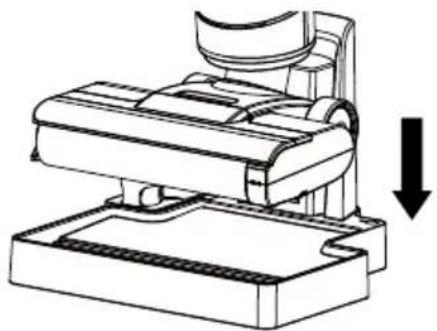
Place the hard floor cleaner on the storage base after use. The hard floor cleaner starts roller air drying automatically while being charged. Refer to page 12-14 for more details.
natural_image
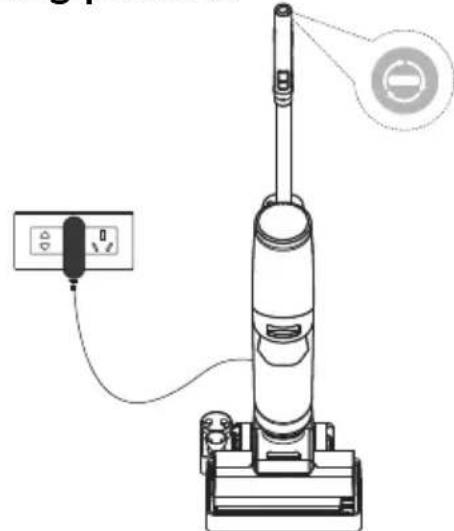
Technical line drawing of a mechanical assembly with a downward arrow indicating motion (no text or symbols present)- Press the self-cleaning button on the top of the handle to start brush roller self-cleaning.
NOTE: The brush roller self-cleaning lasts for 2 minutes every time. If needed, repeat the self-cleaning process.
natural_image
Line drawing of a vacuum cleaner with attached power outlet and control panel (no text or symbols)- While the brush roller is self-cleaning, the hard floor cleaner will stop roller air drying. The air dry light on the storage base and the roller air drying indicator on the display will turn off. The brush roller self-cleaning indicator on the display will turn on, and the suction power indicator will illuminate intermittently.
BRUSH ROLLER SELF-CLEANING
NOTE: While the brush roller is self-cleaning, press the self-cleaning button again, self-cleaning will stop and the DWT full indicator will flash. Empty and clean the dirty water tank immediately to avoid odor, see instructions in EMPTYING THE DIRTY WATER TANK (page 17-18).
-
When the hard floor cleaner completes brush roller self-cleaning, the brush roller self-cleaning indicator turns off. The cleaner returns to charging and roller air drying state.
-
Empty and clean the dirty water tank.
NOTE: During brush roller self-cleaning operation, if the brush roller tangled indicator, or CWT lack of water indicator, or DWT full indicator flashes, self-cleaning will stop. Please address it promptly.
-
Place the hard floor cleaner on the storage base to air dry the brush roller for about 4 hours after cleaning.
-
Ensure the dock station is plugged in. The cleaner will automatically charge and air dry the brush roller. See instructions in CHARGING AND BRUSH ROLLER AIR DRYING (page 12-14).
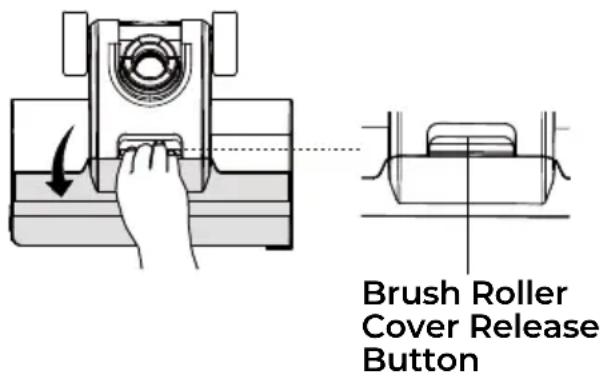
- Grab the brush roller cover while pressing the brush roller cover release button and pull upward to remove the brush roller cover.
text_image
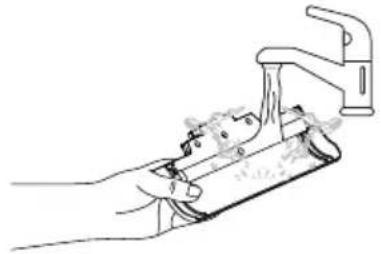
Brush Roller Cover Release Button- Rinse the brush roller cover with clean water.
natural_image
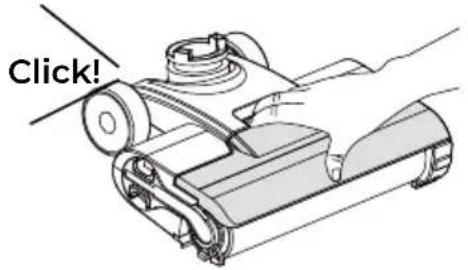
Line drawing of a hand using a tool to clean or install a component, no text or symbols present- Replace the brush roller cover to the floor head until you hear a "click". When replacing, always latch the brush cover into place to avoid leakage.
text_image
Click!CLEANING & REPLACING THE BRUSH ROLLER
- Remove the brush roller cover from the floor head. See instructions in CLEANING THE BRUSH ROLLER COVER (page 20-21).
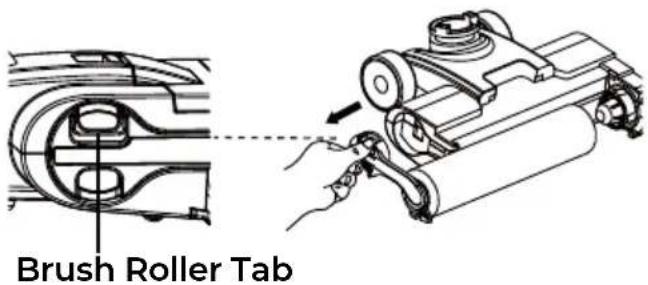
- Remove the brush roller by grabbing the brush roller tab and pulling upward.
text_image
Brush Roller Tab- Take out the brush roller cleaning tool from the handle of the cleaning tool. Using the brush roller cleaning tool, remove the hair and debris wrapped around the roller. After use, put the brush roller cleaning tool back to the handle.
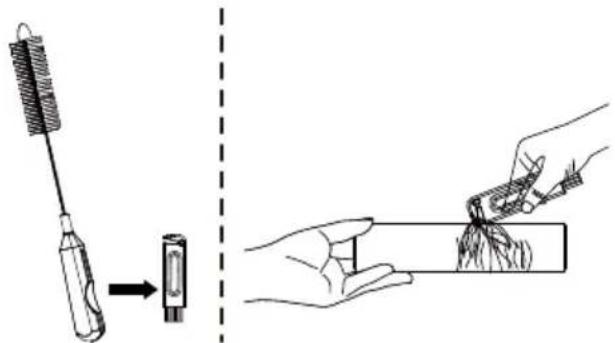
natural_image
Illustration showing a tool being processed from a small component to a hand holding a rectangular object (no text or symbols present)- Wash the brush roller with clean water.
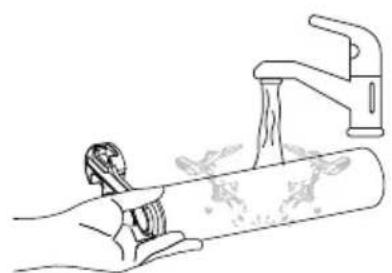
natural_image
Line drawing of a hand using a wrench to lift a pipe with water, next to a faucet (no text or symbols)- Put the brush roller into the accessory holder, and allow it to dry completely before reinstalling.
CLEANING & REPLACING THE BRUSH ROLLER
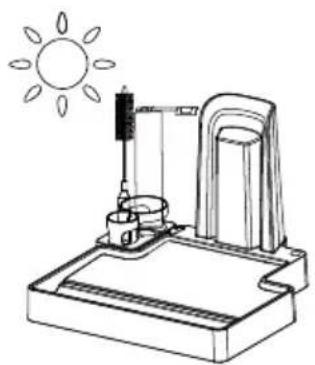
natural_image
Simple line drawing of a sun heating an object on a base, with no text or symbols present.- Reassemble the other brush roller to the floor head until you hear a "click".
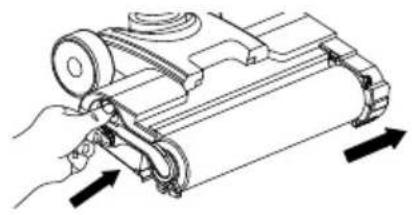
natural_image
Technical line drawing of a mechanical device with directional arrows indicating movement or force (no text or symbols present)- Replace the brush roller cover to the floor head until you hear a "click".
HARD FLOOR WET/DRY VACUUM CLEANER STORAGE
Store your hard floor wet/dry vacuum cleaner in a protected, dry area.
Since the hard floor cleaner uses water, it must not be stored where there is danger of freezing. Freezing will damage internal components and may void the warranty.
NOTE: It is recommended to store the cleaner within a temperature range between 39.2°F (4°C) and 104°F (40°C).

WARNING
To reduce the risk of fire, electric shock or injury, turn OFF the appliance and disconnect plug from electrical outlet before performing maintenance or troubleshooting on the storage base.
TROUBLESHOOTING
Review the table for solutions to minor performance problems. Any service needed, other than maintenance described in this Use & Care Guide, should be performed by a qualified service dealer.

WARNING
Ensure the hard floor wet/dry vacuum cleaner is turned off before performing maintenance to it. Failure to do so could result in electrical shock or personal injury.
| PROBLEM | POSSIBLE CAUSE SOLUTION | |
| The hard floor cleaner does not turn on. | Battery may be depleted. | Charge the hard floor cleaner as instructed on page 12-14. |
| Auto protection for overheating. | Cool the hard floor cleaner down and restart it. | |
| Battery indicator or roller air drying indicator does not flash when charging. | Charging plug is not plugged into outlet firmly. | Be sure the charging plug is plugged in properly to the outlet, and the charging adapter is inserted into the charging port of the storage base. |
| Charging adapter is not fully plugged into the charging port. | Be sure the charging adapter is fully inserted into the charging port of the storage base. | |
| The electrical outlet is switched off. | Ensure that the outlet is supplying power to the charger. | |
| Brush roller does not turn. | Brush roller is jammed. | Remove obstruction. Follow cleaning the brush roller instructions on page 21-22. |
| Brush roller is not installed properly. | Remove the brush roller and reinstall as instructed on page 21-22. | |
| Brush roller tangled indicator is blinking. | The brush roller is blocked. | Remove blockages. Follow cleaning the brush roller instructions on page 21-22. |
| DWT full of water indicator is blinking. | The dirty water in DWT has reached the MAX line. | Empty the dirty water and then reinstall the DWT. |
| The fill tubes are dirty. | Clean up the visible dirt on the fill tubes. | |
| CWT lack of water indicator is blinking. | CWT is empty. | Refill the CWT. |
TROUBLESHOOTING
| All indicators are off in operation. | Battery overheated or malfunctioned. | Cool the hard floor cleaner down and restart it. |
| Battery indicator turns red. | The hard floor cleaner is in low battery. | Charge the hard floor cleaner as instructed on page 12-14. |
| The hard floor cleaner is not picking up or suction power is weak. | Dirty water tank is full. Empty the DWT. | |
| The HEPA filter is dirty or not installed. | Clean and dry the HEPA filter. Follow filter cleaning instructions on page 18. | |
| The HEPA filter needs to be replaced. | To purchase parts call 1-877-531-7321 (US) / 1-844-608-3081 (CA). | |
| Debris channel is blocked. | Clean the debris channel and DWT. | |
| Battery may be depleted. | Charge the hard floor cleaner as instructed on page 12-14. | |
| Dirty water tank is not installed properly. | Check the DWT for correct installation and ensure it is snapped firmly in place. | |
| Dirty water escapes from the cleaner. | HEPA filter is missing or installed incorrectly. | Check the filter for correct installation. See page 18. |
| HEPA filter is damaged and needs to be replaced. | To purchase a replacement filter, call 1-877-531-7321 (US) / 1-844-608-3081 (CA). | |
| Dirty water tank is full or is installed incorrectly. | Empty the DWT or position the DWT correctly and snap firmly into place. | |
| The hard floor cleaner turns off on its own. | Battery may be depleted. | Charge the hard floor cleaner as instructed on page 12-14. |
TABLA DE CONTENIDOS
Cleva North America, Inc., Greenville SC 29607
PIEZAS Y CARACTERÍSTICAS
natural_image
Line drawing of a vacuum cleaner with a cylindrical body and base (no text or symbols)Cuerpo principal
natural_image
Technical line drawing of a mechanical component with a cylindrical top and rectangular base (no text or symbols)natural_image
Technical line drawing of a mechanical assembly with two views (top and side), no text or symbols present.CARGA Y SECADO AL AIRE DEL RODILLO DEL CEPILLO
ADVERTENCIA
natural_image
Technical line drawing of a mechanical device with a downward arrow indicating motion or assembly (no text or symbols present)natural_image
Diagram showing a wall-mounted electrical outlet connected to a power plug, with an arrow indicating direction (no text or symbols present)natural_image
Line drawing of a hand holding a device with a circular annotation highlighting a crossed-out part (no text or symbols present)LLENADO DEL DEPÓSITO DE AGUA LIMPIA
natural_image
Two-step illustration showing a hand using a dropper to lift a cup, with no text or symbols present.natural_image
Illustration showing a hand holding a tool and a faucet with water, separated by a dashed line and sun symbol (no text or labels)natural_image
Technical line drawing of a mechanical assembly with a downward arrow indicating motion (no text or symbols present)natural_image
Line drawing of a vacuum cleaner with a power outlet and electrical plug (no text or symbols)natural_image
Diagram showing a hand pressing down on a mechanical device with a close-up view of the component (no text or symbols present)natural_image
Line drawing of a hand holding a tool or device with a handle, no text or symbols presentCleva North America, Inc., Greenville SC 29607
PIÈCES ET CARACTÉRISTIQUES
natural_image
Line drawing of a handheld tool or device with handle and lever (no text or symbols)Poignée
natural_image
Line drawing of a vacuum cleaner with a cylindrical body and base mount (no text or symbols)Corps principal
natural_image
Technical line drawing of a mechanical component with a cylindrical top and base (no text or symbols)Base de rangement