RCPSU-500 - Vacuum packaging machines Royal Catering - Free user manual and instructions
Find the device manual for free RCPSU-500 Royal Catering in PDF.
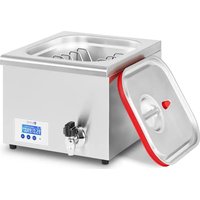


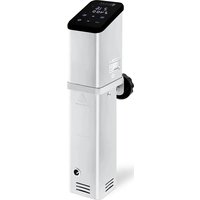
| Product type | Immersion circulator for sous vide cooking |
| Model | RCPSU-500 |
| Brand | Royal Catering |
| Dimensions (L x W x H) | 360 x 400 x 220 mm |
| Weight | 9.5 kg |
| Power supply | 230 V ~ / 50 Hz |
| Rated power | 500 W |
| Tank capacity | 16 L |
| Temperature range | 30 - 95 °C |
| Protection class | I |
| IP protection rating | IPX0 |
| Main material | Stainless steel and heat-resistant plastic |
| Main functions | Sous vide cooking with precise temperature and time control, timer, automatic shut-off, standby |
| Control panel | Digital display with On/Off, SET, increase/decrease buttons |
| Safety | Automatic shut-off in case of overheating, dry-run protection, grounding via terminal |
| Maintenance and cleaning | Clean with a soft cloth and mild detergent; do not immerse; clean the filter regularly |
| Spare parts and repairability | Repairs exclusively by the manufacturer's service; use original parts |
| Included accessories | Food bag holder |
| General information | Indoor use only; max ambient temperature 40 °C; max relative humidity 85% |
Frequently Asked Questions - RCPSU-500 Royal Catering
User questions about RCPSU-500 Royal Catering
0 question about this device. Answer the ones you know or ask your own.
Ask a new question about this device
Download the instructions for your Vacuum packaging machines in PDF format for free! Find your manual RCPSU-500 - Royal Catering and take your electronic device back in hand. On this page are published all the documents necessary for the use of your device. RCPSU-500 by Royal Catering.
USER MANUAL RCPSU-500 Royal Catering
| PRODUKTNAME SOUS | -VIDE-GARER |
| PRODUCT NAME SOUS | -VIDE |
| NAZWA PRODUKTU CYRKULATOR DO SOUS | -VIDE |
| NÁZEV VÝROBKU SOUS | -VIDE HRNEC |
| NOM DU PRODUIT THERMOPLONGEUR CUISINE | |
| NOME DEL PRODOTTO DISPOSITIVO DI COTTURA SOTTOVUOTO | |
| NOMBRE DEL PRODUCTO SOUS VIDE | |
| MODELL | |
| PRODUCT MODEL | |
| MODEL PRODUKTU | RCPSU -500 |
| MODEL VÝROBKU | RCPSU -700 |
| MODÈLE | |
| MODELLO | |
| MODELO | |
| IMPORTEUR | |
| IMPORTER | |
| IMPORTER | |
| DOVOZCE | EXPONDO POLSKA SP. Z O.O. SP. K. |
| IMPORTATEUR | |
| IMPORTATORE | |
| IMPORTADOR | |
| ADRESSE VON IMPORTEUR | |
| IMPORTER ADDRESS | |
| ADRES IMPORTERA | |
| ADRESA DOVOZCE | UL. NOWY KISIELIN-INNOWACYJNA 7, 66002 ZIELONA GÓRA | POLAND, EU |
| ADRESSE DE L'IMPORTATEUR | |
| INDIRIZZO DELL'IMPORTATORE | |
| DIRECCIÓN DEL IMPORTADOR | |
Technical data
Technical data
| Parameter description | Parameter value | |
| Product name | SOUS-VIDE | |
| Model | RCPSU-500 | RCPSU-700 |
| Rated voltage [V~] / Frequency [Hz] | 230/50 | |
| Rated power [W] | 500 | 700 |
| Capacity [L] | 16 | 24 |
| Temperature range [°C] | 30-95 | 30-95 |
| Protection class | I | |
| Protection rating IP | IPX0 | |
| Dimensions [Width x Depth x Height; mm] | 360x400x220 580x360x290 | |
| Weight [kg] | 9,5 | 13 |
1. General description
The user manual is designed to assist in the safe and trouble-free use of the device. The product is designed and manufactured in accordance with strict technical guidelines, using state-of-the-art technologies and components. Additionally, it is produced in compliance with the most stringent quality standards.
DO NOT USE THE DEVICE UNLESS YOU HAVE THOROUGHLY READ AND UNDERSTOOD THIS USER MANUAL.
To increase the product life of the device and to ensure trouble-free operation, use it in accordance with this user manual and regularly perform maintenance tasks. The technical data and specifications in this user manual are up to date. The manufacturer reserves the right to make changes associated with quality improvement. The device is designed to reduce noise emission risks to a minimum, taking into account technological progress and noise reduction opportunities.
Legend
CE | The product satisfies the relevant safety standards.Read instructions before use. |
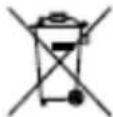 | The product must be recycled. |
 | WARNING! or CAUTION! or REMEMBER! Applicable to the given situation.(general warning sign) |
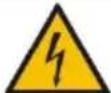 | ATTENTION! Electric shock warning! |
 | ATTENTION! Hot surface, risk of burns! |
 | Only use indoors. |

PLEASE NOTE! Drawings in this manual are for illustration purposes only and in some details may differ from the actual product.
The original operation manual is written in German. Other language versions are translations from the German.
2. Usage safety

ATTENTION! Read all safety warnings and all instructions. Failure to follow the warnings and instructions may result in electric shock, fire and/or serious injury or even death.
The terms "device" or "product" are used in the warnings and instructions to refer to .
2.1. Electrical safety
a) The plug must fit the socket. Do not modify the plug in any way. Using original plugs and matching sockets reduces the risk of electric shock. b) Avoid touching earthed elements such as pipes, heaters, boilers and refrigerators. There is an increased risk of electric shock if the earthed device is exposed to rain, comes into direct contact with a wet surface or is operating in a damp environment. Water getting into the device increases the risk of damage to the device and of electric shock. c) Do not touch the device with wet or damp hands. d) Use the cable only for its designated use. Never use it to carry the device or to pull the plug out of a socket. Keep the cable away from heat sources, oil, sharp edges or moving parts. Damaged or tangled cables increase the risk of electric shock. e) If using the device in a damp environment cannot be avoided, a residual current device (RCD) should be applied. The use of an RCD reduces the risk of electric shock. f) Do not use the device if the power cord is damaged or shows obvious signs of wear. A damaged power cord should be replaced by a qualified electrician or the manufacturer's service centre. g) To avoid electric shock, do not immerse the cord, plug or device in water or other liquids. Do not use the device on wet surfaces. h) ATTENTION! DANGER TO LIFE! While cleaning, never immerse the device in water or other liquids. i) Do not use in very humid environments or in the direct vicinity of water tanks. j) Prevent the device from getting wet. Risk of electric shock!
2.2. Safety in the workplace
a) Make sure the workplace is clean and well lit. A messy or poorly lit workplace may lead to accidents. Try to think ahead, observe what is going on and use common sense when working with the device. b) Do not use the device in a potentially explosive environment, for example in the presence of flammable liquids, gases or dust. c) If you discover damage or irregular operation, immediately switch the device off and report it to a supervisor without delay. d) If there are any doubts as to the correct operation of the device, contact the manufacturer's support service. e) Only the manufacturer's service point may repair the device. Do not attempt any repairs independently! f) In case of fire, use a powder or carbon dioxide (CO2) fire extinguisher (one intended for use on live electrical devices) to put it out. g) Children or unauthorised persons are forbidden to enter a work station. (A distraction may result in loss of control over the device).
h) Use the device in a well-ventilated space. i) Please keep this manual available for future reference. If this device is passed on to a third party, the manual must be passed on with it. j) Keep packaging elements and small assembly parts in a place not available to children. k) Keep the device away from children and animals. l) If this device is used together with another equipment, the remaining instructions for use shall also be followed.

Remember! When using the device, protect children and other bystanders.
2.3. Personal safety
a) Do not use the device when tired, ill or under the influence of alcohol, narcotics or medication which can significantly impair the ability to operate the device. b) The device is not designed to be handled by persons (including children) with limited mental and sensory functions or persons lacking relevant experience and/or knowledge unless they are supervised by a person responsible for their safety or they have received instruction on how to operate the device. c) When working with the device, use common sense and stay alert. Temporary loss of concentration while using the device may lead to serious injuries. d) To prevent the device from accidentally switching on, make sure the switch is on the OFF position before connecting to a power source. e) The device is not a toy. Children must be supervised to ensure that they do not play with the device. f) Do not put your hands or other items inside the device while it is in use! g) NOTE: During operation, some elements of the device become very hot – scalding hazard! Do not touch these elements with your bare hands! Take out cooked meals using tongs or other kitchenware.
2.4. Safe device use
a) Do not use the device if the ON/OFF switch does not function properly (does not switch the device on and off). Devices which cannot be switched on and off using the ON/OFF switch are hazardous, should not be operated and must be repaired. b) Disconnect the device from the power supply before commencement of adjustment, cleaning and maintenance. Such a preventive measure reduces the risk of accidental activation.
c) When not in use, store in a safe place, away from children and people not familiar with the device who have not read the user manual. The device may pose a hazard in the hands of inexperienced users.
d) Keep the device in perfect technical condition. Before each use check for general damage and especially check for cracked parts or elements and for any other conditions which may impact the safe operation of the device. If damage is discovered, hand over the device for repair before use.
e) Keep the device out of the reach of children.
f) Device repair or maintenance should be carried out by qualified persons, only using original spare parts. This will ensure safe use.
g) To ensure the operational integrity of the device, do not remove factory-fitted guards and do not loosen any screws.
h) Do not move, adjust or rotate the device in the course of work.
i) Do not leave this appliance unattended while it is in use.
j) Clean the device regularly to prevent stubborn grime from accumulating.
k) The device is not a toy. Cleaning and maintenance may not be carried out by children without supervision by an adult person.
I) Do not run the device when empty.
m) It is forbidden to interfere with the structure of the device in order to change its parameters or construction.
n) Keep the device away from sources of fire and heat.
o) Do not cover the ventilation openings!
p) The appliance's heating elements remain hot for some time after being turned off. Be careful to avoid burns!
q) Do not use the device without water.
r) Do not add water while the device is active, turn it off first, add water as required and turn the device on again!
s) When removing the lid, hot steam may be released – scalding risk!
t) Do not place food directly in the water heated by the circulator. Food should be placed in a special vacuum bag.
u) When using the device, make sure that you do not overfill it. Exceeding the maximum capacity of the device may damage it.

ATTENTION! Despite the safe design of the device and its protective features, and despite the use of additional elements protecting the operator, there is still a slight risk of accident or injury when using the device. Stay alert and use common sense when using the device.
3. Use guidelines
The device is designed for cooking food placed in vacuum-sealed bags at a controlled water temperature.
The user is liable for any damage resulting from unintended use of the device.
3.1. Device description
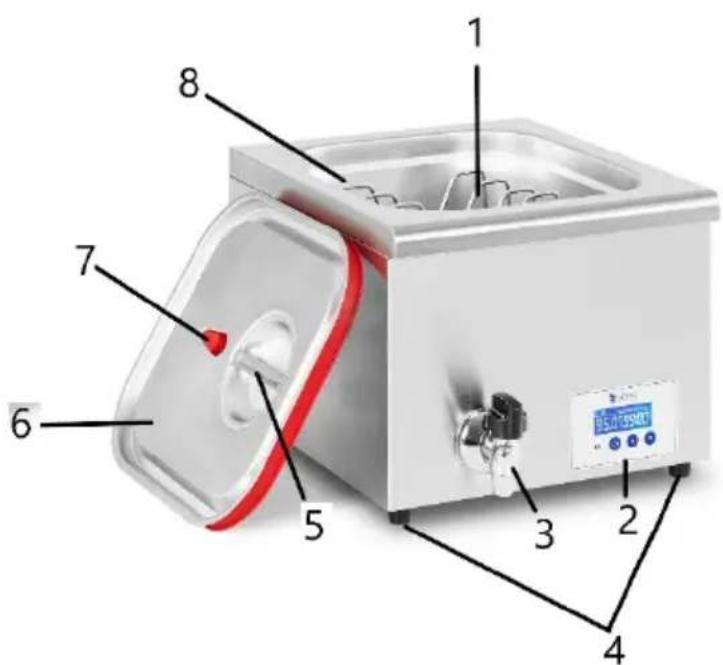
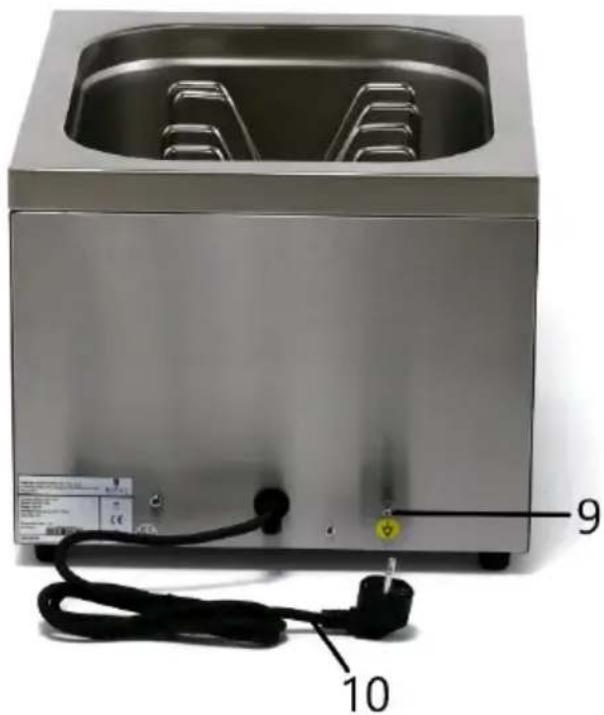
- Rack for food bags
- Control panel
- Tap
- Feet
- Cover handle
- Cover
- Air vent
- Water tank
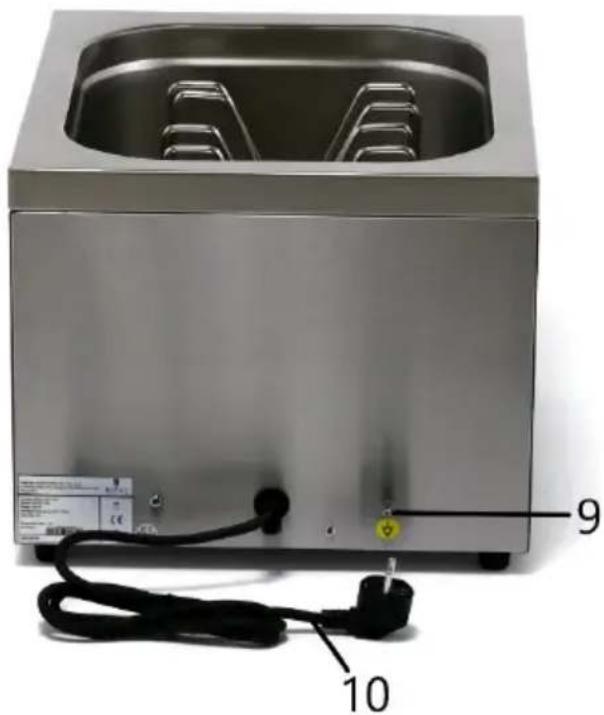
- Earthing clamp
- Power cord
Description of the control panel
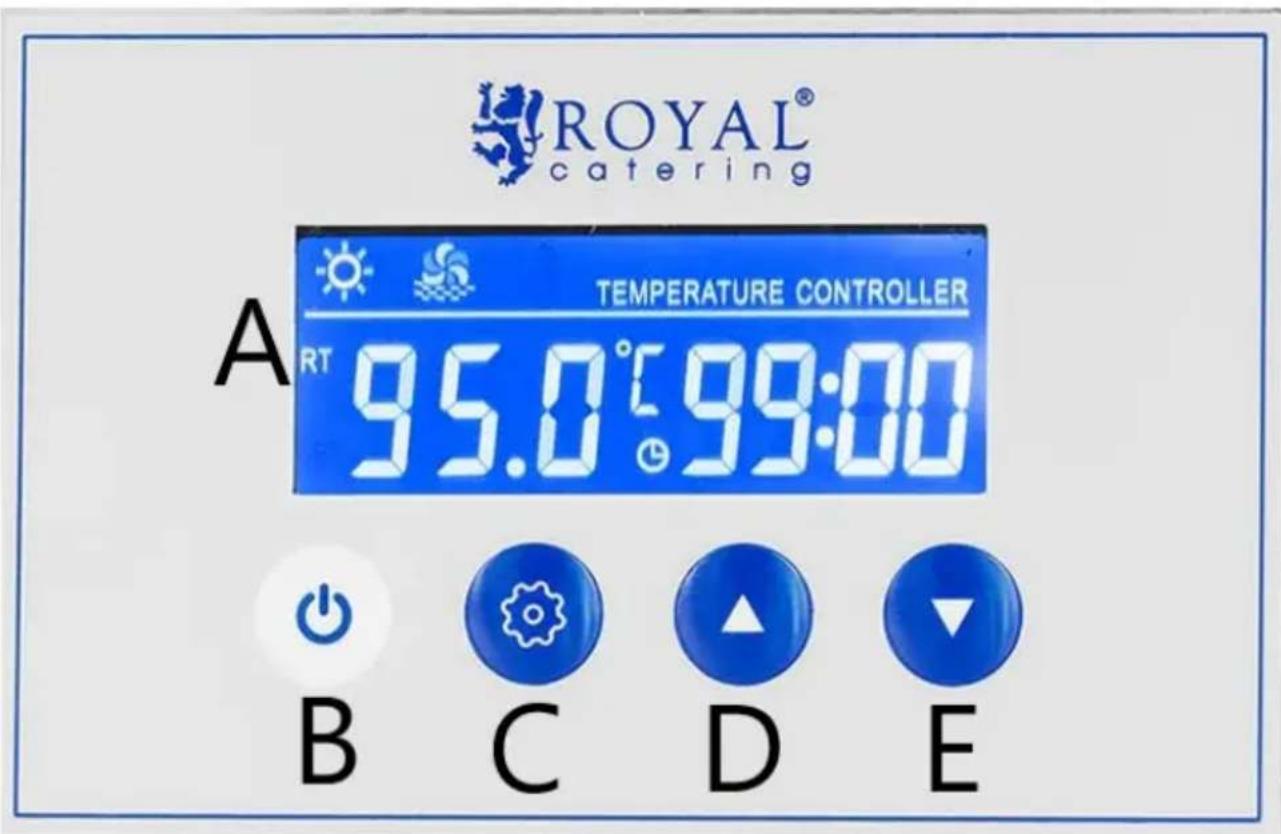
A. Display B. On/Off button C. "SET" button D. Value increasing button E. Value decrease button
3.2. Preparing for use
APPLIANCE LOCATION
The temperature of environment must not be higher than 40° C and the relative humidity should be less than 85%. Ensure good ventilation in the room in which the device is being used. There should be at least 10 cm distance between each side of the device and the wall or other objects.
Place the unit on a heat resistant basis!
The device should always be used when positioned on an even, stable, clean, fireproof and dry surface, and be out of the reach of children and persons with limited mental and sensory functions. Position the device such that you always have access to the power plug. The power cord connected to the appliance must be properly grounded and correspond to the technical details on the product label.
Only use the device in a horizontal position. Do not shake the device.
Disassemble the device and all its components and clean them before the first use.
3.3. Device use
Preparation for work
- Ground the device housing, use the grounding terminal located on the back of the griddle.
- Connect the device to the power supply. The device beeps.
- Pour water into the tank. Place the food intended for cooking, packed in vacuum bags on the rack. Please note: Be careful not to overfill the device when pouring water.
- Make sure the vent on the cover is closed.
Operating the device
- Press the On/Off button on the display. The device beeps. The display will activate, showing the current water temperature and the remaining operating time.
- If no button is pressed on the control panel within 5 seconds, the device will start working in accordance with the last memory settings.
- After reaching the set temperature, the device will beep and will start counting down the pre-set operation time.
- When this is the display, the appliance is heating up and the cooking process is active.
- The display cyclically shows the current water temperature for approx. 10 seconds, then the set temperature for approx. 2 seconds.
- Please note: Do not add water to the device while it is working. In order to add water to the device, turn it off first.
- The cover of the device has a vent to avoid hot steam ejection while removing the cover. To avoid burns, the vent is best opened avoiding direct contact with it. It is recommended to wear protective gloves and take particular care when opening the vent and removing the cover.
- Ready meals should be taken out of the water with tongs or other kitchen utensils. Do not put your hands in hot water!
Time and temperature settings
- To set the temperature, press the "SET" button, the symbol "SET" and the last set temperature will flash on the left side of the display. Use the up and down buttons to set the preferred value. To save the entered setting, press the "SET" button and go to the time settings or wait 5 seconds (not pressing any button on the panel!).
- To set the cooking time, press the "SET" button until the icon and the first two digits on the right side of the display start flashing. Use the up and down buttons to set the time. Then press the "SET" button until two consecutive digits start flashing - set the minutes in the same way. Press the "SET" button to save the settings or wait 5 seconds (not pressing any button on the panel!).
- Holding down the up and down buttons increases the speed of changing the parameter.
Standby mode/Device shutdown
- At the end of the countdown, the device will beep 5 times, then it will beep every minute until the user presses any button on the control panel. The device will go into standby mode, i.e. the heater will stop working. The display backlight will flash and the time will be "00:00".
- The device remains in standby mode for up to 4 hours. If during this time the user doesn't press any button on the control panel, the circulator will automatically turn off.
- The device can also be turned off manually with the On/Off button. The display will go blank and the device will beep.
- Disconnect the device from the power supply. Then, empty the water tank by opening the tap and draining the water into a separate vessel. Close the tap.
3.4. Cleaning and maintenance
a) Unplug the mains plug and allow the device to cool completely before each cleaning, adjustment or replacement of accessories, or if the device is not being used. b) Use only non-corrosive cleaners to clean the surface. c) Use only mild, food-safe detergents to wash the device. d) After cleaning the device, all parts should be dried completely before using it again. e) Store the unit in a dry, cool place, free from moisture and direct exposure to sunlight. f) Do not spray the device with a water jet or submerge it in water. g) The device must be regularly inspected to check its technical efficiency and spot any damage. h) Use a soft cloth for cleaning.
i) Do not use sharp and/or metal objects for cleaning (e.g. a wire brush or a metal spatula) because they may damage the surface material of the appliance.
j) Clean the device regularly, preferably after each use.
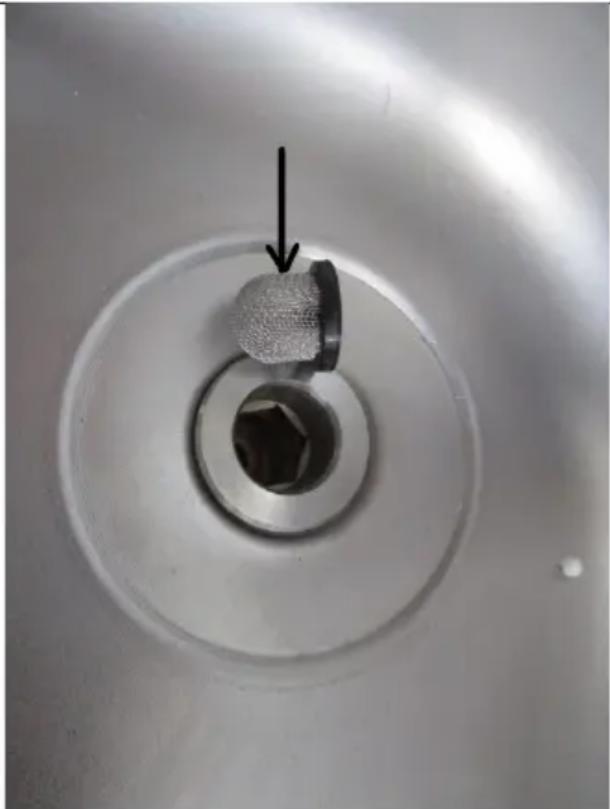
k) Regularly clean the filter, as indicated by the arrow in the figure below. The filter is located at the bottom of the device.
Technical specifications
Technical data
Technical details
Technical data
Technical data
For the disposal of the device please consider and act according to the national and local rules and regulations.
CONTACT
expondo Polska sp. z o.o. sp. k.

- TECHNICAL DATA
- GENERAL DESCRIPTION
- DO NOT USE THE DEVICE UNLESS YOU HAVE THOROUGHLY READ AND UNDERSTOOD THIS USER MANUAL
- LEGEND
- PLEASE NOTE! DRAWINGS IN THIS MANUAL ARE FOR ILLUSTRATION PURPOSES ONLY AND IN SOME DETAILS MAY DIFFER FROM THE ACTUAL PRODUCT
- USAGE SAFETY
- ELECTRICAL SAFETY
- SAFETY IN THE WORKPLACE
- PERSONAL SAFETY
- SAFE DEVICE USE
- USE GUIDELINES
- DEVICE DESCRIPTION
- PREPARING FOR USE
- APPLIANCE LOCATION
- DEVICE USE
- PREPARATION FOR WORK
- OPERATING THE DEVICE
- TIME AND TEMPERATURE SETTINGS
- STANDBY MODE/DEVICE SHUTDOWN
- CLEANING AND MAINTENANCE
- TECHNICAL SPECIFICATIONS
- TECHNICAL DETAILS
- CONTACT
Brand : Royal Catering
Model : RCPSU-500
Category : Vacuum packaging machines