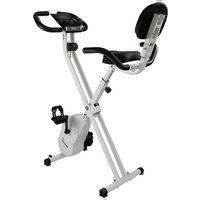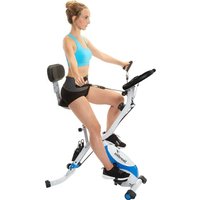
Foldaway X-3000 Bluetooth - Exercise bike Skandika - Free user manual and instructions
Find the device manual for free Foldaway X-3000 Bluetooth Skandika in PDF.


| Product Type | Folding exercise bike |
| Brand | Skandika |
| Model | Foldaway X-3000 Bluetooth |
| Maximum Load Capacity | 120 kg |
| Computer Power Supply | 2 AAA batteries (1.5 V) |
| Resistance System | Manual adjustment via pull cable and pin |
| Braking System | Magnetic support (magnet) |
| Display | LCD computer: time, speed, distance, calories, pulse, odometer |
| Bluetooth | Yes, compatible with Kinomap app |
| Pedals | With adjustable straps |
| Seat | Height-adjustable with backrest |
| Handlebar | With manual pulse sensors |
| Folding and Transport | Release button, transport wheels |
| Warranty | 24 months |
| Maintenance | Clean with a damp cloth, lubricate moving parts |
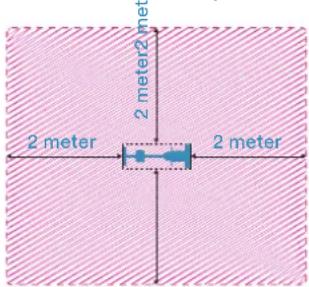
| Safety | Use on a flat surface, 2 m clearance around, indoors only |
Frequently Asked Questions - Foldaway X-3000 Bluetooth Skandika
User questions about Foldaway X-3000 Bluetooth Skandika
0 question about this device. Answer the ones you know or ask your own.
Ask a new question about this device
Download the instructions for your Exercise bike in PDF format for free! Find your manual Foldaway X-3000 Bluetooth - Skandika and take your electronic device back in hand. On this page are published all the documents necessary for the use of your device. Foldaway X-3000 Bluetooth by Skandika.
USER MANUAL Foldaway X-3000 Bluetooth Skandika
natural_image
Exterior view of a Skandika stationary exercise bike with white and blue body (no text or symbols visible)Foldaway X-3000 Bluetooth
Inhalt

skandika.com/service
text_image
Technical diagram of a mechanical assembly with numbered components and exploded view, likely for assembly or manufacturing purposes.text_image
Technical diagram of a mechanical device with numbered components and labeled partsSCHRITT 2
15 Safety precautions
16 Explosion drawing
17 Parts list
18 Set-up instructions
21 Folding and transport/ Illustrations for exercise examples
22 Computer operating instructions
23 Warm-up and cool-down
24 Connection to the Kinomap app via Bluetooth
25 Guarantee conditions

skandika.com/service
Please visit the Skandika Service portal on our website for setup & help videos, FAQs and downloadable instructions.
For more information about Skandika, simply visit our main page www.skandika.com

WARNING
To reduce risk of injury, read and understand this instruction manual before using the device! This machine is intended for home use only in accordance with the instructions provided in this manual. Read the instruction manual carefully before using this device and keep the instruction manual for future use.
SAFETY PRECAUTIONS
- Keep children and pets away from the machine at all times. DO NOT leave children unattended in the same room with the machine.
- Only one person at a time should use the machine.
- If the user experiences dizziness, nausea, chest pain, or any other abnormal symptoms, STOP the workout immediately. CONSULT A PHYSICIAN IMMEDIATELY.
- Position the machine on a plain, leveled surface. DO NOT use the machine near liquids or outdoors.
- Keep hands away from all moving parts.
- Always wear appropriate workout clothing when exercising. DO NOT wear robes or other clothing that could become caught in the machine. Running or aerobic shoes are also required when using the machine.
- Use the machine only for its intended use as described in this manual. DO NOT use attachments not recommended by the manufacturer.
- Do not place any sharp objects around the machine.
- Disabled persons should not use the machine without a qualified person or physician, who can provide qualified surveillance / assistance.
- Before using the device, always do stretching exercises to properly warm up.
- Never operate the device if it is not functioning properly. Before each use, check that the unit is undamaged and that all connections are tight.
-
The max. user capacity of this class HC device is 120 kgs.
-
Do not use this device directly after meals or drinks.
- This device is not suitable for therapeutically use. Only use this unit according to the intended purpose and as directed in the instruction manual.
- Please do not attempt to repair the unit yourself in the event of malfunctions, since this will void all warranty claims. Only have repairs carried out by authorised service centres. It is recommended to lightly lubricate all moving parts from time to time to maintain functionality.
- Please only exercise with a minimum clearance area of 2 meters around the device.
- This device is intended for indoor use only. It is not suitable for commercial use.
text_image
2 meter 2 meter2 me 2 meter 2 meterBe sure to consult a physician before you start any device program. He may give you proper hints and advice with respect to the individual intensity of stress for you, your workout and sensible eating habits. This is especially important for individuals over the age of 35 or persons with pre-existing health problems.
text_image
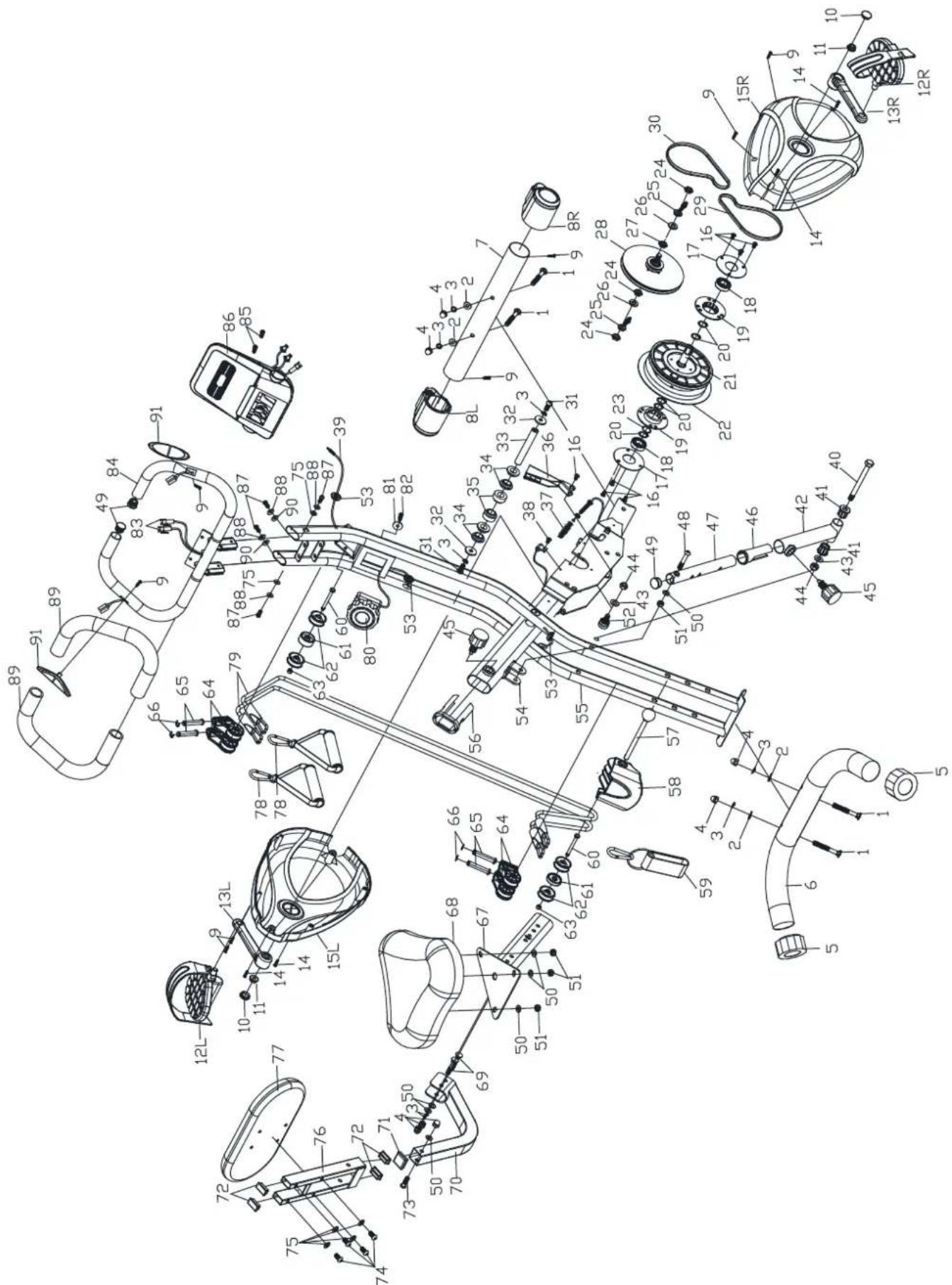
Technical diagram of a mechanical assembly with numbered components and exploded view, likely for assembly or manufacturing purposes.| Part nr. | Description Q'ty | |
| 1 | Carriage bolt M8×65 4 | |
| 2 | Curved washer ø8xø18 4 | |
| 3 | Spring washer ø8xø14 8 | |
| 4 | Cap nut M8 7 | |
| 5 | Adjustable end cap ∅50 2 | |
| 6 | Rear stabiliser ø50×395mm 1 | |
| 7 | Front stabiliser ø50×395mm 1 | |
| 8 | Front roll ∅50 2 | |
| 9 | Screw M4X20 8 | |
| 10 | Crank cover ∅23.5×8 | 2 |
| 11 | Nut M10 | 2 |
| 12 | Pedal (L/R) 1/2" | 2 |
| 13 | Crank (L/R) 5" | 2 |
| 14 | Screw M4X20 | 4 |
| 15 | Chain cover (L/R) | 2 |
| 16 | Screw M6×12 | 7 |
| 17 | Round plate ∅74x∅30×1.5 | 2 |
| 18 | Bearing 6003Z | 2 |
| 19 | Bearing bracket ∅35x∅74×12.5 | 2 |
| 20 | Ring ∅17.5x∅20×1.0 | 5 |
| 21 | Pulley | 1 |
| 22 | Magnetic bracket ∅152×1.3kg | 2 |
| 23 | Curved washer ∅17.5x∅21×0.3 | 1 |
| 24 | Nut M10 | 3 |
| 25 | Nut | 2 |
| 26 | Flat washer ∅10.5×20×2.0 | 2 |
| 27 | Nut M10×3,0 | 2 |
| 28 | Small pulley ∅14×94 | 1 |
| 29 | Belt 230J | 1 |
| 30 | Belt 220J | 1 |
| 31 | Hex nut M8×20 | 2 |
| 32 | Flat washer ∅8.5x∅24 | 2 |
| 33 | Axle ∅15×104 | 1 |
| 34 | Bushing ∅20x∅25×10mm | 4 |
| 35 | Bushing ∅20x∅24×20mm | 2 |
| 36 | Magnet 117×33 | 1 |
| 37 | Spring washer 1 | |
| 38 | Screw M6×10 | 1 |
| 39 | Sensor cable | 1 |
| 40 | Bolt M10×110 | 1 |
| 41 | Bushing ∅28x∅10.5 | 2 |
| 42 | Adjustable set | 1 |
| 43 | Flat washer ∅10,5x∅22 | 2 |
| 44 | Nut M10 | 2 |
| 45 | Knob M16 | 2 |
| 46 | Bushing 32×1.5/25×1.5 | 1 |
| 47 | Adjustable set | 1 |
| Part nr. | Description Q'ty | |
| 48 | Screw M8x48 | 1 |
| 49 | End cap ∅25.4 | 3 |
| 50 | Flat washer ∅8x∅18 | 7 |
| 51 | Nut M8 | 4 |
| 52 | Press wheel | 1 |
| 53 | Cap 15x20 | 3 |
| 54 | Rear main frame | 1 |
| 55 | Front main frame | 1 |
| 56 | Cap 30x60 | 1 |
| 57 | Pin ∅10x116 | 1 |
| 58 | Cover | 1 |
| 59 | Ankle strap | 1 |
| 60 | Hex bolt M6x60 | 2 |
| 61 Wheel ∅34x16 | 2 | |
| 62 | Wheel ∅38x14 | 4 |
| 63 | Nut M6 | 2 |
| 64 | Bracket | 2 |
| 65 | Pin ∅10x53 | 4 |
| 66 | Ring ∅10 | 4 |
| 67 | Seat support | 1 |
| 68 | Seat | 1 |
| 69 | Bolt M8X45 2 | |
| 70 | Backrest support | 1 |
| 71 | Cap 30x30mm | 1 |
| 72 | Cap 15x30mm | 4 |
| 73 | Bolt M8X75 | 1 |
| 74 | Screw M6x40 4 | |
| 75 Flat washer ∅6x∅14 | 6 | |
| 76 Back tube (upper part) 1 | ||
| 77 | Backrest 190x230x30mm | 1 |
| 78 | Handles | 2 |
| 79 | Exercise band ∅6x1080mm 2 | |
| 80 | Tension knob | 1 |
| 81 | Flat washer ∅5.5x∅12 | 1 |
| 82 | Screw M5x50 | 1 |
| 83 | Handpulse wire | 2 |
| 84 | Handlebars | 1 |
| 85 | Screw M5x12 | 2 |
| 86 | Computer | 1 |
| 87 | Screw M6X15 | 4 |
| 88 | Spring washer ∅6x∅14 | 4 |
| 89 | Foam grip ∅25.4 | 2 |
| 90 | Curved washer ∅6x∅14 | 2 |
| 91 | Hand pulse | 2 |
| Allen key | 1 | |
| Hex wrench 1 | ||
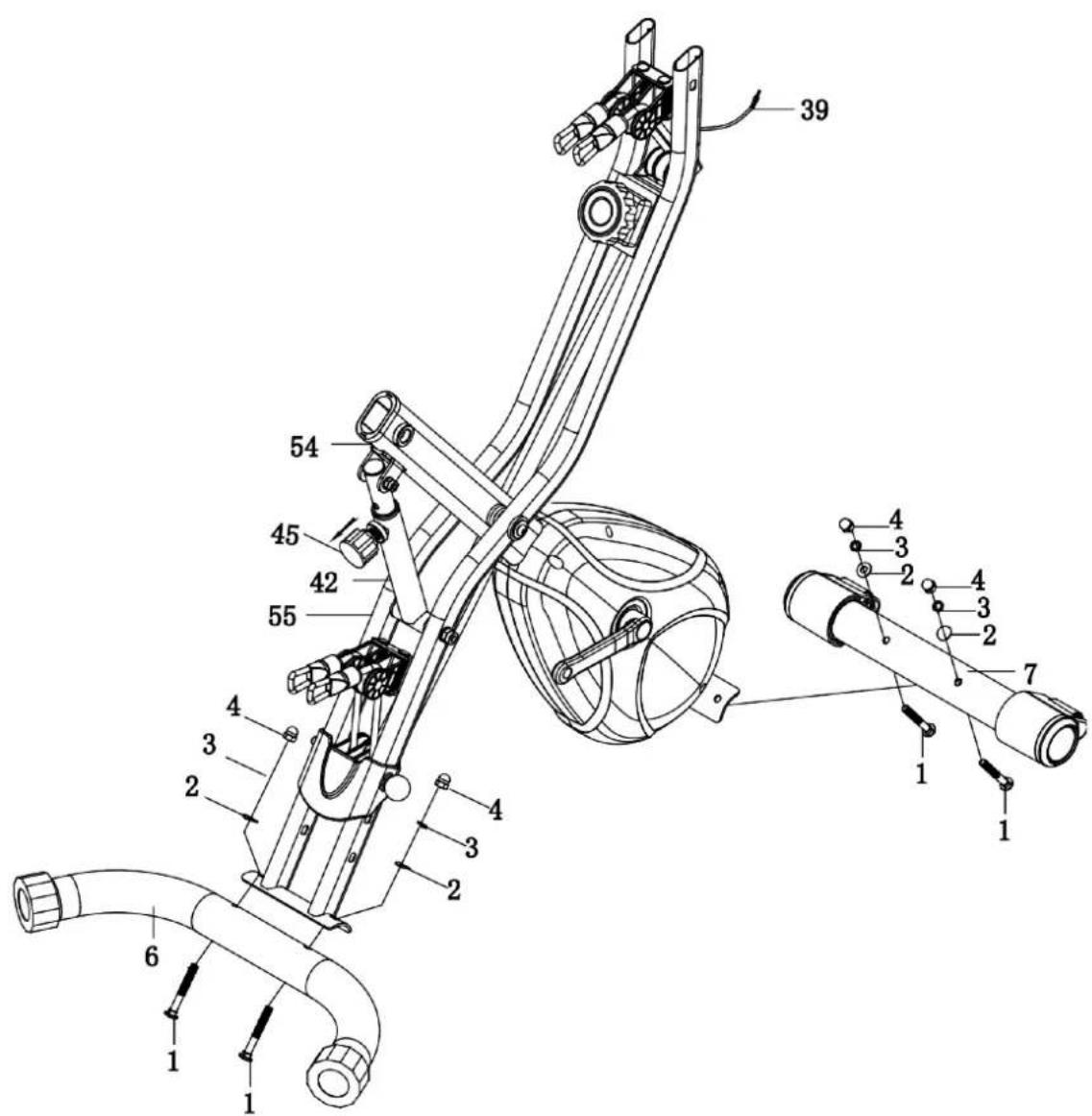
STEP 1
We recommend setting up the unit with 2 people.
Pull the knob (45) out of the main frame and unfold the frame.
Fasten the front stabiliser (7) to the front part of the main frame with 2 curved washers (2), 2 spring washers (3), 2 cap nuts (4) and 2 carriage bolts (1).
Then attach the rear stabiliser (6) to the rear part of the main frame with 2 domed washers (2), 2 spring washers (3), 2 cap nuts (4) and 2 carriage bolts (1).
text_image
Technical diagram of a mechanical device with numbered components and labeled partsSTEP 2
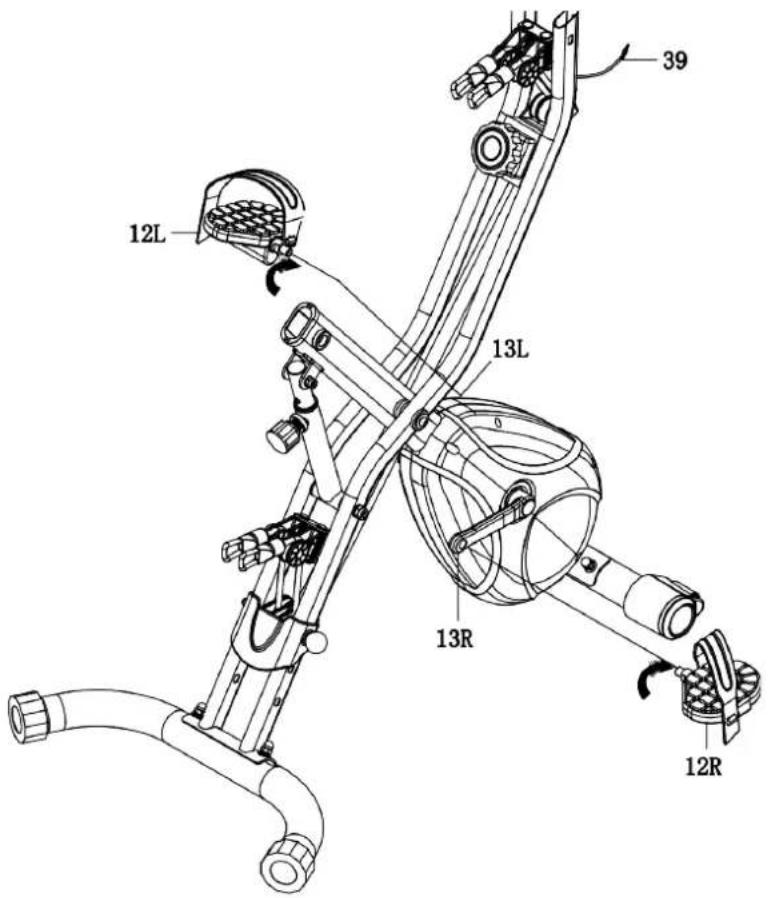
Attach the right pedal (12R) to the right pedal arm by screwing it on clockwise, the left pedal (12L) is attached to the left pedal arm accordingly (screwing direction counterclockwise).
The pedals are marked with „R“ for right and „L“ for left for better assignment.
Attach the pedal straps to the pedals (12R & 12L).
Adjust the pedal straps according to your foot/shoe size.
text_image
12L 13L 13R 12R 39STEP 3
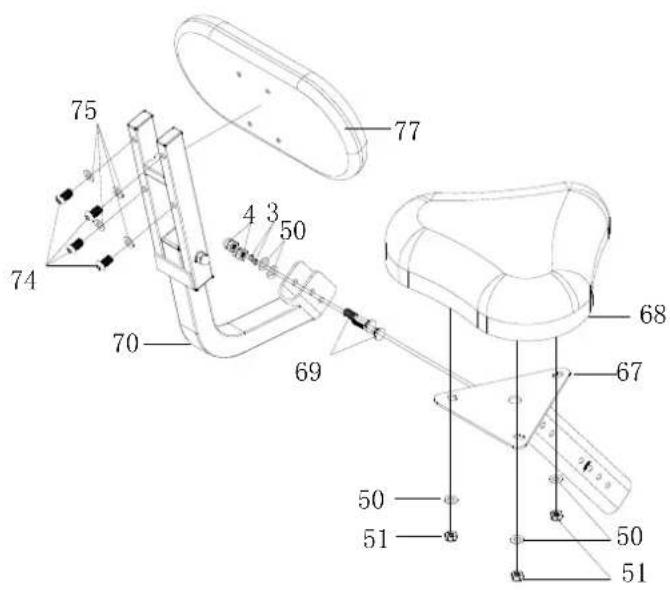
Loosen the nuts (51) and washers (50) from the bottom of the seat (68). Then
secure the seat (68) to the seat support (67) with the nuts (51) and washers (50). Slide the seat support (67) into the main frame (55) and fix it with the knob M16 (45). The seat height can be adjusted according to your personal needs. Now fix the backrest support (70) to the seat support (67) with 2 screws (69), 2 washers (50), 2 spring washers (3) and two cap nuts (4). The backrest (77) is mounted with 4 washers (75) and 4 screws (74).
text_image
75 74 70 4 3 50 69 77 68 67 50 51 50 51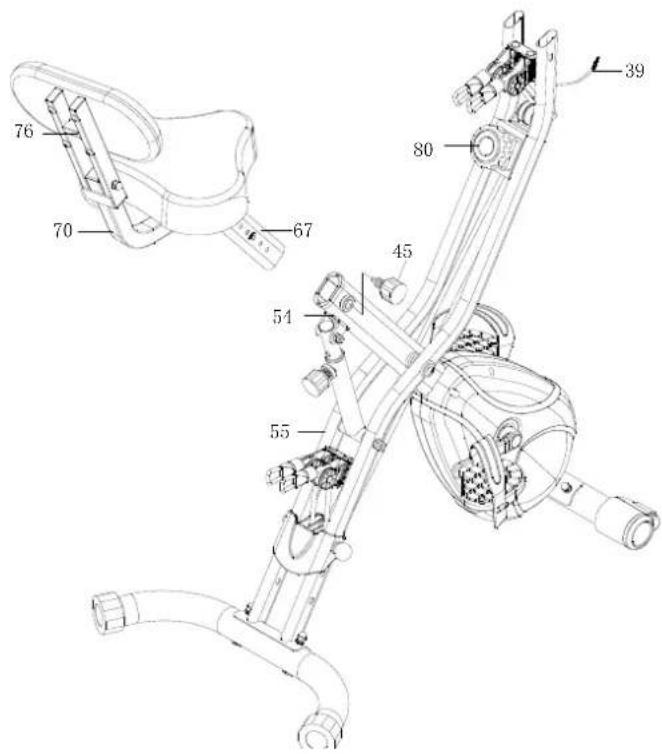
text_image
Technical diagram of a mechanical device with numbered components and labeled partsSTEP 4
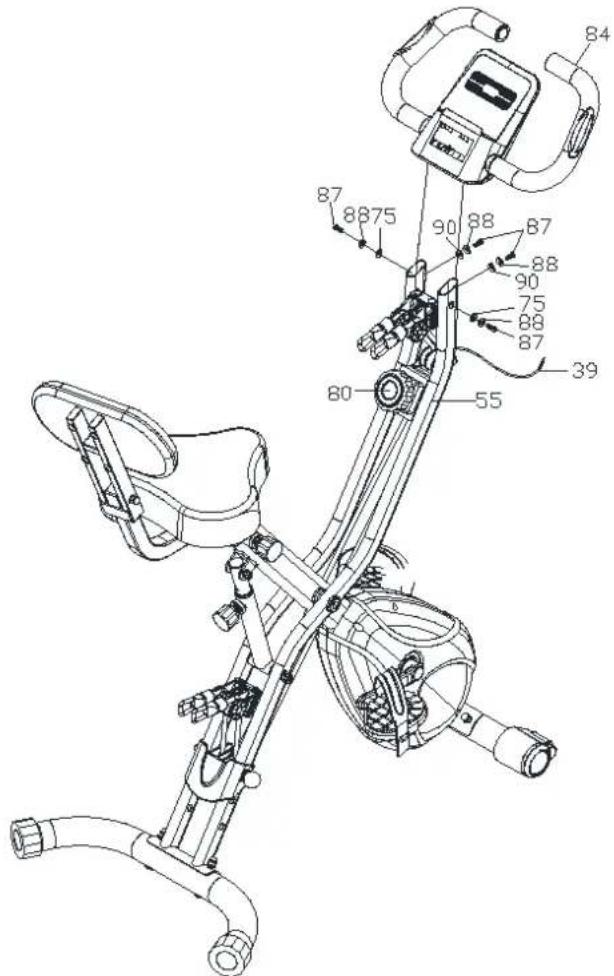
Attach handlebar (84) to the front main frame (55) as shown with the screws (87), washers (75), domed washers (90) and spring washers (88). Connect the sensor cable (39) and the hand pulse cable to the computer (86).
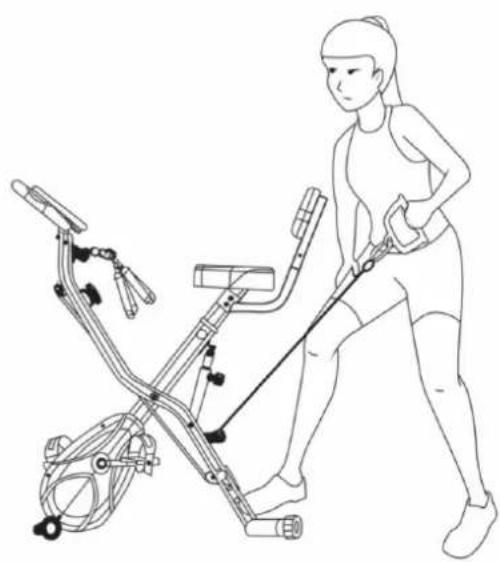
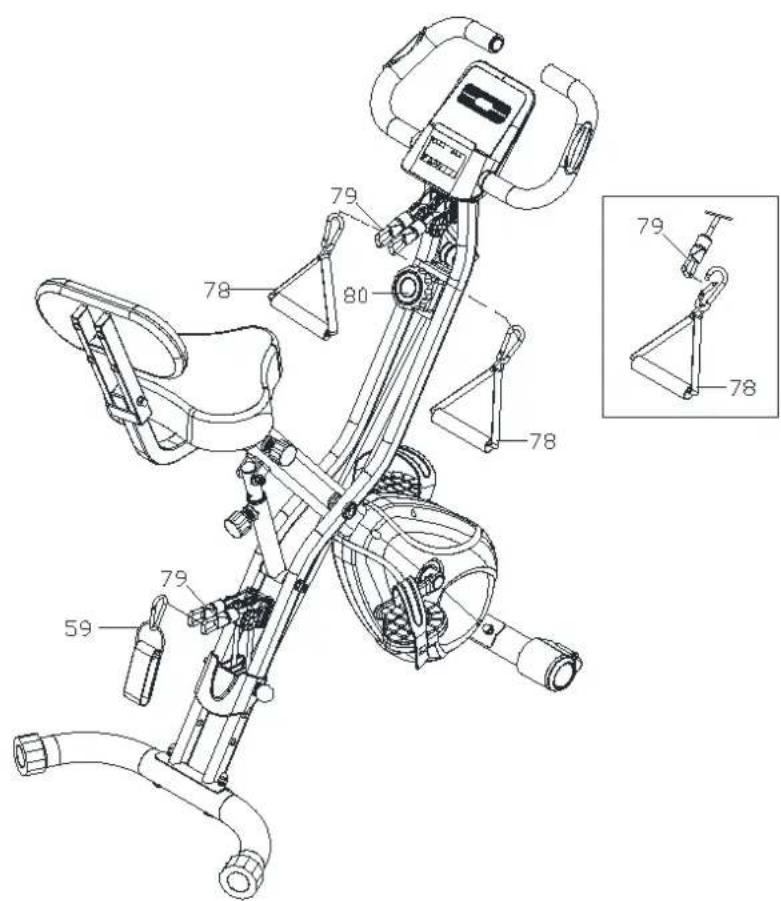
Make sure that you do not pinch any cable. Now attach the pull handles (78) to the exercise bands (79) and bands (79) to the brackets of the unit as shown.
BEFORE USE, CHECK THAT ALL SCREWS AND NUTS ARE WELL TIGHTENED!
text_image
Technical diagram of a stationary exercise bike with numbered components and labeled partsThe resistance of the of the exercise bands (79) can be changend by moving the pin (57).
text_image
Technical diagram of a stationary exercise machine with labeled components and an inset view showing the arm joint.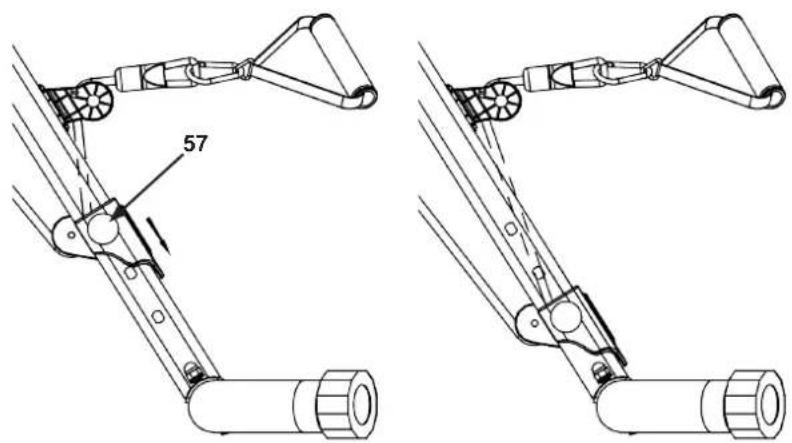
natural_image
Technical line drawing of a robotic arm with labeled component '57' (no text or symbols beyond label)FOLDING AND TRANSPORT
Loosen and pull out the knob (45) to fold the unit.
Then reattach the knob (45) in one of the holes.
Roll the folded unit as carefully as possible over flat surfaces using the transport wheels.
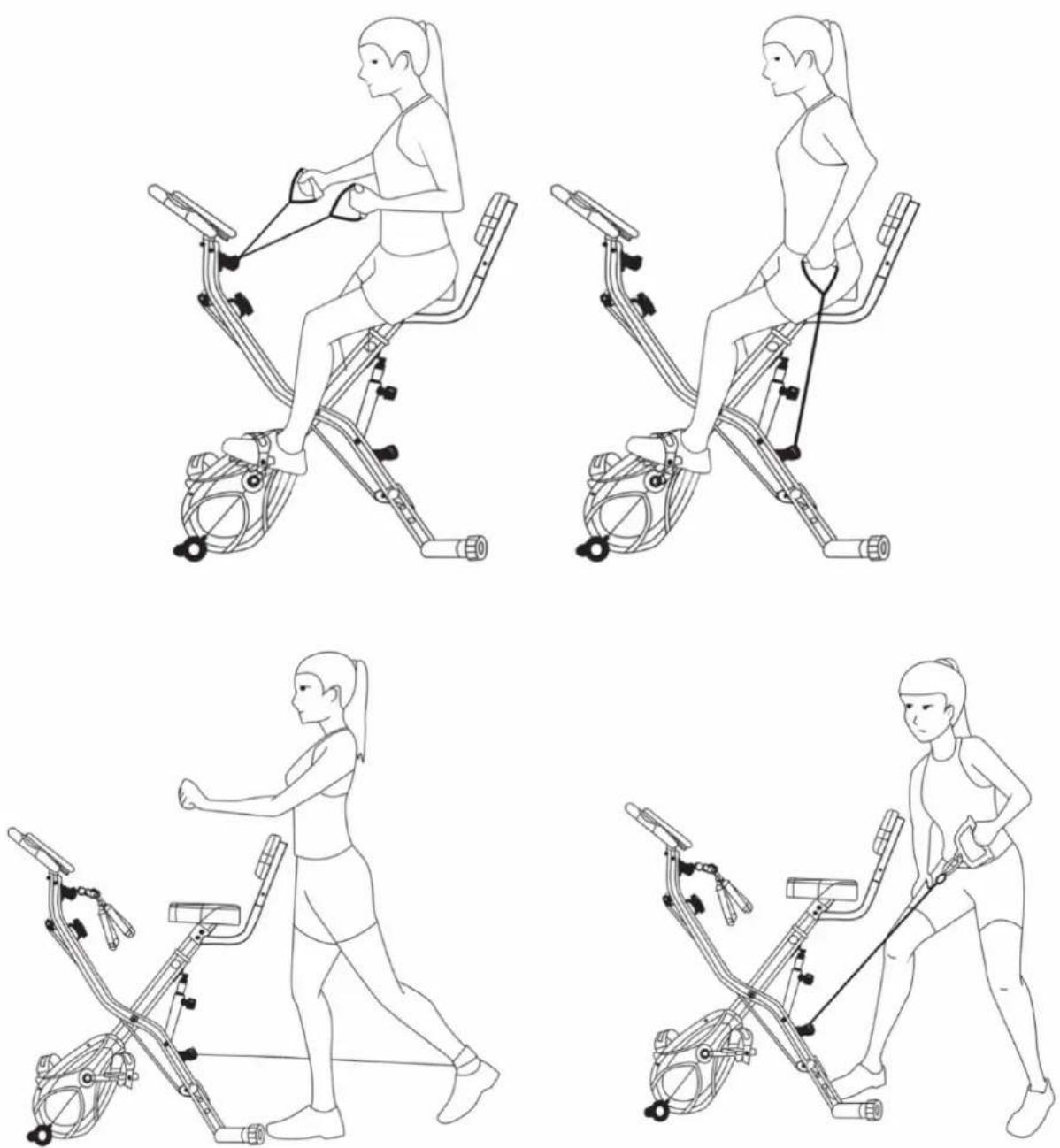
ILLUSTRATIONS FOR EXERCISE EXAMPLES
The following illustrations show some examples of how the unit can be used:
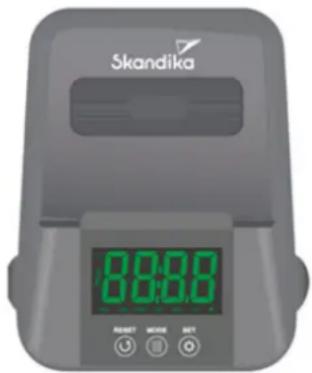
FUNCTION BUTTONS:
MODE: The various functions can be selected by pressing the button. Press and hold the button for approx. 2 seconds to reset the training time, distance and calories to 0.
SET: Press to set the training time, distance or calories (does not work when scan mode is active).
text_image
Skandika 8:00:00 RESET CLOSE SETRESET: Press to reset the training time, distance and calories to 0.
FUNCTIONS:
SCAN: Press this button until the word „SCAN“ appears. The training data training time, speed, distance, calories burned, total distance and pulse appear in the display alternately for approx. 6 seconds each.
TIME: Here the computer displays the current trained time (max. 99:59 min.).
SPEED: Here the computer displays the current training speed (max. 99.9 km/h).
DISTANCE: The distance travelled is displayed here (max. 99.99 km).
ODO: The total distance travelled with this device is displayed (max. 9999 km). Note: When the batteries are changed, the stored distance is lost.
CALORIES: The current calories burned are displayed here (max. 999.9 kcal).
PULSE: The computer displays the theoretical pulse rate (beats/min). For a correct reading, please make sure that you grip the two sensors correctly with your palms. It may take up to 2 minutes before the pulse rate is measured correctly. Display range: 60-240 beats/min. The pulse rate measured by this device should not be considered as a basis for medical treatment.
Remarks:
- If the display is dim or missing or if the battery symbol appears, please replace the batteries (2 x battery type „AAA“). Open the battery cover on the underside of the housing to replace the batteries.
- AUTOMATIC ON/OFF: The computer will switch on when a button is pressed or when training starts. After about 2 minutes of no activity, the computer will automatically switch off.
- If you interrupt the training for 4 seconds, the function values will no longer be recorded and „STOP“ will appear on the display.
- Operating temperature range of the computer: 0°C to +40°C, storage temperature range: -10°C to +60°C. Never use or store the unit outside these ranges!
TRAINING WITH TARGET VALUES
This computer has three target training modes: you can set targets for the function values time, distance or calories. To set such a target, you must first select the corresponding function (Time / Distance / Calories) using the „Mode“ button and then set the desired target using the „Set“ button.
After the start of the training, the computer counts down from the set target value (countdown). When 0 is reached, the respective function value display flashes to indicate that the set target value has been reached. You can now end the training or continue training. If you continue training, the function values are counted up again as normal.
Warm-up and Cool-Down
A successful training programme consists of a warm-up phase, a training phase and the cooldown (warm-down). The training frequency for beginners should be set at 2 to 3 times a week, always with at least one day's rest between training sessions. After a few months, the frequency can be increased to 4 to 5 times a week.
Warm-up
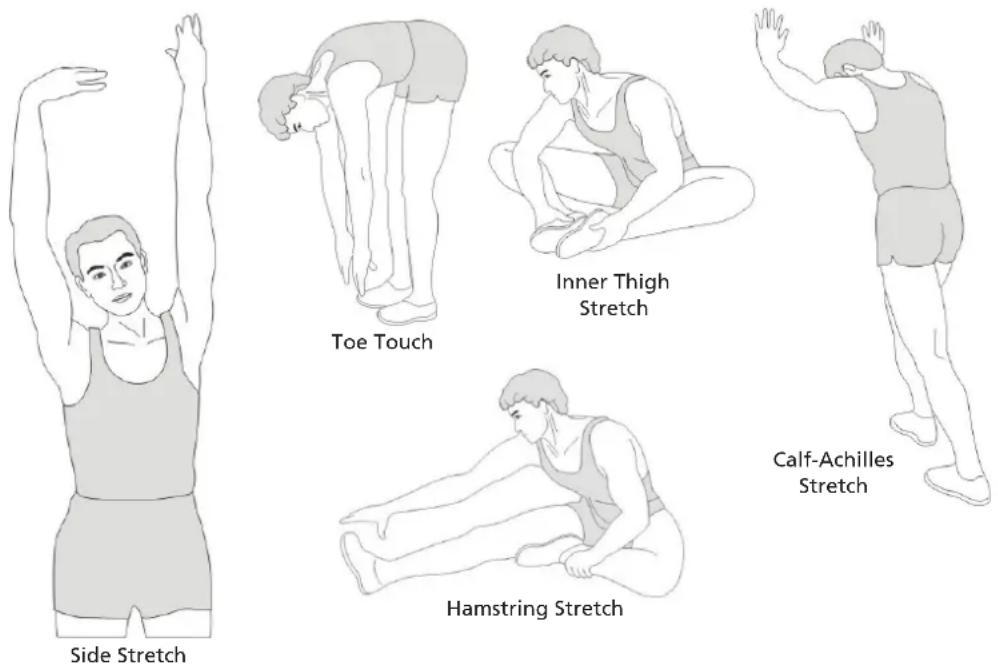
This stage helps to improve the blood circulation and prepares the muscles for your workout. It additionally helps to reduce the risk of injury or cramps. It is recommended to do some stretching exercises as shown here below. Hold each stretching position for approximately 30 seconds. Never force or jerk yourself into a stretching position – if you feel pain, STOP immediately. Warm-up exercises may also include brisk walking, jogging, jumping jacks, jump rope exercises or running in place.
Stretching
Muscles can be stretched more easily when these are warm. This reduces the risk of injury. DO NOT BOUNCE.
Cool-Down
This phase serves to relax your cardiovascular system and muscles again. For example, you can reduce the pace and exercise for 5 more minutes. Then repeat the stretching exercises from the warm-up phase - again remember not to use force or too much pressure when stretching.
text_image
Side Stretch Toe Touch Inner Thigh Stretch Calf-Achilles Stretch Hamstring StretchKINOMAP
The free Kinomap app helps you get a powerful workout that's fun! Download the Kinomap app from the App Store or Play Store (just scan the QR code) or search for Kinomap. Install and open the app and log in or register. Turn on Bluetooth.
The Bluetooth of the device computer is switched off by default. Before connecting the app, please press any button on the computer to turn on Bluetooth. If no app can be connected within 60 seconds after Bluetooth is turned on, Bluetooth will be turned off again.
When the computer is successfully connected to the app, the computer will turn off the display and all data will be shown in the app.
If you want to use the computer again after connecting the app, you must close the app and turn off Bluetooth on the mobile phone.
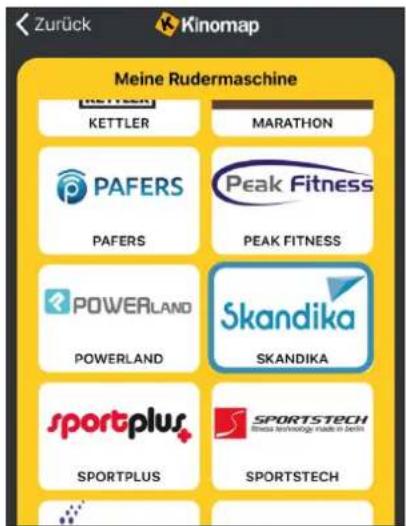
After connecting the app, add the training device as follows:



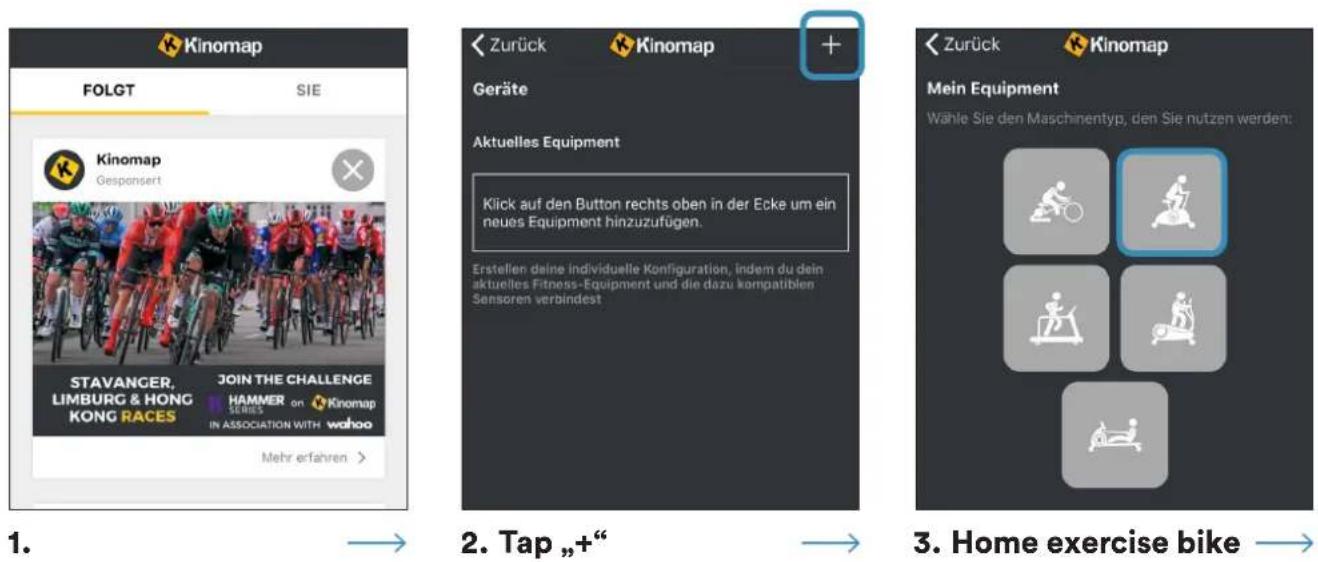
text_image
Zurück Kinomap Meine Rudermaschine KETTLER MARATHON PAFERS Peak Fitness PAFERS PEAK FITNESS POWERLAND Skandika POWERLAND SKANDIKA sportplus SPORTSTECH SPORTPLUS SPORTSTECH- Choose Skandika
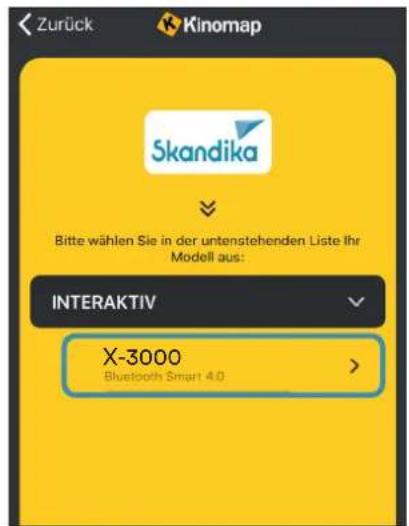
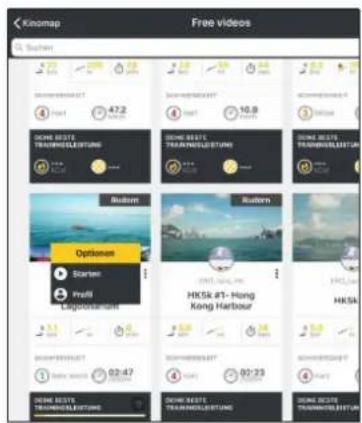
Now tap OK and return to the main menu. You can now select a course (depending on the type of KinoMap account you have). Press Start and start training!
text_image
Kiosmap Free videos S. Sutien 4 47.2 10.8 3 DOME BESTE TRAVELLESTUNG DOME BESTE TRAVELLESTUNG DOME BESTE TRAVELLESTUNG Options Starten Prefil Lagopavam HKSK #T-Hong Kong Harbour HKSA 3.1 6.1 1.1 3.1 6.1 1.1 3.1 6.1 1.1 3.1 6.1 1.1 3.1 6.1 1.1 3.1 6.1 1.1 3.1 6.1 1.1 3.1 6.1 1.1 3.1 6.1 1.1 3.2 6.2 1.1 3.2 6.2 1.1 3.2 6.2 1.1 3.2 6.2 1.1 3.2 6.2 1.1 3.2 6.2 1.1 3.2 6.2 1.1 3.2 6.2 1.1 3.2 6.2 1.2 6.2 1.2 3.2 6.2 1.2 3.2 6.2 1.2 3.2 6.2 1.2 3.2 6.2 1.2 3.2 6.2 1.2 3.2 6.2 1.2 3.2 6.2 1.2 3.2GUARANTEE CONDITIONS
For our devices we provide a warranty as defined below.
- In accordance with the following conditions (numbers 2-5) we repair defect or damage to the device free of charge, if the cause is a manufacturing defect. Therefore, these defects / damages need to be reported to us without delay after appearance and within the warranty period of 24 months after delivery to the end user. The warranty does not cover parts, which easily break (e.g. glass or plastic). The warranty does not cover slight deviations of the product, which are insignificant for usability and value of the device and damage caused by chemical or electrochemical effects and damages caused by penetration of water or generally force majeure damage.
- The warranty achievement is the replacement or repair of defective parts, depending on our decision. The cost of material and labor will be borne by us. Repairs at customer site cannot be demanded. The proof of purchase along with the date of purchase and / or delivery is required. Replaced parts become our property.
- The warranty is void if repairs or adjustments are made,
which are not authorized by us or if our devices are equipped with additional parts or accessories that are not adapted to our devices. Furthermore, the warranty is void if the device is damaged or destroyed by force majeure or due to environmental influences and in case of improper handling / maintenance (e.g. due to non-observance of the instruction manual) or mechanical damages. The customer service may authorize you to replace or repair defective parts after telephone consultation. In this case, the warranty is not void.
- Warranty services do not extend the warranty period nor do they initiate a new warranty period.
- Further demands, especially claims for damages which occurred outside the device, are excluded as long as a liability is not obligatory legal.
- Our warranty terms - which cover the requirements and scope of our warranty conditions - do not affect the contractual warranty obligations of the seller.
- Parts of wear and tear are not included in the warranty.
- The warranty is void if not used properly or if used in gyms, rehabilitation centers and hotels. Even if most of our units are suitable for a professional use, this requires a separate agreement.
ENVIRONMENTAL PROTECTION
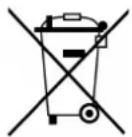
At the end of its life cycle, this product must not be disposed of with household waste but must be taken to a collection unit for the recycling of electric and electronic equipment. The symbol on the product, the instructions for use or the packaging express mention of this. The basic materials can be recycled as specified on the labelling.
When recycling the materials and finding other utilisation for used equipment, you are making a significant contribution towards protecting our environment. Ask at your council about the respective local disposal sites.
In accordance with our policy of continual product improvement, we reserve the right to make technical and visual changes without notice.
For spare parts please contact: service@skandika.de Service centre: MAX Trader GmbH, Wilhelm-Beckmann-Straße 19, 45307 Essen, Germany
Contenu

skandika.com/service
text_image
Technical diagram of a mechanical assembly with numbered components and exploded view, likely for assembly or manufacturing purposes.text_image
Technical diagram of a mechanical device with numbered components and labeled partsÉTAPE 2
text_image
Technical diagram of a mechanical device with numbered components, likely an automotive or robotic assembly.ÉTAPE 4
natural_image
Line drawing of a person using an exercise bike (no text or symbols present)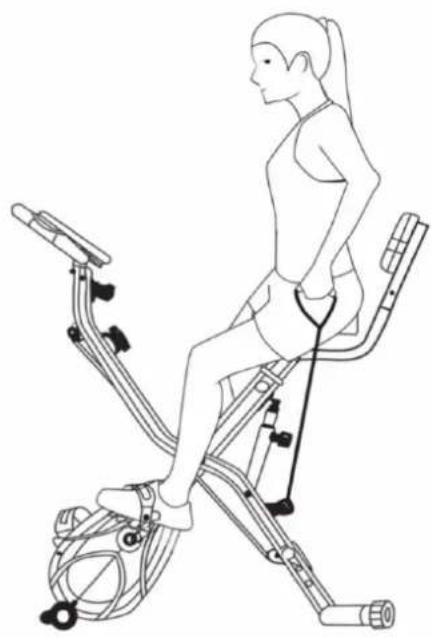
natural_image
Line drawing of a woman using a stationary exercise bike, showing body posture and resistance bands (no text or symbols)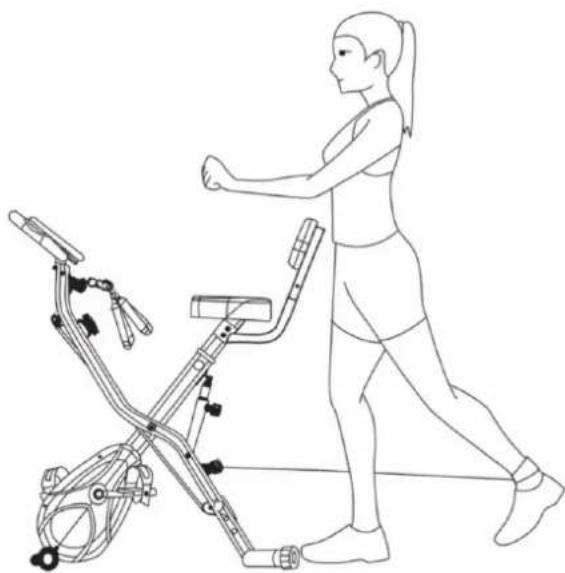
natural_image
Line drawing of a woman exercising with an exercise bike (no text or symbols)