
Bongo Serie A Connected - Scooter CECOTEC - Free user manual and instructions
Find the device manual for free Bongo Serie A Connected CECOTEC in PDF.


| Product Type | Electric Scooter |
| Brand | Cecotec |
| Model | Bongo Series A Connected |
| Battery | 36 V, 6400 mAh (Panasonic) |
| Rated Power | 350 W |
| Maximum Power | 700 W |
| Motor | 350 W rated, 700 W peak |
| Connectivity | Bluetooth 2.4 - 2.48 GHz |
| Mobile App | Yes, to display information and settings |
| Driving Modes | Eco, Comfort, Sport |
| Front Brake | Disc Brake |
| Rear Brake | Mudguard Brake |
| Lights | Front headlight (switchable), rear light (always on, flashes when braking) |
| Screen | LCD |
| Foldable | Yes, with folding latch and locking ring |
| Waterproof | IP54 |
| Frequency Band | 2.4 - 2.48 GHz |
| Max Transmission Power | 20 dBm |
| Warranty | 2 years |
| Maintenance | Soft cloth, do not immerse |
| Storage | Dry place, temperature 0-35°C, charge at least once a month |
| After-Sales Service | Contact +34 9 63 21 07 28 |
Frequently Asked Questions - Bongo Serie A Connected CECOTEC
User questions about Bongo Serie A Connected CECOTEC
0 question about this device. Answer the ones you know or ask your own.
Ask a new question about this device
Download the instructions for your Scooter in PDF format for free! Find your manual Bongo Serie A Connected - CECOTEC and take your electronic device back in hand. On this page are published all the documents necessary for the use of your device. Bongo Serie A Connected by CECOTEC.
USER MANUAL Bongo Serie A Connected CECOTEC
natural_image
Exterior view of a modern electric scooter with green accents and black body (no visible text or symbols)- Parts and components /04
- Warnings /09
- Safety instructions /19
- Product assembly /44
- Operation /46
- Cleaning and maintenance /50
- Troubleshooting /51
- Technical specifications /51
- Disposal of old electrical appliances /51
- Technical support service and warranty /52
SOMMAIRE
- Throttle
- Brake
- Headlight
- Stern
- Fixing ring
- Motor
- Kickland
- Disc brake
- Handlebar
- LCD display
- Dashboard cover
- Closing hook
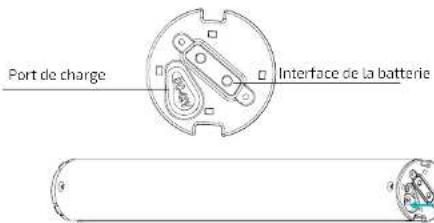
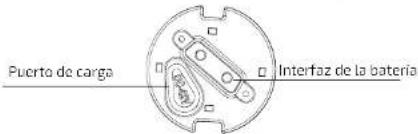
- Charge port
14 Folding latch - Anti-slip footrest
- Rearfender
- Back light
FR
ES • No presione el acelerador cuando canine junto al palinele. EN • Do not activate the throttle while walking next to the scooter. FR • N'appuyez pas sur l'accélérateur lorsque vous marchez a côté de la trottinette. DE • Drücken Sie den Gashebel nicht, wahrend Sie neben dem Scooter laufen. IT • Non premere l'acceleratore quando cammina con il monopattino. PT • Não pressione o acelerador quando estiver ao lado da trotineta. NL • Druk niet op de versneller als u naast de step loopt. PL: Nie nariskaj dżwigni regulacji prędkości, kiedy idąc prowadzisz hulajnogę obok. CZ • Neliskněle akcelerátor, pokud jdele vedle koloběžky.
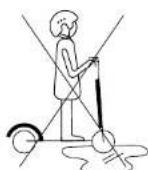
ES • No conduzca sobre charcos ni superficies mojadas. EN • Do not ride through puddles or other wet surfaces. FR • Ne conduisez pas sur des flaques ni sur des surfaces moullées. DE • Fahren Sie nicht auf Pfützen oder nasse Oberflächen. IT • Non condurre su pozzanghere né superfici bagnate. PT • Não conduza sobre poças de água nem em pavimentos molhados. NL • Rijd niet door plassen of natte oppervlakken. PL Nie przejeżdzaj przez kaluże ani mokre powierzchnie. CZ • Nevjlżdjęte do kaluże ani na mokré povrchy.
natural_image
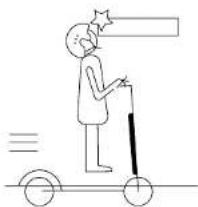
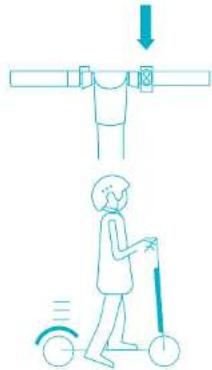
Simple line drawing of a person riding a scooter with a stick, no text or symbols presentES • Tenga cuidado con la cabeza si pasa debajo de zonas con techo como una puerta. EN • Watch your head when passing through doorways or when driving indoors. FR • Failles attention à votre tête si vous passez par ces endroits possédant un tolt comme une porte. DE • Passen Sie auf Ihren Kopf auf, wenn Sie unter überdachte Bereiche vorbeikommen. IT • Prestare attenzione se si passa sotto a tettoie o porte. PT • Tenha cuidado com a cabeza se passar por baixo de zonas com pouca altura. NL • Pas op uw hoofd als u door besloten ruimles of openingen rijdt, zoals een deur. PL Zachowaj ostrożność przy przejeżdżaniu przez miejsca, w których jest strop. CZ • Dalvejte pozor na hiavu, pokud vijzciite pod střechu nebo io dwefi.
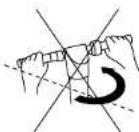
ES • Cuando circule a alta velocidad no gire el manilar de forma brusca. EN • Do not turn the handlebar suddenly when riding at high speed. FR • Lorsque vous circulez à vitesse élevée, ne tournez pas brusquement le guidon. DE • Bei hohen Geschwindigkeiten drehen Sie den Lenker nicht scharf. IT • In caso di circolare ad alta velocità non girare il manuorio in modo brusco. PT • Quando circular a alta velocidade, não gire o volante da forma brusca. NL • Als u op hoge snelheid ridt, draat dan niet abrupt aan het stuur. PL Nie wykonuj gwałtownych ruchów kierownicą, kiedy jedziesz z dużą prędkością. CZ • Pokud jedete rychle, neotăčejte rychle Moldity do stran.
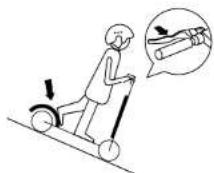
ES • Moderé la velocidad en caso de descender por pendientes y utilice ambos frenos. EN • Watch your speed when travelling downhill. Use both brakes at once when travelling at high speed. FR • Modérez la vitesse si vous descendez des pentes et utilisez les deux freins. DE • Mäßigen Sie die Geschwindigkeit bei Abhangen und verwenden Sie die zwei Bremsen. IT • Moderare la velocità in caso di discesa in pendenze e utilizzare entrambi i frenl. PT • Reduza a velocidade em caso de descer por rampas e utilize ambos travões. NL • Pas de snelheld aan als u een heuvel afdaalt en gebruik beide remmen. PL Zmniejsz prędkość, kiedy zjeźdzasz z görki, użyj obu hamulców. CZ • Pilzpżsobte rychlost, pokud jede z kopce, a poużivelte obé brzdy.
natural_image
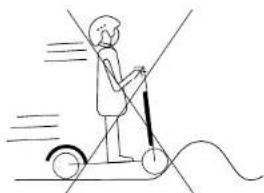
Simple line drawing of a person riding a scooter with motion lines indicating speed (no text or symbols)ES • No circule a alta velocidad sobre obstáculos como escalones, bordillos o badenes. EN • Do not ride fast on stairs, curbs or speed humps. FR • Ne circulez pas à vitesses élevées sur des obstacles comme des marches. des bords, des cassis, ... DE • Fahren Sie nie mit hoher Geschwindigkeit durch Hindernisse wie Treppenstufen, Bordsteine oder Bremsschwellen. IT • Non circolare ad alta velocità su ostacoli quali scolani, bordi o dossi. PT • Não circule em alta velocidade sobre obstáculos como degraus ou bermas. NL • Rijd niet met hoge snelheid over obstakels zoals treten stoepranden of verkeersdrempels. PL Nie przejezdżaj z dużą prętkością przez przeszkody, np. krawężniki, kanly czy progi. CZ • Nenajźdėjle ve velké rychlosti na překázky, jako jsou schody nebo obrubníky.
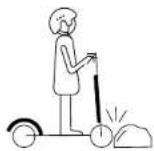
ES • No golpee obstáculos con las ruedas. EN • Avoid hitting obstacles with the wheels. FR • Ne choquez pas avec les roues contre des obstacles. DE • Schlagen Sie keinen Gegenstand mit den Reifen. IT • Non colpire ostacoli con le ruote. PT • Não choque em obstáculos. NL • Raak geen obstakels met de wielen. PL Nie uderzaj kolami w przeszkody CZ • Nevrażejte koly do prěkážek.
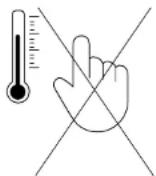
ES • No toque el motor delbuje immediatamente después de circular, podría estar a alta temperatura. EN • Do not touch the product's motor immediately after riding it, it could burn. FR • Ne touchez pas le moteur immédiatement après avoir conduit, sa température pourrait être très élevée. DE • Berühren Sie den Motor nicht sofort nach dem Gebrauch, da er bei hoher Temperatur sein könnte. IT • Non toccare il motore subito dopo aver guidato, potrebbe trovarsi ad una temperatura elevata. PT • Não toque no motor immediatamente depois de circular, poderla estar a altas temperaturas. NL • Raak de motorbehuizing niet aan direct na gebruik van de step, omdat de motor warm zou kunnen zijn. PL Nie dotykaj napędu piasty przez jaki czas po zakończeniu jazdy, gdyż może być gorący. CZ • Nedotýkejte se poudzra motoru během nebo ihned po jizdě. Mohl by být horký.
Read these instructions thoroughly before using the appliance. Keep this instruction manual for future reference or new users.
- Cecotec will not assume any responsibility resulting from product misuse or from not complying with traffic regulations and with this instruction manual.
- When operating the device, make sure to comply with local traffic regulations. Drive in a civilized way and pay attention to people and obstacles around in order to avoid accidents.
- Make sure the tires are not damaged and that all the product's parts and components are tightly assembled before use.
- Do not use the vehicle in such way that could harm other people or properties.
- Any conversion of the scooter is not allowed, as this can change its performance or damage its structure causing injuries.
- Do not operate the product under water to avoid damage to the product and accidents.
- The appliance is not intended to be used by children under the age of 14. It can be used by children over the age of 14, as long as they are given continuous supervision.
- This appliance can be used by children aged 14 and above, and persons with reduced physical, sensory or mental capabilities or lack of experience and knowledge, as long as they have been given supervision or instruction concerning the use of the appliance in a safe way and understand the hazards involved. Children shall not play with the appliance.
- Supervise young children to make sure that they do not play with the appliance. Close supervision is necessary when the appliance is being used by or near children.
BATTERY SAFETY INSTRUCTIONS
- Do not use the battery if it presents unusual odours, excessive heat or if it leaks. Do not touch liquid leaked from the battery.
- Do not allow children or animals to touch the battery.
- Unplug the battery before riding and before assembling or disassembling it.
- In order for the scooter to operate most efficiently, charge the battery at a room temperature between 0^ and 35^ .
- Do not open the battery or insert anything inside it, as it contains dangerous substances and could cause health problems.
- Do not try to charge a faulty battery. If the battery does not operate properly, dispose it off.
WARNING: Only use the original charging equipment provided by Cecotec.
INSTRUCTIONS DE SÉCURITÉ
natural_image
Technical line drawing showing mechanical assembly with arrows indicating motion (no text or symbols)natural_image
Technical line drawing of mechanical components with directional arrows indicating motion (no text or symbols)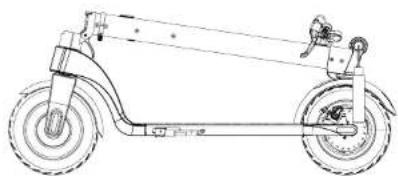
natural_image
Line drawing of a scooter with wheels and suspension components (no text or symbols)ESPAÑOLESPAÑOL
Doblar
natural_image
Line drawing of a human leg with a medical device attached (no text or symbols)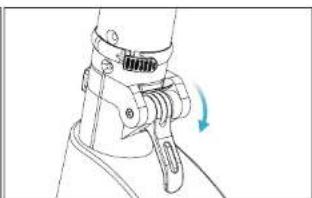
natural_image
Line drawing of a mechanical clamp or bracket assembly with a blue arrow indicating rotation (no text or symbols)natural_image
Mechanical assembly diagram showing a lever mechanism with a blue arrow indicating motion (no text or symbols present)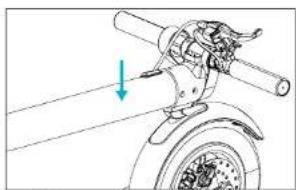
natural_image
Mechanical assembly diagram showing a rotating wheel with a shaft and mounting bracket, no text or symbols present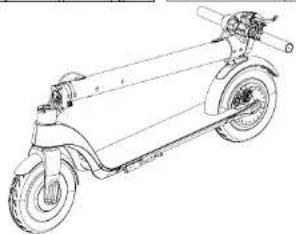
natural_image
Line drawing of a scooter with extended wheels and suspension rod (no text or symbols)3637
bongo
5. FUNCIONAMIENTO
BOTONES
CÓMO CONDUCIR EL PATINETE
natural_image
Illustration of a person using a scooter with a thought bubble showing a hand holding a pencil (no text or symbols present)CÓMO CARGAR EL PATINETE
natural_image
Four-step mechanical assembly diagram showing pipe connection and adjustment mechanism (no text or symbols)Bongo Serie A Connected
Modelo No.: 07026
220-240 V \~ 50/60 Hz
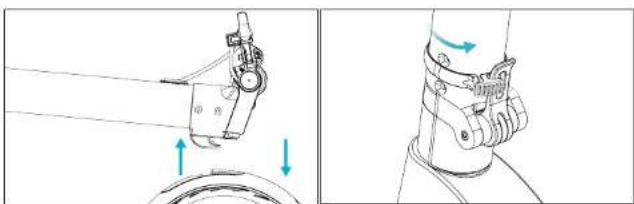
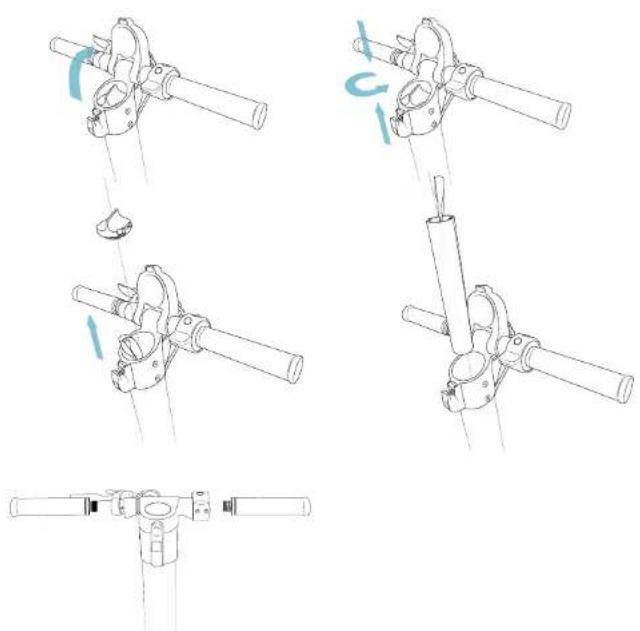
- Pull up the stem while pressing down the rear fender.
- Raise the stem, place the folding tab in a close position and turn the fixing ring to hold the tab.
natural_image
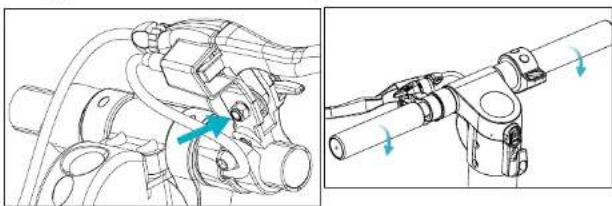
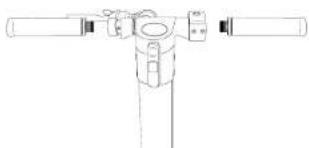
Technical line drawing of a mechanical assembly with arrows indicating motion (no text or symbols)- Fix the brake with an M6 hex wrench.
- Paying attention to the rotation direction, tighten the handlebar.
natural_image
Technical line drawing of mechanical components with no visible text or symbols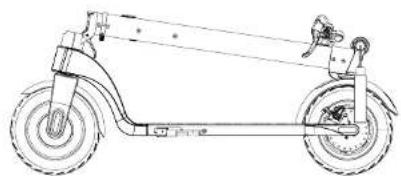
natural_image
Line drawing of a scooter with wheels and suspension components (no text or symbols)Fold
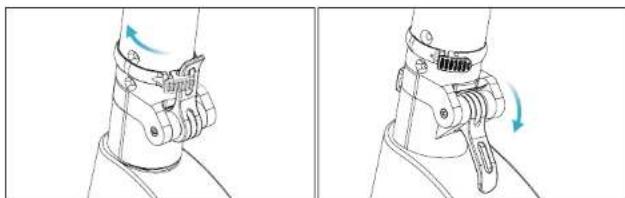
- Turn the fixing ring to loosen it.
- Open the folding tab.
natural_image
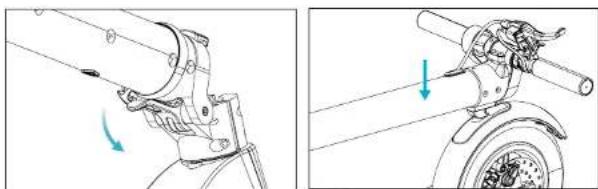
Technical line drawing of a mechanical clamp or bracket assembly with directional arrows indicating rotation (no text or symbols)- Lower the folding tab and then the stem.
- Align the closing hook with the gap on the rear fender and press it down to ensure it is locked.
natural_image
Technical line drawing showing mechanical assembly with arrows indicating motion (no text or symbols)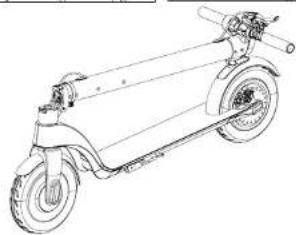
natural_image
Line drawing of a scooter with wheels and suspension components (no text or symbols)4445
bongo
A SERIE |
ENGLISHENGLISH
5. OPERATION
PUSH BUTTONS
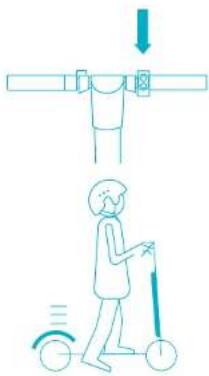
- Power switch: Long press this push push button to turn the scooter on or off.
- Throttle: Use it to start the scooter up and to accelerate.
- Brake: Hold it pressed to stop. Cently step on the rear fender to assist the braking process.
• Function: Press this push button to adjust speed. Select between
p ECO mode: No icon is shown on the display.
o COMFORT mode: The displays shows a white "D".
o SPORT mode: The display shows a red "D". - Headlight: Short press the function push button twice to turn the headlight on. The back lights are always on. While the lights are on, short press the function push button twice to turn them off.
- Cruise mode: Ride at steady speed for 6 seconds to enter this mode. To deactivate it, press the throttle or brake.
Note: This mode is not activated in the default configuration.
Note: The back light will blink when using the brakes.
HOW TO RIDE THE SCOOTER
natural_image
Illustration of a person using a scooter to lift a person's arm, with no text or symbols present.- Press the power push button for 2 seconds.
4647

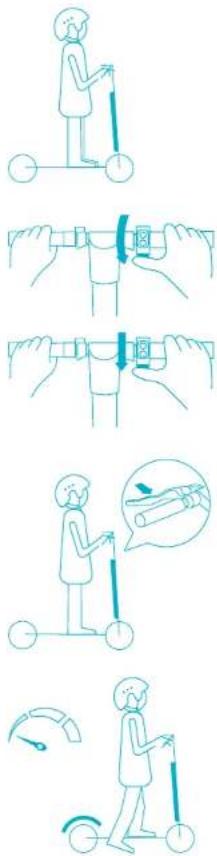
3_Place both feet on the footrest.
-
Press the throttle push button with your right hand and rotate the handle towards your body.
-
Press the throttle push button to speed up.
WARNING: Do not ride too fast.
-
Press the brake to stop or decrease speed. Press the rear fender with the foot to assist the braking process.
-
Only get off the scooter when riding at very low speed or when it is stopped.
A SERIE |
ENGLISHENGLISH
HOW TO CHARGE THE SCOOTER
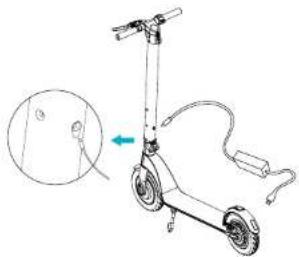
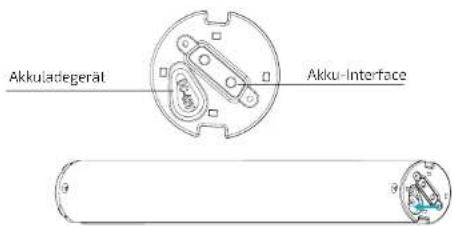
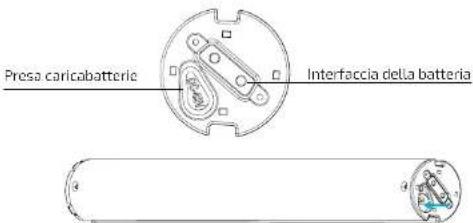
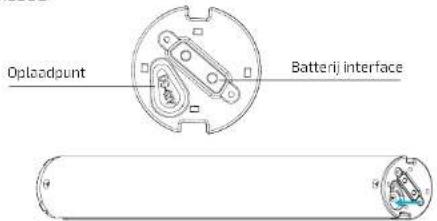
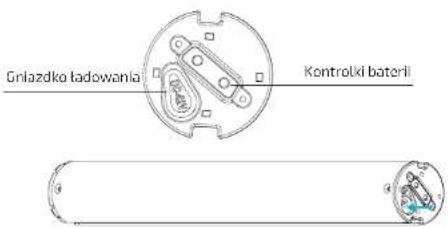
- Open the charge port cover. Make sure it is clean and dry.
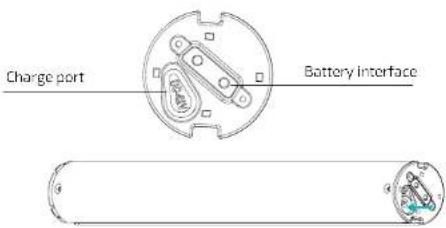
- Connect the charger with the battery and the other end to the power supply. Check the battery indicator is on.
- The light indicator on the charger will change when it reaches 99% charge.
natural_image
Technical line drawings of mechanical components with no visible text or symbolsNOTE: Once the colour has changed, stop charging it. If the battery is left to overcharge for long time the battery service life can be affected.
WARNING: Cover the charge port with the anti-dust cap to avoid any metallic element from touching it to prevent short circuits.
4849
bongo
CHARGING METHOD 1
natural_image
Line drawing of a scooter with a close-up inset showing the front wheel and seat (no text or symbols)CHARGING METHOD 2
On-board computer operating
The on-board computer offers the following functions.
P1: Selecting km/h or mph.
P2: Activating and deactivating cruise speed.
P3: Activating and deactivating start up with kick off (foot).
A. Riding modes:
To select Eco mode, turn on the display and press the menu button until the white D and red D symbols disappear from the right side of the display.
To select Comfort mode, turn on the display ⏻ and press the menu button ≡ until the white D symbol appears in the right side of the display.
A SERIE |
ENGLISHENGLISH
To select Sport mode, turn on the display (and press the menu button) until the red D symbol appears in the right side of the display.
B.- Cruise speed
This mode can be activated or deactivated. To do so, hold down both buttons ⏻ until P0 is displayed. Then, press the menu button (ICONO) until you select P1. Once you have selected P1, enter to the function (cruise speed) and select 1 (deactivated) or 0 (activated). To confirm, press both buttons ⏻ and return to the home display.
C.-Automatic start
Automatic start can be activated or deactivated. To do so, hold down both buttons ∪ until P0 is displayed. Then, press the menu button ∪ until you select P2. Once in P2, access to the function (automatic start) and choose 1 (activated) or 0 (deactivated). To confirm, press both buttons ∪ and return to the home display.
D. Speed measuring unit
Speed can be measured in km/h (0) or in miles/hour (1). To change it, go to menu P0 of the on-board computer.
NOTE: Bango A Connected Series features Smartphone App. Thanks to Bluetooth connectivity, the electric scooter can be linked to your Smartphone and you can check information and settings (SEE APP MANUAL).
6. CLEANING AND MAINTENANCE
- Make sure the product is disconnected from the power supply and turned off before cleaning it or carrying out maintenance tasks.
- Use a soft cloth to clean the outside part of the scooter.
- Do not immerse the scooter in water or other liquids to clean it. This could cause permanent damage to its electronic parts.
- Do not try to repair the scooter by yourself. If it presents any damage or fault, contact the Technical Support Service of Cocotec.
STORAGE
- Make sure the scooter is charged before being stored for long periods of time. Charge it at least once a month.
- Only charge it at a room temperature between 0 °C and 35 °C and store it between - 10 °C
and 35 °C.
- Store the scooter indoors, in a dry and safe place. Cover it or wrap it to protect it from dust if necessary.
7. TROUBLESHOOTING

Stop the product and wait until the engine cools down.

Defective engine: C Defective accelerator: B Defective brake: A
WARNING: These parts must be repair if any of the signs show in the screen. Please contact with our Technical Support Service.
8. TECHNICAL SPECIFICATIONS
Bongo Serie A Connected
Model No.: 07026
220-240V\~50/60Hz
Battery: 36 V, 6400 mAh (PANASONIC)
Rated power: 350 W
Maximum power: 700 W
IP 54
Made in China | Designed in Spain
Frequency Bands: 2.4 - 2.48 GHz
Maximum Transmission Power: 20 dBm
9. DISPOSAL OF OLD ELECTRICAL APPLIANCES

The European directive 2012/19/EU on Waste Electrical and Electronic Equipment (WEEE), specifies that old household electrical appliances must not be disposed of
with the normal unsorted municipal waste. Old appliances must be collected separately, in order to optimize the recovery and recycling of the materials they contain, and reduce the impact on human health and the environment.
The crossed out "wheeled bin" symbol on the product reminds you of your obligation to dispose of the appliance correctly. If the product has a built-in battery or uses batteries, they should be removed from the appliance and disposed of appropriately.
Consumers must contact their local authorities or retailer for information concerning the correct disposal of old appliances and/or their batteries.
ENGLISH
FRANÇAIS
10. TECHNICAL SUPPORT SERVICE AND WARRANTY
This product is under warranty for 2 years from the date of purchase, as long as the proof of purchase is submitted. The product is in perfect physical condition, and it has been given proper use, as explained in this instruction manual.
The warranty will not cover the following situations:
- The product has been used for purposes other than those intended for it, misused, beaten, exposed to moisture, immersed in liquid or corrosive substances, as well as any other fault attributable to the customer.
- The product has been disassembled, modified, or repaired by persons, not authorised by the official Technical Support Service of Cecotec.
- Faults deriving from the normal wear and tear of its parts, due to use.
The warranty service covers every manufacturing defects of your appliance for 2 years, based on current legislation, except consumable parts. In the event of misuse, the warranty will not apply.
If at any moment you detect any problem with your product or have any doubt, do not hesitate to contact Cecolec Technical Support Service at +34 963 210 728.
4. MONTAGE
Déplier
natural_image
Mechanical assembly diagram showing a lever and wheel with directional arrows (no text or labels)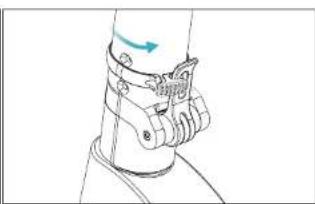
natural_image
Line drawing of a human leg with a medical device attached, showing no text or symbolsnatural_image
Technical line drawing of a mechanical assembly with no visible text or symbols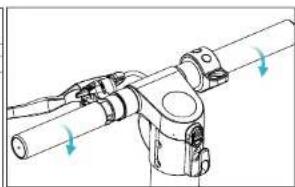
natural_image
Technical line drawing of a mechanical assembly with directional arrows indicating motion (no text or symbols)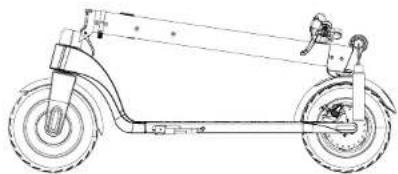
natural_image
Line drawing of a scooter with wheels and suspension components (no text or symbols)FRANÇAISFRANÇAIS
Plier
natural_image
Line drawing of a person's torso wearing a medical or surgical cap (no text or symbols)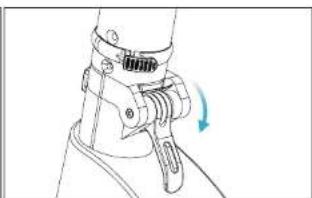
natural_image
Line drawing of a mechanical clamp or bracket with a blue arrow indicating rotation (no text or symbols)natural_image
Mechanical assembly diagram showing a lever mechanism with a blue arrow indicating motion (no text or symbols present)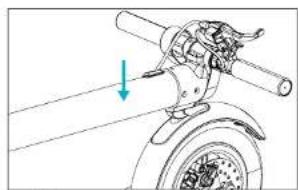
natural_image
Mechanical assembly diagram showing a rotating wheel with a shaft and mounting bracket, no text or symbols present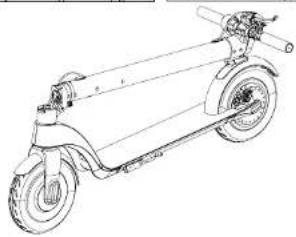
natural_image
Line drawing of a scooter with extended wheels and a handle (no text or symbols)545
bongo
5. FONCTIONNEMENT
BOUTONS
natural_image
Illustration of a person using a scooter with a downward arrow above, no text or symbols presentnatural_image
Technical line drawings of mechanical components with no visible text or symbolsnatural_image
Line drawing of a scooter with a hand pointing to the side of the seat (no text or symbols)MÉTHODE DE CHARGE 2
Bongo Serie A Connected
Modèle No.: 07026
220-240V\~50/60Hz
natural_image
Technical line drawing showing mechanical assembly with arrows indicating motion (no text or symbols)natural_image
Technical line drawing of mechanical components with directional arrows indicating motion (no text or symbols)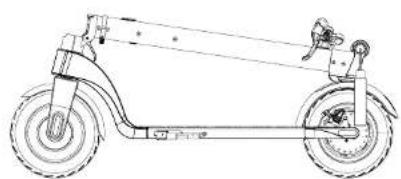
natural_image
Line drawing of a scooter with wheels and suspension components (no text or symbols)6263
bongo
Abklappen
natural_image
Technical line drawing showing two views of a mechanical clamp or bracket assembly with rotation arrows (no text or symbols)natural_image
Technical line drawing showing mechanical assembly with arrows indicating motion (no text or symbols)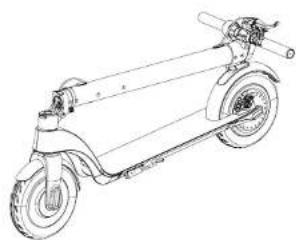
natural_image
Line drawing of a scooter with extended wheels and suspension rod (no text or symbols)A SERIE |
DEUTSCHDEUTSCH
5. BEDIENUNG
TASTEN
natural_image
Technical line drawing showing mechanical assembly steps (no text or symbols)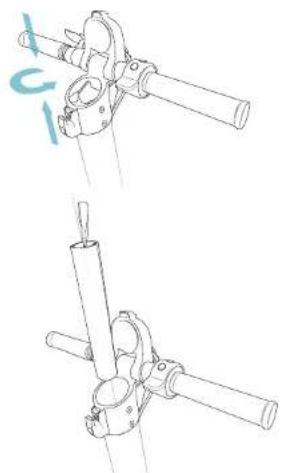
natural_image
Technical line drawing of two mechanical clamping or mounting assembly steps (no text or symbols)6667
bongo
natural_image
Pure technical line drawing of a mechanical component with no text or symbolsnatural_image
Line drawing of a scooter with a hand pointing to the side of the seat (no text or symbols)LADEN METHODE 2
Bongo Serie A Connected
Modell No.: 07026
220-240 V - 50/60 Hz
natural_image
Diagram of a mechanical device with directional arrows indicating motion or force (no text or symbols)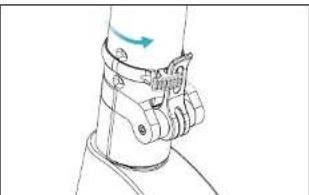
natural_image
Line drawing of a mechanical clamp or bracket with a blue arrow indicating direction (no text or symbols)natural_image
Mechanical assembly diagram showing pipe connections and a blue arrow indicating a specific component (no text or labels present)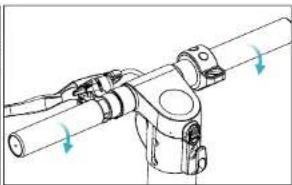
natural_image
Technical line drawing of a mechanical assembly with directional arrows indicating motion (no text or symbols)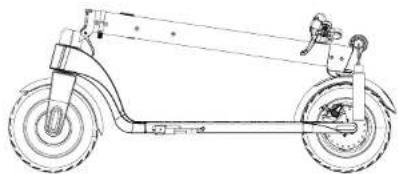
natural_image
Line drawing of a scooter with wheels and suspension components (no text or symbols)ITALIANOITALIANO
Piegare
natural_image
Line drawing of a human leg with a medical device attached (no text or symbols)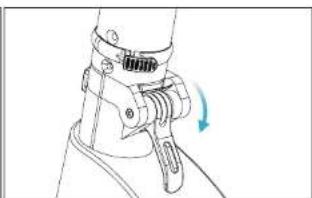
natural_image
Technical line drawing of a mechanical clamp or bracket assembly (no text or symbols)natural_image
Mechanical assembly diagram showing a rotating arm joint with a blue arrow indicating motion (no text or symbols)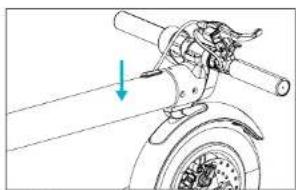
natural_image
Mechanical assembly diagram showing a rotating wheel with a shaft and mounting bracket (no text or symbols)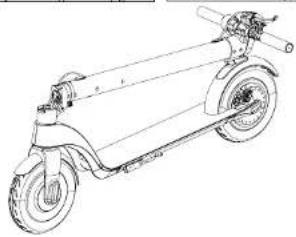
natural_image
Line drawing of a scooter with wheels and suspension components (no text or symbols)727
bongo
5. FUNZIONAMENTO
PULSANTI
natural_image
Technical line drawings of mechanical components with no visible text or symbolsnatural_image
Line drawing of a scooter with a hand pointing to the seat area, showing body positioning and cable attachment (no text or symbols)METODO DI RICARICA 2
Bongo Serie A Connected
Modello No.: 07026
220-240 V \~ 50/60 Hz
natural_image
Mechanical diagram showing a lever mechanism with arrows indicating motion direction (no text or symbols)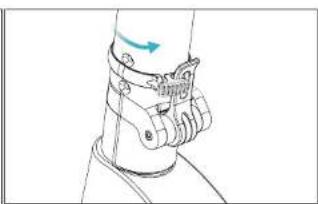
natural_image
Line drawing of a human leg with a mechanical clamp and motion arrow (no text or symbols)natural_image
Mechanical assembly diagram showing a motor and gear assembly with no visible text or symbols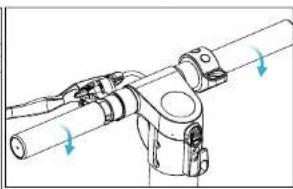
natural_image
Technical line drawing of a mechanical assembly with directional arrows indicating motion (no text or symbols)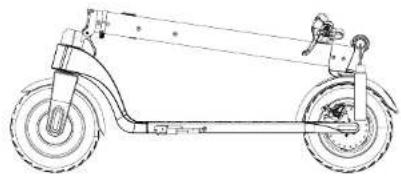
natural_image
Line drawing of a scooter with wheels and suspension components (no text or symbols)Dobrar
806
bongo
natural_image
Line drawing of a mechanical clamp or bracket assembly (no text or symbols)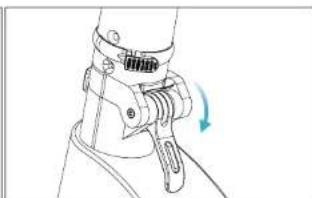
natural_image
Technical line drawing of a mechanical clamp or bracket assembly with a blue arrow indicating rotation (no text or symbols present)natural_image
Technical line drawing of a mechanical assembly with a blue arrow indicating rotation (no text or symbols)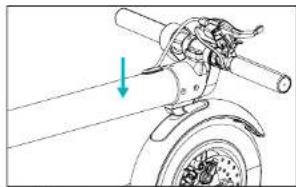
natural_image
Mechanical assembly diagram showing a lever mechanism with a blue arrow indicating direction (no text or symbols present)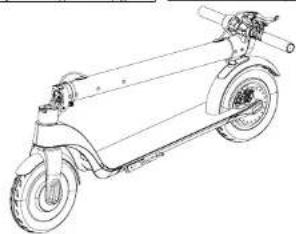
natural_image
Line drawing of a scooter with extended wheels and suspension components (no text or symbols)A SERIE
PORTUGUÊSPORTUGUÊS
5. FUNCIONAMENTO
BOTÕES
natural_image
Illustration of a person using a scooter with a downward arrow above, no text or symbols presentnatural_image
Technical line drawings of mechanical components with no visible text or symbolsnatural_image
Line drawing of a scooter with a hand pointing to the side of the seat (no text or symbols)MÉTODO DE CARGA 2
Bongo Serie A Connected
Modelo No.: 07026
220-240 V - 50/60 Hz
Bateria: 36 V, 6400 mAh (PANASONIC)
natural_image
Diagram of a mechanical device with directional arrows indicating motion or force (no text or symbols)natural_image
Technical line drawing of a mechanical assembly with no visible text or symbols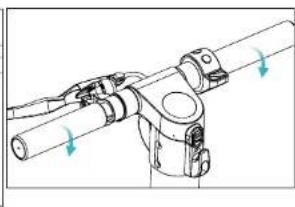
natural_image
Technical line drawing of a mechanical assembly with directional arrows indicating motion (no text or symbols)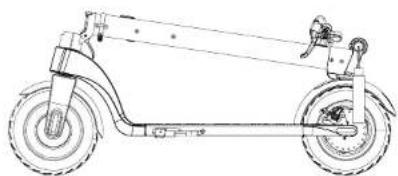
natural_image
Line drawing of a scooter with wheels and suspension components (no text or symbols)NEDERLANDSNEDERLANDS
Opvauwen
natural_image
Line drawing of a person's lower body wearing a medical device (no text or symbols)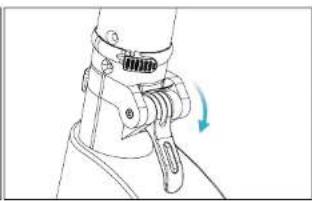
natural_image
Line drawing of a mechanical clamp or grip mechanism with a blue arrow indicating rotation (no text or symbols)natural_image
Mechanical assembly diagram showing a lever mechanism with motion arrow (no text or symbols)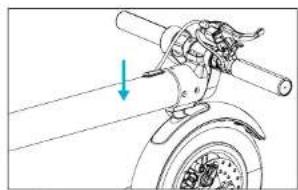
natural_image
Mechanical assembly diagram showing a motor with rotating shaft and mounting bracket (no text or symbols)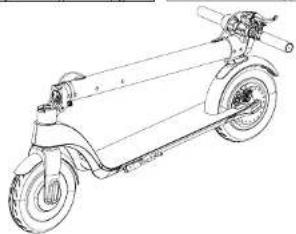
natural_image
Line drawing of a scooter with extended wheels and suspension rod (no text or symbols)9091
bongo
5. WERKING
KNOPPEN
De step opladen
natural_image
Technical line drawings of mechanical components with no visible text or symbolsnatural_image
Line drawing of a scooter with a hand pointing to the seat area, showing body positioning and usage (no text or symbols)OPLAADMETHODE 2
7. PROBLEEMOPLOSSING

Bongo Serie A Connected
Model No.: 07026
220-240 V - 50/60 Hz
Frequentieband: 2.4 - 2.48 GHz
Batterij: 36 V, 6400 mAh (PANASONIC)
Maximale Zendvermogen: 20 dBm
Nominaal vermogen: 350 W
Maximumvermogen: 700 W
IP 54
natural_image
Mechanical diagram showing a lever mechanism with arrows indicating motion direction (no text or symbols)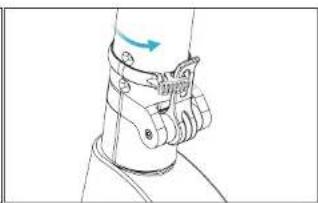
natural_image
Line drawing of a human leg with attached medical device (no text or symbols)natural_image
Technical line drawing of a mechanical assembly with no visible text or symbols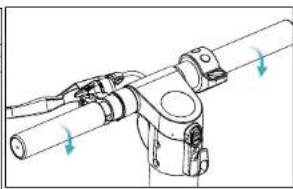
natural_image
Technical line drawing of a mechanical assembly with directional arrows indicating motion (no text or symbols)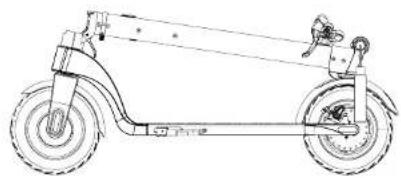
natural_image
Line drawing of a scooter with wheels and suspension components (no text or symbols)Składanie
natural_image
Line drawing of a human leg with attached medical or robotic device (no text or symbols)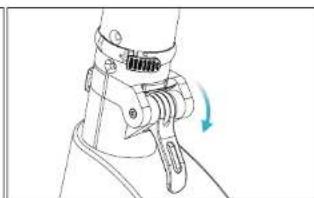
natural_image
Line drawing of a mechanical device with a blue arrow indicating rotation (no text or symbols)natural_image
Mechanical assembly diagram showing a lever mechanism with a blue arrow indicating motion direction (no text or symbols)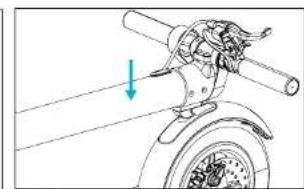
natural_image
Mechanical assembly diagram showing a lever mechanism with a blue arrow indicating direction (no text or symbols present)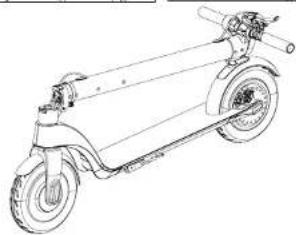
natural_image
Line drawing of a scooter with extended wheels and suspension components (no text or symbols)9899
bongo
A SERIE
|
POLSKIPOLSKI
5. OBSŁUGA URZĄDZENIA
PRZYCISKI
natural_image
Technical line drawings of mechanical components with no visible text or symbolsnatural_image
Line drawing of a scooter with a close-up inset showing the front wheel and seat (no text or symbols)METODA LADOWANIA 2
Bongo. Serie A Connected Connected
Model Ref.: 07026
220-240 V \~ 50/60 Hz
9. DISPOSAL OF OLD ELECTRICAL APPLIANCES

If at any moment you detect any problem with your product or have any doubt, do not hesitate to contact Cecotec Technical Support Service at +34 963 210 728.
ČEŠTINA
4. MONTÁŽ PRODUKTU
Rozložení
natural_image
Technical line drawing showing mechanical assembly with arrows indicating motion (no text or symbols)natural_image
Technical line drawing of mechanical components with directional arrows indicating motion (no text or symbols)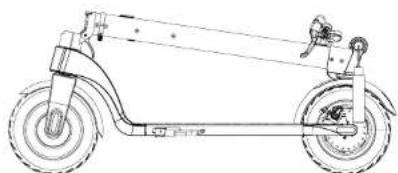
natural_image
Line drawing of a scooter with wheels and suspension components (no text or symbols)Složení
ČEŠTINA
natural_image
Line drawing of a human leg wearing a medical or surgical device (no text or symbols visible)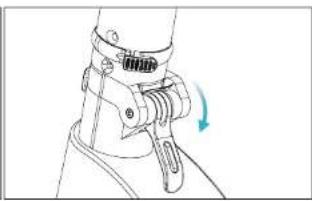
natural_image
Technical line drawing of a mechanical clamp or bracket assembly with a blue arrow indicating rotation (no text or symbols present)natural_image
Technical line drawing of a mechanical assembly with a blue arrow indicating motion (no text or symbols)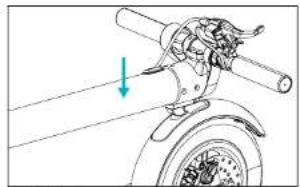
natural_image
Mechanical assembly diagram showing a rotating wheel with a shaft and gear mechanism (no text or labels)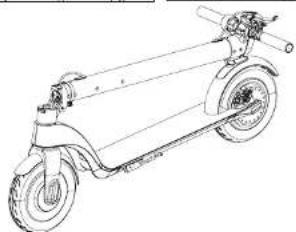
natural_image
Line drawing of a scooter with extended wheels and suspension components (no text or symbols)5. FUNGOVÁNÍ
108109
bongo
ČEŠTINA
TLAČÍTKA
natural_image
Technical line drawing of a mechanical assembly with no visible text or symbols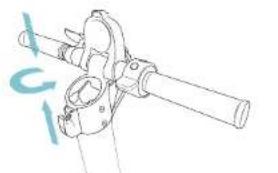
natural_image
Technical line drawing of a mechanical clamp or bracket assembly (no text or symbols)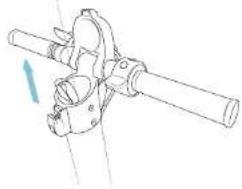
natural_image
Technical line drawing of a mechanical clamp or bracket assembly (no text or symbols)
natural_image
Technical line drawing of a mechanical clamp or bracket assembly (no text or symbols)natural_image
Line drawing of a scooter with a hand pointing to the side panel (no text or symbols)ČEŠTINA
ZPŮSOB NABITÍ 2
Načitání portu
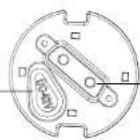
Rozhrani baterie

6. ČIŠTĚNÍ A ÚDRŽBA
Bongo Serie A Connected
Model číslo:07026
220-240V\~50/60Hz
Baterle: 36 V, 6400 mAh (PANASONIC)
Quart de Poblet, Valencia (Spain)
IC02191014


- SOMMAIRE
- FR
- BATTERY SAFETY INSTRUCTIONS
- INSTRUCTIONS DE SÉCURITÉ
- ESPAÑOLESPAÑOL
- FUNCIONAMIENTO
- BOTONES
- CÓMO CARGAR EL PATINETE
- ENGLISHENGLISH
- OPERATION
- PUSH BUTTONS
- HOW TO CHARGE THE SCOOTER
- B.- Cruise speed
- C.-Automatic start
- Speed measuring unit
- CLEANING AND MAINTENANCE
- STORAGE
- TROUBLESHOOTING
- TECHNICAL SPECIFICATIONS
- Bongo Serie A Connected
- DISPOSAL OF OLD ELECTRICAL APPLIANCES
- ENGLISH
- FRANÇAIS
- TECHNICAL SUPPORT SERVICE AND WARRANTY
- MONTAGE
- FRANÇAISFRANÇAIS
- FONCTIONNEMENT
- BOUTONS
- DEUTSCHDEUTSCH
- BEDIENUNG
- TASTEN
- LADEN METHODE 2
- ITALIANOITALIANO
- FUNZIONAMENTO
- PULSANTI
- PORTUGUÊSPORTUGUÊS
- FUNCIONAMENTO
- BOTÕES
- NEDERLANDSNEDERLANDS
- WERKING
- KNOPPEN
- PROBLEEMOPLOSSING
- POLSKIPOLSKI
- OBSŁUGA URZĄDZENIA
- PRZYCISKI
- Bongo. Serie A Connected Connected
- ČEŠTINA
- MONTÁŽ PRODUKTU
- FUNGOVÁNÍ
- TLAČÍTKA
- ČIŠTĚNÍ A ÚDRŽBA
Brand : CECOTEC
Model : Bongo Serie A Connected
Category : Scooter